https://github.com/davidmchan/caption-by-committee
Using LLMs and pre-trained caption models for super-human performance on image captioning.
https://github.com/davidmchan/caption-by-committee
ai captioning chatgpt deep-learning image machine-learning python
Last synced: over 1 year ago
JSON representation
Using LLMs and pre-trained caption models for super-human performance on image captioning.
- Host: GitHub
- URL: https://github.com/davidmchan/caption-by-committee
- Owner: DavidMChan
- License: other
- Created: 2022-12-14T01:59:10.000Z (over 3 years ago)
- Default Branch: main
- Last Pushed: 2023-10-13T21:43:38.000Z (almost 3 years ago)
- Last Synced: 2025-03-27T09:46:10.945Z (over 1 year ago)
- Topics: ai, captioning, chatgpt, deep-learning, image, machine-learning, python
- Language: Python
- Homepage:
- Size: 7.43 MB
- Stars: 40
- Watchers: 2
- Forks: 4
- Open Issues: 0
-
Metadata Files:
- Readme: README.md
- License: LICENSE
Awesome Lists containing this project
README
# IC3: Image Captioning by Committee Consensus
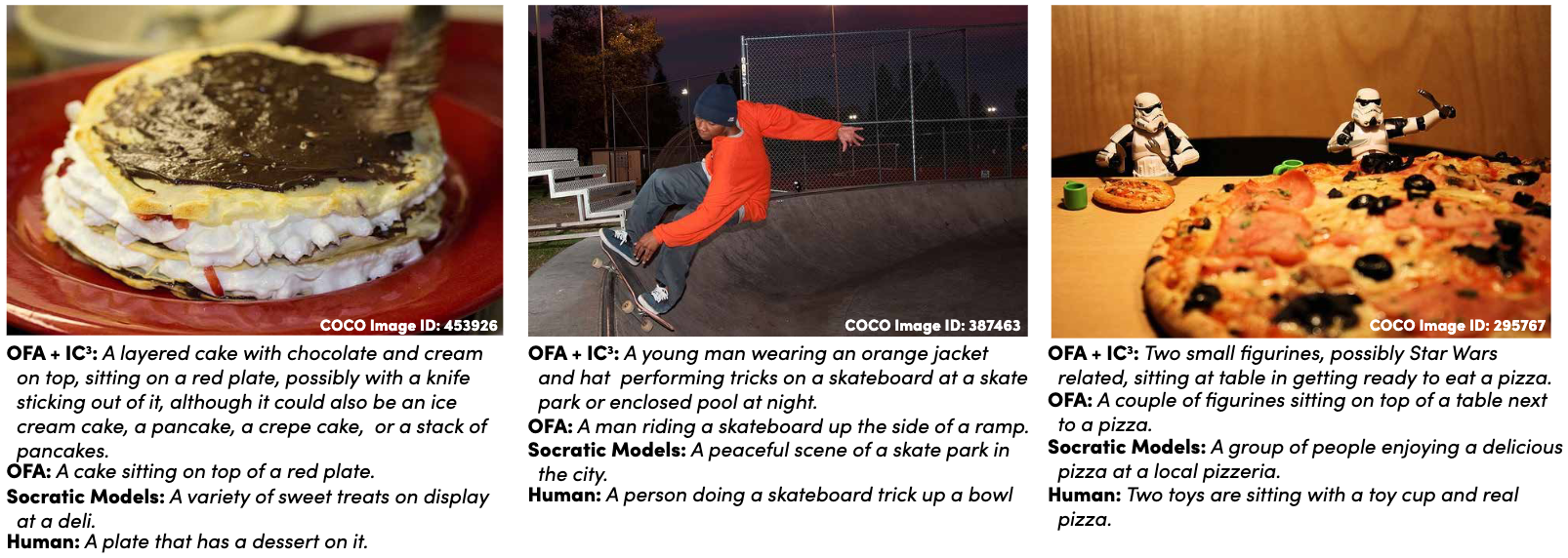
This is the implementation of the paper [IC3: Image Captioning by Committee Consensus](https://arxiv.org/abs/2302.01328).
## Installation
The library can be installed with:
```bash
# Install LAVIS for BLIP/BLIP2 support
$ pip install salesforce-lavis
# Install the local directory with setuptools
$ pip install .
# For the metrics, we need to download and install a spacy model
$ python -m spacy download en_core_web_lg
```
Next, we need to set up environment variables with API keys, if you want to use those API keys
```bash
# For OpenAI-based models, specify the following keys:
export OPENAI_API_KEY=
export OPENAI_API_ORG=
# For Huggingface Inference engine models, specify the following keys:
export HUGGINGFACE_API_KEY=
```
The repository can be tested by running `cbc caption test/test_image.jpg`, which should produce a sample caption using
the OFA and GPT-2 models.
## Running the model using the CLI
To run the model using the CLI, you can use:
```bash
$ cbc caption
```
If you have a full dataset of examples, you can use:
```bash
$ cbc evaluate-dataset
```
Where the JSON format (minimally) looks like:
```json
[
{
"references": ["List", "of", "references"],
"image_path": "Relative path to image"
},
...
]
```
For more details on these commands, see `cbc caption --help` and `cbc evalaute-dataset --help`.
## Using the python API
To use the python API, see the following minimal example using GPT3 and OFA:
```python
from cbc.caption import OFACaptionEngine
from cbc.caption_by_committee import caption_by_committee
from cbc.lm import GPT3Davinci3
def run_caption() -> None:
# Load the image
image = Image.open("coco_test_images/COCO_val2014_000000165547.jpg").convert("RGB")
# Construct a captioning engine (see: cbc/caption/__init__.py for available engines)
caption_engine = OFACaptionEngine(device="cuda:1")
# Construct a language model engine (see cbc/lm/__init__.py for available engines)
lm_engine = GPT3Davinci3()
# Generate the caption
caption = caption_by_committee(
image,
caption_engine=caption_engine,
lm_engine=lm_engine,
caption_engine_temperature=1.0,
n_captions=15,
)
print(caption)
```
## Available Captioning/LM Engines
The following captioning and language models are available for use with this library:
### Captioning
BLIP: Bootstrapping Language-Image Pre-training for Unified Vision-Language Understanding and Generation
- "blip"
- "blip-base"
BLIP-2: Bootstrapping Language-Image Pre-training with Frozen Image Encoders and Large Language Models
- "blip2"
- "blip2-base"
- "blip2-t5"
- "blip2-t5-xl"
OFA: Unifying Architectures, Tasks, and Modalities Through a Simple Sequence-to-Sequence Learning Framework
- "ofa"
Socratic Models: Composing Zero-Shot Multimodal Reasoning with Language
- "socratic-models"
ChatCaptioner: ChatGPT Asks, BLIP-2 Answers: Automatic Questioning Towards Enriched Visual Descriptions ([url](https://github.com/Vision-CAIR/ChatCaptioner/tree/main/ChatCaptioner))
- "chatcaptioner"
### Language Modeling
OpenAI (Requires setting the `OPENAI_API_KEY` and `OPENAI_API_ORG` environment variables):
- "gpt4" (GPT-4 Chat model)
- "gpt432k" (GPT-4 32k Context Chat model)
- "chatgpt" (GPT-3.5-Turbo Chat model)
- "gpt3_davinci3" (GPT-3 Davinci v3 Completion model)
- "gpt3_davinci2" (GPT-3 Davinci v2 Completion model)
- "gpt3_curie" (GPT-3 Curie Completion model)
- "gpt3_babbage" (GPT-3 Babbage Completion model)
- "gpt3_ada" (GPT-3 Ada Completion model)
Huggingface (Requires setting the `HUGGINGFACE_API_KEY` environment variable):
- "bloom" (Bloom 175B model)
- "opt" (OPT 66B model)
Huggingface (No API key required):
- "gpt2" (GPT-2 model)
- "gpt2_med" (GPT-2 Medium model)
- "gpt2_lg" (GPT-2 Large model)
- "gpt2_xl" (GPT-2 XL model)
- "distilgpt2" (DistilGPT-2 model)
- "gpt_neo_125m" (GPT-Neo 125M model)
- "gpt_neo_1b" (GPT-Neo 1.3B model)
- "gpt_neo_2b" (GPT-Neo 2.7B model)
- "gpt_j_6b" (GPT-J 6B model)
Summary Models:
- "t5_small" (T5 Small model)
- "pegasus" (Pegasus model)
LLaMA: Open and Efficient Foundation Language Models (Requires setting the `HUGGINGFACE_LLAMA_WEIGHTS_ROOT` environment variable and preprocessing the weights according to [this url](https://huggingface.co/docs/transformers/main/model_doc/llama).):
- "llama_7B" (LLaMA 7B model)
- "llama_13B" (LLaMA 13B model)
- "llama_30B" (LLaMA 30B model)
- "llama_65B" (LLaMA 65B model)
Alpaca: A Strong, Replicable Instruction-Following Model (Requires setting the `HUGGINGFACE_ALPACA_WEIGHTS_ROOT` environment variable and preprocessing the weights according to [this url](https://github.com/tatsu-lab/stanford_alpaca#recovering-alpaca-weights).):
- "alpaca_7B" (Alpaca 7B)
Koala: A Dialogue Model for Academic Research (Requires setting the `HUGGINGFACE_KOALA_WEIGHTS_ROOT` environment variable and preprocessing the weights according to [this url](https://github.com/young-geng/EasyLM/blob/main/docs/koala.md).):
- "koala_7B" (Koala 7B)
- "koala_13B_v1" (Koala 13B V1)
- "koala_13B_v2" (Koala 13B V2)
Vicuna: An Open Chatbot Impressing GPT-4 (Requires setting the `HUGGINGFACE_VICUNA_WEIGHTS_ROOT` environment variable and preprocessing the weights according to [this url](https://github.com/lm-sys/FastChat#vicuna-weights).):
- "vicuna_7B" (Vicuna 7B)
- "vicuna_13B" (Vicuna 13B)
Alpaca: A Strong, Replicable Instruction-Following Model (Requires setting the `HUGGINGFACE_ALPACA_WEIGHTS_ROOT` environment variable and preprocessing the weights according to [this url](https://github.com/tatsu-lab/stanford_alpaca#recovering-alpaca-weights).):
- "alpaca_7B" (Alpaca 7B)
Koala: A Dialogue Model for Academic Research (Requires setting the `HUGGINGFACE_KOALA_WEIGHTS_ROOT` environment variable and preprocessing the weights according to [this url](https://github.com/young-geng/EasyLM/blob/main/docs/koala.md).):
- "koala_7B" (Koala 7B)
- "koala_13B_v1" (Koala 13B V1)
- "koala_13B_v2" (Koala 13B V2)
Vicuna: An Open Chatbot Impressing GPT-4 (Requires setting the `HUGGINGFACE_VICUNA_WEIGHTS_ROOT` environment variable and preprocessing the weights according to [this url](https://github.com/lm-sys/FastChat#vicuna-weights).):
- "vicuna_7B" (Vicuna 7B)
- "vicuna_13B" (Vicuna 13B)
StableLM: Stability AI Language Models
- "stable_lm_3B" (StableLM Chat Tuned 3B model)
- "stable_lm_7B" (StableLM Chat Tuned 7B model)
- "stable_lm_base_3B" (StableLM Completion 3B model)
- "stable_lm_base_7B" (StableLM Completion 7B model)
Bard (Requires setting the `GOOGLE_BARD_SESSION_ID` environment variable. Get the value of this variable by first going to [https://bard.google.com/](https://bard.google.com/), then log in, press F12 for console, and go to the "Application" tab, then "Cookies", then copy the value of the "\_\_Secure-1PSID" cookie.):
- "bard" (Bard model)
PaLM (Requires the vertex AI client libraries from Google: https://cloud.google.com/vertex-ai/docs/start/client-libraries), and a GCP project set up with the Vertex AI API enabled.):
- "palm" (PaLM model)
Claude (Requires setting the `ANTHROPIC_API_KEY` environment variable)
- "claude" (claude-1 model)
- "claude_100k" (claude-100k-1 model)
- "calude_instant" (claude-instant-1 model)
- "claude_instant_100k" (claude-100k-instant-1 model)
## Running the demos
To load the demos, install the library, and then use streamlit to run the demo:
_Single Image End-to-End Demo:_ `streamlit run demos/single_image.py`
## References
If you found this work useful, cite us:
```
@misc{
https://doi.org/10.48550/arxiv.2302.01328,
doi = {10.48550/ARXIV.2302.01328},
url = {https://arxiv.org/abs/2302.01328},
author = {Chan, David M. and Myers, Austin and Vijayanarasimhan, Sudheendra and Ross, David A. and Canny, John},
keywords = {Computer Vision and Pattern Recognition (cs.CV), Artificial Intelligence (cs.AI), Computation and Language (cs.CL), Machine Learning (cs.LG), FOS: Computer and information sciences, FOS: Computer and information sciences},
title = {IC3: Image Captioning by Committee Consensus},
publisher = {arXiv},
year = {2023},
copyright = {arXiv.org perpetual, non-exclusive license}
}
```