https://github.com/davidvkimball/astro-modular
A flexible Astro blog theme designed for Obsidian users.
https://github.com/davidvkimball/astro-modular
astro astro-template astro-theme astrojs obsidian obsidian-md obsidian-vault
Last synced: 5 months ago
JSON representation
A flexible Astro blog theme designed for Obsidian users.
- Host: GitHub
- URL: https://github.com/davidvkimball/astro-modular
- Owner: davidvkimball
- License: mit
- Created: 2025-08-28T05:29:37.000Z (10 months ago)
- Default Branch: master
- Last Pushed: 2026-01-10T00:15:17.000Z (5 months ago)
- Last Synced: 2026-01-10T21:29:31.335Z (5 months ago)
- Topics: astro, astro-template, astro-theme, astrojs, obsidian, obsidian-md, obsidian-vault
- Language: Astro
- Homepage: https://astro-modular.netlify.app
- Size: 25.1 MB
- Stars: 126
- Watchers: 3
- Forks: 29
- Open Issues: 0
-
Metadata Files:
- Readme: README.md
- Funding: .github/FUNDING.yml
- License: LICENSE
- Agents: AGENTS.md
Awesome Lists containing this project
README
# Astro Modular
A flexible [Astro](https://astro.build) blog theme designed for [Obsidian](https://obsidian.md) users.
[](https://astro.build/themes/details/astro-modular/)
## Made with Vault CMS
Use Obsidian as a CMS with [Vault CMS](https://github.com/davidvkimball/vault-cms).

## Stats
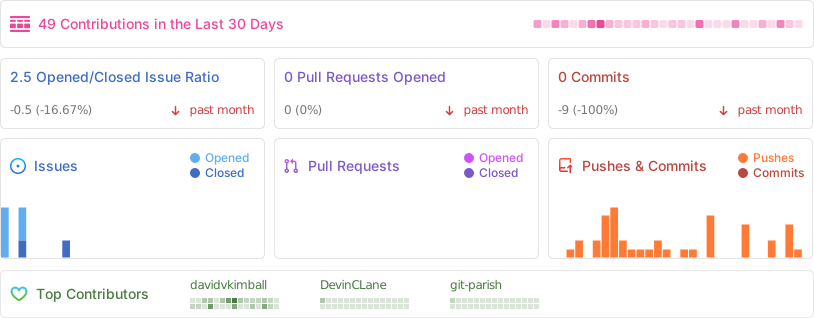

### Status
[](https://app.netlify.com/sites/astro-modular/deploys)
[](https://github.com/davidvkimball/astro-modular)
[](https://github.com/davidvkimball/astro-modular)
### Tech Stack
[](https://astro.build/)
[](https://www.typescriptlang.org/)
[](https://tailwindcss.com/)
[](https://nodejs.org/)
[](https://pnpm.io/)
[](https://obsidian.md/)
## Why Astro Modular?
- **Obsidian As A CMS**: Works with Obsidian out of the box (built upon [Vault CMS](https://github.com/davidvkimball/vault-cms)), write and publish instantly
- **Highly Customizable**: Every feature can be enabled/disabled independently
- **Performance-Focused**: Assets are highly optimized for lightning-fast loading
- **SEO-Ready**: Automatic sitemap, RSS feed, and Open Graph image generation
## Features
- [x] **Custom Themes**
- [x] **Feature Toggle Control**
- [x] **Dark/Light Mode**
- [x] **Search & Command Palette**
- [x] **Wikilinks & Linked Mentions**
- [x] **Obsidian-Style Callouts**
- [x] **Obsidian Embeds Files**
- [x] **Folder-Based Posts**
- [x] **Multiple Content Types**
- [x] **Image Optimization**
- [x] **Automatic Feed Generation**
- [x] **Table of Contents**
- [x] **Smooth Scroll & Page Transitions**
- [x] **Image Gallery & Lightbox**
- [x] **Reading Time & Word Count**
- [x] **Tagging**
- [x] **Graph View**
- [x] **Mermaid Diagrams**
- [x] **LaTeX & Math Rendering**
- [x] **Custom Typography**
- [x] **Profile Picture**
- [x] **Comments**
## Quick Start
[](https://app.netlify.com/start/deploy?repository=https://github.com/davidvkimball/astro-modular)
[](https://vercel.com/new/clone?repository-url=https://github.com/davidvkimball/astro-modular)
[](https://deploy.workers.cloudflare.com/?url=https://github.com/davidvkimball/astro-modular)
### Get the Code
Choose one of the following methods to get started:
#### Option 1: Use GitHub Template (Recommended)
1. Click the **"Use this template"** button on the [repository page](https://github.com/davidvkimball/astro-modular)
2. Select **"Create a new repository"**
3. Choose your repository name and settings
4. Click **"Create repository from template"**
5. Clone your new repository:
```bash
git clone https://github.com/your-username/your-repo-name.git
cd your-repo-name
```
#### Option 2: Fork the Repository
1. Click the **"Fork"** button on the [repository page](https://github.com/davidvkimball/astro-modular)
2. Choose where to fork the repository (your personal account or organization)
3. Clone your forked repository:
```bash
git clone https://github.com/your-username/your-repo-name.git
cd your-repo-name
```
### Prerequisites
- Node.js 18.20.8
- pnpm 7.1.0 or npm 9.6.5
> [!NOTE]
> While this theme works great with any markdown editor, it's specifically optimized for Obsidian use. See the [Astro Suite Vault Guide](src/content/posts/obsidian-vault-guide.md) for Obsidian-specific features.
### Setup
1. **Install pnpm (if you don't have it):**
```bash
npm install -g pnpm
```
2. **Install dependencies:**
```bash
pnpm install
```
3. **Preview:**
```bash
pnpm dev
```
Your blog will be available at `http://localhost:5000`
4. **Build for production:**
```bash
pnpm build
```
### Configuration
Edit `src/config.ts` to customize your site - change the theme, enable/disable features, and configure all settings.
## Deployment
Set your deployment platform once in `src/config.ts` under `deployment.platform` ("netlify", "vercel", "github-pages", or "cloudflare-workers"). The build process automatically generates the correct configuration files for your chosen platform - no environment variables needed!
## Documentation
For detailed guides, see the included blog posts:
- **[Getting Started](src/content/posts/getting-started.md)** - complete setup and workflow guide
- **[Formatting Reference](src/content/posts/formatting-reference.md)** - comprehensive formatting reference
- **[Astro Suite Vault Guide](src/content/posts/astro-suite-vault-modular-guide.md)** - Obsidian vault walkthrough
- **[Obsidian Embeds Demo](src/content/posts/obsidian-embeds-demo.md)** - Obsidian embed examples
**For AI Agents & Developers:** See [AGENTS.md](AGENTS.md) for comprehensive technical documentation.
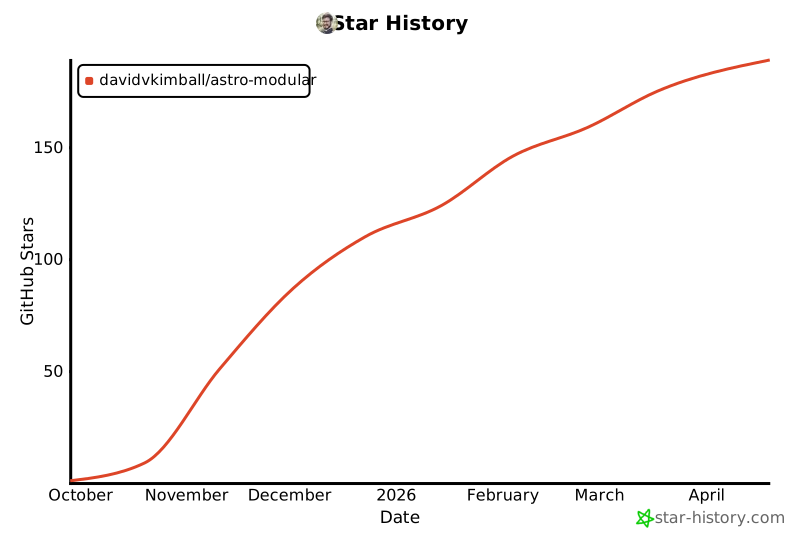
## Star History
[](https://www.star-history.com/#davidvkimball/astro-modular&type=date&legend=top-left)
## Acknowledgments
[Spaceship Astro theme](https://github.com/aitorllj93/astro-theme-spaceship) for the graph view functionality upon which this theme's is based.
[ogImage.click](https://ogimage.click/) to generate the open graph image used for this theme.
## Contributing
This is an open-source project. Feel free to submit feature requests, report bugs, or contribute improvements.
## License
[MIT License](https://github.com/davidvkimball/astro-modular?tab=MIT-1-ov-file)