https://github.com/daviehh/fanshim-cpp
C++ code for the fan shim on raspberry pi
https://github.com/daviehh/fanshim-cpp
cpp gpio libgpiod raspberry-pi
Last synced: about 1 year ago
JSON representation
C++ code for the fan shim on raspberry pi
- Host: GitHub
- URL: https://github.com/daviehh/fanshim-cpp
- Owner: daviehh
- License: mit
- Created: 2019-08-01T19:01:52.000Z (almost 7 years ago)
- Default Branch: master
- Last Pushed: 2019-11-28T01:37:10.000Z (over 6 years ago)
- Last Synced: 2025-03-26T03:51:16.115Z (over 1 year ago)
- Topics: cpp, gpio, libgpiod, raspberry-pi
- Language: C++
- Homepage:
- Size: 271 KB
- Stars: 11
- Watchers: 3
- Forks: 2
- Open Issues: 0
-
Metadata Files:
- Readme: README.md
- License: LICENSE
Awesome Lists containing this project
README
# fanshim-cpp
[](https://travis-ci.com/daviehh/fanshim-cpp)
C++ driver code for the fanshim on raspberry pi using `libgpiod`
[pimoroni link](https://shop.pimoroni.com/products/fan-shim)
**Warning/disclaimer:**
**very experimental code, for testing purposes only.**
**[may not work at any time or even cause hardware damage (e.g. from causing the fan to be constantly running)].**
**Only proceed if you know what the code is doing.**
## Credits
- official fanshim controller code https://github.com/pimoroni/fanshim-python
- nlohmann/json https://github.com/nlohmann/json/
## Build
- If not installed: get the `libgpiod-dev` library
- Put the `json.hpp` file from https://github.com/nlohmann/json/releases in the same folder as the source code, tested with `3.7.0`
- Compile with `clang++ fanshim_driver.cpp -o fanshim_driver -O3 -std=c++17 -lstdc++fs -lgpiodcxx` (may also work with `g++`)
## Example systemd service file
Change `/path/to/compiled/binary` to the compiled binary path.
```
[Unit]
Description=Fanshim C++ driver
[Service]
ExecStart=/path/to/compiled/binary
Restart=always
RestartSec=5
[Install]
WantedBy=multi-user.target
```
## Configuration
The configuration file is in `/usr/local/etc/fanshim.json`, example:
```json
{
"on-threshold": 60,
"off-threshold": 50,
"delay": 10
}
```
Will use the value in the file to override the defaults, no need to specify all keys, just the ones you want to change. Keys used:
- `on-threshold`/`off-threshold`: temperature, in Celsius, the threshold for turing on (off) the fan. Default to 60 and 50 respectively.
- `delay`: in seconds, the program will wait this amount of time before checking the temperature again. Default to 10.
- `budget`: an integer n, the program will only turn on/off the fan if the temperature is consecutively above (below) the on (off) threshold for the last n temperature measurements. Defaults to 3.
- `brightness`: an integer from 0 to 31, LED brightness, 0 means no LED (default).
- `blink`: an integer in [0, 1 , 2], where
- 0: no blink (default);
- 1: the LED will blink when the fan is not spinning;
- 2: the LED will "breath" when the fan is not spinning, the max brightness in this mode is `breath_brgt` (default 10).
## Notes/todo
- No button support (I think given the small size of the button, it'll be easier to force the fan on/off through software based on e.g. whether a certain file exists. Currently, the file is hard-coded as `/usr/local/etc/.force_fanshim`: fan will be on if this file exists)
## Additional features
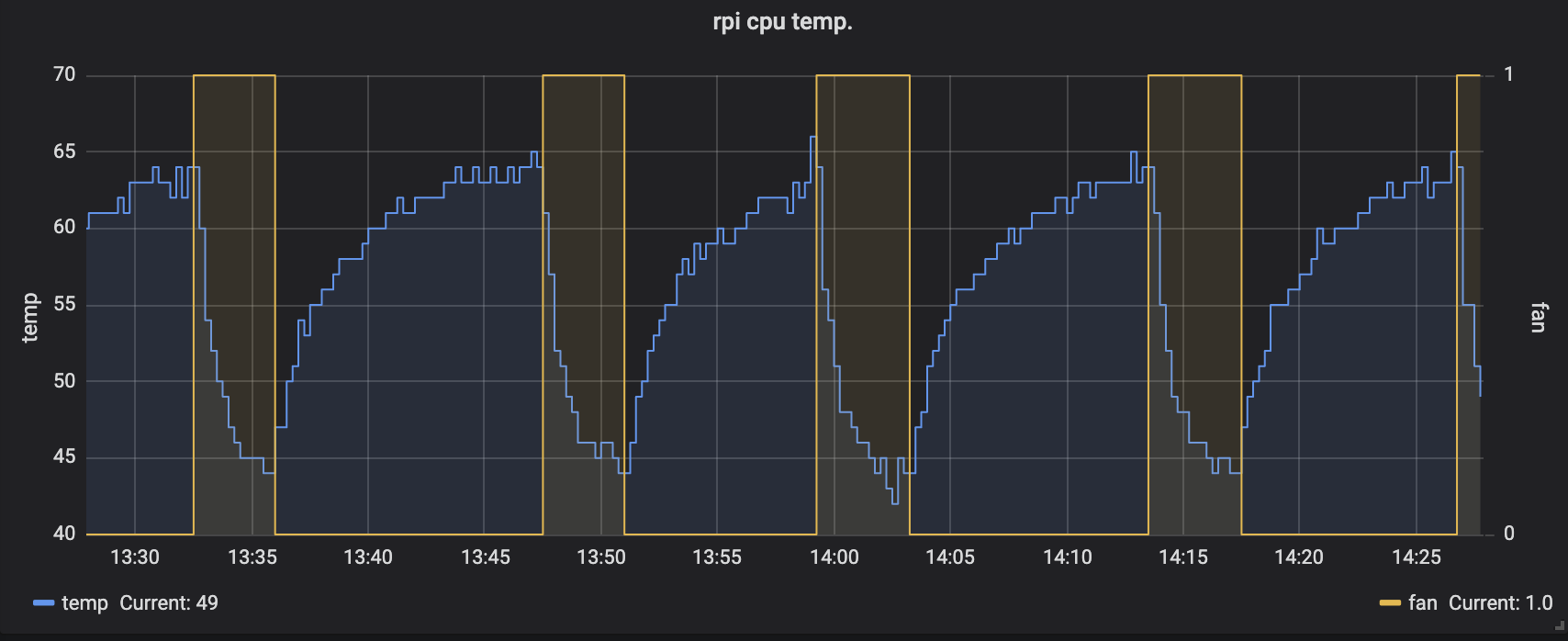
- Will output current status to the file `/usr/local/etc/node_exp_txt/cpu_fan.prom` so that it can be used with external programs to monitor, e.g. node_exporter + prometheus + grafana: