https://github.com/dayschedule/dayschedule-widget
Appointment scheduling widget to embed the booking calendar on your website for 1:1, round-robin and group bookings with Google meet, Zoom and MS Teams integrations
https://github.com/dayschedule/dayschedule-widget
appointment-api appointment-booking appointment-management-system appointment-scheduler appointment-scheduling appointments calendar calendly reservation reservation-system scheduling
Last synced: 4 months ago
JSON representation
Appointment scheduling widget to embed the booking calendar on your website for 1:1, round-robin and group bookings with Google meet, Zoom and MS Teams integrations
- Host: GitHub
- URL: https://github.com/dayschedule/dayschedule-widget
- Owner: dayschedule
- License: mit
- Created: 2022-03-12T09:12:01.000Z (over 4 years ago)
- Default Branch: main
- Last Pushed: 2025-11-25T09:35:11.000Z (7 months ago)
- Last Synced: 2025-11-28T16:09:48.232Z (7 months ago)
- Topics: appointment-api, appointment-booking, appointment-management-system, appointment-scheduler, appointment-scheduling, appointments, calendar, calendly, reservation, reservation-system, scheduling
- Language: TypeScript
- Homepage: https://dayschedule.com/widget
- Size: 6.68 MB
- Stars: 89
- Watchers: 2
- Forks: 15
- Open Issues: 5
-
Metadata Files:
- Readme: README.md
- License: LICENSE
Awesome Lists containing this project
README
# dayschedule-widget
[](https://www.npmjs.com/package/dayschedule-widget)
[](https://www.npmjs.com/package/dayschedule-widget)
[](https://www.jsdelivr.com/package/npm/dayschedule-widget)
[Appointment scheduling widget](https://dayschedule.com/widget) to embed the booking calendar on your website for 1:1, round-robin and group bookings with Google meet, Zoom and MS Teams integrations

## Installation
Install the `dayschedule-widget` [from NPM](https://www.npmjs.com/package/dayschedule-widget)
```
npm i dayschedule-widget
```
## Setup
Add the JavaScript `dayschedule-widget.js` library into your website HTML `head` section:
```
```
### CDN
Alternatively, you can install from CDN for better performance and global caching:
- [jsdelivr](https://www.jsdelivr.com/package/npm/dayschedule-widget)
- [unpkg](https://unpkg.com/browse/dayschedule-widget@latest/dist/)
For example:
```
```
## Usage
Call the `daySchedule.initPopupWidget(...)` function from any button or link from your website to open the scheduling popup:
```
Book an appointment
```
## Examples
The dayschedule widget offers easy embeddable, customizable designs, and [automatic reminders](https://dayschedule.com/docs/t/how-to-send-automatic-email-reminder-for-meetings/365) to manage online appointments. See these examples to learn how to embed the appointment scheduling widget in React, Nest.js, Wordpress, Angular, Vue, Node.js etc.

| Platform | Description |
|------------|-----------------------------------------------------------------------|
| [HTML Popup](https://stackblitz.com/edit/popup-appointment-widget-for-website) | An example of embedding a popup appointment widget using HTML5.|
| [HTML Inline](https://stackblitz.com/edit/inline-appointment-widget-for-website) | An example of embedding a inline appointment widget using HTML5.|
| [Wordpress](https://wordpress.org/plugins/dayschedule-appointment-event-and-service-booking/) | A WordPress plugin for managing appointments, events, and services.|
| [Node.js](https://stackblitz.com/edit/appointment-booking-widget-in-node-js) | Embed appointment booking widget in Node.js|
| [React](https://stackblitz.com/edit/react-appointment-booking-widget) | React.js and Tailwind CSS example to embed appointment booking widget in React |
| [Angular](https://stackblitz.com/edit/angular-appointment-booking-widget) | Angular 16 example to embed appointment booking widget in Angular|
| [Vue.js](https://stackblitz.com/edit/vue-booking-widget) | Vue.js example to embed appointment dayschedule booking widget in Vue website|
| [Next.js](https://stackblitz.com/edit/next-js-appointment-booking-widget) | Next.js example to embed dayschedule appointment booking widget in Next website|
| [Nuxt](https://stackblitz.com/edit/nuxt-appointment-booking-widget) | Nuxt example to embed dayschedule appointment booking widget|
## Widget Types
There are 2 types of embed option available on [DaySchedule](https://dayschedule.com/) for appointment bookings:
1. Popup widget
2. Inline widget
### Popup widget
To embed as a button and open the appointment scheduling popup when clicked. We **recommends** the popup widget, because it's initialized when someone click on the book now button, instead of having it initialize upon page load to improve website speed and performance by avoiding unnecessary requests.
1. Add the `dayschedule-popup.css` on website header.
```
```
2. Add a `onClick` function to open the popup when clicked on a button
```
daySchedule.initPopupWidget({
url: 'https://meet.dayschedule.com',
color: {
primary: '#0f0980',
secondary: '#afeefe'
}
});
```
- [Popup examples](https://dayschedule.github.io/dayschedule-widget/examples/popup.html)
### Inline widget
To embed the inline appointment scheduling plugin in HTML
```
```
- [Inline examples](https://dayschedule.github.io/dayschedule-widget/examples/inline.html)
## Options
Here is the list of options available to customize your appointment look and feel to match up with your website and brand :
| Name | Description |
|--|--|
|url| To set your main scheduling link or single event link|
|color| To set primary and secondary color of your appointment calendar, e.g. `{color: {primary: '#0f0980', secondary: '#afeefe', mode : 'light' }}` |
|questions| To auto fill registration form questions, e.g. `{questions: {name : 'Vikash'}}`
|hideHeader| To hide the header `{ hideHeader: true }`|
|hideEvent| To hide the event details from calendar view `{ hideEvent: true }`|
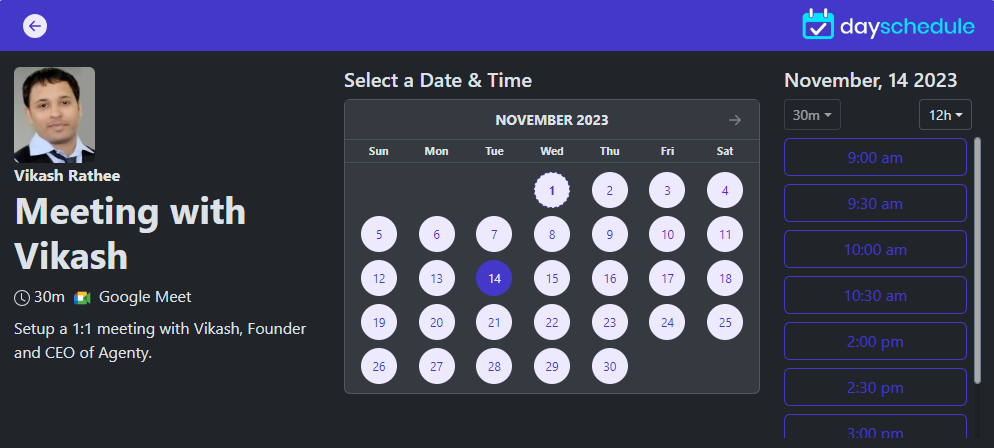
## Dark Mode
To enable the dark mode (night mode) on your appointment scheduling page. Go to [pages setting](https://dayschedule.com/docs/t/branding/285) to apply globally, or use the `color.mode` option in arugments.
```
daySchedule.initPopupWidget({
url: 'https://meet.dayschedule.com',
color: {
primary: '#0f0980',
secondary: '#afeefe',
mode: 'dark'
}
});
```
## Performance
The dayschedule appointment pages are designed for optimal performance, providing users with a smooth and responsive booking experience across desktop, tablet and mobiles.
We optimize each of the functionality to -
1. Minimize network requests
2. Image conversion to WebP (a modern image format [developed by Google](https://developers.google.com/speed/webp), to ensure high-quality images while significantly reducing file sizes)
3. Advanced gzip, br compression to minimize the size of assets such as scripts, and stylesheets
4. Low latency with CDN
Making it **faster then Calendly, Cal.com** etc.

The scheduling pages are hosted on 250+ regions on [Cloudflare](https://www.cloudflare.com/network/) and/or [AWS cloudfront](https://aws.amazon.com/cloudfront/) for high-performance and low-latency. So you will always see lightning-fast loading times and efficient caching mechanisms to ensure swift access of your available time slots and services to your customers for online appointment bookings.
### A grade on Gtmetrix, Lighthouse :white_check_mark:

## Support
Have a question? Contact us on support@dayschedule.com