https://github.com/dcts/holochain-hackathon-barcelona
repo used during holochain hackathon in barcelona (15.11.2019 - 17.11.2019)
https://github.com/dcts/holochain-hackathon-barcelona
Last synced: over 1 year ago
JSON representation
repo used during holochain hackathon in barcelona (15.11.2019 - 17.11.2019)
- Host: GitHub
- URL: https://github.com/dcts/holochain-hackathon-barcelona
- Owner: dcts
- Created: 2019-11-17T10:04:33.000Z (over 6 years ago)
- Default Branch: master
- Last Pushed: 2022-06-17T01:32:00.000Z (about 4 years ago)
- Last Synced: 2025-03-06T11:13:15.812Z (over 1 year ago)
- Language: HTML
- Size: 764 KB
- Stars: 5
- Watchers: 3
- Forks: 0
- Open Issues: 5
-
Metadata Files:
- Readme: readme.md
Awesome Lists containing this project
README
# Holochain Hackathon CodeDiary
This repo was created during the [Holochain](www.holochain.org) Hackathon in Barcelona (15.11 - 18.11.2019). The event was a lot of fun and super intense. Here's a short recap what I've learned:
- **Rust programming language** basics. Intro by [Hedayat Abedijoo](http://abedijoo.com/). Keywords: `ownership` of resources; `borrowing` of ownership (vs referencing); `cloning` as a mechanism to prevent loss of ownership.
- Holochain basic [tutorials](https://developer.holochain.org/docs/tutorials/coreconcepts/): I've managed to go through all basic tutorials covering zome-functions, testing, connecting the DHT to the frontend as well as connecting multiple agents with the `holochain` conductor.
- **Project**: On the last day I build a p2p **annonymous chat** running on holochain.
## Project Screenshot
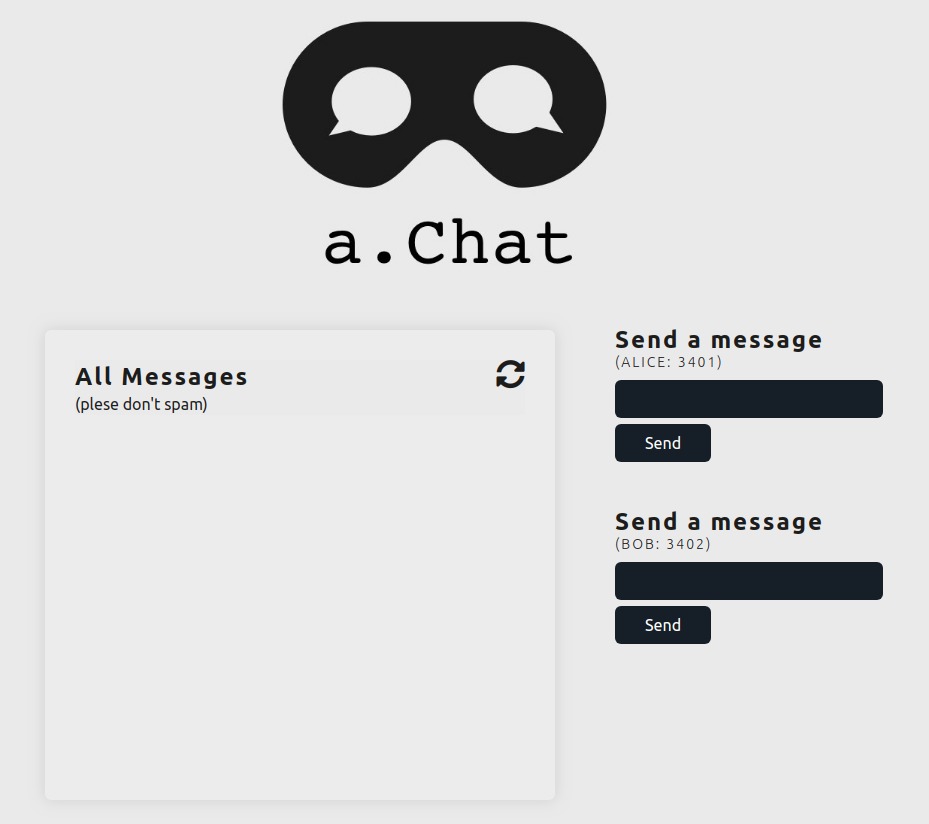
Simple p2p chat app that allows connected users to throw messages inside a pool of messages. The sender of the message is not stored, also messages with the same content are not duplicated. Since I didnt haver time to implement an anchor and links, I has to store the hashes of each message in a centralized db (I used firebase). So I kinda cheated. The content itself is stored in the DHT, the references (hashes) of the content are stored in firestore databse. Obviously this is not a working product, its just a simple implementation and tryout. Logo Design by [Allan Holmes](https://github.com/HeyHolmes).
## NOTES
### holochain command line
```bash
# compile
hc package
# run tests
hc test
# run holochain (dev) -i: mode (http or websocket), -p: specify on which port
hc run -i http -p 8888
# run holochain with conductor (to connect multiple nodes):
holochain -c
holochain -c conductor-config-alice.toml
```
### manually test
```bash
# "MANUAL" WAY OF TESTING
# run server in http mode (tests make http requests)
hc run -i http
# test using npm (navigate to test folder first!)
npm start
```
## basic tests (CURL)
```bash
# START APP
hc run -i http -p 8888
# different http requests
curl -X POST -H "Content-Type: application/json" -d '{"id": "0", "jsonrpc": "2.0", "method": "call", "params": {"instance_id": "test-instance", "zome": "hello", "function": "hello_holo", "args": {"name": "Insert Your Name"} }}' http://127.0.0.1:8888 | jq
curl -X POST -H "Content-Type: application/json" -d '{"id": "0", "jsonrpc": "2.0", "method": "call", "params": {"instance_id": "test-instance", "zome": "hello", "function": "generate_rand", "args": {} }}' http://127.0.0.1:8888 | jq
curl -X POST -H "Content-Type: application/json" -d '{"id": "0", "jsonrpc": "2.0", "method": "call", "params": {"instance_id": "test-instance", "zome": "hello", "function": "create_message", "args": {"message": { "content": "hello world!! first message"} } }}' http://127.0.0.1:8888 | jq
curl -X POST -H "Content-Type: application/json" -d '{"id": "0", "jsonrpc": "2.0", "method": "call", "params": {"instance_id": "test-instance", "zome": "hello", "function": "retrieve_message", "args": {"address": "QmZNDbibhFVMnPDFomEfbsX1PShYjR6aFRoDs4ikxThiNn" } }}' http://127.0.0.1:8888 | jq
```
### advanced tests (2 agents)
```bash
# start agent 1 (3401)
# hc run -i http -p 3401 # NOT WORKING
holochain -c conductor-config-bob.toml
# start agent 2 (3402)
# hc run -i http -p 3402 # NOT WORKING
holochain -c conductor-config-alice.toml
# TESTS-------------------------------------------------------------------------
# put message in DHT from agent 1 (3401)
curl -X POST -H "Content-Type: application/json" -d '{"id": "0", "jsonrpc": "2.0", "method": "call", "params": {"instance_id": "test-instance", "zome": "hello", "function": "create_message", "args": {"message": { "content": "hello from port 3401"} } }}' http://127.0.0.1:3401 | jq
# => Qmanzk2aQs73tsyoioidFB9Yww8PwbFYKF8bXJyrbD3x2b
# retrieve message from agent1 (3401)
curl -X POST -H "Content-Type: application/json" -d '{"id": "0", "jsonrpc": "2.0", "method": "call", "params": {"instance_id": "test-instance", "zome": "hello", "function": "retrieve_message", "args": {"address": "Qmanzk2aQs73tsyoioidFB9Yww8PwbFYKF8bXJyrbD3x2b" } }}' http://127.0.0.1:3401 | jq
# retrieve message from agent2 (3402)
curl -X POST -H "Content-Type: application/json" -d '{"id": "0", "jsonrpc": "2.0", "method": "call", "params": {"instance_id": "test-instance", "zome": "hello", "function": "retrieve_message", "args": {"address": "Qmanzk2aQs73tsyoioidFB9Yww8PwbFYKF8bXJyrbD3x2b" } }}' http://127.0.0.1:3402 | jq
```