https://github.com/dearplain/fast-shadowsocks
在shadowsocks-go基础上加快传输层,配置和使用方法不变。(注意client端和server端要配合使用,不兼容以前的shadowsocks-go)。下载:https://github.com/dearplain/fast-shadowsocks/releases
https://github.com/dearplain/fast-shadowsocks
proxy shadowsocks
Last synced: 8 months ago
JSON representation
在shadowsocks-go基础上加快传输层,配置和使用方法不变。(注意client端和server端要配合使用,不兼容以前的shadowsocks-go)。下载:https://github.com/dearplain/fast-shadowsocks/releases
- Host: GitHub
- URL: https://github.com/dearplain/fast-shadowsocks
- Owner: dearplain
- License: apache-2.0
- Created: 2015-09-17T04:14:51.000Z (almost 11 years ago)
- Default Branch: master
- Last Pushed: 2021-04-18T06:51:53.000Z (about 5 years ago)
- Last Synced: 2025-10-11T16:47:39.308Z (8 months ago)
- Topics: proxy, shadowsocks
- Language: Go
- Homepage:
- Size: 291 KB
- Stars: 29
- Watchers: 4
- Forks: 11
- Open Issues: 0
-
Metadata Files:
- Readme: README.md
- Changelog: CHANGELOG
- License: LICENSE
Awesome Lists containing this project
README
# fast-shadowsocks
## 新功能
- 快速传输协议:特性参见[dearplain/penet](http://github.com/dearplain/penet)
- http代理
- 增加加密方式(aes-128-gcm, aes-192-gcm, aes-256-gcm, chacha20-ietf-poly1305)
## 速度测试
### kcptun
参数:
client_windows_amd64 -r "xxxx:2001" -l ":8388" -mode fast3 -nocomp -autoexpire 900 -sockbuf 16777217 -dscp 46
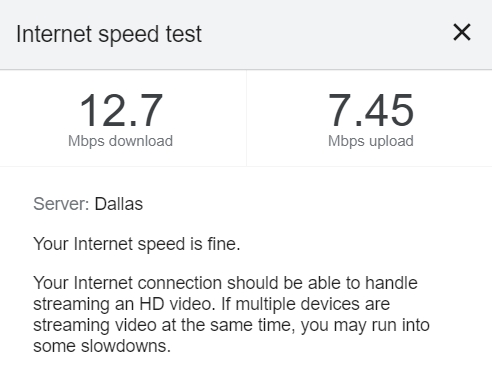
### fast-shadowsocks

# shadowsocks-go
Current version: 1.1.4 [](https://travis-ci.org/shadowsocks/shadowsocks-go)
shadowsocks-go is a lightweight tunnel proxy which can help you get through firewalls. It is a port of [shadowsocks](https://github.com/clowwindy/shadowsocks).
The protocol is compatible with the origin shadowsocks (if both have been upgraded to the latest version).
**Note `server_password` option syntax changed in 0.6.2, the client now connects to servers in the order specified in the config.**
**Please develop on the latest develop branch if you want to send pull request.**
# Install
Compiled client binaries can be download [here](http://dl.chenyufei.info/shadowsocks/). (All compiled with cgo disabled, except the mac version.)
You can also install from source (assume you have go installed):
```
# on server
go get github.com/shadowsocks/shadowsocks-go/cmd/shadowsocks-server
# on client
go get github.com/shadowsocks/shadowsocks-go/cmd/shadowsocks-local
```
It's recommended to disable cgo when compiling shadowsocks-go. This will prevent the go runtime from creating too many threads for dns lookup.
# Usage
Both the server and client program will look for `config.json` in the current directory. You can use `-c` option to specify another configuration file.
Configuration file is in json format and has the same syntax with [shadowsocks-nodejs](https://github.com/clowwindy/shadowsocks-nodejs/). You can download the sample [`config.json`](https://github.com/shadowsocks/shadowsocks-go/blob/master/config.json), change the following values:
```
server your server ip or hostname
server_port server port
local_port local socks5 proxy port
method encryption method, null by default (table), the following methods are supported:
aes-128-cfb, aes-192-cfb, aes-256-cfb, bf-cfb, cast5-cfb, des-cfb, rc4-md5, chacha20, salsa20, rc4, table
password a password used to encrypt transfer
timeout server option, in seconds
```
Run `shadowsocks-server` on your server. To run it in the background, run `shadowsocks-server > log &`.
On client, run `shadowsocks-local`. Change proxy settings of your browser to
```
SOCKS5 127.0.0.1:local_port
```
## About encryption methods
AES is recommended for shadowsocks-go. [Intel AES Instruction Set](http://en.wikipedia.org/wiki/AES_instruction_set) will be used if available and can make encryption/decryption very fast. To be more specific, **`aes-128-cfb` is recommended as it is faster and [secure enough](https://www.schneier.com/blog/archives/2009/07/another_new_aes.html)**.
**rc4 and table encryption methods are deprecated because they are not secure.**
## Command line options
Command line options can override settings from configuration files. Use `-h` option to see all available options.
```
shadowsocks-local -s server_address -p server_port -k password
-m aes-128-cfb -c config.json
-b local_address -l local_port
shadowsocks-server -p server_port -k password
-m aes-128-cfb -c config.json
-t timeout
```
Use `-d` option to enable debug message.
## Use multiple servers on client
```
server_password specify multiple server and password, server should be in the form of host:port
```
Here's a sample configuration [`client-multi-server.json`](https://github.com/shadowsocks/shadowsocks-go/blob/master/sample-config/client-multi-server.json). Given `server_password`, client program will ignore `server_port`, `server` and `password` options.
Servers are chosen in the order specified in the config. If a server can't be connected (connection failure), the client will try the next one. (Client will retry failed server with some probability to discover server recovery.)
## Multiple users with different passwords on server
The server can support users with different passwords. Each user will be served by a unique port. Use the following options on the server for such setup:
```
port_password specify multiple ports and passwords to support multiple users
```
Here's a sample configuration [`server-multi-port.json`](https://github.com/shadowsocks/shadowsocks-go/blob/master/sample-config/server-multi-port.json). Given `port_password`, server program will ignore `server_port` and `password` options.
### Update port password for a running server
Edit the config file used to start the server, then send `SIGHUP` to the server process.
# Note to OpenVZ users
**Use OpenVZ VM that supports vswap**. Otherwise, the OS will incorrectly account much more memory than actually used. shadowsocks-go on OpenVZ VM with vswap takes about 3MB memory after startup. (Refer to [this issue](https://github.com/shadowsocks/shadowsocks-go/issues/3) for more details.)
If vswap is not an option and memory usage is a problem for you, try [shadowsocks-libev](https://github.com/madeye/shadowsocks-libev).