https://github.com/dearva/livemarkdown.avalonia
High performance, real-time markdown renderer for AI/LLM
https://github.com/dearva/livemarkdown.avalonia
ai avalonia llm markdig markdown
Last synced: 4 months ago
JSON representation
High performance, real-time markdown renderer for AI/LLM
- Host: GitHub
- URL: https://github.com/dearva/livemarkdown.avalonia
- Owner: DearVa
- License: apache-2.0
- Created: 2025-07-25T10:28:50.000Z (about 1 year ago)
- Default Branch: main
- Last Pushed: 2026-04-10T09:50:26.000Z (4 months ago)
- Last Synced: 2026-04-10T10:25:55.960Z (4 months ago)
- Topics: ai, avalonia, llm, markdig, markdown
- Language: C#
- Homepage:
- Size: 51.2 MB
- Stars: 112
- Watchers: 2
- Forks: 18
- Open Issues: 0
-
Metadata Files:
- Readme: README.md
- Contributing: CONTRIBUTING.md
- Funding: .github/FUNDING.yml
- License: LICENSE
Awesome Lists containing this project
README

LiveMarkdown.Avalonia
**High performance, real-time markdown renderer for AI/LLM**






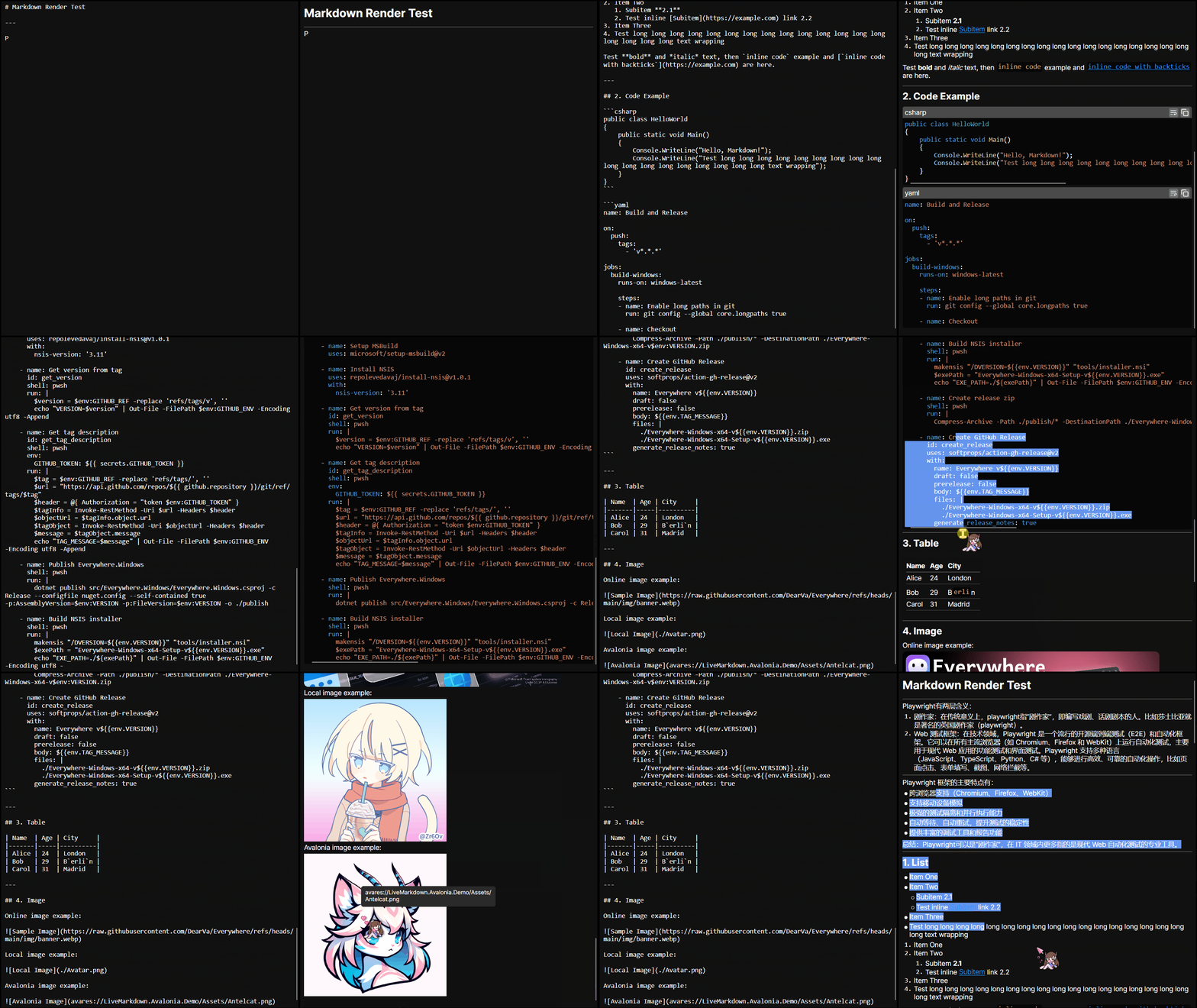
## 👋 Introduction
`LiveMarkdown.Avalonia` is a High-performance Markdown viewer for Avalonia applications.
It supports **real-time rendering** of Markdown content, so it's ideal for applications that require dynamic text
updating, **especially when streaming large model outputs**.
## ⭐ Features
- 🚀 **High-performance rendering powered by [Markdig](https://github.com/xoofx/markdig)**
- 🔄 **Real-time updates**: Automatically re-renders changes in Markdown content
- 🎨 **Customizable styles**: Easily style Markdown elements using Avalonia's powerful styling system
- 🔗 **Link support**: Clickable links with customizable behavior
- 📊 **Table support**: Render tables with proper formatting
- 📜 **Code block syntax highlighting**: Supports multiple languages
with [TextMateSharp](https://github.com/danipen/TextMateSharp)
- 🖼️ **Image support**: Load online, local even `avares` images asynchronously
- ✍️ **Selectable text**: Text can be selected across different Markdown elements
> [!NOTE]
> This library currently only supports `Append` and `Clear` operations on the Markdown content, which is enough for LLM
> streaming scenarios.
> [!WARNING]
> Known issue: Avalonia 11.3.5 and 11.3.6 changed text layout behavior, which may cause some text offset issues in
> certain scenarios. e.g. code inline has extra bottom margin, wried italic font rendering, etc.
>
> Please use 11.3.0 ~ 11.3.4 or >= 11.3.7 to avoid this problem.
## ❤️ Sponsor
This project is fully open-source and free. Your support will improve this project a lot. I sincerely thank all my
sponsors!



## ✈️ Roadmap
- [x] Basic Markdown rendering
- [x] Real-time updates
- [x] Link support
- [x] Table support
- [x] Code block syntax highlighting
- [x] Image support
- [x] Bitmap
- [x] SVG
- [x] Online images
- [x] Local images
- [x] `avares` images
- [x] Selectable text across elements
- [x] LaTeX support
- [ ] HTML support
- [ ] 🚧 Mermaid diagram support
## 🚀 Getting Started
### 1. Install the NuGet package
You can install the latest version from NuGet CLI:
```bash
dotnet add package LiveMarkdown.Avalonia
```
or use the NuGet Package Manager in your IDE.
### 2. Register the Markdown styles in your Avalonia application
```xml
```
### 3. Use the `MarkdownRenderer` control in your XAML
Add the `MarkdownRenderer` control to your `.axaml` file:
```xml
```
Then you can manage the Markdown content in your code-behind:
```csharp
// ObservableStringBuilder is used for efficient string updates
var markdownBuilder = new ObservableStringBuilder();
MarkdownRenderer.MarkdownBuilder = markdownBuilder;
// Append Markdown content, this will trigger re-rendering
markdownBuilder.Append("# Hello, Markdown!");
markdownBuilder.Append("\n\nThis is a **live** Markdown viewer for Avalonia applications.");
// Clear the content
markdownBuilder.Clear();
```
If you want to load local images with relative paths, you can set the `MarkdownRenderer.ImageBasePath` property.
### 4. (Optional) Enable LaTeX rendering
LaTeX is supported via the `LiveMarkdown.Avalonia.Math` package. You can install it via NuGet:
```bash
dotnet add package LiveMarkdown.Avalonia.Math
```
Then register both the `MathInlineNode` and `MathBlockNode` before using LaTeX in your Markdown content (e.g. App.axaml.cs):
```csharp
using LiveMarkdown.Avalonia;
MarkdownNode.Register();
MarkdownNode.Register(); // This is also required for block-level LaTeX support, e.g. $$...$$
```
### 5. (Optional) Enable SVG image rendering
SVG rendering is supported via the `LiveMarkdown.Avalonia.Svg` or `LiveMarkdown.Avalonia.Svg.Skia` package. You can install one of them via NuGet:
```bash
dotnet add package LiveMarkdown.Avalonia.Svg
```
or
```bash
dotnet add package LiveMarkdown.Avalonia.Svg.Skia
```
> [!NOTE]
> The `LiveMarkdown.Avalonia.Svg` and `LiveMarkdown.Avalonia.Svg.Skia` packages provide two different implementations for SVG rendering.
> The former uses `Svg.Controls.Avalonia` which is more Avalonia-native, while the latter uses `Svg.Skia` which is more powerful and has better compatibility.
Then register the `SvgImageDecoder` into the `AsyncImageLoader` before using SVG images in your Markdown content (e.g. App.axaml.cs):
```csharp
using LiveMarkdown.Avalonia;
AsyncImageLoader.DefaultDecoders =
[
SvgImageDecoder.Shared,
DefaultBitmapDecoder.Shared
];
```
You can also set the `AsyncImageLoader.Decoders` property on a per-renderer basis if you want different renderers to use different decoders.
### 6. (Optional) Enable Mermaid diagram rendering
> [!WARNING]
> Mermaid diagram rendering is currently in early preview stage, and may have some issues.
> Only flowchart and state diagram are supported for now, and the rendering performance may not be optimal.
Mermaid diagram rendering is supported via the `LiveMarkdown.Avalonia.Mermaid` package. You can install it via NuGet:
```bash
dotnet add package LiveMarkdown.Avalonia.Mermaid
```
Then register the `MermaidDiagramNode` before using Mermaid diagrams in your Markdown content (e.g. App.axaml.cs):
```csharp
using LiveMarkdown.Avalonia;
MarkdownRenderer.ConfigurePipeline += x => x.UseMermaid();
MarkdownNode.Register();
```
## 🪄 Style Customization
Markdown elements can be styled using Avalonia's powerful styling system. You can override
the [default styles](https://github.com/DearVa/LiveMarkdown.Avalonia/blob/main/src/LiveMarkdown.Avalonia/Styles.axaml)
by defining your own styles in your application styles.
Avalonia Styling Docs:
- [Avalonia Styles](https://docs.avaloniaui.net/docs/styling)
- [Style selector syntax](https://docs.avaloniaui.net/docs/reference/styles/style-selector-syntax)
### Customizing Resources
The `` line in your `App.axaml` imports the
default resources used by the renderer. You can override these resources in your application to customize the look and
feel.
Here are the available resource keys:
| Key | Type | Description |
|--------------------------------|----------|-----------------------------------------------------|
| `BorderColor` | `Color` | Color of borders (e.g., code blocks, tables) |
| `ForegroundColor` | `Color` | Default text color |
| `CardBackgroundColor` | `Color` | Background color for tables |
| `SecondaryCardBackgroundColor` | `Color` | Background color for code blocks and quotes |
| `CodeInlineColor` | `Color` | Text color for inline code |
| `QuoteBorderColor` | `Color` | Border color for blockquotes |
| `FontSizeS` | `Double` | Small font size (not used yet) |
| `FontSizeM` | `Double` | Medium font size (default text size) |
| `FontSizeL` | `Double` | Large font size for Heading4, Heading5 and Heading6 |
| `FontSizeXl` | `Double` | Extra large font size for Heading3 |
| `FontSize2Xl` | `Double` | 2XL font size for Heading2 |
| `FontSize3Xl` | `Double` | 3XL font size for Heading1 |
### Code Block Theme
You can customize the syntax highlighting theme for code blocks. The default theme is `DarkPlus`.
#### Global Setting
To set the theme globally for a `MarkdownRenderer` instance, use the `CodeBlockColorTheme` property:
```xml
```
#### Per-CodeBlock Setting via Styles
You can also use Avalonia styles to set the theme for specific code blocks or based on conditions:
```xml
<Setter Property="ColorTheme" Value="SolarizedDark"/>
```
Supported themes are defined in `TextMateSharp.Grammars.ThemeName`.
### Emphasis Styles
By default, the renderer implements the standard Markdown emphasis styles (e.g., `*italic*`, `**bold**`, `~~strikethrough~~`) using simple font weight and style changes. If you want to customize these styles or extended styles like `==highlight==`, you can define your own styles for the corresponding elements.
Here is a sample style definition that customizes the emphasis styles and adds support for subscript, superscript, underline and highlight. Note that the `BaselineAlignment` seems to be ignored in some cases due to Avalonia's text layout behavior.
```xml
<Style Selector="^ Span.Emphasis">
<!-- You can even set the bold style separately for **star** and __underscore__ -->
<!-- For a full list of available style classes, please refer to the source code of the renderer -->
<!-- https://github.com/DearVa/LiveMarkdown.Avalonia/blob/main/src/LiveMarkdown.Avalonia/Nodes/Inline/EmphasisInlineNode.cs -->
<Style Selector="^.Bold.Star">
<Setter Property="FontWeight" Value="Bold"/>
<Setter Property="FontWeight" Value="Normal"/>
<Setter Property="BaselineAlignment" Value="Subscript"/>
<Setter Property="FontSize" Value="8"/>
<Setter Property="BaselineAlignment" Value="Superscript"/>
<Setter Property="FontSize" Value="8"/>
<Setter Property="TextDecorations" Value="Underline"/>
<Setter Property="Background" Value="DarkOrange"/>
```
## 🤔 FAQ
- Q: Why some emojis not rendered correctly (rendered in single color)?
- A: This is a known issue caused by Skia (the render backend of Avalonia). You can upgrade SkiaSharp version (e.g. >=
3.117.0) to fix this. [Related issue](https://github.com/AvaloniaUI/Avalonia/issues/18677)
## 🤝 Contributing
We welcome issues, feature ideas, and PRs! See [CONTRIBUTING.md](CONTRIBUTING.md) for guidelines.
## 📄 License
Distributed under the Apache 2.0 License. See [LICENSE](LICENSE) for more information.
[](https://app.fossa.com/projects/git%2Bgithub.com%2FDearVa%2FLiveMarkdown.Avalonia?ref=badge_large)
### Third-Party Licenses
- **markdig** - [BSD-2-Clause License](https://github.com/xoofx/markdig/blob/master/license.txt)
- Markdown parser for Everywhere.Markdown rendering
- Source repo: https://github.com/xoofx/markdig
- **Svg.Skia** - [MIT License](https://github.com/wieslawsoltes/Svg.Skia/blob/master/LICENSE.TXT)
- Svg rendering for images
- Source repo: https://github.com/wieslawsoltes/Svg.Skia
- **TextMateSharp** - [MIT License](https://github.com/danipen/TextMateSharp/blob/master/LICENSE.md)
- Syntax highlighting for code blocks
- Source repo: https://github.com/danipen/TextMateSharp
- **CSharpMath** - [MIT License](https://github.com/verybadcat/CSharpMath/blob/master/License)
- LaTeX rendering support
- Source repo: https://github.com/verybadcat/CSharpMath
- **Mermaider** - [MIT License](https://github.com/nullean/mermaider/blob/main/LICENSE.txt)
- LA pure dotnet mermaid parser, layout engine AND renderer, no js runtime, AOT ready.
- Source repo: https://github.com/nullean/mermaider