https://github.com/deemp/clerk
Declaratively generate spreadsheets
https://github.com/deemp/clerk
Last synced: about 1 year ago
JSON representation
Declaratively generate spreadsheets
- Host: GitHub
- URL: https://github.com/deemp/clerk
- Owner: deemp
- License: bsd-3-clause
- Created: 2022-12-26T16:42:25.000Z (over 3 years ago)
- Default Branch: master
- Last Pushed: 2023-07-05T00:51:22.000Z (almost 3 years ago)
- Last Synced: 2025-04-06T17:23:32.631Z (about 1 year ago)
- Language: Haskell
- Homepage:
- Size: 14.1 MB
- Stars: 4
- Watchers: 2
- Forks: 0
- Open Issues: 8
-
Metadata Files:
- Readme: README.md
- Changelog: CHANGELOG.md
- License: LICENSE
Awesome Lists containing this project
README
# clerk
`clerk` provides a Haskell library for declaratively describing the spreadsheets.. `clerk` is built on top of the [xlsx](https://hackage.haskell.org/package/xlsx) package and extends upon the [work](https://youtu.be/1xGoa-zEOrQ) of Nickolay Kudasov.
## Features
`clerk` can be used to produce a styled spreadsheet with some data and formulas on it. These formulas are evaluated when the document is loaded into a target spreadsheet system.
The library supports:
- Typed cell references. Example: `Ref Double`.
- Type-safe arithmetic operations with them. Example: `(a :: Ref Double) + (b :: Ref Double)` produces a `Ref Double`.
- Constructing expressions with given types. Example: `(e :: Expr Double) = "SUM" [a .: b]`, `e` translates to `SUM(A1:B1)` (actual value depends on the values of `a` and `b`).
- Conditional styles, formatting, column widths.
The examples below demonstrate these features.
## Example 1
**The goal**: demonstrate formula syntax.
The source code for this example is available [here](app/Example1.hs).
### Extensions
```haskell
{-# LANGUAGE OverloadedStrings #-}
{-# LANGUAGE TypeApplications #-}
{-# LANGUAGE GADTs #-}
{-# LANGUAGE DataKinds #-}
{-# LANGUAGE ScopedTypeVariables #-}
```
### Imports
I import the necessary stuff.
```haskell
import Clerk ( (.*), (.**), (.+), (./), as, fun, formulaRef, val, Formula, Ref )
import Data.Text (Text)
import Examples.Helpers ( showFormula, mkRef )
```
### Formulas
Formulas consist of references, functions, and values.
I make references to `Double` values
```haskell
r1 :: Ref Double
r1 = mkRef @"B4"
r2 :: Ref Double
r2 = mkRef @"E6"
r3 :: Ref Double
r3 = mkRef @"G8"
```
Next, I convert one of these references to a formula via `formulaRef` and inspect the formula representation.
```haskell
t1 :: Text
t1 = showFormula $ formulaRef r2
-- >>>t1
-- "E6"
```
Finally, I construct a longer expression and look at its representation.
I convert a literal value to a formula via `val`.
```haskell
t2 :: Text
t2 = showFormula $ r1 .* r2 .* val 3 .+ r1 .** r2 ./ r3
-- >>>t2
-- "B4*E6*3.0+B4^E6/G8"
```
Of course, I can mix differently typed references in expressions when necessary.
For this case, I have an unsafe `as` function.
```haskell
r4 :: Ref Int
r4 = mkRef @"T6"
t3 :: Text
t3 = showFormula $ as @Double (r4 .* r4) .+ r1 .** r2 ./ r3
-- >>>t3
-- "T6*T6+B4^E6/G8"
```
This `as` function should not be abused, though. If I need an `Int` instead of a `Double`, I can explicitly use an Excel function.
```haskell
round_ :: forall a. Formula a -> Formula Int
round_ x = fun "ROUND" [x]
t4 :: Formula Int
t4 = round_ (r1 .** r2 ./ r3)
-- >>>:t t4
-- t4 :: Formula Int
t5 :: Text
t5 = showFormula t4
-- >>> t5
-- "ROUND(B4^E6/G8)"
```
## Example 2
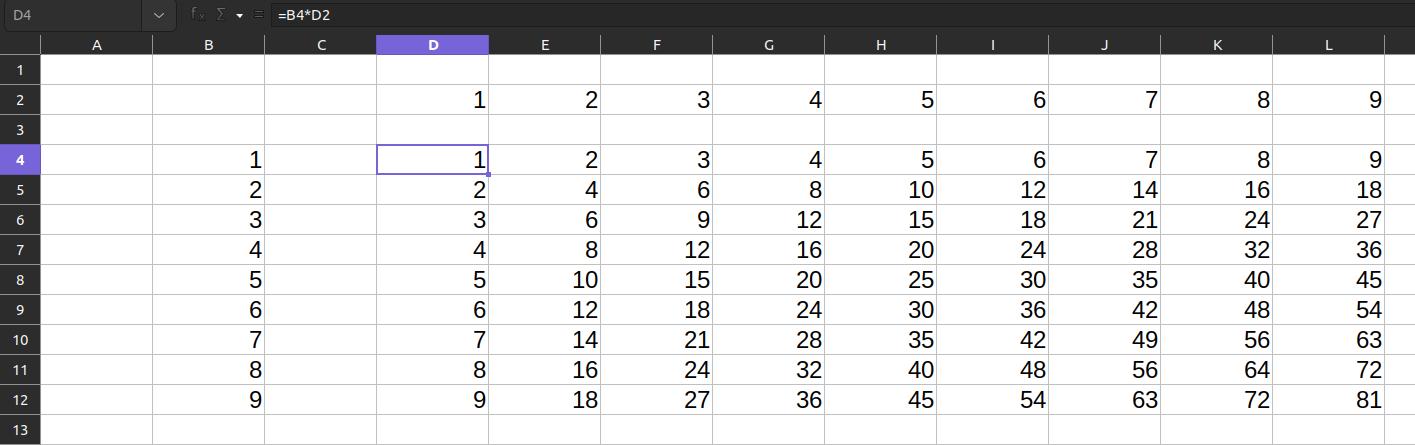
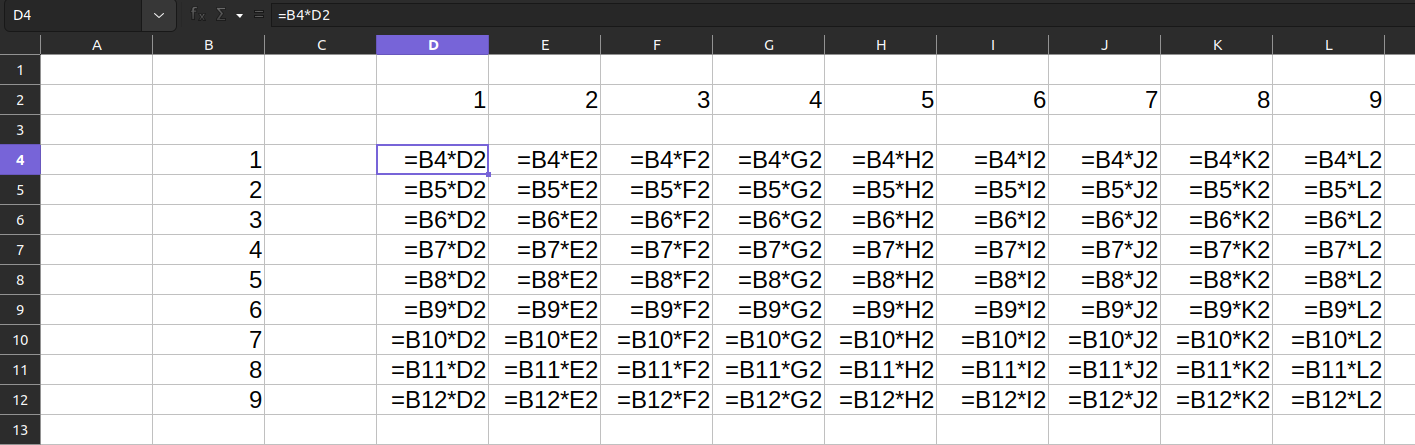
**The goal**: describe and generate a spreadsheet with a simple multiplication table.
The source code for this example is available [here](app/Example2.hs).
The program produces an `xlsx` file that looks as follows:
With formulas enabled:
The below sections describe how such a spreadsheet can be constructed.
### Extensions
I'll need several language extensions.
### Imports
I import the necessary stuff.
```haskell
import Clerk
import Control.Monad (forM, forM_, void)
import qualified Data.Text as T
import Lens.Micro ((&), (+~), (^.))
```
### Tables
The tables that I'd like to construct are:
- A vertical header
- A horizontal header
- A table with results of multiplication of the numbers from these headers
#### A vertical header
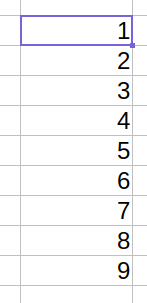
`clerk` provides the `RowI` monad.
This monad takes some `i`nput, internally converts it into Excel types, and outputs something, e.g., a cell reference.
In background, it writes a template of a horizontal block of cells - a **row**.
This row is used for placing the input values onto a sheet.
A vertical block of cells can be represented as several horizontal blocks of cells placed under each other.
So, as a template, I use a `RowI` with one integer as an input.
As I don't need any formatting, I use `blank` cells for templates.
I place the rows for each input value and collect the references.
Each row is shifted relative to the input coordinates.
```haskell
mkVertical :: Coords -> [Int] -> Sheet [Ref Int]
mkVertical coords numbers =
forM (zip [0 ..] numbers) $ \(idx, number) ->
placeIn
(coords & row +~ idx + 2)
number
((columnF blank (const number)) :: RowI Int (Ref Int))
```
#### A horizontal header

For a horizontal header, I make a row of numbers and collect the references to all its cells.
As I don't care about the type of inputs, I use the `Row` type.
In the `Sheet` monad, I place this row starting at a specified coordinate.
```haskell
mkHorizontal :: Coords -> [Int] -> Sheet [Ref Int]
mkHorizontal coords numbers =
place
(coords & col +~ 2)
((forM numbers $ \n -> columnF blank (const n)) :: Row [Ref Int])
```
#### Table builder
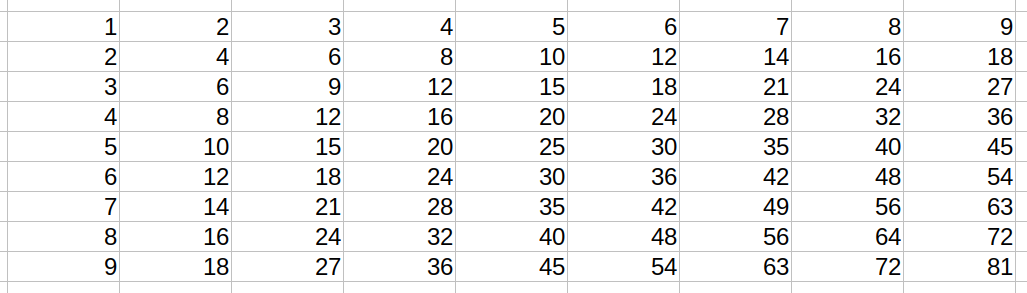
For inner cells, I use single-cell rows for each input.
As I don't need any info about these cells, I use the `Row ()` type.
```haskell
mkTable :: [(Ref Int, Ref Int)] -> Sheet ()
mkTable cs =
forM_ cs $ \(r, c) -> do
coords <- mkCoords' (c ^. col) (r ^. row)
place coords ((columnF_ blank (const (r .* c))) :: Row ())
```
### Sheet
Now, I combine all functions.
```haskell
sheet :: Sheet ()
sheet = do
start <- mkCoords @"B2"
let numbers = [1 .. 9]
cs <- mkHorizontal start numbers
rs <- mkVertical start numbers
mkTable [(r, c) | r <- rs, c <- cs]
```
### Result
Finally, I can write the result and get a spreadsheet like the one at the beginning of [Example 2](#example-2).
```haskell
main :: IO ()
main = writeXlsx "example2.xlsx" [(T.pack "List 1", void sheet)]
```
To get `./example2.xlsx`, run:
```console
nix run .#example2
-- or
cabal run example2
```
With formulas enabled, the sheet looks like this:
## Example 3
**The goal**: describe and generate a spreadsheet that calculates the pressure data given some volume data and constants.
The source code for this example is available [here](app/Example3.hs).
The program produces an `xlsx` file that looks as follows:
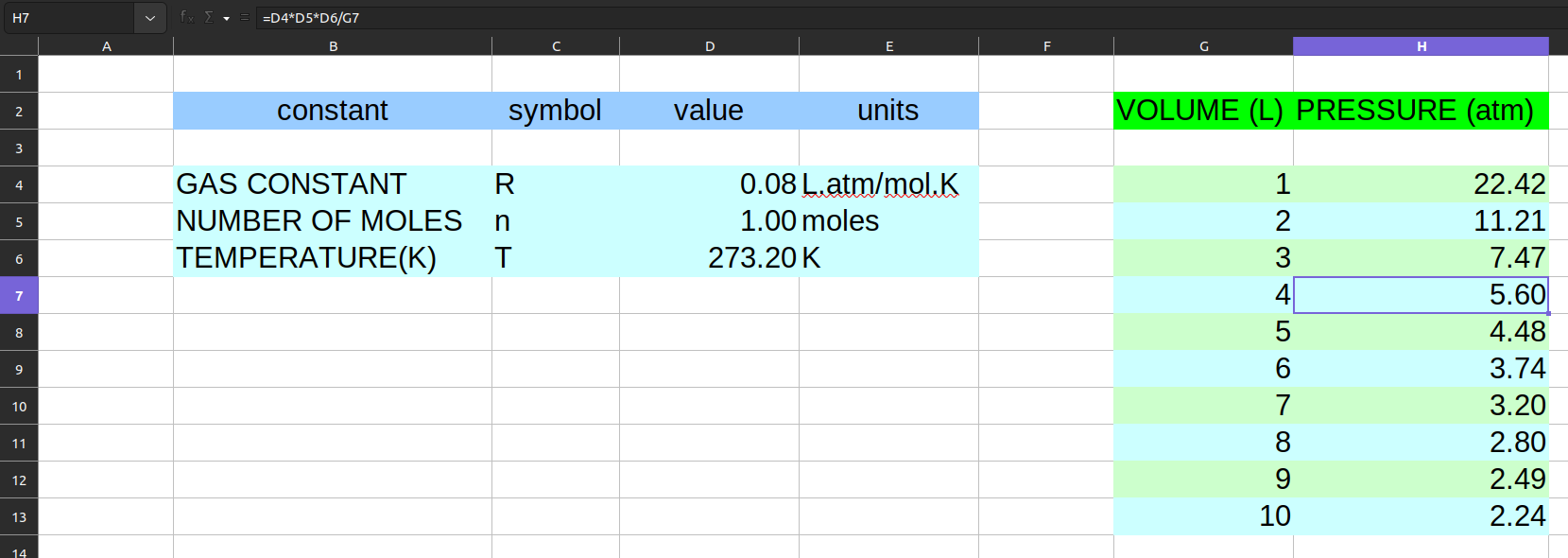
With formulas enabled:l
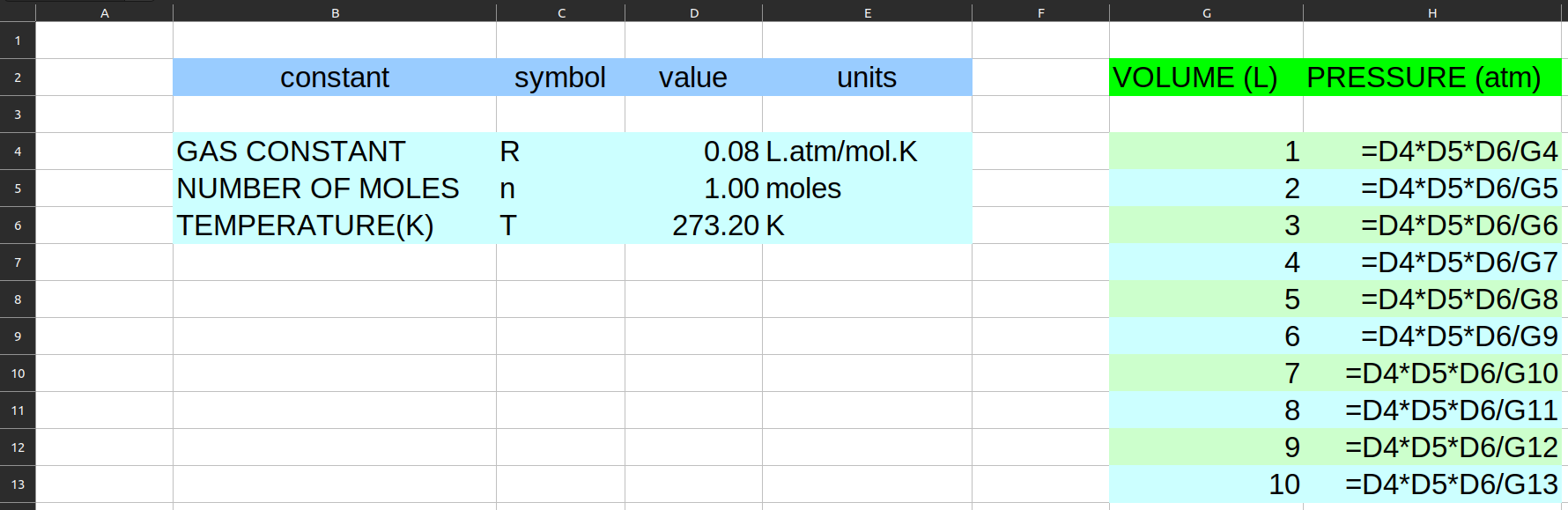
The below sections describe how such a spreadsheet can be constructed.
### Extensions
I'll need several language extensions.
```haskell
-- to access the fields of records like a.b
{-# LANGUAGE OverloadedRecordDot #-}
{-# LANGUAGE ImportQualifiedPost #-}
{-# LANGUAGE RankNTypes #-}
{-# LANGUAGE RecordWildCards #-}
{-# LANGUAGE DuplicateRecordFields #-}
{-# LANGUAGE ScopedTypeVariables #-}
{-# LANGUAGE NoOverloadedStrings #-}
{-# LANGUAGE TypeApplications #-}
{-# LANGUAGE DataKinds #-}
```
### Imports
And import the necessary stuff.
```haskell
import Clerk
import Codec.Xlsx qualified as X
import Codec.Xlsx.Formatted qualified as X
import Data.Text qualified as T
import Lens.Micro ((%~), (&), (+~), (?~))
```
### Tables
The tables that I'd like to construct are:
- A table per a constant's value (three of them)
- A volume and pressure table
- A constants' header
- A volume and pressure header
#### constants values

In our case, each constant has the same type of the numeric value - `Double`.
However, it might be the case that in another set of constants, they'll have different types.
That's why, I'll construct a table with a single row per a constant and later place the constants' tables under each other.
I'll store constant data in a record.
```haskell
data ConstantData a = ConstantData
{ constantName :: String
, constantSymbol :: String
, constantValue :: a
, constantUnits :: String
}
```
Next, I group the constants.
```haskell
data Constants f = Constants
{ gasConstant :: f Double
, numberOfMoles :: f Double
, temperature :: f Double
}
type ConstantsInput = Constants ConstantData
```
Following that, I record the constants data.
```haskell
constants :: ConstantsInput
constants =
Constants
{ gasConstant = ConstantData "GAS CONSTANT" "R" 0.08206 "L.atm/mol.K"
, numberOfMoles = ConstantData "NUMBER OF MOLES" "n" 1 "moles"
, temperature = ConstantData "TEMPERATURE(K)" "T" 273.2 "K"
}
```
Now, I can make a `RowI` for a constant input.
I use a `RowI` because this row cares about the `i`nput type.
I'll later use this row for each constant separately.
I get a pair of outputs:
- Top left cell of a constant's table. That is, the cell with that constant's name.
- The value of the constant.
Later, I'll use these outputs to relate the positions of tables on a sheet.
Notice that I use styles like `lightBlue` here. These styles are defined in the [Styles](#styles) section.
```haskell
constant :: (ToCellData a) => RowI (ConstantData a) (Ref (), Ref a)
constant = do
refTopLeft <- columnF lightBlue constantName
columnF_ lightBlue constantSymbol
refValue <- columnF (lightBlue .& with2decimalDigits) constantValue
columnF_ lightBlue constantUnits
return (refTopLeft, refValue)
```
#### volume and pressure values

To fill this table, I'll take some data and combine it with the constants.
```haskell
newtype Volume = Volume {volume :: Double}
volumeData :: [Volume]
volumeData = Volume <$> [1 .. 10]
```
To pass the constants references in a structured way, I make a helper type.
```haskell
type ConstantsRefs = Constants Ref
```
Next, I define a function to produce a row for volume and pressure.
```haskell
values :: ConstantsRefs -> RowI Volume ()
values Constants{..} = do
refVolume <- columnF alternatingColors volume
let pressure' = gasConstant .* numberOfMoles .* temperature ./ refVolume
columnF_ (alternatingColors .& with2decimalDigits) (const pressure')
```
#### Constants' header

I won't use records here. Instead, I'll put the names of the columns straight into the `Row`.
The outputs will be the coordinates of the top left cell and the top right cell of this table.
```haskell
constantsHeader :: Row (Ref (), Ref ())
constantsHeader = do
let style :: FormatCell
style = blue .& alignedCenter
refTopLeft <- columnWF 20 style (const "constant")
columnWF_ 8 style (const "symbol")
columnF_ style (const "value")
refTopRight <- columnWF 13 style (const "units")
return (refTopLeft, refTopRight)
```
#### Volume & Pressure header

For this header, I'll also put the names of columns straight into a row.
```haskell
valuesHeader :: Row (Ref ())
valuesHeader = do
refTopLeft <- columnWF 12 green (const "VOLUME (L)")
columnWF_ 16 green (const "PRESSURE (atm)")
return refTopLeft
```
### Sheet builder
At last, I combine all rows.
```haskell
sheet :: Sheet ()
sheet = do
start <- mkCoords @"B2"
(constantsHeaderTL, constantsHeaderTopRight) <- place start constantsHeader
(gasTopLeft, gas) <- placeIn (constantsHeaderTL & row +~ 2) constants.gasConstant constant
(nMolesTopLeft, nMoles) <- placeIn (gasTopLeft & row +~ 1) constants.numberOfMoles constant
temperature <- snd <$> placeIn (nMolesTopLeft & row +~ 1) constants.temperature constant
valuesHeaderTopLeft <- place (constantsHeaderTopRight & col +~ 2) valuesHeader
placeIns (valuesHeaderTopLeft & row +~ 2) volumeData (values $ Constants gas nMoles temperature)
```
### Styles
I used several styles to format the tables. This is how these styles are defined.
```haskell
blue, lightBlue, green, lightGreen :: FormatCell
blue = mkColor (hex @"#FF99CCFF")
lightBlue = mkColor (hex @"#90CCFFFF")
green = mkColor (hex @"#FF00FF00")
lightGreen = mkColor (hex @"#90CCFFCC")
alternatingColors :: FormatCell
alternatingColors index = (if even index then lightGreen else lightBlue) index
```
Additionally, I compose an `FCTransform` for the number format.
Such a transform is used to accumulate cell formatting.
```haskell
with2decimalDigits :: FCTransform
with2decimalDigits fcTransform =
fcTransform & X.formattedFormat %~ X.formatNumberFormat ?~ X.StdNumberFormat X.Nf2Decimal
```
And I make a transform for centering the cell content.
```haskell
alignedCenter :: FCTransform
alignedCenter = horizontalAlignment X.CellHorizontalAlignmentCenter
```
### Result
Finally, I write the result and get the spreadsheet like the one at the beginning of [Example 3](#example-3).
```haskell
main :: IO ()
main = writeXlsx "example3.xlsx" [(T.pack "List 1", sheet)]
```
To get `./example3.xlsx`, run:
```console
nix run .#example3
-- or
cabal run example3
```
With formulas enabled, the sheet looks like this:
```haskell
{-# LANGUAGE DataKinds #-}
{-# LANGUAGE OverloadedStrings #-}
{-# LANGUAGE TypeApplications #-}
import Clerk
import Control.Monad (void)
import Control.Monad.RWS (gets)
main :: IO ()
main = writeXlsx "example4.xlsx" [("List 1", sheet 9 15)]
colFormula :: ToCellData output => output -> RowI input (Ref a)
colFormula = columnF blank . const
colIndex :: InputIndex -> RowI input ()
colIndex = void . colFormula
index :: Row InputIndex
index = gets ((+ 1) . _inputIndex)
row0 :: Int -> Int -> Row (Ref Int, Ref Int)
row0 a b = do
colIndex =<< index
r1 <- colFormula a
r2 <- colFormula b
pure (r1, r2)
row1 :: (Ref Int, Ref Int) -> Row (Ref Int, Ref Int)
row1 (a, b) =
do
colIndex =<< index
r1 <- colFormula (fun "MAX" [a, b] :: Formula Int)
r2 <- colFormula (fun "MIN" [a, b] :: Formula Int)
pure (r1, r2)
row3 :: (Ref Int, Ref Int) -> Row (Ref Int, Ref Int)
row3 (a, b) = do
colIndex =<< index
r1 <- colFormula (formulaRef a)
r2 <- colFormula (formulaRef b)
r3 <- colFormula (fun "MOD" [r1, r2] :: Formula Int)
pure (r2, r3)
sheet :: Int -> Int -> Sheet ()
sheet a b = do
start <- mkRef @"A1"
s1 <- place start (row0 a b)
placeIxsFs_ start [1 :: Int .. 6] (cycle [row1, row3]) s1
pure ()
```
## Contribute
This project provides a dev environment via a `Nix` flake.
1. With [flakes enabled](https://nixos.wiki/wiki/Flakes#Enable_flakes), run:
```console
nix develop
cabal build
```
1. This `README.md` is generated from several files. If you edit them, re-generate it.
```console
cabal test docs
```
1. (Optionally) Start `VSCodium` with `Haskell` extensions.
1. Write settings and run `VSCodium`.
```console
nix run .#writeSettings
nix run .#codium .
```
1. Open a `Haskell` file. `Haskell Language Server` should soon start giving you hints.
1. Study these links if you'd like to learn more about the tools used in this flake:
- [Prerequisites](https://github.com/deemp/flakes#prerequisites)
- `Haskell` project [template](https://github.com/deemp/flakes/tree/main/templates/codium/haskell#readme)
- [Haskell](https://github.com/deemp/flakes/blob/main/README/Haskell.md)
1. If `Haskell Language Server` doesn't want to run code in `-- >>>` comments:
1. Check the Output of `HLS`.
1. Find there a directory name containing `hie-bios`.
1. Remove the `hie-bios/dist-clerk-*` directory.