https://github.com/deeplook/dirplot
Create directory treemaps (local, ssh, archives, s3, github, docker, k8s), save in file, PNG aand SVG, open in viewer, display inline in terminals.
https://github.com/deeplook/dirplot
cli docker github k8s plot s3 shell ssh terminal treemap vizualisation
Last synced: 3 months ago
JSON representation
Create directory treemaps (local, ssh, archives, s3, github, docker, k8s), save in file, PNG aand SVG, open in viewer, display inline in terminals.
- Host: GitHub
- URL: https://github.com/deeplook/dirplot
- Owner: deeplook
- License: mit
- Created: 2026-03-06T12:45:53.000Z (4 months ago)
- Default Branch: main
- Last Pushed: 2026-03-11T17:07:54.000Z (4 months ago)
- Last Synced: 2026-03-11T19:13:53.302Z (4 months ago)
- Topics: cli, docker, github, k8s, plot, s3, shell, ssh, terminal, treemap, vizualisation
- Language: Python
- Homepage:
- Size: 2.29 MB
- Stars: 1
- Watchers: 0
- Forks: 0
- Open Issues: 0
-
Metadata Files:
- Readme: README.md
- Changelog: CHANGELOG.md
- Contributing: CONTRIBUTING.md
- License: LICENSE
- Security: SECURITY.md
Awesome Lists containing this project
README
# dirplot
[](https://github.com/deeplook/dirplot/actions/workflows/ci.yml)
[](https://pypi.org/project/dirplot/)
[](https://pypi.org/project/dirplot/)
[](https://pepy.tech/project/dirplot)
[](https://pypi.org/project/dirplot/)
[](https://www.buymeacoffee.com/deeplook)
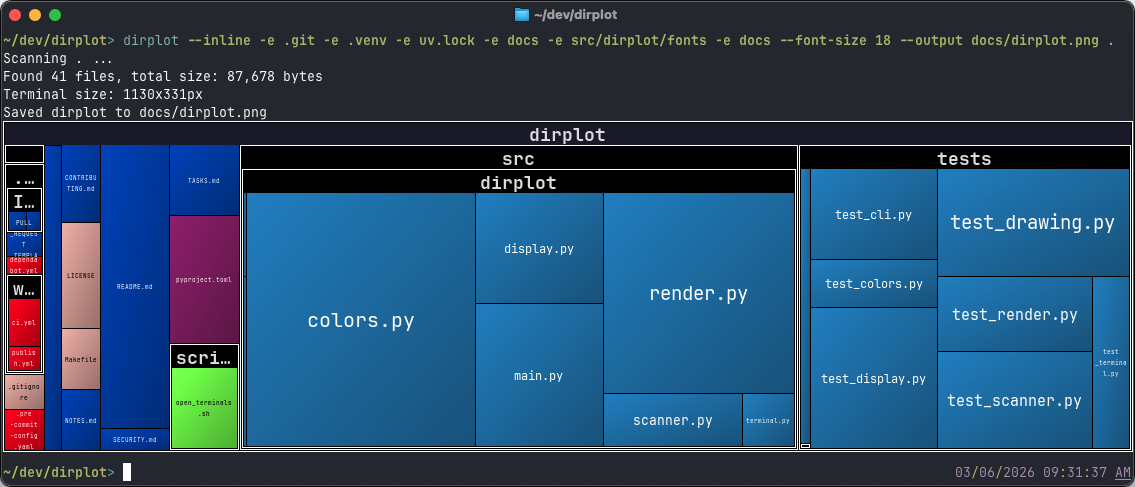
**dirplot** creates nested treemap images for directory trees. It can display them in the system image viewer or inline in the terminal (iTerm2 and Kitty protocols, auto-detected). It also animates git history, watches live filesystems, and scans remote sources.
## Features
- Squarified treemap layout; file area proportional to size; ~500 extensions mapped to [GitHub Linguist](https://github.com/github/linguist) colours.
- PNG and interactive SVG output; renders at terminal pixel size or a custom `WIDTHxHEIGHT`.
- **Animate git history** (`dirplot git`), **watch live filesystems** (`dirplot watch`), and **replay event logs** (`dirplot replay`) — all output APNG or MP4.
- Scan **SSH hosts**, **AWS S3**, **GitHub repos** (public and private), **Docker containers**, and **Kubernetes pods** — no extra deps beyond the respective CLI.
- Read **archives** directly (zip, tar, 7z, rar, jar, whl, …) without unpacking.
- Works on macOS, Linux, and Windows (WSL2 fully supported).
## Installation
```bash
# Standalone tool (recommended)
uv tool install dirplot
# Into the current environment
pip install dirplot
```
Optional extras: `pip install "dirplot[ssh]"`, `"dirplot[s3]"`, `"dirplot[libarchive]"`.
`dirplot watch` uses [watchdog](https://github.com/gorakhargosh/watchdog) for filesystem monitoring — installed automatically as a dependency.
`dirplot git` requires `git` on `PATH`. MP4 output (`dirplot git`, `dirplot watch`, `dirplot replay` with `--animate`) requires [ffmpeg](https://ffmpeg.org/) on `PATH`. `dirplot read-meta` on `.mp4` files also requires `ffprobe` (bundled with ffmpeg).
## Quick start
```bash
dirplot map . # current directory
dirplot map . --inline # display in terminal
dirplot map . --output treemap.png --no-show # save to file
dirplot map . --log --inline # log scale, inline
dirplot map github://pallets/flask # GitHub repo
dirplot map docker://my-container:/app # Docker container
dirplot map project.zip # archive file
tree src/ | dirplot map # pipe tree output
dirplot git . -o history.mp4 --animate # full git history
dirplot git . -o history.mp4 --animate --last 30d # last 30 days
dirplot git github://owner/repo -o h.mp4 --animate --last 7d # GitHub, last week
dirplot watch . --output treemap.png # live watch
dirplot watch . --output treemap.mp4 --animate # record as MP4
dirplot demo # run examples, save to ./demo/
```
## Documentation
- [CLI reference](docs/CLI.md) — all commands, flags, and usage examples
- [Remote access](docs/EXAMPLES.md) — SSH, S3, GitHub, Docker, Kubernetes
- [Archives](docs/ARCHIVES.md) — supported formats and dependencies
- [Python API](docs/API.md) — programmatic usage
## Development
```bash
git clone https://github.com/deeplook/dirplot
cd dirplot
make test
```
See [CONTRIBUTING.md](CONTRIBUTING.md) for full details.
## License
MIT — see [LICENSE](LICENSE).