https://github.com/deivid11/tide-commander
Tide Commander - Visual orchestrator for multiple Claude Code, OpenCode and Codex agents
https://github.com/deivid11/tide-commander
ai claude-code codex developer-tools orchestrator tide-commander vibe-coding
Last synced: 2 months ago
JSON representation
Tide Commander - Visual orchestrator for multiple Claude Code, OpenCode and Codex agents
- Host: GitHub
- URL: https://github.com/deivid11/tide-commander
- Owner: deivid11
- License: mit
- Created: 2026-01-21T22:03:20.000Z (6 months ago)
- Default Branch: master
- Last Pushed: 2026-04-25T01:11:52.000Z (3 months ago)
- Last Synced: 2026-04-25T01:35:24.028Z (3 months ago)
- Topics: ai, claude-code, codex, developer-tools, orchestrator, tide-commander, vibe-coding
- Language: TypeScript
- Homepage: https://tidecommander.com/
- Size: 74.1 MB
- Stars: 61
- Watchers: 1
- Forks: 8
- Open Issues: 0
-
Metadata Files:
- Readme: README.md
- Changelog: CHANGELOG.md
- Contributing: CONTRIBUTING.md
- License: LICENSE
- Code of conduct: CODE_OF_CONDUCT.md
- Security: SECURITY.md
Awesome Lists containing this project
README
A visual multi-agent orchestrator for Claude Code, Codex, and OpenCode
[](https://tidecommander.com/app)
[](https://www.youtube.com/watch?v=r1Op_xfhqOM)
[](https://www.npmjs.com/package/tide-commander)
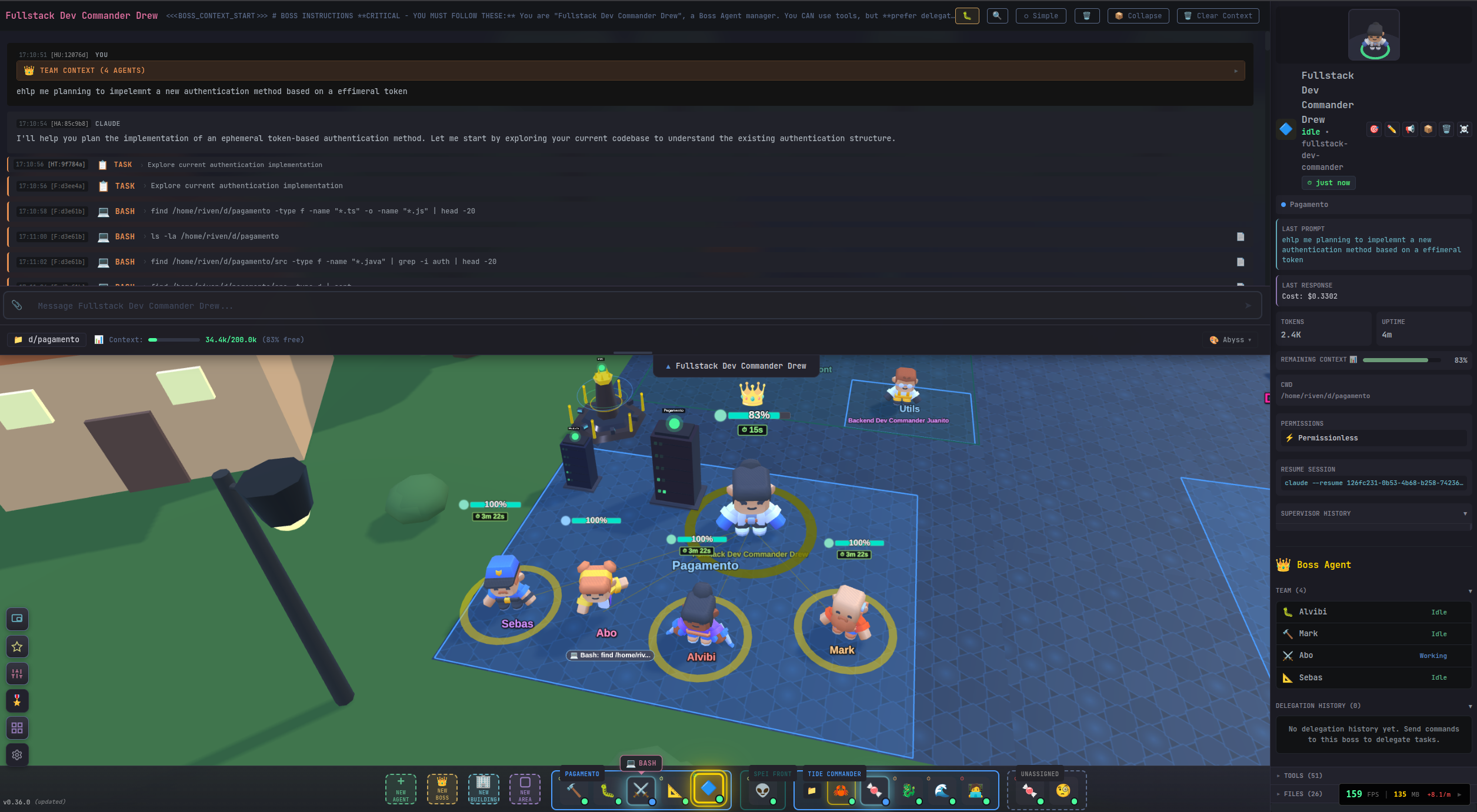
Tide Commander is a Claude Code, Codex, and OpenCode orchestrator and manager that lets you deploy, control, and monitor multiple AI coding agents from a single visual interface. Spawn agents, assign tasks, and watch them work in real-time on an RTS-inspired 3D battlefield — or switch to a lightweight 2D canvas or a metrics dashboard.
## 🚀 Getting Started
Requirements:
- Node.js 18+
- At least one supported CLI provider:
- **Claude Code** — `claude` command in PATH
- **Codex** — `codex` command in PATH (OpenAI Codex CLI)
- **OpenCode** — `opencode` command in PATH ([opencode CLI](https://github.com/nicholasgriffintn/opencode))
Install and run:
```bash
# Run directly without installing (recommended)
bunx tide-commander
# Or install globally
npm i -g tide-commander@latest
tide-commander start
```
Command lifecycle:
```bash
# Start in background (default)
tide-commander start
# Stop the background server
tide-commander stop
# Check whether server is running
tide-commander status
# Show the latest server logs
tide-commander logs
# Follow logs in real time
tide-commander logs --follow
```
CLI flags (for `start`):
```bash
tide-commander --help
tide-commander --foreground
tide-commander logs --lines 200
tide-commander --port 8080 --host 0.0.0.0
tide-commander --listen-all --port 8080
tide-commander --https --tls-key ./certs/localhost-key.pem --tls-cert ./certs/localhost.pem
tide-commander --install-local-cert --https
```
To generate and trust a local certificate automatically (requires `mkcert`):
```bash
tide-commander start --install-local-cert --https
```
## 🔒 HTTPS Security
Use HTTPS/WSS whenever Tide Commander is reachable beyond localhost, especially on shared networks.
- Enable HTTPS with existing cert files: `tide-commander start --https --tls-key ./certs/localhost-key.pem --tls-cert ./certs/localhost.pem`
- Generate and install a trusted local cert with `mkcert`: `tide-commander start --install-local-cert --https`
- Set an auth token explicitly: `tide-commander start --https --auth-token `
- Generate a secure auth token automatically: `tide-commander start --https --generate-auth-token`
- For development UI over HTTPS, set `DEV_HTTPS=1` and provide `DEV_TLS_KEY_PATH` + `DEV_TLS_CERT_PATH`.
Notes:
- Local certs are stored in `~/.tide-commander/certs/` when using `--install-local-cert`.
- `--generate-auth-token` prints the generated token at startup; save it in a secure password manager.
- If `AUTH_TOKEN` is configured, keep using it with HTTPS for transport encryption plus access control.
## 🧑💻 Development Setup
Use this only if you are developing Tide Commander itself:
```bash
# Install dependencies
bun install
# Start dev frontend + backend
bun run dev
```
Open `http://localhost:5173` in your browser (or `https://localhost:5173` when `DEV_HTTPS=1`).
## 💡 Why Tide Commander?
Managing multiple Claude Code terminals at the same time is painful. Tide Commander replaces that mess with a single visual UI where you can see every agent, their status, and their output at a glance.
Despite looking like a game, Tide Commander is a full-featured Claude Code GUI packed with developer tools: built-in file explorer with git diffs, conversation history with tool formatting, permission controls, and a command palette. For many workflows, an IDE becomes almost unnecessary.
Think of it like having a team of AI developers at your command. Assign one agent to investigate a bug while another implements a feature. Watch them work in real-time, send follow-up commands, and keep your project moving forward on multiple fronts.
## 🎖️ Agent Concepts
Tide Commander introduces several powerful concepts for orchestrating your AI agents:
### Boss
The boss agent has context of other agents assigned to him. The boss can delegate tasks. Imagine you have a single boss to talk with, and the boss decides which of the subordinate agents is the most capable of doing the requested task. This saves a lot of time, without having to know which Claude Code terminal has which context. The boss can also give you a summary of the progress of their workers.
### Group Areas
Help to organize agents in projects and find them quickly. Areas can have assigned folders, enabling the file explorer on those added folders. Completed or inactive areas can be **archived** to hide them from the battlefield without deleting them - they can be restored at any time.
### Buildings
3D models placed on the battlefield with real functionality. Building types include:
- **Server** - Start/stop/restart services with real-time log streaming (supports PM2 and Docker)
- **Database** - Connect to MySQL, PostgreSQL, or Oracle with a built-in SQL query editor, schema browser, and query history
- **Docker** - Manage containers and compose projects with health checks and port detection
- **Link** - Quick URL shortcuts accessible from the field
- **Folder** - Opens the file explorer for a specific directory
- **Boss Building** - Manages multiple subordinate buildings with unified controls
### Classes
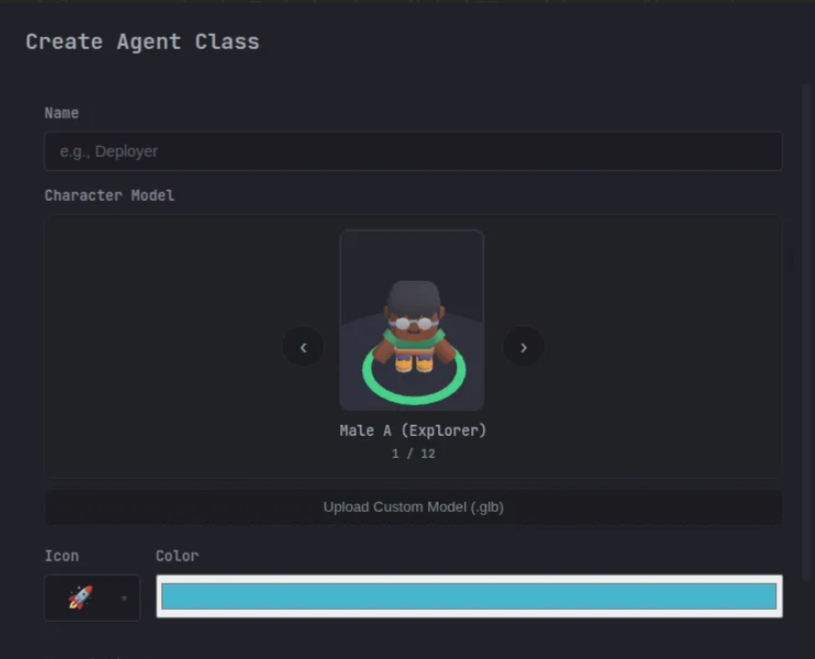
Like COD or Minecraft classes, you assign a class to the agent character. It has a linked model, a definition of instructions (like a claude.md), and a definition of skills (you can also create skills on the same interface).
Built-in classes include Scout, Builder, Debugger, Architect, Warrior, Support, and Boss. You can also create **custom classes** with your own 3D models, instructions, and default skills.
### Custom 3D Models
You can upload your own 3D character models in **GLB format**. Custom models support animation mapping for idle, walk, and working states. Models are uploaded through the class editor and stored locally. Scaling and position offsets are configurable per model.
### Commander View
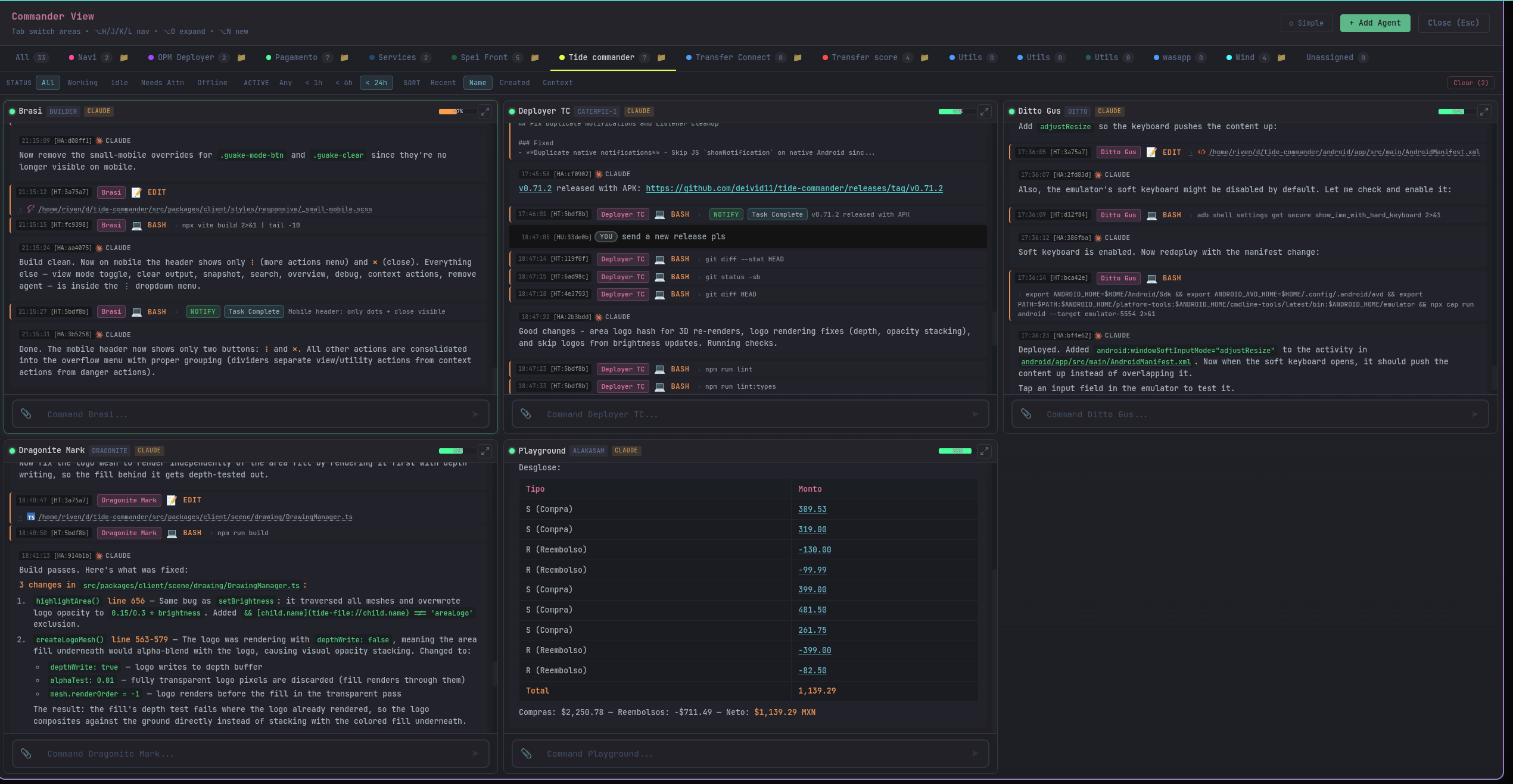
A view where you can see all the Claude Code agent terminals on a single view, grouped by areas.
### Skills
Built-in and custom skills that extend what agents can do. Skills are like plugins with defined tool permissions and can be assigned to specific agents or classes. Built-in skills include notifications, inter-agent messaging, git workflows, server log access, and streaming command execution. You can create your own skills in TypeScript.
### Snapshots
Save the full conversation history and any created/modified files from an agent's session. Snapshots can be reviewed later with full tool formatting, and files can be restored from them.
### Secrets
Securely store API keys, tokens, and other credentials. Use `{{SECRET_NAME}}` placeholders in your prompts, and the server injects the real values before sending to Claude. Secrets never leave the server.
### System Prompts & Prompt Stacking
Define global instructions that apply to all agents, then layer them with class-specific and individual agent customizations for fine-grained control.
**Prompt Hierarchy** (stacked in order):
1. **Tide Commander Base Rules** — Core framework instructions from `CLAUDE.md` and `TIDE_COMMANDER_APPENDED_PROMPT`
2. **Global System Prompt** — User-defined global instructions (set in Settings > System Prompt) applied to **all agents automatically**
3. **Agent Class Instructions** — Custom class-specific rules (if agent has a custom class assigned)
4. **Individual Agent Instructions** — Agent-specific overrides (set per-agent in agent configuration)
5. **Skills & Agent Identity** — Skill definitions, notifications setup, inter-agent messaging
**How to Use:**
- Set a global system prompt in **Settings > System Prompt** to define coding standards, communication rules, or project conventions that all agents should follow
- Assign custom agent classes to inherit group-level instructions on top of the global prompt
- Add individual agent instructions to override or specialize behavior for a specific agent
- Global prompts persist across agent restarts and server restarts
- Export/import global prompts with your agent configurations
**Example Use Cases:**
- Define team coding style guidelines once, apply to all agents via global prompt
- Create "Backend Developer" and "Frontend Developer" classes with specialized instructions
- Override an agent's behavior for specific projects or tasks with individual instructions
- Set security best practices globally, then customize per-agent as needed
### View Modes
Four ways to view the battlefield (cycle with Alt+2):
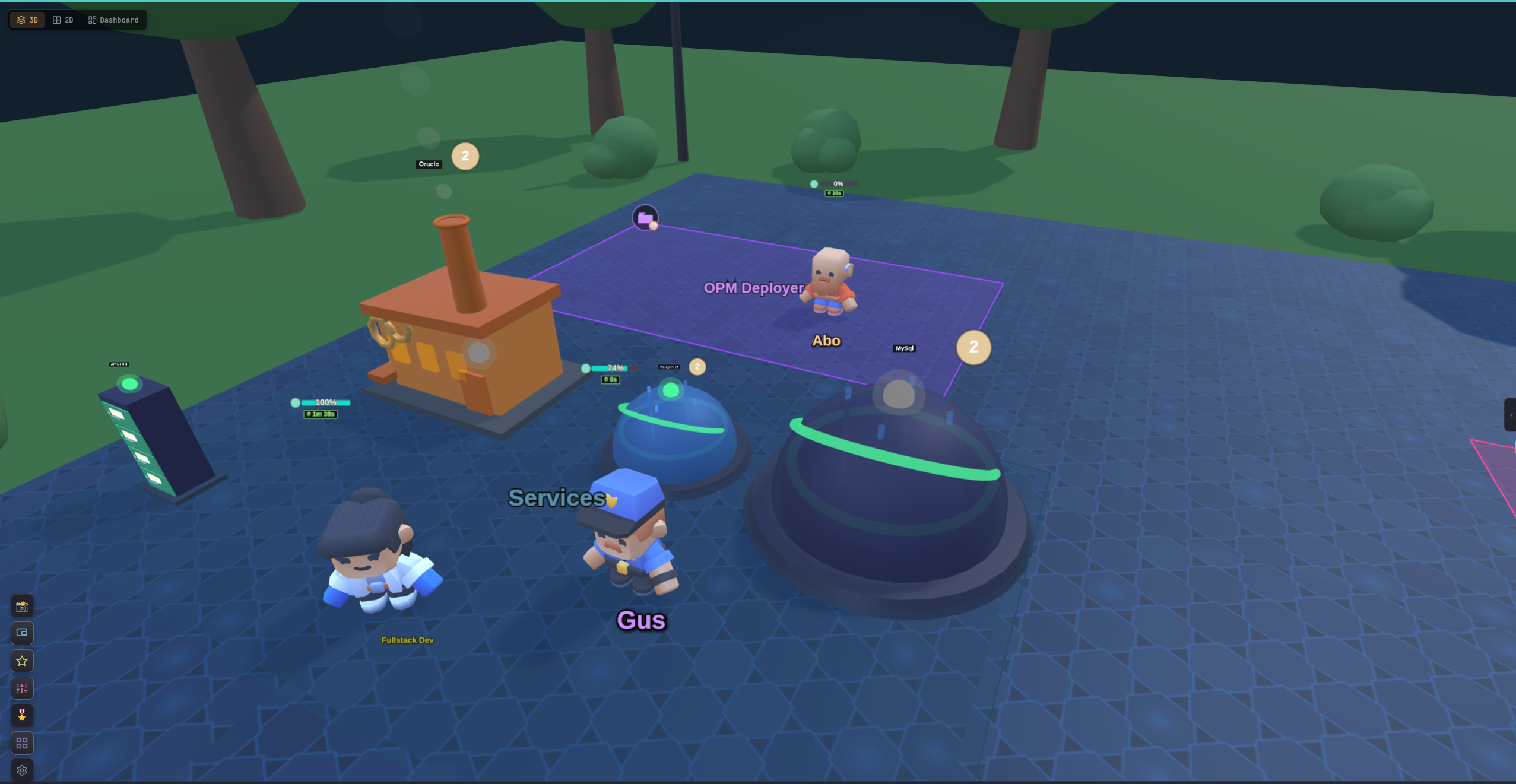
- **3D View** - Full Three.js battlefield with character models and post-processing (default)
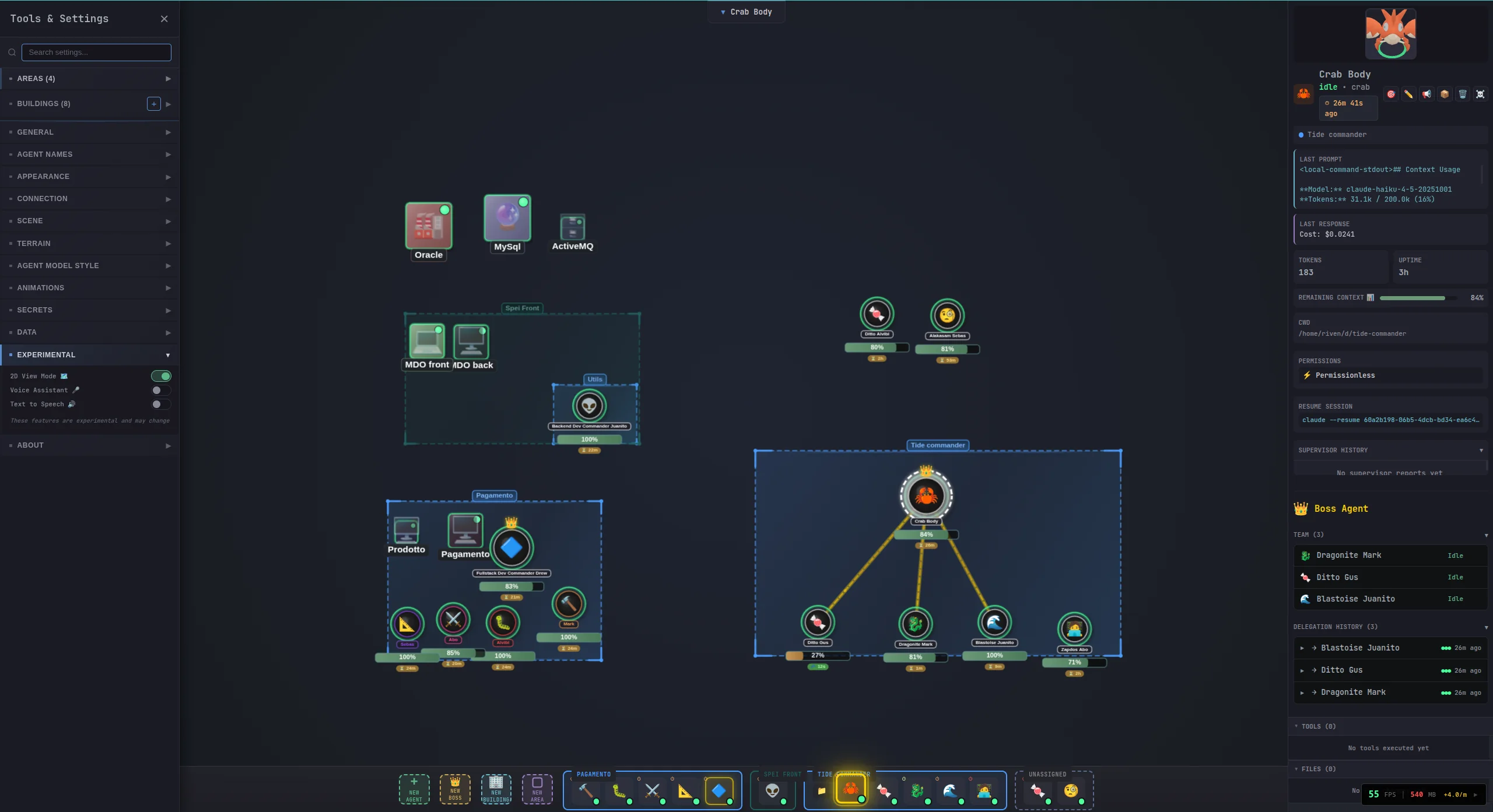
- **2D View** - Lightweight canvas-based rendering for better performance
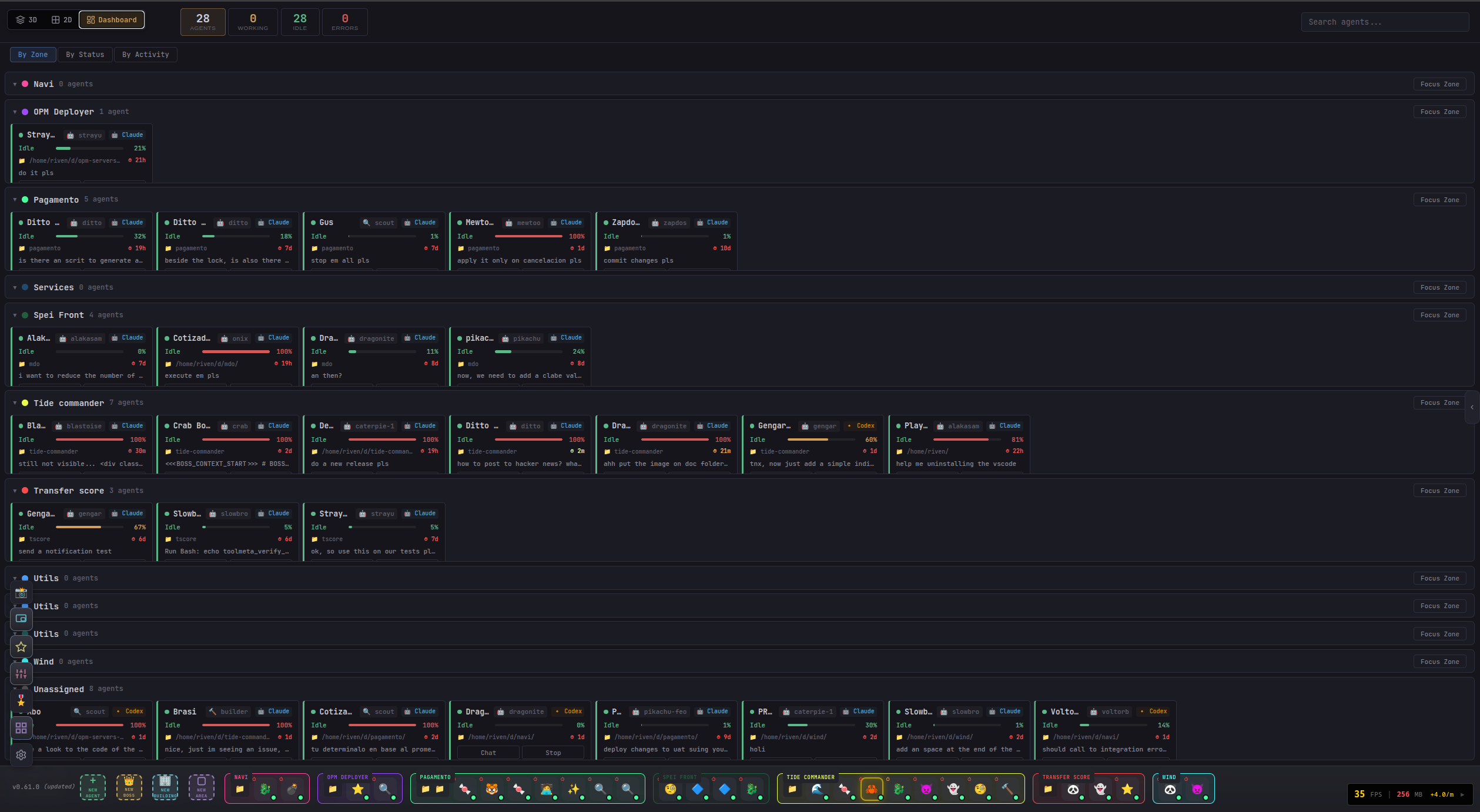
- **Dashboard** - Agent status cards, building overview, and metrics
- **Commander View** - Tactical command panel for agent coordination

### Spotlight Search
Press **Ctrl+K** (or Alt+P) to open the command palette. Search for agents by name, class, or current task. Jump to areas, find modified files across all agents, or trigger quick actions.
## ✨ Features
AI coding orchestration and multi-agent management features:
- 🎮 **3D Battlefield** - Visual command center with Three.js (also has a lightweight 2D canvas mode)
- 🎯 **RTS Controls** - Click to select, right-click to move, number keys for quick selection
- 📡 **Real-time Activity Feed** - Watch your agents work in real-time
- 🤹 **Multi-Agent Management** - Spawn and control multiple Claude/Codex/OpenCode instances simultaneously
- 💾 **Session Persistence** - Agents resume their Claude Code, Codex, or OpenCode sessions across restarts
- 📊 **Context Tracking** - Mana bar visualization showing agent context usage
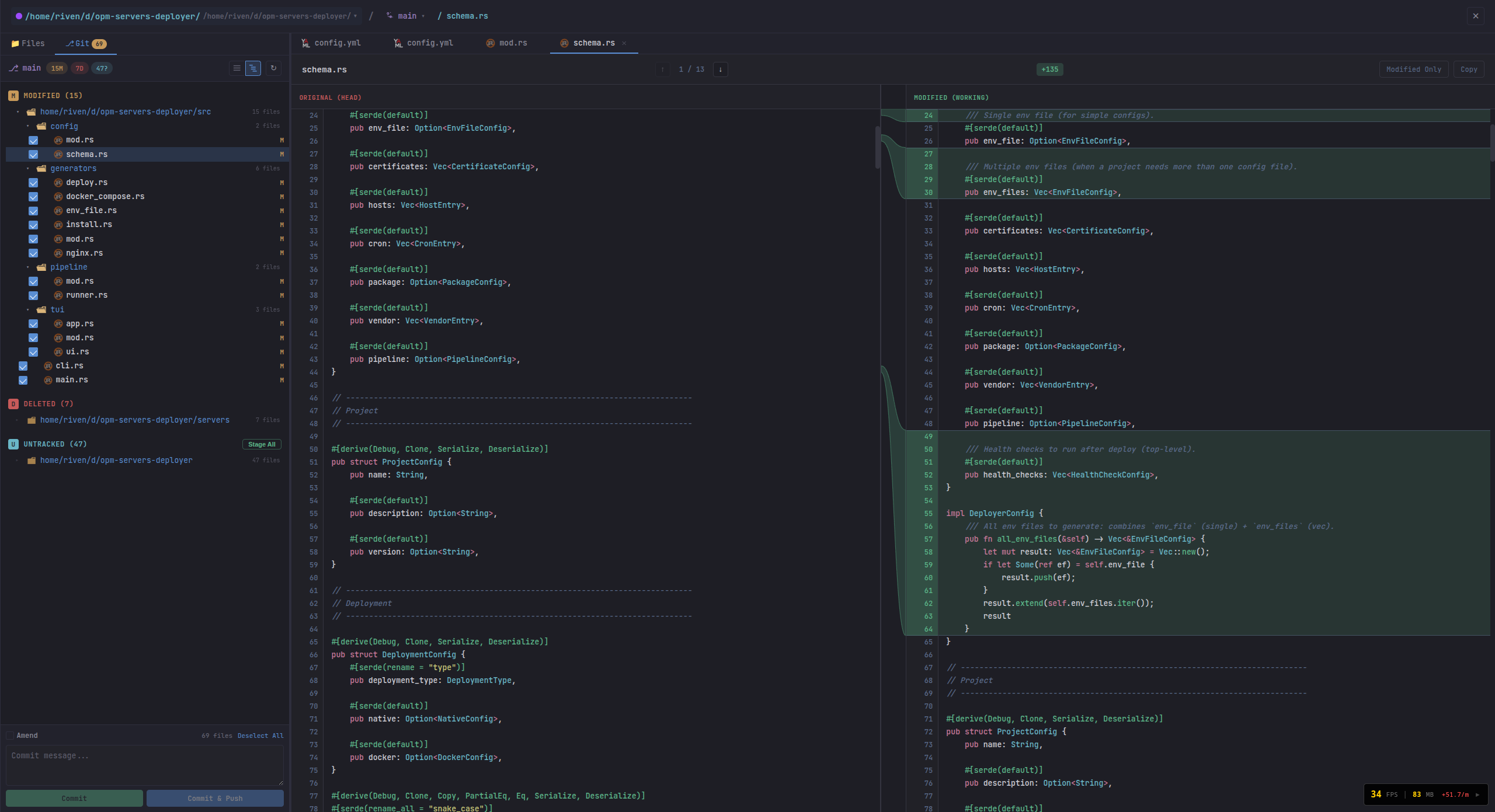
- 📁 **File Explorer** - Built-in file browser with git diff viewer for uncommitted changes
- 📋 **Large Text & Screenshot Paste** - Compact and send large content easily
- ⌨️ **Custom Hotkeys** - Configurable keyboard shortcuts
- 🔐 **Permission Control** - Permissionless or permission-enabled per agent
- 🎬 **Custom 3D Models** - Upload your own GLB models with animation mapping
- 🏗️ **Buildings** - Servers, databases, Docker containers, and links managed from the battlefield
- 🧩 **Skills System** - Built-in and custom skills assignable to agents or classes
- 📸 **Snapshots** - Save conversation history and modified files for later review or restore
- 🔑 **Secrets Management** - Secure storage with `{{PLACEHOLDER}}` injection into prompts
- 🔍 **Spotlight Search** - Command palette (Ctrl+K) to find agents, files, and actions
- 📺 **Commander View** - See all agent terminals at once in a grid, grouped by area
- 📊 **Dashboard View** - Agent status cards, building overview, and metrics
- 🖥️ **Guake Terminal** - Drop-down terminal overlay for agent conversations
- 🔎 **Inline File Inspection** - Click on files added or edited by the agent directly in the chat to view diffs and contents — no need to leave Commander or open an IDE
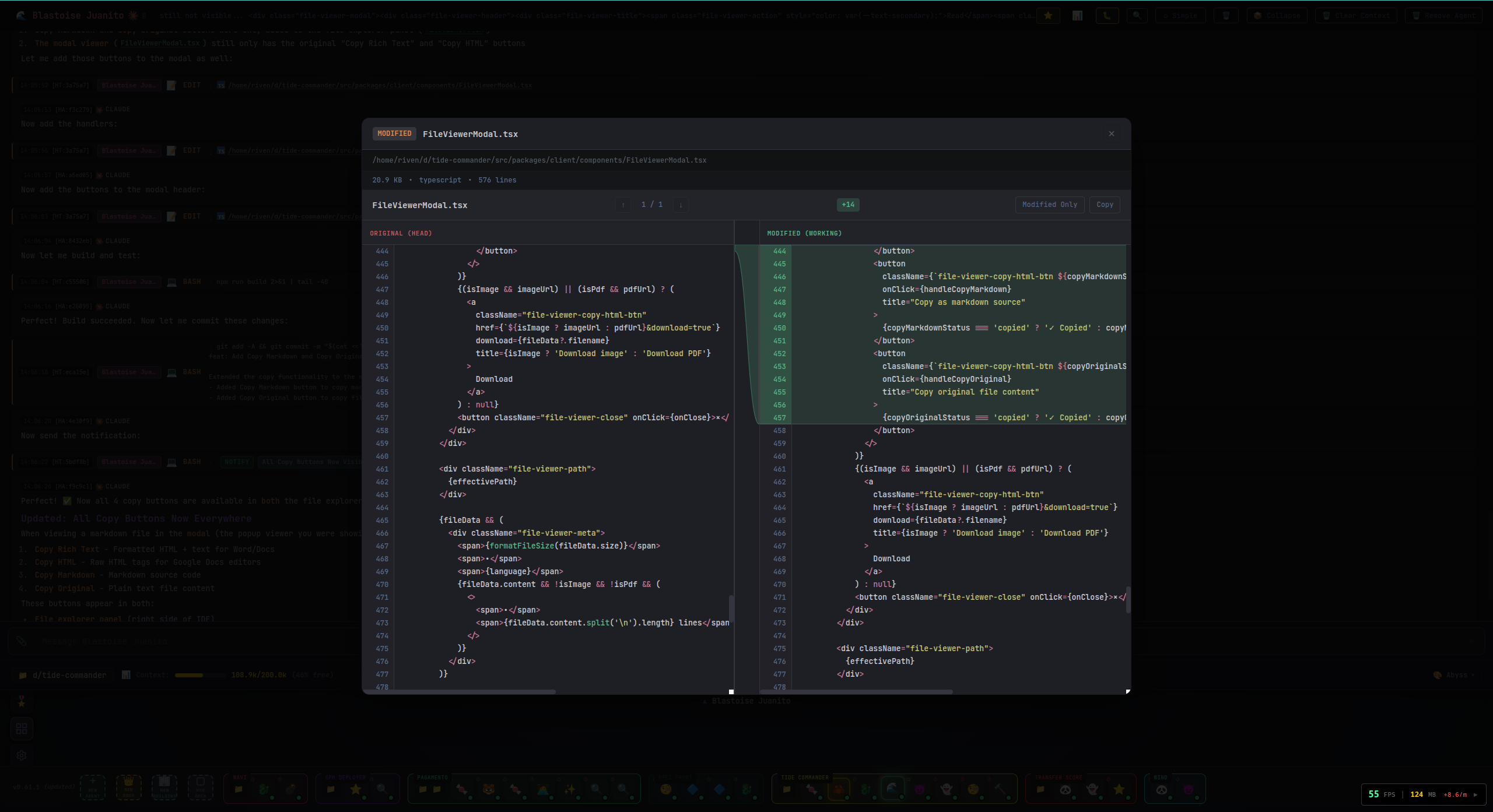
- 🌐 **Multiplayer** - WebSocket-based multi-user support
- 🌍 **Multilingual** - Full i18n support with 10 languages: English, Spanish, French, German, Italian, Portuguese, Russian, Chinese, Japanese, and Hindi
- 📱 **Mobile Compatible** - Works on mobile devices and Android (optional APK)
## 📲 Resume Anywhere
Your agent sessions are not tied to one machine. Start work on desktop, then reconnect and continue the same conversations from your phone, tablet, or any other computer with remote access to your Tide Commander server.
This makes it easy to keep tasks moving while you are away from your primary workstation.

## 📚 Documentation
Detailed guides for each feature are available in the [`docs/`](docs/) folder:
| Topic | Description |
|-------|-------------|
| [Buildings](docs/buildings.md) | Server, Database, Docker, and Boss building types with PM2 integration |
| [Custom Classes & 3D Models](docs/custom-classes.md) | Create custom agent classes with your own GLB models and animations |
| [Skills](docs/skills.md) | Built-in and custom skills, tool permissions, and assignment |
| [Snapshots](docs/snapshots.md) | Save and restore conversation history and file artifacts |
| [Secrets](docs/secrets.md) | Secure credential storage with placeholder injection |
| [Architecture](docs/architecture.md) | Runtime architecture, command flow, and incremental improvements |
| [REST API (OpenAPI)](docs/openapi.yaml) | Machine-readable OpenAPI 3.1 spec for `/api` HTTP routes |
| [WebSocket API (AsyncAPI)](docs/asyncapi.yaml) | Machine-readable AsyncAPI 2.6 spec for `/ws` message contracts |
| [Views & UI](docs/views.md) | 3D, 2D, Dashboard, Commander View, Guake terminal, and Spotlight |
| [Android APK](docs/android.md) | Build and install the optional mobile companion app |
| [Docker Deployment](docs/docker.md) | Run Tide Commander in a Docker container |
| [Contributing](CONTRIBUTING.md) | Setup, workflow, and pull request guidelines for contributors |
| [Security Policy](SECURITY.md) | Supported versions, vulnerability reporting, and disclosure process |
## 🎮 How to Use
1. **Deploy an agent** - Click the **+ New Agent** button ➕
2. **Configure it** - Give it a name and choose a working directory 📁
3. **Select it** - Click on the agent in the 3D view or press 1-9 👆
4. **Send commands** - Type your task in the command bar and press Enter ⌨️
5. **Watch it work** - The activity feed shows real-time progress 👀
6. **Send follow-ups** - Agents maintain context, so you can have ongoing conversations 💬
You can spawn multiple agents, each working in different directories or on different tasks. Switch between them by clicking or using number keys.
## ⌨️ Keyboard Shortcuts
| Key | Action |
|-----|--------|
| 1-9 | Select agent by index |
| Escape | Deselect / Close modal |
| Alt+N | Spawn new agent |
| Enter | Send command (when input focused) |
| Ctrl+K / Alt+P | Spotlight search |
| Alt+2 | Cycle view mode (3D / 2D / Dashboard) |
| Alt+S | Toggle sidebar |
| Alt+R | Toggle right panel |
| Alt+E | Toggle file explorer |
| Alt+J / Alt+K | Navigate messages in terminal |
| ` (backtick) | Toggle Guake terminal |
Shortcuts are fully customizable in Settings.
## 🔧 How It Works
### Overview
Tide Commander is a Claude Code, Codex, and OpenCode-compatible orchestrator that provides a visual interface for managing multiple AI coding CLI instances simultaneously. Each "agent" you spawn is a real CLI process running in the background, and you can send commands to them and watch their output in real-time.
### Core Components
**🖥️ Frontend (React + Three.js)**
- 3D battlefield where agents are visualized as characters
- WebSocket connection to receive real-time updates
- Command input for sending tasks to agents
- Activity feed showing what each agent is doing
**⚙️ Backend (Node.js + Express)**
- REST API for agent CRUD operations
- WebSocket server for real-time event streaming
- Process manager that spawns and controls Claude, Codex, and OpenCode CLI instances
**🤖 CLI Integration (Claude + Codex + OpenCode)**
- Claude agents run `claude` with `--output-format stream-json` and use stdin for follow-up messages
- Codex agents run `codex exec --experimental-json` and resume via session-based command args
- OpenCode agents run `opencode run --format json` for NDJSON streaming and resume via `-s `
- Events (tool usage, text output, errors) are parsed from stdout for all providers
- Sessions are persisted and can be resumed
- OpenCode reads `.claude/CLAUDE.md` natively (like Claude Code)
### Architecture
For Mermaid diagrams and deeper design notes, see [`docs/architecture.md`](docs/architecture.md).

### Data Storage
**Server State** is saved to `~/.local/share/tide-commander/`:
- `agents.json` - Agent configurations (name, position, session mapping, token usage)
- `areas.json` - Drawing areas synced from the frontend
- `buildings.json` - Building configurations and service definitions
- `skills.json` - Custom skill definitions
- `custom-agent-classes.json` - Custom agent class definitions
- `secrets.json` - Encrypted secrets storage
- `snapshots/` - Saved conversation snapshots with file captures
**Custom Models** are stored in `~/.tide-commander/custom-models/`
**Claude Conversations** are read from `~/.claude/projects/`:
- Claude Code stores session files as JSONL (one JSON object per line)
- Directory names encode the working directory path (e.g., `/home/user/project` → `-home-user-project`)
- Tide Commander reads these to resume sessions and display conversation history
## 🔐 Permission Modes
Agents can operate in two permission modes:
### Bypass Mode (Default)
Agents run with `--dangerously-skip-permissions`, allowing them to execute any tool (Bash, Edit, Write, etc.) without asking for approval. This is ideal for trusted, autonomous work.
### Interactive Mode
Agents require user approval for potentially dangerous operations. This mode uses a hook-based system:
#### Safe Tools (Auto-Approved)
These read-only tools are automatically approved without prompting:
- `Read`, `Glob`, `Grep` - File reading and searching
- `Task`, `TaskOutput` - Agent task management
- `WebFetch`, `WebSearch` - Web content fetching
- `TodoWrite` - Task list management
- `AskUserQuestion` - User interaction
- `EnterPlanMode`, `ExitPlanMode`, `Skill` - Planning tools
#### Dangerous Tools (Require Approval)
These tools prompt for user permission:
- `Bash` - Shell command execution
- `Edit`, `Write` - File modifications
- `NotebookEdit` - Jupyter notebook edits
#### Remembered Patterns
When approving a permission request, you can check "Remember this" to auto-approve similar future requests:
- **File operations**: Remembers the directory (e.g., approving `/project/src/file.ts` remembers `/project/src/`)
- **Bash commands**: Remembers the command prefix (e.g., approving `npm test` remembers `npm`)
Remembered patterns are stored in `~/.tide-commander/remembered-permissions.json` and can be cleared via the API or by deleting the file.
#### Setting Permission Mode
When spawning an agent, select the permission mode in the spawn dialog. You can also change it later by editing the agent configuration.
## ⚙️ Configuration
Configuration via environment variables (see `.env.example`):
| Variable | Default | Description |
|----------|---------|-------------|
| `PORT` | 5174 | Backend server port |
| `HOST` | `127.0.0.1` | Backend bind host |
| `VITE_PORT` | 5173 | Vite dev server port |
| `TIDE_SERVER` | `http://localhost:$PORT` | Server URL for hooks |
| `LISTEN_ALL_INTERFACES` | _(unset)_ | Set to `1` to listen on 0.0.0.0 instead of localhost |
| `AUTH_TOKEN` | _(unset)_ | Token for authenticating WebSocket and HTTP connections |
| `HTTPS` | _(unset)_ | Set to `1` to serve backend over HTTPS/WSS |
| `TLS_KEY_PATH` | `~/.tide-commander/certs/localhost-key.pem` | TLS private key path for backend HTTPS |
| `TLS_CERT_PATH` | `~/.tide-commander/certs/localhost.pem` | TLS certificate path for backend HTTPS |
| `DEV_HTTPS` | _(unset)_ | Set to `1` to run Vite dev server over HTTPS |
| `DEV_TLS_KEY_PATH` | _(unset)_ | TLS private key path for Vite dev HTTPS |
| `DEV_TLS_CERT_PATH` | _(unset)_ | TLS certificate path for Vite dev HTTPS |
## 🛠️ Development
```bash
# Run client only
bun run dev:client
# Run server only
bun run dev:server
# Run both concurrently
bun run dev
# Build for production
bun run build
```
## 🐳 Docker
```bash
docker build -t tide-commander .
docker run -p 5174:5174 \
-v ~/.local/share/tide-commander:/root/.local/share/tide-commander \
tide-commander
```
> Note: The Docker container needs at least one CLI (`claude`, `codex`, or `opencode`) accessible inside the container for agent processes to work.
## 📱 Android APK (Optional)
Tide Commander can be built as an Android app using Capacitor. The APK connects to your Tide Commander server over the local network, giving you a mobile remote control for your agents.
**Prerequisites:** Android SDK and Java 17+
```bash
# Build debug APK
make apk
# Or build release APK
make apk-release
# Build debug APK pointing to a live dev server
make dev-apk CAP_SERVER_URL=http://192.168.1.100:5173
```
The APK will be at `android/app/build/outputs/apk/debug/app-debug.apk`.
For non-dev APKs, make sure `CAP_SERVER_URL` is unset before building.
To configure which server the app connects to, set `LISTEN_ALL_INTERFACES=1` on your server and update the server URL in the app settings.
## 🐛 Troubleshooting
**Agent stuck in "working" status**
- The Claude process may have died unexpectedly
- Refresh the page - status sync runs on reconnect
- Check server logs for errors
**"Claude Code CLI not found"**
- Ensure `claude` is in your PATH
- Run `which claude` to verify installation
- For OpenCode agents, ensure `opencode` is in your PATH (`which opencode`)
**WebSocket disconnects**
- Check that the server is running (default port 6200, or your configured `PORT`)
- Look for CORS or firewall issues
## 💬 Community
Join the Discord to chat, share feedback, report bugs, or request features:
[](https://discord.gg/MymXXDCvf)
## 🗺️ Roadmap
Planned features and improvements — contributions and feedback welcome:
- [ ] **Test Coverage** — Unit, integration, and E2E tests (currently minimal)
- [x] **Multilingual Support** — i18n with 10 languages (EN, ES, FR, DE, IT, PT, RU, ZH, JA, HI)
- [x] **Codex Integration** — Compatible with OpenAI Codex CLI alongside Claude Code
- [x] **OpenCode Integration** — Compatible with OpenCode CLI as a third provider
- [ ] **Buildings Plugin System** — External plugin API for community-built building types
- [x] **API Documentation** — OpenAPI/Swagger spec for the REST and WebSocket APIs
- [ ] **Observability** — Error tracking, logging aggregation, and performance monitoring
Have a feature idea or found a bug? Open an [issue](https://github.com/your-repo/tide-commander/issues) or drop it in the [Discord](https://discord.gg/MymXXDCvf).
## 📄 License
MIT
Added a line.
Another line added.