https://github.com/demjhonsilver/mirax-player
Mirax Player is a free and open source video player for React, Vue, Angular, and Svelte.
https://github.com/demjhonsilver/mirax-player
angular javascipt javascript-framework javascript-library react svelte video-player-application video-player-library vue
Last synced: about 1 year ago
JSON representation
Mirax Player is a free and open source video player for React, Vue, Angular, and Svelte.
- Host: GitHub
- URL: https://github.com/demjhonsilver/mirax-player
- Owner: demjhonsilver
- License: other
- Created: 2023-08-24T03:09:45.000Z (almost 3 years ago)
- Default Branch: main
- Last Pushed: 2024-09-08T12:27:45.000Z (almost 2 years ago)
- Last Synced: 2024-11-03T09:45:55.940Z (over 1 year ago)
- Topics: angular, javascipt, javascript-framework, javascript-library, react, svelte, video-player-application, video-player-library, vue
- Language: JavaScript
- Homepage: https://www.npmjs.com/package/mirax-player
- Size: 19.1 MB
- Stars: 3
- Watchers: 0
- Forks: 1
- Open Issues: 0
-
Metadata Files:
- Readme: README.md
- Contributing: CONTRIBUTING.md
- License: LICENSE.md
- Code of conduct: CODE_OF_CONDUCT.md
Awesome Lists containing this project
README

# Mirax Player
[](https://www.npmjs.com/package/mirax-player)


[](https://github.com/demjhonsilver/mirax-player/blob/main/LICENSE.md)
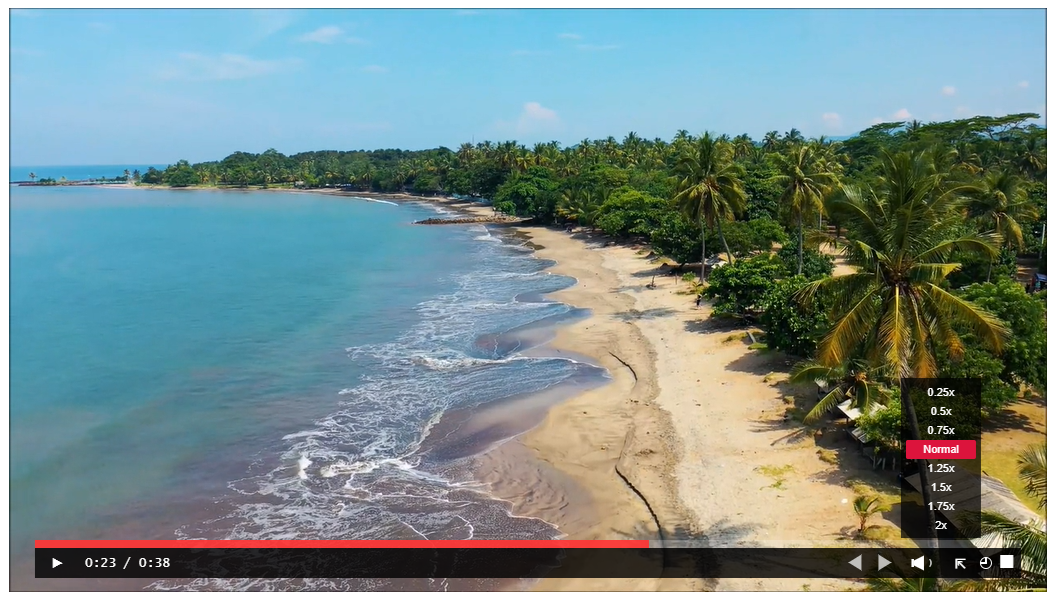
---------------------
## Table of Contents
- [Description](#description)
- [Release Notes](#release-notes)
- [Features](#features)
- [Installation](#installation)
- [TypeScript](#typescript)
- [React](#react)
- [Vue](#vue)
- [Angular](#angular)
- [Svelte](#svelte)
- [Video Player](#video-player)
- [CSS Player](#css-player)
- [Colors](#colors)
- [License](#license)
- [Author](#author)
## Description
Mirax Player is a free video player for React, Vue, Angular, and Svelte.
Frameworks / Libraries | Tested versions
------ | -------- |
 | 18 & above
 | 3 & above
 | 16 & above
 | 3 & above
-----
## Release-notes
Version 7.0.0
Major Changes:
- The Mirax video player remains the focus as the media player service, although you can still change the color.
- The buttons for forward, backward, and play have been changed into simple shapes.
- The player button moves to the left side.
- The embed feature has been removed and transferred to another package named `Embedrax`.
[Embedrax - embed videos](https://github.com/demjhonsilver/embedrax)
Minor Changes:
v7.1.0
- Remap the spacebar to function as the play button.
Patch Changes:
v7.0.1
- Just adjusted the arrow icons to be more responsive.
v7.1.1
- The forward and backward buttons decrease the size.
- The progress bar has a translucent line.
## Features
- Easy to use and responsive.
- Can change the color of the video player.
- The width can be set to a minimum of 370 and a maximum of 1038.
-------------
## Installation
To install the Mirax Player, you can use the following npm command:
```bash
npm install mirax-player
```
## TypeScript

- located at repository files
```html
mirax-player/
|-- src/
| |-- angular/
| |-- react/TypeScriptPlayer.md
| |-- svelte/TypeScriptPlayer.md
| |-- vue/TypeScriptPlayer.md
```
--------
Reminder:
- Don't forget to restart your server.
------------
## Video-player
Player Attributes | Functionality |Type | Required |
------ | -------- | ----------- | ----------
`player-selector` | responsiveness | any| yes
`data-player-width` | dynamic width | number | yes
`data-player-float` | dynamic alignment | string |optional
`data-player-theme` | player color | any | optional
`data-player-bar` | progress bar color | any | optional
-------
Keyboard shortcuts| Functions | Description
---- | ---------------------- | -----------
press `space bar` | Play & Pause |The video will play or pause
press `alt+p` | PiP | Picture in Picture screen
press `left arrow key` | rewind clip | backward for 10 sec.
press `right arrow key` | advance clip | forward for 10 sec.
-------------
- location of videos stored:
public/clip.mp4 from your frameworks
assets/clip.mp4 -Angular
example.com/video/clip.mp4 (url)
----------------------
# React
```js
import { useEffect, useRef } from "react";
import { miraxPlayer } from 'mirax-player';
export const ExampleComponent = () => {
const playerDiv = useRef(null);
useEffect(() => {
miraxPlayer(playerDiv.current);
});
return (
<>
>
);
};
```
or
```js
import { useEffect, useRef } from "react";
import { miraxPlayer } from 'mirax-player';
const ExampleComponent = () => {
const playerDiv = useRef(null);
useEffect(() => {
miraxPlayer(playerDiv.current);
});
return (
<>
>
);
};
export default ExampleComponent
```
# Vue
```js
import { ref, onMounted } from "vue";
import { miraxPlayer } from 'mirax-player';
export default {
setup() {
const playerDiv = ref(null);
onMounted(() => {
miraxPlayer(playerDiv.value);
});
return {
playerDiv
};
}
};
```
# Angular
---------
example.component.ts
-----------
```ts
import { Component, ElementRef, ViewChild, AfterViewInit } from '@angular/core';
import { miraxPlayer } from 'mirax-player';
@Component({
selector: 'app-example',
templateUrl: './example.component.html',
styleUrls: ['./example.component.css']
})
export class ExampleComponent implements AfterViewInit {
@ViewChild('playerDiv', { static: true }) playerDiv!: ElementRef;
ngAfterViewInit(): void {
this.initializemiraxPlayer();
}
initializemiraxPlayer() {
miraxPlayer(this.playerDiv.nativeElement);
}
}
```
example.component.html
-------------
```html
```
# Svelte
```js
import { onMount } from 'svelte';
import { miraxPlayer } from 'mirax-player';
let playerDiv;
onMount(() => {
miraxPlayer(playerDiv);
});
```
## CSS-player
example:
```js
```
## To choose from many colors:
you can simply search on Google. Just type:
`html color hex codes`
`html color hex palette`
or
`html color rgba codes`
`html color rgba palette`
and copy it.
- Left
```js
data-player-float="left"
```
- Center
```js
data-player-float="" // center is default
//or
data-player-float="center"
```
- Right
```js
data-player-float="right"
```
-----
Examples:
---------
```js
data-player-theme="rgba(250, 149, 35, 0.9)"
data-player-bar="rgba(17, 117, 59, 0.9)"
```
```js
data-player-theme="rgb(0,0,0)"
data-player-bar="rgb(255, 255, 255)"
```
```js
data-player-theme="#000000"
data-player-bar="#00ff00"
```
```js
data-player-theme="black"
data-player-bar="red"
```
If you want pure transparent:
---------
```js
data-player-theme = "rgba(0, 0, 0, 0)"
```
## Colors
Color Types | Color syntax | Example | Opacity Range | Appearance
---------- | --------- | ---------------- | -------------------- | ---------------
`RGBA` | rgba() | rgba(255,0,0, 0.5) | `0.1 to 0.9` or `0 and 1` | Red half transparency
`RGB` |rgb() | rgb(255, 0, 0) | `none` | Red
`HEX` | #6digits | #ff0000| `none` | Red
`COLORNAME` | colorname | red | `none` | Red
----------------------------------------------------
## License
[MIT](http://www.opensource.org/licenses/MIT)
- This library package is FREE for commercial or personal use. ❤️
----------------------------------------------------
## Author
Demjhon Silver
- Thank you for your support. 😃