https://github.com/deniskorbakov/skeleton-cli-go
🦴 This template is for creating TUI CLI on Go
https://github.com/deniskorbakov/skeleton-cli-go
cli go skeleton template tui
Last synced: 5 months ago
JSON representation
🦴 This template is for creating TUI CLI on Go
- Host: GitHub
- URL: https://github.com/deniskorbakov/skeleton-cli-go
- Owner: deniskorbakov
- License: mit
- Created: 2025-10-01T19:16:00.000Z (9 months ago)
- Default Branch: main
- Last Pushed: 2025-12-04T15:41:57.000Z (7 months ago)
- Last Synced: 2025-12-07T23:49:13.610Z (7 months ago)
- Topics: cli, go, skeleton, template, tui
- Language: Go
- Homepage:
- Size: 110 KB
- Stars: 10
- Watchers: 1
- Forks: 0
- Open Issues: 1
-
Metadata Files:
- Readme: README.md
- License: LICENSE
Awesome Lists containing this project
README
# Skeleton CLI GO


A template for creating console applications on go using TUI
Made using data from packages:
* [Cobra](https://github.com/spf13/cobra) - Library for creating powerful modern CLI applications
* [Fang](http://github.com/charmbracelet/fang) - The CLI starter kit
* [Huh](https://github.com/charmbracelet/huh) - A simple interactive forms and prompts in the terminal
What do you get:

## ✨ Install
clone the repository
```bash
git clone https://github.com/deniskorbakov/skeleton-cli-go.git
````
go to the project folder
```bash
cd skeleton-cli-go
````
build the app
```bash
make build
```
launch the app
```bash
./cli
```
## 📖 Examples & Usage
### ↘️ Replace
In order to reuse the project for your application, you need to replace the following items
Change the path to the cli to the name of your utility `cmd/cli` -> `cmd/your_name_cli`
In the `.goreleaser.yaml` file, you need to change the name of the `cli` to your utility
```yaml
version: 2
env:
- GO111MODULE=on
project_name: your_name_cli
```
Change the application name in the `Makefile`
```makefile
build:
go mod vendor
go build -ldflags "-w -s" -o your_name_cli cmd/your_name_cli/main.go
```
Change the application description in the root command - `configs/constname/root.go`
### ⌨️ Command
Commands are created in the directory - `internal/command`
We are creating a file based on the example of the file - `internal/command/example.go`
After creation, add the command to `internal/command/root.go`
```go
package command
func Run() {
// Other code
cmd.AddCommand(
exampleCmd,
// Add new comments here
)
}
```
### ⚙️ Configs
`configs/constname` - This directory contains files for the names of commands, their descriptions, etc.
You can add or change team data in this space
### 🗯️ Components
The components use [huh](https://github.com/charmbracelet/huh)
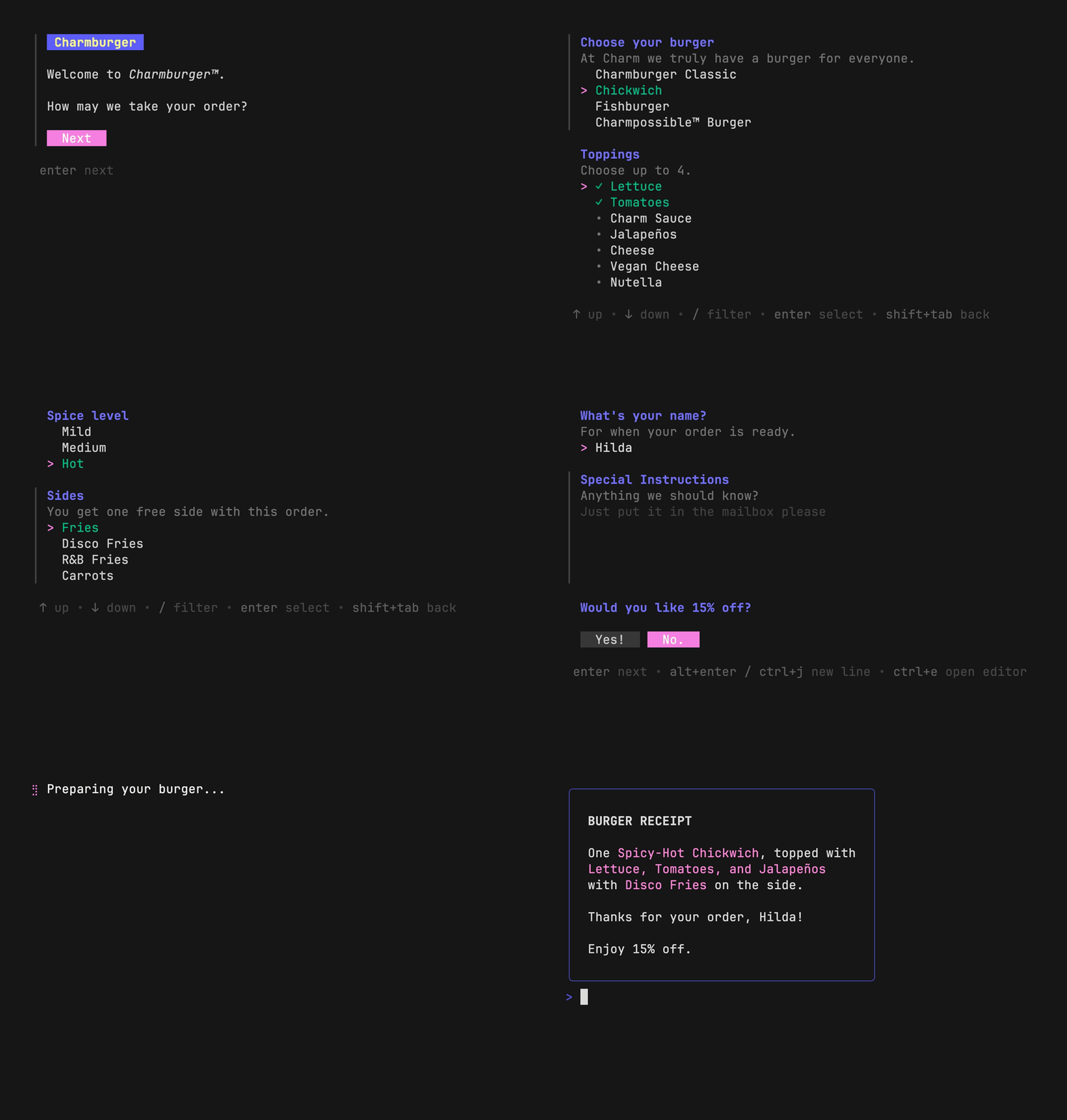
The components in the application are located here - `internal/component`
These components can be either a form or a separate element of it - further logic depends on your needs
I described the standard example in the file - `internal/component/form`
We divide the logic into the form itself and what it outputs in a separate structure with fields that it returns
The application also uses the `internal/component/output/output.go` component. It is designed to display text in
different colors
### 🗒️ Version
The app receives the version during the build using [Goreleaser](https://goreleaser.com/)
The version that you specified in the repository when creating the new release will be installed
### 📝 Release
The release is being assembled with the help of [Goreleaser](https://goreleaser.com/)
You can see exactly what is going on here - `.goreleaser.yaml`
### ✍️ Lint
the project has golangci-lint which adjusts your code
to launch it, specify - `make lint`
### 👻 GitHub Actions
Jobs are configured here to check the quality of the code through lint and also add binary files of your application for
different OS
In order for the job release to work, you need to specify the GH token in the certificates of your project
The secret should be called - `GO_RELEASER`
## 🤝 Feedback
We appreciate your support and look forward to making our product even better with your help!
[@Denis Korbakov](https://github.com/deniskorbakov)