https://github.com/denmrnngp-cloud/hiddify-steam-deck
Steam Deck port of Hiddify VPN — self-extracting installer + Decky Game Mode plugin. Fork of hiddify/hiddify-app.
https://github.com/denmrnngp-cloud/hiddify-steam-deck
clashmeta decky-loader gaming hiddify hysteria2 linux proxy reality shadowsocks shadowtls sing-box steam-deck steamos tuic v2ray vless vmess vpn wireguard xray
Last synced: 3 months ago
JSON representation
Steam Deck port of Hiddify VPN — self-extracting installer + Decky Game Mode plugin. Fork of hiddify/hiddify-app.
- Host: GitHub
- URL: https://github.com/denmrnngp-cloud/hiddify-steam-deck
- Owner: denmrnngp-cloud
- Created: 2026-03-21T18:03:55.000Z (5 months ago)
- Default Branch: main
- Last Pushed: 2026-04-11T17:03:57.000Z (4 months ago)
- Last Synced: 2026-04-11T19:27:45.355Z (4 months ago)
- Topics: clashmeta, decky-loader, gaming, hiddify, hysteria2, linux, proxy, reality, shadowsocks, shadowtls, sing-box, steam-deck, steamos, tuic, v2ray, vless, vmess, vpn, wireguard, xray
- Language: Python
- Size: 310 MB
- Stars: 2
- Watchers: 0
- Forks: 0
- Open Issues: 0
-
Metadata Files:
- Readme: README.md
Awesome Lists containing this project
README
# Hiddify VPN — Steam Deck Port
> **Unofficial Steam Deck port of [hiddify/hiddify-app](https://github.com/hiddify/hiddify-app)**
> Powered by [sing-box](https://github.com/SagerNet/sing-box) · Supports VLESS/Reality, VMess, Trojan, Hysteria 2, TUIC, Shadowsocks
[](https://github.com/hiddify/hiddify-app)
[](https://store.steampowered.com/steamdeck)
[](https://decky.xyz)
Full port of [Hiddify](https://github.com/hiddify/hiddify-app) for Steam Deck / SteamOS.
Works in Desktop Mode and Game Mode (via Decky plugin).
## Demo
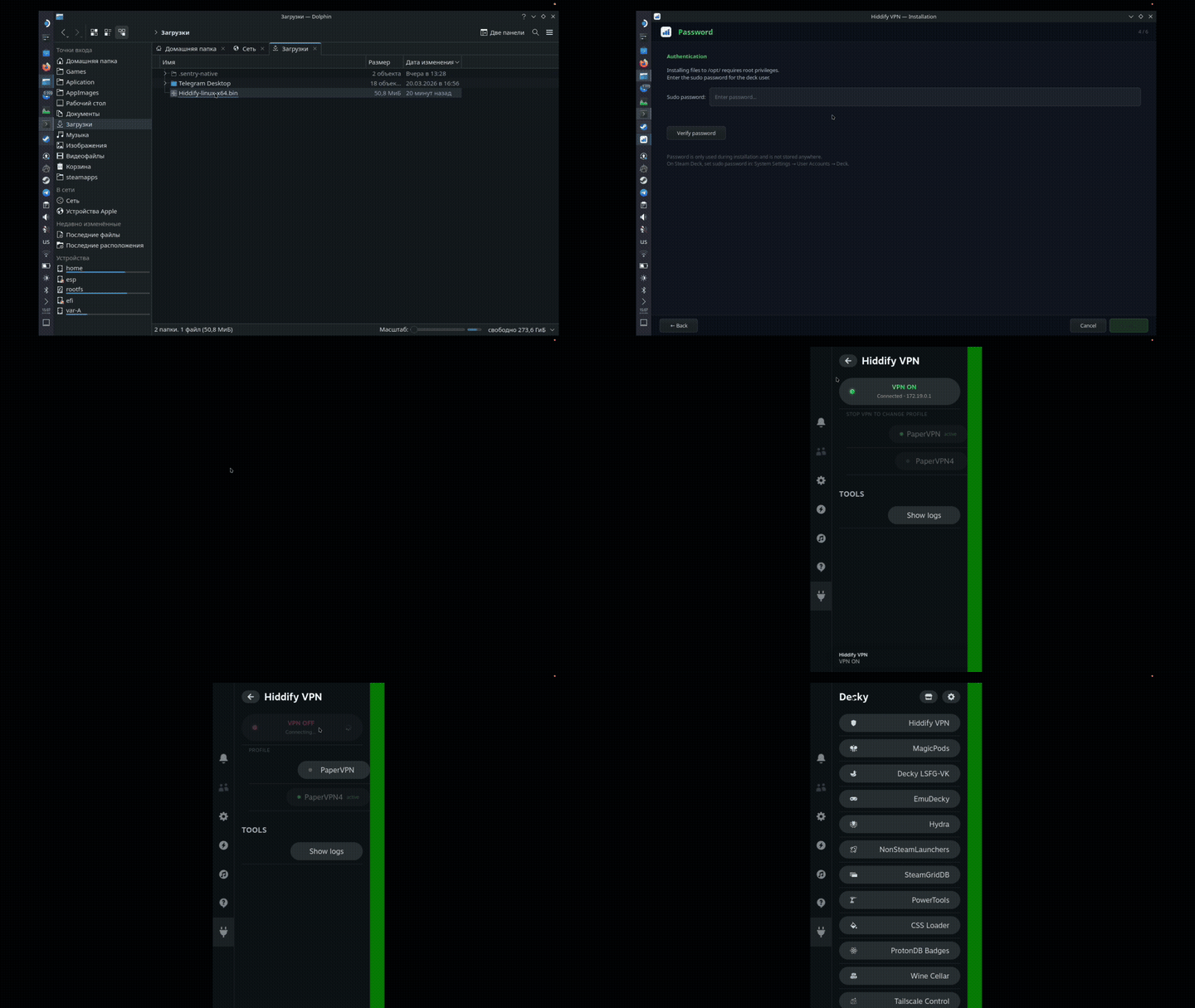
▶ [Download / watch full demo (mp4)](https://github.com/denmrnngp-cloud/hiddify-steam-deck/releases/download/v1.2.0/demo.mp4)
---
## Release Contents
| File | Description |
|------|-------------|
| `Hiddify-linux-x64.bin` | Self-extracting installer (~51 MB) |
| `decky-hiddify-v1.2.0.zip` | Decky plugin for Game Mode VPN control |
| `installer-src/` | Installer source (install.sh + all bundled files) |
---
## Requirements
- Steam Deck (SteamOS) or Ubuntu 22.04+ / Debian 12+
- Architecture: x86-64 (amd64)
- For Game Mode: [Decky Loader](https://decky.xyz/) installed
---
## Installation
### 1. Download the installer
Copy `Hiddify-linux-x64.bin` to your Steam Deck (e.g. `~/Downloads/`).
### 2. Run in Desktop Mode
Open **Konsole** and run:
```bash
bash ~/Downloads/Hiddify-linux-x64.bin
```
The installer automatically:
- Detects Steam Deck and applies the correct mode
- Installs all files to `/opt/hiddify/`
- Applies `patchelf` (absolute RPATH — works from any directory)
- Applies `setcap cap_net_admin` (TUN creation without root at runtime)
- Configures passwordless sudo for HiddifyCli
- Configures polkit rules (no password prompts for DNS/route changes)
- Creates a systemd user service
- Adds a desktop shortcut (Internet category)
- Sets the application icon
### 3. Configure a VPN profile
Launch the GUI from the menu or directly:
```bash
/opt/hiddify/hiddify-gui
```
Add a VPN configuration (subscription link or manual).
Config is saved to:
```
~/.local/share/app.hiddify.com/data/current-config.json
```
### 4. Install the Decky plugin (optional)
For VPN control from Game Mode (the `···` button):
```bash
# Copy decky-hiddify-v1.2.0.zip to Steam Deck, then:
sudo unzip -o decky-hiddify-v1.2.0.zip -d /home/deck/homebrew/plugins/
sudo systemctl restart plugin_loader
```
---
## Uninstall
Run the installer again — a menu will appear:
```
Hiddify is already installed in /opt/hiddify
[1] Reinstall (update)
[2] Uninstall completely
[3] Cancel
```
Select `2` to uninstall. Removes:
- `/opt/hiddify/`
- systemd user service
- desktop shortcut and icon from `~/.local/share/`
---
## VPN Control from Terminal
```bash
# Start VPN
systemctl --user start hiddify
# Stop VPN
systemctl --user stop hiddify
# Status
systemctl --user status hiddify
# Live logs
journalctl --user -u hiddify -f
```
---
## Technical Details
### `/opt/hiddify/` Structure
```
/opt/hiddify/
├── hiddify # Flutter GUI (setcap + absolute RUNPATH)
├── HiddifyCli # VPN core (setcap + absolute RUNPATH)
├── hiddify-gui # Wrapper script for desktop shortcut
├── hiddify.png # Application icon
├── _tools/
│ └── patchelf # Static patchelf (bundled)
├── lib/
│ ├── hiddify-core.so # sing-box core
│ ├── libflutter_linux_gtk.so # Flutter runtime
│ ├── libayatana-appindicator3.so.1 # System tray (bundled)
│ ├── libayatana-ido3-0.4.so.0 # System tray dep (bundled)
│ ├── libayatana-indicator3.so.7 # System tray dep (bundled)
│ └── ... (other Flutter plugin .so files)
└── data/
└── flutter_assets/ # Flutter assets, flag icons, fonts
```
### Key Port Fixes
| Problem | Solution |
|---------|----------|
| `./lib/hiddify-core.so not found` from foreign CWD | `patchelf --replace-needed` + `--set-rpath /opt/hiddify/lib` |
| `libayatana-appindicator3.so.1 not found` on SteamOS | Bundled from Ubuntu 22.04, patchelf on `libtray_manager_plugin.so` |
| `operation not permitted` creating TUN | `setcap cap_net_admin,cap_net_bind_service,cap_net_raw=+eip` on both binaries |
| `cache.db: permission denied` | CWD = `~/.local/share/app.hiddify.com` (user-writable) |
| Caps reset after patchelf | setcap applied strictly **after** patchelf |
| systemd user service on SteamOS | User service in `~/.config/systemd/user/` (survives OS updates) |
| `LD_LIBRARY_PATH` ignored with setcap | Absolute RUNPATH via patchelf instead of `LD_LIBRARY_PATH` |
| Sudo password prompt on every VPN toggle | `/etc/sudoers.d/zz-deck-nopasswd` with `NOPASSWD: ALL` (named `zz-*` to override `wheel` file alphabetically) |
| SteamOS A/B update resets `/etc/` and `/usr/` | Plugin tries to re-apply on load; installer handles it during reinstall |
| `pkill` killing plugin itself | Bracket trick: `pkill -f '/opt/hiddify/hiddif[y]'` — won't match plugin path |
| `systemctl --user` failing in plugin subprocess | Set `DBUS_SESSION_BUS_ADDRESS=unix:path=/run/user/1000/bus` + `XDG_RUNTIME_DIR=/run/user/1000` |
| Hiddify GUI VPN not stopped by plugin | Stop `app-hiddify@.service` by querying `systemctl list-units` for exact unit name |
### Why Installation Survives SteamOS Updates
SteamOS updates via A/B partition swap — only the read-only partition (`/usr`, `/etc`) changes.
The installer writes exclusively to:
- `/opt/hiddify/` — mounted from the `/home` partition (persistent)
- `~/.config/systemd/user/` — home directory (persistent)
- `~/.local/share/` — home directory (persistent)
`setcap` is stored as an xattr on the file in `/opt/hiddify/` — also persistent.
### Manual VPN Start
```bash
cd ~/.local/share/app.hiddify.com
/opt/hiddify/HiddifyCli run \
-c ~/.local/share/app.hiddify.com/data/current-config.json \
--tun
```
---
## Decky Plugin (v1.2.0)
The `decky-hiddify` plugin adds VPN control to Quick Access Menu (the `···` button).
### Features
- **VPN ON / OFF toggle** — button with colored status dot (green = connected, yellow = connecting, red = off)
- **Profile selector** — switch between VPN profiles without leaving Game Mode (VPN must be stopped first)
- Connection status with TUN IP address display
- Syncs with Hiddify GUI (stopping VPN from plugin also stops GUI-managed VPN via systemd unit)
- Background monitor with push events on VPN state changes (polls every 5 s)
- Log viewer (last 40 lines)
- Error boundary — render errors shown in UI instead of crashing the plugin
### Plugin Architecture
```
decky-hiddify/
├── main.py # Backend (Python): HiddifyCli subprocess + profile management
└── src/
└── index.tsx # Frontend (React/TSX): panel UI
```
**Profile switching** reads profiles from `~/.local/share/app.hiddify.com/db.sqlite`
and regenerates `current-config.json` via `HiddifyCli build` from the selected
profile config. This keeps balancer/selector/endpoints handling aligned with the
desktop client. VPN must be stopped before switching.
**GUI sync**: when stopping VPN from the plugin, it queries `systemctl --user list-units 'app-hiddify@*.service'`
to get the exact transient unit name, then stops it. Also sends `SIGTERM` to the `hiddify` GUI process directly.
---
## Build from Source
### Installer
Three large upstream binaries are **not** included in this repo. Download them from the
[Hiddify release](https://github.com/hiddify/hiddify-app/releases) and place into `release/installer-src/lib/`:
| File | Size | Source |
|------|------|--------|
| `lib/hiddify-core.so` | ~70 MB | Hiddify release (sing-box core) |
| `lib/libflutter_linux_gtk.so` | ~32 MB | Hiddify release (Flutter runtime) |
| `lib/libapp.so` | ~15 MB | Hiddify release (Flutter app) |
Then rebuild the self-extracting installer:
```bash
makeself --nox11 release/installer-src/ Hiddify-linux-x64.bin "Hiddify VPN" bash setup.sh
```
### Decky Plugin
```bash
cd decky-hiddify/
npm install
npm run build
# Output: dist/ — copy to Steam Deck at ~/homebrew/plugins/decky-hiddify/
```
---
---
## Home Assistant Add-on
This repo also contains a **Home Assistant add-on** that runs Hiddify VPN (sing-box) on your HA host — routing all HA traffic through VPN.
Source: [`ha-addon/`](ha-addon/)
### Features
- Routes **all** public traffic through VPN (TUN mode with sing-box 1.13)
- Local LAN / HomeKit / Tuya / mDNS bypass TUN automatically (`route_exclude_address`)
- Supports VLESS · VLESS+Reality · VMess · Trojan · Shadowsocks · Hysteria2 · TUIC
- HA sensors: `sensor.hiddify_status`, `sensor.hiddify_ip`, `sensor.hiddify_profile`
- Subscription URL or direct proxy URL
### Install in Home Assistant
1. **Settings → Add-ons → Add-on Store → ⋮ → Repositories**
2. Add: `https://github.com/denmrnngp-cloud/hiddify-steam-deck`
3. Install **Hiddify VPN**, set `subscription_url` in Configuration, start
### Add-on Structure
```
ha-addon/
├── repository.yaml # HA addon repository manifest
└── hiddify/
├── config.yaml # Add-on manifest (options, ports, capabilities)
├── Dockerfile # sing-box 1.13.3 on Alpine
├── run.sh # Entrypoint: parse sub → start sing-box → monitor
├── parse_sub.py # Subscription parser → sing-box JSON config
├── grpc_ctl.py # gRPC helper (hiddify-core control)
└── DOCS.md # User-facing documentation
```
### Routing Architecture
```
Public internet traffic
└── TUN (tun0) → sing-box proxy → VPN server → internet
Private / multicast (route_exclude_address)
└── bypass TUN → direct (LAN, HomeKit, Tuya, mDNS work normally)
```
---
## Sources
- Hiddify App: https://github.com/hiddify/hiddify-app
- Decky Loader: https://github.com/SteamDeckHomebrew/decky-loader
- sing-box (hiddify-core): https://github.com/SagerNet/sing-box