An open API service indexing awesome lists of open source software.

https://github.com/dennyzhang/challenges-chef

:book: Challenges Your Chef Skills By Solving Real Questions.
https://github.com/dennyzhang/challenges-chef

chef configuration-management denny-challenges devops study-project

Last synced: 6 months ago
JSON representation

:book: Challenges Your Chef Skills By Solving Real Questions.

Awesome Lists containing this project

README


* Summary
#+BEGIN_HTML
linkedin
github
slack


PRs Welcome
#+END_HTML
* CheatSheet
File me [[https://github.com/DennyZhang/cheatsheet-kubernetes-A4/issues][Issues]] or star [[https://github.com/DennyZhang/cheatsheet-kubernetes-A4][this repo]].

See more challenges from Denny: [[https://github.com/topics/denny-challenges][#denny-challenges]]

** Scenario-101: Chef HelloWorld I
- Objective: Create a dummy cookbook, and test deployment in docker
- Requirements:
#+BEGIN_EXAMPLE
1. Use docker container to start a env with chef pre-installed
2. Create a dummy cookbook and apply it
#+END_EXAMPLE

- See more: [[Scenario-101][Scenario-101]]

** Scenario-102: Chef HelloWorld II
- Objective: Pure VM deployment
- Requirements:
#+BEGIN_EXAMPLE
1. Start a VM, install chef facility
2. Create a dummy cookbook to install jq package
3. Before install jq, run "apt-get update" by chef. So you need berkshelf.
4. Enforce rubocop and foodcritic for code static check
#+END_EXAMPLE

- See more: [[Scenario-102][Scenario-102]]

** Scenario-103: Chef HelloWorld III
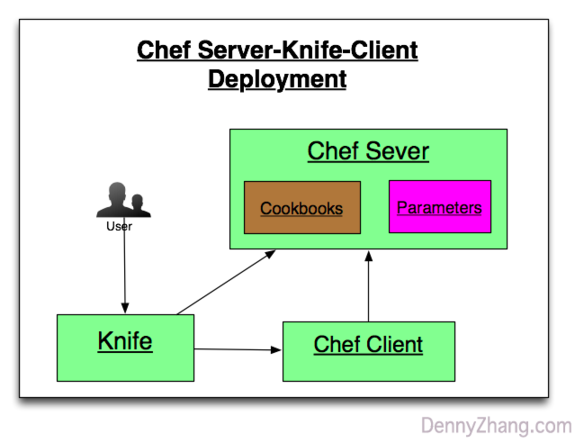
- Objective: Setup chef server and chef client
- Requirements:
#+BEGIN_EXAMPLE
1. Start 3 containers to run chef server, knife workstation and chef client
2. Install and configure knife
3. From knife node run chef deployment in chef client node
#+END_EXAMPLE

#+BEGIN_HTML
#+END_HTML
- See more: [[Scenario-103][Scenario-103]]
- TODO

** Scenario-201: Enforce TDD For Your Chef Cookbooks I
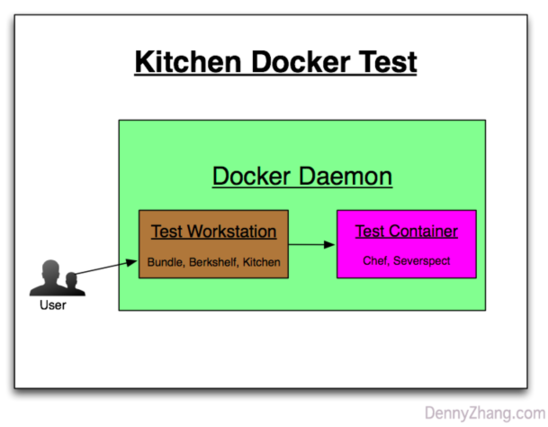
- Objective: Test your cookbooks. Run kitchen docker in your laptop.
- Requirements:
#+BEGIN_EXAMPLE
1. Use kitchen to test your cookbook: start a container and test the logic
2. Enforce kitchen verify logic via serverspec
#+END_EXAMPLE

- See more: [[Scenario-201][Scenario-201]]

#+BEGIN_HTML
#+END_HTML
** Scenario-202: Enforce TDD For Your Chef Cookbooks II
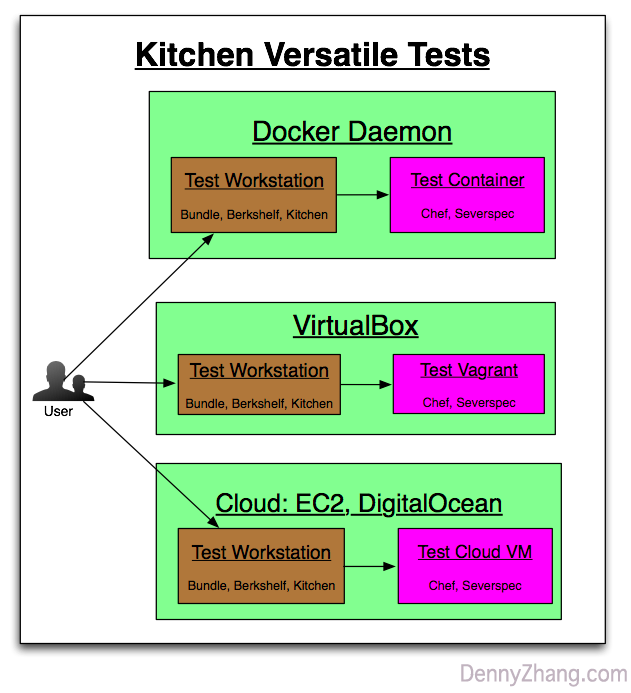
- Objective: Deploy for 3 scenarios: docker, local VM and public cloud
- Requirements:
#+BEGIN_EXAMPLE
1. Use Kitchen to test local vm deployment
2. Use Kitchen to test docker deployment
3. Use Kitchen to test cloud VM deployment
#+END_EXAMPLE

- See more: [[Scenario-202][Scenario-202]]

#+BEGIN_HTML
#+END_HTML

** Scenario-301: Use Chef To Deploy Jenkins I
- Objective: Use chef to deploy one common service for real
- Requirements:
#+BEGIN_EXAMPLE
1. Deploy a standalone jenkins by chef
2. Chef shall add one jenkins user
3. Chef shall add a dummy job with slack notification enabled
4. Run deployment in docker, vagrant and EC2
5. Test both Ubuntu 14.04 and Centos 7
#+END_EXAMPLE

- See more: [[Scenario-301][Scenario-301]]

** Scenario-302: Use Chef To Deploy Jenkins II
- Objective: More Jenkins customization
- Requirements:
#+BEGIN_EXAMPLE
1. For better security, only registered user can login
2. For better security, Jenkins listen on port 18080, instead of 8080
3. When Jenkins is down, get alerts
#+END_EXAMPLE

- See more: [[Scenario-302][Scenario-302]]

** Scenario-303: Use Chef To Deploy Jenkins II
- Objective: More Jenkins customization
- Requirements:
#+BEGIN_EXAMPLE
1. Use Jenkinsfile to create a Jenkins pipeline
2. Enable and configure ThinBackup
#+END_EXAMPLE

- See more: [[Scenario-303][Scenario-303]]
- TODO

** Scenario-401: Use Chef To Deploy 2 Nodes Jenkins I
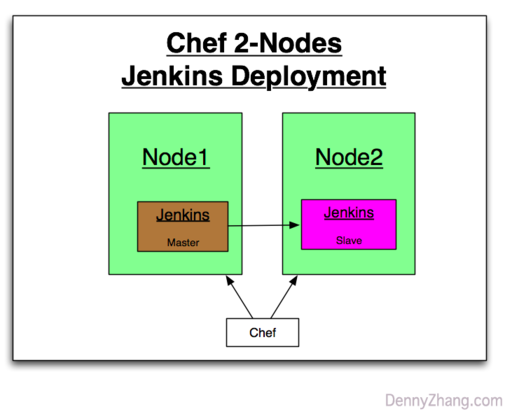
- Objective: Test and verify the deployment for both all-in-one and 2 nodes cluster
- Requirements:
#+BEGIN_EXAMPLE
1. Test 2 nodes jenkins cluster deployment in docker
2. Use Jenkinsfile to configure Jenkins
3. Define Jenkins pipeline
#+END_EXAMPLE

#+BEGIN_HTML
#+END_HTML
- See more: [[Scenario-303][Scenario-303]]
- TODO

#+BEGIN_HTML

#+END_HTML
* More Resources
License: Code is licensed under [[https://www.dennyzhang.com/wp-content/mit_license.txt][MIT License]].

- Useful links
#+BEGIN_EXAMPLE
https://github.com/chef-cookbooks/jenkins
https://github.com/jenkinsci/pipeline-examples
#+END_EXAMPLE

#+BEGIN_HTML

linkedin
github
slack
#+END_HTML
* org-mode configuration :noexport:
#+STARTUP: overview customtime noalign logdone showall
#+DESCRIPTION:
#+KEYWORDS:
#+AUTHOR: Denny Zhang
#+EMAIL: denny@dennyzhang.com
#+TAGS: noexport(n)
#+PRIORITIES: A D C
#+OPTIONS: H:3 num:t toc:nil \n:nil @:t ::t |:t ^:t -:t f:t *:t <:t
#+OPTIONS: TeX:t LaTeX:nil skip:nil d:nil todo:t pri:nil tags:not-in-toc
#+EXPORT_EXCLUDE_TAGS: exclude noexport
#+SEQ_TODO: TODO HALF ASSIGN | DONE BYPASS DELEGATE CANCELED DEFERRED
#+LINK_UP:
#+LINK_HOME:
* # --8<-------------------------- separator ------------------------>8-- :noexport:
* [#A] Routine job by chef :IMPORTANT:noexport:
# Delete old client
knife client delete mdmsandbox -c ~/.chef/knife_mdm.rb -y
knife node delete mdmsandbox -c ~/.chef/knife_mdm.rb -y
# Delete cookbook
knife cookbook delete nagios3 -c ~/.chef/knife_mdm.rb -y
** update osc envs
knife bootstrap www.oscgc.com --sudo -x ubuntu -N "dennytest" -c ~/.chef/knife_mdm.rb -V --node-ssl-verify-mode none
*** Internal Jenkins: 192.168.1.184:4022
knife bootstrap 192.168.1.184 --sudo -x root -P totvsJenkins -p 4022 -N "osc@cloud.com" -c ~/.chef/knife_mdm.rb -V --node-ssl-verify-mode none
** update mdm envs
*** MDM offical nagios: 104.236.159.226:22
knife bootstrap 104.236.159.226 --sudo -x root -N "mdmnagios" -c ~/.chef/knife_mdm.rb -V --node-ssl-verify-mode none
*** Internal sandbox: 10.165.4.67:7022
knife bootstrap 10.165.4.67 --sudo -x root -P sophia1 -p 7022 -N "dennysandbox" -c ~/.chef/knife_mdm.rb -V --node-ssl-verify-mode none
*** Internal Jenkins: 10.165.4.67:4022
knife bootstrap 10.165.4.67 --sudo -x root -P totvsJenkins -p 4022 -N "mdmnjenkins" -c ~/.chef/knife_mdm.rb -V --node-ssl-verify-mode none
*** MDM repo server, official Jenkins: 104.236.159.226:4022
knife bootstrap 104.236.159.226 --sudo -x root -P totvsRepo -p 4022 -N "mdmrepo" -c ~/.chef/knife_mdm.rb -V --node-ssl-verify-mode none

-r apt,jenkins-mdm -j "{\"jenkins_mdm\": {\"jobs\":\"BuildMDMRepo\", \"enable_email_alerting\":\"1\", \"enable_job_scheduled\":\"1\"}}"

http://104.236.159.226:18000
ssh -N -p 5022 -f root@104.236.159.226 -L 18080:localhost:18080 -n /bin/bash1
http://127.0.0.1:18080
*** mdm all-in-one docker test
docker pull denny/sshd:latest

docker run -d --privileged -t -p 2200:22 -i denny/sshd:latest /usr/sbin/sshd -D

knife bootstrap 104.236.180.184 --sudo -x root -P sophia1 -p 2200 -N "aiodocker" -c ~/.chef/knife_mdm.rb -V --node-ssl-verify-mode none -r apt,all-in-one -j "{\"all-in-one\": {\"mgmt_timeout\":\"900000\", \"max_timeout\":\"960000\"}, \"app_mdm\":{\"cb_bucket_retries\":\"10\", \"cb_bucket_retryinterval\":\"10000\", \"cb_bucket_timeout\": \"100000\"}}"
*** mdm local all-in-one test box
192.168.50.11

knife bootstrap 192.168.50.11 --sudo -x vagrant -P vagrant -p 22 -N "dennylocalbox" -c ~/.chef/knife_mdm.rb -V --node-ssl-verify-mode none -r apt,all-in-one -j "{\"all-in-one\": {\"enable_check\":\"0\",\"enable_nagios\":\"0\",\"mgmt_timeout\":\"900000\", \"max_timeout\":\"960000\"}, \"app_mdm\":{\"cb_bucket_retries\":\"10\", \"cb_bucket_retryinterval\":\"10000\", \"cb_bucket_timeout\": \"100000\"}}"
** upload cookbooks by berks
cd /Users/mac/Dropbox/private_data/project/chef/denny-chef-devops/cookbooks/devops-test
berks install
berks upload
berks upload nagios3

# upload cookbooks by knife
cd /Users/mac/Dropbox/private_data/work/totvs/code/mdmdevops/cookbooks/
ls -1 | xargs knife cookbook upload -c ~/.chef/knife_mdm.rb --force
knife cookbook upload -c ~/.chef/knife_mdm.rb backupdir

# delete cookbook
knife cookbook delete -c ~/.chef/knife_mdm.rb nagios3

# list cookbooks
knife cookbook list -c ~/.chef/knife_mdm.rb
** ~/.berkshelf/config.json
#+BEGIN_EXAMPLE
{
"chef": {
"chef_server_url": "https://104.236.159.226:443/organizations/digitalocean",
"node_name": "admin",
"client_key": "/Users/mac/.chef/chef_dennyzhang.pem",
"validation_client_name": "digitalocean-validator",
"validation_key_path": "/Users/mac/.chef/dennyzhang-validator.pem"
},
"ssl": {
"verify": false
}
}
#+END_EXAMPLE
** # --8<-------------------------- separator ------------------------>8--
** DONE apt-get update
CLOSED: [2015-04-26 Sun 17:21]
-r apt

Test:
apt-get update
** DONE [#A] enable email sending by gmail
CLOSED: [2015-04-24 Fri 11:09]
-r ssmtp -j "{\"ssmtp\": {\"credential_method\":\"plain\", \"auth_username\":\"navy.yang007@gmail.com\", \"auth_password\":\"file.navy1\", \"mailhub_name\":\"smtp.gmail.com\", \"mailhub_port\":587}}"

Test:

# ssmtp cookbook doesn't come with mailutils package installed
apt-get install mailutils
yum install mailx

echo "This is a test mail." | mail -s "test mail" 249950670@qq.com
** HALF enable nagios3 for monitoring and auto reporting
-r nagios3 -j "{\"nagios\": {\"server_ip\":\"127.0.0.1\", \"client_ip_list\":\"127.0.0.1\"}}"

Test:
http://127.0.0.1/nagios
nagiosadmin/password1234
** DONE enable backup script
CLOSED: [2015-04-24 Fri 11:22]
-r backupdir -j "{\"backupdir\": {\"dir_list\":\"/var/www/,/etc\"}}"

Test:
** DONE enable hostname
CLOSED: [2015-04-26 Sun 17:24]
-r hostname -j "{\"set_fqdn\": \"workstation.mdm.com\"}"

Test:
hostname -a
hostname -f
** setup hub registry
-r docker-registry2
** # --8<-------------------------- separator ------------------------>8--
** HALF enable mdm Jenkins
-r apt,jenkins-mdm -j "{\"jenkins_mdm\": {\"jobs\":\"BuildMDMRepo,UpdateSandboxMDM\"}}"
** TODO run mdm all-in-one
-r apt,all-in-one -j "{\"mdm\": {\"repo_server\":\"10.165.4.67:18000\"}}"
** # --8<-------------------------- separator ------------------------>8--
** DONE [#A] Use osc chef server
CLOSED: [2015-06-06 Sat 21:31]
cd /Users/mac/Dropbox/private_data/osc/chef/iamdevops/cookbooks
ls -1 | xargs knife cookbook upload -c ~/.chef/knife_osc.rb --force

knife bootstrap 192.168.1.185 --sudo -x root -P sophia1 -p 4022 -N "dennytest" -c ~/.chef/knife_osc.rb -V --node-ssl-verify-mode none -r apt,os-basic-auth -j "{\"os_basic\": {\"enable_firewall\":\"0\"}}"
* [#A] chef: a systems and cloud infrastructure automation framework :IMPORTANT:noexport:
:PROPERTIES:
:type: cloud
:END:

chef's cookbook: /usr/local/src/chef/cookbooks/mycookbook
| Num | Name | Summary |
|-----+--------------+------------------------------------------------------------|
| 1 | Resource | a statement of configuration policy |
| 2 | Knife | upload items from the chef-repo to the Chef server |
| 3 | workstation | |
| 4 | cookbooks | fundamental unit of configuration and policy distribution. |
|-----+--------------+------------------------------------------------------------|
| 5 | recipes | |
| 6 | Attribute | |
| 7 | Databags | a global variable that is stored as JSON data |
| 8 | Environments | |
#+TBLFM: $1=@-1+1;N

- chef server
| Name | Summary |
| /var/opt/chef-server | |
| /var/chef/cache/cookbooks | |
| /var/log/chef-server | |
| /etc/chef-server | |
| chef-server-ctl reconfigure | |
| rpm -e chef-server | |

- knife
| Name | Summary |
|---------------------+-------------------------------------------------------------------------------------------------------|
| knife client list | |
| knife user list | |
| knife node list | |
| knife cookbook list | |
|---------------------+-------------------------------------------------------------------------------------------------------|
| Upload cookbooks | knife cookbook upload -a |
| Upload Data Bag | knife upload data_bags |
| Upload Roles | knife role from file base.rb starter.rb webserver.rb |
| Upload Environments | knife environment from file dev.rb production.rb |
| Boostrap VM | knife bootstrap --sudo -x root -P ChangeMe1 -N "node1" --bootstrap-version 11.12.8 |
| Configure Run_list | knife node run_list set node1 'role[webserver]' 'role[cron]' |

- Misc command
| Command | Summary |
|-----------------------------------------------------------------------------------+----------------------------------------------------------|
| chef-server-ctl test | |
| knife configure --initial | |
| sudo knife bootstrap 192.168.1.185 -x root -P ChangeMe -N centos --sudo | bootstrap a node |
| /root/.chef/knife.rb | knife configuration |
| /etc/chef/client.rb | chef client configuration |
| knife node edit client1 | |
|-----------------------------------------------------------------------------------+----------------------------------------------------------|
| curl https://127.0.0.1:443/clients | |
| curl https://centos-vm1.novalocal:443 | |
| open https://FQDN-OR-IP-OF-CHEF-SERVER | admin/p@ssw0rd1; Make sure iptables doesn't ban 443 port |
|-----------------------------------------------------------------------------------+----------------------------------------------------------|
| knife cookbook create apache-tutorial-1 -o ./ | |
| knife upload cookbooks cookbook-test | upload cookbook |
| knife node run_list add node1.example.com cookbook-test | add run_list of a cookbook to a given node |
| knife node run_list add centos187.osc.com 'recipe[don_cookbook1::testfile]' | add a recipe of a cookbook to a given node |
| knife node run_list remove ubuntu.dennyzhang.com 'recipe[fluig-os::conf_history]' | |
| knife node show dennyubuntu -r | show run_list |
|-----------------------------------------------------------------------------------+----------------------------------------------------------|
| chef-client | puppet agent |
| chef-client -l debug | |
| chef-client -i 3600 | poll every 3600 seconds for changes |
| chef-client -S https://XXX -K /etc/chef/chef-validator.pem | |

- The agents can be installed from the workstation using the knife tool that uses SSH for deployment, easing the installation burden.
** [#A] Linux install chef utility
https://docs.chef.io/install_omnibus.html

curl -L https://www.opscode.com/chef/install.sh | bash
*** DONE [#A] install chef facility with given version
CLOSED: [2016-05-05 Thu 16:45]
http://stackoverflow.com/questions/20205889/how-to-update-the-chef-client-version
(echo "version=12.4.1"; curl -L https://www.opscode.com/chef/install.sh) | sudo bash
** DONE [#A] Chef server migration/backup/restore from chef 11 to chef 12
CLOSED: [2015-04-22 Wed 16:53]
http://www.ameir.net/blog/archives/326-migrating-from-one-chef-server-to-another.html
http://docs.chef.io/server_backup_restore.html

- install new chef server

knife backup export -D ~/chef-backup/ -c ~/.chef/knife-orig.rb
knife backup restore -D ~/chef-backup -c ~/.chef/knife-new.rb
*** migration spchef
macs-MacBook-Air:.chef mac$ knife node list

macs-MacBook-Air:.chef mac$ knife backup restore -D ~/chef-backup
WARNING: This will overwrite existing data!
Do you want to restore backup, possibly overwriting exisitng data? (Y/N) y
=== Restoring clients ===
=== Restoring users ===
ERROR: Failed to create user[admin]: #; skipping
ERROR: Failed to create user[dennyadmin]: #; skipping
ERROR: Failed to create user[kungadmin]: #; skipping
=== Restoring nodes ===
Restoring nodes from /Users/mac/chef-backup/nodes/all-in-one-sp.json
Restoring nodes from /Users/mac/chef-backup/nodes/on-premise-deployment.json
Restoring nodes from /Users/mac/chef-backup/nodes/vapp_buxeo1mg2tlyoe1q1428409660944.json
Restoring nodes from /Users/mac/chef-backup/nodes/vapp_cg6b5hwpk56elgr31420578177412.json
Restoring nodes from /Users/mac/chef-backup/nodes/vapp_hjgyd06p8gc621vq1416950631623.json
Restoring nodes from /Users/mac/chef-backup/nodes/vapp_j920on7cdlpdb8m41417812176580.json
Restoring nodes from /Users/mac/chef-backup/nodes/vapp_n90igti0hp4za70j1420656472829.json
Restoring nodes from /Users/mac/chef-backup/nodes/vapp_yxd6ik7lv9xrapcd1418151775033.json
=== Restoring roles ===
=== Restoring data bags ===
=== Restoring environments ===
=== Restoring cookbooks ===
Restoring cookbook ["all-in-one"]
WARNING: * * * * * * * * * * * * * * * * * * * * * * * * * * * * * * * * * * * * * * * *
WARNING: The cookbooks: all-in-one exist in multiple places in your cookbook_path.
A composite version of these cookbooks has been compiled for uploading.

IMPORTANT: In a future version of Chef, this behavior will be removed and you will no longer
be able to have the same version of a cookbook in multiple places in your cookbook_path.
WARNING: The affected cookbooks are located:
all-in-one:
/Users/mac/chef-backup/cookbooks/all-in-one
/Users/mac/chef-backup/cookbooks/all-in-one-0.1.0
WARNING: * * * * * * * * * * * * * * * * * * * * * * * * * * * * * * * * * * * * * * * *
Uploading all-in-one [0.1.0]
Uploaded 1 cookbook.
Restoring cookbook ["build-iso"]
WARNING: * * * * * * * * * * * * * * * * * * * * * * * * * * * * * * * * * * * * * * * *
WARNING: The cookbooks: build-iso exist in multiple places in your cookbook_path.
A composite version of these cookbooks has been compiled for uploading.

IMPORTANT: In a future version of Chef, this behavior will be removed and you will no longer
be able to have the same version of a cookbook in multiple places in your cookbook_path.
WARNING: The affected cookbooks are located:
build-iso:
/Users/mac/chef-backup/cookbooks/build-iso
/Users/mac/chef-backup/cookbooks/build-iso-0.1.0
WARNING: * * * * * * * * * * * * * * * * * * * * * * * * * * * * * * * * * * * * * * * *
Uploading build-iso [0.1.0]
Uploaded 1 cookbook.
Restoring cookbook ["common-server"]
WARNING: * * * * * * * * * * * * * * * * * * * * * * * * * * * * * * * * * * * * * * * *
WARNING: The cookbooks: common-server exist in multiple places in your cookbook_path.
A composite version of these cookbooks has been compiled for uploading.

IMPORTANT: In a future version of Chef, this behavior will be removed and you will no longer
be able to have the same version of a cookbook in multiple places in your cookbook_path.
WARNING: The affected cookbooks are located:
common-server:
/Users/mac/chef-backup/cookbooks/common-server
/Users/mac/chef-backup/cookbooks/common-server-0.1.0
WARNING: * * * * * * * * * * * * * * * * * * * * * * * * * * * * * * * * * * * * * * * *
Uploading common-server [0.1.0]
Uploaded 1 cookbook.
Restoring cookbook ["fluig-adsync"]
WARNING: * * * * * * * * * * * * * * * * * * * * * * * * * * * * * * * * * * * * * * * *
WARNING: The cookbooks: fluig-adsync exist in multiple places in your cookbook_path.
A composite version of these cookbooks has been compiled for uploading.

IMPORTANT: In a future version of Chef, this behavior will be removed and you will no longer
be able to have the same version of a cookbook in multiple places in your cookbook_path.
WARNING: The affected cookbooks are located:
fluig-adsync:
/Users/mac/chef-backup/cookbooks/fluig-adsync
/Users/mac/chef-backup/cookbooks/fluig-adsync-0.1.0
WARNING: * * * * * * * * * * * * * * * * * * * * * * * * * * * * * * * * * * * * * * * *
Uploading fluig-adsync [0.1.0]
Uploaded 1 cookbook.
Restoring cookbook ["fluig-apache"]
WARNING: * * * * * * * * * * * * * * * * * * * * * * * * * * * * * * * * * * * * * * * *
WARNING: The cookbooks: fluig-apache exist in multiple places in your cookbook_path.
A composite version of these cookbooks has been compiled for uploading.

IMPORTANT: In a future version of Chef, this behavior will be removed and you will no longer
be able to have the same version of a cookbook in multiple places in your cookbook_path.
WARNING: The affected cookbooks are located:
fluig-apache:
/Users/mac/chef-backup/cookbooks/fluig-apache
/Users/mac/chef-backup/cookbooks/fluig-apache-0.1.0
WARNING: * * * * * * * * * * * * * * * * * * * * * * * * * * * * * * * * * * * * * * * *
Uploading fluig-apache [0.1.0]
Uploaded 1 cookbook.
Restoring cookbook ["fluig-backup"]
WARNING: * * * * * * * * * * * * * * * * * * * * * * * * * * * * * * * * * * * * * * * *
WARNING: The cookbooks: fluig-backup exist in multiple places in your cookbook_path.
A composite version of these cookbooks has been compiled for uploading.

IMPORTANT: In a future version of Chef, this behavior will be removed and you will no longer
be able to have the same version of a cookbook in multiple places in your cookbook_path.
WARNING: The affected cookbooks are located:
fluig-backup:
/Users/mac/chef-backup/cookbooks/fluig-backup
/Users/mac/chef-backup/cookbooks/fluig-backup-0.1.0
WARNING: * * * * * * * * * * * * * * * * * * * * * * * * * * * * * * * * * * * * * * * *
Uploading fluig-backup [0.1.0]
Uploaded 1 cookbook.
Restoring cookbook ["fluig-basic-os"]
WARNING: * * * * * * * * * * * * * * * * * * * * * * * * * * * * * * * * * * * * * * * *
WARNING: The cookbooks: fluig-basic-os exist in multiple places in your cookbook_path.
A composite version of these cookbooks has been compiled for uploading.

IMPORTANT: In a future version of Chef, this behavior will be removed and you will no longer
be able to have the same version of a cookbook in multiple places in your cookbook_path.
WARNING: The affected cookbooks are located:
fluig-basic-os:
/Users/mac/chef-backup/cookbooks/fluig-basic-os
/Users/mac/chef-backup/cookbooks/fluig-basic-os-0.1.0
WARNING: * * * * * * * * * * * * * * * * * * * * * * * * * * * * * * * * * * * * * * * *
Uploading fluig-basic-os [0.1.0]
Uploaded 1 cookbook.
Restoring cookbook ["fluig-buildkit"]
WARNING: * * * * * * * * * * * * * * * * * * * * * * * * * * * * * * * * * * * * * * * *
WARNING: The cookbooks: fluig-buildkit exist in multiple places in your cookbook_path.
A composite version of these cookbooks has been compiled for uploading.

IMPORTANT: In a future version of Chef, this behavior will be removed and you will no longer
be able to have the same version of a cookbook in multiple places in your cookbook_path.
WARNING: The affected cookbooks are located:
fluig-buildkit:
/Users/mac/chef-backup/cookbooks/fluig-buildkit
/Users/mac/chef-backup/cookbooks/fluig-buildkit-0.1.0
WARNING: * * * * * * * * * * * * * * * * * * * * * * * * * * * * * * * * * * * * * * * *
Uploading fluig-buildkit [0.1.0]
Uploaded 1 cookbook.
Restoring cookbook ["fluig-cluster"]
WARNING: * * * * * * * * * * * * * * * * * * * * * * * * * * * * * * * * * * * * * * * *
WARNING: The cookbooks: fluig-cluster exist in multiple places in your cookbook_path.
A composite version of these cookbooks has been compiled for uploading.

IMPORTANT: In a future version of Chef, this behavior will be removed and you will no longer
be able to have the same version of a cookbook in multiple places in your cookbook_path.
WARNING: The affected cookbooks are located:
fluig-cluster:
/Users/mac/chef-backup/cookbooks/fluig-cluster
/Users/mac/chef-backup/cookbooks/fluig-cluster-0.1.0
WARNING: * * * * * * * * * * * * * * * * * * * * * * * * * * * * * * * * * * * * * * * *
Uploading fluig-cluster [0.1.0]
Uploaded 1 cookbook.
Restoring cookbook ["fluig-core"]
WARNING: * * * * * * * * * * * * * * * * * * * * * * * * * * * * * * * * * * * * * * * *
WARNING: The cookbooks: fluig-core exist in multiple places in your cookbook_path.
A composite version of these cookbooks has been compiled for uploading.

IMPORTANT: In a future version of Chef, this behavior will be removed and you will no longer
be able to have the same version of a cookbook in multiple places in your cookbook_path.
WARNING: The affected cookbooks are located:
fluig-core:
/Users/mac/chef-backup/cookbooks/fluig-core
/Users/mac/chef-backup/cookbooks/fluig-core-0.1.0
WARNING: * * * * * * * * * * * * * * * * * * * * * * * * * * * * * * * * * * * * * * * *
Uploading fluig-core [0.1.0]
Uploaded 1 cookbook.
Restoring cookbook ["fluig-couchbase"]
WARNING: * * * * * * * * * * * * * * * * * * * * * * * * * * * * * * * * * * * * * * * *
WARNING: The cookbooks: fluig-couchbase exist in multiple places in your cookbook_path.
A composite version of these cookbooks has been compiled for uploading.

IMPORTANT: In a future version of Chef, this behavior will be removed and you will no longer
be able to have the same version of a cookbook in multiple places in your cookbook_path.
WARNING: The affected cookbooks are located:
fluig-couchbase:
/Users/mac/chef-backup/cookbooks/fluig-couchbase
/Users/mac/chef-backup/cookbooks/fluig-couchbase-0.1.0
WARNING: * * * * * * * * * * * * * * * * * * * * * * * * * * * * * * * * * * * * * * * *
Uploading fluig-couchbase [0.1.0]
Uploaded 1 cookbook.
Restoring cookbook ["fluig-crontab"]
WARNING: * * * * * * * * * * * * * * * * * * * * * * * * * * * * * * * * * * * * * * * *
WARNING: The cookbooks: fluig-crontab exist in multiple places in your cookbook_path.
A composite version of these cookbooks has been compiled for uploading.

IMPORTANT: In a future version of Chef, this behavior will be removed and you will no longer
be able to have the same version of a cookbook in multiple places in your cookbook_path.
WARNING: The affected cookbooks are located:
fluig-crontab:
/Users/mac/chef-backup/cookbooks/fluig-crontab
/Users/mac/chef-backup/cookbooks/fluig-crontab-0.1.0
WARNING: * * * * * * * * * * * * * * * * * * * * * * * * * * * * * * * * * * * * * * * *
Uploading fluig-crontab [0.1.0]
Uploaded 1 cookbook.
Restoring cookbook ["fluig-dev-os"]
WARNING: * * * * * * * * * * * * * * * * * * * * * * * * * * * * * * * * * * * * * * * *
WARNING: The cookbooks: fluig-dev-os exist in multiple places in your cookbook_path.
A composite version of these cookbooks has been compiled for uploading.

IMPORTANT: In a future version of Chef, this behavior will be removed and you will no longer
be able to have the same version of a cookbook in multiple places in your cookbook_path.
WARNING: The affected cookbooks are located:
fluig-dev-os:
/Users/mac/chef-backup/cookbooks/fluig-dev-os
/Users/mac/chef-backup/cookbooks/fluig-dev-os-0.1.0
WARNING: * * * * * * * * * * * * * * * * * * * * * * * * * * * * * * * * * * * * * * * *
Uploading fluig-dev-os [0.1.0]
Uploaded 1 cookbook.
Restoring cookbook ["fluig-files"]
WARNING: * * * * * * * * * * * * * * * * * * * * * * * * * * * * * * * * * * * * * * * *
WARNING: The cookbooks: fluig-files exist in multiple places in your cookbook_path.
A composite version of these cookbooks has been compiled for uploading.

IMPORTANT: In a future version of Chef, this behavior will be removed and you will no longer
be able to have the same version of a cookbook in multiple places in your cookbook_path.
WARNING: The affected cookbooks are located:
fluig-files:
/Users/mac/chef-backup/cookbooks/fluig-files
/Users/mac/chef-backup/cookbooks/fluig-files-0.1.0
WARNING: * * * * * * * * * * * * * * * * * * * * * * * * * * * * * * * * * * * * * * * *
Uploading fluig-files [0.1.0]
Uploaded 1 cookbook.
Restoring cookbook ["fluig-initialize"]
WARNING: * * * * * * * * * * * * * * * * * * * * * * * * * * * * * * * * * * * * * * * *
WARNING: The cookbooks: fluig-initialize exist in multiple places in your cookbook_path.
A composite version of these cookbooks has been compiled for uploading.

IMPORTANT: In a future version of Chef, this behavior will be removed and you will no longer
be able to have the same version of a cookbook in multiple places in your cookbook_path.
WARNING: The affected cookbooks are located:
fluig-initialize:
/Users/mac/chef-backup/cookbooks/fluig-initialize
/Users/mac/chef-backup/cookbooks/fluig-initialize-0.1.0
WARNING: * * * * * * * * * * * * * * * * * * * * * * * * * * * * * * * * * * * * * * * *
Uploading fluig-initialize [0.1.0]
Uploaded 1 cookbook.
Restoring cookbook ["fluig-java"]
WARNING: * * * * * * * * * * * * * * * * * * * * * * * * * * * * * * * * * * * * * * * *
WARNING: The cookbooks: fluig-java exist in multiple places in your cookbook_path.
A composite version of these cookbooks has been compiled for uploading.

IMPORTANT: In a future version of Chef, this behavior will be removed and you will no longer
be able to have the same version of a cookbook in multiple places in your cookbook_path.
WARNING: The affected cookbooks are located:
fluig-java:
/Users/mac/chef-backup/cookbooks/fluig-java
/Users/mac/chef-backup/cookbooks/fluig-java-0.1.0
WARNING: * * * * * * * * * * * * * * * * * * * * * * * * * * * * * * * * * * * * * * * *
Uploading fluig-java [0.1.0]
Uploaded 1 cookbook.
Restoring cookbook ["fluig-jenkins"]
WARNING: * * * * * * * * * * * * * * * * * * * * * * * * * * * * * * * * * * * * * * * *
WARNING: The cookbooks: fluig-jenkins exist in multiple places in your cookbook_path.
A composite version of these cookbooks has been compiled for uploading.

IMPORTANT: In a future version of Chef, this behavior will be removed and you will no longer
be able to have the same version of a cookbook in multiple places in your cookbook_path.
WARNING: The affected cookbooks are located:
fluig-jenkins:
/Users/mac/chef-backup/cookbooks/fluig-jenkins
/Users/mac/chef-backup/cookbooks/fluig-jenkins-0.1.0
WARNING: * * * * * * * * * * * * * * * * * * * * * * * * * * * * * * * * * * * * * * * *
Uploading fluig-jenkins [0.1.0]
Uploaded 1 cookbook.
Restoring cookbook ["fluig-keystore"]
WARNING: * * * * * * * * * * * * * * * * * * * * * * * * * * * * * * * * * * * * * * * *
WARNING: The cookbooks: fluig-keystore exist in multiple places in your cookbook_path.
A composite version of these cookbooks has been compiled for uploading.

IMPORTANT: In a future version of Chef, this behavior will be removed and you will no longer
be able to have the same version of a cookbook in multiple places in your cookbook_path.
WARNING: The affected cookbooks are located:
fluig-keystore:
/Users/mac/chef-backup/cookbooks/fluig-keystore
/Users/mac/chef-backup/cookbooks/fluig-keystore-0.1.0
WARNING: * * * * * * * * * * * * * * * * * * * * * * * * * * * * * * * * * * * * * * * *
Uploading fluig-keystore [0.1.0]
Uploaded 1 cookbook.
Restoring cookbook ["fluig-logrotate"]
WARNING: * * * * * * * * * * * * * * * * * * * * * * * * * * * * * * * * * * * * * * * *
WARNING: The cookbooks: fluig-logrotate exist in multiple places in your cookbook_path.
A composite version of these cookbooks has been compiled for uploading.

IMPORTANT: In a future version of Chef, this behavior will be removed and you will no longer
be able to have the same version of a cookbook in multiple places in your cookbook_path.
WARNING: The affected cookbooks are located:
fluig-logrotate:
/Users/mac/chef-backup/cookbooks/fluig-logrotate
/Users/mac/chef-backup/cookbooks/fluig-logrotate-0.1.0
WARNING: * * * * * * * * * * * * * * * * * * * * * * * * * * * * * * * * * * * * * * * *
Uploading fluig-logrotate [0.1.0]
Uploaded 1 cookbook.
Restoring cookbook ["fluig-messaging"]
WARNING: * * * * * * * * * * * * * * * * * * * * * * * * * * * * * * * * * * * * * * * *
WARNING: The cookbooks: fluig-messaging exist in multiple places in your cookbook_path.
A composite version of these cookbooks has been compiled for uploading.

IMPORTANT: In a future version of Chef, this behavior will be removed and you will no longer
be able to have the same version of a cookbook in multiple places in your cookbook_path.
WARNING: The affected cookbooks are located:
fluig-messaging:
/Users/mac/chef-backup/cookbooks/fluig-messaging
/Users/mac/chef-backup/cookbooks/fluig-messaging-0.1.0
WARNING: * * * * * * * * * * * * * * * * * * * * * * * * * * * * * * * * * * * * * * * *
Uploading fluig-messaging [0.1.0]
Uploaded 1 cookbook.
Restoring cookbook ["fluig-nagios"]
WARNING: * * * * * * * * * * * * * * * * * * * * * * * * * * * * * * * * * * * * * * * *
WARNING: The cookbooks: fluig-nagios exist in multiple places in your cookbook_path.
A composite version of these cookbooks has been compiled for uploading.

IMPORTANT: In a future version of Chef, this behavior will be removed and you will no longer
be able to have the same version of a cookbook in multiple places in your cookbook_path.
WARNING: The affected cookbooks are located:
fluig-nagios:
/Users/mac/chef-backup/cookbooks/fluig-nagios
/Users/mac/chef-backup/cookbooks/fluig-nagios-0.1.0
WARNING: * * * * * * * * * * * * * * * * * * * * * * * * * * * * * * * * * * * * * * * *
Uploading fluig-nagios [0.1.0]
Uploaded 1 cookbook.
Restoring cookbook ["fluig-neo4j"]
WARNING: * * * * * * * * * * * * * * * * * * * * * * * * * * * * * * * * * * * * * * * *
WARNING: The cookbooks: fluig-neo4j exist in multiple places in your cookbook_path.
A composite version of these cookbooks has been compiled for uploading.

IMPORTANT: In a future version of Chef, this behavior will be removed and you will no longer
be able to have the same version of a cookbook in multiple places in your cookbook_path.
WARNING: The affected cookbooks are located:
fluig-neo4j:
/Users/mac/chef-backup/cookbooks/fluig-neo4j
/Users/mac/chef-backup/cookbooks/fluig-neo4j-0.1.0
WARNING: * * * * * * * * * * * * * * * * * * * * * * * * * * * * * * * * * * * * * * * *
Uploading fluig-neo4j [0.1.0]
Uploaded 1 cookbook.
Restoring cookbook ["fluig-postcheck"]
WARNING: * * * * * * * * * * * * * * * * * * * * * * * * * * * * * * * * * * * * * * * *
WARNING: The cookbooks: fluig-postcheck exist in multiple places in your cookbook_path.
A composite version of these cookbooks has been compiled for uploading.

IMPORTANT: In a future version of Chef, this behavior will be removed and you will no longer
be able to have the same version of a cookbook in multiple places in your cookbook_path.
WARNING: The affected cookbooks are located:
fluig-postcheck:
/Users/mac/chef-backup/cookbooks/fluig-postcheck
/Users/mac/chef-backup/cookbooks/fluig-postcheck-0.1.0
WARNING: * * * * * * * * * * * * * * * * * * * * * * * * * * * * * * * * * * * * * * * *
Uploading fluig-postcheck [0.1.0]
Uploaded 1 cookbook.
Restoring cookbook ["fluig-precheck"]
WARNING: * * * * * * * * * * * * * * * * * * * * * * * * * * * * * * * * * * * * * * * *
WARNING: The cookbooks: fluig-precheck exist in multiple places in your cookbook_path.
A composite version of these cookbooks has been compiled for uploading.

IMPORTANT: In a future version of Chef, this behavior will be removed and you will no longer
be able to have the same version of a cookbook in multiple places in your cookbook_path.
WARNING: The affected cookbooks are located:
fluig-precheck:
/Users/mac/chef-backup/cookbooks/fluig-precheck
/Users/mac/chef-backup/cookbooks/fluig-precheck-0.1.0
WARNING: * * * * * * * * * * * * * * * * * * * * * * * * * * * * * * * * * * * * * * * *
Uploading fluig-precheck [0.1.0]
Uploaded 1 cookbook.
Restoring cookbook ["fluig-racagent"]
WARNING: * * * * * * * * * * * * * * * * * * * * * * * * * * * * * * * * * * * * * * * *
WARNING: The cookbooks: fluig-racagent exist in multiple places in your cookbook_path.
A composite version of these cookbooks has been compiled for uploading.

IMPORTANT: In a future version of Chef, this behavior will be removed and you will no longer
be able to have the same version of a cookbook in multiple places in your cookbook_path.
WARNING: The affected cookbooks are located:
fluig-racagent:
/Users/mac/chef-backup/cookbooks/fluig-racagent
/Users/mac/chef-backup/cookbooks/fluig-racagent-0.1.0
WARNING: * * * * * * * * * * * * * * * * * * * * * * * * * * * * * * * * * * * * * * * *
Uploading fluig-racagent [0.1.0]
Uploaded 1 cookbook.
Restoring cookbook ["fluig-rest"]
WARNING: * * * * * * * * * * * * * * * * * * * * * * * * * * * * * * * * * * * * * * * *
WARNING: The cookbooks: fluig-rest exist in multiple places in your cookbook_path.
A composite version of these cookbooks has been compiled for uploading.

IMPORTANT: In a future version of Chef, this behavior will be removed and you will no longer
be able to have the same version of a cookbook in multiple places in your cookbook_path.
WARNING: The affected cookbooks are located:
fluig-rest:
/Users/mac/chef-backup/cookbooks/fluig-rest
/Users/mac/chef-backup/cookbooks/fluig-rest-0.1.0
WARNING: * * * * * * * * * * * * * * * * * * * * * * * * * * * * * * * * * * * * * * * *
Uploading fluig-rest [0.1.0]
Uploaded 1 cookbook.
Restoring cookbook ["fluig-rmi"]
WARNING: * * * * * * * * * * * * * * * * * * * * * * * * * * * * * * * * * * * * * * * *
WARNING: The cookbooks: fluig-rmi exist in multiple places in your cookbook_path.
A composite version of these cookbooks has been compiled for uploading.

IMPORTANT: In a future version of Chef, this behavior will be removed and you will no longer
be able to have the same version of a cookbook in multiple places in your cookbook_path.
WARNING: The affected cookbooks are located:
fluig-rmi:
/Users/mac/chef-backup/cookbooks/fluig-rmi
/Users/mac/chef-backup/cookbooks/fluig-rmi-0.1.0
WARNING: * * * * * * * * * * * * * * * * * * * * * * * * * * * * * * * * * * * * * * * *
Uploading fluig-rmi [0.1.0]
Uploaded 1 cookbook.
Restoring cookbook ["fluig-search"]
WARNING: * * * * * * * * * * * * * * * * * * * * * * * * * * * * * * * * * * * * * * * *
WARNING: The cookbooks: fluig-search exist in multiple places in your cookbook_path.
A composite version of these cookbooks has been compiled for uploading.

IMPORTANT: In a future version of Chef, this behavior will be removed and you will no longer
be able to have the same version of a cookbook in multiple places in your cookbook_path.
WARNING: The affected cookbooks are located:
fluig-search:
/Users/mac/chef-backup/cookbooks/fluig-search
/Users/mac/chef-backup/cookbooks/fluig-search-0.1.0
WARNING: * * * * * * * * * * * * * * * * * * * * * * * * * * * * * * * * * * * * * * * *
Uploading fluig-search [0.1.0]
Uploaded 1 cookbook.
Restoring cookbook ["fluig-tomcat"]
WARNING: * * * * * * * * * * * * * * * * * * * * * * * * * * * * * * * * * * * * * * * *
WARNING: The cookbooks: fluig-tomcat exist in multiple places in your cookbook_path.
A composite version of these cookbooks has been compiled for uploading.

IMPORTANT: In a future version of Chef, this behavior will be removed and you will no longer
be able to have the same version of a cookbook in multiple places in your cookbook_path.
WARNING: The affected cookbooks are located:
fluig-tomcat:
/Users/mac/chef-backup/cookbooks/fluig-tomcat
/Users/mac/chef-backup/cookbooks/fluig-tomcat-0.1.0
WARNING: * * * * * * * * * * * * * * * * * * * * * * * * * * * * * * * * * * * * * * * *
Uploading fluig-tomcat [0.1.0]
Uploaded 1 cookbook.
Restoring cookbook ["fluig-vmmanager-webapp"]
WARNING: * * * * * * * * * * * * * * * * * * * * * * * * * * * * * * * * * * * * * * * *
WARNING: The cookbooks: fluig-vmmanager-webapp exist in multiple places in your cookbook_path.
A composite version of these cookbooks has been compiled for uploading.

IMPORTANT: In a future version of Chef, this behavior will be removed and you will no longer
be able to have the same version of a cookbook in multiple places in your cookbook_path.
WARNING: The affected cookbooks are located:
fluig-vmmanager-webapp:
/Users/mac/chef-backup/cookbooks/fluig-vmmanager-webapp
/Users/mac/chef-backup/cookbooks/fluig-vmmanager-webapp-0.1.0
WARNING: * * * * * * * * * * * * * * * * * * * * * * * * * * * * * * * * * * * * * * * *
Uploading fluig-vmmanager-webapp [0.1.0]
Uploaded 1 cookbook.
Restoring cookbook ["ntp"]
WARNING: * * * * * * * * * * * * * * * * * * * * * * * * * * * * * * * * * * * * * * * *
WARNING: The cookbooks: ntp exist in multiple places in your cookbook_path.
A composite version of these cookbooks has been compiled for uploading.

IMPORTANT: In a future version of Chef, this behavior will be removed and you will no longer
be able to have the same version of a cookbook in multiple places in your cookbook_path.
WARNING: The affected cookbooks are located:
ntp:
/Users/mac/chef-backup/cookbooks/ntp
/Users/mac/chef-backup/cookbooks/ntp-1.6.5
WARNING: * * * * * * * * * * * * * * * * * * * * * * * * * * * * * * * * * * * * * * * *
Uploading ntp [1.6.5]
Uploaded 1 cookbook.
Restoring cookbook ["os-security"]
WARNING: * * * * * * * * * * * * * * * * * * * * * * * * * * * * * * * * * * * * * * * *
WARNING: The cookbooks: os-security exist in multiple places in your cookbook_path.
A composite version of these cookbooks has been compiled for uploading.

IMPORTANT: In a future version of Chef, this behavior will be removed and you will no longer
be able to have the same version of a cookbook in multiple places in your cookbook_path.
WARNING: The affected cookbooks are located:
os-security:
/Users/mac/chef-backup/cookbooks/os-security
/Users/mac/chef-backup/cookbooks/os-security-0.1.0
WARNING: * * * * * * * * * * * * * * * * * * * * * * * * * * * * * * * * * * * * * * * *
Uploading os-security [0.1.0]
Uploaded 1 cookbook.
Restoring cookbook ["squid"]
WARNING: * * * * * * * * * * * * * * * * * * * * * * * * * * * * * * * * * * * * * * * *
WARNING: The cookbooks: squid exist in multiple places in your cookbook_path.
A composite version of these cookbooks has been compiled for uploading.

IMPORTANT: In a future version of Chef, this behavior will be removed and you will no longer
be able to have the same version of a cookbook in multiple places in your cookbook_path.
WARNING: The affected cookbooks are located:
squid:
/Users/mac/chef-backup/cookbooks/squid
/Users/mac/chef-backup/cookbooks/squid-0.5.2
WARNING: * * * * * * * * * * * * * * * * * * * * * * * * * * * * * * * * * * * * * * * *
Uploading squid [0.5.2]
Uploaded 1 cookbook.
Restoring cookbook ["vsftpd"]
WARNING: * * * * * * * * * * * * * * * * * * * * * * * * * * * * * * * * * * * * * * * *
WARNING: The cookbooks: vsftpd exist in multiple places in your cookbook_path.
A composite version of these cookbooks has been compiled for uploading.

IMPORTANT: In a future version of Chef, this behavior will be removed and you will no longer
be able to have the same version of a cookbook in multiple places in your cookbook_path.
WARNING: The affected cookbooks are located:
vsftpd:
/Users/mac/chef-backup/cookbooks/vsftpd
/Users/mac/chef-backup/cookbooks/vsftpd-0.1.0
WARNING: * * * * * * * * * * * * * * * * * * * * * * * * * * * * * * * * * * * * * * * *
Uploading vsftpd [0.1.0]
Uploaded 1 cookbook.
macs-MacBook-Air:.chef mac$
*** TODO [#A] chef_server_url parameter need to be updated
#+BEGIN_EXAMPLE
root@kitchen-identity-sandbox:~# cat /etc/chef/client.rb
cat /etc/chef/client.rb
log_level :info
log_location STDOUT
node_name 'all-in-one-sp'
client_key '/etc/chef/client.pem'
chef_server_url 'https://104.131.157.119/organizations/digitalocean'
cache_type 'BasicFile'
no_lazy_load true
cache_options( :path => '/etc/chef/checksums' )
# TODO: improve later
ssl_verify_mode :verify_none
no_proxy 'no_proxy'root@kitchen-identity-sandbox:~#
#+END_EXAMPLE
*** web page: Migrating from one Chef server to another | ameir dot net
http://www.ameir.net/blog/archives/326-migrating-from-one-chef-server-to-another.html
**** webcontent :noexport:
#+begin_example
Location: http://www.ameir.net/blog/archives/326-migrating-from-one-chef-server-to-another.html
ameir dot net

Get your geek on

Get your geek on

Home » Linux Luvin' » Migrating from one Chef server to another

Recent Posts

* Get nameservers from resolv.conf with Ruby
* Run multiple ssh commands in parallel with GNU Parallel
* Elasticsearch cluster administration notes
* Installing OpenVZ templates in Proxmox
* IMAP Append – Message contains bare newlines

Recent Comments

* Ameir Abdeldayem on Easy way to backup entire folders
* Ameir Abdeldayem on Run multiple ssh commands in parallel with GNU Parallel
* denny on Run multiple ssh commands in parallel with GNU Parallel
* denny on Easy way to backup entire folders
* Ivan on Running Proxmox behind a single IP address

Search for: [ ] Search
Migrating from one Chef server to another 6

20 Apr, 2014 in Linux Luvin' by Ameir Abdeldayem
---------------------------------------------------------------------------------------------------

It happens — you’re on a server that just can’t be upgraded any further, and you need more
resources.  Or, you need to backup a Chef server.  Or, you need to setup a QA instance.  Or, you
need to finally migrate from Chef 10 to Chef 11.  Or, you have one of many other possible reasons,
but you need to be able to stand up a new Chef instance, and not have to do a ton of work.  If any
of that applies to you, then this post is for you.

In the case where you’re migrating from one Chef server to another (i.e., the old one is going
bye-bye), it would be very helpful to have your Chef server be CNAMEd (e.g. chef.company.com ->
vm101.iad.company.com) or behind a load balancer/proxy where you can change targets easily.  That
way, you won’t need to update the client configs, and it’ll be an easy swap.  Everything should
“just work” ™.

First, we’ll make a copy of your knife.rb:

Shell
[cp -a ~/.chef/knife{]

1 cp -a ~/.chef/knife{,-orig}.rb

Now, we’ll need to get access to your new Chef server via knife.  You can do so by logging in as
admin, and regenerating and saving a new private key.  You can also create a new user here instead
of using admin, but I advise against this, as any user you create will conflict with users of the
same name from the old server.  Yes, that means that if you’ve been using ‘admin’ as the main user,
you may run into problems (but let’s just hope that you’ve been using per-person accounts).

Now, we’ll update your current knife.rb to reflect the new node information in it:

[... ]

1 ...
2 node_name 'admin'
3 client_key '/Users/user/.chef/new-server-admin.pem'
4 chef_server_url 'https://vm102.iad.company.com'
5 ...

It wouldn’t hurt to check that you have access to the new node by doing a  knife user list .

Now, we’ll need to download all of the data from the “old” Chef server.  To do so, we’ll be using
the nifty ‘knife backup‘ plugin.  To get it installed on OS X, I did:

Shell
[sudo gem install kni]

1 sudo gem install knife-backup

Now, to finally back things up, we’ll do:

Shell
[knife backup export ]

1 knife backup export -D ~/chef-backup/ -c ~/.chef/knife-orig.rb

Note that the argument after -D is the destination directory where all of the Chef data will go;
this directory will automatically be created for you.  The argument of -c tells knife which config
file to use; we’ll, of course, be using the “old” server here.  Also, if you only need to backup a
certain set of data from your Chef server (e.g. only users and environments), you can specify that.
 See the knife backup documentation for details.

Now that we have all the data we need, we’ll need to push it up to the new server.  This works much
the same as the export:

Shell
[knife backup restore]

1 knife backup restore -D ~/chef-backup

I left off the -c here because knife.rb is the default config file.

Once everything has been restored, your original user in Chef will now be available (you can verify
this via the Chef Server UI).  The amazing thing is that your keys have not changed, and can be
used as-is.  Chef Server keeps track of your public keys, so all of your private keys for all nodes
/clients are still good.

This, now, is where you update your knife.rb to reflect your original user settings.  If you’re
running behind a load balancer/proxy, you can simply use your original config as-is after
replacing the old server with the new one.  If you’re doing the CNAME/A record route, you can do
the same once DNS has propagated.  Otherwise, you can overwrite your new config with your old one,
and edit it to reflect the new server’s URL.

If your nodes are pointing to the wrong server in their client.rb, you can use knife ssh with sed
to find/replace the server URLs.

If you’ll be accessing multiple Chef servers frequently enough, I highly recommend looking at the
knife block plugin.  That way, you can switch between different configurations with ease, including
those for Berkshelf.

---------------------------------------------------------------------------------------------------

Leave a comment Cancel reply

Your email address will not be published. Required fields are marked *

Name * [ ]

Email * [ ]

Website [ ]

[ ]
[ ]
[ ]
[ ]
[ ]
[ ]
[ ]
Comment [ ]

You may use these HTML tags and attributes:


Post Comment

6 thoughts on “Migrating from one Chef server to another”

* [ea665620]
Phil Nguyen November 8, 2014 at 2:07 am

Hi Ameir,
The backup operation completed successfully (i.e. list of folders with json files etc..).
However, the restore operation failed to process the backup folder as shown below. Do you know
what am I missing? I will retry this using a Linux box to see if that will help. Thanks for the
script. It will save a lot of pain if this works.

D:\P4\depot\vault\main\hpool\chef-repo>knife backup restore -D d:\chef-backup -c C:\Users\
pnguyen\.chef\knife.rb
WARNING: This will overwrite existing data!
Do you want to restore backup, possibly overwriting exisitng data? (Y/N)Y
=== Restoring clients ===
=== Restoring users ===
=== Restoring nodes ===
=== Restoring roles ===
=== Restoring data bags ===
=== Restoring environments ===
=== Restoring cookbooks ===

* [d8fb36ec]
Ameir Abdeldayem Post author November 8, 2014 at 2:37 am

Hi Phil,

Could you go into d:\chef-backup and run knife diff? That’ll compare the local folder with the
remote server, and let you know if there are differences. It’s possible that the files are the
same (are you using the correct config file?). You could also try with a trailing slash; I
don’t have a Windows box to test with, but there may be nuances there. Also, you could use
knife upload instead of knife backup. The former is essentially what the latter does behind the
scenes. To try that, go into d:\chef-backup and do knife upload .. Hopefully that’ll work. Let
me know if it doesn’t and I’ll try to help out.

-Ameir

* [ea665620]
Phil Nguyen November 8, 2014 at 3:40 am

Update: FYI, it worked when executing the backup/restore script via Ubuntu workstation. Thank
you.

* [d8fb36ec]
Ameir Abdeldayem Post author November 9, 2014 at 2:16 am

Excellent, glad to hear it! There must be an issue on the Windows side of things. Good luck
with your new Chef server!

* [34890ea3]
gdanko November 25, 2014 at 5:06 pm

I am seeing this:
=== Restoring cookbooks ===
Restoring cookbook [“publiccloud_lms_install_jdk”]
Uploading publiccloud_lms_install_jdk [0.1.0]
ERROR: Server returned error 500 for https://localhost/sandboxes/
00000000000012b561684b15f8b1df3f, retrying 1/5 in 4s
ERROR: Server returned error 500 for https://localhost/sandboxes/
00000000000012b561684b15f8b1df3f, retrying 2/5 in 7s
ERROR: Server returned error 500 for https://localhost/sandboxes/
00000000000012b561684b15f8b1df3f, retrying 3/5 in 13s
ERROR: Server returned error 500 for https://localhost/sandboxes/
00000000000012b561684b15f8b1df3f, retrying 4/5 in 29s
ERROR: Server returned error 500 for https://localhost/sandboxes/
00000000000012b561684b15f8b1df3f, retrying 5/5 in 54s
ERROR: internal server error
Response: internal service error

Any idea what could be wrong?

* [d8fb36ec]
Ameir Abdeldayem Post author November 25, 2014 at 7:31 pm

A 500 error means that something server-side is having issues. Are you able to upload anything
to your Chef server? Could you also add –verbose to your command to see if it gives any
additional details?

---------------------------------------------------------------------------------------------------

Post navigation

* ← Change Chef Server settings after installation
* Enable XHProf for WordPress →

· © 2015 ameir dot net · Designed by Press Customizr ·

Back to top

#+end_example
** DONE [#A] setup and install chef 12
CLOSED: [2015-04-22 Wed 16:49]
https://docs.chef.io/install_server.html

# Ubuntu 14.04
http://downloads.chef.io/chef-server/ubuntu/#/
wget https://web-dl.packagecloud.io/chef/stable/packages/ubuntu/trusty/chef-server-core_12.0.8-1_amd64.deb

apt-get update
dpkg -i chef-server-core_12.0.8-1_amd64.deb

chef-server-ctl reconfigure

chef-server-ctl user-create chef_adminsp denny zhang denny.zhang001@gmail.com filebatpwd1 --filename /tmp/chef_adminsp.pem
chef-server-ctl org-create digitalocean "DigitalOcean, Inc." --association_user chef_adminsp -f /tmp/digitalocean-validator.pem

cat > ~/.ssh/knife.rb <> ~/chef-repo/.gitignore

Since we have made a change to the .gitignore file, we can go ahead and make our first new commit
to the version control system. First, add all of the modified files to the current staging area:

cd ~/chef-repo
git add .

Now, commit the changes. We will use the -m flag to specify an in-line commit message describing
the changes we are making:

git commit -m "Excluding the ./.chef directory from version control"

Our Chef repo is now under version control. As we author configurations for our infrastructure, we
can use the above two commands to keep our git repo up-to-date.

Download and Install the Chef Development Kit

Next, we need to install the Chef Development Kit, a suite of software designed for Chef
workstations. This includes many utilities that will be useful when designing configurations for
your infrastructure. The tool we are interested in at this point is the bundled knife command,
which can communicate with and control both the Chef server and any Chef clients.

We can find the Chef 12 Development Kit on the Chef website. Since we are using Ubuntu 14.04 as our
workstation, the page here will contain the latest download link. Note that at the time of this
writing, the download link only references Ubuntu 12.04 and Ubuntu 13.10, but it should still
install without issue on Ubuntu 14.04.

Right-click on the download button under "Ubuntu Linux" and copy the link location:

Ubuntu Chef dev kit

Back on your workstation, change to your home directory. Paste the link you copied and use the wget
command to download the package. The link you copied may be different from the one below if a newer
development kit version has been released:

cd ~
wget https://opscode-omnibus-packages.s3.amazonaws.com/ubuntu/12.04/x86_64/chefdk_0.4.0-1_amd64.deb

Once the .deb package has been downloaded, you can install it by typing:

sudo dpkg -i chefdk_*.deb

After the installation, you can verify that all of the components are available in their expected
location through the new chef command:

chef verify

If your workstation will primarily be used to manage Chef for your infrastructure, you will likely
want to default to the version of Ruby installed with Chef. You can do this by modifying your
.bash_profile so that Chef's Ruby takes precedence:

echo 'eval "$(chef shell-init bash)"' >> ~/.bash_profile

Afterwards, you can source your .bash_profile file to set the correct environmental variables for
the current session:

source ~/.bash_profile

If you wish to manage your Ruby versions independently, you can skip the above steps.

Download the Authentication Keys to the Workstation

At this point, your workstation has all of the software needed to interact with a Chef server and
compose infrastructure configurations. However, it is not yet configured to interact with your Chef
server and your environment. In this section, we'll download the credentials we created on the Chef
server.

We will use the scp utility to download the user key and the organization validator key that we
created on the Chef server. Before doing so, we will create the hidden directory where we will
store these files:

mkdir ~/chef-repo/.chef

The method that you use to connect to the Chef server will determine how exactly we go about
downloading the keys. Follow the method below that matches your setup:

How To Download Keys when Connecting to a Chef Server with Passwords

If you connect to your Chef server through SSH using password-based authentication, the scp command
will work without significant modification.

On your workstation, specify the username and domain name or IP address used to connect to the Chef
server. Follow this immediately with a colon (:) and the path to the file you wish to download.
After adding a space, indicate the directory on the local computer where you wish the download the
files to be placed (~/chef-repo/.chef in our case).

If you log into the Chef server using the root user account, your commands will look something like
this. Remember to change both the domain name or IP address and the name of the key files you are
trying to download to match your environment:

scp root@server_domain_or_IP:/root/admin.pem ~/chef-repo/.chef
scp root@server_domain_or_IP:/root/digitalocean-validator.pem ~/chef-repo/.chef

If you connect to your Chef server using a non-root user, the commands will look more like this:

scp username@server_domain_or_IP:/home/username/admin.pem ~/chef-repo/.chef
scp username@server_domain_or_IP:/home/username/digitalocean-validator.pem ~/chef-repo/.chef

How To Download Keys when Connecting to a Chef Server Using SSH Keys

If, instead, you connect to your Chef server using SSH keys (recommended), you will need to perform
some additional steps.

First, leave your SSH session with the workstation. We will need to reconnect momentarily with a
new parameter:

exit

Once you are back on your local computer, you will need to add the SSH keys you use to connect to
the Chef server to an SSH agent. OpenSSH, the standard SSH suite, includes an SSH agent that can be
started by typing:

eval $(ssh-agent)

You should see output that looks like this (the number will likely be different):

Agent pid 13881

Once the agent is started, you can add your SSH key to it:

ssh-add

Identity added: /home/demo/.ssh/id_rsa (rsa w/o comment)

This will keep your SSH key stored in memory. Now, you can forward the stored key to your
workstation as you connect by using the -A option with ssh. This will allow you to connect to any
computer from your workstation as if you were connecting from your local computer:

ssh -A username@workstation_domain_or_IP

Now, you can connect to your Chef server without needing a password using the forwarded SSH
credentials. If the keys on your Chef server were available through the root user, the commands you
will need will look similar to this. Remember to change the Chef server domain name or IP address
and the key names as needed:

scp root@server_domain_or_IP:/root/admin.pem ~/chef-repo/.chef
scp root@server_domain_or_IP:/root/digitalocean-validator.pem ~/chef-repo/.chef

If the SSH key configured for the Chef server instead is used to authenticate you to a regular user
account, your commands will look like this instead:

scp username@server_domain_or_IP:/home/username/admin.pem ~/chef-repo/.chef
scp username@server_domain_or_IP:/home/username/digitalocean-validator.pem ~/chef-repo/.chef

Configuring Knife to Manage your Chef Environment

Now that you have your Chef credentials available on your workstation, we can configure the knife
command with the information it needs to connect to and control your Chef infrastructure. This is
done through a knife.rb file that we will place in the ~/chef-repo/.chef directory along with our
keys.

Open up a file called knife.rb in that directory in your text editor:

nano ~/chef-repo/.chef/knife.rb

In this file, paste the following information:

current_dir = File.dirname(__FILE__)
log_level :info
log_location STDOUT
node_name "name_for_workstation"
client_key "#{current_dir}/name_of_user_key"
validation_client_name "organization_validator_name"
validation_key "#{current_dir}/organization_validator_key"
chef_server_url "https://server_domain_or_IP/organizations/organization_name"
syntax_check_cache_path "#{ENV['HOME']}/.chef/syntaxcache"
cookbook_path ["#{current_dir}/../cookbooks"]

The following items should be adjusted to suit your infrastructure:

* node_name: This specifies the name that knife will use to connect to your Chef server. This
should match your user name.
* client_key: This should be the name and path to the user key that you copied over from the Chef
server. We can use the #{current_dir} snippet to fill in the path if the key is in the same
directory as the knife.rb file.
* validation_client_name: This is the name of the validation client that knife will use to
bootstrap new nodes. This will take the form of your organization short name, followed by
-validator.
* validation_key: Like the client_key, this includes the name and path to the validation key you
copied from the Chef server. Again, you can use the #{current_dir} Ruby snippet to specify the
current directory if the validation key is in the same directory as the knife.rb file.
* chef_server_url: This is the URL where the Chef server can be reached. It should begin with
https://, followed by your Chef server's domain name or IP address. Afterwards, the path to
your organization should be specified by appending /organizations/your_organization_name.

For our guide, the knife.rb file will look similar to this. You still need to adjust the server's
domain name or IP address if you are following along:

current_dir = File.dirname(__FILE__)
log_level :info
log_location STDOUT
node_name "admin"
client_key "#{current_dir}/admin.pem"
validation_client_name "digitalocean-validator"
validation_key "#{current_dir}/digitalocean-validator.pem"
chef_server_url "https://server_domain_or_IP/organizations/digitalocean"
syntax_check_cache_path "#{ENV['HOME']}/.chef/syntaxcache"
cookbook_path ["#{current_dir}/../cookbooks"]

When you are finished, save and close the knife.rb file.

Now, we will test the configuration file by trying out a simple knife command. We need to be in our
~/chef-repo directory for our configuration file to be read correctly:

cd ~/chef-repo
knife client list

This first attempt should fail with an error that looks like this:

ERROR: SSL Validation failure connecting to host: server_domain_or_IP - SSL_connect returned=1 errno=0 state=SSLv3 read server certificate B: certificate verify failed
ERROR: Could not establish a secure connection to the server.
Use `knife ssl check` to troubleshoot your SSL configuration.
If your Chef Server uses a self-signed certificate, you can use
`knife ssl fetch` to make knife trust the server's certificates.

Original Exception: OpenSSL::SSL::SSLError: SSL_connect returned=1 errno=0 state=SSLv3 read server certificate B: certificate verify failed

This occurs because we do not have our Chef server's SSL certificate on our workstation. We can
acquire this by typing:

knife ssl fetch

This should add the Chef server's certificate file to a list in our ~/chef-repo/.chef directory:

WARNING: Certificates from server_domain_or_IP will be fetched and placed in your trusted_cert
directory (/home/demo/chef-repo/.chef/trusted_certs).

Knife has no means to verify these are the correct certificates. You should
verify the authenticity of these certificates after downloading.

Adding certificate for server_domain_or_IP in /home/demo/chef-repo/.chef/trusted_certs/server_domain_or_IP.crt

After the SSL certificate has been fetched, the previous command should now work:

knife client list

digitalocean-validator

If the above command correctly returns, your workstation is now set up to control your Chef
environment.

Bootstrapping a New Node with Knife

With our Chef server and workstation configured, we can begin using Chef to configure new servers
within our infrastructure.

This happens through a process called "bootstrapping" in which the Chef client executable is
installed on the new computer and the organizational validator key is passed along as well. The new
node then contacts the Chef server with the validator key and, in return, receives its own unique
client key and any configuration that has been assigned to it. This process gets the new server
into its initial state and sets it up for any future management.

To connect to the new server, we will need a few pieces of information about the new node:

* The domain name or IP address where it can be reached
* The username used to complete administrative actions. This can be either root, or a user
configured with sudo privileges.
* A method of logging in as the above user. This can be either the password, or the ability to
use an SSH key.
* A method of performing administrative tasks. For root users, this is unnecessary. For users
relying on sudo privileges, a password is generally necessary.

The general syntax of the command will be:

knife bootstrap node_domain_or_IP [options]

Some common options you may end up using are:

* -x: Used to specify the username to authenticate with through SSH. This is usually required.
* -N: The new name for the node, as displayed within Chef. Leaving this out will usually result
in the hostname being used for the Chef node name.
* -P: Used to specify the password for the username on the remote server. This is necessary if
either the SSH session requires password authentication or if the username requires a password
for sudo commands.
* --sudo: If the username on the remote server will need to use sudo to perform administrative
actions, this flag is needed. By default, it will prompt for the sudo password.
* --use-sudo-password: If you are already providing the password for the user with the -P flag,
using this flag in addition to the --sudo flag will use the -P password without prompting.
* -A: This option forwards SSH keys to the remote host to login rather than using password
authentication.

When using the -A option, you must start an SSH agent on your local computer, add the SSH key that
can be used to connect to the new node, and forward that information to your workstation by
connecting with the -A flag initially. More information about how to do this can be found in the
workstation configuration section regarding downloading the keys from the Chef server.

Using the above information, it is possible to construct the correct bootstrapping commands for a
variety of situations.

For example, to bootstrap a node with the name "testing", using the username demo, which is
configured with sudo privileges, and which needs a password for SSH and the sudo validation, we can
type:

knife bootstrap node_domain_or_IP -N testing -x demo -P password --sudo --use-sudo-password

If we want to bootstrap using the root user, with SSH key authentication using keys available on
the workstation, and wish to keep use the node's hostname as the Chef node name, we can type:

knife bootstrap node_domain_or_IP -x root -A

If we want to use SSH keys to authenticate to a sudo user, we will still need to provide a password
using the -P flag, the --sudo flag, and the --use-sudo-password flag to avoid prompts:

knife bootstrap node_domain_or_IP -x demo -A -P password --sudo --use-sudo-password -N name

If you are in the above scenario, but do not mind being promted for the sudo password, you can
instead just type this:

knife bootstrap node_domain_or_IP -x demo -A --sudo -N name

Once your new node is bootstrapped, you should have a new client:

knife client list

digitalocean-validator
name

You should also have a new node of the same name:

knife node list

name

You can use the above procedure to easily set up new Chef clients on any number of new servers.

If you want to learn about how to automatically add your new DigitalOcean Droplets to your existing
Chef infrastructure without having to bootstrap each one, check out this tutorial.

Conclusion

After following this guide, you should have a fully functional Chef server configured for your
infrastructure. We have also set up a workstation that can be used to manage and maintain the
configurations that Chef will apply to your infrastructure. We have demonstrated how to use the
knife command to bootstrap the servers that will be configured by Chef.

In the next guide, we will demonstrate how to design configurations for your nodes using some Chef
constructs. We will go over the fundamentals of Chef recipes and cookbooks as ways to control your
infrastructure with declarative configs.

Tags: Configuration Management, Chef Distribution: Ubuntu
jellingwood
By: Justin Ellingwood
HeartedHeart
7
Subscribe Subscribed

Share

*
*
*
*

Tutorial Series

Getting Started Managing Your Infrastructure Using Chef

Chef is a powerful configuration management system that can be used to programmatically control
your infrastructure environment. Leveraging the Chef system allows you to easily recreate your
environments in a predictable manner by automating the entire system configuration. In this series,
we will introduce you to Chef concepts and demonstrate how to install and utilize the its powerful
features to manage your servers.

1. How To Understand the Chef Configuration Environment on a VPS

November 20, 2013
7
1
By Justin Ellingwood
2. How To Set Up a Chef 12 Configuration Management System on Ubuntu 14.04 Servers

March 2, 2015
7
1
By Justin Ellingwood
3. How to Install a Chef Server, Workstation, and Client on Ubuntu VPS Instances

January 30, 2014
5
33
By Justin Ellingwood
4. How To Create Simple Chef Cookbooks to Manage Infrastructure on Ubuntu

February 3, 2014
9
12
By Justin Ellingwood
5. How To Use Roles and Environments in Chef to Control Server Configurations

February 4, 2014
5
5
By Justin Ellingwood
6. How To Use the DigitalOcean Plugin for Knife to Manage Droplets in Chef

February 9, 2014
3
6
By Justin Ellingwood
7. How To Manage Your Cluster with Chef and Knife on Ubuntu

October 30, 2014
0
0
By Nik Wakelin
8. How To Automatically Add New Droplets to your Configuration Management System

February 25, 2015
3
0
By Justin Ellingwood

Need a Server?

We offer cloud servers that are quick to set up and easy to manage. Spin one up now for as little
as $5/mo.

Start Here

Related Tutorials

* How To Use Roles and Environments in Chef to Control Server Configurations
* How To Automatically Add New Droplets to your Configuration Management System
* 5 Ways to Improve your Production Web Application Server Setup
* How to Use Puppet to Manage WordPress Themes and Plugins on Ubuntu 14.04
* How To Create an Ansible Playbook To Automate Drupal Installation on Ubuntu 14.04

1 Comment

[ ]
Log In to Comment
Load

Creative Commons License
This work is licensed under a Creative Commons Attribution-NonCommercial-ShareAlike 4.0
International License.
Copyright © 2015 DigitalOcean™ Inc.

* Community
* Tutorials
* Questions
* Projects
* Tags
* Terms, Privacy, & Copyright
* Security

Sign Up

Not so fast, you must have an account before you can do that.
Log In Create Account

#+end_example
** DONE Install chef server 11
CLOSED: [2015-04-22 Wed 18:15]
*** web page: How to Install a Chef Server, Workstation, and Client on Ubuntu VPS Instances | DigitalOcean
https://www.digitalocean.com/community/tutorials/how-to-install-a-chef-server-workstation-and-client-on-ubuntu-vps-instances
**** webcontent :noexport:
#+begin_example
Location: https://www.digitalocean.com/community/tutorials/how-to-install-a-chef-server-workstation-and-client-on-ubuntu-vps-instances
jellingwood
By:
Justin Ellingwood
Jan 30, 2014
HeartedHeart
5
31
Share

*
*
*
*

Contents
View All Results
Sign Up Log In

[ ] submit
* Tutorials
* Questions
* Projects
* Main Site

Community
Menu

* Tutorials
* Questions
* Projects
* Main Site

Sign Up Log In
[ ] submit
How to Install a Chef Server, Workstation, and Client on Ubuntu VPS Instances

Tutorial Series

This tutorial is part 3 of 8 in the series: Getting Started Managing Your Infrastructure Using Chef

Getting Started Managing Your Infrastructure Using Chef

Chef is a powerful configuration management system that can be used to programmatically control
your infrastructure environment. Leveraging the Chef system allows you to easily recreate your
environments in a predictable manner by automating the entire system configuration. In this series,
we will introduce you to Chef concepts and demonstrate how to install and utilize the its powerful
features to manage your servers.

1. How To Understand the Chef Configuration Environment on a VPS

November 20, 2013
7
1
By Justin Ellingwood
2. How To Set Up a Chef 12 Configuration Management System on Ubuntu 14.04 Servers

March 2, 2015
7
1
By Justin Ellingwood
3. How to Install a Chef Server, Workstation, and Client on Ubuntu VPS Instances

January 30, 2014
5
33
By Justin Ellingwood
4. How To Create Simple Chef Cookbooks to Manage Infrastructure on Ubuntu

February 3, 2014
9
12
By Justin Ellingwood
5. How To Use Roles and Environments in Chef to Control Server Configurations

February 4, 2014
5
5
By Justin Ellingwood
6. How To Use the DigitalOcean Plugin for Knife to Manage Droplets in Chef

February 9, 2014
3
6
By Justin Ellingwood
7. How To Manage Your Cluster with Chef and Knife on Ubuntu

October 30, 2014
0
0
By Nik Wakelin
8. How To Automatically Add New Droplets to your Configuration Management System

February 25, 2015
3
0
By Justin Ellingwood

Previous Tutorial Next Tutorial

Note: This guide is targeted at Chef 11. The Chef 12 platform introduces some significant
configuration differences. You can find a guide on how to set up a Chef 12 server, workstation, and
node here.

Introduction

---------------------------------------------------------------------------------------------------

As your organizational structure grows and the separate components necessary to manage your
environment expand, administering each server and service can become unmanageable.

Configuration management solutions are designed to simplify the management of systems and
infrastructure. The goal of configuration management tools are to allow you to manage your
infrastructure as a code base. Chef is a configuration management solution that allows you to
manage large numbers of servers easily.

In a previous guide, we discussed the general structure of the Chef components and the way the
system operates on a conceptual level. We went over some key terminology and the relationship
between many different components.

In this guide, we will work to install a small Chef 11 setup. This will be one Chef server used to
store configuration data and administer access rights. This will serve as a hub for our other
machines.

We will also install a workstation that will allow us to interact with our server and build our
configuration policies. This is where we will do the work to manage our infrastructure environment.

Finally, we will bootstrap a node, which will represent one of the servers in our organization that
will be managed through Chef. We will do this using the server and workstation that we configured.

All three of these machines will be using Ubuntu 12.04 x86_64 VPS instances for simplicity's sake.
We will be targeting the Chef 11 release as it is stable and well tested.

Server Installation

---------------------------------------------------------------------------------------------------

The first component that we need to get online is the Chef server. Because this is central to the
communication of our other components, it needs to be available for our other machines to complete
their setup.

Before doing this, it is important to set up a domain name for your Chef server to resolve requests
correctly. You can see our guide on getting a domain name set up with DigitalOcean here.

If you do not have a domain name, you will need to edit the /etc/hosts file on each of the VPS
instances that you will be using, so that they can all resolve the Chef server by name. If you do
have a domain name, this should only be necessary on the VPS you will be using as the Chef server.
You can do this by typing this on the VPS you will use as the Chef server:

sudo nano /etc/hosts

Inside, add the IP address of this computer and then the name you would like to use to connect to
the server. You can then add a short name after that. Something like this:

111.222.333.444 chef.domain.com chef

Change the 111.222.333.444 to your Chef server's IP address and change the other two values to
whatever you'd like to use to refer to your server as. Add this line to point to your Chef server
to this file on each of the machines you plan to use if you are not using a domain name.

You can check that this is setup correctly by typing:

hostname -f

This should give you the name that is used to reach this server.

You can get the chef server package by visiting this page in your web browser.

Click on the "Chef Server" tab and then select the menus that match your operating system:

Chef server select operating system

Select the most recent version of the Chef 11 server available to you on the right-hand side:

Chef server newest

You will be presented with a link to a deb file. Right-click on this and select the option that is
similar to "copy link location".

In the VPS instance that you will be using as the server, change to your user's home directory and
use the wget utility to download the deb. At the time of this writing, the most recent link is
this:

cd ~
wget https://opscode-omnibus-packages.s3.amazonaws.com/ubuntu/12.04/x86_64/chef-server_11.0.10-1.ubuntu.12.04_amd64.deb

This will download the installation package that you can then install like this:

sudo dpkg -i chef-server*

This will install the server component on this machine.

It prints to the screen afterwards that you should run this next command to actually configure the
service around your specific machine. This will configure everything automatically:

sudo chef-server-ctl reconfigure

Once this step is complete, the server should be up and running. You can access the web interface
immediately by typing https:// followed by your server's domain name or IP address.

https://server_domain_or_IP

Because the SSL certificates were signed by an authority that your browser does not recognize by
default, you will see a warning message appear:

Chef SSL warning

Click the "Proceed anyway" button to bypass this screen and access the login screen. It will look
something like this:

Chef server login screen

The default login credentials are as follows:

Default Username: admin
Default Password: p@ssw0rd1

When you log in for the first time, you will be immediately prompted to change your password.
Select a new password and then click on the "Save User" button on the bottom:

Chef server change pw

You have now configured the server to a point where we can leave it and begin our workstation
configuration.

Workstation Installation

---------------------------------------------------------------------------------------------------

Our workstation computer is the VPS that we will use to create and edit the actual policies that
dictate our infrastructure environments. This machine has a copy of the Chef repo that describes
our machines and services and it uploads those to the Chef server for implementation.

We will start by simply installing git for version control:

sudo apt-get update
sudo apt-get install git

This actually has two purposes. The obvious use is that we will be keeping our configuration under
version control to track changes. The second purpose is to temporarily cache our password with sudo
so that the following command works.

We will now download and run the client installation script from the Chef website. Type this
command to complete all of these steps:

curl -L https://www.opscode.com/chef/install.sh | sudo bash

Our Chef workstation component is now installed. However it is very far from being configured.

The next step is to acquire the "chef-repo" directory structure for a properly formatted Chef
repository from GitHub. We can clone the structure into our home directory by typing:

cd ~
git clone https://github.com/opscode/chef-repo.git

This will create a directory called chef-repo in your home directory. This is where the entire
configuration for your setup will be contained.

We will create a configuration directory for the Chef tools themselves within this directory:

mkdir -p ~/chef-repo/.chef

Within this directory, we will need to put some of the authentication files from our Chef server.
Specifically, we need two private keys.

Generating and Copying Keys from the Server

---------------------------------------------------------------------------------------------------

Go back to your Chef server in your web browser:

https://server_domain_or_IP

Log in using the admin user's credentials that you changed before.

Click on the "Clients" tab in the top navigation bar. You will see two two clients called
chef-validator and chef-webui:

Chef server clients

Click on the "Edit" button associated with the chef-validator client. Regenerate the private key by
selecting that box and clicking "Save Client":

Chef regenerate key

You will be taken a screen with the newly generated values for the key file.

Chef val new key

Note: This key will only be available once, so don't click out of this page! If you do, you will
need to regenerate the key again.

Copy the value of the private key field (the one at the bottom).

On your workstation machine, change to the Chef configuration directory we created in the repo:

cd ~/chef-repo/.chef

Open a new file for the validator key we just created:

nano chef-validator.pem

In this file, paste the contents of the key you copied from the server's web interface (some lines
have been removed for brevity here):

-----BEGIN RSA PRIVATE KEY-----
MIIEowIBAAKCAQEA6Np8f3J3M4NkA4J+r144P4z27B7O0htfXmPOjvQa2avkzWwx
oP28SjUkU/pZD5jTWxsIlRjXgDNdtLwtHYABT+9Q5xiTQ37s+eeJgykQIifED23C
aDi1cFXOp/ysBXaGwjvl5ZBCZkQGRG4NIuL7taPMsVTqM41MRgbAcLCdl5g7Vkri
. . .
. . .
xGjoTVH1vBAJ7BG1RHJZlx+T9QnrK+fQu5R9mikkLHayxi13mD0C
-----END RSA PRIVATE KEY-----

Ensure that there are not extra blank lines above or below the key. Save and close the file.

We will follow the same procedure to regenerate and save the admin user's key file. This time, the
key is for a user, so click on the "Users" tab on the top.

Again, click on the "Edit" button associated with the admin user, check the "Regenerate Private
Key" box and click the "Save User" button:

Chef admin user regen

Copy the Private key value on the next screen. Once again, this will not be shown again, so copy it
correctly the first time.

Back on your workstation computer, you will need to create another file for the admin user in the
same directory:

nano admin.pem

Paste the contents of the key you copied from the server's interface (again, this is shortened):

-----BEGIN RSA PRIVATE KEY-----
MIIEpAIBAAKCAQEA/apu0+F5bkVtX6qGYcfoA6sIW/aLFUEc3Bw7ltb50GoZnUPj
0Ms1N1Rv/pdVZXeBa8KsqICAhAzvwSr0H9j+AoURidbkLv4urVC9VS4dZyIRfwvq
PGvAKop9bbY2WJMs23SiEkurEDyfKaqXKW687taJ9AKbH2yVx0ArPI2RwS3Sze3g
. . .
. . .
VTkNpg3lLRSGbQkvRUP6Kt20erS2bfETTtH6ok/zW4db8B/vnBlcZg==
-----END RSA PRIVATE KEY-----

Verify that there are no extra lines above or below the pasted key lines. Save and close the file.

Configure the Knife Command

---------------------------------------------------------------------------------------------------

We now have to configure the knife command. This command is the central way of communicating with
our server and the nodes that we will be configuring. We need to tell it how to authenticate and
then generate a user to access the Chef server.

Luckily, we've been laying the groundwork for this step by acquiring the appropriate credential
files. We can start the configuration by typing:

knife configure --initial

This will ask you a series of questions. We will go through them one by one:

WARNING: No knife configuration file found
Where should I put the config file? [/home/your_user/.chef/knife.rb]

The values in the brackets ([]) are the default values that knife will use if we do not select a
value.

We want to place our knife configuration file in the hidden directory we have been using:

/home/your_user/chef-repo/.chef/knife.rb

In the next question, type in the domain name or IP address you use to access the Chef server. This
should begin with https:// and end with :443:

https://server_domain_or_IP:443

You will be asked for a name for the new user you will be creating. Choose something descriptive:

Please enter a name for the new user: [root] station1

It will then ask you for the admin name. This you can just press enter on to accept the default
value (we didn't change the admin name).

It will then ask you for the location of the existing administrators key. This should be:

/home/your_user/chef-repo/.chef/admin.pem

It will ask a similar set of questions about the validator. We haven't changed the validator's name
either, so we can keep that as chef-validator. Press enter to accept this value.

It will then ask you for the location of the validation key. It should be something like this:

/home/your_user/chef-repo/.chef/chef-validator.pem

Next, it will ask for the path to the repository. This is the chef-repo folder we have been
operating in:

/home/your_user/chef-repo

Finally, it will ask you to select a password for your new user. Select anything you would like.

This should complete our knife configuration. If we look in our chef-repo/.chef directory, we
should see a knife configuration file and the credentials of our new user:

ls ~/chef-repo/.chef

---------------------------------------------------------------------------------------------------

admin.pem chef-validator.pem knife.rb station1.pem

Cleaning up and Testing the Workstation

---------------------------------------------------------------------------------------------------

Our configuration for our workstation is almost complete. We need to do a few things to clean up
and verify that our connections work.

First, we should get our Chef repository under version control. Because Chef configuration operates
as source code, we can handle it in the same way as we would with the files for any program.

First, we need to initialize our git name and email. Type:

git config --global user.email "your_email@domain.com"
git config --global user.name "Your Name"

Since our "chef-repo" directory structure was pulled straight from GitHub, it is under git version
control already.

However, we do not want to include the "chef-repo/.chef" directory in this version control. This
contains our private keys and the knife configuration file. They do not have anything to do with
our infrastructure we want to design.

Add this directory to the ignore list by opening the .gitignore file:

nano ~/chef-repo/.gitignore

At the bottom of the file, type .chef to include the entire directory:

.rake_test_cache

###
# Ignore Chef key files and secrets
###
.chef/*.pem
.chef/encrypted_data_bag_secret
.chef

Save and close the file.

Now, we can commit our current state (which probably won't have any changes beside the .gitignore
file we just modified) by typing:

git add .
git commit -m 'Finish configuring station1'

We also want to make sure that our user uses the version of Ruby packaged with our Chef
installation. Otherwise, calls made by Chef could be interpreted by the system's Ruby installation,
which may be incompatible with the rest of our tools.

We can just modify our path by adding a line to the bottom of our .bash_profile file.

Type this in to add the line:

echo 'export PATH="/opt/chef/embedded/bin:$PATH"' >> ~/.bash_profile

Now, we can implement these changes into our current environment by typing:

source ~/.bash_profile

We can test whether we can connect successfully with the Chef server by requesting some information
from the server using the knife command.

This will return a list of all of our users:

knife user list

---------------------------------------------------------------------------------------------------

admin
station1

If this is successful, then our workstation can successfully communicate with our server.

Bootstrapping a Client Node

---------------------------------------------------------------------------------------------------

Now that we have the Chef server and a workstation online, we can try to bootstrap a Chef client on
a sample node. We will use another Ubuntu instance.

The bootstrapping process involves setting up Chef client on a node. Chef client is a piece of
software that communicates with the server in order to receive directions for its own
configuration. The client then brings the node it is installed on in-line with the policy given to
it by the server.

This process will simply configure our new VPS instance to be under the umbrella of our Chef
management system. We can then configure it however we would like by creating policies on our
workstation and uploading them to our server.

To complete this process, we only need to know three pieces of information about the VPS we want to
install the client software on:

* IP address or domain name
* Username (accessible through SSH and with sudo privileges)
* Password

With these pieces of information, we can install the appropriate packages by using our knife tool
on our workstation.

You want to type a command that looks like this:

knife bootstrap node_domain_or_IP -x username -P password -N name_for_node --sudo

Let's break this down a bit. The domain name/IP address tells knife which server to connect to. The
username and password provide the login credentials.

If the user you are using is not root, then the --sudo option is necessary in order for the
bootstrapping process to successfully install software on the remote computer. It will prompt you
for the password once you log in to use the sudo command.

The name for the node is a name that you select that is used internally by Chef. This is how you
will refer to this machine when crafting policies and using knife.

After the command is run, the client software will be installed on the remote node. It will be
configured to communicate with the Chef server to receive instructions.

We can query our list of clients by typing:

knife client list

---------------------------------------------------------------------------------------------------

chef-validator
chef-webui
client1

We can see the two clients that are configured by default during the Chef server installation
(chef-validator and chef-webui), as well as the client we just created.

You can just as easily set up other nodes to bring them under configuration control of your Chef
system.

Conclusion

---------------------------------------------------------------------------------------------------

You should now have a Chef server, a separate workstation to create your configurations, and an
example node.

We have not done any actual configuration of the node through Chef at this point, but we are set up
to begin this process. In future tutorials, we will discuss how to implement policies and create
recipes and cookbooks to manage your nodes.

By Justin Ellingwood
Tags: Chef, Configuration Management, Git Distribution: Ubuntu
jellingwood
By: Justin Ellingwood
HeartedHeart
5
Subscribe Subscribed

Share

*
*
*
*

Tutorial Series

Getting Started Managing Your Infrastructure Using Chef

Chef is a powerful configuration management system that can be used to programmatically control
your infrastructure environment. Leveraging the Chef system allows you to easily recreate your
environments in a predictable manner by automating the entire system configuration. In this series,
we will introduce you to Chef concepts and demonstrate how to install and utilize the its powerful
features to manage your servers.

1. How To Understand the Chef Configuration Environment on a VPS

November 20, 2013
7
1
By Justin Ellingwood
2. How To Set Up a Chef 12 Configuration Management System on Ubuntu 14.04 Servers

March 2, 2015
7
1
By Justin Ellingwood
3. How to Install a Chef Server, Workstation, and Client on Ubuntu VPS Instances

January 30, 2014
5
33
By Justin Ellingwood
4. How To Create Simple Chef Cookbooks to Manage Infrastructure on Ubuntu

February 3, 2014
9
12
By Justin Ellingwood
5. How To Use Roles and Environments in Chef to Control Server Configurations

February 4, 2014
5
5
By Justin Ellingwood
6. How To Use the DigitalOcean Plugin for Knife to Manage Droplets in Chef

February 9, 2014
3
6
By Justin Ellingwood
7. How To Manage Your Cluster with Chef and Knife on Ubuntu

October 30, 2014
0
0
By Nik Wakelin
8. How To Automatically Add New Droplets to your Configuration Management System

February 25, 2015
3
0
By Justin Ellingwood

Need a Server?

We offer cloud servers that are quick to set up and easy to manage. Spin one up now for as little
as $5/mo.

Start Here

Related Tutorials

* How To Use Roles and Environments in Chef to Control Server Configurations
* How To Set Up a Chef 12 Configuration Management System on Ubuntu 14.04 Servers
* How To Automatically Add New Droplets to your Configuration Management System
* 5 Ways to Improve your Production Web Application Server Setup
* How to Use Puppet to Manage WordPress Themes and Plugins on Ubuntu 14.04

31 Comments

[ ]
Log In to Comment
Load

Creative Commons License
This work is licensed under a Creative Commons Attribution-NonCommercial-ShareAlike 4.0
International License.
Copyright © 2015 DigitalOcean™ Inc.

* Community
* Tutorials
* Questions
* Projects
* Tags
* Terms, Privacy, & Copyright
* Security

Sign Up

Not so fast, you must have an account before you can do that.
Log In Create Account

#+end_example
** [#A] chef server
| Name | Summary |
|-------------------+----------------------------------------------------------------------------------------------------------------------------------------------|
| Check postgres | tail -f /var/log/chef-server/postgresql/current |
| fetch ssl | knife ssl fetch -c /etc/chef/client.rb |
| knife bootstrap | knife bootstrap chef.dennyzhang.com --sudo -x root -P markDenny1 -p 4022 -N "jenkins" -c ~/.chef/knife_mdm.rb -V --node-ssl-verify-mode none |
| chef certificates | /etc/chef/trusted_certs |
| check log files | chef-server-ctl tail |
| Test status | chef-server-ctl check |
*** TODO [#B] configure chef server not listen on 443
http://opensysblog.directorioc.net/2014/03/chef-change-chef-server-port.html
#+BEGIN_EXAMPLE
We are migrating from Chef 10 to Chef 11. In Chef 10 the API is listening on port 4000 whereas the WebUI is on port 4040. Chef 11 uses nginx and listens by default on standard https port[1]. In order to change this do the following:

1. Edit /opt/chef-server/embedded/cookbooks/chef-server/attributes/default.rb and set the attribute default['chef_server']['nginx']['ssl_port'] to the desired value.

2. Apply the new configuration
chef-server-ctl reconfigure
chef-server-ctl test

Update (2014-08-14): You also have to change the attribute default['chef_server']['bookshelf']['url'] to something like https://#{node['fqdn']}:4000". Otherwise the webserver ui and the upload command won't work for chef will try to connect to port 443 for accessing the bookshelf.
Update II (2014-08-14): The right way to do all this is by creating a new file called /etc/chef-server/chef-server.rb and setting the following parameters:
bookshelf['url'] = "https://myhostname:4000"
nginx['ssl_port'] = 4000
#+END_EXAMPLE
*** ls -lth /etc/chef/trusted_certs
#+BEGIN_EXAMPLE
root@dbb3f08f2511:~# ls -lth /etc/chef/trusted_certs
ls -lth /etc/chef/trusted_certs
total 12K
-rw-r--r-- 1 root root 1.3K Apr 24 05:36 4b4bc38b4449.crt
-rw-r--r-- 1 root root 1.3K Apr 24 05:35 b869782a30f4.crt
-rw-r--r-- 1 root root 1.3K Apr 24 05:35 kitchen-identity-sandbox.crt
#+END_EXAMPLE
*** DONE knife bootstrap fail: SSL issue
CLOSED: [2015-04-24 Fri 10:32]
http://stackoverflow.com/questions/27721000/using-chef-12-chef-client-unable-to-connect-to-chef-server
https://docs.chef.io/knife_ssl_check.html

# solution #1 disable ssl
knife bootstrap chef.dennyzhang.com --sudo -x root -P markDenny1 -p 4022 -N "jenkins" -c ~/.chef/knife_mdm.rb -V --node-ssl-verify-mode none

# solution #2: fetch ssl certificate

#+BEGIN_EXAMPLE
macs-MacBook-Air:cookbooks mac$ knife bootstrap chef.dennyzhang.com --sudo -x root -P markDenny1 -p 4022 -N "jenkins" -c ~/.chef/knife_mdm.rb -V
knife bootstrap chef.dennyzhang.com --sudo -x root -P markDenny1 -p 4022 -N "jenkins" -c ~/.chef/knife_mdm.rb -V
INFO: Using configuration from /Users/mac/.chef/knife_mdm.rb
Doing old-style registration with the validation key at /Users/mac/.chef/dennyzhang-validator.pem...
Delete your validation key in order to use your user credentials instead

Connecting to chef.dennyzhang.com
chef.dennyzhang.com bash: warning: setlocale: LC_ALL: cannot change locale (en_US.UTF-8)
chef.dennyzhang.com sudo: unable to resolve host jenkins.mdm.com
chef.dennyzhang.com bash: warning: setlocale: LC_ALL: cannot change locale (en_US.UTF-8)
chef.dennyzhang.com Starting first Chef Client run...
chef.dennyzhang.com Starting Chef Client, version 12.2.1
chef.dennyzhang.com Creating a new client identity for jenkins using the validator key.
chef.dennyzhang.com [2015-04-24T05:36:25+00:00] ERROR: SSL Validation failure connecting to host: 104.236.159.226 - hostname "104.236.159.226" does not match the server certificate
chef.dennyzhang.com
chef.dennyzhang.com ================================================================================
chef.dennyzhang.com Chef encountered an error attempting to create the client "jenkins"
chef.dennyzhang.com ================================================================================
chef.dennyzhang.com
chef.dennyzhang.com [2015-04-24T05:36:25+00:00] FATAL: Stacktrace dumped to /var/chef/cache/chef-stacktrace.out
chef.dennyzhang.com Chef Client failed. 0 resources updated in 1.66183272 seconds
chef.dennyzhang.com [2015-04-24T05:36:25+00:00] ERROR: hostname "104.236.159.226" does not match the server certificate
chef.dennyzhang.com [2015-04-24T05:36:25+00:00] FATAL: Chef::Exceptions::ChildConvergeError: Chef run process exited unsuccessfully (exit code 1)
#+END_EXAMPLE
*** HALF knife bootstrap node: ssl issue
#+BEGIN_EXAMPLE
macs-MacBook-Air:cookbooks mac$ knife bootstrap chef.dennyzhang.com --sudo -x root -P markDenny1 -p 4022 -N "jenkins" -c ~/.chef/knife_mdm.rb -V
knife bootstrap chef.dennyzhang.com --sudo -x root -P markDenny1 -p 4022 -N "jenkins" -c ~/.chef/knife_mdm.rb -V
INFO: Using configuration from /Users/mac/.chef/knife_mdm.rb
Doing old-style registration with the validation key at /Users/mac/.chef/dennyzhang-validator.pem...
Delete your validation key in order to use your user credentials instead

Connecting to chef.dennyzhang.com
chef.dennyzhang.com bash: warning: setlocale: LC_ALL: cannot change locale (en_US.UTF-8)
chef.dennyzhang.com Installing Chef Client...
chef.dennyzhang.com bash: warning: setlocale: LC_ALL: cannot change locale (en_US.UTF-8)
chef.dennyzhang.com --2015-04-24 05:18:37-- https://www.chef.io/chef/install.sh
chef.dennyzhang.com Resolving www.chef.io (www.chef.io)... 23.235.47.65
chef.dennyzhang.com Connecting to www.chef.io (www.chef.io)|23.235.47.65|:443... connected.
chef.dennyzhang.com HTTP request sent, awaiting response... 200 OK
chef.dennyzhang.com Length: 18990 (19K) [application/x-sh]
chef.dennyzhang.com Saving to: 'STDOUT'
chef.dennyzhang.com
100%[======================================>] 18,990 --.-K/s in 0.002s
chef.dennyzhang.com
chef.dennyzhang.com 2015-04-24 05:18:37 (11.8 MB/s) - written to stdout [18990/18990]
chef.dennyzhang.com
chef.dennyzhang.com Downloading Chef 12 for ubuntu...
chef.dennyzhang.com downloading https://www.getchef.com/chef/metadata?v=12&prerelease=false&nightlies=false&p=ubuntu&pv=14.04&m=x86_64
chef.dennyzhang.com to file /tmp/install.sh.33/metadata.txt
chef.dennyzhang.com trying wget...
chef.dennyzhang.com url https://opscode-omnibus-packages.s3.amazonaws.com/ubuntu/13.04/x86_64/chef_12.2.1-1_amd64.deb
chef.dennyzhang.com md5 84119f54115d754373c9891b8759497c
chef.dennyzhang.com sha256 8e0a8a2477c11615f86ffe686a68fa6636112ba82ebe6bb22daa5dd416f3c13e
chef.dennyzhang.com downloaded metadata file looks valid...
chef.dennyzhang.com downloading https://opscode-omnibus-packages.s3.amazonaws.com/ubuntu/13.04/x86_64/chef_12.2.1-1_amd64.deb
chef.dennyzhang.com to file /tmp/install.sh.33/chef_12.2.1-1_amd64.deb
chef.dennyzhang.com trying wget...
chef.dennyzhang.com Comparing checksum with sha256sum...
chef.dennyzhang.com Installing Chef 12
chef.dennyzhang.com installing with dpkg...
chef.dennyzhang.com Selecting previously unselected package chef.
(Reading database ... 15859 files and directories currently installed.)
chef.dennyzhang.com Preparing to unpack .../chef_12.2.1-1_amd64.deb ...
chef.dennyzhang.com Unpacking chef (12.2.1-1) ...
chef.dennyzhang.com Setting up chef (12.2.1-1) ...
chef.dennyzhang.com Thank you for installing Chef!
chef.dennyzhang.com Starting first Chef Client run...
chef.dennyzhang.com Starting Chef Client, version 12.2.1
chef.dennyzhang.com Creating a new client identity for jenkins using the validator key.
chef.dennyzhang.com [2015-04-24T05:18:53+00:00] ERROR: SSL Validation failure connecting to host: 104.236.159.226 - SSL_connect returned=1 errno=0 state=SSLv3 read server certificate B: certificate verify failed
chef.dennyzhang.com
chef.dennyzhang.com ================================================================================
chef.dennyzhang.com Chef encountered an error attempting to create the client "jenkins"
chef.dennyzhang.com ================================================================================
chef.dennyzhang.com
chef.dennyzhang.com [2015-04-24T05:18:53+00:00] FATAL: Stacktrace dumped to /var/chef/cache/chef-stacktrace.out
chef.dennyzhang.com Chef Client failed. 0 resources updated in 1.643233538 seconds
chef.dennyzhang.com [2015-04-24T05:18:53+00:00] ERROR: SSL_connect returned=1 errno=0 state=SSLv3 read server certificate B: certificate verify failed
chef.dennyzhang.com [2015-04-24T05:18:53+00:00] FATAL: Chef::Exceptions::ChildConvergeError: Chef run process exited unsuccessfully (exit code 1)
macs-MacBook-Air:cookbooks mac$
#+END_EXAMPLE
*** [#A] web page: Chef 12: Fix Untrusted Self Signed Certificates | Chef Blog
https://www.chef.io/blog/2014/12/12/chef-12-fix-untrusted-self-signed-certificates/
**** webcontent :noexport:
#+begin_example
Location: https://www.chef.io/blog/2014/12/12/chef-12-fix-untrusted-self-signed-certificates/
Community Blog Support Account Management Console
Chef Toggle navigation

* Chef
* Delivery
* Learn Chef
* Resources
* Get Chef
*
+ Community
+ Blog
+ Support
+ Account
+ Management Console

< Previous Post Next Post >
Subscribe to RSS Feed

Chef 12: Fix Untrusted Self Signed Certificates

Posted on December 12, 2014 by Joshua Timberman — 6 Comments ↓

This post originally appeared on jtimberman’s Code Blog.

Scenario: You’ve started up a brand new Chef Server using version 12, and you have installed Chef
12 on your local system. You log into the Management Console to create a user and organization (or
do this with the command-line chef-server-ctl commands), and you’re ready to rock with this
knife.rb:

node_name 'jtimberman'
client_key 'jtimberman.pem'
validation_client_name 'tester-validator'
validation_key 'tester-validator.pem'
chef_server_url 'https://chef-server.example.com/organizations/tester'

However, when you try to check things out with knife:

% knife client list
ERROR: SSL Validation failure connecting to host: chef-server.example.com - SSL_connect returned=1 errno=0 state=SSLv3 read server certificate B: certificate verify failed
ERROR: OpenSSL::SSL::SSLError: SSL_connect returned=1 errno=0 state=SSLv3 read server certificate B: certificate verify failed

This is because Chef client 12 has SSL verification enabled by default for all requests. Since the
certificate generated by the Chef Server 12 installation is self-signed, there isn’t a signing CA
that can be verified, and this fails. Never fear intrepid user, for you can get the SSL certificate
from the server and store it as a “trusted” certificate. To find out how, use knife ssl check.

Connecting to host chef-server.example.com:443
ERROR: The SSL certificate of chef-server.example.com could not be verified
Certificate issuer data: /C=US/ST=WA/L=Seattle/O=YouCorp/OU=Operations/CN=chef-server.example.com/emailAddress=you@example.com
Configuration Info:
OpenSSL Configuration:
# Version: OpenSSL 1.0.1j 15 Oct 2014
# Certificate file: /opt/chefdk/embedded/ssl/cert.pem
# Certificate directory: /opt/chefdk/embedded/ssl/certs
Chef SSL Configuration:
# ssl_ca_path: nil
# ssl_ca_file: nil
# trusted_certs_dir: "/Users/jtimberman/Downloads/chef-repo/.chef/trusted_certs"

TO FIX THIS ERROR:

If the server you are connecting to uses a self-signed certificate, you must
configure chef to trust that server's certificate.

By default, the certificate is stored in the following location on the host
where your chef-server runs:

/var/opt/chef-server/nginx/ca/SERVER_HOSTNAME.crt

Copy that file to your trusted_certs_dir (currently: /Users/jtimberman/Downloads/chef-repo/.chef/trusted_certs) using SSH/SCP or some other secure method, then re-run this command to confirm that the server's certificate is now trusted.

(note, at the time of writing, this chef-server location is incorrect, it’s /var/opt/opscode)

There is a fetch plugin for knife too. Let’s download the certificate to the automatically
preconfigured trusted certificate location mentioned in the output above.

% knife ssl fetch
WARNING: Certificates from chef-server.example.com will be fetched and placed in your trusted_cert directory (/Users/jtimberman/Downloads/chef-repo/.chef/trusted_certs).
Knife has no means to verify these are the correct certificates. You should
verify the authenticity of these certificates after downloading.
Adding certificate for chef-server.example.com in /Users/jtimberman/Downloads/chef-repo/.chef/trusted_certs/chef-server.example.com.crt

The certificate should be verified that what was downloaded is in fact the same as the certificate
on the Chef Server. For example, I compared SHA256 checksums:

% ssh ubuntu@chef-server.example.com sudo sha256sum /var/opt/opscode/nginx/ca/chef-server.example.com.crt
043728b55144861ed43a426c67addca357a5889158886aee50685cf1422b5ebf/var/opt/opscode/nginx/ca/chef-server.example.com.crt
% gsha256sum .chef/trusted_certs/chef-server.example.com.crt
043728b55144861ed43a426c67addca357a5889158886aee50685cf1422b5ebf.chef/trusted_certs/chef-server.example.com.crt

Now check knife client list again.

% knife client list
tester-validator

Victory!

Now, we need to get the ceritficate out to every node in the infrastructure in its
trusted_certs_dir – by default this is /etc/chef/trusted_certs. The most simple way to do this is
to use knife ssh to run knife on the target nodes.

% knife ssh 'name:*' 'sudo knife ssl fetch -c /etc/chef/client.rb'
node-output.example.com WARNING: Certificates from chef-server-example.com will be fetched and placed in your trusted_cert
node-output.example.com directory (/etc/chef/trusted_certs).
node-output.example.com
node-output.example.com Knife has no means to verify these are the correct certificates. You should
node-output.example.com verify the authenticity of these certificates after downloading.
node-output.example.com
node-output.example.com Adding certificate for chef-server.example.com in /etc/chef/trusted_certs/chef-server.example.com.crt

The output will be interleaved for all the nodes returned by knife ssh. Of course, we should verify
the SHA256 checksums like before, which can be done again with knife ssh.

[55851a28]
About Joshua Timberman

Joshua Timberman is a Code Cleric at CHEF, where he Cures Technical Debt Wounds for 1d8+5 lines of
code, casts Protection from Yaks, and otherwise helps continuously improve internal technical
process.

‹ Upcoming releases for Chef Client and Chef Development Kit
SysAdvent Day 14: Using Chef Provisioning to Build Chef Server ›

* Jason

Thanks for making this officially available. Will this be added to the installation
instructions? Also, it would be helpful to include the steps required to set up Chef using a CA
signed cert in the installation instructions. They are there in piecemeal, but it takes a bit
of digging to find it and get it set up.

+ Daniel Esponda

I agree with Jason, it has been a hard process setting up Chef Server 12 due to the
scattered documentation

+ Jams

Hey Jason – looks like this might help https://docs.chef.io/server_security.html

+ James

Hi Jason,

I had to set up real certs on an AWS instance. There’s a little of these instructions that
only apply to hosts that have more than one hostname, as AWS nodes do, but you should get a
good started here.

* Nick

This seems to be the case when attempting to bootstrap Windows hosts too causing it to fail
without registration, which is… somewhat problematic…

+ http://odlevak.org/ Pavol

+1 Any instructions how to turn this off on the client I am bootstrapping? Using knife ec2
and and registering my Windows hosts with Chef server always fails. Setting –ca-trust-file
did not work for me. Tried to use –bootstrap-version with knife ec2, but it somehow always
installs the latest one.

Facebook
Twitter
YouTube
LinkedIn

Solutions

* AIX
* Amazon Web Services
* Auditing and Compliance
* Cloud Management
* Coded Business

* Configuration Management
* Containers
* Continuous Delivery
* Data Driven Automation
* DevOps

* Google Cloud Platform
* Hardening Your OS
* Microsoft Azure
* OpenStack
* Patch Management

* Professional Services
* VMware
* Web-Scale IT
* Windows

Products

* Chef

Legal

* Terms and Conditions of Use
* Privacy Policy
* Online Master License and Services Agreement
* Service Level Agreement
* Contributor License Agreements
* Trademark Policy

Support

* Documentation
* Support
* Security
* Learn Chef
* Training
* Webinars
* Community Resources

About Us

* Blog
* Media Room
* Events
* Company
* Careers
* Success with Chef
* Partners

© 2008 – 2015 Chef Software, Inc. All Rights Reserved.
# *
*
#+end_example
*** DONE chef-server-ctl test: getaddrinfo: Name or service not known (SocketError)
CLOSED: [2015-04-24 Fri 07:23]
Define fqdn; and retry "chef-server-ctl reconfigure"
#+BEGIN_EXAMPLE
root@73fd787cb994:~# hostname -f
73fd787cb994.mdm.com
root@73fd787cb994:~# chef-server-ctl test
Configuring logging...
Creating platform...
Configured URL: https://4b4bc38b4449
Creating org pedant_testorg_4b4bc38b4449_7403
/opt/opscode/embedded/service/oc-chef-pedant/lib/pedant/core_ext/net_http.rb:22:in `initialize': getaddrinfo: Name or service not known (SocketError)
from /opt/opscode/embedded/service/oc-chef-pedant/lib/pedant/core_ext/net_http.rb:22:in `open'
from /opt/opscode/embedded/service/oc-chef-pedant/lib/pedant/core_ext/net_http.rb:22:in `block in connect'
from /opt/opscode/embedded/lib/ruby/2.1.0/timeout.rb:76:in `timeout'
from /opt/opscode/embedded/lib/ruby/2.1.0/timeout.rb:127:in `timeout'
from /opt/opscode/embedded/service/oc-chef-pedant/lib/pedant/core_ext/net_http.rb:22:in `connect'
from /opt/opscode/embedded/lib/ruby/2.1.0/net/http.rb:863:in `do_start'
from /opt/opscode/embedded/lib/ruby/2.1.0/net/http.rb:852:in `start'
from /opt/opscode/embedded/service/gem/ruby/2.1.0/bundler/gems/rest-client-ba0d12258b77/lib/restclient/request.rb:183:in `transmit'
from /opt/opscode/embedded/service/gem/ruby/2.1.0/bundler/gems/rest-client-ba0d12258b77/lib/restclient/request.rb:69:in `execute'
from /opt/opscode/embedded/service/gem/ruby/2.1.0/bundler/gems/rest-client-ba0d12258b77/lib/restclient/request.rb:36:in `execute'
from /opt/opscode/embedded/service/gem/ruby/2.1.0/bundler/gems/rest-client-ba0d12258b77/lib/restclient.rb:73:in `post'
from /opt/opscode/embedded/service/oc-chef-pedant/lib/pedant/request.rb:130:in `authenticated_request'
from /opt/opscode/embedded/service/oc-chef-pedant/lib/pedant/request.rb:152:in `post'
from /opt/opscode/embedded/service/oc-chef-pedant/lib/pedant/platform.rb:306:in `block in create_org'
from /opt/opscode/embedded/service/oc-chef-pedant/lib/pedant/platform.rb:305:in `times'
from /opt/opscode/embedded/service/oc-chef-pedant/lib/pedant/platform.rb:305:in `create_org'
from /opt/opscode/embedded/service/oc-chef-pedant/lib/pedant/platform.rb:113:in `org_from_config'
from /opt/opscode/embedded/service/oc-chef-pedant/lib/pedant/platform.rb:42:in `initialize'
from /opt/opscode/embedded/service/oc-chef-pedant/lib/pedant.rb:79:in `new'
from /opt/opscode/embedded/service/oc-chef-pedant/lib/pedant.rb:79:in `create_platform'
from /opt/opscode/embedded/service/oc-chef-pedant/lib/pedant.rb:58:in `setup'
from ./bin/oc-chef-pedant:10:in `'
#+END_EXAMPLE
*** DONE [#A] hostname fqdn
CLOSED: [2015-04-24 Fri 08:10]
hostname 73fd787cb994.mdm.com
echo 73fd787cb994.mdm.com >/etc/hostname
echo "127.0.0.1 73fd787cb994.mdm.com" >> /etc/hosts
ping 73fd787cb994.mdm.com

hostname -f
** # --8<-------------------------- separator ------------------------>8--
** CentOS install chef
http://www.bonusbits.com/main/HowTo:Install_Chef_Server_on_CentOS
*** DONE Chef WorkStation Installation
CLOSED: [2014-06-02 Mon 22:26]
http://sachinsharm.wordpress.com/2013/10/11/installsetup-and-configure-chef-serverworkstationnode-on-centosrhel-6-4/
curl -L https://www.opscode.com/chef/install.sh | bash
** [#A] ubuntu install chef
https://ubuntu-vm.osc.com

default credential: admin/p@ssw0rd1
https://www.digitalocean.com/community/tutorials/how-to-install-a-chef-server-workstation-and-client-on-ubuntu-vps-instances

/etc/chef-server
/etc/chef
/var/opt/chef-server
*** hostname
sudo vim /etc/hosts
127.0.0.1 ubuntu-vm.osc.com ubuntu-vm

change hostname to add fqdn permanetly: sudo vim /etc/hostname
*** Download related version
cd ~
wget https://opscode-omnibus-packages.s3.amazonaws.com/ubuntu/12.04/x86_64/chef-server_11.0.10-1.ubuntu.12.04_amd64.deb
sudo dpkg -i chef-server*
*** configure chef server
sudo chef-server-ctl reconfigure
*** DONE [#A] test configuration :IMPORTANT:
CLOSED: [2014-06-19 Thu 16:03]
sudo chef-server-ctl test
*** change iptables to allow port 443 go through
telnet ubuntu-vm.osc.com 443
*** verify the configuration
https://server_domain_or_IP

default credential: admin/p@ssw0rd1
*** Install workstation
sudo apt-get install git
curl -L https://www.opscode.com/chef/install.sh | sudo bash
*** clone chef-repo
cd ~
git clone https://github.com/opscode/chef-repo.git

mkdir ~/chef-repo/.chef
*** Generating and Copying Keys from the Server
https://server_domain_or_IP
*** chef-validator client: chef-validator.pem
#+begin_example
-----BEGIN RSA PRIVATE KEY-----
MIIEpQIBAAKCAQEAuUviZjhaUeHUVlJjcQv5GB1OoDEqtVQPia4WIVUTJCAEstIT
gB8IEbiVVKhH0/RlYWGRC2lKOXKiYNLLGczs4SL6ZN36orVycPgsH/rXay5HVrl5
guM56nhdXiZarJsTkOp4Xx2VgmWoYjg+UpvT3m1ujaGpyKEE9D1F3Ih52RrvGi6E
0C66HySGszkN37J3egJLLcxf8CQqmUQNHXP7fhdQgA9YyuiPAqd2PZn+jDI6v8pU
2SiM8ZORs1cv6VJwVhUApG3fACx16CKjcESsAnxB15pHLsnLfYabbNYg+G+aJGYU
7BDhKlW6nnLBvtz5wXWO0cRYlv6L6MGhI/RjzQIDAQABAoIBAQCk1nHwV39Zylk3
9ZELFwigQCoa7cI9jytHYrvDKUie4XDsl1/LoU9vXFJT/mPvlUG+8Km0ihUCqAz1
r3AIYrnzykcQBj0aE+pbvxqZ1G9gpMnHx7XmDzgNcsg0olAVrtsoFr3Ad7PyTXcO
8VPX71H6VEV972v30+5xTDTi6/HhhMXexnN/Fqe9JcSj3aAybgNTVEIGkSoadOed
AF0mlyBW0mXuNp90/R09baXrYfrMUt7ATvVfOLlocf7RYjMZU0dSS7sL9xN01yVe
y8XxMhcxe3nPeXjXo+FKJaoK2F3yVmAT+3e6SW+rwgVdD7mjTGf1LAXhlw/HgdjE
na43bcJtAoGBANr02vTQAVCPyYwhwZV6M+tov5wHSwQ9j3JzRPkGHCIAq7KB4XOf
6AwQQss+8DJzPD2QsfE/cGakH4CNmpYREPX6G+NN40HVa0pjww7enptb+Kcu/6Ek
KXTs7ofs8ODTcHPkZUKmAelnOCd44Py0xH/0/c/htb5vMJKi1rbe33OvAoGBANil
MOqRM+3qHqAWumbxJRp6ubkH685vq7b3uD37SI5WjWcTh8Iw4Qko8XSJkrsCwc0z
4ftE9rbbrAC6T4oYpxC/qXA02UbltS+eWHR0CR2Z9Q7By0cQRj1KQlYpXnO2unRn
aPtQJfWVWFSOl9ShvSDp1trTomJcYlX3F70+dvNDAoGAP1TLcDwp5S9x0IKDB8VM
9y5ZHbxOSm+z6hrFPHIz+PHQt9UxbMw3xiV97GPL/guuxO/xSCJdVJLsOba7m+Rb
z4oEPv7sWMJuQhoQ9WAW6ED17wV9ExLums9dPxudoKoHwL2zPE/gBa7BY0lnajCv
FYO7VkGm2+o1VnSbPlHAuCkCgYEAtWZkNhSM8cpWCF/fhnCmS6y1M/ww8zLICjUT
3To5v40zazqMMwqwcvYIbzb+WH5vff3SW42cMvJu7FEUZqJLyRdiraRixh1y/8NL
d37tXw7ZhZi5N/Clj45NS03qW2OGbg9kdQHgNujtBCg9c3pWHWgPUj1gu5F1eVuj
Uf8qpHcCgYEAjP1sBk5NP5hpEdzZq2gTj7IwE6VXknVUJRFwVZGS2KlOolgyqz6/
RO9LMfPIrQQp4gR8sdqiV+CFp8NwACRmaOklsTdMALK6APWS3xTS39hqUd8bQaE0
xEdYnzQNxWX9jUa6ygYQ56k/pVv2QFfHRllFFkzmQt/gLzUV6/ZMyyk=
-----END RSA PRIVATE KEY-----
#+end_example
*** admin.pem
#+begin_example
-----BEGIN RSA PRIVATE KEY-----
MIIEpAIBAAKCAQEAn3lG7OZP33uBCknRkExHH0MiVbEi0YKLEtYf6d6RwJuKDL3S
P6aUiPqfTlvX0j2f/ewM28aHvUYHyGVWAaIV9FGHftwKsqpg46Jhlk9D4AAOiDw6
1c9FGA2lQBLizPr3vLHaIw9pciqa9sgfB2vfMqqhWQTHTvZEoqOXMu2c9FSw7fRM
gXiLKUd130IAcK5pBQRprUMxBlPUXXqv0zHiCQDvZo5j5XUh9fa1pA9WxFSt0oUv
VYwwjNbkSyZjH//TU/Rg+KLOifGoh2NmHdrW+KgL0QTU88gZWCO6xgLqp8LDW8+i
6pv/dpHF4X+rMkr1CFNYmSthP7jSklm5P3H+oQIDAQABAoIBAQCU/ayK9h4XkH6d
yxvUcb9c8M7qOoVqMkmWvqCwUjXgOjD++HWu7AYH+AbQIbSAgvywMlJNHq2A4yWw
TyTMf899JJKvrgr8o3vEENiVotaqN8Nb+tGJIo3ODCmgtERa9/puu8cuTF7av/1p
pMyAlYLBBnOaBIHlPuYfATHo7eBe0Cuvg+J3rAeP/WtIAsX2y4KUk1JguIgiR6xl
yeGuvLhy02jcPCYj7a86ter3NPq0l02Mmm4+O+cdn4cYAvG6A62zLRFv3zyJqZ5I
vTfEn0mvxO1mboHMcIU8yZljv5YXND5SQEAHaKKr7XNl/doOkJrrHjFknHWkrVeH
qHwgpVE1AoGBAMwxPA45BxCDoBNbHrZ0VsfCTXWkOelWDgKSIQ8HYyQyEHV0ADxy
izOBol8c0Pv9Iw/EvDkvIwboaPbjfFQqJWtRtKzETFo45K1hQLZO/DDkacsVX57M
Lv19ZxpxcUqqZpLb6KdevH3tKCzjCzyYy0ldBO00n5WitVGA1OM1PQ6nAoGBAMfv
d3M0Ph9hIH3EK4aWWTAYu7/Eo6TjeoKYbaDPbToLBNBt5lFb8ahHRz195jKzWcNV
DxyFTX/h0iXRN+JT/c3Vhn+oVmLApmVIZZsqwpN4FnHSJvbquaas/R0abXfXFeqw
71kAiI+tx047L/WMf0RmJLHl8OmS8RCi8Gb4azl3AoGAVH5/GmeQu82rvLa0880a
Z9jIUsjdSefZLkknst9csAqjcubIfjrrzSl0diUneU6bZpgDRypxNReQ77Dcrrst
9sW9nMwxyBfI0NHwhEAU7WpnOKkkg0J8o1p0AqY0ui/e+CBVmoSCPR2YxVJCQRX8
8OOz+TAQZUwJ+ar07PwHwvsCgYAZ4qofc0MbwvJ29gAAo9SWQo2ETYw2W/FPmTaQ
XGqy2hxcc+4e2H2YIOpbTsKQC+JyRL/5HFUlWnJfzQ+kMOWqUZvhSUUt8e1ZLZ9i
EI4yk5isUd4Tl95DcyAuNW641lMTGKdUaZpEp+Ym/ci+zNrpWyQjGDcxtoGZes8P
NdiEDwKBgQCcKDnu9oY0qZQpeh/gnuFtM7UUBf2dOFjpOtwAyOdT77+RgMcyNgtb
pPmyyi1ePm2KFwBg4UB4lr7i9p1fV6YXXddi/BHo+IWvWMMg6e2wzsbDPsSOQFkM
I+au1TpRznHMn/AV4HiBG3ugqiGHPn61pFjedGb5FmWm7fQqdu/BbQ==
-----END RSA PRIVATE KEY-----
#+end_example
*** configure knife
/root/chef-repo/.chef
admin.pem chef-validator.pem

knife configure --initial

#+begin_example
root@ubuntu-vm:~/chef-repo/.chef# knife configure --initial
knife configure --initial
Overwrite /root/.chef/knife.rb? (Y/N)Y
Y
Please enter the chef server URL: [https://ubuntu-vm.osc.com:443]

Please enter a name for the new user: [root]

Please enter the existing admin name: [admin]

Please enter the location of the existing admin's private key: [/etc/chef-server/admin.pem] /root/chef-repo/.chef/admin.pem
/root/chef-repo/.chef/admin.pem
Please enter the validation clientname: [chef-validator]

Please enter the location of the validation key: [/etc/chef-server/chef-validator.pem] /root/chef-repo/.chef/chef-validator.pem
/root/chef-repo/.chef/chef-validator.pem
Please enter the path to a chef repository (or leave blank):

Creating initial API user...
Please enter a password for the new user: password

Created user[root]
Configuration file written to /root/.chef/knife.rb
#+end_example
*** [#A] knife.rb
#+begin_example
root@ubuntu-vm:~/chef-repo/.chef#cat /root/.chef/knife.rb
cat /root/.chef/knife.rb
log_level :info
log_location STDOUT
node_name 'root'
client_key '/root/.chef/root.pem'
validation_client_name 'chef-validator'
validation_key '/root/chef-repo/.chef/chef-validator.pem'
chef_server_url 'https://ubuntu-vm.osc.com:443'
syntax_check_cache_path '/root/.chef/syntax_check_cache'
#+end_example
** # --8<-------------------------- separator ------------------------>8--
** service Port of chef
| Service | Port |
|-------------------+------|
| Chef Server | 4000 |
| Chef Server WebUI | 4040 |
| CouchDB | 5984 |
| RabbitMQ | 5672 |
| Chef Solr | 8983 |
** [#A] Concept
*** Cookbooks
http://docs.opscode.com/chef_quick_overview.html
#+begin_example
A cookbook is the fundamental unit of configuration and policy distribution. Each cookbook defines a scenario, such as everything needed to install and configure MySQL, and then it contains all of the components that are required to support that scenario, including:

Attribute values that are set on nodes
Definitions that allow the creation of reusable collections of resources
File distributions
Libraries that extend the chef-client and/or provide helpers to Ruby code
Recipes that specify which resources to manage and the order in which those resources will be applied
Custom resources and providers
Templates
Versions
Metadata about recipes (including dependencies), version constraints, supported platforms, and so on
The chef-client uses Ruby as its reference language for creating cookbooks and defining recipes, with an extended DSL for specific resources. The chef-client provides a reasonable set of resources, enough to support many of the most common infrastructure automation scenarios; however, this DSL can also be extended when additional resources and capabilities are required.
#+end_example

#+begin_example
Cookbooks 烹饪书 包含:
- Attributes 属性 是属于Node 节点 对默认值的设置。属性的作用域是整个cookbook 烹饪书。
- Definitions 定义 让您能够在数个Resources的基础上创建可重复使用的集合。
- File Distribution 文件 将定义好的文件通过Cookbook File 资源传送到chef管理的服务器中。
- Libraries 库 将让chef拥有Ruby代码的支持。
- Recipes 食谱 将Resources 材料 整合管理,已达成某一项任务。如,配置apache2的Recipe。
- Lightweight Resources and Providers (LWRP) 材料&原料 让您自定义resources_材料_和providers_原料_
- Templates 模板 在chef管理下的服务器中渲染,您可以将不同的变量带入模板其中,参见ERB templates。
- Metadata 概要 其中包含了如下概述:Cookbook_烹饪书_中的recipes 食谱,所依赖的libraries或其他cookbook,支持的操作系统,等等。
#+end_example
*** Knife
http://docs.opscode.com/chef_quick_overview.html
#+begin_example
Knife is a command-line tool that provides an interface between a local chef-repo and the Chef server. Knife helps users to manage:

Nodes
Cookbooks and recipes
Roles
Stores of JSON data (data bags), including encrypted data
Environments
Cloud resources, including provisioning
The installation of the chef-client on management workstations
Searching of indexed data on the Chef server
#+end_example
*** DONE chef workstation
CLOSED: [2014-06-09 Mon 16:30]
https://learnchef.opscode.com/get-started/
A workstation is where you will spend most of your time working with Chef. It's the same place you do your development or sysadmin work. From your workstation, you'll author Chef cookbooks, upload them to your Chef server, and more.
*** DONE [#A] What are cookbooks and recipes?
CLOSED: [2014-06-03 Tue 09:57]
https://learnchef.opscode.com/tutorials/create-your-first-cookbook/
A cookbook is the fundamental unit of configuration and policy distribution. A cookbook defines a scenario, such as everything needed to install and configure Apache or IIS web server and the resources that support it.

A recipe describes desired configuration state. A recipe is stored in a cookbook and declares everything that is required to configure part of a system. For example, a recipe can install and configure software components, manage files, deploy applications, run other recipes, and more.

Think of the literal analogy from cooking. You might have a cookbook on Italian cooking, one on Chinese cooking, and maybe one that contains your grandmother's best dishes. Each cookbook is made up of recipes around a common theme. A recipe defines the steps that, if followed precisely, produce the same dish every time.
*** DONE Difference between Chef Server/Workstation/Node
CLOSED: [2014-06-03 Tue 10:00]
- Workstation: Developing cookbooks, and upload to chef-repo
- Node: chef client
*** DONE chef resource: Resources are gathered into recipes
CLOSED: [2014-06-09 Mon 16:41]
https://learnchef.opscode.com/concepts/resources/

Resources are declarative: that means we say what we want to have happen, rather than how

#+begin_example
A resource is the fundamental building block of Chef configuration and represents one part of the system and its desired state. Examples include:

a package that should be installed
a service that should be running
a file that should be generated
Resources are gathered into recipes. The Chef client applies resource requirements to nodes. For more information, see About Resources and Providers.
#+end_example
*** DONE chef ohai: detects data about your operating system
CLOSED: [2014-06-10 Tue 10:01]
Ohai is used to collect data about the system so that it is available to the chef-client

https://wiki.opscode.com/display/ChefCN/Ohai
It's primary purpose is to provide node data to Chef.
sudo gem install ohai

http://docs.opscode.com/ohai.html

https://wiki.opscode.com/display/ChefCN/Using+Ohai
https://wiki.opscode.com/display/chef/Ohai+Installation+and+Use

#+begin_example

Detect node’s environment and provide them to the chef-client

The types of properties Ohai reports on include:
Platform details
Networking usage
Memory usage
Processor usage
Kernel data
Host names
Fully qualified domain name
Other configuration details …

#+end_example

The types of attributes Ohai collects include (but are not limited to):
#+begin_example
Platform details
Network usage
Memory usage
Processor usage
Kernel data
Host names
Fully qualified domain names
Other configuration details
#+end_example

Use ohai as a ruby Library
#+begin_example

You can use Ohai as a library within a ruby program or script. The special Chef client configuration file used in the older Opscode-provided EC2 AMIs used this to retrieve EC2 userdata for configuring Chef itself.

Run this in IRB
irb(main):001:0> require 'rubygems'
=> true
irb(main):002:0> require 'ohai'
=> true
irb(main):003:0> o = Ohai::System.new
=> #
irb(main):004:0> o.all_plugins
=> true
irb(main):005:0> o[:fqdn]
=> "melomel.local"
#+end_example
*** DONE Recipe: a Chef configuration policy that describes resources and their desired state.
CLOSED: [2014-06-09 Mon 16:45]
https://learnchef.opscode.com/concepts/recipes/

Resources are the fundamental building blocks of Chef configuration
Resources are gathered into Recipes
Recipes ensure the system is in the d
#+begin_example
A recipe is a Chef configuration policy that describes resources and their desired state. A recipes is stored in a cookbook and describes everything that is required to configure part of a system. Recipes can:

install and configure software components
manage files
deploy applications
execute other recipes
and more...
For more information, see About Recipes.
#+end_example
*** DONE Chef Definitions: allow you to create new Resources by stringing together existing resources.
CLOSED: [2014-06-10 Tue 10:33]
https://wiki.opscode.com/display/ChefCN/Definitions

When to use Definitions You want a definition if:
- You are repeating a pattern of resources
- You do not want to send actions directly to this resource - i.e., you never need to notify it
- You want to pass data from various recipes to one definition, to update your /etc/aliases, /etc/sudoers, or something similar, with entries from multiple recipes in a single chef run.

#+begin_example
I think an example will explain best:

apache_site Definition
define :apache_site, :enable => true do
include_recipe "apache2"

if params[:enable]
execute "a2ensite #{params[:name]}" do
command "/usr/sbin/a2ensite #{params[:name]}"
notifies :restart, resources(:service => "apache2")
not_if do
::File.symlink?("#{node[:apache][:dir]}/sites-enabled/#{params[:name]}") or
::File.symlink?("#{node[:apache][:dir]}/sites-enabled/000-#{params[:name]}")
end
only_if do ::File.exists?("#{node[:apache][:dir]}/sites-available/#{params[:name]}") end
end
else
execute "a2dissite #{params[:name]}" do
command "/usr/sbin/a2dissite #{params[:name]}"
notifies :restart, resources(:service => "apache2")
only_if do ::File.symlink?("#{node[:apache][:dir]}/sites-enabled/#{params[:name]}") end
end
end
end

Table of Contents
Definitions
How definitions work
Where to place definitions
Definitions aren't resources
When to use Definitions
This definition file creates a new resource apache_site. We utilize it by placing:

apache_site resource
# Enable my_site.conf
apache_site "my_site.conf" do
enable true
end

# Disable my_site.conf
apache_site "my_site.conf" do
enable false
end
#+end_example
** useful webpage :noexport:
*** web page: Chef集中管理工具实践之 (1) 环境部署 << Hey! Linux.
http://heylinux.com/archives/2208.html
**** webcontent :noexport:
#+begin_example
Location: http://heylinux.com/archives/2208.html
如果一件事情值得去做,那它就值得做好。 Whatever is worth doing is worth doing well.

Hey! Linux.

* Home
* About Me
* English Edition
* GitHub
* Site Map

« Chef集中管理工具实践之 (0) 什么是Chef
使用dnsmasq快速搭建内网DNS »

Chef集中管理工具实践之 (1) 环境部署

目录结构
Chef集中管理工具实践之 (0) 什么是Chef
Chef集中管理工具实践之 (1) 环境部署
Chef集中管理工具实践之 (2) 服务器配置
Chef集中管理工具实践之 (3) 自定义配置

本文内容
Chef集中配置管理工具实践之 (1) 环境部署

参考资料
http://wiki.opscode.com/pages/viewpage.action?pageId=24773429
http://wiki.opscode.com/display/chef/Installing+Chef+Server+on+Debian+or+Ubuntu+using+Packages
http://wiki.opscode.com/display/chef/Workstation+Setup+for+Debian+and+Ubuntu
http://wiki.opscode.com/display/chef/Knife+Bootstrap

环境介绍
OS: Ubuntu 10.10 Server 64-bit //经过验证在12.04.1以及12.10上也成功实现部署。
Servers:
chef-server:10.6.1.170
chef-workstation:10.6.1.171
chef-client-1:10.6.1.172
chef-client-2:10.6.1.173

1. 安装配置Chef Server
编辑hosts
ubuntu@chef-server:~$ sudo vim /etc/hosts

127.0.0.1 localhost

10.6.1.170 chef-server
10.6.1.171 chef-workstation
10.6.1.172 chef-client-1
10.6.1.173 chef-client-2

注意:
将本机的hostname在/etc/hosts中添加一条IP解析记录,这一点非常重要。
因为后面在安装chef-server的过程中,会首先安装rabbitmq-server,缺少该解析记录的话,会导致
rabbitma-server启动失败,进而影响到所有其它chef-server软件包的正常安装,如果不清楚这一点的话,会给
问题的排查带来很大的不便。

创建 /etc/apt/sources.list.d/opscode.list
ubuntu@chef-server:~$ sudo echo "deb http://apt.opscode.com/ `lsb_release -cs`-0.10 main" | sudo
tee /etc/apt/sources.list.d/opscode.list

添加GPG Key
ubuntu@chef-server:~$ sudo mkdir -p /etc/apt/trusted.gpg.d
ubuntu@chef-server:~$ sudo gpg --keyserver keys.gnupg.net --recv-keys 83EF826A
ubuntu@chef-server:~$ sudo gpg --export packages@opscode.com | sudo tee /etc/apt/trusted.gpg.d/
opscode-keyring.gpg > /dev/null

ubuntu@chef-server:~$ sudo apt-get update
ubuntu@chef-server:~$ sudo apt-get install opscode-keyring

安装NTP时间服务器,Chef需要确保workstation与所有client与server的时钟一致
ubuntu@chef-server:~$ sudo apt-get install ntp

更新现有系统
ubuntu@chef-server:~$ sudo apt-get upgrade

安装chef-server软件包
ubuntu@chef-server:~$ sudo apt-get install chef chef-server

输入URL: http://chef-server:4000
[configuring-chef]

输入密码: chef-server
[configuring-chef-solr]

该过程执行了如下过程:
安装Chef Server以及所依赖的软件包如Merb,CouchDB,RabbitMQ等共300多个软件包
启动CouchDB,RabbitMQ
启动chef-server-api并运行在4000端口
启动chef-server-webui并运行在4040端口
启动chef-solr-indexer并自动连接到rabbitmq-server
启动chef-solr,chef-client
在目录/etc/chef中创建相关的配置文件

安装完成后检查并确认以下端口:
Chef Server - 4000
Chef Server WebUI - 4040
CouchDB - 5984
RabbitMQ - 5672
Chef Solr - 8983

ubuntu@chef-server:~$ sudo netstat -lntp

Active Internet connections (only servers)
Proto Recv-Q Send-Q Local Address Foreign Address State PID/Program name
tcp 0 0 0.0.0.0:22 0.0.0.0:* LISTEN 11402/sshd
tcp 0 0 0.0.0.0:4000 0.0.0.0:* LISTEN 31998/merb : chef-s
tcp 0 0 0.0.0.0:4040 0.0.0.0:* LISTEN 32168/merb : chef-s
tcp 0 0 0.0.0.0:5672 0.0.0.0:* LISTEN 30470/beam
tcp 0 0 127.0.0.1:5984 0.0.0.0:* LISTEN 30518/beam
tcp 0 0 0.0.0.0:41891 0.0.0.0:* LISTEN 30128/beam
tcp6 0 0 :::22 :::* LISTEN 11402/sshd
tcp6 0 0 127.0.0.1:8983 :::* LISTEN 31760/java
...

登陆Web UI
[chef-server-ui-login]

地址:http://chef-server:4040 (正常访问需要在本地电脑的hosts中添加“10.6.1.170 chef-server”)
账号:admin
密码:chef-server

安装配置knife命令行工具
ubuntu@chef-server:~$ mkdir -p ~/.chef
ubuntu@chef-server:~$ sudo cp /etc/chef/validation.pem /etc/chef/webui.pem ~/.chef
ubuntu@chef-server:~$ sudo chown -R $USER ~/.chef

ubuntu@chef-server:~$ knife configure -i

WARNING: No knife configuration file found
Where should I put the config file? [/home/ubuntu/.chef/knife.rb]
Please enter the chef server URL: [http://chef-server:4000] http://chef-server:4000
Please enter a clientname for the new client: [ubuntu]
Please enter the existing admin clientname: [chef-webui]
Please enter the location of the existing admin client's private key: [/etc/chef/webui.pem] .chef/webui.pem
Please enter the validation clientname: [chef-validator]
Please enter the location of the validation key: [/etc/chef/validation.pem] .chef/validation.pem
Please enter the path to a chef repository (or leave blank):
Creating initial API user...
Created client[ubuntu]
Configuration file written to /home/ubuntu/.chef/knife.rb

执行knife命令,检查是否能连接到指定的Chef Server
ubuntu@chef-server:~$ knife client list

chef-validator
chef-webui
ubuntu

ubuntu@chef-server:~$ knife cookbook list

ubuntu@chef-server:~$ sudo apt-get install ntp

为工作站安装并配置Knife Client
ubuntu@chef-server:~$ knife client create chef-workstation -d -a -f /home/ubuntu/.chef/chef-workstation.pem

Created client[chef-workstation]

ubuntu@chef-server:~$ knife client show chef-workstation

_rev: 1-2a52b9416bad08b697e9c644a0aea4cc
admin: true
chef_type: client
json_class: Chef::ApiClient
name: chef-workstation
public_key: -----BEGIN RSA PUBLIC KEY-----
MIIBCgKCAQEA1RAa+jf733FtoTv64msykO3/SEe8G/YhPgA2S3NfWdgh+LbuhCdT
9IjX3Hio3U/rj6VGeICJkCfWZy7NM9pTaPzH+gJdFbkLrLW1GSoEKMJ/f9IkxRcS
7vdySU05IrPOF9PqcMvrME4xYzsFzIXDz1CbWBs08SuMfjP9qHfeStfBQaoQ8rLp
mOGI0VMOU/CrlfNsAPLbUgVVylKfcmop1dCO6My53xW/qogfg/8Af0qtk7tyjVFi
K+umCjmHmtW09qg5467p7xf4WSUYh076pb3ofbTi0o3VJi8Dz+qGISjvAVf3Y1As
mwkam0IBM5sK41r/Suki9UQanKWsiDm0CQIDAQAB
-----END RSA PUBLIC KEY-----

2. 安装配置chef-workstation
编辑hosts
ubuntu@chef-workstation:~$ vim /etc/hosts

127.0.0.1 localhost

10.6.1.170 chef-server
10.6.1.171 chef-workstation
10.6.1.172 chef-client-1
10.6.1.173 chef-client-2

安装Ruby与其它依赖包
ubuntu@chef-workstation:~$ sudo apt-get install ruby ruby-dev libopenssl-ruby rdoc ri irb
build-essential wget ssl-cert curl

安装RubyGems
ubuntu@chef-workstation:~$ cd /tmp
ubuntu@chef-workstation:~$ curl -O http://production.cf.rubygems.org/rubygems/rubygems-1.8.10.tgz
ubuntu@chef-workstation:~$ tar zxf rubygems-1.8.10.tgz
ubuntu@chef-workstation:~$ cd rubygems-1.8.10
ubuntu@chef-workstation:/tmp/rubygems-1.8.10$ sudo ruby setup.rb --no-format-executable

安装Chef Gem
ubuntu@chef-workstation:/tmp/rubygems-1.8.10$ sudo gem install chef --no-ri --no-rdoc

Fetching: mixlib-config-1.1.2.gem (100%)
Fetching: mixlib-cli-1.2.2.gem (100%)
Fetching: mixlib-log-1.4.1.gem (100%)
Fetching: mixlib-authentication-1.3.0.gem (100%)
Fetching: mixlib-shellout-1.1.0.gem (100%)
Fetching: systemu-2.5.2.gem (100%)
Fetching: yajl-ruby-1.1.0.gem (100%)
Building native extensions. This could take a while...
Fetching: ipaddress-0.8.0.gem (100%)
Fetching: ohai-6.14.0.gem (100%)
Fetching: mime-types-1.19.gem (100%)
Fetching: rest-client-1.6.7.gem (100%)
Fetching: bunny-0.7.9.gem (100%)
[Version 0.7.8] test suite cleanup (eliminated some race conditions related to queue.message_count)
Fetching: json-1.6.1.gem (100%)
Building native extensions. This could take a while...
Fetching: polyglot-0.3.3.gem (100%)
Fetching: treetop-1.4.12.gem (100%)
Fetching: net-ssh-2.2.2.gem (100%)
Fetching: net-ssh-gateway-1.1.0.gem (100%)
Fetching: net-ssh-multi-1.1.gem (100%)
Fetching: highline-1.6.15.gem (100%)
Fetching: erubis-2.7.0.gem (100%)
Fetching: moneta-0.6.0.gem (100%)
Fetching: uuidtools-2.1.3.gem (100%)
Fetching: chef-10.16.2.gem (100%)
Successfully installed mixlib-config-1.1.2
Successfully installed mixlib-cli-1.2.2
Successfully installed mixlib-log-1.4.1
Successfully installed mixlib-authentication-1.3.0
Successfully installed mixlib-shellout-1.1.0
Successfully installed systemu-2.5.2
Successfully installed yajl-ruby-1.1.0
Successfully installed ipaddress-0.8.0
Successfully installed ohai-6.14.0
Successfully installed mime-types-1.19
Successfully installed rest-client-1.6.7
Successfully installed bunny-0.7.9
Successfully installed json-1.6.1
Successfully installed polyglot-0.3.3
Successfully installed treetop-1.4.12
Successfully installed net-ssh-2.2.2
Successfully installed net-ssh-gateway-1.1.0
Successfully installed net-ssh-multi-1.1
Successfully installed highline-1.6.15
Successfully installed erubis-2.7.0
Successfully installed moneta-0.6.0
Successfully installed uuidtools-2.1.3
Successfully installed chef-10.16.2
23 gems installed

安装Git
ubuntu@chef-workstation:~$ sudo apt-get -y install git-core
ubuntu@chef-workstation:~$ git --version
git version 1.7.1

创建Chef Repository
备注:Chef的大部分配置工作都是在Workstaion中的Chef Repository中完成的,不同的Chef Repository可以管
理不同的Chef Server。
ubuntu@chef-workstation:~$ sudo git clone git://github.com/opscode/chef-repo.git /opt/chef-local

Initialized empty Git repository in /opt/chef-local/.git/
remote: Counting objects: 199, done.
remote: Compressing objects: 100% (117/117), done.
remote: Total 199 (delta 72), reused 162 (delta 49)
Receiving objects: 100% (199/199), 30.34 KiB | 10 KiB/s, done.
Resolving deltas: 100% (72/72), done.

ubuntu@chef-workstation:~$ cd /opt/chef-local/
ubuntu@chef-workstation:/opt/chef-local$ ls
README.md Rakefile certificates chefignore config cookbooks data_bags environments roles

创建配置文件夹
ubuntu@chef-workstation:/opt/chef-local$ sudo mkdir -p .chef

传输pem认证文件到Workstation
ubuntu@chef-workstation:/opt/chef-local$ sudo scp ubuntu@chef-server:/home/ubuntu/.chef/
chef-workstation.pem .chef/
ubuntu@chef-workstation:/opt/chef-local$ sudo scp ubuntu@chef-server:/home/ubuntu/.chef/
validation.pem .chef/

ubuntu@chef-workstation:/opt/chef-local$ ls .chef/
chef-workstation.pem validation.pem

ubuntu@chef-workstation:/opt/chef-local$ sudo knife configure

WARNING: No knife configuration file found
Where should I put the config file? [/home/ubuntu/.chef/knife.rb] .chef/knife.rb
Please enter the chef server URL: [http://chef-workstation:4000] http://chef-server:4000
Please enter an existing username or clientname for the API: [ubuntu] chef-workstation
Please enter the validation clientname: [chef-validator]
Please enter the location of the validation key: [/etc/chef/validation.pem] .chef/validation.pem
Please enter the path to a chef repository (or leave blank): /opt/chef-local
*****

You must place your client key in:
/opt/chef-local/.chef/chef-workstation.pem
Before running commands with Knife!
*****

You must place your validation key in:
/opt/chef-local/.chef/validation.pem
Before generating instance data with Knife!
*****
Configuration file written to /opt/chef-local/.chef/knife.rb

验证配置是否正确
ubuntu@chef-workstation:~$ sudo ntpdate chef-server

确认Knife工具能否连接到Chef Server
ubuntu@chef-workstation:~$ knife client list

chef-server
chef-validator
chef-webui
chef-workstation
ubuntu

ubuntu@chef-workstation:~$ knife client show chef-validator

_rev: 1-96959e21dfdb3f232a3ce8bae835475b
admin: false
chef_type: client
json_class: Chef::ApiClient
name: chef-validator
public_key: -----BEGIN RSA PUBLIC KEY-----
MIIBCgKCAQEA00/AWJL5mThj+pSXEB2gMKdTdHFm0pGi2hXAoBwm4/ZlnO4p2iwI
/skfZMepVm8SAkSMIhz7ZC+jN/+Kqas7es0E+iv9ei0BF4Q41Y5kKMFctuElYbPH
ImRCVTcQJ6m7BPS0Tczhy87jk6QlhsDsrnhNyUEgM5XRVNO+NzqeqZ+UMOWd9k2q
KTJhbtHdx7ILdjZ5SBsiIMBhBNni2D0Y34BDtddsXCn1eyTWwGZxZTRZuDDXnls+
aZaqogKoZ40d6h6ZVGh6nmmpdPDi9YdCIqFtWe5LF5bwIy7K6qBVgiOqU0x3Xek3
d1eZG/8C+4FWjAm1h856npvmMOpVip9w8QIDAQAB
-----END RSA PUBLIC KEY-----

3. 安装配置chef-client
编辑hosts
ubuntu@chef-client-1:~$ vim /etc/hosts

127.0.0.1 localhost

10.6.1.170 chef-server
10.6.1.171 chef-workstation
10.6.1.172 chef-client-1
10.6.1.173 chef-client-2

与chef-server同步时间
ubuntu@chef-client-1:~$ sudo ntpdate chef-server

Boostrap可以用来将目标节点初始化为一个Client
ubuntu@chef-workstation:~$ knife bootstrap --help

knife bootstrap FQDN (options)
--bootstrap-proxy PROXY_URL The proxy server for the node being bootstrapped
--bootstrap-version VERSION The version of Chef to install
-N, --node-name NAME The Chef node name for your new node
-s, --server-url URL Chef Server URL
-k, --key KEY API Client Key
--[no-]color Use colored output, defaults to enabled
-c, --config CONFIG The configuration file to use
--defaults Accept default values for all questions
--disable-editing Do not open EDITOR, just accept the data as is
-d, --distro DISTRO Bootstrap a distro using a template
-e, --editor EDITOR Set the editor to use for interactive commands
-E, --environment ENVIRONMENT Set the Chef environment
-j JSON_ATTRIBS A JSON string to be added to the first run of chef-client
--json-attributes
-F, --format FORMAT Which format to use for output
--hint HINT_NAME[=HINT_FILE] Specify Ohai Hint to be set on the bootstrap target. Use multiple --hint options to specify multiple hints.
--[no-]host-key-verify Verify host key, enabled by default.
-i IDENTITY_FILE The SSH identity file used for authentication
--identity-file
-u, --user USER API Client Username
--prerelease Install the pre-release chef gems
--print-after Show the data after a destructive operation
-r, --run-list RUN_LIST Comma separated list of roles/recipes to apply
-G, --ssh-gateway GATEWAY The ssh gateway
-P, --ssh-password PASSWORD The ssh password
-p, --ssh-port PORT The ssh port
-x, --ssh-user USERNAME The ssh username
--template-file TEMPLATE Full path to location of template to use
--sudo Execute the bootstrap via sudo
-V, --verbose More verbose output. Use twice for max verbosity
-v, --version Show chef version
-y, --yes Say yes to all prompts for confirmation
-h, --help Show this message

下面我们对chef-client-1进行初始化
ubuntu@chef-workstation:~$ sudo knife bootstrap 10.6.1.172 -x ubuntu -P password --sudo

Bootstrapping Chef on 10.6.1.172
10.6.1.172 --2012-11-09 03:34:40-- http://opscode.com/chef/install.sh
10.6.1.172 Resolving opscode.com...
10.6.1.172 184.106.28.83
10.6.1.172 Connecting to opscode.com|184.106.28.83|:80...
10.6.1.172 connected.
10.6.1.172 HTTP request sent, awaiting response...
10.6.1.172 301 Moved Permanently
10.6.1.172 Location: http://www.opscode.com/chef/install.sh [following]
10.6.1.172 --2012-11-09 03:34:41-- http://www.opscode.com/chef/install.sh
10.6.1.172 Resolving www.opscode.com...
10.6.1.172 184.106.28.83
10.6.1.172 Reusing existing connection to opscode.com:80.
10.6.1.172 HTTP request sent, awaiting response...
10.6.1.172 200 OK
10.6.1.172 Length: 6396 (6.2K) [application/x-sh]
10.6.1.172 Saving to: `STDOUT'
10.6.1.172
0% [ ] 0 --.-K/s
10.6.1.172 Downloading Chef 10.16.2 for ubuntu...
100%![Couldn't insert /Users/mac/backup/essential/Dropbox/private_data/emacs_stuff/org_data/======================================>: (file-error Opening input file No such file or directory /Users/mac/backup/essential/Dropbox/private_data/emacs_stuff/org_data/======================================>)] 6,396 18.7K/s in 0.3s
10.6.1.172
10.6.1.172 2012-11-09 03:34:42 (18.7 KB/s) - written to stdout [6396/6396]
10.6.1.172
10.6.1.172 Installing Chef 10.16.2
10.6.1.172 Selecting previously deselected package chef.
10.6.1.172 (Reading database ...
(Reading database ... 60%
(Reading database ... 65%
(Reading database ... 70%
(Reading database ... 75%
(Reading database ... 80%
(Reading database ... 85%
(Reading database ... 90%
(Reading database ... 95%
(Reading database ... 41378 files and directories currently installed.)
10.6.1.172 Unpacking chef (from .../chef_10.16.2_amd64.deb) ...
10.6.1.172 Setting up chef (10.16.2-1.ubuntu.10.04) ...
10.6.1.172 Thank you for installing Chef!
10.6.1.172 [2012-11-09T03:57:46+08:00] INFO: *** Chef 10.16.2 ***
10.6.1.172 [2012-11-09T03:57:47+08:00] INFO: Client key /etc/chef/client.pem is not present - registering
10.6.1.172 [2012-11-09T03:57:47+08:00] INFO: HTTP Request Returned 404 Not Found: Cannot load node chef-client-1
10.6.1.172 [2012-11-09T03:57:47+08:00] INFO: Setting the run_list to [] from JSON
10.6.1.172 [2012-11-09T03:57:47+08:00] INFO: Run List is []
10.6.1.172 [2012-11-09T03:57:47+08:00] INFO: Run List expands to []
10.6.1.172 [2012-11-09T03:57:47+08:00] INFO: HTTP Request Returned 404 Not Found: No routes match the request: /reports/nodes/chef-client-1/runs
10.6.1.172 [2012-11-09T03:57:47+08:00] INFO: Starting Chef Run for chef-client-1
10.6.1.172 [2012-11-09T03:57:47+08:00] INFO: Running start handlers
10.6.1.172 [2012-11-09T03:57:47+08:00] INFO: Start handlers complete.
10.6.1.172 [2012-11-09T03:57:48+08:00] INFO: Loading cookbooks []
10.6.1.172 [2012-11-09T03:57:48+08:00] WARN: Node chef-client-1 has an empty run list.
10.6.1.172 [2012-11-09T03:57:48+08:00] INFO: Chef Run complete in 0.438462677 seconds
10.6.1.172 [2012-11-09T03:57:48+08:00] INFO: Running report handlers
10.6.1.172 [2012-11-09T03:57:48+08:00] INFO: Report handlers complete

验证chef-client-1是否已经注册
ubuntu@chef-workstation:~$ knife client list

chef-client-1
chef-server
chef-validator
chef-webui
chef-workstation
ubuntu

从上面可以看出chef-client-1已经成功注册到了chef-server中,整个环境 chef-workstation => chef-server
=> chef-client-1 已经搭建成功。

4. 接着,我们可以开始以下过程
Chef集中管理工具实践之 (2) 服务器配置
Chef集中管理工具实践之 (3) 自定义配置

Chef, DevOps, 集中管理

版权所有© mcsrainbow,保留所有原创日志的权利。转载请注明出处:http://heyLinux.com 。

这篇文章发表于 2012/11/20 23:27,属于 Linux&Unix 分类。你可以通过 RSS 2.0 来跟踪这篇文章。你还可以
对它进行评论。

* Comments (6)
* Related Posts

1. [b1e625]

#1 by jerry on 2013/01/09 - 16:15

ops@debian:~/.chef$ knife configure -i
Overwrite /home/ops/.chef/knife.rb? (Y/N) Y
Please enter the chef server URL: [http://chef-server:4000]
Please enter a clientname for the new client: [root]
Please enter the existing admin clientname: [chef-webui]
Please enter the location of the existing admin client's private key: [/etc/chef/webui.pem]
Please enter the validation clientname: [chef-validator]
Please enter the location of the validation key: [/etc/chef/validation.pem]
Please enter the path to a chef repository (or leave blank):
Creating initial API user...
ERROR: Your private key could not be loaded from /etc/chef/webui.pem
Check your configuration file and ensure that your private key is readable

博主,您好,我按照你的步骤去做,但是到这步总是有问题,无论我是用默认root账户,还是用我的ops账户
,都不行

有什么解决方案吗?或者给我一个思路

++++++++++++++++++++++++++

********************** Resolved
ERROR: Your private key could not be loaded from /home/brett/.chef/
This seems to have the wrong username for some reason

Here is the knife.rb that I am using, modify the passwords and usernames and it should work
***************************
current_dir = File.dirname(__FILE__)
log_level :info
log_location STDOUT
node_name "username"
client_key "#{current_dir}/username.pem"
validation_client_name "organization-validator"
validation_key "#{current_dir}/organization.pem"
chef_server_url "https://api.opscode.com/organizations/organization"
cache_type 'BasicFil
cache_options( :path => "#{ENV['HOME']}/.chef/checksums" )
cookbook_path ["#{current_dir}/cookbooks"]
++++++++++++++++++++++++++++

以上是一个老外blog上的解决方法,但似乎不适用于我

回复引用
2. [b1e625]

#2 by jerry on 2013/01/09 - 16:21

我仔细看了下,我明明是ops用户,提示我的时候,默认却是root

Debian GNU/Linux 6.0 \n \l

回复引用
3. [c09990]

#3 by zhishui on 2013/07/08 - 15:24

你好,我想请教下三个装在同一台电脑上可以吗,我试了下,在chef-client-1注册的时候就有问题,还有就
是现在chef是11版的,据说跟10有挺多差别,这个适用于11版的吗,

回复引用
+ [c1dd2b]

#4 by mcsrainbow on 2013/07/10 - 11:43

基本的配置思路肯定是一致的,具体细节可能不同,有时间我测试一下11版的。目前更喜欢用的是一个
叫Saltstack的软件,和Chef类似但是更易用,用Python实现的。

回复引用
4. [9b9bd5]

#5 by eric on 2013/07/12 - 18:25

哥们你这教程写的有点忒.....
连一点说明都没有,很多地方随着版本和使用不同都应该或多或少有一点变化,所以看你这文档能做成功的
应该很少
希望你下次写文档时可以负责一点,要是给自己就自己收藏就好了
要是想分享,就应该写的详细和人性化一些
谢谢以上是小弟的一点建议

回复引用
+ [c1dd2b]

#6 by mcsrainbow on 2013/07/12 - 18:38

你是用的新版本么?我写文章的习惯是一遍操作一遍写,因此所有的步骤至少在我写文章的当时是没问
题的,我自己也经常拿来参考这些步骤,每次都能成功。我了解近期可能有新版的Chef,有时间我会再
测试一遍,看是不是有的步骤需要更新。

回复引用

取消回复
[ ] Name (required)
[ ] E-Mail (required) (will not be published)
[ ] Website
[ ]
[ ]
[ ]
[ ]
[ ]
[ ]
[ ]
[ ]
验证图片
刷新验证码
[ ] 验证码*

提交

发表评论
1. Salt实战之自动安装部署MooseFS
2. Chef集中管理工具实践之 (3) 自定义配置
3. Chef集中管理工具实践之 (2) 服务器配置
4. Chef集中管理工具实践之 (0) 什么是Chef

* [Search ] Go
*
+ Corporation (48)
+ Database (21)
+ English (7)
+ Linux&Unix (168)
+ Network (12)
+ Programming (9)
+ Thinking in Life (22)
+ Uncategorized (31)
+ Windows (21)
* 标签云(Tags)

Ansible Apache C CDH4 CDH5 CentOS Chef Cisco Cluster Crontab Debian DevOps DNS DOS eaccelerator
Flume Hacker Hadoop HBase HDFS Hearbeat Hive Igenus iptables Java Jboss JDK Key KVM LFS LVM LVS
MongoDB MooseFS Mysql NFS Nginx Oracle Percona Perl php Proxy Python Qmail RamDisk Redis RoseHA
rsync Salt screen sendmail Shell Squid SSH Subversion SUSE swap Tomcat top Ubuntu VMware VNC
VPN VPS Vsftp Windows XCP XEN XenServer XtraDB YouTube yum Zabbix Zend Zookeeper 东软内核分布式
监控反思回忆总结技术效率朋友架构梦爱情理想生活细节脆弱自动化虚拟化资料路由转载集中管理集群黑客
龙芯

WP Cumulus Flash tag cloud by blueandhack
* 近期评论(Recent Comments)

+ Gravatar icon of jinyan2049 jinyan2049
您好,博主,你的技术blog 一直很有营养我想咨询一下,如果安装分布式hbase,我可以脱离hdfs吗
?...
+ Gravatar icon of leej leej
很荣幸和郭老师共事过!看到郭老师的问答很有感触,非常敬佩。依稀记得郭老师说过:我不仅仅是网
管!...
+ Gravatar icon of 屠龙屠龙
不错啊。
+ Gravatar icon of JP4017 JP4017
请问我导入证书总是出KT,但网上看到是要出KR,所以我是联不到线的,请问知不知道是什么原因?...
+ Gravatar icon of shinaiqing123 shinaiqing123
SSH的连接数不是越少越安全吗,为什么要开放很多呀?我是linux菜鸟,请教一下,呵呵...
+ Gravatar icon of 未完待续.. 未完待续..
郭大师V5
+ Gravatar icon of stxinu stxinu
很多都是这样的,没碰到并且没时间去了解的永远不知道,只有碰到了并解决了才知道为什么?该如何
处理,才学到了新东西。...
* 腾讯微博(Tencent Microblog)

[]郭冬微博主页
+ 今天好好把Google的hosts整理了一下去除了很多用不到和过期的映射。 http://url.cn/SehW9G 各位可
以拿去用了,现在很简洁。
05月23日 17:01
+ 太强大了: http://url.cn/MhMbrJ i耳目用户体验
05月09日 17:42
+ Tenable Nessus 一个非常好用的商业漏洞扫描工具,可以申请HOME试用版:http://url.cn/11bDmg
04月16日 13:02
+ 百度终于像Google一样提供主动推送Blog更新啦,预计我的Blog访问量会再增加哦!
[160]
03月28日 11:36
* 友情链接(Blogroll)

+ CrazyCen
+ IT手记
+ JasonZhao
+ My GitHub
+ TTLSA
+ Wianm
+ ㄨ销声匿迹
+ 一阵风
+ 中国SaltStack用户组
+ 乡丅亻
+ 南非机器猫
+ 南非蚂蚁
+ 周丕中
+ 小蜗牛
+ 张宴
+ 張濤
+ 昌德胜
+ 杨振良
+ 泡泡的博客
+ 流浪の猫
+ 海林
+ 田逸
+ 白开水
+ 礼敬诸佛
+ 稀饭的国度
+ 绿肥
+ 罗学
+ 蓝色数据
+ 蜗牛漫步
+ 辛凯
+ 运维者
+ 酒剑心
+ 陈沙克日志
+ 静思学吧
* 文章归档(Archives)

+ 2014 年五月 (3)
+ 2014 年四月 (5)
+ 2014 年三月 (4)
+ 2014 年二月 (3)
+ 2014 年一月 (5)
+ 2013 年十二月 (6)
+ 2013 年十一月 (6)
+ 2013 年十月 (1)
+ 2013 年九月 (3)
+ 2013 年八月 (1)
+ 2013 年七月 (1)
+ 2013 年六月 (3)
+ 2013 年五月 (4)
+ 2013 年四月 (1)
+ 2013 年三月 (2)
+ 2013 年二月 (2)
+ 2013 年一月 (7)
+ 2012 年十二月 (3)
+ 2012 年十一月 (5)
+ 2012 年十月 (10)
+ 2012 年九月 (10)
+ 2012 年八月 (1)
+ 2012 年七月 (1)
+ 2012 年六月 (2)
+ 2012 年五月 (1)
+ 2012 年四月 (1)
+ 2012 年三月 (8)
+ 2012 年二月 (2)
+ 2012 年一月 (2)
+ 2011 年十二月 (4)
+ 2011 年十一月 (4)
+ 2011 年十月 (2)
+ 2011 年九月 (1)
+ 2011 年八月 (4)
+ 2011 年七月 (5)
+ 2011 年六月 (5)
+ 2011 年五月 (4)
+ 2011 年四月 (10)
+ 2011 年三月 (1)
+ 2011 年二月 (1)
+ 2011 年一月 (1)
+ 2010 年十二月 (1)
+ 2010 年十一月 (1)
+ 2010 年十月 (1)
+ 2010 年九月 (2)
+ 2010 年八月 (1)
+ 2010 年七月 (1)
+ 2010 年六月 (1)
+ 2010 年五月 (2)
+ 2010 年四月 (2)
+ 2010 年三月 (1)
+ 2010 年二月 (1)
+ 2010 年一月 (2)
+ 2009 年十二月 (1)
+ 2009 年十一月 (1)
+ 2009 年十月 (4)
+ 2009 年九月 (2)
+ 2009 年八月 (1)
+ 2009 年七月 (1)
+ 2009 年六月 (1)
+ 2009 年五月 (1)
+ 2009 年四月 (1)
+ 2009 年三月 (1)
+ 2009 年二月 (1)
+ 2009 年一月 (1)
+ 2008 年十二月 (1)
+ 2008 年十一月 (2)
+ 2008 年十月 (2)
+ 2008 年九月 (2)
+ 2008 年八月 (4)
+ 2008 年七月 (3)
+ 2008 年六月 (4)
+ 2008 年五月 (2)
+ 2008 年四月 (4)
+ 2008 年三月 (5)
+ 2008 年二月 (8)
+ 2008 年一月 (9)
+ 2007 年十二月 (17)
+ 2007 年十一月 (5)
+ 2007 年十月 (6)
+ 2007 年九月 (1)
+ 2007 年八月 (1)
+ 2007 年七月 (1)
+ 2007 年六月 (1)
+ 2007 年五月 (2)
+ 2007 年四月 (2)
+ 2007 年三月 (9)
+ 2007 年二月 (1)
+ 2007 年一月 (9)
* 功能(Meta)

+ 登录
+ 文章 RSS
+ 评论 RSS
+ WordPress.org
* 垃圾评论过滤(Spam Blocked)

7,909,853 spam blocked by Akismet
* 网站安全监测(Webscan)

[0c0a0cf42f]
* Google +1 (Plusone Button)

* 广告(Google Adsense)

本博客运行在 AWS EC2 日本机房的 VPS服务器上(型号t1.micro)。
域名提供商为GoDaddy,域名解析由DNSPod提供。
版权所有©mcsrainbow,保留所有原创日志的权利。转载请注明出处:http://heylinux.com 。

Fusion theme by digitalnature | powered by WordPress
Entries (RSS) and Comments (RSS) ^

SetTextSize SetPageWidth

#+end_example
*** web page: About Resources and Providers — Chef Docs
http://docs.opscode.com/resource.html
**** webcontent :noexport:
#+begin_example
Location: http://docs.opscode.com/resource.html
Chef

Navigation

* next
* previous |
* Resources•
* Knife•
* Recipe DSL•
* Learn Chef•
* Search the Docs•
* Home »

Table Of Contents

* About Resources and Providers
+ Resources Syntax
+ Common Functionality
+ Resources

About Resources and Providers¶

Note

If you want to see all of the information about resources in a single document, see: http://
docs.opscode.com/chef/resources.html. Keep reading this page for topics about individual resources.

A resource defines the desired state for a single configuration item present on a node that is
under management by Chef. A resource collection—one (or more) individual resources—defines the
desired state for the entire node. During every chef-client run, the current state of each resource
is tested, after which the chef-client will take any steps that are necessary to repair the node
and bring it back into the desired state.

For example, a resource can define a package to be installed, whether a service should be enabled,
restarted, or both, which groups, users, or groups of users should be created, the location in
which a file should be created, the template that is used to create that file, the name of a
directory, and so on.

Where a resource represents a piece of the system (and its desired state), a provider defines the
steps that are needed to bring that piece of the system from its current state into the desired
state. These steps are de-coupled from the request itself. The request is made in a recipe and is
defined by a lightweight resource. The steps are then defined by a lightweight provider.

The Chef::Platform class maps providers to platforms (and platform versions). Ohai, as part of
every chef-client run, verifies the platform and platform_version attributes on each node. The
chef-client then uses those values to identify the correct provider, build an instance of that
provider, identify the current state of the resource, do the specified action, and then mark the
resource as updated (if changes were made). For example, given the following resource:

directory "/tmp/folder" do
owner "root"
group "root"
mode 0755
action :create
end

The chef-client will look up the provider for the directory resource, which happens to be
Chef::Provider::Directory, call load_current_resource to create a new resource called directory["/
tmp/folder"], and then, based on the current state of the directory, do the specified action, which
in this case is to create a directory called /tmp/folder. If the directory already exists, nothing
will happen. If the directory was changed in any way, the resource is marked as updated.

Resources Syntax¶

A resource is a Ruby block with four components: a type, a name, one (or more) attributes (with
values), and one (or more) actions. The syntax for a resource is like this:

type "name" do
attribute "value"
action :type_of_action
end

Every resource has its own set of actions and attributes. Most attributes have default values. Some
attributes are available to all resources, for example those used to send notifications to other
resources and guards that help ensure that some resources are idempotent.

For example, a resource that is used to install a tar.gz package for version 1.16.1 may look
something like this:

package "tar" do
version "1.16.1"
action :install
end

All actions have a default value. Only non-default behaviors of actions and attributes need to be
specified. For example, the package resource’s default action is :install and the name of the
package defaults to the "name" of the resource. Therefore, it is possible to write a resource block
that installs the latest tar.gz package like this:

package "tar"

and a resource block that installs a tar.gz package for version 1.6.1 like this:

package "tar" do
version "1.16.1"
end

In both cases, the chef-client will use the default action (:install) to install the tar package.

Common Functionality¶

All resources share a set of common actions, attributes, conditional executions, notifications, and
relative path options.

+-------------------------------------------------------------------------------------------------+
| Common Item | Description |
|---------------------+---------------------------------------------------------------------------|
|Actions |The :nothing action can be used with any resource or lightweight resource. |
|---------------------+---------------------------------------------------------------------------|
|Attributes |The ignore_failure, provider, retries, retry_delay, and supports attributes|
| |can be used with any resource or lightweight resources. |
|---------------------+---------------------------------------------------------------------------|
| |The not_if and only_if conditional executions can be used to put additional|
|Guards |guards around certain resources so that they are only run when the |
| |condition is met. |
|---------------------+---------------------------------------------------------------------------|
|Guard Interpreters |Evaluate a string command using a script-based resource: bash, csh, perl, |
| |powershell_script, python, or ruby. |
|---------------------+---------------------------------------------------------------------------|
|Notifications |The notifies and subscribes notifications can be used with any resource. |
|---------------------+---------------------------------------------------------------------------|
|Relative Paths |The #{ENV['HOME']} relative path can be used with any resource. |
|---------------------+---------------------------------------------------------------------------|
| |The template, file, remote_file, cookbook_file, directory, and |
|Windows File Security|remote_directory resources support the use of inheritance and access |
| |control lists (ACLs) within recipes. |
|---------------------+---------------------------------------------------------------------------|
|Run a Resource during|Sometimes a resource needs to be run before every other resource or after |
|Resource Compilation |all resources have been added to the resource collection. |
+-------------------------------------------------------------------------------------------------+

Resources¶

The following resources are “platform resources” (i.e. “resources that are built into the
chef-client”):

+-------------------------------------------------------------------------------------------------+
| Resource | Description |
|--------------------+----------------------------------------------------------------------------|
|apt_package |Use the apt_package resource to manage packages for the Debian and Ubuntu |
| |platforms. |
|--------------------+----------------------------------------------------------------------------|
| |The bash resource is used to execute scripts using the Bash interpreter. |
| |This resource may also use any of the actions and attributes that are |
| |available to the execute resource. Commands that are executed with this |
| |resource are (by their nature) not idempotent, as they are typically unique |
| |to the environment in which they are run. Use not_if and only_if to guard |
| |this resource for idempotence. |
|bash | |
| |Note |
| | |
| |The bash script resource (which is based on the script resource) is |
| |different from the ruby_block resource because Ruby code that is run with |
| |this resource is created as a temporary file and executed like other script |
| |resources, rather than run inline. |
|--------------------+----------------------------------------------------------------------------|
| |Use the batch resource to execute a batch script using the cmd.exe |
| |interpreter. The batch resource creates and executes a temporary file |
| |(similar to how the script resource behaves), rather than running the |
| |command inline. This resource inherits actions (:run and :nothing) and |
|batch |attributes (creates, cwd, environment, group, path, timeout, and user) from |
| |the execute resource. Commands that are executed with this resource are (by |
| |their nature) not idempotent, as they are typically unique to the |
| |environment in which they are run. Use not_if and only_if to guard this |
| |resource for idempotence. |
|--------------------+----------------------------------------------------------------------------|
| |Use the breakpoint resource to add breakpoints to recipes. Run the |
| |chef-client in chef-shell mode, and then use those breakpoints to debug |
| |recipes. Breakpoints are ignored by the chef-client during an actual |
|breakpoint |chef-client run. That said, breakpoints are typically used to debug recipes |
| |only when running them in a non-production environment, after which they are|
| |removed from those recipes before the parent cookbook is uploaded to the |
| |Chef server. |
|--------------------+----------------------------------------------------------------------------|
| |Use the chef_gem resource to install a gem only for the instance of Ruby |
| |that is dedicated to the chef-client. When a package is installed from a |
| |local file, it must be added to the node using the remote_file or |
| |cookbook_file resources. |
| | |
| |The chef_gem resource works with all of the same attributes and options as |
| |the gem_package resource, but does not accept the gem_binary attribute |
|chef_gem |because it always uses the CurrentGemEnvironment under which the chef-client|
| |is running. In addition to performing actions similar to the gem_package |
| |resource, the chef_gem resource does the following: |
| | |
| | * Runs its actions immediately, before convergence, allowing a gem to be |
| | used in a recipe immediately after it is installed |
| | * Runs Gem.clear_paths after the action, ensuring that gem is aware of |
| | changes so that it can be required immediately after it is installed |
|--------------------+----------------------------------------------------------------------------|
| |Use the cookbook_file resource to transfer files from a sub-directory of |
| |COOKBOOK_NAME/files/ to a specified path located on a host that is running |
| |the chef-client or chef-solo. The file is selected according to file |
|cookbook_file |specificity, which allows different source files to be used based on the |
| |hostname, host platform (operating system, distro, or as appropriate), or |
| |platform version. Files that are located in the COOKBOOK_NAME/files/default |
| |sub-directory may be used on any platform. |
|--------------------+----------------------------------------------------------------------------|
| |Use the cron resource to manage cron entries for time-based job scheduling. |
| |Attributes for a schedule will default to * if not provided. The cron |
| |resource requires access to a crontab program, typically cron. |
| | |
|cron |Warning |
| | |
| |The cron resource should only be used to modify an entry in a crontab file. |
| |Use the cookbook_file or template resources to add a crontab file to the |
| |cron.d directory. The cron_d lightweight resource (found in the cron |
| |cookbook) is another option for managing crontab files. |
|--------------------+----------------------------------------------------------------------------|
| |The csh resource is used to execute scripts using the csh interpreter. This |
| |resource may also use any of the actions and attributes that are available |
| |to the execute resource. Commands that are executed with this resource are |
| |(by their nature) not idempotent, as they are typically unique to the |
| |environment in which they are run. Use not_if and only_if to guard this |
| |resource for idempotence. |
|csh | |
| |Note |
| | |
| |The csh script resource (which is based on the script resource) is different|
| |from the ruby_block resource because Ruby code that is run with this |
| |resource is created as a temporary file and executed like other script |
| |resources, rather than run inline. |
|--------------------+----------------------------------------------------------------------------|
| |Use the deploy resource to manage and control deployments. This is a popular|
|deploy |resource, but is also complex, having the most attributes, multiple |
| |providers, the added complexity of callbacks, plus four attributes that |
| |support layout modifications from within a recipe. |
|--------------------+----------------------------------------------------------------------------|
| |Use the directory resource to manage a directory, which is a hierarchy of |
| |folders that comprises all of the information stored on a computer. The root|
|directory |directory is the top-level, under which the rest of the directory is |
| |organized. The directory resource uses the name attribute to specify the |
| |path to a location in a directory. Typically, permission to access that |
| |location in the directory is required. |
|--------------------+----------------------------------------------------------------------------|
| |Use the dpkg_package resource to manage packages for the dpkg platform. When|
|dpkg_package |a package is installed from a local file, it must be added to the node using|
| |the remote_file or cookbook_file resources. |
|--------------------+----------------------------------------------------------------------------|
|easy_install_package|Use the easy_install_package resource to manage packages for the Python |
| |platform. |
|--------------------+----------------------------------------------------------------------------|
| |Use the env resource to manage environment keys in Microsoft Windows. After |
|env |an environment key is set, Microsoft Windows must be restarted before the |
| |environment key will be available to the Task Scheduler. |
|--------------------+----------------------------------------------------------------------------|
| |Use the erl_call resource to connect to a node located within a distributed |
| |Erlang system. Commands that are executed with this resource are (by their |
|erl_call |nature) not idempotent, as they are typically unique to the environment in |
| |which they are run. Use not_if and only_if to guard this resource for |
| |idempotence. |
|--------------------+----------------------------------------------------------------------------|
| |Use the execute resource to execute a command. Commands that are executed |
|execute |with this resource are (by their nature) not idempotent, as they are |
| |typically unique to the environment in which they are run. Use not_if and |
| |only_if to guard this resource for idempotence. |
|--------------------+----------------------------------------------------------------------------|
|file |Use the file resource to manage files that are present on a node, including |
| |setting or updating the contents of those files. |
|--------------------+----------------------------------------------------------------------------|
|freebsd_package |Use the freebsd_package resource to manage packages for the FreeBSD |
| |platform. |
|--------------------+----------------------------------------------------------------------------|
| |Use the gem_package resource to manage gem packages that are only included |
|gem_package |in recipes. When a package is installed from a local file, it must be added |
| |to the node using the remote_file or cookbook_file resources. |
|--------------------+----------------------------------------------------------------------------|
| |Use the git resource to manage source control resources that exist in a git |
|git |repository. git version 1.6.5 (or higher) is required to use all of the |
| |functionality in the git resource. |
|--------------------+----------------------------------------------------------------------------|
|group |Use the group resource to manage a local group. |
|--------------------+----------------------------------------------------------------------------|
| |Use the http_request resource to send an HTTP request (GET, PUT, POST, |
|http_request |DELETE, HEAD, or OPTIONS) with an arbitrary message. This resource is often |
| |useful when custom callbacks are necessary. |
|--------------------+----------------------------------------------------------------------------|
|ifconfig |Use the ifconfig resource to manage interfaces. |
|--------------------+----------------------------------------------------------------------------|
|ips_package |Use the ips_package resource to manage packages (using Image Packaging |
| |System (IPS)) on the Solaris 11 platform. |
|--------------------+----------------------------------------------------------------------------|
|link |Use the link resource to create symbolic or hard links. |
|--------------------+----------------------------------------------------------------------------|
|log |Use the log resource to to create log entries from a recipe. |
|--------------------+----------------------------------------------------------------------------|
|macports_package |Use the macports_package resource to manage packages for the Mac OS X |
| |platform. |
|--------------------+----------------------------------------------------------------------------|
| |Use the mdadm resource to manage RAID devices in a Linux environment using |
| |the mdadm utility. The mdadm provider will create and assemble an array, but|
|mdadm |it will not create the config file that is used to persist the array upon |
| |reboot. If the config file is required, it must be done by specifying a |
| |template with the correct array layout, and then by using the mount provider|
| |to create a file systems table (fstab) entry. |
|--------------------+----------------------------------------------------------------------------|
|mount |Use the mount resource to manage a mounted file system. |
|--------------------+----------------------------------------------------------------------------|
| |Use the ohai resource to reload the Ohai configuration on a node. This |
|ohai |allows recipes that change system attributes (like a recipe that adds a |
| |user) to refer to those attributes later on during the chef-client run. |
|--------------------+----------------------------------------------------------------------------|
| |Use the package resource to manage packages. When the package is installed |
|package |from a local file (such as with RubyGems, dpkg, or RPM Package Manager), the|
| |file must be added to the node using the remote_file or cookbook_file |
| |resources. |
|--------------------+----------------------------------------------------------------------------|
|pacman_package |Use the pacman_package resource to manage packages (using pacman) on the |
| |Arch Linux platform. |
|--------------------+----------------------------------------------------------------------------|
| |The perl resource is used to execute scripts using the Perl interpreter. |
| |This resource may also use any of the actions and attributes that are |
| |available to the execute resource. Commands that are executed with this |
| |resource are (by their nature) not idempotent, as they are typically unique |
| |to the environment in which they are run. Use not_if and only_if to guard |
| |this resource for idempotence. |
|perl | |
| |Note |
| | |
| |The perl script resource (which is based on the script resource) is |
| |different from the ruby_block resource because Ruby code that is run with |
| |this resource is created as a temporary file and executed like other script |
| |resources, rather than run inline. |
|--------------------+----------------------------------------------------------------------------|
|portage_package |Use the portage_package resource to manage packages for the Gentoo platform.|
|--------------------+----------------------------------------------------------------------------|
| |Use the powershell_script resource to execute a script using the Windows |
| |PowerShell interpreter, much like how the script and script-based resources—|
| |bash, csh, perl, python, and ruby—are used. The powershell_script is |
| |specific to the Microsoft Windows platform and the Windows PowerShell |
| |interpreter. This resource creates and executes a temporary file (similar to|
|powershell_script |how the script resource behaves), rather than running the command inline. |
| |This resource includes actions (:run and :nothing; ) and attributes (creates|
| |, cwd, environment, group, path, timeout, and user) that are inherited from |
| |the execute resource. Commands that are executed with this resource are (by |
| |their nature) not idempotent, as they are typically unique to the |
| |environment in which they are run. Use not_if and only_if to guard this |
| |resource for idempotence. |
|--------------------+----------------------------------------------------------------------------|
| |The python resource is used to execute scripts using the Python interpreter.|
| |This resource may also use any of the actions and attributes that are |
| |available to the execute resource. Commands that are executed with this |
| |resource are (by their nature) not idempotent, as they are typically unique |
| |to the environment in which they are run. Use not_if and only_if to guard |
| |this resource for idempotence. |
|python | |
| |Note |
| | |
| |The python script resource (which is based on the script resource) is |
| |different from the ruby_block resource because Ruby code that is run with |
| |this resource is created as a temporary file and executed like other script |
| |resources, rather than run inline. |
|--------------------+----------------------------------------------------------------------------|
| |Use the registry_key resource to create and delete registry keys in |
| |Microsoft Windows. |
| | |
| |64-bit versions of Microsoft Windows have a 32-bit compatibility layer in |
| |the registry that reflects and redirects certain keys (and their sub-keys) |
|registry_key |into specific locations. By default, the registry functionality will default|
| |to the machine architecture of the system that is being configured. The |
| |chef-client can access any reflected or redirected registry key. The |
| |chef-client can write to any 64-bit registry location. (This behavior is not|
| |affected by the chef-client running as a 32-bit application.) For more |
| |information, see: http://msdn.microsoft.com/en-us/library/windows/desktop/ |
| |aa384235(v=vs.85).aspx. |
|--------------------+----------------------------------------------------------------------------|
| |Use the remote_directory resource to incrementally transfer a directory from|
|remote_directory |a cookbook to a node. The directory that is copied from the cookbook should |
| |be located under COOKBOOK_NAME/files/default/REMOTE_DIRECTORY. The |
| |remote_directory resource will obey file specificity. |
|--------------------+----------------------------------------------------------------------------|
|remote_file |Use the remote_file resource to transfer a file from a remote location using|
| |file specificity. This resource is similar to the file resource. |
|--------------------+----------------------------------------------------------------------------|
|route |Use the route resource to manage the system routing table in a Linux |
| |environment. |
|--------------------+----------------------------------------------------------------------------|
|rpm_package |Use the rpm_package resource to manage packages for the RPM Package Manager |
| |platform. |
|--------------------+----------------------------------------------------------------------------|
| |Use the ruby resource to execute scripts using the Ruby interpreter. This |
| |resource may also use any of the actions and attributes that are available |
| |to the execute resource. Commands that are executed with this resource are |
| |(by their nature) not idempotent, as they are typically unique to the |
| |environment in which they are run. Use not_if and only_if to guard this |
| |resource for idempotence. |
|ruby | |
| |Note |
| | |
| |The ruby script resource (which is based on the script resource) is |
| |different from the ruby_block resource because Ruby code that is run with |
| |this resource is created as a temporary file and executed like other script |
| |resources, rather than run inline. |
|--------------------+----------------------------------------------------------------------------|
| |Use the ruby_block resource to execute Ruby code during a chef-client run. |
|ruby_block |Ruby code in the ruby_block resource is evaluated with other resources |
| |during convergence, whereas Ruby code outside of a ruby_block resource is |
| |evaluated before other resources, as the recipe is compiled. |
|--------------------+----------------------------------------------------------------------------|
| |Use the script resource to execute scripts using a specified interpreter |
| |(Bash, csh, Perl, Python, or Ruby). This resource may also use any of the |
| |actions and attributes that are available to the execute resource. Commands |
| |that are executed with this resource are (by their nature) not idempotent, |
| |as they are typically unique to the environment in which they are run. Use |
|script |not_if and only_if to guard this resource for idempotence. |
| | |
| |Note |
| | |
| |The script resource is different from the ruby_block resource because Ruby |
| |code that is run with this resource is created as a temporary file and |
| |executed like other script resources, rather than run inline. |
|--------------------+----------------------------------------------------------------------------|
|service |Use the service resource to manage a service. |
|--------------------+----------------------------------------------------------------------------|
|smart_o_s_package |Use the smartos_package resource to manage packages for the SmartOS |
| |platform. |
|--------------------+----------------------------------------------------------------------------|
|solaris_package |The solaris_package resource is used to manage packages for the Solaris |
| |platform. |
|--------------------+----------------------------------------------------------------------------|
|subversion |Use the subversion resource to manage source control resources that exist in|
| |a Subversion repository. |
|--------------------+----------------------------------------------------------------------------|
| |Use the template resource to manage the contents of a file using an Embedded|
|template |Ruby (ERB) template. This resource includes actions and attributes from the |
| |file resource. Template files managed by the template resource follow the |
| |same file specificity rules as the remote_file and file resources. |
|--------------------+----------------------------------------------------------------------------|
| |Use the user resource to add users, update existing users, remove users, and|
| |to lock/unlock user passwords. |
| | |
| |Note |
| | |
| |System attributes are collected by Ohai at the start of every chef-client |
|user |run. By design, the actions available to the user resource are processed |
| |after the start of the chef-client run. This means that attributes added or |
| |modified by the user resource during the chef-client run must be reloaded |
| |before they can be available to the chef-client. These attributes can be |
| |reloaded in two ways: by picking up the values at the start of the (next) |
| |chef-client run or by using the ohai resource to reload these attributes |
| |during the current chef-client run. |
|--------------------+----------------------------------------------------------------------------|
| |Use the windows_package resource to manage Microsoft Installer Package (MSI)|
| |packages for the Microsoft Windows platform. |
| | |
| |Note |
|windows_package | |
| |This resource effectively replaces the windows_package resource found in the|
| |windows cookbook by moving that functionality into the chef-client. The |
| |windows cookbook may still be used, but in that situation use the generic |
| |package resource instead of the windows_package resource. |
|--------------------+----------------------------------------------------------------------------|
| |Use the yum_package resource to install, upgrade, and remove packages with |
| |yum for the Red Hat and CentOS platforms. The yum_package resource is able |
|yum_package |to resolve provides data for packages much like yum can do when it is run |
| |from the command line. This allows a variety of options for installing |
| |packages, like minimum versions, virtual provides, and library names. |
+-------------------------------------------------------------------------------------------------+

In addition, the chef_handler resource is configured and run using the chef_handler cookbook, which
is the location in which custom handlers are defined and maintained. Despite being defined in a
cookbook (and as a “lightweight resource”), the chef_handler resource should otherwise be
considered a “platform resource”.

Navigation

* next
* previous |
* Resources•
* Knife•
* Recipe DSL•
* Learn Chef•
* Search the Docs•
* Home »

Documentation for current versions of Enterprise Chef and Open Source Chef. Send feedback to
docs@getchef.com. This work is licensed under a Creative Commons Attribution 3.0 Unported License.

#+end_example
*** web page: CentOS 6.3下CHEF环境部署 - 一路向北 - 51CTO技术博客
http://showerlee.blog.51cto.com/2047005/1408467
**** webcontent :noexport:
#+begin_example
Location: http://showerlee.blog.51cto.com/2047005/1408467
[head_blog_]51CTO首页#51CTO博客#我的博客# 搜索每日博报
#社区:学院论坛博客下载更多[nav_ico1]

* 家园
* 学院
* 博客
* 论坛
* 下载
* 自测
* 门诊
* 周刊
* 读书
* 技术圈

[blogLogo01]

一路向北

http://showerlee.blog.51cto.com 【复制】 【订阅】
原创:113翻译:0转载:64
博客|图库|写博文|帮助

* 首页|
* LINUX|
* WINDOWS|
* SHELL|
* PYTHON|
* PHP|
* RUBY|
* ORACLE|
* MYSQL|
* MAIL|
* APACHE|
* NGINX|
* RSYNC|
* ZABBIX|
* PUPPET|
* PANABIT|
* VPN|
* 虚拟化|
* 安全|
* 监控|
* 负载均衡高可用

showerlee 的BLOG

写留言去学院学习发消息加友情链接进家园加好友

2012年度IT博客大赛
十大杰出IT博客诞生

[blog_m]

博客统计信息

51CTO推荐博客
用户名:showerlee
文章数:179
评论数:126
访问量:134433
无忧币:5662
博客积分:2850
博客等级:7
注册日期:2010-08-23

热门专题

更多>>
[wKiom1]

微软公有云学习系列
阅读量:1930

[wKiom1]

揭秘DB2的备份与恢复
阅读量:2967

[wKioL1]

Exchange Server 2013 服务器配置详解
阅读量:828

[wKioL1]

从零开始学高德地图JS API
阅读量:937

热门文章

* CENTOS6.3下zabbix安装部署
* LAMP 全功能编译安装 for..
* Centos6.3下利用rsyslog+..
* Centos6.3下利用openvpn..
* Centos6.3下apache+svn部..
* LINUX家族神器-Gentoo安..
* Centos6.3下rsync+sersyn..
* Centos6.3下利用changepa..

搜索BLOG文章

[ ] 搜 索

最近访客

* [avatar]

dong5..

* [avatar]

學飛的鳥

* [avatar]

自由..

* [avatar]

zf_tec

* [avatar]

vbbb625

* [avatar]

chenm..

* [avatar]

双鱼..

* [avatar]

北极火狐

* [avatar]

johnn..

* [avatar]

fish_..

* [avatar]

zyp0209

* [avatar]

米格29

最新评论

* lspgyy:你好,按照你的配置。 &nbs..
* stevenlee87:回复 stevenlee87: 我自己解决了..
* stevenlee87:博主你好!我在执行drbdadm crea..
* stevenlee87:楼主你好!请问 heartbeat drbd nfs..
* okhwyy:写的很不错,赞一个!

51CTO推荐博文

更多>>

* 内容类型(ContentType)与文件扩..
* SQL Server 在虚拟化中的授权
* 【高德地图API】从零开始学高德JS..
* AIX环境文件系统迁移到ASM存储
* jasypt命令行工具的使用说明
* c#中数组类型存放位置
* Drupal7主题初步设置篇-Ubuntu 14..
* Iptables实用脚本工具
* 从 apache duutils 所学到的
* 【Apache Shiro】Non-Spring web ..
* Nagios插件开发之监控服务器负载

友情链接

* 简单、简洁
* HWOTT
* 游造技术博客
* Chris—on the way
* IT辰逸
* 实践检验真理
* 雷纳科斯的博客
* ->
* 邓俊阳的Blog
* 上帝,咱们不见不散!本周内更新
* 老徐的私房菜
* 抚琴煮酒
* Ro の博客
* PHPer活到老学到老
* Ty_WangPanPan
* 一壶浊酒
* 奋斗的小鸟
* 老男孩linux运维本日内更新
* 韩立刚
* 马哥教育
* 烟雨楼台
* 运维工作奋斗
* 王乾De技术Blog[爱..
* 滴水穿石三日内更新
* 技术收藏
* 自强不息
* 生命不止,战斗不息!
* 刘园的博客
* 代光的博客
* linux
* 技术成就梦想
* 在晴朗的天空下

的视频课程

相关视频课程更多
[wKioJlMv5]

Shell运维自动化高级实战[老男孩2014linux精品](共140课时)
34703人学习

[wKioL1NUh]

iOS开发视频教程-iOS网络编程【高级篇】(共39课时)
1293人学习

[wKioJlKO-]

Android开发从零到实战视频教程(共100课时)
12000人学习

博主的更多文章>>

[artType01] CentOS 6.3下CHEF环境部署

2014-05-08 16:26:11
标签:CHEF
原创作品,允许转载,转载时请务必以超链接形式标明文章原始出处、作者信息和本声明。否则将追究法律责任
。http://showerlee.blog.51cto.com/2047005/1408467

一.前言:

初识Chef,我们可以先了解一下DevOps运动 http://zh.wikipedia.org/wiki/DevOps,简单点说,就是传统的软
件组织将开发、IT运营和质量保障设为各自分离的部门,而DevOps运动的出现是由于软件行业日益清晰地认识到
:为了按时交付软件产品和服务,开发和运营工作必须紧密合作。
所以Chef简单点说,就是DevOps运动中的一项重要工具成员,是一个同时面向开发与运维的集中管理工具。

就服务器的集中管理工具而言,知名度与Chef平分天下的是叫“Puppet”的工具,它们是OSS知名度排名最前的2个

想像一下我们现在需要搭建一台MySQL Database Slave服务器,安装过程我们手动操作了没过多久,又需要第二
台,这时候我们会想,如果之后安装第一台的时候把操作过程执行的命令写成脚本,现在安装第二台,运行一下
脚本就行了,节约时间而且不容易出错。

Chef就相当于这样的一个脚本管理工具,但功能要强大得多,可定制性强,Chef将脚本命令代码化,定制时只需
要修改代码,安装的过程就是执行代码的过程。
打个比方,Chef就像一个制作玩具的工厂,它可以把一些原材料做成漂亮的玩具,它有一些模板,你把原材料放
进去,选择一个模板(比如怪物史莱克),它就会制造出这个玩具,服务器的配置也是这样,一台还没有配置的服
务器,你给它指定一个模板(role或recipe), Chef就会把它配置成你想要的线上服务器。

Chef使用服务器—客户端模式管理所有需要配置的机器,使用Chef涉及至少三台机器:
一台开发机器(Workstation),在上面编写大餐的做法;
一台Chef服务器(server),管理所有要配置的Chef客户端,给它们下发配置信息;
多台Chef客户端(Node),就是我将要烹调出的大餐。

操作系统:CentOS-6.3-x86-64
CHEF: chef-server-11.0.12-1.el6.x86_64

Server : 10.107.91.251 (chef.example.com)
Workstation: 10.107.91.251 (chef.example.com)
node: 10.107.91.252 (node1.example.com)

二.安装前的准备:(chef.example.com,node1.example.com)
1.关闭iptables
# service iptables stop

2.关闭SELINUX
# setenforce 0
# vi /etc/sysconfig/selinux
---------------
SELINUX=disabled
---------------

3.同步时间(重要)
# ntpdate asia.pool.ntp.org
# hwclock -w

4.安装ruby环境:
详见: http://showerlee.blog.51cto.com/2047005/1393485

三.chef-server安装:(chef.example.com)

1.下载chef-server安装包
进入页面http://www.opscode.com/chef/install,点击Chef Server标签,选择要下载的版本
或在终端下用以下命令下载11.0.12版本:

# wget -c --no-check-certificate https://opscode-omnibus-packages.s3.amazonaws.com/el/6/x86_64/
chef-server-11.0.12-1.el6.x86_64.rpm

2.安装chef-server
终端内进入chef-server软件包所在目录,执行以下命令:

# rpm -ivh chef-server-11.0.12-1.el6.x86_64.rpm
注:请使用下载的软件包名称替换上面命令中的软件包名称.

3.修改本地FQDN名:
1).首先修改主机的hostname
# vi /etc/sysconfig/network
———————-———————-———————-———————-
HOSTNAME=chef.example.com
———————-———————-———————-———————-

2).修改本地host,添加server与node的FNDN
# echo "10.107.91.251 chef.example.com" >> /etc/hosts
# echo "10.107.91.252 node1.example.com" >> /etc/hosts
重启系统. 登录后验证:
# hostname -f
———————-———————-———————-———————-
chef.example.com
———————-———————-———————-———————-

3.配置chef-server
执行以下命令配置chef-server
# chef-server-ctl reconfigure

注:chef-server 10.x版本默认监听4000端口,chef-server 11.x监听443端口
SO若线上开启防火墙,需执行以下命令防火墙开启443端口
# iptables -I INPUT -p tcp --dport 443 -j ACCEPT
# service iptables save

现在浏览器打开https://10.107.91.251
输入:
username: admin
password: p@ssw0rd1
即可访问chef-server web页面.

四.chef-workstation安装:(chef.example.com)
1.安装chef-Client
进入页面http://www.opscode.com/chef/install,点击Chef Client标签,选择要下载的版本.
本例使用11.12.4-1版本:

# wget -c --no-check-certificate https://opscode-omnibus-packages.s3.amazonaws.com/el/6/x86_64/
chef-11.12.4-1.el6.x86_64.rpm
# rpm -ivh chef-11.12.4-1.el6.x86_64.rpm

2.安装配置git
1).yum安装git:
# yum -y install git

2).进入root主目录,git克隆chef repository
# su -
# cd ~
# git clone git://github.com/opscode/chef-repo.git
————————————————————————————————————————————————————————————
Initialized empty Git repository in /root/chef-repo/.git/
remote: Reusing existing pack: 223, done.
remote: Total 223 (delta 0), reused 0 (delta 0)
Receiving objects: 100% (223/223), 45.77 KiB | 37 KiB/s, done.
Resolving deltas: 100% (57/57), done.
————————————————————————————————————————————————————————————

2.配置chef-workstation
运行命令 knife configure -i ,配置过程如下所示(只需填写chef repository一项:/root/chef-repo,其他项使
用默认值):

# knife configure --initial
————————————————————————————————————————————————————————————
WARNING: No knife configuration file found
Where should I put the config file? [/root/.chef/knife.rb]
Please enter the chef server URL: [https://chef.example.com:443]
Please enter a name for the new user: [root]
Please enter the existing admin name: [admin]
Please enter the location of the existing admin's private key: [/etc/chef-server/admin.pem]
Please enter the validation clientname: [chef-validator]
Please enter the location of the validation key: [/etc/chef-server/chef-validator.pem]
Please enter the path to a chef repository (or leave blank): /root/chef-repo
Creating initial API user...
Please enter a password for the new user: 123456

注:这里输入API user密码(后面要使用)

Created user[root]
Configuration file written to /root/.chef/knife.rb
————————————————————————————————————————————————————————————
注: 没有出现Please enter a name for the new user: [root] 检查chef-server的443端口是否可以访问.

五.chef-workstation与chef-server不在同一服务器上的配置方法

(本例server与workstation在同一服务器,如无特殊需可略过这部分)

1.将chef-server的域名解析添加至chef-workstation的hosts文件
# echo "10.107.91.251 chef.example.com" >>/etc/hosts

2.在chef-workstation先创建/root/.chef目录,并将chef服务器上的/etc/chef-server/admin.pem和/etc/
chef-server/chef-validator.pem文件拷贝到此目录
# mkdir ~/.chef
# scp chef.example.com:/etc/chef-server/admin.pem ~/.chef
# scp chef.example.com:/etc/chef-server/chef-validator.pem ~/.chef

3.执行knife configure -i命令进行初始化, 然后删除~/.chef/admin.pem
# knife configure --initial
# rm ~/.chef/admin.pem

4.knife configure配置过程:
1.server URL修改为chef服务器的地址https://chef.example.com:443,
2.admin's private key路径改为/root/.chef/admin.pem
3.validation key路径改为/root/.chef/chef-validation.pem
4.chef repository地址输入/root/chef-repo,其余项保持默认值.

# knife configure --initial
————————————————————————————————————————————————————————————
Overwrite /root/.chef/knife.rb? (Y/N) Y
Please enter the chef server URL: [https://workstation:443] https://chef.example.com:443
Please enter a name for the new user: [root]
Please enter the existing admin name: [admin]
Please enter the location of the existing admin's private key: [/etc/chef-server/admin.pem] /root
/.chef/admin.pem
Please enter the validation clientname: [chef-validator]
Please enter the location of the validation key: [/etc/chef-server/chef-validator.pem] /root/.chef/
chef-validator.pem
Please enter the path to a chef repository (or leave blank): /root/chef-repo
Creating initial API user...
Please enter a password for the new user: 123456
注:这里输入API user密码(后面要使用)
Created user[root]
Configuration file written to /root/.chef/knife.rb
————————————————————————————————————————————————————————————

5.配置ruby路径(之前已安装RUBY,这里可以略过)
chef默认集成了一个ruby的稳定版本,需修改PATH变量,保证chef集成的ruby被优先使用.
# echo 'export PATH="/opt/chef/embedded/bin:$PATH"' >> ~/.bash_profile && source ~/.bash_profile

六.验证chef-workstation
执行knife client list命令返回client列表则配置成功.
# knife client list
——————————————————
chef-validator
chef-webui
——————————————————

七.chef-node配置 (node1.example.com)

node即为被chef-server配置管理的服务器

1.安装chef-Client
进入页面http://www.opscode.com/chef/install,点击Chef Client标签,选择要下载的版本.
本例使用11.12.4-1版本:

# wget -c --no-check-certificate https://opscode-omnibus-packages.s3.amazonaws.com/el/6/x86_64/
chef-11.12.4-1.el6.x86_64.rpm
# rpm -ivh chef-11.12.4-1.el6.x86_64.rpm

2.修改本地FQDN名:

1).首先修改主机的hostname
# vi /etc/sysconfig/network
———————-———————-———————-———————-
HOSTNAME=node1.example.com
———————-———————-———————-———————-

2).修改本地host,添加本机和server的FNDN
# echo "10.107.91.251 chef.example.com" >> /etc/hosts
# echo "10.107.91.252 node1.example.com" >> /etc/hosts
重启系统. 登录后验证:
# hostname -f
———————-———————-———————-———————-
node1.example.com
———————-———————-———————-———————-

3.在chef-worksation执行下面命令添加并配置node
# knife bootstrap node1.example.com -x root -P 123456
注: 这里的密码是node1系统root账号的密码
chef-workstation通过ssh连接到node1(10.107.91.252)上执行bootstrap脚本(chef-workstation /opt/chef/
embedded/lib/ruby/gems/1.9.1/gems/chef-11.6.0/lib/chef/knife/bootstrap/chef-full.erb)可以使用自定义
的bootstrap脚本对node进行初始化配置.

node1会下载https://www.opscode.com/chef/install.sh脚本. 脚本检查操作系统类型并在网络上下载符合此系
统的chef版本进行安装(下载安装较慢). 可以在node上预先安装chef(见workstation安装chef部分)跳过此脚本.
———————-———————-———————-———————-—-———————-—-———————-
Connecting to node1.example.com
node1.example.com Starting first Chef Client run...
node1.example.com [2014-05-08T15:53:22+08:00] WARN:
node1.example.com * * * * * * * * * * * * * * * * * * * * * * * * * * * * * * * * * * * * * * * *
node1.example.com SSL validation of HTTPS requests is disabled. HTTPS connections are still
node1.example.com encrypted, but chef is not able to detect forged replies or man in the middle
node1.example.com attacks.
node1.example.com
node1.example.com To fix this issue add an entry like this to your configuration file:
node1.example.com
node1.example.com ```
node1.example.com # Verify all HTTPS connections (recommended)
node1.example.com ssl_verify_mode :verify_peer
node1.example.com
node1.example.com # OR, Verify only connections to chef-server
node1.example.com verify_api_cert true
node1.example.com ```
node1.example.com
node1.example.com To check your SSL configuration, or troubleshoot errors, you can use the
node1.example.com `knife ssl check` command like so:
node1.example.com
node1.example.com ```
node1.example.com knife ssl check -c /etc/chef/client.rb
node1.example.com ```
node1.example.com
node1.example.com * * * * * * * * * * * * * * * * * * * * * * * * * * * * * * * * * * * * * * * *
node1.example.com
node1.example.com Starting Chef Client, version 11.12.4
node1.example.com Creating a new client identity for node1.example.com using the validator key.
node1.example.com resolving cookbooks for run list: []
node1.example.com Synchronizing Cookbooks:
node1.example.com Compiling Cookbooks...
node1.example.com [2014-05-08T15:53:25+08:00] WARN: Node node1.example.com has an empty run list.
node1.example.com Converging 0 resources
node1.example.com
node1.example.com Running handlers:
node1.example.com Running handlers complete
node1.example.com
node1.example.com Chef Client finished, 0/0 resources updated in 2.393659851 seconds
———————-———————-———————-———————-—-———————-—-———————-

查看是否连接node1成功:
# knife node list
———————-———————-———————
node1
———————-———————-———————

从上面可以看出node1已经成功注册到了chef-server中,整个环境 chef-workstation => chef-server =>
chef-client-1 已经搭建成功。

八.登陆server web后台
1.修改浏览器本机HOST,这里笔者使用的是MAC系统
# vi /etc/hosts
———————-———————-———————
10.107.91.251 chef.example.com
10.107.91.252 node1.example.com
———————-———————-———————

2.访问https://chef.example.com

如图:

wKioL1NrQVvRYxZyAAWYA7VjQ6w575.jpg

wKiom1NrQYaQ5-rfAARXsYvgAEw028.jpg

wKiom1NrQYeSu_9xAAa6V1ehHTc082.jpg

wKioL1NrQV3xP_NQAAUOuXSy2wI441.jpg

九.创建一个cookbook实例

1.git克隆chef repository (chef.example.com)

注: chef repository 是一个存储cookbooks和其他文件的目录结构,初次使用需要从github克隆

# su -
# cd ~
# git clone git://github.com/opscode/chef-repo.git
————————————————————————————————————————————————————————————
Initialized empty Git repository in /root/chef-repo/.git/
remote: Reusing existing pack: 223, done.
remote: Total 223 (delta 0), reused 0 (delta 0)
Receiving objects: 100% (223/223), 45.77 KiB | 37 KiB/s, done.
Resolving deltas: 100% (57/57), done.
————————————————————————————————————————————————————————————

获取到的目录如下:

# ls

——————————————————————————————————

Desktop Downloads Pictures Templates anaconda-ks.cfg install.log src
Documents Music Public Videos chef-repo install.log.syslog

——————————————————————————————————

# cd chef-repo/
# ls

——————————————————————————————————

LICENSE Rakefile chefignore cookbooks environments
README.md certificates config data_bags roles

——————————————————————————————————

2.创建一个cookbook,取名quick_start (chef.example.com)

注:需要切换到之前clone获取到的目录的cookbooks目录下

# cd ~/chef-repo/cookbooks

# knife cookbook create quick_start -o ./

——————————————————————————————————
**** Creating cookbook quick_start
**** Creating README for cookbook: quick_start
**** Creating CHANGELOG for cookbook: quick_start
**** Creating metadata for cookbook: quick_start

——————————————————————————————————

创建的cookbooks目录如下

# # ls -1p quick_start

—————————————

CHANGELOG.md
README.md
attributes/
definitions/
files/
libraries/
metadata.rb
providers/
recipes/
resources/
templates/

—————————————

注: cookbooks用来在chef中分布共享,大多数你创建基础实例都需要cookbooks.

此cookbook实例是创建一个简单的recipe,用来传递给node1一个简单的带有一些已经定义好的变量属性的文
本.

3.创建一个属性文件,取名"quick_start.rb" (chef.example.com)

# vi ~/chef-repo/cookbooks/quick_start/attributes/quick_start.rb

——————————————————————————

normal[:deep_thought] = "If a tree falls in the forest ..."

——————————————————————————

注: 在cookbook中属性文件用来在node中创建一些配置,从而你可以从recipe中调用这些属性.

4.对default recipe创建一个source template源模板 (chef.example.com)

# vi ~/chef-repo/cookbooks/quick_start/recipes/default.rb

——————————————————————————

template "/tmp/deep_thought.txt" do
source "deep_thought.txt.erb"
variables :deep_thought => node[:deep_thought]
action :create
end

——————————————————————————

注: recipes允许你对具体的源进行管理,这个例子中,你创建了一个叫quick_start的recipe,内容包括一个单独的
源模板名叫template "/tmp/deep_thought.txt"

5.创建一个template模板文件 (chef.example.com)

注:这个文件调用源模板的具体属性,而后被chef传送给具体的node客户端

# vi ~/chef-repo/cookbooks/quick_start/templates/default/deep_thought.txt.erb

——————————————————————————

Today's deep thought: <%= @deep_thought %>

——————————————————————————

6.将cookbook上传到Server (chef.example.com)

# cd ~/chef-repo/cookbooks/

# ls

——————————————————————————

README.md quick_start

——————————————————————————

# knife cookbook upload -a -o ./

——————————————————————————

Uploading quick_start [0.1.0]
Uploaded all cookbooks.

——————————————————————————

确认你刚上传的cookbook

# knife cookbook list

——————————————————————————

quick_start 0.1.0

——————————————————————————

6.将quick_start recipe添加到你的node中 (chef.example.com)

# knife node run_list add node1.example.com 'recipe[quick_start]'

——————————————————————————

node1.example.com:
run_list: recipe[quick_start]

——————————————————————————

查看添加好的recipe

# knife node show node1.example.com -r

——————————————————————————

node1.example.com:
run_list: recipe[quick_start]

——————————————————————————

6.在node客户端注册,从而获取server上recipe的具体实例 (node1.example.com)

注:保证/etc/chef下有client.pem与validation.pem证书文件,如果没有检查之前的配置.

# chef-client

————————————————————————————————————

[2014-05-08T23:55:33+08:00] WARN:
# * * * * * * * * * * * * * * * * * * * * * * * * * * * * * * * * * * * * * * *
SSL validation of HTTPS requests is disabled. HTTPS connections are still
encrypted, but chef is not able to detect forged replies or man in the middle
attacks.

To fix this issue add an entry like this to your configuration file:

```
# Verify all HTTPS connections (recommended)
ssl_verify_mode :verify_peer

# OR, Verify only connections to chef-server
verify_api_cert true
```

To check your SSL configuration, or troubleshoot errors, you can use the
`knife ssl check` command like so:

```
knife ssl check -c /etc/chef/client.rb
```

# * * * * * * * * * * * * * * * * * * * * * * * * * * * * * * * * * * * * * * *

Starting Chef Client, version 11.12.4
resolving cookbooks for run list: ["quick_start"]
Synchronizing Cookbooks:
- quick_start
Compiling Cookbooks...
Converging 1 resources
Recipe: quick_start::default
* template[/tmp/deep_thought.txt] action create
- create new file /tmp/deep_thought.txt
- update content in file /tmp/deep_thought.txt from none to feb62f
--- /tmp/deep_thought.txt 2014-05-08 23:55:43.098408727 +0800
+++ /tmp/chef-rendered-template20140508-8171-11cxwpb 2014-05-08 23:55:43.099454345 +0800
@@ -1 +1,2 @@
+Today's deep thought: If a tree falls in the forest ...

Running handlers:
Running handlers complete

Chef Client finished, 1/1 resources updated in 9.915108372 seconds

————————————————————————————————————

最终执行后,创建 /tmp/deep_thought.txt文件,即实现了server向node的文件分发

# vi /tmp/deep_thought.txt

————————————————————————————————————

Today's deep thought: If a tree falls in the forest ...

————————————————————————————————————

注: warning问题将在以后的文档中解决...

大功告成....

本文出自 “一路向北” 博客,请务必保留此出处http://showerlee.blog.51cto.com/2047005/1408467

更多 一键收藏,随
分享至 时查看,分享
好友!

# 0人 了这篇
文章
类别:RUBY┆阅读(0)┆评论(0) ┆ 返回博主首页┆返回博客首页
上一篇 CentOS 6.3下编译安装Ruby 2.0 下一篇 CentOS 6.3下CHEF批量部署APACHE

[wKiom1MxIy]

相关文章

* Chef是一个什么样的工具
* Chef在大数据集群部署中的应用
* ansible实现自动化运维

文章评论

发表评论

2014 WOT全球软件技术峰会【火热抢票中】

昵 称:
[ ]登录 快速注册

验证码:
[ ]

点击图片可刷新验证码请点击后输入验证码博客过2级,无需填写验证码

内 容:
[ ]

[*]同时赞一个

Copyright By 51CTO.COM 版权所有

[copyright]

#+end_example
*** [#A] web page: Part 1: Install/Setup and configure Chef Server/Workstation/Node on CentOS/RHEL 6.4 | Sachin Sharma :IMPORTANT:
http://sachinsharm.wordpress.com/2013/10/11/installsetup-and-configure-chef-serverworkstationnode-on-centosrhel-6-4/
**** webcontent :noexport:
#+begin_example
Location: http://sachinsharm.wordpress.com/2013/10/11/installsetup-and-configure-chef-serverworkstationnode-on-centosrhel-6-4/
Sachin Sharma

Menu

Skip to content

* Home
* About

Standard

Posted by

Sachin Sharma

Posted on

October 11, 2013

Posted under

Chef, Configuration Management

Comments

4 Comments

Part 1: Install/Setup and configure Chef Server/Workstation/Node on CentOS/RHEL 6.4

This article will guide you through the installation and configuration steps of Chef Server/
Workstation/Node on CentOS/RHEL 6.4.
The procedure mentioned in this tutorial is tested on:

OS CentOS
6.4
Chef 11.0.8
Server
Knife 11.6.0

What is Chef?
Chef is a Ruby-based configuration management engine. It acts as a hub, ensuring that the right
cookbooks are used, that the right policies are applied, that all of the node objects are
up-to-date, and that all of the nodes that will be maintained are registered and known to the Chef
Server. The Chef Server distributes configuration details (such as recipes, templates, and file
distributions) to every node within the organization. Chef then does as much of the configuration
work as possible on the nodes themselves (and not on the Chef Server). This scalable approach
distributes the configuration effort throughout the organization.

Chef Server:

The server acts as a hub for configuration data. The server stores cookbooks, the policies that are
applied to nodes, and metadata that describes each registered node that is being managed by the
chef-client. Nodes use the chef-client to ask the server for configuration details, such as
recipes, templates, and file distributions. Starting with the release of Chef 11.x, the front-end
for the server is written using Erlang.

Workstations:
A workstation is a computer that is configured to run Knife, to synchronize with the chef-repo, and
interact with a single server. The workstation is the location from which most users will do most
of their work, including:

* Developing cookbooks and recipes (and authoring them using Ruby).
* Keeping the chef-repo synchronized with version source control.
* Using Knife to upload items from the chef-repo to the server.
* Configuring organizational policy, including defining roles and environments and ensuring that
critical data is stored in data bags.
* Interacting with nodes, as (or when) required, such as performing a bootstrap operation.

Node:
A node is any server or virtual server that is configured to be maintained by a chef-client. A node
can be any physical, virtual, or cloud machine that can run the chef-client. A chef-client is an
agent that runs locally on every node that is registered with the server. When a chef-client is
run, it will perform all of the steps that are required to bring the node into the expected state,
including:

* Registering and authenticating the node with the server.
* Building the node object.
* Synchronizing cookbooks.
* Compiling the resource collection by loading each of the required cookbooks, including recipes,
attributes, and all other dependencies.
* Taking the appropriate and required actions to configure the node.
* Looking for exceptions and notifications, handling each as required.

RSA public key-pairs are used to authenticate the chef-client with the server every time a
chef-client needs access to data that is stored on the server. This prevents any node from
accessing data that it shouldn’t and it ensures that only nodes that are properly registered with
the server can be managed.

I) Prerequisite
1) Host should have fully configured hostname.
2) Should have DNS entry in place.
3) Following package are required.

# yum install wget curl -y

II) Chef Server Installation
1) Go to http://www.opscode.com/chef/install.
2) Click the Chef Server tab.
3) Select the operating system, version, and architecture.
4) Select the version of Chef Server 11.x to download, and then click the link that appears to
download the package.
5) Install the downloaded package using the correct method for the operating system on which Chef
Server 11.x will be installed.

# rpm -ivh https://opscode-omnibus-packages.s3.amazonaws.com/el/6/x86_64/chef-server-11.0.8-1.el6.x86_64.rpm

6) Configure Chef Server 11.x by running the following command:

# chef-server-ctl reconfigure

The *chef-server-ctl* command will set up all of the required components, including Erchef,
RabbitMQ, PostgreSQL, and all of the cookbooks that are used by chef to maintain Chef Server 11.x.
7) Verify the the hostname for the server by running the *hostname* command. The hostname for the
server must be a FQDN.

# hostname

8) Verify the installation of Chef Server 11.x by running the following command:

# chef-server-ctl test

Note: Try to stop apache before running this test.
9) You can explore the Chef Server URL using your favorite browser:

# https://FQDN-OR-IP-OF-CHEF-SERVER

Note: Default UserName/Password is admin/p@ssw0rd1

10) The *chef-server-ctl* command is used on the Chef Server system for management. It has built-in
help (-h) that will display the various sub-commands.

II) Chef WorkStation Installation
1) Run the following command that appears (for UNIX and Linux environments):

# curl -L https://www.opscode.com/chef/install.sh | bash
% Total % Received % Xferd Average Speed Time Time Time Current
Dload Upload Total Spent Left Speed
101 6790 101 6790 0 0 3826 0 0:00:01 0:00:01 --:--:-- 12190
Downloading Chef for el...
Installing Chef
warning: /tmp/tmp.KnyQTnqz/chef-.x86_64.rpm: Header V4 DSA/SHA1 Signature, key ID 83ef826a: NOKEY
Preparing... ########################################### [100%]
1:chef ########################################### [100%]
Thank you for installing Chef!

2) When the installation is finished enter the *chef-client* command to verify that the chef-client
was installed:

# chef-client -v
Chef: 11.6.0

3) Create the “.chef” directory
The .chef directory is used to store three files:

* knife.rb
* ORGANIZATION-validator.pem
* USER.pem

a) Copy Cert Keys from Chef Server to your Workstation User Folder:

$ mkdir ~/.chef
$ scp root@chef-server:/etc/chef-server/admin.pem ~/.chef
$ scp root@chef-server:/etc/chef-server/chef-validator.pem ~/.chef

b) Now we will configure the Client setting using *knife* command.

$ knife configure -i
Overwrite /root/.chef/knife.rb? (Y/N) y
Please enter the chef server URL: [https://test.example.com:443] https://chef-server.example.com:443/
Please enter a name for the new user: [root] knife-user1
Please enter the existing admin name: [admin] Enter
Please enter the location of the existing admin's private key: [/etc/chef-server/admin.pem] ~/.chef/admin.pem
Please enter the validation clientname: [chef-validator]
Please enter the location of the validation key: [/etc/chef-server/chef-validator.pem] ~/.chef/chef-validator.pem
Please enter the path to a chef repository (or leave blank):
Creating initial API user...
Please enter a password for the new user:
Created user[knife-user1]
Configuration file written to /root/.chef/knife.rb

c) Your Knife config file (knife.rb) will look like:

$ cat ~/.chef/knife.rb
log_level :info
log_location STDOUT
node_name 'knife-user1'
client_key '/root/.chef/knife-user1.pem'
validation_client_name 'chef-validator'
validation_key '/root/.chef/admin.pem'
chef_server_url 'https://chef-server.example.com:443/'
syntax_check_cache_path '/root/.chef/syntax_check_cache'

d) Verify the install by running the following commands to ensure that every chef-client and user
was registered correctly.

$ knife client list
chef-validator
chef-webui

$ knife user list
admin
knife-user1

III) Chef Node Installation
1) Run the following command that appears (for UNIX and Linux environments):

# curl -L https://www.opscode.com/chef/install.sh | bash
% Total % Received % Xferd Average Speed Time Time Time Current
Dload Upload Total Spent Left Speed
101 6790 101 6790 0 0 3826 0 0:00:01 0:00:01 --:--:-- 12190
Downloading Chef for el...
Installing Chef
warning: /tmp/tmp.KnyQTnqz/chef-.x86_64.rpm: Header V4 DSA/SHA1 Signature, key ID 83ef826a: NOKEY
Preparing... ########################################### [100%]
1:chef ########################################### [100%]
Thank you for installing Chef!

2) Create the Chef Directory.

# mkdir /etc/chef

3) Copy Chef Server Validation Cert Keys from Chef Server to your Node at “/etc/chef”:

# scp root@chef-server:/etc/chef-server/chef-validator.pem /etc/chef

4) Log in to Chef client and run the following command in order for a client to register itself
with Chef Server:

# chef-client -S https://FQDN-OR-IP-OF-CHEF-SERVER -K /etc/chef/chef-validator.pem

5) Once the client is verified, we need to create a “client.rb” file inside “/etc/chef”.

# vi /etc/chef/client.rb
log_level :info
log_location STDOUT
chef_server_url 'https://FQDN-OR-IP-OF-CHEF-SERVER'

6) Verify the Node is successfully registered with Chef Server using:
a) From Workstation Machine:

# knife node list

b) From Chef Server Web UI (Node List):

# https://FQDN-OR-IP-OF-CHEF-SERVER

7) Run the Chef Client to check if the respective cookbook (recipe’s) are pushed to that node:

# chef-client
# chef-client -l debug (In case if you want to debug)

8) Starts the chef-client which will poll the chef-server every 3600 seconds for changes.

# chef-client -i 3600

---------------------------------------------------------------------------------------------------

Related Posts:

Part 2: Understanding Chef Cookbook/Recipe.
Part 3: Understanding Chef Cookbook/Recipe.

About these ads

Share this:

* Twitter
* Facebook
* LinkedIn
* Google
*

Google+

Sachin Sharma Sachin Sharma

Like this:

Like Loading...

Related

* chef
* chef installation
* chef server
* knife

Post navigation

← Install/Setup and configure Git Server with Gitolite and Gitweb on CentOS/RHEL 6.4
Recover/Change/ Reset MySQL root password →

4 thoughts on “Part 1: Install/Setup and configure Chef Server/Workstation/Node on CentOS/RHEL 6.4”

1. [fc5] Aaron says:
February 13, 2014 at 10:58 PM

Thank you for writing this series. You saved me hours of work. This is a well written, useful,
and accurate tutorial and guide. I think it’s better than Chef’s own install guide. You may
want to include a mention of opening TCP port 443 in iptables on the chef server machine. That
was an obvious step to many of us but may be overlooked by some beginners.

Reply
2. Pingback: Installing Chef on CentOS « Runaway Sequence
3. [d69] venumurthy says:
March 10, 2014 at 11:51 AM

Excellent tutorial Sachin. Thank you very much!

Reply
4. [9cd] sheetal says:
March 11, 2014 at 5:09 PM

Can you also include steps of how to create cookbooks/recipes using CHEF server UI instead of
from workstation ?

Reply

Leave a Reply Cancel reply

Enter your comment here...
[ ]

Fill in your details below or click an icon to log in:

*
*
*
*
*

Gravatar
Email (required) (Address never made public)
Name (required)
[ ]
Website
[ ]
WordPress.com Logo

You are commenting using your WordPress.com account. ( Log Out / Change )

Twitter picture

You are commenting using your Twitter account. ( Log Out / Change )

Facebook photo

You are commenting using your Facebook account. ( Log Out / Change )

Google+ photo

You are commenting using your Google+ account. ( Log Out / Change )

Cancel

Connecting to % s

[ ] Notify me of follow-up comments via email.

Post Comment

Search Search
Recent Posts

* Part 3: Understanding Chef Cookbook/Recipe.
* Part 2: Understanding Chef Cookbook/Recipe.
* Recover/Change/ Reset MySQL root password
* Part 1: Install/Setup and configure Chef Server/Workstation/Node on CentOS/RHEL 6.4
* Install/Setup and configure Git Server with Gitolite and Gitweb on CentOS/RHEL 6.4

Recent Comments

[300e] wasim on Setting up Dovecot on CentOS/R…
[6b1c] sachinsharm on Install/Setup and configure Gi…
[9cd0] sheetal on Part 1: Install/Setup and conf…
[d693] venumurthy on Part 1: Install/Setup and conf…
[c520] KWHW on Install/Setup and configure Gi…

Archives

* January 2014
* October 2013
* August 2013
* April 2012

Categories

* Chef
* Configuration Management
* Content Management
* Database
* Dovecot
* Ganglia
* Git
* Mail
* Monitoring
* MTA
* MySQL
* Nagios
* OpenVPN
* Others
* Package Management
* Personal
* RPM
* Security
* SELinux
* Sendmail
* Trending
* Version Control
* VPN
* Wordpress

Meta

* Register
* Log in
* Entries RSS
* Comments RSS
* WordPress.com

Create a free website or blog at WordPress.com. | The Zoren Theme.
Follow

Follow “Sachin Sharma”

Get every new post delivered to your Inbox.

Sign me up

Powered by WordPress.com
% d bloggers like this:

[b]

#+end_example
*** web page: Setup Knife - Bonus Bits Wiki
http://www.bonusbits.com/main/HowTo:Setup_Knife
**** webcontent :noexport:
#+begin_example
Location: http://www.bonusbits.com/main/HowTo:Setup_Knife
Setup Knife

From Bonus Bits Wiki
Jump to: navigation, search

Crystal Clear action configure.png This article is incomplete.
You can help complete this article by adding content.

Contents

* 1 Purpose
* 2 Prerequisites
* 3 Create User Chef Client Config Folder
* 4 Option 1 (Use Configuration Tool)
* 5 Option 2 (Manual - Chef WebUI)
* 6 Bootstrap Option
* 7 User Knife Config File Path
* 8 Environment Variables
* 9 Other Options Examples
* 10 Sources

Purpose

This article gives the steps to setup Chef Client knife tool after it's installed.

Prerequisites

Install Chef Client from RPM on CentOS
Install Chef Client from RubyGems

Create User Chef Client Config Folder

mkdir ~/.chef

Option 1 (Use Configuration Tool)

Copy Cert Keys from Chef Server to User Folder

scp root@chef-server:/etc/chef-server/admin.pem ~/.chef

scp root@chef-server:/etc/chef-server/chef-validator.pem ~/.chef

knife configure -i

Example

knife configure -i
WARNING: No knife configuration file found
Where should I put the config file? [/home/username/.chef/knife.rb]
Please enter the chef server URL: [http://localhostname:4000] https://chefserver.domain.com
Please enter a name for the new user: [username]
Please enter the existing admin name: [admin]
Please enter the location of the existing admin's private key: [/etc/chef/admin.pem] ~/.chef/admin.pem
Please enter the validation clientname: [chef-validator]
Please enter the location of the validation key: [/etc/chef/validation.pem] ~/.chef/chef-validator.pem
Please enter the path to a chef repository (or leave blank):
Creating initial API user...
Please enter a password for the new user: ********
Created user[username]
Configuration file written to /home/username/.chef/knife.rb

Option 2 (Manual - Chef WebUI)

Logon to Chef WebUI

1. Create user
2. Set as admin
3. Copy Private key that is generated
1. Beware it will only show you the key once.
4. Create a file to store the key in such as /home/username/.chef/username.pem
5. Create a knife.rb file /home/username/.chef/knife.rb
6. Add the following

log_level :info
log_location STDOUT
ssl_verify_mode :verify_none
node_name 'username'
chef_server_url 'http://chefserver.domain.com'
client_key '/home/username/.chef/username.pem'

Bootstrap Option

To be able to send bootstrap (deploy) client command the chef-validator pem must be local and set
in the knife.rb.

scp root@chef-server:/etc/chef-server/chef-validator.pem ~/.chef

validation_client_name 'chef-validator'
validation_key '/home/username/.chef/chef-validator.pem'

User Knife Config File Path

~/.chef/knife.rb

Environment Variables

Set Knife Editor
Append to .bashrc

echo '' >> ~/.bashrc && echo '# Knife Editor Path' >> ~/.bashrc && echo 'export EDITOR=/usr/bin/
sublime' >> ~/.bashrc

Other Options Examples

Cache Settings

cache_type 'Basicfile'

cache_options( :path => '~/.chef/checksums' )

Cookbook Path

cookbook_path [ '~/cookbooks' ]

Sources

http://docs.opscode.com/config_rb_knife.html

Retrieved from "http://www.bonusbits.com/index.php?title=HowTo:Setup_Knife&oldid=2405"
Categories:

* How To
* Linux
* Chef
* Knife

Navigation menu

Personal tools

* Log in

Namespaces

* HowTo
* Discussion

Variants

Views

* Read
* View source
* View history

Actions

Search

Go Search

Navigation

* Main page
* Latest Articles
* Latest Updates

Top Namespaces

* Automation
* How To
* Knowledgebase
* Reference

Root Categories

* Apple
* Cisco
* Linux
* Network
* Microsoft
* Scripting
* SQL
* Vmware

Top Categories

* Bash Scripts
* Batch Scripts
* Cookbook
* CentOS
* Chef
* ESX
* Exchange
* Data Domain
* IOS
* Mac
* McAfee
* PowerShell
* PowerShell Scripts
* PowerShell Modules
* Windows

Tools

* What links here
* Related changes
* Upload file
* Special pages
* Printable version
* Permanent link
* Page information

Help

* User Help
* Wiki Manual

Favorites

* POSHCode.org
* Powershell.com
* Experts Exchange
* Levon's LinkedIn

Misc

* Browse Categories
* Top Categories
* Recent Changes

* This page was last modified on 8 July 2013, at 10:19.
* This page has been accessed 2,029 times.

* Privacy policy
* About Bonus Bits Wiki
* Disclaimers

* Powered by MediaWiki

#+end_example
*** web page: How to install chef on OSX Maverick - mariusv.com | Once a geek, forever a geek
http://www.mariusv.com/install-chef-on-osx-maverick/
**** webcontent :noexport:
#+begin_example
Location: http://www.mariusv.com/install-chef-on-osx-maverick/
mariusv.com

Watch as I awkwardly stumble through life
about • wishlist • rent me • subscribe

Home › Blog archive › How to install chef on OSX Maverick

How to install chef on OSX Maverick

Posted by Marius Voila on December 10, 2013 in London, U.K . — 0 comments This post contains 255
words

Few days ago I was tempted to update my work Mac to OSX Maverick (10.9) so I went ahead and
upgraded even if I got lots of co-workers saying that my laptop will not boot up anymore because of
the amount of Corporate Security software we have installed on it. Well the upgrade went pretty
much fine (few glitches but nothing which I could not hack my way around) but for some reason the
upgrade removed Chef from it so I had to re-install but for my surprise the curl -L https://
www.opscode.com/chef/install.sh | sudo bash command failed to install because of Unknown OS :-) and
asking me to open a ticket with OpsCode which is not quite my view on fixing issues. After few
minutes of Googling I found out that there is already a ticket open regarding this issue for OSX
10.8 Mountain Lion and one of the comments already has a small workaround for OSX 10.8 so I went
ahead and applied the solution provided for 10.8 but changing to 10.9 and it worked.

Here are the steps needed to follow to install Chef on OSX 10.9 Maverick:

First, download the install script from https://www.opscode.com/chef/install.sh by invoking: curl
https://www.opscode.com/chef/install.sh -o install.sh

Then edit the install.sh:

"10.6") platform_version="10.6" ;;
"10.7") platform_version="10.7" ;;
"10.8") platform_version="10.7" ;;

and change it to:

"10.6") platform_version="10.6" ;;
"10.7") platform_version="10.7" ;;
"10.8") platform_version="10.7" ;;
"10.9") platform_version="10.7" ;;

next step will be to make the script executable and run it ;-)

Share this:

Liked this post? Subscribe to my RSS feed.

Categories: #personal

Gravatar image About the author: Marius Voila is a Linux Sysadmin, a photographer, a technologist,
a specialist in deployments, cloud computing, load balancing, scaling and performance tuning, as
well as developing disaster-recovery best practices such as backups and restorations, firewalls,
and server security audits, OpenStack deployments. Read more → Follow @mariusvoila

Possibly Related Posts

* OpenVas6 OMP issues on CentOS ( May 23, 2014 )
* Install Apache Solr 4.7.1 on Ubuntu ( Apr 07, 2014 )
* Bash auto completion in iTerm2 OSX ( Feb 07, 2014 )

Please enable JavaScript to view comments. comments powered by Disqus

Copyright © 2010 - 2014 Marius Voila. Some rights reserved.

Except where otherwise noted, content on this site is licensed under a
Creative Commons Attribution-NonCommercial-ShareAlike 3.0 Unported License.

#+end_example
*** web page: Chef | IT automation for speed and awesomeness | Chef
http://www.getchef.com/chef/
**** webcontent :noexport:
#+begin_example
Location: http://www.getchef.com/chef/
Chef
Sign In Management Console

* Products
+ Chef
+ Enterprise Chef
* Solutions
+ Amazon Web Services
+ Cloud Management
+ Coded Business
+ Configuration Management
+ Containers
+ Continuous Delivery
+ DevOps
+ Google Cloud Platform
+ Professional Services
+ Windows
* Learn Chef
+ Chef Docs
+ Chef Tutorials
+ Training
* About
+ Blog
+ Media Room
+ Events
+ Company
+ Careers
+ Success with Chef
+ Partners
* Community
* Support

Get Chef
[logo-chef]

Chef is built to address the hardest infrastructure challenges on the planet. By modeling IT
infrastructure and application delivery as code, Chef provides the power and flexibility to compete
in the digital economy.

Get Chef

Sign up for our Chef Fundamentals Series is now available!

Why Chef? Which Chef? Plans & Pricing How Chef Works Getting Started

Why Chef?

Chef gives your IT infrastructure the speed, flexibility and efficiency you need to compete in the
digital economy

Chef is an automation platform that transforms infrastructure into code. Stop thinking in terms of
physical and virtual servers. With Chef, your real asset is the code that brings those servers and
the services they provide to life. An automated infrastructure can accelerate your time to market,
help you manage scale and complexity, and safeguard your systems.

Whether your network is in the cloud, on-site, or a hybrid, Chef can automate how you configure,
deploy and scale your servers and applications, whether you manage 5 servers, 5,000 servers or
500,000 servers. It's no wonder that Chef has been chosen by companies like Facebook and Amazon for
mission-critical challenges.

Which Chef is Right for You?

Chef is available in two flavors: Enterprise Chef and Open Source Chef.

Enterprise Chef is a powerful solution to managing and automating large-scale infrastructure that
includes premium features like multi-tenancy, role-based access control, reporting and support from
automation experts at Chef.

Open source Chef is an open-source free version of Chef server that is the basis for both versions
of Chef.

Features Open Source Chef Enterprise Chef
Flexible and Scalable Automation Platform ✔ ✔
Access to 800+ Reusable Cookbooks ✔ ✔
Integration with Leading Cloud Providers ✔ ✔
Enterprise Platform Support including Windows and Solaris ✔ ✔
Create, Bootstrap and Manage OpenStack Clouds ✔ ✔
Easy Installation with 'one-click' Omnibus Installer ✔ ✔
Automatic System Discovery with Ohai ✔ ✔
Text-Based Search Capabilities ✔ ✔
Multiple Environment Support ✔ ✔
"Knife" Command Line Interface ✔ ✔
"Dry Run" Mode for Testing Potential Changes ✔ ✔
Manage 10,000+ Nodes on a Single Chef Server ✔ ✔
Available as a Hosted Service — ✔
Enhanced Management Console — ✔
Centralized Activity and Resource Reporting — ✔
"Push" Command and Control Client Runs** — ✔
Multi-Tenancy — ✔
Role-Based Access Control [RBAC] — ✔
High Availability Installation Support and Verification — ✔
Centralized Authentication Using LDAP or Active Directory** — ✔
Standard Support Available ✔
Premium 24/7 Support Available Available
Access to Chef Professional Services Available Priority
**** Not available in Hosted Enterprise Chef

Plans & Pricing

The following plans are available for Enterprise Chef.

Free Launch Standard Premium
Price per Month Free $120 $300 $600
Nodes 5 20 50 100
Standard Support — ✔ ✔ ✔

Need more nodes? Contact us.

How Chef Works

Chef is based on a key insight: You can model your evolving IT infrastructure and applications as
code. Chef makes no assumptions about your environment and the approach you use to configure and
manage it. Instead, Chef gives you a way to describe and automate your infrastructure and
processes. Your infrastructure becomes testable, versioned and repeatable. It becomes part of your
Agile process.

Chef relies on reusable definitions known as cookbooks and recipes that are written using the the
Ruby programming language. Cookbooks and recipes automate common infrastructure tasks. Their
definitions describe what your infrastructure consists of and how each part of your infrastructure
should be deployed, configured and managed. Chef applies those definitions to servers to produce an
automated infrastructure.

Cookbooks and recipes are made from building blocks called resources. Many resources are included
in Chef, but you can also create your own, in particular to deal with legacy systems. Also, you can
interact with the community of Chef users, numbering in the tens of thousands, who are constantly
sharing cookbooks, recipes and advice. There's a good chance you'll find someone who's worked on
situations similar to yours. The community will support your success, and Chef's professional
services are there to help you as well.

[chart-basi]

The Chef server stores your network's configuration data and recipes. The data describes all the
“ingredients” that make up your infrastructure. Recipes are step-by-step instructions for
assembling those ingredients together into a complete, running system. The Chef client is a program
that runs the recipes on nodes of the network, which may be physical or virtual servers either
on-premise or in the cloud. You use a workstation to update the state of the Chef server from time
to time, as your infrastructure evolves. All changes are captured using revision control.

Getting started with Chef

Want to learn more? The best way is to start playing.

1. Sign up for a free trial of Enterprise Chef.
2. Get hands on with Chef quickstart guides on #learnchef.
3. Take a look at some cookbooks.
4. Take a look at the documentation.

If you want a little help getting up to speed with Chef, try our Chef Fundamentals training.

Intro to Chef

Code Can Accelerate Your Time to Market

Use Chef to quickly deliver products and services and adapt to shifts in the market. Automation
means that you can set up your infrastructure and be ready to deploy new features in minutes rather
than days.

"We were able to definitively accelerate our time-to-value and time-to-market, which results in
operational efficiency and cost savings. Chef's biggest advantage is the amount of time we save
in setting up virtual servers and other tasks."
Leandro Reox
Senior Infrastructure Engineer and Cloud Architect
MercadoLibre

Code Can Encourage Innovation

Let Chef handle repetitive manual tasks so you can focus on innovation. Increase agility and
efficiency. Get new developers ready to go in just a few minutes.

Admeld automates configuration management with Chef to improve efficiency and agility.

"Four months ago we spent more time on maintenance. Now we are doing a lot more innovation.
Opscode [Chef] is exceeding our expectations and we are looking forward to leveraging Chef for
future projects."
Ian Meyer
Technical Operations Manager
Admeld

Code Can Scale

Use Chef to manage complexity and rapidly scale to meet customer demand. Transforming your
infrastructure into code means that you can build, rebuild, configure and scale in real time.

Prezi rapidly adds compute resources manages orchestration of complex infrastructure with Chef.

"Chef gives us agility. If we want to start developing a new system tomorrow, by Noon we can
put every infrastructure piece in place and be ready to go."
Gabor Veszi
Infrastructure Lead, Prezi
Prezi

Code is Consistent

Use Chef to maintain a model of your infrastructure that is always consistent with its true state.
A code-based blueprint gives you the flexibility to manage and understand your dynamic network, no
matter how fast it changes, no matter its size.

Facebook's infrastructure team manages servers, configurations, and administrative access policies
with Chef.

"There are three dimensions of scale we generally look at for infrastructure - the number of
servers, the volume of different configurations across those systems, and the number of people
required to maintain those configurations. Chef provided an automation solution flexible enough
to bend to our scale dynamics without requiring us to change our workflow."
Phil Dibowitz
Production Engineer, Facebook
Facebook

Code Can Safeguard Your Business

Code can make your infrastructure easier to maintain, reduce downtime, and give you increased
visibility into operations. Use Chef to monitor for exceptions and unplanned events. If disaster
strikes, use Chef to reconstruct your entire network. Chef can help transform your infrastructure
into an auditable, automated and secure system.

Socrata builds secure, repeatable, fully automated infrastructure with Chef.

“Opscode [Chef] helped lower the stress of this job. Our team still carries the pager 24x7, but
it does not ring as often. We have dramatically increased the level of automation and
auditability when we deploy new capacity and that gives us peace of mind.”
Paul Paradise
Operations Engineer
Socrata

Products

* Chef
* Enterprise Chef

Solutions

* Amazon Web Services
* Cloud Management
* Coded Business
* Configuration Management
* Containers
* Continuous Delivery
* DevOps
* Google Cloud Platform
* Professional Services
* Windows

Support

* Documentation
* Support
* Security
* Learn Chef
* Training
* Community Resources

About Us

* Blog
* Media Room
* Events
* Company
* Careers
* Success with Chef
* Partners

Legal

* Terms and Conditions of Use
* Privacy Policy
* Online Master License and Services Agreement
* Service Level Agreement
* Contributor License Agreements
* Trademark Policy

© 2008-2014 Chef Software, Inc. All Rights Reserved.
Facebook Twitter LinkedIn YouTube
*
# *

#+end_example
*** web page: Create your first cookbook - Tutorials | Learn Chef
https://learnchef.opscode.com/tutorials/create-your-first-cookbook/
**** webcontent :noexport:
#+begin_example
Location: https://learnchef.opscode.com/tutorials/create-your-first-cookbook/
* Chef Home
* Documentation
* @learnchef

Get started

Tutorials

* Create your first cookbook
* Write for multiple platforms

Concepts

* Resources
* Recipes
* Cookbooks
* Run-lists
* Nodes
* Roles
* Environments
* Organizations

Chef Fundamentals Webinar Series

Legacy content

* Starter Use Cases

Help I'm Stuck!

§Create your first cookbook

In this tutorial, you'll create your first cookbook that builds out a web server and serves up some
basic content. Although you don't need prior knowledge about web servers, configuring one is a
great way to learn how to:

* create a new cookbook and add a recipe to it
* upload your cookbook to the Chef server
* configure your node's run list
* run chef-client to trigger the configuration process on your target node

In the end, you'll see this basic web page in your browser:

Tutorial goal

In this tutorial, we break Windows and Linux into two separate tracks. In future tutorials, we'll
look at how to combine everything into a single recipe.

§What are cookbooks and recipes?

A cookbook is the fundamental unit of configuration and policy distribution. A cookbook defines a
scenario, such as everything needed to install and configure Apache or IIS web server and the
resources that support it.

A recipe describes desired configuration state. A recipe is stored in a cookbook and declares
everything that is required to configure part of a system. For example, a recipe can install and
configure software components, manage files, deploy applications, run other recipes, and more.

Think of the literal analogy from cooking. You might have a cookbook on Italian cooking, one on
Chinese cooking, and maybe one that contains your grandmother's best dishes. Each cookbook is made
up of recipes around a common theme. A recipe defines the steps that, if followed precisely,
produce the same dish every time.

§Let's get started

If you haven't yet set up your Chef environment, let's do it now. Then choose a track below.

Both tracks illustrate similar concepts, so you don't need to do both.

Jump to the Windows Server track ↓ Jump to the Linux track ↓

§Configure IIS on Windows Server

Here you'll set up and validate IIS on Windows Server in 7 steps.

§Step 1: Create the cookbook

The knife command provides an interface between your workstation and the Chef server. From your
chef-repo directory, run the knife command to create a new cookbook.

knife cookbook create iis-tutorial-1

At this point, everything is set up locally, and nothing's sent to the Chef server. You'll upload
the cookbook in a later step.

§Step 2: Write the recipe

When you create a cookbook, Chef creates a default recipe for you. From your text editor, open up
the default recipe in the iis-tutorial-1 cookbook.

cookbooks/iis-tutorial-1/recipes/default.rb

Now let's write some Ruby code to perform these actions:

* install IIS
* start the World Wide Web Publishing Service
* configure the home page

Here's the code you need to add to default.rb:

powershell_script 'Install IIS' do
action :run
code 'add-windowsfeature Web-Server'
end

service 'w3svc' do
action [ :enable, :start ]
end

cookbook_file 'c:\inetpub\wwwroot\Default.htm' do
source 'Default.htm'
rights :read, 'Everyone'
end

§Step 3: Add a file resource

The final part of the recipe you just wrote uses the cookbook_file resource to copy the home page.
Now you need to add that resource to your cookbook.

Open Default.htm in your text editor.

cookbooks/iis-tutorial-1/files/default/Default.htm

And write out the homepage like this:

Hello, world!

§Step 4: Upload the cookbook to the Chef server

From the chef-repo directory, run knife's cookbook upload command to upload your cookbook.

knife cookbook upload iis-tutorial-1

A copy of your cookbook is now on the Chef server.

§Step 5: Create the run list

The run list defines the order in which recipes are run. In this tutorial, you have just one recipe
in your run list.

To configure the run list for your Windows Server node, first navigate to manage.opscode.com and
log in to your Chef account. Then from the Nodes tab, select your node and open its run list.

Opening the run list

Now drag the recipe from the Available Recipes box to the Current Run List box. Then click Save Run
List.

Setting and saving the run list

§Step 6: Run chef-client

Next you'll run chef-client to get the latest cookbooks from the Chef server and bring your target
node to its expected state.

The easiest way to run chef-client is to run the knife command from your local workstation. (Recall
that you ran the knife command when you bootstrapped your node and that knife serves as the
interface between you and the Chef server.)

Here's the command.

knife winrm ec2-xx-xx-xx-xx.compute-1.amazonaws.com chef-client -m -x chef -P chef

Replace ec2-xx-xx-xx-xx.compute-1.amazonaws.com with your node's IP address or hostname. If you're
not using a Chef EC2 image, replace the -x and -P arguments with the username and password for an
account that has Administrator access.

Alternatively, you can log into your Windows Server node through Remote Desktop and run the
chef-client command from PowerShell or the command prompt. Just be sure to open your prompt as
Administrator.

As chef-client runs, you'll see Windows Server configure itself to run IIS and copy your basic web
page to c:\inetpub\wwwroot.

§Step 7: Verify your home page

After the chef-client run completes, open a web browser from any computer and navigate to your test
node. For example, if you're running on EC2, the URL might resemble:

http://ec2-xx-xx-xx-x.compute-1.amazonaws.com

You'll see "Hello, world!" in your browser.

You did it! Now try the Linux version of this tutorial, or jump to the bottom for next steps.

§Configure Apache on Linux

Here you'll set up and validate Apache on Linux in 7 steps.

§Step 1: Create the cookbook

The knife command provides an interface between your workstation and the Chef server. From your
chef-repo directory, run the knife command to create a new cookbook.

knife cookbook create apache-tutorial-1

At this point, everything is set up locally, and nothing's sent to the Chef server. You'll upload
the cookbook in a later step.

§Step 2: Write the recipe

When you create a cookbook, Chef creates a default recipe for you. From your text editor, open up
the default recipe in the apache-tutorial-1 cookbook.

cookbooks/apache-tutorial-1/recipes/default.rb

Now let's write some Ruby code to perform these actions:

* install Apache
* start the service and make sure it will start when the machine boots
* configure the home page

Here's the code you need to add to default.rb. Apache is configured differently on various flavors
of Linux. If your target node is running Ubuntu or Debian, follow the apache tab. If your target
node is running RHEL, CentOS, or Fedora, follow the httpd tab. In future tutorials, you'll learn
how to combine both options in the same code file.

apache

package 'apache2' do
action :install
end

service 'apache2' do
action [ :enable, :start ]
end

cookbook_file '/var/www/index.html' do
source 'index.html'
mode '0644'
end

httpd

package 'httpd' do
action :install
end

service 'httpd' do
action [ :enable, :start ]
end

cookbook_file '/var/www/html/index.html' do
source 'index.html'
mode '0644'
end

§Step 3: Add a file resource

The final part of the recipe you just wrote uses the cookbook_file resource to copy the home page.
Now you need to add that resource to your cookbook.

Open index.html in your text editor.

cookbooks/apache-tutorial-1/files/default/index.html

And write out the homepage like this:

Hello, world!

§Step 4: Upload the cookbook to the Chef server

From the chef-repo directory, run knife's cookbook upload command to upload your cookbook.

knife cookbook upload apache-tutorial-1

A copy of your cookbook is now on the Chef server.

§Step 5: Create the run list

The run list defines the order in which recipes are run. In this tutorial, you have just one recipe
in your run list.

To configure the run list for your Linux node, first navigate to manage.opscode.com and log in to
your Chef account. Then from the Nodes tab, select your node and open its run list.

Opening the run list

Now drag the recipe from the Available Recipes box to the Current Run List box. Then click Save Run
List.

Setting and saving the run list

§Step 6: Run chef-client

Next you'll run chef-client to get the latest cookbooks from the Chef server and bring your target
node to its expected state.

The easiest way to run chef-client is to run the knife command from your local workstation. (Recall
that you ran the knife command when you bootstrapped your node and that knife serves as the
interface between you and the Chef server.)

Here's the command.

knife ssh ec2-xx-xx-xx-xx.compute-1.amazonaws.com 'sudo chef-client' -m -x chef -P chef

Replace ec2-xx-xx-xx-xx.compute-1.amazonaws.com with your node's IP address or hostname. If you're
not using a Chef EC2 image, replace the -x and -P arguments with the username and password for an
account that has root access.

Alternatively, you can log into your Linux node through SSH and then run chef-client.

ssh chef@ec2-xx-xx-xx-xx.compute-1.amazonaws.com

sudo chef-client

If you're using Vagrant, here's the command to use.

knife ssh localhost 'sudo chef-client' -m -x vagrant -P vagrant --ssh-port 2222

--ssh-port 2222 might not be correct if you're running more than one Vagrant VM. You can get the
port that Vagrant selects for SSH forwarding from the output of the vagrant up command.

As chef-client runs, you'll see Linux configure itself to run Apache and copy your basic web page
to /var/www/index.html or /var/www/html/index.html.

§Step 7: Verify your home page

After the chef-client run completes, open a web browser from any computer and navigate to your test
node. For example, if you're running on EC2, the URL might resemble:

http://ec2-xx-xx-xx-x.compute-1.amazonaws.com

You'll see "Hello, world!" in your browser.

You did it! Now try the Windows Server version of this tutorial, or jump to the bottom for next
steps.

§What next?

Congratulations, you've successfully used Chef to configure your web server validated that it can
serve up a basic web page. You now have a cookbook and a recipe that you can extend further or use
as a template for something else. You also know how to run chef-client to update your configuration
when things change. And you can do it all on Windows Server or Linux.

If you want to learn more about cookbooks, see the Chef documentation for cookbooks on
docs.opscode.com.

In the next tutorial, you'll learn a bit more about what happens during a chef-client run and then
revise your Linux cookbook to run on multiple distros.

Write for multiple platforms →

Did you find this content useful?YesNo

---------------------------------------------------------------------------------------------------

* Feedback

Copyright © 2014 Chef All Rights Reserved.

#+end_example
*** web page: Cookbooks烹饪书 - Chef-CN - Chef Open Source Wiki
https://wiki.opscode.com/pages/viewpage.action?pageId=13173060
**** webcontent :noexport:
#+begin_example
Location: https://wiki.opscode.com/pages/viewpage.action?pageId=13173060
Quick Search [ ] Search this space
* Browse
+ Pages
+ Blog
+ Templates
+ Labels
+ Attachments
+ Mail
+ Forums
+ Activity
+ Advanced
+ Space Directory
+ Feed Builder
+ Keyboard Shortcuts
+ Confluence Gadgets
* Log In
* Sign Up
*

1. Dashboard
2. Chef-CN
3. …
4. 首页
5. Chef核心
6. Cookbooks烹饪书

[logo]

* Tools
+ Attachments (0)
+ Page History
+ Restrictions
+ Info
+ Link to this Page…
+ View in Hierarchy
+ View Source
+ Favourites

Cookbooks烹饪书

Skip to end of metadata

* Page restrictions apply
* Added by Adam Jacob, last edited by Ruoran Wang on Jul 21, 2012 (view change)
* show comment hide comment

Comment: Migration of unmigrated content due to installation of a new plugin
Go to start of metadata

Cookbooks 烹饪书是chef中的配置单元。它封装了用来自动配置您基础 * 什么是Cookbook 烹
架构的各种资源,它还能让同学们方便的分享各自的构架配置。 饪书?
* 如何使用cookbook
烹饪书?
什么是Cookbook 烹饪书? * 如何写新的
cookbook烹饪书?
Cookbooks 烹饪书包含: * 从哪里找到社区
cookbook烹饪书?
* Attributes 属性是属于Node 节点对默认值的设置。属性的作用域 + Github 中的烹
是整个cookbook 烹饪书。 饪书
* Definitions 定义让您能够在数个Resources的基础上创建可重复 + 烹饪书开发流
使用的集合。 程
* File Distribution 文件将定义好的文件通过Cookbook File 资源 * 如何将烹饪书上传
传送到chef管理的服务器中。 至chef服务器?
* Libraries 库将让chef拥有Ruby代码的支持。 * 我如何改动现有的
* Recipes 食谱将Resources 材料整合管理,已达成某一项任务。如 烹饪书?
,配置apache2的Recipe。 + 上传不同路径
* Lightweight Resources and Providers (LWRP) 材料&原料让您自 下的烹饪书
定义resources_材料_和providers_原料_ + Site Specific
* Templates 模板在chef管理下的服务器中渲染,您可以将不同的变 Cookbooks
量带入模板其中,参见ERB templates。 + Customizing
* Metadata 概要其中包含了如下概述:Cookbook_烹饪书_中的 Templates and
recipes 食谱,所依赖的libraries或其他cookbook,支持的操作 Files
系统,等等。 + Other
Site-specific
以上这些cookbook的组成元素均为文件夹或文件。您可已通过执行 Cookbooks
{{cookbook create}} knife command 来生成一个cookbook的示例。 + Cookbook
Dependencies
Cookbook Contents * Use Case Study

您将要在本地系统的Chef Repository 大厨版本库中的 cookbooks/ 路
径下开发cookbook。 社区教程

如何使用cookbook烹饪书? ---------------------

我们建议您在 *Chef Repository*中写您自己的cookbook烹饪书。当然 Nagios and Chef at
,您也可以下载使用社区分享的cookbook烹饪书。. Fotopedia

cookbook烹饪书完成后,您将其上传至Chef Server以便使用(之后将提 Fotopedia uses Chef
到使用方法)。同样的,您也可以通过 *Managing Cookbooks With in the management of
Knife*将其上传至Opscode Community Cookbooks site社区分享。 their infrastructure.
Among many other
如何写新的cookbook烹饪书? things, Chef
generates the Nagios
您可以使用Knife在 Chef Repository cookbooks/ 创建新的cookbook configuration for all
烹饪书 . their services. Their
Fotopedia Labs blog
然后按照需求编辑不同的组成部分,比如说默认的recipe食谱。(更多 entry: Nagios and
示例参见 Guide to Creating A Cookbook and Writing A Recipe从食 Chef at Fotopedia
谱到烹饪书) includes extensive
detail on the use of
recipes, roles, ruby
blocks, helpers and
other Chef components
- all within their
Nagios Cookbook.

Guide to Writing
Cookbooks by Joshua
Timberman

Opscode team member
Joshua Timberman
posted a guide to
writing cookbooks on
his blog.

从哪里找到社区cookbook烹饪书?

Opscode 管理下的 Chef Community Cookbook Site 是cookbook烹饪书的来源之一. 这里专门提供
了各种cookbook的清单,您可以使用RESTful API方便的浏览、获取所需资源。Opscode 公布了其内
部使用的所有cookbook 并且也号召大家如此。Cookbook Site Help里包含了Chef Community
Cookbook Site关于社区烹饪书的指南。

您可以通过Kinfe API从网上下载烹饪书。您可解压下载的tar.gz 压缩文件至Chef Repository的
cookbooks/ 路径下。

如果您使用Git,您可以下载并自动解压文件至 cookbooks/ 路径,并且自动追踪上游改动。命令如
下:

更多信息参见 Chef Repository#cookbooks。

Github 中的烹饪书

Opscodef公布于社区网站上的cookbooks属于发行版,在github中的属于开发中 Opscode 建议从社
区网站下载 the Community site 而不是从github中下载,因为这些开发中的cookbooks可能存在
bug

出了Opscode在github中的cookbooks,其他社区成员也在github中分享了他们各自的cookbooks:

仓库 介绍 维护者

https://github.com/opscode-cookbooks Cookbooks created by Opscode
Opscode

https://github.com/37signals/ 37 Signals Repository 37 Signals
37s_cookbooks

https://github.com/engineyard/ EY Cloud Recipes Engine Yard
ey-cloud-recipes

https://github.com/cookbooks Community Curated "Cookbooks"
Cookbooks Organization

烹饪书开发流程

如果您使用Git Git 作为版本控制系统,详见 Working with Git and Cookbooks[如何使用烹饪书]
如果您使用其他的版本控制系统,您也可以浏览一下内容,然后将相应的流程用于您选择的版本控
制系统中。

如何将烹饪书上传至chef服务器?

使用Knife~刀~来管理您的Cookbooks~烹饪书~

[unknown-at]

*Knife*刀是属于chef的功能强大的命令行工具.

详情参见 *Managing Cookbooks With Knife*用刀管理您的烹饪书

回到我们的问题,我们用 knife cookbook upload 命令来上传烹饪书至chef服务器。在这里,chef
服务器包含托管chef服务器和私有chef服务器。

如果您要上名为 COOKBOOK 的烹饪书:

上传多个烹饪书 1..n :

上传所有烹饪书:

如果您使用Chef Solo[独奏], 您需要将您的cookbooks复制到运行chef-solo的服务器上。详情参见
Chef Solo。

我如何改动现有的烹饪书?

需要关于社区网站的帮助?

[unknown-at]

Cookbook Site Help 这里有您要的信息.

如果您在使用 Opscode烹饪书, Cookbook Support 提供了如何创建和维护烹饪书的信息,您也可以
在这里提出您的问题。

当您从github上下载烹饪书,并且想自定义内容使用 "cookbook site install" 这个命令。

然后您可以对烹饪书进行想要的改动。

当需要更新至上游的新版本时,您可以执行同样的命令。之后您可以选择将上游的更新合并至您的
改动中。

如过上游的更新和您的改动有冲突,您可以用git解决问题。

上传不同路径下的烹饪书

一般来说,在knife.rb中您会定义您的烹饪书的路径,cookbook_path = /default/path/to/
cookbook。如果想相传其他路径下的烹饪书,您可以使用 -o 选项:
(knife.rb 是knife命令的配置文件)

同样的,您也可以直接改变在knife.rb中的{{cookbook_path}}。

Site Specific Cookbooks

You can also make your own site specific copies of cookbooks.

~/.chef/knife.rb or ~/chef-repo/.chef/knife.rb

Next, copy the entire contents of the cookbook, go forth and customize it, then upload
the cookbook(s) to the server. When Chef runs, it will only use the cookbook from
site-cookbooks, not the one in cookbooks.

For example, say you have:

When the cookbook is uploaded, Knife will use the cookbook in chef-repo/site-cookbooks/
djbdns.

Customizing Templates and Files

WARNING!  This technique has been depreciated - see CHEF-2308

If you would like to customize just the files or templates used by a cookbook, you can
create just those as well, copying them over from the upstream version and making your
local changes. For example, you're deploying OpenLDAP and want to customize the
slapd.conf and add your own certificates.

Assuming you've followed along with the Chef Repository and have created the ldap
certificate:

Make changes, update the repository and install the cookbooks, and when Chef runs, it
will get the certificte and slapd.conf from the site-cookbooks, but otherwise use the
rest of the openldap cookbook.

Other Site-specific Cookbooks

You can also use site-cookbooks for setting up other site-specific cookbooks

chef-repo/site-cookbooks/web_server/recipes/default.rb

Then add "web_server" to recipes for the node in the webui, and it will apply the
configuration. Prior to Chef 0.7.0, you might have a cookbook that merely includes
several other recipes/cookbooks. Now you'll use Roles to define that.

Cookbook Dependencies

The Chef Server tries to only distribute the cookbooks that are needed to configure
each individual Node. In order to do that, we take the list of Roles and Recipes that
are assigned directly to that system, expand the list of dependencies for them, and
then ship that set to the Node.

If there is a dependency on a particular cookbook being in place in order to complete a
configuration, edit the template metadata.rb file to specify that dependency through
the 'depends' field. Metadata has details on this field, and the other fields that are
available to you in the metadata.rb file.

Whenever you include a recipe in a cookbook via "include_recipe" you need to add the
included cookbook to the depends list.

Use Case Study

In our environment we don’t have only Windows / Ubuntu/Debian / RH servers. So my
problem is that we want to create a maintenance role for updating these servers, but
the server name doesn’t describe the function or the OS running on it. Is there a way
to create “server-groups” which include only windows servers or something like this
because with these groups we can easily put a the correct “maintenance-role” (cookbooks
for maintenance) to them if they are needed?

Probably the best and most direct way to go about this is to have a single "Maintenance
Cookbook" as part of every system, which will selectively include recipes based on
platform. It'd look something like this:

Labels

* None

14 Child Pages

Page: Attributes Page: Definitions Page: File Distribution Page: Libraries Page: Metadata Page:
Recipes Page: Templates Page: Version Constraints Page: Cookbook Site Help Page: Chef Repository
Page: Working with Git and Cookbooks Page: Headless Branches for Cookbook Repositories Page: Just
Enough Ruby for Chef Page: Creating New Cookbooks

4 Comments

Hide/Show Comments

1. User icon: classpath@gmail.com

Jul 31, 2009

Jin-young Heo

The git cloning doesn't allow clone repository to existed directory. Then, how can I get
pre-made cookbooks into my cookbooks directory?

+ Permalink
1. User icon: jtimberman

Aug 01, 2009

Joshua Timberman [Chef]

Sounds like you're using the Chef Repository, simply remove the cookbooks/ directory and
then you can clone opscode/cookbooks from GitHub.

o Permalink
1. User icon: classpath@gmail.com

Aug 05, 2009

Jin-young Heo

I already organized chef-repo in our own git server. So I did like below:

cd ~/chef-repo
git rm -r cookbooks
git commit -m "Delete cookbooks directory to use Opscode pre-made cookbooks"
git submodule add git://github.com/opscode/cookbooks.git ./cookbooks
git add .gitmodules cookbooks/
git commit -m "Import Opscode pre-made cookbooks"

Is it reasonable(Sorry, I'm a newbie of chef and git)?

# Permalink
1. User icon: jtimberman

Aug 06, 2009

Joshua Timberman [Chef]

Using Git submodules is perfectly ok. I know there's some others that use that
method as well. It keeps your version consistent too, since its tied a commit.

@ Permalink

Powered by a free Atlassian Confluence Open Source Project License granted to Chef and Ohai.
Evaluate Confluence today.

* Powered by Atlassian Confluence 4.3.7, the Enterprise Wiki
* Printed by Atlassian Confluence 4.3.7, the Enterprise Wiki.
* · Report a bug
* · Atlassian News

Portions Copyright © 2009-2013 Chef Software, Inc. All Rights Reserved. Other content licensed
under a Creative Commons Attribution-ShareAlike 3.0 Unported License.

#+end_example
*** web page: Set up your Chef environment | Learn Chef
https://learnchef.opscode.com/get-started/
**** webcontent :noexport:
#+begin_example
Location: https://learnchef.opscode.com/get-started/
* Chef Home
* Documentation
* @learnchef

Get started

Tutorials

* Create your first cookbook
* Write for multiple platforms

Concepts

* Resources
* Recipes
* Cookbooks
* Run-lists
* Nodes
* Roles
* Environments
* Organizations

Chef Fundamentals Webinar Series

Legacy content

* Starter Use Cases

Help I'm Stuck!

§Set up your Chef environment

Before getting started using Chef, you'll need to set up your environment. Let's briefly touch on
what the Chef environment looks like.

The typical Chef environment is made up of 3 parts: the Chef server, your workstation, and nodes.

The Chef server is the brains of the operation. It stores information about your infrastructure as
well as reusable components called cookbooks. You can run Chef server on premises or let us host it
for you. More on that later.

A workstation is where you will spend most of your time working with Chef. It's the same place you
do your development or sysadmin work. From your workstation, you'll author Chef cookbooks, upload
them to your Chef server, and more.

A node is a server in your infrastructure. Nodes are the computers that you manage using Chef. A
node can be a physical computer, virtual machine, instance in your public or private cloud
environment, or even a switch or router in your network.

Here's a visual representation to help you understand how the Chef server, workstation, and nodes
fit together.

Chef server, workstation, and nodes

The next 3 sections walk you through the setup process. Each step has a few options. We recommend
that as you evaluate and experiment with Chef that you choose the environment that you're most
comfortable with. You can later adapt what you've learned to your business environment.

Expect to take about 20-30 minutes to work through the setup process.

§Step 1: Set up Chef server

Chef server comes in two flavors: Enterprise Chef and Open Source Chef.

You can run Enterprise Chef either on premises, or let us host it for you on Hosted Enterprise
Chef. To help you experience Chef as quickly as possible, we recommend that you sign up for a free
trial of Hosted Enterprise Chef. Just fill out the form on our sign up page.

Sign up for a free trial of Hosted Enterprise Chef

After you evaluate Chef, read Which Chef is Right for You? to understand which version of Chef
works best for your organization. You can also check out Joshua Timberman's Chef 11 Server: Up and
Running blog post to get a feel for what it's like to set up Chef server yourself.

§Step 2: Set up your workstation

Chef supports administration from many flavors of Windows, Mac OS, Linux, and Unix. You can find
all supported options here. To keep things manageable, we recommend that you start with one of
these:

* Windows 7 or 8.1
* Mac OS X 10.7.3+
* Ubuntu 10.04 or 12.04

§Install the Starter Kit

During the Hosted Enterprise Chef signup process, you created an organization. Now you need to
install the Starter Kit to enable your workstation to communicate with the Chef server
(authenication is done through .pem certificates.)

1. Navigate to https://manage.opscode.com/starter-kit.
2. If you have multiple organizations, choose the organization for which you would like to use the
Starter Kit.
3. Click the Download Starter Kit button that appears.
4. Click Proceed. A folder named chef-repo will download to your computer.
5. Move chef-repo to a convenient location. For example,
+ C:\Users\you\chef-repo (Windows)
+ /Users/you/chef-repo (Mac OS)
+ /home/you/chef-repo (Linux)

§Run the Chef installer

Chef provides everything you need to get started in what's called the omnibus installer. The two
important parts of the installation for a workstation are the Ruby programming language and knife,
the command-line tool that provides the interface between the workstation and the Chef server. The
installer includes other tools that we'll look at later.

Choose one of these options to install Chef on your workstation:

Windows

Get the MSI installer for Windows here. Choose the default options when you run it.

OS X

Run this command from your terminal:

curl -L https://www.opscode.com/chef/install.sh | sudo bash

Ubuntu

Run this command from your terminal:

curl -L https://www.opscode.com/chef/install.sh | sudo bash

§Set up your text editor

Because you'll be writing code, be sure to set up a good text editor on your workstation. We
recommend one that shows line numbers, provides syntax highlighting for Ruby, auto-completes
commands, and enables you to work with multiple files at the same time. If you don't have a
favorite text editor, you can try Sublime Text for free. It works on all platforms.

§Step 3: Set up a node to manage

A node can be practically any computer with an operating system that is connected to a network and
for which you have administrator, sudo, or root access. We recommend CentOS 6+, Windows Server
2008+, or Ubuntu 12.04+. You'll need access to the hostname or IP address of the server as well as
the SSH username, password, and port.

§Deploy an image

Although you can use a physical machine, we recommend using a virtual machine so that you can
easily spin up and tear down instances. We've provided a number of preconfigured images on Amazon
EC2, and highly recommend that you start there.

If you're a Vagrant user, the Enterprise Chef Starter Kit includes a Vagrantfile which can be used
to launch a Vagrant instance.

If you are not currently set up to use Vagrant or EC2, you can try our Chef Training Lab, (it's
currently in beta - we'd love your feedback.)

Amazon EC2

For each AMI listed here, login with username chef and password chef.

1. Choose an AMI.
+ Public CentOS AMI (ami-ed100c84) in the US East (N. Virginia) Region
+ Public Ubuntu AMI (ami-0521316c) in the US East (N. Virginia) Region
+ Public Windows Server 2012 AMI (ami-97d0ccfe) in the US East (N. Virginia) Region
2. From the EC2 Management Console, click Launch. Follow the prompts. You can accept the default
settings for all steps except the following:
+ On Step 2, choose your instance type. A t1.micro instance is the most cost-effective and
should be sufficient for Learn Chef tutorials.
+ On Step 6, ensure these ports are open. Ensure that the Source column is Anywhere. Most of
these ports are used by the bootstrap process, which you'll learn about next. The HTTP
ports are later used by the Learn Chef tutorials, so we recommend you open them now.
o Linux:
# 22 (SSH)
# 80-90 (HTTP)
# 443 (SSL)
o Windows:
# 3389 (RDP)
# 80-90 (HTTP)
# 5985-6000 (WinRM)
+ After you complete Step 7, choose Proceed without a key pair.

These images are simlilar to the base images, with these modifications:

* A chef account with administrator access on all images.
* A MOTD on Linux images.
* Windows Remote Management (WinRM) configuration and access to port 5985 on Windows images.
Specifically, we ran these commands with administrator priviledges:

winrm quickconfig -q
winrm set winrm/config/winrs '@{MaxMemoryPerShellMB="300"}'
winrm set winrm/config '@{MaxTimeoutms="1800000"}'
winrm set winrm/config/service '@{AllowUnencrypted="true"}'
winrm set winrm/config/service/auth '@{Basic="true"}'
netsh advfirewall firewall set rule name="Windows Remote Management (HTTP-In)" profile=public protocol=tcp localport=5985 remoteip=localsubnet new remoteip=any

Vagrant

The Starter Kit provided by Enterprise Chef includes a Vagrantfile. All you need to run is:

vagrant up

Chef Training Lab (Beta)

Choose from one of the Training Labs below:

* Ubuntu Training Lab
* CentOS Training Lab
* Windows Training Lab

We have also published a detailed video tutorial on setting up this lab.

Here's what happens next:

* Sign Up Page: After clicking the link above you will be taken to a sign up page for CloudShare
(the cloud hosting platform we are working with).

sign up page

* Once the sign up form is completed you will enter the environment. The status bar at the top
will let you know that a VM is being provisioned for you.
* Once provisioned, the Start Using This Environment button will light up. Click it.

start using

* You will see a single Ubuntu 10.04 VM listed in the window. Click More details and write down
the following information:
+ The external address
+ SSH username and password

view-details view details more

§Bootstrap the image

At this point, you have an image with a public IP address or hostname, can establish an SSH or RDP
connection, and an administrator or root account that you can access.

Now you need to bootstrap the image. The bootstrapping process installs the Chef client and checks
in with the Chef server.

Bootstrapping can take a few moments to kick off. Please be patient after entering the command.

§Bootstrap a Windows node

If you're bootstrapping a Windows node, you'll first need to install the knife windows plugin on
your workstation. The documentation explains in detail how to do so, but on Linux the command
typically looks like this:

/opt/chef/embedded/bin/gem install knife-windows

Then to bootstrap the Windows node, you run the knife bootstrap command. Bootstrapping a Windows
Server image on EC2 looks like this:

knife bootstrap windows winrm ec2-xx-xx-xx-xx.compute-1.amazonaws.com -x chef –P chef -N node1

Replace ec2-xx-xx-xx-xx.compute-1.amazonaws.com with your node's IP address or hostname. If you're
not using an EC2 image, replace the -x and -P arguments with the username and password for an
account that has Administrator access.

The -N argument specifies the node's name. It can be whatever you like.

§Bootstrap a Linux node

If you're bootstrapping a Linux node, navigate to the chef-repo directory and run the knife
bootstrap command. Bootstrapping a Linux image on EC2 looks like this:

knife bootstrap ec2-xx-xx-xx-xx.compute-1.amazonaws.com --sudo -x chef -P chef -N node1

Replace ec2-xx-xx-xx-xx.compute-1.amazonaws.com with your node's IP address or hostname. If you're
not using an EC2 image, replace the -x and -P arguments with the username and password for an
account that has root access.

The -N argument specifies the node's name. It can be whatever you like.

You'll be prompted to re-enter the sudo password.

If you're using Vagrant, the bootstrap command looks like this.

knife bootstrap localhost --sudo -x vagrant -P vagrant --ssh-port 2222 -N node1

--ssh-port 2222 might not be correct if you're running more than one Vagrant VM. You can get the
port that Vagrant selects for SSH forwarding from the output of the vagrant up command.

§Verify the node

To verify that the node is bootstrapped, navigate to manage.opscode.com/organizations. From the
Nodes tab, you'll see an entry for the node you just bootstrapped.

When logged into your account and the organization used for this tutorial series, you should see a
single node listed on the Nodes tab.

§All done!

Congratulations! You're now set up with your Chef environment and are ready to start the first
tutorial where you'll write your first cookbook.

Create your first cookbook →

Did you find this content useful?YesNo

---------------------------------------------------------------------------------------------------

* Feedback

Copyright © 2014 Chef All Rights Reserved.

#+end_example
*** web page: sysadvent: Day 24 - Twelve things you may not know about Chef
http://sysadvent.blogspot.com/2012/12/day-24-twelve-things-you-didnt-know.html
**** webcontent :noexport:
#+begin_example
Location: http://sysadvent.blogspot.com/2012/12/day-24-twelve-things-you-didnt-know.html
skip to main | skip to sidebar
sysadvent

December 24, 2012

Day 24 - Twelve things you may not know about Chef

This was written by Joshua Timberman.

In this post, we will discuss a number of features that can be used in managing systems with Chef,
but may be overlooked by some users. We'll also look at some features that are not so commonly
used, and may prove helpful.

Here's a table of contents:

1. Resources are first class citizens
2. In-place file editing
3. File Checksum comparisons
4. Version matching
5. Encrypting Data for Chef's Use
6. Chef has a REPL
7. Working with the Resource Collection
8. Extending the Recipe DSL with helpers
9. Load and execute a single recipe
10. Integrating Chef with Your Tools
11. Sending information to various places
12. Tagging nodes

(1) Resources are first class citizens

This is probably something most readers who are familiar with Chef already do know. However, we do
encounter some uses of Chef that indicate that the author didn't know this. For example, this is
from an actual recipe I have seen:

execute "yum install foo" do
not_if "rpm -qa | grep '^foo'"
end

execute "/etc/init.d/food start" do
not_if "ps awux | grep /usr/sbin/food"
end

This totally works, assuming that the grep doesn't turn up a false positive (someone reading the
'food' man page?). However, there are resources for this pattern kind of thing, so it's best to use
them instead:

package "foo" do
action :install
end

service "food" do
action :start
end

Core Chef Resources

Chef comes with a great many resources. These are for managing common components of operating
systems, but also primitives that can be used to use on their own, or compose new resources.

Some common resources:

* package
* service
* user
* group
* file, template, remote_file, cookbook_file
* execute, script, ruby_block

These actually make up probably 80% or more of the resources people will use. However, Chef comes
with a few other resources that are less commonly used but still highly useful.

* scm, git, subversion
* ohai
* http_request
* erlang_call

The scm resource has two providers, git and subversion, which can be used as the resource type.
These are useful if a source repository must be checked out. For example, myproject is in
subversion, and your project is in git.

subversion "myproject" do
repository "svn://code.example.com/repos/myproject/trunk"
destination "/opt/share/myproject"
revision "HEAD"
action :checkout
end

git "yourproject" do
repository "git://github.com/you/yourproject.git"
destination "/usr/local/src/yourproject"
reference "1.2.3" # some tag
action :checkout
end

This is used under the covers in the deploy resource.

The ohai resource can be used to reload attributes on the node that come from Ohai plugins.

For example, we can create a user, and then tell ohai to reload the plugin that has all user and
group information.

ohai "reload_passwd" do
action :nothing
plugin "passwd"
end

user "daemonuser" do
home "/dev/null"
shell "/sbin/nologin"
system true
notifies :reload, "ohai[reload_passwd]", :immediately
end

Or, we can drop off a new plugin as a template, and then load that plugin.

ohai "reload_nginx" do
action :nothing
plugin "nginx"
end

template "#{node['ohai']['plugin_path']}/nginx.rb" do
source "plugins/nginx.rb.erb"
owner "root"
group "root"
mode 00755
notifies :reload, 'ohai[reload_nginx]', :immediately
end

If your recipe(s) manipulate system state that future resources need to be aware of, this can be
quite helpful.

The http_request resource makes... an HTTP request. This can be used to send (or receive) data via
an API.

For example, we can send a request to retrieve some information:

http_request "some_message" do
url "http://api.example.com/check_in"
end

But more usefully, we can send a POST request. For example, on a Chef Server with CouchDB (Chef 10
and earlier), we can compact the database:

http_request "compact chef couchDB" do
url "http://localhost:5984/chef/_compact"
action :post
end

If you're building a custom lightweight resource/provider for an API service like a monitoring
system, this could be a helpful primitive to build upon.

Opscode Cookbooks

Aside from the resources built into Chef, Opscode publishes a number of cookbooks that contain
custom resources, or "LWRPs". See the README for these cookbooks for examples.

* apt_repository - manage APT repos (sources.list.d entries)
* cron_d - manage cron.d crontabs
* sudo - add sudoers.d entries
* yum_repository - manage YUM repos

There's many more, and documentation for them is on the Opscode Chef docs site.

(2) In-place file editing

For a number of reasons, people may need to manage the content of files by replacing or adding
specific lines. The common use case is something like sysctl.conf, which may have different tuning
requirements from different applications on a single server.

This is an anti-pattern

Many folks who practice configuration management see this as an anti-pattern, and recommend
managing the whole file instead. While that is ideal, it may not make sense for everyone's
environment.

But if you really must...

The Chef source has a handy utility library to provide this functionality, Chef::Util::FileEdit.
This provides a number of methods that can be used to manipulate file contents. These are used
inside a ruby_block resource so that the Ruby code is done during the "execution phase" of the Chef
run.

ruby_block "edit etc hosts" do
block do
rc = Chef::Util::FileEdit.new("/etc/hosts")
rc.search_file_replace_line(
/^127\.0\.0\.1 localhost$/,
"127.0.0.1 #{new_fqdn} #{new_hostname} localhost"
)
rc.write_file
end
end

For another example, Sean OMeara has written a line that includes a resource/provider to append a
line in a file if it doesn't exist.

(3) File Checksum comparisons

In managing file content with the file, template, cookbook_file, and remote_file resources, Chef
compares the content using a SHA256 checksum. This class can be used in your own Ruby programs or
libraries too. Sure, you can use the "sha256sum" command, but this is native Ruby instead of
shelling out.

The class to use is Chef::ChecksumCache and the method is #checksum_for_file.

require 'chef/checksum_cache'
sha256 = Chef::ChecksumCache.checksum_for_file("/path/to/file")

(4) Version matching

It is quite common to need version string comparison checks in recipes. Perhaps we want to match
the version of the platform this node is running on. Often we can simply use a numeric comparison
between floating point numbers or strings:

if node['platform_version'].to_f == 10.04
if node['platform_version'] == "6.3"

However, sometimes we have versions that use three points, and matching on the third portion is
relevant. This would get lost in #to_f, and greater/less than comparisons may not match with
strings.

Chef::VersionConstraint

The [Chef::VersionConstraint](http://rubydoc.info/gems/chef/10.16.2/Chef/VersionConstraint) class
can be used for version comparisons. It is modeled after the version constraints in Chef cookbooks
themselves.

First we initialize the Chef::VersionConstraint with an argument containing the comparison operator
and the version as a string. Then, we send the #include? method with the version to compare as an
argument. For example, we might be checking that the version of OS X is 10.7 or higher (Lion).

require 'chef/version_constraint'
Chef::VersionConstraint.new(">= 10.7.0").include?("10.6.0") #=> false
Chef::VersionConstraint.new(">= 10.7.0").include?("10.7.3") #=> true
Chef::VersionConstraint.new(">= 10.7.0").include?("10.8.2") #=> true

Or, in a Chef recipe we can use the node's platform version attribute. For example, on a CentOS 5.8
system:

Chef::VersionConstraint.new("~> 6.0").include?(node['platform_version']) # false

But on a CentOS 6.3 system:

Chef::VersionConstraint.new("~> 6.0").include?(node['platform_version']) # true

Chef's version number is stored as a node attribute (node['chef_packages']['chef']['version']) that
can be used in recipes. Perhaps we want to check for a particular version because we're going to
use a feature in the recipe only available in newer versions.

version_checker = Chef::VersionConstraint.new(">= 0.10.10")
mac_service_supported = version_checker.include?(node['chef_packages']['chef']['version'])

if mac_service_supported
# do mac service is supported so do these things
end

(5) Encrypting Data for Chef's Use

By default, the data stored on the Chef Server is not encrypted. Node attributes, while containing
useful data, are plaintext for anyone that has a private key authorized to the Chef Server.
However, sometimes it is desirable to store encrypted data, and Data Bags (stores of arbitrary JSON
data) can be encrypted.

You'll need a secret key. This can be a phrase or a file. The key needs to be available on any
system that will need to decrypt the data. A cryptographically strong secret key is best, and can
be generated with OpenSSL:

openssl rand -base64 512 > ~/.chef/encrypted_data_bag_secret

Next, create the data bag that will contain encrypted items. For example, I'll use secrets.

knife data bag create secrets

Next, create the items in the bag that will be encrypted.

knife data bag create secrets credentials --secret-file ~/.chef/encrypted_data_bag_secret
{
"id": "credentials",
"user": "joshua",
"password": "dirty_secrets"
}

Then, view the content of the data bag item:

knife data bag show secrets credentials
id: credentials
password: cKZgOISOE+lmRiqf9j5LlRegtcILqvVw6XRft11T7Pg=

user: mBf1UDwAGq0N0Ohqugabfg==

Naturally, this is encrypted using the secret file. Decrypt it:

knife data bag show secrets credentials --secret-file ~/.chef/encrypted_data_bag_secret
id: credentials
password: dirty_secrets
user: joshua

To use this data in a recipe, the secret file must be copied and its location configured in Chef.
The knife bootstrap command can do this automatically if your knife.rb contains the
encrypted_data_bag_secret configuration. Presuming that the .chef directory contains the knife.rb
and the above secret file:

encrypted_data_bag_secret "./encrypted_data_bag_secret"

In a Recipe, Chef::EncryptedDataBagItem

Nodes bootstrapped using the default bootstrap template will have the secret key file copied to /
etc/chef/encrypted_data_bag_secret, and available for Chef. This is a constant in the
Chef::EncryptedDataBagItem class, DEFAULT_SECRET_FILE. To use this in a recipe, use the #
load_secret method, then pass that as an argument to the #load method for the data bag item.
Finally, access various keys from the item like a Ruby Hash. Example below:

secret = Chef::EncryptedDataBagItem.load_secret(Chef::EncryptedDataBagItem::DEFAULT_SECRET_FILE))
user_creds = Chef::EncryptedDataBagItem.load("secrets","credentials", secret)
user_creds['id'] # => "credentials"
user_creds['user'] # => "joshua"
user_creds['password'] # => "dirty_secrets"

(6) Chef has a REPL

Chef comes with a built-in "REPL" or shell, called shef. A REPL is "Read, Eval, Print, Loop" or
"read what I typed in, evaluate it, print out the results, and do it again." Other examples of
REPLs are Python's python w/ no arguments, a Unix shell, or Ruby's irb.

shef (chef-shell in Chef 11)

In Chef 10 and earlier, the Chef REPL is invoked as a binary named shef. In Chef 11 and later, it
is renamed to chef-shell. Additional options can be passed to the command-line, including a config
file to use, or an over all mode to use (solo or client/server). See shef --help for options.

Once invoked, shef has multiple run-time contexts that can be used:

* main
* recipe (recipe_mode in Chef 11)
* attributes (attributes_mode in Chef 11)

At any time, you can type "help" to get context specific help. The "main" context provides a number
of API helper methods. The "attributes" context functions as a cookbook's attributes file. The
"recipe" context is in the Chef recipe DSL context, where resources can be created and run. For
example:

chef:recipe > package "zsh" do
chef:recipe > action :install
chef:recipe ?> end
=>

(the output is trimmed for brevity, try it on your own system)

This works similar to how Chef actually works when processing recipes. It has recognized the input
as a Chef Resource and added it to the resource collection. This doesn't actually manage the
resource until we enter the execution phase, similar to a Chef run. We can do that with the shef
method run_chef:

chef:recipe > run_chef
[2012-12-23T12:32:27-07:00] INFO: Processing package[zsh] action install ((irb#1) line 1)
[2012-12-23T12:32:27-07:00] DEBUG: package[zsh] checking package status for zsh
zsh:
Installed: 4.3.17-1ubuntu1
Candidate: 4.3.17-1ubuntu1
Version table:
*** 4.3.17-1ubuntu1 0
500 http://us.archive.ubuntu.com/ubuntu/ precise/main amd64 Packages
100 /var/lib/dpkg/status
[2012-12-23T12:32:27-07:00] DEBUG: package[zsh] current version is 4.3.17-1ubuntu1
[2012-12-23T12:32:27-07:00] DEBUG: package[zsh] candidate version is 4.3.17-1ubuntu1
[2012-12-23T12:32:27-07:00] DEBUG: package[zsh] is already installed - nothing to do
=> true

There are many possibilities for debugging and exploring with this tool. For example, use it to
test the examples that are presented in this post.

chef/shef/ext (renamed in Chef 11)

The methods available in the "main" context of Shef are also available to your own scripts and
plugins by requiring Chef::Shef::Ext. In Chef 11, this will be Chef::Shell::Ext, though the old one
is present for compatibility.

require 'chef/shef/ext'
Shef::Extensions.extend_context_object(self)
nodes.all # => [node[doppelbock], node[cask], node[ipa]]

(7) Working with the Resource Collection

One of the features of Chef is that Recipes are pure Ruby. As such, we can manipulate things that
are in the Object Space, such as other Chef objects. One of these is the Resource Collection, the
data structure that contains all the resources that have been seen as Chef processes recipes. Using
shef, or any Chef recipe, we can work with the resource collection for a variety of reasons.

Look Up Another Resource

The #resources method will return an array of all the resources. From our shef session earlier, we
have a single resource:

chef:recipe > resources
["package[zsh]"]

We can add others.

chef:recipe > service "food"
chef:recipe > file "/tmp/food-zsh-completion"

Now when we look at the resource collection, we'll see the new resources:

chef:recipe > resources
["package[zsh]", "service[food]", "file[/tmp/food-zsh-completion]"]

We can use the resources method to open a specific resource.

"Re-Open" Resources to Modify/Override

If we look at the service[food] resource that was created (using all default parameters), we'll
see:

chef:recipe > resources("service[food]")
false, :reload=>false, :status=>false} @ignore_failure: false @retries: 0 @retry_delay: 2 @source_line: "(irb#1):2:in `irb_binding'" @elapsed_time: 0 @resource_name: :service @service_name: "food" @enabled: nil @running: nil @parameters: nil @pattern: "food" @start_command: nil @stop_command: nil @status_command: nil @restart_command: nil @reload_command: nil @priority: nil @startup_type: :automatic @cookbook_name: nil @recipe_name: nil>

To work with this, it is easier to assign to a local variable.

chef:recipe > f = resources("service[food]")

Then, we can call the various parameters as accessor methods.

chef:recipe > f.supports
=> {:restart=>false, :reload=>false, :status=>false}

We can modify this by sending the supports method to f with additional arguments. For example,
maybe the food service supports restart and status commands, but not reload:

chef: recipe > f.supports({:restart => true, :status => true})
=> {:restart=>true, :status=>true}

As a more practical example, perhaps you want to use a cookbook from the Chef Community Site that
manages a couple services on Ubuntu. However, the author of the cookbook hasn't updated the
cookbook in a while, and those services are managed by upstart instead of being init.d scripts. You
could create a custom cookbook that "wraps" the upstream cookbook with a recipe like this to modify
those service resources:

if platform?("ubuntu")
["service_one, "service_two].each do |s|
srv = resource("service[#{s}]")
srv.provider Chef::Provider::Service::Upstart
srv.start_command "/usr/bin/service #{s} start"
end
end

Then in the node's run list, you'd have the upstream cookbook's recipe and your custom recipe:

{
"run_list": [
"their_upstream",
"your_custom"
]
}

This is a pattern that has become popular with the idea of "Library" vs. "Application" cookbooks,
and Bryan Berry has a RubyGem to provider a helper for it.

(8) Extending the Recipe DSL with helpers

One of the features of a Chef cookbook is that it can contain a "libraries" directory with files
containing helper libraries. These can be new Chef Resources/Providers, ways of interacting with
third party services, or simply extending the Chef Recipe DSL.

Let's just have a simple method that shortcuts the Chef version attribute so we don't have to type
the whole thing in our recipes.

First, create a cookbook named "my_helpers".

knife cookbook create my_helpers

Then create the library file. This can be anything you want, all library files are loaded by Chef.

touch cookbooks/my_helpers/libraries/default.rb

Then, since we are extending the Chef Recipe DSL, add this method to its class, Chef::Recipe.

class Chef
class Recipe
def chef_version
node['chef_packages']['chef']['version']
end
end
end

To use this in a recipe, simply call that method. From the earlier example:

mac_service_supported = version_checker.include?(chef_version)

Next, I'll use a helper library for the Encrypted Data Bag example from earlier to demonstrate
this. I created a separate library file.

touch cookbooks/my_helpers/libraries/encrypted_data_bag_item.rb

It contains:

class Chef
class Recipe
def encrypted_data_bag_item(bag, item, secret_file = Chef::EncryptedDataBagItem::DEFAULT_SECRET_FILE)
DataBag.validate_name!(bag.to_s)
DataBagItem.validate_id!(item)
secret = EncryptedDataBagItem.load_secret(secret_file)
EncryptedDataBagItem.load(bag, item, secret)
rescue Exception
Log.error("Failed to load data bag item: #{bag.inspect} #{item.inspect}")
raise
end
end
end

Now, when I want to use it in a recipe, I can:

user_creds = encrypted_data_bag_item("secrets", "credentials)

(9) Load and execute a single recipe

In default operation, Chef loads cookbooks and recipes from their directories on disk. It is
actually possible to load a single recipe file by composing a new binary program from Chef's
built-in classes. This is helpful for simple use cases or as a general example. Dan DeLeo of
Opscode wrote this as a gist awhile back, which I've updated here:

https://gist.github.com//4366061

It's only 45 lines counting whitespace. Simply save that to a file, and then create a recipe file,
and run it with the filename as an argument.

root@virt1test:~# wget https://gist.github.com/raw/4366061/68125dcf8767e1f5436e506c2d2a9697605d9802/chef-apply.rb
--2012-12-23 13:56:32-- https://gist.github.com/raw/4366061/68125dcf8767e1f5436e506c2d2a9697605d9802/chef-apply.rb
2012-12-23 13:56:32 (137 MB/s) - `chef-apply.rb' saved [848]

root@virt1test:~# chmod +x chef-apply.rb
root@virt1test:~# ./chef-apply.rb recipe.rb
[2012-12-23T13:56:54-07:00] INFO: Run List is []
[2012-12-23T13:56:54-07:00] INFO: Run List expands to []
[2012-12-23T13:56:54-07:00] INFO: Processing package[zsh] action install ((chef-apply cookbook)::(chef-apply recipe) line 1)
[2012-12-23T13:56:54-07:00] INFO: Processing package[vim] action install ((chef-apply cookbook)::(chef-apply recipe) line 2)
[2012-12-23T13:56:54-07:00] INFO: Processing file[/tmp/stuff] action create ((chef-apply cookbook)::(chef-apply recipe) line 3)

This is the simple recipe:

package "zsh"
package "vim"

file "/tmp/stuff" do
content "I have some stuff I'm stashing in here."
end

This functionality is quite useful for example purposes, and a ticket (CHEF-3571) was created to
track its addition for core Chef.

(10) Integrating Chef with Your Tools

There's a rising ecosystem of tools surrounding chef. Many of them use the Chef REST API to expose
cool functionality and let you build your own tooling on top.

spice and ridley (ruby)

spice and ridley provide ruby APIs that talk to Chef.

pychef (python)

pychef gives you a nice api for hitting the Chef API from python.

jclouds (java/clojure)

jclouds has a chef component to let you use the Chef REST api from Java and Clojure. Learn more
here

(11) Sending information to various places

Chef has the ability to send output to a variety of places. By default, it will output to standard
out. This is managed through the Chef logger, a class called Chef::Log.

The Chef::Log Configuration

The Chef::Log logger has three main configuration options:

* log_level: the amount of log output to display. Default is "info", but "debug" is common.
* log_location: where the log output should go. Default is standard out.
* verbose_logging: whether to display "Processing:" messages for each resource Chef processes.
Default is true.

The first two are configurable with command-line options, or in the configuration file. The level
is the -l (small ell) option, and the location is the -L (big ell) option.

chef-client -l debug -L debug-output.log

In the configuration file, the level should be specified as a symbol (preceding colon), and the
location as a string or constant (if using standard out).

log_level :info
log_location STDOUT

Or:

log_level :debug
log_location "/var/log/chef/debug-output.log"

The verbose output option is in the configuration file. To suppress "Processing" lines, set it to
false.

verbose_logging false

Output Formatters

A new feature for log output introduced in Chef 10.14 is "Output Formatters". These can be set with
the -F option, or the formatter configuration option. There are some formatters included in Chef:

* base: the default
* doc: nicely presented "documentation" type output
* min: rspec style minimal output

For example, to use the doc style but only for one run:

chef-client -F doc -l fatal

Use the log level fatal so normal logger messages aren't displayed. To make this permenant for all
runs, put it in the config file.

log_level :fatal
formatter "doc"

You can create your own formatters, too. An example of this is Andrea Campi's nyan cat formatter.
You can deploy this and use it with Sean OMeara's cookbook.

Report/Exception Handlers

Chef has an API for running report/exception handlers at the end of a Chef run. These can display
information about the resources that were updated, any exception that occurred, or other data about
the run itself. The handlers themselves are Ruby classes that inherit from Chef::Handler, and then
override the report method to perform the actual reporting work. Chef handlers can be distributed
as RubyGems, or single files.

client.rb

Chef becomes aware of the report or exception handlers through the configuration file. For example,
if I wanted to use the updated_resources handler that I wrote as a RubyGem, I would install the gem
on the system, and then put the following in my /etc/chef/client.rb.

require "chef/handler/updated_resources"
report_handlers << SimpleReport::UpdatedResources.new
exception_handlers << SimpleReport::UpdatedResources.new

Then at the end of the run, the report would print out the resources that were updated.

chef_handler Cookbook

For handlers that are simply a single file, use Opscode's chef_handler cookbook. It will
automatically handle putting the handlers in place on the system, and adding them to the
configuration.

Other Handlers

A number of Chef handlers are available from the community and many are listed on the Exception and
Report Handlers page. Conventionally, authors often prepend chef-handler to their gem names to make
them easier to find. Some common ones you may find useful:

* chef-irc-snitch: send exceptions to an IRC channel
* chef-handler-campfire: send exceptions and reports to campfire
* hipchat: the hipchat gem itself includes a Chef report handler!
* chef-handler-graphite: send Chef run report data to graphite.

(12) Tagging nodes

A feature that has existed in Chef since its initial release is "node tagging". This is simply a
node attribute built in where entries can be added and removed, or queried easily.

Use cases

One can certainly use other node attributes for storing data. Since node attributes can be any JSON
object type, arrays are easily available. Howeer, "tags" have some special helpers available, and
semantic uses that may make more sense than plain attributes.

Part of the idea is that tags may be added or removed, flipping the node to various states as far
as the Chef Server is concerned. For example, one might only want to monitor nodes that have a
certain tag, or run data base migrations on a node tagged to do so.

Tags in Chef Recipes

In Chef recipes, we can search for nodes that have a particular tag. Perhaps nodes tagged
"decommissioned" shouldn't be monitored.

decommissioned_nodes = search(:node, "tags:decommissioned")

The recipe DSL itself has some tag-specific helper methods, too.

Use tagged? to see if the node running Chef has a specific tag:

if tagged?("decommissioned")
raise "Why am I running Chef if I'm decommissioned?"
end

Perhaps more usefully:

if tagged?("run_migrations")
execute "rake db:migrate" do
cwd "/srv/myapp/current"
end
end

If the tags of the node need to be modified during a run, that can be done with the tag and untag
methods.

tag("deployed")
log "I'm printed if the tag deployed is set." do
only_if { tagged?("deployed") }
end

Or perhaps more usefully, untag the node after the migrations from earlier are run:

if tagged?("run_migrations")
execute "rake db:migrate" do
cwd "/srv/myapp/current"
notifies :create, "ruby_block[untag-run-migrations]", :immediately
end
end

ruby_block "untag-run-migrations" do
block do
untag("run_migrations")
end
only_if { tagged?("run_migrations") }
end

Knife Commands

There are knife commands for viewing and manipulating node tags.

View the tags of a node:

knife tag list web23.example.com
decommissioned

Add a tag to a node:

knife tag create web23.example.com powered_off
Created tags powered_off for node web23.example.com.

Remove a tag from a node:

knife tag delete web23.example.com powered_off
Deleted tags powered_off for node web23.example.com.

Conclusion

Hopefully this post contains a number of things you didn't know were available to Chef, and will be
useful in your Chef environment.

Posted by Jordan Sissel # #

3 comments:

Doug Ireton said...

Super helpful Chef tips. Thanks Joshua!

December 24, 2012 at 11:06 AM [icon_delet]
JB said...

You should work at Opscode...

December 24, 2012 at 3:45 PM [icon_delet]
jakshi said...

I'm chum that sometimes use ani-pattern "In-place file editing". Thank you a lot for your tips,
they are mega-helpful.

January 3, 2013 at 1:51 AM [icon_delet]

Post a Comment

Newer Post Older Post Home
Subscribe to: Post Comments (Atom)

Sponsored by Puppet Labs

[PL_logo_ho]
#

Awesome Sponsors

[Sysadvent_]
#

What is sysadvent?

One article for each day of December, ending on the 25th article.

With the goals of of sharing, openness, and mentoring, we aim to provide great articles about
systems administration topics written by fellow sysadmins.

Want to get involved? Join the mailing list!

#

Like SysAdvent? Donate!

Lots of love goes into this project every year. Show your love with a donation! Funds are spread
out in the form of author appreciation :)
PayPal - The safer, easier way to pay online! *
#

Subscribe

[arrow_drop] [icon_feed1] Posts
[subscribe-] [subscribe-] [icon_feed1] Atom
[arrow_drop] [icon_feed1] Posts
[arrow_drop] [icon_feed1] Comments
[subscribe-] [subscribe-] [icon_feed1] Atom
[arrow_drop] [icon_feed1] Comments
#

Blog Archive

* ► 2013 (25)
+ ► December (25)

* ▼ 2012 (25)
+ ▼ December (25)
o Day 25 - CFEngine Sketches
o Day 24 - Twelve things you may not know about Chef...
o Day 23 - Down and Dirty Log File Filtering with Pe...
o Day 22 - Be a Fire Marshal, Not a Fire Fighter
o Day 21 - The Double-Hop Nightmare
o Day 20 - Data-Driven Firewalls
o Day 19 - Modeling Deployments on Legos
o Day 18 - Effective System Administration
o Day 17 - Diving Into Alert Streams
o Day 16 - SSH keys shared with FUSE
o Day 15 - Remote Working the Right Way
o Day 14 - Migrating Legacy (Physical) Servers into ...
o Day 13 - Configuration Management as Legos
o Day 12 - Devops is a Mindset; a Cultural Case Stud...
o Day 11 - Data Center Ops Tips
o Day 10 - Packages Doing Too Much?
o Day 9 - Backups for Startups
o Day 8 - Scheduling Projects with TaskJuggler
o Day 7 - Bacon Preservation with ZFS
o Day 6 - Watching out for Vendor Lock-In
o Day 5 - Following the White Rabbit
o Day 4 - ZooKeeper for Distributed Coordination
o Day 3 - Zero-Downtime MySQL Schema Changes
o Day 2 - Building Community for Fun and Profit
o Day 1 - Easy Visualizations with Spreadsheets

* ► 2011 (25)
+ ► December (25)

* ► 2010 (25)
+ ► December (25)

* ► 2009 (26)
+ ► December (26)

* ► 2008 (25)
+ ► December (25)

#

#+end_example
*** web page: About Data Bags — Chef Docs
http://docs.opscode.com/essentials_data_bags.html
**** webcontent :noexport:
#+begin_example
Location: http://docs.opscode.com/essentials_data_bags.html
Chef

Navigation

* next
* previous |
* Resources•
* Knife•
* Recipe DSL•
* Learn Chef•
* Search the Docs•
* Home »

Table Of Contents

* About Data Bags
+ Create a Data Bag
o Using Knife
o Manually
+ Store Data in a Data Bag
o Directory Structure
o Data Bag Items
+ Encrypt a Data Bag Item
o Encryption Versions
o Knife Options
o Secret Keys
o Encrypt
o Verify Encryption
o Decrypt
o Store Keys on Nodes
+ Use Data Bags
o with Search
o with Environments
o with Recipes
# Load with Recipe DSL
# Create and edit
# Access from recipe
# Create users
o with chef-solo

About Data Bags¶

A data bag is a global variable that is stored as JSON data and is accessible from a Chef server. A
data bag is indexed for searching and can be loaded by a recipe or accessed during a search.

Create a Data Bag¶

A data bag can be created in two ways: using Knife or manually. In general, using Knife to create
data bags is recommended, but as long as the data bag folders and data bag item JSON files are
created correctly, either method is safe and effective.

Using Knife¶

Knife can be used to create data bags and data bag items when the knife data bag sub-command is run
with the create argument and to update the Chef server with local changes to data bag items with
the from_file argument. For example:

$ knife data bag create DATA_BAG_NAME (DATA_BAG_ITEM)

As long as a file is in the correct directory structure, Knife will be able to find the data bag
and data bag item with only the name of the data bag and data bag item. For example:

$ knife data bag from file BAG_NAME ITEM_NAME.json

will load the following file:

data_bags/BAG_NAME/ITEM_NAME.json

Continuing the example above, if you are in the “admins” directory and make changes to the file
charlie.json, then to upload that change to the Chef server use the following command:

$ knife data bag from file admins charlie.json

In some cases, such as when Knife is not being run from the root directory for the chef-repo, the
full path to the data bag item may be required. For example:

$ knife data bag from file BAG_NAME /path/to/file/ITEM_NAME.json

Manually¶

One or more data bags and data bag items can be created manually under the data_bags directory in
the chef-repo. Any method can be used to create the data bag folders and data bag item JSON files.
For example:

$ mkdir data_bags/admins

would create a data bag folder named “admins”. The equivalent command for using Knife is:

$ knife data bag create admins

A data bag item can be created manually in the same way as the data bag, but by also specifying the
file name for the data bag item (this example is using vi, a visual editor for UNIX):

$ vi data_bags/admins/charlie.json

would create a data bag item named “charlie.json” under the “admins” sub-directory in the data_bags
directory of the chef-repo. The equivalent command for using Knife is:

$ knife data bag create admins charlie

Store Data in a Data Bag¶

When the chef-repo is cloned from github, the following occurs:

* A directory named data_bags is created.
* For each data bag, a sub-directory is created that has the same name as the data bag.
* For each data bag item, a JSON file is created and placed in the appropriate sub-directory.

The data_bags directory can be placed under version source control.

When deploying from a private repository using a data bag, use the deploy_key option to ensure the
private key is present:

{
"id": "my_app",
... (truncated) ...
"deploy_key": "ssh_private_key"
}

where ssh_private_key is the same SSH private key as used with a private git repository and the new
lines converted to \n.

Directory Structure¶

All data bags are stored in the data_bags directory of the chef-repo. This directory structure is
understood by Knife so that the full path does not need to be entered when working with data bags
from the command line. An example of the data_bags directory structure:

data_bags
|_admins
|_charlie.json
|_bob.json
|_tom.json
|_db_users
|_charlie.json
|_bob.json
|_sarah.json
|_db_config
|_small.json
|_medium.json
|_large.json

where admins, db_users, and db_config are the names of individual data bags and all of the files
that end with .json are the individual data bag items.

Data Bag Items¶

A data bag is a container of related data bag items, where each individual data bag item is a JSON
file. The only structural requirement of a data bag item is that it must have an id:

{
"id": "ITEM_NAME",
"key": "value"
}

where key and value are the key:value pair for each additional attribute within the data bag item.
Knife can load a data bag item by specifying the name of the data bag to which the item belongs and
then the filename of the data bag item.

Encrypt a Data Bag Item¶

A data bag item may be encrypted using shared secret encryption. This allows each data bag item to
store confidential information (such as a database password) or to be managed in a source control
system (without plain-text data appearing in revision history). Each data bag item may be encrypted
individually; if a data bag contains multiple encrypted data bag items, these data bag items are
not required to share the same encryption keys.

Encryption Versions¶

The manner by which a data bag item is encrypted depends on the version of the chef-client. See the
following:

_images/essentials_data_bags_versions.png

where R is read, W is write, and D is disable. (Disabling support for older encryption version
formats will be in the next version and, if desired, will require a configuration change.)

For version 0 (default, through Chef 10.18):

* An encrypted data bag item is written using YAML as the serialization format
* Base64 encoding is used to preserve special characters in encrypted contents
* Data is encrypted using AES-256-CBC (as defined by the OpenSSL package in the Ruby Standard
Library)
* The chef-client uses shared secret encryption; an encrypted file can only be decrypted by a
node or a user with the same shared secret
* A recipe can load encrypted data as long as the shared secret is present in a file on the node
or is accessible from a URI path
* Only the values of a data bag item are decrypted; keys are still searchable. The values
associated with the id key of a data bag item are not encrypted (because they are needed when
tracking the data bag item)

For version 1 (default, starting with Chef 11.0):

* An encrypted data bag item is written using JSON as the serialization format
* Base64 encoding is used to preserve special characters in encrypted contents
* Data is encrypted using AES-256-CBC (as defined by the OpenSSL package in the Ruby Standard
Library)
* A data bag item is encrypted using a random initialization vector each time a value is
encrypted, which helps protect against some forms of cryptanalysis
* The chef-client uses shared secret encryption; an encrypted file can only be decrypted by a
node or a user with the same shared secret
* A recipe can load encrypted data as long as the shared secret is present in a file on the node
or is accessible from a URI path
* Only the values of a data bag item are decrypted; keys are still searchable. The values
associated with the id key of a data bag item are not encrypted (because they are needed by the
chef-client when tracking the data bag item)

For version 2 (available, starting with Chef 11.6):

* Same as version 1
* Can disable version 0 and version 1 data bag item encryption formats
* Adds Encrypt-then-MAC(EtM) protection

Knife Options¶

Knife can encrypt and decrypt data bag items when the knife data bag sub-command is run with the
create, edit, from file, or show arguments and the following options:

+-----------------------------------------------------------------------------------------------+
| Option | Description |
|------------------+----------------------------------------------------------------------------|
|--secret SECRET |The encryption key that is used for values contained within a data bag item.|
|------------------+----------------------------------------------------------------------------|
|--secret-file FILE|The path to the file that contains the encryption key. |
+-----------------------------------------------------------------------------------------------+

Secret Keys¶

Encrypting a data bag item requires a secret key. A secret key can be created in any number of
ways. For example, OpenSSL can be used to generate a random number, which can then be used as the
secret key:

$ openssl rand -base64 512 | tr -d '\r\n' > encrypted_data_bag_secret

where encrypted_data_bag_secret is the name of the file which will contain the secret key. For
example, to create a secret key named “my_secret_key”:

$ openssl rand -base64 512 | tr -d '\r\n' > my_secret_key

The tr command eliminates any trailing line feeds. Doing so avoids key corruption when transferring
the file between platforms with different line endings.

Encrypt¶

A data bag item is encrypted using a Knife command similar to:

$ knife data bag create passwords mysql --secret-file /tmp/my_data_bag_key

where “passwords” is the name of the data bag, “mysql” is the name of the data bag item, and “/tmp/
my_data_bag_key” is the path to the location in which the file that contains the secret-key is
located. Knife will ask for user credentials before the encrypted data bag item is saved.

Verify Encryption¶

When the contents of a data bag item are encrypted, they will not be readable until they are
decrypted. Encryption can be verified with a Knife command similar to:

$ knife data bag show passwords mysql

where “passwords” is the name of the data bag and “mysql” is the name of the data bag item. This
will return something similar to:

id: mysql
pass:
cipher: aes-256-cbc
encrypted_data: JZtwXpuq4Hf5ICcepJ1PGQohIyqjNX6JBc2DGpnL2WApzjAUG9SkSdv75TfKSjX4
iv: VYY2qx9b4r3j0qZ7+RkKHg==
version: 1
user:
cipher: aes-256-cbc
encrypted_data: 10BVoNb/plkvkrzVdybPgFFII5GThZ3Op9LNkwVeKpA=
iv: uIqKHZ9skJlN2gpJoml6rQ==
version: 1

Decrypt¶

An encrypted data bag item is decrypted with a Knife command similar to:

$ knife data bag show --secret-file /tmp/my_data_bag_key passwords mysql

that will return JSON output similar to:

{
"id": "mysql",
"pass": "thesecret123",
"user": "fred"
}

Store Keys on Nodes¶

An encryption key can also be stored in an alternate file on the nodes that need it and specify the
path location to the file inside an attribute; however, EncryptedDataBagItem.load expects to see
the actual secret as the third argument, rather than a path to the secret file. In this case, you
can use EncryptedDataBagItem.load_secret to slurp the secret file contents and then pass them:

# inside your attribute file:
# default[:mysql][:secretpath] = "C:\\chef\\any_secret_filename"
#
# inside your recipe:
# look for secret in file pointed to by mysql attribute :secretpath
mysql_secret = Chef::EncryptedDataBagItem.load_secret("#{node[:mysql][:secretpath]}")
mysql_creds = Chef::EncryptedDataBagItem.load("passwords", "mysql", mysql_secret)
mysql_creds["pass"] # will be decrypted

Use Data Bags¶

Data bags can be accessed in the following ways:

with Search¶

A data bag is a global variable that is stored as JSON data and is accessible from a Chef server. A
data bag is indexed for searching and can be loaded by a recipe or accessed during a search.

Any search for a data bag (or a data bag item) must specify the name of the data bag and then
provide the search query string that will be used during the search. For example, to use Knife to
search within a data bag named “admin_data” across all items, except for the “admin_users” item,
enter the following:

$ knife search admin_data "(NOT id:admin_users)"

Or, to include the same search query in a recipe, use a code block similar to:

search(:admin_data, "NOT id:admin_users")

It may not be possible to know which data bag items will be needed. It may be necessary to load
everything in a data bag (but not know what “everything” is). Using a search query is the ideal way
to deal with that ambiguity, yet still ensure that all of the required data is returned. The
following examples show how a recipe can use a series of search queries to search within a data bag
named “admins”. For example, to find every administrator:

search(:admins, "*:*")

Or to search for an administrator named “charlie”:

search(:admins, "id:charlie")

Or to search for an administrator with a group identifier of “ops”:

search(:admins, "gid:ops")

Or to search for an administrator whose name begins with the letter “c”:

search(:admins, "id:c*")

Data bag items that are returned by a search query can be used as if they were a hash. For example:

charlie = search(:admins, "id:charlie").first
# => variable 'charlie' is set to the charlie data bag item
charlie["gid"]
# => "ops"
charlie["shell"]
# => "/bin/zsh"

The following recipe can be used to create a user for each administrator by loading all of the
items from the “admins” data bag, looping through each admin in the data bag, and then creating a
user resource so that each of those admins exist:

admins = data_bag('admins')

admins.each do |login|
admin = data_bag_item('admins', login)
home = "/home/#{login}"

user(login) do
uid admin['uid']
gid admin['gid']
shell admin['shell']
comment admin['comment']
home home
supports :manage_home => true
end

end

And then the same recipe, modified to load administrators using a search query (and using an array
to store the results of the search query):

admins = []

search(:admins, "*:*").each do |admin|
login = admin["id"]

admins << login

home = "/home/#{login}"

user(login) do
uid admin['uid']
gid admin['gid']
shell admin['shell']
comment admin['comment']

home home
supports :manage_home => true
end

end

with Environments¶

Values that are stored in a data bag are global to the organization and are available to any
environment. There are two main strategies that can be used to store per-environment data within a
data bag: by using a top-level key that corresponds to the environment or by using separate items
for each environment.

A data bag that is storing a top-level key for an environment might look something like this:

{
"id": "some_data_bag_item",
"production" : {
# Hash with all your data here
},
"testing" : {
# Hash with all your data here
}
}

When using the data bag in a recipe, that data can be accessed from a recipe using code similar to:

bag_item[node.chef_environment]["some_other_key"]

The other approach is to use separate items for each environment. Depending on the amount of data,
it may all fit nicely within a single item. If this is the case, then creating different items for
each environment may be a simple approach to providing per-environment values within a data bag.
However, this approach is more time-consuming and may not scale to very large environments or when
the data must be stored in many data bag items.

with Recipes¶

Data bags can be accessed by a recipe in the following ways:

* Loaded by name when using the Recipe DSL. Use this approach when a only single, known data bag
item is required.
* Accessed through the search indexes. Use this approach when more than one data bag item is
required or when the contents of a data bag are looped through. The search indexes will
bulk-load all of the data bag items, which will result in a lower overhead than if each data
bag item were loaded by name.

Load with Recipe DSL¶

The Recipe DSL provides access to data bags and data bag items with the following methods:

* data_bag(bag), where bag is the name of the data bag.
* data_bag_item('bag', 'item'), where bag is the name of the data bag and item is the name of the
data bag item.

The data_bag method returns an array with a key for each of the data bag items that are found in
the data bag. For example, a data bag named “admins” with a single data bag item named “justin”
could be loaded with:

data_bag("admins")

to return this:

# => ["justin"]

To load the contents of the data bag item named “justin”:

data_bag_item('admins', 'justin')

to return something like this:

# => {"comment"=>"Justin Currie", "gid"=>1005, "id"=>"justin", "uid"=>1005, "shell"=>"/bin/zsh"}

Create and edit¶

Creating and editing the contents of a data bag or a data bag item from a recipe is not
recommended. The recommended method of updating a data bag or a data bag item is to use Knife and
the knife data bag sub-command. If this action must be done from a recipe, please note the
following:

* If two operations concurrently attempt to update the contents of a data bag, the last-written
attempt will be the operation to update the contents of the data bag. This situation can lead
to data loss, so organizations should take steps to ensure that only one chef-client is making
updates to a data bag at a time.
* Altering data bags from the node when using the open source Chef server requires the node’s API
client to be granted admin privileges. In most cases, this is not advisable.

and then take steps to ensure that any subsequent actions are done carefully. The following
examples show how a recipe can be used to create and edit the contents of a data bag or a data bag
item using the Chef::DataBag and Chef::DataBagItem objects.

To create a data bag from a recipe:

users = Chef::DataBag.new
users.name("users")
users.create

To create a data bag item from a recipe:

sam = {
"id" => "sam",
"Full Name" => "Sammy",
"shell" => "/bin/zsh"
}
databag_item = Chef::DataBagItem.new
databag_item.data_bag("users")
databag_item.raw_data = sam
databag_item.save

To edit the contents of a data bag item from a recipe:

sam = data_bag_item("users", "sam")
sam["Full Name"] = "Samantha"
sam.save

Access from recipe¶

A recipe can access encrypted data bag items as long as the recipe is running on a node that has
access to the shared-key that is required to decrypt the data. A secret can be specified by using
the Chef::EncryptedDataBagItem.load method. For example:

mysql_creds = Chef::EncryptedDataBagItem.load("passwords", "mysql", secret_key)
mysql_creds["pass"] # will be decrypted

where “secret_key” is the argument that specifies the location of the file that contains the
encryption key. An encryption key can be stored in a file on the nodes that need it and then
configured so that the chef-client knows where to look using the Chef::Config
[:encrypted_data_bag_secret] method, which defaults to /etc/chef/encrypted_data_bag_secret. When
the default location is used, the argument that specifies the secret key file location is assumed
to be the default and does not need to be explicitly specified in the recipe. For example:

mysql_creds = Chef::EncryptedDataBagItem.load("passwords", "mysql") # no secret_key
mysql_creds["pass"] # will be decrypted

Create users¶

The chef-client can create users on systems based on the contents of a data bag. For example, a
data bag named “admins” can contain a data bag item for each of the administrators that will manage
the various systems that each chef-client is maintaining. A recipe can load the data bag items and
then create user accounts on the target system with code similar to the following:

# Load the keys of the items in the 'admins' data bag
admins = data_bag('admins')

admins.each do |login|
# This causes a round-trip to the server for each admin in the data bag
admin = data_bag_item('admins', login)
homedir = "/home/#{login}"

# for each admin in the data bag, make a user resource
# to ensure they exist
user(login) do
uid admin['uid']
gid admin['gid']
shell admin['shell']
comment admin['comment']
home homedir
supports :manage_home => true
end

end

# Create an "admins" group on the system
# You might use this group in the /etc/sudoers file
# to provide sudo access to the admins
group "admins" do
gid 999
members admins
end

with chef-solo¶

chef-solo can load data from a data bag as long as the contents of that data bag are accessible
from a directory structure that exists on the same machine as chef-solo. The location of this
directory is configurable using the data_bag_path option in the solo.rb file. The name of each
sub-directory corresponds to a data bag and each JSON file within a sub-directory corresponds to a
data bag item. Search is not available in recipes when they are run with chef-solo; use the
data_bag() and data_bag_item() functions to access data bags and data bag items.

Note

Use the chef-solo-search cookbook library (developed by Chef community member “edelight” and
available from github) to add data bag search capabilities to a chef-solo environment: https://
github.com/edelight/chef-solo-search.

Navigation

* next
* previous |
* Resources•
* Knife•
* Recipe DSL•
* Learn Chef•
* Search the Docs•
* Home »

Documentation for current versions of Enterprise Chef and Open Source Chef. Send feedback to
docs@getchef.com. This work is licensed under a Creative Commons Attribution 3.0 Unported License.

#+end_example
*** web page: knife bootstrap — Chef Docs
http://docs.opscode.com/knife_bootstrap.html
**** webcontent :noexport:
#+begin_example
Location: http://docs.opscode.com/knife_bootstrap.html
Chef

Navigation

* next
* previous |
* Resources•
* Knife•
* Recipe DSL•
* Learn Chef•
* Search the Docs•
* Home »

Table Of Contents

* knife bootstrap
+ Syntax
+ Options
o knife.rb Settings
+ Custom Templates
o Template Locations
o Ubuntu 12.04
o Debian and Apt
o Microsoft Windows
+ Examples

knife bootstrap¶

A bootstrap is a process that installs the chef-client on a target system so that it can run as a
chef-client and communicate with a Chef server.

The knife bootstrap subcommand is used to run a bootstrap operation that installs the chef-client
on the target system. The bootstrap operation must specify the IP address or FQDN of the target
system.

Note

To bootstrap the chef-client on Microsoft Windows machines, the knife-windows plugins is required,
which includes the necessary bootstrap scripts that are used to do the actual installation.

Syntax¶

This subcommand has the following syntax:

$ knife bootstrap FQDN_or_IP_ADDRESS (options)

Options¶

Note

Review the list of common options available to this (and all) Knife subcommands and plugins.

This subcommand has the following options:

-A, --forward-agent
Use to enable SSH agent forwarding.
--bootstrap-no-proxy NO_PROXY_URL_or_IP

A URL or IP address that specifies a location that should not be proxied.

Note

This option is used internally by Chef to help verify bootstrap operations during testing and
should never be used during an actual bootstrap operation.

--bootstrap-proxy PROXY_URL
The proxy server for the node that is the target of a bootstrap operation.
--bootstrap-version VERSION
The version of the chef-client to install.
-d DISTRO, --distro DISTRO

The template file to be used during a bootstrap operation. The following distributions are
supported: chef-full (the default bootstrap), centos5-gems, fedora13-gems, ubuntu10.04-gems,
ubuntu10.04-apt, ubuntu12.04-gems, and the name of a custom bootstrap template file. When this
option is used, Knife will search for the template file in the following order: the bootstrap/
folder in the current working directory, the bootstrap/ folder in the chef-repo, the bootstrap/
folder in the ~/.chef/ directory, or a default bootstrap file. Do not use the --template-file
option when --distro is specified.

Warning

The default bootstrap operation uses the omnibus installer, which means the default template
file (chef-full) should work on all supported platforms. It is recommended to use custom
bootstrap templates only when the omnibus installer cannot be used. The .erb file extension is
added automatically and should not be passed as part of the bootstrap command.

-E ENVIRONMENT, --environment ENVIRONMENT
The name of the environment. When this option is added to a command, the command will run only
against the named environment.
-G GATEWAY, --ssh-gateway GATEWAY
The SSH tunnel or gateway that is used to run a bootstrap action on a machine that is not
accessible from the workstation.
--hint HINT_NAME[=HINT_FILE]
An Ohai hint to be set on the target of the bootstrap. The hint is contained in a file and is
formatted as JSON: {"attribute":"value","attribute":"value"...}. HINT_NAME is the name of the
hint and HINT_FILE is the name of the hint file located at /etc/chef/ohai/hints/HINT_FILE.json.
Use multiple --hint options in the command to specify multiple hints.
-i IDENTITY_FILE, --identity-file IDENTITY_FILE
The SSH identity file used for authentication. Key-based authentication is recommended.
-j JSON_ATTRIBS, --json-attributes JSON_ATTRIBS
A JSON string that is added to the first run of a chef-client.
-N NAME, --node-name NAME
The name of the node.
--[no-]host-key-verify
Use --no-host-key-verify to disable host key verification. Default setting: --host-key-verify.
-p PORT, --ssh-port PORT
The SSH port.
-P PASSWORD, --ssh-password PASSWORD
The SSH password. This can be used to pass the password directly on the command line. If this
option is not specified (and a password is required) Knife will prompt for the password.
--prerelease
Use to install pre-release gems.
-r RUN_LIST, --run-list RUN_LIST
A comma-separated list of roles and/or recipes to be applied.
--secret SECRET
The encryption key that is used for values contained within a data bag item.
--secret-file FILE
The path to the file that contains the encryption key.
--sudo
Use to execute a bootstrap operation with sudo.
--template-file TEMPLATE
The path to a template file that will be used during a bootstrap operation. Do not use the
--distro option when --template-file is specified.
--use-sudo-password
Use to perform a bootstrap operation with sudo; specify the password with the -P (or
--ssh-password) option.
-V -V
Use to run the initial chef-client run at the debug log-level (e.g. chef-client -l debug).
-x USERNAME, --ssh-user USERNAME
The SSH user name.

knife.rb Settings¶

Note

See knife.rb for more information about how to add optional settings to the knife.rb file.

The following knife bootstrap settings can be added to the knife.rb file:

knife[:bootstrap_proxy]
Use to add the --bootstrap-proxy option.
knife[:bootstrap_version]
Use to add the --bootstrap-version option.
knife[:distro]
Use to add the --distro option.
knife[:run_list]
Use to add the --run-list option.
knife[:template_file]
Use to add the --template-file option.
knife[:use_sudo]
Use to add the --sudo option.

Note

The knife bootstrap subcommand relies on a number of SSH-related settings that are handled by the
knife ssh subcommand.

Custom Templates¶

The chef-full distribution uses the omnibus installer. For most bootstrap operations, regardless of
the platform on which the target node is running, using the chef-full distribution is the best
approach for installing the chef-client on a target node. In some situations, using another
supported distribution is necessary. And in some situations, a custom template may be required. For
example, the default bootstrap operation relies on an Internet connection to get the distribution
to the target node. If a target node cannot access the Internet, then a custom template can be used
to define a specific location for the distribution so that the target node may access it during the
bootstrap operation.

For example, a bootstrap template file named “british_sea_power”:

$ knife bootstrap 123.456.7.8 -x username -P password --sudo --distro "british_sea_power"

The following examples show how a bootstrap template file can be customized for various platforms.

Template Locations¶

A custom bootstrap template file (template_filename) must be located in a bootstrap/ directory,
typically located within the ~/.chef/ directory.

Use the --distro option with the knife bootstrap subcommand to specify the bootstrap template file.
This location is configurable when the following settings are added to the knife.rb file:

+-------------------------------------------------------------------------------------------------+
| Setting | Description |
|----------------+--------------------------------------------------------------------------------|
| |The template file to be used during a bootstrap operation. The following |
| |distributions are supported: chef-full (the default bootstrap), centos5-gems, |
| |fedora13-gems, ubuntu10.04-gems, ubuntu10.04-apt, ubuntu12.04-gems, and the name|
|knife[:distro] |of a custom bootstrap template file. When this option is used, Knife will search|
| |for the template file in the following order: the bootstrap/ folder in the |
| |current working directory, the bootstrap/ folder in the chef-repo, the bootstrap|
| |/ folder in the ~/.chef/ directory, or a default bootstrap file. Do not use the |
| |--template-file option when --distro is specified. |
|----------------+--------------------------------------------------------------------------------|
|knife |The path to a template file that will be used during a bootstrap operation. Do |
|[:template_file]|not use the --distro option when --template-file is specified. |
+-------------------------------------------------------------------------------------------------+

Ubuntu 12.04¶

The following example shows how to modify the default script for Ubuntu 12.04. First, copy the
bootstrap template from the default location. If the chef-client is installed from a RubyGems, the
full path can be found in the gem contents:

% gem contents chef | grep ubuntu12.04-gems
/Users/jtimberman/.rvm/gems/ruby-1.9.2-p180/gems/chef-0.10.2/lib/chef/knife/bootstrap/ubuntu12.04-gems.erb

Copy the template to the chef-repo in the .chef/bootstrap directory:

% cp /Users/jtimberman/.rvm/gems/ruby-1.9.2-p180/gems/chef-0.10.2/
lib/chef/knife/bootstrap/ubuntu12.04-gems.erb ~/chef-repo/.chef/
bootstrap/ubuntu12.04-gems-mine.erb

Modify the template with any editor, then use it with the -d or --distro option in the knife
bootstrap operation, or use any of the Knife plug-ins that support cloud computing.

$ knife bootstrap 192.168.1.100 -r 'role[webserver]' -d ubuntu12.04-gems-mine

Alternatively, an example bootstrap template can be found in the git source for the chef-repo:
https://github.com/opscode/chef/blob/master/lib/chef/knife/bootstrap/ubuntu12.04-gems.erb. Copy the
template to ~/.chef-repo/.chef/bootstrap/ubuntu12.04-apt.erb and modify the template appropriately.

Debian and Apt¶

The following example shows how to use the knife bootstrap sub-command to create a client
configuration file (/etc/chef/client.rb) that uses Hosted Chef as the Chef server. The
configuration file will look something like:

log_level :info
log_location STDOUT
chef_server_url 'https://api.opscode.com/organizations/ORGNAME'
validation_client_name 'ORGNAME-validator'

The knife bootstrap sub-command will look in three locations for the template that is used during
the bootstrap operation. The locations are:

1. A bootstrap directory in the installed Knife library; the actual location may vary, depending
how the chef-client is installed
2. A bootstrap directory in the $PWD/.chef, e.g. in ~/chef-repo/.chef
3. A bootstrap directory in the users $HOME/.chef

If, in the example above, the second location was used, then create the .chef/bootstrap/ directory
in the chef-repo, and then create the Embedded Ruby (ERB) template file by running commands similar
to the following:

mkdir ~/.chef/bootstrap
vi ~/.chef/bootstrap/debian5.0-apt.erb

When finished creating the directory and the Embedded Ruby (ERB) template file, edit the template
to run the SSH commands. Then set up the validation certificate and the client configuration file.

Finally, run the chef-client on the node using a knife bootstrap command that specifies a run-list
(the -r option). The bootstrap template can be called using a command similar to the following:

$ knife bootstrap mynode.example.com -r 'role[webserver]','role[production]' --distro debian5.0-apt

Microsoft Windows¶

The following example shows how to modify the default script for Microsoft Windows and Windows
PowerShell:

@setlocal

<%= "SETX HTTP_PROXY \"#{knife_config[:bootstrap_proxy]}\"" if knife_config[:bootstrap_proxy] %>
@mkdir <%= bootstrap_directory %>

> <%= bootstrap_directory %>\wget.ps1 (
<%= win_wget_ps %>
)

:install
@rem Install Chef using chef-client MSI installer

<% url="http://reposerver.example.com/chef-client-11.6.0.rc.1-1.windows.msi" -%>
@set "REMOTE_SOURCE_MSI_URL=<%= url %>"
@set "LOCAL_DESTINATION_MSI_PATH=<%= local_download_path %>"

@powershell -ExecutionPolicy Unrestricted -NoProfile -NonInteractive "& '<%= bootstrap_directory %>\wget.ps1' '% REMOTE_SOURCE_MSI_URL%' '% LOCAL_DESTINATION_MSI_PATH%'"

@REM Replace install_chef from knife-windows Gem with one that has extra flags to turn on Chef service feature -- only available in Chef >= 11.6.x
@REM <%= install_chef %>
@echo Installing Chef Client 11.6.0.rc1 with msiexec
@msiexec /q /i "% LOCAL_DESTINATION_MSI_PATH%" ADDLOCAL="ChefClientFeature,ChefServiceFeature"
@endlocal

@echo Writing validation key...

> <%= bootstrap_directory %>\validation.pem (
<%= validation_key %>
)

@echo Validation key written.

<% if @config[:encrypted_data_bag_secret] -%>
> <%= bootstrap_directory %>\encrypted_data_bag_secret (
<%= encrypted_data_bag_secret %>
)
<% end -%>

> <%= bootstrap_directory %>\client.rb (
<%= config_content %>
)

> <%= bootstrap_directory %>\first-boot.json (
<%= run_list %>
)

<%= start_chef %>

Examples¶

The following examples show how to use this Knife subcommand:

Bootstrap a node

$ knife bootstrap 12.34.56.789 -P vanilla -x root -r 'recipe[apt],recipe[xfs],recipe[vim]'

which shows something similar to:

...
12.34.56.789 Chef Client finished, 12/12 resources updated in 78.942455583 seconds

Use knife node show to verify:

$ knife node show debian-wheezy.int.domain.org

which returns something similar to:

Node Name: debian-wheezy.int.domain.org
Environment: _default
FQDN: debian-wheezy.int.domain.org
IP: 12.34.56.789
Run List: recipe[apt], recipe[xfs], recipe[vim]
Roles:
Recipes: apt, xfs, vim, apt::default, xfs::default, vim::default
Platform: debian 7.4
Tags:

Use an SSH password

$ knife bootstrap 192.168.1.1 -x username -P PASSWORD --sudo

Use a file that contains a private key

$ knife bootstrap 192.168.1.1 -x username -i ~/.ssh/id_rsa --sudo

Navigation

* next
* previous |
* Resources•
* Knife•
* Recipe DSL•
* Learn Chef•
* Search the Docs•
* Home »

Documentation for current versions of Enterprise Chef and Open Source Chef. Send feedback to
docs@getchef.com. This work is licensed under a Creative Commons Attribution 3.0 Unported License.

#+end_example
*** web page: How To Create Simple Chef Cookbooks to Manage Infrastructure on Ubuntu | DigitalOcean
https://www.digitalocean.com/community/tutorials/how-to-create-simple-chef-cookbooks-to-manage-infrastructure-on-ubuntu
**** webcontent :noexport:
#+begin_example
Location: https://www.digitalocean.com/community/tutorials/how-to-create-simple-chef-cookbooks-to-manage-infrastructure-on-ubuntu
Contents

Sign Up Log In

[ ]
* Tutorials
* Questions
* Projects
* Tags
* Main Site

Menu
Sign Up Log In

* Tutorials
* Questions
* Projects
* Tags
* Main Site

[ ]
Justin Ellingwood

February 3, 2014

Beginner

How To Create Simple Chef Cookbooks to Manage Infrastructure on Ubuntu

Tagged In: NGINX, Ubuntu, Configuration Management
Author: Justin Ellingwood • Date: February 3, 2014

Introduction

---------------------------------------------------------------------------------------------------

Chef is a configuration management system designed to allow you to automate and control vast
numbers of computers in an automated, reliable, and scalable manner.

In previous tutorials, we have looked at some common Chef terminology and discussed how to install
a Chef server, workstation, and nodes. In this guide, we will use these guides as a jumping off
point to begin talking about how to automate your environment.

In this article, we will discuss the basics of creating a Chef cookbook. Cookbooks are the
configuration units that allow us to configure and perform specific tasks within Chef on our remote
nodes. We build cookbooks and then tell Chef which nodes we want to run the steps outlined in the
cookbook.

In this guide, we will assume that you are starting with the three machines that we ended the last
lesson with. You should have a server, a workstation, and at least one node to push configuration
changes to.

Basic Cookbook Concepts

---------------------------------------------------------------------------------------------------

Cookbooks serve as the fundamental unit of configuration and policy details that Chef uses to bring
a node into a specific state. This just means that Chef uses cookbooks to perform work and make
sure things are as they should be on the node.

Cookbooks are usually used to handle one specific service, application, or functionality. For
instance, a cookbook can be created to use NTP to set and sync the node's time with a specific
server. It may install and configure a database application. Cookbooks are basically packages for
infrastructure choices.

Cookbooks are created on the workstation and then uploaded to a Chef server. From there, recipes
and policies described within the cookbook can be assigned to nodes as part of the node's
"run-list". A run-list is a sequential list of recipes and roles that are run on a node by
chef-client in order to bring the node into compliance with the policy you set for it.

In this way, the configuration details that you write in your cookbook are applied to the nodes you
want to adhere to the scenario described in the cookbook.

Cookbooks are organized in a directory structure that is completely self-contained. There are many
different directories and files that are used for different purposes. Let's go over some of the
more important ones now.

Recipes

---------------------------------------------------------------------------------------------------

A recipe is the main workhorse of the cookbook. A cookbook can contain more than one recipe, or
depend on outside recipes. Recipes are used to declare the state of different resources.

Chef resources describe a part of the system and its desired state. For instance, a resource could
say "the package x should be installed". Another resource may say "the x service should be
running".

A recipe is a list related resources that tell Chef how the system should look if it implements the
recipe. When Chef runs the recipe, it checks each resource for compliance to the declared state. If
the system matches, it moves on to the next resource, otherwise, it attempts to move the resource
into the given state.

Resources can be of many different types. You can learn about the different resource types here.
Some common ones are:

* package: Used to manage packages on a node
* service: Used to manage services on a node
* user: Manage users on the node
* group: Manage groups
* template: Manage files with embedded ruby templates
* cookbook_file: Transfer files from the files subdirectory in the cookbook to a location on the
node
* file: Manage contents of a file on node
* directory: Manage directories on node
* execute: Execute a command on the node
* cron: Edit an existing cron file on the node

Attributes

---------------------------------------------------------------------------------------------------

Attributes in Chef are basically settings. Think of them as simple key-value pairs for anything you
might want to use in your cookbook.

There are several different kinds of attributes that can be applied, each with a different level of
precedence over the final settings that a node operates under. At the cookbook level, we generally
define the default attributes of the service or system we are configuring. These can be overridden
later by more specific values for a specific node.

When creating a cookbook, we can set attributes for our service in the attributes subdirectory of
our cookbook. We can then reference these values in other parts of our cookbook.

Files

---------------------------------------------------------------------------------------------------

The files subdirectory within the cookbook contains any static files that we will be placing on the
nodes that use the cookbook.

For instance, any simple configuration files that we are not likely to modify can be placed, in
their entirety, in the files subdirectory. A recipe can then declare a resource that moves the
files from that directory into their final location on the node.

Templates

---------------------------------------------------------------------------------------------------

Templates are similar to files, but they are not static. Template files end with the .erb
extension, meaning that they contain embedded Ruby.

These are mainly used to substitute attribute values into the file to create the final file version
that will be placed on the node.

For example, if we have an attribute that defines the default port for a service, the template file
can call to insert the attribute at the point in the file where the port is declared. Using this
technique, you can easily create configuration files, while keeping the actual variables that you
wish to change elsewhere.

Metadata.rb

---------------------------------------------------------------------------------------------------

The metadata.rb file is used, not surprisingly, to manage the metadata about a package. This
includes things like the name of the package, a description, etc.

It also includes things like dependency information, where you can specify which cookbooks this
cookbook needs to operate. This will allow the Chef server to build the run-list for the nodes
correctly and ensure that all of the pieces are transfered correctly.

Create a Simple Cookbook

---------------------------------------------------------------------------------------------------

To demonstrate some of the work flow involved in working with cookbooks, we will create a cookbook
of our own. This will be a very simple cookbook that installs and configures the Nginx web server
on our node.

To begin, we need to go to our ~/chef-repo directory on our workstation:

cd ~/chef-repo

Once there, we can create a cookbook by using knife. As we mentioned in previous guides, knife is a
tool used to configure most interactions with the Chef system. We can use it to perform work on our
workstation and also to connect with the Chef server or individual nodes.

The general syntax for creating a cookbook is:

knife cookbook create cookbook_name

Since our cookbook will deal with installing and configuring Nginx, we will name our cookbook
appropriately:

knife cookbook create nginx

---------------------------------------------------------------------------------------------------
**** Creating cookbook nginx
**** Creating README for cookbook: nginx
**** Creating CHANGELOG for cookbook: nginx
**** Creating metadata for cookbook: nginx

What knife does here is builds a simple structure within our cookbooks directory for our new
cookbook. We can see our cookbook structure by navigating into the cookbooks directory, and into
the directory with the cookbook name.

cd cookbooks/nginx
ls

---------------------------------------------------------------------------------------------------

attributes CHANGELOG.md definitions files libraries metadata.rb providers README.md recipes resources templates

As you can see, this has created a folder and file structure that we can use to build our cookbook.
Let's begin with the biggest chunk of the configuration, the recipe.

Create a Simple Recipe

---------------------------------------------------------------------------------------------------

If we go into the recipes subdirectory, we can see that there is already a file called default.rb
inside:

cd recipes
ls

---------------------------------------------------------------------------------------------------

default.rb

This is the recipe that will be run if you reference the "nginx" recipe. This is where we will be
adding our code.

Open the file with your text editor:

nano default.rb

---------------------------------------------------------------------------------------------------

#
# Cookbook Name:: nginx
# Recipe:: default
#
# Copyright 2014, YOUR_COMPANY_NAME
#
# All rights reserved - Do Not Redistribute
#

The only thing that is in this file currently is a comment header.

We can begin by planning the things that need to happen for our Nginx web server to get up and
running the way that we want it to. We do this by configuring "resources". Resources do not
describe how to do something; they simply describe what a part of the system should look like when
it is complete.

First of all, we obviously need to make sure the software is installed. We can do this by creating
a "package" resource first.

package 'nginx' do
action :install
end

This little piece of code defines a package resource for Nginx. The first line begins with the type
of resource (package) and the name of the resource ('nginx'). The rest is a group of actions and
parameters that declare what we want to happen with the resource.

In this resource, we see action :install. This line tells Chef that the resource we are describing
should be installed. The node that runs this recipe will check that Nginx is installed. If it is,
it will check that off the list of things to do. If not, it will install the program using the
methods available on the client system and then check it off.

After we install the service, we probably want to adjust its current state on the node. By default,
Ubuntu does not start Nginx after installation, so we will want to change that:

service 'nginx' do
action [ :enable, :start ]
end

Here, we see a resource of the "service" type. This declares that for the Nginx service component
(the part that allows us to manage the server with init or upstart), we want to start the service
right now, and also enable it to start automatically when the machine is restarted.

The final resource we will be declaring is the actual file that we will be serving. Since this is
just a simple file that we will not be modifying, we can simply declare the location where we want
the file and tell it where in the cookbook to get the file:

cookbook_file "/usr/share/nginx/www/index.html" do
source "index.html"
mode "0644"
end

We use the "cookbook_file" resource type to tell Chef that this file is available within the
cookbook itself and can be transfered as-is to the location. In our example, we are transferring a
file into Nginx's document root.

In our case, we specify the file name that we are trying to create in the first line. In the
"source" line, we tell it the name of the file to look for within the cookbook. Chef looks for this
file within the "files/default" subdirectory in the cookbook.

The "mode" line sets the permissions on the file we are creating. In this case, we are allowing the
root user read and write permissions and everyone else read permissions.

Save and close this file when you are finished.

Creating the Index file

---------------------------------------------------------------------------------------------------

As you saw above, we defined a "cookbook_file" resource which should move a file called
"index.html" into the document root on the node. We need to create this file.

We should put this file in the "files/default" subdirectory of our cookbook. Go there now by
typing:

cd ~/chef-repo/cookbooks/nginx/files/default

Inside this directory, we will create the file we referenced:

nano index.html

This file will just be a really simple HTML document meant to demonstrate that our resources have
operated the way we wanted them to.

Paste this into the file:


Hello there


This is a test


Please work!


Save and close the file when you are finished.

Create a Helper Cookbook

---------------------------------------------------------------------------------------------------

Before we go any further, let's preemptively solve a small problem. When our node tries to run the
cookbook that we've created as it is now, chances are, it will fail.

That is because it will attempt to install Nginx from the Ubuntu repositories, and the package
database on our node is most likely out-of-date. Usually, we run "sudo apt-get update" prior to
running package commands.

To address this issue, we can create a simple cookbook whose only purpose is to ensure that the
package database is updated.

We can do this using the same knife syntax we used before. Let's call this cookbook "apt":

knife cookbook create apt

This will create the same kind of directory structure that we had when we first started with our
Nginx cookbook.

Let's cut straight to the chase and edit the default recipe for our new cookbook.

nano ~/chef-repo/cookbooks/apt/recipes/default.rb

In this file, we will declare an "execute" resource. This is simply a way of defining a command
that we want to run on the node.

Our resource looks like this:

execute "apt-get update" do
command "apt-get update"
end

The first line gives a name for our resource. In our case, we are calling the resource this for
simplicity's sake. If the "command" attribute is defined (as we have done), then this is the actual
command that is executed.

Since these are exactly the same, it does not matter in the slightest.

Save and close the file.

Now that we have our new cookbook, there are a number of ways that we can make sure that we execute
this before our Nginx cookbook. We could add it to the node's run-list before the Nginx cookbook,
but we can also tie it into the Nginx cookbook itself.

This is probably the better option because we will not have to remember to add the "apt" cookbook
before the "nginx" cookbook on every node we want to configure for Nginx.

We need to adjust a few things in the Nginx cookbook to make this happen. First, let's open the
Nginx recipe file again:

nano ~/chef-repo/cookbooks/nginx/recipes/default.rb

At the top of this cookbook, before the other resources that we have defined, we can read in the
"apt" default recipe by typing:

include_recipe "apt"

package 'nginx' do
action :install
end

service 'nginx' do
action [ :enable, :start ]
end

cookbook_file "/usr/share/nginx/www/index.html" do
source "index.html"
mode "0644"
end

Save and close the file.

The other file that we need to edit is the metadata.rb file. This file is checked when the Chef
server sends the run-list to the node, to see which other recipes should be added to the run-list.

Open the file now:

nano ~/chef-repo/cookbooks/nginx/metadata.rb

At the bottom of the file, you can add this line:

name 'nginx'
maintainer 'YOUR_COMPANY_NAME'
maintainer_email 'YOUR_EMAIL'
license 'All rights reserved'
description 'Installs/Configures nginx'
long_description IO.read(File.join(File.dirname(__FILE__), 'README.md'))
version '0.1.0'

depends "apt"

With that finished, our Nginx cookbook now relies on our apt cookbook to take care of the package
database update.

Add the Cookbook to your Node

---------------------------------------------------------------------------------------------------

Now that our basic cookbooks are complete, we can upload them to our chef server.

We can do that individually by typing:

knife cookbook upload apt
knife cookbook upload nginx

Or, we can upload everything by typing:

knife cookbook upload -a

Either way, our recipes will be uploaded to the Chef server.

Now, we can modify the run-list of our nodes. We can do this easily by typing:

knife node edit name_of_node

If you need to find the name of your available nodes, you can type:

knife node list

---------------------------------------------------------------------------------------------------

client1

For our purposes, when we type this, we get a file that looks like this:

knife node edit client1

---------------------------------------------------------------------------------------------------

{
"name": "client1",
"chef_environment": "_default",
"normal": {
"tags": [

]
},
"run_list": [

]
}

You may need to set your EDITOR environmental variable before this works. You can do this by
typing:

export EDITOR=name_of_editor

As you can see, this is a simple JSON document that describes some aspects of our node. We can see
a "run_list" array, which is currently empty.

We can add our Nginx cookbook to that array using the format:

"recipe[name_of_recipe]"

When we are finished, our file should look like this:

{
"name": "client1",
"chef_environment": "_default",
"normal": {
"tags": [

]
},
"run_list": [
"recipe[nginx]"
]
}

Save and close the file to implement the new settings.

Now, we can SSH into our node and run the Chef client software. This will cause the client to check
into the Chef server. Once it does this, it will see the new run-list that has been assigned it.

SSH into your node and then run this:

sudo chef-client

---------------------------------------------------------------------------------------------------

Starting Chef Client, version 11.8.2
resolving cookbooks for run list: ["nginx"]
Synchronizing Cookbooks:
- apt
- nginx
Compiling Cookbooks...
Converging 4 resources
Recipe: apt::default
* execute[apt-get update] action run
- execute apt-get update

Recipe: nginx::default
* package[nginx] action install (up to date)
* service[nginx] action enable
- enable service service[nginx]

* service[nginx] action start (up to date)
* cookbook_file[/usr/share/nginx/www/index.html] action create (up to date)
Chef Client finished, 2 resources updated

As you can see, our apt cookbook was sent over and run as well, even though it wasn't in the
run-list we created. That is because Chef intelligently resolved dependencies and modified the
actual run-list before executing it on the node.

Note: There are various methods of ensuring that one cookbook or recipe is run before another.
Adding a dependency is only one choice, and other methods may be preferred.

We can verify that this works by going to our node's IP address or domain name:

http://node_domain_or_IP

You should see something that looks like this:

Chef node Nginx

Congratulations, you have configured your first node using Chef cookbooks!

Conclusion

---------------------------------------------------------------------------------------------------

Although this was a very simple example that probably didn't save you much time over configuring
your server manually, hopefully you can begin to see the possibilities of this method of building
infrastructure.

Not only does it allow for rapid deployment and configuration of different kinds of servers, it
ensures that you know the exact configuration of all of your machines. This lets you validate and
test your infrastructure, and also gives you the framework you need to quickly redeploy your
infrastructure on a whim.

By Justin Ellingwood
Share Tutorial Improve Tutorial Write Tutorial

Related Tutorials

* How To Create Ansible Playbooks to Automate System Configuration on Ubuntu
* How To Install Tinc and Set Up a Basic VPN on Ubuntu 14.04
* How To Install and Use OTPW for Single-Use SSH Passwords on Ubuntu 14.04
* How To Install and Configure Syncthing to Synchronize Directories on Ubuntu 14.04
* How To Use Icinga To Monitor Your Servers and Services On Ubuntu 14.04

Share this Tutorial

Tweet
Vote on Hacker News

4 Comments

Load
Log In to comment
[ ] Submit Comment
Creative Commons License
This work is licensed under a Creative Commons Attribution-NonCommercial-ShareAlike 4.0
International License.

Copyright © 2014
DigitalOcean ™ Inc.
Proudly Made in NY
Terms, Privacy, & Copyright Security

Product

* Pricing
* Features
* Customers
* One-Click Apps
* API

Company

* About Us
* Blog
* Jobs
* Press
* Logos & Badges
* Events
* Contact

Help

* Knowledgebase
* Getting Started
* Feedback
* Referral Program
* Network Status

Community

* Dashboard
* Overview
* Tutorials
* Questions
* Projects
* Tutorial Suggestions
* Get Paid to Write

Connect

* Twitter
* Facebook
* LinkedIn
* Google+
* Instagram

Droplets Launched
*
# *

#+end_example
** console shot
*** console shot: sudo chef-server-ctl reconfigure
#+begin_example
[root@centos-vm1 ~]# sudo chef-server-ctl reconfigure
sudo chef-server-ctl reconfigure
Starting Chef Client, version 11.6.0
Compiling Cookbooks...
Recipe: chef-server::default
* directory[/etc/chef-server] action create
- create new directory /etc/chef-server
- change mode from '' to '0775'
- change owner from '' to 'root'
- change group from '' to 'root'

[2014-06-02T21:59:57-04:00] WARN: Cloning resource attributes for directory[/var/opt/chef-server/chef-server-webui/etc] from prior resource (CHEF-3694)
[2014-06-02T21:59:57-04:00] WARN: Previous directory[/var/opt/chef-server/chef-server-webui/etc]: /opt/chef-server/embedded/cookbooks/chef-server/recipes/chef-server-webui.rb:31:in `block in from_file'
[2014-06-02T21:59:57-04:00] WARN: Current directory[/var/opt/chef-server/chef-server-webui/etc]: /opt/chef-server/embedded/cookbooks/chef-server/definitions/unicorn_config.rb:21:in `block in from_file'
Generating RSA private key, 2048 bit long modulus
.................................................................+++
...................+++
e is 65537 (0x10001)
Converging 207 resources
* directory[/etc/chef-server] action nothing (skipped due to action :nothing)
Recipe: chef-server::users
* user[chef_server] action create
- create user user[chef_server]

* group[chef_server] action create
- alter group group[chef_server]
- replace group members with new list of members

Recipe: chef-server::default
* directory[/etc/chef] action create
- create new directory /etc/chef
- change mode from '' to '0775'
- change owner from '' to 'root'
- change group from '' to 'chef_server'

* directory[/var/opt/chef-server] action create
- create new directory /var/opt/chef-server
- change mode from '' to '0755'
- change owner from '' to 'root'
- change group from '' to 'root'

Recipe: runit::upstart
* execute[initctl stop opscode-runsvdir] action run (skipped due to only_if)
* file[/etc/init/opscode-runsvdir.conf] action delete (up to date)
* cookbook_file[/etc/init/chef-server-runsvdir.conf] action create
- create new file /etc/init/chef-server-runsvdir.conf
- update content in file /etc/init/chef-server-runsvdir.conf from none to 1d64c1
--- /etc/init/chef-server-runsvdir.conf 2014-06-02 21:59:58.033000004 -0400
+++ /tmp/.chef-server-runsvdir.conf20140602-4853-16264rh 2014-06-02 21:59:58.052000001 -0400
@@ -0,0 +1,10 @@
+start on runlevel [2345]
+stop on shutdown
+respawn
+post-stop script
+ # To avoid stomping on runsv's owned by a different runsvdir
+ # process, kill any runsv process that has been orphaned, and is
+ # now owned by init (process 1).
+ pkill -HUP -P 1 runsv$
+end script
+exec /opt/chef-server/embedded/bin/runsvdir-start
- change mode from '' to '0644'
- change owner from '' to 'root'
- change group from '' to 'root'

* execute[initctl status chef-server-runsvdir] action run
- execute initctl status chef-server-runsvdir

* execute[initctl start chef-server-runsvdir] action run
- execute initctl start chef-server-runsvdir

Recipe: chef-server::rabbitmq
* directory[/var/opt/chef-server/rabbitmq] action create
- create new directory /var/opt/chef-server/rabbitmq
- change mode from '' to '0700'
- change owner from '' to 'chef_server'

* directory[/var/opt/chef-server/rabbitmq/etc] action create
- create new directory /var/opt/chef-server/rabbitmq/etc
- change mode from '' to '0700'
- change owner from '' to 'chef_server'

* directory[/var/opt/chef-server/rabbitmq/db] action create
- create new directory /var/opt/chef-server/rabbitmq/db
- change mode from '' to '0700'
- change owner from '' to 'chef_server'

* directory[/var/log/chef-server/rabbitmq] action create
- create new directory /var/log/chef-server/rabbitmq
- change mode from '' to '0700'
- change owner from '' to 'chef_server'

* link[/var/opt/chef-server/rabbitmq/db] action create (skipped due to not_if)
* link[/opt/chef-server/embedded/bin/rabbitmqctl] action create (up to date)
* link[/opt/chef-server/embedded/bin/rabbitmq-env] action create (up to date)
* link[/opt/chef-server/embedded/bin/rabbitmq-multi] action create
- create symlink at /opt/chef-server/embedded/bin/rabbitmq-multi to /opt/chef-server/embedded/service/rabbitmq/sbin/rabbitmq-multi

* link[/opt/chef-server/embedded/bin/rabbitmq-server] action create (up to date)
* template[/opt/chef-server/embedded/service/rabbitmq/sbin/rabbitmq-env] action create
...
...
Recipe: chef-server::erchef
* service[erchef] action restart
- restart service service[erchef]

Chef Client finished, 268 resources updated
chef-server Reconfigured!
You have new mail in /var/spool/mail/root
#+end_example
*** console shot: chef-server-ctl test
#+begin_example
[root@centos-vm1 ~]# chef-server-ctl test
chef-server-ctl test
Configuring logging...
Creating platform...
Starting Pedant Run: 2014-06-03 13:57:25 UTC
setting up rspec config for #
Configuring RSpec for Open-Source Tests
_______ _______ _______ _______ _______ ______ _______
| || || || || || | | |
| _ || _ || _____|| || _ || _ || ___|
| | | || |_| || |_____ | || | | || | | || |___
| |_| || ___||_____ || _|| |_| || |_| || ___|
| || | _____| || |_ | || || |___
|_______||___| |_______||_______||_______||______| |_______|

_______ _______ ______ _______ __ _ _______
| || || | | _ || | | || |
| _ || ___|| _ || |_| || |_| ||_ _|
| |_| || |___ | | | || || | | |
| ___|| ___|| |_| || || _ | | |
| | | |___ | || _ || | | | | |
|___| |_______||______| |__| |__||_| |__| |___|

"Accuracy Over Tact"

=== Testing Environment ===
Config File: /var/opt/chef-server/chef-pedant/etc/pedant_config.rb
HTTP Traffic Log File: /var/log/chef-server/chef-pedant/http-traffic.log

Running tests from the following directories:
/opt/chef-server/embedded/service/chef-pedant/spec/api
Ruby? Erlang? true
Run options:
include {:focus=>true, :smoke=>true}
exclude {:platform=>:multitenant, :cleanup=>true}
Creating client pedant_admin_client...
Populating dot_chef for knife user: pedant_admin_client
Generating knife files: /tmp/d20140603-2304-1dxtqof/knife.rb
Creating client pedant_client...
Populating dot_chef for knife user: pedant_client
Generating knife files: /tmp/d20140603-2304-x2s6aa/knife.rb
Populating dot_chef for knife user: pedant_non_admin_user
Generating knife files: /tmp/d20140603-2304-1qcbznq/knife.rb
Populating dot_chef for knife user: knifey
Generating knife files: /tmp/d20140603-2304-qgyrwb/knife.rb

Open source /authenticate_users endpoint
POST /authenticate_user
with existing user
and correct password
should respond with 200 OK verified => true
and wrong password
should respond with 200 OK verified => false

Environments API Endpoint
with non-default environments in the organization
PUT /environments/
with a valid update
should respond with 200 OK

/environments/ENVIRONMENT/recipes API endpoint
with multiple versions of multiple cookbooks
with no environment constraints
when fetching recipes from a non-default environment
should respond with 200 OK and recipes from the latest version of all cookbooks within the environment
when fetching recipes from _default environment
should respond with 200 OK and recipes from the latest version of all cookbooks within the environment

Environments API Endpoint
with non-default environments in the organization
DELETE /environments/
with an existing environment
should respond with 200 OK

Environments API Endpoint
POST /environments
with no additional environments
when creating a valid environment
should respond with 201 Created and a correct path
should persist the environment

Environments API Endpoint
GET /environments//roles
within a non-default environment
with an existing role
should respond with 200 OK and the role

Environments API Endpoint
GET /environments
with an operational server
should respond with 200 OK
GET /environments/_default
with an operational server
should respond with 200 OK
GET /environments/
with an existing environment
should respond with 200 OK and the environment

/environments/ENVIRONMENT/cookbooks API endpoint
with multiple versions of multiple cookbooks
with no environment constraints
from a non-default environment
when fetching cookbooks
should respond with 200 OK and latest versions of ALL cookbooks

Open Source /principals endpoint
GET /principals/
a regular user
should respond with 200 OK and the user
a regular client
should respond with 200 OK and the client

Testing the Nodes API endpoint
GET /nodes/
for an existing node
returns a 200 and the node
POST /nodes
without existing node name
should respond with 201 Created
PUT /nodes/
with existing node
with a canonical payload
updates the node
using DELETE
to a node that already exists
succeeds

Cookbooks API endpoint
PUT /cookbooks// [update]
as admin user
should respond with 200 Ok

Cookbooks API endpoint
DELETE /cookbooks//
for existing cookbooks
when deleting existent version of an existing cookbook
should cleanup unused checksum data in s3/bookshelf

Cookbooks API endpoint
PUT /cookbooks// [create]
with a basic cookbook
should respond with 201 Created

Cookbook Versions API endpoint, GET
with cookbooks on the server
when requesting the 'latest' Cookbook version
should respond with 200 OK and the latest cookbook version

Cookbooks API endpoint
GET /cookbooks
with an operational server
should respond with 200 OK

Search API endpoint
/search/environment
GET
when searching for a single environment by name
should have more than just the target of our environment search on the system
should return status code 200 and a single environment
POST
targeted toward many environments with body of {"possibly_nested"=>["default_attributes", "top", "middle", "bottom"], "the_name"=>["name"], "not_found"=>["foo", "bar", "baz", "totally_not_a_real_field"], "empty"=>[]}
should succeed, and return multiple environments
/search/node
GET
when searching for a single node by name
should have more than just the target of our node search on the system
should return status code 200 and a single node
POST
targeted toward many nodes with body of {"possibly_nested"=>["top", "middle", "bottom"], "the_name"=>["name"], "not_found"=>["foo", "bar", "baz", "totally_not_a_real_field"], "empty"=>[]}
should succeed, and return multiple nodes
/search/role
GET
when searching for a single role by name
should have more than just the target of our role search on the system
should return status code 200 and a single role
POST
targeted toward many roles with body of {"possibly_nested"=>["override_attributes", "top", "middle", "bottom"], "the_name"=>["name"], "not_found"=>["foo", "bar", "baz", "totally_not_a_real_field"], "empty"=>[]}
should succeed, and return multiple roles
/search/client
GET
searching by name
returns the correct client
POST
targeted toward many clients with body of {"possibly_nested"=>["admin"], "the_name"=>["name"], "not_found"=>["foo", "bar", "baz", "totally_not_a_real_field"], "empty"=>[]}
should succeed, and return multiple clients
/search/
using GET
an existing data bag
a query that should succeed
should succeed
using POST
for an existing data bag
a partial search
should succeed

Testing the Roles API endpoint
making a request to /roles
using POST
for a role that does not exist
should respond with 201 and the correct path
should persist the role
making a request to /roles/
using GET
to a role that exists
succeeds
using PUT
to a role that exists
with canonical payload
should respond with 200 and the updated role body
should actually update the role
using DELETE
to an existing role
should respond with 201 and the deleted role body
should actually delete the role
making a request to /roles//environments/
using GET
with the default environment
with an already existing role
responds with 200 and the role's run list

Open Source /users endpoint
GET /users
with an operational server
should respond with 200 OK
GET /users/
with an existing user
should respond with 200 OK and the user
POST /users
as an admin
without an existing user of the same name
should respond with 201 Created and create the user
PUT /users/
as admin user
with a valid update
should respond with 200 OK
DELETE /users/
user to be deleted is admin
as an admin client
with an existing admin user
should respond with 200 OK and delete the user
as an admin user
with an existing admin user
should respond with 200 OK
user to be deleted is non-admin
non-admin can delete themselves
should respond with 200 OK

Data Bag API endpoint
with no data bags
a request to /data
POST
with a canonical payload
behaves like a successful data bag POST
returns success
creates the data bag
with data bags
that have no items
a request to /data/
POST
various good inputs to create a data bag item
with JUST an ID
behaves like a successful data bag item POST
returns success
creates the resource
that have items
a request to /data/
GET
shows a full data bag
DELETE
deletes a bag AND ALL THE ITEMS
a request to /data//
GET
shows the complete item
PUT
with various correct inputs to update a data bag item
with normal input
behaves like a successful data bag item PUT
returns success
updates the data bag item
DELETE
deletes the item

Sandboxes API Endpoint
Sandboxes Endpoint, POST
when creating a new sandbox
should respond with 201 Created
Sandboxes Endpoint, PUT
when committing a sandbox after uploading files
should respond with 200 OK

Open Source Client API endpoint
GET /clients
as an admin client
with an operational server
should respond with 200 OK
POST /clients
valid requests of various types to create a client
with a "normal" admin client payload
creates a new admin client
GET /clients/
with Pedant-created clients
the Pedant admin client
should respond with 200 OK
the Pedant non-admin client
should respond with 200 OK
PUT /clients/
as an admin
with admin set to true
should respond with 200 OK

Depsolver API endpoint
POST /environments/:env/cookbook_versions
success cases
returns 200 with a minimal good cookbook
Deleting client pedant_admin_client ...
Deleting client pedant_client ...
Pedant did not create the user admin, and will not delete it
Deleting user pedant_non_admin_user ...
Deleting user knifey ...

Finished in 49.95 seconds
70 examples, 0 failures
#+end_example
*** [#B] chef-server-ctl
chef-server-ctl reconfigure
chef-server-ctl test
#+begin_example
chef-server-ctl
cleanse
Delete *all* private chef data, and start from scratch.
graceful-kill
Attempt a graceful stop, then SIGKILL the entire process group.
help
Print this help message.
hup
Send the services a HUP.
int
Send the services an INT.
kill
Send the services a KILL.
once
Start the services if they are down. Do not restart them if they stop.
reconfigure
Reconfigure the application.
reindex
Reindex all server data
restart
Stop the services if they are running, then start them again.
service-list
List all the services (enabled services appear with a *.)
show-config
Show the configuration that would be generated by reconfigure.
start
Start services if they are down, and restart them if they stop.
status
Show the status of all the services.
stop
Stop the services, and do not restart them.
tail
Watch the service logs of all enabled services.
term
Send the services a TERM.
test
Run the API test suite against localhost.
uninstall
Kill all processes and uninstall the process supervisor (data will be preserved).
#+end_example
*** [#A] chef validation_key
#+begin_example
root@ubuntu-vm:~/chef-repo/.chef#cat /root/.chef/knife.rb
cat /root/.chef/knife.rb
log_level :info
log_location STDOUT
node_name 'root'
client_key '/root/.chef/root.pem'
validation_client_name 'chef-validator'
validation_key '/root/chef-repo/.chef/chef-validator.pem'
chef_server_url 'https://ubuntu-vm.osc.com:443'
syntax_check_cache_path '/root/.chef/syntax_check_cache'
#+end_example
** DONE [#A] Sample: create a cookbook in a given directory :IMPORTANT:
CLOSED: [2014-06-20 Fri 14:45]
http://showerlee.blog.51cto.com/2047005/1408467

#+begin_example
mkdir -p ~/chef-repo/cookbooks
cd ~/chef-repo/cookbooks

knife cookbook create quick_start -o ./
ls -1p quick_start

# vi ~/chef-repo/cookbooks/quick_start/attributes/quick_start.rb
normal[:deep_thought] = "If a tree falls in the forest ..."

# vi ~/chef-repo/cookbooks/quick_start/recipes/default.rb

template "/tmp/deep_thought.txt" do
source "deep_thought.txt.erb"
variables :deep_thought => node[:deep_thought]
action :create
end

# vi ~/chef-repo/cookbooks/quick_start/templates/default/deep_thought.txt.erb
Today's deep thought: <%= @deep_thought %>

cd ~/chef-repo/cookbooks/

ls

knife cookbook upload -a -o ./

knife cookbook list

将quick_start recipe添加到你的node中 (chef.example.com)

# knife node run_list add node1.example.com 'recipe[quick_start]'

查看添加好的recipe

# knife node show node1.example.com -r

chef-client
#+end_example
** [#A] example :IMPORTANT:
*** DONE example: Chef write for multiple platform
CLOSED: [2014-06-09 Mon 16:20]
https://learnchef.opscode.com/tutorials/write-for-multiple-platforms/
#+begin_example
# These variables configure Ubuntu and Debian.
package_name = 'apache2'
service_name = 'apache2'
document_root = '/var/www'

if platform_family? 'rhel'
package_name = 'httpd'
service_name = 'httpd'
document_root = '/var/www/html'
end

package package_name do
action :install
end

service service_name do
action [ :enable, :start ]
end

cookbook_file "#{document_root}/index.html" do
source 'index.html'
mode '0644'
end
#+end_example
*** [#B] Sample: Configure Apache on Linux
https://learnchef.opscode.com/tutorials/create-your-first-cookbook/
#+begin_example
Here you'll set up and validate Apache on Linux in 7 steps.

§Step 1: Create the cookbook
The knife command provides an interface between your workstation and the Chef server. From your chef-repo directory, run the knife command to create a new cookbook.

knife cookbook create apache-tutorial-1
At this point, everything is set up locally, and nothing's sent to the Chef server. You'll upload the cookbook in a later step.

§Step 2: Write the recipe
When you create a cookbook, Chef creates a default recipe for you. From your text editor, open up the default recipe in the apache-tutorial-1 cookbook.

cookbooks/apache-tutorial-1/recipes/default.rb
Now let's write some Ruby code to perform these actions:

install Apache
start the service and make sure it will start when the machine boots
configure the home page
Here's the code you need to add to default.rb. Apache is configured differently on various flavors of Linux. If your target node is running Ubuntu or Debian, follow the apache tab. If your target node is running RHEL, CentOS, or Fedora, follow the httpd tab. In future tutorials, you'll learn how to combine both options in the same code file.

apache
package 'apache2' do
action :install
end

service 'apache2' do
action [ :enable, :start ]
end

cookbook_file '/var/www/index.html' do
source 'index.html'
mode '0644'
end
httpd
§Step 3: Add a file resource
The final part of the recipe you just wrote uses the cookbook_file resource to copy the home page. Now you need to add that resource to your cookbook.

Open index.html in your text editor.

cookbooks/apache-tutorial-1/files/default/index.html
And write out the homepage like this:

Hello, world!

§Step 4: Upload the cookbook to the Chef server
From the chef-repo directory, run knife's cookbook upload command to upload your cookbook.

knife cookbook upload apache-tutorial-1
A copy of your cookbook is now on the Chef server.

§Step 5: Create the run list
The run list defines the order in which recipes are run. In this tutorial, you have just one recipe in your run list.

To configure the run list for your Linux node, first navigate to manage.opscode.com and log in to your Chef account. Then from the Nodes tab, select your node and open its run list.

Opening the run list

Now drag the recipe from the Available Recipes box to the Current Run List box. Then click Save Run List.

Setting and saving the run list

§Step 6: Run chef-client
Next you'll run chef-client to get the latest cookbooks from the Chef server and bring your target node to its expected state.

The easiest way to run chef-client is to run the knife command from your local workstation. (Recall that you ran the knife command when you bootstrapped your node and that knife serves as the interface between you and the Chef server.)

Here's the command.

knife ssh ec2-xx-xx-xx-xx.compute-1.amazonaws.com 'sudo chef-client' -m -x chef -P chef
Replace ec2-xx-xx-xx-xx.compute-1.amazonaws.com with your node's IP address or hostname. If you're not using a Chef EC2 image, replace the -x and -P arguments with the username and password for an account that has root access.

Alternatively, you can log into your Linux node through SSH and then run chef-client.

ssh chef@ec2-xx-xx-xx-xx.compute-1.amazonaws.com
sudo chef-client
If you're using Vagrant, here's the command to use.

knife ssh localhost 'sudo chef-client' -m -x vagrant -P vagrant --ssh-port 2222
--ssh-port 2222 might not be correct if you're running more than one Vagrant VM. You can get the port that Vagrant selects for SSH forwarding from the output of the vagrant up command.
As chef-client runs, you'll see Linux configure itself to run Apache and copy your basic web page to /var/www/index.html or /var/www/html/index.html.

§Step 7: Verify your home page
After the chef-client run completes, open a web browser from any computer and navigate to your test node. For example, if you're running on EC2, the URL might resemble:

http://ec2-xx-xx-xx-x.compute-1.amazonaws.com
You'll see "Hello, world!" in your browser.
#+end_example
*** [#A] Sample: https://github.com/opscode-cookbooks
*** DONE [#A] chef cookbook example :IMPORTANT:
CLOSED: [2014-06-09 Mon 15:37]
http://docs.opscode.com/resource_cookbook_file.html#examples
#+begin_example
Examples
The following examples demonstrate various approaches for using resources in recipes. If you want to see examples of how Chef uses resources in recipes, take a closer look at the cookbooks that Chef authors and maintains: https://github.com/opscode-cookbooks.

Transfer a file

cookbook_file "/tmp/testfile" do
source "testfile"
mode "0644"
end
Handle cookbook_file and yum_package resources in the same recipe

When a cookbook_file resource and a yum_package resource are both called from within the same recipe, dump the cache and use the new repository immediately to ensure that the correct package is installed:

cookbook_file "/etc/yum.repos.d/custom.repo" do
source "custom"
mode "0644"
end

yum_package "only-in-custom-repo" do
action :install
flush_cache [:before]
end
Install repositories from a file, trigger a command, and force the internal cache to reload

The following example shows how to install new yum repositories from a file, where the installation of the repository triggers a creation of the yum cache that forces the internal cache for the chef-client to reload:

execute "create-yum-cache" do
command "yum -q makecache"
action :nothing
end

ruby_block "reload-internal-yum-cache" do
block do
Chef::Provider::Package::Yum::YumCache.instance.reload
end
action :nothing
end

cookbook_file "/etc/yum.repos.d/custom.repo" do
source "custom"
mode "0644"
notifies :run, "execute[create-yum-cache]", :immediately
notifies :create, "ruby_block[reload-internal-yum-cache]", :immediately
end
Use a case statement

The following example shows how a case statement can be used to handle a situation where an application needs to be installed on multiple platforms, but the where the install directories are different, depending on the platform:

cookbook_file "application.pm" do
case node[:platform]
when "centos","redhat"
path "/usr/lib/version/1.2.3/dir/application.pm"
when "arch"
path "/usr/share/version/core_version/dir/application.pm"
else
path "/etc/version/dir/application.pm"
end
source "application-#{node[:languages][:perl][:version]}.pm"
owner "root"
group "root"
mode "0644"
end
#+end_example
** DONE LoadError: cannot load such file -- chef/rest: gem install chef
CLOSED: [2014-06-20 Fri 16:40]
sudo apt-get install rubygems

gem install chef

#+begin_example
[root@centos-vm1 denny]# irb
irb
irb(main):001:0> require 'net/http'
require 'net/http'
=> true
irb(main):002:0> require 'chef/rest'
require 'chef/rest'
LoadError: cannot load such file -- chef/rest
from /usr/local/lib/ruby/site_ruby/2.1.0/rubygems/core_ext/kernel_require.rb:55:in `require'
from (irb):2
from /usr/local/bin/irb:11:in `'
#+end_example
** DONE store per-environment data within a data bag
CLOSED: [2014-06-20 Fri 16:29]
http://docs.opscode.com/essentials_data_bags.html
#+begin_example
{
"id": "some_data_bag_item",
"production" : {
# Hash with all your data here
},
"testing" : {
# Hash with all your data here
}
}
#+end_example
** # --8<-------------------------- separator ------------------------>8--
** Setting 192.168.1.187
https://centos-vm1.novalocal/
admin/p@ssw0rd1
*** public key
#+begin_example
-----BEGIN PUBLIC KEY-----
MIIBIjANBgkqhkiG9w0BAQEFAAOCAQ8AMIIBCgKCAQEAoZKjeStLNVRLUpP9S6OX
byBGd3t7q1kMrtyPULg3LYR5tOgDrgYlc9G1FrdZ3gCvLPem6bYkqZjx4u1jLjDT
PKcivOYdCrL0tkrMvTSdO5z1ID8PrcyGXODCx/K5UE299BbQ/WG+Qprlnm19mni9
w5SKJz2JvDm8O8RZSKv7RdAL1bVok/gNxt5BDUMQZZ32XUJ17oMjuHnpKLEvWHyp
86F3JocYUcaeZx7V9oxH86/6xfZx2Z/HGgzEfseoJVqKWTTJc7qO3sZDnRDUpQmz
LAIluhGJoC/RaFcuTI16okEas5FhmOqaje5NANH4fgvQPsA7HBuqQG27pV8gj533
vwIDAQAB
-----END PUBLIC KEY-----
#+end_example
*** password for recipe
[root@centos-vm1 cookbooks]# openssl passwd -1 "theplaintextpassword"
openssl passwd -1 "theplaintextpassword"
$1$TBnRTQKL$mETb.fro/qAHO4ylyJxmS.
** useful link
http://docs.opscode.com/chef_quick_overview.html
http://sachinsharm.wordpress.com/2013/10/11/installsetup-and-configure-chef-serverworkstationnode-on-centosrhel-6-4/
** [#A] Chef VS Puppet
| chef | puppet |
|--------------------------------------------+--------------------|
| chef-client | puppet agent apply |
| Nice GUI https://FQDN-OR-IP-OF-CHEF-SERVER | None by Default |

- Chef support windows
- Chef have a nice GUI
- Chef have much more concept

[9/29/14, 18:53:13] denny: Chef is more modulized than Puppet, which result in it's more flexible and power.
[9/29/14, 18:53:52] denny: Chef support multiple OS, say mac and windows. At least it claims to be so
[9/29/14, 18:54:25] denny: Chef cookbook mechanism provides a good unit of code reuse.
[9/29/14, 18:54:39] denny: Now, it's time for drawbacks.
[9/29/14, 18:55:19] denny: 1. Chef is more difficult to learn, since too many concepts and too many ways to achieve the same goal.
[9/29/14, 18:57:14] denny: 2. Chef is less popular to puppet, IMHO
*** DONE Chef over Puppet: retries and retry_delay; ignore_failure
CLOSED: [2014-06-09 Mon 16:09]
http://docs.opscode.com/chef/resources.html
*** DONE Chef over Puppet: support windows more
CLOSED: [2014-06-09 Mon 16:10]
** # --8<-------------------------- separator ------------------------>8--
** [#B] Chef Data Bags: arbitrary stores of globally available JSON data.
https://wiki.opscode.com/display/ChefCN/Data+Bags
Data Bags are stored on the server and indexed for searching.

export EDITOR=vim
knife data bag create admins charlie

| Name | Summary |
|----------------+---------------------------------------------------------|
| create bag | export EDITOR=vim; knife data bag create admins charlie |
| list bags | knife data bag list |
| show bags | knife data bag show admins |
| show bag items | knife data bag show admins charlie |
| edit bags | knife data bag edit admins charlie |
*** DONE Attributes or data bags: what should I use?
CLOSED: [2014-06-23 Mon 12:46]
http://www.getchef.com/blog/2014/01/23/attributes-or-data-bags-what-should-i-use/

guidelines for whether to a data bag, instead of attributes:
- If it is global across all of your infrastructure,
- If it needs to be encrypted
- If it needs to be written to by another system
- If an external team needs to update limited pieces of information
** DONE [#A] chef server api: Chef::REST :IMPORTANT:
CLOSED: [2014-06-20 Fri 21:06]
http://docs.opscode.com/api_chef_server.html
http://ops.anthonygoddard.com/Chef/querying-chef-using-the-rest-api/
http://search.cpan.org/~bpatel/CHEF-REST-Client-1/lib/CHEF/REST/Client.pm

gem install bundler

Chef::REST library is the easiest one to perform the request.

Below is a ruby file, you modify the parameter, then launch it.
Note: irb also works.
*** sample1: get_rest
http://ops.anthonygoddard.com/Chef/querying-chef-using-the-rest-api/
#+begin_src ruby
require 'bundler/setup'
require 'chef'

Chef::Config.from_file("/root/.chef/knife.rb") # /etc/chef/client.rb is also ok
rest = Chef::REST.new("https://ubuntu-vm.osc.com")

nodes = rest.get_rest("/nodes")
#+end_src
*** sample2: post
- ruby code, which calls chef server to create a chef client
#+begin_src ruby
require 'bundler/setup'
require 'chef'

require 'rubygems'
require 'json'

Chef::Config.from_file("/root/.chef/knife.rb")
rest = Chef::REST.new("https://ubuntu-vm.osc.com") # chef server uri

string="{\"name\": \"client_name\", \"admin\": false}"
object=JSON.parse(string)

rest.post("/clients", object) # create a chef client, with name of client_name
#+end_src

- output of running above ruby code
#+begin_example
{"uri"=>"https://chef.fluigidentity.com/clients/client_name",
"public_key"=>"-----BEGIN PUBLIC KEY-----\n
MIIBIjANBgkqhkiG9w0BAQEFAAOCAQ8AMIIBCgKCAQEAnB0XiRF6K1UeGU5DDy5q\n
NCFY1k12jgyRRoKcr5bzhRB0rbBarm7MxZgtgbn+dguMSj5mmIpReRD6pLe7zOjl\n
xZ+3KFO+ptmzonwnG+3WvWNN+m3IjmzCcvT1RcISeBgWSg9yBNJdZIzk2tsnmwFr\n
/2c2O8lUX8StCbUMyyM+L2KeLhUVt6r5oa/fExrRfKfXOQkZgajRScXum+JjVfkd\n
9YV2gqZSrriUMQnwlYAVznazpYUVKnC8lEc+7dO6zh/wHdnxMjDywgwgV4apxY6b\n
iVdCLxxtQq0ks/aMu9VcEqOLAz1EtZh7QNL5WhNfzzNOoqp6NKQK0wvXGaA7kUHn\n
mwIDAQAB\n-----END PUBLIC KEY-----\n",
"private_key"=>"-----BEGIN RSA PRIVATE KEY-----\n
MIIEpAIBAAKCAQEAnB0XiRF6K1UeGU5DDy5qNCFY1k12jgyRRoKcr5bzhRB0rbBa\n
rm7MxZgtgbn+dguMSj5mmIpReRD6pLe7zOjlxZ+3KFO+ptmzonwnG+3WvWNN+m3I\n
jmzCcvT1RcISeBgWSg9yBNJdZIzk2tsnmwFr/2c2O8lUX8StCbUMyyM+L2KeLhUV\n
t6r5oa/fExrRfKfXOQkZgajRScXum+JjVfkd9YV2gqZSrriUMQnwlYAVznazpYUV\n
KnC8lEc+7dO6zh/wHdnxMjDywgwgV4apxY6biVdCLxxtQq0ks/aMu9VcEqOLAz1E\n
tZh7QNL5WhNfzzNOoqp6NKQK0wvXGaA7kUHnmwIDAQABAoIBACfZgT162Z2gD5vU\n
D2gbp/6AmKWzhlTCPn8qLgbgWG8aAT6o6qzmGZ1CuDMKIDtPvVLiVNwRSrTFscVE\n
JUssFCL7HwzLO7ppjeInIPCPKKaVZ71KMsywVH51qvpQjNhdBauH/8ndTPuyv2Ri\n
VtzJYyEB3qUqQkBj+uukbIyaBXCgrL1hoMFHXe1Pbl6uUyXk4tN6fLZ+o/U600EJ\n
Ln9Y/BN87CTk83BJ0C/OEkHMq/5i4DXUM8kHsUSr2PEYviJWozFd+tyCt29UDMw0\n
vOzF6NlZ/VFKyyhZ7wA/VtU6NqBKpnQ5phfCeIGJG5aRyPy7Sz3h3JxOR1uQejco\n
27Iia2ECgYEAy9ruu2m1HBwLfSpK4qIEeTuO1AW3xtLm/Y2/H58QP9UI7XU5hCxV\n
bxvJZOkav9V0axO8arQ64F61Wi621eu6XfyouSspLhzjnuK7Jtoxk0TqNa4OLwzO\n
IyiFaqM3TKMWU86xryORKwpsOHhyJoIAlR1ytCvvl8WxJdoahjKYV8sCgYEAxAvk\n
/hdrYy5tGTRKSAEvcAq1sGuP7C6hO8P1ZNoo6yhaI+8/G4ZFNJNEN6Hx9MTEa6nJ\n
ntvUKaqStePrvPFhtNYVaQT4jtrwpg5483K4Cyu60pQusXvlKuutAv4FP8T7lUX1\n
TmQYqaBhA1S3V9aFWEDX8Ko6L3pAVD5T2rF+lXECgYAxQ8F57TvlhSmJoBTk3D60\n
hZ4owxD8ra9BC2Zq3+fvZS55JGE3/fbPmSl8h5D9VzqBPg3Ew7WOz5SILM3muMcb\n
O5oS1cln6XdgyG5uH0Dn1Dm9q0imOjP+7yX+9V7B2I/mxQbPyoqkmio5I3KCt9wo\n
LSuxOwT16sK64RCT6dpDLQKBgQC+fEgt0xeWsP90Y+hg+jXbiaxsFLcs50nmRkrj\n
iU4E35pmHAqXdek8YnMAEyyDhcTMT5cF8da9/Wy7qw/c8DTdfr4i4p+YPodg8eL3\n
uNm2kPDftvd/oEBVadUbeTIkegNxUR4+4udLufdJQ0E56ch6rdajkuMiSojC0iSr\n
85ZpIQKBgQCfxLSWBI7w1u0dsRhwjnKBWS+2pL6keZ6VbkhItTScvRtZzp+6wUfK\n
KNYFTsXbLo5Fniu00qkkXFBFOLvW1P0UJ7Etw1aI3Oq+SVEkH2o7aKEVmsU7Rm50\n
2WkMXXLtHAn+UNl6irs+xNheFpOFuQjjCgFKY9JnNv6RiCzBakSwJA==\n
-----END RSA PRIVATE KEY-----\n"}
#+end_example

- Content of knife.rb
#+begin_example
[root@centos190 ~]# cat /root/.chef/knife.rb
cat /root/.chef/knife.rb
log_level :info
log_location STDOUT
node_name 'dontest'
client_key '/root/.chef/dontest.pem' <-- public admin key
validation_client_name 'chef-validator-don'
validation_key '/etc/chef-server/chef-validator-don.pem' <-- private admin key
chef_server_url 'https://chef.fluigidentity.com'
syntax_check_cache_path '/root/.chef/syntax_check_cache'
#+end_example
*** sample3: get_rest
#+begin_src ruby
#!/usr/bin/env ruby
require 'rubygems'
require 'chef/config'
require 'chef/log'
require 'chef/rest'
require 'chef/node'
require 'chef/application/client'

chef_server_url="https://chef.fluigidentity.com/" # TODO: change to the correct one
client_name = "adminclient.dennyzhang.com" # TODO: change to the correct one
signing_key_filename="/etc/chef/adminclient.pem" # TODO: change the correct one
rest = Chef::REST.new(chef_server_url, client_name, signing_key_filename)
puts rest.get_rest("/clients") # TODO: change to the correct one
#+end_src
** DONE [#A] Fail connect 443: curl https://centos-vm1.novalocal:443: copy certificate from server to proper location of client
CLOSED: [2014-06-20 Fri 14:43]
cp /var/opt/chef-server/nginx/ca/ubuntu-vm.osc.com.crt /usr/share/centrifydc/apache/certs/ca-certs.crt
#+begin_example
[root@centos-vm1 ~]# curl https://centos-vm1.novalocal:443
curl https://centos-vm1.novalocal:443
curl: (60) error setting certificate verify locations:
CAfile: /usr/share/centrifydc/apache/certs/ca-certs.crt
CApath: none

More details here: http://curl.haxx.se/docs/sslcerts.html

curl performs SSL certificate verification by default, using a "bundle"
of Certificate Authority (CA) public keys (CA certs). The default
bundle is named curl-ca-bundle.crt; you can specify an alternate file
using the --cacert option.
If this HTTPS server uses a certificate signed by a CA represented in
the bundle, the certificate verification probably failed due to a
problem with the certificate (it might be expired, or the name might
not match the domain name in the URL).
If you'd like to turn off curl's verification of the certificate, use
the -k (or --insecure) option.
#+end_example
** DONE [#A] where chef's cookbook: /usr/local/src/chef/cookbooks/mycookbook :IMPORTANT:
CLOSED: [2014-06-10 Tue 01:17]

knife cookbook create quick_start -o ./: specify where cookbooks are stored
sudo knife cookbook create mycookbook
http://heylinux.com/archives/2269.html
** DONE [#A] How to add a chef client node to chef server :IMPORTANT:
CLOSED: [2014-06-20 Fri 14:39]
knife configure --initial
cat /root/.chef/knife.rb
cp /root/.chef/dennyubuntu.pem /etc/chef/client.pem
sudo knife bootstrap ubuntu-vm.osc.com --sudo -x root -P ChangeMe -N dennyubuntu
*** DONE chef-server-ctl test: #: stop Apache first
CLOSED: [2014-06-03 Tue 10:03]
https://groups.google.com/forum/#!msg/opscode-chef-openstack/AIZvB-P2Sl0/r4GAoO1ipRYJ
http://lists.opscode.com/sympa/arc/chef/2013-06/msg00477.html
#+begin_example
[root@centos-vm1 ~]# chef-server-ctl test
chef-server-ctl test
Configuring logging...
Creating platform...
Starting Pedant Run: 2014-06-03 13:25:33 UTC
setting up rspec config for #
Configuring RSpec for Open-Source Tests
_______ _______ _______ _______ _______ ______ _______
| || || || || || | | |
| _ || _ || _____|| || _ || _ || ___|
| | | || |_| || |_____ | || | | || | | || |___
| |_| || ___||_____ || _|| |_| || |_| || ___|
| || | _____| || |_ | || || |___
|_______||___| |_______||_______||_______||______| |_______|

_______ _______ ______ _______ __ _ _______
| || || | | _ || | | || |
| _ || ___|| _ || |_| || |_| ||_ _|
| |_| || |___ | | | || || | | |
| ___|| ___|| |_| || || _ | | |
| | | |___ | || _ || | | | | |
|___| |_______||______| |__| |__||_| |__| |___|

"Accuracy Over Tact"

=== Testing Environment ===
Config File: /var/opt/chef-server/chef-pedant/etc/pedant_config.rb
HTTP Traffic Log File: /var/log/chef-server/chef-pedant/http-traffic.log

Running tests from the following directories:
/opt/chef-server/embedded/service/chef-pedant/spec/api
Ruby? Erlang? true
Run options:
include {:focus=>true, :smoke=>true}
exclude {:platform=>:multitenant, :cleanup=>true}
Creating client pedant_admin_client...
Exception during Pedant credentials setup
#
/opt/chef-server/embedded/lib/ruby/1.9.1/net/http.rb:800:in `connect'
/opt/chef-server/embedded/lib/ruby/1.9.1/net/http.rb:800:in `block in connect'
/opt/chef-server/embedded/lib/ruby/1.9.1/timeout.rb:55:in `timeout'
/opt/chef-server/embedded/lib/ruby/1.9.1/timeout.rb:100:in `timeout'
/opt/chef-server/embedded/lib/ruby/1.9.1/net/http.rb:800:in `connect'
/opt/chef-server/embedded/lib/ruby/1.9.1/net/http.rb:756:in `do_start'
/opt/chef-server/embedded/lib/ruby/1.9.1/net/http.rb:745:in `start'
/opt/chef-server/embedded/service/gem/ruby/1.9.1/gems/rest-client-1.6.7/lib/restclient/request.rb:172:in `transmit'
/opt/chef-server/embedded/service/gem/ruby/1.9.1/gems/rest-client-1.6.7/lib/restclient/request.rb:64:in `execute'
/opt/chef-server/embedded/service/gem/ruby/1.9.1/gems/rest-client-1.6.7/lib/restclient/request.rb:33:in `execute'
/opt/chef-server/embedded/service/gem/ruby/1.9.1/gems/rest-client-1.6.7/lib/restclient.rb:72:in `post'
/opt/chef-server/embedded/service/chef-pedant/lib/pedant/request.rb:103:in `authenticated_request'
/opt/chef-server/embedded/service/chef-pedant/lib/pedant/request.rb:125:in `post'
/opt/chef-server/embedded/service/chef-pedant/lib/pedant/opensource/platform.rb:81:in `create_client'
/opt/chef-server/embedded/service/chef-pedant/lib/pedant/opensource/platform.rb:122:in `client_from_config'
/opt/chef-server/embedded/service/chef-pedant/lib/pedant/opensource/platform.rb:40:in `block in setup'
/opt/chef-server/embedded/service/chef-pedant/lib/pedant/opensource/platform.rb:35:in `each'
/opt/chef-server/embedded/service/chef-pedant/lib/pedant/opensource/platform.rb:35:in `setup'
/opt/chef-server/embedded/service/chef-pedant/lib/pedant.rb:102:in `block (2 levels) in configure_rspec'
/opt/chef-server/embedded/service/gem/ruby/1.9.1/gems/rspec-core-2.11.1/lib/rspec/core/hooks.rb:23:in `instance_eval'
/opt/chef-server/embedded/service/gem/ruby/1.9.1/gems/rspec-core-2.11.1/lib/rspec/core/hooks.rb:23:in `run'
/opt/chef-server/embedded/service/gem/ruby/1.9.1/gems/rspec-core-2.11.1/lib/rspec/core/hooks.rb:72:in `block in run'
/opt/chef-server/embedded/service/gem/ruby/1.9.1/gems/rspec-core-2.11.1/lib/rspec/core/hooks.rb:72:in `each'
/opt/chef-server/embedded/service/gem/ruby/1.9.1/gems/rspec-core-2.11.1/lib/rspec/core/hooks.rb:72:in `run'
/opt/chef-server/embedded/service/gem/ruby/1.9.1/gems/rspec-core-2.11.1/lib/rspec/core/hooks.rb:424:in `run_hook'
/opt/chef-server/embedded/service/gem/ruby/1.9.1/gems/rspec-core-2.11.1/lib/rspec/core/command_line.rb:27:in `block in run'
/opt/chef-server/embedded/service/gem/ruby/1.9.1/gems/rspec-core-2.11.1/lib/rspec/core/reporter.rb:34:in `report'
/opt/chef-server/embedded/service/gem/ruby/1.9.1/gems/rspec-core-2.11.1/lib/rspec/core/command_line.rb:25:in `run'
/opt/chef-server/embedded/service/gem/ruby/1.9.1/gems/rspec-core-2.11.1/lib/rspec/core/runner.rb:69:in `run'
./bin/chef-pedant:29:in `'

Finished in 0.50274 seconds
0 examples, 0 failures
[root@centos-vm1 ~]#
#+end_example
*** useful link
http://www.getchef.com/blog/2014/01/23/attributes-or-data-bags-what-should-i-use/
Attributes or data bags: what should I use? | Chef Blog
*** DONE knife cli: search data bags
CLOSED: [2014-06-20 Fri 16:50]
http://docs.opscode.com/essentials_data_bags.html
#+begin_example
root@ubuntu-vm:~/.chef# knife search admins "(id:charlie)"
knife search admins "(id:charlie)"
1 items found

chef_type: data_bag_item
data_bag: admins
gender: male
id: charlie
name: denny

root@ubuntu-vm:~/.chef# knife data bag show admins charlie
knife data bag show admins charlie
gender: male
id: charlie
name: denny
#+end_example
** DONE [#A] nginx keeps restart, which fails 443 port listening: Apache listen in port 80 :IMPORTANT:
CLOSED: [2014-06-19 Thu 16:30]
** DONE [#A] chef-solo: Managing a single server with Chef
CLOSED: [2014-06-22 Sun 23:27]
https://www.digitalocean.com/community/tutorials/how-to-install-chef-and-ruby-with-rvm-on-a-ubuntu-vps
http://www.mechanicalrobotfish.com/blog/2013/01/01/configure-a-server-with-chef-solo-in-five-minutes/
http://www.opinionatedprogrammer.com/2011/06/chef-solo-tutorial-managing-a-single-server-with-chef/

sudo gem install knife-solo --no-ri --no-rdoc

chef-solo -v
*** sample: sudo chef-solo -c ~/chef/solo.rb
#+begin_example
bash-3.2$ tree
.
├── chef-client-running.pid
├── chef-stacktrace.out
├── cookbooks
│   ├── crondemo
│   │   └── recipes
│   │   ├── default.rb
│   │   └── goodbye.rb
│   └── helloworld
│   └── recipes
│   └── default.rb
├── node.json
└── solo.rb

5 directories, 7 files
bash-3.2$ cat solo.rb
file_cache_path "/Users/mac/chef"
cookbook_path "Users/mac/chef/cookbooks"
json_attribs "/Users/mac/chef/node.json"

bash-3.2$ cat node.json
{
"run_list": [ "recipe[helloworld]", "recipe[crondemo]", "recipe[crondemo::goodbye]" ]
}
bash-3.2$ cat cookbooks/helloworld/recipes/default.rb

file "/tmp/helloworld.txt" do
owner "mac"
group "staff"
mode 00544
action :create
content "Hello, Implementor!"
end
bash-3.2$ cat ~/chef/cookbooks/crondemo/recipes/default.rb

cron "log something" do
action :create
hour "*"
minute "*"
command "logger Hello!"
end

bash-3.2$ cat ~/chef/cookbooks/crondemo/recipes/goodbye.rb

cron "log something else" do
action :create
hour "*"
minute "*"
command "logger Goodbye!"
end

#+end_example
** DONE knife ssl check -c /etc/chef/client.rb: SSL certificate could not verfied
CLOSED: [2014-06-20 Fri 12:09]
mkdir /etc/chef/trusted_certs/
cp /var/opt/chef-server/nginx/ca/ubuntu-vm.osc.com.crt /etc/chef/trusted_certs/
knife ssl check -c /etc/chef/client.rb

#+begin_example
root@ubuntu-vm:~# knife ssl check -c /etc/chef/client.rb
knife ssl check -c /etc/chef/client.rb
Connecting to host ubuntu-vm.osc.com:443
ERROR: The SSL certificate of ubuntu-vm.osc.com could not be verified
Certificate issuer data: /C=US/ST=WA/L=Seattle/O=YouCorp/OU=Operations/CN=ubuntu-vm.osc.com/emailAddress=you@example.com

Configuration Info:

OpenSSL Configuration:
* Version: OpenSSL 1.0.1h 5 Jun 2014
* Certificate file: /opt/chef/embedded/ssl/cert.pem
* Certificate directory: /opt/chef/embedded/ssl/certs
Chef SSL Configuration:
* ssl_ca_path: nil
* ssl_ca_file: nil
* trusted_certs_dir: "/etc/chef/trusted_certs"

TO FIX THIS ERROR:

If the server you are connecting to uses a self-signed certificate, you must
configure chef to trust that server's certificate.

By default, the certificate is stored in the following location on the host
where your chef-server runs:

/var/opt/chef-server/nginx/ca/SERVER_HOSTNAME.crt

Copy that file to you trusted_certs_dir (currently: /etc/chef/trusted_certs)
using SSH/SCP or some other secure method, then re-run this command to confirm
that the server's certificate is now trusted.

#+end_example
** DONE [#B] How to use attribute of chef
CLOSED: [2014-06-20 Fri 17:43]
#+begin_example
quick_start
attributes

quick_start.rb
normal[:deep_thought] = "If a tree falls in the forest ..."

recipes

default.rb
template "/tmp/deep_thought.txt" do
source "deep_thought.txt.erb"
variables :deep_thought => node[:deep_thought]
action :create
end

root_files

README.md
CHANGELOG.md
metadata.rb
templates

deep_thought.txt.erb
Today's deep thought: <%= @deep_thought %>
#+end_example
** DONE [#A] remove ssl certificate verification problem
CLOSED: [2014-06-20 Fri 12:13]
mkdir -p /usr/share/centrifydc/apache/certs/
cp /var/opt/chef-server/nginx/ca/ubuntu-vm.osc.com.crt /usr/share/centrifydc/apache/certs/ca-certs.crt
chmod 755 /usr/share/centrifydc/apache/certs/ca-certs.crt

#+begin_example
root@ubuntu-vm:/var/log/chef-server/nginx# curl https://ubuntu-vm.osc.com/users/login
8--
** TODO Why chef need postgresql
** TODO Chef Environments: manage different environments such as production, staging, development, and testing, etc
https://wiki.opscode.com/display/ChefCN/Environments

#+begin_example
/sshx:root@192.168.1.187: #$ knife environment help
FATAL: Cannot find sub command for: 'environment help'
Available environment subcommands: (for details, knife SUB-COMMAND --help)

** ENVIRONMENT COMMANDS **
knife environment compare [ENVIRONMENT..] (options)
knife environment create ENVIRONMENT (options)
knife environment delete ENVIRONMENT (options)
knife environment edit ENVIRONMENT (options)
knife environment from file FILE [FILE..] (options)
knife environment list (options)
knife environment show ENVIRONMENT (options)
#+end_example
** TODO [#A] chef take pretty much time to understand how so many files are connected
*** When Chef loads cookbook attribute files, it does so in alphabetical order for all the cookbooks.
*** Any libraries you include in a Cookbook will automatically be required, and available within all your Recipes, Attribute Files and Definitions.
*** How to find templates
https://wiki.opscode.com/display/ChefCN/Templates
the rule distilled:
host-node[:fqdn]
node[:platform]-node[:version]
node[:platform]
default
** TODO Install chef on mac
** TODO chef for windows
** # --8<-------------------------- separator ------------------------>8--
** TODO What is validation client?
** TODO How to generate public and private certificate?
** chef-validator: The chef-validator uses the Chef Server API, but only during the first chef-client run on a node.
http://docs.opscode.com/chef/auth.html
- /etc/chef/client.pem
When the chef-client makes a request to the Chef server, the chef-client authenticates each request using a private key located in /etc/chef/client.pem.

- /etc/chef/validation.pem
However, during the first chef-client run, this private key does not exist. Instead, the chef-client will attempt to use the private key assigned to the chef-validator, located in /etc/chef/validation.pem. (If, for any reason, the chef-validator is unable to make an authenticated request to the Chef server, the initial chef-client run will fail.)

During the initial chef-client run, the chef-client will register with the Chef server using the private key assigned to the chef-validator, after which the chef-client will obtain a client.pem private key for all future authentication requests to the Chef server.

After the initial chef-client run has completed successfully, the chef-validator is no longer required and may be deleted from the node. Use the delete_validation recipe found in the chef-client cookbook (https://github.com/opscode-cookbooks/chef-client) to remove the chef-validator.
** TODO How to generate /etc/chef/validation.pem?
** # --8<-------------------------- separator ------------------------>8--
** environments
http://docs.opscode.com/api_chef_server.html
Typical environments: production, staging, testing, and development environments.
** chef runlist: a role can contain cookbooks and recipes
| Name | Summary |
|-----------------------------+--------------------------------------------------------------|
| query runlist of a node | knife node show dennyubuntu -r |
| remove run_list from a node | knife node run_list remove dennyubuntu "recipe[quick_start]" |

https://www.digitalocean.com/community/tutorials/how-to-use-roles-and-environments-in-chef-to-control-server-configurations
The runlist of a role can contain cookbooks (which will run the default recipe), recipes from cookbooks (as specified using the cookbook::recipe syntax), and other roles. Remember, a run_list is always executed sequentially, so put the dependency items before the other items.
** TODO chef server list workstations: query the database
** TODO what's chef definitions
https://www.digitalocean.com/community/tutorials/how-to-understand-the-chef-configuration-environment-on-a-vps
** TODO What's the difference for: cookbook, recipes, run_list; roles, policy; environments, definitions;
- Cookbooks are usually used to handle one specific service, application, or functionality.
-A run-list is a sequential list of recipes and roles that are run on a node by chef-client in order to bring the node into compliance with the policy you set for it.
** TODO chef run-lists
https://learnchef.opscode.com/concepts/run-lists/
A run-list is an ordered list of policies that the Chef client runs.
** TODO How to use databag in chef
** # --8<-------------------------- separator ------------------------>8--
** TODO [#A] what does chef clients of chef-validator and chef-webui mean?
** TODO [#A] What's the backend flow for chef initializing client?
** TODO [#B] node tagging: group nodes by similar types of information
http://sysadvent.blogspot.com/2012/12/day-24-twelve-things-you-didnt-know.html
http://docs.opscode.com/knife_tag.html
http://docs.opscode.com/dsl_recipe_method_tag.html
#+begin_src ruby
tag("machine")

if tagged?("machine")
Chef::Log.info("Hey I'm #{node[:tags]}")
end

untag("machine")

if not tagged?("machine")
Chef::Log.info("I has no tagz")
end
#+end_src
** [#A] chef resource VS provider VS Lightweight Providers
http://docs.opscode.com/lwrp_custom.html

http://docs.opscode.com/resource.html
- The syntax for a resource is like this:
#+begin_example
type "name" do
attribute "value"
action :type_of_action
end
#+end_example
- All actions have a default value.

- A resource represents a piece of the system (and its desired state)
- A provider defines the steps that are needed to bring that piece of the system from its current state into the desired state.

- The Chef::Platform class maps providers to platforms (and platform versions).
- Ohai, as part of every chef-client run, verifies the platform and platform_version attributes on each node.

#+begin_example
For example, given the following resource:

directory "/tmp/folder" do
owner "root"
group "root"
mode 0755
action :create
end

The chef-client will look up the provider for the directory resource, which happens to be Chef::Provider::Directory, call load_current_resource to create a new resource called directory["/tmp/folder"], and then, based on the current state of the directory, do the specified action, which in this case is to create a directory called /tmp/folder. If the directory already exists, nothing will happen. If the directory was changed in any way, the resource is marked as updated.
#+end_example
** TODO [#B] Why I need chef-validator pem file, since we already have a admin.perm: validation key and private key of admin
knife configuration: /root/.chef/knife.rb
/root/chef-repo/.chef
admin.pem chef-validator.pem

knife configure --initial

#+begin_example
root@ubuntu-vm:~/chef-repo/.chef# knife configure --initial
knife configure --initial
Overwrite /root/.chef/knife.rb? (Y/N)Y
Y
Please enter the chef server URL: [https://ubuntu-vm.osc.com:443]

Please enter a name for the new user: [root]

Please enter the existing admin name: [admin]

Please enter the location of the existing admin's private key: [/etc/chef-server/admin.pem] /root/chef-repo/.chef/admin.pem
/root/chef-repo/.chef/admin.pem
Please enter the validation clientname: [chef-validator]

Please enter the location of the validation key: [/etc/chef-server/chef-validator.pem] /root/chef-repo/.chef/chef-validator.pem
/root/chef-repo/.chef/chef-validator.pem
Please enter the path to a chef repository (or leave blank):

Creating initial API user...
Please enter a password for the new user: password

Created user[root]
Configuration file written to /root/.chef/knife.rb
#+end_example
** TODO Questions: Chef environments and Chef tag
** # --8<-------------------------- separator ------------------------>8--
** TODO LWRP
** TODO Read some more cookbooks of chef
** loop: each for
#+BEGIN_EXAMPLE
node['nagios']['client_ip_list'].split(';').each do |nagios_client_ip|
service_check_list = []
########################### Common Check ##################################
service_check_list += \
[
'check_total_procs:check_nrpe2!check_total_procs',
'check_load:check_nrpe2!check_load',
'check_users:check_nrpe2!check_users',
'check_swap_usage:check_nrpe2!check_swap_usage',
'check_zombie_procs:check_nrpe2!check_zombie_procs',
]

end

#+END_EXAMPLE
** TODO [#A] Chef Roles: Each role consists of zero (or more) attributes and a run list.
https://www.digitalocean.com/community/tutorials/how-to-use-roles-and-environments-in-chef-to-control-server-configurations
http://docs.opscode.com/essentials_roles.html

#+begin_example
name "webserver"
description "The base role for systems that serve HTTP traffic"
run_list "recipe[apache2]", "recipe[apache2::mod_ssl]", "role[monitor]"
env_run_lists "prod" => ["recipe[apache2]"], "staging" => ["recipe[apache2::staging]"], "_default" => []
default_attributes "apache2" => { "listen_ports" => [ "80", "443" ] }
override_attributes "apache2" => { "max_children" => "50" }
#+end_example

#+begin_example
{
"name": "webserver",
"chef_type": "role",
"json_class": "Chef::Role",
"default_attributes": {
"apache2": {
"listen_ports": [
"80",
"443"
]
}
},
"description": "The base role for systems that serve HTTP traffic",
"run_list": [
"recipe[apache2]",
"recipe[apache2::mod_ssl]",
"role[montior]"
],
"env_run_lists" : {
"production" : [],
"preprod" : [],
"dev": [
"role[base]",
"recipe[apache]",
"recipe[apache::copy_dev_configs]",
],
"test": [
"role[base]",
"recipe[apache]"
]
},
"override_attributes": {
"apache2": {
"max_children": "50"
}
}
}
#+end_example
** # --8<-------------------------- separator ------------------------>8--
** TODO [#A] setup a chef cient without help of knife: chef client Unattended Installs :IMPORTANT:
http://docs.opscode.com/install_bootstrap.html
public and private key

Unattended Installs: chef-client -j /etc/chef/file.json

The chef-client can be installed using an unattended bootstrap. This allows the chef-client to be installed from itself, without using SSH.

When the chef-client is installed using an unattended bootstrap, remember that the chef-client:
- Must be able to authenticate to the Chef server
- Must be able to configure a run-list
- May require custom attributes, depending on the cookbooks that are being used
- Must be able to access the chef-validator.pem so that it may create a new identity on the Chef server
- Must have a unique node name; the chef-client will use the FQDN for the host system by default

https://github.com/Metaswitch/clearwater-docs/wiki/Installing-a-Chef-client
** TODO [#A] Fail to connect chef server
telnet www.baidu.com 80

curl -k -L http://docs.opscode.com/install_bootstrap.html
curl -k -L https://chef.fluigidentity.com

telnet 54.230.38.25 80
** DONE delete cookbook for a given version
CLOSED: [2014-06-26 Thu 19:09]
#+begin_example
[root@centos190 cookbooks]# knife cookbook upload -a -o ./
knife cookbook upload -a -o ./
Uploading don_cookbook1 [0.1.0]
Uploaded all cookbooks.
[root@centos190 cookbooks]# knife cookbook delete don_cookbook1 0.1.0
knife cookbook delete don_cookbook1 0.1.0
Do you really want to delete don_cookbook1 version 0.1.0? (Y/N)Y
Y
Deleted cookbook[don_cookbook1 version 0.1.0]
[root@centos190 cookbooks]# knife cookbook upload -a -o ./
knife cookbook upload -a -o ./
Uploading don_cookbook1 [0.1.0]
Uploaded all cookbooks.
#+end_example
** DONE [#A] centos install Chef client :IMPORTANT:
CLOSED: [2014-06-29 Sun 19:18]
http://www.oddtechnology.com/2011/06/30/simple-install-of-chef-client-on-linux/
http://www.bonusbits.com/main/HowTo:Install_Chef_Client_from_RPM_on_CentOS

wget https://opscode-omnibus-packages.s3.amazonaws.com/el/6/x86_64/chef-11.4.0-1.el6.x86_64.rpm

rpm -ivh chef-11.4.0-1.el6.x86_64.rpm
*** [#B] web page: Simple Install of Chef Client on Linux (Red Hat, CentOS, Fedora, etc.) | Odd Technology
http://www.oddtechnology.com/2011/06/30/simple-install-of-chef-client-on-linux/
**** webcontent :noexport:
#+begin_example
Location: http://www.oddtechnology.com/2011/06/30/simple-install-of-chef-client-on-linux/
Odd Technology
Blog of a Tech Geek
[cropped-drive-1]
Skip to content

* Home
* About

← How to extract multi-part zip files on Linux
How to Test UDP Connectivity →

Simple Install of Chef Client on Linux (Red Hat, CentOS, Fedora, etc.)

Posted on 2011/06/30 by kirk

1. Install the rbel repo. As root, run the following command:

#> rpm -Uvh http://rbel.frameos.org/rbel5

2. Install chef client and dependancies. Install root, run the following command:

#> yum install rubygem-chef -y

3. Create a “client” entry in Chef server management console or with knife on the management
server. If you are not comfortable with the knife command, just use the web console.

4. Create and/or edit /etc/chef/validation.pem and paste the Public key to it.

5. Create and/or edit /etc/chef/client.pem and paste the Private key to it.

6. Create “node” in Chef server management console or with knife on the management server. If you
are not comfortable with the knife command, just use the web console.

7. Create and edit /etc/chef/client.rb and add the following values:

log_level                :info
log_location             STDOUT
node_name                ''
client_key               '/etc/chef/client.pem'
validation_client_name   ''
validation_key           '/etc/chef/validation.pem'
chef_server_url          'http://:4000'
cache_type               'BasicFile'
cache_options( :path => '/etc/chef/checksums' )

Make sure you fill in the template values above with your information.

8. Secure chef configuration directory and files.

#> chmod 750 /etc/chef
#> chmod -R 640 /etc/chef/*

NOTE: If you want to get fancy later on, create a cookbook on your chef server that will secure the
/etc/chef directory and its contents every time and assign that to every server you manage. So even
if someone messes up the permission, they will be secured the next time the chef-client runs.

9. Configure new node in Chef server

10. Set chef-client service to start at boot

#> chkconfig chef-client on

11. Start chef-client service

#> service chef-client start

12. Check /var/log/chef/client.log to confirm that all has started well. If not, troubleshoot why.
Most times it is something with the validation.pem, client.pem or connectivity.

You should now be able to log into the Chef managmeent console and see the node in the Nodes tab
with OS and hardware data captured.

Now you can add cookbooks to your node and restart the client for them to be installed.

This entry was posted in CentOS, Chef, Fedora, Install, Linux, Recipe/Cookbooks, Red Hat. Bookmark
the permalink.
← How to extract multi-part zip files on Linux
How to Test UDP Connectivity →

Leave a Reply Cancel reply

You must be logged in to post a comment.

* Search for: [ ] Search
* Recent Posts

+ Couchbase node reboots and rack crashes
+ How to Create/Make Multiple Directories on Linux Using mkdir command
+ How to Shrink Oracle Tables
+ Fun of moving a wordpress blog to “self-hosted”
+ How to Test UDP Connectivity
* Recent Comments

* Archives

+ April 2014
+ November 2013
+ September 2013
+ July 2011
+ June 2011
+ March 2011
* Categories

+ ASM
+ CentOS
+ Chef
+ Couchbase
+ Data Pump
+ Fedora
+ Install
+ Linux
+ Oracle Database
+ Recipe/Cookbooks
+ Red Hat
+ Uncategorized
* Meta

+ Log in
+ Entries RSS
+ Comments RSS
+ WordPress.org

Odd Technology
Proudly powered by WordPress.

#+end_example
** DONE [#B] Chef ubuntu client :IMPORTANT:
CLOSED: [2014-06-30 Mon 10:15]
https://github.com/Metaswitch/clearwater-docs/wiki/Installing-a-Chef-client
http://www.linuxfunda.com/2014/02/04/how-to-install-and-configure-chef-client/

#+begin_example
Prepare APT

Connect to chef-client. as the ubuntu user over SSH.

Install the add-apt-key tool.

sudo apt-get install add-apt-key -y
Under sudo, create /etc/apt/sources.list.d/opscode.list with the following content:

deb http://apt.opscode.com/ precise-0.10 main
Install the GPG key for this repository:

sudo add-apt-key 83EF826A
Install the Chef keyring and update APT's indexes.

sudo apt-get update
sudo apt-get install opscode-keyring -y
sudo apt-get upgrade -y
Once this is done, you can continue on to install the Chef client software.

Install the Chef client software

Install the Chef client tool.

sudo apt-get install chef -y
During the install you will be prompted for the Chef server URL, enter http://chef-server.:4000.

Then copy two pems files to /etc/chef

Change /etc/chef/client.rb
#+end_example
*** DONE /etc/chef/client.rb
CLOSED: [2014-06-30 Mon 10:15]
#+begin_example
log_level :info
log_location STDOUT
node_name 'centos187.osc.com'
client_key '/etc/chef/client.pem'
validation_client_name 'centos187.osc.com'
validation_key '/etc/chef/validation.pem'
chef_server_url 'https://chef.fluigidentity.com'
cache_type 'BasicFile'
cache_options( :path => '/etc/chef/checksums' )
#+end_example
*** web page: How to install and configure Chef Client | LinuxFunda
http://www.linuxfunda.com/2014/02/04/how-to-install-and-configure-chef-client/
**** webcontent :noexport:
#+begin_example
Location: http://www.linuxfunda.com/2014/02/04/how-to-install-and-configure-chef-client/
Top Menu

* Submit Articles
* OpenSource Apps for Linux

[copy-l_f4]

LinuxFunda

Site for Linux Begineers!! Feel free to contribute your thoughts!!

Follow Us

[facebook][twitter][rss-feed][rss-commen]

Blogs

* Linux
+ Ubuntu
+ CentOS
+ Fedora
* Database
+ Oracle
+ MySQL
+ CouchBase
* Scripting
+ Shell Script
* Webserver
+ Apache
+ Nginx
* Monitoring
+ Cacti
+ Nagios
* AWS
+ S3
+ Ec2
+ AutoScaling
* Language
+ PHP
+ ROR

How to install and configure Chef Client

Posted on February 4, 2014 by Tapas Mishra 1 Comment

Chef-logoIn my previous post I have described about Chef and “How to install and configure Chef
Server“. In this article I will show you how to install and configure Chef client. As per Opscode:
The chef-client relies on abstract definitions (known as cookbooks and recipes) that are written in
Ruby and are managed like source code. Each definition describes how a specific part of your
infrastructure should be built and managed. The chef-client then applies those definitions to
servers and applications, as specified, resulting in a fully automated infrastructure. When a new
node is brought online, the only thing the chef-client needs to know is which cookbooks and recipes
to apply.

Installing Chef Client:

To install Chef Client on a machine go to the URL http://www.getchef.com/chef/install/. Select your
Operating System, Version and Environment. It will show you the link to download the relevant
package.

On Linux you can also install through the installer script. The script will download and install
the latest version of chef client on your machine.

[curl -L https://www.]

1 curl -L https://www.opscode.com/chef/install.sh | sudo bash

After finishing the installation verify that the chef-client was installed. If you have RVM
installed on your machine then don’t forgot to change the ruby to system ruby issue the command rvm
use system

[chef-client -v ]

1 chef-client -v

For me the result looks like this.

[Chef: 11.8.2 ]

1 Chef: 11.8.2

You can find a folder structure like below on your machine after chef-client installation.

[/opt ]

1 /opt
2 /chef
3 /bin
4 /embedded
5 /bin
6 /include
7 /lib
8 /share
9 /ssl

Now we will start working to communicate with our chef server. To communicate with chef server
follow the below steps.

Create a directory named chef inside the /etc  directory.

[mkdir /etc/chef ]

1 mkdir /etc/chef

We need to copy the  chef-validator.pem  file from our chef server. You can find this file in  /etc
/chef  directory of the server. Issue the below command to copy it to our client machine.

[scp root@chefserver_]

1 scp root@chefserver_ip:/etc/chef/chef-validator.pem /etc/chef/

Now we need a  client.rb  file in the client machine in which we have to mention about our chef
server.

[vi /etc/chef/client.]

1 vi /etc/chef/client.rb

Append the below code to the file

[log_level :in]

1 log_level :info
2 log_location STDOUT
3 chef_server_url 'https://chef_server_url/'
4 validation_key "/etc/chef/chef-validator.pem"
5 validation_client_name 'chef-validator'

Finally we need to register the client with the chef server. Issue the below command to register
the client in chef server.

[/usr/bin/chef-client]

1 /usr/bin/chef-client

Login to the chef server URL and now you can able to see the newly installed client machine name in
the client and node list of the chef server. Now you can run any role or recipes on the client.
Below is an example to run a role on the client machine.

Create a joson file inside the  /etc/chef  directory named startup.json

[vi /etc/chef/startup]

1 vi /etc/chef/startup.json

Append the below code to run a role

[{"run_list": ["role[]

1 {"run_list": ["role[testrole]"]}

Issue the below command to execute the role on the client machine.

[/usr/bin/chef-client]

1 /usr/bin/chef-client -j /etc/chef/startup.json

That’s it. Enjoy with your newly installed Chef Server and client.

Share and Enjoy

* Facebook
* Twitter
* Delicious
* LinkedIn
* StumbleUpon
* Add to favorites
* Email
* RSS

The following two tabs change content below.

* Bio
* Latest Posts

[1bb44a08]
My Twitter profileMy Facebook profileMy Google+ profileMy LinkedIn profile

Tapas Mishra

Software Engineer
Loves to work on Opensource products. Basically having 4 yrs of experience on Linux environment.
Knowledge on Public cloud services like AWS, Rackspace, DigitalOcean, Linode. Please don't hesitate
to give a comment on the posts. Your comments are my strength.
[1bb44a08]
My Twitter profileMy Facebook profileMy Google+ profileMy LinkedIn profile

Latest posts by Tapas Mishra (see all)

* How to tag your AWS resources efficiently - March 24, 2014
* Understanding the Top command on Linux - March 18, 2014
* Working with SELinux - March 10, 2014

Categories: Chef, Linux

Tags: Chef, Chef Server

One thought on “How to install and configure Chef Client”

1. Pingback: How to Install Chef Server on Ubuntu 12.04 | LinuxFunda

Leave a Reply Cancel reply

« How to Install Chef Server on Ubuntu 12.04
Working with SELinux »
Search for: [ ] Search
Subscribe to Blog via Email

Enter your email address to subscribe to this blog and receive notifications of new posts by email.

Join 25 other subscribers

[Email Address ]

Subscribe

Categories

[Select Category ]

Like Us On Facebook

Follow me on Twitter

My Tweets
Translate »
English
English

* Chritmass
* OpenSource Apps for Linux
* Submit Articles

Powered by WordPress and HeatMap AdAptive Theme

EmailEmail
PrintPrint

#+end_example
** Setup ubuntu environment: chef client and call rest api of chef server
- Install related packages
sudo apt-get install chef -y
sudo apt-get install rubygems
gem install chef

- Create chef client in webUI of chef server, and copy pem files
See this for example. Though it's for CentOS, it also make sense for ubuntu
http://www.oddtechnology.com/2011/06/30/simple-install-of-chef-client-on-linux/

- Run a small rest api test in ruby
http://personal.dennyzhang.com/chef_skills/#sec-17-1

- Run below command for chef client sync
chef-client
** web page: Installing a Chef client · Metaswitch/clearwater-docs Wiki · GitHub
https://github.com/Metaswitch/clearwater-docs/wiki/Installing-a-Chef-client
*** webcontent :noexport:
#+begin_example
Location: https://github.com/Metaswitch/clearwater-docs/wiki/Installing-a-Chef-client
Skip to content

Sign up Sign in

* Explore
* Features
* Enterprise
* Blog

[ ]
This repository
(*)
This repository
( )
All repositories
* Star 14
* Fork 9

public Metaswitch/clearwater-docs #

* Code #
* Issues 3 #
* Pull Requests 0 #
* Wiki #

* Pulse #
* Graphs #
* Network #

HTTPS clone URL

[https://github.com/M]

Subversion checkout URL

[https://github.com/M]

You can clone with HTTPS or Subversion.

Download ZIP

Installing a Chef client

graemerobertson edited this page May 01, 2014 · 13 revisions

Pages 51

[ ]

* All in one EC2 AMI Installation
* All in one Images
* All in one OVF Installation
* Application Server Guide
* Automated Install
* Backups
* Cacti
* CDF Integration
* Clearwater Architecture
* Clearwater Call Barring Support
* Clearwater Call Diversion Support
* Clearwater CPP Coding Guidelines
* Clearwater DNS Usage
* Clearwater Elastic Scaling
* Clearwater IP Port Usage
* Clearwater Privacy Feature
* Clearwater Ruby Coding Guidelines
* Clearwater SNMP Statistics
* Clearwater stress testing
* Clearwater Tour
* Configuring an Application Server
* Configuring M Monit
* Configuring the native Android SIP client
* Configuring Zoiper Android iOS Client
* Creating a deployment environment
* Creating a deployment with Chef
* Debugging Bono, Sprout and Homestead with GDB and Valgrind
* ENUM
* Exploring Clearwater
* External HSS Integration
* Geographic redundancy
* Home
* IBCF
* Installation Instructions
* Installing a Chef client
* Installing a Chef server
* IPv6
* IR.92 Supplementary Services
* Making your first call
* Manual Install
* Modifying Clearwater settings
* Multiple Domains
* OpenIMSCore HSS Integration
* Plivo
* Pull request process
* Running the live tests
* SIP Interface Specifications
* Support
* Troubleshooting and Recovery
* Voxbone
* WebRTC support in Clearwater
* Show 36 more pages…

Clone this wiki locally

[https://github.com/M]

Installing a Chef Client

These instructions cover commissioning a Chef client node on an EC2 server as part of the automated
install process for Clearwater.

Prerequisites

* An Amazon EC2 account.
* A DNS root domain configured with Route53 (Amazon's built-in DNS service, accessible from the
EC2 console. This domain will be referred to as in this document.
* You must have installed a Chef server and thus know the for your server.
* A web-browser with which you can visit the Chef server Web UI.

Create the instance

Create a m1.small AWS EC2 instance running Ubuntu Server 12.04.1 LTS using the AWS web interface.
Configure its security group to allow access on port 22 (for SSH). The SSH keypair you provide here
is referred to below as . It is easiest if you use the same SSH keypair for all of
your instances.

Configure a DNS entry for this machine, chef-client.. (The precise name isn't important, but
we use this consistently in the documentation that follows.) It should have a non-aliased A record
pointing at the public IP address of the instance as displayed in the EC2 console.

Once the instance is up and running and you can connect to it over SSH, you may continue to the
next steps.

If you make a mistake, simply delete the instance permanently by selecting "Terminate" in the EC2
console, and start again. The terminated instance may take a few minutes to disappear from the
console.

Prepare APT

Connect to chef-client. as the ubuntu user over SSH.

Install the add-apt-key tool.

sudo apt-get install add-apt-key -y

Under sudo, create /etc/apt/sources.list.d/opscode.list with the following content:

deb http://apt.opscode.com/ precise-0.10 main

Install the GPG key for this repository:

sudo add-apt-key 83EF826A

Install the Chef keyring and update APT's indexes.

sudo apt-get update
sudo apt-get install opscode-keyring -y
sudo apt-get upgrade -y

Once this is done, you can continue on to install the Chef client software.

Install the Chef client software

Install the Chef client tool.

sudo apt-get install chef -y

During the install you will be prompted for the Chef server URL, enter http://chef-server.
:4000.

Install Ruby 1.9.3

The Clearwater chef plugins use features from Ruby 1.9.3. Run the following to install it.

curl -L https://get.rvm.io | bash -s stable
source ~/.rvm/scripts/rvm
rvm autolibs enable
rvm install 1.9.3
rvm use 1.9.3

At this point, ruby --version should indicate that 1.9.3 is in use.

Installing the Clearwater Chef extensions

On the chef-client machine, install git and dependent libraries.

sudo apt-get install git libxml2-dev libxslt1-dev

Clone the Clearwater Chef repository.

git clone -b stable git://github.com/Metaswitch/chef.git ~/chef

This will have created a chef folder in your home directory, navigate there now.

cd ~/chef

Fetch the submodules used by the Clearwater Chef extensions.

git submodule update --init

Finally install the Ruby libraries that are needed by our scripts.

bundle install

Create a Chef client for the chef-client machine

In a browser of your choice, navigate to http://chef-server.:4040 to access the Web UI of the
server. Log in using admin and and follow the on-screen instructions to change the
WebUI password (you can 'change' it to its current value if you don't want to remember a new
password).

Go to the Clients tab at the top of the screen and click Create, use chef-client for the name, tick
the Admin box and click Create Client. On the next screen, you'll be presented with an RSA keypair,
copy the private half before moving away from this screen. Once you've copied the key, you can
close your browser tab.

If you forgot to tick the admin box or forgot to copy the private key before closing the browser
tab, delete the newly created client with the delete link and create a new one.

Configure the chef-client machine

Back on the chef-client machine, create a .chef folder in your home directory.

mkdir ~/.chef

Create ~/.chef/chef-client.pem and paste the private key from the server into it.

Copy the validator key from the chef server to your client. You will need to either copy the Amazon
SSH key to the client and use it, or copy the validator

scp -i .pem ubuntu@chef-server.:.chef/validation.pem ~/.chef/

or (on an intermediate box with the SSH key available)

scp -i .pem ubuntu@chef-server.:.chef/validation.pem .
scp -i .pem validation.pem ubuntu@chef-client.:~/.chef/

Configure knife using the built in auto-configuration tool.

knife configure

* Use the default value for the config location.
* The Chef server URL should be http://chef-server.:4000
* The Chef client name should be chef-client
* Use the default value for the validation client name.
* The validation key location should be ~/.chef/validation.pem.
* The chef repository path should be ~/chef/

Obtain AWS access keys

To allow the Clearwater extensions to create AWS instances or configure Route53 DNS entries, you
will need to supply your AWS access key and secret access key. To find your AWS keys, you must be
logged in as the main AWS user, not an IAM user. Go to http://aws.amazon.com and click on My
Account/Console then Security Credentials. From there, under the Access Credentials section of the
page, click on the Access Keys tab to view your access key. The access key is referred to as
below. To see your secret access key, just click on the Show link under Secret Access
Key. The secret access key will be referred to as below.

Add deployment-specific configuration

Now add the following lines to the bottom of your ~/.chef/knife.rb file.

# AWS deployment keys.
knife[:aws_access_key_id] = ""
knife[:aws_secret_access_key] = ""

# Signup key. Anyone with this key can create accounts
# on the deployment. Set to a secure value.
knife[:signup_key] = "secret"

# TURN workaround password, used by faulty WebRTC clients.
# Anyone with this password can use the deployment to send
# arbitrary amounts of data. Set to a secure value.
knife[:turn_workaround] = "password"

# Ellis API key. Used by internal scripts to
# provision, update and delete user accounts without a password.
# Set to a secure value.
knife[:ellis_api_key] = "secret"

# Ellis cookie key. Used to prevent spoofing of Ellis cookies. Set
# to a secure value.
knife[:ellis_cookie_key] = "secret"

# SMTP credentials as supplied by your email provider.
knife[:smtp_server] = "localhost"
knife[:smtp_username] = ""
knife[:smtp_password] = ""

# Sender to use for password recovery emails. For some
# SMTP servers (e.g., Amazon SES) this email address
# must be validated or email sending will fail.
knife[:email_sender] = "clearwater@example.com"

# MMonit server credentials, if any.
knife[:mmonit_server] = ""
knife[:mmonit_username] = ""
knife[:mmonit_password] = ""

Fill in the values appropriate to your deployment using a text editor as directed.

* The AWS deployment keys are the ones you obtained above.

* The keys and passwords marked "Set to a secure value" above should be set to secure random
values, to protect your deployment from unauthorised access. An easy way to generate a secure
random key on a Linux system is as follows:

head -c6 /dev/random | base64

The signup_key must be supplied by new users when they create an account on the system.

The turn_workaround must be supplied by certain WebRTC clients when using TURN. It controls
access to media relay function.

The ellis_api_key and ellis_cookie_key are used internally.

* The SMTP credentials are required only for password recovery. If you leave them unchanged, this
function will not work.

* The M/Monit credentials are only required if you have an M/Monit server. Otherwise you can
leave them unchanged.

Test your settings

Test that knife is configured correctly

knife client list

This should return a list of clients and not raise any errors.

Upload Clearwater definitions to Chef server

The Chef server needs to be told the definitions for the various Clearwater node types. To do this,
run

cd ~/chef
knife cookbook upload apt
knife cookbook upload chef-solo-search
knife cookbook upload clearwater
find roles/*.rb -exec knife role from file {} \;

You will need to re-do this step if make any changes to your knife.rb settings.

Next steps

At this point, the Chef server is up and running and ready to manage installs and the chef client
is ready to create deployments. The next step is to create a deployment environment.

* Status
* API
* Training
* Shop
* Blog
* About

* © 2014 GitHub, Inc.
* Terms
* Privacy
* Security
* Contact

[ ]

Something went wrong with that request. Please try again.

#+end_example
** [#A] web page: How To Understand the Chef Configuration Environment on a VPS | DigitalOcean
https://www.digitalocean.com/community/tutorials/how-to-understand-the-chef-configuration-environment-on-a-vps
*** webcontent :noexport:
#+begin_example
Location: https://www.digitalocean.com/community/tutorials/how-to-understand-the-chef-configuration-environment-on-a-vps
Contents

Sign Up Log In

[ ]
* Tutorials
* Questions
* Projects
* Tags
* Main Site

Menu
Sign Up Log In

* Tutorials
* Questions
* Projects
* Tags
* Main Site

[ ]
Justin Ellingwood

November 20, 2013

Beginner

How To Understand the Chef Configuration Environment on a VPS

Tagged In: Miscellaneous, Scaling, Ruby, Configuration Management
Author: Justin Ellingwood • Date: November 20, 2013

Introduction

---------------------------------------------------------------------------------------------------

Configuration management tools provide an avenue for deploying consistent, predictable code and
configurations to a variety of client computers from a centralized management server. Chef is one
of the most popular configuration management tools. It uses Ruby and handles configuration by
packing details into what it calls recipes.

Chef provides a way to quickly deploy entire environments instead of only single applications. In
any situation where you would install a piece of software and then modify its configuration files,
Chef can be used to automate this process.

In this guide, we will provide a general overview of how Chef organizes its files and what tools
and systems it uses to accomplish its objectives.

If you would like to follow along, there is a tutorial on how to install Chef on Ubuntu here.

Chef Terminology

---------------------------------------------------------------------------------------------------

It is important to understand the different components that make up Chef.

Chef Operating Infrastructure

We will start by discussing the different models that make up the high level deployment strategy.

The Chef system is defined by the roles that each machine or resource plays in the deployment
process:

* Chef Server: This is the central location that stores configuration recipes, cookbooks, and
node and workstation definitions. It is the central machine that every other machine in the
organization will use for deployment configuration.

* Chef Nodes: Chef nodes are the deployment targets that are configured by Chef. Each node
represents a separate, contained machine environment that can be on physical hardware or
virtualized.

These operating system environments each contain a Chef client application that can communicate
with the Chef Server.

* Chef Workstations: Chef workstations are where Chef configuration details are created or
edited. The configuration files are then pushed to the Chef server, where they will be
available to deploy to any nodes.

The configuration of these different components allows you to have multiple workstations and nodes.
Nodes can be configured as soon as they are online and connected to the server.

While the above outline gives the impression that these are separate entities, it is possible for
one machine to fulfill two or all of these roles. There is a project called chef-solo which allows
you to forgo the use of a server and operate by configuring the computer which it is installed.

Server Details

---------------------------------------------------------------------------------------------------

The server is the central control point that is accessed by all of the other chef machines, whether
as a client or a manager. It is basically a large repository or database of all of the
configuration details.

It handles connections and permissions from nodes and workstations and organizes data so that it
can easily be pulled by clients. The server can also include a web interface in order to manage or
configure some details.

Node Details

---------------------------------------------------------------------------------------------------

As mentioned above, a node can be a physical or virtual machine. Its only requirements are that it
has access to the network and can communicate with the chef server. The user running the chef
software also needs to be able to install software and make system changes.

Each node communicates with the central server using an application called chef-client. This
handles pulling data off of the server and executing the configuration steps necessary to get the
node into its final state. The chef-client program and the chef server communicate through the use
of RSA key-based authentication.

Chef-client uses a tool called ohai to get statistics about the node. These are used in order to
set up certain configuration details and populate variables contained within the files.

Workstation Details

---------------------------------------------------------------------------------------------------

A workstation has the tools necessary to create and modify configuration details for any of the
available nodes and can communicate with the chef server to make these available.

An important tool to manage chef on a workstation is called knife. Knife acts as a gateway in which
you can configure anything that would be stored on the server. It can manage nodes and
configurations and can generally be used to access the server in a "chef-specific" way. While it
would be possible to log into the server with SSH and make changes to all of the data that it
handles manually, this is not really adhering to the processes that chef implements.

Configurations and definitions that are created and modified on a workstation are committed to
version control and then pushed to the server. The repository is called the chef-repo. It holds all
of the data needed for the configuration of chef.

Chef Repo File Structure

---------------------------------------------------------------------------------------------------

Chef handles its configuration and dependency information on a workstation within a specified
directory structure. It is important to understand this hierarchy in order to effectively create
recipes and push changes.

As we mentioned above, the server configuration files should be kept in version control in
repository referred to as the "chef-repo". This is just a normal directory that contains the chef
files.

In this directory, we can find a structure that looks like this:

* certificates/: Contains the SSL certificates that can be associated with clients for
authentication.
* chefignore: Lists the files and directories within the structure that should not be included in
the push to the server.
* config/: Contains one of the two repository configuration files
+ rake.rb: Defines some variable declarations for creating SSL certificates and some general
options.
* cookbooks/: Contains the cookbooks that configure the infrastructure for your organization.
* data_bags/: Contains various data bags for your configuration.

Data bags are protected sub-directories that contain sensitive configuration details. They are only
accessible to those nodes that have matching SSL certificates and contain JSON formated files with
configuration details.
# environments/: Contains a top-level location to contain details for deploying the environment.

Every environment that diverges from the default environment must be defined in this directory.

* Rakefile: This file defines the tasks that chef can perform in its configurations.
* roles/: Contains files that define the roles that can be assigned to nodes.

Chef Cookbook File Structure

---------------------------------------------------------------------------------------------------

Within the cookbooks directory in the chef-repo, sub-directories define specific cookbooks for
applications. Within each separate application configuration directory is a structure that defines
how this service should be installed and what changes must be made to make it work correctly.

Within the application, you will find files and definitions that define how an application must be
installed and configured.

The metadata.rb or metadata.json files contains metadata information about the service. This
includes basic information like the name of the cookbook and the version, but it also is the place
where the dependency information is stored. If this cookbook depends on other cookbooks to be
installed, it can list them in this file and chef will install and configure them prior to the
current cookbook.

The attributes directory contains attribute definitions that can be used to override or define
settings for the nodes that will have this service.

The definitions directory contains files that declare resources. This means that you can group
functionality together under one heading.

The files directory describes how chef should distribute files throughout the node on which this
cookbook is deployed.

The recipes directory contains the "recipes" that define how the service should be configured.
Recipes are generally small files that configure specific aspects of the larger system. If a
cookbook used to install and configure a web server, a recipe may enable a module or set up a sane
firewall default.

The templates directory is used to provide more complex configuration management. You can provide
entire configuration files that contain embedded Ruby commands. The variables that are printed can
be defined in other files.

Conclusion

---------------------------------------------------------------------------------------------------

While this guide may not help you get started writing your own Chef configurations, it should give
you a good overview as to what the individual components are in a complex deployment environment.
Once you begin to understand how the node, server, workstation interaction works, and can find your
way around the chef-repo, you can begin to start understanding how some of the cookbooks available
operate.

In a future article, we will discuss how to create some of your own cookbooks and configure an
environment that can be deployed to other machines within your network.

By Justin Ellingwood
Share Tutorial Improve Tutorial Write Tutorial

Related Tutorials

* How To Install and Use OTPW for Single-Use SSH Passwords on Ubuntu 14.04
* 5 Common Server Setups For Your Web Application
* How To Use HAProxy As A Layer 7 Load Balancer For WordPress and Nginx On Ubuntu 14.04
* How To Migrate a MySQL Database To A New Server On Ubuntu 14.04
* How To Optimize WordPress Performance With MySQL Replication On Ubuntu 14.04

Share this Tutorial

Tweet
Vote on Hacker News

1 Comment

Load
Log In to comment
[ ] Submit Comment
Creative Commons License
This work is licensed under a Creative Commons Attribution-NonCommercial-ShareAlike 4.0
International License.

Copyright © 2014
DigitalOcean ™ Inc.
Proudly Made in NY
Terms, Privacy, & Copyright Security

Product

* Pricing
* Features
* Customers
* One-Click Apps
* API

Company

* About Us
* Blog
* Jobs
* Press
* Logos & Badges
* Events
* Contact

Help

* Knowledgebase
* Getting Started
* Feedback
* Referral Program
* Network Status

Community

* Dashboard
* Overview
* Tutorials
* Questions
* Projects
* Tutorial Suggestions
* Get Paid to Write

Connect

* Twitter
* Facebook
* LinkedIn
* Google+
* Instagram

Droplets Launched
*
# *

#+end_example
** web page: Errors — Chef Docs
http://docs.opscode.com/errors.html
*** webcontent :noexport:
#+begin_example
Location: http://docs.opscode.com/errors.html
Chef

Navigation

* next
* previous |
* Resources•
* Knife•
* Recipe DSL•
* Learn Chef•
* Search the Docs•
* Home »

Table Of Contents

* Errors
+ 401 Unauthorized
o Failed to authenticate as ORGANIZATION-validator
o Failed to authenticate to https://api.opscode.com
o Organization not found
o Synchronize the clock on your host
o All other 401 errors
+ 403 Forbidden
+ Workflow Problems
o No such file or directory
o Commit or stash your changes
o Cannot find config file

Errors¶

The following sections describe troubleshooting some common errors and problems.

401 Unauthorized¶

There are multiple causes of the Chef 401 “Unauthorized” error, so please use the sections below to
find the error message that most closely matches your output. If you are unable to find a matching
error, or if the provided steps are unhelpful, please file a help ticket.

Failed to authenticate as ORGANIZATION-validator¶

If you’re receiving an error like the following it most likely means you’ll need to regenerate the
ORGANIZATION-validator.pem file:

INFO: Client key /etc/chef/client.pem is not present - registering
INFO: HTTP Request Returned 401 Unauthorized: Failed to authenticate as ORGANIZATION-validator. Ensure that your node_name and client key are correct.
FATAL: Stacktrace dumped to c:/chef/cache/chef-stacktrace.out
FATAL: Net::HTTPServerException: 401 "Unauthorized"

Troubleshooting Steps

1. Check if the ORGANIZATION-validator.pem file exists in one of the following locations:

~/.chef
~/projects/current_project/.chef
/etc/chef

If one is present, verify that it has the correct read permissions.

2. If there’s no ORGANIZATION-validator.pem file, regenerate it.

Recreate this file by going to the Chef Manager web user interface and selecting Organizations
in the upper right side of the screen.

You can then select Reset Validation Key next to the organization for which the key is to be
reset.

Failed to authenticate to https://api.opscode.com¶

When the values for certain settings in the client.rb file—node_name and client_key—are incorrect,
it will not be possible to authenticate to the Chef server. An error similar to the following is
shown:

ERROR: Failed to authenticate to https://api.opscode.com/organizations/ORGANIZATION as USERNAME with key /path/to/USERNAME.pem
Response: Failed to authenticate as USERNAME. Ensure that your node_name and client key are correct.

To resolve this type of error, do one of the following:

* Verify you have the correct values in your knife.rb file, especially for the node_name and
client_key settings.

* Check if the file referenced in the client_key setting (usually USER.pem) exists. Some common
locations include:

~/.chef
~/projects/current_project/.chef
/etc/chef

If one is present, verify that it has the correct read permissions.

* If there’s no client.rb file, regenerate it and ensure the values for the node_name and
client_key settings are correct.

Organization not found¶

If you see this error when trying to recreate the ORGANIZATION-validator.pem, it’s possible that
the chef-client itself was deleted. In this situation, the ORGANIZATION-validator.pem will need to
be recreated. In these directions, ORGANIZATION should be replaced with the name of your
organization.

To reset a validation client’s validation key:

1. Open Chef Manager.

2. Click Policy.

3. Click Clients.

4. Select a validation client.

5. Click the Details tab.

6. Click Reset Key.

7. In the Reset Key dialog box, confirm that the key should be regenerated and click the Reset Key
button:

_images/step_manage_webui_admin_organization_reset_key.png
8. Copy the private key:

_images/step_manage_webui_policy_client_reset_key_copy.png

or download and save the private key locally:

_images/step_manage_webui_policy_client_reset_key_download.png

Synchronize the clock on your host¶

If the system clock drifts more than 15 minutes from the actual time, the following type of error
will be shown:

INFO: Client key /etc/chef/client.pem is not present - registering
INFO: HTTP Request Returned 401 Unauthorized: Failed to authenticate as ORGANIZATION-validator. Synchronize the clock on your host.
FATAL: Stacktrace dumped to /var/chef/cache/chef-stacktrace.out
FATAL: Net::HTTPServerException: 401 "Unauthorized"

To resolve this error, synchronize the clock with an NTP server.

All other 401 errors¶

The general Net::HTTPServerException: 401 "Unauthorized" error will usually occur for one of two
reasons.

Troubleshooting Steps

1. Make sure your client.pem is valid.

This can be fixed by deleting client.pem in /etc/chef and deleting the client and node with
knife.

On a management station:

# Dump the current node to JSON
$ knife node show NODE_NAME -fJ > NODE_NAME.json

$ knife client delete FQDN -y
$ knife node delete FQDN -y

On an affected node (as root):

$ rm /etc/chef/client.pem
$ chef-client

When the chef-client runs, it will register the API client and generate the correct key.

After successfully running the chef-client on the node, reload the run_list and node
attributes:

$ knife node from file NODE_NAME.json

2. Make sure to use the same node_name as the initial chef-client run.

This can happen for a number of reasons. For example, if the client.rb file does not specify
the correct node name and the system’s hostname has changed.

Running chef-client -l debug will identify the node name being used by the chef-client for
authentication attempts:

DEBUG: Signing the request as SOME_NODE_NAME

This can be fixed this by explicitly setting node_name in the client.rb file to match the name
originally used to register.

node_node ‘mynode.mycompany.com’

Alternatively, re-register the node using the method described previously.

403 Forbidden¶

If you’re seeing output like this:

FATAL: Stacktrace dumped to /var/chef/cache/chef-stacktrace.out
FATAL: Net::HTTPServerException: 403 "Forbidden"

this is an indication that there is an issue with permissions on the Chef server.

Troubleshooting Steps

In Chef, there are two different types of permissions issues, object specific and global
permissions. To figure out which type of permission issue you’re experiencing, run the chef-client
again using the -l debug options to see debugging output.

You should see something like this up the stack trace:

DEBUG: Sending HTTP Request to https://api.opscode.com/organizations/ORGNAME/nodes
ERROR: Running exception handlers

The URL will help identify the type of permission issue. If the URL is an index action (i.e.
operating on a collection of resources, like /nodes) then this is a global permission. If the URL
is operating on an instance of a collection (i.e. /nodes/NODENAME) then this is an object
permission issue.

To fix the global permissions:

1. Log in to the Chef Manager and click on the failing object type (most likely Nodes).

2. Click on the Permissions sub-tab. Which permission it needs, depends on which request that
failed:

GET - Under the group section, make sure it has the LIST permission checked
POST - Under the group section, make sure it has the CREATE permission checked

3. Check the checkboxes needed and save the updates.

To fix object permissions:

1. Log in to the Chef Manager and click on the failing object type (most likely Nodes).

2. Click on the object in the list that is causing the error.

3. Click on the Permissions sub-tab. Which permission it needs, depends on the type of request
that failed:

GET - Make sure it has the READ permission checked
PUT - Make sure it has the UPDATE permission checked
DELETE - Make sure it has the DELETE permission checked

4. Check the checkboxes needed and save the updates.

Workflow Problems¶

In working with Chef, you’ll most likely encounter issues in your regular workflow. This page is a
collection of common errors our users have reported while working with Chef. Please use the
accordion below to select the error message that most closely matches your output. If you are
unable to find a matching error, or if the provided steps are unhelpful, please file a help ticket.

No such file or directory¶

If you’re seeing an error like:

Client key /etc/chef/client.pem is notresent - registering
WARN: Failed to read the private key /etc/che/validation.pem: #
FATAL: Stacktrace dumped to /etc/chef/cache/chef-stacktrace.out
FATAL: Chef::Exceptions::PrivateKeyMissing: I cannot read /etc/chef/validation.pem, which you told me to use to sign requests

it means that the chef-client could not find your validation.pem.

Troubleshooting Steps

1. Make sure your validation.pem or ORGANIZATION-validator.pem is downloaded and accessible by the
current user.
2. Make sure your client.rb points to the location of your validator pem.

Commit or stash your changes¶

This isn’t really an error, but can be confusing to new users. When you try to install a cookbook
with changes that have not been committed to git you will get this error:

Installing getting-started to /home/jes/chef-repo/.chef/../cookbooks
ERROR: You have uncommitted changes to your cookbook repo:
M cookbooks/getting-started/recipes/default.rb
?? .chef/
?? log
Commit or stash your changes before importing cookbooks

Troubleshooting Steps

Solve this by committing the cookbook changes. For example, the following command would commit all
new changes with the message “updates”.

$ git commit -am "Updating so I can install a site cookbook"

Re-run the knife cookbook site install command again to install the community cookbook.

Cannot find config file¶

If you’re seeing an error like:

WARN: *****************************************
WARN: Can not find config file: /etc/chef/client.rb, using defaults.
WARN: No such file or directory - /etc/chef/client.rb
# ... output truncated ... #
FATAL: Chef::Exceptions::PrivateKeyMissing: I cannot read /etc/chef/validation.pem, which you told me to use to sign requests!

Troubleshooting Steps

Work around this issue by supplying the full path to the client.rb file:

$ chef-client -c /etc/chef/client.rb

Navigation

* next
* previous |
* Resources•
* Knife•
* Recipe DSL•
* Learn Chef•
* Search the Docs•
* Home »

Documentation for current versions of Enterprise Chef and Open Source Chef. Send feedback to
docs@getchef.com. This work is licensed under a Creative Commons Attribution 3.0 Unported License.

#+end_example
** Berkshelf helps you author, bundle, and pull your cookbooks from local files, git, and chef server
https://www.digitalocean.com/community/tutorials/how-to-install-chef-and-ruby-with-rvm-on-a-ubuntu-vps
sudo gem install berkshelf --no-ri --no-rdoc
** Berkshelf - a Chef cookbook dependency manager
https://learnchef.opscode.com/legacy/starter-use-cases/wordpress/
http://berkshelf.com
** DONE chef task dependency
CLOSED: [2014-08-05 Tue 10:52]
*** web page: execute — Chef Docs
http://docs.getchef.com/resource_execute.html
**** webcontent :noexport:
#+begin_example
Location: http://docs.getchef.com/resource_execute.html
Chef

Navigation

* next
* previous |
* Resources•
* Knife•
* Recipe DSL•
* Learn Chef•
* Search the Docs•
* Home »

Table Of Contents

* execute
+ Syntax
+ Actions
+ Attributes
o Guards
+ Providers
+ Examples

execute¶

A resource defines the desired state for a single configuration item present on a node that is
under management by Chef. A resource collection—one (or more) individual resources—defines the
desired state for the entire node. During every chef-client run, the current state of each resource
is tested, after which the chef-client will take any steps that are necessary to repair the node
and bring it back into the desired state.

Use the execute resource to execute a command. Commands that are executed with this resource are
(by their nature) not idempotent, as they are typically unique to the environment in which they are
run. Use not_if and only_if to guard this resource for idempotence.

Use the script resource to execute a script using a specific interpreter (Ruby, Python, Perl, csh,
or Bash).

Syntax¶

The syntax for using the execute resource in a recipe is as follows:

execute "name" do
attribute "value" # see attributes section below
...
action :action # see actions section below
end

where

* execute tells the chef-client to use the Chef::Provider::Execute provider during the
chef-client run
* name is the name of the resource block; when the command attribute is not specified as part of
a recipe, name is also the command to be executed
* attribute is zero (or more) of the attributes that are available for this resource
* :action is the step that the resource will ask the provider to take during the chef-client run

The following is an example of how the execute resource can work when used in a recipe. In this
example, a whitespace array is used to identify the names of the pets that will then be fed (by the
command that is run):

% w{rover fido bubbers}.each do |pet_name|
execute "feed_pet_#{pet_name}" do
command "echo 'Feeding: #{pet_name}'; touch '/tmp/#{pet_name}'"
not_if { ::File.exists?("/tmp/#{pet_name}")}
end
end

Note

When using the not_if and only_if guards with the execute resource, the current working directory
attribute (cwd) is not inherited from the resource. For example:

execute 'bundle install' do
cwd '/myapp'
not_if 'bundle check' # This is not run inside /myapp
end

Actions¶

This resource has the following actions:

+-------------------------------------------------------------------------------------------------+
| Action | Description |
|--------+----------------------------------------------------------------------------------------|
|:run |Default. Use to run a command. |
|--------+----------------------------------------------------------------------------------------|
|:nothing|Use to prevent a command from running. This action is used to specify that a command is |
| |run only when another resource notifies it. |
+-------------------------------------------------------------------------------------------------+

Attributes¶

This resource has the following attributes:

+-------------------------------------------------------------------------------------------------+
| Attribute | Description |
|-----------+-------------------------------------------------------------------------------------|
|command |The name of the command to be executed. Default value: the name of the resource block|
| |(see Syntax section above). |
|-----------+-------------------------------------------------------------------------------------|
|creates |Use to prevent a command from creating a file when that file already exists. |
|-----------+-------------------------------------------------------------------------------------|
|cwd |The current working directory from which a command is run. |
|-----------+-------------------------------------------------------------------------------------|
|environment|A Hash of environment variables in the form of {"ENV_VARIABLE" => "VALUE"}. (These |
| |variables must exist for a command to be run successfully.) |
|-----------+-------------------------------------------------------------------------------------|
|group |The group name or group ID that must be changed before running a command. |
|-----------+-------------------------------------------------------------------------------------|
|path |An array of paths to use when searching for a command. These paths are not added to |
| |the command’s environment $PATH. The default value uses the system path. |
|-----------+-------------------------------------------------------------------------------------|
| |Optional. Use to specify a provider by using its long name. For example: provider |
|provider |Chef::Provider::Long::Name. See the Providers section below for the list of providers|
| |available to this resource. |
|-----------+-------------------------------------------------------------------------------------|
|returns |The return value for a command. This may be an array of accepted values. An exception|
| |is raised when the return value(s) do not match. Default value: 0. |
|-----------+-------------------------------------------------------------------------------------|
|timeout |The amount of time (in seconds) a command will wait before timing out. Default value:|
| |3600. |
|-----------+-------------------------------------------------------------------------------------|
|user |The user name or user ID that should be changed before running a command. |
|-----------+-------------------------------------------------------------------------------------|
|umask |The file mode creation mask, or umask. |
+-------------------------------------------------------------------------------------------------+

Guards¶

A guard attribute can be used to evaluate the state of a node during the execution phase of the
chef-client run. Based on the results of this evaluation, a guard attribute is then used to tell
the chef-client if it should continue executing a resource. A guard attribute accepts either a
string value or a Ruby block value:

* A string is executed as a shell command. If the command returns 0, the guard is applied. If the
command returns any other value, then the guard attribute is not applied.
* A block is executed as Ruby code that must return either true or false. If the block returns
true, the guard attribute is applied. If the block returns false, the guard attribute is not
applied.

A guard attribute is useful for ensuring that a resource is idempotent by allowing that resource to
test for the desired state as it is being executed, and then if the desired state is present, for
the chef-client to do nothing.

Attributes

The following attributes can be used to define a guard that is evaluated during the execution phase
of the chef-client run:

+---------------------------------------------------------------------------------+
| Guard | Description |
|-------+-------------------------------------------------------------------------|
|not_if |Use to prevent a resource from executing when the condition returns true.|
|-------+-------------------------------------------------------------------------|
|only_if|Use to allow a resource to execute only if the condition returns true. |
+---------------------------------------------------------------------------------+

Arguments

The following arguments can be used with the not_if or only_if guard attributes:

+--------------------------------------------------------------------------------------------+
| Argument | Description |
|------------+-------------------------------------------------------------------------------|
| |Use to specify the user that a command will run as. For example: |
|:user | |
| |not_if "grep adam /etc/passwd", :user => 'adam' |
|------------+-------------------------------------------------------------------------------|
| |Use to specify the group that a command will run as. For example: |
|:group | |
| |not_if "grep adam /etc/passwd", :group => 'adam' |
|------------+-------------------------------------------------------------------------------|
| |Use to specify a Hash of environment variables to be set. For example: |
|:environment| |
| |not_if "grep adam /etc/passwd", :environment => { 'HOME' => "/home/adam" } |
|------------+-------------------------------------------------------------------------------|
| |Use to set the current working directory before running a command. For example:|
|:cwd | |
| |not_if "grep adam passwd", :cwd => '/etc' |
|------------+-------------------------------------------------------------------------------|
| |Use to set a timeout for a command. For example: |
|:timeout | |
| |not_if "sleep 10000", :timeout => 10 |
+--------------------------------------------------------------------------------------------+

Providers¶

The following providers are available. Use the short name to call the provider from a recipe:

+--------------------------------------------------------------------------+
| Long name |Short name| Notes |
|-----------------------+----------+---------------------------------------|
|Chef::Provider::Execute|execute |The default provider for all platforms.|
+--------------------------------------------------------------------------+

Examples¶

The following examples demonstrate various approaches for using resources in recipes. If you want
to see examples of how Chef uses resources in recipes, take a closer look at the cookbooks that
Chef authors and maintains: https://github.com/opscode-cookbooks.

Run a command upon notification

execute "slapadd" do
command "slapadd < /tmp/something.ldif"
creates "/var/lib/slapd/uid.bdb"
action :nothing
end

template "/tmp/something.ldif" do
source "something.ldif"
notifies :run, "execute[slapadd]", :immediately
end

Run a touch file only once while running a command

execute "upgrade script" do
command "php upgrade-application.php && touch /var/application/.upgraded"
creates "/var/application/.upgraded"
action :run
end

Run a command which requires an environment variable

execute "slapadd" do
command "slapadd < /tmp/something.ldif"
creates "/var/lib/slapd/uid.bdb"
action :run
environment ({'HOME' => '/home/myhome'})
end

Delete a repository using yum to scrub the cache

# the following code sample thanks to gaffneyc @ https://gist.github.com/918711

execute "clean-yum-cache" do
command "yum clean all"
action :nothing
end

file "/etc/yum.repos.d/bad.repo" do
action :delete
notifies :run, "execute[clean-yum-cache]", :immediately
notifies :create, "ruby_block[reload-internal-yum-cache]", :immediately
end

Install repositories from a file, trigger a command, and force the internal cache to reload

The following example shows how to install new yum repositories from a file, where the installation
of the repository triggers a creation of the yum cache that forces the internal cache for the
chef-client to reload:

execute "create-yum-cache" do
command "yum -q makecache"
action :nothing
end

ruby_block "reload-internal-yum-cache" do
block do
Chef::Provider::Package::Yum::YumCache.instance.reload
end
action :nothing
end

cookbook_file "/etc/yum.repos.d/custom.repo" do
source "custom"
mode "0644"
notifies :run, "execute[create-yum-cache]", :immediately
notifies :create, "ruby_block[reload-internal-yum-cache]", :immediately
end

Prevent restart and reconfigure if configuration is broken

Use the :nothing common action to prevent an application from restarting, and then use the
subscribes notification to ask the broken configuration to be reconfigured immediately:

execute "test-nagios-config" do
command "nagios3 --verify-config"
action :nothing
subscribes :run, "template[/etc/nagios3/configures-nagios.conf]", :immediately
end

Notify in a specific order

To notify multiple resources, and then have these resources run in a certain order, do something
like the following:

execute 'foo' do
command '...'
notifies :run, 'template[baz]', :immediately
notifies :install, 'package[bar]', :immediately
notifies :run, 'execute[final]', :immediately
end

template 'baz' do
...
notifies :run, 'execute[restart_baz]', :immediately
end

package 'bar'

execute 'restart_baz'

execute 'final' do
command '...'
end

where the sequencing will be in the same order as the resources are listed in the recipe: execute
'foo', template 'baz', execute [restart_baz], package 'bar', and execute 'final'.

Execute a command using a template

The following example shows how to set up IPv4 packet forwarding using the execute resource to run
a command named forward_ipv4 that uses a template defined by the template resource:

execute "forward_ipv4" do
command "echo > /proc/.../ipv4/ip_forward"
action :nothing
end

template "/etc/file_name.conf" do
source "routing/file_name.conf.erb"
notifies :run, 'execute[forward_ipv4]', :delayed
end

where the command attribute for the execute resource contains the command that is to be run and the
source attribute for the template resource specifies which template to use. The notifies attribute
for the template specifies that the execute[forward_ipv4] (which is defined by the execute
resource) should be queued up and run at the end of the chef-client run.

Add a rule to an IP table

The following example shows how to add a rule named test_rule to an IP table using the execute
resource to run a command using a template that is defined by the template resource:

execute 'test_rule' do
command "command_to_run
--option value
...
--option value
--source #{node[:name_of_node][:ipsec][:local][:subnet]}
-j test_rule"
action :nothing
end

template "/etc/file_name.local" do
source "routing/file_name.local.erb"
notifies :run, 'execute[test_rule]', :delayed
end

where the command attribute for the execute resource contains the command that is to be run and the
source attribute for the template resource specifies which template to use. The notifies attribute
for the template specifies that the execute[test_rule] (which is defined by the execute resource)
should be queued up and run at the end of the chef-client run.

Stop a service, do stuff, and then restart it

The following example shows how to use the execute, service, and mount resources together to ensure
that a node running on Amazon EC2 is running MySQL. This example does the following:

* Checks to see if the Amazon EC2 node has MySQL
* If the node has MySQL, stops MySQL
* Installs MySQL
* Mounts the node
* Restarts MySQL

# the following code sample comes from the ``server_ec2`` recipe in the following cookbook: https://github.com/opscode-cookbooks/mysql

if (node.attribute?('ec2') && ! FileTest.directory?(node['mysql']['ec2_path']))

service "mysql" do
action :stop
end

execute "install-mysql" do
command "mv #{node['mysql']['data_dir']} #{node['mysql']['ec2_path']}"
not_if do FileTest.directory?(node['mysql']['ec2_path']) end
end

[node['mysql']['ec2_path'], node['mysql']['data_dir']].each do |dir|
directory dir do
owner "mysql"
group "mysql"
end
end

mount node['mysql']['data_dir'] do
device node['mysql']['ec2_path']
fstype "none"
options "bind,rw"
action [:mount, :enable]
end

service "mysql" do
action :start
end

end

where

* the two service resources are used to stop, and then restart the MySQL service
* the execute resource is used to install MySQL
* the mount resource is used to mount the node and enable MySQL

Use the platform_family? method

The following is an example of using the platform_family? method in the Recipe DSL to create a
variable that can be used with other resources in the same recipe. In this example,
platform_family? is being used to ensure that a specific binary is used for a specific platform
before using the remote_file resource to download a file from a remote location, and then using the
execute resource to install that file by running a command.

if platform_family?("rhel")
pip_binary = "/usr/bin/pip"
else
pip_binary = "/usr/local/bin/pip"
end

remote_file "#{Chef::Config[:file_cache_path]}/distribute_setup.py" do
source "http://python-distribute.org/distribute_setup.py"
mode "0644"
not_if { ::File.exists?(pip_binary) }
end

execute "install-pip" do
cwd Chef::Config[:file_cache_path]
command <<-EOF
# command for installing Python goes here
EOF
not_if { ::File.exists?(pip_binary) }
end

where a command for installing Python might look something like:

#{node['python']['binary']} distribute_setup.py
#{::File.dirname(pip_binary)}/easy_install pip

Control a service using the execute resource

Warning

This is an example of something that should NOT be done. Use the service resource to control a
service, not the execute resource.

Do something like this:

service "tomcat" do
action :start
end

and NOT something like this:

execute "start-tomcat" do
command "/etc/init.d/tomcat6 start"
action :run
end

There is no reason to use the execute resource to control a service because the service resource
exposes the start_command attribute directly, which gives a recipe full control over the command
issued in a much cleaner, more direct manner.

Use the search recipe DSL method to find users

The following example shows how to use the search method in the Recipe DSL to search for users:

# the following code sample comes from the openvpn cookbook: https://github.com/opscode-cookbooks/openvpn

search("users", "*:*") do |u|
execute "generate-openvpn-#{u['id']}" do
command "./pkitool #{u['id']}"
cwd "/etc/openvpn/easy-rsa"
environment(
'EASY_RSA' => '/etc/openvpn/easy-rsa',
'KEY_CONFIG' => '/etc/openvpn/easy-rsa/openssl.cnf',
'KEY_DIR' => node["openvpn"]["key_dir"],
'CA_EXPIRE' => node["openvpn"]["key"]["ca_expire"].to_s,
'KEY_EXPIRE' => node["openvpn"]["key"]["expire"].to_s,
'KEY_SIZE' => node["openvpn"]["key"]["size"].to_s,
'KEY_COUNTRY' => node["openvpn"]["key"]["country"],
'KEY_PROVINCE' => node["openvpn"]["key"]["province"],
'KEY_CITY' => node["openvpn"]["key"]["city"],
'KEY_ORG' => node["openvpn"]["key"]["org"],
'KEY_EMAIL' => node["openvpn"]["key"]["email"]
)
not_if { ::File.exists?("#{node["openvpn"]["key_dir"]}/#{u['id']}.crt") }
end

% w{ conf ovpn }.each do |ext|
template "#{node["openvpn"]["key_dir"]}/#{u['id']}.#{ext}" do
source "client.conf.erb"
variables :username => u['id']
end
end

execute "create-openvpn-tar-#{u['id']}" do
cwd node["openvpn"]["key_dir"]
command <<-EOH
tar zcf #{u['id']}.tar.gz \
ca.crt #{u['id']}.crt #{u['id']}.key \
#{u['id']}.conf #{u['id']}.ovpn \
EOH
not_if { ::File.exists?("#{node["openvpn"]["key_dir"]}/#{u['id']}.tar.gz") }
end
end

where

* the search will use both of the execute resources, unless the condition specified by the not_if
commands are met
* the environments attribute in the first execute resource is being used to define values that
appear as variables in the OpenVPN configuration
* the template resource tells the chef-client which template to use

Enable remote login for Mac OS X

execute "enable ssh" do
command "/usr/sbin/systemsetup -setremotelogin on"
not_if "/usr/sbin/systemsetup -getremotelogin | /usr/bin/grep On"
action :run
end

Execute code immediately, based on the template resource

By default, notifications are :delayed, that is they are queued up as they are triggered, and then
executed at the very end of a chef-client run. To run an action immediately, use :immediately:

template "/etc/nagios3/configures-nagios.conf" do
# other parameters
notifies :run, "execute[test-nagios-config]", :immediately
end

and then the chef-client would immediately run the following:

execute "test-nagios-config" do
command "nagios3 --verify-config"
action :nothing
end

Sourcing a file

The execute resource cannot be used to source a file (e.g. command "source filename"). The
following example will fail because source is not an executable:

execute "foo" do
command "source /tmp/foo.sh"
end

Instead, use the script resource or one of the script-based resources (bash, csh, perl, python, or
ruby). For example:

bash "foo" do
code "source /tmp/foo.sh"
end

Run a Knife command

execute 'create_user' do
command <<-EOM.gsub(/\s+/, ' ').strip!
knife user create #{user}
--admin
--password password
--disable-editing
--file /home/vagrant/.chef/user.pem
--config /tmp/knife-admin.rb
EOM
end

Navigation

* next
* previous |
* Resources•
* Knife•
* Recipe DSL•
* Learn Chef•
* Search the Docs•
* Home »

Documentation for current versions of Enterprise Chef and Open Source Chef. Send feedback to
docs@getchef.com. This work is licensed under a Creative Commons Attribution 3.0 Unported License.

#+end_example
** DONE chef install package
CLOSED: [2014-08-05 Tue 11:06]
http://docs.getchef.com/resource_apt_package.html
#+begin_example
#
# Cookbook Name:: fluig-os
# Recipe:: install_packages
#
# Copyright 2014, TOTVS Lab
#
# All rights reserved - Do Not Redistribute
#
apt_package "tree" do
action :install
end

apt_package "git" do
action :install
end

apt_package "make" do
action :install
end

#+end_example
** DONE chef recipe include recipe
CLOSED: [2014-08-05 Tue 11:06]
#+begin_example
#
# Cookbook Name:: fluig-os
# Recipe:: default
#
# Copyright 2014, TOTVS Lab
#
# All rights reserved - Do Not Redistribute
#
include_recipe "fluig-os::enable_coredump"
include_recipe "fluig-os::conf_history"
include_recipe "fluig-os::enable_logrotate"
include_recipe "fluig-os::enable_sar"
include_recipe "fluig-os::install_packages"

#+end_example
** web page: Three ways to chain events in Chef | Frank Mitchell
http://frankmitchell.org/2013/02/chef-events/
*** webcontent :noexport:
#+begin_example
Location: http://frankmitchell.org/2013/02/chef-events/
Frank Mitchell 26 Feb. 2013

Three ways to chain events in Chef

Do X, then do Y. Doing things sequentially is common in configuration management. You have to
install a package before you run a service. You have to write a configuration file before you start
a server. Chef provides a lot of flexibility when it comes to sequencing events. Here are three
ways you can get the right things to happen in the right order.

Write it in the order you want it to run

Chef executes resources in the order they appear in a recipe. Coming to Chef from Puppet, I found
this to be a welcome surprise. Need to install the NTP daemon and then make sure the service is
started? No problem. Just put your service resource after your package resource.

package 'ntp' do
action :install
end

service 'ntp' do
action :start
end

This is the most common way to sequence events. You can tell what the control flow is just by
reading a cookbook from top to bottom.

Notify resources about changes

Chef provides a notification mechanism for signaling when things change. This lets you do things
like restart a service when a configuration file changes. Want to lay down your own NTP
configuration file and bounce the service when it’s updated? Easy. Have your template resource
notify your service resource of the change.

template '/etc/ntp.conf' do
notifies :restart, 'service[ntp]'
end

service 'ntp' do
action :start
end

Something that surprised me when I first started working with Chef, was that notifications on
resources queue, then trigger at the end of the run. So the recipe above takes the following
actions:

1. Updates the template.
2. Queues a restart of the service.
3. Starts the service.
4. Restarts the service.

Sometimes you want a notification to trigger right after something changes, instead of waiting
until the end of the run. In that case, you can use the :immediately flag.

template '/etc/ntp.conf' do
notifies :restart, 'service[ntp]', :immediately
end

service 'ntp' do
action :start
end

Check if resources have changed

Chef resources are first class objects, which means you can ask them about their state during the
run. Every resource has an updated_by_last_action? method which returns true if the resource
changed. Combining this with sequential execution lets you build robust cookbooks.

Suppose you want to download and unpack a tarball. If the folder you’re unpacking into exists,
you’ll want to remove it first. But if the tarball hasn’t changed, you’ll want to skip that step.
Download the package with a remote file resource resource, cache the result, and use the only_if
modifier on a directory resource to skip the removal if the tarball’s unchanged.

tarball = remote_file '~/node-v0.8.20.tar.gz' do
source 'http://nodejs.org/dist/v0.8.20/node-v0.8.20.tar.gz'
end

folder = directory '~/node-v0.8.20' do
action :remove
only_if { tarball.updated_by_last_action? }
end

This lets you keep the linear flow of your cookbooks, while letting future resource take action
based on what’s happened in the past.

Words

The following snippets are tenuously related to what you just read. You might like them. Rather see
things chronologically? Dig through the archives.

* Computing Chef checksums in Ruby 18 Feb.
* Fixing the iPhone zooming bug 29 Apr.
* Using yoga to get into a flow state 22 Nov.
* Squishy things are hard to estimate, not impossible 1 Nov.
* Never ask a wizard if you can read his spell book 25 Oct.

»

Design & text by Frank Mitchell. Color scheme by giubbola. Fonts by various arltists. Built with
magic and hosted by nearlyfreespeech.net.

#+end_example
** TODO chef change option in conf file
** DONE knife: ERROR: Attempt to use relative path 'cookbooks' when current directory is outside the repository path
CLOSED: [2014-08-05 Tue 10:36]
wrong command format

knife cookbook delete fluig-os

knife cookbook list
#+begin_example
root@ubuntu:~# root@ubuntu:~# knife list cookbooks
ERROR: Attempt to use relative path 'cookbooks' when current directory is outside the repository path
#+end_example
** DONE knife cookbook upload fluig-os: chef 502 Bad Gateway: bookshelf is down
CLOSED: [2014-08-05 Tue 10:36]
Can't start bookshelf, and no log is found, thus I run "chef-server-ctl reconfigure"

#+begin_example
root@ubuntu:~# chef-server-ctl status
down: bookshelf: 0s, normally up, want up; run: log: (pid 1319) 864s
run: chef-expander: (pid 15195) 411s; run: log: (pid 1313) 864s
run: chef-server-webui: (pid 1316) 864s; run: log: (pid 1315) 864s
run: chef-solr: (pid 1328) 864s; run: log: (pid 1327) 864s
run: erchef: (pid 15198) 411s; run: log: (pid 1330) 864s
run: nginx: (pid 1333) 864s; run: log: (pid 1326) 864s
run: postgresql: (pid 15270) 410s; run: log: (pid 1321) 864s
run: rabbitmq: (pid 1323) 864s; run: log: (pid 1322) 864s
#+end_example

#+begin_example
root@ubuntu:~# knife cookbook upload fluig-os
Uploading fluig-os [0.1.0]
ERROR: Failed to upload /home/denny/chef/cookbooks/fluig-os/metadata.rb (d5e7e616c55c9b2e89e78f879319c3c6) to https://ubuntu:443/bookshelf/organization-00000000000000000000000000000000/checksum-d5e7e616c55c9b2e89e78f879319c3c6?AWSAccessKeyId=22d50fd85aa59e0214d6ca2d4b9166291e68f73b&Expires=1407253181&Signature=yqZFBZzu%2Bymcs3G5iXOwc88jP8U%3D : 502 "Bad Gateway"

502 Bad Gateway

502 Bad Gateway


nginx/1.4.4

ERROR: Failed to upload /home/denny/chef/cookbooks/fluig-os/recipes/enable_logrotate.rb (c9d0cbc35f4e39708f5ad8bac9f85a5a) to https://ubuntu:443/bookshelf/organization-00000000000000000000000000000000/checksum-c9d0cbc35f4e39708f5ad8bac9f85a5a?AWSAccessKeyId=22d50fd85aa59e0214d6ca2d4b9166291e68f73b&Expires=1407253181&Signature=HZSA4nHtwB/icfveK2ciPd2d9Sw%3D : 502 "Bad Gateway"

502 Bad Gateway

502 Bad Gateway


nginx/1.4.4

ERROR: Failed to upload /home/denny/chef/cookbooks/fluig-os/recipes/default.rb (60f59f85e148ca608d8b548008027032) to https://ubuntu:443/bookshelf/organization-00000000000000000000000000000000/checksum-60f59f85e148ca608d8b548008027032?AWSAccessKeyId=22d50fd85aa59e0214d6ca2d4b9166291e68f73b&Expires=1407253181&Signature=z/pWNFw6zsD06uVvo6vnPGRjS50%3D : 502 "Bad Gateway"

502 Bad Gateway

502 Bad Gateway


nginx/1.4.4

ERROR: Failed to upload /home/denny/chef/cookbooks/fluig-os/recipes/enable_coredump.rb (cd31254abcc78c148dd8ef3b8953f9ed) to https://ubuntu:443/bookshelf/organization-00000000000000000000000000000000/checksum-cd31254abcc78c148dd8ef3b8953f9ed?AWSAccessKeyId=22d50fd85aa59e0214d6ca2d4b9166291e68f73b&Expires=1407253181&Signature=OHo11yvYWhliOlitSnzz9IdDeaM%3D : 502 "Bad Gateway"

502 Bad Gateway

502 Bad Gateway


nginx/1.4.4

ERROR: Failed to upload /home/denny/chef/cookbooks/fluig-os/README.md (529135f263a3a379999fda34012ee8f9) to https://ubuntu:443/bookshelf/organization-00000000000000000000000000000000/checksum-529135f263a3a379999fda34012ee8f9?AWSAccessKeyId=22d50fd85aa59e0214d6ca2d4b9166291e68f73b&Expires=1407253181&Signature=EqWIx0V6oDfXsf5lyngwG9yTHug%3D : 502 "Bad Gateway"

502 Bad Gateway

502 Bad Gateway


nginx/1.4.4

ERROR: Failed to upload /home/denny/chef/cookbooks/fluig-os/CHANGELOG.md (b59d2bbbd2428ddc93a4c64ae6b516d5) to https://ubuntu:443/bookshelf/organization-00000000000000000000000000000000/checksum-b59d2bbbd2428ddc93a4c64ae6b516d5?AWSAccessKeyId=22d50fd85aa59e0214d6ca2d4b9166291e68f73b&Expires=1407253181&Signature=kBZ9IXeUZZX4vcT%2BD%2BC0YmlehY8%3D : 502 "Bad Gateway"

502 Bad Gateway

502 Bad Gateway


nginx/1.4.4

ERROR: Failed to upload /home/denny/chef/cookbooks/fluig-os/recipes/conf_history.rb (1f5c5f6e8253509e8e2b071d30e21f23) to https://ubuntu:443/bookshelf/organization-00000000000000000000000000000000/checksum-1f5c5f6e8253509e8e2b071d30e21f23?AWSAccessKeyId=22d50fd85aa59e0214d6ca2d4b9166291e68f73b&Expires=1407253181&Signature=GdWlbt5xwkvwPLM1YiOS69Vm/sU%3D : 502 "Bad Gateway"

502 Bad Gateway

502 Bad Gateway


nginx/1.4.4

ERROR: Failed to upload /home/denny/chef/cookbooks/fluig-os/recipes/install_packages.rb (427209c87843c11419a0a5e037e1e681) to https://ubuntu:443/bookshelf/organization-00000000000000000000000000000000/checksum-427209c87843c11419a0a5e037e1e681?AWSAccessKeyId=22d50fd85aa59e0214d6ca2d4b9166291e68f73b&Expires=1407253181&Signature=mT4gqF6xz8J78c4v1gxvtGBXZ4M%3D : 502 "Bad Gateway"

502 Bad Gateway

502 Bad Gateway


nginx/1.4.4

ERROR: bad gateway
Response:
502 Bad Gateway

502 Bad Gateway


nginx/1.4.4

ERROR: Failed to upload /home/denny/chef/cookbooks/fluig-os/recipes/enable_sar.rb (9cf3af69e83862b96fafca132f853317) to https://ubuntu:443/bookshelf/organization-00000000000000000000000000000000/checksum-9cf3af69e83862b96fafca132f853317?AWSAccessKeyId=22d50fd85aa59e0214d6ca2d4b9166291e68f73b&Expires=1407253181&Signature=%2BZN%2By78RfwDN8P8r/jpc6nqxw1s%3D : 502 "Bad Gateway"

502 Bad Gateway

502 Bad Gateway


nginx/1.4.4

#+end_example
** DONE chef update /etc/profile
CLOSED: [2014-08-04 Mon 19:50]
http://rubydoc.info/gems/chef/Chef/Util/FileEdit#search_file_delete-instance_method
http://stackoverflow.com/questions/12090914/updating-file-using-file-chef-solo-resource
#+begin_example
cookbook_file "#{ENV['HOME']}/.bashrc_user" do
user "user"
group "user"
mode 00644
end

ruby_block "include-bashrc-user" do
block do
file = Chef::Util::FileEdit.new("#{ENV['HOME']}/.bashrc")
file.insert_line_if_no_match(
"# Include user specific settings",
"\n# Include user specific settings\nif [ -f ~/.bashrc_user ]; then . ~/.bashrc_user; fi"
)
file.write_file
end
end
#+end_example
** DONE knife fail to upload cookbook
CLOSED: [2014-08-04 Mon 19:50]
http://stackoverflow.com/questions/17362609/default-search-path-for-cookbook

#+begin_example
root@ubuntu:/tmp# knife cookbook upload cookbooks apache-tutorial-1
ERROR: Could not find cookbook cookbooks in your cookbook path, skipping it
ERROR: Could not find cookbook apache-tutorial-1 in your cookbook path, skipping it
ERROR: Failed to upload 2 cookbooks.
#+end_example

#+begin_example
root@ubuntu:/tmp# cat ~/.chef/knife.rb
log_level :info
log_location STDOUT
node_name 'denny'
client_key '/root/.chef/denny.pem'
validation_client_name 'chef-validator'
validation_key '/etc/chef-server/chef-validator.pem'
chef_server_url 'https://ubuntu:443'
syntax_check_cache_path '/root/.chef/syntax_check_cache'
root@ubuntu:/tmp# echo "cookbook_path [ '/home/denny/chef/cookbooks/']" >> ~/.chef/knife.rb
root@ubuntu:/tmp# cat ~/.chef/knife.rb
log_level :info
log_location STDOUT
node_name 'denny'
client_key '/root/.chef/denny.pem'
validation_client_name 'chef-validator'
validation_key '/etc/chef-server/chef-validator.pem'
chef_server_url 'https://ubuntu:443'
syntax_check_cache_path '/root/.chef/syntax_check_cache'
cookbook_path [ '/home/denny/chef/cookbooks/']
#+end_example
** DONE chef server status: chef-server-ctl status
CLOSED: [2014-08-05 Tue 10:15]
#+begin_example
root@ubuntu:~# chef-server-ctl status
down: bookshelf: 0s, normally up, want up; run: log: (pid 1319) 274s
run: chef-expander: (pid 10046) 0s; run: log: (pid 1313) 274s
run: chef-server-webui: (pid 1316) 274s; run: log: (pid 1315) 274s
run: chef-solr: (pid 1328) 274s; run: log: (pid 1327) 274s
down: erchef: 1s, normally up, want up; run: log: (pid 1330) 274s
run: nginx: (pid 1333) 274s; run: log: (pid 1326) 274s
down: postgresql: 0s, normally up, want up; run: log: (pid 1321) 274s
run: rabbitmq: (pid 1323) 274s; run: log: (pid 1322) 274s
root@ubuntu:~# chef-server-ctl start
ok: run: bookshelf: (pid 10954) 0s
ok: run: chef-expander: (pid 10951) 0s
ok: run: chef-server-webui: (pid 1316) 305s
ok: run: chef-solr: (pid 1328) 305s
ok: run: erchef: (pid 10969) 1s
ok: run: nginx: (pid 1333) 306s
ok: run: postgresql: (pid 11109) 0s
ok: run: rabbitmq: (pid 1323) 310s
root@ubuntu:~# chef-server-ctl status
down: bookshelf: 1s, normally up, want up; run: log: (pid 1319) 315s
run: chef-expander: (pid 11211) 1s; run: log: (pid 1313) 315s
run: chef-server-webui: (pid 1316) 315s; run: log: (pid 1315) 315s
run: chef-solr: (pid 1328) 315s; run: log: (pid 1327) 315s
run: erchef: (pid 11220) 1s; run: log: (pid 1330) 315s
run: nginx: (pid 1333) 315s; run: log: (pid 1326) 315s
down: postgresql: 1s, normally up, want up; run: log: (pid 1321) 315s
run: rabbitmq: (pid 1323) 315s; run: log: (pid 1322) 315s
root@ubuntu:~#
#+end_example
** DONE chef 502 Bad Gateway: chef postgresql is not started
CLOSED: [2014-08-05 Tue 10:19]
#+begin_example
root@ubuntu:~# chef-client
[2014-08-05T08:14:14-07:00] INFO: Forking chef instance to converge...
Starting Chef Client, version 11.14.2
[2014-08-05T08:14:14-07:00] INFO: *** Chef 11.14.2 ***
[2014-08-05T08:14:14-07:00] INFO: Chef-client pid: 7413
[2014-08-05T08:14:19-07:00] INFO: HTTP Request Returned 502 Bad Gateway:

================================================================================
Chef encountered an error attempting to load the node data for "ubuntu.dennyzhang.com"
================================================================================

Server Unavailable
------------------
The Chef Server is temporarily unavailable

Server Response:
----------------

502 Bad Gateway

502 Bad Gateway


nginx/1.4.4

[2014-08-05T08:14:19-07:00] FATAL: Stacktrace dumped to /var/chef/cache/chef-stacktrace.out
Chef Client failed. 0 resources updated in 5.017663669 seconds
[2014-08-05T08:14:19-07:00] ERROR: 502 "Bad Gateway"
[2014-08-05T08:14:19-07:00] FATAL: Chef::Exceptions::ChildConvergeError: Chef run process exited unsuccessfully (exit code 1)
#+end_example
** Use Solr to provide search on data stored in server
** CANCELED chef databag can use yaml
CLOSED: [2014-08-11 Mon 00:31]
http://djellemah.com/blog/2012/12/15/yaml-databags-in-chef/
YAML databags in chef
** DONE Chef build symbol link
CLOSED: [2014-08-11 Mon 17:28]
http://docs.getchef.com/resource_link.html
#+begin_example
link "/tmp/file" do
to "/etc/file"
end
#+end_example

#+begin_example
link "/tmp/file" do
action :delete
only_if "test -L /tmp/file"
end
#+end_example
** DONE Ubuntu conflict: ruby-json, ruby-json-pure: sudo aptitude remove ruby-json-pure
CLOSED: [2014-08-20 Wed 13:32]
https://groups.google.com/a/cloudfoundry.org/forum/#!topic/vcap-dev/sqGizxEKEjs
https://bugs.launchpad.net/ubuntu/+source/ruby-json/+bug/1045096
#+begin_example
[20140820 09:55:01] mac@cloudpass ~$ sudo apt-get -f install
Reading package lists... Done
Building dependency tree
Reading state information... Done
Correcting dependencies... Done
The following extra packages will be installed:
ruby-json
The following NEW packages will be installed:
ruby-json
0 upgraded, 1 newly installed, 0 to remove and 216 not upgraded.
46 not fully installed or removed.
Need to get 0 B/73.3 kB of archives.
After this operation, 280 kB of additional disk space will be used.
Do you want to continue [Y/n]? y
debconf: unable to initialize frontend: Dialog
debconf: (Dialog frontend will not work on a dumb terminal, an emacs shell buffer, or without a controlling terminal.)
debconf: falling back to frontend: Readline
(Reading database ... 177241 files and directories currently installed.)
Unpacking ruby-json (from .../ruby-json_1.6.3-1_amd64.deb) ...
dpkg: error processing /var/cache/apt/archives/ruby-json_1.6.3-1_amd64.deb (--unpack):
trying to overwrite '/usr/lib/ruby/vendor_ruby/json.rb', which is also in package ruby-json-pure 1.5.1-0ubuntu3
Errors were encountered while processing:
/var/cache/apt/archives/ruby-json_1.6.3-1_amd64.deb
E: Sub-process /usr/bin/dpkg returned an error code (1)
#+end_example
** DONE chef-solo: cannot load such file -- mixlib/authentication/signedheaderauth (LoadError)
CLOSED: [2014-08-20 Wed 13:34]
sudo apt-get install ruby-dev
#+begin_example
[20140820 09:24:44] mac@cloudpass /home/denny/chef$ sudo chef-solo -c /home/denny/chef/test/chef-solo/solo.rb
/usr/lib/ruby/1.9.1/rubygems/custom_require.rb:36:in `require': cannot load such file -- mixlib/authentication/signedheaderauth (LoadError)
from /usr/lib/ruby/1.9.1/rubygems/custom_require.rb:36:in `require'
from /usr/lib/ruby/vendor_ruby/chef/rest/auth_credentials.rb:25:in `'
from /usr/lib/ruby/1.9.1/rubygems/custom_require.rb:36:in `require'
from /usr/lib/ruby/vendor_ruby/chef/rest.rb:28:in `'
from /usr/lib/ruby/1.9.1/rubygems/custom_require.rb:36:in `require'
from /usr/lib/ruby/vendor_ruby/chef/search/query.rb:21:in `'
from /usr/lib/ruby/1.9.1/rubygems/custom_require.rb:36:in `require'
from /usr/lib/ruby/vendor_ruby/chef/mixin/language.rb:19:in `'
from /usr/lib/ruby/1.9.1/rubygems/custom_require.rb:36:in `require'
from /usr/lib/ruby/vendor_ruby/chef/resource.rb:22:in `'
from /usr/lib/ruby/1.9.1/rubygems/custom_require.rb:36:in `require'
from /usr/lib/ruby/vendor_ruby/chef/resource/file.rb:20:in `'
from /usr/lib/ruby/1.9.1/rubygems/custom_require.rb:36:in `require'
from /usr/lib/ruby/vendor_ruby/chef/provider/file.rb:21:in `'
from /usr/lib/ruby/1.9.1/rubygems/custom_require.rb:36:in `require'
from /usr/lib/ruby/vendor_ruby/chef/provider/cookbook_file.rb:20:in `'
from /usr/lib/ruby/1.9.1/rubygems/custom_require.rb:36:in `require'
from /usr/lib/ruby/vendor_ruby/chef/providers.rb:20:in `'
from /usr/lib/ruby/1.9.1/rubygems/custom_require.rb:36:in `require'
from /usr/lib/ruby/vendor_ruby/chef.rb:25:in `'
from /usr/lib/ruby/1.9.1/rubygems/custom_require.rb:36:in `require'
from /usr/lib/ruby/vendor_ruby/chef/application/solo.rb:19:in `'
from /usr/lib/ruby/1.9.1/rubygems/custom_require.rb:36:in `require'
from /usr/bin/chef-solo:22:in `'
#+end_example
** DONE chef cookbook dependency
CLOSED: [2014-08-20 Wed 13:49]
https://github.com/berkshelf/berkshelf/issues/680
In the metadata for the artifact cookbook, it explicitly depends on the windows version ~> 1.8.0:

depends "windows", "~> 1.8.0"
** DONE chef solo does not support default attributes.
CLOSED: [2014-08-18 Mon 09:43]
http://stackoverflow.com/questions/13735232/chef-solo-undefined-method-for-nilnilclass
#+begin_example
[8/13/14, 0:58:51] kungchaowang: again, now we just support only Ubuntu for these cookbooks
[8/13/14, 1:06:11] kungchaowang: and, for things like this:

template "/etc/init.d/rest" do
source "service_initscript.erb"
variables({
:service_name => "rest",
:service_description => "script to start/stop rest server",
:java_opts => "-Xms1024M -Xmx2048M"
})
end

should we make java_opts as data bag or node properties replacement variables? so in case the node has a lot of memory, we can increase by change node property or data bag json data only?
#+end_example

#+begin_example
chef solo does not support default attributes.

You're going to need to put together a node.json under your nodes directory which lists the attributes in .json form.

So in your case:

{
"php": {
"version": "5.4.9"
}
}
If you want to use default attributes/any attributes in .rb format, you're going to need to use chef-server/chef-client.

#+end_example
** DONE chef cookbook_file use variable
CLOSED: [2014-08-21 Thu 14:55]
http://www.devopsnotes.com/2012/02/how-to-write-good-chef-cookbook.html
# cookbook-syslog-ng/recipes/default.rb
package "syslog-ng"

cookbook_file "#{node[:syslog_ng][:config_dir]}/syslog-ng.conf" do
owner node[:syslog_ng][:user]
group node[:syslog_ng][:group]
mode 00640
end
** DONE chef install a list of packages
CLOSED: [2014-08-21 Thu 14:55]
http://stackoverflow.com/questions/21006941/how-to-read-cookbook-file-at-recipe-compilation-time
#+begin_example
# apt_package "git" do
# action :install
# end

# apt_package "make" do
# action :install
# end

# apt_package "tree" do
# action :install
# end

%w{git make tree}.each do |x|
apt_package "#{x}" do
action :install
end
end

#+end_example
** web page: Stackful.io : Three Ways to Get Chef/Chef Solo Installed on Your Server
http://stackful-dev.com/three-ways-to-get-chef-chef-solo-installed-on-your-server.html
*** webcontent :noexport:
#+begin_example
Location: http://stackful-dev.com/three-ways-to-get-chef-chef-solo-installed-on-your-server.html
Stackful.io

*
*
*
*

*
* Why Stackful.io
* How it works
* Pricing
* Blog

* Sign up
* Log in

Three Ways to Get Chef/Chef Solo Installed on Your Server

post image

I am learning Chef these days and I have been playing mostly with Chef Solo on a single virtual
machine, trying various approaches and installing software using both the great Opscode cookbooks
as well as some of the better community-contributed ones.

I have been following Jo Liss' excellent tutorial to get the Chef Ruby gem on my machine and then
run my recipes. It uses the existing Ruby gems system to get Chef on the system which is a fine way
to go about the problem, but there are other solutions too. For example, after getting through the
docs I believe I found a simpler way to install everything -- the Omnibus installer that works on
most operating systems and Linux distros out there. We should also mention that Opscode publishes a
bunch of native packages for the most popular Linux distributions.

Installing as a Ruby Gem

Chef is written in Ruby and is primarily distributed as a Ruby gem. Ruby developers should feel at
home with that system and on my Ubuntu VM, installation is as simple as getting the ruby1.9.1
package and installing the Chef gem:

apt-get install ruby1.9.1 ruby1.9.1-dev build-essential
gem1.9.1 install --no-ri --no-rdoc chef

The commands above install Ruby 1.9.1 and the build-essential package that may be needed for some
Ruby C extensions. Then we go on to installing the latest Chef release (11.04 at the time of this
writing).

You can also install a specific Chef version and run it on a different Ruby release, say the
Ubuntu-default Ruby 1.8 (which I wouldn't recommend).

Pros:

* As I already said, this is relatively simple to install and use. It should also be second
nature to Ruby developers.
* It uses the system-wide Ruby distribution and the binaries you'd rely on like chef-client and
chef-solo get put on your path.
* Your recipes being Ruby scripts can use any Ruby gem installed globally on the system.

Cons:

* People that aren't comfortable with Ruby may find this hard or awkward.
* It isn't integrated with your operating system's package manager. Ideally we'd have a Ubuntu
package that I could install and upgrade with a single apt-get command.
* Depending on the system Ruby has a dark side too. Installing a broken or noncompatible version
of a Ruby gem might break your recipes.

Using the Omnibus Installer

The Omnibus installer is a full installation that has been packaged as an executable script. You
just download it and run it on your server. Of course, you can do it with a single command run as
root:

curl -L https://www.opscode.com/chef/install.sh | bash

That will download the latest version (you can use a specific version too) and install it along
with all required dependencies. The installation will be placed in the /opt/chef folder and it will
contain a full Ruby installation in /opt/chef/embedded

Pros:

* By far, I believe this is the simplest and fastest way to install Chef on a server. I've been
using it with great success.
* The Chef installation uses its own isolated Ruby environment which reduces the chance of broken
recipes due to botched gem installations.

Cons:

* Again, this doesn't integrate with the OS/distro package manager and it could get hard or
awkward when you try to install Chef with third party package management tools.
* Installing a third-party gem that your recipes might use is harder. You'd need to use the /opt/
chef/embedded/bin/gem command to get a new gem installed to that environment.

Using OS-specific Packages

The last option we'll discus uses the Opscode-published packages for various distributions and
operating systems. Since I'm running a Ubuntu 12.04 VM, I'll refer you to the respective
documentation. The process is pretty straightforward:

1. Add the Opscode repository to your system.
2. Fetch and trust the Opscode GPG key. Install the opscode-keyring package for auto-updates too.
3. Finally install Chef: apt-get install chef

Pros:

* Finally we have a package that installs with our distro's package manager and we can easily
update it in the future.
* We can set up the Chef package to be preinstalled on bare metal servers and VM's. For example,
here's a guide on including the package with VM's built with Ubuntu's vm-builder tool.

Cons:

* The installation is a bit complex. It would be great if we didn't have to work with GPG keys
and just add a PPA. Or maybe have the chef packages bundled with Ubuntu.
* It seems the Opscode repository doesn't contain a precise package for the recently-released
Chef 11. I got a package containing Chef 10.18.

Conclusion

My Ubuntu-centric expedition in Chef-land is not over yet and I need to explore other operating
systems too. I will be testing with CentOS in the next couple of days and I am most curious on how
it all works on Windows. At the moment I'd say the Omnibus installer is a clear winner for me in
terms of its simplicity and I'll keep using it.

* February 27, 2013
* By: Hristo Deshev
* Tags: sysadmin, devops, chef

Please enable JavaScript to view the comments powered by Disqus. comments powered by Disqus
[stackful-i]

Application Hosting Service

* Django apps feel at home.
* Git push deployment.
* High performance SSD instances.
* New York and Amsterdam availability.
* Starting at $8/mo for 512 MB RAM.
* Fully functional demo, no credit card required.

Learn more

Popular Posts

phix-n: Install PHP + NGINX the Hacker Way
Linux 101: Hardening SSH
Quick Tips on Making Your Code Python 3 Ready
Dead hard drives... now what? [RAID 101]
Setting up Node.js and PostgreSQL on Ubuntu Servers
Generate a Static Company Site and Blog with Pelican and Jinja
Adding South Migrations to your Django Project Post-factum
Logcheck: Keep an eye on your Linux server logs
TypeScript, Node.js, Vim, and Linux -- Oh My!
Easier Pelican Blogging with Fabric Automation
SQLite: the Case against Custom Application File Formats
Discovering SQLAlchemy Core: the Relational NoSQL API for Python
Cuisine: the Lightweight Chef/Puppet Alternative
Fabric: the Hassle-free Build Tool
RAID-install Ubuntu Server on large hard drives
Herd UNIX processes with Supervisor
What every developer needs to know about Ubuntu Upstart

Tag Cloud

pelican developer links typescript postgresql jinja nodejs python chef devops sqlite django
sysadmin sqlalchemy meteor fabric

Twitter Mentions

Product

Why Stackful.io
How it works
Pricing
Sign up

Stackful.io

Home
Blog
Log in

Connect

Twitter
RSS Feed
Facebook
Google+

© Copyright 2012-2013 Stackful.io.

* Privacy Policy
* Terms of Service

#+end_example
** DONE chef: Shared files/templates between cookbooks
CLOSED: [2014-08-22 Fri 12:05]
http://serverfault.com/questions/415692/shared-files-templates-between-cookbooks

#+begin_example
% cookbooks/commons
cookbooks/commons
|-- files
| `-- default
| `-- master.conf
`-- templates
`-- default
`-- general.conf.erb
Suppose you have two cookbooks, thing1 and thing2, and they both use these. The recipes might be:

# thing1/recipes/default.rb
cookbook_file "/etc/thing1/master.conf" do
source "master.conf"
cookbook "commons"
end

template "/etc/thing1/general.conf" do
source "general.conf.erb"
cookbook "commons"
end

# thing2/recipes/default.rb
cookbook_file "/etc/thing2/like_master_but_different.conf" do
source "master.conf"
cookbook "commons"
end

template "/etc/thing2/not_as_general_as_you_think.conf" do
source "general.conf.erb"
cookbook "commons"
end
#+end_example
** DONE Chef use ohai to confirm resource of server
CLOSED: [2014-08-22 Fri 12:48]
http://chefiseasy.com/tag/ohai/
https://wiki.opscode.com/display/chef/Ohai+Installation+and+Use
log node['cpu']['total']
** Chef logging
*** [#A] Chef log warning
Chef::Log.warn('apache2::mod_php5 generally is expected to be run under a non-threaded MPM, such as prefork')
*** DONE Chef log message: log "your string #{var}"
CLOSED: [2014-08-22 Fri 12:29]
http://docs.getchef.com/resource_log.html
log "your string to log"

#+begin_example
log "a debug string" do
level :debug
end
#+end_example
** DONE Chef abort with error message
CLOSED: [2014-08-22 Fri 13:49]
http://stackoverflow.com/questions/14290397/how-do-you-abort-end-a-chef-run

Chef::Application.fatal!("AES Key must be 16, 24, or 32 characters in length bu")
** DONE chef copy directory
CLOSED: [2014-08-22 Fri 14:53]
http://docs.getchef.com/resource_remote_directory.html

remote_directory "/var/www/html" do
files_mode "0440"
files_owner "yan"
mode "0770"
owner "hamilton"
source "website"
end
** DONE Chef make parent directory
CLOSED: [2014-08-11 Mon 17:10]
http://docs.getchef.com/resource_directory.html
#+begin_example
directory "/etc/apache2/ssl.crt" do
mode "0755"
owner "root"
group "root"
action :create
recursive true
# TODO: set tasks dependency
end
#+end_example
** DONE sudo gem install chef --no-ri --no-rdoc
CLOSED: [2014-08-23 Sat 20:02]
#+begin_example
mac@servermini:/home/denny/chef$ sudo gem install chef --no-ri --no-rdoc

Fetching: mixlib-config-2.1.0.gem (100%)
Fetching: mixlib-cli-1.5.0.gem (100%)
Fetching: mixlib-log-1.6.0.gem (100%)
Fetching: mixlib-authentication-1.3.0.gem (100%)
Fetching: mixlib-shellout-1.4.0.gem (100%)
Fetching: mime-types-1.25.1.gem (100%)
Fetching: systemu-2.6.4.gem (100%)
Fetching: ffi-1.9.3.gem (100%)
Building native extensions. This could take a while...
Fetching: libyajl2-1.0.1.gem (100%)
Building native extensions. This could take a while...
Fetching: ffi-yajl-1.0.2.gem (100%)
Building native extensions. This could take a while...
Fetching: ipaddress-0.8.0.gem (100%)
Fetching: wmi-lite-1.0.0.gem (100%)
Fetching: ohai-7.2.4.gem (100%)
Fetching: rest-client-1.6.7.gem (100%)
Fetching: net-ssh-2.9.1.gem (100%)
Fetching: net-ssh-gateway-1.2.0.gem (100%)
Fetching: net-ssh-multi-1.2.0.gem (100%)
Fetching: highline-1.6.21.gem (100%)
Fetching: erubis-2.7.0.gem (100%)
Fetching: diff-lcs-1.2.5.gem (100%)
Fetching: hashie-2.1.2.gem (100%)
Fetching: json-1.8.1.gem (100%)
Building native extensions. This could take a while...
Fetching: rack-1.5.2.gem (100%)
Fetching: chef-zero-2.2.gem (100%)
Fetching: coderay-1.1.0.gem (100%)
Fetching: slop-3.6.0.gem (100%)
Fetching: method_source-0.8.2.gem (100%)
Fetching: pry-0.10.1.gem (100%)
Fetching: plist-3.1.0.gem (100%)
Fetching: chef-11.14.6.gem (100%)
Successfully installed mixlib-config-2.1.0
Successfully installed mixlib-cli-1.5.0
Successfully installed mixlib-log-1.6.0
Successfully installed mixlib-authentication-1.3.0
Successfully installed mixlib-shellout-1.4.0
Successfully installed mime-types-1.25.1
Successfully installed systemu-2.6.4
Successfully installed ffi-1.9.3
Successfully installed libyajl2-1.0.1
Successfully installed ffi-yajl-1.0.2
Successfully installed ipaddress-0.8.0
Successfully installed wmi-lite-1.0.0
Successfully installed ohai-7.2.4
Successfully installed rest-client-1.6.7
Successfully installed net-ssh-2.9.1
Successfully installed net-ssh-gateway-1.2.0
Successfully installed net-ssh-multi-1.2.0
Successfully installed highline-1.6.21
Successfully installed erubis-2.7.0
Successfully installed diff-lcs-1.2.5
Successfully installed hashie-2.1.2
Successfully installed json-1.8.1
Successfully installed rack-1.5.2
Successfully installed chef-zero-2.2
Successfully installed coderay-1.1.0
Successfully installed slop-3.6.0
Successfully installed method_source-0.8.2
Successfully installed pry-0.10.1
Successfully installed plist-3.1.0
Successfully installed chef-11.14.6
30 gems installed
#+end_example
** DONE [#B] chef take effect of change to /etc/profile
CLOSED: [2014-08-25 Mon 01:18]
http://stackoverflow.com/questions/6284517/how-can-you-use-a-chef-recipe-to-set-an-environment-variable
#+begin_example
If you need an env var set strictly within the chef process, you can use ENV['foo'] = 'bar' since it's a ruby process.

If you need to set one for an execute provider, chef exposes an environment hash:

execute 'Bootstrap the database' do
cwd "#{app_dir}/current"
command "#{env_cmd} rake db:drop db:create db:schema:load RAILS_ENV=#{rails_env}"
environment 'HOME' => "/home/#{app_user}"
user app_user
action :run
not_if %[psql -U postgres -c "\\l" | grep #{db_name}]
end
#+end_example
** DONE Chef validate existence of attributes
CLOSED: [2014-08-26 Tue 11:55]
http://stackoverflow.com/questions/18986096/what-is-the-correct-way-to-check-for-the-existence-of-a-nested-attribute-in-chef
node.attribute?()
node[:foo].attribute?(:bar)
node[:foo].member?(:bar)
** DONE Chef download remote files
CLOSED: [2014-08-24 Sun 11:38]
http://docs.getchef.com/resource_remote_file.html

#+begin_example
jdk_tarball="jdk-7u17-linux-x64.tar.gz"

# Install jdk for the given version
remote_file "Download JDK Tarball" do
path "/#{node['global']['download_dir']}/#{jdk_tarball}"
source "http://#{node['global']['http_server_ip']}/fluig_share/#{jdk_tarball}"
use_last_modified true
notifies :run, "execute[Unpack JDK Tarball]", :immediately
end

execute "Unpack JDK Tarball" do
command "tar -xf #{jdk_tarball}"
action :nothing
cwd node['global']['download_dir']
#notifies :run, "execute[Make Redis]", :immediately
end
#+end_example

http://loadedinthecloud.blogspot.com/2013/04/pragmatic-chef-verifying-remote-files.html
#+begin_example
remote_file "Download Redis Source" do
path "#{download_dir}/#{tarball}"
source download_url
backup false
checksum sha256_checksum
notifies :create, "ruby_block[Validate Tarball Checksum]", :immediately
not_if { redis_exists? && node['redisio']['safe_install'] }
end
#+end_example

http://tech.yipit.com/2013/05/09/pragmatic-chef-verifying-remote-files/
#+begin_example
remote_file "Download Redis Source" do
path "#{download_dir}/#{tarball}"
source download_url
backup false
checksum sha256_checksum
notifies :run, "execute[Unpack Redis Tarball]", :immediately
end

execute "Unpack Redis Tarball" do
command "tar -xvzf #{tarball}"
action :nothing
cwd download_dir
notifies :run, "execute[Make Redis]", :immediately
end
#+end_example

https://gist.github.com/ricardovf/1005206
#+begin_example
node[:mono][:tarballs].each do |pkg|
remote_file "#{node[:mono][:temp_dir]}/#{pkg[:tarball]}.tar.bz2" do
source "#{pkg[:url]}"
owner "root"
group "root"
mode "0644"
notifies :create, "template[#{extract_script}]"
end
end
#+end_example
** TODO Chef validate attribute
http://rubydoc.info/gems/chef-attribute-validator/0.6.0/frames
** DONE [#A] bugfix: "/cloudpass/backend/build/dist" not created: don't add double quote
CLOSED: [2014-08-26 Tue 13:15]
/Users/mac/totvslab/code/chef/cookbooks/fluig-basic-os/recipes/update_fluig_packages.rb
*** bad
#+begin_example
%w{"/cloudpass/backend/build/dist" "/cloudpass/backend/build/lib"}.each do |x|
directory x do
owner "root"
group "root"
mode 00644
action :create
recursive true
end
end

#+end_example
*** good
%w{/cloudpass/backend/build/dist /cloudpass/backend/build/lib}.each do |x|
directory x do
owner "root"
group "root"
mode 00644
action :create
recursive true
end
end
** TODO chef can't symoblink directory
https://tickets.opscode.com/browse/CHEF-2383
** DONE chef execute only_if
CLOSED: [2014-08-31 Sun 00:23]
#+begin_example
execute "Download_JDK" do
action :run
not_if { ::File.exists?("/#{node['global']['download_dir']}/#{jdk_tarball}") \
|| ::File.exists?("/#{node['global']['download_dir']}/jdk1.7.0_17") }
notifies :create_if_missing, "remote_file[Download JDK Tarball]", :immediately
end

# Install jdk for the given version
remote_file "Download JDK Tarball" do
path "/#{node['global']['download_dir']}/#{jdk_tarball}"
source "http://#{node['global']['http_server_ip']}/fluig_share/common_packages/#{jdk_tarball}"
use_last_modified true
action :nothing
notifies :run, "execute[Unpack JDK Tarball]", :immediately
end
#+end_example
** DONE Chef: make sure file doesn't exists
CLOSED: [2014-08-31 Sun 09:30]
#+begin_example
file "/tmp/something" do
action :delete
end
#+end_example
** web page: Chef Server Scrapes
http://www.javahotchocolate.com/notes/chef-server.html
*** webcontent :noexport:
#+begin_example
Location: http://www.javahotchocolate.com/notes/chef-server.html
bg image(bg.gif)

Chef Server Scrapes

[chef-logo] Russell Bateman
17 May 2013
last update:

For the most part, this document is just the scrapes from setting up a Chef server from scratch on
a new installation of Ubuntu Precise server.

root@uas-dev-chef:# cd /etc/apt/sources.list.d/
root@uas-dev-chef:/etc/apt/sources.list.d# vim opscode.list

(Added deb http://apt.opscode.com/ precise-0.10 main as only line in file.)

russ@uas-dev-chef:~$ sudo mkdir -p /etc/apt/trusted.gpg.d

Here I copy the trusted key that I had to get on my development host (because I couldn't get it
behind the firewall on my server) over to my server from my development host.

/etc/apt/trusted.gpg.d $ scp opscode-keyring.gpg uas-dev-chef:/home/russ
Warning: the RSA host key for 'chef' differs from the key for the IP address '16.86.192.111'
Offending key for IP in /home/russ/.ssh/known_hosts:15
Matching host key in /home/russ/.ssh/known_hosts:133
Are you sure you want to continue connecting (yes/no)? yes
russ@chef's password:
opscode-keyring.gpg 100% 1163 1.1KB/s 00:00

Now, back to the server...

russ@uas-dev-chef:~$ sudo cp opscode-keyring.gpg /etc/apt/trusted.gpg.d/
russ@uas-dev-chef:~$ sudo apt-get update
Ign http://apt.opscode.com precise-0.10 InRelease
Ign http://us.archive.ubuntu.com precise InRelease
Ign http://us.archive.ubuntu.com precise-updates InRelease
Get:1 http://apt.opscode.com precise-0.10 Release.gpg [198 B]
Ign http://security.ubuntu.com precise-security InRelease
Ign http://us.archive.ubuntu.com precise-backports InRelease
Hit http://apt.opscode.com precise-0.10 Release
Hit http://us.archive.ubuntu.com precise Release.gpg
Get:2 http://security.ubuntu.com precise-security Release.gpg [198 B]
Hit http://us.archive.ubuntu.com precise-updates Release.gpg
Hit http://apt.opscode.com precise-0.10/main amd64 Packages
Hit http://us.archive.ubuntu.com precise-backports Release.gpg
Get:3 http://security.ubuntu.com precise-security Release [49.6 kB]
Hit http://apt.opscode.com precise-0.10/main i386 Packages
Hit http://us.archive.ubuntu.com precise Release
Hit http://us.archive.ubuntu.com precise-updates Release
Ign http://apt.opscode.com precise-0.10/main TranslationIndex
Hit http://us.archive.ubuntu.com precise-backports Release
Hit http://us.archive.ubuntu.com precise/main Sources
Get:4 http://security.ubuntu.com precise-security/main Sources [71.9 kB]
Hit http://us.archive.ubuntu.com precise/restricted Sources
Get:5 http://security.ubuntu.com precise-security/restricted Sources [2,494 B]
Hit http://us.archive.ubuntu.com precise/universe Sources
Get:6 http://security.ubuntu.com precise-security/universe Sources [24.4 kB]
Hit http://us.archive.ubuntu.com precise/multiverse Sources
Get:7 http://security.ubuntu.com precise-security/multiverse Sources [1,380 B]
Ign http://apt.opscode.com precise-0.10/main Translation-en_US
Hit http://us.archive.ubuntu.com precise/main amd64 Packages
Get:8 http://security.ubuntu.com precise-security/main amd64 Packages [258 kB]
Ign http://apt.opscode.com precise-0.10/main Translation-en
Hit http://us.archive.ubuntu.com precise/restricted amd64 Packages
Hit http://us.archive.ubuntu.com precise/universe amd64 Packages
Hit http://us.archive.ubuntu.com precise/multiverse amd64 Packages
Get:9 http://security.ubuntu.com precise-security/restricted amd64 Packages [4,627 B]
Get:10 http://security.ubuntu.com precise-security/universe amd64 Packages [72.7 kB]
Hit http://us.archive.ubuntu.com precise/main i386 Packages
Hit http://us.archive.ubuntu.com precise/restricted i386 Packages
Hit http://us.archive.ubuntu.com precise/universe i386 Packages
Hit http://us.archive.ubuntu.com precise/multiverse i386 Packages
Get:11 http://security.ubuntu.com precise-security/multiverse amd64 Packages [2,179 B]
Get:12 http://security.ubuntu.com precise-security/main i386 Packages [274 kB]
Hit http://us.archive.ubuntu.com precise/main TranslationIndex
Hit http://us.archive.ubuntu.com precise/multiverse TranslationIndex
Hit http://us.archive.ubuntu.com precise/restricted TranslationIndex
Hit http://us.archive.ubuntu.com precise/universe TranslationIndex
Hit http://us.archive.ubuntu.com precise-updates/main Sources
Hit http://us.archive.ubuntu.com precise-updates/restricted Sources
Hit http://us.archive.ubuntu.com precise-updates/universe Sources
Get:13 http://security.ubuntu.com precise-security/restricted i386 Packages [4,620 B]
Hit http://us.archive.ubuntu.com precise-updates/multiverse Sources
Get:14 http://security.ubuntu.com precise-security/universe i386 Packages [74.8 kB]
Hit http://us.archive.ubuntu.com precise-updates/main amd64 Packages
Get:15 http://security.ubuntu.com precise-security/multiverse i386 Packages [2,375 B]
Hit http://us.archive.ubuntu.com precise-updates/restricted amd64 Packages
Hit http://security.ubuntu.com precise-security/main TranslationIndex
Hit http://us.archive.ubuntu.com precise-updates/universe amd64 Packages
Hit http://security.ubuntu.com precise-security/multiverse TranslationIndex
Hit http://us.archive.ubuntu.com precise-updates/multiverse amd64 Packages
Hit http://security.ubuntu.com precise-security/restricted TranslationIndex
Hit http://security.ubuntu.com precise-security/universe TranslationIndex
Hit http://us.archive.ubuntu.com precise-updates/main i386 Packages
Hit http://security.ubuntu.com precise-security/main Translation-en
Hit http://us.archive.ubuntu.com precise-updates/restricted i386 Packages
Hit http://security.ubuntu.com precise-security/multiverse Translation-en
Hit http://us.archive.ubuntu.com precise-updates/universe i386 Packages
Hit http://security.ubuntu.com precise-security/restricted Translation-en
Hit http://us.archive.ubuntu.com precise-updates/multiverse i386 Packages
Hit http://security.ubuntu.com precise-security/universe Translation-en
Hit http://us.archive.ubuntu.com precise-updates/main TranslationIndex
Hit http://us.archive.ubuntu.com precise-updates/multiverse TranslationIndex
Hit http://us.archive.ubuntu.com precise-updates/restricted TranslationIndex
Hit http://us.archive.ubuntu.com precise-updates/universe TranslationIndex
Hit http://us.archive.ubuntu.com precise-backports/main Sources
Hit http://us.archive.ubuntu.com precise-backports/restricted Sources
Hit http://us.archive.ubuntu.com precise-backports/universe Sources
Hit http://us.archive.ubuntu.com precise-backports/multiverse Sources
Hit http://us.archive.ubuntu.com precise-backports/main amd64 Packages
Hit http://us.archive.ubuntu.com precise-backports/restricted amd64 Packages
Hit http://us.archive.ubuntu.com precise-backports/universe amd64 Packages
Hit http://us.archive.ubuntu.com precise-backports/multiverse amd64 Packages
Hit http://us.archive.ubuntu.com precise-backports/main i386 Packages
Hit http://us.archive.ubuntu.com precise-backports/restricted i386 Packages
Hit http://us.archive.ubuntu.com precise-backports/universe i386 Packages
Hit http://us.archive.ubuntu.com precise-backports/multiverse i386 Packages
Hit http://us.archive.ubuntu.com precise-backports/main TranslationIndex
Hit http://us.archive.ubuntu.com precise-backports/multiverse TranslationIndex
Hit http://us.archive.ubuntu.com precise-backports/restricted TranslationIndex
Hit http://us.archive.ubuntu.com precise-backports/universe TranslationIndex
Hit http://us.archive.ubuntu.com precise/main Translation-en
Hit http://us.archive.ubuntu.com precise/multiverse Translation-en
Hit http://us.archive.ubuntu.com precise/restricted Translation-en
Hit http://us.archive.ubuntu.com precise/universe Translation-en
Hit http://us.archive.ubuntu.com precise-updates/main Translation-en
Hit http://us.archive.ubuntu.com precise-updates/multiverse Translation-en
Hit http://us.archive.ubuntu.com precise-updates/restricted Translation-en
Hit http://us.archive.ubuntu.com precise-updates/universe Translation-en
Hit http://us.archive.ubuntu.com precise-backports/main Translation-en
Hit http://us.archive.ubuntu.com precise-backports/multiverse Translation-en
Hit http://us.archive.ubuntu.com precise-backports/restricted Translation-en
Hit http://us.archive.ubuntu.com precise-backports/universe Translation-en
Fetched 843 kB in 9s (85.6 kB/s)
Reading package lists... Done
russ@uas-dev-chef:~$ sudo apt-get install opscode-keyring
Reading package lists... Done
Building dependency tree
Reading state information... Done
The following NEW packages will be installed:
opscode-keyring
0 upgraded, 1 newly installed, 0 to remove and 55 not upgraded.
Need to get 2,584 B of archives.
After this operation, 57.3 kB of additional disk space will be used.
Get:1 http://apt.opscode.com/ precise-0.10/main opscode-keyring all 2010.11.26 [2,584 B]
Fetched 2,584 B in 0s (13.1 kB/s)
Selecting previously unselected package opscode-keyring.
(Reading database ... 49716 files and directories currently installed.)
Unpacking opscode-keyring (from .../opscode-keyring_2010.11.26_all.deb) ...
Setting up opscode-keyring (2010.11.26) ...
russ@uas-dev-chef:~$ sudo apt-get upgrade
[sudo] password for russ:
Reading package lists... Done
Building dependency tree
Reading state information... Done
The following packages have been kept back:
linux-headers-generic-lts-quantal linux-image-generic-lts-quantal
The following packages will be upgraded:
accountsservice apport apt apt-transport-https apt-utils aptitude bash bind9-host curl dmsetup dnsutils iptables
language-selector-common libaccountsservice0 libapt-inst1.4 libapt-pkg4.12 libbind9-80 libc-bin libc6 libcurl3
libcurl3-gnutls libdbus-glib-1-2 libdevmapper-event1.02.1 libdevmapper1.02.1 libdns81 libdrm-intel1 libdrm-nouveau1a
libdrm-radeon1 libdrm2 libgnutls26 libisc83 libisccc80 libisccfg82 liblwres80 libpciaccess0 libssl1.0.0 libudev0
libxml2 linux-firmware linux-generic-lts-quantal lvm2 multiarch-support openssh-client openssh-server openssl perl
perl-base perl-modules python-apport python-problem-report rsyslog sudo udev
53 upgraded, 0 newly installed, 0 to remove and 2 not upgraded.
Need to get 52.3 MB of archives.
After this operation, 133 kB of additional disk space will be used.
Do you want to continue [Y/n]? y
Get:1 http://us.archive.ubuntu.com/ubuntu/ precise-updates/main bash amd64 4.2-2ubuntu2.1 [641 kB]
Get:2 http://us.archive.ubuntu.com/ubuntu/ precise-updates/main perl amd64 5.14.2-6ubuntu2.3 [4,409 kB]
Get:3 http://us.archive.ubuntu.com/ubuntu/ precise-updates/main perl-base amd64 5.14.2-6ubuntu2.3 [1,508 kB]
.
.
.
Setting up openssh-client (1:5.9p1-5ubuntu1.1) ...
Setting up openssh-server (1:5.9p1-5ubuntu1.1) ...
Installing new version of config file /etc/pam.d/sshd ...
ssh stop/waiting
ssh start/running, process 6768
Setting up openssl (1.0.1-4ubuntu5.9) ...
Setting up python-problem-report (2.0.1-0ubuntu17.2) ...
Setting up python-apport (2.0.1-0ubuntu17.2) ...
Setting up apport (2.0.1-0ubuntu17.2) ...
apport start/running
Setting up aptitude (0.6.6-1ubuntu1.2) ...
Setting up curl (7.22.0-3ubuntu4.1) ...
Setting up linux-firmware (1.79.4) ...
Setting up linux-generic-lts-quantal (3.5.0.30.37) ...
Setting up perl-modules (5.14.2-6ubuntu2.3) ...
Setting up libdevmapper1.02.1 (2:1.02.48-4ubuntu7.3) ...
Setting up dmsetup (2:1.02.48-4ubuntu7.3) ...
update-initramfs: deferring update (trigger activated)
Setting up libdevmapper-event1.02.1 (2:1.02.48-4ubuntu7.3) ...
Setting up lvm2 (2.02.66-4ubuntu7.3) ...
update-initramfs: deferring update (trigger activated)
Setting up perl (5.14.2-6ubuntu2.3) ...
Processing triggers for libc-bin ...
ldconfig deferred processing now taking place
Processing triggers for initramfs-tools ...
update-initramfs: Generating /boot/initrd.img-3.5.0-23-generic
russ@uas-dev-chef:~$ sudo apt-get install chef chef-server
Reading package lists... Done
Building dependency tree
Reading state information... Done
The following extra packages will be installed:
ant ant-optional apache2-utils binutils build-essential ca-certificates-java chef-expander chef-server-api
chef-server-webui chef-solr couchdb couchdb-bin cpp cpp-4.6 default-jre-headless dpkg-dev erlang-asn1 erlang-base
.
.
.
Get:303 http://us.archive.ubuntu.com/ubuntu/ precise-updates/main ruby1.8-dev amd64 1.8.7.352-2ubuntu1.2 [632 kB]
Get:304 http://us.archive.ubuntu.com/ubuntu/ precise/main unzip amd64 6.0-4ubuntu1 [192 kB]
Get:305 http://us.archive.ubuntu.com/ubuntu/ precise/main zip amd64 3.0-4 [262 kB]
Get:306 http://us.archive.ubuntu.com/ubuntu/ precise-updates/main icedtea-6-jre-cacao amd64 6b27-1.12.5-0ubuntu0.12.04.1 [776 kB]
Get:307 http://us.archive.ubuntu.com/ubuntu/ precise-updates/main icedtea-6-jre-jamvm amd64 6b27-1.12.5-0ubuntu0.12.04.1 [512 kB]
Get:308 http://us.archive.ubuntu.com/ubuntu/ precise/universe libdb-java all 5.1.4ubuntu1 [2,258 B]
Fetched 225 MB in 3min 0s (1,249 kB/s)
Extracting templates from packages: 100%
Preconfiguring packages ...

At this point, the TUI comes up to ask for URL and password for Chef. I liked http://uas-dev-chef
and Escoffier.

Selecting previously unselected package libasound2.
(Reading database ... 49732 files and directories currently installed.)
Unpacking libasound2 (from .../libasound2_1.0.25-1ubuntu10.2_amd64.deb) ...
Selecting previously unselected package x11-common.
Unpacking x11-common (from .../x11-common_1%3a7.6+12ubuntu2_all.deb) ...
Selecting previously unselected package libice6.
Unpacking libice6 (from .../libice6_2%3a1.0.7-2build1_amd64.deb) ...
.
.
.
Adding new group `jetty' (GID 115) ...
Adding new user `jetty' (UID 108) with group `jetty' ...
Not creating home directory `/usr/share/jetty'.
* Not starting jetty - edit /etc/default/jetty and change NO_START to be 0 (or comment it out).
Setting up libcommons-dbcp-java (1.4-1ubuntu1) ...
Setting up libtomcat6-java (6.0.35-1ubuntu3.2) ...
Setting up libjetty-extra-java (6.1.24-6ubuntu0.12.04.1) ...
Setting up solr-jetty (1.4.1+dfsg1-2ubuntu2) ...
* Not starting jetty - edit /etc/default/jetty and change NO_START to be 0 (or comment it out).
Setting up chef-solr (10.18.2-1) ...
Creating vhost "/chef" ...
...done.
Creating user "chef" ...
...done.
Setting permissions for user "chef" in vhost "/chef" ...
...done.

Creating config file /etc/chef/solr.rb with new version
* Starting chef-solr chef-solr [ OK ]
Setting up chef-expander (10.18.2-1) ...
* Starting chef-expander chef-expander [Thu, 21 Feb 2008 23:08:16 -0700]
[Thu, 21 Feb 2008 23:08:16 -0700] INFO: Chef Expander 10.18.2 starting cluster with 1 nodes
[ OK ]
Setting up libjetty-extra (6.1.24-6ubuntu0.12.04.1) ...
Setting up icedtea-6-jre-cacao (6b27-1.12.5-0ubuntu0.12.04.1) ...
Setting up icedtea-6-jre-jamvm (6b27-1.12.5-0ubuntu0.12.04.1) ...
.
.
.
Setting up libgecode-dev (3.7.1-3) ...
Setting up libdep-selector-ruby (0.0.8-0opscode1) ...
Setting up chef-server-api (10.18.2-1) ...

Creating config file /etc/chef/server.rb with new version
* Starting chef-server ~ In 24332
[ OK ]
Setting up chef-server (10.18.2-1) ...
Setting up libqt4-opengl-dev (4:4.8.1-0ubuntu4.4) ...
Setting up libqtwebkit-dev (2.2.1-1ubuntu4) ...
Setting up chef-server-webui (10.18.2-1) ...

Creating config file /etc/chef/webui.rb with new version
* Starting chef-server-webui ~ In 24511
[ OK ]
Processing triggers for libc-bin ...
ldconfig deferred processing now taking place

And now, we're done setting up the Chef server.

#+end_example
** DONE Chef package yes
CLOSED: [2016-03-14 Mon 18:51]
package 'nginx' do
version "#{node['common_basic']['nginx']['version']}"
action :install
options '--force-yes'
not_if "dpkg -l nginx | grep -E '^ii'"
end
** DONE [#A] Chef failure: handle tomcat7
CLOSED: [2014-09-05 Fri 16:38]
apt_package "tomcat7" do
action :install
options "-o Dpkg::Options::='--force-confnew'"
end

#+begin_example
Setting up authbind (1.2.0build3) ...
STDERR: Configuration file `/etc/init.d/tomcat7'
==> File on system created by you or by a script.
==> File also in package provided by package maintainer.
What would you like to do about it ? Your options are:
Y or I : install the package maintainer's version
N or O : keep your currently-installed version
D : show the differences between the versions
Z : start a shell to examine the situation
The default action is to keep your current version.
*** tomcat7 (Y/I/N/O/D/Z) [default=N] ? dpkg: error processing tomcat7 (--configure):
EOF on stdin at conffile prompt
Errors were encountered while processing:
tomcat7
E: Sub-process /usr/bin/dpkg returned an error code (1)
---- End output of apt-get -q -y install tomcat7=7.0.26-1ubuntu1.2 ----
Ran apt-get -q -y install tomcat7=7.0.26-1ubuntu1.2 returned 100
[2014-09-05T12:33:24-04:00] FATAL: Chef::Exceptions::ChildConvergeError: Chef run process exited unsuccessfully (exit code 1)
#+end_example
** DONE chef: git clone by pass the host key
CLOSED: [2014-09-05 Fri 21:16]
http://stackoverflow.com/questions/15174194/jenkins-host-key-verification-failed

http://stackoverflow.com/questions/7772190/passing-ssh-options-to-git-clone
http://www.markhneedham.com/blog/2013/04/14/capistrano-host-key-verification-failed-err-fatal-the-remote-end-hung-up-unexpectedly/

git ls-remote -h git@github.com:TOTVS/chef.git HEAD

#+begin_example
root@sf-fi-qa-10:/tmp# git clone git@github.com:TOTVS/backend.git
Cloning into 'backend'...
The authenticity of host 'github.com (192.30.252.129)' can't be established.
RSA key fingerprint is 16:27:ac:a5:76:28:2d:36:63:1b:56:4d:eb:df:a6:48.
Are you sure you want to continue connecting (yes/no)? yes

Warning: Permanently added 'github.com,192.30.252.129' (RSA) to the list of known hosts.
remote: Counting objects: 85061, done.
remote: Compressing objects: 100% (526/526), done.
remote: Total 85061 (delta 284), reused 0 (delta 0)
Receiving objects: 100% (85061/85061), 40.45 MiB | 8.34 MiB/s, done.
Resolving deltas: 100% (35850/35850), done.
#+end_example
** TODO [#A] Chef: service shutdown is not quick enough :IMPORTANT:
/home/denny/chef/cookbooks/fluig-rest/recipes/default.rb
#+begin_example
service "rest" do
supports :status => true
action [ :enable, :start ]
# TODO rest service can't shutdown quickly. Below commands would result in two rest instances
# /etc/init.d/rest stop
# /etc/init.d/rest start
#subscribes :restart, "template[/etc/init.d/rest]", :immediately
#subscribes :restart, "template[/cloudpass/backend/build/config/rest.yml]", :delayed
end

#+end_example
** DONE Chef: Install by curl
CLOSED: [2014-09-08 Mon 15:04]

/home/denny/chef/test/chef-solo/chef_solo.sh
#+begin_example
# Preparation of chef solo
```
curl -L http://repo02.thecloudpass.com/fluig_share/common_packages/chef_solo.sh | bash

The shell script shall ask your credential for "git clone".
```
#+end_example
** openssl passwd -1 "theplaintextpassword"
** DONE Chef linux add a user
CLOSED: [2014-09-09 Tue 23:39]
https://docs.getchef.com/resource_user.html
password

user 'systemguy' do
comment 'system guy'
system true
shell '/bin/false'
end

gem install ruby-shadow

openssl passwd -1 "theplaintextpassword"

user "random" do
supports :manage_home => true
comment "Random User"
uid 1234
gid "users"
home "/home/random"
shell "/bin/bash"
password "$1$JJsvHslV$szsCjVEroftprNn4JHtDi."
end
** [#B] web page: Five Things I Hate About Chef - Cryptocracy
http://www.cryptocracy.com/blog/2014/04/29/five-things-i-hate-about-chef
*** webcontent :noexport:
#+begin_example
Location: http://www.cryptocracy.com/blog/2014/04/29/five-things-i-hate-about-chef
Cryptocracy

A blog

* RSS

[ ]
* Blog
* Archives
* About Me
* Hire Me

Five Things I Hate About Chef

Apr 29th, 2014

Seven years ago, brian d foy proposed a question for would-be language advocates: “What do you hate
most about your language?”. His point was that if you’re not familiar enough with something to hate
parts of it, you don’t know it well enough to be an effective advocate. At the time, it inspired
some great posts in a few programming language communities. More recently, I was reminded of the
question after reading one too many posts praising some new config management tool that went
something like this:

I’ve been using X for two weeks, and it’s awesome!
I used Chef/Puppet before and it took me weeks to understand it.
X was so easy to use, I did [some trivial task] in my first half hour!
I thoroughly recommend it.

Such advocacy is profoundly uninteresting. Beyond the fact that you only get started with a tool
once, the consequences of a tool’s design decisions often take time to make themselves apparent.
The magic that made your first hour easy as a solo user might make life difficult working in a
team; or the elegant simplicity in your pilot project might require a pile of hacks six months
later at scale. One person’s minor irritations are another’s dealbreakers, so I love hearing what
folks think of their preferred tools after they’ve had to live with them for a while.

I’ve been using Chef for the last few years, and it’s currently my favourite tool, so here’s five
things I hate about it:

1. No partial updates to node data in the Chef server

Chef doesn’t provide any way to update a subset of a node’s data – each update replaces the copy on
the server, and the last writer wins. This means that if you update the server while a node is in
the middle of a Chef run, you may find your changes are reverted when chef-client saves the node at
the end of the run.

Related to this, knife node from file should have a big disclaimer attached to it. Some folks want
to keep their basic node data in version control, and use that subcommand to upload changes. This
erases almost everything about the node from the server, so any searches relying on computed or
saved attributes will fail until the next chef-client run saves the full node again.

This is not an easy problem to solve. Fortunately, you’re allowed to hate things that can’t be
easily fixed.

2. No standard solution for secure attributes

The standard way of parameterising recipes is attributes. The standard way of securing secrets for
use by Chef is encrypted databags. Databags and attributes are entirely separate mechanisms, and
different methods are used to load encrypted and regular databags. This means that the only
cookbooks that load secrets from encrypted databags only do that (they can implement their own
fallback through these mechanisms, but Chef doesn’t offer any help).

But wait, wrapper cookbooks! You could write a wrapper to load your secrets from your encrypted
databag, override the appropriate node attributes, then include the original recipe. This works,
but now your secrets are recorded in node attributes and will be saved to the Chef server in the
clear.

But wait, Chef handlers! You could write a Chef handler to remove the sensitive attributes from the
node before it’s saved! Maybe – I forget whether report handlers are actually called before the
node is saved at the run – and anyway, recipes can (and do) save the node at any point.

I guess you could monkey-patch node.save (or something), but the point is you’re on your own.

3. Underdevelopment of the Recipe DSL

The Recipe DSL hasn’t changed much in the last couple of years, barring the addition of some
helpers for Windows platforms.

The most glaring example is the absence of a helper for Encrypted Data Bags. Here’s how you’d load
a regular, unencrypted databag:

1 item = data_bag_item('users', 'zts')

Here’s how you’d load the same databag if it was encrypted with the default secret:

1 item = Chef::EncryptedDataBagItem.load('users', 'zts')

Alright, it’s only a small thing – but it sticks out like a sore thumb, and I know the glaring
rubyism rubs some people up the wrong way. Seth Vargo’s excellent Chef Sugar gem provides a load of
enhancements to the recipe DSL (including an encrypted_data_bag_item method), many of which should
be part of core Chef. Dumping every last idea into the recipe DSL might be worse than never adding
anything at all, but the lack of love shown to such a core part of the Chef user experience makes
me sad.

4. No local storage

Why would I need local storage? Loads of reasons. A big one is that I do a lot of work with
chef-solo, which can’t save any state at all (chef-client -z might fix this for me, but it’s not
quite a drop-in replacement).

Still, node-local storage would be useful for chef-client too. One application would be storage of
secrets generated by Chef for services it installs and manages (eg, a mysql service). Another would
be to enable chef-client to detect when node attributes have been changed on the server – or
something like the immutable attributes, Dan Carley prototyped for Puppet some time ago.

5. Two-Phase Runs and the Resource Queue

In principle, a Chef run has two phases. In the first phase, recipes are “compiled”, a process
which pushes resources into a queue. In the second phase, the compiled resources are “converged”
one by one. As resources are queued in the order they’re declared, the order of actions is easy to
predict. This is simple, elegant, and – in practice – a great big lie.

Cracks first start to appear in the two-phase ideal when you want to extend Chef – say, adding
resources to manage mysql databases. To manage mysql using Ruby, we’ll want to install the mysql
gem. Before we can do that, we will first need to install the mysql libraries and a toolchain to
compile the gem. Chef can do all these things, but it won’t do any of them until it gets to the
converge phase – and that means, we won’t be able to use our shiny new mysql resource until the
next time we run Chef.

Fortunately(?), it’s possible to converge a specific resource during the compile phase using
resource.run_action() and that’s the go-to solution to this problem. Taht breaks the expectation
that resources will be converged in the order they’re declared, but at least the syntax makes it
obvious – except in the case of chef_gem, which does converges in the compile phase without any
visual indication in your recipe.

The upshot is that extending Chef with gems is a monumental pain. Seth Vargo’s post “Using Gems
With Chef” post explores some more options.

The waters are further muddied by LWRPs using inline compile mode. This creates additional,
disconnected run_contexts which are compiled and converged when the LWRP is converged. This makes
LWRPs work better, at the cost of obscuring the Chef resources they used to do their thing –
run_context.resource_collection.all_resources won’t contain those nested resources. (I suspect you
can write a custom event subscriber to collect this information for yourself.)

Once again, I don’t know what the solution looks like here (though I believe people are talking
about doing something for Chef 12).

What about you?

So, that’s five things I hate about Chef. I hope a few of you will be motivated to share five
things you hate about your favourite tool. I’m not working in a large team at the moment, so I’ve
mostly been thinking about technical niggles – but I’d love to hear perspectives on the human side
of tool use, too.

Apr 29th, 2014 chef Like this post? Follow @zts on Twitter.

Tweet

« Gonzo: Increasing Agility by Understanding Risk

Comments

Please enable JavaScript to view the comments powered by Disqus.

Recent Posts

* Five Things I Hate About Chef
* Gonzo: Increasing Agility by Understanding Risk
* Scale Summit 2014
* Using Test Doubles in ChefSpec
* cfgmgmtcamp.eu 2014

GitHub Repos

* Status updating...

@zts on GitHub

My Pinboard

Fetching linkroll...

My Pinboard Bookmarks »

Copyright © 2014 - Zachary Stevens - Powered by Octopress

#+end_example
** DONE Chef client failure: Upgrade to new version of chef
CLOSED: [2014-09-11 Thu 14:19]
dpkg -l | grep chef

ls -lth /var/chef/cache/cookbooks/
#+begin_example
================================================================================
Recipe Compile Error in /var/chef/cache/cookbooks/all-in-one/recipes/default.rb
================================================================================

NoMethodError
-------------
undefined method `resolve_attribute' for #

Cookbook Trace:
---------------
/var/chef/cache/cookbooks/fluig-basic-os/recipes/default.rb:10:in `from_file'
/var/chef/cache/cookbooks/all-in-one/recipes/default.rb:15:in `from_file'

Relevant File Content:
----------------------
/var/chef/cache/cookbooks/fluig-basic-os/recipes/default.rb:

3: # Recipe:: default
4: #
5: # Copyright 2014, TOTVS Lab
6: #
7: # All rights reserved - Do Not Redistribute
8: #
9:
10>> node.from_file(run_context.resolve_attribute("fluig-basic-os", "default"))
11:
12: # Precheck before anything
13: include_recipe "fluig-precheck"
14:
15: # Configure OS
16: include_recipe "fluig-basic-os::common_basic"
17:
18: include_recipe "fluig-basic-os::update_fluig_packages"
19: include_recipe "fluig-basic-os::update_repo"

[Thu, 11 Sep 2014 10:30:21 -0400] ERROR: Running exception handlers
[Thu, 11 Sep 2014 10:30:21 -0400] FATAL: Saving node information to /var/chef/cache/failed-run-data.json
[Thu, 11 Sep 2014 10:30:21 -0400] ERROR: Exception handlers complete
[Thu, 11 Sep 2014 10:30:21 -0400] FATAL: Stacktrace dumped to /var/chef/cache/chef-stacktrace.out
[Thu, 11 Sep 2014 10:30:21 -0400] FATAL: NoMethodError: undefined method `resolve_attribute' for #
#+end_example
** web page: OpenSSL Errors and Rails – Certificate Verify Failed . RailsApps
http://railsapps.github.io/openssl-certificate-verify-failed.html
*** webcontent :noexport:
#+begin_example
Location: http://railsapps.github.io/openssl-certificate-verify-failed.html
* RailsApps Project
* Menu

* Tutorials
* Twitter
* Blog
* GitHub Repository

OpenSSL Errors and Rails – Certificate Verify Failed

by Daniel Kehoe

Last updated 28 December 2013

Are you getting an error “OpenSSL certificate verify failed” with Ruby? You may be seeing Ruby
errors with OpenSSL because of outdated SSL certificate files. These problems are most common with
Ruby 2.1 on Mac OS X. For problems with Windows or Ubuntu, see the end of the article.

This is a note for developers using the example applications and tutorials from the RailsApps
project. If you’re getting started with Rails, or want an easier way to get started building your
applications, see the RailsApps example applications and tutorials.

If You Are New to Rails

If you’re new to Rails, see What is Ruby on Rails?, the book Learn Ruby on Rails, and
recommendations for a Rails tutorial.

Join RailsApps

What is the RailsApps Project?

This is an article from the RailsApps project. The RailsApps project provides example applications
that developers use as starter apps. Hundreds of developers use the apps, report problems as they
arise, and propose solutions. Rails changes frequently; each application is known to work and
serves as your personal “reference implementation.” Each application is accompanied by a tutorial
so there is no mystery code. Support for the project comes from subscribers. Please accept our
invitation to join the RailsApps project.

Errors

Have you seen one of these error messages?

openssl::ssl::sslerror: ssl_connect returned=1 errno=0 state=sslv3 read server certificate b: certificate verify failed

could not load openssl. you must recompile ruby with openssl support or change the sources in your gemfile from 'https' to 'http'. instructions for compiling with openssl using rvm are available at rvm.io/packages/openssl.

Use RVM to Fix SSL Certificates

Recent versions of RVM, the Ruby Version Manager, include a utility to diagnose and resolve errors
caused by outdated certificate files. See the article Installing Rails for instructions and advice.
The RVM website explains how to install RVM.

If you’ve installed RVM, try this:

$ rvm -v
# rvm 1.19.1 (stable)
$ rvm osx-ssl-certs status all
# Certificates for...
$ rvm osx-ssl-certs update all
# Updating certificates...

That’s all that is needed to resolve the issue if you are using RVM (you must be using RVM version
1.19.1 or newer).

For more on the issue, see a discussion at add rvm osx-ssl-certs on GitHub.

Let me know if this resolves the issue. Please add to the comments below.

Staying Healthy

In a year or two, the error may reappear, when the certificate files again become outdated. To keep
the certificate files current, RVM offers an option to run a cron job that updates the certificate
files daily.

$ sudo rvm osx-ssl-certs cron install

Getting Help

Before you ask for help, please carefully read all the output from RVM commands, including any log
files mentioned in the output messages. RVM provides very good diagnostic and help messages.

You can get help directly from the RVM team using the IRC (Internet Relay Chat) channel #rvm on
irc.freenode.net:

* http://webchat.freenode.net/?channels=rvm

If you’ve never used IRC, it’s worthwhile to figure out how to use IRC because the RVM team is
helpful and friendly. IRC on freenode requires registration (see how to register).

Other Possibilities

Almost all problems with Ruby and OpenSSL can be resolved by installing RVM and running rvm
osx-ssl-certs update. Before the RVM osx-ssl-certs utility was available, there were other, more
complicated ways to resolve the issue. This article details some of the older solutions.

Errors with Ruby 2.1

If you get OpenSSL errors with Ruby 2.1, make sure you are using RubyGems 2.0.3 or newer:

$ gem -v

Use gem update --system to upgrade the RubyGems system gem if necessary.

Update SSL Certificates

The SSL certificates that comes with Mac OS X 10.8 may be outdated. If you are using RVM, the
newest version of RVM will install OpenSSL and updated certificates automatically. You can also
install Homebrew and try this:

$ brew update
$ brew install openssl
$ brew link openssl --force
$ brew install curl-ca-bundle

Alternative

James Tucker (raggi) has released a simple script (openssl-osx-ca) that uses Homebrew to update the
OpenSSL security certificates found in the Mac OS X Keychain. The script replaces the outdated
OpenSSL security certificates on your Mac with new certificates from Mozilla.org

$ brew tap raggi/ale
$ brew install openssl-osx-ca

Doesn’t work for you? Please add to the comments below.

Errors with Ruby 1.9.3

You may have received an error message if you’ve tried to create a new Rails application with Ruby
1.9.3.

For example, you may have entered:

$ rails new myapp

or created a new Rails application using an application template:

$ rails new myapp -m https://raw.github.com/RailsApps/rails-composer/master/composer.rb

and seen the following error message:

SSL_connect returned=1 errno=0 state=SSLv3 read server certificate B: certificate verify failed (OpenSSL::SSL::SSLError)

or

Gem::RemoteFetcher::FetchError: SSL_connect returned=1 errno=0 state=SSLv3 read server certificate B

Here is an explanation and suggested solutions.

What is Happening

When creating a new Rails application, the Ruby language interpreter uses OpenSSL to connect to
https://rubygems.org/. The Gemfile installed by the rails new command specifies https://
rubygems.org/ as the source for gems and requires an SSL connection.

In the case of a new application generated from an application template hosted on GitHub, the Ruby
language interpreter uses OpenSSL to connect to GitHub. GitHub requires all connections to be made
using SSL.

The error message indicates the connection failed because OpenSSL was unable to verify the server
certificate.

If you are seeing an error when you create a new Rails application, it is likely that you need to
update OpenSSL certificate files on your computer. Users of older versions of Mac OS X and Ubuntu
operating systems are likely to see these errors.

Check RubyGems issues on GitHub and look for recent updates to the issue SSL_connect failure when
running ‘rails new’. You may find more information on Stack Overflow, especially this discussion:
Bundle install fails with SSL certificate verification error. And please read the comments below.

Diagnosis

What’s your operating system version?

$ uname -srv

It is advisable to upgrade your operating system if older than Mac OS X 10.8 (Mountain Lion) or
Ubuntu 12.04 (Precise Pangolin).

What version of Ruby are you using?

$ ruby -v

If it’s older than Ruby 2.0.0-p195 or Ruby 1.9.3-p392 you should upgrade. See the article
Installing Rails.

Be sure you are using RubyGems 2.0.3 or newer:

$ gem -v

Update RubyGems if necessary:

$ gem update --system

Check your OpenSSL version:

$ openssl version

You should see OpenSSL 1.0.1 or newer. If not, try updating OpenSSL.

A curl -I command should show that the rubygems.org file host is available and responding:

$ curl -I https://d2chzxaqi4y7f8.cloudfront.net/gems/rake-0.9.2.2.gem
HTTP/1.0 200 OK
...

Try executing remote_fetcher directly to download a gem from the rubygems.org file host:

$ ruby -rrubygems/remote_fetcher -e 'p Gem::RemoteFetcher.new.fetch_http(URI.parse("https://d2chzxaqi4y7f8.cloudfront.net/gems/rake-0.9.2.2.gem")).bytesize'
Fetching: rake-0.9.2.2.gem (100%)

If you’ve updated OpenSSL or upgraded your OS, and you’re still getting the error “SSL_connect
returned=1 errno=0 state=unknown state: sslv3 alert handshake failure”, run the diagnostic below
and add your report to the issue SSL_connect failure when running ‘rails new’. Please supply
details: OS version, Ruby version, RubyGems version, OpenSSL version, error message.

% ruby -d -rrubygems/remote_fetcher -e 'p Gem::RemoteFetcher.new.fetch_http(URI.parse("https://d2chzxaqi4y7f8.cloudfront.net/gems/rake-0.9.2.2.gem")).bytesize'
% ruby -rrbconfig -e 'p Dir.glob(File.join(RbConfig::CONFIG["sitelibdir"], "rubygems/ssl_certs/*"))'
% ruby -rhttpclient -e 'h = HTTPClient.new; h.ssl_config.verify_callback = proc { |ok, ctx|; p ctx.current_cert; ok }; h.get("https://d2chzxaqi4y7f8.cloudfront.net/gems/rake-0.9.2.2.gem")'

You can try several workarounds to isolate the error conditions. Please don’t rely on a workaround
for anything other than a temporary solution. Attempt the suggested resolutions (below) and file an
issue report if they don’t work.

Workaround #1

Try changing your Gemfile to use an http connection for your gem source. Instead of source 'https:/
/rubygems.org' use:

source 'http://rubygems.org'

This workaround is not an option if you are running rails new because the Gemfile is produced
automatically from a template in the Rails library.

Workaround #2

Use the --skip-bundle when you generate a new Rails application:

rails new myapp --skip-bundle

This workaround is not an option if you are using an application template to generate a new Rails
application as most application templates will run commands that require a successful bundle
install.

Workaround #3

Try toggling off the requirement to verify the SSL security certificate.

Create or modify the file called .gemrc in your home path and add the line:

:ssl_verify_mode: 0

For Mac OS and Linux, “home path” means ~/.gemrc. You can also create /etc/gemrc if you prefer. For
Windows XP, “home path” means C:\Documents and Settings\All Users\Application Data\gemrc. For
Windows 7, C:\ProgramData\gemrc. (Suggested by Andrew Fallows in a Stack Overflow discussion).

This is only a workaround. It opens a possible security vulnerability (discussed here).

Be sure to try possible solutions suggested below. Please leave a comment if they work (or don’t).

Updating SSL Certificates with Homebrew

$ openssl version
.
$ brew update
.
.
.
$ brew install openssl
==> Downloading http://openssl.org/source/openssl-1.0.1e.tar.gz
==> perl ./Configure --prefix=/usr/local/Cellar/openssl/1.0.1e --openssldir=/usr
==> make
==> make test
==> make install MANDIR=/usr/local/Cellar/openssl/1.0.1e/share/man MANSUFFIX=ssl
==> Caveats
To install updated CA certs from Mozilla.org:

brew install curl-ca-bundle

This formula is keg-only: so it was not symlinked into /usr/local.

Mac OS X already provides this software and installing another version in
parallel can cause all kinds of trouble.

The OpenSSL provided by OS X is too old for some software.

Generally there are no consequences of this for you. If you build your
own software and it requires this formula, you'll need to add to your
build variables:

LDFLAGS: -L/usr/local/opt/openssl/lib
CPPFLAGS: -I/usr/local/opt/openssl/include

==> Summary
/usr/local/Cellar/openssl/1.0.1e: 429 files, 15M, built in 3.9 minutes
$ brew link openssl --force
Linking /usr/local/Cellar/openssl/1.0.1e... 1139 symlinks created
$ brew install curl-ca-bundle
==> Downloading https://downloads.sourceforge.net/project/machomebrew/...
/usr/local/Cellar/curl-ca-bundle/1.87: 2 files, 252K, built in 5 seconds

Close and reopen your terminal (or reload your shell).

$ openssl version
OpenSSL 1.0.1e 11 Feb 2013

Doesn’t work for you? Please add to the comments below.

Updating SSL Certificates with MacPorts

If you don’t want to use Homebrew, you can try updating your OpenSSL certificates using MacPorts.
You’ll need to install MacPorts first.

$ openssl version
$ sudo port sync; sudo port selfupdate; sudo port install openssl
...
$ openssl version
OpenSSL 1.0.1a 19 Apr 2012

You should download an updated certificate file. This assumes you are using MacPorts and have a
directory /opt/local/etc/openssl:

$ cd /opt/local/etc/openssl
$ sudo curl -O http://curl.haxx.se/ca/cacert.pem
$ sudo mv cacert.pem cert.pem

Doesn’t work for you? Please add to the comments below.

Solution for Windows

Fletcher Nichol shows how to download a cacert.pem file and set an environment variable to install
the certificate authorities needed by the OpenSSL library.

You can also try hacking the open-uri source: How to Use an Application Template from Github when
You’re Developing in Rails on Windows

Any advice to offer? Please add to the comments below.

Solution for Ubuntu

Ubuntu’s custom build of OpenSSL failed with the SSL server configuration used for the Cloudfront
service (Amazon Web Services) used for RubyGems file hosting.

For Ubuntu 12.04, the openssl 1.0.1-4ubuntu5 package fixes the problem. The problem should be
resolved when you install the update.

Newer versions of Ubuntu should not have the problem.

Any advice to offer? Please add to the comments below.

Credits

Daniel Kehoe wrote the article.

Learn Ruby on Rails

Comments

Is this helpful? Your encouragement fuels the project. Please tweet or add a comment. Couldn't get
something to work? For the example apps and tutorials, it's best to open an issue on GitHub so we
can help you.

Please enable JavaScript to view the comments powered by Disqus. comments powered by Disqus

RailsApps · Getting Started
Ruby on Rails
What is Ruby on Rails?
Learn Ruby on Rails
Rails Tutorial
Ruby on Rails Tutorial for Beginners
Install Ruby on Rails
Install Ruby on Rails - Mac OS X
Install Ruby on Rails - Ubuntu
Ruby on Rails - Nitrous.io
Update Rails
Rails Composer
Rails Examples
Rails Starter Apps

RailsApps · Articles
Rails Authorization
Analytics for Rails
Heroku and Rails
JavaScript and Rails
Rails Environment Variables
Git and Rails
Rails GitHub
Send Email with Rails
Haml and Rails
Rails Application Layout
HTML5 Boilerplate for Rails
Example Gemfiles for Rails
Rails Application Templates
Rails Product Planning
Rails Project Management

RailsApps · Tutorials
Rails Bootstrap
Rails Foundation
OmniAuth Tutorial
Rails Devise Tutorial
Devise RSpec
Devise Bootstrap
Role-Based Authorization
Rails Authorization with Pundit
Rails Membership Site with Stripe
Rails Subscription Site with Recurly
Startup Prelaunch Signup Application

RailsApps Profile
Google
Find us on Google+

#+end_example
** web page: Authentication and Authorization — Chef Docs
https://docs.getchef.com/auth.html
*** webcontent :noexport:
#+begin_example
Location: https://docs.getchef.com/auth.html
Chef

Navigation

* next
* previous |
* Resources•
* Knife•
* Recipe DSL•
* Learn Chef•
* Search the Docs•
* Home »

Table Of Contents

* Authentication and Authorization
+ Authentication
o chef-validator
o During a chef-client Run
o Knife
o From the Web Interface
o Other Options
# cURL
# PyChef
# Ruby
o Debug Authentication Issues
+ Authorization
o Chef Server
# Object Permissions
# Global Permissions
# Default Groups
# Multiple Organizations
+ Chef Server API
o Authentication Headers
# Header Format
# Required Headers
# Example
o Endpoints

Authentication and Authorization¶

All communication with the Chef server must be authenticated using the Chef Server API, which is a
REST API that allows requests to made to the Chef server. Only authenticated requests will be
authorized. Most of the time, and especially when using Knife, the chef-client, or the Chef server
web interface, the use of the Chef Server API is transparent. In some cases, the use of the Chef
Server API requires more detail, such as when making the request in Ruby code, with a Knife plugin,
or when using cURL.

Authentication¶

The authentication process ensures the Chef server responds only to requests made by trusted users.
A public key encryption is used for all server types: Enterprise Chef (hosted and non-hosted), and
Open Source Chef. When a node and/or a workstation is configured to run the chef-client, both
public and private keys are created. The public key is stored on the Chef server, while the private
key is returned to the user for safe keeping. (The private key is a .pem file located in the .chef
directory or in /etc/chef.)

Both the chef-client and Knife use the Chef Server API when communicating with the Chef server. The
chef-validator uses the Chef Server API, but only during the first chef-client run on a node.

Each request to the Chef server from those executables sign a special group of HTTP headers with
the private key. The Chef server then uses the public key to verify the headers and verify the
contents.

chef-validator¶

Every request made by the chef-client to the Chef server must be an authenticated request using the
Chef Server API and a private key. When the chef-client makes a request to the Chef server, the
chef-client authenticates each request using a private key located in /etc/chef/client.pem.

However, during the first chef-client run, this private key does not exist. Instead, the
chef-client will attempt to use the private key assigned to the chef-validator, located in /etc/
chef/validation.pem. (If, for any reason, the chef-validator is unable to make an authenticated
request to the Chef server, the initial chef-client run will fail.)

During the initial chef-client run, the chef-client will register with the Chef server using the
private key assigned to the chef-validator, after which the chef-client will obtain a client.pem
private key for all future authentication requests to the Chef server.

After the initial chef-client run has completed successfully, the chef-validator is no longer
required and may be deleted from the node. Use the delete_validation recipe found in the
chef-client cookbook (https://github.com/opscode-cookbooks/chef-client) to remove the
chef-validator.

During a chef-client Run¶

RSA public key-pairs are used to authenticate the chef-client with the Chef server every time a
chef-client needs access to data that is stored on the Chef server. This prevents any node from
accessing data that it shouldn’t and it ensures that only nodes that are properly registered with
the Chef server can be managed.

Knife¶

RSA public key-pairs are used to authenticate Knife with the Chef server every time Knife attempts
to access the Chef server. This ensures that each instance of Knife is properly registered with the
Chef server and that only trusted users can make changes to the data.

Knife can also use the knife exec subcommand to make specific, authenticated requests to the Chef
server. Knife plugins can also make authenticated requests to the Chef server by leveraging the
knife exec subcommand.

From the Web Interface¶

The Chef server user interface uses the Chef Server API to perform most operations. This ensures
that authentication requests to the Chef server are authorized. This authentication process is
handled automatically and is not something that users of hosted Enterprise Chef or the open source
Chef server will need to manage. For Enterprise Chef, the authentication keys used by the web
interface will need to be maintained by the individual administrators who are responsible for
managing the server.

Other Options¶

The most common ways to interact with the Chef server using the Chef Server API abstract the API
from the user. That said, the Chef Server API can be interacted with directly. The following
sections describe a few of the ways that are available for doing that.

cURL¶

An API request can be made using cURL, which is a Bash shell script that requires two utilities:
awk and openssl. The following example shows how an authenticated request can be made using the
Chef Server API and cURL:

#!/usr/bin/env bash

_chef_dir () {
# Helper function:
# Recursive function that searches for chef configuration directory
# It looks upward from the cwd until it hits /. If no directory is found,
# ~/.chef is chosen if it exists
# You could simply hard-code the path below

if [ "$PWD" = "/" ]; then
if [ -d ".chef" ]; then
echo "/.chef"
elif [ -d "$HOME/.chef" ]; then
echo "$HOME/.chef"
fi
return
fi

if [ -d '.chef' ];then
echo "${PWD}/.chef"
else
(cd ..; _chef_dir)
fi
}

_chomp () {
# helper function to remove newlines
awk '{printf "% s", $0}'
}

chef_api_request() {
# This is the meat-and-potatoes, or rice-and-vegetables, your preference really.

local method path body timestamp chef_server_url client_name hashed_body hashed_path
local canonical_request headers auth_headers

chef_server_url="https://api.opscode.com/organizations/my_org"
# '/organizations/ORG_NAME' is needed
if echo $chef_server_url | grep -q "/organizations/" ; then
endpoint=/organizations/${chef_server_url#*/organizations/}${2%%\?*}
else
endpoint=${2%%\?*}
fi
path=${chef_server_url}$2
client_name="chef_user"
method=$1
body=$3

hashed_path=$(echo -n "$endpoint" | openssl dgst -sha1 -binary | openssl enc -base64)
hashed_body=$(echo -n "$body" | openssl dgst -sha1 -binary | openssl enc -base64)
timestamp=$(date -u "+% Y-% m-% dT% H:% M:% SZ")

canonical_request="Method:$method\nHashed Path:$hashed_path\nX-Ops-Content-Hash:$hashed_body\nX-Ops-Timestamp:$timestamp\nX-Ops-UserId:$client_name"
headers="-H X-Ops-Timestamp:$timestamp \
-H X-Ops-Userid:$client_name \
-H X-Chef-Version:0.10.4 \
-H Accept:application/json \
-H X-Ops-Content-Hash:$hashed_body \
-H X-Ops-Sign:version=1.0"

auth_headers=$(printf "$canonical_request" | openssl rsautl -sign -inkey \
"$(_chef_dir)/${client_name}.pem" | openssl enc -base64 | _chomp | awk '{ll=int(length/60);i=0; \
while (i<=ll) {printf " -H X-Ops-Authorization-% s:% s", i+1, substr($0,i*60+1,60);i=i+1}}')

case $method in
GET)
curl_command="curl $headers $auth_headers $path"
$curl_command
;;
*)
echo "Unknown Method. I only know: GET" >&2
return 1
;;
esac
}

chef_api_request "$@"

After saving this shell script to a file named chef_api_request, use it similar to the following:

$ bash chef_api_request GET "/clients"

PyChef¶

An API request can be made using PyChef, which is a Python library that meets the
Mixlib::Authentication requirements so that it can easily interact with the Chef server. The
following example shows how an authenticated request can be made using the Chef Server API and
PyChef:

from chef import autoconfigure, Node

api = autoconfigure()
n = Node('web1')
print n['fqdn']
n['myapp']['version'] = '1.0'
n.save()

and the following example shows how to make API calls directly:

from chef import autoconfigure

api = autoconfigure()
print api.api_request('GET', '/clients')

The previous examples assume that the current working directory is such that PyChef can find a
valid configuration file in the same manner as the chef-client or Knife. For more about PyChef,
see: https://github.com/coderanger/pychef.

Ruby¶

On a system with the chef-client installed, use Ruby to make an authenticated request to the Chef
server:

require 'rubygems'
require 'chef/config'
require 'chef/log'
require 'chef/rest'

chef_server_url="https://chefserver.com"
client_name = "clientname"
signing_key_filename="/path/to/pem/for/clientname"

rest = Chef::REST.new(chef_server_url, client_name, signing_key_filename)
puts rest.get_rest("/clients")

or:

require 'rubygems'
require 'mixlib/cli'
require 'chef'
require 'chef/node'
require 'chef/mixin/xml_escape'
require 'json'

config_file = "c:/chef/client.rb"
Chef::Config.from_file(config_file)
Chef::Log.level = Chef::Config[:log_level]

def Usage()
puts "/etc/chef/client.rb" #The config file location, e.g. ~/home/.chef/knife.rb etc
config_file = gets.chomp
if (!File.exists?(config_file))
puts "config_file #{config_file} does not exist. Exiting.\n"
exit
end
STDOUT.puts <<-EOF
Choose options e.g. 1

1 Display all nodes per environment
2 Display all nodes in detail (can be slow if there a large number of nodes)
9 Exit
EOF
end

def ExecuteUserChoice()
testoption = gets.chomp
case testoption
when "1"
Execute(method(:DisplayNodesPerEnv))
when "2"
Execute(method(:DisplayNodesDetail))
when "9"
puts "exit"
else
puts "Unknown option #{testoption}. Exiting\n"
exit
end
end

def DisplayNodesPerEnv()
Chef::Environment.list(false).each do |envr|
print "ENVIRONMENT: ", envr[0], "\n"
Chef::Node.list_by_environment(envr[0], false).each do |node_info|
print "\tNODE: ", node_info[0], "\n"
print "\t\tURL: ", node_info[1], "\n"
end
end
end

def DisplayNodesDetail()
Chef::Node.list(true).each do |node_array|
node = node_array[1]
print "#{node.name}\n"
print "\t#{node[:fqdn]}\n"
print "\t#{node[:kernel][:machine]}\n"
print "\t#{node[:kernel][:os]}\n"
print "\t#{node[:platform]}\n"
print "\t#{node[:platform_version]}\n"
print "\t#{node.chef_environment}\n"
print "\t#{node.run_list.roles}\n"
end
end

def Execute(option)
begin
profilestart = Time.now
option.call()
profileend = Time.now
timeofrun = profileend - profilestart
print "Time taken = #{timeofrun}"
rescue Exception => ex
print "Error calling chef API"
print ex.message
print ex.backtrace.join("\n")
end
end

Usage()
ExecuteUserChoice()

Another way Ruby can be used with the Chef Server API is to get objects from the Chef server, and
then interact with the returned data using Ruby methods. Whenever possible, the Chef Server API
will return an object of the relevant type. The returned object is then available to be called by
other methods. For example, the api.get method can be used to return a node named “foobar”, and
then .destroy can be used to delete that node:

silly_node = api.get("/nodes/foobar")
silly_node.destroy

Debug Authentication Issues¶

In some cases, the chef-client may receive a 401 response to the authentication request and a 403
response to an authorization request. An authentication error error may look like the following:

[Wed, 05 Oct 2011 15:43:34 -0700] INFO: HTTP Request Returned 401
Unauthorized: Failed to authenticate as node_name. Ensure that your node_name and client key are correct.

To debug authentication problems, determine which chef-client is attempting to authenticate. This
is often found in the log messages for that chef-client. Debug logging can be enabled on a
chef-client using the following command:

$ chef-client -l debug

When debug logging is enabled, a log entry will look like the following:

[Wed, 05 Oct 2011 22:05:35 +0000] DEBUG: Signing the request as NODE_NAME

If the authentication request occurs during the initial chef-client run, the issue is most likely
with the private key.

If the authentication is happening on the node, there are a number of common causes:

* The client.pem file is incorrect. This can be fixed by deleting the client.pem file and
re-running the chef-client. When the chef-client re-runs, it will re-attempt to register with
the Chef server and generate the correct key.
* A node_name is different from the one used during the initial chef-client run. This can happen
for a number of reasons. For example, if the client.rb file does not specify the correct node
name and the host name has recently changed. This issue can be resolved by explicitly setting
the node name in the client.rb file or by using the -N option for the chef-client executable.
* The system clock has drifted from the actual time by more than 15 minutes. This can be fixed by
syncing the clock with an NTP server.

Authorization¶

Users of the Chef server can only perform authorized actions. The Chef server has two authorization
models:

* Enterprise Chef uses a role-based access control (RBAC) model for both hosted and non-hosted
versions
* The open source Chef server has a single tenant access control model where users require admin
rights to create, read, update, or delete objects; non-admins have read access to all objects
and update access a single node

Chef Server¶

The Chef server uses role-based access control (RBAC) to restrict access to objects—nodes,
environments, roles, data bags, cookbooks, and so on. This ensures that only authorized user and/or
chef-client requests to the Chef server are allowed. Access to objects on the Chef server is
fine-grained, allowing access to be defined by object type, object, group, user, and organization.
The Chef server uses permissions to define how a user may interact with an object, after they have
been authorized to do so.

The Chef server uses organizations, groups, and users to define role-based access control:

+-------------------------------------------------------------------------------------------------+
| Feature | Description |
|----------------------------+--------------------------------------------------------------------|
| |An organization is the top-level entity for role-based access |
| |control in the Chef server. Each organization contains the default |
| |groups (admins, clients, and users, plus billing_admins for hosted |
|_images/ |Chef server), at least one user and at least one node (on which the |
|icon_server_organization.png |chef-client is installed). The Chef server supports multiple |
| |organizations. The Chef server includes a single default |
| |organization that is defined during setup. Additional organizations |
| |can be created after the initial setup and configuration of the Chef|
| |server. |
|----------------------------+--------------------------------------------------------------------|
| |A group is used to define access to object types and objects in the |
| |Chef server and also to assign permissions that determine what types|
| |of tasks are available to members of that group who are authorized |
|_images/ |to perform them. Individual users who are members of a group will |
|icon_server_group.png |inherit the permissions assigned to the group. The Chef server |
| |includes the following default groups: admins, clients, and users. |
| |For users of the hosted Chef server, an additional default group is |
| |provided: billing_admins. |
|----------------------------+--------------------------------------------------------------------|
| |A user is any non-administrator human being who will manage data |
|_images/ |that is uploaded to the Chef server from a workstation or who will |
|icon_server_users.png |log on to the Chef Manage web user interface. The Chef server |
| |includes a single default user that is defined during setup and is |
| |automatically assigned to the admins group. |
|----------------------------+--------------------------------------------------------------------|
| |A client is any agent that uses the Chef Server API to interact with|
| |the Chef server. This is almost always (and often only) the |
|_images/icon_chef_client.png|chef-client, which is an agent that runs locally on every node that |
| |is registered with the Chef server. Every node on which a |
| |chef-client is configured is automatically added to the clients |
| |group. |
+-------------------------------------------------------------------------------------------------+

When a user makes a request to the Chef server using the Chef Server API, permission to perform
that action is determined by the following process:

1. Check if the user has permission to the object type
2. If no, recursively check if the user is a member of a security group that has permission to
that object
3. If yes, allow the user to perform the action

Permissions are managed using the Chef management console add-on in the Chef server web user
interface.

Object Permissions¶

The Chef server includes the following object permissions:

+-------------------------------------------------------------------------------------------------+
|Permission| Description |
|----------+--------------------------------------------------------------------------------------|
| |Use the Delete permission to define which users and groups may delete an object. This |
|Delete |permission is required for any user who uses the knife [object] delete [object_name] |
| |argument to interact with objects on the Chef server. |
|----------+--------------------------------------------------------------------------------------|
| |Use the Grant permission to define which users and groups may configure permissions on|
|Grant |an object. This permission is required for any user who configures permissions using |
| |the Administration tab in the Chef Manage user interface. |
|----------+--------------------------------------------------------------------------------------|
| |Use the Read permission to define which users and groups may view the details of an |
|Read |object. This permission is required for any user who uses the knife [object] show |
| |[object_name] argument to interact with objects on the Chef server. |
|----------+--------------------------------------------------------------------------------------|
| |Use the Update permission to define which users and groups may edit the details of an |
| |object. This permission is required for any user who uses the knife [object] edit |
|Update |[object_name] argument to interact with objects on the Chef server and for any |
| |chef-client to save node data to the Chef server at the conclusion of a chef-client |
| |run. |
+-------------------------------------------------------------------------------------------------+

Global Permissions¶

The Chef server includes the following global permissions:

+-------------------------------------------------------------------------------------------------+
|Permission| Description |
|----------+--------------------------------------------------------------------------------------|
| |Use the Create global permission to define which users and groups may create the |
|Create |following server object types: cookbooks, data bags, environments, nodes, roles, and |
| |tags. This permission is required for any user who uses the knife [object] create |
| |argument to interact with objects on the Chef server. |
|----------+--------------------------------------------------------------------------------------|
| |Use the List global permission to define which users and groups may view the following|
|List |server object types: cookbooks, data bags, environments, nodes, roles, and tags. This |
| |permission is required for any user who uses the knife [object] list argument to |
| |interact with objects on the Chef server. |
+-------------------------------------------------------------------------------------------------+

Default Groups¶

The Chef server includes the following default groups:

+-------------------------------------------------------------------------------------------------+
| Group | Description |
|--------------+----------------------------------------------------------------------------------|
|admins |Use the admins group to define the list of users who have administrative rights to|
| |all objects and object types for a single organization. |
|--------------+----------------------------------------------------------------------------------|
| |Use the billing_admins group to define the list of users who have permission to |
|billing_admins|manage billing information. (This permission exists only for the hosted Chef |
| |server.) |
|--------------+----------------------------------------------------------------------------------|
| |Use the clients group to define the list of nodes on which a chef-client is |
| |installed and under management by Chef. In general, think of this permission as |
|clients |“all of the non-human actors—the chef-client, in nearly every case—that will get |
| |data from and/or upload data to the Chef server”. Newly-created chef-client |
| |instances are added to this group automatically. |
|--------------+----------------------------------------------------------------------------------|
| |Use the users group to define the list of users who will use Knife and the Chef |
|users |Manage user interface to interact with objects and object types. In general, think|
| |of this permission as “all of the non-admin human actors who will work with data |
| |that is uploaded to and/or downloaded from the Chef server”. |
+-------------------------------------------------------------------------------------------------+

Multiple Organizations¶

A single instance of the Chef server can support many organizations. Each organization has a unique
set of groups and users. Each organization manages a unique set of nodes, on which a chef-client is
installed and configured so that it may interact with a single organization on the Chef server.

_images/server_rbac_orgs_groups_and_users.png

A user may belong to multiple organizations under the following conditions: role-based access
control is configured per-organization, for a single user to interact with the Chef server using
Knife from the same chef-repo, that user may need to edit their knife.rb file prior to that
interaction.

Using multiple organizations within the Chef server ensures that the same toolset, coding patterns
and practices, physical hardware, and product support effort is being applied across the entire
company, even when:

* Multiple product groups must be supported—each product group can have its own security
requirements, schedule, and goals
* Updates occur on different schedules—the nodes in one organization are managed completely
independently from the nodes in another
* Individual teams have competing needs for object and object types—data bags, environments,
roles, and cookbooks are unique to each organization, even if they share the same name

Chef Server API¶

The Chef Server API is a REST API that provides access to objects on the Chef server, including
nodes, environments, roles, cookbooks (and cookbook versions), and to manage an API client list and
the associated RSA public key-pairs.

Authentication Headers¶

Authentication to the Chef server occurs when a specific set of HTTP headers are signed using a
private key that is associated with the machine from which the request is made. The request is
authorized if the Chef server can verify the signature using the public key. Only authorized
actions are allowed.

Note

Most authentication requests made to the Chef server are abstracted from the user. Such as when
using Knife or the Chef server user interface. In some cases, such as when using the knife exec
subcommand, the authentication requests need to be made more explicitly, but still in a way that
does not require authentication headers. In a few cases, such as when using arbitrary Ruby code or
cURL, it may be necessary to include the full authentication header as part of the request to the
Chef server.

Header Format¶

All hashing is done using SHA1 and encoded in Base64. Base64 encoding should have line breaks every
60 characters. Each canonical header should be encoded in the following format:

Method:HTTP_METHOD
Hashed Path:HASHED_PATH
X-Ops-Content-Hash:HASHED_BODY
X-Ops-Timestamp:TIME
X-Ops-UserId:USERID

where:

* HTTP_METHOD is the method used in the API request (GET, POST, and so on)
* HASHED_PATH is the path of the request: /organizations/organization_name/name_of_endpoint. The
HASHED_PATH must be hashed using SHA1 and encoded using Base64, must not have repeated forward
slashes (/), must not end in a forward slash (unless the path is /), and must not include a
query string.
* The private key must be an RSA key in the SSL .pem file format. This signature is then broken
into character strings (of not more than 60 characters per line) and placed in the header.

The Chef server decrypts this header and ensures its content matches the content of the
non-encrypted headers that were in the request. The timestamp of the message is checked to ensure
the request was received within a reasonable amount of time. One approach generating the signed
headers is to use mixlib-authentication, which is a class-based header signing authentication
object similar to the one used by the chef-client.

Required Headers¶

The following authentication headers are required:

+-------------------------------------------------------------------------------------------------+
| Feature | Description |
|---------------------+---------------------------------------------------------------------------|
|Accept |The format in which response data from the Chef server is provided. This |
| |header must be set to application/json. |
|---------------------+---------------------------------------------------------------------------|
| |The host name (and port number) to which a request is sent. (Port number 80|
|Host |does not need to be specified.) For example: api.opscode.com (which is the |
| |same as api.opscode.com:80) or api.opscode.com:443. |
|---------------------+---------------------------------------------------------------------------|
| |The version of the chef-client executable from which a request is made. |
|X-Chef-Version |This header ensures that responses are in the correct format. For example: |
| |11.0.4.x or 0.10.x. |
|---------------------+---------------------------------------------------------------------------|
| |One (or more) 60 character segments that comprise the canonical header. A |
| |canonical header is signed with the private key used by the client machine |
| |from which the request is sent, and is also encoded using Base64. If more |
|X-Ops-Authorization-N|than one segment is required, each should be named sequentially, e.g. |
| |X-Ops-Authorization-1, X-Ops-Authorization-2, X-Ops-Authorization-N, where |
| |N represents the integer used by the last header that is part of the |
| |request. |
|---------------------+---------------------------------------------------------------------------|
| |The body of the request. The body should be hashed using SHA1 and encoded |
|X-Ops-Content-Hash |using Base64. All hashing is done using SHA1 and encoded in Base64. Base64 |
| |encoding should have line breaks every 60 characters. |
|---------------------+---------------------------------------------------------------------------|
|X-Ops-Sign |Set this header to the following value: version=1.0. |
|---------------------+---------------------------------------------------------------------------|
|X-Ops-Timestamp |The timestamp, in ISO-8601 format and with UTC indicated by a trailing Z |
| |and separated by the character T. For example: 2013-03-10T14:14:44Z. |
|---------------------+---------------------------------------------------------------------------|
|X-Ops-UserId |The name of the API client whose private key will be used to create the |
| |authorization header. |
+-------------------------------------------------------------------------------------------------+

Example¶

The following example shows an authentication request:

GET /organizations/organization_name/nodes HTTP/1.1
Accept: application/json
Accept-Encoding: gzip;q=1.0,deflate;q=0.6,identity;q=0.3
X-Ops-Sign: algorithm=sha1;version=1.0;
X-Ops-Userid: user_id
X-Ops-Timestamp: 2013-03-12T17:13:28Z
X-Ops-Content-Hash: 2jmj7l5rfasfgSw0ygaVb/vlWAghYkK/YBwk=
X-Ops-Authorization-1: BE3NnHeh5yFTiT3ifuwLSPCCYasdfXaRN5oZb4c6hbW0aefI
X-Ops-Authorization-2: sL4j1qtEZzi/2WeF67UuytdsdfgbOc5CjgECQwqrym9gCUON
X-Ops-Authorization-3: yf0p7PrLRCNasdfaHhQ2LWoE/+kTcu0dkasdfvaTghfCDC57
X-Ops-Authorization-4: 155i+ZlthfasfhbfrtukusbIUGBKUYFjhbvcds3k0i0gqs+V
X-Ops-Authorization-5: /sLcR7JjQky7sdafIHNEEBQrISktNCDGfFI9o6hbFIayFBx3
X-Ops-Authorization-6: nodilAGMb166@haC/fttwlWQ2N1LasdqqGomRedtyhSqXA==
Host: api.opscode.com:443
X-Chef-Version: 11.4.0
User-Agent: Chef Knife/11.4.0 (ruby-1.9.2-p320; ohai-6.16.0; x86_64-darwin11.3.0; +http://opscode.com)

Endpoints¶

Each authentication request must include /organizations/ORG_NAME as part of the name for the
endpoint. For example, the full endpoint for getting a list of roles:

GET /organizations/ORG_NAME/roles

where ORG_NAME is the name of the organization.

For more information about the Chef Server API endpoints see Chef Server API.

Navigation

* next
* previous |
* Resources•
* Knife•
* Recipe DSL•
* Learn Chef•
* Search the Docs•
* Home »

Documentation for current versions of Chef. Send feedback to docs@getchef.com. This work is
licensed under a Creative Commons Attribution 3.0 Unported License.

#+end_example
** DONE Chef support different OS
CLOSED: [2014-09-06 Sat 10:45]
https://github.com/stackforge/cookbook-openstack-common/blob/master/recipes/ceph_client.rb
#+begin_example
case node['platform_family']
when 'debian'
%w{apache2 libapache2-mod-jk libtcnative-1}.each do |x|
package "#{x}" do
action :install
end
end
when 'fedora', 'rhel', 'suse'
%w{httpd httpd-devel apr-util-devel}.each do |x|
package "#{x}" do
action :install
end
end
else
Chef::Application.fatal!("Need to customize for OS of #{node[:platform_family]}")
end
#+end_example
** DONE Chef: Load attribute files explictly
CLOSED: [2014-09-13 Sat 10:03]
http://stackoverflow.com/questions/19628418/how-to-get-current-recipe-attribute-file-to-be-loaded-first
node.from_file(run_context.resolve_attribute("cookcook_name", "attribute_file"))
** DONE Chef: Support node.json chef server databag
CLOSED: [2014-09-13 Sat 10:15]
http://docs.getchef.com/essentials_data_bags.html

knife data bag from file andre_financebr_com /etc/chef/node.json
** [#A] rest webservice api :IMPORTANT:
*** [#A] web page: Chef Server API — Chef Docs
http://docs.getchef.com/api_chef_server.html
**** webcontent :noexport:
#+begin_example
Location: http://docs.getchef.com/api_chef_server.html
Chef

Navigation

* next
* previous |
* Resources•
* Knife•
* Recipe DSL•
* Learn Chef•
* Search the Docs•
* Home »

Table Of Contents

* Chef Server API
+ Requirements
+ Authentication Headers
o Header Format
o Required Headers
o Example
+ Global Endpoints
o /organizations
# GET
# POST
o /organizations/NAME
# DELETE
# GET
# PUT
o /users
# GET
# POST
o /users/NAME
# DELETE
# GET
# POST
# PUT
+ Organization Endpoints
o /clients
# GET
# POST
o /clients/NAME
# DELETE
# GET
# PUT
o /cookbooks
# GET
o /cookbooks/NAME
# GET
o /cookbooks/NAME/version
# DELETE
# GET
# PUT
o /data
# GET
# POST
o /data/NAME
# GET
# POST
o /data/NAME/ITEM
# DELETE
# GET
# PUT
o /environments
# GET
# POST
o /environments/NAME
# DELETE
# GET
# PUT
o /environments/n/cookbooks/n
# GET
o /environments/n/cookbook_versions
# POST
o /environments/NAME/cookbooks
# GET
o /environments/NAME/nodes
# GET
o /environments/NAME/recipes
# GET
o /environments/NAME/roles/NAME
# GET
o /nodes
# GET
# POST
o /nodes/NAME
# DELETE
# GET
# PUT
o /principals/NAME
# GET
o /roles
# GET
# POST
o /roles/NAME
# DELETE
# GET
# PUT
o /roles/NAME/environments
# GET
o /roles/NAME/environments/NAME
# GET
o /sandboxes
# POST
o /sandboxes/ID
# PUT
o /search
# GET
o /search/INDEX
# GET
# POST
o _status
o /updated_since
# GET

Chef Server API¶

The Chef Server API is a REST API that provides access to objects on the Chef server, including
nodes, environments, roles, cookbooks (and cookbook versions), and to manage an API client list and
the associated RSA public key-pairs.

Requirements¶

The Chef Server API has the following requirements:

* Access to a Chef server running version 0.10.x or above
* The Accept header must be set to application/json
* For PUT and POST requests, the Content-Type header must be set to application/json
* The X-Chef-Version header must be set to the version of the Chef Server API that is being used
* A request must be signed using Mixlib::Authentication
* A request must be well-formatted. The easiest way to ensure a well-formatted request is to use
the Chef::REST library

Authentication Headers¶

Authentication to the Chef server occurs when a specific set of HTTP headers are signed using a
private key that is associated with the machine from which the request is made. The request is
authorized if the Chef server can verify the signature using the public key. Only authorized
actions are allowed.

Note

Most authentication requests made to the Chef server are abstracted from the user. Such as when
using Knife or the Chef server user interface. In some cases, such as when using the knife exec
subcommand, the authentication requests need to be made more explicitly, but still in a way that
does not require authentication headers. In a few cases, such as when using arbitrary Ruby code or
cURL, it may be necessary to include the full authentication header as part of the request to the
Chef server.

Header Format¶

All hashing is done using SHA1 and encoded in Base64. Base64 encoding should have line breaks every
60 characters. Each canonical header should be encoded in the following format:

Method:HTTP_METHOD
Hashed Path:HASHED_PATH
X-Ops-Content-Hash:HASHED_BODY
X-Ops-Timestamp:TIME
X-Ops-UserId:USERID

where:

* HTTP_METHOD is the method used in the API request (GET, POST, and so on)
* HASHED_PATH is the path of the request: /organizations/organization_name/name_of_endpoint. The
HASHED_PATH must be hashed using SHA1 and encoded using Base64, must not have repeated forward
slashes (/), must not end in a forward slash (unless the path is /), and must not include a
query string.
* The private key must be an RSA key in the SSL .pem file format. This signature is then broken
into character strings (of not more than 60 characters per line) and placed in the header.

The Chef server decrypts this header and ensures its content matches the content of the
non-encrypted headers that were in the request. The timestamp of the message is checked to ensure
the request was received within a reasonable amount of time. One approach generating the signed
headers is to use mixlib-authentication, which is a class-based header signing authentication
object similar to the one used by the chef-client.

Required Headers¶

The following authentication headers are required:

+-------------------------------------------------------------------------------------------------+
| Feature | Description |
|---------------------+---------------------------------------------------------------------------|
|Accept |The format in which response data from the Chef server is provided. This |
| |header must be set to application/json. |
|---------------------+---------------------------------------------------------------------------|
|Content-Type |The format in which data is sent to the Chef server. This header is |
| |required for PUT and POST requests and must be set to application/json. |
|---------------------+---------------------------------------------------------------------------|
| |The host name (and port number) to which a request is sent. (Port number 80|
|Host |does not need to be specified.) For example: api.opscode.com (which is the |
| |same as api.opscode.com:80) or api.opscode.com:443. |
|---------------------+---------------------------------------------------------------------------|
| |The version of the chef-client executable from which a request is made. |
|X-Chef-Version |This header ensures that responses are in the correct format. For example: |
| |11.0.4.x or 0.10.x. |
|---------------------+---------------------------------------------------------------------------|
| |One (or more) 60 character segments that comprise the canonical header. A |
| |canonical header is signed with the private key used by the client machine |
| |from which the request is sent, and is also encoded using Base64. If more |
|X-Ops-Authorization-N|than one segment is required, each should be named sequentially, e.g. |
| |X-Ops-Authorization-1, X-Ops-Authorization-2, X-Ops-Authorization-N, where |
| |N represents the integer used by the last header that is part of the |
| |request. |
|---------------------+---------------------------------------------------------------------------|
| |The body of the request. The body should be hashed using SHA1 and encoded |
|X-Ops-Content-Hash |using Base64. All hashing is done using SHA1 and encoded in Base64. Base64 |
| |encoding should have line breaks every 60 characters. |
|---------------------+---------------------------------------------------------------------------|
|X-Ops-Sign |Set this header to the following value: version=1.0. |
|---------------------+---------------------------------------------------------------------------|
|X-Ops-Timestamp |The timestamp, in ISO-8601 format and with UTC indicated by a trailing Z |
| |and separated by the character T. For example: 2013-03-10T14:14:44Z. |
|---------------------+---------------------------------------------------------------------------|
|X-Ops-UserId |The name of the API client whose private key will be used to create the |
| |authorization header. |
+-------------------------------------------------------------------------------------------------+

Example¶

The following example shows an authentication request:

GET /organizations/organization_name/nodes HTTP/1.1
Accept: application/json
Accept-Encoding: gzip;q=1.0,deflate;q=0.6,identity;q=0.3
X-Ops-Sign: algorithm=sha1;version=1.0;
X-Ops-Userid: user_id
X-Ops-Timestamp: 2013-03-12T17:13:28Z
X-Ops-Content-Hash: 2jmj7l5rfasfgSw0ygaVb/vlWAghYkK/YBwk=
X-Ops-Authorization-1: BE3NnHeh5yFTiT3ifuwLSPCCYasdfXaRN5oZb4c6hbW0aefI
X-Ops-Authorization-2: sL4j1qtEZzi/2WeF67UuytdsdfgbOc5CjgECQwqrym9gCUON
X-Ops-Authorization-3: yf0p7PrLRCNasdfaHhQ2LWoE/+kTcu0dkasdfvaTghfCDC57
X-Ops-Authorization-4: 155i+ZlthfasfhbfrtukusbIUGBKUYFjhbvcds3k0i0gqs+V
X-Ops-Authorization-5: /sLcR7JjQky7sdafIHNEEBQrISktNCDGfFI9o6hbFIayFBx3
X-Ops-Authorization-6: nodilAGMb166@haC/fttwlWQ2N1LasdqqGomRedtyhSqXA==
Host: api.opscode.com:443
X-Chef-Version: 11.4.0
User-Agent: Chef Knife/11.4.0 (ruby-1.9.2-p320; ohai-6.16.0; x86_64-darwin11.3.0; +http://opscode.com)

Global Endpoints¶

A global endpoint may be used to access all of the organizations on the Chef server.

/organizations¶

The Chef server may contain multiple organizations.

The /organizations endpoint has the following methods: GET and POST.

GET¶

The GET method is used to get a list of organizations on the Chef server.

This method has no parameters.

Request

GET /organizations/ORG_NAME/organizations

Response

The response will return something like the following:

{
"org_name1"=>"https://url/for/org_name1"
"org_name2"=>"https://url/for/org_name2"
...
}

Response Codes

+-------------------------------------------------------------------------------------------------+
|Response Code| Description |
|-------------+-----------------------------------------------------------------------------------|
|200 |OK. The request was successful. |
|-------------+-----------------------------------------------------------------------------------|
|403 |Forbidden. The user which made the request is not authorized to perform the action.|
+-------------------------------------------------------------------------------------------------+

POST¶

The POST method is used to create an organization on the Chef server.

This method has no parameters.

Request

POST /organizations

with a request body that looks something like:

{
"name": "chef",
"full_name": "Chef Software, Inc.",
}

where:

* name must begin with a lower-case letter or digit, may only contain lower-case letters, digits,
hyphens, and underscores, and must be between 1 and 255 characters. For example: chef.
* full_name must begin with a non-white space character and must be between 1 and 1023
characters. For example: Chef Software, Inc..

Note

An organization isn’t usable until a user that belongs to the admins group is associated with the
organization.

Response

The response will return something like the following:

{ "org_name"=>"https://url/for/org_name" }

Response Codes

+-------------------------------------------------------------------------------------------------+
|Response Code| Description |
|-------------+-----------------------------------------------------------------------------------|
|200 |OK. The request was successful. |
|-------------+-----------------------------------------------------------------------------------|
|400 |Bad request. The contents of the request are not formatted correctly. |
|-------------+-----------------------------------------------------------------------------------|
|403 |Forbidden. The user which made the request is not authorized to perform the action.|
|-------------+-----------------------------------------------------------------------------------|
|409 |Unauthorized. The user which made the request is not authorized to perform the |
| |action. |
+-------------------------------------------------------------------------------------------------+

/organizations/NAME¶

An organization is a single instance of a Chef server, including all of the nodes that are managed
by that Chef server and each of the workstations that will run Knife and access the Chef server
using the Chef Server API.

The /organizations/NAME endpoint has the following methods: DELETE, GET, and PUT.

DELETE¶

The DELETE method is used to delete an organization.

This method has no parameters.

Request

DELETE /organizations/ORG_NAME

Response

The response will return something like the following:

{
"name"=>"chef",
"full_name"=>"Chef Software, Inc",
"guid"=>"f980d1asdfda0331235s00ff36862
}

Response Codes

+-------------------------------------------------------------------------------------------------+
|Response Code| Description |
|-------------+-----------------------------------------------------------------------------------|
|200 |OK. The request was successful. |
|-------------+-----------------------------------------------------------------------------------|
|403 |Forbidden. The user which made the request is not authorized to perform the action.|
+-------------------------------------------------------------------------------------------------+

GET¶

The GET method is used to get the details for the named organization.

This method has no parameters.

Request

GET /organizations/NAME

Response

The response will return something like the following:

{
"name"=>"chef",
"full_name"=>"Chef Software, Inc",
"guid"=>"f980d1asdfda0331235s00ff36862
...
}

Response Codes

+-------------------------------------------------------------------------------------------------+
|Response Code| Description |
|-------------+-----------------------------------------------------------------------------------|
|200 |OK. The request was successful. |
|-------------+-----------------------------------------------------------------------------------|
|403 |Forbidden. The user which made the request is not authorized to perform the action.|
+-------------------------------------------------------------------------------------------------+

PUT¶

The PUT method is used to create an organization.

This method has no parameters.

Request

PUT /organizations/ORG_NAME

with a request body that looks something like:

{
"name": "chef",
"full_name"=>"Chef Software, Inc",
}

Response

The response will return the JSON for the updated organization.

Response Codes

+-------------------------------------------------------------------------------------------------+
|Response Code| Description |
|-------------+-----------------------------------------------------------------------------------|
|200 |OK. The request was successful. |
|-------------+-----------------------------------------------------------------------------------|
|400 |Bad request. The contents of the request are not formatted correctly. |
|-------------+-----------------------------------------------------------------------------------|
|403 |Forbidden. The user which made the request is not authorized to perform the action.|
|-------------+-----------------------------------------------------------------------------------|
|410 |Gone. Unable to update private key. |
+-------------------------------------------------------------------------------------------------+

/users¶

A user is an individual account that is created to allow access to the Chef server. For example:

* A hosted Chef server account
* The user who operates the workstation from which a Chef server will be managed

The /users endpoint has the following methods: `GET and POST.

GET¶

The GET method is used to get a list of users on the Chef server.

This method has no parameters.

Request

GET /users

Response

The response will return something like the following:

{
"user1"=>"https://url/for/user1"
"user2"=>"https://url/for/user2"
...
}

Response Codes

+-------------------------------------------------------------------------------------------------+
|Response Code| Description |
|-------------+-----------------------------------------------------------------------------------|
|200 |OK. The request was successful. |
|-------------+-----------------------------------------------------------------------------------|
|401 |Unauthorized. The user which made the request is not authorized to perform the |
| |action. |
|-------------+-----------------------------------------------------------------------------------|
|403 |Forbidden. The user which made the request is not authorized to perform the action.|
|-------------+-----------------------------------------------------------------------------------|
|404 |Not found. The requested object does not exist. |
+-------------------------------------------------------------------------------------------------+

POST¶

The POST method is used to create a user on the Chef server.

This method has no parameters.

Request

POST /users

Response

The response will return something like the following:

{ "user_name"=>"https://url/for/user_name" }

Response Codes

+-------------------------------------------------------------------------------------------------+
|Response Code| Description |
|-------------+-----------------------------------------------------------------------------------|
|200 |OK. The request was successful. |
|-------------+-----------------------------------------------------------------------------------|
|400 |Bad request. The contents of the request are not formatted correctly. |
|-------------+-----------------------------------------------------------------------------------|
|401 |Unauthorized. The user which made the request is not authorized to perform the |
| |action. |
|-------------+-----------------------------------------------------------------------------------|
|403 |Forbidden. The user which made the request is not authorized to perform the action.|
|-------------+-----------------------------------------------------------------------------------|
|404 |Not found. The requested object does not exist. |
|-------------+-----------------------------------------------------------------------------------|
|409 |Conflict. The object already exists. |
|-------------+-----------------------------------------------------------------------------------|
|413 |Request entity too large. A request may not be larger than 1000000 bytes. |
+-------------------------------------------------------------------------------------------------+

/users/NAME¶

The /users/USER_NAME endpoint has the following methods: DELETE, GET, POST, and PUT.

DELETE¶

The DELETE method is used to delete a user.

This method has no parameters.

Request

DELETE /users/USER_NAME

Response

The response will return something similar to:

{
"name": "Grant McLennan",
}

Response Codes

+-------------------------------------------------------------------------------------------------+
|Response Code| Description |
|-------------+-----------------------------------------------------------------------------------|
|200 |OK. The request was successful. |
|-------------+-----------------------------------------------------------------------------------|
|401 |Unauthorized. The user which made the request is not authorized to perform the |
| |action. |
|-------------+-----------------------------------------------------------------------------------|
|403 |Forbidden. The user which made the request is not authorized to perform the action.|
|-------------+-----------------------------------------------------------------------------------|
|404 |Not found. The requested object does not exist. |
+-------------------------------------------------------------------------------------------------+

GET¶

The GET method is used to return the details for a user.

This method has no parameters.

Request

GET /users/USER_NAME

Response

The response will return something like the following:

{
"name": "Robert Forster",
}

Response Codes

+-------------------------------------------------------------------------------------------------+
|Response Code| Description |
|-------------+-----------------------------------------------------------------------------------|
|200 |OK. The request was successful. |
|-------------+-----------------------------------------------------------------------------------|
|401 |Unauthorized. The user which made the request is not authorized to perform the |
| |action. |
|-------------+-----------------------------------------------------------------------------------|
|403 |Forbidden. The user which made the request is not authorized to perform the action.|
+-------------------------------------------------------------------------------------------------+

POST¶

The POST method is used to create a new user. If a public key is not specified, both public and
private keys will be generated and returned. If a public key is specified, only the public key will
be returned.

This method has no parameters.

Request

POST /users/USER_NAME

with a request body that looks something like:

{
"name": "Robert Forster"
}

Response

The response will return something like the following:

{
"name": "Robert Forster",
"private_key": "-----BEGIN PRIVATE KEY-----\n
MIGfMA0GCSqGSIb3DQEBAQUAA4GNADCBiQKBgQCyVPW9YXa5PR0rgEW1updSxygB\n
wmVpDnHurgQ7/gbh+PmY49EZsfrZSbKgSKy+rxdsVoSoU+krYtHvYIwVfr2tk0FP\n
nhAWJaFH654KpuCNG6x6iMLtzGO1Ma/VzHnFqoOeSCKHXDhmHwJAjGDTPAgCJQiI\n
eau6cDNJRiJ7j0/xBwIDAQAB\n
-----END PRIVATE KEY-----"
"admin": true
}

Response Codes

+-------------------------------------------------------------------------------------------------+
|Response Code| Description |
|-------------+-----------------------------------------------------------------------------------|
|201 |Created. The object was created. |
|-------------+-----------------------------------------------------------------------------------|
|400 |Bad request. The contents of the request are not formatted correctly. |
|-------------+-----------------------------------------------------------------------------------|
|401 |Unauthorized. The user which made the request is not authorized to perform the |
| |action. |
|-------------+-----------------------------------------------------------------------------------|
|403 |Forbidden. The user which made the request is not authorized to perform the action.|
|-------------+-----------------------------------------------------------------------------------|
|409 |Conflict. The object already exists. |
|-------------+-----------------------------------------------------------------------------------|
|413 |Request entity too large. A request may not be larger than 1000000 bytes. |
+-------------------------------------------------------------------------------------------------+

PUT¶

The PUT method is used to update a specific user. If values are not specified for the PUT method,
the Chef server will use the existing values rather than assign default values.

PUT accepts a boolean: { "private_key": "true" }. If this is specified, a new private key is
generated.

If values are missing, they will not be overwritten. If public_key is null, the public key will not
be overwritten.

Note

PUT supports renames. If PUT /users/foo is requested with { "name: "bar""}, then it will rename foo
to bar and all of the content previously associated with foo will be associated with bar.

This method has no parameters.

Request

PUT /users/NAME

with a request body that looks something like:

POST /users { "name": "Grant McLennan" }

Response

The response will return something like the following:

{
"name": "Grant McLennan",
"private_key": "-----BEGIN PRIVATE KEY-----\n
MIGfMA0GCSqGSIb3DQEBAQUAA4GNADCBiQKBgQCyVPW9YXa5PR0rgEW1updSxygB\n
wmVpDnHurgQ7/gbh+PmY49EZsfrZSbKgSKy+rxdsVoSoU+krYtHvYIwVfr2tk0FP\n
nhAWJaFH654KpuCNG6x6iMLtzGO1Ma/VzHnFqoOeSCKHXDhmHwJAjGDTPAgCJQiI\n
eau6cDNJRiJ7j0/xBwIDAQAB\n
-----END PRIVATE KEY-----"
"admin": false
}

If a new private key was generated, both the private and public keys are returned.

Response Codes

+-------------------------------------------------------------------------------------------------+
|Response| Description |
| Code | |
|--------+----------------------------------------------------------------------------------------|
|200 |OK. The request was successful. |
|--------+----------------------------------------------------------------------------------------|
|201 |Created. The object was created. (This response code is only returned when the user is |
| |renamed.) |
|--------+----------------------------------------------------------------------------------------|
|401 |Unauthorized. The user which made the request is not authorized to perform the action. |
|--------+----------------------------------------------------------------------------------------|
|403 |Forbidden. The user which made the request is not authorized to perform the action. |
|--------+----------------------------------------------------------------------------------------|
|404 |Not found. The requested object does not exist. |
|--------+----------------------------------------------------------------------------------------|
| |Unauthorized. The user which made the request is not authorized to perform the action. |
|409 |(This response code is only returned when a user is renamed, but a user already exists |
| |with that name.) |
|--------+----------------------------------------------------------------------------------------|
|413 |Request entity too large. A request may not be larger than 1000000 bytes. |
+-------------------------------------------------------------------------------------------------+

Organization Endpoints¶

Each organization-specific authentication request must include /organizations/ORG_NAME as part of
the name for the endpoint. For example, the full endpoint for getting a list of roles:

GET /organizations/ORG_NAME/roles

where ORG_NAME is the name of the organization.

/clients¶

The /clients endpoint is used to manage an API client list and their associated RSA public
key-pairs.

Note

In general, the API client list should be managed using Knife or the Chef server management
console, as opposed to the Chef Server API.

The /clients endpoint has the following methods: GET and POST.

GET¶

The GET method is used to return the API client list on the Chef server, including nodes that have
been registered with the Chef server, the chef-validator clients, and the chef-server-webui
clients.

This method has no parameters.

Request

GET /organizations/ORG_NAME/clients

Response

The response will return something like the following:

{
"client1": "https://api.opscode.com/organizations/org_name/clients/client_name",
"client2": "https://api.opscode.com/organizations/org_name/clients/client_name"
}

or:

{
"client1": "http://localhost:4000/clients/client_name",
"client2": "http://localhost:4000/clients/client_name",
"client3": "http://localhost:4000/clients/client_name"
}

Response Codes

+-------------------------------------------------------------------------------------------------+
|Response Code| Description |
|-------------+-----------------------------------------------------------------------------------|
|200 |OK. The request was successful. |
|-------------+-----------------------------------------------------------------------------------|
|401 |Unauthorized. The user which made the request is not authorized to perform the |
| |action. |
|-------------+-----------------------------------------------------------------------------------|
|403 |Forbidden. The user which made the request is not authorized to perform the action.|
+-------------------------------------------------------------------------------------------------+

POST¶

The POST method is used to create a new API client.

This method has no parameters.

Request

POST /organizations/ORG_NAME/clients

with a request body that looks something like:

{
"name": "name_of_API_client",
"admin": false
}

where name_of_API_client is the name of the API client to be created and admin indicates whether
the API client will be run as an admin API client.

Response

The response will return something like the following:

{
"uri": "http://localhost:4000/clients/monkeypants",
"private_key": "-----BEGIN PRIVATE KEY-----\n
MIGfMA0GCSqGSIb3DQEBAQUAA4GNADCBiQKBgQCyVPW9YXa5PR0rgEW1updSxygB\n
wmVpDnHurgQ7/gbh+PmY49EZsfrZSbKgSKy+rxdsVoSoU+krYtHvYIwVfr2tk0FP\n
nhAWJaFH654KpuCNG6x6iMLtzGO1Ma/VzHnFqoOeSCKHXDhmHwJAjGDTPAgCJQiI\n
eau6cDNJRiJ7j0/xBwIDAQAB\n
-----END PRIVATE KEY-----"
}

Store the private key in a safe place. It will be required later (along with the client name) to
access the Chef server when using the Chef Server API.

Response Codes

+-------------------------------------------------------------------------------------------------+
|Response Code| Description |
|-------------+-----------------------------------------------------------------------------------|
|201 |Created. The object was created. |
|-------------+-----------------------------------------------------------------------------------|
|400 |Bad request. The contents of the request are not formatted correctly. |
|-------------+-----------------------------------------------------------------------------------|
|401 |Unauthorized. The user which made the request is not authorized to perform the |
| |action. |
|-------------+-----------------------------------------------------------------------------------|
|403 |Forbidden. The user which made the request is not authorized to perform the action.|
|-------------+-----------------------------------------------------------------------------------|
|409 |Conflict. The object already exists. |
|-------------+-----------------------------------------------------------------------------------|
|413 |Request entity too large. A request may not be larger than 1000000 bytes. |
+-------------------------------------------------------------------------------------------------+

/clients/NAME¶

The /clients/NAME endpoint is used to manage a specific API client. This endpoint has the following
methods: DELETE, GET, and PUT.

DELETE¶

The DELETE method is used to remove a specific API client.

This method has no parameters.

Request

DELETE /organizations/ORG_NAME/clients/NAME

This method has no request body.

Response

This method has no response body.

Response Codes

+-------------------------------------------------------------------------------------------------+
|Response Code| Description |
|-------------+-----------------------------------------------------------------------------------|
|200 |OK. The request was successful. |
|-------------+-----------------------------------------------------------------------------------|
|401 |Unauthorized. The user which made the request is not authorized to perform the |
| |action. |
|-------------+-----------------------------------------------------------------------------------|
|403 |Forbidden. The user which made the request is not authorized to perform the action.|
|-------------+-----------------------------------------------------------------------------------|
|404 |Not found. The requested object does not exist. |
+-------------------------------------------------------------------------------------------------+

GET¶

The GET method is used to return a specific API client.

This method has no parameters.

Request

GET /organizations/ORG_NAME/clients/NAME

Response

The response will return something like the following:

{
"clientname": "client_name",
"orgname": "org_name",
"validator": false,
"certificate": "-----BEGIN CERTIFICATE-----\n
MIIDOjCCAqOgAwIBAgIE47eOmDANBgkqhkiG9w0BAQUFADCBnjELMAkGA1UEBhMC\n
VVMxEzARBgNVBAgMCldhc2hpbmd0b24xfrsgbg@VBAcMB1NlYXR0bGUxFjAUBgNV\n
BAoMDU9wc2NvZGUsIEluYy4xHDAaBgNVBAsME0NlcnRpZmljYXRlIFNlcnZpY2Ux\n
MjAwBgNVBAMMKW9wc2NvZGUuY29tL2VtYWlsQWRkcmVzcz1hdXRoQG9wc2NvZGUu\n
Y29tMCAXDTEyMDkwNzE4MDUwOFo1234g5ghdcDAzMTgwNTA4WjCBnTEQMA4GA1UE\n
BxMHU2VhdHRsZTETMBEGA1UECBMKV2FzaGluZ3RvbjELMAkGA1UEBhMCVVMxHDAa\n
BgNVBAsTE0NlcnRpZmljYXRlIFNlcnZpY2UxFjAUBgNVBAoTDU9wc2NvZGUsIElu\n
Yy4xMTAvBgNVBAMUKFVSSTpodHRwOi8vb3BzY29kZS5jb20vR1VJRFMvY2xpZW50\n
X2d1aWQwggEiMA0GCSqGSIb3DQEBAQUAA4IBDwAwggEKAoIBAQDJhwXHuq96iHpv\n
SDkDdpSAWa3O81o1ZkG1/H1GmRKc3NDp9KfL/eg/itJeVT5BJ2DXenhbP0M8BHQG\n
arObwx6vXm+H/Q2sdfbbhdFt5y6wQZI4Dqnv7Hk/H95jUb+MJoXpJkB7zYSqrrei\n
LBjjPg2p+M9+EUklelLeXDJDdj1xL5RNdDfv3yxyESTdYYVboQwgqbP3yGy7ITQc\n
vg11qmDzg7L17q6uQevVap6aECuGS7//CcDcKJwuBYQukJi7QFs5V4ayq6GlgfT/h\n
b/yjEAcfcqvBBDOO8K34fExnWTO7fdghh4btddPayHbud8dW0m3KdzhUaIh9BlGz\n
xFTdI8/lAgMBAAEwDQYJKoZIhvcNAQEFBQADgYEAZlvDZWmw0u0VS4mapSxuKPAz\n
4qhB8yttbZj8H9hUNfMdHMpyE3jJGFcLokRXdfxOsFNoPUj0hn+5BKTqtmdd6T1u\n
iDVoFfJ3nVPfGJMdPXZyi62pNCwPe/va13dLqTG92AGNDjjOxmMma9/OQ8Ty0eBu\n
HWOxaK6VpV8pqZPq/Fg=\n-----END CERTIFICATE-----\n",
"name": "node_name"
}

Response Codes

+-------------------------------------------------------------------------------------------------+
|Response Code| Description |
|-------------+-----------------------------------------------------------------------------------|
|200 |OK. The request was successful. |
|-------------+-----------------------------------------------------------------------------------|
|401 |Unauthorized. The user which made the request is not authorized to perform the |
| |action. |
|-------------+-----------------------------------------------------------------------------------|
|403 |Forbidden. The user which made the request is not authorized to perform the action.|
|-------------+-----------------------------------------------------------------------------------|
|404 |Not found. The requested object does not exist. |
+-------------------------------------------------------------------------------------------------+

PUT¶

The PUT method is used to update a specific API client. If values are not specified for the PUT
method, the Chef server will use the existing values rather than assign default values.

Note

PUT supports renames. If PUT /user/foo is requested with { "name: "bar""}, then it will rename foo
to bar and all of the content previously associated with foo will be associated with bar.

This method has no parameters.

Request

PUT /organizations/ORG_NAME/clients/NAME

with a request body that looks something like:

{
"name": "monkeypants",
"private_key": true,
"admin": false
}

where private_key (when true) will generate a new RSA private key for the API client. If admin is
set to true the API client will be promoted to an admin API client.

Response

The response will return something like the following:

{
"name": "monkeypants",
"private_key": "-----BEGIN PRIVATE KEY-----\n
MIGfMA0GCSqGSIb3DQEBAQUAA4GNADCBiQKBgQCyVPW9YXa5PR0rgEW1updSxygB\n
wmVpDnHurgQ7/gbh+PmY49EZsfrZSbKgSKy+rxdsVoSoU+krYtHvYIwVfr2tk0FP\n
nhAWJaFH654KpuCNG6x6iMLtzGO1Ma/VzHnFqoOeSCKHXDhmHwJAjGDTPAgCJQiI\n
eau6cDNJRiJ7j0/xBwIDAQAB\n
-----END PRIVATE KEY-----"
"admin": true
}

Response Codes

+-------------------------------------------------------------------------------------------------+
|Response| Description |
| Code | |
|--------+----------------------------------------------------------------------------------------|
|200 |OK. The request was successful. |
|--------+----------------------------------------------------------------------------------------|
|201 |Created. The object was created. (This response code is only returned when the client is|
| |renamed.) |
|--------+----------------------------------------------------------------------------------------|
|401 |Unauthorized. The user which made the request is not authorized to perform the action. |
|--------+----------------------------------------------------------------------------------------|
|403 |Forbidden. The user which made the request is not authorized to perform the action. |
|--------+----------------------------------------------------------------------------------------|
|404 |Not found. The requested object does not exist. |
|--------+----------------------------------------------------------------------------------------|
| |Unauthorized. The user which made the request is not authorized to perform the action. |
|409 |(This response code is only returned when a client is renamed, but a client already |
| |exists with that name.) |
|--------+----------------------------------------------------------------------------------------|
|413 |Request entity too large. A request may not be larger than 1000000 bytes. |
+-------------------------------------------------------------------------------------------------+

/cookbooks¶

A cookbook is the fundamental unit of configuration and policy distribution. Each cookbook defines
a scenario, such as everything needed to install and configure MySQL, and then it contains all of
the components that are required to support that scenario, including:

* Attribute values that are set on nodes
* Definitions that allow the creation of reusable collections of resources
* File distributions
* Libraries that extend the chef-client and/or provide helpers to Ruby code
* Recipes that specify which resources to manage and the order in which those resources will be
applied
* Custom resources and providers
* Templates
* Versions
* Metadata about recipes (including dependencies), version constraints, supported platforms, and
so on

When a cookbook is uploaded, only files that are new or updated will be included. This approach
minimizes the amount of storage and time that is required during the modify-upload-test cycle. To
keep track of which files have already been uploaded, the chef-client uses a checksum and assigns a
checksum to each file. These checksums are used in the cookbook version manifest, alongside the
same records that store the file description (name, specificity, and so on), as well as the
checksum and the URL from which the file’s contents can be retrieved.

The /cookbooks endpoint has the following methods: GET.

GET¶

The GET method is used to return a hash of all cookbooks and cookbook versions.

This method has the following parameters:

+-------------------------------------------------------------------------------------------------+
| Parameter | Description |
|------------+------------------------------------------------------------------------------------|
| |The number of cookbook versions to include in the response, where n is the number of|
| |cookbook versions. For example: num_versions=3 will return the three latest |
|num_versions|versions, in descending order (newest to oldest). Use num_versions=all to return all|
|=n |cookbook versions. If num_versions is not specified, it will return a single |
| |cookbook version. 0 is an invalid input (it will return an empty array for the |
| |versions of each cookbook). |
+-------------------------------------------------------------------------------------------------+

Request

GET /organizations/ORG_NAME/cookbooks

Response

The response will return something like the following:

{
"apache2" => {
"url" => "http://localhost:4000/cookbooks/apache2",
"versions" => [
{"url" => "http://localhost:4000/cookbooks/apache2/5.1.0",
"version" => "5.1.0"},
{"url" => "http://localhost:4000/cookbooks/apache2/4.2.0",
"version" => "4.2.0"}
]
},
"nginx" => {
"url" => "http://localhost:4000/cookbooks/nginx",
"versions" => [
{"url" => "http://localhost:4000/cookbooks/nginx/1.0.0",
"version" => "1.0.0"},
{"url" => "http://localhost:4000/cookbooks/nginx/0.3.0",
"version" => "0.3.0"}
]
}
}

Response Codes

+-------------------------------------------------------------------------------------------------+
|Response Code| Description |
|-------------+-----------------------------------------------------------------------------------|
|200 |OK. The request was successful. |
|-------------+-----------------------------------------------------------------------------------|
|401 |Unauthorized. The user which made the request is not authorized to perform the |
| |action. |
|-------------+-----------------------------------------------------------------------------------|
|403 |Forbidden. The user which made the request is not authorized to perform the action.|
+-------------------------------------------------------------------------------------------------+

/cookbooks/NAME¶

The /cookbooks/NAME endpoint has the following methods: GET.

GET¶

The GET method is used to return a hash that contains a key-value pair that corresponds to the
specified cookbook, with a URL for the cookbook and for each version of the cookbook.

This method has the following parameters:

+-------------------------------------------------------------------------------------------------+
| Parameter | Description |
|------------+------------------------------------------------------------------------------------|
| |The number of cookbook versions to include in the response, where n is the number of|
| |cookbook versions. For example: num_versions=3 will return the three latest |
|num_versions|versions, in descending order (newest to oldest). Use num_versions=all to return all|
|=n |cookbook versions. If num_versions is not specified, it will return a single |
| |cookbook version. 0 is an invalid input (it will return an empty array for the |
| |versions of each cookbook). |
+-------------------------------------------------------------------------------------------------+

Request

GET /organizations/ORG_NAME/cookbooks/NAME

Response

The response will return something like the following:

{
"apache2" => {
"url" => "http://localhost:4000/cookbooks/apache2",
"versions" => [
{"url" => "http://localhost:4000/cookbooks/apache2/5.1.0",
"version" => "5.1.0"},
{"url" => "http://localhost:4000/cookbooks/apache2/4.2.0",
"version" => "4.2.0"}
]
}
}

Response Codes

+-------------------------------------------------------------------------------------------------+
|Response Code| Description |
|-------------+-----------------------------------------------------------------------------------|
|200 |OK. The request was successful. |
|-------------+-----------------------------------------------------------------------------------|
|401 |Unauthorized. The user which made the request is not authorized to perform the |
| |action. |
|-------------+-----------------------------------------------------------------------------------|
|403 |Forbidden. The user which made the request is not authorized to perform the action.|
|-------------+-----------------------------------------------------------------------------------|
|404 |Not found. The requested object does not exist. |
+-------------------------------------------------------------------------------------------------+

/cookbooks/NAME/version¶

A cookbook version represents a set of functionality that is different from the cookbook on which
it is based. A version may exist for many reasons, such as ensuring the correct use of a
third-party component, updating a bug fix, or adding an improvement. A cookbook version is defined
using syntax and operators, may be associated with environments, cookbook metadata, and/or
run-lists, and may be frozen (to prevent unwanted updates from being made).

A cookbook version is maintained just like a cookbook, with regard to source control, uploading it
to the Chef server, and how the chef-client applies that cookbook when configuring nodes.

The /cookbooks/NAME/VERSION endpoint has the following methods: DELETE, GET, and PUT.

DELETE¶

The DELETE method is used to delete a cookbook version.

This method has no parameters.

Request

DELETE /organizations/ORG_NAME/cookbooks/NAME/VERSION

Response

This method has no response body. Unused checksum values will be garbage collected.

Response Codes

+-------------------------------------------------------------------------------------------------+
|Response Code| Description |
|-------------+-----------------------------------------------------------------------------------|
|200 |OK. The request was successful. |
|-------------+-----------------------------------------------------------------------------------|
|401 |Unauthorized. The user which made the request is not authorized to perform the |
| |action. |
|-------------+-----------------------------------------------------------------------------------|
|403 |Forbidden. The user which made the request is not authorized to perform the action.|
|-------------+-----------------------------------------------------------------------------------|
|404 |Not found. The requested object does not exist. |
+-------------------------------------------------------------------------------------------------+

GET¶

The GET method is used to return a description of a cookbook, including its metadata and links to
component files.

This method has no parameters.

Request

GET /organizations/ORG_NAME/cookbooks/NAME/VERSION

where VERSION can be _latest in order to float to head.

Response

The response will return something like the following:

{
"cookbook_name": "getting-started",
"files": [

],
"chef_type": "cookbook_version",
"definitions": [

],
"libraries": [

],
"attributes": [
{
"url": "https://domain.com/org_name/(...rest of URL)",
"path": "attributes/default.rb",
"specificity": "default",
"name": "default.rb",
"checksum": "fa0fc4abf3f6787fdsaasadfrc5c35de667c"
}
],
"recipes": [
{
"url": "https://domain.com/org_name/(...rest of URL)",
"path": "recipes/default.rb",
"specificity": "default",
"name": "default.rb",
"checksum": "7e79b1ace7728fdsadfsdaf857e60fc69"
}
],
"providers": [

],
"resources": [

],
"templates": [
{
"url": "https://domain.com/org_name/(...rest of URL)",
"path": "templates/default/chef-getting-started.txt.erb",
"specificity": "default",
"name": "chef-getting-started.txt.erb",
"checksum": "a29d6f2545sdffds1f140c3a78b1fe"
}
],
"root_files": [
{
"url": "https://domain.com/org_name/(...rest of URL)",
"path": ".DS_Store",
"specificity": "default",
"name": ".DS_Store",
"checksum": "c107b500aafd12asdffdsdf5c2a7d6"
},
{
"url": "https://domain.com/org_name/(...rest of URL)",
"path": "metadata.json",
"specificity": "default",
"name": "metadata.json",
"checksum": "20f09570e54dasdf0f3ae01e6401c90f"
},
{
"url": "https://domain.com/org_name/(...rest of URL)",
"path": "metadata.rb",
"specificity": "default",
"name": "metadata.rb",
"checksum": "71027aefasd487fdsa4cb6994b66ed"
},
{
"url": "https://domain.com/org_name/(...rest of URL)",
"path": "README.rdoc",
"specificity": "default",
"name": "README.rdoc",
"checksum": "8b9275e56fee974easdfasdfbb729"
}
],
"name": "getting-started-0.4.0",
"frozen?": false,
"version": "0.4.0",
"json_class": "Chef::CookbookVersion",
"metadata": {
"maintainer": "Maintainer",
"attributes": { },
"suggestions": { },
"recipes": { "getting-started": "" },
"dependencies": { },
"platforms": { },
"groupings": { },
"recommendations": { },
"name": "getting-started",
"description": "description",
"version": "0.4.0",
"maintainer_email": "sysadmin@opscode.com",
"long_description": "= DESCRIPTION:\n\nThis cookbook is used to do some things.\n\n",
"providing": { "getting-started": ">= 0.0.0" },
"replacing": { },
"conflicting": { },
"license": "Apache 2.0"
}
}

Response Codes

+-------------------------------------------------------------------------------------------------+
|Response Code| Description |
|-------------+-----------------------------------------------------------------------------------|
|200 |OK. The request was successful. |
|-------------+-----------------------------------------------------------------------------------|
|401 |Unauthorized. The user which made the request is not authorized to perform the |
| |action. |
|-------------+-----------------------------------------------------------------------------------|
|403 |Forbidden. The user which made the request is not authorized to perform the action.|
|-------------+-----------------------------------------------------------------------------------|
|404 |Not found. The requested object does not exist. |
+-------------------------------------------------------------------------------------------------+

PUT¶

The PUT method is used to create or update a cookbook version.

This method has no parameters.

Request

PUT /organizations/ORG_NAME/cookbooks/NAME/VERSION

with a request body that looks something like:

{
"definitions": [
{
"name": "unicorn_config.rb",
"checksum": "c92b659171552e896074caa58dada0c2",
"path": "definitions/unicorn_config.rb",
"specificity": "default"
}
],
"name": "unicorn-0.1.2",
"attributes": [],
"files": [],
"json_class": "Chef::CookbookVersion",
"providers": [],
"metadata": {
"dependencies": {"ruby": [], "rubygems": []},
"name": "unicorn",
"maintainer_email": "ops@opscode.com",
"attributes": {},
"license": "Apache 2.0",
"suggestions": {},
"platforms": {},
"maintainer": "Opscode, Inc",
"long_description": "= LICENSE AND AUTHOR:\n\nAuthor:: Adam Jacob...",
"recommendations": {},
"version": "0.1.2",
"conflicting": {},
"recipes": {"unicorn": "Installs unicorn rubygem"},
"groupings": {},
"replacing": {},
"description": "Installs/Configures unicorn",
"providing": {}
},
"libraries": [],
"templates": [
{
"name": "unicorn.rb.erb",
"checksum": "36a1cc1b225708db96d48026c3f624b2",
"path": "templates/default/unicorn.rb.erb",
"specificity": "default"
}
],
"resources": [],
"cookbook_name": "unicorn",
"version": "0.1.2",
"recipes": [
{
"name": "default.rb",
"checksum": "ba0dadcbca26710a521e0e3160cc5e20",
"path": "recipes/default.rb",
"specificity": "default"
}
],
"root_files": [
{
"name": "README.rdoc",
"checksum": "d18c630c8a68ffa4852d13214d0525a6",
"path": "README.rdoc",
"specificity": "default"
},
{
"name": "metadata.rb",
"checksum": "967087a09f48f234028d3aa27a094882",
"path": "metadata.rb",
"specificity": "default"
},
{
"name": "metadata.json",
"checksum": "45b27c78955f6a738d2d42d88056c57c",
"path": "metadata.json",
"specificity": "default"
}
],
"chef_type": "cookbook_version"
}

where the checksum values must have already been uploaded to the Chef server using the sandbox
endpoint. Once a file with a particular checksum has been uploaded by the user, redundant uploads
are not necessary. Unused checksum values will be garbage collected.

Response

This method has no response body.

Response Codes

+-------------------------------------------------------------------------------------------------+
|Response Code| Description |
|-------------+-----------------------------------------------------------------------------------|
|200 |OK. The request was successful. |
|-------------+-----------------------------------------------------------------------------------|
|401 |Unauthorized. The user which made the request is not authorized to perform the |
| |action. |
|-------------+-----------------------------------------------------------------------------------|
|403 |Forbidden. The user which made the request is not authorized to perform the action.|
|-------------+-----------------------------------------------------------------------------------|
|413 |Request entity too large. A request may not be larger than 1000000 bytes. |
+-------------------------------------------------------------------------------------------------+

/data¶

A data bag is a global variable that is stored as JSON data and is accessible from a Chef server. A
data bag is indexed for searching and can be loaded by a recipe or accessed during a search.

The /data endpoint has the following methods: GET and POST.

GET¶

The GET method is used to return a list of all data bags on the Chef server.

This method has no parameters.

Request

GET /organizations/ORG_NAME/data

Response

The response will return something like the following:

{
"users": "http://localhost:4000/data/users",
"applications": "http://localhost:4000/data/applications"
}

shown as a list of key-value pairs, where (in the example above) users and applications are the
names of data bags and “http://localhost:4000/data/foo” is the path to the data bag.

Response Codes

+-------------------------------------------------------------------------------------------------+
|Response Code| Description |
|-------------+-----------------------------------------------------------------------------------|
|200 |OK. The request was successful. |
|-------------+-----------------------------------------------------------------------------------|
|401 |Unauthorized. The user which made the request is not authorized to perform the |
| |action. |
|-------------+-----------------------------------------------------------------------------------|
|403 |Forbidden. The user which made the request is not authorized to perform the action.|
+-------------------------------------------------------------------------------------------------+

POST¶

The POST method is used to create a new data bag on the Chef server.

This method has no parameters.

Request

POST /organizations/ORG_NAME/data

with a request body that contains the key-value pair for the data bag and looks something like:

{
"name": "users"
}

where (in the example above) name is the key and “users” is the value.

Response

The response will return something like the following:

{
"chef_type" => "environment"
"data_bag" => "data123"
"id" => "12345"
}

Response Codes

+-------------------------------------------------------------------------------------------------+
|Response Code| Description |
|-------------+-----------------------------------------------------------------------------------|
|201 |Created. The object was created. |
|-------------+-----------------------------------------------------------------------------------|
|400 |Bad request. The contents of the request are not formatted correctly. |
|-------------+-----------------------------------------------------------------------------------|
|401 |Unauthorized. The user which made the request is not authorized to perform the |
| |action. |
|-------------+-----------------------------------------------------------------------------------|
|403 |Forbidden. The user which made the request is not authorized to perform the action.|
|-------------+-----------------------------------------------------------------------------------|
|409 |Unauthorized. The user which made the request is not authorized to perform the |
| |action. |
|-------------+-----------------------------------------------------------------------------------|
|413 |Request entity too large. A request may not be larger than 1000000 bytes. |
+-------------------------------------------------------------------------------------------------+

/data/NAME¶

The /data/NAME endpoint is used to view and update data for a specific data bag. This endpoint has
the following methods: GET and POST.

GET¶

The GET method is used to return a hash of all entries in the specified data bag.

This method has no parameters.

Request

GET /organizations/ORG_NAME/data/NAME

Response

The response will return something like the following:

{
"adam": "http://localhost:4000/data/users/adam"
}

Response Codes

+-------------------------------------------------------------------------------------------------+
|Response Code| Description |
|-------------+-----------------------------------------------------------------------------------|
|200 |OK. The request was successful. |
|-------------+-----------------------------------------------------------------------------------|
|401 |Unauthorized. The user which made the request is not authorized to perform the |
| |action. |
|-------------+-----------------------------------------------------------------------------------|
|403 |Forbidden. The user which made the request is not authorized to perform the action.|
|-------------+-----------------------------------------------------------------------------------|
|404 |Not found. The requested object does not exist. |
+-------------------------------------------------------------------------------------------------+

POST¶

The POST method is used to create a new data bag item.

This method has no parameters.

Request

POST /organizations/ORG_NAME/data/NAME

with a request body that looks something like:

{
"id": "adam",
"real_name": "Adam Jacob"
}

where id is required.

Response

This method has no response body.

Response Codes

+-------------------------------------------------------------------------------------------------+
|Response Code| Description |
|-------------+-----------------------------------------------------------------------------------|
|200 |OK. The request was successful. |
|-------------+-----------------------------------------------------------------------------------|
|400 |Bad request. The contents of the request are not formatted correctly. |
|-------------+-----------------------------------------------------------------------------------|
|401 |Unauthorized. The user which made the request is not authorized to perform the |
| |action. |
|-------------+-----------------------------------------------------------------------------------|
|403 |Forbidden. The user which made the request is not authorized to perform the action.|
|-------------+-----------------------------------------------------------------------------------|
|404 |Not found. The requested object does not exist. |
|-------------+-----------------------------------------------------------------------------------|
|409 |Conflict. The object already exists. |
|-------------+-----------------------------------------------------------------------------------|
|413 |Request entity too large. A request may not be larger than 1000000 bytes. |
+-------------------------------------------------------------------------------------------------+

/data/NAME/ITEM¶

A data bag is a container of related data bag items, where each individual data bag item is a JSON
file. The only structural requirement of a data bag item is that it must have an id:

{
"id": "ITEM_NAME",
"key": "value"
}

where key and value are the key:value pair for each additional attribute within the data bag item.
Knife can load a data bag item by specifying the name of the data bag to which the item belongs and
then the filename of the data bag item.

The /data/NAME/ITEM endpoint allows the key-value pairs within a data bag item to be viewed and
managed. This endpoint has the following methods: DELETE, GET, and PUT.

DELETE¶

The DELETE method is used to delete a key-value pair in a data bag item.

This method has no parameters.

Request

DELETE /organizations/ORG_NAME/data/NAME/ITEM

This method has no request body.

Response

The response will return something like the following:

{
"id": "adam",
"real_name": "Adam Brent Jacob"
}

where the key-value pairs represent the last state of the data bag item.

Response Codes

+-------------------------------------------------------------------------------------------------+
|Response Code| Description |
|-------------+-----------------------------------------------------------------------------------|
|200 |OK. The request was successful. |
|-------------+-----------------------------------------------------------------------------------|
|401 |Unauthorized. The user which made the request is not authorized to perform the |
| |action. |
|-------------+-----------------------------------------------------------------------------------|
|403 |Forbidden. The user which made the request is not authorized to perform the action.|
|-------------+-----------------------------------------------------------------------------------|
|404 |Not found. The requested object does not exist. |
+-------------------------------------------------------------------------------------------------+

GET¶

The GET method is used to view all of the key-value pairs in a data bag item.

This method has no parameters.

Request

GET /organizations/ORG_NAME/data/NAME/ITEM

Response

The response will return something like the following:

{
"real_name": "Adam Jacob",
"id": "adam"
}

Response Codes

+-------------------------------------------------------------------------------------------------+
|Response Code| Description |
|-------------+-----------------------------------------------------------------------------------|
|200 |OK. The request was successful. |
|-------------+-----------------------------------------------------------------------------------|
|401 |Unauthorized. The user which made the request is not authorized to perform the |
| |action. |
|-------------+-----------------------------------------------------------------------------------|
|403 |Forbidden. The user which made the request is not authorized to perform the action.|
|-------------+-----------------------------------------------------------------------------------|
|404 |Not found. The requested object does not exist. |
+-------------------------------------------------------------------------------------------------+

PUT¶

The PUT method is used to replace the contents of a data bag item with the contents of this
request.

This method has no parameters.

Request

POST /organizations/ORG_NAME/data/NAME/ITEM

with a request body that looks something like:

{
"real_name": "Adam Brent Jacob",
"id": "adam"
}

where id is required.

Response

The response will return something like the following:

{
"real_name": "Adam Brent Jacob",
"id": "adam"
}

Response Codes

+-------------------------------------------------------------------------------------------------+
|Response Code| Description |
|-------------+-----------------------------------------------------------------------------------|
|200 |OK. The request was successful. |
|-------------+-----------------------------------------------------------------------------------|
|401 |Unauthorized. The user which made the request is not authorized to perform the |
| |action. |
|-------------+-----------------------------------------------------------------------------------|
|403 |Forbidden. The user which made the request is not authorized to perform the action.|
|-------------+-----------------------------------------------------------------------------------|
|404 |Not found. The requested object does not exist. |
|-------------+-----------------------------------------------------------------------------------|
|413 |Request entity too large. A request may not be larger than 1000000 bytes. |
+-------------------------------------------------------------------------------------------------+

/environments¶

An environment is a way to map an organization’s real-life workflow to what can be configured and
managed when using Chef server. Every organization begins with a single environment called the
_default environment, which cannot be modified (or deleted). Additional environments can be created
to reflect each organization’s patterns and workflow. For example, creating production, staging,
testing, and development environments. Generally, an environment is also associated with one (or
more) cookbook versions.

The /environments endpoint has the following methods: GET and POST.

GET¶

The GET method is used to return a data structure that contains a link to each available
environment.

This method has no parameters.

Request

GET /organizations/ORG_NAME/environments

Response

The response will return something like the following:

{
"_default": "https://api.opscode.com/organizations/org_name/environments/_default",
"webserver": "https://api.opscode.com/organizations/org_name/environments/webserver"
}

Response Codes

+-------------------------------------------------------------------------------------------------+
|Response Code| Description |
|-------------+-----------------------------------------------------------------------------------|
|200 |OK. The request was successful. |
|-------------+-----------------------------------------------------------------------------------|
|401 |Unauthorized. The user which made the request is not authorized to perform the |
| |action. |
|-------------+-----------------------------------------------------------------------------------|
|403 |Forbidden. The user which made the request is not authorized to perform the action.|
+-------------------------------------------------------------------------------------------------+

POST¶

The POST method is used to create a new environment.

This method has no parameters.

Request

POST /organizations/ORG_NAME/environments

with a request body that looks something like:

{
"name": "dev",
"attributes": {},
"json_class": "Chef::Environment",
"description": "",
"cookbook_versions": {},
"chef_type": "environment"
}

Response

The response will return something like the following:

{ "uri": "http://localhost:4000/environments/dev" }

Response Codes

+-------------------------------------------------------------------------------------------------+
|Response Code| Description |
|-------------+-----------------------------------------------------------------------------------|
|201 |Created. The object was created. |
|-------------+-----------------------------------------------------------------------------------|
|400 |Bad request. The contents of the request are not formatted correctly. |
|-------------+-----------------------------------------------------------------------------------|
|401 |Unauthorized. The user which made the request is not authorized to perform the |
| |action. |
|-------------+-----------------------------------------------------------------------------------|
|403 |Forbidden. The user which made the request is not authorized to perform the action.|
|-------------+-----------------------------------------------------------------------------------|
|409 |Conflict. The object already exists. |
|-------------+-----------------------------------------------------------------------------------|
|413 |Request entity too large. A request may not be larger than 1000000 bytes. |
+-------------------------------------------------------------------------------------------------+

/environments/NAME¶

The /environments/NAME endpoint has the following methods: DELETE, GET, and PUT.

DELETE¶

The DELETE method is used to delete an environment.

This method has no parameters.

Request

DELETE /organizations/ORG_NAME/environments/NAME

Response

The response will return the JSON for the environment that was deleted, something like the
following:

{
"name":"backend",
"description":"",
"cookbook_versions":{},
"json_class":"Chef::Environment",
"chef_type":"environment",
"default_attributes":{},
"override_attributes":{}
}

Response Codes

+-------------------------------------------------------------------------------------------------+
|Response Code| Description |
|-------------+-----------------------------------------------------------------------------------|
|200 |OK. The request was successful. |
|-------------+-----------------------------------------------------------------------------------|
|401 |Unauthorized. The user which made the request is not authorized to perform the |
| |action. |
|-------------+-----------------------------------------------------------------------------------|
|403 |Forbidden. The user which made the request is not authorized to perform the action.|
|-------------+-----------------------------------------------------------------------------------|
|404 |Not found. The requested object does not exist. |
+-------------------------------------------------------------------------------------------------+

GET¶

The GET method is used to return the details for an environment as JSON.

This method has no parameters.

Request

GET /organizations/ORG_NAME/environments/NAME

Response

The response will return something like the following:

{
"name": "_default",
"description": "The default Chef environment",
"json_class": "Chef::Environment",
"chef_type": "environment",
"default_attributes": { }
"override_attributes": { },
"cookbook_versions": { },
}

Response Codes

+-------------------------------------------------------------------------------------------------+
|Response Code| Description |
|-------------+-----------------------------------------------------------------------------------|
|200 |OK. The request was successful. |
|-------------+-----------------------------------------------------------------------------------|
|401 |Unauthorized. The user which made the request is not authorized to perform the |
| |action. |
|-------------+-----------------------------------------------------------------------------------|
|403 |Forbidden. The user which made the request is not authorized to perform the action.|
|-------------+-----------------------------------------------------------------------------------|
|404 |Not found. The requested object does not exist. |
+-------------------------------------------------------------------------------------------------+

PUT¶

The PUT method is used to update the details of an environment on the Chef server.

This method has no parameters.

Request

PUT /organizations/ORG_NAME/environments/NAME

with a request body that contains the updated JSON for the environment and looks something like:

{
"name": "dev",
"attributes": {},
"json_class": "Chef::Environment",
"description": "The Dev Environment",
"cookbook_versions": {},
"chef_type": "environment"
}

Response

The response will return the updated environment.

Response Codes

+-------------------------------------------------------------------------------------------------+
|Response Code| Description |
|-------------+-----------------------------------------------------------------------------------|
|200 |OK. The request was successful. |
|-------------+-----------------------------------------------------------------------------------|
|401 |Unauthorized. The user which made the request is not authorized to perform the |
| |action. |
|-------------+-----------------------------------------------------------------------------------|
|403 |Forbidden. The user which made the request is not authorized to perform the action.|
|-------------+-----------------------------------------------------------------------------------|
|404 |Not found. The requested object does not exist. |
|-------------+-----------------------------------------------------------------------------------|
|413 |Request entity too large. A request may not be larger than 1000000 bytes. |
+-------------------------------------------------------------------------------------------------+

/environments/n/cookbooks/n¶

The /environments/NAME/cookbooks/NAME endpoint has the following methods: GET.

GET¶

The GET method is used to return a hash of key-value pairs for the requested cookbook.

This method has the following parameters:

+-------------------------------------------------------------------------------------------------+
| Parameter | Description |
|------------+------------------------------------------------------------------------------------|
| |The number of cookbook versions to include in the response, where n is the number of|
| |cookbook versions. For example: num_versions=3 will return the three latest |
|num_versions|versions, in descending order (newest to oldest). Use num_versions=all to return all|
|=n |cookbook versions. If num_versions is not specified, it will return a single |
| |cookbook version. 0 is an invalid input (it will return an empty array for the |
| |versions of each cookbook). |
+-------------------------------------------------------------------------------------------------+

Request

GET /organizations/ORG_NAME/environments/NAME/cookbooks/NAME

where the first instance of NAME is the name of the environment, and the second instance is the
name of the cookbook.

Response

The response will return something like the following:

{
"apache2" => {
"url" => "http://localhost:4000/cookbooks/apache2",
"versions" => [
{"url" => "http://localhost:4000/cookbooks/apache2/5.1.0",
"version" => "5.1.0"},
{"url" => "http://localhost:4000/cookbooks/apache2/4.2.0",
"version" => "4.2.0"}
]
}
}

Response Codes

+-------------------------------------------------------------------------------------------------+
|Response Code| Description |
|-------------+-----------------------------------------------------------------------------------|
|200 |OK. The request was successful. |
|-------------+-----------------------------------------------------------------------------------|
|401 |Unauthorized. The user which made the request is not authorized to perform the |
| |action. |
|-------------+-----------------------------------------------------------------------------------|
|403 |Forbidden. The user which made the request is not authorized to perform the action.|
|-------------+-----------------------------------------------------------------------------------|
|404 |Not found. The requested object does not exist. |
+-------------------------------------------------------------------------------------------------+

/environments/n/cookbook_versions¶

The /environments/NAME/cookbook_versions endpoint has the following methods: POST.

POST¶

The POST method is used to return a hash of the cookbooks and cookbook versions (including all
dependencies) that are required by the run_list array. Version constraints may be specified using
the @ symbol after the cookbook name as a delimiter. Version constraints may also be present when
the cookbook_versions attributes is specified for an environment or when dependencies are specified
by a cookbook.

This method has no parameters.

Request

POST /organizations/ORG_NAME/environments/NAME/cookbook_versions

with a request body that looks something like:

{
"run_list": [
"zed@0.0.1",
"bar",
"mysql",
"gem",
"nginx@0.99.2",
"cron",
"foo"
]
}

where @x.x.x represents a constraint for a cookbook version.

Response

The response will return a list of cookbooks that are required by the run_list array contained in
the request. The cookbooks that are returned are often the latest versions of each cookbook.
Depending on any constraints present in the request or on dependencies a cookbook may have for
specific cookbook versions, a request may not always return the latest cookbook version for each
cookbook.

A response looks something like the following:

{
"cookbook_name": {
"recipes": [
{
"name": "default.rb",
"path": "recipes/default.rb",
"checksum": "12345efg78912346abcddefg789",
"specificity": "default",
"url": "https://URL"
},
{
"name": "recipe_name.rb",
"path": "recipes/recipe_name.rb",
"checksum": "12345efg78912346abcddefg789",
"specificity": "default",
"url": "https://URL"
},
{
...
}
],
"definitions": [

],
"libraries": [

],
"attributes": [

],
"files": [

],
"templates": [
{
"name": "template_name.erb",
"path": "templates/default/template_name.erb",
"checksum": "12345efg78912346abcddefg789",
"specificity": "default",
"url": "https://URL"
},
{
...
}
],
"resources": [

],
"providers": [

],
"root_files": [
{
"name": "metadata.rb",
"path": "metadata.rb",
"checksum": "12345efg78912346abcddefg789",
"specificity": "default",
"url": "https://URL"
}
],
"cookbook_name": "cookbook_name-1.0.2",
"metadata": {
"name": "cookbook_name",
"description": "description",
"long_description": "",
"maintainer": "maintainer",
"maintainer_email": "maintainer@email.com",
"license": "license",
"platforms": {
},
"dependencies": {
"cookbook_name": ">= 0.0.0",
"cookbook_name": ">= 1.2.3",
...
"cookbook_name": ">= 0.1.0"
},
"recommendations": {
},
"suggestions": {
},
"conflicting": {
},
"providing": {
"cookbook_name": ">= 0.0.0",
"cookbook_name::recipe_name": ">= 0.0.0",
"cookbook_name::recipe_name": ">= 1.2.3",
"cookbook_name::recipe_name": ">= 0.1.0"
},
"replacing": {
},
"attributes": {
},
"groupings": {
},
"recipes": {
"cookbook_name": "description",
"cookbook_name::recipe_name": "",
...
"cookbook_name::recipe_name": ""
},
"version": "0.0.0"
},
"version": "0.0.0",
"name": "cookbook_name-1.0.2",
"frozen?": false,
"chef_type": "cookbook_version",
"json_class": "Chef::CookbookVersion"
},
"cookbook_name": {
"recipes": [
{
"name": "default.rb",
"path": "recipes/default.rb",
"checksum": "12345efg78912346abcddefg789",
"specificity": "default",
"url": "https://URL"
},
],
"definitions": [

],
"libraries": [
{
"name": "library_file.rb",
"path": "libraries/library_file.rb",
"checksum": "12345efg78912346abcddefg789",
"specificity": "default",
"url": "https://URL"
}
],
"attributes": [
{
"name": "default.rb",
"path": "attributes/default.rb",
"checksum": "12345efg78912346abcddefg789",
"specificity": "default",
"url": "https://URL"
}
],
"files": [

],
"templates": [

],
"resources": [

],
"providers": [

],
"root_files": [
{
"name": ".gitignore",
"path": ".gitignore",
"checksum": "12345efg78912346abcddefg789",
"specificity": "default",
"url": "https://URL"
},
{
"name": ".kitchen.yml",
"path": ".kitchen.yml",
"checksum": "12345efg78912346abcddefg789",
"specificity": "default",
"url": "https://URL"
},
{
"name": "CHANGELOG.md",
"path": "CHANGELOG.md",
"checksum": "12345efg78912346abcddefg789",
"specificity": "default",
"url": "https://URL"
},
{
"name": "CONTRIBUTING",
"path": "CONTRIBUTING",
"checksum": "12345efg78912346abcddefg789",
"specificity": "default",
"url": "https://URL"
},
{
"name": "LICENSE",
"path": "LICENSE",
"checksum": "12345efg78912346abcddefg789",
"specificity": "default",
"url": "https://URL"
},
{
"name": "metadata.json",
"path": "metadata.json",
"checksum": "12345efg78912346abcddefg789",
"specificity": "default",
"url": "https://URL"
},
{
"name": "metadata.rb",
"path": "metadata.rb",
"checksum": "12345efg78912346abcddefg789",
"specificity": "default",
"url": "https://URL"
},
{
"name": "README.md",
"path": "README.md",
"checksum": "12345efg78912346abcddefg789",
"specificity": "default",
"url": "https://URL"
},
],
"chef_type": "cookbook_version",
"name": "cookbook_name-1.0.2",
"cookbook_name": "cookbook_name",
"version": "1.0.2",
"metadata": {
"name": "cookbook_name",
"description": "description",
"long_description": "",
"maintainer": "maintainer",
"maintainer_email": "maintainer@email.com",
"license": "license",
"platforms": {
},
"dependencies": {
},
"recommendations": {
},
"suggestions": {
},
"conflicting": {
},
"providing": {
},
"replacing": {
},
"attributes": {
},
"groupings": {
},
"recipes": {
},
"version": "1.0.2"
},
"frozen?": true,
"json_class": "Chef::CookbookVersion"
},
"cookbook_name": {
...
}
}

Response Codes

+-------------------------------------------------------------------------------------------------+
|Response| Description |
| Code | |
|--------+----------------------------------------------------------------------------------------|
|200 |OK. The request was successful. |
|--------+----------------------------------------------------------------------------------------|
|400 |Bad request. The contents of the request are not formatted correctly. |
|--------+----------------------------------------------------------------------------------------|
|401 |Unauthorized. The user which made the request is not authorized to perform the action. |
|--------+----------------------------------------------------------------------------------------|
|403 |Forbidden. The user which made the request is not authorized to perform the action. |
|--------+----------------------------------------------------------------------------------------|
|404 |Not found. The requested object does not exist. |
|--------+----------------------------------------------------------------------------------------|
| |Not allowed. A set of cookbooks and/or cookbook versions could not be found that met all|
| |of the requirements of the run-list. A cookbook in the run-list may not exist. A |
|412 |dependency may be present for a cookbook that does not exist. A constraint on a cookbook|
| |made by a run-list, environment, or cookbook version may not match an available cookbook|
| |version. |
|--------+----------------------------------------------------------------------------------------|
|413 |Request entity too large. A request may not be larger than 1000000 bytes. |
+-------------------------------------------------------------------------------------------------+

/environments/NAME/cookbooks¶

The /environments/NAME/cookbooks endpoint has the following methods: GET.

GET¶

The GET method is used to get a list of cookbooks and cookbook versions that are available to the
specified environment.

This method has the following parameters:

+-------------------------------------------------------------------------------------------------+
| Parameter | Description |
|------------+------------------------------------------------------------------------------------|
| |The number of cookbook versions to include in the response, where n is the number of|
| |cookbook versions. For example: num_versions=3 will return the three latest |
|num_versions|versions, in descending order (newest to oldest). Use num_versions=all to return all|
|=n |cookbook versions. If num_versions is not specified, it will return a single |
| |cookbook version. 0 is an invalid input (it will return an empty array for the |
| |versions of each cookbook). |
+-------------------------------------------------------------------------------------------------+

Request

GET /organizations/ORG_NAME/environments/NAME/cookbooks

Response

The response will return something like the following:

{
"apache2" => {
"url" => "http://localhost:4000/cookbooks/apache2",
"versions" => [
{"url" => "http://localhost:4000/cookbooks/apache2/5.1.0",
"version" => "5.1.0"},
{"url" => "http://localhost:4000/cookbooks/apache2/4.2.0",
"version" => "4.2.0"}
]
},
"nginx" => {
"url" => "http://localhost:4000/cookbooks/nginx",
"versions" => [
{"url" => "http://localhost:4000/cookbooks/nginx/1.0.0",
"version" => "1.0.0"},
{"url" => "http://localhost:4000/cookbooks/nginx/0.3.0",
"version" => "0.3.0"}
]
}
}

Response Codes

+-------------------------------------------------------------------------------------------------+
|Response Code| Description |
|-------------+-----------------------------------------------------------------------------------|
|200 |OK. The request was successful. |
|-------------+-----------------------------------------------------------------------------------|
|401 |Unauthorized. The user which made the request is not authorized to perform the |
| |action. |
|-------------+-----------------------------------------------------------------------------------|
|403 |Forbidden. The user which made the request is not authorized to perform the action.|
|-------------+-----------------------------------------------------------------------------------|
|404 |Not found. The requested object does not exist. |
+-------------------------------------------------------------------------------------------------+

/environments/NAME/nodes¶

The /environments/NAME/nodes endpoint has the following methods: GET.

GET¶

The GET method is used to return a list of nodes in a given environment.

This method has no parameters.

Request

GET /organizations/ORG_NAME/environments/NAME/nodes

Response

The response will return something like the following:

{
"blah": "https://api.opscode.com/org/org_name/nodes/_default",
"boxer": "https://api.opscode.com/org/org_name/nodes/frontend",
"blarrrrgh": "https://api.opscode.com/org/org_name/nodes/backend"
}

Response Codes

+-------------------------------------------------------------------------------------------------+
|Response Code| Description |
|-------------+-----------------------------------------------------------------------------------|
|200 |OK. The request was successful. |
|-------------+-----------------------------------------------------------------------------------|
|401 |Unauthorized. The user which made the request is not authorized to perform the |
| |action. |
|-------------+-----------------------------------------------------------------------------------|
|403 |Forbidden. The user which made the request is not authorized to perform the action.|
|-------------+-----------------------------------------------------------------------------------|
|404 |Not found. The requested object does not exist. |
+-------------------------------------------------------------------------------------------------+

/environments/NAME/recipes¶

The /environments/NAME/recipes endpoint has the following methods: GET.

GET¶

The GET method is used to return a list of recipes available to a given environment.

This method has no parameters.

Request

GET /organizations/ORG_NAME/environments/NAME/recipes

where the first instance of NAME is the name of the environment, and the second instance is the
name of the recipe.

Response

The response will return something like the following:

[
"ant",
"apache2",
"apache2::mod_auth_openid",
"apache2::mod_authnz_ldap",
"apt",
"aws",
"capistrano",
"chef",
"chef::bootstrap_client",
"chef-client::config",
"chef-client",
...
]

The list of recipes will be the default recipes for a given cookbook. If an environment has
multiple versions of a cookbook that matches its constraints, only the recipes from the latest
version of that cookbook will be reported.

Response Codes

+-------------------------------------------------------------------------------------------------+
|Response Code| Description |
|-------------+-----------------------------------------------------------------------------------|
|200 |OK. The request was successful. |
|-------------+-----------------------------------------------------------------------------------|
|401 |Unauthorized. The user which made the request is not authorized to perform the |
| |action. |
|-------------+-----------------------------------------------------------------------------------|
|403 |Forbidden. The user which made the request is not authorized to perform the action.|
|-------------+-----------------------------------------------------------------------------------|
|404 |Not found. The requested object does not exist. |
+-------------------------------------------------------------------------------------------------+

/environments/NAME/roles/NAME¶

The /environments/NAME/roles/NAME endpoint has the following methods: GET.

GET¶

The GET method is used to return the run_list attribute of the role (when the name of the
environment is _default) or to return env_run_lists[environment_name] (for non-default
environments).

Note

The behavior of this endpoint is identical to GET /roles/NAME/environments/NAME; it is recommended
(but not required) that GET /roles/NAME/environments/NAME be used instead of this endpoint.

This method has no parameters.

Request

GET /organizations/ORG_NAME/environments/NAME/roles/NAME

where the first instance of NAME is the name of the environment, and the second instance is the
name of the role.

Response

The response will return something like the following:

{
"run_list": [
"recipe[recipe_name]",
"role[role_name]",
"recipe[recipe_name]",
"role[role_name]",
"recipe[recipe_name]",
"role[role_name]"
]
}

The chef-client will pick up the _default run-list if env_run_list[environment_name] is null or
nonexistent.

Response Codes

+-------------------------------------------------------------------------------------------------+
|Response Code| Description |
|-------------+-----------------------------------------------------------------------------------|
|200 |OK. The request was successful. |
|-------------+-----------------------------------------------------------------------------------|
|401 |Unauthorized. The user which made the request is not authorized to perform the |
| |action. |
|-------------+-----------------------------------------------------------------------------------|
|403 |Forbidden. The user which made the request is not authorized to perform the action.|
|-------------+-----------------------------------------------------------------------------------|
|404 |Not found. The requested object does not exist. |
+-------------------------------------------------------------------------------------------------+

/nodes¶

A node is any physical, virtual, or cloud machine that is configured to be maintained by a
chef-client.

The /nodes endpoint has the following methods: GET and POST.

GET¶

The GET method is used to return a hash of URIs for nodes on the Chef server.

This method has no parameters.

Request

GET /organizations/ORG_NAME/nodes

Response

The response will return something like the following:

{
"latte": "http://localhost:4000/nodes/latte"
}

Response Codes

+-------------------------------------------------------------------------------------------------+
|Response Code| Description |
|-------------+-----------------------------------------------------------------------------------|
|200 |OK. The request was successful. |
|-------------+-----------------------------------------------------------------------------------|
|401 |Unauthorized. The user which made the request is not authorized to perform the |
| |action. |
|-------------+-----------------------------------------------------------------------------------|
|403 |Forbidden. The user which made the request is not authorized to perform the action.|
+-------------------------------------------------------------------------------------------------+

POST¶

The POST method is used to create a new node.

This method has no parameters.

Request

POST /organizations/ORG_NAME/nodes

with a request body that looks something like:

{
"name": "latte",
"chef_type": "node",
"json_class": "Chef::Node",
"attributes": {
"hardware_type": "laptop"
},
"overrides": {},
"defaults": {},
"run_list": [ "recipe[unicorn]" ]
}

where name is the name of the node. Other attributes are optional. The order of the run_list
attribute matters.

Response

The response will return something like the following:

{ "uri": "http://localhost:4000/nodes/latte" }

Response Codes

+-------------------------------------------------------------------------------------------------+
|Response Code| Description |
|-------------+-----------------------------------------------------------------------------------|
|201 |Created. The object was created. |
|-------------+-----------------------------------------------------------------------------------|
|400 |Bad request. The contents of the request are not formatted correctly. |
|-------------+-----------------------------------------------------------------------------------|
|401 |Unauthorized. The user which made the request is not authorized to perform the |
| |action. |
|-------------+-----------------------------------------------------------------------------------|
|403 |Forbidden. The user which made the request is not authorized to perform the action.|
|-------------+-----------------------------------------------------------------------------------|
|409 |Conflict. The object already exists. |
|-------------+-----------------------------------------------------------------------------------|
|413 |Request entity too large. A request may not be larger than 1000000 bytes. |
+-------------------------------------------------------------------------------------------------+

/nodes/NAME¶

The /nodes/NAME endpoint has the following methods: DELETE, GET, and PUT.

DELETE¶

The DELETE method is used to delete a node.

This method has no parameters.

Request

DELETE /organizations/ORG_NAME/nodes/NAME

Response

The response will return the last known state of the node, similar to:

{
"overrides": {},
"name": "latte",
"chef_type": "node",
"json_class": "Chef::Node",
"attributes": {
"hardware_type": "laptop"
},
"run_list": [
"recipe[apache2]"
],
"defaults": {}
}

Response Codes

+-------------------------------------------------------------------------------------------------+
|Response Code| Description |
|-------------+-----------------------------------------------------------------------------------|
|200 |OK. The request was successful. |
|-------------+-----------------------------------------------------------------------------------|
|401 |Unauthorized. The user which made the request is not authorized to perform the |
| |action. |
|-------------+-----------------------------------------------------------------------------------|
|403 |Forbidden. The user which made the request is not authorized to perform the action.|
|-------------+-----------------------------------------------------------------------------------|
|404 |Not found. The requested object does not exist. |
+-------------------------------------------------------------------------------------------------+

GET¶

The GET method is used to return the details of a node as JSON.

This method has no parameters.

Request

GET /organizations/ORG_NAME/nodes/NAME

Response

The response will return something like the following:

{
"name": "node_name",
"chef_environment": "_default",
"run_list": [
"recipe[recipe_name]"
]
"json_class": "Chef::Node",
"chef_type": "node",
"automatic": { ... },
"normal": { "tags": [ ] },
"default": { },
"override": { }
}

Response Codes

+-------------------------------------------------------------------------------------------------+
|Response Code| Description |
|-------------+-----------------------------------------------------------------------------------|
|200 |OK. The request was successful. |
|-------------+-----------------------------------------------------------------------------------|
|401 |Unauthorized. The user which made the request is not authorized to perform the |
| |action. |
|-------------+-----------------------------------------------------------------------------------|
|403 |Forbidden. The user which made the request is not authorized to perform the action.|
|-------------+-----------------------------------------------------------------------------------|
|404 |Not found. The requested object does not exist. |
+-------------------------------------------------------------------------------------------------+

PUT¶

The PUT method is used to update a node.

This method has no parameters.

Request

PUT /organizations/ORG_NAME/nodes/NAME

with a request body that looks something like:

{
"overrides": {},
"name": "latte",
"chef_type": "node",
"json_class": "Chef::Node",
"attributes": {
"hardware_type": "laptop"
},
"run_list": [
'recipe[cookbook_name::recipe_name],
role[role_name]'
],
"defaults": {}
}

Response

The response will return the updated node.

Response Codes

+-------------------------------------------------------------------------------------------------+
|Response Code| Description |
|-------------+-----------------------------------------------------------------------------------|
|200 |OK. The request was successful. |
|-------------+-----------------------------------------------------------------------------------|
|401 |Unauthorized. The user which made the request is not authorized to perform the |
| |action. |
|-------------+-----------------------------------------------------------------------------------|
|403 |Forbidden. The user which made the request is not authorized to perform the action.|
|-------------+-----------------------------------------------------------------------------------|
|404 |Not found. The requested object does not exist. |
|-------------+-----------------------------------------------------------------------------------|
|413 |Request entity too large. A request may not be larger than 1000000 bytes. |
+-------------------------------------------------------------------------------------------------+

/principals/NAME¶

The /principals/NAME endpoint has the following methods: GET.

GET¶

The GET method is used to get a list of public keys for clients and users in order to ensure that
enough information is present for authorized requests.

This method has no parameters.

Request

GET /organizations/ORG_NAME/principals/NAME

Response

The response will return something like the following for a user:

{
"name": "normal_user",
"type": "user",
"public_key": "-----BEGIN PUBLIC KEY-----\n
MIGfMA0GCSqGSIb3DQEBAQUAA4GNADCBiQKBgQCyVPW9YXa5PR0rgEW1updSxygB\n
wmVpDnHurgQ7/gbh+PmY49EZsfrZSbKgSKy+rxdsVoSoU+krYtHvYIwVfr2tk0FP\n
nhAWJaFH654KpuCNG6x6iMLtzGO1Ma/VzHnFqoOeSCKHXDhmHwJAjGDTPAgCJQiI\n
eau6cDNJRiJ7j0/xBwIDAQAB\n
-----END PUBLIC KEY-----"
}

or something like the following for a client:

{
"name": "client_node",
"type": "client",
"public_key": "-----BEGIN PUBLIC KEY-----\n
MIEfGVG0GCSqGSIb3DQEBAQUAA4RRFEDCVgftg67j8dgsdfges0rgEW1updSxygB\n
wmVpDnHuqwe7/gbh+PmY49EZsfrZSbKgSKy+rxKJHREGJ5tgCtHvYIwVfr2tk0FP\n
nhAWJaFH654KpuCNG6x6iMLt5FGH1Ma/VzHnFqoOeSCKHDhmHwJAjGDTPAgCJQiI\n
elk8UFCN45Jj0/xBwIDAQAB\n
-----END PUBLIC KEY-----"
}

Response Codes

+-------------------------------------------------------------+
|Response Code| Description |
|-------------+-----------------------------------------------|
|200 |OK. The request was successful. |
|-------------+-----------------------------------------------|
|404 |Not found. The requested object does not exist.|
+-------------------------------------------------------------+

/roles¶

A role is a way to define certain patterns and processes that exist across nodes in an organization
as belonging to a single job function. Each role consists of zero (or more) attributes and a run
list. Each node can have zero (or more) roles assigned to it. When a role is run against a node,
the configuration details of that node are compared against the attributes of the role, and then
the contents of that role’s run list are applied to the node’s configuration details. When a
chef-client runs, it merges its own attributes and run lists with those contained within each
assigned role.

The /roles endpoint has the following methods: GET and POST.

GET¶

The GET method is used to get a list of roles along with their associated URIs.

This method has no parameters.

Request

GET /organizations/ORG_NAME/roles

Response

The response will return something like the following:

{
"webserver": "http://localhost:4000/roles/webserver"
}

Response Codes

+-------------------------------------------------------------------------------------------------+
|Response Code| Description |
|-------------+-----------------------------------------------------------------------------------|
|200 |OK. The request was successful. |
|-------------+-----------------------------------------------------------------------------------|
|401 |Unauthorized. The user which made the request is not authorized to perform the |
| |action. |
|-------------+-----------------------------------------------------------------------------------|
|403 |Forbidden. The user which made the request is not authorized to perform the action.|
+-------------------------------------------------------------------------------------------------+

POST¶

The POST method is used to create a new role on the Chef server.

This method has no parameters.

Request

POST /organizations/ORG_NAME/roles

with a request body that looks something like:

{
"name": "webserver",
"chef_type": "role",
"json_class": "Chef::Role",
"default_attributes": {},
"description": "A webserver",
"run_list": [
"recipe[unicorn]",
"recipe[apache2]"
],
"override_attributes": {}
}

Response

The response will return something like the following:

{ "uri": "http://localhost:4000/roles/webserver" }

Response Codes

+-------------------------------------------------------------------------------------------------+
|Response Code| Description |
|-------------+-----------------------------------------------------------------------------------|
|201 |OK. The request was successful. |
|-------------+-----------------------------------------------------------------------------------|
|400 |Bad request. The contents of the request are not formatted correctly. |
|-------------+-----------------------------------------------------------------------------------|
|401 |Unauthorized. The user which made the request is not authorized to perform the |
| |action. |
|-------------+-----------------------------------------------------------------------------------|
|403 |Forbidden. The user which made the request is not authorized to perform the action.|
|-------------+-----------------------------------------------------------------------------------|
|409 |Conflict. The object already exists. |
|-------------+-----------------------------------------------------------------------------------|
|413 |Request entity too large. A request may not be larger than 1000000 bytes. |
+-------------------------------------------------------------------------------------------------+

/roles/NAME¶

The /roles/NAME endpoint has the following methods: GET, DELETE, and PUT.

DELETE¶

The DELETE method is used to delete a role on the Chef server.

This method has no parameters.

Request

DELETE /organizations/ORG_NAME/roles/NAME

Response

The response will return something like the following:

{
"name": "webserver",
"chef_type": "role",
"json_class": "Chef::Role",
"default_attributes": {},
"description": "A webserver",
"run_list": [
"recipe[apache2]"
],
"override_attributes": {}
}

Response Codes

+-------------------------------------------------------------------------------------------------+
|Response Code| Description |
|-------------+-----------------------------------------------------------------------------------|
|200 |OK. The request was successful. |
|-------------+-----------------------------------------------------------------------------------|
|401 |Unauthorized. The user which made the request is not authorized to perform the |
| |action. |
|-------------+-----------------------------------------------------------------------------------|
|403 |Forbidden. The user which made the request is not authorized to perform the action.|
|-------------+-----------------------------------------------------------------------------------|
|404 |Not found. The requested object does not exist. |
+-------------------------------------------------------------------------------------------------+

GET¶

The GET method is used to return the details for a role as JSON.

This method has no parameters.

Request

GET /organizations/ORG_NAME/roles/NAME

Response

The response will return something like the following:

{
"name": "webserver",
"chef_type": "role",
"json_class": "Chef::Role",
"default_attributes": {},
"description": "A webserver",
"run_list": [
"recipe[unicorn]",
"recipe[apache2]"
],
"override_attributes": {}
}

Response Codes

+-------------------------------------------------------------------------------------------------+
|Response Code| Description |
|-------------+-----------------------------------------------------------------------------------|
|200 |OK. The request was successful. |
|-------------+-----------------------------------------------------------------------------------|
|401 |Unauthorized. The user which made the request is not authorized to perform the |
| |action. |
|-------------+-----------------------------------------------------------------------------------|
|403 |Forbidden. The user which made the request is not authorized to perform the action.|
|-------------+-----------------------------------------------------------------------------------|
|404 |Not found. The requested object does not exist. |
+-------------------------------------------------------------------------------------------------+

PUT¶

The PUT method is used to update a role on the Chef server.

This method has no parameters.

Request

PUT /organizations/ORG_NAME/roles/NAME

with a request body that looks something like:

{
"name": "webserver",
"chef_type": "role",
"json_class": "Chef::Role",
"default_attributes": {},
"description": "A webserver",
"run_list": [
"recipe[apache2]"
],
"override_attributes": {}
}

Response

The response will return the JSON for the updated role.

Response Codes

+-------------------------------------------------------------------------------------------------+
|Response Code| Description |
|-------------+-----------------------------------------------------------------------------------|
|200 |OK. The request was successful. |
|-------------+-----------------------------------------------------------------------------------|
|401 |Unauthorized. The user which made the request is not authorized to perform the |
| |action. |
|-------------+-----------------------------------------------------------------------------------|
|403 |Forbidden. The user which made the request is not authorized to perform the action.|
|-------------+-----------------------------------------------------------------------------------|
|404 |Not found. The requested object does not exist. |
|-------------+-----------------------------------------------------------------------------------|
|413 |Request entity too large. A request may not be larger than 1000000 bytes. |
+-------------------------------------------------------------------------------------------------+

/roles/NAME/environments¶

The /roles/NAME/environments endpoint has the following method: GET.

GET¶

The GET method returns a list of the environments that have environment-specific run-lists in the
given role as JSON data.

This method has no parameters.

Request

GET /organizations/ORG_NAME/roles/NAME/environments

Response

The response will return something like the following:

["_default","production","qa"]

Response Codes

+-------------------------------------------------------------------------------------------------+
|Response Code| Description |
|-------------+-----------------------------------------------------------------------------------|
|200 |OK. The request was successful. |
|-------------+-----------------------------------------------------------------------------------|
|401 |Unauthorized. The user which made the request is not authorized to perform the |
| |action. |
|-------------+-----------------------------------------------------------------------------------|
|403 |Forbidden. The user which made the request is not authorized to perform the action.|
|-------------+-----------------------------------------------------------------------------------|
|404 |Not found. The requested object does not exist. |
+-------------------------------------------------------------------------------------------------+

/roles/NAME/environments/NAME¶

The /roles/NAME/environments/NAME endpoint has the following method: GET.

GET¶

The GET method returns the environment-specific run-list (env_run_lists[environment_name]) for a
role.

This method has no parameters.

Request

GET /organizations/ORG_NAME/roles/NAME/environments/NAME

where the first NAME is the name of the role and the second is the name of the environment.

Response

The response will return something like the following:

{"run_list":["recipe[foo]"]}

Response Codes

+-------------------------------------------------------------------------------------------------+
|Response Code| Description |
|-------------+-----------------------------------------------------------------------------------|
|200 |OK. The request was successful. |
|-------------+-----------------------------------------------------------------------------------|
|401 |Unauthorized. The user which made the request is not authorized to perform the |
| |action. |
|-------------+-----------------------------------------------------------------------------------|
|403 |Forbidden. The user which made the request is not authorized to perform the action.|
|-------------+-----------------------------------------------------------------------------------|
|404 |Not found. The requested object does not exist. |
+-------------------------------------------------------------------------------------------------+

/sandboxes¶

A sandbox is used to commit files so they only need to be updated one time, as opposed to every
time a cookbook is uploaded. The /sandboxes endpoint has the following methods: POST.

POST¶

The POST method is used to create a new sandbox. This method accepts a list of checksums as input
and returns the URLs against which to PUT files that need to be uploaded.

This method has no parameters.

Request

POST /organizations/ORG_NAME/sandboxes

with a request body that looks something like:

{"checksums": {
"385ea5490c86570c7de71070bce9384a":null,
"f6f73175e979bd90af6184ec277f760c":null,
"2e03dd7e5b2e6c8eab1cf41ac61396d5":null
}
}

Response

The response will return something like the following:

{"uri":
"https://api.opscode.com/organizations/testorg/sandboxes/eff7b6f8b3ef44c6867216662d5eeb5f",
"checksums":
{"385ea5490c86570c7de71070bce9384a":
{"url":
"https://s3.amazonaws.com/opscode-platform-production-data/organization-(...)",
"needs_upload":true},
"f6f73175e979bd90af6184ec277f760c"=>
{"url":
"https://s3.amazonaws.com/opscode-platform-production-data/organization-(...)",
"needs_upload":true},
"2e03dd7e5b2e6c8eab1cf41ac61396d5":
{"url":
"https://s3.amazonaws.com/opscode-platform-production-data/organization-(...)",
"needs_upload":true}
},
"sandbox_id"=>"eff7b6f8b3ef44c6867216662d5eeb5f"
}

Response Codes

+-------------------------------------------------------------------------------------------------+
|Response| Description |
| Code | |
|--------+----------------------------------------------------------------------------------------|
|200 |OK. The request was successful. A hash that maps each checksum to a hash that contains a|
| |boolean needs_upload field and a URL if needs_upload is set to true. |
|--------+----------------------------------------------------------------------------------------|
| |Bad request. The object has already been committed or one (or more) of the objects were |
|400 |not properly uploaded. The payload does not contain a well-formed checksums parameter |
| |that is a hash containing a key for each checksum. |
|--------+----------------------------------------------------------------------------------------|
|401 |Unauthorized. The user which made the request is not authorized to perform the action. |
|--------+----------------------------------------------------------------------------------------|
|403 |Forbidden. The user which made the request is not authorized to perform the action. |
|--------+----------------------------------------------------------------------------------------|
|413 |Request entity too large. A request may not be larger than 1000000 bytes. |
+-------------------------------------------------------------------------------------------------+

/sandboxes/ID¶

Each sandbox has a unique identifier. The /sandboxes/ID endpoint has the following methods: PUT.

PUT¶

The PUT method is used to commit files that are in a sandbox to their final location so that
changes to cookbooks will not require re-uploading the same data.

This method has no parameters.

Request

PUT /organizations/ORG_NAME/sandboxes/ID

with a request body that looks something like:

{"is_completed":true}

Response

The response will return something like the following:

{
"guid": guid,
"name": guid,
"checksums":
{"385ea5490c86570c7de71070bce9384a":
{"url":
"https://s3.amazonaws.com/opscode-platform-production-data/organization-(...)",
"needs_upload":true}
},
"create_time": ,
"is_completed": true
}

Response Codes

+-------------------------------------------------------------------------------------------------+
|Response Code| Description |
|-------------+-----------------------------------------------------------------------------------|
|200 |OK. The request was successful. |
|-------------+-----------------------------------------------------------------------------------|
|400 |Bad request. The contents of the request are not formatted correctly. |
|-------------+-----------------------------------------------------------------------------------|
|401 |Unauthorized. The user which made the request is not authorized to perform the |
| |action. |
|-------------+-----------------------------------------------------------------------------------|
|403 |Forbidden. The user which made the request is not authorized to perform the action.|
|-------------+-----------------------------------------------------------------------------------|
|404 |Not found. The requested object does not exist. |
|-------------+-----------------------------------------------------------------------------------|
|413 |Request entity too large. A request may not be larger than 1000000 bytes. |
+-------------------------------------------------------------------------------------------------+

/search¶

Search indexes allow queries to be made for any type of data that is indexed by the Chef server,
including data bags (and data bag items), environments, nodes, and roles. A defined query syntax is
used to support search patterns like exact, wildcard, range, and fuzzy. A search is a full-text
query that can be done from several locations, including from within a recipe, by using the search
subcommand in Knife, or by using the /search or /search/INDEX endpoints in the Chef Server API. The
search engine is based on Apache Solr and is run from the Chef server.

The /search endpoint allows nodes, roles, data bags, environments to be searched. This endpoint has
the following methods: GET.

Note

At the end of every chef-client run, the node object is saved to the Chef server. From the Chef
server, each node object is then added to the Apache Solr search index. This process is
asynchronous. By default, node objects are committed to the search index every 60 seconds or per
1000 node objects, whichever occurs first.

GET¶

The GET method is used to return a data structure that contains links to each available search
index. By default, the role, node, client, and data bag indexes will always be available (where the
data bag index is the name of the data bag on the Chef server). Search indexes may lag behind the
most current data at any given time. If a situation occurs where data needs to be written and then
immediately searched, an artificial delay (of at least 10 seconds) is recommended.

This method has no parameters.

Request

GET /organizations/ORG_NAME/search

This method has no request body.

Response

The response will return something like the following:

{
"node": "http://localhost:4000/search/node",
"role": "http://localhost:4000/search/role",
"client": "http://localhost:4000/search/client",
"users": "http://localhost:4000/search/users"
}

Response Codes

+-------------------------------------------------------------------------------------------------+
|Response Code| Description |
|-------------+-----------------------------------------------------------------------------------|
|200 |OK. The request was successful. |
|-------------+-----------------------------------------------------------------------------------|
|401 |Unauthorized. The user which made the request is not authorized to perform the |
| |action. |
|-------------+-----------------------------------------------------------------------------------|
|403 |Forbidden. The user which made the request is not authorized to perform the action.|
+-------------------------------------------------------------------------------------------------+

/search/INDEX¶

Use the /search/INDEX endpoint to access the search indexes on the Chef server. The /search/INDEX
endpoint has the following methods: GET and POST.

A search query is comprised of two parts: the key and the search pattern. A search query has the
following syntax:

key:search_pattern

where key is a field name that is found in the JSON description of an indexable object on the Chef
server (a role, node, client, environment, or data bag) and search_pattern defines what will be
searched for, using one of the following search patterns: exact, wildcard, range, or fuzzy
matching. Both key and search_pattern are case-sensitive; key has limited support for multiple
character wildcard matching using an asterisk (“*”) (and as long as it is not the first character).

GET¶

The GET method is used to return all of the data that matches the query in the GET request.

This method has the following parameters:

+-------------------------------------------------------------------------------------------------+
|Parameter| Description |
|---------+---------------------------------------------------------------------------------------|
|q |The search query used to identify a a list of items on a Chef server. This option uses |
| |the same syntax as the search sub-command. |
|---------+---------------------------------------------------------------------------------------|
|rows |The number of rows to be returned. |
|---------+---------------------------------------------------------------------------------------|
|sort |The order in which search results will be sorted. |
|---------+---------------------------------------------------------------------------------------|
|start |The row at which return results will begin. |
+-------------------------------------------------------------------------------------------------+

Request

GET /organizations/ORG_NAME/search/INDEX

Response

The response contains the total number of rows that match the request and will return something
like the following:

{
"total": 1,
"start": 0,
"rows": [
{
"overrides": {"hardware_type": "laptop"},
"name": "latte",
"chef_type": "node",
"json_class": "Chef::Node",
"attributes": {"hardware_type": "laptop"},
"run_list": ["recipe[unicorn]"],
"defaults": {}
}
]
}

Response Codes

+-------------------------------------------------------------------------------------------------+
|Response Code| Description |
|-------------+-----------------------------------------------------------------------------------|
|200 |OK. The request was successful. |
|-------------+-----------------------------------------------------------------------------------|
|401 |Unauthorized. The user which made the request is not authorized to perform the |
| |action. |
|-------------+-----------------------------------------------------------------------------------|
|403 |Forbidden. The user which made the request is not authorized to perform the action.|
|-------------+-----------------------------------------------------------------------------------|
|404 |Not found. The requested object does not exist. |
+-------------------------------------------------------------------------------------------------+

POST¶

A partial search query allows a search query to be made against specific attribute keys that are
stored on the Chef server. A partial search query can search the same set of objects on the Chef
server as a full search query, including specifying an object index and providing a query that can
be matched to the relevant index. While a full search query will return an array of objects that
match (each object containing a full set of attributes for the node), a partial search query will
return only the values for the attributes that match. One primary benefit of using a partial search
query is that it requires less memory and network bandwidth while the chef-client processes the
search results.

Note

To use the partial_search method in a recipe, that recipe must contain a dependency on the
partial_search cookbook.

To create a partial search query, use the partial_search method, and then specify the key paths for
the attributes to be returned. Each key path should be specified as an array of strings and is
mapped to an arbitrary short name. For example:

partial_search(:node, 'role:web',
:keys => { 'name' => [ 'name' ],
'ip' => [ 'ipaddress' ],
'kernel_version' => [ 'kernel', 'version' ]
}
).each do |result|
puts result['name']
puts result['ip']
puts result['kernel_version']
end

In the previous example, two attributes will be extracted (on the Chef server) from any node that
matches the search query. The result will be a simple hash with keys name, ip, and kernel_version.

The POST method is used to return partial search results. For example, if a node has the following:

{
'x' => 'foo',
'kernel' => { 'a' => 1, 'foo' => 'bar', 'version' => [ 1, 2, 3 ] }
}

a partial search query can be used to return something like:

{ 'kernel_version' => [ 1, 2, 3 ] }

This method has the following parameters:

+-------------------------------------------------------------------------------------------------+
|Parameter| Description |
|---------+---------------------------------------------------------------------------------------|
|q |The search query used to identify a a list of items on a Chef server. This option uses |
| |the same syntax as the search sub-command. |
|---------+---------------------------------------------------------------------------------------|
|rows |The number of rows to be returned. |
|---------+---------------------------------------------------------------------------------------|
|sort |The order in which search results will be sorted. |
|---------+---------------------------------------------------------------------------------------|
|start |The row at which return results will begin. |
+-------------------------------------------------------------------------------------------------+

Request

GET /organizations/ORG_NAME/search

with a request body that looks something like:

{
'name' => [ 'name' ],
'ip' => [ 'ipaddress' ],
'kernel_version' => [ 'kernel', 'version' ]
}

Response

The response will return something like the following:

{
"name": "latte",
"ip": "123.4.5.6789",
"kernel_version": {"linux": "1.2.3"},
}

Response Codes

+-------------------------------------------------------------------------------------------------+
|Response Code| Description |
|-------------+-----------------------------------------------------------------------------------|
|200 |OK. The request was successful. |
|-------------+-----------------------------------------------------------------------------------|
|401 |Unauthorized. The user which made the request is not authorized to perform the |
| |action. |
|-------------+-----------------------------------------------------------------------------------|
|403 |Forbidden. The user which made the request is not authorized to perform the action.|
|-------------+-----------------------------------------------------------------------------------|
|413 |Request entity too large. A request may not be larger than 1000000 bytes. |
+-------------------------------------------------------------------------------------------------+

_status¶

The /_status endpoint can be used to check the status of communications between the front and back
end servers. This endpoint is located at /_status on the front end servers.

Request

api.get("https://chef_server.front_end.url/_status")

This method has no request body.

Response

The response will return something like the following:

{
"status" => "pong",
"upstreams" =>
{
"service_name" => "pong",
...
}
}

Response Codes

+-----------------------------------------------------------+
|Response Code| Description |
|-------------+---------------------------------------------|
|200 |All communications are OK. |
|-------------+---------------------------------------------|
| |One (or more) services are down. For example:|
| | |
| |{ |
| | "status":"fail", |
| | "upstreams": |
|500 | { |
| | "service_name":"fail", |
| | "service_name":"pong", |
| | ... |
| | } |
| |} |
+-----------------------------------------------------------+

/updated_since¶

The /updated_since endpoint ensures that replica instances of the Chef server are able to
synchronize with the primary Chef server. The /ORGS/ORG_NAME/updated_since endpoint has the
following methods: GET.

GET¶

The GET method is used to return the details of an organization as JSON.

Request

GET /organizations/ORG_NAME/objects_since?seq=NUM

where NUM is the largest integer previously returned as an identifier.

Response

The response will return an array of paths for objects that have been created, updated, or deleted
since NUM, similar to:

[
{
"action": "create",
"id": 1,
"path": "/roles/foo"
},
{
"action": "create",
"id": 2,
"path": "/roles/foo2"
},
{
"action": "create",
"id": 3,
"path": "/roles/foo3"
},
{
"action": "update",
"id": 4,
"path": "/roles/foo3"
}
]

Response Codes

+-------------------------------------------------------------------------------------------------+
|Response Code| Description |
|-------------+-----------------------------------------------------------------------------------|
|200 |OK. The request was successful. |
|-------------+-----------------------------------------------------------------------------------|
|401 |Unauthorized. The user which made the request is not authorized to perform the |
| |action. |
|-------------+-----------------------------------------------------------------------------------|
|403 |Forbidden. The user which made the request is not authorized to perform the action.|
|-------------+-----------------------------------------------------------------------------------|
|404 |Not found. The requested object does not exist. |
+-------------------------------------------------------------------------------------------------+

Navigation

* next
* previous |
* Resources•
* Knife•
* Recipe DSL•
* Learn Chef•
* Search the Docs•
* Home »

Documentation for current versions of Chef. Send feedback to docs@getchef.com. This work is
licensed under a Creative Commons Attribution 3.0 Unported License.

#+end_example
** [#A] Chef lesson learn :IMPORTANT:
- Handle the difference for redhat/ubuntu: tomcat, Apache, nagios
logs file location and conf files
- service initialization
- autostart sequecne: couchbase --> keystore --> rmi
- precheck and postcheck: validation
- initscript of services: status/start/stop
** DONE # Add current hostname to /etc/hosts
CLOSED: [2014-09-22 Mon 18:58]
#+begin_example
ruby_block "Current hostname in /etc/hosts" do
block do
file = Chef::Util::FileEdit.new("/etc/hosts")
file.insert_line_if_no_match(
"# Edited by Chef",
"\n# Edited by Chef\n127.0.0.1 #{node['hostname']}"
)
file.write_file
end
not_if "grep \"127.0.0.1.*`hostname -s`\" /etc/hosts"
end
#+end_example
** post-check: tcp port listening
/sshx:root@162.243.155.139:/home/denny/chef/cookbooks/fluig-postcheck/recipes/tcp_port_check.rb
#+begin_example
node.from_file(run_context.resolve_attribute("fluig-postcheck", "default"))

node['postcheck']['aio_port_list'].split(" ").each do |x|
ruby_block "Check tcp port #{x} listening" do
block do
Chef::Application.fatal!("ERROR: port #{x} is not listening")
end
:delayed
not_if "lsof -i tcp:#{x} | grep LISTEN | grep -v grep"
end
end

#+end_example
** DONE Chef precheck: make sure OS version is supported
CLOSED: [2014-09-23 Tue 17:29]
#+begin_example
current_os_version = node['platform'] + "_" + node['platform_version']
supported_os_list = node['precheck']['supported_os'].split(" ")
if ! supported_os_list.include?(current_os_version)
Chef::Application.fatal!("Current OS is " + current_os_version + \
", but supported OS are: " + supported_os_list.join(", "))
end

#+end_example
** chef precheck: make sure enough disk capacity for the root directory
#+begin_example
# Check enough disk capacity for root directory
node['filesystem'].each do |mnt, disk|
if disk['mount'] == "/" && disk.has_key?('kb_available')
#free_disk = disk['kb_available'].to_f /(1024*1024)
free_disk = disk['kb_available'].to_f
free_disk = free_disk/(1024*1024)
free_disk = free_disk.round/10.to_f
if free_disk < node['precheck']['basic_os']['free_disk'].to_f
Chef::Application.fatal!("Free disk of \/ is only " + free_disk.to_s + " GB, while at least " \
+ node['precheck']['basic_os']['free_disk'] + " GB free disk is required" + mnt)
end
end
end
#+end_example
** chef precheck for memory, cpu and disk
/sshx:root@162.243.155.139:/home/denny/chef/cookbooks/fluig-precheck/recipes/basic-os-check.rb
#+begin_example
#
# Cookbook Name:: fluig-precheck
# Recipe:: default
#
# Copyright 2014, TOTVS Lab
#
# All rights reserved - Do Not Redistribute
#
node.from_file(run_context.resolve_attribute("fluig-precheck", "default"))

# Make sure OS version is supported
current_os_version = node['platform'] + "_" + node['platform_version']
supported_os_list = node['precheck']['supported_os'].split(" ")
if ! supported_os_list.include?(current_os_version)
Chef::Application.fatal!("Current OS is " + current_os_version + \
", but supported OS are: " + supported_os_list.join(", "))
end

# Check 64 bits
if node['kernel']['machine'] != "x86_64"
Chef::Application.fatal!("Fluig system only supports OS of x86_64")
end

# Check enough CPU cores
if node['cpu']['total'] < node['precheck']['basic_os']['min_cpu_count'].to_i
Chef::Application.fatal!("Low cpu: To install fluig system, we need at least " \
+ node['precheck']['basic_os']['min_cpu_count'] + " cpu cores")
end

# Check enough memory
total_memory = node['memory']['total'][0..-3].to_f
total_memory = total_memory/(1024*1024)
if total_memory < node['precheck']['basic_os']['min_memory_gb'].to_f
Chef::Application.fatal!("Low memory: To install fluig system, we need at least " \
+ node['precheck']['basic_os']['min_memory_gb'] \
+ " GB memory, while total memory is " + total_memory.round(2).to_s)
end

# Check enough disk capacity for root directory
node['filesystem'].each do |mnt, disk|
if disk['mount'] == "/" && disk.has_key?('kb_available')
#free_disk = disk['kb_available'].to_f /(1024*1024)
free_disk = disk['kb_available'].to_f
free_disk = free_disk/(1024*1024)
if free_disk < node['precheck']['basic_os']['free_disk'].to_f
Chef::Application.fatal!("Free disk of \/ is only " + free_disk.round(2).to_s \
+ " GB, while at least " + node['precheck']['basic_os']['free_disk'] \
+ " GB free disk is required" + mnt)
end
end
end

#+end_example
** DONE chef run command as a given user
CLOSED: [2014-09-26 Fri 14:31]
#+begin_example
execute "Bypass SSH Host Key" do
command "/var/lib/jenkins/jenkins_scripts/bypass_git_host_key.exp"
action :nothing
user "jenkins"
end
#+end_example
** DONE chef.rb: turn off lazy loading on the client
CLOSED: [2014-09-22 Mon 22:33]
no_lazy_load true
http://stackoverflow.com/questions/23943089/chef-client-throws-403-forbidden-intermittently
https://tickets.opscode.com/browse/CHEF-3045
*** TODO [#A] Chef fail for 403 error :IMPORTANT:
#+begin_example
+%jenkins ALL=(ALL:ALL) NOPASSWD: ALL[2014-09-16T23:01:56-07:00] INFO: file[/etc/sudoers.d/jenkins] mode changed to 440

- change mode from '' to '0440'
* template[/etc/default/jenkins] action create[2014-09-16T23:01:56-07:00] INFO: Processing template[/etc/default/jenkins] action create (fluig-jenkins::jenkins-package line 30)
[2014-09-16T23:01:56-07:00] INFO: HTTP Request Returned 403 Forbidden:

================================================================================
Error executing action `create` on resource 'template[/etc/default/jenkins]'
================================================================================

Net::HTTPServerException
------------------------
403 "Forbidden"

Resource Declaration:
---------------------
# In /var/chef/cache/cookbooks/fluig-jenkins/recipes/jenkins-package.rb

30: template "/etc/default/jenkins" do
31: source "jenkins.erb"
32: mode 0644
33: variables({
34: :jenkins_port => node['jenkins']['listen_port'],
35: })
36: notifies :run, "execute[Bypass SSH Host Key]", :delayed
37: end
38:

Compiled Resource:
------------------
# Declared in /var/chef/cache/cookbooks/fluig-jenkins/recipes/jenkins-package.rb:30:in `from_file'

template("/etc/default/jenkins") do
provider Chef::Provider::Template
action "create"
retries 0
retry_delay 2
guard_interpreter :default
path "/etc/default/jenkins"
backup 5
atomic_update true
source "jenkins.erb"
variables {:jenkins_port=>"8180"}
cookbook_name "fluig-jenkins"
recipe_name "jenkins-package"
mode 420
end

[2014-09-16T23:01:56-07:00] INFO: Running queued delayed notifications before re-raising exception
[2014-09-16T23:01:56-07:00] INFO: execute[Copy cloudpass.war] sending restart action to service[tomcat7] (delayed)
Recipe: fluig-tomcat::default
* service[tomcat7] action restart[2014-09-16T23:01:56-07:00] INFO: Processing service[tomcat7] action restart (fluig-tomcat::default line 88)
[2014-09-16T23:02:08-07:00] INFO: service[tomcat7] restarted

- restart service service[tomcat7]
[2014-09-16T23:02:08-07:00] INFO: [template[/etc/init.d/hornetq]] sending restart action to service[hornetq] (delayed)
Recipe: fluig-messaging::default
* service[hornetq] action restart[2014-09-16T23:02:08-07:00] INFO: Processing service[hornetq] action restart (fluig-messaging::default line 40)
[2014-09-16T23:02:09-07:00] INFO: service[hornetq] restarted

- restart service service[hornetq]
[2014-09-16T23:02:09-07:00] INFO: [template[/etc/init.d/search]] sending restart action to service[search] (delayed)
Recipe: fluig-search::default
* service[search] action restart[2014-09-16T23:02:09-07:00] INFO: Processing service[search] action restart (fluig-search::default line 38)
[2014-09-16T23:02:16-07:00] INFO: service[search] restarted

- restart service service[search]
[2014-09-16T23:02:16-07:00] INFO: [template[/etc/nagios/nrpe.cfg]] sending restart action to service[nagios-nrpe-server] (delayed)
Recipe: fluig-nagios::nagios_client
* service[nagios-nrpe-server] action restart[2014-09-16T23:02:16-07:00] INFO: Processing service[nagios-nrpe-server] action restart (fluig-nagios::nagios_client line 32)
[2014-09-16T23:02:18-07:00] INFO: service[nagios-nrpe-server] restarted

- restart service service[nagios-nrpe-server]
[2014-09-16T23:02:18-07:00] INFO: template[/etc/nagios3/htpasswd.users] sending restart action to service[apache2] (delayed)
Recipe: fluig-nagios::nagios_server
* service[apache2] action restart[2014-09-16T23:02:18-07:00] INFO: Processing service[apache2] action restart (fluig-nagios::nagios_server line 17)
[2014-09-16T23:02:22-07:00] INFO: service[apache2] restarted

- restart service service[apache2]

Running handlers:
[2014-09-16T23:02:22-07:00] ERROR: Running exception handlers
Running handlers complete
[2014-09-16T23:02:22-07:00] ERROR: Exception handlers complete
[2014-09-16T23:02:22-07:00] FATAL: Stacktrace dumped to /var/chef/cache/chef-stacktrace.out
Chef Client failed. 128 resources updated in 1032.471999318 seconds
[2014-09-16T23:02:22-07:00] ERROR: template[/etc/default/jenkins] (fluig-jenkins::jenkins-package line 30) had an error: Net::HTTPServerException: 403 "Forbidden"
[2014-09-16T23:02:22-07:00] FATAL: Chef::Exceptions::ChildConvergeError: Chef run process exited unsuccessfully (exit code 1)
#+end_example
**** TODO chef fail for 403 error
#+begin_example
[2014-09-17T14:30:49-03:00] ERROR: remote_directory[/cloudpass/backend/build/bin] (fluig-basic-os::update_fluig_packages line 49) had an error: Net::HTTPServerException: cookbook_file[/cloudpass/backend/build/bin/view_update_options.sh] (dynamically defined) had an error: Net::HTTPServerException: 403 "Forbidden"
[2014-09-17T14:30:49-03:00] FATAL: Chef::Exceptions::ChildConvergeError: Chef run process exited unsuccessfully (exit code 1)
#+end_example
** DONE [#A] Chef fail to start service
CLOSED: [2014-09-24 Wed 17:26]
http://serverfault.com/questions/495969/service-doesnt-start-when-using-chef
#+begin_example
Most probably you have some errors in your /etc/init.d/myservice
script. When you say that yourservice supports status command, chef
will run service myservice status and check the exitcode. If it's 0,
it assumes that the service is running. Your script should exit with
nonzero code.
#+end_example
** TODO [#A] /etc/profile.d doesn't source in the right order :IMPORTANT:
#+begin_example
testenv:/home/denny/chef$ source /etc/profile
jenkins@testenv:chef$ echo $PATH
/opt/jdk/bin:/usr/local/sbin:/usr/local/bin:/usr/sbin:/usr/bin:/sbin:/bin:/data/download/grails-2.2.4/bin:/usr/local/sbin:/usr/local/bin:/usr/sbin:/usr/bin:/sbin:/bin:/usr/games:/opt/couchbase/bin:/usr/share/ruby-rvm/bin
#+end_example
** DONE [#B] Chef fail to run update: ntpd need to update server time
CLOSED: [2014-09-28 Sun 17:37]
#+begin_example
[2014-09-28T07:33:08-04:00] INFO: Chef-client pid: 2242
[2014-09-28T07:33:18-04:00] INFO: HTTP Request Returned 401 Unauthorized: error
[2014-09-28T07:33:18-04:00] FATAL: Stacktrace dumped to /var/chef/cache/chef-stacktrace.out
[2014-09-28T07:33:18-04:00] ERROR: 401 "Unauthorized"
[2014-09-28T07:33:18-04:00] FATAL: Chef::Exceptions::ChildConvergeError: Chef run process exited unsuccessfully (exit code 1)
#+end_example
** DONE chef get current timestamp
CLOSED: [2014-09-29 Mon 14:06]

#+begin_example
current_time=Time.new.strftime('%Y-%m-%d %H:%M')
file "#{node['global']['fluig_state']}/version" do
action :create
content "Version:#{node['global']['version']}\nLast successful update: #{current_time}\n"
end

#+end_example
** chef: debian run apt-get once
#+begin_example
#
# Cookbook Name:: fluig-basic-os
# Recipe:: update_repo
#
# Copyright 2014, TOTVS Lab
#
# All rights reserved - Do Not Redistribute
#

include_recipe "fluig-basic-os::download_files"
case node['platform_family']
when 'debian'
cookbook_file '/etc/apt/sources.list.d/fluig.list' do
source "repo_files/ubuntu_fluig.list"
cookbook "fluig-files"
mode 0644
notifies :run, "execute[should_update_repo]", :immediately
end

cookbook_file '/etc/apt/sources.list.d/maven.list' do
source "repo_files/ubuntu_maven.list"
cookbook "fluig-files"
mode 0644
notifies :run, "execute[should_update_repo]", :immediately
end

cookbook_file '/etc/apt/sources.list.d/couchbase.list' do
source "repo_files/ubuntu_couchbase.list"
cookbook "fluig-files"
mode 0644
notifies :run, "execute[should_update_repo]", :immediately
end

execute "apt-key couchbase" do
command "apt-key adv --keyserver keyserver.ubuntu.com --recv-keys A3FAA648D9223EDA"
action :run
not_if "apt-key list | grep couchbase"
notifies :run, "execute[should_update_repo]", :immediately
end

execute "should_update_repo" do
command "touch /tmp/should_update_repo"
action :nothing
end

# Update system
execute "apt-get update" do
command "rm -rf /tmp/should_update_repo && apt-get update"
action :run
only_if "test -f /tmp/should_update_repo"
end

when 'fedora', 'rhel', 'suse'
epel_repo_fullpath=node['global']['download_dir'] +"/" + "epel-release-6-8.noarch.rpm"
remote_file "Download epel repo" do
path "#{epel_repo_fullpath}"
source "http://#{node['global']['http_server_ip']}/fluig_share/common_packages/epel-release-6-8.noarch.rpm"
use_last_modified true
action :create_if_missing
notifies :install, "rpm_package[epel-repo]", :immediately
end

rpm_package "epel-repo" do
source "#{epel_repo_fullpath}"
action :nothing
not_if "rpm -q epel-release"
end
else
Chef::Application.fatal!("Need to customize for OS of #{node[:platform_family]}")
end
#+end_example
** DONE copy a local file
CLOSED: [2014-10-01 Wed 10:22]
remote_file "Copy service file" do
path "/etc/init.d/someService"
source "file:///home/someService"
owner 'root'
group 'root'
mode 0755
end

https://stackoverflow.com/questions/19221252/how-to-move-copy-files-locally/19706896#19706896

#+begin_example
I use file statement to copy file

file "/etc/init.d/someService" do
owner 'root'
group 'root'
mode 0755
content ::File.open("/home/someService").read
action :create
end
here :

"/etc/init.d/someService" - target file,
"/home/someService" - source file
Also you can wrap ::File.open("/home/someService").read in lazy block

...
lazy { ::File.open("/home/someService").read }
...
Second way

User remote_file statement

remote_file "Copy service file" do
path "/etc/init.d/someService"
source "file:///home/someService"
owner 'root'
group 'root'
mode 0755
end
Third way

Also you can use shell/batch

For-each directory
Dir[ "/some/directory/resources/**/*" ].each do |curr_path|
file "/some/target/dir/#{Pathname.new(curr_path).basename}" do
owner 'root'
group 'root'
mode 0755
content lazy { IO.read(curr_path).read }
action :create
end if File.file?(curr_path)
directory "/some/target/dir/#{File.dirname(curr_path)}" do
path curr_path
owner 'root'
group 'root'
mode 0755
action :create
end if File.directory?(curr_path)
end
This is just idea, because sub-paths in this example is not handled correctly.
#+end_example
** chef: catch exception
https://stackoverflow.com/questions/15933157/replacing-a-template-in-a-wrapper-cookbook/15935161#15935161
#+begin_example
include_recipe "graphite"
begin
r = resources(:template => "#{node['graphite']['base_dir']}/conf/storage-schemas.conf")
r.cookbook "my-cookbook"
rescue Chef::Exceptions::ResourceNotFound
Chef::Log.warn "could not find template to override!"
end
You can also use a line like:

r.source "graphite-stuff/my-storage-schemas.conf.erb"
if you want to organize the files in your wrapper cookbook in a different way.
#+end_example
** web page: Facebook Whips Systems Into Shape With Customized Chef
http://www.enterprisetech.com/2014/01/13/facebook-whips-systems-shape-customized-chef/
*** webcontent :noexport:
#+begin_example
Location: http://www.enterprisetech.com/2014/01/13/facebook-whips-systems-shape-customized-chef/
* Home
* About EnterpriseTech
* Subscribe
*
* Events
* Markets
* Contacts
* Social
* RSS Feeds

Inside Extreme Scale Tech|Wednesday, October 1, 2014

*

EnterpriseTech

*
* Home
* Systems
* Software
* Datacenter
* Cloud
* Storage
* Networks
* Insight
* Sectors
+ Financial Services
+ Government
+ Healthcare
+ Life Sciences
+ Energy
+ Manufacturing
+ Retail
+ Media
+ Academia
* Subscribe
* [Search... ]

* Subscribe to EnterpriseTech Weekly Updates: Subscribe by email

* Follow Us on FacebookFollow Us on Twitter

Facebook Whips Systems Into Shape With Customized Chef

January 13, 2014 by Timothy Prickett Morgan
facebook-infrastructure-logo

Like many modern corporations that exist mainly to supply a service over the Internet, Facebook
would like to use open source software wherever practical in its infrastructure and with as little
change as possible. But given the immense scale that the social network operates at – it has
hundreds of thousands of servers operating in its three datacenters and handful of colocation
facilities – that is not always possible.

Sometimes hacking an existing project does the trick, and that is the case with Facebook and the
Chef configuration management tool.

In some cases, companies operating at scale have to add features to an open source project to make
it scale better, as was the case with LinkedIn and its use of the open source CFEngine
configuration management tool. LinkedIn ran up against the scalability limits of CFEngine, more
because the system discovery process and figuring out what of its 30,000 systems to patch was still
largely manual, and so it created a Redis NoSQL data store backend for CFEngine to keep all the
telemetry on its fleet and allow of instantaneous querying to figure out what machines were
configured in what way.

Facebook’s first system configuration automation tool was also CFEngine, Phil Dibowitz, a systems
engineer at Facebook, explains to EnterpriseTech. Facebook started out on CFEngine 2 many years ago
– long before Dibowitz came to the company in 2010 – but for a number of different reasons the
company started looking for alternatives.

Dibowitz was hired to do the looking. He was a Solaris and Linux systems administrator in the wake
of the dot-com bust some service providers, spent a few years as a systems architect at the
University of Southern California, and was a senior Unix systems administrator at Ticketmaster for
several years. While at Ticketmaster, Dibowitz was one of the creators of the open source Spine
configuration tool, which controls the setup of the 3,000 Linux servers in the ticket broker’s
datacenters today. Spine is a hierarchical tool that is meant to simplify the way systems get
configured by grouping them in classes, and it works well for setups where you have groups of
machines doing similar tasks with similar iron. Dibowitz also created the Provision server
provisioning companion to Spine while at Ticketmaster before he went to Google for a two-year stint
as a site reliability engineer. (That’s the closest thing to a system administrator that Google
has, and it is a much broader and deeper role.)

“We did a lot of work in evaluating all possible configuration management systems that exist in the
world,” says Dibowitz. “As you might imagine, we were not thrilled with the idea of writing out
own, so the question was is there something we can use or build on.”

Lots of different tools were tested by Dibowitz and his team of three configuration management
engineers, who manage all of those hundreds of thousands of servers. (Well, sort of. More on that
in a moment.) The three contenders for a replacement to CFEngine were Spine, Puppet from Puppet
Labs and Chef from Chef Software (formerly known as Opscode).

“Chef was chosen as the tool that was going to fit our workflow the best,” says Dibowitz, “and the
primary reason was flexibility because everything in Chef is just Ruby executed at different stages
and there is really nothing that you can’t do. It is just a programming language and you are just
evaluating Ruby. There is lots of syntactic sugar on top of that to enable things to be easier.”

It is funny about the choices that companies make. LinkedIn chose CFEngine for its configuration
management tool because it is written in C++ for high performance and specifically because it did
not have any dependencies on any outside languages. Most configuration tools have a domain specific
language, according to Dibowitz, but they are not full programming languages like Ruby. “You can
define resources that you want to manage, but only within the framework of their specific language.
So you can’t necessarily loop over your resources or dynamically generate your resources. You are
just more limited in how you can manage things using other tools.”

The other benefit of Chef is that a lot of its work gets done on the Facebook servers themselves
(which is called clients by Chef, of course, just to keep it interesting. “Almost nothing is
centralized, so it is so much easier to scale everything,” according to Dibowitz.

Dibowitz is not allowed to talk precisely about how many servers that Facebook has in production or
where they are located. But generally speaking, each cluster at Facebook has something on the order
of 15,000 servers, give or take a few thousand. There are multiple clusters in a datacenter and
multiple datacenters in a region. The three main production regions at Facebook are in Prineville,
Oregon; Forest City, North Carolina; and Lulea, Sweden, plus the co-location facilities in
California in San Jose and Santa Clara. (Facebook is looking to get out of Silicon Valley because
the datacenter and power costs are too high, and will probably do so about the time that its
wind-powered Altoona, Iowa facility comes online in early 2015.)

That 15,000-node cluster is controlled by a single Chef server instance, but Facebook has an
untypical configuration of the Chef Enterprise or the open source Chef server to do so. The upgrade
from CFEngine to Chef is still ongoing, but at this point about 85 percent of the machines in the
Facebook fleet have their configurations managed by Chef. Here’s what it looks like:

facebook-chef-setup

The Chef Enterprise server is broken into a front end and a back end, and each Facebook cluster has
three Chef front ends, which have the requests for changes to server configuration templates–
called cookbooks – load balanced across them. The two back-end Chef Enterprise servers are
clustered for high availability. Facebook has made a number of modifications to the Chef tool so it
can scale. On one cluster with 17,000 server nodes checking in every fifteen minutes for
configuration updates, those two back-end servers consume about 85 percent of their CPU capacity.

To let a pair of back-end machines handle such a load, Facebook has to turn a lot of stuff off.
First, Facebook disabled the Chef search functions, which eat a lot of resources. Next, Facebook
disabled the Ohai introspection feature on the Chef server, which looks at everything – what file
systems are present, what kernel modules are loaded, you name it – on each node. When you make
changes to a node, the file describing the setup has to be saved back to the Chef server. This
“node save” function is popular because it basically gives Chef shops an inventory management
system for free. Facebook already has one of those.

Dibowitz said all of this moving of data back and forth between the Chef server and the cluster
nodes for node saves “would melt our switches,” so Facebook created a Chef cookbook that kept that
data locally on Facebook servers, but did not save it back to the Chef server over the network.

Facebook has homegrown hardware inventory management tools to figure out what server has what stuff
in it. The company does not use Chef for application deployment because it has a homegrown tool for
that as well, and this means the Chef server has more capacity to dedicate to configuration
management. Both homegrown application deployment and inventory management tools as well as a
homegrown system monitoring tool are subject to replacement as soon open source projects get good
enough and can scale far enough.

Another tweak that Facebook created for Chef is called Grocery Delivery, which is a Chef extension
that the company has contributed back to the open source community. Grocery Delivery is necessary
because Chef does not have the capability to manage multiple clusters, and it automatically updates
the Chef server back-ends with new cookbooks as the administration team or software engineers
responsible for various services make changes to cookbooks. The way Chef is deployed, the server
runs every 15 minutes, looking for configuration changes, and it takes 14 minutes to pump those
changes out across the cluster. It has a sophisticated hashing mechanism for tracking changes, so
it can very quickly see what has changed and pump the configurations out across the server nodes.
Any change takes under 30 minutes to propagate to those 15,000 machines.

That’s the other interesting thing about Facebook. The company does not have a global group of
system administrators, like Google’s site reliability engineer SWAT team. It does have a few
production engineers for a handful of different product groups, which have somewhere between two
and ten people on a team. But by and large, it is the software engineers who are coding for the
Facebook services who are making changes to cookbooks.

The Facebook cookbooks for server configuration are a bit different from the standard ones, too.
They are really a set of APIs that create a template, using a hash of key-value pairs, for the most
typical server setups at the company, but leaving software engineers the ability to make tweaks for
the portions of a server setup they are knowledgeable about – say, the memory capacity for a MySQL
database instance supporting a particular workload – without having to know about or deal with the
other aspects of the system. One change of a few lines in the master cookbook is sent out instantly
to the relevant machines in the cluster and is again running in under 30 minutes.

“You can’t have as many people as you have servers,” says Dibowitz with a laugh. “This way, I get
to manage the features of the system that I am the expert at, and you get to manage the things that
you are expert at, and everyone, as people, get to scale better. This was one of the goals we had
for moving from CFEngine to Chef. Not to necessarily make the system management scale better. As it
turns out, if you have enough system engineers, you can make a configuration system scale. The real
goal was to have people scale better, and have fewer people have to wrap their minds around
incomprehensible combinations of configurations.”

Another interesting thing: At any given time, somewhere between 20 and 25 percent of the clusters
in the Facebook fleet will always run the open source version of Chef rather than the
commercial-grade Chef Enterprise. That is because Facebook has promised to work with the Chef
community to make sure that the freebie version of the code can scale and is stable.

Share this:

*
*
*
*
*
*
*
*
*
*

Categories: Editor's Pick: Front Page, Slider: Software, Software
Tags: CFEngine,chef,Facebook,server
[a6b0b1dc]
About the author: Timothy Prickett Morgan

Editor in Chief, EnterpriseTech Prickett Morgan brings 25 years of experience as a publisher, IT
industry analyst, editor, and journalist for some of the world’s most widely-read high-tech and
business publications including The Register, BusinessWeek, Midrange Computing, IT Jungle, Unigram,
The Four Hundred, ComputerWire, Computer Business Review, Computer System News and IBM Systems
User.

Add a Comment

Click here to cancel reply

Name * [ ]

Email * [ ]

Website [ ]

[ ]
[ ]
[ ]
[ ]
[ ]
[ ]
[ ]
[ ]
Your Comments [ ]

Add comment

[ ] Notify me of follow-up comments by email.

*
* Search

[Search... ]
* Recent News

+
Price Erosion, Weak Demand Rattle Storage Market
September 30, 2014
+
Ellison: Oracle’s Cloud Is Bigger Than You Think
September 30, 2014
+
Oracle Doubles Exalytics In-Memory Performance, Holds Price Steady
September 30, 2014
+
Oracle Takes On All-Flash Makers With Hybrid FS1 Arrays
September 29, 2014
+
Cisco Fleshes Out $1B Intercloud Strategy
September 29, 2014
* Contributors

Timothy Prickett Morgan

Editor in Chief
Nicole Hemsoth
Nicole Hemsoth

Founding Editor
Senior Contributor
George Leopold
George Leopold

Senior Editor
Steve Conway
Steve Conway

IDC
Dan Olds
Dan Olds

Gabriel Consulting
Tim Stammers
Tim Stammers

451 Group
Alex Woodie
Alex Woodie

Contributing Editor
Tiffany Trader
Tiffany Trader

Contributing Editor
* Upcoming Events

1. Cloud Connect @ Interop

September 29 - October 2
2. Interop New York

September 30 - October 3
3. ISC Big Data’14

October 1 - October 2
4. Aerospace & Defense Manufacturing Summit 2014

October 5 - October 6
5. American Manufacturing Strategies Summit 2014

October 6 - October 8

View All Events

© 2014 EnterpriseTech. All Rights Reserved.

* About EnterpriseTech
* Contacts
* Back to Top

#+end_example
** [#A] get output of a command as a variable
https://stackoverflow.com/questions/16309808/how-can-i-put-the-output-of-a-chef-execute-resource-into-a-variable
#+begin_example
ruby_block "find-last-line" do
block do
node["last_line"] = `tail -1 file.txt`
end
action :create
end
#+end_example
** Get deployed cookbook version: run_context.cookbook_collection[cookbook_name].metadata.version
https://stackoverflow.com/questions/13689811/get-deployed-cookbook-version/13710498#13710498
** DONE chef client detail log
CLOSED: [2014-10-05 Sun 16:46]
https://stackoverflow.com/questions/16079121/running-chef-client-throws-404-object-not-found-nethttpserverexception/16079122#16079122
#+begin_example
The first thing to do in order to get more details is enabling a better logging in the client.rb file. Usually you do that by adding to /etc/chef/client.rb the following line:

log_level :debug
#+end_example
** chef check whether attributes exist
#+begin_example
# TODO chef-solo doesn't read attributes, thus we set default value here
if not node[:jenkins].attribute?(:listen_port)
node[:jenkins] = {}
# jenkins's default port is 8080, which way too popular
# Thus, we set the default value as another less popular tcp port
node[:jenkins][:listen_port] = 8180
end
#+end_example
** TODO multiple test in only_if clause
#+begin_example
execute "Handle /opt/jdk is not a link" do
command "[ ! -d /opt/jdk ] || mv /opt/jdk /opt/jdk.bak"
action :run
only_if "test ! -L /opt/jdk"
end
#+end_example
** DONE How to restart chef server: chef-server-ctl stop/start
CLOSED: [2014-10-09 Thu 18:05]
chef-server-ctl --help
** DONE knife fail to upload: chef server is started before FQDN is set
CLOSED: [2014-10-09 Thu 18:49]
hostname -A
hostname -f
*** web page: ruby - unable to upload cookbook from knife to chef-server - Stack Overflow
http://stackoverflow.com/questions/18870361/unable-to-upload-cookbook-from-knife-to-chef-server
**** webcontent :noexport:
#+begin_example
Location: http://stackoverflow.com/questions/18870361/unable-to-upload-cookbook-from-knife-to-chef-server
current community

* chat blog

Stack Overflow
*

Meta Stack Overflow
*

Stack Overflow Careers

your communities

Sign up or log in to customize your list.

more stack exchange communities

Stack Exchange
sign up log in tour help

* Tour Start here for a quick overview of the site
* Help Center Detailed answers to any questions you might have
* Meta Discuss the workings and policies of this site

stack overflow careers
[ ]

Stack Overflow

* Questions
* Tags
* Users
* Badges
* Unanswered

* Ask Question

Take the 2-minute tour ×
Stack Overflow is a question and answer site for professional and enthusiast programmers. It's 100%
free, no registration required.

unable to upload cookbook from knife to chef-server

I am running open source chef server on ubuntu ec2 instance. I am trying to upload the cookbook
from my workstation using knife to chef-server, I am getting following error

/home/jeevan/.rvm/rubies/ruby-2.0.0-p195/lib/ruby/2.0.0/net/http.rb:878:in `initialize': getaddrinfo: Name or service not known (SocketError)
from /home/jeevan/.rvm/rubies/ruby-2.0.0-p195/lib/ruby/2.0.0/net/http.rb:878:in `open'
from /home/jeevan/.rvm/rubies/ruby-2.0.0-p195/lib/ruby/2.0.0/net/http.rb:878:in `block in connect'
from /home/jeevan/.rvm/rubies/ruby-2.0.0-p195/lib/ruby/2.0.0/timeout.rb:66:in `timeout'
from /home/jeevan/.rvm/rubies/ruby-2.0.0-p195/lib/ruby/2.0.0/net/http.rb:877:in `connect'
from /home/jeevan/.rvm/rubies/ruby-2.0.0-p195/lib/ruby/2.0.0/net/http.rb:862:in `do_start'
from /home/jeevan/.rvm/rubies/ruby-2.0.0-p195/lib/ruby/2.0.0/net/http.rb:851:in `start'
from /home/jeevan/.rvm/gems/ruby-2.0.0-p195/gems/rest-client-1.6.7/lib/restclient/request.rb:172:in `transmit'
from /home/jeevan/.rvm/gems/ruby-2.0.0-p195/gems/rest-client-1.6.7/lib/restclient/request.rb:64:in `execute'
from /home/jeevan/.rvm/gems/ruby-2.0.0-p195/gems/rest-client-1.6.7/lib/restclient/request.rb:33:in `execute'
from /home/jeevan/.rvm/gems/ruby-2.0.0-p195/gems/rest-client-1.6.7/lib/restclient/resource.rb:76:in `put'
from /home/jeevan/.rvm/gems/ruby-2.0.0-p195/gems/chef-11.6.0/lib/chef/cookbook_uploader.rb:151:in `block in uploader_function_for'
up vote from /home/jeevan/.rvm/gems/ruby-2.0.0-p195/gems/chef-11.6.0/lib/chef/cookbook_uploader.rb:25:in `call'
1 down from /home/jeevan/.rvm/gems/ruby-2.0.0-p195/gems/chef-11.6.0/lib/chef/cookbook_uploader.rb:25:in `block (3 levels) in setup_worker_threads'
vote from /home/jeevan/.rvm/gems/ruby-2.0.0-p195/gems/chef-11.6.0/lib/chef/cookbook_uploader.rb:24:in `loop'
favorite from /home/jeevan/.rvm/gems/ruby-2.0.0-p195/gems/chef-11.6.0/lib/chef/cookbook_uploader.rb:24:in `block (2 levels) in setup_worker_threads'

when I ran the same command in the verbose mode I figured out knife or workstation or chef-client
installed on my laptop is trying to connect to the private ip of the ubuntu ec2 instance.

How do I prevent the knife to stop connecting to private ip of the ubuntu ec2 instance and connect
to the sub-domain/domain or elastic ip of the server.

Kindly help me out

ruby ubuntu amazon-ec2 chef knife

asked Sep 18 '13 at 10:56
share|improve this question [QY]
Jeevan Dongre
2,08273487

the URL of chef server is configured in your ~/.chef/knife.rb. make sure the value of entry
1 chef_server_url is the URL to your ec2 instance. it happens when you register your workstation
in this chef server. – shawnzhu Sep 23 '13 at 0:32

add a comment |

1 Answer 1

active oldest votes

check how you configured chef_server_url in your chef configuration file.

You may want to configure the fqdn to your server instead of just the
hostname.

for example if your machine is called myhserver.mycompany.com then if you
configured (in your knife.rb)

chef_server_url 'myserver:8080'

then your server may be resolved to the private ip, and if you configred
up vote 2 down vote
accepted chef_server_url 'myserver.mycompany.com:8080'

Then it may be resolved to your public IP. it depends how your DNS is
configured.

Note: you can also consider configuring chef_server_url to point to your IP
(instead of hostnames/fqdn).

answered Sep 25 '13 at 10:39
share|improve this answer [d9]
drordk
463

add a comment |

Your Answer

[ ]
[ ]
[ ]
[ ]
[ ]
[ ]
[ ]
[ ]
[ ]
[ ]
[ ]
[ ]
[ ]
[ ]
[ ]

draft saved
draft discarded
[ ]

Sign up or log in

Sign up using Google

Sign up using Facebook

Sign up using Stack Exchange

Submit

Post as a guest

Name [ ]
Email [ ] required, but not shown

Post as a guest

Name [ ]
Email [ ] required, but not shown

Post Your Answer discard

By posting your answer, you agree to the privacy policy and terms of service.

Not the answer you're looking for? Browse other questions tagged ruby ubuntu amazon-ec2 chef knife
or ask your own question.

asked 1 year ago

viewed 1227 times

active 1 year ago

Blog
---------------------------------------------------------------------------------------------------

Editing is essential: new badges and review enhancements

Related

0
Unable to upload cookbook (because something is wrong with my recipe?)
1
Chef Server > Exception: NoMethodError: undefined method `save' for # when
running 'knife configure -i'
0
Can't knife ec2 server create for Australian region
0
Using Knife From Rails Application
0
Unable to access knife in chef
1
when i do knife cookbook upload 'cookbookname'
0
when i do “knife cookbook upload -s” i am getting the following error
3
ruby/OSX 10.9.2: chef plugin knife-ec2 installs successfully, but is still unavailable
0
knife cookbook upload (ERROR: internal server error)
1
Unable to install librarian-chef cookbooks on Windows 7

Hot Network Questions

*
Watch YouTube videos in terminal
*
"Lend" vs. "Borrow": which word fits better in this sentence?
*
Can you source a "here document"?
*
What limits our healing speed?
*
If both the concatenation of two languages and the second "half" are regular, is the first too?
*
Total by a criteria
*
Are postdoctoral scholars considered students or researchers in other countries?
*
Proper way to validate from sub to sub
*
Argspec or arity of a bytecode function in Emacs 24
*
Can you stop fuel delivery to one cylinder of a 2003 Ford F150 with 5.4L Triton Engine?
*
Spacing the elements in a bar chart with error bars
*
Is it possible to manually release an oxygen mask on airplanes?
*
How can Yuri Gagarin's Vostok 1 flight be considered to have been orbital, since he did not go
all the way around Earth?
*
Does streaming use the same amount of data as downloading?
*
What causes the dimensions of a star increase when its hydrogen fuel is exhausted?
*
How did 7 come to be an abbreviation for 'and' in Old English?
*
Explaining subjects whose justification requires demanding technical content
*
+= on NumPy arrays not behaving as expected
*
Is it frowned upon as a designer if you don't use "top" software?
*
make program installs via ssh tunelling on CentOs system
*
What is Vanilla?
*
A blanket for my baby snake
*
What would have been the carrying capacity for 11th-13th century backpacks?
*
How can I encourage my players to use overcome and create an advantage actions?

more hot questions
question feed
*
lang-rb
tour help badges blog chat data legal privacy policy work here advertising info mobile contact us
feedback

Technology Life / Arts Culture / Science Other
Recreation
1. Programmers 1. Photography
2. Unix & 2. Science 1. English
Linux Fiction & Language &
1. Stack 3. Ask Fantasy Usage 1. Mathematics
Overflow Different 1. Database 3. Graphic 2. Skeptics 2. Cross 1. Stack
2. Server Fault (Apple) Administrators Design 3. Mi Yodeya Validated Apps
3. Super User 4. WordPress 2. Drupal Answers 4. Seasoned (Judaism) (stats) 2. Meta
4. Web Development 3. SharePoint Advice 4. Travel 3. Theoretical Stack
Applications 5. Geographic 4. User (cooking) 5. Christianity Computer Exchange
5. Ask Ubuntu Information Experience 5. Home 6. Arqade Science 3. Area 51
6. Webmasters Systems 5. Mathematica Improvement (gaming) 4. Physics 4. Stack
7. Game 6. Electrical 6. Salesforce 6. Personal 7. Bicycles 5. MathOverflow Overflow
Development Engineering 7. more (13) Finance & 8. Role-playing 6. more (7) Careers
8. TeX - LaTeX 7. Android Money Games
Enthusiasts 7. Academia 9. more (21)
8. Information 8. more (10)
Security

site design / logo © 2014 stack exchange inc; user contributions licensed under cc by-sa 3.0 with
attribution required
rev 2014.10.9.1925
Stack Overflow works best with JavaScript enabled[p-c1rF4kxg]

#+end_example
** DONE [#A] Chef: When fail, /etc/init.d/jenkins status return with $? 0
CLOSED: [2014-10-12 Sun 12:54]
*** [#A] bug: in test vm, when jenkins stop, chef client won't start it
chef-client -j /etc/chef/fluig-jenkins.json

ps -ef | grep jenkins

/etc/init.d/jenkins status

chef-client -j $json_file -L /tmp/chef_client.log /dev/null

ls -lth /etc/chef

#+begin_example
John, just sync up: I have made multiple improvement of jenkins, which may requires a manual upgrade step for existing Jenkins system.

The upgrade procedure is exact the original command of deploying jenkins.
https://totvslab.atlassian.net/wiki/display/TECH/Fluig+Jenkins+System

export deploy_scenario="fluig-jenkins"
curl -L http://sprepo.fluigidentity.com/fluig_share/chef_cmd/chef_deploy.sh | bash
#+end_example
** CANCELED [#A] QA-03: chef update hang: after machine reboot, everything is thing
CLOSED: [2014-10-21 Tue 00:58]
#+begin_example

root@sf-fi-qa-03:~#
root@sf-fi-qa-03:~# chef-client -j /etc/chef/$deploy_scenario.json
[2014-10-21T05:14:41+00:00] INFO: Forking chef instance to converge...
Starting Chef Client, version 11.10.4
[2014-10-21T05:14:41+00:00] INFO: *** Chef 11.10.4 ***
[2014-10-21T05:14:41+00:00] INFO: Chef-client pid: 9778

root@sf-fi-qa-03:~# ps -ef | grep chef
ps -ef | grep chef
root 10173 9613 1 05:21 pts/1 00:00:00 /opt/chef/embedded/bin/ruby /usr/bin/chef-client -j fluig-cluster_with-workaround.json
root 10178 10173 0 05:21 pts/1 00:00:00 chef-client worker: ppid=10173;start=05:21:27;
root 10318 3627 0 05:22 pts/0 00:00:00 grep --color=auto chef

root@sf-fi-qa-03:~# pstree -A -a -p 10178
pstree -A -a -p 10178
chef-client,10178
|-df,10302 -P
`-{chef-client},10303

root@sf-fi-qa-03:~# pstree -A -a -p 10173
pstree -A -a -p 10173
chef-client,10173 /usr/bin/chef-client -j fluig-cluster_with-workaround.json
|-chef-client,10178
| |-df,10302 -P
| `-{chef-client},10303
`-{chef-client},10179
#+end_example
** DONE [#A] Chef: automate backup changes to config template: ls -lth /var/chef/backup/
CLOSED: [2014-11-06 Thu 00:30]
** DONE [#A] use RemoteFile from a ruby_block
CLOSED: [2014-11-18 Tue 16:59]

http://stackoverflow.com/questions/22715982/trying-to-use-remotefile-from-a-ruby-block
https://gist.github.com/mostlygeek/1672827
#+BEGIN_EXAMPLE
ruby_block "parse-json" do
block do
f = Chef::Resource::File::RemoteFile.new("/tmp/googlebackup", run_context)
f.source "http://google.com"
f.run_action :create
end
action :create
end
#+END_EXAMPLE
** DONE chef client.rb confgiure http_proxy
CLOSED: [2014-11-23 Sun 08:52]
https://docs.getchef.com/config_rb_client.html
#+BEGIN_EXAMPLE
log_level :info
log_location STDOUT
node_name 'all-in-one-sp'
client_key '/etc/chef/client.pem'
chef_server_url 'https://172.20.18.15:443'
cache_type 'BasicFile'
no_lazy_load true
cache_options( :path => '/etc/chef/checksums' )
# TODO: improve later
ssl_verify_mode :verify_none
http_proxy 'http://172.20.16.13:3128/'
https_proxy 'http://172.20.16.13:3128/'
#+END_EXAMPLE
** CANCELED chef ruby-gem
CLOSED: [2014-12-11 Thu 14:02]
complete
ERROR: Could not find a valid gem 'ruby-shadow' (>= 0) in any repository
Connection to 107.170.212.114 closed.
** DONE [#A] chef supermarket http://cookbooks.opscode.com
CLOSED: [2014-12-12 Fri 23:09]
** web page: How to setup your Mac automatically with chef
http://www.rocu.de/how-to-setup-your-mac-automatically-with-chef/
*** webcontent :noexport:
#+begin_example
Location: http://www.rocu.de/how-to-setup-your-mac-automatically-with-chef/
Home Subscribe

How to setup your Mac automatically with chef

01 October 2012 on post, chef, mac, software, mac os x, chef-solo

Recently I joined a team that practices DevOps. That's why I had to learn Chef:

With Chef, you write abstract definitions as source code to describe how you want each part of
your infrastructure to be built, and then apply those descriptions to individual servers.

Since I regard my iMac as part of my infrastructure - I decided to give Chef a shot. In this post I
explain how I did it.

Bootstrapping chef

Before the first Chef run, you have to prepare youre machine.

I store my cookbooks on Dropbox. So after installing the OS (manually), I download and install
Dropbox.

After Dropbox finished syncing I run bootstrap.sh :

USERNAME=shostakovich

mkdir ~/tmp
cd ~/tmp

# Install GCC + Git

curl https://github.com/downloads/kennethreitz/osx-gcc-installer/GCC-10.7-v2.pkg > GCC-10.7-v2.pkg
sudo installer -pkg GCC-10.7-v2.pkg -target /

# Install chef

sudo gem install chef

# Prepare Directory for Homebrew

sudo mkdir /usr/local
sudo chown -R $USERNAME /usr/local

This installs a compiler, Homebrew and some dev-tools like GIT on the machine.

Last but not least bootstrap.sh installs Chef itself.

Installing apps & packages

I have my standard set of tools. Instead of installing them manually I wanted to use Chef.

Luckily there are already cookbooks that can install dmg's and apps within zip files.

You just have to download them and then you can specify which apps to
install:

dmg_package "Google Chrome" do
dmg_name "googlechrome"
source "https://dl-ssl.google.com/chrome/mac/stable/GGRM/googlechrome.dmg"
action :install
end

zip_app_package "Mou" do
source "http://mouapp.com/download/Mou.zip"
end

dmg_package "Virtualbox" do
source "http://dlc.sun.com.edgesuite.net/virtualbox/4.1.18/VirtualBox-4.1.18-78361-OSX.dmg"
type "mpkg"
end

For all my Unix tools I use the Homebrew cookbook.

This way I can specify all the packages I need in my node.json - the configuration file I use to
run chef-solo.

{
"run_list": [
"recipe[main]",
"recipe[git]",
"recipe[rvm]",
"recipe[apps]"
],

"packages" : [
"wget",
"tmux",
"watch",
"mobile-shell",
"imagemagick",
"solr",
"mysql",
"aspell",
"htmldoc",
"ghostscript",
"redis",
"pdftohtml"
],

"homedir" : "/Users/shostakovich",
"user" : "shostakovich"
}

Configuration

I store most of my dotfiles on my Dropbox.

When i set up a new machine i symlink them into my home directory. Last but not least, i change
some defaults - for example to move the Dock out of the way..

template "#{node['homedir']}/.vimrc" do
source "vimrc.erb"
owner node['user']
end

execute "set dock to be on left" do
command "defaults write com.apple.dock orientation -string left"
user node['user']
end

execute "relaunch dock" do
command "killall Dock"
end

`

How can you get started?

I highly recommend giving it a shot! It's a good way to learn chef.

For a kick start with chef-solo, watch RailsCast 339.

If you have problems setting up chef-solo on a Mac, have a look at how to fix solo.rb.

If you need further ideas, have a look at the workstation setup of pivotal.

The end

I used this a couple of times already. Its kind of boring, to watch chef setting up your
dev-machine. But hey - you can drink coffee in the meantime.

Robert Curth's Picture

Robert Curth

My name is Robert. I am engineer at gutefrage.net during the daytime. In the evening I wind down,
cook and read. I love the sea.

Dachau (Germany) http://www.rocu.de/about-me

Share this post

Twitter Facebook Google+
Rocu.de © 2014 Proudly published with Ghost

[piwik]

#+end_example
** DONE stop chef server: chef-server-ctl stop
CLOSED: [2015-01-03 Sat 11:51]
** DONE [#A] Chef: Install ntp package fail in Blanver env: language env issue
CLOSED: [2015-01-09 Fri 11:18]
https://github.com/opscode/chef/issues/2695

LANG=en_US.UTF-8
LANGUAGE=en_US.UTF-8
LC_CTYPE="en_US.UTF-8"
# Re-run deployment
chef-client -j /etc/chef/fluig_identity_enterprise.json

Our deployment code try to install ntp package, and it fails.

But if we install that manually by “apt-get install ntp”, it’s fine.

I’m thinking why.
*** ntp cookbook
cat > /etc/chef/ntp.json < /tmp/test.rb && chef-apply /tmp/test.rb
Recipe: (chef-apply cookbook)::(chef-apply recipe)
* apt_package[ntp] action install
- install version 1:4.2.6.p3+dfsg-1ubuntu3.1 of package ntp

Now just change locale to fr_FR :

~# locale
LANG=fr_FR.UTF-8
LANGUAGE=fr_FR.UTF-8
LC_CTYPE="fr_FR.UTF-8"
LC_NUMERIC="fr_FR.UTF-8"
LC_TIME="fr_FR.UTF-8"
LC_COLLATE="fr_FR.UTF-8"
LC_MONETARY="fr_FR.UTF-8"
LC_MESSAGES="fr_FR.UTF-8"
LC_PAPER="fr_FR.UTF-8"
LC_NAME="fr_FR.UTF-8"
LC_ADDRESS="fr_FR.UTF-8"
LC_TELEPHONE="fr_FR.UTF-8"
LC_MEASUREMENT="fr_FR.UTF-8"
LC_IDENTIFICATION="fr_FR.UTF-8"
LC_ALL=fr_FR.UTF-8

~# echo 'package "ntp"' > /tmp/test.rb && chef-apply /tmp/test.rb
Recipe: (chef-apply cookbook)::(chef-apply recipe)
* apt_package[ntp] action install
* No version specified, and no candidate version available for ntp
================================================================================
Error executing action `install` on resource 'apt_package[ntp]'
================================================================================

Chef::Exceptions::Package
-------------------------
No version specified, and no candidate version available for ntp

Resource Declaration:
---------------------
# In /tmp/test.rb

1: package "ntp"

Compiled Resource:
------------------
# Declared in /tmp/test.rb:1:in `run_chef_recipe'

apt_package("ntp") do
action :install
retries 0
retry_delay 2
default_guard_interpreter :default
package_name "ntp"
timeout 900
declared_type :package
cookbook_name "(chef-apply cookbook)"
recipe_name "(chef-apply recipe)"
end

[2014-12-22T13:48:19+00:00] FATAL: Stacktrace dumped to /var/chef/cache/chef-stacktrace.out
[2014-12-22T13:48:19+00:00] FATAL: Chef::Exceptions::Package: apt_package[ntp] ((chef-apply cookbook)::(chef-apply recipe) line 1) had an error: Chef::Exceptions::Package: No version specified, and no candidate version available for ntp

Same conf with chef 11 :

~# chef-apply -v
Chef: 11.16.4

~# echo 'package "ntp"' > /tmp/test.rb && chef-apply /tmp/test.rb
Recipe: (chef-apply cookbook)::(chef-apply recipe)
* package[ntp] action install
- install version 1:4.2.6.p3+dfsg-1ubuntu3.1 of package ntp

All we can say about this issue :

* package ressource seems to have a dependency to a specific (en) locale in Chef 12 (for some
output parsing i guess)
* It affects Ubuntu (debian & OS based on yum not tested yet)
* It affects both VM (Vagrant, ...) and bare metal servers
* Same behaviour with Ubuntu 14.04 and more
* This was not blocking in Chef 11 and less.

So is it possible to support non-EN locale or create a workaround to force EN locale inside Chef ?
It would be great for all Chefs around the world.

Thanks for all !

Lamont Granquist lamont-granquist added this to the 12.0.4 milestone Dec 22, 2014
Lamont Granquist lamont-granquist self-assigned this Dec 22, 2014
Tyler Ball tyler-ball added Bug Chef Core labels Dec 31, 2014
Bráulio Bhavamitra brauliobo referenced this issue in opscode-cookbooks/chef-client Jan 7, 2015
Closed

Package resource : Support non-EN locale in Chef 12 #236

Bráulio Bhavamitra
brauliobo commented Jan 7, 2015

any workaround for this?

Bráulio Bhavamitra
brauliobo commented Jan 7, 2015

Workarounded with:

# avoid problems with locales on chef
# workaround https://github.com/opscode/chef/issues/2695
ENV['LANG'] = 'en_US.UTF-8'
ENV['LANGUAGE'] = ENV['LANG']
ENV['LC_ALL'] = ENV['LANG']

on solo.rb

Bráulio Bhavamitra brauliobo referenced this issue in opscode/opscode-omnibus Jan 7, 2015
Closed

Chef 12 RC3 - chef-server-ctl install opscode-manage fails. #473

Lamont Granquist
Owner
lamont-granquist commented Jan 7, 2015

looks like LANGUAGE has priority over even LC_ALL

Lamont Granquist lamont-granquist referenced this issue Jan 7, 2015
Open

add forcing of LANG and LANGUAGE env vars #2727

Sign up for free to join this conversation on GitHub. Already have an account? Sign in to comment

* Status
* API
* Training
* Shop
* Blog
* About

* © 2015 GitHub, Inc.
* Terms
* Privacy
* Security
* Contact

[ ]

Something went wrong with that request. Please try again.

#+end_example
** CANCELED [#B] Apache fail to start
CLOSED: [2015-01-11 Sun 16:11]
http://impradeep.com/apacheconfextrahttpd-ssl-conf-error/

do the symbol link

mod_socache_shmcb.so

ln -s /etc/apache2/mods-available/socache_shmcb.load /etc/apache2/mods-enabled/socache_shmcb.load
ln -s /usr/lib/apache2/modules/mod_socache_shmcb.so /etc/apache2/mods-enabled/socache_shmcb.load

mod_socache_shmcb

#+begin_example
root@ip-10-253-174-158:/etc/apache2/sites-enabled# /etc/init.d/apache2 start
* Starting web server apache2
*
* The apache2 configtest failed.
Output of config test was:
AH00526: Syntax error on line 43 of /etc/apache2/mods-enabled/ssl.conf:
SSLSessionCache: 'shmcb' session cache not supported (known names: ). Maybe you need to load the appropriate socache module (mod_socache_shmcb?).
Action 'configtest' failed.
The Apache error log may have more information.
#+end_example
** DONE pre-fetch in chef update
CLOSED: [2015-01-12 Mon 12:01]
#+BEGIN_EXAMPLE
[11/19/14, 11:45:46 AM] kungchaowang: it’s ok. if you see any community cookbook, they all download to /tmp/ because if server does not reboot, those downloads will stay. they did it to make sure leave no trace for what they had done to people’s machine. For our case, we can do it this way, it’s ok
[11/19/14, 11:48:07 AM] denny: Let me illustrate a little more

Eventually upgrade may looks like this:

step1: chef-client -j prefetch.json
This step will do the preparation: download files, doing backup
step2: chef-client -j node.json
This step will perform the actually change, which may restart services.
[11/19/14, 11:49:33 AM] denny: Thus step2 can be as short as 5 min.

And step1 change nothing to existing functionality, it’s no harm.
#+END_EXAMPLE
** DONE file join
CLOSED: [2015-01-17 Sat 22:32]
default['ipmitool']['cmd'] = File.join(
File::SEPARATOR, 'usr', 'bin', 'ipmitool'
)
** DONE cookbooks specifiy OS supports list
CLOSED: [2015-01-17 Sat 22:32]
metadata.json

"platforms": {
"debian": ">= 0.0.0",
"ubuntu": ">= 0.0.0"
},
"dependencies": {
},
"recommendations": {
},
"suggestions": {
},

metadata.rb

#+BEGIN_EXAMPLE
version '0.3.0'
supports 'ubuntu', '>= 12.04'
supports 'debian', '>= 6.0'
supports 'scientificlinux', '>= 5.0'
supports 'centos', '>= 5.0'
depends 'apt', '>= 2.4.0'
#+END_EXAMPLE
** TODO [#A] Chef: remove the cookbook dependency for the existnece of /data/download directory :IMPORTANT:
** TODO [#A] chef: hard to enable one single cookbook like squid :IMPORTANT:
** DONE [#B] template file no need to specify all variables
CLOSED: [2015-01-20 Tue 00:25]
*** attribute files
/Users/mac/Downloads/openssh/attributes/default.rb
#+BEGIN_EXAMPLE
#
# Cookbook Name:: openssh
# Attributes:: default
#
# Author:: Ernie Brodeur
# Copyright 2008-2013, Opscode, Inc.
#
# Licensed under the Apache License, Version 2.0 (the "License");
# you may not use this file except in compliance with the License.
# You may obtain a copy of the License at
#
# http://www.apache.org/licenses/LICENSE-2.0
#
# Unless required by applicable law or agreed to in writing, software
# distributed under the License is distributed on an "AS IS" BASIS,
# WITHOUT WARRANTIES OR CONDITIONS OF ANY KIND, either express or implied.
# See the License for the specific language governing permissions and
# limitations under the License.
#
# Attributes are commented out using the default config file values.
# Uncomment the ones you need, or set attributes in a role.
#

default['openssh']['package_name'] = case node['platform_family']
when 'rhel', 'fedora'
%w[openssh-clients openssh]
when 'arch', 'suse', 'gentoo'
%w[openssh]
when 'freebsd'
%w[]
else
%w[openssh-client openssh-server]
end

default['openssh']['service_name'] = case node['platform_family']
when 'rhel', 'fedora', 'suse', 'freebsd', 'gentoo'
'sshd'
else
'ssh'
end

default['openssh']['config_mode'] = case node['platform_family']
when 'rhel', 'fedora'
'0600'
else
'0644'
end

default['openssh']['rootgroup'] = case node['platform_family']
when 'freebsd'
'wheel'
else
'root'
end

# ssh config group
default['openssh']['client']['host'] = '*'
# default['openssh']['client']['forward_agent'] = 'no'
# default['openssh']['client']['forward_x11'] = 'no'
# default['openssh']['client']['rhosts_rsa_authentication'] = 'no'
# default['openssh']['client']['rsa_authentication'] = 'yes'
# default['openssh']['client']['password_authentication'] = 'yes'
# default['openssh']['client']['host_based_authentication'] = 'no'
# default['openssh']['client']['gssapi_authentication'] = 'no'
# default['openssh']['client']['gssapi_delegate_credentials'] = 'no'
# default['openssh']['client']['batch_mode'] = 'no'
# default['openssh']['client']['check_host_ip'] = 'yes'
# default['openssh']['client']['address_family'] = 'any'
# default['openssh']['client']['connect_timeout'] = '0'
# default['openssh']['client']['strict_host_key_checking'] = 'ask'
# default['openssh']['client']['identity_file'] = '~/.ssh/identity'
# default['openssh']['client']['identity_file_rsa'] = '~/.ssh/id_rsa'
# default['openssh']['client']['identity_file_dsa'] = '~/.ssh/id_dsa'
# default['openssh']['client']['port'] = '22'
# default['openssh']['client']['protocol'] = [ '2 1' ]
# default['openssh']['client']['cipher'] = '3des'
# default['openssh']['client']['ciphers'] = [ 'aes128-ctr aes192-ctr aes256-ctr arcfour256 arcfour128 aes128-cbc 3des-cbc' ]
# default['openssh']['client']['macs'] = [ 'hmac-md5 hmac-sha1 umac-64@openssh.com hmac-ripemd160' ]
# default['openssh']['client']['escape_char'] = '~'
# default['openssh']['client']['tunnel'] = 'no'
# default['openssh']['client']['tunnel_device'] = 'any:any'
# default['openssh']['client']['permit_local_command'] = 'no'
# default['openssh']['client']['visual_host_key'] = 'no'
# default['openssh']['client']['proxy_command'] = 'ssh -q -W %h:%p gateway.example.com'
# sshd config group
# default['openssh']['server']['port'] = '22'
# default['openssh']['server']['address_family'] = 'any'
# default['openssh']['server']['listen_address'] = [ '0.0.0.0 ::' ]
# default['openssh']['server']['protocol'] = '2'
# default['openssh']['server']['host_key_v1'] = '/etc/ssh/ssh_host_key'
# default['openssh']['server']['host_key_rsa'] = '/etc/ssh/ssh_host_rsa_key'
# default['openssh']['server']['host_key_dsa'] = '/etc/ssh/ssh_host_dsa_key'
# default['openssh']['server']['host_key_ecdsa'] = '/etc/ssh/ssh_host_ecdsa_key'
# default['openssh']['server']['key_regeneration_interval'] = '1h'
# default['openssh']['server']['server_key_bits'] = '1024'
# default['openssh']['server']['syslog_facility'] = 'AUTH'
# default['openssh']['server']['log_level'] = 'INFO'
# default['openssh']['server']['login_grace_time'] = '2m'
# default['openssh']['server']['permit_root_login'] = 'yes'
# default['openssh']['server']['strict_modes'] = 'yes'
# default['openssh']['server']['max_auth_tries'] = '6'
# default['openssh']['server']['max_sessions'] = '10'
# default['openssh']['server']['r_s_a_authentication'] = 'yes'
# default['openssh']['server']['pubkey_authentication'] = 'yes'
# default['openssh']['server']['authorized_keys_file'] = '%h/.ssh/authorized_keys'
# default['openssh']['server']['rhosts_r_s_a_authentication'] = 'no'
# default['openssh']['server']['host_based_authentication'] = 'no'
# default['openssh']['server']['ignore_user_known_hosts'] = 'no'
# default['openssh']['server']['ignore_rhosts'] = 'yes'
# default['openssh']['server']['password_authentication'] = 'yes'
# default['openssh']['server']['permit_empty_passwords'] = 'no'
default['openssh']['server']['challenge_response_authentication'] = 'no'
# default['openssh']['server']['kerberos_authentication'] = 'no'
# default['openssh']['server']['kerberos_or_localpasswd'] = 'yes'
# default['openssh']['server']['kerberos_ticket_cleanup'] = 'yes'
# default['openssh']['server']['kerberos_get_afs_token'] = 'no'
# default['openssh']['server']['gssapi_authentication'] = 'no'
# default['openssh']['server']['gssapi_clean_up_credentials'] = 'yes'
default['openssh']['server']['use_p_a_m'] = 'yes'
# default['openssh']['server']['allow_agent_forwarding'] = 'yes'
# default['openssh']['server']['allow_tcp_forwarding'] = 'yes'
# default['openssh']['server']['gateway_ports'] = 'no'
# default['openssh']['server']['x11_forwarding'] = 'no'
# default['openssh']['server']['x11_display_offset'] = '10'
# default['openssh']['server']['x11_use_localhost'] = 'yes'
# default['openssh']['server']['print_motd'] = 'yes'
# default['openssh']['server']['print_lastlog'] = 'yes'
# default['openssh']['server']['t_c_p_keep_alive'] = 'yes'
# default['openssh']['server']['use_login'] = 'no'
# default['openssh']['server']['use_privilege_separation'] = 'yes'
# default['openssh']['server']['permit_user_environment'] = 'no'
# default['openssh']['server']['compression'] = 'delayed'
# default['openssh']['server']['client_alive_interval'] = '0'
# default['openssh']['server']['client_alive_count_max'] = '3'
# default['openssh']['server']['use_dns'] = 'yes'
# default['openssh']['server']['pid_file'] = '/var/run/sshd.pid'
# default['openssh']['server']['max_startups'] = '10'
# default['openssh']['server']['permit_tunnel'] = 'no'
# default['openssh']['server']['chroot_directory'] = 'none'
# default['openssh']['server']['banner'] = 'none'
# default['openssh']['server']['subsystem'] = 'sftp /usr/libexec/sftp-server'
default['openssh']['server']['match'] = {}

#+END_EXAMPLE
*** template file
/Users/mac/Downloads/openssh/templates/default/sshd_config.erb
#+BEGIN_EXAMPLE
# This file was generated by Chef for <%= node['fqdn'] %>
# Do NOT modify this file by hand!

<% node['openssh']['server'].dup.reject{|k,v| k=='match'}.map do |key, value| -%>
<% if value.kind_of? Array -%>
<% value.each do |item| -%>
<%= "#{key.split("_").map { |w| w.capitalize}.join} #{item}" %>
<% end -%>
<% else -%>
<%= "#{key.split("_").map { |w| w.capitalize}.join} #{value}"%>
<% end -%>
<% end -%>

<% unless node['openssh']['server']['match'].empty? || !defined?(node['openssh']['server']['match']) -%>
<% node['openssh']['server']['match'].sort.map do |match_key, match_items| -%>
Match <%= match_key %>
<% match_items.sort.map do |key, value| -%>
<% if value.kind_of? Array -%>
<% value.each do |item| -%>
<%= " #{key.split("_").map { |w| w.capitalize}.join} #{item}" %>
<% end -%>
<% else -%>
<%= " #{key.split("_").map { |w| w.capitalize}.join} #{value}"%>
<% end -%>
<% end -%>
<% end -%>
<% end -%>
#+END_EXAMPLE
** DONE [#A] chef bootstrap client
CLOSED: [2015-01-22 Thu 00:16]
#+begin_example
[10/3/14, 14:48:53] kungchaowang: well, I am just a copycat, majority of works are opscode
[10/3/14, 14:49:02] kungchaowang: I am just use the cookbook
[10/3/14, 14:49:33] denny: I will constantly check new changes, and raise questions if I have
[10/3/14, 14:51:49] kungchaowang: yes, here is how I bootstrap a clean node:

knife bootstrap 192.168.56.101 \
-N kungneo4j1 \
-P totvs@123 \
-r ntp,java,neo4j-enterprise::tarball,chef-client::delete_validation,chef-client::init_service \
--sudo --use-sudo-password totvs@123 \
-x devop \
-j "{\"java\": {\"install_flavor\": \"oracle\", \"jdk_version\": \"7\", \"oracle\": { \"accept_oracle_download_terms\": true }}, \"neo4j\": { \"server\": { \"name\": \"kungneo4j1\", \"ha\": { \"server_id\": 1, \"initial_hosts\": \"kungneo4j1:5001\", \"cluster_server\": \"kungneo4j1:5001\", \"server\": \"192.168.56.101:6001\" } }}}"

if I know the id/password or key to that clean node
[10/3/14, 14:52:22] kungchaowang: but it’s only first time, after that, it runs on its own with default 1800 sec refresh on chef changes
[10/3/14, 14:52:54] denny: Would you checkin the doc , kung?
[10/3/14, 14:52:59] kungchaowang: after that, I just go to web UI, modify json data for that node, and the cluster setting changed after 1800 secs
[10/3/14, 14:53:22] kungchaowang: currently I have no doc, if you have a central place, please let me know.
[10/3/14, 14:54:29] denny: Please put in the readme.md in the top directory. I will reorganize it later, if necessary. ok?
[10/3/14, 14:54:33] kungchaowang: I will be running them on HA mode and start testing then on my local VMs first, if all my local VM works good, I will use the same chef bootstrap to create 3 nodes cluster on digital ocean today
[10/3/14, 14:55:10] denny: Nice, I will also have a try to be the same page with u.
[10/3/14, 14:56:09] kungchaowang: the good thing for my approaches is, I almost never need to login to those nodes, just bootstrap them, and modify them from web UI. no need to login to those machines even for changing configurations later on
[10/3/14, 14:56:43] denny: Understand. It's the formal way of chef.
[10/3/14, 14:57:20] kungchaowang: yes, we should just change them from knife or web UI from now on after node is chef installed with designed cookbooks
[10/3/14, 14:57:44] kungchaowang: brb
[10/3/14, 14:57:51] denny: After another round of chef improvement, I will keep consistent with that later
[10/3/14, 14:58:22] denny: Thanks for the suggestion, kung
#+end_example
** TODO avoid Chef user: update resource again and again
#+begin_example
Recipe: fluig-basic-os::add_os_user
* gem_package[ruby-shadow] action install (up to date)
* user[readonly] action create
- alter user user[readonly]

* user[fakeuser] action create
- alter user user[fakeuser]
#+end_example
** TODO [#A] Chef: check if I pre-download, whether re-run chef-client will download again? :IMPORTANT:
** TODO ChefSpec: undefined method `require_rspec_core' for RSpec::Support:Module
https://github.com/bsingr/growl-rspec/issues/5

rspec cookbooks/motd

gem install chefspec -v 4.0.1
#+begin_example
/var/lib/gems/1.9.1/gems/rspec-core-3.1.7/lib/rspec/core/formatters/progress_formatter.rb:1:in `': undefined method `require_rspec_core' for RSpec::Support:Module (NoMethodError)
from /usr/lib/ruby/1.9.1/rubygems/custom_require.rb:36:in `require'
from /usr/lib/ruby/vendor_ruby/rspec/core/configuration.rb:428:in `built_in_formatter'
from /usr/lib/ruby/vendor_ruby/rspec/core/configuration.rb:268:in `add_formatter'
from /usr/lib/ruby/vendor_ruby/rspec/core/configuration.rb:283:in `reporter'
from /usr/lib/ruby/vendor_ruby/rspec/core/command_line.rb:24:in `run'
from /usr/lib/ruby/vendor_ruby/rspec/core/runner.rb:55:in `run_in_process'
from /usr/lib/ruby/vendor_ruby/rspec/core/runner.rb:46:in `run'
from /usr/lib/ruby/vendor_ruby/rspec/core/runner.rb:10:in `block in autorun'

No Chef resources found, skipping coverage calculation...
#+end_example
** TODO Chef-shell :IMPORTANT:
#+begin_example
/sshx:root@107.170.212.114: #$ chef-shell -z
loading configuration: /etc/chef/client.rb

chef > help
help

chef-shell Help
================================================================================
| Command | Description
================================================================================
| help | prints this help message
| version | prints information about chef
| recipe_mode | switch to recipe mode
| attributes_mode | switch to attributes mode
| run_chef | run chef using the current recipe
| chef_run | returns an object to control a paused chef run
| chef_run.resume | resume the chef run
| chef_run.step | run only the next resource
| chef_run.skip_back | move back in the run list
| chef_run.skip_forward | move forward in the run list
| reset | resets the current recipe
| become_node | assume the identity of another node.
| echo | turns printout of return values on or off
| echo? | says if echo is on or off
| tracing | turns on or off tracing of execution. *verbose*
| tracing? | says if tracing is on or off
| ls | simple ls style command
| node | returns the current node (i.e., this host)
| ohai | pretty print the node's attributes
| edit | edit an object in your EDITOR
| clients | Find and edit API clients
| clients.all | list all api clients
| clients.show | load an api client by name
| clients.search | search for API clients
| clients.transform | edit all api clients via a code block and save them
| cookbooks | Find and edit cookbooks
| cookbooks.all | list all cookbooks
| cookbooks.show | load a cookbook by name
| cookbooks.transform | edit all cookbooks via a code block and save them
| nodes | Find and edit nodes via the API
| nodes.all | list all nodes
| nodes.show | load a node by name
| nodes.search | search for nodes
| nodes.transform | edit all nodes via a code block and save them
| roles | Find and edit roles via the API
| roles.all | list all roles
| roles.show | load a role by name
| roles.search | search for roles
| roles.transform | edit all roles via a code block and save them
| databags | Find and edit +databag_name+ via the api
| databags.all | list all items in the data bag
| databags.show | load a data bag item by id
| databags.search | search for items in the data bag
| databags.transform | edit all items via a code block and save them
| environments | Find and edit environments via the API
| environments.all | list all environments
| environments.show | load an environment by name
| environments.search | search for environments
| environments.transform | edit all environments via a code block and save them
| api | A REST Client configured to authenticate with the API
================================================================================

Use help(:command) to get detailed help with individual commands

=> :ucanhaz_halp
chef >
#+end_example
** TODO [#A] Chef to bootstrap VM which is VPN; VM which can't access the internet :IMPORTANT:
** DONE Install chef/knife
CLOSED: [2015-01-22 Thu 00:06]
http://downloads.getchef.com/chef-dk/
** TODO [#B] gem install ruby-shadow: no member named ‘pw_class’
#+BEGIN_EXAMPLE
root@denny-chef-ubuntu-13:/etc/chef# gem install ruby-shadow
Building native extensions. This could take a while...
ERROR: Error installing ruby-shadow:
ERROR: Failed to build gem native extension.

/usr/bin/ruby1.9.1 extconf.rb
checking for getspent() in -lshadow... no
checking for getspent()... yes
checking for fgetspent()... yes
checking for setspent()... yes
checking for endspent()... yes
checking for lckpwdf()... yes
checking for ulckpwdf()... yes
checking for sgetspent()... yes
checking for ruby/io.h... yes
creating Makefile

make
compiling shadow/shadow.c
shadow/shadow.c: In function ‘convert_pw_struct’:
shadow/shadow.c:47:9: error: ‘struct spwd’ has no member named ‘pw_class’
shadow/shadow.c: In function ‘rb_shadow_putspent’:
shadow/shadow.c:162:9: error: ‘struct spwd’ has no member named ‘sp_loginclass’
make: *** [shadow.o] Error 1

Gem files will remain installed in /var/lib/gems/1.9.1/gems/ruby-shadow-2.4.0 for inspection.
Results logged to /var/lib/gems/1.9.1/gems/ruby-shadow-2.4.0/./gem_make.out
root@denny-chef-ubuntu-13:/etc/chef#
#+END_EXAMPLE
*** TODO chef: create user fail
#+BEGIN_EXAMPLE
Unpacking chef (from .../chef_12.2.0-alpha.0-1_amd64.deb) ...
Setting up chef (12.2.0-alpha.0-1) ...
Thank you for installing Chef!
Fetching: ruby-shadow-2.4.0.gem (100%)
Building native extensions. This could take a while...
ERROR: Error installing ruby-shadow:
ERROR: Failed to build gem native extension.

/usr/bin/ruby1.9.1 extconf.rb
checking for getspent() in -lshadow... no
checking for getspent()... yes
checking for fgetspent()... yes
checking for setspent()... yes
checking for endspent()... yes
checking for lckpwdf()... yes
checking for ulckpwdf()... yes
checking for sgetspent()... yes
checking for ruby/io.h... yes
creating Makefile

make
compiling shadow/shadow.c
shadow/shadow.c: In function ‘convert_pw_struct’:
shadow/shadow.c:47:9: error: ‘struct spwd’ has no member named ‘pw_class’
shadow/shadow.c: In function ‘rb_shadow_putspent’:
shadow/shadow.c:162:9: error: ‘struct spwd’ has no member named ‘sp_loginclass’
make: *** [shadow.o] Error 1

Gem files will remain installed in /var/lib/gems/1.9.1/gems/ruby-shadow-2.4.0 for inspection.
Results logged to /var/lib/gems/1.9.1/gems/ruby-shadow-2.4.0/./gem_make.out
#+END_EXAMPLE
** DONE [#A] Chef cookbook more modularized :noexport:
CLOSED: [2015-01-21 Wed 23:59]
#+BEGIN_EXAMPLE
[11/19/14, 11:43:39 AM] kungchaowang: yes, I see you download to a permanent place
[11/19/14, 11:44:31 AM] denny: It’s designed for pre-fetch.

Say upgrading prod env, we will eventually pre-download packages we need to update.

Thus, we can minimize the downtime, during chef update.
[11/19/14, 11:44:54 AM] denny: network downloading of prod env normally takes over 15 min
[11/19/14, 11:45:46 AM] kungchaowang: it’s ok. if you see any community cookbook, they all download to /tmp/ because if server does not reboot, those downloads will stay. they did it to make sure leave no trace for what they had done to people’s machine. For our case, we can do it this way, it’s ok
[11/19/14, 11:48:07 AM] denny: Let me illustrate a little more

Eventually upgrade may looks like this:

step1: chef-client -j prefetch.json
This step will do the preparation: download files, doing backup
step2: chef-client -j node.json
This step will perform the actually change, which may restart services.
[11/19/14, 11:49:33 AM] denny: Thus step2 can be as short as 5 min.

And step1 change nothing to existing functionality, it’s no harm.
[11/19/14, 11:57:06 AM] kungchaowang: I suggest each cookbook’s download should be downloaded by itself.
[11/19/14, 11:57:16 AM] kungchaowang: if it already exist, then skip
[11/19/14, 11:57:32 AM] denny: yes
[11/19/14, 11:57:50 AM] kungchaowang: it will run 5 mins as well the file already exists
[11/19/14, 11:59:02 AM] kungchaowang: I think everyone should clean their own stuff and know their own stuff best than others, so, for whatever it needs, should not depend on others(if possible) hehe
[11/19/14, 12:00:05 PM] denny: agree
[11/19/14, 12:02:03 PM] denny: It's more modulized
[11/19/14, 12:02:31 PM] kungchaowang: anyway, that’s my suggestion, you do whatever you feel like it. mine is just suggestions
[11/19/14, 12:04:11 PM] denny: Thanks, kung
[11/19/14, 1:54:19 PM] kungchaowang: Denny, did you deploy neo4j on qafluigidentity server?
[11/19/14, 1:54:42 PM] denny: Yes , I have. Two days ago.
[11/19/14, 1:54:51 PM] kungchaowang: or, maybe, do you know how to login to RMI server to verify?
[11/19/14, 1:55:17 PM] kungchaowang: please give me that server’s ip
[11/19/14, 1:55:55 PM] denny: Would u Grep from the wiki? I'm not around keyboard right now.
[11/19/14, 2:02:51 PM] denny: Or check github
[11/19/14, 2:08:50 PM] kungchaowang: ok
#+END_EXAMPLE
** DONE easily to boostrap a VM by chef: knife bootstrap --sudo -x root -P ChangeMe1 -N "node1"
CLOSED: [2015-01-22 Thu 23:17]
working_dir="/Users/mac/Dropbox/private_data/project/chef"
knife_cfg="$working_dir/credential/knife_denny.rb"

knife bootstrap -c $knife_cfg 192.241.202.107 --sudo -x root -N "node1"

In the VM:

mkdir -p /etc/chef/trusted_certs/

cat > /etc/chef/trusted_certs/chef.dennyzhang.com.crt < /etc/chef/trusted_certs/chef.dennyzhang.com.crt < --sudo -x root -N "node1"
Connecting to 192.241.202.107
C-c C-cbash-3.2$ knife bootstrap -c $knife_cfg 192.241.202.107 --sudo -x root -N "node1"
Connecting to 192.241.202.107
192.241.202.107 sudo: unable to resolve host denny-chef-ubuntu-13
192.241.202.107 Installing Chef Client...
192.241.202.107 --2015-01-22 22:51:52-- https://www.opscode.com/chef/install.sh
192.241.202.107 Resolving www.opscode.com (www.opscode.com)... 184.106.28.91
192.241.202.107 Connecting to www.opscode.com (www.opscode.com)|184.106.28.91|:443... connected.
192.241.202.107 HTTP request sent, awaiting response... 200 OK
192.241.202.107 Length: 18285 (18K) [application/x-sh]
192.241.202.107 Saving to: `STDOUT'
192.241.202.107
100%[======================================>] 18,285 --.-K/s in 0s
192.241.202.107
192.241.202.107 2015-01-22 22:51:53 (204 MB/s) - written to stdout [18285/18285]
192.241.202.107
192.241.202.107 Downloading Chef 12 for ubuntu...
192.241.202.107 downloading https://www.opscode.com/chef/metadata?v=12&prerelease=false&nightlies=false&p=ubuntu&pv=12.04&m=x86_64
192.241.202.107 to file /tmp/install.sh.3796/metadata.txt
192.241.202.107 trying wget...
192.241.202.107 url https://opscode-omnibus-packages.s3.amazonaws.com/ubuntu/12.04/x86_64/chef_12.0.3-1_amd64.deb
192.241.202.107 md5 e849cf61d3e3fd37224c11f9902aa536
192.241.202.107 sha256 a8e9c78cc9b9a17a32b9b4ae1650b8b6454b4f0abd611048d099a659ca5de28f
192.241.202.107 downloaded metadata file looks valid...
192.241.202.107 downloading https://opscode-omnibus-packages.s3.amazonaws.com/ubuntu/12.04/x86_64/chef_12.0.3-1_amd64.deb
192.241.202.107 to file /tmp/install.sh.3796/chef_12.0.3-1_amd64.deb
192.241.202.107 trying wget...
192.241.202.107 Comparing checksum with sha256sum...
192.241.202.107 Installing Chef 12
192.241.202.107 installing with dpkg...
192.241.202.107 Selecting previously unselected package chef.
(Reading database ... 144681 files and directories currently installed.)
192.241.202.107 Unpacking chef (from .../chef_12.0.3-1_amd64.deb) ...
192.241.202.107 Setting up chef (12.0.3-1) ...
192.241.202.107 Thank you for installing Chef!
192.241.202.107 Starting first Chef Client run...
192.241.202.107 Starting Chef Client, version 12.0.3
192.241.202.107 Creating a new client identity for node1 using the validator key.
192.241.202.107 [2015-01-22T22:52:06-05:00] ERROR: SSL Validation failure connecting to host: chef.dennyzhang.com - SSL_connect returned=1 errno=0 state=SSLv3 read server certificate B: certificate verify failed
192.241.202.107
192.241.202.107 ================================================================================
192.241.202.107 Chef encountered an error attempting to create the client "node1"
192.241.202.107 ================================================================================
192.241.202.107
192.241.202.107 [2015-01-22T22:52:06-05:00] FATAL: Stacktrace dumped to /var/chef/cache/chef-stacktrace.out
192.241.202.107 Chef Client failed. 0 resources updated in 1.802591257 seconds
192.241.202.107 [2015-01-22T22:52:06-05:00] ERROR: SSL_connect returned=1 errno=0 state=SSLv3 read server certificate B: certificate verify failed
192.241.202.107 [2015-01-22T22:52:06-05:00] FATAL: Chef::Exceptions::ChildConvergeError: Chef run process exited unsuccessfully (exit code 1)
bash-3.2$
#+END_EXAMPLE
** DONE chef easily specify the run list
CLOSED: [2015-01-23 Fri 00:36]
working_dir="/Users/mac/Dropbox/private_data/project/chef"
knife_cfg="$working_dir/credential/knife_denny.rb"

knife node -c $knife_cfg run_list set node1 'recipe[devops-test]'
** web page: Chef 12: Fix Untrusted Self Sign Certs - jtimberman's Code Blog
http://jtimberman.housepub.org/blog/2014/12/11/chef-12-fix-untrusted-self-sign-certs/
*** webcontent :noexport:
#+begin_example
Location: http://jtimberman.housepub.org/blog/2014/12/11/chef-12-fix-untrusted-self-sign-certs/
jtimberman's Code Blog

Chef, Ops, Ruby, Linux/Unix. Opinions are mine, not my employer's (CHEF).

* RSS

[ ]
* Blog
* Archives

Chef 12: Fix Untrusted Self Sign Certs

Dec 11th, 2014

Scenario: You’ve started up a brand new Chef Server using version 12, and you have installed Chef
12 on your local system. You log into the Management Console to create a user and organization (or
do this with the command-line chef-server-ctl commands), and you’re ready to rock with this
knife.rb:

1 node_name 'jtimberman'
2 client_key 'jtimberman.pem'
3 validation_client_name 'tester-validator'
4 validation_key 'tester-validator.pem'
5 chef_server_url 'https://chef-server.example.com/organizations/tester';

However, when you try to check things out with knife:

1 % knife client list
2 ERROR: SSL Validation failure connecting to host: chef-server.example.com - SSL_connect returned=1 errno=0 state=SSLv3 read server certificate B: certificate verify failed
3 ERROR: OpenSSL::SSL::SSLError: SSL_connect returned=1 errno=0 state=SSLv3 read server certificate B: certificate verify failed

This is because Chef client 12 has SSL verification enabled by default for all requests. Since the
certificate generated by the Chef Server 12 installation is self-signed, there isn’t a signing CA
that can be verified, and this fails. Never fear intrepid user, for you can get the SSL certificate
from the server and store it as a “trusted” certificate. To find out how, use knife ssl check.

1 Connecting to host chef-server.example.com:443
2 ERROR: The SSL certificate of chef-server.example.com could not be verified
3 Certificate issuer data: /C=US/ST=WA/L=Seattle/O=YouCorp/OU=Operations/CN=chef-server.example.com/emailAddress=you@example.com
4
5 Configuration Info:
6
7 OpenSSL Configuration:
8 * Version: OpenSSL 1.0.1j 15 Oct 2014
9 * Certificate file: /opt/chefdk/embedded/ssl/cert.pem
10 * Certificate directory: /opt/chefdk/embedded/ssl/certs
11 Chef SSL Configuration:
12 * ssl_ca_path: nil
13 * ssl_ca_file: nil
14 * trusted_certs_dir: "/Users/jtimberman/Downloads/chef-repo/.chef/trusted_certs"
15
16 TO FIX THIS ERROR:
17
18 If the server you are connecting to uses a self-signed certificate, you must
19 configure chef to trust that server's certificate.
20
21 By default, the certificate is stored in the following location on the host
22 where your chef-server runs:
23
24 /var/opt/chef-server/nginx/ca/SERVER_HOSTNAME.crt
25
26 Copy that file to your trusted_certs_dir (currently: /Users/jtimberman/Downloads/chef-repo/.chef/trusted_certs)
27 using SSH/SCP or some other secure method, then re-run this command to confirm
28 that the server's certificate is now trusted.

(note, this chef-server location is incorrect, it’s /var/opt/opscode)

There is a fetch plugin for knife too. Let’s download the certificate to the automatically
preconfigured trusted certificate location mentioned in the output above.

1 % knife ssl fetch
2 WARNING: Certificates from chef-server.example.com will be fetched and placed in your trusted_cert
3 directory (/Users/jtimberman/Downloads/chef-repo/.chef/trusted_certs).
4
5 Knife has no means to verify these are the correct certificates. You should
6 verify the authenticity of these certificates after downloading.
7
8 Adding certificate for chef-server.example.com in /Users/jtimberman/Downloads/chef-repo/.chef/trusted_certs/chef-server.example.com.crt

The certificate should be verified that what was downloaded is in fact the same as the certificate
on the Chef Server. For example, I compared SHA256 checksums:

1 % ssh ubuntu@chef-server.example.com sudo sha256sum /var/opt/opscode/nginx/ca/chef-server.example.com.crt
2 043728b55144861ed43a426c67addca357a5889158886aee50685cf1422b5ebf /var/opt/opscode/nginx/ca/chef-server.example.com.crt
3 % gsha256sum .chef/trusted_certs/chef-server.example.com.crt
4 043728b55144861ed43a426c67addca357a5889158886aee50685cf1422b5ebf .chef/trusted_certs/chef-server.example.com.crt

Now check knife client list again.

1 % knife client list
2 tester-validator

Victory!

Now, we need to get the ceritficate out to every node in the infrastructure in its
trusted_certs_dir – by default this is /etc/chef/trusted_certs. The most simple way to do this is
to use knife ssh to run knife on the target nodes.

1 % knife ssh 'name:*' 'sudo knife ssl fetch -c /etc/chef/client.rb'
2 node-output.example.com WARNING: Certificates from chef-server-example.com will be fetched and placed in your trusted_cert
3 node-output.example.com directory (/etc/chef/trusted_certs).
4 node-output.example.com
5 node-output.example.com Knife has no means to verify these are the correct certificates. You should
6 node-output.example.com verify the authenticity of these certificates after downloading.
7 node-output.example.com
8 node-output.example.com Adding certificate for chef-server.example.com in /etc/chef/trusted_certs/chef-server.example.com.crt

The output will be interleaved for all the nodes returned by knife ssh. Of course, we should verify
the SHA256 checksums like before, which can be done again with knife ssh.

Posted by Joshua Timberman Dec 11th, 2014 chef, security

« Reflecting on Six Years with Chef Quick Tip: Deleting Attributes »

Comments

Please enable JavaScript to view the comments powered by Disqus.

Latest Tweets

* Status updating...

Follow @jtimberman

Recent Posts

* Quick Tip: Define Resources to Notifiy in LWRPs
* Quick Tip: Testing Conditionals in ChefSpec
* Quick Tip: Serverspec Spec_helper in Test Kitchen
* Quick Tip: Chef 12 Homebrew User Mixin
* Quick Tip: Deleting Attributes

GitHub Repos

* Status updating...

@jtimberman on GitHub

Copyright © 2011-2015 - Joshua Timberman - Powered by Octopress
Creative Commons License This work is licensed under a Creative Commons Attribution-ShareAlike 3.0
United States License.

#+end_example
** DONE ruby gem fail: cannot load such file -- mkmf (LoadError)
CLOSED: [2015-01-23 Fri 19:12]
http://stackoverflow.com/questions/12731904/rails-installation-failed-on-ubuntu-with-cannot-load-such-file-mkmf
sudo apt-get install ruby1.9.1-dev
#+BEGIN_EXAMPLE
root@denny-chef-ubuntu-9:/# gem install knife-solo --no-ri --no-rdoc

Fetching: mixlib-config-2.1.0.gem (100%)
Fetching: mixlib-cli-1.5.0.gem (100%)
Fetching: mixlib-log-1.6.0.gem (100%)
Fetching: mixlib-authentication-1.3.0.gem (100%)
Fetching: mixlib-shellout-2.0.1.gem (100%)
Fetching: mime-types-1.25.1.gem (100%)
Fetching: systemu-2.6.4.gem (100%)
Fetching: ffi-1.9.6.gem (100%)
Building native extensions. This could take a while...
ERROR: Error installing knife-solo:
ERROR: Failed to build gem native extension.

/usr/bin/ruby1.9.1 extconf.rb
/usr/lib/ruby/1.9.1/rubygems/custom_require.rb:36:in `require': cannot load such file -- mkmf (LoadError)
from /usr/lib/ruby/1.9.1/rubygems/custom_require.rb:36:in `require'
from extconf.rb:4:in `'

Gem files will remain installed in /var/lib/gems/1.9.1/gems/ffi-1.9.6 for inspection.
Results logged to /var/lib/gems/1.9.1/gems/ffi-1.9.6/ext/ffi_c/gem_make.out
#+END_EXAMPLE
** try chef server 12
https://docs.chef.io/install_server.html
** DONE [#B] install chef-solo: run install.sh by opscode
CLOSED: [2015-01-25 Sun 07:46]
curl -L https://www.opscode.com/chef/install.sh | bash
http://gettingstartedwithchef.com/first-steps-with-chef.html

https://www.digitalocean.com/community/tutorials/how-to-install-chef-and-ruby-with-rvm-on-a-ubuntu-vps
#+BEGIN_EXAMPLE
192.241.202.107 [0mChef Client finished, 0/0 resources updated in 3.399093703 seconds[0m
Install chef-solo
node1:
run_list: recipe[chef-solo]
[2015-01-24T07:49:29-05:00] INFO: Forking chef instance to converge...
[2015-01-24T07:49:29-05:00] INFO: *** Chef 12.0.3 ***
[2015-01-24T07:49:29-05:00] INFO: Chef-client pid: 575
[2015-01-24T07:49:30-05:00] INFO: Run List is [recipe[chef-solo]]
[2015-01-24T07:49:30-05:00] INFO: Run List expands to [chef-solo]
[2015-01-24T07:49:30-05:00] INFO: Starting Chef Run for node1
[2015-01-24T07:49:30-05:00] INFO: Running start handlers
[2015-01-24T07:49:30-05:00] INFO: Start handlers complete.
[2015-01-24T07:49:31-05:00] INFO: HTTP Request Returned 404 Object Not Found:
[2015-01-24T07:49:31-05:00] INFO: HTTP Request Returned 412 Precondition Failed: {"message"=>"Run list contains invalid items: no such cookbook chef-solo.", "non_existent_cookbooks"=>["chef-solo"], "cookbooks_with_no_versions"=>[]}
[0m
================================================================================[0m
[31mError Resolving Cookbooks for Run List:[0m
================================================================================[0m

[0mMissing Cookbooks:[0m
------------------[0m
The following cookbooks are required by the client but don't exist on the server:
[0m* chef-solo
[0m
[0m
[0mExpanded Run List:[0m
------------------[0m
* chef-solo[0m

[0m[2015-01-24T07:49:31-05:00] ERROR: Running exception handlers
[2015-01-24T07:49:31-05:00] ERROR: Exception handlers complete
[2015-01-24T07:49:31-05:00] FATAL: Stacktrace dumped to /var/chef/cache/chef-stacktrace.out
[2015-01-24T07:49:31-05:00] ERROR: 412 "Precondition Failed"
[2015-01-24T07:49:31-05:00] FATAL: Chef::Exceptions::ChildConvergeError: Chef run process exited unsuccessfully (exit code 1)
Build step 'Execute shell' marked build as failure
Sending e-mails to: filebat.mark@gmail.com
#+END_EXAMPLE
** DONE chef Cookbook Style & Correctness: foodcritic
CLOSED: [2015-01-26 Mon 21:13]
#+BEGIN_EXAMPLE
Cookbook Style & Correctness
$ gem install foodcritic --no-ri --no-rdoc -v 3.0.3
$ foodcritic cookbooks/apache
$ foodcritic cookbooks/apache -t ~FC003 -t ~FC009
$ gem install rubocop --no-ri --no-rdoc -v 0.18.1
$ rubocop cookbooks
$ rubocop cookbooks/apache
$ rubocop cookbooks/apache --auto-gen-config
$ echo "inherit_from: rubocop-todo.yml" >> .rubocop.yml
cookbooks/apache/.rubocop.yml
AlignParameters:
Enabled: false
Encoding:
Enabled: false
LineLength:
Max: 200
StringLiterals:
Enabled: false
$ rubocop cookbooks/apache
apache/files/default/plugins/modules.rb
...
modules.stdout.each_line do |line|
fullkey, value = line.split(/\(/, 2).map { |i| i.strip }
apache_mod = fullkey.gsub(/_module/,"")
...
$ rubocop cookbooks/apache
#+END_EXAMPLE
** TODO chef server install ssl certificate
ls -lth /var/opt/chef-server/nginx/ca/

cat /var/opt/chef-server/nginx/etc/chef_https_lb.conf

http://bealetech.com/blog/2013/06/14/custom-ssl-certificates-with-chef-11-server/

https://docs.chef.io/security_notes.html

https://docs.chef.io/server_security.html
** DONE [#A] Chef code check with Foodcritic :IMPORTANT:
CLOSED: [2015-01-29 Thu 12:28]
sudo apt-get install libxml2-dev
sudo apt-get install libxslt-dev
gem install foodcritic --no-ri --no-rdoc -v 3.0.3
foodcritic cookbooks/Apache

foodcritic cookbooks/apache -t ~FC003 -t ~FC009
** DONE chef code correctness: Rubocop
CLOSED: [2015-01-29 Thu 12:29]
- make sure our cookbooks follow best practice for Ruby code.
| Name | Summary |
|--------------------+-----------------------------|
| Check all cookbook | rubocop cookbooks |
| Check one cookbook | rubocop cookbooks/apache |
| Fix problems | rubocop cookbooks/Apache -a |
*** Turn off common, annoying warnings
#+begin_example
reate a boilerplate .rubocop.yml

OPEN IN EDITOR:cookbooks/apache/.rubocop.yml

Alignparameters:
Enabled: false

Encoding:
Enabled: false

LineLength:
Max: 200

StringLiterals:
Enabled: false
#+end_example
** DONE [#A] install chef-solo 11.18.0 manually :IMPORTANT:
CLOSED: [2015-02-01 Sun 00:12]
# chef 12.0 won't work, since ark module can't find new method any more
apt-get install -y ruby1.9.3 build-essential
test ! -f /usr/bin/ruby || mv /usr/bin/ruby /usr/bin/ruby.bak
ln -s /usr/bin/ruby1.9.3 /usr/bin/ruby
test ! -f /usr/bin/gem || mv /usr/bin/gem /usr/bin/gem.bak
ln -s /usr/bin/gem1.9.3 /usr/bin/gem
gem install chef --no-ri --no-rdoc -v 11.18.0

/var/lib/gems/1.9.1/gems/chef-11.18.0/bin/chef-solo -c ./test/chef-solo/solo.rb
** DONE chef define file template, ownership and mode in one command
CLOSED: [2015-01-31 Sat 23:50]
https://github.com/elasticsearch/cookbook-elasticsearch/blob/master/recipes/default.rb
template "/etc/init.d/elasticsearch" do
source "elasticsearch.init.erb"
owner 'root' and mode 0755
end
** DONE [#B] Chef manage host key
CLOSED: [2015-02-16 Mon 20:01]
https://supermarket.chef.io/cookbooks/ssh_authorized_keys
https://supermarket.chef.io/cookbooks/ssh_known_hosts
# #####################################################
# https://supermarket.chef.io/cookbooks/ssh_authorized_keys
ssh_authorize_key 'denny.zhang001@gmail.com' do
key 'AAAAB3NzaC1yc2EAAAADAQABAAABAQDAwp69ZIA8Usz5EgSh5gBXKGFZBUawP8nDSgZVW6Vl/+NDhij5Eo5BePYvUaxg/5aFxrxROOyLGE9xhNBk7PP49Iz1pqO9T/QNSIiuuvQ/Xhpvb4OQfD5xr6l4t/9gLf+OYGvaFHf/xzMnc9cKzZ+azLlDHbeewu1GMI/XNFWo4VWAsH+6xM8VIpdJSaR7alJn/W6dmyRBbk0uS3Yut63jVFk4zalAzXquU0BX1ne+DLB/LW8ZanN5PWECabSi4dXYLfxC2rDhDcQdXU3MwV5b7TtR5rFoNS8IGcyHoeq5tasAtAAaD2sEzyJbllAfFsNyxNQ+Yh8935HcWqx2/T0r'
user 'root'
end
# #####################################################
** TODO [#A] Chef enable precheck
*** TODO [#A] Bug: If tcp port not configured, it will hang :IMPORTANT:
**** TODO Download failure
#+begin_example
[2014-10-03T18:31:12-04:00] INFO: Running queued delayed notifications before re-raising exception
[2014-10-03T18:31:12-04:00] ERROR: Running exception handlers
[2014-10-03T18:31:12-04:00] ERROR: Exception handlers complete
[2014-10-03T18:31:12-04:00] FATAL: Stacktrace dumped to /var/chef/cache/chef-stacktrace.out
[2014-10-03T18:31:12-04:00] ERROR: remote_file[Download ST4-4.0.7.jar] (fluig-basic-os::download_files line 28) had an error: Errno::ETIMEDOUT: Error connecting to http://repo02.thecloudpass.com:8282/fluig_share/common_java_lib/ST4-4.0.7.jar - Connection timed out - connect(2)
[2014-10-03T18:31:12-04:00] FATAL: Chef::Exceptions::ChildConvergeError: Chef run process exited unsuccessfully (exit code 1)
#+end_example
** TODO [#A] Chef: integrate attribute and databag :IMPORTANT:
** TODO [#A] ohai plugin for service layout :IMPORTANT:
** DONE cache checksum
CLOSED: [2015-03-14 Sat 08:04]
shasum -a 256 ~/jdk-8u25-linux-x64.tar.gz
#+BEGIN_EXAMPLE
macs-MacBook-Air:sandbox-test mac$ shasum -a 256 ~/jdk-8u25-linux-x64.tar.gz
shasum -a 256 ~/jdk-8u25-linux-x64.tar.gz
057f660799be2307d2eefa694da9d3fce8e165807948f5bcaa04f72845d2f529 /Users/mac/jdk-8u25-linux-x64.tar.gz
#+END_EXAMPLE
** TODO how many chef client can one chef server serve
** DONE change file for certain line, if it's incorrect
CLOSED: [2015-04-03 Fri 16:50]
#+BEGIN_EXAMPLE
execute "Comment out 17.0.1.1 from /etc/hosts" do
command "sed -i 's/^127.0.1.1/#127.0.1.1/g' /etc/hosts"
action :run
only_if "grep '^127.0.1.1' /etc/hosts"
end
#+END_EXAMPLE
** DONE [#B] Ubuntu install chef server 12
CLOSED: [2015-04-18 Sat 16:57]
| Name | Summary |
|------------------------+---------|
| /var/log/opscode | |
| /opt/opscode | |
| chef-server-ctl status | |
| chef-server-ctl tail | |

https://github.com/tmc/dockerfiles/blob/master/chef-server/Dockerfile
https://www.youtube.com/watch?v=VAcfkRBhrz0
https://docs.chef.io/install_server.html
http://www.bogotobogo.com/DevOps/Chef/Chef_Server_install_on_EC2_ubuntu_14_04.php

docker run -i -t -p 6080:80 -p 6443:443 -p 6022:22 --privileged ubuntu:14.04 /bin/bash
docker run -it --privileged ubuntu:14.04 /bin/bash
ufw allow 6443/tcp
ufw allow 6080/tcp

dpkg-divert --local --rename --add /sbin/initctl # only for install on docker
ln -sf /bin/true /sbin/initctl # only for install on docker
sysctl -w kernel.shmmax=17179869184 # If running in docker, change sysctl in hosting OS first
echo "kernel.shmmax=17179869184" > /etc/sysctl.d/shmmax.conf

apt-get update
wget --no-check-certificate https://web-dl.packagecloud.io/chef/stable/packages/ubuntu/*/chef-server-core_12.0.7-1_amd64.deb
dpkg -i ./chef-server-core_12.0.7-1_amd64.deb
/opt/opscode/embedded/bin/runsvdir-start &
chef-server-ctl reconfigure

docker run -i -t -p 6080:80 -p 6443:443 --privileged denny/chefserver:v1 /bin/bash
sysctl -w kernel.shmmax=17179869184 # If running in docker, change sysctl in hosting OS first
echo "kernel.shmmax=17179869184" > /etc/sysctl.d/shmmax.conf
/opt/opscode/embedded/bin/runsvdir-start &
chef-server-ctl reconfigure

sysctl -w kernel.shmmax=17179869184 # If running in docker, change sysctl in hosting OS first
/opt/opscode/embedded/bin/runsvdir-start &
chef-server-ctl start

warning: /opt/opscode/sv/rabbitmq/log: unable to open supervise/ok: file does not exist

/opt/opscode/embedded/bin/runsvdir-start
*** DONE /opt/opscode/embedded/bin/runsvdir-start: sysctl Read-only file system
CLOSED: [2015-04-18 Sat 13:26]
root@5f1c32707382:/# /opt/opscode/embedded/bin/runsvdir-start
/opt/opscode/embedded/bin/runsvdir-start: line 24: ulimit: pending signals: cannot modify limit: Operation not permitted
/opt/opscode/embedded/bin/runsvdir-start: line 34: ulimit: max user processes: cannot modify limit: Operation not permitted
/opt/opscode/embedded/bin/runsvdir-start: line 37: /proc/sys/fs/file-max: Read-only file system

^C
*** TODO [#A] Fail to install chef server: rabbitmq unable to open supervise/ok: file does not exist
http://stackoverflow.com/questions/21307114/creating-staging-environment-locally-on-single-host-using-docker
http://chef.opscode.narkive.com/f325IV4Z/anyone-have-chef-server-12-rc-4-working-on-centos-7
https://github.com/chef/chef-server/issues/62
#+BEGIN_EXAMPLE
]0;root@8c0be19ecd87: /root@8c0be19ecd87:/# chef-server-ctl reconfigure
chef-server-ctl reconfigure
Starting Chef Client, version 12.0.3
resolving cookbooks for run list: ["private-chef::default"]
Synchronizing Cookbooks:
- private-chef
- enterprise
- apt
- yum
- runit
- build-essential
- yum-epel
Compiling Cookbooks...
Recipe: private-chef::default
* directory[/etc/opscode] action create (up to date)
* directory[/etc/opscode/logrotate.d] action create
- create new directory /etc/opscode/logrotate.d
- change mode from '' to '0755'
- change owner from '' to 'root'
- change group from '' to 'root'
[2015-04-18T03:09:50+00:00] WARN: 'path' attribute of 'execute' is not used by any provider in Chef 11 and Chef 12. Use 'environment' attribute to configure 'PATH'. This attribute will be removed in Chef 13.
[2015-04-18T03:09:50+00:00] WARN: Cloning resource attributes for template[/opt/opscode/embedded/service/chef-server-bootstrap/bootstrapper-config/pivotal.yml] from prior resource (CHEF-3694)
[2015-04-18T03:09:50+00:00] WARN: Previous template[/opt/opscode/embedded/service/chef-server-bootstrap/bootstrapper-config/pivotal.yml]: /opt/opscode/embedded/cookbooks/cache/cookbooks/private-chef/recipes/bootstrap.rb:32:in `from_file'
[2015-04-18T03:09:50+00:00] WARN: Current template[/opt/opscode/embedded/service/chef-server-bootstrap/bootstrapper-config/pivotal.yml]: /opt/opscode/embedded/cookbooks/cache/cookbooks/private-chef/recipes/bootstrap.rb:60:in `from_file'
[2015-04-18T03:09:50+00:00] WARN: Cloning resource attributes for file[/etc/opscode/pivotal.pub] from prior resource (CHEF-3694)
[2015-04-18T03:09:50+00:00] WARN: Previous file[/etc/opscode/pivotal.pub]: /opt/opscode/embedded/cookbooks/cache/cookbooks/private-chef/recipes/default.rb:166:in `from_file'
[2015-04-18T03:09:50+00:00] WARN: Current file[/etc/opscode/pivotal.pub]: /opt/opscode/embedded/cookbooks/cache/cookbooks/private-chef/recipes/bootstrap.rb:65:in `from_file'
[2015-04-18T03:09:50+00:00] WARN: Cloning resource attributes for runit_service[redis_lb] from prior resource (CHEF-3694)
[2015-04-18T03:09:50+00:00] WARN: Previous runit_service[redis_lb]: /opt/opscode/embedded/cookbooks/cache/cookbooks/enterprise/definitions/component_runit_service.rb:37:in `block in from_file'
[2015-04-18T03:09:50+00:00] WARN: Current runit_service[redis_lb]: /opt/opscode/embedded/cookbooks/cache/cookbooks/private-chef/recipes/redis_lb.rb:83:in `from_file'
[2015-04-18T03:09:50+00:00] WARN: Cloning resource attributes for directory[/var/opt/opscode/nginx/etc/addon.d] from prior resource (CHEF-3694)
[2015-04-18T03:09:50+00:00] WARN: Previous directory[/var/opt/opscode/nginx/etc/addon.d]: /opt/opscode/embedded/cookbooks/cache/cookbooks/private-chef/recipes/oc_id.rb:173:in `from_file'
[2015-04-18T03:09:50+00:00] WARN: Current directory[/var/opt/opscode/nginx/etc/addon.d]: /opt/opscode/embedded/cookbooks/cache/cookbooks/private-chef/recipes/nginx.rb:33:in `block in from_file'
Generating RSA private key, 2048 bit long modulus
.................+++
...+++
e is 65537 (0x10001)
Converging 284 resources
* link[/usr/bin/private-chef-ctl] action create (up to date)
* link[/usr/bin/chef-server-ctl] action create (up to date)
* directory[/etc/opscode] action nothing (skipped due to action :nothing)
* directory[/etc/opscode/logrotate.d] action nothing (skipped due to action :nothing)
* log[opscode_webui deprecation notice] action write (skipped due to only_if)
Recipe: private-chef::users
* user[opscode] action create
- create user opscode
* group[opscode] action create
- alter group group[opscode]
- replace group members with new list of members
Recipe: private-chef::default
* file[/etc/opscode/dark_launch_features.json] action create
- create new file /etc/opscode/dark_launch_features.json
- update content in file /etc/opscode/dark_launch_features.json from none to c1da29
--- /etc/opscode/dark_launch_features.json 2015-04-18 03:09:51.164291128 +0000
+++ /etc/opscode/.dark_launch_features.json20150418-2667-1t3b30i 2015-04-18 03:09:51.164291128 +0000
@@ -1 +1,18 @@
+{
+ "quick_start": false,
+ "new_theme": true,
+ "private-chef": true,
+ "sql_users": true,
+ "add_type_and_bag_to_items": true,
+ "reporting": true,
+ "actions": true,
+ "503_mode": false,
+ "couchdb_containers": false,
+ "couchdb_groups": false,
+ "couchdb_acls": false,
+ "couchdb_association_requests": false,
+ "couchdb_organizations": false,
+ "couchdb_associations": false,
+ "policies": false
+}
- change mode from '' to '0644'
- change owner from '' to 'opscode'
- change group from '' to 'root'
* file[/etc/opscode/webui_pub.pem] action create
- create new file /etc/opscode/webui_pub.pem
- update content in file /etc/opscode/webui_pub.pem from none to 4dc26a
--- /etc/opscode/webui_pub.pem 2015-04-18 03:09:51.192291128 +0000
+++ /etc/opscode/.webui_pub.pem20150418-2667-6ziffq 2015-04-18 03:09:51.192291128 +0000
@@ -1 +1,10 @@
+-----BEGIN PUBLIC KEY-----
+MIIBIjANBgkqhkiG9w0BAQEFAAOCAQ8AMIIBCgKCAQEAnUnhv49nsK9+5cmZYnrI
+KmRdpPXdsblPsTH764tj/I5/ISeVmS9sOJQdE9YozemtdwItPAoBsCeLuAsCzwt7
+Tl8aaB2c5CxlkNE4ZI2gH1+PQCewWiYqWY+xjiGwe0q5pf0vt2A9EaMD5jnhOBCo
+EmXHtTbM6IJx4l8yHDrv8s1GSJTkrA8UJl/IvEm35QTfMshiwqjDNsXke3Vsm2c9
+YoMpPwokG5i+gxDsAKT2wDG483w6jhFZ1If4qHceMjP4KJxfVLjNNslzCZL1XSi6
+cwqbX6yM4pBfSgtYdT0mpvt9nIR22Tnyf+C/7oA8DEa3yAPIYm4PyodvRDSbBSrp
+cQIDAQAB
+-----END PUBLIC KEY-----
- change mode from '' to '0644'
- change owner from '' to 'root'
- change group from '' to 'root'
* file[/etc/opscode/webui_priv.pem] action create
- create new file /etc/opscode/webui_priv.pem
- update content in file /etc/opscode/webui_priv.pem from none to 52068b
--- /etc/opscode/webui_priv.pem 2015-04-18 03:09:51.216291128 +0000
+++ /etc/opscode/.webui_priv.pem20150418-2667-17czioz 2015-04-18 03:09:51.216291128 +0000
@@ -1 +1,28 @@
+-----BEGIN RSA PRIVATE KEY-----
+MIIEogIBAAKCAQEAnUnhv49nsK9+5cmZYnrIKmRdpPXdsblPsTH764tj/I5/ISeV
+mS9sOJQdE9YozemtdwItPAoBsCeLuAsCzwt7Tl8aaB2c5CxlkNE4ZI2gH1+PQCew
+WiYqWY+xjiGwe0q5pf0vt2A9EaMD5jnhOBCoEmXHtTbM6IJx4l8yHDrv8s1GSJTk
+rA8UJl/IvEm35QTfMshiwqjDNsXke3Vsm2c9YoMpPwokG5i+gxDsAKT2wDG483w6
+jhFZ1If4qHceMjP4KJxfVLjNNslzCZL1XSi6cwqbX6yM4pBfSgtYdT0mpvt9nIR2
+2Tnyf+C/7oA8DEa3yAPIYm4PyodvRDSbBSrpcQIDAQABAoIBAHcnFAQY7/USTXBo
+E3FeECrFE4e21fYfqvZSJkSeuOUHUdlc8mA0Y6hM0+ZGE21B+62vEXNtJTA8FQUc
+GkmcqhGJzChZXpQf6eUWCcFq5IU/z/ZK2rbAOM7WIyzH6rjLt+296prhJgIpWvfa
+mvns7FXbkrl9xSbSQtG5Se3G3CUzGmShvcjPOfGCChEyslma18UeeDW6OqynVfFm
+vW/3+9ysi1rsJEpvwfeLXpFm5JBMLJfhzLM7+qYjgbqQziLDnk6tG75Hjj+u6jby
+IvpdVYDHK3vTqvptER5eMyR3YTjfIfN94lIlhtBUzAF99GR3Uf39mmeovM8fMFdF
+dLGEa5ECgYEAyl1j3Eihpmz0o4uk4Q2R3uMho8UI8YM80dUmhkZlA9VXXHSL6Zw2
+VRgI06sunXHvTMd8gvWzeKMB7FoG9k3OM5ho0s69wShaVKnYdvDDFhQu2Wy9ucmm
+1/VAFWcF3yH8W/qNBJhziFZkfZhDbGCG9X+nWnEIdKkYm+7pbCQD/TUCgYEAxvoJ
+P7wBDXXzxYRRbnrFrVRObOudqWTxBIm1DyrJL3+LuCB6jQcsRHiMy2bGbuJflSOj
+ah66kmCQkAq2DWviIS5ckjQm8izXLOfIl4MMKeZz8pGW61JVbcIk6zpsm8duDTxi
+4tfL7qgWYd83tk3rYTY1Gsy77+784c9bbQznTs0CgYBUyz8dvZ1mg/8aTFhBKRN3
+Zorg+Z3evRQOBJeI6hRHv+xERF2f/KHTlCeWsgLtXCFedbRZl6SlJwCWTb7fFAkU
+G4fI1XIzbrozAZw/cnD8XmanGmaBY9qyYQSCM1IFhlMdI2ZVh5/ZgAHJkrSlw+ip
+E91HC1f0sioqpLhQZOL7BQKBgHnVH1SnCP30+w41tqavBdrbhCmtGxxdcjYVG4ft
+6sHqluJnAKLZgYFrTso8Y8QBWAU5jRWtOw/lkJ6h8FbHd+5ZNNVQmYgvbJFSWsBq
+vUfqk5QzEPWFtElAVtqxK083DWuNTf8Xowa+ZPYId1Ro4Xbkeh+uvGRtMOoSzSg4
+fmkBAoGAODcLtxoQoblMJcSMSkcj+L9RwREwbBfYUMK3zBOxBxl91gXUVspI4OhF
+CHF7vFaHzwyVAkGvF0zN0vlNbFBbqdSxIm4k3jFxHL9ACYioSEMWWSwyMSKQqlRi
+VfA0y+xdLtjqaHTUZSzlBu8uBTSDgBczKYU/XV3gbjz78VgQtaI=
+-----END RSA PRIVATE KEY-----
- change mode from '' to '0600'
- change owner from '' to 'opscode'
- change group from '' to 'root'
* file[/etc/opscode/worker-public.pem] action create
- create new file /etc/opscode/worker-public.pem
- update content in file /etc/opscode/worker-public.pem from none to 16d04c
--- /etc/opscode/worker-public.pem 2015-04-18 03:09:51.248291128 +0000
+++ /etc/opscode/.worker-public.pem20150418-2667-rvygho 2015-04-18 03:09:51.248291128 +0000
@@ -1 +1,10 @@
+-----BEGIN PUBLIC KEY-----
+MIIBIjANBgkqhkiG9w0BAQEFAAOCAQ8AMIIBCgKCAQEAy4Qfor2cpLQEqKDeMoLp
+8LWdBqp/6rIBcfcq8yTHIJ77ymQ78F00z2v8nI465KnEFyTfSbbL24Poe7FLl/1Q
+Xko/9TU4sg30Vosi3d+Jz6uodzjLSnaWXCFLtkrAieHdno7KAsfsjOsXKo1eGOe0
+NoqvZqrrIA+GLgGbtAU7XqwWQLjJrWyOMX3iD3uQe/iU3ycnKHERZRIYVmA0Txfo
+mEqVeiYYgrN3Dy3lhZOoc4kcvMcy/jrDartuHP69HWqQoI4dhNXxyKAMDh4NIbCY
+ZjKCjyTIK36Ww2xZe+DY3vPoxwwOxSYD9X3po/U/X4fz59+ogBYq77S7FKWOH0/m
+DQIDAQAB
+-----END PUBLIC KEY-----
- change mode from '' to '0644'
- change owner from '' to 'root'
- change group from '' to 'root'
* file[/etc/opscode/worker-private.pem] action create
- create new file /etc/opscode/worker-private.pem
- update content in file /etc/opscode/worker-private.pem from none to 36372f
--- /etc/opscode/worker-private.pem 2015-04-18 03:09:51.272291128 +0000
+++ /etc/opscode/.worker-private.pem20150418-2667-xo7myc 2015-04-18 03:09:51.272291128 +0000
@@ -1 +1,28 @@
+-----BEGIN RSA PRIVATE KEY-----
+MIIEpQIBAAKCAQEAy4Qfor2cpLQEqKDeMoLp8LWdBqp/6rIBcfcq8yTHIJ77ymQ7
+8F00z2v8nI465KnEFyTfSbbL24Poe7FLl/1QXko/9TU4sg30Vosi3d+Jz6uodzjL
+SnaWXCFLtkrAieHdno7KAsfsjOsXKo1eGOe0NoqvZqrrIA+GLgGbtAU7XqwWQLjJ
+rWyOMX3iD3uQe/iU3ycnKHERZRIYVmA0TxfomEqVeiYYgrN3Dy3lhZOoc4kcvMcy
+/jrDartuHP69HWqQoI4dhNXxyKAMDh4NIbCYZjKCjyTIK36Ww2xZe+DY3vPoxwwO
+xSYD9X3po/U/X4fz59+ogBYq77S7FKWOH0/mDQIDAQABAoIBABNL9cvyepXLU93B
+UxArBY+DSN5G8FYKhsSNkQ7438CiEnHAS0ahL86zCIK3obHovuUK4/kTUgUAXtzL
+lMVWiXZHSAUyBKwtUouaKbYr6d89AX48blojIGKf7ZPdRqBMQD02gMT+u9kouUuZ
+l+B4p8e8IqFzd1PU5P4bvO22yUhSkU6PQcOhB9OU7eK8sPQTSMDDWEiXv/vTChWM
+fEthU1G+yck2kHdGr7nDkZmoJdXJnA2Md8Z/Rl4iLjf8y60xn+IT8rZT6lXj0wUs
+Q9ilk4F5e7132b+JFKqN0jzlWGqS8fGWF5H1ch9MWJyrW4wZ0uMV/UUkIP/Rl+kQ
+o/xS/YECgYEA/NRdmAoqxSOJaLhawJPANZUbLVCc5QMoFKd25eXBqacwxaBoTvuN
+OD/++qeJ5HxzgZfrhqLqMrc+tbcHcuHZAxW6HjBpNnS2RlCPzUZlwCCdr8JIUgMF
+IiQrUPkfwwv+UQ9i33PmnCPrF1svnzqVvdqxs9nbpwMiM25NPy1Nd90CgYEAzhFz
+ptlGbAF7dVEW8AJpcf2pt+4S7y5K/yCXqOLic+CeExWgtxP/JiefKkK8FpwPriEg
+/rYnFcrycppo1/OquKWdAfR91632wNaM+LZnQ8DiouPIowGMz1qEUSc7I9WfTd62
+5aeOK+MasZ06SZHlz64PX2LaxFvc8X/tJvG42/ECgYEAzTVtNf9ikZnzaJzhhBco
+VhVM9q3MepDiUklOVvDyDEpYar90ik7gY3yF71pWsK5WbiQplaDbqAhVjNYe5J7t
+LfTPmLtAWmPGojG3VizCX3vZoRN28aHj478prVJW9k/gvlhXrvh6f9cjdFSdxYae
+jXdY7ppwDxGbC9WGOzYA/70CgYEAraaBOhogwQViv1MNLEYsC5ZCPjAOnqX5JxOV
+GgnP4Oxo6RYxr/XW7pU3CIriK39pq0hZoKtpNnEmbDL4pPq+ZAmTzMD2hxkfNhPX
+CgPT84GIutGPEuZMfbP+itCvgpwTObCzmcXgBdXEeeZP5w1ehutcIvqP9iafgpdW
+BppuOFECgYEAgA2b073gmwixEjNzW7lGKtdCeZqOhTc/KgB2madcE5lpny/6wU7L
+T0PTkUs0Ph8ApMhJXHAeNHDE8+tf1sepi0mr2ZwvVht3VhgihKKZ/W6ahQ6Oa/BK
+Ycne9tZtv59AhB2LVZqHiYN8U/a2AyOG/rdxAhqodk9BBvjVL9yqB38=
+-----END RSA PRIVATE KEY-----
- change mode from '' to '0600'
- change owner from '' to 'opscode'
- change group from '' to 'root'
* file[/etc/opscode/pivotal.pub] action create
- create new file /etc/opscode/pivotal.pub
- update content in file /etc/opscode/pivotal.pub from none to 87d8c5
--- /etc/opscode/pivotal.pub 2015-04-18 03:09:51.296291128 +0000
+++ /etc/opscode/.pivotal.pub20150418-2667-1duuzql 2015-04-18 03:09:51.296291128 +0000
@@ -1 +1,10 @@
+-----BEGIN PUBLIC KEY-----
+MIIBIjANBgkqhkiG9w0BAQEFAAOCAQ8AMIIBCgKCAQEAvyfcgoGZHDTq3E8mPYWu
+e/PzKentu9J+FRCFr73pBVjYd3rqIO8VAPMeNTYD3LsuwVAUKfprj3i/e1Estyce
+k7tOey5gkH9ch/gtuNvA3oxgbNPQC5SLUaCUNzmlgw+W9UgY1Yo5ptY373Rm3bUx
+wwE3nevccRqb/eMeodQy1WBM53T+O8ZO/iw8tCc/GhtYzr94vatTGTZ020IFVGZj
+nfID9snQptk1AkpsgcKR2ntcVPAaMENl5HSy19U7NyPoKg6F4QU3js3DsEAhphpv
+cikbLcZ+0UvOVLKeDc7asuAdwKd5hgeoXPPkLa7AFSBrT0SKs9r4Ux5kyz0USYrA
+zQIDAQAB
+-----END PUBLIC KEY-----
- change mode from '' to '0644'
- change owner from '' to 'opscode'
- change group from '' to 'root'
* file[/etc/opscode/pivotal.pem] action create
- create new file /etc/opscode/pivotal.pem
- update content in file /etc/opscode/pivotal.pem from none to 09319e
--- /etc/opscode/pivotal.pem 2015-04-18 03:09:51.304291128 +0000
+++ /etc/opscode/.pivotal.pem20150418-2667-7uv8eo 2015-04-18 03:09:51.304291128 +0000
@@ -1 +1,28 @@
+-----BEGIN RSA PRIVATE KEY-----
+MIIEpQIBAAKCAQEAvyfcgoGZHDTq3E8mPYWue/PzKentu9J+FRCFr73pBVjYd3rq
+IO8VAPMeNTYD3LsuwVAUKfprj3i/e1Estycek7tOey5gkH9ch/gtuNvA3oxgbNPQ
+C5SLUaCUNzmlgw+W9UgY1Yo5ptY373Rm3bUxwwE3nevccRqb/eMeodQy1WBM53T+
+O8ZO/iw8tCc/GhtYzr94vatTGTZ020IFVGZjnfID9snQptk1AkpsgcKR2ntcVPAa
+MENl5HSy19U7NyPoKg6F4QU3js3DsEAhphpvcikbLcZ+0UvOVLKeDc7asuAdwKd5
+hgeoXPPkLa7AFSBrT0SKs9r4Ux5kyz0USYrAzQIDAQABAoIBAQCQepJiWY3eEekJ
+xxECIw40Rbgej97NvVTqmuhQYlvDXNmPxOk9Jzda1maYlVDp/thh6CK1b77oW71u
+eXYwoHKt+j5hQDZgQMMxSdVVCVOHYdZnqthuSEHc2l/sNbfxjVDt5yZOEAFvJi50
+4Cf3nsITv9HHnMOrAQ+yH33Blt8tAiLXOj+7epX+IOmLSnFL5vDKqIItazCegO1Y
+Cq+IuS2JBLrHRWYtyMeWrKc2WxVYknA1PlMfUwK+Qy6BH1hE08z438wckb1zvs1y
+KbaCx0uIq9HAU8IE9jjLhu+iG8vQap5If7i9qIVbZL7/U/2TWRuSQIV8H6BiWgj3
+Y97l1zvJAoGBAPAiUgypn1h0rCoZLd89Kmv2DKMtUZEBOffi/EwyRIaEw3ysnGKG
+Sys5OF+o/bE6c1K6EgtlreHRRGWVYIhNP4vYkZIcXxkrUZOAS+vV/Xz5st3wADrH
+oDt4R9BqYLS0Qtwi/B0ovWmtkEt3sOdEFjVdatoTmls7ntGX78n8k6uTAoGBAMvJ
+HEBF7jAzJ/z1xL/ITv4ZkrG6aZU5qhZy9EPEbgKWVS1VJ1ryeHLopZIo2ntfRn73
+IHTdTW4SmZLKYSKmBfcPYh0vF961iJs5tJjP0xzz/AKHuSBiUDjvqjNKdUKdY3Ow
+jcg6LmoJQKsEI7bv/mGWiee3Hvdb7twIfqz+U14fAoGAfjarxXgKBqYcL2xYjfNK
+LsB+V+3j50ErxLyLO0lYdxOk5AydjbNkIu3KUY0y+knsf1jJTzA8OmqRdosS19Ey
+S0CjEpbS7Rm1oL9YKDarK1raxof0tvBhqaBIrqSa+5+bXLUOqgzVsYvGQcRBOOyy
+d44IMWMISFeH3EXthM66lv0CgYEAnXhQPlJLVi+RjOUVHeVZNPzp4DBd+hPPHP3D
+RsJ5B8LHGvqcKKkI7jJcDu9GtOLQhLfN+sAvXwk8ZrPAD5gfL+RROp/zYAMDBn+2
+0AZ36f2XFRVvtliCCR0ZdfzpU4pvGSyqwrhCuWlg8UWHm4skFKDQ+58DbL07fAeM
+a30zSp0CgYEA40k3Xveo9X9nNfIqcbXZyMCl7Pf+B4DuF7yOG0+w3HFEo/z1zgL+
+UI0eYfaTXvuFRojOUxsctbIH5UYhmod3YoQSf34vjC5+ZJ6zmt9h+jYzK1kGEk4m
+YKxl+cTVhZyVbSLvGlAotzfoDOY+itoZCRiALGrV8VkN4edPAq9R5eg=
+-----END RSA PRIVATE KEY-----
- change mode from '' to '0600'
- change owner from '' to 'opscode'
- change group from '' to 'root'
* directory[/etc/chef] action create
- create new directory /etc/chef
- change mode from '' to '0775'
- change owner from '' to 'root'
- change group from '' to 'opscode'
* directory[/var/opt/opscode] action create (up to date)
* directory[/var/log/opscode] action create
- create new directory /var/log/opscode
- change mode from '' to '0755'
- change owner from '' to 'opscode'
- change group from '' to 'opscode'
* private-chef_keepalived_safemode[warmfuzzy] action create (skipped due to only_if)
Recipe: enterprise::runit_upstart
* execute[initctl stop opscode-runsvdir] action run (skipped due to only_if)
* file[/etc/init/opscode-runsvdir.conf] action delete (up to date)
* template[/etc/init/private-chef-runsvdir.conf] action create
- create new file /etc/init/private-chef-runsvdir.conf
- update content in file /etc/init/private-chef-runsvdir.conf from none to ce8cd3
--- /etc/init/private-chef-runsvdir.conf 2015-04-18 03:09:51.364291128 +0000
+++ /tmp/chef-rendered-template20150418-2667-3wcrhv 2015-04-18 03:09:51.364291128 +0000
@@ -1 +1,17 @@
+start on runlevel [2345]
+stop on shutdown
+respawn
+pre-stop script
+ # To avoid Enterprise Chef service processes from being orphaned,
+ # we need to ensure everything is stopped before we kill our
+ # runsvdir process.
+ /usr/bin/private-chef-ctl stop
+end script
+post-stop script
+ # To avoid stomping on runsv's owned by a different runsvdir
+ # process, kill any runsv process that has been orphaned, and is
+ # now owned by init (process 1).
+ pkill -HUP -P 1 runsv$
+end script
+exec /opt/opscode/embedded/bin/runsvdir-start
- change mode from '' to '0644'
- change owner from '' to 'root'
- change group from '' to 'root'
* execute[initctl status private-chef-runsvdir] action run
- execute initctl status private-chef-runsvdir
* execute[initctl start private-chef-runsvdir] action run (skipped due to only_if)
Recipe: private-chef::sysctl-updates
* execute[sysctl-reload] action nothing (skipped due to action :nothing)
* bash[dual ip4/ip6 portbind] action run (skipped due to only_if)
Recipe: private-chef::plugins
* chef_run[recipe[chef-ha-drbd::disable]] action runCompiling Cookbooks...
Converging 0 resources

- Running chef-run with run list recipe[chef-ha-drbd::disable]
Recipe: private-chef::rabbitmq
* directory[/var/opt/opscode/rabbitmq] action create
- create new directory /var/opt/opscode/rabbitmq
- change mode from '' to '0750'
- change owner from '' to 'opscode'
- change group from '' to 'opscode'
* directory[/var/opt/opscode/rabbitmq/etc] action create
- create new directory /var/opt/opscode/rabbitmq/etc
- change mode from '' to '0750'
- change owner from '' to 'opscode'
- change group from '' to 'opscode'
* directory[/var/opt/opscode/rabbitmq/db] action create
- create new directory /var/opt/opscode/rabbitmq/db
- change mode from '' to '0750'
- change owner from '' to 'opscode'
- change group from '' to 'opscode'
* directory[/var/log/opscode/rabbitmq] action create
- create new directory /var/log/opscode/rabbitmq
- change mode from '' to '0750'
- change owner from '' to 'opscode'
- change group from '' to 'opscode'
* link[/var/opt/opscode/rabbitmq/db] action create (skipped due to not_if)
* link[/opt/opscode/embedded/bin/rabbitmqctl] action create (up to date)
* link[/opt/opscode/embedded/bin/rabbitmq-defaults] action create
- create symlink at /opt/opscode/embedded/bin/rabbitmq-defaults to /opt/opscode/embedded/service/rabbitmq/sbin/rabbitmq-defaults
* link[/opt/opscode/embedded/bin/rabbitmq-env] action create (up to date)
* link[/opt/opscode/embedded/bin/rabbitmq-plugins] action create
- create symlink at /opt/opscode/embedded/bin/rabbitmq-plugins to /opt/opscode/embedded/service/rabbitmq/sbin/rabbitmq-plugins
* link[/opt/opscode/embedded/bin/rabbitmq-server] action create (up to date)
* template[/opt/opscode/embedded/service/rabbitmq/sbin/rabbitmq-defaults] action create
- update content in file /opt/opscode/embedded/service/rabbitmq/sbin/rabbitmq-defaults from 4bcf8e to 2463be
--- /opt/opscode/embedded/service/rabbitmq/sbin/rabbitmq-defaults 2015-03-26 22:36:36.000000000 +0000
+++ /tmp/chef-rendered-template20150418-2667-2ttybx 2015-04-18 03:09:51.852291128 +0000
@@ -16,7 +16,7 @@
##

### next line potentially updated in package install steps
-SYS_PREFIX=${RABBITMQ_HOME}
+SYS_PREFIX=/var/opt/opscode/rabbitmq

### next line will be updated when generating a standalone release
ERL_DIR=
@@ -26,12 +26,12 @@

## Set default values

-CONFIG_FILE=${SYS_PREFIX}/etc/rabbitmq/rabbitmq
-LOG_BASE=${SYS_PREFIX}/var/log/rabbitmq
-MNESIA_BASE=${SYS_PREFIX}/var/lib/rabbitmq/mnesia
-ENABLED_PLUGINS_FILE=${SYS_PREFIX}/etc/rabbitmq/enabled_plugins
+CONFIG_FILE=${SYS_PREFIX}/etc/rabbitmq
+LOG_BASE=${SYS_PREFIX}/log
+MNESIA_BASE=${SYS_PREFIX}/db
+ENABLED_PLUGINS_FILE=${SYS_PREFIX}/etc/enabled_plugins

PLUGINS_DIR="${RABBITMQ_HOME}/plugins"

-CONF_ENV_FILE=${SYS_PREFIX}/etc/rabbitmq/rabbitmq-env.conf
+CONF_ENV_FILE=/var/opt/opscode/rabbitmq/etc/rabbitmq.conf
* template[/var/opt/opscode/rabbitmq/etc/rabbitmq.conf] action create
- create new file /var/opt/opscode/rabbitmq/etc/rabbitmq.conf
- update content in file /var/opt/opscode/rabbitmq/etc/rabbitmq.conf from none to 40477a
--- /var/opt/opscode/rabbitmq/etc/rabbitmq.conf 2015-04-18 03:09:51.868291128 +0000
+++ /tmp/chef-rendered-template20150418-2667-ijf855 2015-04-18 03:09:51.868291128 +0000
@@ -1 +1,7 @@
+HOME="/var/opt/opscode/rabbitmq"
+RABBITMQ_MNESIA_BASE="/var/opt/opscode/rabbitmq/db"
+RABBITMQ_LOG_BASE="/var/opt/opscode/rabbitmq/log"
+RABBITMQ_NODE_IP_ADDRESS="127.0.0.1"
+RABBITMQ_NODE_PORT="5672"
+NODENAME="rabbit@localhost"
- change mode from '' to '0644'
- change owner from '' to 'root'
- change group from '' to 'root'
* execute[restart_rabbitmq_log_service] action nothing (skipped due to action :nothing)
* template[/var/log/opscode/rabbitmq/config] action create
- create new file /var/log/opscode/rabbitmq/config
- update content in file /var/log/opscode/rabbitmq/config from none to c52569
--- /var/log/opscode/rabbitmq/config 2015-04-18 03:09:51.880291128 +0000
+++ /tmp/chef-rendered-template20150418-2667-1b68h7o 2015-04-18 03:09:51.880291128 +0000
@@ -1 +1,4 @@
+# svlogd configuration
+S104857600
+n10
- change mode from '' to '0644'
- change owner from '' to 'root'
- change group from '' to 'root'
Recipe:
* service[rabbitmq] action nothing (skipped due to action :nothing)
Recipe: private-chef::rabbitmq
* runit_service[rabbitmq] action enable
Recipe:
* directory[/opt/opscode/sv/rabbitmq] action create
- create new directory /opt/opscode/sv/rabbitmq
- change mode from '' to '0755'
* template[/opt/opscode/sv/rabbitmq/run] action create
- create new file /opt/opscode/sv/rabbitmq/run
- update content in file /opt/opscode/sv/rabbitmq/run from none to c7603d
--- /opt/opscode/sv/rabbitmq/run 2015-04-18 03:09:51.928291128 +0000
+++ /tmp/chef-rendered-template20150418-2667-2kgp8q 2015-04-18 03:09:51.924291128 +0000
@@ -1 +1,5 @@
+#!/bin/sh
+exec 2>&1
+exec chpst -P -u opscode -U opscode /usr/bin/env HOME=/var/opt/opscode/rabbitmq /opt/opscode/embedded/bin/rabbitmq-server
+
- change mode from '' to '0755'
* directory[/opt/opscode/sv/rabbitmq/log] action create
- create new directory /opt/opscode/sv/rabbitmq/log
- change mode from '' to '0755'
* directory[/opt/opscode/sv/rabbitmq/log/main] action create
- create new directory /opt/opscode/sv/rabbitmq/log/main
- change mode from '' to '0755'
* template[/opt/opscode/sv/rabbitmq/log/run] action create
- create new file /opt/opscode/sv/rabbitmq/log/run
- update content in file /opt/opscode/sv/rabbitmq/log/run from none to 0e09b8
--- /opt/opscode/sv/rabbitmq/log/run 2015-04-18 03:09:51.940291128 +0000
+++ /tmp/chef-rendered-template20150418-2667-1cuw1jw 2015-04-18 03:09:51.940291128 +0000
@@ -1 +1,4 @@
+#!/bin/sh
+exec chpst -U opscode -u opscode \
+ svlogd -tt /var/log/opscode/rabbitmq
- change mode from '' to '0755'
* template[/opt/opscode/sv/rabbitmq/log/config] action create
- create new file /opt/opscode/sv/rabbitmq/log/config
- update content in file /opt/opscode/sv/rabbitmq/log/config from none to e3b0c4
(no diff)
- change mode from '' to '0644'
* link[/opt/opscode/init/rabbitmq] action create
- create symlink at /opt/opscode/init/rabbitmq to /opt/opscode/embedded/bin/sv
- configure service runit_service[rabbitmq]
* link[/opt/opscode/service/rabbitmq] action create
- create symlink at /opt/opscode/service/rabbitmq to /opt/opscode/sv/rabbitmq
- enable service runit_service[rabbitmq]
* directory[/opt/opscode/sv/rabbitmq] action create (up to date)
* template[/opt/opscode/sv/rabbitmq/run] action create (up to date)
* directory[/opt/opscode/sv/rabbitmq/log] action create (up to date)
* directory[/opt/opscode/sv/rabbitmq/log/main] action create (up to date)
* template[/opt/opscode/sv/rabbitmq/log/run] action create (up to date)
* template[/opt/opscode/sv/rabbitmq/log/config] action create (up to date)
* link[/opt/opscode/init/rabbitmq] action create (up to date)
- configure service runit_service[rabbitmq]
Recipe: private-chef::rabbitmq
* execute[/opt/opscode/bin/private-chef-ctl start rabbitmq] action run

================================================================================
Error executing action `run` on resource 'execute[/opt/opscode/bin/private-chef-ctl start rabbitmq]'
================================================================================

Mixlib::ShellOut::ShellCommandFailed
------------------------------------
Expected process to exit with [0], but received '1'
---- Begin output of /opt/opscode/bin/private-chef-ctl start rabbitmq ----
STDOUT: warning: rabbitmq: unable to open supervise/ok: file does not exist
STDERR:
---- End output of /opt/opscode/bin/private-chef-ctl start rabbitmq ----
Ran /opt/opscode/bin/private-chef-ctl start rabbitmq returned 1

Resource Declaration:
---------------------
# In /opt/opscode/embedded/cookbooks/cache/cookbooks/private-chef/recipes/rabbitmq.rb

85: execute "#{opc_ctl} start rabbitmq" do
86: environment rabbitmq_env
87: retries 20
88: end
89:

Compiled Resource:
------------------
# Declared in /opt/opscode/embedded/cookbooks/cache/cookbooks/private-chef/recipes/rabbitmq.rb:85:in `from_file'

execute("/opt/opscode/bin/private-chef-ctl start rabbitmq") do
action "run"
retries 20
retry_delay 2
default_guard_interpreter :execute
command "/opt/opscode/bin/private-chef-ctl start rabbitmq"
backup 5
environment {"HOSTNAME"=>"8c0be19ecd87", "TERM"=>"xterm", "LS_COLORS"=>"rs=0:di=01;34:ln=01;36:mh=00:pi=40;33:so=01;35:do=01;35:bd=40;33;01:cd=40;33;01:or=40;31;01:su=37;41:sg=30;43:ca=30;41:tw=30;42:ow=34;42:st=37;44:ex=01;32:*.tar=01;31:*.tgz=01;31:*.arj=01;31:*.taz=01;31:*.lzh=01;31:*.lzma=01;31:*.tlz=01;31:*.txz=01;31:*.zip=01;31:*.z=01;31:*.Z=01;31:*.dz=01;31:*.gz=01;31:*.lz=01;31:*.xz=01;31:*.bz2=01;31:*.bz=01;31:*.tbz=01;31:*.tbz2=01;31:*.tz=01;31:*.deb=01;31:*.rpm=01;31:*.jar=01;31:*.war=01;31:*.ear=01;31:*.sar=01;31:*.rar=01;31:*.ace=01;31:*.zoo=01;31:*.cpio=01;31:*.7z=01;31:*.rz=01;31:*.jpg=01;35:*.jpeg=01;35:*.gif=01;35:*.bmp=01;35:*.pbm=01;35:*.pgm=01;35:*.ppm=01;35:*.tga=01;35:*.xbm=01;35:*.xpm=01;35:*.tif=01;35:*.tiff=01;35:*.png=01;35:*.svg=01;35:*.svgz=01;35:*.mng=01;35:*.pcx=01;35:*.mov=01;35:*.mpg=01;35:*.mpeg=01;35:*.m2v=01;35:*.mkv=01;35:*.webm=01;35:*.ogm=01;35:*.mp4=01;35:*.m4v=01;35:*.mp4v=01;35:*.vob=01;35:*.qt=01;35:*.nuv=01;35:*.wmv=01;35:*.asf=01;35:*.rm=01;35:*.rmvb=01;35:*.flc=01;35:*.avi=01;35:*.fli=01;35:*.flv=01;35:*.gl=01;35:*.dl=01;35:*.xcf=01;35:*.xwd=01;35:*.yuv=01;35:*.cgm=01;35:*.emf=01;35:*.axv=01;35:*.anx=01;35:*.ogv=01;35:*.ogx=01;35:*.aac=00;36:*.au=00;36:*.flac=00;36:*.mid=00;36:*.midi=00;36:*.mka=00;36:*.mp3=00;36:*.mpc=00;36:*.ogg=00;36:*.ra=00;36:*.wav=00;36:*.axa=00;36:*.oga=00;36:*.spx=00;36:*.xspf=00;36:", "PATH"=>"/opt/opscode/bin:/opt/opscode/embedded/bin:/usr/bin:/bin", "PWD"=>"/", "SVWAIT"=>"30", "HOME"=>"/root", "SHLVL"=>"2", "LESSOPEN"=>"| /usr/bin/lesspipe %s", "LESSCLOSE"=>"/usr/bin/lesspipe %s %s", "_"=>"/opt/opscode/embedded/bin/omnibus-ctl"}
returns 0
declared_type :execute
cookbook_name "private-chef"
recipe_name "rabbitmq"
end

* execute[restart_rabbitmq_log_service] action run

================================================================================
Error executing action `run` on resource 'execute[restart_rabbitmq_log_service]'
================================================================================

Mixlib::ShellOut::ShellCommandFailed
------------------------------------
Expected process to exit with [0], but received '1'
---- Begin output of /opt/opscode/embedded/bin/sv restart /opt/opscode/sv/rabbitmq/log ----
STDOUT: warning: /opt/opscode/sv/rabbitmq/log: unable to open supervise/ok: file does not exist
STDERR:
---- End output of /opt/opscode/embedded/bin/sv restart /opt/opscode/sv/rabbitmq/log ----
Ran /opt/opscode/embedded/bin/sv restart /opt/opscode/sv/rabbitmq/log returned 1

Resource Declaration:
---------------------
# In /opt/opscode/embedded/cookbooks/cache/cookbooks/enterprise/definitions/component_runit_service.rb

19: execute "restart_#{component}_log_service" do
20: command "#{node['runit']['sv_bin']} restart #{node['runit']['sv_dir']}/#{component}/log"
21: action :nothing
22: end
23:

Compiled Resource:
------------------
# Declared in /opt/opscode/embedded/cookbooks/cache/cookbooks/enterprise/definitions/component_runit_service.rb:19:in `block in from_file'

execute("restart_rabbitmq_log_service") do
params {:package=>"private_chef", :log_directory=>nil, :svlogd_size=>nil, :svlogd_num=>nil, :ha=>nil, :control=>nil, :runit_attributes=>{}, :action=>:enable, :name=>"rabbitmq"}
action [:nothing]
retries 0
retry_delay 2
default_guard_interpreter :execute
command "/opt/opscode/embedded/bin/sv restart /opt/opscode/sv/rabbitmq/log"
backup 5
returns 0
declared_type :execute
cookbook_name "private-chef"
recipe_name "rabbitmq"
end

Running handlers:
[2015-04-18T03:11:17+00:00] ERROR: Running exception handlers
Running handlers complete
[2015-04-18T03:11:17+00:00] ERROR: Exception handlers complete
[2015-04-18T03:11:17+00:00] FATAL: Stacktrace dumped to /opt/opscode/embedded/cookbooks/cache/chef-stacktrace.out
Chef Client failed. 33 resources updated in 127.77198905 seconds
[2015-04-18T03:11:17+00:00] FATAL: Chef::Exceptions::MultipleFailures: Multiple failures occurred:
* Mixlib::ShellOut::ShellCommandFailed occurred in chef run: execute[/opt/opscode/bin/private-chef-ctl start rabbitmq] (private-chef::rabbitmq line 85) had an error: Mixlib::ShellOut::ShellCommandFailed: Expected process to exit with [0], but received '1'
---- Begin output of /opt/opscode/bin/private-chef-ctl start rabbitmq ----
STDOUT: warning: rabbitmq: unable to open supervise/ok: file does not exist
STDERR:
---- End output of /opt/opscode/bin/private-chef-ctl start rabbitmq ----
Ran /opt/opscode/bin/private-chef-ctl start rabbitmq returned 1
* Mixlib::ShellOut::ShellCommandFailed occurred in delayed notification: execute[restart_rabbitmq_log_service] (private-chef::rabbitmq line 19) had an error: Mixlib::ShellOut::ShellCommandFailed: Expected process to exit with [0], but received '1'
---- Begin output of /opt/opscode/embedded/bin/sv restart /opt/opscode/sv/rabbitmq/log ----
STDOUT: warning: /opt/opscode/sv/rabbitmq/log: unable to open supervise/ok: file does not exist
STDERR:
---- End output of /opt/opscode/embedded/bin/sv restart /opt/opscode/sv/rabbitmq/log ----
Ran /opt/opscode/embedded/bin/sv restart /opt/opscode/sv/rabbitmq/log returned 1

]0;root@8c0be19ecd87: /root@8c0be19ecd87:/#
#+END_EXAMPLE
*** TODO docker install chef server: postgres
#+BEGIN_EXAMPLE
root@5f1c32707382:/# cat /opt/opscode/embedded/cookbooks/cache/chef-stacktrace.out
Generated at 2015-04-18 13:02:16 +0000
Mixlib::ShellOut::ShellCommandFailed: private-chef_pg_database[opscode-pgsql] (private-chef::postgresql line 127) had an error: Mixlib::ShellOut::ShellCommandFailed: execute[create_database_opscode-pgsql] (/opt/opscode/embedded/cookbooks/cache/cookbooks/private-chef/providers/pg_database.rb line 13) had an error: Mixlib::ShellOut::ShellCommandFailed: Expected process to exit with [0], but received '1'
---- Begin output of createdb --template template0 --encoding UTF-8 opscode-pgsql ----
STDOUT:
STDERR: createdb: could not connect to database template1: could not connect to server: No such file or directory
Is the server running locally and accepting
connections on Unix domain socket "/tmp/.s.PGSQL.5432"?
---- End output of createdb --template template0 --encoding UTF-8 opscode-pgsql ----
Ran createdb --template template0 --encoding UTF-8 opscode-pgsql returned 1
/opt/opscode/embedded/lib/ruby/gems/2.1.0/gems/mixlib-shellout-2.0.1/lib/mixlib/shellout.rb:278:in `invalid!'
#+END_EXAMPLE

#+BEGIN_EXAMPLE
root@5f1c32707382:/# tail /var/log/opscode/postgresql/9.2/current
2015-04-18_13:07:02.53867 FATAL: could not create shared memory segment: Invalid argument
2015-04-18_13:07:02.53872 DETAIL: Failed system call was shmget(key=5432001, size=1094131712, 03600).
2015-04-18_13:07:02.53873 HINT: This error usually means that PostgreSQL's request for a shared memory segment exceeded your kernel's SHMMAX parameter. You can either reduce the request size or reconfigure the kernel with larger SHMMAX. To reduce the request size (currently 1094131712 bytes), reduce PostgreSQL's shared memory usage, perhaps by reducing shared_buffers or max_connections.
2015-04-18_13:07:02.53873 If the request size is already small, it's possible that it is less than your kernel's SHMMIN parameter, in which case raising the request size or reconfiguring SHMMIN is called for.
2015-04-18_13:07:02.53874 The PostgreSQL documentation contains more information about shared memory configuration.
2015-04-18_13:07:03.57108 FATAL: could not create shared memory segment: Invalid argument
2015-04-18_13:07:03.57112 DETAIL: Failed system call was shmget(key=5432001, size=1094131712, 03600).
2015-04-18_13:07:03.57113 HINT: This error usually means that PostgreSQL's request for a shared memory segment exceeded your kernel's SHMMAX parameter. You can either reduce the request size or reconfigure the kernel with larger SHMMAX. To reduce the request size (currently 1094131712 bytes), reduce PostgreSQL's shared memory usage, perhaps by reducing shared_buffers or max_connections.
2015-04-18_13:07:03.57114 If the request size is already small, it's possible that it is less than your kernel's SHMMIN parameter, in which case raising the request size or reconfiguring SHMMIN is called for.
2015-04-18_13:07:03.57115 The PostgreSQL documentation contains more information about shared memory configuration.
#+END_EXAMPLE
** DONE ~/.chef/knife.rb for chef 12
CLOSED: [2015-05-01 Fri 08:46]
#+BEGIN_EXAMPLE
log_level :info
log_location STDOUT
node_name 'admin'
client_key '/Users/mac/.chef/chef_dennyzhang.pem'
validation_client_name 'digitalocean-validator'
validation_key '/Users/mac/.chef/dennyzhang-validator.pem'
chef_server_url 'https://104.236.159.226:443/organizations/digitalocean'
syntax_check_cache_path '/Users/mac/.chef/syntax_check_cache'
ssl_verify_mode :verify_none
cookbook_path ["/Users/mac/Dropbox/private_data/work/totvs/code/mdmdevops/cookbooks"]

#+END_EXAMPLE
** DONE ~/.chef/knife.rb for chef 11
CLOSED: [2015-05-01 Fri 08:47]
#+BEGIN_EXAMPLE
log_level :info
log_location STDOUT
node_name 'admin'
client_key '/etc/chef/admintmp.pem'
validation_client_name 'chef-validator'
validation_key '/etc/chef/validatortmp.pem'
chef_server_url 'https://192.168.1.101'
syntax_check_cache_path '/Users/mac/.chef/syntax_check_cache'
ssl_verify_mode :verify_none
#+END_EXAMPLE
** DONE [#B] Chef fail the test, when OS version is not 14.04. Like 14.10?
CLOSED: [2015-05-21 Thu 09:23]
if node['platform'] != 'ubuntu' || node['platform_version'] != '14.04' || node['kernel']['machine'] != 'x86_64'
Chef::Application.fatal!('The only tested and verified OS is Ubuntu 14.04 64bits!')
end
** DONE [#A] chef parameter precheck :IMPORTANT:
CLOSED: [2015-05-23 Sat 01:20]
#+BEGIN_EXAMPLE
if node['platform'] != 'ubuntu' || node['platform_version'] != '14.04' || node['kernel']['machine'] != 'x86_64'
Chef::Application.fatal!('The only tested and verified OS is Ubuntu 14.04 64bits!')
end

if ! node[:global].attribute?(:repo_server_ip_port)
Chef::Application.fatal!("Required parameter of ['global']['repo_server_ip_port'] must be set")
end

# Check dns and outbound network
ruby_block "Check network connectivity" do
block do
Chef::Application.fatal!("ERROR: fail to ping www.google.com")
end
not_if "ping -c2 www.google.com"
end

if node['platform'] != 'ubuntu' || node['platform_version'] != '14.04' || node['kernel']['machine'] != 'x86_64'
Chef::Application.fatal!('The only tested and verified OS is Ubuntu 14.04 64bits!')
end

# Check enough CPU cores
if node['cpu']['total'] < node['precheck']['basic_os']['min_cpu_count'].to_i
Chef::Application.fatal!("Low cpu: To install fluig system, we need at least " \
+ node['precheck']['basic_os']['min_cpu_count'] + " cpu cores")
end

# Check enough memory
total_memory = node['memory']['total'][0..-3].to_f
total_memory = total_memory/(1024*1024)
if total_memory < node['precheck']['basic_os']['min_memory_gb'].to_f
Chef::Application.fatal!("Low memory: To install fluig system, we need at least " \
+ node['precheck']['basic_os']['min_memory_gb'] \
+ " GB memory, while total memory is " + total_memory.round(2).to_s)
end

# Check enough disk capacity for root directory
node['filesystem'].each do |mnt, disk|
if disk['mount'] == "/" && disk.has_key?('kb_available')
free_disk = disk['kb_available'].to_f
free_disk = free_disk/(1024*1024)
if free_disk < node['precheck']['basic_os']['free_disk'].to_f
Chef::Application.fatal!("Free disk of \/ is only " + free_disk.round(2).to_s \
+ " GB, while at least " + node['precheck']['basic_os']['free_disk'] \
+ " GB free disk is required" + mnt)
end
end
end
#+END_EXAMPLE
** DONE Chef rubocop: rubocop C: Line is too long change line legnth
CLOSED: [2015-06-04 Thu 22:24]
https://github.com/bbatsov/rubocop
Metrics/LineLength:
Max: 90

#+BEGIN_EXAMPLE
=========== foodcritic os-basic-auth =============+ command='rubocop os-basic-auth'
+ eval rubocop os-basic-auth
++ rubocop os-basic-auth
Inspecting 11 files
......C....

Offences:

os-basic-auth/recipes/java.rb:19:80: C: Line is too long. [85/79]
# http://www.oracle.com/technetwork/java/javase/downloads/jdk8-downloads-2133151.html
^^^^^^
os-basic-auth/recipes/java.rb:20:80: C: Line is too long. [80/79]
# http://download.oracle.com/otn-pub/java/jdk/8u40-b26/jdk-8u40-linux-x64.tar.gz
^
os-basic-auth/recipes/java.rb:46:80: C: Line is too long. [80/79]
cookbook_file '/usr/lib/jvm/java-8-oracle-amd64/jre/lib/security/jssecacerts' do
#+END_EXAMPLE
** TODO chef run bash command: check status, but dump the output, if fails
http://stackoverflow.com/questions/16309808/how-can-i-put-the-output-of-a-chef-execute-resource-into-a-variable
ruby_block "check_curl_command_output" do
block do
#tricky way to load this Chef::Mixin::ShellOut utilities
Chef::Resource::RubyBlock.send(:include, Chef::Mixin::ShellOut)
curl_command = 'curl --write-out %{http_code} --silent --output /dev/null '+node['url']
curl_command_out = shell_out(curl_command)
if curl_command.stdout == "302"
...
else
...
end
end
action :create
end

#+BEGIN_EXAMPLE
node['couchbase_mdm']['node_list_rebalance'].split(';').each do |node_ip|
execute "Rebalance #{node_ip} to couchbase cluster" do
command "curl -v -u #{cb_username}:#{cb_passwd} \
-d \"ejectedNodes=&knownNodes=ns_1%40#{server_ip}%2Cns_1%40#{node_ip}\" \
http://#{server_ip}:#{cb_port}/controller/rebalance 2>&1 | grep 'HTTP/1.1 200 OK'"
action :run
# TODO: If node is rebalanced, skip the action
only_if 'echo hello'
end
end
#+END_EXAMPLE
** DONE chef template example
CLOSED: [2015-06-25 Thu 16:03]
#+BEGIN_EXAMPLE
template "/etc/nagios3/conf.d/#{node['ipaddress']}/0_nagios_host.cfg" do
source '0_nagios_host.cfg.erb'
mode '0655'
variables(
host_name: node['ipaddress'],
alias: node['ipaddress'],
address: node['ipaddress']
)
end
#+END_EXAMPLE
** DONE chef install remote deb package
CLOSED: [2015-06-26 Fri 10:09]
http://stackoverflow.com/questions/9898614/what-is-the-idiomatic-way-to-install-a-debian-package-using-chef

https://github.com/chef/chef/issues/3008
#+BEGIN_EXAMPLE
remote_file '/tmp/opendj_2.6.0-1_all.deb' do
source 'http://104.236.159.226:18000/opendj_2.6.0-1_all.deb'
mode 0644
checksum "bc86b2d23995d95dd0b25ba813cc92533224a66b3551f116e1396569355f1121"
end

dpkg_package 'opendj' do
source '/tmp/opendj_2.6.0-1_all.deb'
action :install
end
#+END_EXAMPLE
** DONE chef remove a file
CLOSED: [2015-08-10 Mon 08:21]
https://docs.chef.io/resource_file.html
#+BEGIN_EXAMPLE
file '/tmp/something' do
action :delete
end
#+END_EXAMPLE
** DONE chef change file mode
CLOSED: [2015-06-28 Sun 23:52]
https://docs.chef.io/resource_file.html
file '/var/www/customers/public_html/index.php' do
content 'This is a placeholder for the home page.'
mode '0644'
owner 'web_admin'
group 'web_admin'
end
** CANCELED chef remote file, make sure enforce no proxy is used
CLOSED: [2015-06-30 Tue 15:44]
https://docs.chef.io/resource_remote_file.html
#+BEGIN_EXAMPLE
remote_file 'Download gateway war' do
path cache_war_file
source package_url
use_last_modified true
action :create
notifies :run, 'execute[Deploy gateway war]', :immediately
end
#+END_EXAMPLE
** TODO chef remote_file fetch ssl files
http://stackoverflow.com/questions/30702620/chef-remote-file-from-https-site-with-self-signed-certificate
#+BEGIN_EXAMPLE
[2015-07-01T15:16:15+00:00] ERROR: remote_file[/usr/lib/nagios/plugins/check_proc_mem.sh] (nagios3::nagios_client line 127) had an error: OpenSSL::SSL::SSLError: hostname "raw.githubusercontent.com" does not match the server certificate
[2015-07-01T15:16:15+00:00] FATAL: Chef::Exceptions::ChildConvergeError: Chef run process exited unsuccessfully (exit code 1)
Build step 'Execute shell' marked build as failure
Finished: FAILURE
#+END_EXAMPLE
** DONE chef content
CLOSED: [2015-07-02 Thu 14:50]
#+BEGIN_EXAMPLE
file "/tmp/helloworld.txt" do
owner "mac"
group "staff"
mode 00544
action :create
content "Hello, Implementor!"
end
#+END_EXAMPLE
** DONE chef array
CLOSED: [2015-07-31 Fri 16:35]
sites = ['account.api.jingantech.com', 'audit.api.jingantech.com', \
'message.api.jingantech.com', 'mfa.api.jingantech.com', \
'oauth2.api.jingantech.com'
]

sites.each do |vhost|
web_app "#{vhost}.app" do
template 'misc_app.conf.erb'
server_name vhost
end
end
** DONE chef template sample
CLOSED: [2015-07-31 Fri 17:47]
#+BEGIN_EXAMPLE
template "/etc/nagios3/conf.d/#{node['ipaddress']}/couchbase_nagios.cfg" do
source 'couchbase_nagios.cfg.erb'
mode '0655'
variables host_name: node['ipaddress']
end
#+END_EXAMPLE
** DONE chef: how to insert or append a line to a file
CLOSED: [2015-09-29 Tue 11:01]
https://michaelkueller.wordpress.com/2012/09/27/chef-how-to-insert-or-append-a-line-to-a-file/
#+BEGIN_EXAMPLE
When using chef, I have often faced the problem of having to insert a line into an existing file.
The way I solved this before, was to use bash.
bash "insert_line" do
user "root"
code <<-EOS
echo "172.22.0.47 www.example.com" >> /etc/hosts
EOS
not_if "grep -q www.example.com /etc/hosts"
end
The Chef (or better the Ruby) way to do this is the following:
ruby_block "insert_line" do
block do
file = Chef::Util::FileEdit.new("/etc/hosts")
file.insert_line_if_no_match("/www.example.com/", "www.example.com")
file.write_file
end
end
#+END_EXAMPLE
** DONE Chef - How to get the output of a command to a Ruby variable: output = `find /filder1 | grep .txt`
CLOSED: [2015-10-16 Fri 10:31]
http://stackoverflow.com/questions/17082791/chef-how-to-get-the-output-of-a-command-to-a-ruby-variable
** DONE chef delete/remove directory
CLOSED: [2016-01-21 Thu 16:07]
#+BEGIN_SRC ruby
%w(7539fb5daa41 b9368aff00cb test).each do |dir|
directory "/etc/nagios3/conf.d/#{node['hostname']}" do
action :delete
recursive true
end
end
#+END_SRC
** DONE knife verbose log: knife -v
CLOSED: [2016-01-12 Tue 16:46]
** DONE knife: RuntimeError: Please set EDITOR environment variable
CLOSED: [2016-01-14 Thu 18:00]
http://stackoverflow.com/questions/15571465/chef-error-runtimeerror-please-set-editor-environment-variable
Try

export EDITOR=$(which vim)
To persist this, add it to ~/.bashrc or ~/.bash_profile.
** DONE Chef Server 12 does not allow client to be recrerated: need to delete node as well for security
CLOSED: [2015-05-07 Thu 09:24]
knife client delete mdmsandbox -c ~/.chef/knife_mdm.rb
knife node delete mdmsandbox -c ~/.chef/knife_mdm.rb
*** web page: Chef Server 12 does not allow client to be recrerated · Issue #54 · chef/chef-server · GitHub
https://github.com/chef/chef-server/issues/54
**** webcontent :noexport:
#+begin_example
Location: https://github.com/chef/chef-server/issues/54
Skip to content

Sign up Sign in
[ ]
This repository
* Explore
* Features
* Enterprise
* Blog

* Watch 74
* Star 17
* Fork 5

chef/chef-server #

* Code #
* Issues #
* Pull requests #

* Pulse #
* Graphs #

HTTPS clone URL

[https://github.com/c]

Subversion checkout URL

[https://github.com/c]

You can clone with HTTPS or Subversion.

Download ZIP

[octoca]

Loading…

New issue

Chef Server 12 does not allow client to be recrerated #54

Closed
tokenrain opened this Issue Jan 6, 2015 · 7 comments

Labels

None yet
Milestone

No milestone
Assignee

No one assigned
4 participants

@tokenrain @Tech356 @mmzyk @stevendanna
@tokenrain
tokenrain commented Jan 6, 2015

We rebuild many of our hosts regularly.

In the past we simply run a 'knife client delete ' and let the validator recreate the client upon
bootstrap. We leave the node intact and it converges as per it's saved run_list.

Under chef 12 when we try and do the same thing we get

[2015-01-04T13:51:00-08:00] ERROR: 403 "Forbidden"
[2015-01-04T13:51:00-08:00] FATAL: Chef::Exceptions::ChildConvergeError: Chef run process exited
unsuccessfully (exit code 1)

It appears that the server does not like the new client key in the sense that it is not associated
with the old node.

This seems like a function that should work and would be useful for a large number of Chef users.

I am running Chef Server 12.0.1 on Centos 6.6

@Tech356
Tech356 commented Jan 6, 2015

I have not upgraded to Chef 12 yet but I am interested in this issue. I rebuild hosts often and
leave the node intact. Having to delete and re-upload the run list and node attributes would be
inconvenient.

@tokenrain
tokenrain commented Jan 6, 2015

I have confirmed this bug for Chef Server 12.0.1 running on both CentOS 6.6 and Ubuntu 14.04. This
is a problem for me in that I will need to write some new infrastructure to automate the
repopulation of the run_list and tags. Hopefully it will at least get talked about soon. SOLR4 is a
big win so I really would like to move everything to Chef 12

@mmzyk
Owner
mmzyk commented Jan 12, 2015

I assume you've upgraded from open source Chef Server 11 @tokenrain? I believe this has to do with
the fuller permission systems in Chef Server 12. I think there was a thread about this on the
mailing list that I will try to find, but I believe this is not a bug, but might require you to
change a bit how you've been doing things. Let me look into it some.

@mmzyk
Owner
mmzyk commented Jan 12, 2015

@tokenrain Here's the mailing list thread I was thinking about: is this what you are encountering?

http://lists.opscode.com/sympa/arc/chef/2015-01/msg00037.html

@tokenrain
tokenrain commented Jan 13, 2015

This was actually me posting this issue on the Chef Mailing list. Basically in OpenSource Chef 11
server you could delete a client "knife client delete xxx" and if the client had a validator when
it ran chef-client it could generate a new client key-pair which has the ability to write the
existing node data because the name of the new client and the old node were the same. This made
rebuilding hosts really simple as all you needed to do was delete the client and run chef-client
when the host came back up. You did not have to save the environment and run list and pass that to
the initial run.

I installed Chef 12 Server and found that you can no longer delete the client and create a new one
and have the new client have write access to the old node data. This means that in order to rebuild
a host I know have to obtain the old environment and run list, delete the node and the client, and
supply the environment and run_list during the initial chef run.

My question for Chef Inc is simply is this a feature or a bug of Chef 12 Server. If it is a bug and
is going to be fixed that is awesome and I will wait for the fix before moving everything over to
Chef Server 12. If it is a feature then I will have to build a bit of code to automate adding an
environment and run_list on rebuild.

Noah seemed to think that this was caused by inconsistent maybe buggy code but I did not get the
feeling (Nor would I ask him to) that he knew exactly which code was causing the problem.

So TL;DR - Is this a bug or a feature

@stevendanna
Owner
stevendanna commented Jan 13, 2015

@tokenrain This is a feature. It is the expected outcome of the new ACL system. The fact that it
broke your workflow, however, is definitely something we typically hope to avoid and perhaps points
to an improvement we could make in the future. In the near term, I would recommend building the bit
of code needed to rebuild nodes given this behavior. I (and others) can certainly help you do that.

In Chef 11, most permissions decisions where made on the basis of whether you were an admin or
non-admin. However, a special exception was made if you were a client trying to operate on a node
of the same name. In this case, we allowed you to update the node. Thus, client "foobar" could
update node "foobar" even though they were not an admin client.

In Chef 12, only clients with the UPDATE permission on the node can update the node. When a client
initially creates a node, it gets UPDATE (as well as all other permissions on that node). When you
delete that client and recreate it, from the perspective of the ACL system it is a brand new client
with no permissions on that node. Thus, you either need to delete both the client and node (so that
the new client will be the first client to create the node on the next chef-client run) and devise
a way to save the run_list. (You might also be able to come up with a process where you use the ACL
API to fix the client permissions rather than delete the node, but either way you'll be writing
some new custom code).

@tokenrain
tokenrain commented Jan 21, 2015

Thanks for the timely response and the excellent explanation to the problem. I also appreciate the
offer of help with building the code that is needed to deal with this, but I can handle that.
Thanks!

@tokenrain tokenrain closed this Jan 21, 2015
Sign up for free to join this conversation on GitHub. Already have an account? Sign in to comment

* Status
* API
* Training
* Shop
* Blog
* About

* © 2015 GitHub, Inc.
* Terms
* Privacy
* Security
* Contact

[ ]

Something went wrong with that request. Please try again.

#+end_example
** DONE [#A] Chef generate a log message
CLOSED: [2015-05-13 Wed 23:04]
node.from_file(run_context.resolve_attribute('os-basic', 'default'))
log "======== DENNY TEST ====="
** DONE chef install gem
CLOSED: [2015-05-18 Mon 14:23]
https://docs.chef.io/resource_gem_package.html
gem_package 'di-ruby-lvm' do
gem_binary '/opt/chef/embedded/bin/gem'
action :install
end
** DONE Chef Zero -> Chef Client
CLOSED: [2015-10-15 Thu 00:03]
https://www.chef.io/blog/2014/06/24/from-solo-to-zero-migrating-to-chef-client-local-mode/
https://www.safaribooksonline.com/library/view/learning-chef/9781491945087/ch11.html

- Chef Solo was the original Chef.
- Five years later, we not only have a robust & scalable Chef server

- Chef Zero is a full, in-memory, fast-start Chef server intended for
development purposes; it persists no data to disk, nor does it have
any authentication or authorization.

Using chef_zero as a provisioner to Test Kitchen also allows you to
make “fixture node objects” as test data in your tests, and thereby
truly exercise any search(...) logic in your recipe-under-test.
** DONE chef verify status: add assertion
CLOSED: [2015-08-02 Sun 09:37]
/Users/mac/Dropbox/private_data/osc/code/new_opendj/recipes/default.rb
#+BEGIN_EXAMPLE
verify_java = Chef::Mixlib::ShellOut.new("which java")
verify_java.run_command
verify_java_result = verify_java.status == 0
Chef::Log.info("Java is installed: #{verify_java.stdout}");
#+END_EXAMPLE
** TODO [#A] chef: "service[mongodb] started" has no effect :IMPORTANT:
/etc/ini.d/$service_name status: is misleading for $? return code.

osc mongodb-auth: fail to start by chef, however manual start works

http://lists.opscode.com/sympa/arc/chef/2012-02/msg00270.html
http://serverfault.com/questions/534498/how-to-ensure-a-service-is-running-using-chef
http://stackoverflow.com/questions/16659176/chef-start-or-restart-service-as-needed
http://serverfault.com/questions/495969/service-doesnt-start-when-using-chef
#+BEGIN_EXAMPLE
[2015-07-20T15:44:46+00:00] DEBUG: service[mongodb] found /etc/init/mongodb.conf
[2015-07-20T15:44:46+00:00] DEBUG: service[mongodb] enabled: start on runlevel [2345]
[2015-07-20T15:44:46+00:00] INFO: service[mongodb] started

- start service service[mongodb]
[2015-07-20T15:44:46+00:00] INFO: Chef Run complete in 32.621687322 seconds
root@c9760b015ab4:~# service mongodb status
* mongodb not running
root@c9760b015ab4:~# echo $?
3
root@c9760b015ab4:~# ps -ef | grep mongodb
ps -ef | grep mongodb
root 6245 5617 0 15:45 pts/3 00:00:00 grep --color=auto mongodb
#+END_EXAMPLE
** [#A] Chef speed up :IMPORTANT:
*** DONE [#A] chef apt_package not_if only_if: to speed up :IMPORTANT:
CLOSED: [2015-08-07 Fri 10:27]
http://stackoverflow.com/questions/19944517/how-to-tell-chef-to-take-an-action-if-the-desired-package-to-install-doesnt-exi
#+BEGIN_EXAMPLE
%w{net-tools}.each do |x|
apt_package x do
action :install
not_if "dpkg-query -W #{x}"
end
end
#+END_EXAMPLE
*** DONE [#B] chef speedup nagios: 10 seconds: remote_file checksum
CLOSED: [2015-08-07 Fri 15:38]
#+BEGIN_EXAMPLE
2015-08-07T06:12:57+00:00] INFO: Processing directory[/usr/lib/nagios/plugins] action create (nagios3::nagios_client line 119)
[ 2015-08-07T06:12:57+00:00] INFO: Processing remote_file[/usr/lib/nagios/plugins/check_proc_mem.sh] action create (nagios3::nagios_client line 128)
[ 2015-08-07T06:12:59+00:00] INFO: Processing remote_file[/usr/lib/nagios/plugins/check_proc_cpu.sh] action create (nagios3::nagios_client line 128)
[ 2015-08-07T06:13:04+00:00] INFO: Processing remote_file[/usr/lib/nagios/plugins/check_proc_fd.sh] action create (nagios3::nagios_client line 128)
[ 2015-08-07T06:13:06+00:00] INFO: Processing template[/usr/lib/nagios/plugins/check_linux_stats.pl] action create (nagios3::nagios_client line 138)
[ 2015-08-07T06:13:06+00:00] INFO: Processing template[/usr/lib/nagios/plugins/check_ip_address.sh] action create (nagios3::nagios_client line 138)
#+END_EXAMPLE
*** DONE chef speed up: 389 apt: 6 seconds: not_if check file
CLOSED: [2015-08-07 Fri 16:53]
apt_repository "couchbase" do
uri "http://packages.couchbase.com/ubuntu"
distribution node['lsb']['codename']
components ["#{node['lsb']['codename']}/main"]
key "http://packages.couchbase.com/ubuntu/couchbase.key"
end

apt_repository 'gradle-repo' do
uri 'ppa:cwchien/gradle'
distribution node['lsb']['codename']
key '9D06AF36'
keyserver 'keyserver.ubuntu.com'
not_if { ::File.exist?('/etc/apt/sources.list.d/gradle-repo.list') }
end

#+BEGIN_EXAMPLE
[2015-08-07T07:06:11+00:00] INFO: Processing apt_repository[389-directory] action add (ldap-auth::install line 10)
[2015-08-07T07:06:11+00:00] INFO: Processing file[/var/lib/apt/periodic/update-success-stamp] action nothing (/root/test/dev/iamdevops/cookbooks/apt/providers/repository.rb line 147)
[2015-08-07T07:06:11+00:00] INFO: Processing execute[apt-cache gencaches] action nothing (/root/test/dev/iamdevops/cookbooks/apt/providers/repository.rb line 151)
[2015-08-07T07:06:11+00:00] INFO: Processing execute[apt-get update] action nothing (/root/test/dev/iamdevops/cookbooks/apt/providers/repository.rb line 156)
[2015-08-07T07:06:11+00:00] INFO: Processing execute[install-key 3972CA88B828D5182ED7FE6C07B8937284F281ED] action run (/root/test/dev/iamdevops/cookbooks/apt/providers/repository.rb line 28)
[2015-08-07T07:06:12+00:00] INFO: Processing file[/etc/apt/sources.list.d/389-directory.list] action create (/root/test/dev/iamdevops/cookbooks/apt/providers/repository.rb line 185)
[2015-08-07T07:06:12+00:00] INFO: Processing apt_package[389-admin] action install (ldap-auth::install line 16)
[2015-08-07T07:06:12+00:00] INFO: Processing apt_package[389-ds-base] action install (ldap-auth::install line 16)
[2015-08-07T07:06:12+00:00] INFO: Processing apt_package[389-ds-console] action install (ldap-auth::install line 16)
#+END_EXAMPLE
** DONE chef logrotate
CLOSED: [2015-08-11 Tue 16:07]
https://supermarket.chef.io/cookbooks/logrotate
#+BEGIN_EXAMPLE
To create application specific logrotate configs, use the logrotate_app definition. For example, to rotate logs for a tomcat application named myapp that writes its log file to /var/log/tomcat/myapp.log:

logrotate_app 'tomcat-myapp' do
cookbook 'logrotate'
path '/var/log/tomcat/myapp.log'
frequency 'daily'
rotate 30
create '644 root adm'
end
To rotate multiple logfile paths, specify the path as an array:

logrotate_app 'tomcat-myapp' do
cookbook 'logrotate'
path ['/var/log/tomcat/myapp.log', '/opt/local/tomcat/catalina.out']
frequency 'daily'
create '644 root adm'
rotate 7
end
To specify which logrotate options, specify the options as an array:

logrotate_app 'tomcat-myapp' do
cookbook 'logrotate'
path '/var/log/tomcat/myapp.log'
options ['missingok', 'delaycompress', 'notifempty']
frequency 'daily'
rotate 30
create '644 root adm'
end
#+END_EXAMPLE
** DONE osc code build failure: docker container被人创建了一个不正确的文件 /etc/profile.d/jdk.sh
CLOSED: [2015-09-28 Mon 23:19]
http://123.57.240.189:28080/job/BuildRepoCode/26/console

http://50.198.76.249:443/view/NoAlert/job/BuildAllCodeNoAlert/111/console

#+BEGIN_EXAMPLE
在Wyman的提示下,我们找到问题的原因了:jdk的版本错误。

今天下午5:48时,不知哪个同事在jenkins docker上创建了这个文件:/etc/profile.d/jdk.sh

因为我们马上就有机器到成都了,所以之后不会有同事需要login到Boston环境做测试。
所以就没有再查为什么会有这个文件。

root@3aa89f131a3a:~# cat /etc/profile.d/jdk.sh/jdk.sh
cat /root/jdk.sh
export JAVA_HOME=/usr/lib/jvm/java-6-openjdk-amd64
#+END_EXAMPLE
** DONE chef update /etc/hosts
CLOSED: [2015-07-02 Thu 22:16]
#+BEGIN_EXAMPLE
host_alias = "admin.fluigdata.com app.fluigdata.com totvslabs.fluigdata.com"
execute 'Bind 127.0.0.1 to mdm dns names' do
command "echo 127.0.0.1 #{host_alias} >> /etc/hosts"
action :run
only_if "grep '^127.0.0.1 #{host_alias}' /etc/hosts"
end
#+END_EXAMPLE

https://supermarket.chef.io/cookbooks/hostsfile
Doesn't work for docker, since rename file will run into error of "Device or resource busy"
** DONE chef ark download tar.gz
CLOSED: [2015-06-26 Fri 07:50]
https://supermarket.chef.io/cookbooks/ark

Given a simple project archive available at a url:

ark 'pig' do
url 'http://apache.org/pig/pig-0.8.0.tar.gz'
end
The provider will:

fetch it to to /var/cache/chef/
unpack it to the default path (/usr/local/pig-0.8.0)
create a symlink for :home_dir (/usr/local/pig) pointing to path
add specified binary commands to the enviroment PATH variable
By default, the ark will not run again if the :path is not empty. Ark provides many actions to accommodate different use cases, such as :dump, :cherry_pick, :put, and :install_with_make.
** DONE chef: whether to hack /etc/hosts for docker contianer
CLOSED: [2016-01-13 Wed 14:53]
127.0.0.1 admin.fluigdata.com totvslabs.fluigdata.com

#+BEGIN_SRC sh
if node['common_basic']['hack_hosts_file'] == 'true'
%w(admin.fluigdata.com app.fluigdata.com totvslabs.fluigdata.com).each do |x|
execute "Change /etc/hosts: 127.0.0.1 #{x}" do
command "echo 127.0.0.1 #{x} >> /etc/hosts"
action :run
not_if "grep '^127.0.0.1 #{x}' /etc/hosts"
end
end
end
#+END_SRC
** chefdk: Chef Development Kit
https://downloads.chef.io/chef-dk/
ChefDK contains:

An early version of a brand new command-line tool, chef, that aims to streamline Chef workflow, starting with new generators.
The well-known cookbook dependency manager Berkshelf 3.0.
The Test Kitchen integration testing framework.
ChefSpec, which makes unit testing cookbooks a breeze.
Foodcritic, a linting tool for doing static code analysis on cookbooks.
All of the Chef tools you're already familiar with: Chef Client, Knife, Ohai and Chef Zero.
** TODO [#A] Chef parameter doesn't work as expected :IMPORTANT:
/sshx:fluig@10.165.4.198:/home/denny/chef/cookbooks/fluig-jenkins/recipes/default.rb

if node[:jenkins][:avoid_packages_download] == "0"
include_recipe "fluig-basic-os::update_repo"
include_recipe "fluig-basic-os::update_fluig_packages"
include_recipe "fluig-dev-os::devop"

include_recipe "build-iso"
end
** TODO Chef fail to bootstrap mac os
#+BEGIN_EXAMPLE
bash-3.2$ knife_cfg="/Users/mac/Dropbox/private_data/project/chef/credential/knife_denny.rb"
knife_cfg="/Users/mac/Dropbox/private_data/project/chef/credential/knife_denny.rb"
bash-3.2$ knife bootstrap -c $knife_cfg 127.0.0.1 --sudo -x root -N "$chef_node_name"
knife bootstrap -c $knife_cfg 127.0.0.1 --sudo -x root -N "$chef_node_name"
Connecting to 127.0.0.1
Password:
127.0.0.1 Starting first Chef Client run...
127.0.0.1 Starting Chef Client, version 12.0.1
127.0.0.1 [2015-01-24T07:43:08-05:00] ERROR: Server returned error 500 for https://chef.dennyzhang.com/users/login, retrying 1/5 in 3s
127.0.0.1 [2015-01-24T07:43:17-05:00] ERROR: Server returned error 500 for https://chef.dennyzhang.com/users/login, retrying 2/5 in 8s
127.0.0.1 [2015-01-24T07:43:25-05:00] ERROR: Server returned error 500 for https://chef.dennyzhang.com/users/login, retrying 3/5 in 14s
#+END_EXAMPLE
** DONE [#A] symbol link: java: install maven later on will override /usr/bin/java to /etc/alternatives/java
CLOSED: [2015-05-20 Wed 00:51]
ln -s /usr/lib/jvm/java-8-oracle-amd64/bin/java /usr/bin/java
** DONE [#A] couchbase start: stuck by chef: couchbase http://127.0.0.1:8091 stuck
CLOSED: [2015-06-24 Wed 10:13]
** DONE [#A] mysql-auth cookbook: install mysql-client-5.5 will remove installed package of mysql-server-5.6
CLOSED: [2015-06-26 Fri 00:35]
mysql-server package is not installed, thus /usr/bin/mysqld_safe doesn't exist

ls -lth /usr/bin/mysqld_safe
cat /etc/mysql/debian.cnf

#+BEGIN_EXAMPLE
MacPro:mysql-auth mac$ KITCHEN_YAML=.kitchen.docker_totvs.yml kitchen converge
-----> Starting Kitchen (v1.4.0)
-----> Converging ...
$$$$$$ Running legacy converge for 'Docker' Driver
Preparing files for transfer
Preparing dna.json
Resolving cookbook dependencies with Berkshelf 3.2.4...
Removing non-cookbook files before transfer
Preparing validation.pem
Preparing client.rb
-----> Chef Omnibus installation detected (install only if missing)
Transferring files to
Starting Chef Client, version 12.4.0
Creating a new client identity for default-ubuntu-1404 using the validator key.
[2015-06-25T16:12:46+00:00] WARN: Child with name 'dna.json' found in multiple directories: /tmp/kitchen/dna.json and /tmp/kitchen/dna.json
[2015-06-25T16:12:46+00:00] WARN: Child with name 'dna.json' found in multiple directories: /tmp/kitchen/dna.json and /tmp/kitchen/dna.json
resolving cookbooks for run list: ["apt::default", "mysql-auth::default"]
[2015-06-25T16:12:46+00:00] WARN: Child with name 'dna.json' found in multiple directories: /tmp/kitchen/dna.json and /tmp/kitchen/dna.json
Synchronizing Cookbooks:
- apt
- mysql-auth
- mysql
- os-basic-auth
- yum-mysql-community
- smf
- firewall
- java
- ssh_authorized_keys
- nodejs
- locale
- tomcat
- yum
- rbac
- poise
- yum-epel
- build-essential
- ark
- homebrew
- openssl
- windows
- 7-zip
- chef-sugar
- chef_handler
Compiling Cookbooks...
[2015-06-25T16:13:02+00:00] WARN: You are overriding windows_package on {:os=>"windows"} with Chef::Resource::WindowsCookbookPackage: used to be Chef::Resource::WindowsPackage. Use override: true if this is what you intended.
[2015-06-25T16:13:02+00:00] WARN: Cloning resource attributes for directory[/data] from prior resource (CHEF-3694)
[2015-06-25T16:13:02+00:00] WARN: Previous directory[/data]: /tmp/kitchen/cache/cookbooks/os-basic-auth/recipes/basic.rb:14:in `block in from_file'
[2015-06-25T16:13:02+00:00] WARN: Current directory[/data]: /tmp/kitchen/cache/cookbooks/mysql-auth/recipes/default.rb:19:in `block in from_file'
Converging 25 resources
Recipe: apt::default
* execute[apt-get-update] action run
- execute apt-get update
* execute[apt-get update] action nothing (skipped due to action :nothing)
* execute[apt-get autoremove] action nothing (skipped due to action :nothing)
* execute[apt-get autoclean] action nothing (skipped due to action :nothing)
* apt_package[update-notifier-common] action install
- install version 0.154.1ubuntu1 of package update-notifier-common
* execute[apt-get-update] action run

* execute[apt-get-update-periodic] action run (skipped due to only_if)
* directory[/var/cache/local] action create
- create new directory /var/cache/local
- change mode from '' to '0755'
- change owner from '' to 'root'
- change group from '' to 'root'
* directory[/var/cache/local/preseeding] action create

- change mode from '' to '0755'
- change owner from '' to 'root'
- change group from '' to 'root'
Recipe: os-basic-auth::basic
* directory[/opt/authright] action create

- change mode from '' to '0755'
- change owner from '' to 'root'
- change group from '' to 'root'
* directory[/opt/authright/download] action create

- change mode from '' to '0755'
- change owner from '' to 'root'
- change group from '' to 'root'
* directory[/opt/authright/bin] action create

- change mode from '' to '0755'
- change owner from '' to 'root'
- change group from '' to 'root'
* directory[/opt/authright/config] action create
- create new directory /opt/authright/config

- change owner from '' to 'root'

* directory[/opt/authright/config/env.d] action create

- change mode from '' to '0755'
- change owner from '' to 'root'
- change group from '' to 'root'
* directory[/opt/authright/logs] action create

- change owner from '' to 'root'
- change group from '' to 'root'
* directory[/opt/authright/plugins] action create

- change owner from '' to 'root'
- change group from '' to 'root'
* directory[/data] action create

- change mode from '' to '0755'
- change owner from '' to 'root'
- change group from '' to 'root'
* directory[/data/backup] action create

- change owner from '' to 'root'

* template[/etc/profile.d/profile_auth.sh] action create

--- /etc/profile.d/profile_auth.sh 2015-06-25 16:13:29.360186366 +0000
+++ /tmp/chef-rendered-template20150625-26-1oek4t4 2015-06-25 16:13:29.360186366 +0000

+#!/bin/sh
+export LC_ALL=C

+export CLASSPATH=$JAVA_HOME/lib:/opt/authright/:$CLASSPATH
+
+## don't put duplicate lines in the history. See bash(1) for more options
+## ... or force ignoredups and ignorespace
+#HISTCONTROL=ignoredups:ignorespace
+#
+## append to the history file, don't overwrite it
+## TODO disable temporarily
+##shopt -s histappend
+#
+## for setting history length see HISTSIZE and HISTFILESIZE in bash(1)
+#HISTSIZE=1000
+#HISTFILESIZE=2000
+#
+## Change history command to dump more info
+#export HISTTIMEFORMAT="%F %T `who am i | awk 'BEGIN{OFS=" ";}{print $1,$2,$5}' ` `echo $PWD` "
+#
+## check the window size after each command and, if necessary,
+## update the values of LINES and COLUMNS.
+## TODO disable temporarily
+##shopt -s checkwinsize
+#
+## make less more friendly for non-text input files, see lesspipe(1)
+#[ -x /usr/bin/lesspipe ] && eval "$(SHELL=/bin/sh lesspipe)"
+#
+## set variable identifying the chroot you work in (used in the prompt below)
+#if [ -z "$debian_chroot" ] && [ -r /etc/debian_chroot ]; then
+# debian_chroot=$(cat /etc/debian_chroot)
+#fi
+#
+## set a fancy prompt (non-color, unless we know we "want" color)
+#case "$TERM" in
+# xterm-color) color_prompt=yes;;
+#esac
+#
+## uncomment for a colored prompt, if the terminal has the capability; turned
+## off by default to not distract the user: the focus in a terminal window
+## should be on the output of commands, not on the prompt
+##force_color_prompt=yes
+#
+#if [ -n "$force_color_prompt" ]; then
+# if [ -x /usr/bin/tput ] && tput setaf 1 >&/dev/null; then
+# # We have color support; assume it's compliant with Ecma-48
+# # (ISO/IEC-6429). (Lack of such support is extremely rare, and such
+# # a case would tend to support setf rather than setaf.)
+# color_prompt=yes
+# else
+# color_prompt=
+# fi
+#fi
+#
+#if [ "$color_prompt" = yes ]; then
+# PS1='${debian_chroot:+($debian_chroot)}\[\033[01;32m\]\u@\h\[\033[00m\]:\[\033[01;34m\]\w\[\033[00m\]\$ '
+#else
+# PS1='${debian_chroot:+($debian_chroot)}\u@\h:\w\$ '
+#fi
+#unset color_prompt force_color_prompt
+#
+## If this is an xterm set the title to user@host:dir
+#case "$TERM" in
+#xterm*|rxvt*)
+# PS1="\[\e]0;${debian_chroot:+($debian_chroot)}\u@\h: \w\a\]$PS1"
+# ;;
+#*)
+# ;;
+#esac
+#
+## enable color support of ls and also add handy aliases
+#if [ -x /usr/bin/dircolors ]; then
+# test -r ~/.dircolors && eval "$(dircolors -b ~/.dircolors)" || eval "$(dircolors -b)"
+# alias ls='ls --color=auto'
+# #alias dir='dir --color=auto'
+# #alias vdir='vdir --color=auto'
+#
+# alias grep='grep --color=auto'
+# alias fgrep='fgrep --color=auto'
+# alias egrep='egrep --color=auto'
+#fi
+#
+## some more ls aliases
+#alias ll='ls -alF'
+#alias la='ls -A'
+#alias l='ls -CF'
+#alias cloudpasslog='cd /data/fluigidentity-logs'
+#alias backend='cd /cloudpass/backend/build/config'
+#alias frontend='cd /cloudpass/frontend'
+#alias fluiglog='cd /var/log/fluigidentity/'
+#
+#
+#alias alljars="cd /cloudpass/backend; mvn clean package -Dmaven.test.skip=true -Pall-jars; cd -"
+#alias tail_rest="tail -f /data/fluigidentity-logs/rest.log"
+#alias tail_backend="tail -f /cloudpass/backend/build/bin/cloudpass_logs/server.log"
+#alias tail_adsync="tail -f /data/fluigidentity-logs/adsync.log"
+#
+#alias ssping='cd /var/log/apache2; for i in $(seq 1 100); do tail -n 1000 www.qafluigidentity.com_ssl_access.log | grep "adcommand/get" | cut -d" " -f1 | sort | uniq -c; echo "-------"; sleep 10; done'
+#alias tomcatlog='cd /var/log/tomcat7; tail -f catalina.out'
+#
+#alias backend='cd /cloudpass/backend/build/bin'
+#alias frontend='cd /cloudpass/frontend/idm-cloupdass/target'
+#
+#export CLASSPATH=$JAVA_HOME/lib
+#export MAVEN_OPTS="-Xmx512m -XX:MaxPermSize=128m -Dmaven.test.skip=true -Dmaven.compiler.source=1.7 -Dmaven.compiler.target=1.7"
+#
+##THIS MUST BE AT THE END OF THE FILE FOR GVM TO WORK!!!
+## [ ! -f "/root/.gvm/bin/gvm-init.sh" ] || source "/root/.gvm/bin/gvm-init.sh"
- change mode from '' to '0655'
* link[/sbin/insserv] action create
- create symlink at /sbin/insserv to /usr/lib/insserv/insserv
Recipe: mysql-auth::default
* directory[/data] action create (up to date)
* directory[/data/mysql] action create
- create new directory /data/mysql

- install version 5.6.19-0ubuntu0.14.04.1 of package mysql-server-5.6
* mysql_service[default] action create
(up to date)
* service[default :create mysql] action stop (up to date)
* service[default :create mysql] action disable
- disable service service[default :create mysql]
* group[default :create mysql] action create (up to date)
* user[default :create mysql] action create (up to date)
* file[default :create /etc/mysql/my.cnf] action delete

* file[default :create /etc/my.cnf] action delete (up to date)
* link[default :create /usr/share/my-default.cnf] action create

* directory[default :create /etc/mysql-default] action create

- change mode from '' to '0750'
- change owner from '' to 'mysql'
- change group from '' to 'mysql'
* directory[default :create /etc/mysql-default/conf.d] action create

- change mode from '' to '0750'
- change owner from '' to 'mysql'
- change group from '' to 'mysql'
* directory[default :create /run/mysql-default] action create

- change mode from '' to '0755'
- change owner from '' to 'mysql'
- change group from '' to 'mysql'
* directory[default :create /var/log/mysql-default] action create

- change mode from '' to '0750'
- change owner from '' to 'mysql'

* directory[default :create /data/mysql] action create
- change mode from '0755' to '0750'
- change owner from 'root' to 'mysql'
- change group from 'root' to 'mysql'
* template[default :create /etc/mysql-default/my.cnf] action create

- update content in file /etc/mysql-default/my.cnf from none to a38d37
--- /etc/mysql-default/my.cnf 2015-06-25 16:14:24.408187399 +0000
+++ /tmp/chef-rendered-template20150625-26-1bh16f0 2015-06-25 16:14:24.408187399 +0000
@@ -1 +1,24 @@
+# Chef generated my.cnf for instance mysql-default
+
+[client]

+port = 3306
+socket = /run/mysql-default/mysqld.sock
+
+[mysql]
+default-character-set = utf8
+
+[mysqld]
+user = mysql
+pid-file = /run/mysql-default/mysqld.pid
+socket = /run/mysql-default/mysqld.sock
+bind-address = 0.0.0.0
+port = 3306
+datadir = /data/mysql
+tmpdir = /tmp
+log-error = /var/log/mysql-default/error.log
+!includedir /etc/mysql-default/conf.d
+
+[mysqld_safe]
+socket = /run/mysql-default/mysqld.sock
- change mode from '' to '0600'
- change owner from '' to 'mysql'
- change group from '' to 'mysql'
* bash[default :create initial records] action run
- execute "bash" "/tmp/chef-script20150625-26-3tm0wr"

* mysql_service[default] action start
* template[default :start /usr/sbin/mysql-default-wait-ready] action create
- create new file /usr/sbin/mysql-default-wait-ready
- update content in file /usr/sbin/mysql-default-wait-ready from none to a11716
--- /usr/sbin/mysql-default-wait-ready 2015-06-25 16:14:38.836187670 +0000
+++ /tmp/chef-rendered-template20150625-26-1me29r0 2015-06-25 16:14:38.836187670 +0000
@@ -1 +1,23 @@
+#!/bin/sh
+
+# Wait for the server to come up
+ret=0
+while /bin/true; do
+ RESPONSE=`/usr/bin/mysqladmin --no-defaults --socket="/run/mysql-default/mysqld.sock" --user=UNKNOWN_MYSQL_USER ping 2>&1`
+ mret=$?
+ if [ $mret -eq 0 ]; then
+ break
+ fi
+ # exit codes 1, 11 (EXIT_CANNOT_CONNECT_TO_SERVICE) are expected,
+ # anything else suggests a configuration error
+ if [ $mret -ne 1 -a $mret -ne 11 ]; then
+ ret=1
+ break
+ fi
+ # "Access denied" also means the server is alive
+ echo "$RESPONSE" | grep -q "Access denied for user" && break
+ sleep 1
+done
+
+exit $ret
- change mode from '' to '0755'
- change owner from '' to 'root'
- change group from '' to 'root'
* template[default :start /etc/init/mysql-default.conf] action create
- create new file /etc/init/mysql-default.conf
- update content in file /etc/init/mysql-default.conf from none to b6b61d
--- /etc/init/mysql-default.conf 2015-06-25 16:14:38.848187670 +0000
+++ /tmp/chef-rendered-template20150625-26-vq5yza 2015-06-25 16:14:38.848187670 +0000
@@ -1 +1,27 @@
+# mysql-default Service
+
+description "MySQL service mysql-default"
+author "chef-client"
+
+start on runlevel [2345]
+stop on starting rc RUNLEVEL=[016]
+
+respawn
+respawn limit 2 5
+
+env HOME=/etc/mysql-default
+umask 007
+
+kill timeout 300
+
+pre-start script
+[ -d /run/mysql-default ] || install -m 755 -o mysql -g mysql -d /run/mysql-default
+end script
+
+exec /usr/sbin/mysqld --defaults-file=/etc/mysql-default/my.cnf
+
+post-start script
+/usr/sbin/mysql-default-wait-ready
+end script
- change mode from '' to '0644'
- change owner from '' to 'root'
- change group from '' to 'root'
* service[default :start mysql-default] action start
- start service service[default :start mysql-default]

* mysql_client[default] action create
* apt_package[default :create mysql-client-5.5] action install
- install version 5.5.43-0ubuntu0.14.04.1 of package mysql-client-5.5
* apt_package[default :create libmysqlclient-dev] action install
- install version 5.5.43-0ubuntu0.14.04.1 of package libmysqlclient-dev

* mysql_config[default] action create
(up to date)
* user[default :create mysql] action create (up to date)
* directory[default :create /etc/mysql-default/conf.d] action create (up to date)
* template[default :create /etc/mysql-default/conf.d/default.cnf] action create

--- /etc/mysql-default/conf.d/default.cnf 2015-06-25 16:15:35.012188725 +0000
+++ /tmp/chef-rendered-template20150625-26-1x83f6z 2015-06-25 16:15:35.012188725 +0000

- change owner from '' to 'mysql'
- change group from '' to 'mysql'

* mysql_service[default] action restart
(up to date)
* service[default :restart start mysql-default] action start
- start service service[default :restart start mysql-default]

Running handlers:
Running handlers complete
Chef Client finished, 40/50 resources updated in 170.101386691 seconds
Finished converging (5m32.38s).
-----> Kitchen is finished. (5m34.35s)
MacPro:mysql-auth mac$ KITCHEN_YAML=.kitchen.docker_totvs.yml kitchen verify
-----> Starting Kitchen (v1.4.0)
-----> Setting up ...
$$$$$$ Running legacy setup for 'Docker' Driver
-----> Installing Busser (busser)
Fetching: thor-0.19.0.gem (100%)
Successfully installed thor-0.19.0
Fetching: busser-0.7.1.gem (100%)
Successfully installed busser-0.7.1
2 gems installed
-----> Setting up Busser
Creating BUSSER_ROOT in /tmp/verifier
Creating busser binstub
Installing Busser plugins: busser-serverspec
Plugin serverspec installed (version 0.5.7)
-----> Running postinstall for serverspec plugin
Finished setting up (0m10.80s).
-----> Verifying ...
$$$$$$ Running legacy verify for 'Docker' Driver
Preparing files for transfer
Suite path directory /tmp/verifier/suites does not exist, skipping.
Transferring files to
-----> Running serverspec test suite
-----> Installing Serverspec..
Fetching: net-ssh-2.9.2.gem (100%)
Fetching: net-scp-1.2.1.gem (100%)
Fetching: specinfra-2.36.5.gem (100%)
Fetching: multi_json-1.11.1.gem (100%)
Fetching: diff-lcs-1.2.5.gem (100%)
Fetching: rspec-support-3.3.0.gem (100%)
Fetching: rspec-expectations-3.3.0.gem (100%)
Fetching: rspec-core-3.3.1.gem (100%)
Fetching: rspec-its-1.2.0.gem (100%)
Fetching: rspec-mocks-3.3.1.gem (100%)
Fetching: rspec-3.3.0.gem (100%)
Fetching: serverspec-2.19.0.gem (100%)
-----> serverspec installed (version 2.19.0)
/opt/chef/embedded/bin/ruby -I/tmp/verifier/suites/serverspec -I/tmp/verifier/gems/gems/rspec-support-3.3.0/lib:/tmp/verifier/gems/gems/rspec-core-3.3.1/lib /opt/chef/embedded/bin/rspec --pattern /tmp/verifier/suites/serverspec/\*\*/\*_spec.rb --color --format documentation --default-path /tmp/verifier/suites/serverspec

Service "mysql_default"
should be running (FAILED - 1)

Failures:

1) Service "mysql_default" should be running
Failure/Error: it { should be_running }
expected Service "mysql_default" to be running
# /tmp/verifier/suites/serverspec/server_spec.rb:9:in `block (2 levels) in '

Finished in 0.36739 seconds (files took 0.26172 seconds to load)
1 example, 1 failure

Failed examples:

rspec /tmp/verifier/suites/serverspec/server_spec.rb:9 # Service "mysql_default" should be running

/opt/chef/embedded/bin/ruby -I/tmp/verifier/suites/serverspec -I/tmp/verifier/gems/gems/rspec-support-3.3.0/lib:/tmp/verifier/gems/gems/rspec-core-3.3.1/lib /opt/chef/embedded/bin/rspec --pattern /tmp/verifier/suites/serverspec/\*\*/\*_spec.rb --color --format documentation --default-path /tmp/verifier/suites/serverspec failed
!!!!!! Ruby Script [/tmp/verifier/gems/gems/busser-serverspec-0.5.7/lib/busser/runner_plugin/../serverspec/runner.rb /tmp/verifier/suites/serverspec] exit code was 1
>>>>>> Verify failed on instance .
>>>>>> Please see .kitchen/logs/default-ubuntu-1404.log for more details
>>>>>> ------Exception-------
>>>>>> Class: Kitchen::ActionFailed
>>>>>> Message: SSH exited (1) for command: [env http_proxy=http://10.165.4.67:3128 https_proxy=https://10.165.4.67:3128 sh -c '
http_proxy="http://10.165.4.67:3128"; export http_proxy
HTTP_PROXY="http://10.165.4.67:3128"; export HTTP_PROXY
https_proxy="https://10.165.4.67:3128"; export https_proxy
HTTPS_PROXY="https://10.165.4.67:3128"; export HTTPS_PROXY
BUSSER_ROOT="/tmp/verifier"; export BUSSER_ROOT
GEM_HOME="/tmp/verifier/gems"; export GEM_HOME
GEM_PATH="/tmp/verifier/gems"; export GEM_PATH
GEM_CACHE="/tmp/verifier/gems/cache"; export GEM_CACHE

sudo -E /tmp/verifier/bin/busser test
']
>>>>>> ----------------------
MacPro:mysql-auth mac$
#+END_EXAMPLE
** DONE chef server: Server returned error 500
CLOSED: [2015-06-04 Thu 13:11]
- changing the hostname of the chef-server caused this problem.
https://tickets.opscode.com/browse/CHEF-4126
#+BEGIN_EXAMPLE
changing the hostname of the chef-server caused this problem.
We don't use DNS and for some reason - opscode team thought it was necessary to depend on the actual name of the chef-server's hostname.
To resolve this - I went to the host file and updated it with the original hostname when the chef-server installation took place.
#+END_EXAMPLE
** TODO [#A] Chef has deprecated the concept of role? So we just use run_list?
** TODO chef template based on a remote file
** DONE chef print commands' output: standard way, 3rd modules
CLOSED: [2016-04-09 Sat 11:12]
https://gist.github.com/charlesjohnson/9d6f3e0fca1fa4602257
#+BEGIN_SRC ruby
results = "/tmp/output.txt"
file results do
action :delete
end

cmd = "ls /"
bash cmd do
code <<-EOH
#{cmd} &> #{results}
EOH
end

ruby_block "Results" do
only_if { ::File.exists?(results) }
block do
print "\n"
print File.read(results)
end
end
#+END_SRC

https://gist.github.com/maxdec/1caa75bf70e2374e1a3a
#+BEGIN_SRC ruby
cmd = "sudo su - #{deploy[:user]} -c 'cd #{deploy[:current_path]} && /usr/local/bin/bundle install --path #{deploy[:home]}/.bundler/#{application}'"
Chef::Log.info(cmd)
Chef::Log.info(OpsWorks::ShellOut.shellout("#{cmd} 2>&1"))
#+END_SRC
** DONE [#A] chef run_status
CLOSED: [2016-04-10 Sun 07:54]
https://github.com/chef/chef/blob/master/lib/chef/run_status.rb
** DONE [#A] Chef handler: if deployment fail, take actions automatically :IMPORTANT:
CLOSED: [2016-04-10 Sun 12:58]
https://github.com/jtimberman/eventlog-cookbook

https://blog.arangamani.net/blog/2014/03/30/writing-custom-chef-handlers/
https://docs.chef.io/handlers.html
https://christinemdraper.wordpress.com/2014/09/01/getting-started-with-chef-report-and-exception-handlers/

http://jira.dennyzhang.com/browse/DOCS-159

| Name | Summary |
|--------------------+------------------------------------|
| start_handlers | run at the start of the run |
| report_handlers | run at the end of a successful run |
| exception_handlers | run at the end of a failed run |

resources_updated = run_status.updated_resources.map {|r| r.to_s}
run_status.success?
run_status.elapsed_time
run_status.exception
** DONE chef command output
CLOSED: [2016-04-11 Mon 09:23]
http://www.rubydoc.info/gems/chef/0.10.4/Chef/ShellOut
#+BEGIN_SRC ruby
find = Chef::ShellOut.new("find . -name '*.rb'")
find.run_command
# If all went well, the results are on +stdout+
puts find.stdout
# find(1) prints diagnostic info to STDERR:
puts "error messages" + find.stderr
# Raise an exception if it didn't exit with 0
find.error!
#+END_SRC
** DONE chef speed up: only_if python_pip 'awscli'
CLOSED: [2016-04-29 Fri 18:16]
python_pip 'awscli' do
action :install
only_if "pip search awscli | grep '^Name: '"
end
** DONE undefined method “cheffish” for nil:NilClass: upgrade iptables to 2.1.1
CLOSED: [2016-05-05 Thu 16:48]

** TODO [#A] chef update part of the file :IMPORTANT:
#+BEGIN_SRC ruby
node['os_basic']['ssh_public_keys'].split(';').each do |public_key|
list = public_key.split(':')
ssh_name = list[0]
ssh_key = list[1]
execute "Inject #{ssh_name} key to #{authorized_keys}" do
command "echo ssh-rsa #{ssh_key} #{ssh_name} >> #{authorized_keys}"
action :run
not_if "grep \"#{ssh_key} #{ssh_name}\" #{authorized_keys}"
end
end
#+END_SRC

** DONE update ssh authorized_keys
CLOSED: [2016-05-26 Thu 14:07]
#+BEGIN_SRC ruby
authorized_keys = '/root/.ssh/authorized_keys'
node['os_basic']['ssh_public_keys'].split(';').each do |public_key|
list = public_key.split(':')
ssh_name = list[0]
ssh_key = list[1]
execute "Inject #{ssh_name} key to #{authorized_keys}" do
command "echo ssh-rsa #{ssh_key} #{ssh_name} >> #{authorized_keys}"
action :run
not_if "grep \"#{ssh_key} #{ssh_name}\" #{authorized_keys}"
end
end
#+END_SRC

#+BEGIN_SRC ruby
default['os_basic']['ssh_public_keys'] = \
'kung.wang@totvs.com:'\
'AAAAB3NzaC1yc2EAAAADAQABAAABAQCneF004Ajy1HZSNhwo2TDU88DCOOOTqdONL9orwvOFdy'\
'mdplRdLFTmZQhKRr32PsyyVMMpggzIyojkOdUCGjgBSDKDGiFONU1V+30SULTU3vVqYDPwMjyk'\
'2e46VN4JkUIjjCEtUFmcIJ0Mx4z/87/M69Fd8r64QoFvLQO5ZZSW/X9zWKeeO471Xab7os7WZj'\
'Eiz7cW9YTVPnwY4JOZdyDnaOrmSeQ3vAmO0h7TvSYIvPUrl9Tiot/iPKMmp+s77VQI8lf6KHC3'\
'ec3GHuutqKov8Gwbxq/B7Px3UUulY86zgTFs+QCpHROwRc+z5hMuLLFLf2C0vwFG9ea2MXE/jIt7;'\
'denny@dennyzhang.com:'\
'AAAAB3NzaC1yc2EAAAADAQABAAABAQCVG3i3ZsLnv/3SJDX0a/RADDDOr4kc6gQkhPYhIGQGUR'\
's69V/tmW6zaGGmcDRDEh9hXQ6xvF8FZhpHClgfHFbPnEENm2H1khxpwywXXPMWKeq8hPXW0FzF'\
'5b3jP6Y945t4ciJPq9kYOz3xjzBNVXy1Bui9Vl1DXuqYFW8SF6SfIc8vIHH/r7PaKzp7ziKubf'\
'jBXVoFfv+oflMEFo/mMhMt53VEGhTbq1ZYxPpmtTGOgmmo/c6iEn+IU3/LoAAwR9yaYsW8z0qC'\
'U1ecX+4NKM0ejGO5FnWnFaAxsmg5oz19rHonIz6MwIKh8HGN+6DDgI45R0qUvw9LRxjTWNFF9L7l;'

# This will discard any untracked changes
node['os_basic']['ssh_public_keys'].split(';').each do |public_key|
list = public_key.split(':')
ssh_name = list[0]
ssh_key = list[1]
# Inject ssh key
ssh_authorize_key ssh_name do
key ssh_key
user 'root'
end
end
#+END_SRC

** TODO [#A] chef: when command fails, dump output for chef update
#+BEGIN_EXAMPLE
[2016-05-31T00:25:04-04:00] INFO: Processing execute[Add 159.203.202.227 to couchbase cluster 159.203.198.129] action run (couchbase-mdm::cluster line 44)
[2016-05-31T00:25:04-04:00] INFO: Processing execute[Guard resource] action run (dynamically defined)
[0m
================================================================================[0m
[31mError executing action `run` on resource 'execute[Add 159.203.202.227 to couchbase cluster 159.203.198.129]'[0m
================================================================================[0m

[0mMixlib::ShellOut::ShellCommandFailed[0m
------------------------------------[0m
Expected process to exit with [0], but received '7'
[0m---- Begin output of bash -xe /opt/mdm/bin/couchbase_cluster.sh add_node 159.203.198.129 159.203.202.227 Administrator password1234 8091 1>>/var/log/couchbase_cluster.log 2>&1 ----
[0mSTDOUT:
[0mSTDERR:
[0m---- End output of bash -xe /opt/mdm/bin/couchbase_cluster.sh add_node 159.203.198.129 159.203.202.227 Administrator password1234 8091 1>>/var/log/couchbase_cluster.log 2>&1 ----
[0mRan bash -xe /opt/mdm/bin/couchbase_cluster.sh add_node 159.203.198.129 159.203.202.227 Administrator password1234 8091 1>>/var/log/couchbase_cluster.log 2>&1 returned 7[0m

[0mResource Declaration:[0m
---------------------[0m
# In /root/chef/sprint-32/mdmdevops/cookbooks/couchbase-mdm/recipes/cluster.rb
[0m
[0m 44: execute "Add #{ip_address} to couchbase cluster #{server_ip_autojoin}" do
[0m 45: command 'bash -xe /opt/mdm/bin/couchbase_cluster.sh add_node ' \
[0m 46: "#{server_ip_autojoin} #{ip_address} #{cb_username} #{cb_passwd} " \
[0m 47: "#{cb_port} 1>>#{node['couchbase_mdm']['logfile_cluster']} 2>&1"
[0m 48: action :run
[0m 49: # If node is already added, skip the action
[0m 50: not_if 'bash -xe /opt/mdm/bin/couchbase_cluster.sh node_in_cluster ' \
[0m 51: "#{server_ip_autojoin} #{ip_address} #{cb_username} #{cb_passwd} " \
[0m 52: "#{cb_port} 1>>#{node['couchbase_mdm']['logfile_cluster']} 2>&1"
[0m 53: end
[0m 54:
[0m
[0mCompiled Resource:[0m
------------------[0m
# Declared in /root/chef/sprint-32/mdmdevops/cookbooks/couchbase-mdm/recipes/cluster.rb:44:in `from_file'
[0m
[0mexecute("Add 159.203.202.227 to couchbase cluster 159.203.198.129") do
[0m action [:run]
[0m retries 0
[0m retry_delay 2
[0m default_guard_interpreter :execute
[0m command "bash -xe /opt/mdm/bin/couchbase_cluster.sh add_node 159.203.198.129 159.203.202.227 Administrator password1234 8091 1>>/var/log/couchbase_cluster.log 2>&1"
[0m backup 5
[0m returns 0
[0m declared_type :execute
[0m cookbook_name :"couchbase-mdm"
[0m recipe_name "cluster"
[0m not_if "bash -xe /opt/mdm/bin/couchbase_cluster.sh node_in_cluster 159.203.198.129 159.203.202.227 Administrator password1234 8091 1>>/var/log/couchbase_cluster.log 2>&1"
[0mend
[0m
[0m[2016-05-31T00:25:10-04:00] INFO: Running queued delayed notifications before re-raising exception
[2016-05-31T00:25:10-04:00] ERROR: Running exception handlers
#+END_EXAMPLE

** TODO chef add missing key-value pair to conf files
#+BEGIN_SRC ruby
ruby_block "adding bind mount for #{node[:mysql][:datadir]} to #{node[:mysql][:opsworks_autofs_map_file]}" do
block do
handle_to_map_file = Chef::Util::FileEdit.new(node[:mysql][:opsworks_autofs_map_file])
handle_to_map_file.insert_line_if_no_match(node[:mysql][:datadir], node[:mysql][:autofs_entry])
handle_to_map_file.write_file
end

notifies :restart, "service[autofs]", :immediately
end
#+END_SRC
** TODO chef value_for_platform_family
https://docs.chef.io/dsl_recipe.html
** TODO [#A] chef get command output
opsworks-cookbooks/deploy/recipes/mysql.rb
#+BEGIN_SRC ruby
status, stdout, stderr = Chef::Mixin::Command.output_of_command("echo 'select host from db where db=\"#{deploy[:database][:database]}\" and user =\"root\"' | #{mysql_command} --skip-column-names mysql", {})
template.variables[:hosts] = stdout.split("\n").delete_if{|host| host == '127.0.0.1' || host == 'localhost'}
#+END_SRC

** DONE chef run bash script
CLOSED: [2016-08-16 Tue 22:40]
http://docs.aws.amazon.com/opsworks/latest/userguide/cookbooks-101-basics-commands.html
#+BEGIN_SRC ruby
bash "install_something" do
user "root"
cwd "/tmp"
code <<-EOH
touch somefile
EOH
not_if do
File.exists?("/tmp/somefile")
end
end
#+END_SRC

** platform? and platform_family?
https://coderanger.net/chef-tips/
#+BEGIN_SRC ruby
In recipe code, you can use platform? and platform_family? to examine the current system:

if platform?('centos')
execute 'scl enable ruby200 "ruby install.rb"'
end

if platform_family?('debian')
package 'openssl-dev'
end

file '/etc/motd' do
user 'root'
content 'Welcome!'
only_if do
platform?('ubuntu')
end
end
#+END_SRC

** Chef’s HTTP Client
https://coderanger.net/chef-tips/
#+BEGIN_SRC ruby
Chef has an http_request resource for making fire-and-forget API calls, but sometimes you want to fetch some data and use it:

template '/etc/app.conf' do
variables({
my_id: Chef::HTTP.new('https://cmdb/').get('/')
})
end
This automatically gets the same TLS verification settings as the rest of chef-client and handles HTTP redirections.

Other available methods:

get(path, [headers])
post(path, data, [headers])
head(path, [headers])
#+END_SRC
** DONE fix chef warnings: method access to node attributes (node.foo.bar) is deprecated
CLOSED: [2016-10-10 Mon 17:25]
#+BEGIN_EXAMPLE

just a warn that I noticed

[2:27]
```[2016-10-10T06:21:46+00:00] INFO: Processing template[/opt/mdm/config/mdm.yml] action create (app-mdm::default line 65)[2016-10-10T06:21:46+00:00] WARN: method access to node attributes (node.foo.bar) is deprecated and will be removed in Chef 13, please use bracket syntax (node["foo"]["bar"])
[2016-10-10T06:21:46+00:00] WARN: method access to node attributes (node.foo.bar) is deprecated and will be removed in Chef 13, please use bracket syntax (node["foo"]["bar"])
[2016-10-10T06:21:46+00:00] WARN: method access to node attributes (node.foo.bar) is deprecated and will be removed in Chef 13, please use bracket syntax (node["foo"]["bar"])
[2016-10-10T06:21:46+00:00] WARN: method access to node attributes (node.foo.bar) is deprecated and will be removed in Chef 13, please use bracket syntax (node["foo"]["bar"])
```

denny zhang [2:30 PM]
Thanks. Yes, I know.

We're using fixed version of chef. It won't incur problems to us.

You just remind me to put some effort to remove the warnings.
#+END_EXAMPLE

** DONE bundle: command not found
CLOSED: [2016-10-19 Wed 15:44]
http://stackoverflow.com/questions/29932409/bundle-command-not-found-mac

sudo gem install bundler

gem install bundle: won't work

which bundle
gem list bundler
#+BEGIN_EXAMPLE
jenkins@jenkins:/tmp/mdmdevops/cookbooks/all-in-one$ bundle install
bash: bundle: command not found
jenkins@jenkins:/tmp/mdmdevops/cookbooks/all-in-one$ gem list bundle

*** LOCAL GEMS ***

bundle (0.0.1)
bundler (1.13.5)
jenkins@jenkins:/tmp/mdmdevops/cookbooks/all-in-one$ which bundle
jenkins@jenkins:/tmp/mdmdevops/cookbooks/all-in-one$ ruby --version
ruby 2.2.5p319 (2016-04-26 revision 54774) [x86_64-linux-gnu]
#+END_EXAMPLE

** DONE chef only_if/not_if a code block
CLOSED: [2016-06-23 Thu 10:51]
#+BEGIN_SRC ruby
execute "mkfs_#{device}" do
command "mkfs -t #{options[:fstype]} #{device}"

not_if do
BlockDevice::wait_for(device)

# check volume filesystem
system("blkid -s TYPE -o value #{device}")
end
end
#+END_SRC
** DONE Chef define a library to check input parameters: valid ip address
CLOSED: [2016-12-22 Thu 10:58]
https://docs.chef.io/libraries.html
https://blog.chef.io/2014/03/12/writing-libraries-in-chef-cookbooks/
http://stackoverflow.com/questions/37434589/how-to-use-library-module-in-cookbook-recipes

template "/etc/nagios3/conf.d/#{host}/#{file}" do
source "#{file}.erb"
mode '0655'
variables(
host_name: get_hostname_by_ip(host),
alias: host,
address: host
)

/Users/mac/baidu/百度云同步盘/private_data/project/devops_consultant/consultant_code/mdmdevops-totvslabs/cookbooks/nagios-mdm/libraries/nagios_helper.rb

module Nagios
module Helper

def get_hostname_by_ip(ip_address)
require 'resolv'
dns = Resolv.new

hostname = ip_address
begin
hostname = dns.getname(ip_address)
rescue
# TODO: show error message
puts 'ERROR: Exception'
end
return hostname
end
end
end

** DONE chef-solo backup folder: /var/chef/
CLOSED: [2017-03-25 Sat 07:38]

** BYPASS Chef can't remove apt packages if they don't exist in a repo
CLOSED: [2017-05-05 Fri 10:57]
https://github.com/chef/chef/issues/1600
# remove old couchbase
apt_package 'couchbase-server' do
action :remove
version '4.1.0-5005-1'
only_if "dpkg -s couchbase-server"
end

** DONE kitchen get current driver
CLOSED: [2016-05-24 Tue 18:31]
#+BEGIN_SRC sh
#!/bin/bash
if kitchen list | grep ' Docker ' 1>/dev/null 2>&1; then
if kitchen exec .* -c "test -f /opt/couchbase/"; then
command="kitchen exec .* -c rm -rf /opt/couchbase/*"
echo "run: $command" && eval "$command" || true
fi
fi
#+END_SRC
** DONE Run Chef in linux OS
CLOSED: [2016-05-27 Fri 17:46]
http://jiracn.dennyzhang.com:40051/browse/DOCS-231
# docker run -t -d --privileged -h mytest --name my-test -p 5122:22 denny/sshd:v1 /usr/sbin/sshd -D
# docker exec -it my-test bash
# export branch_name="DOCS-227-general-security"
# export git_repo_url="git@github.com:DennyZhang/chef_community_cookbooks.git"
# export chef_json="{\"run_list\": [\"recipe[general_security]\"], \"general_security\": {\"ssh_disable_passwd_login\": \"true\", \"ssh_disable_root_login\": \"false\"}}"
# apt-get install -y curl
# curl -o /tmp/linux_apply_cookbook.sh https://raw.githubusercontent.com/dennyzhang/devops_public/master/chef/linux_apply_cookbook.sh
# bash -xe /tmp/linux_apply_cookbook.sh
** DONE show chef update report
CLOSED: [2016-06-01 Wed 09:53]
include_recipe 'chef_changereport_handler'

#+BEGIN_EXAMPLE
root@prod-app-1:~# cat /root/chef_update/history.txt
cat /root/chef_update/history.txt
========================================================
Chef Update Run On: prod-app-1
Started: 2016-05-31 01:29:37, Ended: 2016-05-31 01:32:59, duration: 201.56s
Update Status: success
Changed List: 94 resources are changed
- directory[/var/cache/local]
- directory[/var/cache/local/preseeding]
- directory[/root/chef_update]
- template[/var/chef/handlers/changereport_handler.rb]
- remote_directory[/var/chef/handlers]
- chef_handler[MyChefReport::ChangReportHandler]
- template[/etc/logrotate.d/changereport_chef_handler]
- template[/etc/logrotate.d/mdm-initscript]
- template[/etc/logrotate.d/mdmbackup-initscript]
- template[/etc/logrotate.d/mdm-app]
- template[/etc/logrotate.d/mdm-app-error]
- execute[/usr/sbin/logrotate -v /etc/logrotate.conf]
- directory[/opt/devops]
- directory[/opt/devops/bin]
- directory[/usr/local/var]
- directory[/usr/local/var/run]
- directory[/opt/mdm]
- directory[/opt/mdm/bin]
- directory[/opt/mdm/config]
- directory[/opt/mdm/config/env.d]
- directory[/opt/mdm/logs]
- directory[/opt/mdm/plugins]
- directory[/data]
- directory[/data/plugin]
- directory[/data/plugin/backup]
- cookbook_file[/opt/mdm/bin/disable_oom.sh]
- cookbook_file[/opt/mdm/bin/free_cache.sh]
- cookbook_file[/opt/mdm/bin/create_loop_device.sh]
- remote_file[/usr/local/bin/enforce_all_nagios_check.sh]
- directory[/data/backup]
- template[/etc/resolve.conf]
- template[/etc/profile.d/profile_mdm.sh]
- apt_package[inotify-tools]
- apt_package[tree]
- apt_package[syslinux]
- ruby_block[set-env-java-home]
- file[/etc/profile.d/jdk.sh]
- java_ark[jdk]
- remote_file[/var/chef/cache/jdk-8u40-linux-x64.tar.gz]
- template[/usr/lib/jvm/.java-8-oracle-amd64.jinfo]
- java_alternatives[set-java-alternatives]
- link[/usr/lib/jvm/default-java]
- apt_package[unzip]
- directory[/opt/java_jce/8]
- execute[download jce]
- execute[extract jce]
- file[/usr/lib/jvm/java-8-oracle-amd64/jre/lib/security/local_policy.jar]
- link[/usr/lib/jvm/java-8-oracle-amd64/jre/lib/security/local_policy.jar]
- file[/usr/lib/jvm/java-8-oracle-amd64/jre/lib/security/US_export_policy.jar]
- link[/usr/lib/jvm/java-8-oracle-amd64/jre/lib/security/US_export_policy.jar]
- execute[Set urandom for java.security]
- link[/usr/bin/java]
- cookbook_file[/usr/lib/jvm/java-8-oracle-amd64/jre/lib/security/jssecacerts]
- execute[Generate locale]
- execute[Update locale]
- cookbook_file[/root/.ssh/git_id_rsa]
- file[/root/.ssh/config]
- execute[Config SSHD]
- template[/opt/mdm/bin/mdm_status_all.sh]
- template[/opt/mdm/bin/mdm_start_all.sh]
- template[/opt/mdm/bin/mdm_stop_all.sh]
- directory[/data/backup/staging]
- directory[/data/elasticsearch]
- template[/opt/mdm/config/mdm.yml]
- template[/opt/mdm/logback.xml]
- template[/etc/init.d/mdm]
- template[/etc/profile.d/app_mdm.sh]
- remote_file[/data/plugin/backup/mdm-backupserver-plugin-1.0.3.jar]
- remote_file[/opt/mdm/fluigdata.jks]
- remote_file[/opt/mdm/app-1.0.3.jar]
- remote_file[/opt/mdm/backupserver-1.0.3.jar]
- service[mdm]
- apt_package[nagios-nrpe-server]
- apt_package[nagios-nrpe-plugin]
- apt_package[libsys-statistics-linux-perl]
- file[/etc/sudoers.d/nagios]
- remote_directory[/etc/nagios/log_cfg]
- template[/etc/nagios/nrpe.cfg]
- template[/etc/nagios/nrpe.d/common_nrpe.cfg]
- template[/etc/nagios/nrpe.d/my_nrpe.cfg]
- template[/etc/nagios/nrpe.d/check_logfile.cfg]
- remote_file[/usr/lib/nagios/plugins/check_proc_mem.sh]
- remote_file[/usr/lib/nagios/plugins/check_proc_cpu.sh]
- remote_file[/usr/lib/nagios/plugins/check_proc_fd.sh]
- template[/usr/lib/nagios/plugins/check_linux_stats.pl]
- template[/usr/lib/nagios/plugins/check_ip_address.sh]
- cookbook_file[/usr/lib/nagios/plugins/check_logfiles]
- cookbook_file[/usr/lib/nagios/plugins/check_service_status.sh]
- service[nagios-nrpe-server]
- user[nagios]
- template[/etc/nagios/log_cfg/mdm_log.cfg]
- template[/etc/nagios/log_cfg/couchbase_log.cfg]
- template[/etc/nagios/log_cfg/elasticsearch_log.cfg]
- template[/etc/nagios/log_cfg/elasticsearch_audit_log.cfg]
Detail info:
========================================================
Chef Update Run On: prod-app-1
Started: 2016-05-31 02:12:42, Ended: 2016-05-31 02:12:51, duration: 8.8s
Update Status: success
Changed List: 4 resources are changed
- chef_handler[MyChefReport::ChangReportHandler]
- execute[/usr/sbin/logrotate -v /etc/logrotate.conf]
- ruby_block[set-env-java-home]
- execute[Config SSHD]
Detail info:
========================================================
Chef Update Run On: prod-app-1
Started: 2016-05-31 07:43:59, Ended: 2016-05-31 07:46:04, duration: 125.47s
Update Status: success
Changed List: 12 resources are changed
- chef_handler[MyChefReport::ChangReportHandler]
- execute[/usr/sbin/logrotate -v /etc/logrotate.conf]
- ruby_block[set-env-java-home]
- execute[Config SSHD]
- template[/opt/mdm/config/mdm.yml]
- template[/etc/init.d/mdm]
- remote_file[/data/plugin/backup/mdm-backupserver-plugin-1.0.3.jar]
- remote_file[/opt/mdm/app-1.0.3.jar]
- remote_file[/opt/mdm/backupserver-1.0.3.jar]
- service[mdm]
- template[/etc/nagios/nrpe.cfg]
- service[nagios-nrpe-server]
Detail info:
========================================================
Chef Update Run On: prod-app-1
Started: 2016-05-31 07:52:10, Ended: 2016-05-31 07:52:55, duration: 45.18s
Update Status: success
Changed List: 6 resources are changed
- chef_handler[MyChefReport::ChangReportHandler]
- execute[/usr/sbin/logrotate -v /etc/logrotate.conf]
- ruby_block[set-env-java-home]
- execute[Config SSHD]
- template[/opt/mdm/config/mdm.yml]
- service[mdm]
Detail info:
root@prod-app-1:~# date
date
Tue May 31 21:50:27 EDT 2016
root@prod-app-1:~#
#+END_EXAMPLE
** DONE nagiosgraph-1.5.2.tar.gz download link issue: don't use external server
CLOSED: [2016-06-04 Sat 21:07]
2016-06-04 10:35:41 [2016-06-04T10:35:41+00:00] FATAL: Stacktrace dumped to /var/chef/cache/chef-stacktrace.out
2016-06-04 10:35:41 [2016-06-04T10:35:41+00:00] ERROR: remote_file[Download nagiosgraph Tarball] (nagios3::nagios_server line 165) had an error: Errno::ETIMEDOUT: Error connecting to http://www.mirrorservice.org/sites/downloads.sourceforge.net/n/na/nagiosgraph/nagiosgraph/1.5.2/nagiosgraph-1.5.2.tar.gz - Connection timed out - connect(2) for "www.mirrorservice.org" port 80
2016-06-04 10:35:41 [2016-06-04T10:35:41+00:00] FATAL: Chef::Exceptions::ChildConvergeError: Chef run process exited unsuccessfully (exit code 1)
2016-06-04 10:35:41 Build step 'Execute shell' marked build as failure
** DONE easily test chef snippet in your server
CLOSED: [2016-10-23 Sun 15:37]
docker stop my-test; docker rm my-test

# Start image
docker run -t -d --privileged -h mytest --name my-test ubuntu:14.04 /bin/bash
docker exec -it my-test bash

apt-get -y update
apt-get install -y curl wget

wget -O /root/devops_provision_os.sh https://raw.githubusercontent.com/dennyzhang/devops_public/master/chef/devops_provision_os.sh
bash -e /root/devops_provision_os.sh

# Checkout git source code
cd /root
git clone https://github.com/DennyZhang/chef_community_cookbooks.git

# Setup chef-solo test
cat > /root/client.rb < /root/client.json << EOF
{
"run_list": ["recipe[devops_library::default]"]
}
EOF
# Chef dry-run
chef-solo -c /root/client.rb -j /root/client.json

# change code and test your logic

# use a docker image for this
** # --8<-------------------------- separator ------------------------>8--
** DONE chef chef_solo vs chef_zero: chef-solo is an open source version of the chef-client
CLOSED: [2017-11-17 Fri 16:28]
http://blog.differentpla.net/blog/2014/11/13/which-chef

Chef Zero
Per https://github.com/opscode/chef-zero:

Chef Zero is a simple, easy-install, in-memory Chef server that can be useful for Chef Client testing and chef-solo-like tasks that require a full Chef Server.
Chef Solo
Per https://docs.getchef.com/chef_solo.html:

chef-solo is an open source version of the chef-client that allows using cookbooks with nodes without requiring access to a Chef server. chef-solo runs locally and requires that a cookbook (and any of its dependencies) be on the same physical disk as the node.
** DONE serverspec: port listen check gives false negative
CLOSED: [2017-11-18 Sat 09:54]
#+BEGIN_EXAMPLE
# test ssh port
describe port(22) do
it { should be_listening }
end
I can ssh onto the server fine. I know the port is listening, but I get this when I run kitchen verify:

Failures:

1) Port "22" should be listening
Failure/Error: it { should be_listening }
expected Port "22" to be listening
# /tmp/verifier/suites/serverspec/base_spec.rb:5:in `block (2 levels) in '
#+END_EXAMPLE
*** PATH env
https://github.com/test-kitchen/kitchen-vagrant/issues/214
I added:

set :path, '/sbin:/usr/sbin:$PATH'
after

set :backend, :exec
now it works for me
*** gem version
https://github.com/test-kitchen/busser-serverspec/issues/32
*** ss not found: apt-get install iproute2
install socket statistics package
http://manpages.ubuntu.com/manpages/artful/man8/ss.8.html
** DONE [#A] chef create customized docker image, thus we can make the recipe test faster :IMPORTANT:
CLOSED: [2017-11-27 Mon 01:17]
https://jenkins.io/pipeline/getting-started-pipelines/
https://wiki.jenkins.io/display/JENKINS/Pipeline+Plugin

docker exec -it jenkins-demo-centos7 bash
rm -rf /etc/ssh/ssh_host_rsa_key /etc/ssh/ssh_host_rsa_key.pub
rm -rf /etc/ssh/ssh_host_dsa_key /etc/ssh/ssh_host_dsa_key.pub
exit

docker commit jenkins-demo-centos7 denny/centos_test

export IMAGE_NAME="denny/centos_test"
** TODO chef report detail steps, especially remote_file
** TODO [#A] chef service default 10 minutes timeout may not be long enough
https://trello.com/c/qUBhwuF3

https://github.com/chef/chef/issues/5309
https://github.com/chef/chef/issues/3023
http://lists.opscode.com/sympa/arc/chef/2013-09/msg00278.html

Since we have a big amount of data, this process always take 15~20 min. However chef-client will timeout in 10 min. I would like to have the ability to alter the timeout attribute.

#+BEGIN_EXAMPLE
/opt/chef/bin/chef-solo --config /tmp/kitchen/solo.rb --log_level auto --force-formatter --no-color --json-attributes /tmp/kitchen/dna.json

cd /tmp/kitchen/cookbooks/app-mdm/recipes

> test.rb && vim ./test.rb

> ../templates/default/test.erb && vim ../templates/default/test.erb

echo "" >> /etc/init.d/mdmtest
#+END_EXAMPLE
** TODO jna warning: http://injenkins.carol.ai:48080/view/Basic/job/DockerDeployAllInOne/405/console
https://github.com/elastic/elasticsearch/issues/13245
https://github.com/TOTVS/totvslabs-framework/commit/4b05c6ac219a50161e06416ed70d332b876686e4

** TODO ec2 kitchen create issue
#+BEGIN_EXAMPLE
Thank you for installing Chef!
Transferring files to
/var/lib/gems/2.3.0/gems/net-ssh-4.2.0/lib/net/ssh/ruby_compat.rb:20:in `select': closed stream (IOError)
from /var/lib/gems/2.3.0/gems/net-ssh-4.2.0/lib/net/ssh/ruby_compat.rb:20:in `io_select'
from /var/lib/gems/2.3.0/gems/net-ssh-4.2.0/lib/net/ssh/transport/packet_stream.rb:75:in `available_for_read?'
from /var/lib/gems/2.3.0/gems/net-ssh-4.2.0/lib/net/ssh/transport/packet_stream.rb:90:in `next_packet'
from /var/lib/gems/2.3.0/gems/net-ssh-4.2.0/lib/net/ssh/transport/session.rb:193:in `block in poll_message'
from /var/lib/gems/2.3.0/gems/net-ssh-4.2.0/lib/net/ssh/transport/session.rb:188:in `loop'
from /var/lib/gems/2.3.0/gems/net-ssh-4.2.0/lib/net/ssh/transport/session.rb:188:in `poll_message'
from /var/lib/gems/2.3.0/gems/net-ssh-4.2.0/lib/net/ssh/connection/session.rb:544:in `dispatch_incoming_packets'
from /var/lib/gems/2.3.0/gems/net-ssh-4.2.0/lib/net/ssh/connection/session.rb:246:in `ev_preprocess'
from /var/lib/gems/2.3.0/gems/net-ssh-4.2.0/lib/net/ssh/connection/event_loop.rb:99:in `each'
from /var/lib/gems/2.3.0/gems/net-ssh-4.2.0/lib/net/ssh/connection/event_loop.rb:99:in `ev_preprocess'
from /var/lib/gems/2.3.0/gems/net-ssh-4.2.0/lib/net/ssh/connection/event_loop.rb:27:in `process'
from /var/lib/gems/2.3.0/gems/net-ssh-4.2.0/lib/net/ssh/connection/session.rb:225:in `process'
from /var/lib/gems/2.3.0/gems/net-ssh-4.2.0/lib/net/ssh/connection/session.rb:178:in `block in loop'
from /var/lib/gems/2.3.0/gems/net-ssh-4.2.0/lib/net/ssh/connection/session.rb:178:in `loop'
from /var/lib/gems/2.3.0/gems/net-ssh-4.2.0/lib/net/ssh/connection/session.rb:124:in `close'
from /var/lib/gems/2.3.0/gems/test-kitchen-1.19.0/lib/kitchen/transport/ssh.rb:121:in `close'
from /var/lib/gems/2.3.0/gems/test-kitchen-1.19.0/lib/kitchen/transport/ssh.rb:98:in `cleanup!'
from /var/lib/gems/2.3.0/gems/test-kitchen-1.19.0/lib/kitchen/instance.rb:294:in `cleanup!'
from /var/lib/gems/2.3.0/gems/test-kitchen-1.19.0/lib/kitchen/command.rb:205:in `run_action_in_thread'
from /var/lib/gems/2.3.0/gems/test-kitchen-1.19.0/lib/kitchen/command.rb:169:in `block (2 levels) in run_action'
root@injenkins:/tmp/chef-study/Scenario-202/cookbooks/example# kitchen list
Instance Driver Provisioner Verifier Transport Last Action Last Error
default-ubuntu-1404 Ec2 ChefZero Busser Ssh Created IOError
#+END_EXAMPLE

** CANCELED setup chef server in docker
CLOSED: [2017-11-17 Fri 17:46]
https://hub.docker.com/r/base/chef-server/~/dockerfile/

#+BEGIN_EXAMPLE
* private_chef_pg_database[opscode-pgsql] action create

================================================================================
Error executing action `create` on resource 'private_chef_pg_database[opscode-pgsql]'
================================================================================

PG::ConnectionBad
-----------------
could not connect to server: Connection refused
Is the server running on host "127.0.0.1" and accepting
TCP/IP connections on port 5432?

Cookbook Trace:
---------------
/var/opt/opscode/local-mode-cache/cookbooks/private-chef/libraries/ec_postgres.rb:22:in `initialize'
/var/opt/opscode/local-mode-cache/cookbooks/private-chef/libraries/ec_postgres.rb:22:in `new'
/var/opt/opscode/local-mode-cache/cookbooks/private-chef/libraries/ec_postgres.rb:22:in `with_connection'
/var/opt/opscode/local-mode-cache/cookbooks/private-chef/providers/pg_database.rb:13:in `block in class_from_file'

Resource Declaration:
---------------------
# In /var/opt/opscode/local-mode-cache/cookbooks/private-chef/recipes/postgresql.rb

130: private_chef_pg_database "opscode-pgsql"
131: include_recipe "private-chef::erchef_database"

Compiled Resource:
------------------
# Declared in /var/opt/opscode/local-mode-cache/cookbooks/private-chef/recipes/postgresql.rb:130:in `from_file'

private_chef_pg_database("opscode-pgsql") do
action [:create]
retries 0
retry_delay 2
default_guard_interpreter :default
#+END_EXAMPLE

* [#A] Test-kitchen is an end-to-end testing framework for chef cookbooks. :noexport:
http://kitchen.ci/docs/getting-started/
http://blog.nistu.de/2013/09/21/getting-started-with-test-kitchen
https://github.com/dhoer/chef-selenium2/blob/master/.kitchen.yml

https://github.com/test-kitchen/test-kitchen/wiki/Getting-Started

Kitchen eventually run:

echo "cookbook_path '/tmp/kitchen/cookbooks'" > /tmp/kitchen/solo.rb
/opt/chef/bin/chef-solo --config /tmp/kitchen/solo.rb --log_level auto --force-formatter --no-color --json-attributes /tmp/kitchen/dna.json

Check json: /tmp/kitchen/dna.json

/opt/chef/bin/chef-solo --config /tmp/kitchen/client.rb --log_level auto --force-formatter --no-color --json-attributes /tmp/kitchen/dna.json

/opt/chef/bin/chef-client --config /tmp/kitchen/client.rb --log_level auto --force-formatter --no-color --json-attributes /tmp/kitchen/dna.json --local-mode

- Components
| Name | Summary |
|-------------------------------------------------------+------------------------------------------------------------|
| kitchen init --driver=kitchen-docker --create-gemfile | create .kitchen.yml, Gemfile from default template |
| kitchen list | Lists one or more instances |
| kitchen create | |
| bundle exec kitchen test | |
| kitchen login default-ubuntu-1204 | ssh to sandbox instance. credential: kitchen/kitchen |
| kitchen converge default-ubuntu-1204 | perform a chef run in the sandbox instance |
| kitchen verify default-ubuntu-1204 | run tests in your test/integration tree |
| kitchen test default-ubuntu-1204 | automate all: destroy/create/converge/setup/verify/destroy |
| kitchen diagnose --all | |
|-------------------------------------------------------+------------------------------------------------------------|
| kitchen converge -l debug | |
|-------------------------------------------------------+------------------------------------------------------------|
| test-kitchen | |
| vagrant-lxc | |
| chef-zero | |
|-------------------------------------------------------+------------------------------------------------------------|
| ls -lth /tmp/kitchen/cookbooks | confirm cookbooks used for testing |

- Common Commands
| Name | Summary |
|----------------------------------+--------------------------|
| Install gem | sudo brew install gem |
| Install bundle | |
| Install dependencies in cookbook | bundle install |
| verify Test Kitchen is installed | bundle exec kitchen help |
| Trigger kitchen test | bundle exec kitchen test |

- Video
http://vimeo.com/79844109
Test-Kitchen Docker Driver Demo

- PPT
http://www.slideshare.net/misheska/testing-yourautomationcode-docker-version-v02
Testing Your Automation Code (Docker Version)
** DONE [#A] Setup test kitchen + Docker in Ubuntu VM
CLOSED: [2015-02-27 Fri 00:10]
*** Install chefdk
cd /tmp/
# change?
wget https://opscode-omnibus-packages.s3.amazonaws.com/ubuntu/12.04/x86_64/chefdk_0.4.0-1_amd64.deb
dpkg -i chefdk_0.4.0-1_amd64.deb
*** DONE [#B] ubuntu 12.04 install ruby 2.0
CLOSED: [2015-02-26 Thu 23:55]
http://stackoverflow.com/questions/16222738/how-do-i-install-ruby-2-0-0-correctly-on-ubuntu-12-04
https://www.digitalocean.com/community/tutorials/how-to-install-ruby-on-rails-on-ubuntu-12-04-lts-precise-pangolin-with-rvm

sudo apt-get -y update
sudo apt-get -y install build-essential zlib1g-dev libssl-dev libreadline6-dev libyaml-dev
cd /tmp
wget http://cache.ruby-lang.org/pub/ruby/2.0/ruby-2.0.0-p481.tar.gz
tar -xvzf ruby-2.0.0-p481.tar.gz
cd ruby-2.0.0-p481/
./configure --prefix=/usr/local
make
sudo make install

ruby --version
gem --version
*** install docker: needed by kitchen+docker
# ubuntu
https://docs.docker.com/installation/ubuntulinux/
curl -sSL https://get.docker.com/ | sudo sh
docker ps
*** get test code
apt-get install -y git
git clone https://github.com/DennyZhang/linux-basic.git
*** perform test
cd linux-basic
gem install bundle
bundle install

change .kitchen.yml
kitchen create default-ubuntu-1204
kitchen converge default-ubuntu-1204
** DONE debian install chefdk
CLOSED: [2017-06-26 Mon 23:51]
https://downloads.chef.io/chefdk

** [#A] Test Kitchen with digital ocean :IMPORTANT:
Gemfile:
gem 'kitchen-digitalocean'

Run commands with credential, add to /etc/profile
export DIGITALOCEAN_ACCESS_TOKEN="cfd913c599987e1dc5f298bdf05af06704f4ef50ad3a30a8fbdb5bc91a9bc5c9"
export DIGITALOCEAN_SSH_KEY_IDS="308951"

kitchen list
*** .kitchen.yml
#+BEGIN_EXAMPLE
---
driver:
name: digitalocean

provisioner:
name: chef_solo

platforms:
- name: ubuntu-12-04-x64
driver_config:
region: sfo1
size: 8gb
private_networking: false
#image: conf_iptable
server_name: kitchen-test-ubuntu12-04
ssh_key_ids: 308951

suites:
- name: default
run_list:
- recipe[linux-basic::default]
attributes:
#+END_EXAMPLE
*** get digitial ocean token :noexport:
export DIGITALOCEAN_ACCESS_TOKEN="cfd913c599987e1dc5f298bdf05af06704f4ef50ad3a30a8fbdb5bc91a9bc5c9"
export DIGITALOCEAN_SSH_KEY_IDS="308951"
**** get token id from digital ocean
**** get ssh_key_id
#+BEGIN_EXAMPLE
bash-3.2$ curl -X GET https://api.digitalocean.com/v2/account/keys -H "Authorization: Bearer cfd913c599987e1dc5f298bdf05af06704f4ef50ad3a30a8fbdb5bc91a9bc5c9"
{"ssh_keys":[{"id":308951,"fingerprint":"78:6d:8a:e6:b9:44:45:7c:61:b7:d0:35:23:c1:28:29","public_key":"ssh-rsa AAAAB3NzaC1yc2EAAAADAQABAAABAQDAwp69ZIA8Usz5EgSh5gBXKGFZBUawP8nDSgZVW6Vl/+NDhij5Eo5BePYvUaxg/5aFxrxROOyLGE9xhNBk7PP49Iz1pqO9T/QNSIiuuvQ/Xhpvb4OQfD5xr6l4t/9gLf+OYGvaFHf/xzMnc9cKzZ+azLlDHbeewu1GMI/XNFWo4VWAsH+6xM8VIpdJSaR7alJn/W6dmyRBbk0uS3Yut63jVFk4zalAzXquU0BX1ne+DLB/LW8ZanN5PWECabSi4dXYLfxC2rDhDcQdXU3MwV5b7TtR5rFoNS8IGcyHoeq5tasAtAAaD2sEzyJbllAfFsNyxNQ+Yh8935HcWqx2/T0r filebat.mark@gmail.com","name":"denny"},{"id":308952,"fingerprint":"45:06:08:44:00:6e:de:27:c7:3d:22:36:76:37:f1:68","public_key":"ssh-rsa AAAAB3NzaC1yc2EAAAADAQABAAABAQCC0H5mIzgwQFpU/ooWoZE+TJaAnut2nJjXai6yDk24w1EUROFEecRDt0fdD/RdqPyo05DEqJhIBr3OtVmn4gUanxUV5wDRDjBg6VSKC3pjepZUd5OzCCrV4kBpF9GzMwLBW5XuDzEsUScKosLOEhb9CaDdA5E2E9hnlee4WOXpZazjMPaCQydkdy63PlK/qGgfHv27I1goLwTE/XfU2xN8rFe311tHei3q8ndn86r5vq6Av/+6oIxu2K3R9AtDUL1VLmoLjyVr0pCRb8DXm0VKaKE2Vjpna/mYi5g2j99rqo6oWzk6G7GlQouF8FB/VdSOQGZQ286WbNSsG0hGqHLn CloudpassServers","name":"cloudpass"},{"id":365559,"fingerprint":"64:c2:ff:2b:8a:bf:1f:71:1f:c1:ac:15:14:31:3f:01","public_key":"ssh-rsa AAAAB3NzaC1yc2EAAAADAQABAAABAQCneF004Ajy1HZSNhwo2TDU88DCOOOTqdONL9orwvOFdymdplRdLFTmZQhKRr32PsyyVMMpggzIyojkOdUCGjgBSDKDGiFONU1V+30SULTU3vVqYDPwMjyk2e46VN4JkUIjjCEtUFmcIJ0Mx4z/87/M69Fd8r64QoFvLQO5ZZSW/X9zWKeeO471Xab7os7WZjEiz7cW9YTVPnwY4JOZdyDnaOrmSeQ3vAmO0h7TvSYIvPUrl9Tiot/iPKMmp+s77VQI8lf6KHC3ec3GHuutqKov8Gwbxq/B7Px3UUulY86zgTFs+QCpHROwRc+z5hMuLLFLf2C0vwFG9ea2MXE/jIt7 kung.wang@totvs.com","name":"kung"},{"id":409409,"fingerprint":"07:e7:c4:ba:26:f7:f7:0d:3b:4f:19:11:a6:0f:1e:89","public_key":"ssh-rsa AAAAB3NzaC1yc2EAAAADAQABAAABAQDfI/mi4Bmh2kaMoTxX8MyqSFYISHmwFlvDbvpwGh/7EsxeqNYnbNqZUOYxpvWJjM4DpvejhcmP/Mzo6/DVBR+IqmGkajz4iNCF8RQ4VqN70PYk1nMWirwPi2svU5mmG2iY/VjqDJXc5e45+efj6Jp12CEwNLRtR5L1hw4jAwrADKYi8pO/bs/NROiy5wzSmvsX03HnCoF69YHtbsMjpKqnKJb4aRVVEajVtroEBkcCfdeqma50MVZiHd1comJIANUor2TCXeJdBku3VvTtbKITBNXjJUmnWvl5YKcd/a8oPyd45/JnuNF8oo2oQu4Gyurx4kxxMb45yzuKCzQjgI3F shivang.shah@totvs.com","name":"shivang"},{"id":640883,"fingerprint":"36:b9:14:eb:32:ac:fc:b9:25:38:b3:3e:5e:48:c5:52","public_key":"ssh-rsa AAAAB3NzaC1yc2EAAAADAQABAAABAQDkl9FWkhFgXJj4MqqOcI69pKl5/G8MXI/YiH0qpDA36Alpmw7GzbFBjdseSQgb1uBrrXCXMICCHjgpsO+nkfqZRH82WkYJTumKVK/oBh1h8gCOqxlCUOKioJzFcHSimR7SEcdw4tuba6Lriv7Nyc6u/1WOZMuOxxV2sRYgpFbBFVl81fisuaabJQIwtcTOkpiYIRLXSPQN97THSXImD+dgFd+bu3JTwPzARlK3uODGXj5Kr7MskJm/WKbQFfhg5gVyky04pwHXFkbcCv+C7yMjTzmS27dMPmWPZP+b/XBXRnCU2QELbAp3KJc5g4gDuDqKqW+wp9XMqAjqvDPa2kXv mitusingh27@yahoo.com","name":"Mitu"}],"links":{},"meta":{"total":5}}bash-3.2$
#+END_EXAMPLE
**** export environment variable
export DIGITALOCEAN_ACCESS_TOKEN="cfd913c599987e1dc5f298bdf05af06704f4ef50ad3a30a8fbdb5bc91a9bc5c9"
export DIGITALOCEAN_SSH_KEY_IDS="308951"
*** try helloworld
https://github.com/test-kitchen/kitchen-digitalocean

# add it to your Gemfile if you are using Bundler

source 'https://rubygems.org'

gem 'test-kitchen'
gem 'kitchen-digitalocean'

# Install packages based on Gemfile
bundle install

# export environment variable for digital ocean
*** TODO How I can boot VM from my own image
** # --8<-------------------------- separator ------------------------>8--
** DONE kitchen enforce no proxy
CLOSED: [2015-06-30 Tue 15:38]
In provision command:

echo "configure no_proxy"
eth0_ip=$(/sbin/ifconfig eth0 | grep 'inet addr:' | cut -d: -f2 | awk '{ print $1}')
echo no_proxy="localhost,127.0.0.1,$eth0_ip" > /etc/profile.d/no_proxy.sh
** [#A] kitchen.yml for docker
---
driver:
name: docker
driver_config:
instance_name: "security-mdm"
use_sudo: false
privileged: true
tls_verify: true
tls_cacert: /Users/mac/Dropbox/private_data/project/docker/docker_tls_totvslabs/ca.pem
tls_cert: /Users/mac/Dropbox/private_data/project/docker/docker_tls_totvslabs/cert.pem
tls_key: /Users/mac/Dropbox/private_data/project/docker/docker_tls_totvslabs/key.pem
socket: tcp://10.165.4.67:4243
provision_command: "curl -L https://www.opscode.com/chef/install.sh | bash"
# forward:
# - 5022:22
volume:
/home/denny/cache:/var/chef/cache/

provisioner:
name: chef_zero

platforms:
- name: ubuntu-14.04

suites:
- name: default
run_list:
- recipe[apt::default]
- recipe[security-mdm::default]
attributes:
{security-mdm:
{enable_firewall: '1'}}
*** web page: kitchen-docker/docker.rb at master · portertech/kitchen-docker · GitHub
https://github.com/portertech/kitchen-docker/blob/master/lib/kitchen/driver/docker.rb
**** webcontent :noexport:
#+begin_example
Location: https://github.com/portertech/kitchen-docker/blob/master/lib/kitchen/driver/docker.rb
Skip to content

Sign up Sign in
[ ]
This repository
* Explore
* Features
* Enterprise
* Blog

* Watch 32
* Star 191
* Fork 78

portertech/kitchen-docker #

* Code #
* Issues #
* Pull Requests #

* Pulse #
* Graphs #

HTTPS clone URL

[https://github.com/p]

Subversion checkout URL

[https://github.com/p]

You can clone with HTTPS or Subversion.

Download ZIP
Permalink
branch: master
Switch branches/tags
[ ]

* Branches
* Tags

deprecated dockerfile master
Nothing to show
v1.7.0
v1.6.0
v1.5.0
v1.4.0
v1.3.1
v1.2.1
v1.2.0
v1.1.0.beta
v1.0.0.beta
v1.0.0
v0.13.0
v0.12.0
v0.11.0
v0.10.0
v0.9.0
v0.8.1
v0.8.0.beta
v0.8.0
v0.7.1
v0.7.0
v0.6.0
v0.5.0
v0.4.0
v0.3.0
v0.2.0
v0.1.3
v0.1.2
v0.1.1.dev
v0.1.1
v0.1.0.dev
Nothing to show

kitchen-docker/lib/kitchen/driver/docker.rb
Sean Porter portertech Jan 4, 2015
ensure there is a container id before inspecting a container

17 contributors

Sean Porter tbe madhatter Greg Fitzgerald Aaron Nichols Masashi Terui Tim Dysinger Mihai
Petracovici Mike Fiedler Gabor Nagy Noah Kantrowitz Pete Cheslock Ben House Fletcher Nichol Mark
Stuart Sean Carolan AJ Christensen

Users who have contributed to this file

* Sean Porter portertech
* tbe tbe
* madhatter madhatter
* Greg Fitzgerald gregf
* Aaron Nichols adnichols
* Masashi Terui marcy-terui
* Tim Dysinger dysinger
* Mihai Petracovici petracvv
* Mike Fiedler miketheman
* Gabor Nagy Aigeruth
* Noah Kantrowitz coderanger
* Pete Cheslock petecheslock
* Ben House bhouse
* Fletcher Nichol fnichol
* Mark Stuart codeitagile
* Sean Carolan scarolan
* AJ Christensen fujin

277 lines (245 sloc) 9.701 kb
Raw Blame History

# -*- encoding: utf-8 -*-
#
# Copyright (C) 2014, Sean Porter
#
# Licensed under the Apache License, Version 2.0 (the "License");
# you may not use this file except in compliance with the License.
# You may obtain a copy of the License at
#
# http://www.apache.org/licenses/LICENSE-2.0
#
# Unless required by applicable law or agreed to in writing, software
# distributed under the License is distributed on an "AS IS" BASIS,
# WITHOUT WARRANTIES OR CONDITIONS OF ANY KIND, either express or implied.
# See the License for the specific language governing permissions and
# limitations under the License.
require 'kitchen'
require 'json'
require 'uri'
require File.join(File.dirname(__FILE__), 'docker', 'erb')
module Kitchen
module Driver
# Docker driver for Kitchen.
#
# @author Sean Porter
class Docker < Kitchen::Driver::SSHBase
default_config :binary, 'docker'
default_config :socket, ENV['DOCKER_HOST'] || 'unix:///var/run/docker.sock'
default_config :privileged, false
default_config :use_cache, true
default_config :remove_images, false
default_config :run_command, '/usr/sbin/sshd -D -o UseDNS=no -o UsePAM=no -o
PasswordAuthentication=yes ' +
'-o UsePrivilegeSeparation=no -o PidFile=/tmp/sshd.pid'
default_config :username, 'kitchen'
default_config :password, 'kitchen'
default_config :tls, false
default_config :tls_verify, false
default_config :tls_cacert, nil
default_config :tls_cert, nil
default_config :tls_key, nil
default_config :publish_all, false
default_config :use_sudo do |driver|
!driver.remote_socket?
end
default_config :image do |driver|
driver.default_image
end
default_config :platform do |driver|
driver.default_platform
end
default_config :disable_upstart, true
def verify_dependencies
run_command("#{config[:binary]} >> /dev/null 2>&1", :quiet => true)
rescue
raise UserError,
'You must first install the Docker CLI tool http://www.docker.io/gettingstarted/'
end
def default_image
platform, release = instance.platform.name.split('-')
if platform == 'centos' && release
release = 'centos' + release.split('.').first
end
release ? [platform, release].join(':') : platform
end
def default_platform
instance.platform.name.split('-').first
end
def create(state)
state[:image_id] = build_image(state) unless state[:image_id]
state[:container_id] = run_container(state) unless state[:container_id]
state[:hostname] = remote_socket? ? socket_uri.host : 'localhost'
state[:port] = container_ssh_port(state)
wait_for_sshd(state[:hostname], nil, :port => state[:port])
end
def destroy(state)
rm_container(state) if container_exists?(state)
if config[:remove_images] && state[:image_id]
rm_image(state)
end
end
def remote_socket?
config[:socket] ? socket_uri.scheme == 'tcp' : false
end
protected
def socket_uri
URI.parse(config[:socket])
end
def docker_command(cmd, options={})
docker = config[:binary].dup
docker << " -H #{config[:socket]}" if config[:socket]
docker << " --tls" if config[:tls]
docker << " --tlsverify" if config[:tls_verify]
docker << " --tlscacert=#{config[:tls_cacert]}" if config[:tls_cacert]
docker << " --tlscert=#{config[:tls_cert]}" if config[:tls_cert]
docker << " --tlskey=#{config[:tls_key]}" if config[:tls_key]
run_command("#{docker} #{cmd}", options.merge(:quiet => !logger.debug?))
end
def build_dockerfile
from = "FROM #{config[:image]}"
platform = case config[:platform]
when 'debian', 'ubuntu'
disable_upstart = <<-eos
RUN dpkg-divert --local --rename --add /sbin/initctl
RUN ln -sf /bin/true /sbin/initctl
eos
packages = <<-eos
ENV DEBIAN_FRONTEND noninteractive
RUN apt-get update
RUN apt-get install -y sudo openssh-server curl lsb-release
eos
config[:disable_upstart] ? disable_upstart + packages : packages
when 'rhel', 'centos', 'fedora'
<<-eos
RUN yum clean all
RUN yum install -y sudo openssh-server openssh-clients which curl
RUN ssh-keygen -t rsa -f /etc/ssh/ssh_host_rsa_key -N ''
RUN ssh-keygen -t dsa -f /etc/ssh/ssh_host_dsa_key -N ''
eos
when 'arch'
<<-eos
RUN pacman -Syu --noconfirm
RUN pacman -S --noconfirm openssh sudo curl
RUN ssh-keygen -A -t rsa -f /etc/ssh/ssh_host_rsa_key
RUN ssh-keygen -A -t dsa -f /etc/ssh/ssh_host_dsa_key
eos
when 'gentoo'
<<-eos
RUN emerge sync
RUN emerge net-misc/openssh app-admin/sudo
RUN ssh-keygen -A -t rsa -f /etc/ssh/ssh_host_rsa_key
RUN ssh-keygen -A -t dsa -f /etc/ssh/ssh_host_dsa_key
eos
when 'gentoo-paludis'
<<-eos
RUN cave sync
RUN cave resolve -zx net-misc/openssh app-admin/sudo
RUN ssh-keygen -A -t rsa -f /etc/ssh/ssh_host_rsa_key
RUN ssh-keygen -A -t dsa -f /etc/ssh/ssh_host_dsa_key
eos
else
raise ActionFailed,
"Unknown platform '#{config[:platform]}'"
end
username = config[:username]
password = config[:password]
base = <<-eos
RUN useradd -d /home/#{username} -m -s /bin/bash #{username}
RUN echo #{username}:#{password} | chpasswd
RUN echo '#{username} ALL=(ALL) NOPASSWD:ALL' >> /etc/sudoers
RUN echo '#{username} ALL=(ALL) NOPASSWD:ALL' >> /etc/sudoers.d/#{username}
eos
custom = ''
Array(config[:provision_command]).each do |cmd|
custom << "RUN #{cmd}\n"
end
[from, platform, base, custom].join("\n")
end
def dockerfile
if config[:dockerfile]
template = IO.read(File.expand_path(config[:dockerfile]))
context = DockerERBContext.new(config.to_hash)
ERB.new(template).result(context.get_binding)
else
build_dockerfile
end
end
def parse_image_id(output)
output.each_line do |line|
if line =~ /image id|build successful|successfully built/i
return line.split(/\s+/).last
end
end
raise ActionFailed,
'Could not parse Docker build output for image ID'
end
def build_image(state)
cmd = "build"
cmd << " --no-cache" unless config[:use_cache]
output = docker_command("#{cmd} -", :input => dockerfile)
parse_image_id(output)
end
def parse_container_id(output)
container_id = output.chomp
unless [12, 64].include?(container_id.size)
raise ActionFailed,
'Could not parse Docker run output for container ID'
end
container_id
end
def build_run_command(image_id)
cmd = "run -d -p 22"
Array(config[:forward]).each {|port| cmd << " -p #{port}"}
Array(config[:dns]).each {|dns| cmd << " -dns #{dns}"}
Array(config[:volume]).each {|volume| cmd << " -v #{volume}"}
Array(config[:volumes_from]).each {|container| cmd << " --volumes-from #{container}"}
Array(config[:links]).each {|link| cmd << " --link #{link}"}
cmd << " --name #{config[:instance_name]}" if config[:instance_name]
cmd << " -P" if config[:publish_all]
cmd << " -h #{config[:hostname]}" if config[:hostname]
cmd << " -m #{config[:memory]}" if config[:memory]
cmd << " -c #{config[:cpu]}" if config[:cpu]
cmd << " -privileged" if config[:privileged]
cmd << " -e http_proxy=#{config[:http_proxy]}" if config[:http_proxy]
cmd << " -e https_proxy=#{config[:https_proxy]}" if config[:https_proxy]
cmd << " #{image_id} #{config[:run_command]}"
cmd
end
def run_container(state)
cmd = build_run_command(state[:image_id])
output = docker_command(cmd)
parse_container_id(output)
end
def inspect_container(state)
container_id = state[:container_id]
docker_command("inspect #{container_id}")
end
def container_exists?(state)
state[:container_id] && !!inspect_container(state) rescue false
end
def parse_container_ssh_port(output)
begin
info = Array(::JSON.parse(output)).first
ports = info['NetworkSettings']['Ports'] || info['HostConfig']['PortBindings']
ssh_port = ports['22/tcp'].detect {|port| port['HostIp'] == '0.0.0.0'}
ssh_port['HostPort'].to_i
rescue
raise ActionFailed,
'Could not parse Docker inspect output for container SSH port'
end
end
def container_ssh_port(state)
output = inspect_container(state)
parse_container_ssh_port(output)
end
def rm_container(state)
container_id = state[:container_id]
docker_command("stop #{container_id}")
docker_command("rm #{container_id}")
end
def rm_image(state)
image_id = state[:image_id]
docker_command("rmi #{image_id}")
end
end
end
end

Jump to Line
[ ] Go
* Status
* API
* Training
* Shop
* Blog
* About

* © 2015 GitHub, Inc.
* Terms
* Privacy
* Security
* Contact

[ ]

Something went wrong with that request. Please try again.

#+end_example
** [#A] kitchen.yml for digitalocean
---
driver:
name: digitalocean

provisioner:
name: chef_solo

platforms:
- name: kitchen-security-mdm
driver_config:
region: sfo1
size: 4gb
private_networking: false
image: ubuntu-14-10-x64
server_name: kitchen-security-mdm
ssh_key_ids: 308951, 803652

suites:
- name: default
run_list:
- recipe[security-mdm::default]
attributes:
*** web page: kitchen-digitalocean/digitalocean.rb at master · test-kitchen/kitchen-digitalocean · GitHub
https://github.com/test-kitchen/kitchen-digitalocean/blob/master/lib/kitchen/driver/digitalocean.rb
**** webcontent :noexport:
#+begin_example
Location: https://github.com/test-kitchen/kitchen-digitalocean/blob/master/lib/kitchen/driver/digitalocean.rb
Skip to content

Sign up Sign in
[ ]
This repository
* Explore
* Features
* Enterprise
* Blog

* Watch 7
* Star 35
* Fork 26

test-kitchen/kitchen-digitalocean #

* Code #
* Issues #
* Pull Requests #

* Pulse #
* Graphs #

HTTPS clone URL

[https://github.com/t]

Subversion checkout URL

[https://github.com/t]

You can clone with HTTPS or Subversion.

Download ZIP
Permalink
branch: master
Switch branches/tags
[ ]

* Branches
* Tags

api_v2 master match_name
Nothing to show
v0.8.3
v0.8.2
v0.8.1
v0.8.0.pre1
v0.8.0
v0.7.3
v0.7.2
v0.7.1
v0.7.0
v0.6.4
v0.6.3
v0.6.2
v0.6.1
v0.6.0
v0.5.2
v0.5.1
v0.5.0
v0.4.0
v0.3.1
v0.3.0
list
0.2.1
0.2.0
0.1.1
0.1.0
Nothing to show

kitchen-digitalocean/lib/kitchen/driver/digitalocean.rb
Jonathan Hartman RoboticCheese Dec 22, 2014
Fix #34; make key IDs always a String

5 contributors

Greg Fitzgerald Jonathan Hartman Sarkis Varozian Steven De Coeyer Noah Kantrowitz

Users who have contributed to this file

* Greg Fitzgerald gregf
* Jonathan Hartman RoboticCheese
* Sarkis Varozian sarkis
* Steven De Coeyer Zhann
* Noah Kantrowitz coderanger

154 lines (127 sloc) 4.549 kb
Raw Blame History

# -*- encoding: utf-8 -*-
#
# Author:: Greg Fitzgerald ()
#
# Copyright (C) 2013, Greg Fitzgerald
#
# Licensed under the Apache License, Version 2.0 (the "License");
# you may not use this file except in compliance with the License.
# You may obtain a copy of the License at
#
# http://www.apache.org/licenses/LICENSE-2.0
#
# Unless required by applicable law or agreed to in writing, software
# distributed under the License is distributed on an "AS IS" BASIS,
# WITHOUT WARRANTIES OR CONDITIONS OF ANY KIND, either express or implied.
# See the License for the specific language governing permissions and
# limitations under the License.
require 'benchmark'
require 'droplet_kit'
require 'kitchen'
require 'etc'
require 'socket'
require 'json'
module Kitchen
module Driver
# Digital Ocean driver for Kitchen.
#
# @author Greg Fitzgerald
class Digitalocean < Kitchen::Driver::SSHBase
default_config :username, 'root'
default_config :port, '22'
default_config :region, 'nyc2'
default_config :size, '512mb'
default_config(:image) { |driver| driver.default_image }
default_config(:server_name) { |driver| driver.default_name }
default_config :private_networking, true
default_config :ipv6, false
default_config :digitalocean_access_token do
ENV['DIGITALOCEAN_ACCESS_TOKEN']
end
default_config :ssh_key_ids do
ENV['DIGITALOCEAN_SSH_KEY_IDS'] || ENV['SSH_KEY_IDS']
end
required_config :digitalocean_access_token
required_config :ssh_key_ids
def create(state)
server = create_server
state[:server_id] = server.id
info("Digital Ocean instance <#{state[:server_id]}> created.")
while true
sleep 8
droplet = client.droplets.find(id: state[:server_id])
break if droplet \
&& droplet.networks[:v4] \
&& droplet.networks[:v4].any? { |n| n[:type] == 'public' }
end
state[:hostname] = droplet.networks[:v4]
.find { |n| n[:type] == 'public' }['ip_address']
wait_for_sshd(state[:hostname]); print "(ssh ready)\n"
debug("digitalocean:create #{state[:hostname]}")
end
def destroy(state)
return if state[:server_id].nil?
client.droplets.delete(id: state[:server_id])
info("Digital Ocean instance <#{state[:server_id]}> destroyed.")
state.delete(:server_id)
state.delete(:hostname)
end
def default_image
instance.platform.name
end
# Generate what should be a unique server name up to 63 total chars
# Base name: 15
# Username: 15
# Hostname: 23
# Random string: 7
# Separators: 3
# ================
# Total: 63
def default_name
[
instance.name.gsub(/\W/, '')[0..14],
Etc.getlogin.gsub(/\W/, '')[0..14],
Socket.gethostname.gsub(/\W/, '')[0..22],
Array.new(7) { rand(36).to_s(36) }.join
].join('-').gsub(/_/, '-')
end
private
def client
debug_client_config
DropletKit::Client.new(access_token: config[:digitalocean_access_token])
end
def create_server
debug_server_config
droplet = DropletKit::Droplet.new(
name: config[:server_name],
region: config[:region],
image: config[:image],
size: config[:size],
ssh_keys: config[:ssh_key_ids].to_s.split(/, ?/),
private_networking: config[:private_networking],
ipv6: config[:ipv6]
)
resp = client.droplets.create(droplet)
if resp.class != DropletKit::Droplet
error JSON.parse(resp)['message']
error "Please check your access token is set correctly."
else
resp
end
end
def debug_server_config
debug("digitalocean:name #{config[:server_name]}")
debug("digitalocean:image#{config[:image]}")
debug("digitalocean:size #{config[:size]}")
debug("digitalocean:region #{config[:region]}")
debug("digitalocean:ssh_key_ids #{config[:ssh_key_ids]}")
debug("digitalocean:private_networking #{config[:private_networking]}")
debug("digitalocean:ipv6 #{config[:ipv6]}")
end
def debug_client_config
debug("digitalocean_api_key #{config[:digitalocean_access_token]}")
end
end
end
end
# vim: ai et ts=2 sts=2 sw=2 ft=ruby

Jump to Line
[ ] Go
* Status
* API
* Training
* Shop
* Blog
* About

* © 2015 GitHub, Inc.
* Terms
* Privacy
* Security
* Contact

[ ]

Something went wrong with that request. Please try again.

#+end_example
** [#A] kitchen.yml for openstack
*** web page: kitchen-openstack
https://github.com/test-kitchen/kitchen-openstack/blob/master/lib/kitchen/driver/openstack.rb
**** webcontent :noexport:
#+begin_example
Location: https://github.com/test-kitchen/kitchen-openstack/blob/master/lib/kitchen/driver/openstack.rb
Skip to content

Sign up Sign in
This repository
[ ]
* Explore
* Features
* Enterprise
* Blog

* Watch 12
* Star 29
* Fork 40

test-kitchen/kitchen-openstack #

* Code #
* Issues #
* Pull requests #

* Pulse #
* Graphs #

HTTPS clone URL

[https://github.com/t]

Subversion checkout URL

[https://github.com/t]
You can clone with
HTTPS
or
Subversion
.
Download ZIP
Permalink
branch: master
Switch branches/tags
[ ]

* Branches
* Tags

master
Nothing to show
v1.8.0
v1.7.1
v1.7.0
v1.6.1
v1.6.0
v1.5.3
v1.5.2
v1.5.0
v1.4.0
v1.3.0
v1.1.0
v1.0.0
v0.5.0
v0.4.0
v0.2.0
Nothing to show

kitchen-openstack/lib/kitchen/driver/openstack.rb
@RoboticCheese RoboticCheese Apr 7, 2015
Resolve RuboCop offenses

16 contributors

@RoboticCheese @hufman @dschlenk @wilreichert @ainoya @ftclausen @jer @jgawor @monsterzz
@stevendanna @bears4barrett @StaymanHou @fortable1999 @stevejmason @LiamHaworth @tenforward

Users who have contributed to this file

* @RoboticCheese RoboticCheese
* @hufman hufman
* @dschlenk dschlenk
* @wilreichert wilreichert
* @ainoya ainoya
* @ftclausen ftclausen
* @jer jer
* @jgawor jgawor
* @monsterzz monsterzz
* @stevendanna stevendanna
* @bears4barrett bears4barrett
* @StaymanHou StaymanHou
* @fortable1999 fortable1999
* @stevejmason stevejmason
* @LiamHaworth LiamHaworth
* @tenforward tenforward

Raw Blame History
380 lines (340 sloc) 12.327 kb

# Encoding: UTF-8
#
# Author:: Jonathan Hartman ()
#
# Copyright (C) 2013-2015, Jonathan Hartman
#
# Licensed under the Apache License, Version 2.0 (the "License");
# you may not use this file except in compliance with the License.
# You may obtain a copy of the License at
#
# http://www.apache.org/licenses/LICENSE-2.0
#
# Unless required by applicable law or agreed to in writing, software
# distributed under the License is distributed on an "AS IS" BASIS,
# WITHOUT WARRANTIES OR CONDITIONS OF ANY KIND, either express or implied.
# See the License for the specific language governing permissions and
# limitations under the License.
require 'benchmark'
require 'fog'
require 'kitchen'
require 'etc'
require 'ipaddr'
require 'socket'
require 'ohai'
require_relative 'openstack/volume'
module Kitchen
module Driver
# Openstack driver for Kitchen.
#
# @author Jonathan Hartman
class Openstack < Kitchen::Driver::SSHBase
@@ip_pool_lock = Mutex.new
default_config :server_name, nil
default_config :server_name_prefix, nil
default_config :key_name, nil
default_config :private_key_path do
%w(id_rsa id_dsa).map do |k|
f = File.expand_path "~/.ssh/#{k}"
f if File.exist?(f)
end.compact.first
end
default_config :public_key_path do |driver|
driver[:private_key_path] + '.pub'
end
default_config :username, 'root'
default_config :password, nil
default_config :port, '22'
default_config :use_ipv6, false
default_config :openstack_tenant, nil
default_config :openstack_region, nil
default_config :openstack_service_name, nil
default_config :openstack_network_name, nil
default_config :floating_ip_pool, nil
default_config :floating_ip, nil
default_config :availability_zone, nil
default_config :security_groups, nil
default_config :network_ref, nil
default_config :no_ssh_tcp_check, false
default_config :no_ssh_tcp_check_sleep, 120
default_config :block_device_mapping, nil
def create(state)
unless config[:server_name]
if config[:server_name_prefix]
config[:server_name] = server_name_prefix(
config[:server_name_prefix]
)
else
config[:server_name] = default_name
end
end
config[:disable_ssl_validation] && disable_ssl_validation
server = create_server
state[:server_id] = server.id
info "OpenStack instance <#{state[:server_id]}> created."
server.wait_for do
print '.'
ready?
end
info "\n(server ready)"
if config[:floating_ip]
attach_ip(server, config[:floating_ip])
elsif config[:floating_ip_pool]
attach_ip_from_pool(server, config[:floating_ip_pool])
end
state[:hostname] = get_ip(server)
setup_ssh(server, state)
add_ohai_hint(state)
rescue Fog::Errors::Error, Excon::Errors::Error => ex
raise ActionFailed, ex.message
end
def destroy(state)
return if state[:server_id].nil?
config[:disable_ssl_validation] && disable_ssl_validation
server = compute.servers.get(state[:server_id])
server.destroy unless server.nil?
info "OpenStack instance <#{state[:server_id]}> destroyed."
state.delete(:server_id)
state.delete(:hostname)
end
private
def openstack_server
server_def = {
provider: 'OpenStack'
}
required_server_settings.each { |s| server_def[s] = config[s] }
optional_server_settings.each { |s| server_def[s] = config[s] }
server_def
end
def required_server_settings
[:openstack_username, :openstack_api_key, :openstack_auth_url]
end
def optional_server_settings
[:openstack_tenant, :openstack_region, :openstack_service_name]
end
def network
Fog::Network.new(openstack_server)
end
def compute
Fog::Compute.new(openstack_server)
end
def volume
Volume.new
end
def get_bdm(config)
volume.get_bdm(config, openstack_server)
end
def create_server
server_def = init_configuration
if config[:network_ref]
networks = [].concat([config[:network_ref]])
server_def[:nics] = networks.flatten.map do |net|
{ 'net_id' => find_network(net).id }
end
end
if config[:block_device_mapping]
server_def[:block_device_mapping] = get_bdm(config)
end
[
:security_groups,
:public_key_path,
:key_name,
:user_data
].each do |c|
server_def[c] = optional_config(c) if config[c]
end
# Can't use the Fog bootstrap and/or setup methods here; they require a
# public IP address that can't be guaranteed to exist across all
# OpenStack deployments (e.g. TryStack ARM only has private IPs).
compute.servers.create(server_def)
end
def init_configuration
{
name: config[:server_name],
image_ref: find_image(config[:image_ref]).id,
flavor_ref: find_flavor(config[:flavor_ref]).id,
availability_zone: config[:availability_zone]
}
end
def optional_config(c)
case c
when :security_groups
config[c] if config[c].is_a?(Array)
when :user_data
File.open(config[c]) { |f| f.read } if File.exist?(config[c])
else
config[c]
end
end
def find_image(image_ref)
image = find_matching(compute.images, image_ref)
fail(ActionFailed, 'Image not found') unless image
debug "Selected image: #{image.id} #{image.name}"
image
end
def find_flavor(flavor_ref)
flavor = find_matching(compute.flavors, flavor_ref)
fail(ActionFailed, 'Flavor not found') unless flavor
debug "Selected flavor: #{flavor.id} #{flavor.name}"
flavor
end
def find_network(network_ref)
net = find_matching(network.networks.all, network_ref)
fail(ActionFailed, 'Network not found') unless net
debug "Selected net: #{net.id} #{net.name}"
net
end
# Generate what should be a unique server name up to 63 total chars
# Base name: 15
# Username: 15
# Hostname: 23
# Random string: 7
# Separators: 3
# ================
# Total: 63
def default_name
[
instance.name.gsub(/\W/, '')[0..14],
(Etc.getlogin || 'nologin').gsub(/\W/, '')[0..14],
Socket.gethostname.gsub(/\W/, '')[0..22],
Array.new(7) { rand(36).to_s(36) }.join
].join('-')
end
def server_name_prefix(server_name_prefix)
# Generate what should be a unique server name with given prefix
# of up to 63 total chars
#
# Provided prefix: variable, max 54
# Separator: 1
# Random string: 8
# ===================
# Max: 63
#
if server_name_prefix.length > 54
warn 'Server name prefix too long, truncated to 54 characters'
server_name_prefix = server_name_prefix[0..53]
end
server_name_prefix.gsub!(/\W/, '')
if server_name_prefix.empty?
warn 'Server name prefix empty or invalid; using fully generated name'
default_name
else
random_suffix = ('a'..'z').to_a.sample(8).join
server_name_prefix + '-' + random_suffix
end
end
def attach_ip_from_pool(server, pool)
@@ip_pool_lock.synchronize do
info "Attaching floating IP from <#{pool}> pool"
free_addrs = compute.addresses.map do |i|
i.ip if i.fixed_ip.nil? && i.instance_id.nil? && i.pool == pool
end.compact
if free_addrs.empty?
fail ActionFailed, "No available IPs in pool <#{pool}>"
end
config[:floating_ip] = free_addrs[0]
attach_ip(server, free_addrs[0])
end
end
def attach_ip(server, ip)
info "Attaching floating IP <#{ip}>"
server.associate_address ip
(server.addresses['public'] ||= []) << { 'version' => 4, 'addr' => ip }
end
def get_public_private_ips(server)
begin
pub, priv = server.public_ip_addresses, server.private_ip_addresses
rescue Fog::Compute::OpenStack::NotFound, Excon::Errors::Forbidden
# See Fog issue: https://github.com/fog/fog/issues/2160
addrs = server.addresses
addrs['public'] && pub = addrs['public'].map { |i| i['addr'] }
addrs['private'] && priv = addrs['private'].map { |i| i['addr'] }
end
[pub, priv]
end
def get_ip(server)
unless config[:floating_ip].nil?
debug "Using floating ip: #{config[:floating_ip]}"
return config[:floating_ip]
end
if config[:openstack_network_name]
debug "Using configured net: #{config[:openstack_network_name]}"
return server.addresses[config[:openstack_network_name]].first['addr']
end
pub, priv = get_public_private_ips(server)
priv ||= server.ip_addresses unless pub
pub, priv = parse_ips(pub, priv)
pub.first || priv.first || fail(ActionFailed, 'Could not find an IP')
end
def parse_ips(pub, priv)
pub, priv = Array(pub), Array(priv)
if config[:use_ipv6]
[pub, priv].each { |n| n.select! { |i| IPAddr.new(i).ipv6? } }
else
[pub, priv].each { |n| n.select! { |i| IPAddr.new(i).ipv4? } }
end
[pub, priv]
end
def add_ohai_hint(state)
info 'Adding OpenStack hint for ohai'
ssh = Fog::SSH.new(*build_ssh_args(state))
ssh.run([
%(sudo mkdir -p #{Ohai::Config[:hints_path][0]}),
%(sudo touch #{Ohai::Config[:hints_path][0]}/openstack.json)
])
end
def setup_ssh(server, state)
tcp_check(state)
if config[:key_name]
info "Using OpenStack keypair <#{config[:key_name]}>"
end
info "Using public SSH key <#{config[:public_key_path]}>"
info "Using private SSH key <#{config[:private_key_path]}>"
state[:ssh_key] = config[:private_key_path]
do_ssh_setup(state, config, server) unless config[:key_name]
end
def do_ssh_setup(state, config, server)
info "Setting up SSH access for key <#{config[:public_key_path]}>"
ssh = Fog::SSH.new(state[:hostname],
config[:username],
password: config[:password] || server.password)
pub_key = open(config[:public_key_path]).read
ssh.run([
%(mkdir .ssh),
%(echo "#{pub_key}" >> ~/.ssh/authorized_keys),
%(passwd -l #{config[:username]})
])
end
def tcp_check(state)
# allow driver config to bypass SSH tcp check -- because
# it doesn't respect ssh_config values that might be required
if config[:no_ssh_tcp_check]
sleep(config[:no_ssh_tcp_check_sleep])
else
wait_for_sshd(state[:hostname],
config[:username],
port: config[:port])
end
info '(ssh ready)'
end
def disable_ssl_validation
require 'excon'
Excon.defaults[:ssl_verify_peer] = false
end
def find_matching(collection, name)
name = name.to_s
if name.start_with?('/') && name.end_with?('/')
regex = Regexp.new(name[1...-1])
# check for regex name match
collection.each { |single| return single if regex =~ single.name }
else
# check for exact id match
collection.each { |single| return single if single.id == name }
# check for exact name match
collection.each { |single| return single if single.name == name }
end
nil
end
end
end
end

Jump to Line
[ ] Go
* Status
* API
* Training
* Shop
* Blog
* About

* © 2015 GitHub, Inc.
* Terms
* Privacy
* Security
* Contact

[ ]

Something went wrong with that request. Please try again.
#+end_example
** Kitchen.yml for ansible
https://github.com/neillturner/kitchen-ansible/blob/master/provisioner_options.md
https://github.com/neillturner/kitchen-ansible
http://www.slideshare.net/MartinEtmajer/testing-ansible-roles-with-test-kitchen-serverspec-and-rspec-48185017

sudo gem install kitchen-ansible
** [#A] kitchen.yml for vagrant
---
driver:
name: vagrant
driver_config:
use_sudo: false
box: "totvslabs/mdm"
network: [["private_network", "ip: '192.168.50.10'"]]
vm_hostname: vagrant-ubuntu-1404
#provision_command: "curl -L https://www.opscode.com/chef/install.sh | bash"

provisioner:
name: chef_zero

platforms:
- name: ubuntu-14.04

suites:
- name: default
run_list:
- recipe[sandbox-test::default]
attributes:
*** web page: kitchen-vagrant/vagrant.rb at master · test-kitchen/kitchen-vagrant · GitHub
https://github.com/test-kitchen/kitchen-vagrant/blob/master/lib/kitchen/driver/vagrant.rb
**** webcontent :noexport:
#+begin_example
Location: https://github.com/test-kitchen/kitchen-vagrant/blob/master/lib/kitchen/driver/vagrant.rb
Skip to content

Sign up Sign in
[ ]
This repository
* Explore
* Features
* Enterprise
* Blog

* Watch 38
* Star 134
* Fork 114

test-kitchen/kitchen-vagrant #

* Code #
* Issues #
* Pull Requests #

* Pulse #
* Graphs #

HTTPS clone URL

[https://github.com/t]

Subversion checkout URL

[https://github.com/t]

You can clone with HTTPS or Subversion.

Download ZIP
Permalink
branch: master
Switch branches/tags
[ ]

* Branches
* Tags

btm/provider-equals master windows-guest-support
Nothing to show
v0.15.0
v0.14.0
v0.13.0
v0.12.0
v0.11.3
v0.11.2
v0.11.1
v0.11.0
v0.10.0
v0.9.0
v0.8.0
v0.7.4
v0.7.3
v0.7.2
v0.7.1
v0.7.0
v0.6.0
v0.5.2
v0.5.1
v0.5.0
v0.4.0
v0.3.0
v0.2.4
v0.2.3
v0.2.2
v0.2.1
v0.2.0
v0.1.0
Nothing to show

kitchen-vagrant/lib/kitchen/driver/vagrant.rb
Jean-Bernard DAMIANO gouketsu Jan 12, 2015
Update vagrant.rb

18 contributors

Fletcher Nichol Seth Vargo Aaron Lane Teemu Matilainen Torben Knerr AJ Christensen Mike Conigliaro
Brian Clark Joshua Timberman Peter Eisentraut Seth Chisamore Jean-Bernard DAMIANO Baptiste Courtois
Andrew Williams Ash Berlin Alex Slynko Aaron Kalin Igor Shpakov

Users who have contributed to this file

* Fletcher Nichol fnichol
* Seth Vargo sethvargo
* Aaron Lane byggztryng
* Teemu Matilainen tmatilai
* Torben Knerr tknerr
* AJ Christensen fujin
* Mike Conigliaro mconigliaro
* Brian Clark bdclark
* Joshua Timberman jtimberman
* Peter Eisentraut petere
* Seth Chisamore schisamo
* Jean-Bernard DAMIANO gouketsu
* Baptiste Courtois Annih
* Andrew Williams TheDude05
* Ash Berlin ashb
* Alex Slynko alex-slynko-wonga
* Aaron Kalin martinisoft
* Igor Shpakov Igorshp

256 lines (209 sloc) 7.499 kb
Raw Blame History

# -*- encoding: utf-8 -*-
#
# Author:: Fletcher Nichol ()
#
# Copyright (C) 2012, Fletcher Nichol
#
# Licensed under the Apache License, Version 2.0 (the "License");
# you may not use this file except in compliance with the License.
# You may obtain a copy of the License at
#
# http://www.apache.org/licenses/LICENSE-2.0
#
# Unless required by applicable law or agreed to in writing, software
# distributed under the License is distributed on an "AS IS" BASIS,
# WITHOUT WARRANTIES OR CONDITIONS OF ANY KIND, either express or implied.
# See the License for the specific language governing permissions and
# limitations under the License.
require 'fileutils'
require 'rubygems/version'
require 'kitchen'
module Kitchen
module Driver
# Vagrant driver for Kitchen. It communicates to Vagrant via the CLI.
#
# @author Fletcher Nichol
#
# @todo Vagrant installation check and version will be placed into any
# dependency hook checks when feature is released
class Vagrant < Kitchen::Driver::SSHBase
default_config :customize, {}
default_config :network, []
default_config :synced_folders, []
default_config :ssh, {}
default_config :pre_create_command, nil
default_config :vagrantfiles, []
default_config :provision, false
default_config :vagrantfile_erb,
File.join(File.dirname(__FILE__), "../../../templates/Vagrantfile.erb")
default_config :provider,
ENV.fetch('VAGRANT_DEFAULT_PROVIDER', "virtualbox")
default_config :vm_hostname do |driver|
driver.instance.name
end
default_config :box do |driver|
"opscode-#{driver.instance.platform.name}"
end
default_config :box_url do |driver|
driver.default_box_url
end
default_config :box_version, nil
default_config :box_check_update, nil
required_config :box
no_parallel_for :create, :destroy
def create(state)
create_vagrantfile
run_pre_create_command
cmd = "vagrant up"
cmd += " --no-provision" unless config[:provision]
cmd += " --provider=#{config[:provider]}" if config[:provider]
run cmd
set_ssh_state(state)
info("Vagrant instance #{instance.to_str} created.")
end
def converge(state)
create_vagrantfile
super
end
def setup(state)
create_vagrantfile
super
end
def verify(state)
create_vagrantfile
super
end
def destroy(state)
return if state[:hostname].nil?
create_vagrantfile
@vagrantfile_created = false
run "vagrant destroy -f"
FileUtils.rm_rf(vagrant_root)
info("Vagrant instance #{instance.to_str} destroyed.")
state.delete(:hostname)
end
def verify_dependencies
check_vagrant_version
end
def instance=(instance)
@instance = instance
resolve_config!
end
def default_box_url
# No default neede for 1.5 onwards - Vagrant Cloud only needs a box name
return if Gem::Version.new(vagrant_version) >= Gem::Version.new(1.5)
bucket = config[:provider]
bucket = 'vmware' if config[:provider] =~ /^vmware_(.+)$/
"https://opscode-vm-bento.s3.amazonaws.com/vagrant/#{bucket}/" +
"opscode_#{instance.platform.name}_chef-provisionerless.box"
end
protected
WEBSITE = "http://www.vagrantup.com/downloads.html"
MIN_VER = "1.1.0"
def run(cmd, options = {})
cmd = "echo #{cmd}" if config[:dry_run]
run_command(cmd, { :cwd => vagrant_root }.merge(options))
end
def silently_run(cmd)
run_command(cmd,
:live_stream => nil, :quiet => logger.debug? ? false : true)
end
def run_pre_create_command
if config[:pre_create_command]
run(config[:pre_create_command], :cwd => config[:kitchen_root])
end
end
def vagrant_root
@vagrant_root ||= File.join(
config[:kitchen_root], % w{.kitchen kitchen-vagrant},
"kitchen-#{File.basename(config[:kitchen_root])}-#{instance.name}"
)
end
def create_vagrantfile
return if @vagrantfile_created
finalize_synced_folder_config
expand_vagrantfile_paths
vagrantfile = File.join(vagrant_root, "Vagrantfile")
debug("Creating Vagrantfile for #{instance.to_str} (#{vagrantfile})")
FileUtils.mkdir_p(vagrant_root)
File.open(vagrantfile, "wb") { |f| f.write(render_template) }
debug_vagrantfile(vagrantfile)
@vagrantfile_created = true
end
def finalize_synced_folder_config
config[:synced_folders].map! do |source, destination, options|
[
File.expand_path(
source.gsub("%{instance_name}", instance.name),
config[:kitchen_root]
),
destination.gsub("%{instance_name}", instance.name),
options || "nil"
]
end
end
def expand_vagrantfile_paths
config[:vagrantfiles].map! do |vagrantfile|
File.absolute_path(vagrantfile)
end
end
def render_template
if File.exists?(template)
ERB.new(IO.read(template)).result(binding).gsub(% r{^\s*$\n}, '')
else
raise ActionFailed, "Could not find Vagrantfile template #{template}"
end
end
def template
File.expand_path(config[:vagrantfile_erb], config[:kitchen_root])
end
def set_ssh_state(state)
hash = vagrant_ssh_config
state[:hostname] = hash["HostName"]
state[:username] = hash["User"]
state[:ssh_key] = hash["IdentityFile"]
state[:port] = hash["Port"]
state[:proxy_command] = hash["ProxyCommand"] if hash["ProxyCommand"]
end
def vagrant_ssh_config
output = run("vagrant ssh-config", :live_stream => nil)
lines = output.split("\n").map do |line|
tokens = line.strip.partition(" ")
[tokens.first, tokens.last.gsub(/"/, '')]
end
Hash[lines]
end
def debug_vagrantfile(vagrantfile)
if logger.debug?
debug("------------")
IO.read(vagrantfile).each_line { |l| debug("#{l.chomp}") }
debug("------------")
end
end
def resolve_config!
unless config[:vagrantfile_erb].nil?
config[:vagrantfile_erb] =
File.expand_path(config[:vagrantfile_erb], config[:kitchen_root])
end
unless config[:pre_create_command].nil?
config[:pre_create_command] =
config[:pre_create_command].gsub("{{vagrant_root}}", vagrant_root)
end
end
def vagrant_version
version_string = silently_run("vagrant --version")
version_string = version_string.chomp.split(" ").last
rescue Errno::ENOENT
raise UserError, "Vagrant #{MIN_VER} or higher is not installed." +
" Please download a package from #{WEBSITE}."
end
def check_vagrant_version
version = vagrant_version
if Gem::Version.new(version) < Gem::Version.new(MIN_VER)
raise UserError, "Detected an old version of Vagrant (#{version})." +
" Please upgrade to version #{MIN_VER} or higher from #{WEBSITE}."
end
end
end
end
end

Jump to Line
[ ] Go
* Status
* API
* Training
* Shop
* Blog
* About

* © 2015 GitHub, Inc.
* Terms
* Privacy
* Security
* Contact

[ ]

Something went wrong with that request. Please try again.

#+end_example
** # --8<-------------------------- separator ------------------------>8--
** why we need test kitchen
Running a cookbook involved a lot of setup:
- configure workstation
- configure chef server
- bootstrap node

Test Kitchen lets you set up sandbox environments in which to run cookbooks right on your chef development station
** install basic pacakges first
http://stackoverflow.com/questions/8003523/error-installing-nokogiri-1-5-0-with-rails-3-1-0-and-ubuntu
You need to have all the necessary libraries installed on your machine. When you installed RVM , it should have listed this for you. On the current version of rvm, you can run rvm requirements to see the exact list. Right now, that list is:

sudo apt-get install build-essential openssl libreadline6 libreadline6-dev curl git-core zlib1g zlib1g-dev libssl-dev libyaml-dev libsqlite3-0 libsqlite3-dev sqlite3 libxml2-dev libxslt-dev autoconf libc6-dev ncurses-dev automake libtool bison subversion
** install kitchen: gem install test-kitchen kitchen-vagrant. ruby >=1.9.3
ruby --version
apt-get install ruby1.9.3
ls -lth /usr/bin/ruby1.9.3
#+BEGIN_EXAMPLE
root@denny-chef-ubuntu-9:~# gem install test-kitchen kitchen-vagrant
gem install test-kitchen kitchen-vagrant
Fetching: mixlib-shellout-2.0.1.gem (100%)
ERROR: Error installing test-kitchen:
mixlib-shellout requires Ruby version >= 1.9.3.
ERROR: Error installing kitchen-vagrant:
mixlib-shellout requires Ruby version >= 1.9.3.
#+END_EXAMPLE
** web page: Getting Started with test-kitchen - Nikolay Sturm's Blog
http://blog.nistu.de/2013/09/21/getting-started-with-test-kitchen
*** webcontent :noexport:
#+begin_example
Location: http://blog.nistu.de/2013/09/21/getting-started-with-test-kitchen
Nikolay Sturm's Blog

Musings about Development and Operations

* RSS

[ ]
* Blog
* Archives

Getting Started With Test-kitchen

Sep 21st, 2013 | Comments

Test-kitchen is an end-to-end testing framework for chef cookbooks. It manages VMs, runs your
cookbook under test and then verifies the cookbook brought about the changes you expected.

Test-kitchen is moving quickly and documentation is sparse, so I found it pretty hard getting
started with test-kitchen, vagrant-lxc and chef-zero. After lots of reading I finally realised the
following setup.

VM Management

Test-kitchen has a plugin architecture that supports different virtualization backends. One of them
is the kitchen-vagrant backend. It uses vagrant, which I think of as an abstraction layer on top of
the actual virtualisation technique. As some of my colleagues are on Mac OS X, this should make it
a little simpler for them.

To install vagrant, you have to download a package from http://downloads.vagrantup.com/ and install
it manually.

By default, vagrant uses VirtualBox as virtualization backend. This is a pretty decent default for
a cross-platform tool but as such, it is not the optimal solution for my use case.

Doing end-to-end testing with virtual machines will be slow as hell, even more so when you are used
to unit testing where runtimes are measured in milliseconds. The fastest virtualization technique
on Linux is, to the best of my knowledge, Linux Containers (lxc).

Luckily vagrant also has a plugin architecture, so switching to lxc is mostly a matter of
installing prerequisite packages and the lxc plugin.

$ sudo apt-get install lxc lxc-templates cgroup-lite redir
$ vagrant plugin install vagrant-lxc

Fábio Rehm, the author of vagrant-lxc, has put together a blog post, explaining how to setup an lxc
base box. At the end of this post he mentions to add your own stuff to the base container. For our
intended setup, we need to install a few packages.

Log into the container with user and password vagrant, then do this:

$ sudo apt-get -y install curl build-essential
$ cd /tmp && curl -O https://opscode-omnibus-packages.s3.amazonaws.com/ubuntu/12.04/x86_64/chef_11.6.0-1.ubuntu.12.04_amd64.deb
$ sudo dpkg -i chef_11.6.0-1.ubuntu.12.04_amd64.deb && rm chef_11.6.0-1.ubuntu.12.04_amd64.deb
$ sudo apt-get clean
$ sudo /opt/chef/embedded/bin/gem install chef-zero knife-essentials
$ sudo halt

Installing chef and chef-zero into the base box speeds up test-kitchen runs considerably. If you
don’t mind the time installing those every test run, feel free to leave them out of the base box.

Finally create the base box according to Fábio’s blog post. I extracted this shell script from his
post.

Installing test-kitchen

I manage all my gems with bundler, so the first step to installing test-kitchen is to setup a
Gemfile in the chef repository’s root.

source 'https://rubygems.org'

gem 'berkshelf', '~> 2.0.0'
gem 'chef', '~> 11.6.0'
gem 'chef-zero'
gem 'json', '1.7.7' # needed for conflict resolution
gem 'kitchen-vagrant'
gem 'test-kitchen', '1.0.0.beta.3'

We will use berkshelf to manage cookbook dependencies (see below). We have to list chef and
chef-zero here (although we already installed them above), so that test-kitchen will be able to
load them.

As described in the comment, the explicit json dependency is required for conflict resolution.
Otherwise bundler will fail with varying errors.

Running bundle install should install all gems without errors.

Using test-kitchen

To get started we initialise an empty cookbook.

$ mkdir cookbooks
$ knife cookbook create my_sample_cookbook -o cookbooks
$ cd cookbooks/my_sample

and create a config file for test-kitchen in the cookbook’s directory.

Let’s have a look at some of the specifics of this file.

driver_plugin: vagrant
provisioner: chef_zero

First we setup our toolchain with vagrant and chef-zero.

driver_config:
http_proxy: http://10.0.3.1:8123
https_proxy: https://10.0.3.1:8123

Using an http proxy, is a nice performance optimisation. Just run a local proxy like polipo and
make sure it listens on the lxc interface.

platforms:
- name: ubuntu-12.04

In the platforms section we setup the different environments, test-kitchen will use to test our
cookbooks.

suites:
- name: default
data_bags_path: ../../data_bags

Finally, the suites define different test suites for the cookbook. For instance, you could have
different test suites for client and server recipes.

By default, chef-zero uses roles, data bags and nodes from your cookbook, e.g. cookbooks/my_sample/
data_bags. You can override these paths with roles_path, data_bags_path, and nodes_path if you
prefer putting test data elsewhere or even using production data for your tests.

To run test-kitchen, call kitchen test and see it iterate over all platforms and suites. Nice!

Adding Tests

Depending on your preferences there are different ways of writing tests for test-kitchen. All of
them (AFAIK) are based on minitest. I am used to rspec, so I prefer using minitest/spec.

If you google around, you can find different ways of providing tests to test-kitchen that work in
one or another scenario. Here, I’ll describe the simplest way I could find for making it work with
minitest/spec.

First we create a Berksfile to manage cookbook dependencies.

metadata
cookbook 'minitest-handler', github: 'btm/minitest-handler-cookbook'

With the metadata option we delegate dependency specification to the cookbook’s metadata.rb file.
This way we don’t duplicate that information. In the Berkfsfile we only add test-related cookbooks
explicitly.

There were a few important bugfixes for the minitest-handler cookbook, but no new release yet, so
we have to use the github master.

Berkshelf will automatically install all necessary cookbooks in our VMs.

Now that we have the testing framework installed, it’s time to write an actual test. The easiest
way is to put the test file in the cookbook’s files/default/test folder. Other people use specific
test-cookbooks but the reason for doing so is beyond me.

In my sample test I utilize chef’s data bag search, which only works after including the proper dsl
module. Expect a similar setup for anything non-trivial.

With the tests in place, running kitchen test will hopefully fail and only succeed after you have
added a proper recipe to the cookbook.

If you have any improvements to this setup, let us know in the comments.

Happy testing!

Posted by Nikolay Sturm Sep 21st, 2013 chef, devops

Tweet

« Context for Agile Practices Reducing Template Complexity in Chef Cookbooks »

Comments

Please enable JavaScript to view the comments powered by Disqus.

About Me

I am a former systems administrator, now working as web applications engineer. In this blog I share
my experiences and develop my thoughts and ideas around questions concerning development and
operations, otherwise known as DevOps.

I was the author of cucumber-puppet, a tool for specifying Puppet catalog behavior, now
discontinued.

* Google+ github RSS Twitter
* Amazon Wishlist
* Contact
* Disclaimer/Impressum

Recent Posts

* Reducing Template Complexity in Chef Cookbooks
* Getting Started with test-kitchen
* Context for Agile Practices
* ri vs. bundler
* Insights into TDD

Categories

* blog (1)
subscribe to blog
* books (2)
subscribe to books
* chef (3)
subscribe to chef
* devops (13)
subscribe to devops
* lean (4)
subscribe to lean
* misc (2)
subscribe to misc
* productivity (5)
subscribe to productivity
* programming (13)
subscribe to programming
* puppet (10)
subscribe to puppet
* sysadmin (3)
subscribe to sysadmin

[gp] Google+

Copyright © 2014 - Nikolay Sturm - Powered by Octopress

#+end_example
** example: test kitchen console output
bundle exec kitchen test
#+BEGIN_EXAMPLE
bash-3.2$ bundle exec kitchen test
-----> Starting Kitchen (v1.3.1)
-----> Cleaning up any prior instances of
-----> Destroying ...
Finished destroying (0m0.00s).
-----> Testing
-----> Creating ...
Bringing machine 'default' up with 'virtualbox' provider...
==> default: Importing base box 'opscode-ubuntu-12.04'...
==> default: Matching MAC address for NAT networking...
==> default: Setting the name of the VM: default-ubuntu-1204_default_1422923349068_90498
==> default: Fixed port collision for 22 => 2222. Now on port 2200.
==> default: Clearing any previously set network interfaces...
==> default: Preparing network interfaces based on configuration...
default: Adapter 1: nat
==> default: Forwarding ports...
default: 22 => 2200 (adapter 1)
==> default: Booting VM...
==> default: Waiting for machine to boot. This may take a few minutes...
default: SSH address: 127.0.0.1:2200
default: SSH username: vagrant
default: SSH auth method: private key
default: Warning: Connection timeout. Retrying...
default:
default: Vagrant insecure key detected. Vagrant will automatically replace
default: this with a newly generated keypair for better security.
default:
default: Inserting generated public key within guest...
default: Removing insecure key from the guest if its present...
default: Key inserted! Disconnecting and reconnecting using new SSH key...
==> default: Machine booted and ready!
==> default: Checking for guest additions in VM...
==> default: Setting hostname...
==> default: Machine not provisioning because `--no-provision` is specified.
Vagrant instance created.
Finished creating (0m40.71s).
-----> Converging ...
Preparing files for transfer
Preparing dna.json
Preparing current project directory as a cookbook
Removing non-cookbook files before transfer
Preparing solo.rb
-----> Installing Chef Omnibus (install only if missing)
downloading https://www.chef.io/chef/install.sh
to file /tmp/install.sh

Downloading Chef for ubuntu...
downloading https://www.chef.io/chef/metadata?v=&prerelease=false&nightlies=false&p=ubuntu&pv=12.04&m=x86_64
to file /tmp/install.sh.1220/metadata.txt
trying wget...
url https://opscode-omnibus-packages.s3.amazonaws.com/ubuntu/12.04/x86_64/chef_12.0.3-1_amd64.deb
md5 e849cf61d3e3fd37224c11f9902aa536
sha256 a8e9c78cc9b9a17a32b9b4ae1650b8b6454b4f0abd611048d099a659ca5de28f
downloaded metadata file looks valid...
downloading https://opscode-omnibus-packages.s3.amazonaws.com/ubuntu/12.04/x86_64/chef_12.0.3-1_amd64.deb
to file /tmp/install.sh.1220/chef_12.0.3-1_amd64.deb
trying wget...
Comparing checksum with sha256sum...
Installing Chef
installing with dpkg...
Selecting previously unselected package chef.
(Reading database ... 56035 files and directories currently installed.)
Unpacking chef (from .../chef_12.0.3-1_amd64.deb) ...
Setting up chef (12.0.3-1) ...
Thank you for installing Chef!
Transferring files to
Starting Chef Client, version 12.0.3
Compiling Cookbooks...
Converging 1 resources
Recipe: systempatch::patch-cve-2014-6271
* apt_package[bash] action upgrade (up to date)

Running handlers:
Running handlers complete
Chef Client finished, 0/1 resources updated in 5.298262067 seconds
Finished converging (3m54.83s).
-----> Setting up ...
Finished setting up (0m0.00s).
-----> Verifying ...
Finished verifying (0m0.00s).
-----> Destroying ...
==> default: Forcing shutdown of VM...
==> default: Destroying VM and associated drives...
Vagrant instance destroyed.
Finished destroying (0m5.40s).
Finished testing (4m41.01s).
-----> Kitchen is finished. (4m41.38s)
bash-3.2$ pwd
pwd
/Users/mac/Dropbox/private_data/project/chef/test-kitchen/cookbooks/systempatch
bash-3.2$
#+END_EXAMPLE
** DONE OSX: With homebrew GeCode 4.x installed, gem doesn't work
CLOSED: [2015-02-13 Fri 09:31]
https://github.com/chef/dep-selector/issues/19
https://github.com/chef/dep-selector-libgecode/issues/10

sudo gem uninstall dep-selector-libgecode dep_selector
# uninstall 'gecode'
brew uninstall gecode
# reinstall dep-selector-libgecode
sudo gem install dep-selector-libgecode
sudo gem install dep_selector

#+BEGIN_EXAMPLE
What happened

Install GeCode 4.x: brew install gecode
Install dep-selector-libgecode 1.0.0: gem install dep-selector-libgecode -v 1.0.0
Run ruby code that uses it (e.g. berks 3.0.0.rc1): berks
/usr/local/var/rbenv/versions/2.0.0-p451/lib/ruby/gems/2.0.0/gems/ffi-1.9.3/lib/ffi/library.rb:133:in `block in ffi_lib': Could not open library '/usr/local/var/rbenv/versions/2.
0.0-p451/lib/ruby/gems/2.0.0/gems/dep_selector-1.0.0/lib/dep_gecode.bundle': dlopen(/usr/local/var/rbenv/versions/2.0.0-p451/lib/ruby/gems/2.0.0/gems/dep_selector-1.0.0/lib/dep_g
ecode.bundle, 5): Symbol not found: __ZN6Gecode16ValBranchOptions3defE (LoadError)
Referenced from: /usr/local/var/rbenv/versions/2.0.0-p451/lib/ruby/gems/2.0.0/gems/dep_selector-1.0.0/lib/dep_gecode.bundle
Expected in: flat namespace
Workaround

uninstall 'dep-selector-libgecode': gem uninstall dep-selector-libgecode dep_selector
uninstall 'gecode': brew uninstall gecode
reinstall dep-selector-libgecode: gem install dep-selector-libgecode -v 1.0.0
Notes

I wonder if an RPATH isn't being set right or something.
#+END_EXAMPLE
removing the brew gecode packages and removing/reinstalling vagrant-berkshelf - and all works well.
** DONE kitchen create CentOS docker VM
CLOSED: [2015-02-13 Fri 09:06]
kitchen create default-centos-64
#+BEGIN_EXAMPLE
macs-air:devops-test mac$ kitchen create default-centos-64
kitchen create default-centos-64
-----> Starting Kitchen (v1.3.1)
-----> Creating ...

Sending build context to Docker daemon
Step 0 : FROM centos:centos6
centos:centos6: The image you are pulling has been verified
5b12ef8fd570: Pulling fs layer
a30bc9f3097e: Pulling fs layer
511136ea3c5a: Already exists
5b12ef8fd570: Download complete
5b12ef8fd570: Pull complete
a30bc9f3097e: Download complete
a30bc9f3097e: Pull complete
Status: Downloaded newer image for centos:centos6
---> a30bc9f3097e
Step 1 : RUN yum clean all
---> Running in 732884dba3f4
Loaded plugins: fastestmirror
Cleaning repos: base extras updates
Cleaning up Everything
---> b092d89bb476
Removing intermediate container 732884dba3f4
Step 2 : RUN yum install -y sudo openssh-server openssh-clients which curl
---> Running in 1a48193ee54d
Loaded plugins: fastestmirror
Setting up Install Process
Determining fastest mirrors
* base: centos-mirror.jchost.net
* extras: mirror.linux.duke.edu
* updates: mirror.us.oneandone.net
Resolving Dependencies
--> Running transaction check
---> Package curl.x86_64 0:7.19.7-40.el6_6.3 will be updated
---> Package curl.x86_64 0:7.19.7-40.el6_6.4 will be an update
--> Processing Dependency: libcurl = 7.19.7-40.el6_6.4 for package: curl-7.19.7-40.el6_6.4.x86_64
---> Package openssh-clients.x86_64 0:5.3p1-104.el6_6.1 will be installed
--> Processing Dependency: openssh = 5.3p1-104.el6_6.1 for package: openssh-clients-5.3p1-104.el6_6.1.x86_64
--> Processing Dependency: libfipscheck.so.1()(64bit) for package: openssh-clients-5.3p1-104.el6_6.1.x86_64
--> Processing Dependency: libedit.so.0()(64bit) for package: openssh-clients-5.3p1-104.el6_6.1.x86_64
---> Package openssh-server.x86_64 0:5.3p1-104.el6_6.1 will be installed
--> Processing Dependency: libwrap.so.0()(64bit) for package: openssh-server-5.3p1-104.el6_6.1.x86_64
---> Package sudo.x86_64 0:1.8.6p3-15.el6 will be installed
---> Package which.x86_64 0:2.19-6.el6 will be installed
--> Running transaction check
---> Package fipscheck-lib.x86_64 0:1.2.0-7.el6 will be installed
--> Processing Dependency: /usr/bin/fipscheck for package: fipscheck-lib-1.2.0-7.el6.x86_64
---> Package libcurl.x86_64 0:7.19.7-40.el6_6.3 will be updated
---> Package libcurl.x86_64 0:7.19.7-40.el6_6.4 will be an update
---> Package libedit.x86_64 0:2.11-4.20080712cvs.1.el6 will be installed
---> Package openssh.x86_64 0:5.3p1-104.el6_6.1 will be installed
---> Package tcp_wrappers-libs.x86_64 0:7.6-57.el6 will be installed
--> Running transaction check
---> Package fipscheck.x86_64 0:1.2.0-7.el6 will be installed
--> Finished Dependency Resolution
Dependencies Resolved

================================================================================
Package Arch Version Repository Size
================================================================================
Installing:
openssh-clients x86_64 5.3p1-104.el6_6.1 updates 437 k
openssh-server x86_64 5.3p1-104.el6_6.1 updates 321 k
sudo x86_64 1.8.6p3-15.el6 base 704 k
which x86_64 2.19-6.el6 base 38 k
Updating:
curl x86_64 7.19.7-40.el6_6.4 updates 194 k
Installing for dependencies:
fipscheck x86_64 1.2.0-7.el6 base 14 k
fipscheck-lib x86_64 1.2.0-7.el6 base 8.3 k
libedit x86_64 2.11-4.20080712cvs.1.el6 base 74 k
openssh x86_64 5.3p1-104.el6_6.1 updates 272 k
tcp_wrappers-libs x86_64 7.6-57.el6 base 62 k
Updating for dependencies:
libcurl x86_64 7.19.7-40.el6_6.4 updates 166 k

Transaction Summary
================================================================================
Install 9 Package(s)
Upgrade 2 Package(s)

Total download size: 2.2 M
Downloading Packages:
--------------------------------------------------------------------------------
Total 407 kB/s | 2.2 MB 00:05
warning: rpmts_HdrFromFdno: Header V3 RSA/SHA1 Signature, key ID c105b9de: NOKEY
Retrieving key from file:///etc/pki/rpm-gpg/RPM-GPG-KEY-CentOS-6
Importing GPG key 0xC105B9DE:
Userid : CentOS-6 Key (CentOS 6 Official Signing Key)
Package: centos-release-6-6.el6.centos.12.2.x86_64 (@CentOS/$releasever)
From : /etc/pki/rpm-gpg/RPM-GPG-KEY-CentOS-6
Running rpm_check_debug
Running Transaction Test
Transaction Test Succeeded
Running Transaction
Warning: RPMDB altered outside of yum.
Installing : fipscheck-lib-1.2.0-7.el6.x86_64 1/13
Installing : fipscheck-1.2.0-7.el6.x86_64 2/13
Installing : openssh-5.3p1-104.el6_6.1.x86_64 3/13
Updating : libcurl-7.19.7-40.el6_6.4.x86_64 4/13
Installing : libedit-2.11-4.20080712cvs.1.el6.x86_64 5/13
Installing : tcp_wrappers-libs-7.6-57.el6.x86_64 6/13
Installing : openssh-server-5.3p1-104.el6_6.1.x86_64 7/13
Installing : openssh-clients-5.3p1-104.el6_6.1.x86_64 8/13
Updating : curl-7.19.7-40.el6_6.4.x86_64 9/13
Installing : sudo-1.8.6p3-15.el6.x86_64 10/13
Installing : which-2.19-6.el6.x86_64 11/13
install-info: No such file or directory for /usr/share/info/which.info.gz
Cleanup : curl-7.19.7-40.el6_6.3.x86_64 12/13
Cleanup : libcurl-7.19.7-40.el6_6.3.x86_64 13/13
Verifying : tcp_wrappers-libs-7.6-57.el6.x86_64 1/13
Verifying : libedit-2.11-4.20080712cvs.1.el6.x86_64 2/13
Verifying : which-2.19-6.el6.x86_64 3/13
Verifying : fipscheck-1.2.0-7.el6.x86_64 4/13
Verifying : libcurl-7.19.7-40.el6_6.4.x86_64 5/13
Verifying : sudo-1.8.6p3-15.el6.x86_64 6/13
Verifying : openssh-server-5.3p1-104.el6_6.1.x86_64 7/13
Verifying : curl-7.19.7-40.el6_6.4.x86_64 8/13
Verifying : openssh-clients-5.3p1-104.el6_6.1.x86_64 9/13
Verifying : openssh-5.3p1-104.el6_6.1.x86_64 10/13
Verifying : fipscheck-lib-1.2.0-7.el6.x86_64 11/13
Verifying : curl-7.19.7-40.el6_6.3.x86_64 12/13
Verifying : libcurl-7.19.7-40.el6_6.3.x86_64 13/13
Installed:
openssh-clients.x86_64 0:5.3p1-104.el6_6.1
openssh-server.x86_64 0:5.3p1-104.el6_6.1
sudo.x86_64 0:1.8.6p3-15.el6
which.x86_64 0:2.19-6.el6

Dependency Installed:
fipscheck.x86_64 0:1.2.0-7.el6 fipscheck-lib.x86_64 0:1.2.0-7.el6
libedit.x86_64 0:2.11-4.20080712cvs.1.el6 openssh.x86_64 0:5.3p1-104.el6_6.1
tcp_wrappers-libs.x86_64 0:7.6-57.el6

Updated:
curl.x86_64 0:7.19.7-40.el6_6.4

Dependency Updated:
libcurl.x86_64 0:7.19.7-40.el6_6.4
Complete!
---> 9d4e882f15cc
Removing intermediate container 1a48193ee54d
Step 3 : RUN ssh-keygen -t rsa -f /etc/ssh/ssh_host_rsa_key -N ''
---> Running in 8cbace14dc86
Generating public/private rsa key pair.
Your identification has been saved in /etc/ssh/ssh_host_rsa_key.
Your public key has been saved in /etc/ssh/ssh_host_rsa_key.pub.
The key fingerprint is:
da:db:00:ed:87:58:6d:11:92:b7:1f:95:f9:5b:c6:b9 root@3f43f5c20d23
The key's randomart image is:
+--[ RSA 2048]----+
| ... o |
| .... + |
| ... . o.|
| . .... .=|
| . S o. . .+|
| B o . E |
| o = . |
| = |
| . . |
+-----------------+
---> 687c0000de04
Removing intermediate container 8cbace14dc86
Step 4 : RUN ssh-keygen -t dsa -f /etc/ssh/ssh_host_dsa_key -N ''
---> Running in 038524f5367c
Generating public/private dsa key pair.
Your identification has been saved in /etc/ssh/ssh_host_dsa_key.
Your public key has been saved in /etc/ssh/ssh_host_dsa_key.pub.
The key fingerprint is:
e2:fe:b5:bd:10:f2:20:ab:8a:27:26:b1:f5:5a:3b:bb root@3f43f5c20d23
The key's randomart image is:
+--[ DSA 1024]----+
| |
| |
| |
| |
| o S . |
|. . . + + . |
| + .. o + |
|+o..o+ . + |
|+oooE+... . o. |
+-----------------+
---> 848d48e86cef
Removing intermediate container 038524f5367c
Step 5 : RUN useradd -d /home/kitchen -m -s /bin/bash kitchen
---> Running in fcd6b4d806af
---> 83be4e82a982
Removing intermediate container fcd6b4d806af
Step 6 : RUN echo kitchen:kitchen | chpasswd
---> Running in 7f26a0e514d4
---> ebd22f4bf078
Removing intermediate container 7f26a0e514d4
Step 7 : RUN echo 'kitchen ALL=(ALL) NOPASSWD:ALL' >> /etc/sudoers
---> Running in 1029e0678d51
---> 17e8671e5340
Removing intermediate container 1029e0678d51
Step 8 : RUN echo 'kitchen ALL=(ALL) NOPASSWD:ALL' >> /etc/sudoers.d/kitchen
---> Running in 92ea2984c947
---> ee46f02c526a
Removing intermediate container 92ea2984c947
Step 9 : RUN curl -L https://www.opscode.com/chef/install.sh | bash
---> Running in b298ca217a22
% Total % Received % Xferd Average Speed Time Time Time Current
Dload Upload Total Spent Left Speed
100 18378 100 18378 0 0 39241 0 --:--:-- --:--:-- --:--:-- 110k
Downloading Chef for el...
downloading https://www.opscode.com/chef/metadata?v=&prerelease=false&nightlies=false&p=el&pv=6&m=x86_64
to file /tmp/install.sh.8/metadata.txt
trying curl...
url https://opscode-omnibus-packages.s3.amazonaws.com/el/6/x86_64/chef-12.0.3-1.x86_64.rpm
md5 3634d1a3b6ae2e5977361075da0f44cc
sha256 0ec6162b9d0ca2b2016ff02781d84905f712d64c7a81d01b0df88f977832f310
downloaded metadata file looks valid...
downloading https://opscode-omnibus-packages.s3.amazonaws.com/el/6/x86_64/chef-12.0.3-1.x86_64.rpm
to file /tmp/install.sh.8/chef-12.0.3-1.x86_64.rpm
trying curl...
Comparing checksum with sha256sum...
Installing Chef
installing with rpm...
warning: /tmp/install.sh.8/chef-12.0.3-1.x86_64.rpm: Header V4 DSA/SHA1 Signature, key ID 83ef826a: NOKEY
Preparing... ##################################################
chef ##################################################
Thank you for installing Chef!
---> 07f0339f0b35
Removing intermediate container b298ca217a22
Successfully built 07f0339f0b35
841f5e8cf13f7499f1ccfbfc0445d22ae0da7fcf385a4ccff3965292ef66a008
[{
"AppArmorProfile": "",
"Args": [
"-D",
"-o",
"UseDNS=no",
"-o",
"UsePAM=no",
"-o",
"PasswordAuthentication=yes",
"-o",
"UsePrivilegeSeparation=no",
"-o",
"PidFile=/tmp/sshd.pid"
],
"Config": {
"AttachStderr": false,
"AttachStdin": false,
"AttachStdout": false,
"Cmd": [
"/usr/sbin/sshd",
"-D",
"-o",
"UseDNS=no",
"-o",
"UsePAM=no",
"-o",
"PasswordAuthentication=yes",
"-o",
"UsePrivilegeSeparation=no",
"-o",
"PidFile=/tmp/sshd.pid"
],
"CpuShares": 0,
"Cpuset": "",
"Domainname": "",
"Entrypoint": null,
"Env": [
"PATH=/usr/local/sbin:/usr/local/bin:/usr/sbin:/usr/bin:/sbin:/bin"
],
"ExposedPorts": {
"22/tcp": {}
},
"Hostname": "841f5e8cf13f",
"Image": "07f0339f0b35",
"MacAddress": "",
"Memory": 0,
"MemorySwap": 0,
"NetworkDisabled": false,
"OnBuild": null,
"OpenStdin": false,
"PortSpecs": null,
"StdinOnce": false,
"Tty": false,
"User": "",
"Volumes": null,
"WorkingDir": ""
},
"Created": "2015-02-13T15:03:48.488091303Z",
"Driver": "aufs",
"ExecDriver": "native-0.2",
"HostConfig": {
"Binds": null,
"CapAdd": null,
"CapDrop": null,
"ContainerIDFile": "",
"Devices": [],
"Dns": null,
"DnsSearch": null,
"ExtraHosts": null,
"IpcMode": "",
"Links": null,
"LxcConf": [],
"NetworkMode": "bridge",
"PortBindings": {
"22/tcp": [
{
"HostIp": "",
"HostPort": ""
}
]
},
"Privileged": false,
"PublishAllPorts": false,
"RestartPolicy": {
"MaximumRetryCount": 0,
"Name": ""
},
"SecurityOpt": null,
"VolumesFrom": null
},
"HostnamePath": "/mnt/sda1/var/lib/docker/containers/841f5e8cf13f7499f1ccfbfc0445d22ae0da7fcf385a4ccff3965292ef66a008/hostname",
"HostsPath": "/mnt/sda1/var/lib/docker/containers/841f5e8cf13f7499f1ccfbfc0445d22ae0da7fcf385a4ccff3965292ef66a008/hosts",
"Id": "841f5e8cf13f7499f1ccfbfc0445d22ae0da7fcf385a4ccff3965292ef66a008",
"Image": "07f0339f0b3562cf411bd18124809a9f8ea779f3454f099059856932e6716fe0",
"MountLabel": "",
"Name": "/compassionate_meitner",
"NetworkSettings": {
"Bridge": "docker0",
"Gateway": "172.17.42.1",
"IPAddress": "172.17.0.33",
"IPPrefixLen": 16,
"MacAddress": "02:42:ac:11:00:21",
"PortMapping": null,
"Ports": {
"22/tcp": [
{
"HostIp": "0.0.0.0",
"HostPort": "49166"
}
]
}
},
"Path": "/usr/sbin/sshd",
"ProcessLabel": "",
"ResolvConfPath": "/mnt/sda1/var/lib/docker/containers/841f5e8cf13f7499f1ccfbfc0445d22ae0da7fcf385a4ccff3965292ef66a008/resolv.conf",
"State": {
"Error": "",
"ExitCode": 0,
"FinishedAt": "0001-01-01T00:00:00Z",
"OOMKilled": false,
"Paused": false,
"Pid": 6355,
"Restarting": false,
"Running": true,
"StartedAt": "2015-02-13T15:03:48.882435938Z"
},
"Volumes": {},
"VolumesRW": {}
}
]
Finished creating (9m42.68s).
-----> Kitchen is finished. (9m42.96s)

#+END_EXAMPLE
** DONE [#A] kitchen login default-ubuntu-1204: how to ssh docker vm
CLOSED: [2015-02-13 Fri 07:20]
http://kitchen.ci/docs/getting-started/manually-verifying
kitchen@192.168.59.103 password: kitchen
** DONE [#C] testkicken docker: doesn't run my test cookbook
CLOSED: [2015-02-13 Fri 08:49]
Change provisioner in .kitchen.yml
from dummy to chef_solo
*** .kitchen.yml sample
#+BEGIN_EXAMPLE
---
driver:
name: docker
driver_config:
use_sudo: false
socket: tcp://192.168.59.103:2376
provision_command: "curl -L https://www.opscode.com/chef/install.sh | bash"

provisioner:
name: chef_solo

platforms:
- name: ubuntu-12.04

suites:
- name: default
run_list:
- recipe[devops-test::default]
attributes:

#+END_EXAMPLE
** DONE testkitchen + docker sample: bundle exec kitchen test
CLOSED: [2015-02-12 Thu 22:33]
#+BEGIN_EXAMPLE
bash-3.2$ bundle exec kitchen test
bundle exec kitchen test
/Library/Ruby/Gems/2.0.0/gems/bundler-1.7.12/lib/bundler/runtime.rb:222: warning: Insecure world writable dir /Library/Ruby/Gems/2.0.0 in PATH, mode 040777
-----> Starting Kitchen (v1.3.1)
-----> Cleaning up any prior instances of
-----> Destroying ...
Finished destroying (0m0.00s).
-----> Testing
-----> Creating ...

Sending build context to Docker daemon
Step 0 : FROM ubuntu:12.04
---> 69c02692b0c1
Step 1 : RUN dpkg-divert --local --rename --add /sbin/initctl
---> Using cache
---> 503c920a1d21
Step 2 : RUN ln -sf /bin/true /sbin/initctl
---> Using cache
---> fd443b04ca0a
Step 3 : ENV DEBIAN_FRONTEND noninteractive
---> Using cache
---> acc039fdbc1c
Step 4 : RUN apt-get update
---> Using cache
---> 019170bc62a7
Step 5 : RUN apt-get install -y sudo openssh-server curl lsb-release
---> Using cache
---> 1872365b771a
Step 6 : RUN useradd -d /home/kitchen -m -s /bin/bash kitchen
---> Using cache
---> b8207b3311db
Step 7 : RUN echo kitchen:kitchen | chpasswd
---> Using cache
---> 07d3717847e6
Step 8 : RUN echo 'kitchen ALL=(ALL) NOPASSWD:ALL' >> /etc/sudoers
---> Using cache
---> 2678490c0625
Step 9 : RUN echo 'kitchen ALL=(ALL) NOPASSWD:ALL' >> /etc/sudoers.d/kitchen
---> Using cache
---> 75c05870579f
Step 10 : RUN curl -L https://www.opscode.com/chef/install.sh | bash
---> Using cache
---> 88b726dc391a
Successfully built 88b726dc391a
2cea6d335c06673ccb3bac029826054e0134c466db827e6471fe8a2b81bc7b0e
[{
"AppArmorProfile": "",
"Args": [
"-D",
"-o",
"UseDNS=no",
"-o",
"UsePAM=no",
"-o",
"PasswordAuthentication=yes",
"-o",
"UsePrivilegeSeparation=no",
"-o",
"PidFile=/tmp/sshd.pid"
],
"Config": {
"AttachStderr": false,
"AttachStdin": false,
"AttachStdout": false,
"Cmd": [
"/usr/sbin/sshd",
"-D",
"-o",
"UseDNS=no",
"-o",
"UsePAM=no",
"-o",
"PasswordAuthentication=yes",
"-o",
"UsePrivilegeSeparation=no",
"-o",
"PidFile=/tmp/sshd.pid"
],
"CpuShares": 0,
"Cpuset": "",
"Domainname": "",
"Entrypoint": null,
"Env": [
"PATH=/usr/local/sbin:/usr/local/bin:/usr/sbin:/usr/bin:/sbin:/bin",
"DEBIAN_FRONTEND=noninteractive"
],
"ExposedPorts": {
"22/tcp": {}
},
"Hostname": "2cea6d335c06",
"Image": "88b726dc391a",
"MacAddress": "",
"Memory": 0,
"MemorySwap": 0,
"NetworkDisabled": false,
"OnBuild": null,
"OpenStdin": false,
"PortSpecs": null,
"StdinOnce": false,
"Tty": false,
"User": "",
"Volumes": null,
"WorkingDir": ""
},
"Created": "2015-02-06T08:28:08.862623727Z",
"Driver": "aufs",
"ExecDriver": "native-0.2",
"HostConfig": {
"Binds": null,
"CapAdd": null,
"CapDrop": null,
"ContainerIDFile": "",
"Devices": [],
"Dns": null,
"DnsSearch": null,
"ExtraHosts": null,
"IpcMode": "",
"Links": null,
"LxcConf": [],
"NetworkMode": "bridge",
"PortBindings": {
"22/tcp": [
{
"HostIp": "",
"HostPort": ""
}
]
},
"Privileged": false,
"PublishAllPorts": false,
"RestartPolicy": {
"MaximumRetryCount": 0,
"Name": ""
},
"SecurityOpt": null,
"VolumesFrom": null
},
"HostnamePath": "/mnt/sda1/var/lib/docker/containers/2cea6d335c06673ccb3bac029826054e0134c466db827e6471fe8a2b81bc7b0e/hostname",
"HostsPath": "/mnt/sda1/var/lib/docker/containers/2cea6d335c06673ccb3bac029826054e0134c466db827e6471fe8a2b81bc7b0e/hosts",
"Id": "2cea6d335c06673ccb3bac029826054e0134c466db827e6471fe8a2b81bc7b0e",
"Image": "88b726dc391a76ae0b3efed175fe145cd9fa1c4ed65fa135677843a8aa0d0871",
"MountLabel": "",
"Name": "/thirsty_stallman",
"NetworkSettings": {
"Bridge": "docker0",
"Gateway": "172.17.42.1",
"IPAddress": "172.17.0.12",
"IPPrefixLen": 16,
"MacAddress": "02:42:ac:11:00:0c",
"PortMapping": null,
"Ports": {
"22/tcp": [
{
"HostIp": "0.0.0.0",
"HostPort": "49157"
}
]
}
},
"Path": "/usr/sbin/sshd",
"ProcessLabel": "",
"ResolvConfPath": "/mnt/sda1/var/lib/docker/containers/2cea6d335c06673ccb3bac029826054e0134c466db827e6471fe8a2b81bc7b0e/resolv.conf",
"State": {
"Error": "",
"ExitCode": 0,
"FinishedAt": "0001-01-01T00:00:00Z",
"OOMKilled": false,
"Paused": false,
"Pid": 4783,
"Restarting": false,
"Running": true,
"StartedAt": "2015-02-06T08:28:09.233553897Z"
},
"Volumes": {},
"VolumesRW": {}
}
]
Finished creating (0m2.06s).
-----> Converging ...
Preparing files for transfer
Finished converging (0m0.00s).
-----> Setting up ...
Finished setting up (0m0.00s).
-----> Verifying ...
Finished verifying (0m0.00s).
-----> Destroying ...
[{
"AppArmorProfile": "",
"Args": [
"-D",
"-o",
"UseDNS=no",
"-o",
"UsePAM=no",
"-o",
"PasswordAuthentication=yes",
"-o",
"UsePrivilegeSeparation=no",
"-o",
"PidFile=/tmp/sshd.pid"
],
"Config": {
"AttachStderr": false,
"AttachStdin": false,
"AttachStdout": false,
"Cmd": [
"/usr/sbin/sshd",
"-D",
"-o",
"UseDNS=no",
"-o",
"UsePAM=no",
"-o",
"PasswordAuthentication=yes",
"-o",
"UsePrivilegeSeparation=no",
"-o",
"PidFile=/tmp/sshd.pid"
],
"CpuShares": 0,
"Cpuset": "",
"Domainname": "",
"Entrypoint": null,
"Env": [
"PATH=/usr/local/sbin:/usr/local/bin:/usr/sbin:/usr/bin:/sbin:/bin",
"DEBIAN_FRONTEND=noninteractive"
],
"ExposedPorts": {
"22/tcp": {}
},
"Hostname": "2cea6d335c06",
"Image": "88b726dc391a",
"MacAddress": "",
"Memory": 0,
"MemorySwap": 0,
"NetworkDisabled": false,
"OnBuild": null,
"OpenStdin": false,
"PortSpecs": null,
"StdinOnce": false,
"Tty": false,
"User": "",
"Volumes": null,
"WorkingDir": ""
},
"Created": "2015-02-06T08:28:08.862623727Z",
"Driver": "aufs",
"ExecDriver": "native-0.2",
"HostConfig": {
"Binds": null,
"CapAdd": null,
"CapDrop": null,
"ContainerIDFile": "",
"Devices": [],
"Dns": null,
"DnsSearch": null,
"ExtraHosts": null,
"IpcMode": "",
"Links": null,
"LxcConf": [],
"NetworkMode": "bridge",
"PortBindings": {
"22/tcp": [
{
"HostIp": "",
"HostPort": ""
}
]
},
"Privileged": false,
"PublishAllPorts": false,
"RestartPolicy": {
"MaximumRetryCount": 0,
"Name": ""
},
"SecurityOpt": null,
"VolumesFrom": null
},
"HostnamePath": "/mnt/sda1/var/lib/docker/containers/2cea6d335c06673ccb3bac029826054e0134c466db827e6471fe8a2b81bc7b0e/hostname",
"HostsPath": "/mnt/sda1/var/lib/docker/containers/2cea6d335c06673ccb3bac029826054e0134c466db827e6471fe8a2b81bc7b0e/hosts",
"Id": "2cea6d335c06673ccb3bac029826054e0134c466db827e6471fe8a2b81bc7b0e",
"Image": "88b726dc391a76ae0b3efed175fe145cd9fa1c4ed65fa135677843a8aa0d0871",
"MountLabel": "",
"Name": "/thirsty_stallman",
"NetworkSettings": {
"Bridge": "docker0",
"Gateway": "172.17.42.1",
"IPAddress": "172.17.0.12",
"IPPrefixLen": 16,
"MacAddress": "02:42:ac:11:00:0c",
"PortMapping": null,
"Ports": {
"22/tcp": [
{
"HostIp": "0.0.0.0",
"HostPort": "49157"
}
]
}
},
"Path": "/usr/sbin/sshd",
"ProcessLabel": "",
"ResolvConfPath": "/mnt/sda1/var/lib/docker/containers/2cea6d335c06673ccb3bac029826054e0134c466db827e6471fe8a2b81bc7b0e/resolv.conf",
"State": {
"Error": "",
"ExitCode": 0,
"FinishedAt": "0001-01-01T00:00:00Z",
"OOMKilled": false,
"Paused": false,
"Pid": 4783,
"Restarting": false,
"Running": true,
"StartedAt": "2015-02-06T08:28:09.233553897Z"
},
"Volumes": {},
"VolumesRW": {}
}
]
2cea6d335c06673ccb3bac029826054e0134c466db827e6471fe8a2b81bc7b0e
Finished destroying (0m1.41s).
Finished testing (0m3.49s).
-----> Kitchen is finished. (0m3.86s)
bash-3.2$
#+END_EXAMPLE
** DONE [#B] kitchen add dependent cookbooks
CLOSED: [2015-02-13 Fri 09:48]
http://kitchen.ci/docs/getting-started/adding-dependency
Do you have a Berksfile in your project directory? If so, Test Kitchen will use Berkshelf to resolve dependencies.
Do you have a Cheffile in your project directory? If so, Test Kitchen will use Librarian-Chef to resolve dependencies.
Do you have a cookbooks/ directory in your project directory? If so, Test Kitchen will use that.
Do you have a metadata.rb file in your project directory? If so, then this project is a cookbook and Test Kitchen will use that.
Otherwise we're out of options, so Test Kitchen will create a fake cookbook and use that so that Chef has just enough to perform an empty Chef run.
*** web page: File: README — Documentation for kitchen-docker (1.7.0)
http://www.rubydoc.info/gems/kitchen-docker/1.7.0
**** webcontent :noexport:
#+begin_example
Location: http://www.rubydoc.info/gems/kitchen-docker/1.7.0
Libraries » kitchen-docker (1.7.0) » Index » File: README

Kitchen::Docker

A Test Kitchen Driver for Docker.

Requirements

* Docker

Installation and Setup

Please read the Test Kitchen docs for more details.

Example .kitchen.local.yml:

---
driver:
name: docker

platforms:
- name: ubuntu
run_list:
- recipe[apt]
- name: centos
driver_config:
image: centos
platform: rhel
run_list:
- recipe[yum]

Default Configuration

This driver can determine an image and platform type for a select number of platforms.

Examples:

---
platforms:
- name: ubuntu-12.04
- name: centos-6.4

This will effectively generate a configuration similar to:

---
platforms:
- name: ubuntu-12.04
driver_config:
image: ubuntu:12.04
platform: ubuntu
- name: centos-6.4
driver_config:
image: centos:6.4
platform: centos

Configuration

binary

The Docker binary to use.

The default value is docker.

Examples:

binary: docker.io

binary: /opt/docker

socket

The Docker daemon socket to use. By default, Docker will listen on unix:///var/run/docker.sock, and
no configuration here is required. If Docker is binding to another host/port or Unix socket, you
will need to set this option. If a TCP socket is set, its host will be used for SSH access to suite
containers.

Examples:

socket: unix:///tmp/docker.sock

socket: tcp://docker.example.com:4242

If you use Boot2Docker, set your DOCKER_HOST environment variable properly (e.g. export DOCKER_HOST
=tcp://192.168.59.103:2375) or you have to use the following:

socket: tcp://192.168.59.103:2375

image

The Docker image to use as the base for the suite containers. You can find images using the Docker
Index.

The default will be computed, using the platform name (see the Default Configuration section for
more details).

platform

The platform of the chosen image. This is used to properly bootstrap the suite container for Test
Kitchen. Kitchen Docker currently supports:

* debian or ubuntu
* rhel or centos
* gentoo or gentoo-paludis

The default will be computed, using the platform name (see the Default Configuration section for
more details).

require_chef_omnibus

Determines whether or not a Chef Omnibus package will be installed. There are several different
behaviors available:

* true - the latest release will be installed. Subsequent converges will skip re-installing if
chef is present.
* latest - the latest release will be installed. Subsequent converges will always re-install even
if chef is present.
* (ex: 10.24.0) - the desired version string will be passed the the install.sh
script. Subsequent converges will skip if the installed version and the desired version match.
* false or nil - no chef is installed.

The default value is true.

disable_upstart

Disables upstart on Debian/Ubuntu containers, as many images do not support a working upstart.

The default value is true.

provision_command

Custom command(s) to be run when provisioning the base for the suite containers.

Examples:

provision_command: curl -L https://www.opscode.com/chef/install.sh | bash

provision_command:
- apt-get install dnsutils
- apt-get install telnet

driver_config:
provision_command: curl -L https://www.opscode.com/chef/install.sh | bash
require_chef_omnibus: false

use_cache

This determines if the Docker cache is used when provisioning the base for suite containers.

The default value is true.

use_sudo

This determines if Docker commands are run with sudo.

The default value depends on the type of socket being used. For local sockets, the default value is
true. For remote sockets, the default value is false.

This should be set to false if you're using boot2docker, as every command passed into the VM runs
as root by default.

remove_images

This determines if images are automatically removed when the suite container is destroyed.

The default value is false.

run_command

Sets the command used to run the suite container.

The default value is /usr/sbin/sshd -D -o UseDNS=no -o UsePAM=no -o PasswordAuthentication=yes.

Examples:

run_command: /sbin/init

memory

Sets the memory limit for the suite container in bytes. Otherwise use Dockers default. You can read
more about memory.limit_in_bytes here.

cpu

Sets the CPU shares (relative weight) for the suite container. Otherwise use Dockers defaults. You
can read more about cpu.shares here.

volume

Adds a data volume(s) to the suite container.

Examples:

volume: /ftp

volume:
- /ftp
- /srv

volumes_from

Mount volumes managed by other containers.

Examples:

volumes_from: repos

volumes_from:
- repos
- logging
- rvm

dns

Adjusts resolv.conf to use the dns servers specified. Otherwise use Dockers defaults.

Examples:

dns: 8.8.8.8

dns:
- 8.8.8.8
- 8.8.4.4

http_proxy

Sets an http proxy for the suite container using the http_proxy environment variable.

Examples:

http_proxy: http://proxy.host.com:8080

https_proxy

Sets an https proxy for the suite container using the https_proxy environment variable.

Examples:

https_proxy: http://proxy.host.com:8080

forward

Set suite container port(s) to forward to the host machine. You may specify the host (public) port
in the mappings, if not, Docker chooses for you.

Examples:

forward: 80

forward:
- 22:2222
- 80:8080

hostname

Set the suite container hostname. Otherwise use Dockers default.

Examples:

hostname: foobar.local

privileged

Run the suite container in privileged mode. This allows certain functionality inside the Docker
container which is not otherwise permitted.

The default value is false.

Examples:

privileged: true

dockerfile

Use a custom Dockerfile, instead of having Kitchen-Docker build one for you.

Examples:

dockerfile: test/Dockerfile

instance_name

Set the name of container to link to other container(s).

Examples:

instance_name: web

links

Set instance_name(and alias) of other container(s) that connect from the suite container.

Examples:

links: db:db

Examples:

links:
- db:db
- kvs:kvs

publish_all

Publish all exposed ports to the host interfaces. This option used to communicate between some
containers.

The default value is false.

Examples:

publish_all: true

Development

* Source hosted at GitHub
* Report issues/questions/feature requests on GitHub Issues

Pull requests are very welcome! Make sure your patches are well tested. Ideally create a topic
branch for every separate change you make. For example:

1. Fork the repo
2. Create your feature branch (git checkout -b my-new-feature)
3. Commit your changes (git commit -am 'Added some feature')
4. Push to the branch (git push origin my-new-feature)
5. Create new Pull Request

Authors

Created and maintained by Sean Porter (portertech@gmail.com)

License

Apache 2.0 (see LICENSE)

Generated on Mon Jan 5 05:13:30 2015 by yard 0.8.7.6 (ruby-2.1.4).

Clicky

#+end_example
** CANCELED kitchen docker create centos container
CLOSED: [2015-02-13 Fri 16:10]
#+BEGIN_EXAMPLE
I, [2015-02-12T22:16:21.755417 #3175] INFO -- Kitchen: -----> Creating ...
E, [2015-02-12T22:20:52.444420 #3175] ERROR -- Kitchen: ------Exception-------
E, [2015-02-12T22:20:52.444805 #3175] ERROR -- Kitchen: Class: Kitchen::ActionFailed
E, [2015-02-12T22:20:52.445181 #3175] ERROR -- Kitchen: Message: Failed to complete #create action: [Expected process to exit with [0], but received '1'
---- Begin output of docker -H tcp://192.168.59.103:2376 build - ----
STDOUT: Sending build context to Docker daemon 2.56 kB

Sending build context to Docker daemon
Step 0 : FROM centos:centos6
Pulling repository centos
STDERR: time="2015-02-12T22:20:52-06:00" level="info" msg="Get https://index.docker.io/v1/repositories/library/centos/images: dial tcp: lookup index.docker.io on 10.136.93.15:53: no answer from server"
---- End output of docker -H tcp://192.168.59.103:2376 build - ----
Ran docker -H tcp://192.168.59.103:2376 build - returned 1]
E, [2015-02-12T22:20:52.445378 #3175] ERROR -- Kitchen: ---Nested Exception---
E, [2015-02-12T22:20:52.445498 #3175] ERROR -- Kitchen: Class: Kitchen::ShellOut::ShellCommandFailed
E, [2015-02-12T22:20:52.445582 #3175] ERROR -- Kitchen: Message: Expected process to exit with [0], but received '1'
---- Begin output of docker -H tcp://192.168.59.103:2376 build - ----
STDOUT: Sending build context to Docker daemon 2.56 kB

Sending build context to Docker daemon
Step 0 : FROM centos:centos6
Pulling repository centos
STDERR: time="2015-02-12T22:20:52-06:00" level="info" msg="Get https://index.docker.io/v1/repositories/library/centos/images: dial tcp: lookup index.docker.io on 10.136.93.15:53: no answer from server"
---- End output of docker -H tcp://192.168.59.103:2376 build - ----
Ran docker -H tcp://192.168.59.103:2376 build - returned 1
E, [2015-02-12T22:20:52.445689 #3175] ERROR -- Kitchen: ------Backtrace-------
E, [2015-02-12T22:20:52.445770 #3175] ERROR -- Kitchen: /Library/Ruby/Gems/2.0.0/gems/test-kitchen-1.3.1/lib/kitchen/shell_out.rb:69:in `rescue in run_command'
E, [2015-02-12T22:20:52.445882 #3175] ERROR -- Kitchen: /Library/Ruby/Gems/2.0.0/gems/test-kitchen-1.3.1/lib/kitchen/shell_out.rb:59:in `run_command'
E, [2015-02-12T22:20:52.445972 #3175] ERROR -- Kitchen: /Library/Ruby/Gems/2.0.0/gems/test-kitchen-1.3.1/lib/kitchen/driver/base.rb:182:in `run_command'
E, [2015-02-12T22:20:52.446069 #3175] ERROR -- Kitchen: /Library/Ruby/Gems/2.0.0/gems/kitchen-docker-1.7.0/lib/kitchen/driver/docker.rb:113:in `docker_command'
E, [2015-02-12T22:20:52.446158 #3175] ERROR -- Kitchen: /Library/Ruby/Gems/2.0.0/gems/kitchen-docker-1.7.0/lib/kitchen/driver/docker.rb:200:in `build_image'
E, [2015-02-12T22:20:52.446243 #3175] ERROR -- Kitchen: /Library/Ruby/Gems/2.0.0/gems/kitchen-docker-1.7.0/lib/kitchen/driver/docker.rb:81:in `create'
E, [2015-02-12T22:20:52.446316 #3175] ERROR -- Kitchen: /Library/Ruby/Gems/2.0.0/gems/test-kitchen-1.3.1/lib/kitchen/instance.rb:352:in `public_send'
E, [2015-02-12T22:20:52.446376 #3175] ERROR -- Kitchen: /Library/Ruby/Gems/2.0.0/gems/test-kitchen-1.3.1/lib/kitchen/instance.rb:352:in `block in perform_action'
E, [2015-02-12T22:20:52.446448 #3175] ERROR -- Kitchen: /Library/Ruby/Gems/2.0.0/gems/test-kitchen-1.3.1/lib/kitchen/instance.rb:416:in `call'
E, [2015-02-12T22:20:52.446536 #3175] ERROR -- Kitchen: /Library/Ruby/Gems/2.0.0/gems/test-kitchen-1.3.1/lib/kitchen/instance.rb:416:in `synchronize_or_call'
E, [2015-02-12T22:20:52.446650 #3175] ERROR -- Kitchen: /Library/Ruby/Gems/2.0.0/gems/test-kitchen-1.3.1/lib/kitchen/instance.rb:381:in `block in action'
E, [2015-02-12T22:20:52.446730 #3175] ERROR -- Kitchen: /System/Library/Frameworks/Ruby.framework/Versions/2.0/usr/lib/ruby/2.0.0/benchmark.rb:281:in `measure'
E, [2015-02-12T22:20:52.446845 #3175] ERROR -- Kitchen: /Library/Ruby/Gems/2.0.0/gems/test-kitchen-1.3.1/lib/kitchen/instance.rb:380:in `action'
E, [2015-02-12T22:20:52.446954 #3175] ERROR -- Kitchen: /Library/Ruby/Gems/2.0.0/gems/test-kitchen-1.3.1/lib/kitchen/instance.rb:352:in `perform_action'
E, [2015-02-12T22:20:52.447102 #3175] ERROR -- Kitchen: /Library/Ruby/Gems/2.0.0/gems/test-kitchen-1.3.1/lib/kitchen/instance.rb:303:in `create_action'
E, [2015-02-12T22:20:52.447231 #3175] ERROR -- Kitchen: /Library/Ruby/Gems/2.0.0/gems/test-kitchen-1.3.1/lib/kitchen/instance.rb:292:in `block in transition_to'
E, [2015-02-12T22:20:52.447301 #3175] ERROR -- Kitchen: /Library/Ruby/Gems/2.0.0/gems/test-kitchen-1.3.1/lib/kitchen/instance.rb:291:in `each'
E, [2015-02-12T22:20:52.447401 #3175] ERROR -- Kitchen: /Library/Ruby/Gems/2.0.0/gems/test-kitchen-1.3.1/lib/kitchen/instance.rb:291:in `transition_to'
E, [2015-02-12T22:20:52.447457 #3175] ERROR -- Kitchen: /Library/Ruby/Gems/2.0.0/gems/test-kitchen-1.3.1/lib/kitchen/instance.rb:119:in `create'
E, [2015-02-12T22:20:52.447539 #3175] ERROR -- Kitchen: /Library/Ruby/Gems/2.0.0/gems/test-kitchen-1.3.1/lib/kitchen/command.rb:176:in `public_send'
E, [2015-02-12T22:20:52.447634 #3175] ERROR -- Kitchen: /Library/Ruby/Gems/2.0.0/gems/test-kitchen-1.3.1/lib/kitchen/command.rb:176:in `block (2 levels) in run_action'
E, [2015-02-12T22:20:52.447716 #3175] ERROR -- Kitchen: ----------------------
I, [2015-02-12T22:21:56.925617 #3222] INFO -- Kitchen: -----> Starting Kitchen (v1.3.1)
I, [2015-02-12T22:21:57.360112 #3222] INFO -- Kitchen: -----> Creating ...
I, [2015-02-12T22:21:58.252973 #3222] INFO -- Kitchen: -----> Creating ...
#+END_EXAMPLE
** web page: Test-Driven Chef Cookbooks with Test Kitchen | ENGINEERING @ AWEBER
http://engineering.aweber.com/test-driven-chef-cookbooks-with-test-kitchen/
*** webcontent :noexport:
#+begin_example
Location: http://engineering.aweber.com/test-driven-chef-cookbooks-with-test-kitchen/
[aweber_eng]
[ ] Submit
[ ] Submit
18

Jul

2013

Test-Driven Chef Cookbooks with Test Kitchen

By: AWeber EngineeringJuly 18, 2013

You can find information on the interwebs about setting up test-kitchen,  berkshelf,  and 
minitest-chef-handler but nothing that seems to bring them all together in a quick tutorial. At
least if there is, I haven't found it.

Using the information I distilled from a couple blog posts and the github repos related to the
tools mentioned above, I put together some steps for initializing a cookbook with test-kitchen and
berkshelf to allow creating and executing tests on a virtualbox vm provisioned using chef and
vagrant. Let's get started with the setup.

Gathering the Ingredients

The following software is required to run this tutorial:

* Virtualbox: Software that allows virtualized environments to run on your system.
* vagrant: Software that provides an easy to use interface with various virtual environment
providers.
* chef: Configuration management software used to provision infrastructure via cookbooks
(collections of scripts).
* berkshelf: Used to organize the cookbooks required by the infrastructure.
* test-kitchen: An application that tests cookbooks by running tests across a user defined set of
platforms.

Install vagrant and Virtualbox for your system using the directions provided on their websites.

Ruby version 1.9.1 or greater is required. You can check your version by running ruby --version  on
the commandline. If your version is not sufficient, check the Download Ruby page for ways to get a
newer version.

Next, install the chef, test-kitchen and berkshelf gems. You may need to use sudo if your user
doesn't have permissions to install gems.

[gem install chef ]

1 gem install chef
2 gem install test-kitchen --pre
3 gem install berkshelf
4 gem install kitchen-vagrant

Preparing the Workspace

So now that we have all the tools needed to test, lets create and test a cookbook on ubuntu 12.04.
Start with creating a repo using your favorite version control tool. In this example we use git.

[(~/git)% git init sa]

1 (~/git)% git init salmon

Layout the cookbook using the knife command provided by chef. This command will layout the files
and directories contained in a cookbook.

[(~/git)% knife cookb]

1 (~/git)% knife cookbook create salmon -o .
2 ** Creating cookbook salmon
3 ** Creating README for cookbook: salmon
4 ** Creating CHANGELOG for cookbook: salmon
5 ** Creating metadata for cookbook: salmon

In the new cookbook directory, run the kitchen init command to initialize your cookbook to support
test-kitchen. You may need to use sudo kitchen init if your user cannot install gems.

[(~/git/salmon)% cd s]

1 (~/git/salmon)% cd salmon
2 (~/git/salmon)% sudo kitchen init
3 Password:
4 create .kitchen.yml
5 create test/integration/default
6 create .gitignore
7 append .gitignore
8 append .gitignore
9 run gem install kitchen-vagrant from "."
10 Successfully installed kitchen-vagrant-0.10.0
11 1 gem installed

Now, since we only want to test on ubuntu 12.04, lets edit test-kitchen's config contained in the .
kitchen.yml file. Open the .kitchen.yml file and remove all the platforms except for ubuntu-12.04.
The platforms section should look similar to this:

[platforms: ]

1 platforms:
2 - name: ubuntu-12.04
3 driver_config:
4 box: canonical-ubuntu-12.04
5 box_url: http://cloud-images.ubuntu.com/vagrant/precise/current/
precise-server-cloudimg-amd64-vagrant-disk1.box

At this point, test-kitchen is setup to run on the ubuntu-12.04 platform. Running kitchen test
  will spin up a vagrant vm running ubuntu 12.04, install chef using the omnibus chef packages from
opscode and attempt to converge your empty cookbook. Now to create some tests.

Mixing the Ingredients

This is not meant to be an example of how to properly test a cookbook but more for providing an
example of setting up a cookbook to test using minitest-chef-handler which runs checks on your
system at the end of a chef run.

Minitest-chef-handler requires some setup before we can start testing. First, create a cookbook in
the  test/cookbooks directory that will contain all of our tests:

[knife cookbook creat]

1 knife cookbook create salmon_test -o test/cookbooks

Next, create and edit the Berksfile in the root directory of the salmon cookbook. The  Berksfile
 contains the dependencies of the cookbook being developed. Add the following to provide
test-kitchen with the needed dependencies to test your cookbook.

Berksfile
[metadata ]

1 metadata
2
3 cookbook "minitest-handler"
4 cookbook "salmon_test", :path => "./test/cookbooks/salmon_test"

Next, include the recipe you want to test in the corresponding recipe in the test cookbook. Add the
following to test/cookbooks/salmon_test/recipes/default.rb:

[include_recipe 'salm]

1 include_recipe 'salmon'

Lastly, setup your .kitchen.yml to load the new test cookbook into the test suite by changing the
suites section to the following:

[suites: ]

1 suites:
2 - name: default
3 run_list:
4 - recipe[minitest-handler]
5 - recipe[salmon_test]
6 attributes: {}

Baking the Masterpiece

Now in proper TDD fashion, lets write a failing test and fix it. Create the test/cookbooks/
salmon_test/files/default/tests/minitest/ directory and put the following code into the
default_test.rb file in the directory.

[require 'minitest/sp]

1 require 'minitest/spec'
2
3 describe_recipe 'salmon::default' do
4 it "creates a file called capers" do
5 file("/home/capers").must_exist
6 end
7 end

The test in this file above looks for a file called  capers in the /home directory that is expected
to be created by the default recipe of the salmon cookbook.

Run the tests with kitchen test. They should fail:

[--- snip --- ]

--- snip ---
# Running tests:
1
2 recipe::salmon::default#test_0001_creates a file called capers = 0.00 s = F
3
4 Finished tests in 0.004644s, 215.3174 tests/s, 215.3174 assertions/s.
5
6 1) Failure:
7 recipe::salmon::default#test_0001_creates a file called sauerkraut [/var/chef/minitest/
8 salmon_test/default_test.rb:5]:
9 Expected path '/home/capers' to exist
10
11 1 tests, 1 assertions, 1 failures, 0 errors, 0 skips
12 [2013-05-31T14:12:02+00:00] INFO: Report handlers complete
13 [2013-05-31T14:12:02+00:00] ERROR: Running exception handlers
14 [2013-05-31T14:12:02+00:00] ERROR: Exception handlers complete
15 Chef Client failed. 5 resources updated
16 [2013-05-31T14:12:02+00:00] FATAL: Stacktrace dumped to /tmp/kitchen-chef-solo/cache/chef-
17 stacktrace.out
18 [2013-05-31T14:12:02+00:00] FATAL: RuntimeError: MiniTest failed with 1 failure(s) and 0 error(s
19 ).
20 Failure:
21 recipe::salmon::default#test_0001_creates a file called capers [/var/chef/minitest/salmon_test/
22 default_test.rb:5]:
23 Expected path '/home/capers' to exist
24
25 >>>>>> Converge failed on instance .
26 >>>>>> Please see .kitchen/logs/default-ubuntu-1204.log for more details
27 >>>>>> ------Exception-------
28 >>>>>> Class: Kitchen::ActionFailed
29 >>>>>> Message: SSH exited (1) for command: [sudo chef-solo -c /tmp/kitchen-chef-solo/solo.rb -j
/tmp/kitchen-chef-solo/dna.json --log_level info]
>>>>>> ----------------------
(~/git/salmon)%

You may notice in the output that the virtual machine was not destroyed. When tests fail, 
test-kitchen doesn't destroy the virtual machine so it can be examined to determine the cause of
the failure. To login to the vm, just run kitchen login default-ubuntu-1204.

Now let's fix the test by adding the following to the default recipe in recipes/default.rb of the
cookbook under test:

[file "/home/capers" ]

1 file "/home/capers" do
2 action :create
3 end

Run the tests again with kitchen test. They should pass this time and the virtual machine will be
destroyed at the end:

[--- snip --- ]

1 --- snip ---
2
3 Running tests:
4
5 recipe::salmon::default#test_0001_creates a file called capers = 0.00 s = .
6
7 Finished tests in 0.005456s, 183.2813 tests/s, 183.2813 assertions/s.
8
9 1 tests, 1 assertions, 0 failures, 0 errors, 0 skips
10 [2013-05-31T17:50:06+00:00] INFO: Report handlers complete
11 Chef Client finished, 7 resources updated
12 Finished converging (0m41.67s).
13 -----> Setting up
14 Finished setting up (0m0.00s).
15 -----> Verifying
16 Finished verifying (0m0.00s).
17 -----> Destroying
18 [kitchen::driver::vagrant command] BEGIN (vagrant destroy -f)
19 [default] Forcing shutdown of VM...
20 [default] Destroying VM and associated drives...
21 [kitchen::driver::vagrant command] END (0m4.96s)
22 Vagrant instance destroyed.
23 Finished destroying (0m5.46s).
24 Finished testing (1m39.61s).
25 -----> Kitchen is finished. (1m41.21s)
26 (~/git/salmon)%

Eating the Cake

When I first started looking at test-kitchen, I thought it was the tool that ties everything
together. But the further down the chef testing rabbit hole I went, I found that test-kitchen is
but one of many testing tools used to properly test chef cookbooks. Since a cookbook is software,
it requires testing just like any other software project. A mix of lint checking, syntax checking,
unit-testing and integration tests are required. Having chef converge the cookbooks on a system is
a test in itself but in order to minimize regressions, a proper unit-test suite should be run. See 
Unit Testing Chef Cookbooks by Seth Vargo for some great information on that topic.

Tools for testing the areas mentioned above already exist. The foodcritic utility handles lint
checking. The knife utility syntax checks the cookbook using knife cookbook test. ChefSpec and 
minitest-chef-handler provide the frameworks for creating both unit and integration tests. 
Test-kitchen handles the execution of integration tests across different platforms.

I'm thankful for the enormous amounts of work put into creating these tools and the awesome
community surrounding chef. There's still a lot of work to be done in documenting and providing
working examples of using these tools for proper chef testing.  Hopefully, this post alleviates
some pain and helps someone else get started testing their cookbooks.

Categories:

* DevOps
* Test-Driven Development

Tags: berkshelf, chef, ChefSpec, minitest-chef-handler, test-kitchen

* tolleiv

Thanks for the good summary. Using this type of test-workflow means ~7-10mins per test-run
(based on Vagrant) ... that's quite hard when you really want to work in a TDD style. Do you
have any recommendations on how to shorted this? (Especially during development)
Cheers

* tolleiv

Just to answer my own question - kitchen converge helps a lot to minimize testing time.

* Nickolay Yurin

Try use docker instead of vagrant, it's much faster and quite simple to setup.

Categories

* API
* Community
* Culture
* Data
+ Hadoop
+ MapReduce
+ MongoDB
* Design
* DevOps
* Events
* JavaScript
* Math
* Mobile
+ Android
+ iOS
* New Team Members
* Operations
* Philosophy
* Python
* Software
+ PHP
* Test-Driven Development
* Uncategorized
* User Experience

Tags

android api automation aws berkshelf chef ChefSpec collaboration Community Conferences cosine
similarity cpython creativity data mining data science deliverability elasticsearch email Hadoop
interpreter-implementation ios math memory-management minitest-chef-handler mobile MongoDB natural
language processing objective-c open source people php predictive analysis Public Speaking puppet
PyCon python QA selenium Speaking teamwork test-kitchen testing text processing vagrant vm

Follow Us On Twitter

@AWEBERAPI

Get Posts In Your Inbox

Name:
[ ]
Email:
[ ]
Submit

We respect your email privacy

Email Marketing by AWeber

[displays]
We're Hiring

Actively seeking smart new personalities to join our team.

AWeber.Jobs

#+end_example
** TODO kitchen docker login: no need to input password again and again
** DONE [#A] mac fail to install ruby package of Nokogiri :IMPORTANT:
CLOSED: [2015-02-14 Sat 16:11]
sudo env ARCHFLAGS="-arch x86_64" gem install nokogiri -v '1.5.11' -- --use-system-libraries
- In OSX 10.9+ you may need to install xCode command tools to allow you to install libiconv.
- Install "Command Line Tools" with the exactly matched version of Xcode

sudo env ARCHFLAGS="-arch x86_64" gem install nokogiri

ARCHFLAGS=-Wno-error=unused-command-line-argument-hard-error-in-future gem install nokogiri
gem install nokogiri -- --with-xml2-include=/Applications/Xcode.app/Contents/Developer/Platforms/MacOSX.platform/Developer/SDKs/MacOSX10.9.sdk/usr/include/libxml2

http://stackoverflow.com/questions/5528839/why-does-installing-nokogiri-on-mac-os-fail-with-libiconv-is-missing

xcode-select --install: may fail, need go to apple developer website
| Name | Summary |
|------------------+-----------------------------------------------------------------------------------------------------------------------------|
| mkmf.log | /Library/Ruby/Gems/2.0.0/extensions/universal-darwin-13/2.0.0/nokogiri-1.6.6.2/mkmf.log |
| libiconv.2.dylib | /Applications/Xcode.app/Contents/Developer/Platforms/MacOSX.platform/Developer/SDKs/MacOSX10.9.sdk/usr/lib/libiconv.2.dylib |
*** web page: Install on Mac OSx with MacPorts fails to find libxml2 · Issue #972 · sparklemotion/nokogiri · GitHub
https://github.com/sparklemotion/nokogiri/issues/972
**** webcontent :noexport:
#+begin_example
Location: https://github.com/sparklemotion/nokogiri/issues/972
Skip to content

Sign up Sign in
[ ]
This repository
* Explore
* Features
* Enterprise
* Blog

* Watch 110
* Star 3,092
* Fork 431

sparklemotion/nokogiri #

* Code #
* Issues #
* Pull Requests #
* Wiki #

* Pulse #
* Graphs #

HTTPS clone URL

[https://github.com/s]

Subversion checkout URL

[https://github.com/s]

You can clone with HTTPS or Subversion.

Download ZIP

[octoca]

Loading…

New issue

Install on Mac OSx with MacPorts fails to find libxml2 #972

Closed
JESii opened this Issue Sep 19, 2013 · 8 comments
Apply labels to this issue
[ ]
[*] needs more info
[ ] HTML5
[ ] OSL
[ ] REE
[ ] backport
[ ] css
[ ] discussion
[ ] encoding
[ ] feature request
[ ] flavorjones
[ ] html
[ ] iconv
[ ] invalid xml handling
[ ] jruby
[ ] libxml2
[ ] libxml2-upstream
[ ] namespace-confusion
[ ] osx
[ ] security
[ ] tenderlove
[ ] tutorials
[ ] zlib
Nothing to show
Loading…

Labels

needs more info

Milestone

No milestone

Assignee

No one assigned

6 participants

Jon Seidel Akinori MUSHA Alex Sharp Thomas Darde Ryan Davis Mike Dalessio
Jon Seidel
JESii commented Sep 19, 2013

Short output from gem install nokogiri is:

Extracting libxml2-2.8.0.tar.gz into
tmp/x86_64-apple-darwin12/ports/libxml2/2.8.0... OK
Running 'configure' for libxml2 2.8.0... OK
Running 'compile' for libxml2 2.8.0... OK
Running 'install' for libxml2 2.8.0... OK
Activating libxml2 2.8.0 (from
/Users/jseidel/.rvm/gems/ruby-1.9.3-p327@rails3213/gems/nokogiri-1.6.0/ports
/x86_64-apple-darwin12/libxml2/2.8.0)...
Extracting libxslt-1.1.26.tar.gz into
tmp/x86_64-apple-darwin12/ports/libxslt/1.1.26... OK
Running 'configure' for libxslt 1.1.26... OK
Running 'compile' for libxslt 1.1.26... OK
Running 'install' for libxslt 1.1.26... OK
Activating libxslt 1.1.26 (from
/Users/jseidel/.rvm/gems/ruby-1.9.3-p327@rails3213/gems/nokogiri-1.6.0/ports
/x86_64-apple-darwin12/libxslt/1.1.26)...
checking for libxml/parser.h... yes
checking for libxslt/xslt.h... yes
checking for libexslt/exslt.h... yes
checking for iconv_open() in iconv.h... yes
checking for xmlParseDoc() in -lxml2... no

-----

libxml2 is missing. please visit
http://nokogiri.org/tutorials/installing_nokogiri.html for help with
installing dependencies.

However, MacPorts says that's already installed:

port installed | grep lib
libxml @1.8.17_0 (active)
libxml2 @2.9.1_0 (active)

What in the heck is going on here? It seems really weird to me that the
installer is compiling libxml2 and then can't find it!

I've followed the installation instructions at Nokigiri Installation and
that doesn't help. I also tried installing 1.5.9 and that failed the same way.

I've upgraded all ports, upgraded MacPorts...

Akinori MUSHA
Owner
knu commented Sep 20, 2013

As you see from the output, the gem has freshly built libxml-2.8.0 and tries to use it for building
nokogiri.so instead of the one installed by MacPorts. (libxml2 2.9.x is not yet supported by the
way)

You have to check out config.log for the reason why it is failing. It might be due to some
unfortunate contradiction, like the 2.9.1 library somehow being linked while using the 2.8.0
headers, but that's just a wild guess after all.

Alex Sharp
ajsharp commented Sep 28, 2013

I'm having a similar problem with homebrew.

Akinori MUSHA
Owner
knu commented Oct 22, 2013

I've merged the static_clean branch, so the game has changed. Please recheck with the current
master.

Thomas Darde
thomasdarde commented Nov 4, 2013

I had some problems installing nokogiri. Resulted I was on a "noexec" partiction.
I add this information here, because this ticket shows a very similar error message and i found it
while googling for my problem..

Alex Sharp
ajsharp commented Nov 4, 2013

In my case, the solution was to remove some of the symlinks that existed either at /usr/lib or /usr
/local/lib. Homebrew manages /usr/local/lib, and I think /usr/lib is managed by OS X. Either way,
when I wiped out what existed for libxml at the /usr/local/lib level, everything worked peachy. So
my solution was to use the libxml libraries installed by the OS.

Akinori MUSHA
Owner
knu commented Nov 5, 2013

As I said, you guys have to show us some configure.log, mkmf.log or whatever log the build is
failing at for further investigation. Me too's do not help much.

In this case, the build is failing in trying to find xmlParseDoc() in libxml2, so you should look
through mkmf.log for the actual error the compiler or linker emits and the flags given.

Ryan Davis
zenspider commented Jun 24, 2014

I suspect this should be closed.

Mike Dalessio
Owner
flavorjones commented Dec 31, 2014

I believe the current installation tutorial has correct and up-to-date instructions for OSX:

http://www.nokogiri.org/tutorials/installing_nokogiri.html

Please let me know if you feel it's missing information or is inaccurate. Thank you!

Mike Dalessio flavorjones closed this Dec 31, 2014
Sign up for free to join this conversation on GitHub. Already have an account? Sign in to comment

* Status
* API
* Training
* Shop
* Blog
* About

* © 2015 GitHub, Inc.
* Terms
* Privacy
* Security
* Contact

[ ]

Something went wrong with that request. Please try again.

#+end_example
*** DONE Error to install Nokogiri on OSX 10.9 Maverick?
CLOSED: [2015-02-11 Wed 23:29]
http://stackoverflow.com/questions/19643153/error-to-install-nokogiri-on-osx-10-9-maverick

sudo env ARCHFLAGS="-arch x86_64" gem install nokogiri -- --with-xml2-include=/Applications/Xcode.app/Contents/Developer/Platforms/MacOSX.platform/Developer/SDKs/MacOSX10.9.sdk/usr/include/libxml2

#+BEGIN_EXAMPLE
bash-3.2$ sudo gem install nokogiri
sudo gem install nokogiri
Building native extensions. This could take a while...
ERROR: Error installing nokogiri:
ERROR: Failed to build gem native extension.

/System/Library/Frameworks/Ruby.framework/Versions/2.0/usr/bin/ruby -r ./siteconf20150211-39022-9b8f19.rb extconf.rb
checking if the C compiler accepts ... yes
checking if the C compiler accepts -Wno-error=unused-command-line-argument-hard-error-in-future... no
Building nokogiri using packaged libraries.
checking for gzdopen() in -lz... yes
checking for iconv... yes
************************************************************************
IMPORTANT NOTICE:

Building Nokogiri with a packaged version of libxml2-2.9.2
with the following patches applied:
- 0001-Revert-Missing-initialization-for-the-catalog-module.patch
- 0002-Fix-missing-entities-after-CVE-2014-3660-fix.patch

Team Nokogiri will keep on doing their best to provide security
updates in a timely manner, but if this is a concern for you and want
to use the system library instead; abort this installation process and
reinstall nokogiri as follows:

gem install nokogiri -- --use-system-libraries
[--with-xml2-config=/path/to/xml2-config]
[--with-xslt-config=/path/to/xslt-config]

If you are using Bundler, tell it to use the option:

bundle config build.nokogiri --use-system-libraries
bundle install

Note, however, that nokogiri is not fully compatible with arbitrary
versions of libxml2 provided by OS/package vendors.
************************************************************************
Extracting libxml2-2.9.2.tar.gz into tmp/x86_64-apple-darwin13/ports/libxml2/2.9.2... OK
Running patch with /Library/Ruby/Gems/2.0.0/gems/nokogiri-1.6.6.2/ports/patches/libxml2/0001-Revert-Missing-initialization-for-the-catalog-module.patch...
Running 'patch' for libxml2 2.9.2... OK
Running patch with /Library/Ruby/Gems/2.0.0/gems/nokogiri-1.6.6.2/ports/patches/libxml2/0002-Fix-missing-entities-after-CVE-2014-3660-fix.patch...
Running 'patch' for libxml2 2.9.2... OK
Running 'configure' for libxml2 2.9.2... OK
Running 'compile' for libxml2 2.9.2... ERROR, review '/Library/Ruby/Gems/2.0.0/gems/nokogiri-1.6.6.2/ext/nokogiri/tmp/x86_64-apple-darwin13/ports/libxml2/2.9.2/compile.log' to see what happened.
*** extconf.rb failed ***
Could not create Makefile due to some reason, probably lack of necessary
libraries and/or headers. Check the mkmf.log file for more details. You may
need configuration options.

Provided configuration options:
--with-opt-dir
--without-opt-dir
--with-opt-include
--without-opt-include=${opt-dir}/include
--with-opt-lib
--without-opt-lib=${opt-dir}/lib
--with-make-prog
--without-make-prog
--srcdir=.
--curdir
--ruby=/System/Library/Frameworks/Ruby.framework/Versions/2.0/usr/bin/ruby
--help
--clean
--use-system-libraries
--enable-static
--disable-static
--with-zlib-dir
--without-zlib-dir
--with-zlib-include
--without-zlib-include=${zlib-dir}/include
--with-zlib-lib
--without-zlib-lib=${zlib-dir}/lib
--enable-cross-build
--disable-cross-build
/Library/Ruby/Gems/2.0.0/gems/mini_portile-0.6.2/lib/mini_portile.rb:279:in `block in execute': Failed to complete compile task (RuntimeError)
from /Library/Ruby/Gems/2.0.0/gems/mini_portile-0.6.2/lib/mini_portile.rb:271:in `chdir'
from /Library/Ruby/Gems/2.0.0/gems/mini_portile-0.6.2/lib/mini_portile.rb:271:in `execute'
from /Library/Ruby/Gems/2.0.0/gems/mini_portile-0.6.2/lib/mini_portile.rb:70:in `compile'
from /Library/Ruby/Gems/2.0.0/gems/mini_portile-0.6.2/lib/mini_portile.rb:110:in `cook'
from extconf.rb:278:in `block in process_recipe'
from extconf.rb:177:in `tap'
from extconf.rb:177:in `process_recipe'
from extconf.rb:475:in `'

extconf failed, exit code 1

Gem files will remain installed in /Library/Ruby/Gems/2.0.0/gems/nokogiri-1.6.6.2 for inspection.
Results logged to /Library/Ruby/Gems/2.0.0/extensions/universal-darwin-13/2.0.0/nokogiri-1.6.6.2/gem_make.out

#+END_EXAMPLE

#+BEGIN_EXAMPLE
dict.c:252:29: warning: comparison of integers of different signs: 'int' and 'unsigned int' [-Wsign-compare]
if (pool->end - pool->free > namelen)
~~~~~~~~~~~~~~~~~~~~~~ ^ ~~~~~~~
dict.c:320:29: warning: comparison of integers of different signs: 'int' and 'unsigned int' [-Wsign-compare]
if (pool->end - pool->free > namelen + plen + 1)
~~~~~~~~~~~~~~~~~~~~~~ ^ ~~~~~~~~~~~~~~~~~~
2 warnings generated.
CC SAX2.lo
CC xmlwriter.lo
CC legacy.lo
CC chvalid.lo
CC pattern.lo
CC xmlsave.lo
CC xmlmodule.lo
CC schematron.lo
CC xzlib.lo
CCLD libxml2.la
/Applications/Xcode.app/Contents/Developer/Toolchains/XcodeDefault.xctoolchain/usr/bin/ranlib: for architecture: x86_64 file: .libs/libxml2.a(xzlib.o) has no symbols
/Applications/Xcode.app/Contents/Developer/Toolchains/XcodeDefault.xctoolchain/usr/bin/ranlib: for architecture: i386 file: .libs/libxml2.a(xzlib.o) has no symbols
CC testdso.lo
CCLD testdso.la
CC xmllint.o
CCLD xmllint
ld: warning: ld: warning: ignoring file /opt/local/lib/libz.dylib, file was built for x86_64 which is not the architecture being linked (i386): /opt/local/lib/libz.dylibignoring file /opt/local/lib/liblzma.dylib, file was built for x86_64 which is not the architecture being linked (i386): /opt/local/lib/liblzma.dylib

ld: warning: ignoring file /opt/local/lib/libiconv.dylib, file was built for x86_64 which is not the architecture being linked (i386): /opt/local/lib/libiconv.dylib
Undefined symbols for architecture i386:
"_crc32", referenced from:
_xmlCreateZMemBuff in libxml2.a(xmlIO.o)
_xmlZMemBuffAppend in libxml2.a(xmlIO.o)
"_deflate", referenced from:
_xmlZMemBuffGetContent in libxml2.a(xmlIO.o)
_xmlZMemBuffAppend in libxml2.a(xmlIO.o)
"_deflateEnd", referenced from:
_xmlFreeZMemBuff in libxml2.a(xmlIO.o)
"_deflateInit2_", referenced from:
_xmlCreateZMemBuff in libxml2.a(xmlIO.o)
"_gzclose", referenced from:
_xmlGzfileClose in libxml2.a(xmlIO.o)
"_gzdirect", referenced from:
___xmlParserInputBufferCreateFilename in libxml2.a(xmlIO.o)
"_gzdopen", referenced from:
_xmlGzfileOpenW in libxml2.a(xmlIO.o)
_xmlGzfileOpen_real in libxml2.a(xmlIO.o)
"_gzopen", referenced from:
_xmlGzfileOpenW in libxml2.a(xmlIO.o)
_xmlGzfileOpen_real in libxml2.a(xmlIO.o)
"_gzread", referenced from:
_xmlGzfileRead in libxml2.a(xmlIO.o)
"_gzwrite", referenced from:
_xmlGzfileWrite in libxml2.a(xmlIO.o)
"_inflate", referenced from:
_xmlNanoHTTPRead in libxml2.a(nanohttp.o)
"_inflateEnd", referenced from:
_xmlNanoHTTPFreeCtxt in libxml2.a(nanohttp.o)
"_inflateInit2_", referenced from:
_xmlNanoHTTPScanAnswer in libxml2.a(nanohttp.o)
"_libiconv", referenced from:
_xmlIconvWrapper in libxml2.a(encoding.o)
"_libiconv_close", referenced from:
_xmlFindCharEncodingHandler in libxml2.a(encoding.o)
_xmlCharEncCloseFunc in libxml2.a(encoding.o)
"_libiconv_open", referenced from:
_xmlFindCharEncodingHandler in libxml2.a(encoding.o)
ld: symbol(s) not found for architecture i386
clang: error: linker command failed with exit code 1 (use -v to see invocation)
make[2]: *** [xmllint] Error 1
make[1]: *** [all-recursive] Error 1
make: *** [all] Error 2
#+END_EXAMPLE
*** web page: bash - Nokogiri gem fails to install in OS X Mavericks - Ask Different
http://apple.stackexchange.com/questions/129280/nokogiri-gem-fails-to-install-in-os-x-mavericks
**** webcontent :noexport:
#+begin_example
Location: http://apple.stackexchange.com/questions/129280/nokogiri-gem-fails-to-install-in-os-x-mavericks
current community

* chat blog

Ask Different
*

Ask Different Meta

your communities

Sign up or log in to customize your list.

more stack exchange communities

Stack Exchange
sign up log in tour help

* Tour Start here for a quick overview of the site
* Help Center Detailed answers to any questions you might have
* Meta Discuss the workings and policies of this site

[ ]

Ask Different

* Questions
* Tags
* Users
* Badges
* Unanswered

* Ask Question

Take the 2-minute tour ×
Ask Different is a question and answer site for power users of Apple hardware and software. It's
100% free, no registration required.

Nokogiri gem fails to install in OS X Mavericks

Install fails showing:

checking for iconv_open() in iconv.h... no
checking for iconv_open() in -liconv... no
checking for libiconv_open() in iconv.h... no
checking for libiconv_open() in -liconv... no
libiconv is missing.

However, looking at nokogiri's mkmf.log, the following errors are shown:

ld: warning: ignoring file /usr/local/Cellar/libxslt/1.1.28/lib/libxslt.dylib, **file was built for x86_64 which is not the architecture being linked (i386)**: /usr/local/Cellar/libxslt/1.1.28/lib/libxslt.dylib

ld: warning: ignoring file /usr/local/Cellar/libxml2/2.9.1/lib/libxml2.dylib, **file was built for x86_64 which is not the architecture being linked (i386)**: /usr/local/Cellar/libxml2/2.9.1/lib/libxml2.dylib

ld: warning: ignoring file /usr/local/Cellar/libiconv/1.14/lib/libiconv.dylib, **file was built for x86_64 which is not the architecture being linked (i386)**: /usr/local/Cellar/libiconv/1.14/lib/libiconv.dylib

up vote I have xcode and it's command tools installed. My ~/.bash_profile has 64bit compiling forced by:
1 down export ARCHFLAGS="-arch x86_64"
vote
favorite I have libxml2, libxslt, and libiconv installed via Homebrew, and each is linked. I've tried
installing all of these without the ARCHFLAG in .bash_profile.

I've also brew install apple-gcc42 and linked, as per how tos I've found.

I've tried installing nokogiri by passing paths to libxml2, libxslt, and libiconv in /usr/local/
Cellar/, but the install still fails, with same errors as above.

I've wasted at least a day on this - just trying to get one Ruby gem installed. I'd really like to
get back to actually developing.

Can anyone please help?

bash homebrew ruby

asked May 1 '14 at 4:26
share|improve this question [f3]
user3591456
612

Which ruby are you using? Default OS X or an RVM-managed ruby? With an RVM-managed 2.1.1 I
have no problem doing 'gem install nokogiri'. I'm using XCode 5.1.1. It builds and installs
its own libxml2 and its installing nokogiri-1.6.3.1. – Ian C.♦ Jul 31 '14 at 20:20

add a comment |

1 Answer 1

active oldest votes

You can't assume that the version of ruby built-into OS X is compatible with any gems you
want to use. Do not try to remove the version of ruby that ships with OS X or update or
upgrade it unless with App Store/Software Update/softwareupdate. Most rubiers will tell you
don't even bother useing the ruby that ships with OS X. But you can install multiple
versions of ruby, and you'll definately need a ruby version manager if you intend to use
lots of gems.

ruby was once quite easy to use, but now, the number of versions that necessarily need to be
supported are legion, and gem developers sometimes force you to install a new version of
ruby at some other version when you already have a perfectly good ruby installation! Grr.
ruby is really starting to chafe, because while the support information might be out there,
it is looking more and more like a fishing reel that has birdnested. IMO, ruby is broken,
someone's going to have to pull it out and get it neatly reeled in for it to be fixed, and
I'm just not up to it. I'm not the guy. Not me.

brewinistas enthusiasm notwithstanding, the homebrew package manager has growing pains
typical of an immature package management solution. I use MacPorts to manage... all my
installations, but also the various versions of ruby installations that are necessary to use
the gems I want. MacPorts requires an appropriate version of xcode; xcode_5.1.1.dmg is the
most recent version for Mavericks. rvm uses MacPorts by default if it is installed.

It appears from your provided logs that you're missing stuff. That's what's nice about
MacPorts (and any mature package manager); it takes care of the dependecies for you if
they're not installed.

Install MacPorts

curl -Ok https://distfiles.macports.org/MacPorts/MacPorts-2.2.1.tar.bz2

tar xf MacPorts-2.2.1.tar.bz2

cd MacPorts-2.2.1

./configure

make

sudo make install

cd ..
up
vote 1 rm -rf Macports-*
down
vote sudo /opt/local/bin/port -v selfupdate

add MacPorts to your $PATH:

export PATH=/opt/local/bin:/opt/local/sbin:$PATH

take a look at what MacPorts has for ruby

port search ruby |less

and/or just install nokogiri

sudo port -vsk install ruby19 libxml2 libxslt

sudo gem install nokogiri

port -vfp clean ruby19 libxml2 libxslt

if there's trouble try

sudo port upgrade outdated

MacPorts won't affect OS X version of anything, nor homebrew (except to make it superfluous)
and keeps everything it installs in /opt making deinstallation a breeze (but this has
nothing to do with where ruby keeps its gems, ~/.gem ). But you should really get to know
and love MacPorts, it is your friend.

to completely uninstall MacPorts

sudo port -dfp uninstall --follow-dependencies installed

sudo port -dfp uninstall all

sudo rm -rf /opt/local

sudo rm -rf /Library/Tcl/macports*

answered May 1 '14 at 5:55
share|improve this answer edited May 1 '14 at 7:45 [FT]
chillin
1,715221

Thanks, I've tried this and still get similar errors relating to i386/x64 (I can't
format here): ld: warning: ignoring file /Library/Ruby/Gems/2.0.0/gems/nokogiri-1.6.1/
ports/x86_64-apple-darwin13.1.0/lib‌​xslt/1.1.26/lib/libxslt.dylib, file was built for
x86_64 which is not the architecture being linked (i386): /Library/Ruby/Gems/2.0.0/gems
/noko 85 ld: warning: ignoring file /Library/Ruby/Gems/2.0.0/gems/nokogiri-1.6.1/ports/
x86_64-apple-darwin13.1.0/lib‌​xml2/2.8.0/lib/libxml2.dylib, file was built for x86_64
which is not the architecture being linked (i386): /Library/Ruby/Gems/2.0.0/gems/nokog
– user3591456 May 2 '14 at 3:27
You haven't said what system you're using... perhaps its as simple as forcing the
system to use the 64-bit kernel (if you're on 10.6, subsequent Systems should be using
a 64-bit kernel already). To ensure 64-bit mode, hold down the '6' and '4' keys when
the Mac starts up; or open Terminal and enter: nvram boot-args="arch=x86_64" You reset
to 32-bit mode as follows: sudo nvram boot-args="" – chillin May 5 '14 at 23:47

add a comment |

Your Answer

[ ]
[ ]
[ ]
[ ]
[ ]
[ ]
[ ]
[ ]
[ ]
[ ]
[ ]
[ ]
[ ]
[ ]
[ ]

draft saved
draft discarded
[ ]

Sign up or log in

Sign up using Google

Sign up using Facebook

Sign up using Stack Exchange

Submit

Post as a guest

Name [ ]
Email

Post as a guest

Name [ ]
Email

Post Your Answer discard

By posting your answer, you agree to the privacy policy and terms of service.

Not the answer you're looking for? Browse other questions tagged bash homebrew ruby or ask your own
question.

asked 9 months ago

viewed 3000 times

active 6 months ago

Linked

0
App Store repeatedly asking me to update

Related

0
How can I install XJig on Snow Leopard?
4
Installing Homebrew: .git already exists
9
Problems installing Ruby versions via RVM in Mountain Lion
1
Ruby 2.0.0 fails to install because of openssl
2
Least intrusive way to install Ruby 1.9 on a borrowed MacBook?
1
OSX 9 Mavericks - Homebrew - g++ 4.8 - link fails: Undefined symbol “__istype(int, unsigned long)”
2
How can I get Homebrew working under Mavericks?
2
“brew install ogre” fails at “make install”
0
Rails install error - Mavericks 10.9
0
Installing Ruby 1.9.2 and having trouble

Hot Network Questions

*
How does Pathfinder handle PCs having pets?
*
Same Mean, Different Variance
*
Evidence for electrodynamics in curved spacetime
*
is matrix transpose a linear transformation?
*
"A cup of hot coffee" or "A hot cup of coffee"
*
Could stones cut with a high powered laser be used to build the Beit Hamikdash?
*
Why does the Clumsy armor tag impose −1 ongoing for all rolls?
*
What is the smartest thing to do in case of a stock market crash
*
How safe is public transport in San Francisco for a female travelling alone?
*
What is the origin of the "underwater basket weaving" meme in Academia?
*
Dealing with vague client and boss comments on design
*
How would multi-race humanoid evolution happen
*
Why is `[` a shell builtin and `[[` a shell keyword?
*
How to handle initial state in an event-driven architecture?
*
TicTacToe AI needs optimization
*
Is using the result of cmp() as an index "too cryptic"?
*
How to expand \align mode into two pages by following the end line of the previous page
*
What kind of math do engineers really use?
*
Bridging the gap between abstract machines and computer achitectures?
*
Frequency of appointments with Ph.D. supervisor
*
Inserting an open and simply-connected set between a compact set and an open set
*
What does installation script do in apt-get install?
*
Math with dinosaurs
*
Novel series about magic users with seven lives

more hot questions
question feed
*
lang-bsh
tour help blog chat data legal privacy policy work here advertising info mobile contact us feedback

Technology Life / Arts Culture / Science Other
Recreation
1. Programmers 1. Photography
2. Unix & 2. Science 1. English
Linux Fiction & Language &
1. Stack 3. Ask Fantasy Usage 1. Mathematics
Overflow Different 1. Database 3. Graphic 2. Skeptics 2. Cross 1. Stack
2. Server Fault (Apple) Administrators Design 3. Mi Yodeya Validated Apps
3. Super User 4. WordPress 2. Drupal Answers 4. Seasoned (Judaism) (stats) 2. Meta
4. Web Development 3. SharePoint Advice 4. Travel 3. Theoretical Stack
Applications 5. Geographic 4. User (cooking) 5. Christianity Computer Exchange
5. Ask Ubuntu Information Experience 5. Home 6. Arqade Science 3. Area 51
6. Webmasters Systems 5. Mathematica Improvement (gaming) 4. Physics 4. Stack
7. Game 6. Electrical 6. Salesforce 6. Personal 7. Bicycles 5. MathOverflow Overflow
Development Engineering 7. more (14) Finance & 8. Role-playing 6. more (7) Careers
8. TeX - LaTeX 7. Android Money Games
Enthusiasts 7. Academia 9. more (21)
8. Information 8. more (10)
Security

site design / logo © 2015 stack exchange inc; user contributions licensed under cc by-sa 3.0 with
attribution required
rev 2015.2.12.2291
Apple is a trademark of Apple Inc., registered in the US and other countries. This site is not
affiliated with or endorsed by Apple Inc. in any way.
Ask Different works best with JavaScript enabled[p-c1rF4kxg]

#+end_example
*** mkmf.log
#+BEGIN_EXAMPLE
"xcrun clang -o conftest -I/System/Library/Frameworks/Ruby.framework/Versions/2.0/usr/include/ruby-2.0.0/universal-darwin13 -I/System/Library/Frameworks/Ruby.framework/Versions/2.0/usr/include/ruby-2.0.0/ruby/backward -I/System/Library/Frameworks/Ruby.framework/Versions/2.0/usr/include/ruby-2.0.0 -I. -D_XOPEN_SOURCE -D_DARWIN_C_SOURCE -D_DARWIN_UNLIMITED_SELECT -D_REENTRANT -g -Os -pipe -DHAVE_GCC_SYNC_BUILTINS conftest.c -L. -L/System/Library/Frameworks/Ruby.framework/Versions/2.0/usr/lib -L. -L/usr/local/lib -arch x86_64 -lruby.2.0.0 -lpthread -ldl -lobjc "
checked program was:
/* begin */
1: #include "ruby.h"
2:
3: int main(int argc, char **argv)
4: {
5: return 0;
6: }
/* end */

"xcrun clang -I/System/Library/Frameworks/Ruby.framework/Versions/2.0/usr/include/ruby-2.0.0/universal-darwin13 -I/System/Library/Frameworks/Ruby.framework/Versions/2.0/usr/include/ruby-2.0.0/ruby/backward -I/System/Library/Frameworks/Ruby.framework/Versions/2.0/usr/include/ruby-2.0.0 -I. -D_XOPEN_SOURCE -D_DARWIN_C_SOURCE -D_DARWIN_UNLIMITED_SELECT -D_REENTRANT -g -Os -pipe -DHAVE_GCC_SYNC_BUILTINS -arch x86_64 -c conftest.c"
checked program was:
/* begin */
1: #include "ruby.h"
2:
3: int main() {return 0;}
/* end */

"xcrun clang -I/System/Library/Frameworks/Ruby.framework/Versions/2.0/usr/include/ruby-2.0.0/universal-darwin13 -I/System/Library/Frameworks/Ruby.framework/Versions/2.0/usr/include/ruby-2.0.0/ruby/backward -I/System/Library/Frameworks/Ruby.framework/Versions/2.0/usr/include/ruby-2.0.0 -I. -D_XOPEN_SOURCE -D_DARWIN_C_SOURCE -D_DARWIN_UNLIMITED_SELECT -D_REENTRANT -g -Os -pipe -DHAVE_GCC_SYNC_BUILTINS -Wno-error=unused-command-line-argument-hard-error-in-future -arch x86_64 -c conftest.c"
warning: unknown warning option '-Werror=unused-command-line-argument-hard-error-in-future'; did you mean '-Werror=unused-command-line-argument'? [-Wunknown-warning-option]
1 warning generated.
checked program was:
/* begin */
1: #include "ruby.h"
2:
3: int main() {return 0;}
/* end */

have_library: checking for gzdopen() in -lz... -------------------- yes

"xcrun clang -o conftest -I/System/Library/Frameworks/Ruby.framework/Versions/2.0/usr/include/ruby-2.0.0/universal-darwin13 -I/System/Library/Frameworks/Ruby.framework/Versions/2.0/usr/include/ruby-2.0.0/ruby/backward -I/System/Library/Frameworks/Ruby.framework/Versions/2.0/usr/include/ruby-2.0.0 -I. -D_XOPEN_SOURCE -D_DARWIN_C_SOURCE -D_DARWIN_UNLIMITED_SELECT -D_REENTRANT -g -Os -pipe -DHAVE_GCC_SYNC_BUILTINS conftest.c -L. -L/System/Library/Frameworks/Ruby.framework/Versions/2.0/usr/lib -L. -L/usr/local/lib -arch x86_64 -lruby.2.0.0 -lz -lpthread -ldl -lobjc "
checked program was:
/* begin */
1: #include "ruby.h"
2:
3: #include
4:
5: /*top*/
6: extern int t(void);
7: int t(void) { void ((*volatile p)()); p = (void ((*)()))gzdopen; return 0; }
8: int main(int argc, char **argv)
9: {
10: if (argc > 1000000) {
11: printf("%p", &t);
12: }
13:
14: return 0;
15: }
/* end */

--------------------

have_iconv?: checking for iconv... -------------------- yes

"xcrun clang -o conftest -I/System/Library/Frameworks/Ruby.framework/Versions/2.0/usr/include/ruby-2.0.0/universal-darwin13 -I/System/Library/Frameworks/Ruby.framework/Versions/2.0/usr/include/ruby-2.0.0/ruby/backward -I/System/Library/Frameworks/Ruby.framework/Versions/2.0/usr/include/ruby-2.0.0 -I. -D_XOPEN_SOURCE -D_DARWIN_C_SOURCE -D_DARWIN_UNLIMITED_SELECT -D_REENTRANT -g -Os -pipe -DHAVE_GCC_SYNC_BUILTINS conftest.c -L. -L/System/Library/Frameworks/Ruby.framework/Versions/2.0/usr/lib -L. -L/usr/local/lib -arch x86_64 -lruby.2.0.0 -lpthread -ldl -lobjc "
Undefined symbols for architecture x86_64:
"_iconv", referenced from:
_main in conftest-82da0e.o
"_iconv_open", referenced from:
_main in conftest-82da0e.o
ld: symbol(s) not found for architecture x86_64
clang: error: linker command failed with exit code 1 (use -v to see invocation)
checked program was:
/* begin */
1: #include "ruby.h"
2:
3: #include
4: #include
5:
6: int main(void)
7: {
8: iconv_t cd = iconv_open("", "");
9: iconv(cd, NULL, NULL, NULL, NULL);
10: return EXIT_SUCCESS;
11: }
/* end */

"xcrun clang -o conftest -I/System/Library/Frameworks/Ruby.framework/Versions/2.0/usr/include/ruby-2.0.0/universal-darwin13 -I/System/Library/Frameworks/Ruby.framework/Versions/2.0/usr/include/ruby-2.0.0/ruby/backward -I/System/Library/Frameworks/Ruby.framework/Versions/2.0/usr/include/ruby-2.0.0 -I. -D_XOPEN_SOURCE -D_DARWIN_C_SOURCE -D_DARWIN_UNLIMITED_SELECT -D_REENTRANT -g -Os -pipe -DHAVE_GCC_SYNC_BUILTINS conftest.c -L. -L/System/Library/Frameworks/Ruby.framework/Versions/2.0/usr/lib -L. -L/usr/local/lib -arch x86_64 -lruby.2.0.0 -liconv -lpthread -ldl -lobjc "
checked program was:
/* begin */
1: #include "ruby.h"
2:
3: #include
4: #include
5:
6: int main(void)
7: {
8: iconv_t cd = iconv_open("", "");
9: iconv(cd, NULL, NULL, NULL, NULL);
10: return EXIT_SUCCESS;
11: }
/* end */

--------------------

have_library: checking for main() in -llzma... -------------------- yes

"xcrun clang -o conftest -I/System/Library/Frameworks/Ruby.framework/Versions/2.0/usr/include/ruby-2.0.0/universal-darwin13 -I/System/Library/Frameworks/Ruby.framework/Versions/2.0/usr/include/ruby-2.0.0/ruby/backward -I/System/Library/Frameworks/Ruby.framework/Versions/2.0/usr/include/ruby-2.0.0 -I. -D_XOPEN_SOURCE -D_DARWIN_C_SOURCE -D_DARWIN_UNLIMITED_SELECT -D_REENTRANT -g -Os -pipe -DHAVE_GCC_SYNC_BUILTINS -DNOKOGIRI_USE_PACKAGED_LIBRARIES conftest.c -L. -L/System/Library/Frameworks/Ruby.framework/Versions/2.0/usr/lib -L. -L/usr/local/lib -arch x86_64 -lruby.2.0.0 -llzma -lpthread -ldl -lobjc "
conftest.c:5:57: error: use of undeclared identifier 'main'
int t(void) { void ((*volatile p)()); p = (void ((*)()))main; return 0; }
^
1 error generated.
checked program was:
/* begin */
1: #include "ruby.h"
2:
3: /*top*/
4: extern int t(void);
5: int t(void) { void ((*volatile p)()); p = (void ((*)()))main; return 0; }
6: int main(int argc, char **argv)
7: {
8: if (argc > 1000000) {
9: printf("%p", &t);
10: }
11:
12: return 0;
13: }
/* end */

"xcrun clang -o conftest -I/System/Library/Frameworks/Ruby.framework/Versions/2.0/usr/include/ruby-2.0.0/universal-darwin13 -I/System/Library/Frameworks/Ruby.framework/Versions/2.0/usr/include/ruby-2.0.0/ruby/backward -I/System/Library/Frameworks/Ruby.framework/Versions/2.0/usr/include/ruby-2.0.0 -I. -D_XOPEN_SOURCE -D_DARWIN_C_SOURCE -D_DARWIN_UNLIMITED_SELECT -D_REENTRANT -g -Os -pipe -DHAVE_GCC_SYNC_BUILTINS -DNOKOGIRI_USE_PACKAGED_LIBRARIES conftest.c -L. -L/System/Library/Frameworks/Ruby.framework/Versions/2.0/usr/lib -L. -L/usr/local/lib -arch x86_64 -lruby.2.0.0 -llzma -lpthread -ldl -lobjc "
conftest.c:5:15: warning: implicit declaration of function 'main' is invalid in C99 [-Wimplicit-function-declaration]
int t(void) { main(); return 0; }
^
1 warning generated.
checked program was:
/* begin */
1: #include "ruby.h"
2:
3: /*top*/
4: extern int t(void);
5: int t(void) { main(); return 0; }
6: int main(int argc, char **argv)
7: {
8: if (argc > 1000000) {
9: printf("%p", &t);
10: }
11:
12: return 0;
13: }
/* end */

--------------------

have_func: checking for xmlParseDoc() in libxml/parser.h... -------------------- no

"xcrun clang -o conftest -I/System/Library/Frameworks/Ruby.framework/Versions/2.0/usr/include/ruby-2.0.0/universal-darwin13 -I/System/Library/Frameworks/Ruby.framework/Versions/2.0/usr/include/ruby-2.0.0/ruby/backward -I/System/Library/Frameworks/Ruby.framework/Versions/2.0/usr/include/ruby-2.0.0 -I. -I/Library/Ruby/Gems/2.0.0/gems/nokogiri-1.6.6.2/ports/x86_64-apple-darwin13/libxslt/1.1.28/include -I/Library/Ruby/Gems/2.0.0/gems/nokogiri-1.6.6.2/ports/x86_64-apple-darwin13/libxml2/2.9.2/include/libxml2 -I/Library/Ruby/Gems/2.0.0/gems/nokogiri-1.6.6.2/ports/x86_64-apple-darwin13/libxml2/2.9.2/include/libxml2 -D_XOPEN_SOURCE -D_DARWIN_C_SOURCE -D_DARWIN_UNLIMITED_SELECT -D_REENTRANT -DNOKOGIRI_LIBXML2_PATH\=\"/Library/Ruby/Gems/2.0.0/gems/nokogiri-1.6.6.2/ports/x86_64-apple-darwin13/libxml2/2.9.2\" -DNOKOGIRI_LIBXML2_PATCHES\=\"0001-Revert-Missing-initialization-for-the-catalog-module.patch\ 0002-Fix-missing-entities-after-CVE-2014-3660-fix.patch\" -DNOKOGIRI_LIBXSLT_PATH\=\"/Library/Ruby/Gems/2.0.0/gems/nokogiri-1.6.6.2/ports/x86_64-apple-darwin13/libxslt/1.1.28\" -DNOKOGIRI_LIBXSLT_PATCHES\=\"0001-Adding-doc-update-related-to-1.1.28.patch\ 0002-Fix-a-couple-of-places-where-f-printf-parameters-wer.patch\ 0003-Initialize-pseudo-random-number-generator-with-curre.patch\ 0004-EXSLT-function-str-replace-is-broken-as-is.patch\ 0006-Fix-str-padding-to-work-with-UTF-8-strings.patch\ 0007-Separate-function-for-predicate-matching-in-patterns.patch\ 0008-Fix-direct-pattern-matching.patch\ 0009-Fix-certain-patterns-with-predicates.patch\ 0010-Fix-handling-of-UTF-8-strings-in-EXSLT-crypto-module.patch\ 0013-Memory-leak-in-xsltCompileIdKeyPattern-error-path.patch\ 0014-Fix-for-bug-436589.patch\ 0015-Fix-mkdir-for-mingw.patch\" -g -Os -pipe -DHAVE_GCC_SYNC_BUILTINS -DNOKOGIRI_USE_PACKAGED_LIBRARIES conftest.c -L. -L/System/Library/Frameworks/Ruby.framework/Versions/2.0/usr/lib -L/Library/Ruby/Gems/2.0.0/gems/nokogiri-1.6.6.2/ports/x86_64-apple-darwin13/libxml2/2.9.2/lib -L/Library/Ruby/Gems/2.0.0/gems/nokogiri-1.6.6.2/ports/x86_64-apple-darwin13/libxslt/1.1.28/lib -L. -L/usr/local/lib -arch x86_64 /Library/Ruby/Gems/2.0.0/gems/nokogiri-1.6.6.2/ports/x86_64-apple-darwin13/libxslt/1.1.28/lib/libexslt.a -lm -liconv -lpthread -lz /Library/Ruby/Gems/2.0.0/gems/nokogiri-1.6.6.2/ports/x86_64-apple-darwin13/libxml2/2.9.2/lib/libxml2.a /Library/Ruby/Gems/2.0.0/gems/nokogiri-1.6.6.2/ports/x86_64-apple-darwin13/libxslt/1.1.28/lib/libxslt.a -lm -liconv -lpthread -lz /Library/Ruby/Gems/2.0.0/gems/nokogiri-1.6.6.2/ports/x86_64-apple-darwin13/libxml2/2.9.2/lib/libxml2.a -llzma -lruby.2.0.0 /Library/Ruby/Gems/2.0.0/gems/nokogiri-1.6.6.2/ports/x86_64-apple-darwin13/libxslt/1.1.28/lib/libexslt.a -lm -liconv -lpthread -lz /Library/Ruby/Gems/2.0.0/gems/nokogiri-1.6.6.2/ports/x86_64-apple-darwin13/libxml2/2.9.2/lib/libxml2.a /Library/Ruby/Gems/2.0.0/gems/nokogiri-1.6.6.2/ports/x86_64-apple-darwin13/libxslt/1.1.28/lib/libxslt.a -lm -liconv -lpthread -lz /Library/Ruby/Gems/2.0.0/gems/nokogiri-1.6.6.2/ports/x86_64-apple-darwin13/libxml2/2.9.2/lib/libxml2.a -llzma -lpthread -ldl -lobjc "
Undefined symbols for architecture x86_64:
"_libiconv", referenced from:
_xmlIconvWrapper in libxml2.a(encoding.o)
"_libiconv_close", referenced from:
_xmlFindCharEncodingHandler in libxml2.a(encoding.o)
_xmlCharEncCloseFunc in libxml2.a(encoding.o)
"_libiconv_open", referenced from:
_xmlFindCharEncodingHandler in libxml2.a(encoding.o)
ld: symbol(s) not found for architecture x86_64
clang: error: linker command failed with exit code 1 (use -v to see invocation)
checked program was:
/* begin */
1: #include "ruby.h"
2:
3: #include
4:
5: /*top*/
6: extern int t(void);
7: int t(void) { void ((*volatile p)()); p = (void ((*)()))xmlParseDoc; return 0; }
8: int main(int argc, char **argv)
9: {
10: if (argc > 1000000) {
11: printf("%p", &t);
12: }
13:
14: return 0;
15: }
/* end */

"xcrun clang -o conftest -I/System/Library/Frameworks/Ruby.framework/Versions/2.0/usr/include/ruby-2.0.0/universal-darwin13 -I/System/Library/Frameworks/Ruby.framework/Versions/2.0/usr/include/ruby-2.0.0/ruby/backward -I/System/Library/Frameworks/Ruby.framework/Versions/2.0/usr/include/ruby-2.0.0 -I. -I/Library/Ruby/Gems/2.0.0/gems/nokogiri-1.6.6.2/ports/x86_64-apple-darwin13/libxslt/1.1.28/include -I/Library/Ruby/Gems/2.0.0/gems/nokogiri-1.6.6.2/ports/x86_64-apple-darwin13/libxml2/2.9.2/include/libxml2 -I/Library/Ruby/Gems/2.0.0/gems/nokogiri-1.6.6.2/ports/x86_64-apple-darwin13/libxml2/2.9.2/include/libxml2 -D_XOPEN_SOURCE -D_DARWIN_C_SOURCE -D_DARWIN_UNLIMITED_SELECT -D_REENTRANT -DNOKOGIRI_LIBXML2_PATH\=\"/Library/Ruby/Gems/2.0.0/gems/nokogiri-1.6.6.2/ports/x86_64-apple-darwin13/libxml2/2.9.2\" -DNOKOGIRI_LIBXML2_PATCHES\=\"0001-Revert-Missing-initialization-for-the-catalog-module.patch\ 0002-Fix-missing-entities-after-CVE-2014-3660-fix.patch\" -DNOKOGIRI_LIBXSLT_PATH\=\"/Library/Ruby/Gems/2.0.0/gems/nokogiri-1.6.6.2/ports/x86_64-apple-darwin13/libxslt/1.1.28\" -DNOKOGIRI_LIBXSLT_PATCHES\=\"0001-Adding-doc-update-related-to-1.1.28.patch\ 0002-Fix-a-couple-of-places-where-f-printf-parameters-wer.patch\ 0003-Initialize-pseudo-random-number-generator-with-curre.patch\ 0004-EXSLT-function-str-replace-is-broken-as-is.patch\ 0006-Fix-str-padding-to-work-with-UTF-8-strings.patch\ 0007-Separate-function-for-predicate-matching-in-patterns.patch\ 0008-Fix-direct-pattern-matching.patch\ 0009-Fix-certain-patterns-with-predicates.patch\ 0010-Fix-handling-of-UTF-8-strings-in-EXSLT-crypto-module.patch\ 0013-Memory-leak-in-xsltCompileIdKeyPattern-error-path.patch\ 0014-Fix-for-bug-436589.patch\ 0015-Fix-mkdir-for-mingw.patch\" -g -Os -pipe -DHAVE_GCC_SYNC_BUILTINS -DNOKOGIRI_USE_PACKAGED_LIBRARIES conftest.c -L. -L/System/Library/Frameworks/Ruby.framework/Versions/2.0/usr/lib -L/Library/Ruby/Gems/2.0.0/gems/nokogiri-1.6.6.2/ports/x86_64-apple-darwin13/libxml2/2.9.2/lib -L/Library/Ruby/Gems/2.0.0/gems/nokogiri-1.6.6.2/ports/x86_64-apple-darwin13/libxslt/1.1.28/lib -L. -L/usr/local/lib -arch x86_64 /Library/Ruby/Gems/2.0.0/gems/nokogiri-1.6.6.2/ports/x86_64-apple-darwin13/libxslt/1.1.28/lib/libexslt.a -lm -liconv -lpthread -lz /Library/Ruby/Gems/2.0.0/gems/nokogiri-1.6.6.2/ports/x86_64-apple-darwin13/libxml2/2.9.2/lib/libxml2.a /Library/Ruby/Gems/2.0.0/gems/nokogiri-1.6.6.2/ports/x86_64-apple-darwin13/libxslt/1.1.28/lib/libxslt.a -lm -liconv -lpthread -lz /Library/Ruby/Gems/2.0.0/gems/nokogiri-1.6.6.2/ports/x86_64-apple-darwin13/libxml2/2.9.2/lib/libxml2.a -llzma -lruby.2.0.0 /Library/Ruby/Gems/2.0.0/gems/nokogiri-1.6.6.2/ports/x86_64-apple-darwin13/libxslt/1.1.28/lib/libexslt.a -lm -liconv -lpthread -lz /Library/Ruby/Gems/2.0.0/gems/nokogiri-1.6.6.2/ports/x86_64-apple-darwin13/libxml2/2.9.2/lib/libxml2.a /Library/Ruby/Gems/2.0.0/gems/nokogiri-1.6.6.2/ports/x86_64-apple-darwin13/libxslt/1.1.28/lib/libxslt.a -lm -liconv -lpthread -lz /Library/Ruby/Gems/2.0.0/gems/nokogiri-1.6.6.2/ports/x86_64-apple-darwin13/libxml2/2.9.2/lib/libxml2.a -llzma -lpthread -ldl -lobjc "
conftest.c:7:27: error: too few arguments to function call, single argument 'cur' was not specified
int t(void) { xmlParseDoc(); return 0; }
~~~~~~~~~~~ ^
/Library/Ruby/Gems/2.0.0/gems/nokogiri-1.6.6.2/ports/x86_64-apple-darwin13/libxml2/2.9.2/include/libxml2/libxml/parser.h:841:11: note: 'xmlParseDoc' declared here
XMLPUBFUN xmlDocPtr XMLCALL
^
1 error generated.
checked program was:
/* begin */
1: #include "ruby.h"
2:
3: #include
4:
5: /*top*/
6: extern int t(void);
7: int t(void) { xmlParseDoc(); return 0; }
8: int main(int argc, char **argv)
9: {
10: if (argc > 1000000) {
11: printf("%p", &t);
12: }
13:
14: return 0;
15: }
/* end */

--------------------

have_library: checking for xmlParseDoc() in -lxml2... -------------------- no

"xcrun clang -o conftest -I/System/Library/Frameworks/Ruby.framework/Versions/2.0/usr/include/ruby-2.0.0/universal-darwin13 -I/System/Library/Frameworks/Ruby.framework/Versions/2.0/usr/include/ruby-2.0.0/ruby/backward -I/System/Library/Frameworks/Ruby.framework/Versions/2.0/usr/include/ruby-2.0.0 -I. -I/Library/Ruby/Gems/2.0.0/gems/nokogiri-1.6.6.2/ports/x86_64-apple-darwin13/libxslt/1.1.28/include -I/Library/Ruby/Gems/2.0.0/gems/nokogiri-1.6.6.2/ports/x86_64-apple-darwin13/libxml2/2.9.2/include/libxml2 -I/Library/Ruby/Gems/2.0.0/gems/nokogiri-1.6.6.2/ports/x86_64-apple-darwin13/libxml2/2.9.2/include/libxml2 -D_XOPEN_SOURCE -D_DARWIN_C_SOURCE -D_DARWIN_UNLIMITED_SELECT -D_REENTRANT -DNOKOGIRI_LIBXML2_PATH\=\"/Library/Ruby/Gems/2.0.0/gems/nokogiri-1.6.6.2/ports/x86_64-apple-darwin13/libxml2/2.9.2\" -DNOKOGIRI_LIBXML2_PATCHES\=\"0001-Revert-Missing-initialization-for-the-catalog-module.patch\ 0002-Fix-missing-entities-after-CVE-2014-3660-fix.patch\" -DNOKOGIRI_LIBXSLT_PATH\=\"/Library/Ruby/Gems/2.0.0/gems/nokogiri-1.6.6.2/ports/x86_64-apple-darwin13/libxslt/1.1.28\" -DNOKOGIRI_LIBXSLT_PATCHES\=\"0001-Adding-doc-update-related-to-1.1.28.patch\ 0002-Fix-a-couple-of-places-where-f-printf-parameters-wer.patch\ 0003-Initialize-pseudo-random-number-generator-with-curre.patch\ 0004-EXSLT-function-str-replace-is-broken-as-is.patch\ 0006-Fix-str-padding-to-work-with-UTF-8-strings.patch\ 0007-Separate-function-for-predicate-matching-in-patterns.patch\ 0008-Fix-direct-pattern-matching.patch\ 0009-Fix-certain-patterns-with-predicates.patch\ 0010-Fix-handling-of-UTF-8-strings-in-EXSLT-crypto-module.patch\ 0013-Memory-leak-in-xsltCompileIdKeyPattern-error-path.patch\ 0014-Fix-for-bug-436589.patch\ 0015-Fix-mkdir-for-mingw.patch\" -g -Os -pipe -DHAVE_GCC_SYNC_BUILTINS -DNOKOGIRI_USE_PACKAGED_LIBRARIES conftest.c -L. -L/System/Library/Frameworks/Ruby.framework/Versions/2.0/usr/lib -L/Library/Ruby/Gems/2.0.0/gems/nokogiri-1.6.6.2/ports/x86_64-apple-darwin13/libxml2/2.9.2/lib -L/Library/Ruby/Gems/2.0.0/gems/nokogiri-1.6.6.2/ports/x86_64-apple-darwin13/libxslt/1.1.28/lib -L. -L/usr/local/lib -arch x86_64 /Library/Ruby/Gems/2.0.0/gems/nokogiri-1.6.6.2/ports/x86_64-apple-darwin13/libxslt/1.1.28/lib/libexslt.a -lm -liconv -lpthread -lz /Library/Ruby/Gems/2.0.0/gems/nokogiri-1.6.6.2/ports/x86_64-apple-darwin13/libxml2/2.9.2/lib/libxml2.a /Library/Ruby/Gems/2.0.0/gems/nokogiri-1.6.6.2/ports/x86_64-apple-darwin13/libxslt/1.1.28/lib/libxslt.a -lm -liconv -lpthread -lz /Library/Ruby/Gems/2.0.0/gems/nokogiri-1.6.6.2/ports/x86_64-apple-darwin13/libxml2/2.9.2/lib/libxml2.a -llzma -lruby.2.0.0 -lxml2 /Library/Ruby/Gems/2.0.0/gems/nokogiri-1.6.6.2/ports/x86_64-apple-darwin13/libxslt/1.1.28/lib/libexslt.a -lm -liconv -lpthread -lz /Library/Ruby/Gems/2.0.0/gems/nokogiri-1.6.6.2/ports/x86_64-apple-darwin13/libxml2/2.9.2/lib/libxml2.a /Library/Ruby/Gems/2.0.0/gems/nokogiri-1.6.6.2/ports/x86_64-apple-darwin13/libxslt/1.1.28/lib/libxslt.a -lm -liconv -lpthread -lz /Library/Ruby/Gems/2.0.0/gems/nokogiri-1.6.6.2/ports/x86_64-apple-darwin13/libxml2/2.9.2/lib/libxml2.a -llzma -lpthread -ldl -lobjc "
Undefined symbols for architecture x86_64:
"_libiconv", referenced from:
_xmlIconvWrapper in libxml2.a(encoding.o)
"_libiconv_close", referenced from:
_xmlFindCharEncodingHandler in libxml2.a(encoding.o)
_xmlCharEncCloseFunc in libxml2.a(encoding.o)
"_libiconv_open", referenced from:
_xmlFindCharEncodingHandler in libxml2.a(encoding.o)
ld: symbol(s) not found for architecture x86_64
clang: error: linker command failed with exit code 1 (use -v to see invocation)
checked program was:
/* begin */
1: #include "ruby.h"
2:
3: #include
4:
5: /*top*/
6: extern int t(void);
7: int t(void) { void ((*volatile p)()); p = (void ((*)()))xmlParseDoc; return 0; }
8: int main(int argc, char **argv)
9: {
10: if (argc > 1000000) {
11: printf("%p", &t);
12: }
13:
14: return 0;
15: }
/* end */

"xcrun clang -o conftest -I/System/Library/Frameworks/Ruby.framework/Versions/2.0/usr/include/ruby-2.0.0/universal-darwin13 -I/System/Library/Frameworks/Ruby.framework/Versions/2.0/usr/include/ruby-2.0.0/ruby/backward -I/System/Library/Frameworks/Ruby.framework/Versions/2.0/usr/include/ruby-2.0.0 -I. -I/Library/Ruby/Gems/2.0.0/gems/nokogiri-1.6.6.2/ports/x86_64-apple-darwin13/libxslt/1.1.28/include -I/Library/Ruby/Gems/2.0.0/gems/nokogiri-1.6.6.2/ports/x86_64-apple-darwin13/libxml2/2.9.2/include/libxml2 -I/Library/Ruby/Gems/2.0.0/gems/nokogiri-1.6.6.2/ports/x86_64-apple-darwin13/libxml2/2.9.2/include/libxml2 -D_XOPEN_SOURCE -D_DARWIN_C_SOURCE -D_DARWIN_UNLIMITED_SELECT -D_REENTRANT -DNOKOGIRI_LIBXML2_PATH\=\"/Library/Ruby/Gems/2.0.0/gems/nokogiri-1.6.6.2/ports/x86_64-apple-darwin13/libxml2/2.9.2\" -DNOKOGIRI_LIBXML2_PATCHES\=\"0001-Revert-Missing-initialization-for-the-catalog-module.patch\ 0002-Fix-missing-entities-after-CVE-2014-3660-fix.patch\" -DNOKOGIRI_LIBXSLT_PATH\=\"/Library/Ruby/Gems/2.0.0/gems/nokogiri-1.6.6.2/ports/x86_64-apple-darwin13/libxslt/1.1.28\" -DNOKOGIRI_LIBXSLT_PATCHES\=\"0001-Adding-doc-update-related-to-1.1.28.patch\ 0002-Fix-a-couple-of-places-where-f-printf-parameters-wer.patch\ 0003-Initialize-pseudo-random-number-generator-with-curre.patch\ 0004-EXSLT-function-str-replace-is-broken-as-is.patch\ 0006-Fix-str-padding-to-work-with-UTF-8-strings.patch\ 0007-Separate-function-for-predicate-matching-in-patterns.patch\ 0008-Fix-direct-pattern-matching.patch\ 0009-Fix-certain-patterns-with-predicates.patch\ 0010-Fix-handling-of-UTF-8-strings-in-EXSLT-crypto-module.patch\ 0013-Memory-leak-in-xsltCompileIdKeyPattern-error-path.patch\ 0014-Fix-for-bug-436589.patch\ 0015-Fix-mkdir-for-mingw.patch\" -g -Os -pipe -DHAVE_GCC_SYNC_BUILTINS -DNOKOGIRI_USE_PACKAGED_LIBRARIES conftest.c -L. -L/System/Library/Frameworks/Ruby.framework/Versions/2.0/usr/lib -L/Library/Ruby/Gems/2.0.0/gems/nokogiri-1.6.6.2/ports/x86_64-apple-darwin13/libxml2/2.9.2/lib -L/Library/Ruby/Gems/2.0.0/gems/nokogiri-1.6.6.2/ports/x86_64-apple-darwin13/libxslt/1.1.28/lib -L. -L/usr/local/lib -arch x86_64 /Library/Ruby/Gems/2.0.0/gems/nokogiri-1.6.6.2/ports/x86_64-apple-darwin13/libxslt/1.1.28/lib/libexslt.a -lm -liconv -lpthread -lz /Library/Ruby/Gems/2.0.0/gems/nokogiri-1.6.6.2/ports/x86_64-apple-darwin13/libxml2/2.9.2/lib/libxml2.a /Library/Ruby/Gems/2.0.0/gems/nokogiri-1.6.6.2/ports/x86_64-apple-darwin13/libxslt/1.1.28/lib/libxslt.a -lm -liconv -lpthread -lz /Library/Ruby/Gems/2.0.0/gems/nokogiri-1.6.6.2/ports/x86_64-apple-darwin13/libxml2/2.9.2/lib/libxml2.a -llzma -lruby.2.0.0 -lxml2 /Library/Ruby/Gems/2.0.0/gems/nokogiri-1.6.6.2/ports/x86_64-apple-darwin13/libxslt/1.1.28/lib/libexslt.a -lm -liconv -lpthread -lz /Library/Ruby/Gems/2.0.0/gems/nokogiri-1.6.6.2/ports/x86_64-apple-darwin13/libxml2/2.9.2/lib/libxml2.a /Library/Ruby/Gems/2.0.0/gems/nokogiri-1.6.6.2/ports/x86_64-apple-darwin13/libxslt/1.1.28/lib/libxslt.a -lm -liconv -lpthread -lz /Library/Ruby/Gems/2.0.0/gems/nokogiri-1.6.6.2/ports/x86_64-apple-darwin13/libxml2/2.9.2/lib/libxml2.a -llzma -lpthread -ldl -lobjc "
conftest.c:7:27: error: too few arguments to function call, single argument 'cur' was not specified
int t(void) { xmlParseDoc(); return 0; }
~~~~~~~~~~~ ^
/Library/Ruby/Gems/2.0.0/gems/nokogiri-1.6.6.2/ports/x86_64-apple-darwin13/libxml2/2.9.2/include/libxml2/libxml/parser.h:841:11: note: 'xmlParseDoc' declared here
XMLPUBFUN xmlDocPtr XMLCALL
^
1 error generated.
checked program was:
/* begin */
1: #include "ruby.h"
2:
3: #include
4:
5: /*top*/
6: extern int t(void);
7: int t(void) { xmlParseDoc(); return 0; }
8: int main(int argc, char **argv)
9: {
10: if (argc > 1000000) {
11: printf("%p", &t);
12: }
13:
14: return 0;
15: }
/* end */

--------------------

have_library: checking for xmlParseDoc() in -llibxml2... -------------------- no

"xcrun clang -o conftest -I/System/Library/Frameworks/Ruby.framework/Versions/2.0/usr/include/ruby-2.0.0/universal-darwin13 -I/System/Library/Frameworks/Ruby.framework/Versions/2.0/usr/include/ruby-2.0.0/ruby/backward -I/System/Library/Frameworks/Ruby.framework/Versions/2.0/usr/include/ruby-2.0.0 -I. -I/Library/Ruby/Gems/2.0.0/gems/nokogiri-1.6.6.2/ports/x86_64-apple-darwin13/libxslt/1.1.28/include -I/Library/Ruby/Gems/2.0.0/gems/nokogiri-1.6.6.2/ports/x86_64-apple-darwin13/libxml2/2.9.2/include/libxml2 -I/Library/Ruby/Gems/2.0.0/gems/nokogiri-1.6.6.2/ports/x86_64-apple-darwin13/libxml2/2.9.2/include/libxml2 -D_XOPEN_SOURCE -D_DARWIN_C_SOURCE -D_DARWIN_UNLIMITED_SELECT -D_REENTRANT -DNOKOGIRI_LIBXML2_PATH\=\"/Library/Ruby/Gems/2.0.0/gems/nokogiri-1.6.6.2/ports/x86_64-apple-darwin13/libxml2/2.9.2\" -DNOKOGIRI_LIBXML2_PATCHES\=\"0001-Revert-Missing-initialization-for-the-catalog-module.patch\ 0002-Fix-missing-entities-after-CVE-2014-3660-fix.patch\" -DNOKOGIRI_LIBXSLT_PATH\=\"/Library/Ruby/Gems/2.0.0/gems/nokogiri-1.6.6.2/ports/x86_64-apple-darwin13/libxslt/1.1.28\" -DNOKOGIRI_LIBXSLT_PATCHES\=\"0001-Adding-doc-update-related-to-1.1.28.patch\ 0002-Fix-a-couple-of-places-where-f-printf-parameters-wer.patch\ 0003-Initialize-pseudo-random-number-generator-with-curre.patch\ 0004-EXSLT-function-str-replace-is-broken-as-is.patch\ 0006-Fix-str-padding-to-work-with-UTF-8-strings.patch\ 0007-Separate-function-for-predicate-matching-in-patterns.patch\ 0008-Fix-direct-pattern-matching.patch\ 0009-Fix-certain-patterns-with-predicates.patch\ 0010-Fix-handling-of-UTF-8-strings-in-EXSLT-crypto-module.patch\ 0013-Memory-leak-in-xsltCompileIdKeyPattern-error-path.patch\ 0014-Fix-for-bug-436589.patch\ 0015-Fix-mkdir-for-mingw.patch\" -g -Os -pipe -DHAVE_GCC_SYNC_BUILTINS -DNOKOGIRI_USE_PACKAGED_LIBRARIES conftest.c -L. -L/System/Library/Frameworks/Ruby.framework/Versions/2.0/usr/lib -L/Library/Ruby/Gems/2.0.0/gems/nokogiri-1.6.6.2/ports/x86_64-apple-darwin13/libxml2/2.9.2/lib -L/Library/Ruby/Gems/2.0.0/gems/nokogiri-1.6.6.2/ports/x86_64-apple-darwin13/libxslt/1.1.28/lib -L. -L/usr/local/lib -arch x86_64 /Library/Ruby/Gems/2.0.0/gems/nokogiri-1.6.6.2/ports/x86_64-apple-darwin13/libxslt/1.1.28/lib/libexslt.a -lm -liconv -lpthread -lz /Library/Ruby/Gems/2.0.0/gems/nokogiri-1.6.6.2/ports/x86_64-apple-darwin13/libxml2/2.9.2/lib/libxml2.a /Library/Ruby/Gems/2.0.0/gems/nokogiri-1.6.6.2/ports/x86_64-apple-darwin13/libxslt/1.1.28/lib/libxslt.a -lm -liconv -lpthread -lz /Library/Ruby/Gems/2.0.0/gems/nokogiri-1.6.6.2/ports/x86_64-apple-darwin13/libxml2/2.9.2/lib/libxml2.a -llzma -lruby.2.0.0 -llibxml2 /Library/Ruby/Gems/2.0.0/gems/nokogiri-1.6.6.2/ports/x86_64-apple-darwin13/libxslt/1.1.28/lib/libexslt.a -lm -liconv -lpthread -lz /Library/Ruby/Gems/2.0.0/gems/nokogiri-1.6.6.2/ports/x86_64-apple-darwin13/libxml2/2.9.2/lib/libxml2.a /Library/Ruby/Gems/2.0.0/gems/nokogiri-1.6.6.2/ports/x86_64-apple-darwin13/libxslt/1.1.28/lib/libxslt.a -lm -liconv -lpthread -lz /Library/Ruby/Gems/2.0.0/gems/nokogiri-1.6.6.2/ports/x86_64-apple-darwin13/libxml2/2.9.2/lib/libxml2.a -llzma -lpthread -ldl -lobjc "
ld: library not found for -llibxml2
clang: error: linker command failed with exit code 1 (use -v to see invocation)
checked program was:
/* begin */
1: #include "ruby.h"
2:
3: #include
4:
5: /*top*/
6: extern int t(void);
7: int t(void) { void ((*volatile p)()); p = (void ((*)()))xmlParseDoc; return 0; }
8: int main(int argc, char **argv)
9: {
10: if (argc > 1000000) {
11: printf("%p", &t);
12: }
13:
14: return 0;
15: }
/* end */

"xcrun clang -o conftest -I/System/Library/Frameworks/Ruby.framework/Versions/2.0/usr/include/ruby-2.0.0/universal-darwin13 -I/System/Library/Frameworks/Ruby.framework/Versions/2.0/usr/include/ruby-2.0.0/ruby/backward -I/System/Library/Frameworks/Ruby.framework/Versions/2.0/usr/include/ruby-2.0.0 -I. -I/Library/Ruby/Gems/2.0.0/gems/nokogiri-1.6.6.2/ports/x86_64-apple-darwin13/libxslt/1.1.28/include -I/Library/Ruby/Gems/2.0.0/gems/nokogiri-1.6.6.2/ports/x86_64-apple-darwin13/libxml2/2.9.2/include/libxml2 -I/Library/Ruby/Gems/2.0.0/gems/nokogiri-1.6.6.2/ports/x86_64-apple-darwin13/libxml2/2.9.2/include/libxml2 -D_XOPEN_SOURCE -D_DARWIN_C_SOURCE -D_DARWIN_UNLIMITED_SELECT -D_REENTRANT -DNOKOGIRI_LIBXML2_PATH\=\"/Library/Ruby/Gems/2.0.0/gems/nokogiri-1.6.6.2/ports/x86_64-apple-darwin13/libxml2/2.9.2\" -DNOKOGIRI_LIBXML2_PATCHES\=\"0001-Revert-Missing-initialization-for-the-catalog-module.patch\ 0002-Fix-missing-entities-after-CVE-2014-3660-fix.patch\" -DNOKOGIRI_LIBXSLT_PATH\=\"/Library/Ruby/Gems/2.0.0/gems/nokogiri-1.6.6.2/ports/x86_64-apple-darwin13/libxslt/1.1.28\" -DNOKOGIRI_LIBXSLT_PATCHES\=\"0001-Adding-doc-update-related-to-1.1.28.patch\ 0002-Fix-a-couple-of-places-where-f-printf-parameters-wer.patch\ 0003-Initialize-pseudo-random-number-generator-with-curre.patch\ 0004-EXSLT-function-str-replace-is-broken-as-is.patch\ 0006-Fix-str-padding-to-work-with-UTF-8-strings.patch\ 0007-Separate-function-for-predicate-matching-in-patterns.patch\ 0008-Fix-direct-pattern-matching.patch\ 0009-Fix-certain-patterns-with-predicates.patch\ 0010-Fix-handling-of-UTF-8-strings-in-EXSLT-crypto-module.patch\ 0013-Memory-leak-in-xsltCompileIdKeyPattern-error-path.patch\ 0014-Fix-for-bug-436589.patch\ 0015-Fix-mkdir-for-mingw.patch\" -g -Os -pipe -DHAVE_GCC_SYNC_BUILTINS -DNOKOGIRI_USE_PACKAGED_LIBRARIES conftest.c -L. -L/System/Library/Frameworks/Ruby.framework/Versions/2.0/usr/lib -L/Library/Ruby/Gems/2.0.0/gems/nokogiri-1.6.6.2/ports/x86_64-apple-darwin13/libxml2/2.9.2/lib -L/Library/Ruby/Gems/2.0.0/gems/nokogiri-1.6.6.2/ports/x86_64-apple-darwin13/libxslt/1.1.28/lib -L. -L/usr/local/lib -arch x86_64 /Library/Ruby/Gems/2.0.0/gems/nokogiri-1.6.6.2/ports/x86_64-apple-darwin13/libxslt/1.1.28/lib/libexslt.a -lm -liconv -lpthread -lz /Library/Ruby/Gems/2.0.0/gems/nokogiri-1.6.6.2/ports/x86_64-apple-darwin13/libxml2/2.9.2/lib/libxml2.a /Library/Ruby/Gems/2.0.0/gems/nokogiri-1.6.6.2/ports/x86_64-apple-darwin13/libxslt/1.1.28/lib/libxslt.a -lm -liconv -lpthread -lz /Library/Ruby/Gems/2.0.0/gems/nokogiri-1.6.6.2/ports/x86_64-apple-darwin13/libxml2/2.9.2/lib/libxml2.a -llzma -lruby.2.0.0 -llibxml2 /Library/Ruby/Gems/2.0.0/gems/nokogiri-1.6.6.2/ports/x86_64-apple-darwin13/libxslt/1.1.28/lib/libexslt.a -lm -liconv -lpthread -lz /Library/Ruby/Gems/2.0.0/gems/nokogiri-1.6.6.2/ports/x86_64-apple-darwin13/libxml2/2.9.2/lib/libxml2.a /Library/Ruby/Gems/2.0.0/gems/nokogiri-1.6.6.2/ports/x86_64-apple-darwin13/libxslt/1.1.28/lib/libxslt.a -lm -liconv -lpthread -lz /Library/Ruby/Gems/2.0.0/gems/nokogiri-1.6.6.2/ports/x86_64-apple-darwin13/libxml2/2.9.2/lib/libxml2.a -llzma -lpthread -ldl -lobjc "
conftest.c:7:27: error: too few arguments to function call, single argument 'cur' was not specified
int t(void) { xmlParseDoc(); return 0; }
~~~~~~~~~~~ ^
/Library/Ruby/Gems/2.0.0/gems/nokogiri-1.6.6.2/ports/x86_64-apple-darwin13/libxml2/2.9.2/include/libxml2/libxml/parser.h:841:11: note: 'xmlParseDoc' declared here
XMLPUBFUN xmlDocPtr XMLCALL
^
1 error generated.
checked program was:
/* begin */
1: #include "ruby.h"
2:
3: #include
4:
5: /*top*/
6: extern int t(void);
7: int t(void) { xmlParseDoc(); return 0; }
8: int main(int argc, char **argv)
9: {
10: if (argc > 1000000) {
11: printf("%p", &t);
12: }
13:
14: return 0;
15: }
/* end */

--------------------

#+END_EXAMPLE
*** install libiconv from source code
wget http://ftp.gnu.org/pub/gnu/libiconv/libiconv-1.13.1.tar.gz
tar xvfz libiconv-1.13.1.tar.gz
cd libiconv-1.13.1
./configure --prefix=/usr/local/Cellar/libiconv/1.13.1
make
sudo make install
*** console shot
#+BEGIN_EXAMPLE
bash-3.2$ sudo gem install nokogiri -v '1.5.11'
sudo gem install nokogiri -v '1.5.11'
Building native extensions. This could take a while...
ERROR: Error installing nokogiri:
ERROR: Failed to build gem native extension.

/System/Library/Frameworks/Ruby.framework/Versions/2.0/usr/bin/ruby extconf.rb
checking for libxml/parser.h... yes
checking for libxslt/xslt.h... yes
checking for libexslt/exslt.h... yes
checking for iconv_open() in iconv.h... no
checking for iconv_open() in -liconv... no
checking for libiconv_open() in iconv.h... no
checking for libiconv_open() in -liconv... no
-----
libiconv is missing. please visit http://nokogiri.org/tutorials/installing_nokogiri.html for help with installing dependencies.
-----
*** extconf.rb failed ***
Could not create Makefile due to some reason, probably lack of necessary
libraries and/or headers. Check the mkmf.log file for more details. You may
need configuration options.

Provided configuration options:
--with-opt-dir
--without-opt-dir
--with-opt-include
--without-opt-include=${opt-dir}/include
--with-opt-lib
--without-opt-lib=${opt-dir}/lib
--with-make-prog
--without-make-prog
--srcdir=.
--curdir
--ruby=/System/Library/Frameworks/Ruby.framework/Versions/2.0/usr/bin/ruby
--with-zlib-dir
--without-zlib-dir
--with-zlib-include
--without-zlib-include=${zlib-dir}/include
--with-zlib-lib
--without-zlib-lib=${zlib-dir}/lib
--with-iconv-dir
--without-iconv-dir
--with-iconv-include
--without-iconv-include=${iconv-dir}/include
--with-iconv-lib
--without-iconv-lib=${iconv-dir}/lib
--with-xml2-dir
--without-xml2-dir
--with-xml2-include
--without-xml2-include=${xml2-dir}/include
--with-xml2-lib
--without-xml2-lib=${xml2-dir}/lib
--with-xslt-dir
--without-xslt-dir
--with-xslt-include
--without-xslt-include=${xslt-dir}/include
--with-xslt-lib
--without-xslt-lib=${xslt-dir}/lib
--with-libxslt-config
--without-libxslt-config
--with-pkg-config
--without-pkg-config
--with-libxml-2.0-config
--without-libxml-2.0-config
--with-libiconv-config
--without-libiconv-config
--with-iconvlib
--without-iconvlib
--with-iconvlib
--without-iconvlib
--with-iconvlib
--without-iconvlib
--with-iconvlib
--without-iconvlib

Gem files will remain installed in /Library/Ruby/Gems/2.0.0/gems/nokogiri-1.5.11 for inspection.
Results logged to /Library/Ruby/Gems/2.0.0/gems/nokogiri-1.5.11/ext/nokogiri/gem_make.out
bash-3.2$
#+END_EXAMPLE
*** check iconv library issue
#+BEGIN_EXAMPLE
"xcrun clang -o conftest -I/System/Library/Frameworks/Ruby.framework/Versions/2.0/usr/include/ruby-2.0.0/universal-darwin13 -I/System/Library/Frameworks/Ruby.framework/Versions/2.0/usr/include/ruby-2.0.0/ruby/backward -I/System/Library/Frameworks/Ruby.framework/Versions/2.0/usr/include/ruby-2.0.0 -I. -D_XOPEN_SOURCE -D_DARWIN_C_SOURCE -D_DARWIN_UNLIMITED_SELECT -D_REENTRANT -g -Os -pipe -DHAVE_GCC_SYNC_BUILTINS conftest.c -L. -L/System/Library/Frameworks/Ruby.framework/Versions/2.0/usr/lib -L. -L/usr/local/lib -arch x86_64 -lruby.2.0.0 -lpthread -ldl -lobjc "
Undefined symbols for architecture x86_64:
"_iconv", referenced from:
_main in conftest-04c30e.o
"_iconv_open", referenced from:
_main in conftest-04c30e.o
ld: symbol(s) not found for architecture x86_64
clang: error: linker command failed with exit code 1 (use -v to see invocation)
checked program was:
/* begin */
1: #include "ruby.h"
2:
3: #include
4: #include
5:
6: int main(void)
7: {
8: iconv_t cd = iconv_open("", "");
9: iconv(cd, NULL, NULL, NULL, NULL);
10: return EXIT_SUCCESS;
11: }
/* end */
#+END_EXAMPLE
** DONE [#A] kitchen docker port forwarding is not working: It should be container port:docker host port
CLOSED: [2015-02-22 Sun 23:04]

forward:
- 8080:80

/Users/mac/Dropbox/private_data/project/chef/denny-chef-devops/cookbooks/nagios3/.kitchen.yml

| Name | Summary |
|---------------------------+---------------------------------------|
| docker port 24e755caf1b7 | check docker container port listening |
| docker port $container_id | container:port --> docker_host:port |
docker -H tcp://192.168.59.103:2376 run -d -p 80:8080 84cfa7a38a31 /usr/sbin/sshd -D -o UseDNS=no -o UsePAM=no -o PasswordAuthentication=yes -o UsePrivilegeSeparation=no -o PidFile=/tmp/sshd.pid

#+BEGIN_EXAMPLE
Display your running container with docker ps command

CONTAINER ID IMAGE COMMAND CREATED STATUS PORTS NAMES
5fb65ff765e9 nginx:latest "nginx -g 'daemon of 3 minutes ago Up 3 minutes 0.0.0.0:49156->443/tcp, 0.0.0.0:49157->80/tcp web

$ docker port web. container port is 80, and we can acess by http://$docker_host:49157

443/tcp -> 0.0.0.0:49156
80/tcp -> 0.0.0.0:49157
#+END_EXAMPLE

#+BEGIN_EXAMPLE
root@boot2docker:~# curl http://127.0.0.1:18080/nagios
curl http://127.0.0.1:18080/nagios
curl: (7) Failed connect to 127.0.0.1:18080; Connection refused
#+END_EXAMPLE
** DONE kitchen berkshelf: find cookbooks local first, then chef supermarket
CLOSED: [2015-02-22 Sun 23:34]

cookbook "nagios3", git: "https://github.com/DennyZhang/nagios3.git"

cookbook "nagios3", path: "/Users/mac/Dropbox/private_data/project/chef/denny-chef-devops/cookbooks/nagios3"
http://berkshelf.com
#+BEGIN_EXAMPLE
Path Location

The Path location is useful for rapid iteration because it does not download, copy, or move the cookbook to The Berkshelf or change the contents of the target. Instead the cookbook found at the given filepath will be used alongside the cookbooks found in The Berkshelf.

cookbook "artifact", path: "/Users/reset/code/artifact-cookbook"
The value given to the path key can only contain a single cookbook and must contain a metadata.rb file.
#+END_EXAMPLE
** web page: Kitchen — Chef Docs
https://docs.chef.io/kitchen.html
*** webcontent :noexport:
#+begin_example
Location: https://docs.chef.io/kitchen.html
Chef

Navigation

* next
* previous |
* Resources•
* Chef Client•
* Chef Server•
* Chef Analytics•
* Docs Releases•
* Search the Docs•
* Home »

Table Of Contents

* Kitchen
+ Test Frameworks
+ Drivers
+ kitchen (executable)
+ kitchen.yml
o Syntax
+ For more information ...

Kitchen¶

Use Kitchen to automatically test cookbook data across any combination of platforms and test
suites:

* Defined in a kitchen.yml file
* Uses a driver plugin architecture
* Supports cookbook testing across many cloud providers and virtualization technologies
* Supports all common testing frameworks that are used by the Ruby community

The key concepts in Kitchen are:

* A platform is the operating system or target environment on which a cookbook is to be tested
* A suite is the chef-client configuration, a run-list, and (optionally) node attributes
* An instance is the combination of a specific platform and a specific suite, with each instance
being assigned an auto-generated name
* A driver is the lifecycle that implements the actions associated with a specific
instance—create the instance, do what is needed to converge on that instance (such as
installing the chef-client, uploading cookbooks, starting the chef-client run, and so on),
setup anything else needed for testing, verify one (or more) suites post-converge, and then
destroy that instance
* A provisioner is the component on which the chef-client code will be run, either using
chef-zero or chef-solo via the chef_zero and chef_solo provisioners, respectively

Warning

This topic is about a Chef community-authored tool that is packaged as part of the Chef development
kit. See http://kitchen.ci/docs/getting-started/ for more information about Kitchen.

Test Frameworks¶

An integration test is an executable test that fails when the assumptions defined by the test are
proven to be false. Each test is written in Ruby and must be located in the /tests directory within
the cookbook to be tested.

The following frameworks are good options for building integration tests with Kitchen:

+-------------------------------------------------------------------------------------------------+
| Test | Description |
|Framework | |
|----------+--------------------------------------------------------------------------------------|
|Bats |bats (or Bash Automated Testing System) is an testing framework for Bash. Bats is also|
| |the default framework for Kitchen. |
|----------+--------------------------------------------------------------------------------------|
|Minitest |A small, fast, testing framework. |
|----------+--------------------------------------------------------------------------------------|
|Rspec |The primary testing framework for Ruby, using the words describe and it to express |
| |tests as conversation. bats, Minitest, Serverspec are all based on RSpec. |
|----------+--------------------------------------------------------------------------------------|
|Serverspec|RSpec-based tests for servers. |
+-------------------------------------------------------------------------------------------------+

The syntax used for the tests depends on the testing framework. RSpec-based testing is similar to
the following:

it 'what_the_test_does' do
# Ruby code that defines the test
end

For example:

it 'contains the default configuration settings' do
file(File.join(node['chef_client']['conf_dir'], 'client.rb')).must_match('^chef_server_url')
file(File.join(node['chef_client']['conf_dir'], 'client.rb')).must_match('^validation_client_name')
end

or:

it 'converts ssl_verify_mode to a symbol' do
file(File.join(node['chef_client']['conf_dir'], 'client.rb')).must_match('^ssl_verify_mode :verify_peer')
end

or:

it 'disables ohai plugins' do
regexp = 'Ohai::Config\[:disabled_plugins\] =\s+\["passwd"\]'
file(File.join(node['chef_client']['conf_dir'], 'client.rb')).must_match(/#{regexp}/)
end

Handlers can also be run as part of cookbook testing. At the top of the test file, use:

require File.expand_path('../support/helpers', __FILE__)

to specify the handler, and then include the handler within the test:

it 'enables exception_handlers' do
file(File.join(node['chef_client']['conf_dir'], 'client.rb')).must_match(
'^exception_handlers << Report::UpdateResource.new'
)
end

Drivers¶

Kitchen uses a driver plugin architecture to enable Kitchen to simulate testing on cloud providers,
such as Amazon EC2, OpenStack, and Rackspace. Each driver is responsible for managing a virtual
instance of that platform so that it may be used by Kitchen during cookbook testing.

Note

The Chef development kit includes the kitchen-vagrant driver.

Most drivers have driver-specific configuration settings that must be added to the kitchen.yml file
before Kitchen will be able to use that platform during cookbook testing. Some popular drivers:

+-------------------------------------------------------------------------------------------------+
| Driver Plugin | Description |
|--------------------+----------------------------------------------------------------------------|
|kitchen-all |A driver for everything, or “all the drivers in a single Rubygem”. |
|--------------------+----------------------------------------------------------------------------|
|kitchen-bluebox |A driver for Blue Box. |
|--------------------+----------------------------------------------------------------------------|
|kitchen-cloudstack |A driver for CloudStack. |
|--------------------+----------------------------------------------------------------------------|
|kitchen-digitalocean|A driver for DigitalOcean. |
|--------------------+----------------------------------------------------------------------------|
|kitchen-docker |A driver for Docker. |
|--------------------+----------------------------------------------------------------------------|
|kitchen-ec2 |A driver for Amazon EC2. |
|--------------------+----------------------------------------------------------------------------|
|kitchen-fog |A driver for FOG. |
|--------------------+----------------------------------------------------------------------------|
|kitchen-gce |A driver for Google Compute Engine. |
|--------------------+----------------------------------------------------------------------------|
|kitchen-openstack |A driver for OpenStack. |
|--------------------+----------------------------------------------------------------------------|
|kitchen-rackspace |A driver for Rackspace. |
|--------------------+----------------------------------------------------------------------------|
|kitchen-vagrant |A driver for Vagrant. The default driver packaged with the Chef development |
| |kit. |
+-------------------------------------------------------------------------------------------------+

kitchen (executable)¶

kitchen is the command-line tool for Kitchen, an integration testing tool used by the chef-client.
Kitchen runs tests against any combination of platforms using any combination of test suites. Each
test, however, is done against a specific instance, which is comprised of a single platform and a
single set of testing criteria. This allows each test to be run in isolation, ensuring that
different behaviors within the same codebase can be tested thoroughly before those changes are
committed to production.

Note

Any Kitchen subcommand that does not specify an instance will be applied to all instances.

For more information about the kitchen command line tool, see kitchen.

kitchen.yml¶

A kitchen.yml file is used to define what is required to run Kitchen, including the driver, the
provisioner, and which platforms are used to create instances on which one (or more) test suites
will run.

For more information about the kitchen.yml file, see kitchen.yml.

Syntax¶

The basic structure of a kitchen.yml file is as follows:

driver:
name: driver_name

provisioner:
name: provisioner_name

platforms:
- name: platform-version

suites:
- name: suite_name
run_list:
- recipe[cookbook_name::recipe_name]
attributes: { foo: "bar" }
excludes:
- platform-version
- name: suite_name
run_list:
- recipe[cookbook_name::recipe_name]
attributes: { foo: "bar" }
excludes:
- platform-version

where:

* driver_name is the name of a driver that will be used to create platform instances used during
cookbook testing. For example, vagrant is the name to use for the kitchen-vagrant driver; some
drivers support custom settings

* provisioner_name specifies how the chef-client will be simulated during testing. chef_zero and
chef_solo are the most common provisioners used for testing cookbooks

* platform-version is a the name of a platform on which Kitchen will perform cookbook testing,
for example, ubuntu-12.04 or centos-6.4; depending on the platform, additional driver
details—for example, instance names and URLs used with cloud platforms like OpenStack or Amazon
EC2—may be required

* platforms may define Chef server attributes that are common to the collection of test suites

* suites is a collection of test suites, with each suite_name grouping defining an aspect of a
cookbook to be tested. Each suite_name must specify a run-list, for example:

run_list:
- recipe[cookbook_name::default]
- recipe[cookbook_name::recipe_name]

* Each suite_name grouping may specify attributes as a Hash: { foo: "bar" }

* Each suite_name grouping may use excludes to exclude certain platforms

For example, a very simple kitchen.yml file:

driver:
name: vagrant

provisioner:
name: chef_zero

platforms:
- name: ubuntu-12.04
- name: centos-6.4
- name: debian-7.1.0

suites:
- name: default
run_list:
- recipe[apache::httpd]
excludes:
- debian-7.1.0

This file uses Vagrant as the driver, which requires no additional configuration because it’s the
default driver used by Kitchen, chef-zero as the provisioner, and a single (default) test suite
that runs on Ubuntu 12.04, and CentOS 6.4.

For more information ...¶

For more information about test-driven development and Kitchen:

* Test-Driven Infrastructure with Chef, 2nd Edition, by Stephen Nelson-Smith (O’Reilly Media)
* kitchen.ci

Navigation

* next
* previous |
* Resources•
* Chef Client•
* Chef Server•
* Chef Analytics•
* Docs Releases•
* Search the Docs•
* Home »

Documentation for current versions of Chef. Send feedback to docs@chef.io. This work is licensed
under a Creative Commons Attribution 3.0 Unported License.

#+end_example
** DONE kitchen list error: gem cleanup do the trick
CLOSED: [2015-02-24 Tue 15:24]
#+BEGIN_EXAMPLE
macs-air:nagios3 mac$ kitchen list
kitchen list
/Library/Ruby/Gems/2.0.0/gems/safe_yaml-1.0.4/lib/safe_yaml/parse/date.rb:22:in `': uninitialized constant SafeYAML::Parse::Date::DateTime (NameError)
from /Library/Ruby/Gems/2.0.0/gems/safe_yaml-1.0.4/lib/safe_yaml/parse/date.rb:3:in `'
from /Library/Ruby/Gems/2.0.0/gems/safe_yaml-1.0.4/lib/safe_yaml/parse/date.rb:2:in `'
from /Library/Ruby/Gems/2.0.0/gems/safe_yaml-1.0.4/lib/safe_yaml/parse/date.rb:1:in `'
from /Library/Ruby/Site/2.0.0/rubygems/core_ext/kernel_require.rb:69:in `require'
from /Library/Ruby/Gems/2.0.0/gems/safe_yaml-1.0.4/lib/safe_yaml/load.rb:14:in `'
from /Library/Ruby/Site/2.0.0/rubygems/core_ext/kernel_require.rb:121:in `require'
from /Library/Ruby/Gems/2.0.0/gems/test-kitchen-1.3.1/lib/kitchen/loader/yaml.rb:27:in `'
from /Library/Ruby/Site/2.0.0/rubygems/core_ext/kernel_require.rb:69:in `require'
from /Library/Ruby/Gems/2.0.0/gems/test-kitchen-1.3.1/lib/kitchen.rb:41:in `'
from /Library/Ruby/Site/2.0.0/rubygems/core_ext/kernel_require.rb:69:in `require'
from /Library/Ruby/Gems/2.0.0/gems/test-kitchen-1.3.1/lib/kitchen/cli.rb:21:in `'
from /Library/Ruby/Site/2.0.0/rubygems/core_ext/kernel_require.rb:69:in `require'
from /Library/Ruby/Gems/2.0.0/gems/test-kitchen-1.3.1/bin/kitchen:10:in `'
from /usr/bin/kitchen:23:in `load'
from /usr/bin/kitchen:23:in `'
#+END_EXAMPLE
** DONE kitchen test choose .yml
CLOSED: [2015-02-25 Wed 22:54]
https://gist.github.com/juliandunn/cc0d677b2cd749845816
KITCHEN_YAML=.kitchen.cloud.yml kitchen converge
** TODO [#A] kitchen docker add port forwarding, after container is created
** DONE kitchen read attributes from json files: contact the json file as one line command
CLOSED: [2015-02-27 Fri 14:01]
** DONE test kitchen digitalocean: customize vm name
CLOSED: [2015-02-28 Sat 08:43]
https://github.com/test-kitchen/kitchen-digitalocean/blob/master/lib/kitchen/driver/digitalocean.rb
server_name: kitchen-test-ubuntu12-04
** DONE test kitchen run remote ssh command without password
CLOSED: [2015-02-28 Sat 08:46]
echo -e "date\nexit" | kitchen login default-ubuntu-12-04-x64

echo -e "ip addr\nexit" | kitchen login default-ubuntu-12-04-x64

echo -e "ip addr\nexit" | kitchen login default-ubuntu-12-04-x64 | grep 'global eth0'

echo -e "ip addr\nexit" | KITCHEN_YAML=.kitchen-01.yml kitchen login default-ubuntu-12-04-x64 | grep 'global eth0' | awk -F' ' '{print $2}' | awk -F'/' '{print $1}'
** DONE kitchen rename the VM file
CLOSED: [2015-02-28 Sat 10:37]
#+BEGIN_EXAMPLE
platforms:
- name: kitchen-cluster-01
driver_config:
region: sfo1
size: 8gb
private_networking: false
image: ubuntu-12-04-x64
server_name: kitchen-cluster-01
ssh_key_ids: 308951

#+END_EXAMPLE
** DONE define multiple hostnames in one kitchen yaml file
CLOSED: [2015-02-28 Sat 10:37]
#+BEGIN_EXAMPLE
---
driver:
name: digitalocean
provision_command: "curl -L https://www.opscode.com/chef/install.sh | bash"

provisioner:
name: chef_solo

platforms:
- name: kitchen-cluster-01
driver_config:
region: sfo1
size: 8gb
private_networking: false
image: ubuntu-12-04-x64
server_name: kitchen-cluster-01
ssh_key_ids: 308951

- name: kitchen-cluster-02
driver_config:
region: sfo1
size: 8gb
private_networking: false
image: ubuntu-12-04-x64
server_name: kitchen-cluster-02
ssh_key_ids: 308951

- name: kitchen-cluster-03
driver_config:
region: sfo1
size: 8gb
private_networking: false
image: ubuntu-12-04-x64
server_name: kitchen-cluster-03
ssh_key_ids: 308951

- name: kitchen-cluster-04
driver_config:
region: sfo1
size: 8gb
private_networking: false
image: ubuntu-12-04-x64
server_name: kitchen-cluster-04
ssh_key_ids: 308951

suites:
- name: default
run_list:
- recipe[fluig-cluster::default]
attributes: {"global":{"version":"master","repo_server_ip_port":"sprepo.fluigidentity.com:80","domain_name":"localhost","post_domain_name":".test.com","base_url_for_metadata":"https://app.test.com/cloudpass/","readonly_user":"","admin_user":"","master_key_password":"totvslabs","is_production":"false","is_on_premises":"false","enable_remote_backup":"false","enable_webapp":"false","initialize_system":"false","initialize_vapopulatescript":"false"},"apache":{"domain_name":"test.com","self_sign_ssl":"true"},"rest":{"jwt_protection":"true"},"servers":{"hornetq_server":"REPLACE-NODE02-IP","search_ip_list":"REPLACE-NODE02-IP","rest_ip_list":"REPLACE-NODE03-IP;REPLACE-NODE04-IP","rmi_ip_list":"REPLACE-NODE03-IP;REPLACE-NODE04-IP","adsync_ip_list":"REPLACE-NODE03-IP;REPLACE-NODE04-IP","tomcat_ip_list":"REPLACE-NODE03-IP;REPLACE-NODE04-IP","apache_ip_list":"REPLACE-NODE03-IP;REPLACE-NODE04-IP","couchbase_ip_list":"REPLACE-NODE01-IP","search_ip_list":"REPLACE-NODE02-IP","keystore_ip_list":"REPLACE-NODE01-IP","racagent_ip_list":"REPLACE-NODE01-IP","racagent_name_list":"racagent01,racagent02","nagios_server":"REPLACE-NODE03-IP","nagios_client_ip_list":"REPLACE-NODE01-IP;REPLACE-NODE03-IP;REPLACE-NODE02-IP;REPLACE-NODE04-IP","neo4j_ip_list":"REPLACE-NODE02-IP"},"couchbase":{"admin_pwd":"password1234","cb_cluster_ramsize":"5120","bucket_ramsize":"2048","cloudpass_bucket_pwd":""},"nagios":{"admin_password_hash":"$1$6SQ5o.M4$IIq6HW19ue6VZ2z04ib83/","allowed_hosts":"127.0.0.1"},"tomcat":{"need_swap_mixpanel":"false"},"keystore":{"keystore_password":"totvslabs"},"aws":{"domain":"test.com","hostedZoneId":"Z2LWCQRAL5W90L","defaultCNameARecord":"www.test.com."},"neo4j":{"server":{"jvm":{"xms":"2048","xmx":"3072"}}}}

#+END_EXAMPLE
** DONE [#A] kitchen list: Could not load the 'digitalocean' driver: kitchen is using ruby 1.9, instead of ruby2
CLOSED: [2015-03-01 Sun 00:40]
source /etc/profile

#+BEGIN_EXAMPLE
testenv:/home/denny/chef/cookbooks/fluig-cluster# kitchen list
kitchen list
>>>>>> ------Exception-------
>>>>>> Class: Kitchen::ClientError
>>>>>> Message: Could not load the 'digitalocean' driver from the load path. Please ensure that your driver is installed as a gem or included in your Gemfile if using Bundler.
>>>>>> ----------------------
>>>>>> Please see .kitchen/logs/kitchen.log for more details
>>>>>> Also try running `kitchen diagnose --all` for configuration
#+END_EXAMPLE
** TODO kitchen read node.json
*** fluig-cluster.json
#+BEGIN_EXAMPLE
cat /etc/chef/fluig-cluster.json
{
"id": "fluig-cluster",
"run_list": ["recipe[fluig-cluster]"],

"global": {
"version": "master",
// public repo server is: sprepo.fluigidentity.com
"repo_server_ip_port": "sprepo.fluigidentity.com:80",
"domain_name": "localhost", // current hostname. TODO: Must customize properly
"post_domain_name": ".test.com", // TODO: Must customize properly
"base_url_for_metadata": "https://app.test.com/cloudpass/",
// passwd:
"readonly_user": "",
// passwd:
"admin_user": "",
"master_key_password": "totvslabs",
"is_production": "false",
"is_on_premises": "false",
"enable_remote_backup": "false",
"enable_webapp": "false",
"initialize_system": "false",
"initialize_vapopulatescript": "false"
},

"apache": {
"domain_name": "test.com", // TODO: combine two domain
"self_sign_ssl": "true"
},

"rest": {
"jwt_protection": "true"
},

"servers": {
// Only support deploy single instance
"hornetq_server": "107.170.211.216",
"search_ip_list": "107.170.211.216",

// Stateless services
"rest_ip_list": "107.170.212.114;104.131.157.119",
"rmi_ip_list": "107.170.212.114;104.131.157.119",
"adsync_ip_list": "107.170.212.114;104.131.157.119",
"tomcat_ip_list": "107.170.212.114;104.131.157.119",
"apache_ip_list": "107.170.212.114;104.131.157.119",

// Support deploy multiple instances
"couchbase_ip_list": "104.236.184.27",
"search_ip_list": "107.170.211.216",
"keystore_ip_list": "104.236.184.27",
"racagent_ip_list": "104.236.184.27",
"racagent_name_list": "racagent01,racagent02",
"nagios_server": "107.170.212.114",
"nagios_client_ip_list": "104.236.184.27;107.170.212.114;107.170.211.216;104.131.157.119",
"neo4j_ip_list": "107.170.211.216"
},

"couchbase": {
"admin_pwd": "password1234",
"cb_cluster_ramsize": "5120",
"bucket_ramsize": "2048",
"cloudpass_bucket_pwd": ""
},

"nagios": {
// passwd: TOTVSFoobar1!
"admin_password_hash": "$1$6SQ5o.M4$IIq6HW19ue6VZ2z04ib83/",
"allowed_hosts": "127.0.0.1"
},

"tomcat": {
"need_swap_mixpanel": "false"
},

"keystore": {
"keystore_password": "totvslabs"
},

"aws": {
"domain": "test.com",
"hostedZoneId": "Z2LWCQRAL5W90L",
"defaultCNameARecord": "www.test.com."
},

"neo4j": {
"server": {
"jvm": {
"xms": "2048",
"xmx": "3072"
}
}
}
}
#+END_EXAMPLE
** TODO [#A] How test kitchen test with cluster deployment
Principle:
- Use same attribute json for all machines in the env
- kitchen verify
- System initialization

https://github.com/test-kitchen/test-kitchen/issues/184
https://github.com/test-kitchen/test-kitchen/issues/252
https://github.com/test-kitchen/test-kitchen/issues/560
http://www.ovaistariq.net/833/speedup-test-kitchen-vagrant-testing/

https://github.com/TYPO3-cookbooks/gerrit/blob/77f05d33aefb93de670796e81c7b3322264c22a4/.kitchen.yml

kitchen -c: Run a converge against all matching instances concurrently.
https://github.com/test-kitchen/test-kitchen/pull/293
*** web page: Ability to test recipes that require multiple VMs connected to a chef server · Issue #184 · test-kitchen/test-kitchen · GitHub
https://github.com/test-kitchen/test-kitchen/issues/184
**** webcontent :noexport:
#+begin_example
Location: https://github.com/test-kitchen/test-kitchen/issues/184
Skip to content

Sign up Sign in
[ ]
This repository
* Explore
* Features
* Enterprise
* Blog

* Watch 131
* Star 722
* Fork 302

test-kitchen/test-kitchen #

* Code #
* Issues #
* Pull Requests #
* Wiki #

* Pulse #
* Graphs #

HTTPS clone URL

[https://github.com/t]

Subversion checkout URL

[https://github.com/t]

You can clone with HTTPS or Subversion.

Download ZIP

[octoca]

Loading…

New issue

Ability to test recipes that require multiple VMs connected to a chef server #184

Closed
b-dean opened this Issue Aug 14, 2013 · 19 comments

Labels

None yet
Milestone

No milestone
Assignee

No one assigned
14 participants

Ben Dean Joshua Timberman Scott M. Likens Mathieu Sauve-Frankel Seth Vargo Dr Nic Williams Jesse
Nelson Noah Kantrowitz Simon McCartney Stephen Nelson-Smith Alex Farhadi Seva Feldman acqant
Franklin Wise
Ben Dean
b-dean commented Aug 14, 2013

Some cookbooks, such as opscode-cookbooks/jenkins, have recipes that require more than one chef
node. There is no good way to test those with test-kitchen as the combinations of platforms and
suites only results in a chef run happening on a single VM (at a time or in parallel).

If one were testing these with a Vagrantfile, then the VMs could all be listed in the Vagrantfile
in the correct order to run the tests. But then you lose all the advantages of test-kitchen for
running the same suite on a bunch of different platforms.

I don't really have any ideas how to solve this problem but I didn't see any issues specifically
addressing it either.

Here's a more concrete scenario. Say you wanted to test the jenkins cookbook's ability to have one
chef node be a jenkins master and one be a jenkins slave. There are examples of the run lists for
jenkins servers in the jenkins cookbook's .kitchen.yml so I'm not going to type them here but the
slave might look something like:

suites:
- name: ssh_slave_node
run_list:
- recipe[jenkins::node_ssh]
attributes:
jenkins:
server:
# IP address for the master
host: 33.33.33.10

Any thoughts on how to test these kinds of recipes?

Joshua Timberman
Owner
jtimberman commented Aug 17, 2013

Test Kitchen has always been designed and intended to run a single project's integration tests in
an isolated environment. It has never been a goal that test kitchen is used to build a "test
cluster" with multiple nodes. I argue that is the purpose of having a non-production environment,
and that test-kitchen is used to test that the base functionality and design of a project
(cookbook) works. While a lot of people ask about this kind of functionality, I think it is more
important that test kitchen remain a test running primitive that doesn't try to be everything to
everyone within the core project. Perhaps this is where a community plugin is appropriate, and if
the test kitchen core features/API doesn't make it easy to do that, perhaps then we can revisit for
the test-kitchen project itself.

@fnichol, @schisamo, or @sethvargo any additional thoughts?

Scott M. Likens
damm commented Aug 18, 2013

Pardon my unasked for thoughts.

It would be better if you used chef-zero and bootstrapped a jenkins node and then had your chef
cookbook use search to find the artifact you had just created for the test environment. To expand
on that.

In an ideal world, we would test with the artifacts we create, we would not use external artifacts
outside of the testing system. Otherwise you assume 33.33.33.10 is always configured right (and
that is not a desirable assumption)

Ben Dean
b-dean commented Aug 19, 2013

@damm I was not really intending to assume that 33.33.33.10 was configured correctly. Maybe I
wasn't clear in my original post but I wanted 33.33.33.10 and some other VM to both be configured
in the same "multi vm platform" or whatever it would be called. The way I've been doing these sort
of tests currently is just to not deal with test-kitchen at all and have a Vagrantfile with two VMs
defined with the appropriate recipes in each, with :chef_client provisioners connected to a
chef-zero server. I don't really like that some tests are that and some are the arguably better,
kitchen tests.

@jtimberman I get where you're coming from on this. Ideally each combination of platform and suite
would be a single convergence on one VM. But there is a lot of client/server software out there
that where it would be very difficult to test how chef sets up the client portion (the jenkins
slave in this instance) when the server does not exist. Because of this, cookbooks like the jenkins
cookbook only have tests for the server node and all the client node's recipes are untested.

The reason I even ask this is because I have some fixes I'd like to contribute to that
opscode-cookbook/jenkins repo but the lack of tests for recipes like jenkins::node_ssh or
jenkins::node_jnlp, make me uncomfortable. I'd be interested to know what @schisamo thinks too
since he wrote the existing tests for that cookbook.

Mathieu Sauve-Frankel
kisoku commented Aug 21, 2013

There are plenty of valid test scenarios inside a library cookbook where multi-vm is a desirable
feature to have. Any library cookbook for clustered or clustering services would benefit greatly
from having this feature, like pacemaker or elasticsearch or jenkins.

In the jenkins case simply providing a mocked up node for a search to succeed is not sufficient, as
some of the node providers requires a functioning jenkins server to register against before the
converge can succeed.

Seth Vargo
Owner
sethvargo commented Aug 21, 2013

Ohai cheffers! We had an internal discussion about this ticket today and I wanted to relay the
outcome of that conversation. We don't deny that this feature would be useful in many testing
scenarios. Even though Test Kitchen is an integration test for your cookbook, it's actually a unit
test in the context of your infrastructure; it's purpose is to test a single unit (cookbook) of
your infrastructure. However, given that Test Kitchen is a highly modular and already has a plugin
architecture, this functionality should be added via an external, community-maintained plugin. We
do not feel comfortable having this functionality in the core of Test Kitchen, as it's not in the
original goals of the project.

On possibility would be to use chef-zero and mock data loaded for use with search, etc. I encourage
those of you interested in this functionality to collaborate and create a new Test Kitchen plugin.
If Opscode can be of any assistance in this process, please feel free to ping me :smile:.

Seth Vargo sethvargo closed this Aug 21, 2013
Dr Nic Williams
drnic commented Feb 23, 2014

Any change of heart in the last 6 months on this topic?

Seth Vargo
Owner
sethvargo commented Feb 23, 2014

@drnic we are working on Chef metal (and then Chef metal integration with TK) that will allow for a
solution to this problem in the near future.

Jesse Nelson
spheromak commented Feb 23, 2014

yay for chef-metal :+1:

Scott M. Likens
damm commented Feb 23, 2014

hmmm, I wonder if we could use Drone.io in this

Noah Kantrowitz
coderanger commented Feb 25, 2014

Leaving room for other tools like CloudFormation would be good too.

Simon McCartney
simonmcc commented Mar 1, 2014

Isn't this what @LordCope's Leibniz is supposed to help with?

Stephen Nelson-Smith
Atalanta commented Mar 3, 2014

All Leibniz does is use the kitchenci API to launch machines, and provide the ability to specify a
list of machines, run lists etc in cucmber examples.

I think this is actually a good approach - and encourages people to get on with writing acceptance
tests.

How would chef-metal help?

Alex Farhadi
phundisk commented Dec 9, 2014

+1 on having a feature like this. It would be nice to be able to test a cluster ability with test
kitchen.

Seva Feldman
felka commented Dec 10, 2014

+1 . More and more cookbooks require cluster of nodes - consul, zookeeper, cassandra, kafka and
etc.
This feature will really help!

acqant
acqant commented Jan 8, 2015

+1
2015 bump!

Franklin Wise
franklinwise commented Jan 25, 2015

+1 Yes!

Mathieu Sauve-Frankel
kisoku commented Jan 26, 2015
If someome could revive Doug Triggs' chef-metal^Wprovisioning provider we could have this :-)

On Mon, Jan 26, 2015 at 6:21 PM, Stephen Nelson-Smith < notifications@github.com> wrote: This is
something I'm going to need too, so I'll certainly put some effort into this. — Reply to this email
directly or view it on GitHub <
https://github.com/test-kitchen/test-kitchen/issues/184#issuecomment-71432652> .
-- Mathieu Sauve-Frankel
acqant
acqant commented Jan 26, 2015

Couldn't you have multiple "suites" with different run_lists?

---
driver:
name: vagrant
require_chef_omnibus: 11.16.4-1
associate_public_ip: true

provisioner:
name: chef_zero
environments_path: ../cb-base/test/integration/PROD/environments
data_bags_path: ../cb-base/test/integration/PROD/data_bags
nodes_path: ../cb-base/test/integration/PRODnodes

platforms:
- name: centos-5.7
driver:
box: centos-5.7
box_url: http://opscode-vm-bento.s3.amazonaws.com/vagrant/boxes/opscode-centos-5.7.box

suites:
- name: client
driver:
vm_hostname: client.domain.com
network:
#- ["public_network", {ip: "192.168.1.200"}]
run_list:
- recipe[client]
provisioner:
client_rb:
environment: PROD
- name: server
driver:
vm_hostname: server.domain.com
run_list:
- recipe[server_stuff
attributes:
chef_client:
config:
force_logger: true
log_level: info
provisioner:
client_rb:
environment: PROD

acqant
acqant commented Jan 26, 2015

More than anything I'd like the these to be git resources or chef server urls

environments_path: ../cb-base/test/integration/environments
data_bags_path: ../cb-base/test/integration/data_bags
nodes_path: ../cb-base/test/integration//prod/nodes

Sign up for free to join this conversation on GitHub. Already have an account? Sign in to comment

* Status
* API
* Training
* Shop
* Blog
* About

* © 2015 GitHub, Inc.
* Terms
* Privacy
* Security
* Contact

[ ]

Something went wrong with that request. Please try again.

#+end_example
** DONE [#A] kitchen.yml get value from environment variable
CLOSED: [2015-03-13 Fri 20:54]
- kitchen.yml support specify docker image onfly
https://github.com/test-kitchen/kitchen-vagrant/blob/master/lib/kitchen/driver/vagrant.rb
#+BEGIN_EXAMPLE
driver_config:
use_sudo: false
socket: tcp://192.168.59.103:2376
#image: "dennylocal/elasticsearch-mdm:v1"
image: <%= ENV.fetch('DOCKER_IMAGE', "dennylocal/elasticsearch-mdm:v1") %>
#provision_command: "curl -L https://www.opscode.com/chef/install.sh | bash"
forward:
- 19200:9200
#+END_EXAMPLE
** TODO [#A] kitchen docker use current image: need to delete kitchen OS user first
#+BEGIN_EXAMPLE
macs-MacBook-Air:elasticsearch-mdm mac$ KITCHEN_YAML=.kitchen.docker.yml kitchen converge
KITCHEN_YAML=.kitchen.docker.yml kitchen converge
-----> Starting Kitchen (v1.3.1)
-----> Creating ...

Sending build context to Docker daemon
Step 0 : FROM ENV.fetch('DOCKER_IMAGE', "dennylocal/elasticsearch-mdm:v1")
time="2015-03-13T15:21:57-05:00" level="info" msg="issecure: could not resolve \"ENV.fetch('DOCKER_IMAGE', \\\"dennylocal\": lookup ENV.fetch('DOCKER_IMAGE', \"dennylocal: invalid domain name"
>>>>>> ------Exception-------
>>>>>> Class: Kitchen::ActionFailed
>>>>>> Message: Failed to complete #create action: [Expected process to exit with [0], but received '1'
---- Begin output of docker -H tcp://192.168.59.103:2376 build - ----
STDOUT: Sending build context to Docker daemon 2.56 kB
Sending build context to Docker daemon
Step 0 : FROM ENV.fetch('DOCKER_IMAGE', "dennylocal/elasticsearch-mdm:v1")
STDERR: time="2015-03-13T15:21:57-05:00" level="info" msg="issecure: could not resolve \"ENV.fetch('DOCKER_IMAGE', \\\"dennylocal\": lookup ENV.fetch('DOCKER_IMAGE', \"dennylocal: invalid domain name"
---- End output of docker -H tcp://192.168.59.103:2376 build - ----
Ran docker -H tcp://192.168.59.103:2376 build - returned 1]
>>>>>> ----------------------
>>>>>> Please see .kitchen/logs/kitchen.log for more details
>>>>>> Also try running `kitchen diagnose --all` for configuration

macs-MacBook-Air:elasticsearch-mdm mac$ git status
git status
On branch master
Your branch is up-to-date with 'origin/master'.

Changes not staged for commit:
(use "git add ..." to update what will be committed)
(use "git checkout -- ..." to discard changes in working directory)

modified: ../all-in-one/.kitchen.vagrant.yml
modified: ../backup-mdm/.kitchen.docker.yml
modified: ../backup-mdm/.kitchen.vagrant.yml
modified: ../couchbase-mdm/.kitchen.vagrant.yml
modified: .kitchen.docker.yml
modified: .kitchen.vagrant.yml
modified: ../jenkins-mdm/.kitchen.vagrant.yml
modified: ../nagios-mdm/.kitchen.vagrant.yml
modified: ../os-basic/.kitchen.vagrant.yml
modified: ../sandbox-test/.kitchen.vagrant.yml

no changes added to commit (use "git add" and/or "git commit -a")
macs-MacBook-Air:elasticsearch-mdm mac$ KITCHEN_YAML=.kitchen.docker.yml kitchen converge
KITCHEN_YAML=.kitchen.docker.yml kitchen converge
-----> Starting Kitchen (v1.3.1)
-----> Creating ...

Sending build context to Docker daemon
Step 0 : FROM dennylocal/elasticsearch-mdm:v1
---> eec97a7d5114
Step 1 : RUN dpkg-divert --local --rename --add /sbin/initctl
---> Running in 6b8fff282f1c
Leaving 'local diversion of /sbin/initctl to /sbin/initctl.distrib'
---> 2911c120239c
Removing intermediate container 6b8fff282f1c
Step 2 : RUN ln -sf /bin/true /sbin/initctl
---> Running in 5ab40d9b5750
---> cac86b3d6d41
Removing intermediate container 5ab40d9b5750
Step 3 : ENV DEBIAN_FRONTEND noninteractive
---> Running in d5e51e9c30a3
---> 21a7c301a5e6
Removing intermediate container d5e51e9c30a3
Step 4 : RUN apt-get update
---> Running in dc884aac81d0
Ign http://archive.ubuntu.com trusty InRelease
Ign http://archive.ubuntu.com trusty-updates InRelease
Ign http://archive.ubuntu.com trusty-security InRelease
Hit http://archive.ubuntu.com trusty Release.gpg
Get:1 http://archive.ubuntu.com trusty-updates Release.gpg [933 B]
Get:2 http://archive.ubuntu.com trusty-security Release.gpg [933 B]
Hit http://archive.ubuntu.com trusty Release
Get:3 http://archive.ubuntu.com trusty-updates Release [62.0 kB]
Get:4 http://archive.ubuntu.com trusty-security Release [62.0 kB]
Hit http://archive.ubuntu.com trusty/main Sources
Hit http://archive.ubuntu.com trusty/restricted Sources
Hit http://archive.ubuntu.com trusty/universe Sources
Hit http://archive.ubuntu.com trusty/main amd64 Packages
Hit http://archive.ubuntu.com trusty/restricted amd64 Packages
Hit http://archive.ubuntu.com trusty/universe amd64 Packages
Get:5 http://archive.ubuntu.com trusty-updates/main Sources [233 kB]
Get:6 http://archive.ubuntu.com trusty-updates/restricted Sources [2310 B]
Get:7 http://archive.ubuntu.com trusty-updates/universe Sources [133 kB]
Get:8 http://archive.ubuntu.com trusty-updates/main amd64 Packages [569 kB]
Get:9 http://archive.ubuntu.com trusty-updates/restricted amd64 Packages [15.1 kB]
Get:10 http://archive.ubuntu.com trusty-updates/universe amd64 Packages [336 kB]
Get:11 http://archive.ubuntu.com trusty-security/main Sources [89.2 kB]
Get:12 http://archive.ubuntu.com trusty-security/restricted Sources [1874 B]
Get:13 http://archive.ubuntu.com trusty-security/universe Sources [19.6 kB]
Get:14 http://archive.ubuntu.com trusty-security/main amd64 Packages [279 kB]
Get:15 http://archive.ubuntu.com trusty-security/restricted amd64 Packages [14.8 kB]
Get:16 http://archive.ubuntu.com trusty-security/universe amd64 Packages [114 kB]
Fetched 1933 kB in 4s (433 kB/s)
Reading package lists...
---> cb215004d9f5
Removing intermediate container dc884aac81d0
Step 5 : RUN apt-get install -y sudo openssh-server curl lsb-release
---> Running in a78d2360c9e1
Reading package lists...
Building dependency tree...
Reading state information...
lsb-release is already the newest version.
sudo is already the newest version.
curl is already the newest version.
openssh-server is already the newest version.
0 upgraded, 0 newly installed, 0 to remove and 6 not upgraded.
---> 1e69078d6e0f
Removing intermediate container a78d2360c9e1
Step 6 : RUN useradd -d /home/kitchen -m -s /bin/bash kitchen
---> Running in 32fe43279e5d
useradd: user 'kitchen' already exists
time="2015-03-13T15:23:14-05:00" level="info" msg="The command [/bin/sh -c useradd -d /home/kitchen -m -s /bin/bash kitchen] returned a non-zero code: 9"
>>>>>> ------Exception-------
>>>>>> Class: Kitchen::ActionFailed
>>>>>> Message: Failed to complete #create action: [Expected process to exit with [0], but received '1'
---- Begin output of docker -H tcp://192.168.59.103:2376 build - ----
STDOUT: Sending build context to Docker daemon 2.56 kB
Sending build context to Docker daemon
Step 0 : FROM dennylocal/elasticsearch-mdm:v1
---> eec97a7d5114
Step 1 : RUN dpkg-divert --local --rename --add /sbin/initctl
---> Running in 6b8fff282f1c
Leaving 'local diversion of /sbin/initctl to /sbin/initctl.distrib'
---> 2911c120239c
Removing intermediate container 6b8fff282f1c
Step 2 : RUN ln -sf /bin/true /sbin/initctl
---> Running in 5ab40d9b5750
---> cac86b3d6d41
Removing intermediate container 5ab40d9b5750
Step 3 : ENV DEBIAN_FRONTEND noninteractive
---> Running in d5e51e9c30a3
---> 21a7c301a5e6
Removing intermediate container d5e51e9c30a3
Step 4 : RUN apt-get update
---> Running in dc884aac81d0
Ign http://archive.ubuntu.com trusty InRelease
Ign http://archive.ubuntu.com trusty-updates InRelease
Ign http://archive.ubuntu.com trusty-security InRelease
Hit http://archive.ubuntu.com trusty Release.gpg
Get:1 http://archive.ubuntu.com trusty-updates Release.gpg [933 B]
Get:2 http://archive.ubuntu.com trusty-security Release.gpg [933 B]
Hit http://archive.ubuntu.com trusty Release
Get:3 http://archive.ubuntu.com trusty-updates Release [62.0 kB]
Get:4 http://archive.ubuntu.com trusty-security Release [62.0 kB]
Hit http://archive.ubuntu.com trusty/main Sources
Hit http://archive.ubuntu.com trusty/restricted Sources
Hit http://archive.ubuntu.com trusty/universe Sources
Hit http://archive.ubuntu.com trusty/main amd64 Packages
Hit http://archive.ubuntu.com trusty/restricted amd64 Packages
Hit http://archive.ubuntu.com trusty/universe amd64 Packages
Get:5 http://archive.ubuntu.com trusty-updates/main Sources [233 kB]
Get:6 http://archive.ubuntu.com trusty-updates/restricted Sources [2310 B]
Get:7 http://archive.ubuntu.com trusty-updates/universe Sources [133 kB]
Get:8 http://archive.ubuntu.com trusty-updates/main amd64 Packages [569 kB]
Get:9 http://archive.ubuntu.com trusty-updates/restricted amd64 Packages [15.1 kB]
Get:10 http://archive.ubuntu.com trusty-updates/universe amd64 Packages [336 kB]
Get:11 http://archive.ubuntu.com trusty-security/main Sources [89.2 kB]
Get:12 http://archive.ubuntu.com trusty-security/restricted Sources [1874 B]
Get:13 http://archive.ubuntu.com trusty-security/universe Sources [19.6 kB]
Get:14 http://archive.ubuntu.com trusty-security/main amd64 Packages [279 kB]
Get:15 http://archive.ubuntu.com trusty-security/restricted amd64 Packages [14.8 kB]
Get:16 http://archive.ubuntu.com trusty-security/universe amd64 Packages [114 kB]
Fetched 1933 kB in 4s (433 kB/s)
Reading package lists...
---> cb215004d9f5
Removing intermediate container dc884aac81d0
Step 5 : RUN apt-get install -y sudo openssh-server curl lsb-release
---> Running in a78d2360c9e1
Reading package lists...
Building dependency tree...
Reading state information...
lsb-release is already the newest version.
sudo is already the newest version.
curl is already the newest version.
openssh-server is already the newest version.
0 upgraded, 0 newly installed, 0 to remove and 6 not upgraded.
---> 1e69078d6e0f
Removing intermediate container a78d2360c9e1
Step 6 : RUN useradd -d /home/kitchen -m -s /bin/bash kitchen
---> Running in 32fe43279e5d
useradd: user 'kitchen' already exists

STDERR: time="2015-03-13T15:23:14-05:00" level="info" msg="The command [/bin/sh -c useradd -d /home/kitchen -m -s /bin/bash kitchen] returned a non-zero code: 9"
---- End output of docker -H tcp://192.168.59.103:2376 build - ----
Ran docker -H tcp://192.168.59.103:2376 build - returned 1]
>>>>>> ----------------------
>>>>>> Please see .kitchen/logs/kitchen.log for more details
>>>>>> Also try running `kitchen diagnose --all` for configuration

macs-MacBook-Air:elasticsearch-mdm mac$ KITCHEN_YAML=.kitchen.docker.yml kitchen converge
KITCHEN_YAML=.kitchen.docker.yml kitchen converge
-----> Starting Kitchen (v1.3.1)
-----> Creating ...

Sending build context to Docker daemon
Step 0 : FROM dennylocal/elasticsearch-mdm:v1
---> eec97a7d5114
Step 1 : RUN dpkg-divert --local --rename --add /sbin/initctl
---> Using cache
---> 2911c120239c
Step 2 : RUN ln -sf /bin/true /sbin/initctl
---> Using cache
---> cac86b3d6d41
Step 3 : ENV DEBIAN_FRONTEND noninteractive
---> Using cache
---> 21a7c301a5e6
Step 4 : RUN apt-get update
---> Using cache
---> cb215004d9f5
Step 5 : RUN apt-get install -y sudo openssh-server curl lsb-release
---> Using cache
---> 1e69078d6e0f
Step 6 : RUN useradd -d /home/kitchen -m -s /bin/bash kitchen
---> Running in f858d8500986
useradd: user 'kitchen' already exists
time="2015-03-13T15:24:27-05:00" level="info" msg="The command [/bin/sh -c useradd -d /home/kitchen -m -s /bin/bash kitchen] returned a non-zero code: 9"
>>>>>> ------Exception-------
>>>>>> Class: Kitchen::ActionFailed
>>>>>> Message: Failed to complete #create action: [Expected process to exit with [0], but received '1'
---- Begin output of docker -H tcp://192.168.59.103:2376 build - ----
STDOUT: Sending build context to Docker daemon 2.56 kB
Sending build context to Docker daemon
Step 0 : FROM dennylocal/elasticsearch-mdm:v1
---> eec97a7d5114
Step 1 : RUN dpkg-divert --local --rename --add /sbin/initctl
---> Using cache
---> 2911c120239c
Step 2 : RUN ln -sf /bin/true /sbin/initctl
---> Using cache
---> cac86b3d6d41
Step 3 : ENV DEBIAN_FRONTEND noninteractive
---> Using cache
---> 21a7c301a5e6
Step 4 : RUN apt-get update
---> Using cache
---> cb215004d9f5
Step 5 : RUN apt-get install -y sudo openssh-server curl lsb-release
---> Using cache
---> 1e69078d6e0f
Step 6 : RUN useradd -d /home/kitchen -m -s /bin/bash kitchen
---> Running in f858d8500986
useradd: user 'kitchen' already exists

STDERR: time="2015-03-13T15:24:27-05:00" level="info" msg="The command [/bin/sh -c useradd -d /home/kitchen -m -s /bin/bash kitchen] returned a non-zero code: 9"
---- End output of docker -H tcp://192.168.59.103:2376 build - ----
Ran docker -H tcp://192.168.59.103:2376 build - returned 1]
>>>>>> ----------------------
>>>>>> Please see .kitchen/logs/kitchen.log for more details
>>>>>> Also try running `kitchen diagnose --all` for configuration
#+END_EXAMPLE
** DONE kitchen docker define a container name, in order to differentiate among docker contianers
CLOSED: [2015-03-13 Fri 22:03]
https://github.com/portertech/kitchen-docker/blob/master/lib/kitchen/driver/docker.rb
#+BEGIN_EXAMPLE
---
driver:
name: docker
driver_config:
use_sudo: false
remove_images: true
instance_name: elasticsearch-mdm-container
username: kitchen
password: kitchen

#+END_EXAMPLE
** TODO ssh to kitchen docker with no need to input password
https://github.com/portertech/kitchen-docker/issues/110
** CANCELED sandbox: kitchen + vagrant: doesn't run provision_command: doesn't support
CLOSED: [2015-03-19 Thu 21:46]
** # --8<-------------------------- separator ------------------------>8--
** DONE chef: bypass the slow chef transfer
CLOSED: [2015-06-18 Thu 16:38]
#+BEGIN_EXAMPLE
echo "cookbook_path '/tmp/kitchen/cookbooks'" > /tmp/kitchen/solo.rb
/opt/chef/bin/chef-solo --config /tmp/kitchen/solo.rb --log_level auto --force-formatter --no-color --json-attributes /tmp/kitchen/dna.json
#+END_EXAMPLE
** DONE kitchen list error: You must first install the Docker CLI
CLOSED: [2015-07-02 Thu 19:57]
Wrong kitchen.yml: which has two entries of use_sudo
One use_sudo is true
#+BEGIN_EXAMPLE
---
driver:
name: docker
driver_config:
use_sudo: false
socket: tcp://192.168.59.103:2376
use_sudo: true
privileged: true
#+END_EXAMPLE

#+BEGIN_EXAMPLE
MacPro:devops-test mac$ KITCHEN_YAML=.kitchen.docker.yml kitchen list
>>>>>> ------Exception-------
>>>>>> Class: Kitchen::UserError
>>>>>> Message: You must first install the Docker CLI tool http://www.docker.io/gettingstarted/
>>>>>> ----------------------
>>>>>> Please see .kitchen/logs/kitchen.log for more details
>>>>>> Also try running `kitchen diagnose --all` for configuration

MacPro:devops-test mac$ which docker
/usr/local/bin/docker
MacPro:devops-test mac$ kitchen list
Instance Driver Provisioner Verifier Transport Last Action
default-ubuntu-1404 Docker ChefSolo Busser Ssh
#+END_EXAMPLE
** DONE kitchen verify use customized ruby gem: change ruby gem in docker container or vm
CLOSED: [2015-11-03 Tue 15:17]
http://stackoverflow.com/questions/21294299/kitchen-give-me-some-problems-when-i-run-kitchen-setup
https://github.com/rubygems/rubygems/issues/515

#+BEGIN_EXAMPLE
14:15:56 -----> Kitchen is finished. (0m50.07s)
14:15:56 [2015-11-03 14:15:56]========== kitchen verify ==========
14:15:56 -----> Starting Kitchen (v1.4.1)
14:15:57 -----> Setting up ...
14:15:57 $$$$$$ Running legacy setup for 'Docker' Driver
14:15:57 -----> Installing Busser (busser)
14:16:03 ERROR: While executing gem ... (Gem::RemoteFetcher::FetchError)
14:16:03 Errno::ECONNRESET: Connection reset by peer - SSL_connect (https://api.rubygems.org/quick/Marshal.4.8/busser-0.7.1.gemspec.rz)
14:16:03 sh: 24: /tmp/verifier/gems/bin/busser: not found
14:16:03 Installing Busser plugins: busser-serverspec
14:16:03 sudo: /tmp/verifier/bin/busser: command not found
14:16:03 >>>>>> Setup failed on instance .
14:16:03 >>>>>> Please see .kitchen/logs/default-ubuntu-1404.log for more details
14:16:03 >>>>>> ------Exception-------
14:16:03 >>>>>> Class: Kitchen::ActionFailed
14:16:03 >>>>>> Message: SSH exited (1) for command: [sh -c '
14:16:03
14:16:03 BUSSER_ROOT="/tmp/verifier"; export BUSSER_ROOT
14:16:03 GEM_HOME="/tmp/verifier/gems"; export GEM_HOME
14:16:03 GEM_PATH="/tmp/verifier/gems"; export GEM_PATH
14:16:03 GEM_CACHE="/tmp/verifier/gems/cache"; export GEM_CACHE
14:16:03 ruby="/opt/chef/embedded/bin/ruby"
14:16:03 gem="/opt/chef/embedded/bin/gem"
14:16:03 version="busser"
14:16:03 gem_install_args="busser --no-rdoc --no-ri"
14:16:03 busser="sudo -E /tmp/verifier/bin/busser"
14:16:03 plugins="busser-serverspec"
#+END_EXAMPLE
** DONE kitchen specify cache path
CLOSED: [2015-11-04 Wed 13:13]

https://authright.atlassian.net/browse/DEVOPS-145?focusedCommentId=11321&page=com.atlassian.jira.plugin.system.issuetabpanels:comment-tabpanel#comment-11321
https://docs.chef.io/config_yml_kitchen.html
http://stackoverflow.com/questions/26108214/what-does-chefconfigfile-cache-path-do-exactly

,-----------
| provisioner:
| name: chef_zero
| client_rb:
| file_cache_path: "/var/chef/cache"
`-----------

file_cache_path

/tmp/kitchen/cache/jmeter-2.13.tgz
/var/chef/cache/jmeter-2.13.tgz
#+BEGIN_EXAMPLE
19:50:13 * remote_file[/tmp/kitchen/cache/jmeter-2.13.tgz] action create
19:50:13
19:50:13 ================================================================================
19:50:13 Error executing action `create` on resource 'remote_file[/tmp/kitchen/cache/jmeter-2.13.tgz]'
19:50:13 ================================================================================
19:50:13
19:50:13 Chef::Exceptions::ContentLengthMismatch
19:50:13 ---------------------------------------
19:50:13 Response body length 9683666 does not match HTTP Content-Length header 35326648.
19:50:13
19:50:13 Resource Declaration:
19:50:13 ---------------------
19:50:13 # In /tmp/kitchen/cache/cookbooks/ark/providers/default.rb
19:50:13
19:50:13 45: remote_file new_resource.release_file do
19:50:13 46: Chef::Log.debug('DEBUG: new_resource.release_file')
19:50:13 47: source new_resource.url
19:50:13 48: checksum new_resource.checksum if new_resource.checksum
19:50:13 49: action :create
19:50:13 50: notifies :run, "execute[unpack #{new_resource.release_file}]"
19:50:13 51: end
19:50:13 52:
19:50:13
19:50:13 Compiled Resource:
19:50:13 ------------------
19:50:13 # Declared in /tmp/kitchen/cache/cookbooks/ark/providers/default.rb:45:in `block in class_from_file'
19:50:13
19:50:13 remote_file("/tmp/kitchen/cache/jmeter-2.13.tgz") do
19:50:13 provider Chef::Provider::RemoteFile
19:50:13 action [:create]
19:50:13 retries 0
19:50:13 retry_delay 2
19:50:13 default_guard_interpreter :default
19:50:13 path "/tmp/kitchen/cache/jmeter-2.13.tgz"
19:50:13 backup 5
19:50:13 atomic_update true
19:50:13 source ["http://www.us.apache.org/dist/jmeter/binaries/apache-jmeter-2.13.tgz"]
19:50:13 use_etag true
19:50:13 use_last_modified true
19:50:13 declared_type :remote_file
19:50:13 cookbook_name "autotest-auth"
19:50:13 checksum "9fe33d3d6e381103d3ced2962cdef5c164a06fc58c55e247eadf5a5dbcd4d8fe"
19:50:13 end
19:50:13
19:50:13
19:50:13 ================================================================================
19:50:13 Error executing action `install` on resource 'ark[jmeter]'
19:50:13 ================================================================================
19:50:13
19:50:13 Chef::Exceptions::ContentLengthMismatch
19:50:13 ---------------------------------------
19:50:13 remote_file[/tmp/kitchen/cache/jmeter-2.13.tgz] (/tmp/kitchen/cache/cookbooks/ark/providers/default.rb line 45) had an error: Chef::Exceptions::ContentLengthMismatch: Response body length 9683666 does not match HTTP Content-Length header 35326648.
19:50:13
19:50:13 Resource Declaration:
19:50:13 ---------------------
19:50:13 # In /tmp/kitchen/cache/cookbooks/autotest-auth/recipes/jmeter_default.rb
19:50:13
19:50:13 28: ark 'jmeter' do
19:50:13 29: action :install
19:50:13 30: has_binaries ['bin/jmeter', 'bin/jmeter-server', 'bin/ApacheJMeter.jar']
19:50:13 31: url node['jmeter']['source_url']
19:50:13 32: checksum node['jmeter']['source_checksum']
19:50:13 33: version node['jmeter']['version']
19:50:13 34: only_if { node['jmeter']['install_type'] == 'source' }
19:50:13 35: end
19:50:13 36:
19:50:13
19:50:13 Compiled Resource:
19:50:13 ------------------
19:50:13 # Declared in /tmp/kitchen/cache/cookbooks/autotest-auth/recipes/jmeter_default.rb:28:in `from_file'
19:50:13
19:50:13 ark("jmeter") do
19:50:13 provider LWRP provider ark from cookbook ark
19:50:13 action [:install]
19:50:13 retries 0
19:50:13 retry_delay 2
19:50:13 default_guard_interpreter :default
19:50:13 declared_type :ark
19:50:13 cookbook_name "autotest-auth"
19:50:13 recipe_name "jmeter_default"
19:50:13 url "http://www.us.apache.org/dist/jmeter/binaries/apache-jmeter-2.13.tgz"
19:50:13 version "2.13"
19:50:13 checksum "9fe33d3d6e381103d3ced2962cdef5c164a06fc58c55e247eadf5a5dbcd4d8fe"
19:50:13 has_binaries ["bin/jmeter", "bin/jmeter-server", "bin/ApacheJMeter.jar"]
19:50:13 extension "tgz"
19:50:13 prefix_bin "/usr/local/bin"
19:50:13 home_dir "/usr/local/jmeter"
19:50:13 path "/usr/local/jmeter-2.13"
19:50:13 release_file "/tmp/kitchen/cache/jmeter-2.13.tgz"
19:50:13 owner "root"
19:50:13 only_if { #code block }
19:50:13 end
19:50:13
19:50:13 Recipe: protractor::package
19:50:16 * service[webdriver-manager] action restart
19:50:16 - restart service service[webdriver-manager]
#+END_EXAMPLE
** DONE [#B] kitchen : Could not load the 'docker' driver from the load path: bundle install
CLOSED: [2015-11-15 Sun 14:05]
#+BEGIN_EXAMPLE
jenkins@oscjenkins:~/code/dockercookbooknoalert/dev/iamdevops/cookbooks/all-in-one-auth$ kitchen list
>>>>>> ------Exception-------
>>>>>> Class: Kitchen::ClientError
>>>>>> Message: Could not load the 'docker' driver from the load path. Please ensure that your driver is installed as a gem or included in your Gemfile if using Bundler.
>>>>>> ----------------------
>>>>>> Please see .kitchen/logs/kitchen.log for more details
>>>>>> Also try running `kitchen diagnose --all` for configuration

jenkins@oscjenkins:~/code/dockercookbooknoalert/dev/iamdevops/cookbooks/all-in-one-auth$ which kitechen
jenkins@oscjenkins:~/code/dockercookbooknoalert/dev/iamdevops/cookbooks/all-in-one-auth$ which docker
/usr/bin/docker
#+END_EXAMPLE
** DONE kitchen create fail: docker client 1.19 is incompatible with docker server 1.18
CLOSED: [2015-08-19 Wed 00:26]
https://github.com/docker/docker/issues/14077
https://github.com/boot2docker/boot2docker/issues/731
#+BEGIN_EXAMPLE
jenkins@eba4b4702c56:~/code/dockerbasic/dev/mdmdevops/cookbooks/couchbase-mdm$ kitchen create
-----> Starting Kitchen (v1.4.1)
-----> Creating ...
Sending build context to Docker daemon 2.56 kB
Sending build context to Docker daemon
Error response from daemon: client and server don't have same version (client : 1.19, server: 1.18)
>>>>>> ------Exception-------
>>>>>> Class: Kitchen::ActionFailed
>>>>>> Message: Failed to complete #create action: [Expected process to exit with [0], but received '1'
---- Begin output of docker -H tcp://10.165.4.67:4243 --tlsverify --tlscacert=../../misc/tls/ca.pem --tlscert=../../misc/tls/cert.pem --tlskey=../../misc/tls/key.pem build - ----
STDOUT: Sending build context to Docker daemon 2.56 kB
Sending build context to Docker daemon
STDERR: Error response from daemon: client and server don't have same version (client : 1.19, server: 1.18)
---- End output of docker -H tcp://10.165.4.67:4243 --tlsverify --tlscacert=../../misc/tls/ca.pem --tlscert=../../misc/tls/cert.pem --tlskey=../../misc/tls/key.pem build - ----
Ran docker -H tcp://10.165.4.67:4243 --tlsverify --tlscacert=../../misc/tls/ca.pem --tlscert=../../misc/tls/cert.pem --tlskey=../../misc/tls/key.pem build - returned 1]
>>>>>> ----------------------
>>>>>> Please see .kitchen/logs/kitchen.log for more details
>>>>>> Also try running `kitchen diagnose --all` for configuration
#+END_EXAMPLE

#+BEGIN_EXAMPLE
jenkins@eba4b4702c56:~/code/dockerbasic/dev/mdmdevops/cookbooks/couchbase-mdm$ docker version
Client version: 1.7.1
Client API version: 1.19
Go version (client): go1.4.2
Git commit (client): 786b29d
OS/Arch (client): linux/amd64
Get http:///var/run/docker.sock/v1.19/version: dial unix /var/run/docker.sock: permission denied. Are you trying to connect to a TLS-enabled daemon without TLS?
#+END_EXAMPLE
** DONE kitchen provision chef_solo version
CLOSED: [2016-02-15 Mon 13:35]
http://stackoverflow.com/questions/23398709/how-to-specify-the-version-of-chef-solo-in-test-kitchen-kitchen-yml-file
#+BEGIN_EXAMPLE
Figured it out...In your .kitchen.yml file you have an option called require_chef_omnibus. You can specify true, latest, or a version number.

provisioner:
name: chef_solo
require_chef_omnibus: 11.10.4
#+END_EXAMPLE
** DONE kitchen: You must first install the Docker CLI tool
CLOSED: [2015-05-13 Wed 21:28]
https://github.com/portertech/kitchen-docker/issues/54

Install docker will fix the issue:

curl -sSL https://get.docker.com/ | sudo sh

#+BEGIN_EXAMPLE
testenv:/home/denny/mdmdevops/cookbooks/nagios-mdm# KITCHEN_YAML=.kitchen.docker.yml kitchen create
Starting Kitchen (v1.4.0)
>>>>>> ------Exception-------
>>>>>> Class: Kitchen::UserError
>>>>>> Message: You must first install the Docker CLI tool http://www.docker.io/gettingstarted/
>>>>>> ----------------------
>>>>>> Please see .kitchen/logs/kitchen.log for more details
>>>>>> Also try running `kitchen diagnose --all` for configuration
#+END_EXAMPLE
** DONE Kitchen Test for all cookbooks
CLOSED: [2015-05-13 Wed 22:26]
#+BEGIN_EXAMPLE
#!/bin/bash -ex

function git_update_code() {
set -e
local git_repo=${1?}
local branch_name=${2?}
local working_dir=${3?}

local git_repo_url="git@github.com:TOTVS/$git_repo.git"

echo "Git update code for '$git_repo_url' to $working_dir, branch_name: $branch_name"
# checkout code, if absent
if [ ! -d $working_dir/$branch_name/$git_repo ]; then
mkdir -p $working_dir/$branch_name
cd $working_dir/$branch_name
git clone $git_repo_url
else
cd $working_dir/$branch_name/$git_repo
git config remote.origin.url $git_repo_url
fi

cd $working_dir/$branch_name/$git_repo
git checkout $branch_name
git reset --hard
git pull
}

working_dir="/var/lib/jenkins/code"
branch_name="master"
git_repo="mdmdevops"

if $clean_start; then
[ ! -d $working_dir/$branch_name ] || rm -rf $working_dir/$branch_name
fi

if [ ! -d $working_dir ]; then
mkdir -p "$working_dir"
chown -R jenkins:jenkins "$working_dir"
fi

git_update_code $git_repo $branch_name $working_dir

cookbook_dir="$working_dir/master/mdmdevops/cookbooks"
cd $cookbook_dir
for cookbook in `ls -1 .`; do
if [ $cookbook = "sandbox-test" ]; then
continue
fi
cd $cookbook_dir/$cookbook
echo -ne "\r\r=========== TEST $cookbook ============="
command="bundle install"
echo $command
$command

command="KITCHEN_YAML=.kitchen.docker.yml kitchen test"
echo $command
eval $command
done

#+END_EXAMPLE
** DONE [#A] Try kitchen + puppet
CLOSED: [2015-03-07 Sat 12:17]
| Name | Summary |
|------------------------------+--------------------------|
| bundle init | |
| kitchen init | |
| gem install librarian-puppet | |
| librarian-puppet init | |
| librarian-puppet install | fetch the needed modules |
*** DONE install the env
CLOSED: [2015-03-07 Sat 17:55]
http://ehaselwanter.com/en/blog/2014/05/08/using-test-kitchen-with-puppet/
https://www.tiredpixel.com/2014/12/14/puppet-modules-using-librarian-puppet/
*** console output
#+BEGIN_EXAMPLE
macs-air:puppet-kitchen-example mac$ kitchen test default-centos-65
kitchen test default-centos-65
-----> Starting Kitchen (v1.3.1)
-----> Cleaning up any prior instances of
-----> Destroying ...
Finished destroying (0m0.00s).
-----> Testing
-----> Creating ...
Bringing machine 'default' up with 'virtualbox' provider...
==> default: Importing base box 'nocm_centos-6.5'...
==> default: Matching MAC address for NAT networking...
==> default: Setting the name of the VM: default-centos-65_default_1425751802516_71071
==> default: Clearing any previously set network interfaces...
==> default: Preparing network interfaces based on configuration...
default: Adapter 1: nat
==> default: Forwarding ports...
default: 22 => 2222 (adapter 1)
==> default: Booting VM...
==> default: Waiting for machine to boot. This may take a few minutes...
default: SSH address: 127.0.0.1:2222
default: SSH username: vagrant
default: SSH auth method: private key
default: Warning: Connection timeout. Retrying...
default:
default: Vagrant insecure key detected. Vagrant will automatically replace
default: this with a newly generated keypair for better security.
default:
default: Inserting generated public key within guest...
default: Removing insecure key from the guest if its present...
default: Key inserted! Disconnecting and reconnecting using new SSH key...
==> default: Machine booted and ready!
==> default: Checking for guest additions in VM...
==> default: Setting hostname...
==> default: Machine not provisioning because `--no-provision` is specified.
Vagrant instance created.
Finished creating (0m51.68s).
-----> Converging ...
Preparing files for transfer
Preparing modules
Resolving module dependencies with Librarian-Puppet 2.1.0...
Preparing manifests
Preparing files
nothing to do for files
Preparing hiera data
Finished Preparing files for transfer
Installing puppet, will try to determine platform os
which: no puppet in (/usr/local/bin:/bin:/usr/bin)
Retrieving https://yum.puppetlabs.com/puppetlabs-release-el-6.noarch.rpm
warning: /var/tmp/rpm-tmp.IfIZI1: Header V4 RSA/SHA1 Signature, key ID 4bd6ec30: NOKEY
Preparing... ########################################### [100%]
1:puppetlabs-release ########################################### [100%]
Loaded plugins: fastestmirror, security
Determining fastest mirrors
* base: mirror.raystedman.net
* extras: mirror.compevo.com
* updates: mirrors.gigenet.com
base | 3.7 kB 00:00
base/group_gz | 216 kB 00:00
base/filelists_db | 6.1 MB 00:10
base/primary_db | 4.6 MB 00:07
base/other_db | 2.8 MB 00:04
extras | 3.4 kB 00:00
extras/filelists_db | 31 kB 00:00
extras/prestodelta | 605 B 00:00
extras/primary_db | 30 kB 00:00
extras/other_db | 37 kB 00:00
puppetlabs-deps | 2.5 kB 00:00
puppetlabs-deps/filelists_db | 209 kB 00:00
puppetlabs-deps/primary_db | 27 kB 00:00
puppetlabs-deps/other_db | 21 kB 00:00
puppetlabs-products | 2.5 kB 00:00
puppetlabs-products/filelists_db | 1.1 MB 00:01
puppetlabs-products/primary_db | 135 kB 00:00
puppetlabs-products/other_db | 180 kB 00:00
updates | 3.4 kB 00:00
updates/filelists_db | 1.6 MB 00:02
updates/prestodelta | 215 kB 00:00
updates/primary_db | 2.1 MB 00:05
updates/other_db | 19 MB 00:42
Metadata Cache Created
Loaded plugins: fastestmirror, security
Loading mirror speeds from cached hostfile
* base: mirror.raystedman.net
* extras: mirror.compevo.com
* updates: mirrors.gigenet.com
Setting up Install Process
Resolving Dependencies
--> Running transaction check
---> Package puppet.noarch 0:3.7.4-1.el6 will be installed
--> Processing Dependency: ruby >= 1.8 for package: puppet-3.7.4-1.el6.noarch
--> Processing Dependency: hiera >= 1.0.0 for package: puppet-3.7.4-1.el6.noarch
--> Processing Dependency: ruby >= 1.8.7 for package: puppet-3.7.4-1.el6.noarch
--> Processing Dependency: facter >= 1:1.7.0 for package: puppet-3.7.4-1.el6.noarch
--> Processing Dependency: ruby-augeas for package: puppet-3.7.4-1.el6.noarch
--> Processing Dependency: ruby-shadow for package: puppet-3.7.4-1.el6.noarch
--> Processing Dependency: rubygem-json for package: puppet-3.7.4-1.el6.noarch
--> Processing Dependency: /usr/bin/ruby for package: puppet-3.7.4-1.el6.noarch
--> Processing Dependency: ruby(selinux) for package: puppet-3.7.4-1.el6.noarch
--> Running transaction check
---> Package facter.x86_64 1:2.4.1-1.el6 will be installed
---> Package hiera.noarch 0:1.3.4-1.el6 will be installed
---> Package libselinux-ruby.x86_64 0:2.0.94-5.8.el6 will be installed
--> Processing Dependency: libselinux = 2.0.94-5.8.el6 for package: libselinux-ruby-2.0.94-5.8.el6.x86_64
---> Package ruby.x86_64 0:1.8.7.374-4.el6_6 will be installed
--> Processing Dependency: ruby-libs = 1.8.7.374-4.el6_6 for package: ruby-1.8.7.374-4.el6_6.x86_64
--> Processing Dependency: libruby.so.1.8()(64bit) for package: ruby-1.8.7.374-4.el6_6.x86_64
---> Package ruby-augeas.x86_64 0:0.4.1-3.el6 will be installed
--> Processing Dependency: augeas-libs >= 0.8.0 for package: ruby-augeas-0.4.1-3.el6.x86_64
--> Processing Dependency: libaugeas.so.0(AUGEAS_0.12.0)(64bit) for package: ruby-augeas-0.4.1-3.el6.x86_64
--> Processing Dependency: libaugeas.so.0(AUGEAS_0.8.0)(64bit) for package: ruby-augeas-0.4.1-3.el6.x86_64
--> Processing Dependency: libaugeas.so.0(AUGEAS_0.11.0)(64bit) for package: ruby-augeas-0.4.1-3.el6.x86_64
--> Processing Dependency: libaugeas.so.0(AUGEAS_0.1.0)(64bit) for package: ruby-augeas-0.4.1-3.el6.x86_64
--> Processing Dependency: libaugeas.so.0(AUGEAS_0.10.0)(64bit) for package: ruby-augeas-0.4.1-3.el6.x86_64
--> Processing Dependency: libaugeas.so.0()(64bit) for package: ruby-augeas-0.4.1-3.el6.x86_64
---> Package ruby-shadow.x86_64 1:2.2.0-2.el6 will be installed
---> Package rubygem-json.x86_64 0:1.5.5-3.el6 will be installed
--> Processing Dependency: rubygems >= 1.3.7 for package: rubygem-json-1.5.5-3.el6.x86_64
--> Running transaction check
---> Package augeas-libs.x86_64 0:1.0.0-7.el6_6.1 will be installed
---> Package libselinux.x86_64 0:2.0.94-5.3.el6_4.1 will be updated
--> Processing Dependency: libselinux = 2.0.94-5.3.el6_4.1 for package: libselinux-utils-2.0.94-5.3.el6_4.1.x86_64
---> Package libselinux.x86_64 0:2.0.94-5.8.el6 will be an update
---> Package ruby-libs.x86_64 0:1.8.7.374-4.el6_6 will be installed
--> Processing Dependency: libreadline.so.5()(64bit) for package: ruby-libs-1.8.7.374-4.el6_6.x86_64
---> Package rubygems.noarch 0:1.3.7-5.el6 will be installed
--> Processing Dependency: ruby-rdoc for package: rubygems-1.3.7-5.el6.noarch
--> Running transaction check
---> Package compat-readline5.x86_64 0:5.2-17.1.el6 will be installed
---> Package libselinux-utils.x86_64 0:2.0.94-5.3.el6_4.1 will be updated
---> Package libselinux-utils.x86_64 0:2.0.94-5.8.el6 will be an update
---> Package ruby-rdoc.x86_64 0:1.8.7.374-4.el6_6 will be installed
--> Processing Dependency: ruby-irb = 1.8.7.374-4.el6_6 for package: ruby-rdoc-1.8.7.374-4.el6_6.x86_64
--> Running transaction check
---> Package ruby-irb.x86_64 0:1.8.7.374-4.el6_6 will be installed
--> Finished Dependency Resolution

Dependencies Resolved

================================================================================
Package Arch Version Repository Size
================================================================================
Installing:
puppet noarch 3.7.4-1.el6 puppetlabs-products 1.6 M
Installing for dependencies:
augeas-libs x86_64 1.0.0-7.el6_6.1 updates 313 k
compat-readline5 x86_64 5.2-17.1.el6 base 130 k
facter x86_64 1:2.4.1-1.el6 puppetlabs-products 98 k
hiera noarch 1.3.4-1.el6 puppetlabs-products 23 k
libselinux-ruby x86_64 2.0.94-5.8.el6 base 100 k
ruby x86_64 1.8.7.374-4.el6_6 updates 538 k
ruby-augeas x86_64 0.4.1-3.el6 puppetlabs-deps 21 k
ruby-irb x86_64 1.8.7.374-4.el6_6 updates 317 k
ruby-libs x86_64 1.8.7.374-4.el6_6 updates 1.7 M
ruby-rdoc x86_64 1.8.7.374-4.el6_6 updates 381 k
ruby-shadow x86_64 1:2.2.0-2.el6 puppetlabs-deps 13 k
rubygem-json x86_64 1.5.5-3.el6 puppetlabs-deps 763 k
rubygems noarch 1.3.7-5.el6 base 207 k
Updating for dependencies:
libselinux x86_64 2.0.94-5.8.el6 base 108 k
libselinux-utils x86_64 2.0.94-5.8.el6 base 82 k

Transaction Summary
================================================================================
Install 14 Package(s)
Upgrade 2 Package(s)

Total download size: 6.2 M
Downloading Packages:
(1/16): augeas-libs-1.0.0-7.el6_6.1.x86_64.rpm | 313 kB 00:00
(2/16): compat-readline5-5.2-17.1.el6.x86_64.rpm | 130 kB 00:00
(3/16): facter-2.4.1-1.el6.x86_64.rpm | 98 kB 00:00
(4/16): hiera-1.3.4-1.el6.noarch.rpm | 23 kB 00:00
(5/16): libselinux-2.0.94-5.8.el6.x86_64.rpm | 108 kB 00:00
(6/16): libselinux-ruby-2.0.94-5.8.el6.x86_64.rpm | 100 kB 00:00
(7/16): libselinux-utils-2.0.94-5.8.el6.x86_64.rpm | 82 kB 00:00
(8/16): puppet-3.7.4-1.el6.noarch.rpm | 1.6 MB 00:02
(9/16): ruby-1.8.7.374-4.el6_6.x86_64.rpm | 538 kB 00:00
(10/16): ruby-augeas-0.4.1-3.el6.x86_64.rpm | 21 kB 00:00
(11/16): ruby-irb-1.8.7.374-4.el6_6.x86_64.rpm | 317 kB 00:00
(12/16): ruby-libs-1.8.7.374-4.el6_6.x86_64.rpm | 1.7 MB 00:02
(13/16): ruby-rdoc-1.8.7.374-4.el6_6.x86_64.rpm | 381 kB 00:00
(14/16): ruby-shadow-2.2.0-2.el6.x86_64.rpm | 13 kB 00:00
(15/16): rubygem-json-1.5.5-3.el6.x86_64.rpm | 763 kB 00:01
(16/16): rubygems-1.3.7-5.el6.noarch.rpm | 207 kB 00:00
--------------------------------------------------------------------------------
Total 230 kB/s | 6.2 MB 00:27
warning: rpmts_HdrFromFdno: Header V4 RSA/SHA512 Signature, key ID 4bd6ec30: NOKEY
Retrieving key from file:///etc/pki/rpm-gpg/RPM-GPG-KEY-puppetlabs
Importing GPG key 0x4BD6EC30:
Userid : Puppet Labs Release Key (Puppet Labs Release Key)
Package: puppetlabs-release-6-11.noarch (installed)
From : /etc/pki/rpm-gpg/RPM-GPG-KEY-puppetlabs
Running rpm_check_debug
Running Transaction Test
Transaction Test Succeeded
Running Transaction
Warning: RPMDB altered outside of yum.
Updating : libselinux-2.0.94-5.8.el6.x86_64 1/18
Installing : augeas-libs-1.0.0-7.el6_6.1.x86_64 2/18
Installing : libselinux-ruby-2.0.94-5.8.el6.x86_64 3/18
Updating : libselinux-utils-2.0.94-5.8.el6.x86_64 4/18
Installing : compat-readline5-5.2-17.1.el6.x86_64 5/18
Installing : ruby-libs-1.8.7.374-4.el6_6.x86_64 6/18
Installing : ruby-1.8.7.374-4.el6_6.x86_64 7/18
Installing : ruby-irb-1.8.7.374-4.el6_6.x86_64 8/18
Installing : ruby-rdoc-1.8.7.374-4.el6_6.x86_64 9/18
Installing : rubygems-1.3.7-5.el6.noarch 10/18
Installing : rubygem-json-1.5.5-3.el6.x86_64 11/18
Installing : hiera-1.3.4-1.el6.noarch 12/18
Installing : 1:facter-2.4.1-1.el6.x86_64 13/18
Installing : 1:ruby-shadow-2.2.0-2.el6.x86_64 14/18
Installing : ruby-augeas-0.4.1-3.el6.x86_64 15/18
Installing : puppet-3.7.4-1.el6.noarch 16/18
Cleanup : libselinux-utils-2.0.94-5.3.el6_4.1.x86_64 17/18
Cleanup : libselinux-2.0.94-5.3.el6_4.1.x86_64 18/18
Verifying : puppet-3.7.4-1.el6.noarch 1/18
Verifying : libselinux-2.0.94-5.8.el6.x86_64 2/18
Verifying : augeas-libs-1.0.0-7.el6_6.1.x86_64 3/18
Verifying : ruby-irb-1.8.7.374-4.el6_6.x86_64 4/18
Verifying : compat-readline5-5.2-17.1.el6.x86_64 5/18
Verifying : 1:facter-2.4.1-1.el6.x86_64 6/18
Verifying : ruby-1.8.7.374-4.el6_6.x86_64 7/18
Verifying : rubygem-json-1.5.5-3.el6.x86_64 8/18
Verifying : 1:ruby-shadow-2.2.0-2.el6.x86_64 9/18
Verifying : rubygems-1.3.7-5.el6.noarch 10/18
Verifying : ruby-rdoc-1.8.7.374-4.el6_6.x86_64 11/18
Verifying : libselinux-ruby-2.0.94-5.8.el6.x86_64 12/18
Verifying : ruby-libs-1.8.7.374-4.el6_6.x86_64 13/18
Verifying : libselinux-utils-2.0.94-5.8.el6.x86_64 14/18
Verifying : ruby-augeas-0.4.1-3.el6.x86_64 15/18
Verifying : hiera-1.3.4-1.el6.noarch 16/18
Verifying : libselinux-2.0.94-5.3.el6_4.1.x86_64 17/18
Verifying : libselinux-utils-2.0.94-5.3.el6_4.1.x86_64 18/18

Installed:
puppet.noarch 0:3.7.4-1.el6

Dependency Installed:
augeas-libs.x86_64 0:1.0.0-7.el6_6.1
compat-readline5.x86_64 0:5.2-17.1.el6
facter.x86_64 1:2.4.1-1.el6
hiera.noarch 0:1.3.4-1.el6
libselinux-ruby.x86_64 0:2.0.94-5.8.el6
ruby.x86_64 0:1.8.7.374-4.el6_6
ruby-augeas.x86_64 0:0.4.1-3.el6
ruby-irb.x86_64 0:1.8.7.374-4.el6_6
ruby-libs.x86_64 0:1.8.7.374-4.el6_6
ruby-rdoc.x86_64 0:1.8.7.374-4.el6_6
ruby-shadow.x86_64 1:2.2.0-2.el6
rubygem-json.x86_64 0:1.5.5-3.el6
rubygems.noarch 0:1.3.7-5.el6

Dependency Updated:
libselinux.x86_64 0:2.0.94-5.8.el6 libselinux-utils.x86_64 0:2.0.94-5.8.el6

Complete!
-----> Installing Chef Omnibus to install busser to run tests
downloading https://www.getchef.com/chef/install.sh
to file /tmp/install.sh
trying wget...
trying curl...
% Total % Received % Xferd Average Speed Time Time Time Current
Dload Upload Total Spent Left Speed
100 18358 100 18358 0 0 1590 0 0:00:11 0:00:11 --:--:-- 92717
Downloading Chef for el...
downloading https://www.chef.io/chef/metadata?v=&prerelease=false&nightlies=false&p=el&pv=6&m=x86_64
to file /tmp/install.sh.2750/metadata.txt
trying wget...
url https://opscode-omnibus-packages.s3.amazonaws.com/el/6/x86_64/chef-12.1.0-1.el6.x86_64.rpm
md5 7169d310550cff994e23391de18c258e
sha256 26e891420622ed244fd8554d916a879b0df1621c37f459dca1100e8a7e2ca13e
downloaded metadata file looks valid...
downloading https://opscode-omnibus-packages.s3.amazonaws.com/el/6/x86_64/chef-12.1.0-1.el6.x86_64.rpm
to file /tmp/install.sh.2750/chef-12.1.0-1.el6.x86_64.rpm
trying wget...
Comparing checksum with sha256sum...
Installing Chef
installing with rpm...
warning: /tmp/install.sh.2750/chef-12.1.0-1.el6.x86_64.rpm: Header V4 DSA/SHA1 Signature, key ID 83ef826a: NOKEY
Preparing... ########################################### [100%]
1:chef ########################################### [100%]
Thank you for installing Chef!
Transferring files to
Warning: Config file /etc/puppet/hiera.yaml not found, using Hiera defaults
Notice: Compiled catalog for default-centos-65.vagrantup.com in environment production in 0.80 seconds
Warning: The package type's allow_virtual parameter will be changing its default value from false to true in a future release. If you do not want to allow virtual packages, please explicitly set allow_virtual to false.
(at /usr/lib/ruby/site_ruby/1.8/puppet/type/package.rb:430:in `default')
Notice: /Stage[main]/Ntp::Config/File[/etc/ntp.conf]/content: content changed '{md5}7fda24f62b1c7ae951db0f746dc6e0cc' to '{md5}2f72221d9ef0c6420522717828160fa7'
Notice: /Stage[main]/Ntp::Service/Service[ntp]/ensure: ensure changed 'stopped' to 'running'
Notice: Finished catalog run in 1.07 seconds
Finished converging (4m32.10s).
-----> Setting up ...
Fetching: thor-0.19.0.gem (100%)
Successfully installed thor-0.19.0
Fetching: busser-0.6.2.gem (100%)
Successfully installed busser-0.6.2
2 gems installed
-----> Setting up Busser
Creating BUSSER_ROOT in /tmp/busser
Creating busser binstub
Plugin bats installed (version 0.3.0)
-----> Running postinstall for bats plugin
Installed Bats to /tmp/busser/vendor/bats/bin/bats
Plugin serverspec installed (version 0.5.3)
-----> Running postinstall for serverspec plugin
Finished setting up (2m21.50s).
-----> Verifying ...
Suite path directory /tmp/busser/suites does not exist, skipping.
Uploading /tmp/busser/suites/bats/verify_installed.bats (mode=0644)
Uploading /tmp/busser/suites/serverspec/ntp_spec.rb (mode=0644)
-----> Running bats test suite
[1G ntp is up and running[77G1/2[2G[1G ✓ ntp is up and running
[1G ✓ ntp.conf contains correct servers

2 tests, 0 failures
-----> Running serverspec test suite
-----> Installing Serverspec..
Fetching: net-ssh-2.9.2.gem (100%)
Fetching: net-scp-1.2.1.gem (100%)
Fetching: specinfra-2.18.3.gem (100%)
Fetching: multi_json-1.11.0.gem (100%)
Fetching: diff-lcs-1.2.5.gem (100%)
Fetching: rspec-support-3.2.2.gem (100%)
Fetching: rspec-expectations-3.2.0.gem (100%)
Fetching: rspec-core-3.2.1.gem (100%)
Fetching: rspec-its-1.2.0.gem (100%)
Fetching: rspec-mocks-3.2.1.gem (100%)
Fetching: rspec-3.2.0.gem (100%)
Fetching: serverspec-2.10.0.gem (100%)
-----> serverspec installed (version 2.10.0)
/opt/chef/embedded/bin/ruby -I/tmp/busser/suites/serverspec -I/tmp/busser/gems/gems/rspec-support-3.2.2/lib:/tmp/busser/gems/gems/rspec-core-3.2.1/lib /opt/chef/embedded/bin/rspec --pattern /tmp/busser/suites/serverspec/\*\*/\*_spec.rb --color --format documentation --default-path /tmp/busser/suites/serverspec
/tmp/busser/suites/serverspec/ntp_spec.rb:3:in `': uninitialized constant Serverspec::Helper::Exec (NameError)
from /tmp/busser/gems/gems/rspec-core-3.2.1/lib/rspec/core/configuration.rb:1226:in `load'
from /tmp/busser/gems/gems/rspec-core-3.2.1/lib/rspec/core/configuration.rb:1226:in `block in load_spec_files'
from /tmp/busser/gems/gems/rspec-core-3.2.1/lib/rspec/core/configuration.rb:1224:in `each'
from /tmp/busser/gems/gems/rspec-core-3.2.1/lib/rspec/core/configuration.rb:1224:in `load_spec_files'
from /tmp/busser/gems/gems/rspec-core-3.2.1/lib/rspec/core/runner.rb:97:in `setup'
from /tmp/busser/gems/gems/rspec-core-3.2.1/lib/rspec/core/runner.rb:85:in `run'
from /tmp/busser/gems/gems/rspec-core-3.2.1/lib/rspec/core/runner.rb:70:in `run'
from /tmp/busser/gems/gems/rspec-core-3.2.1/lib/rspec/core/runner.rb:38:in `invoke'
from /tmp/busser/gems/gems/rspec-core-3.2.1/exe/rspec:4:in `'
from /opt/chef/embedded/bin/rspec:23:in `load'
from /opt/chef/embedded/bin/rspec:23:in `'
/opt/chef/embedded/bin/ruby -I/tmp/busser/suites/serverspec -I/tmp/busser/gems/gems/rspec-support-3.2.2/lib:/tmp/busser/gems/gems/rspec-core-3.2.1/lib /opt/chef/embedded/bin/rspec --pattern /tmp/busser/suites/serverspec/\*\*/\*_spec.rb --color --format documentation --default-path /tmp/busser/suites/serverspec failed
Ruby Script [/tmp/busser/gems/gems/busser-serverspec-0.5.3/lib/busser/runner_plugin/../serverspec/runner.rb /tmp/busser/suites/serverspec] exit code was 1
>>>>>> Verify failed on instance .
>>>>>> Please see .kitchen/logs/default-centos-65.log for more details
>>>>>> ------Exception-------
>>>>>> Class: Kitchen::ActionFailed
>>>>>> Message: SSH exited (1) for command: [sh -c '
BUSSER_ROOT="/tmp/busser" GEM_HOME="/tmp/busser/gems" GEM_PATH="/tmp/busser/gems" GEM_CACHE="/tmp/busser/gems/cache"
export BUSSER_ROOT GEM_HOME GEM_PATH GEM_CACHE

sudo -E /tmp/busser/bin/busser test
']
>>>>>> ----------------------
#+END_EXAMPLE
*** web page: Using Test Kitchen With Puppet
http://ehaselwanter.com/en/blog/2014/05/08/using-test-kitchen-with-puppet/
**** webcontent :noexport:
#+begin_example
Location: http://ehaselwanter.com/en/blog/2014/05/08/using-test-kitchen-with-puppet/
---------------------------------------------------------------------------------------------------

*
+
+
+
+
+
+
+
+
+
+

*
+ en
+ de

Using Test Kitchen With Puppet

* May 08, 2014
* By Edmund Haselwanter
* kitchenci, puppet

From the kitchen.ci homepage:

Your infrastructure deserves tests too.

So lets write some integration test for our puppet code. We will use a super simple puppet manifest
just deploying ntp as a hello world example focusing on test-kitchen instead.

Prerequisites

You need git (you should use it ;-) , ruby (use > 2.0) and bundler installed

Cover Your Bases

So let us start by creating a directory and a github repo for our project:

mkdir puppet-kitchen-example
cd puppet-kitchen-example
git init
hub create # this is optional

Next up we want to leverage bundler so lets create a Gemfile

bundle init
Writing new Gemfile to puppet-kitchen-example/Gemfile

We want to use test-kitchen and the kitchen-puppet gem. Until the patch gets pulled in we use a
fork here:

echo 'gem "test-kitchen"' >> Gemfile
echo 'gem "kitchen-puppet"' >> Gemfile

bundle install
Fetching gem metadata from https://rubygems.org/..........
Fetching additional metadata from https://rubygems.org/..
Resolving dependencies...
Using kitchen-puppet (0.0.7 804c905)
Using mixlib-shellout (1.4.0)
Using net-ssh (2.9.0)
Using net-scp (1.2.1)
Using safe_yaml (1.0.3)
Using thor (0.19.1)
Using test-kitchen (1.2.1)
Using bundler (1.5.3)
Your bundle is complete!
Use `bundle show [gemname]` to see where a bundled gem is installed.

No we are able to initialize test-kitchen

kitchen init
create .kitchen.yml
create test/integration/default
create .gitignore
append .gitignore
append .gitignore
append Gemfile
You must run `bundle install' to fetch any new gems.

So lets do as advised and install the new dependencies

bundle install

Resolving dependencies...
Using kitchen-puppet (0.0.8)
Using mixlib-shellout (1.4.0)
Using net-ssh (2.9.0)
Using net-scp (1.2.1)
Using safe_yaml (1.0.3)
Using thor (0.19.1)
Using test-kitchen (1.2.1)
Using kitchen-vagrant (0.15.0)
Using bundler (1.5.3)
Your bundle is complete!
Use `bundle show [gemname]` to see where a bundled gem is installed.

Now we have to update the kitchen.yml file with puppet specific options from the kitchen-puppet gem
See kitchen-puppet and provisioner options for details

cat > .kitchen.yml < Starting Kitchen (v1.2.1)
-----> Creating ...
Bringing machine 'default' up with 'virtualbox' provider...
==> default: Box 'nocm_ubuntu-12.04' could not be found. Attempting to find and install...
default: Box Provider: virtualbox
default: Box Version: >= 0
==> default: Adding box 'nocm_ubuntu-12.04' (v0) for provider: virtualbox
default: Downloading: http://puppet-vagrant-boxes.puppetlabs.com/ubuntu-server-12042-x64-vbox4210-nocm.box
==> default: Successfully added box 'nocm_ubuntu-12.04' (v0) for 'virtualbox'!
==> default: Importing base box 'nocm_ubuntu-12.04'...
==> default: Matching MAC address for NAT networking...
==> default: Setting the name of the VM: default-nocm-ubuntu-1204_default_1399308985043_82278
==> default: Clearing any previously set forwarded ports...
==> default: Clearing any previously set network interfaces...
==> default: Preparing network interfaces based on configuration...
default: Adapter 1: nat
==> default: Forwarding ports...
default: 22 => 2222 (adapter 1)
==> default: Booting VM...
==> default: Waiting for machine to boot. This may take a few minutes...
default: SSH address: 127.0.0.1:2222
default: SSH username: vagrant
default: SSH auth method: private key
default: Warning: Connection timeout. Retrying...
==> default: Machine booted and ready!
==> default: Checking for guest additions in VM...
default: The guest additions on this VM do not match the installed version of
default: VirtualBox! In most cases this is fine, but in rare cases it can
default: prevent things such as shared folders from working properly. If you see
default: shared folder errors, please make sure the guest additions within the
default: virtual machine match the version of VirtualBox you have installed on
default: your host and reload your VM.
default:
default: Guest Additions Version: 4.2.10
default: VirtualBox Version: 4.3
==> default: Setting hostname...
Vagrant instance created.
Finished creating (2m15.59s).
-----> Creating ...
Bringing machine 'default' up with 'virtualbox' provider...
==> default: Box 'nocm_centos-6.5' could not be found. Attempting to find and install...
default: Box Provider: virtualbox
default: Box Version: >= 0
==> default: Adding box 'nocm_centos-6.5' (v0) for provider: virtualbox
default: Downloading: http://puppet-vagrant-boxes.puppetlabs.com/centos-65-x64-virtualbox-nocm.box
==> default: Successfully added box 'nocm_centos-6.5' (v0) for 'virtualbox'!
==> default: Importing base box 'nocm_centos-6.5'...
==> default: Matching MAC address for NAT networking...
==> default: Setting the name of the VM: default-centos-65_default_1399309228645_16849
==> default: Fixed port collision for 22 => 2222. Now on port 2200.
==> default: Clearing any previously set network interfaces...
==> default: Preparing network interfaces based on configuration...
default: Adapter 1: nat
==> default: Forwarding ports...
default: 22 => 2200 (adapter 1)
==> default: Booting VM...
==> default: Waiting for machine to boot. This may take a few minutes...
default: SSH address: 127.0.0.1:2200
default: SSH username: vagrant
default: SSH auth method: private key
default: Warning: Connection timeout. Retrying...
==> default: Machine booted and ready!
==> default: Checking for guest additions in VM...
==> default: Setting hostname...
Vagrant instance created.
Finished creating (4m15.89s).
-----> Kitchen is finished. (6m31.73s)

This looks very promising. Lets verify the current state kitchen list

± kitchen list
Instance Driver Provisioner Last Action
default-nocm-ubuntu-1204 Vagrant PuppetApply Created
default-centos-65 Vagrant PuppetApply Created

Add Puppet and librarian-puppet To The Mix

Since we are trying to test a puppet-apply run we have to add puppet to the mix. Unfortunately the
librarian-puppet integration with kitchen-puppet got me some errors. Let us use it anyways to fetch
the puppet modules and move it out of the way afterwards.

echo 'gem "puppet"' >> Gemfile
echo 'gem "librarian-puppet"' >> Gemfile
bundle install
Resolving dependencies...
Using CFPropertyList (2.2.7)
Using facter (2.0.1)
Using json_pure (1.8.1)
Using hiera (1.3.2)
Using highline (1.6.21)
Using json (1.8.1)
Using kitchen-puppet (0.0.8)
Using mixlib-shellout (1.4.0)
Using net-ssh (2.9.0)
Using net-scp (1.2.1)
Using safe_yaml (1.0.3)
Using thor (0.19.1)
Using test-kitchen (1.2.1)
Using kitchen-vagrant (0.15.0)
Using librarian (0.1.2)
Using librarian-puppet (1.0.1)
Using rgen (0.6.6)
Using puppet (3.5.1)
Using bundler (1.5.3)
Your bundle is complete!
Use `bundle show [gemname]` to see where a bundled gem is installed.

Now we can use librarian-puppet to create our Puppetfile

± librarian-puppet init
create Puppetfile

We want to use the Puppetlabs ntp module. lets change the Puppetfile to fetch it.

# OSX/BSD
sed -i '' 's#modulefile#mod "puppetlabs/ntp"#' Puppetfile

# Linux
sed -i 's#modulefile#mod "puppetlabs/ntp"#' Puppetfile

cat Puppetfile
#!/usr/bin/env ruby
#^syntax detection

forge "http://forge.puppetlabs.com"

# use dependencies defined in Modulefile
mod "puppetlabs/ntp"

# mod 'puppetlabs/stdlib'

# mod 'ntp',
# :git => 'git://github.com/puppetlabs/puppetlabs-ntp.git'

# mod 'apt',
# :git => 'https://github.com/puppetlabs/puppetlabs-apt.git',
# :ref => 'feature/master/dans_refactor'

run

librarian-puppet install

and it will fetch the needed modules

ls modules
ntp stdlib

to actually install ntp we have to create a manifest. Our test suite will run site.pp so let us
create a simple one.

mkdir manifests
cat > manifests/site.pp << SITE

class { '::ntp':
servers => [ '0.pool.ntp.org', '1.pool.ntp.org' ],
}

SITE

First Step To Success: Convergence

The infrastructure code is in place. The infrastructure itself is ready (read created), so we can
do our operations work and install ntp on the nodes.

I have truncated the output a little bit.

kitchen converge
-----> Starting Kitchen (v1.2.1)
-----> Converging ...
Preparing files for transfer
Preparing modules
Preparing manifests
Preparing hiera data
Finished Preparing files for transfer
Installing puppet, will try to determine platform os
--2014-05-08 16:12:02-- http://apt.puppetlabs.com/puppetlabs-release-precise.deb
Resolving apt.puppetlabs.com (apt.puppetlabs.com)... 198.58.114.168, 2600:3c00::f03c:91ff:fe69:6bf0
Connecting to apt.puppetlabs.com (apt.puppetlabs.com)|198.58.114.168|:80... connected.
HTTP request sent, awaiting response... 200 OK
Length: 3430 (3.3K) [application/x-debian-package]
Saving to: `puppetlabs-release-precise.deb'

100%![Couldn't insert /Users/mac/Dropbox/private_data/emacs_stuff/org_data/======================================>: (file-error Opening input file no such file or directory /Users/mac/Dropbox/private_data/emacs_stuff/org_data/======================================>)] 3,430 --.-K/s in 0s

2014-05-08 16:12:03 (318 MB/s) - `puppetlabs-release-precise.deb' saved [3430/3430]

Selecting previously unselected package puppetlabs-release.

[ ... snipped content ...]

Fetched 5,163 kB in 12s (409 kB/s)
package lists... Done
g dependency tree
state information... Done
The following extra packages will be installed:
augeas-lenses debconf-utils facter hiera libaugeas-ruby libaugeas-ruby1.8
libaugeas0 libjson-ruby libruby libruby1.8 libshadow-ruby1.8 puppet-common
ruby ruby-json ruby-rgen ruby1.8 virt-what
Suggested packages:
augeas-doc augeas-tools puppet-el vim-puppet ruby-selinux libselinux-ruby1.8
librrd-ruby1.9.1 librrd-ruby1.8 ri ruby-dev ruby1.8-examples ri1.8
Recommended packages:
rdoc
The following NEW packages will be installed:
augeas-lenses debconf-utils facter hiera libaugeas-ruby libaugeas-ruby1.8
libaugeas0 libjson-ruby libruby libruby1.8 libshadow-ruby1.8 puppet
puppet-common ruby ruby-json ruby-rgen ruby1.8 virt-what
0 upgraded, 18 newly installed, 0 to remove and 123 not upgraded.
Need to get 3,771 kB of archives.
After this operation, 14.6 MB of additional disk space will be used.

[ ... snipped content ...]

Fetched 3,771 kB in 5s (629 kB/s)
Selecting previously unselected package augeas-lenses.
(Reading database ... 54000 files and directories currently installed.)
Unpacking augeas-lenses (from .../augeas-lenses_0.10.0-0ubuntu4_all.deb) ...
Selecting previously unselected package debconf-utils.
Unpacking debconf-utils (from .../debconf-utils_1.5.42ubuntu1_all.deb) ...
Selecting previously unselected package libruby1.8.
Unpacking libruby1.8 (from .../libruby1.8_1.8.7.352-2ubuntu1.4_amd64.deb) ...
Selecting previously unselected package ruby1.8.
Unpacking ruby1.8 (from .../ruby1.8_1.8.7.352-2ubuntu1.4_amd64.deb) ...
Selecting previously unselected package ruby.
Unpacking ruby (from .../apt/archives/ruby_4.8_all.deb) ...
Selecting previously unselected package virt-what.
Unpacking virt-what (from .../virt-what_1.11-1_amd64.deb) ...
Selecting previously unselected package facter.
Unpacking facter (from .../facter_2.0.1-1puppetlabs1_amd64.deb) ...
Selecting previously unselected package libaugeas0.
Unpacking libaugeas0 (from .../libaugeas0_0.10.0-0ubuntu4_amd64.deb) ...
Selecting previously unselected package libaugeas-ruby1.8.
Unpacking libaugeas-ruby1.8 (from .../libaugeas-ruby1.8_0.3.0-1.1ubuntu4_amd64.deb) ...
Selecting previously unselected package libaugeas-ruby.
Unpacking libaugeas-ruby (from .../libaugeas-ruby_0.3.0-1.1ubuntu4_all.deb) ...
Selecting previously unselected package ruby-json.
Unpacking ruby-json (from .../ruby-json_1.6.3-1_amd64.deb) ...
Selecting previously unselected package libjson-ruby.
Unpacking libjson-ruby (from .../libjson-ruby_1.6.3-1_all.deb) ...
Selecting previously unselected package libruby.
Unpacking libruby (from .../archives/libruby_4.8_all.deb) ...
Selecting previously unselected package libshadow-ruby1.8.
Unpacking libshadow-ruby1.8 (from .../libshadow-ruby1.8_1.4.1-8build1_amd64.deb) ...
Selecting previously unselected package hiera.
Unpacking hiera (from .../hiera_1.3.2-1puppetlabs1_all.deb) ...
Selecting previously unselected package ruby-rgen.
Unpacking ruby-rgen (from .../ruby-rgen_0.6.5-1puppetlabs1_all.deb) ...
Selecting previously unselected package puppet-common.
Unpacking puppet-common (from .../puppet-common_3.5.1-1puppetlabs1_all.deb) ...
Selecting previously unselected package puppet.
Unpacking puppet (from .../puppet_3.5.1-1puppetlabs1_all.deb) ...
Processing triggers for man-db ...
Processing triggers for ureadahead ...
ureadahead will be reprofiled on next reboot
Setting up augeas-lenses (0.10.0-0ubuntu4) ...
Setting up debconf-utils (1.5.42ubuntu1) ...
Setting up libruby1.8 (1.8.7.352-2ubuntu1.4) ...
Setting up ruby1.8 (1.8.7.352-2ubuntu1.4) ...
update-alternatives: using /usr/bin/ruby1.8 to provide /usr/bin/ruby (ruby) in auto mode.
Setting up ruby (4.8) ...
Setting up virt-what (1.11-1) ...
Setting up facter (2.0.1-1puppetlabs1) ...
Setting up libaugeas0 (0.10.0-0ubuntu4) ...
Setting up libaugeas-ruby1.8 (0.3.0-1.1ubuntu4) ...
Setting up libaugeas-ruby (0.3.0-1.1ubuntu4) ...
Setting up ruby-json (1.6.3-1) ...
Setting up libjson-ruby (1.6.3-1) ...
Setting up libruby (4.8) ...
Setting up libshadow-ruby1.8 (1.4.1-8build1) ...
Setting up hiera (1.3.2-1puppetlabs1) ...
Setting up ruby-rgen (0.6.5-1puppetlabs1) ...
Setting up puppet-common (3.5.1-1puppetlabs1) ...
Setting up puppet (3.5.1-1puppetlabs1) ...
* Starting puppet agent
puppet not configured to start, please edit /etc/default/puppet to enable
[ OK ]
Processing triggers for libc-bin ...
ldconfig deferred processing now taking place
-----> Installing Chef Omnibus to install busser to run tests
% Total % Received % Xferd Average Speed Time Time Time Current

Dload Upload Total Spent Left Speed

100 15934 100 15934 0 0 15250 0 0:00:01 0:00:01 --:--:-- 26035
Downloading Chef for ubuntu...
downloading https://www.getchef.com/chef/metadata?v=&prerelease=false&nightlies=false&p=ubuntu&pv=12.04&m=x86_64
to file /tmp/install.sh.2139/metadata.txt
trying wget...
url https://opscode-omnibus-packages.s3.amazonaws.com/ubuntu/12.04/x86_64/chef_11.12.4-1_amd64.deb
md5 c45e1d4f7842af1048f788c4452d6cc0
sha256 595cd1e884efd21f8f5e34bdbe878421a9d5c1c24abd3c669a84e8ed261317a3
downloaded metadata file looks valid...
downloading https://opscode-omnibus-packages.s3.amazonaws.com/ubuntu/12.04/x86_64/chef_11.12.4-1_amd64.deb
to file /tmp/install.sh.2139/chef_11.12.4-1_amd64.deb
trying wget...
Comparing checksum with sha256sum...
Installing Chef
installing with dpkg...
Selecting previously unselected package chef.
(Reading database ... 56644 files and directories currently installed.)
Unpacking chef (from .../chef_11.12.4-1_amd64.deb) ...
Setting up chef (11.12.4-1) ...
Thank you for installing Chef!
Transfering files to
Warning: Config file /etc/puppet/hiera.yaml not found, using Hiera defaults
Notice: Compiled catalog for default-nocm-ubuntu-1204.vagrantup.com in environment production in 0.32 seconds
Notice: /Stage[main]/Ntp::Config/File[/etc/ntp.conf]/content: content changed '{md5}32280703a4ba7aa1148c48895097ed07' to '{md5}4af276f148adc7960235ad4ba09cad48'
Notice: /Stage[main]/Ntp::Service/Service[ntp]: Triggered 'refresh' from 1 events
Notice: Finished catalog run in 2.21 seconds

This is the first part. Converge on Ubuntu. An interesting point: the testing code we are about to
add needs a ruby on the system. test-kitchen started as a community project around chef. So
test-kitchen leverages the ruby which comes with chef. That’s why chef gets installed alongside
puppet.

And the same command shines a light on test-kitchens beauty. We run it on as many OS as we put in
the yml. How cool is that :-)

-----> Converging ...
Preparing files for transfer
Preparing modules
Preparing manifests
Preparing hiera data
Finished Preparing files for transfer
Installing puppet, will try to determine platform os
which: no puppet in (/usr/local/bin:/bin:/usr/bin)
Retrieving https://yum.puppetlabs.com/puppetlabs-release-el-6.noarch.rpm
warning: /var/tmp/rpm-tmp.TtvWua: Header V4 RSA/SHA1 Signature, key ID 4bd6ec30: NOKEY
Preparing... ##### ########################################### [100%]
1:puppetlabs-release ########################################### [100%]
Loaded plugins: fastestmirror, security
Determining fastest mirrors
* base: ftp.fau.de
* extras: ftp.fau.de
* updates: mirror.de.leaseweb.net
base | 3.7 kB 00:00
base/group_gz | 220 kB 00:00
base/filelists_db | 5.9 MB 00:01
base/primary_db | 4.4 MB 00:00
base/other_db | 2.8 MB 00:01
extras | 3.4 kB 00:00
extras/filelists_db | 11 kB 00:00
extras/prestodelta | 907 B 00:00
extras/primary_db | 19 kB 00:00
extras/other_db | 5.8 kB 00:00
puppetlabs-deps | 2.5 kB 00:00
puppetlabs-deps/filelists_db | 182 kB 00:00
puppetlabs-deps/primary_db | 23 kB 00:00
puppetlabs-deps/other_db | 16 kB 00:00
puppetlabs-products | 2.5 kB 00:00
puppetlabs-products/filelists_db | 921 kB 00:00
puppetlabs-products/primary_db | 107 kB 00:00
puppetlabs-products/other_db | 145 kB 00:00
updates | 3.4 kB 00:00
updates/filelists_db | 1.7 MB 00:00
updates/prestodelta | 262 kB 00:00
updates/primary_db | 2.6 MB 00:00
updates/other_db | 21 MB 00:04
Metadata Cache Created
Loaded plugins: fastestmirror, security
Loading mirror speeds from cached hostfile
* base: ftp.fau.de
* extras: ftp.fau.de
* updates: mirror.de.leaseweb.net
Setting up Install Process
Resolving Dependencies
--> Running transaction check
---> Package puppet.noarch 0:3.5.1-1.el6 will be installed
--> Processing Dependency: facter >= 1:1.7.0 for package: puppet-3.5.1-1.el6.noarch
--> Processing Dependency: ruby >= 1.8.7 for package: puppet-3.5.1-1.el6.noarch
--> Processing Dependency: hiera >= 1.0.0 for package: puppet-3.5.1-1.el6.noarch
--> Processing Dependency: ruby >= 1.8 for package: puppet-3.5.1-1.el6.noarch
--> Processing Dependency: ruby-rgen >= 0.6.5 for package: puppet-3.5.1-1.el6.noarch
--> Processing Dependency: ruby(selinux) for package: puppet-3.5.1-1.el6.noarch
--> Processing Dependency: /usr/bin/ruby for package: puppet-3.5.1-1.el6.noarch
--> Processing Dependency: rubygem-json for package: puppet-3.5.1-1.el6.noarch
--> Processing Dependency: ruby-shadow for package: puppet-3.5.1-1.el6.noarch
--> Processing Dependency: ruby-augeas for package: puppet-3.5.1-1.el6.noarch
--> Running transaction check
---> Package facter.x86_64 1:2.0.1-1.el6 will be installed
---> Package hiera.noarch 0:1.3.2-1.el6 will be installed
---> Package libselinux-ruby.x86_64 0:2.0.94-5.3.el6_4.1 will be installed
---> Package ruby.x86_64 0:1.8.7.352-13.el6 will be installed
--> Processing Dependency: ruby-libs = 1.8.7.352-13.el6 for package: ruby-1.8.7.352-13.el6.x86_64
--> Processing Dependency: libruby.so.1.8()(64bit) for package: ruby-1.8.7.352-13.el6.x86_64
---> Package ruby-augeas.x86_64 0:0.4.1-3.el6 will be installed
--> Processing Dependency: augeas-libs >= 0.8.0 for package: ruby-augeas-0.4.1-3.el6.x86_64
--> Processing Dependency: libaugeas.so.0(AUGEAS_0.12.0)(64bit) for package: ruby-augeas-0.4.1-3.el6.x86_64
--> Processing Dependency: libaugeas.so.0(AUGEAS_0.8.0)(64bit) for package: ruby-augeas-0.4.1-3.el6.x86_64
--> Processing Dependency: libaugeas.so.0(AUGEAS_0.11.0)(64bit) for package: ruby-augeas-0.4.1-3.el6.x86_64
--> Processing Dependency: libaugeas.so.0(AUGEAS_0.1.0)(64bit) for package: ruby-augeas-0.4.1-3.el6.x86_64
--> Processing Dependency: libaugeas.so.0(AUGEAS_0.10.0)(64bit) for package: ruby-augeas-0.4.1-3.el6.x86_64
--> Processing Dependency: libaugeas.so.0()(64bit) for package: ruby-augeas-0.4.1-3.el6.x86_64
---> Package ruby-rgen.noarch 0:0.6.5-2.el6 will be installed
---> Package ruby-shadow.x86_64 1:2.2.0-2.el6 will be installed
---> Package rubygem-json.x86_64 0:1.5.5-1.el6 will be installed
--> Processing Dependency: rubygems for package: rubygem-json-1.5.5-1.el6.x86_64
--> Running transaction check
---> Package augeas-libs.x86_64 0:1.0.0-5.el6_5.1 will be installed
---> Package ruby-libs.x86_64 0:1.8.7.352-13.el6 will be installed
--> Processing Dependency: libreadline.so.5()(64bit) for package: ruby-libs-1.8.7.352-13.el6.x86_64
---> Package rubygems.noarch 0:1.3.7-5.el6 will be installed
--> Processing Dependency: ruby-rdoc for package: rubygems-1.3.7-5.el6.noarch
--> Running transaction check
---> Package compat-readline5.x86_64 0:5.2-17.1.el6 will be installed
---> Package ruby-rdoc.x86_64 0:1.8.7.352-13.el6 will be installed
--> Processing Dependency: ruby-irb = 1.8.7.352-13.el6 for package: ruby-rdoc-1.8.7.352-13.el6.x86_64
--> Running transaction check
---> Package ruby-irb.x86_64 0:1.8.7.352-13.el6 will be installed
--> Finished Dependency Resolution

Dependencies Resolved

================================================================================
Package Arch Version Repository Size
================================================================================
Installing:
puppet noarch 3.5.1-1.el6 puppetlabs-products 1.2 M
Installing for dependencies:
augeas-libs x86_64 1.0.0-5.el6_5.1 updates 309 k
compat-readline5 x86_64 5.2-17.1.el6 base 130 k
facter x86_64 1:2.0.1-1.el6 puppetlabs-products 84 k
hiera noarch 1.3.2-1.el6 puppetlabs-products 23 k
libselinux-ruby x86_64 2.0.94-5.3.el6_4.1 base 99 k
ruby x86_64 1.8.7.352-13.el6 updates 534 k
ruby-augeas x86_64 0.4.1-3.el6 puppetlabs-deps 21 k
ruby-irb x86_64 1.8.7.352-13.el6 updates 314 k
ruby-libs x86_64 1.8.7.352-13.el6 updates 1.6 M
ruby-rdoc x86_64 1.8.7.352-13.el6 updates 377 k
ruby-rgen noarch 0.6.5-2.el6 puppetlabs-deps 237 k
ruby-shadow x86_64 1:2.2.0-2.el6 puppetlabs-deps 13 k
rubygem-json x86_64 1.5.5-1.el6 puppetlabs-deps 763 k
rubygems noarch 1.3.7-5.el6 base 207 k

Transaction Summary
================================================================================
Install 15 Package(s)

Total download size: 5.9 M
Installed size: 14 M
Downloading Packages:
(1/15): augeas-libs-1.0.0-5.el6_5.1.x86_64.rpm | 309 kB 00:00
(2/15): compat-readline5-5.2-17.1.el6.x86_64.rpm | 130 kB 00:00
(3/15): facter-2.0.1-1.el6.x86_64.rpm | 84 kB 00:00
(4/15): hiera-1.3.2-1.el6.noarch.rpm | 23 kB 00:00
(5/15): libselinux-ruby-2.0.94-5.3.el6_4.1.x86_64.rpm | 99 kB 00:00
(6/15): puppet-3.5.1-1.el6.noarch.rpm | 1.2 MB 00:01
(7/15): ruby-1.8.7.352-13.el6.x86_64.rpm | 534 kB 00:00
(8/15): ruby-augeas-0.4.1-3.el6.x86_64.rpm | 21 kB 00:00
(9/15): ruby-irb-1.8.7.352-13.el6.x86_64.rpm | 314 kB 00:00
(10/15): ruby-libs-1.8.7.352-13.el6.x86_64.rpm | 1.6 MB 00:00
(11/15): ruby-rdoc-1.8.7.352-13.el6.x86_64.rpm | 377 kB 00:00
(12/15): ruby-rgen-0.6.5-2.el6.noarch.rpm | 237 kB 00:00
(13/15): ruby-shadow-2.2.0-2.el6.x86_64.rpm | 13 kB 00:00
(14/15): rubygem-json-1.5.5-1.el6.x86_64.rpm | 763 kB 00:00
(15/15): rubygems-1.3.7-5.el6.noarch.rpm | 207 kB 00:00
--------------------------------------------------------------------------------
Total 253 kB/s | 5.9 MB 00:23
warning: rpmts_HdrFromFdno: Header V4 RSA/SHA512 Signature, key ID 4bd6ec30: NOKEY
Retrieving key from file:///etc/pki/rpm-gpg/RPM-GPG-KEY-puppetlabs
Importing GPG key 0x4BD6EC30:
Userid : Puppet Labs Release Key (Puppet Labs Release Key)
Package: puppetlabs-release-6-10.noarch (installed)
From : /etc/pki/rpm-gpg/RPM-GPG-KEY-puppetlabs
Running rpm_check_debug
Running Transaction Test
Transaction Test Succeeded
Running Transaction
Warning: RPMDB altered outside of yum.
Installing : augeas-libs-1.0.0-5.el6_5.1.x86_64 1/15
Installing : libselinux-ruby-2.0.94-5.3.el6_4.1.x86_64 2/15
Installing : compat-readline5-5.2-17.1.el6.x86_64 3/15
Installing : ruby-libs-1.8.7.352-13.el6.x86_64 4/15
Installing : ruby-1.8.7.352-13.el6.x86_64 5/15
Installing : ruby-rgen-0.6.5-2.el6.noarch 6/15
Installing : 1:facter-2.0.1-1.el6.x86_64 7/15
Installing : ruby-irb-1.8.7.352-13.el6.x86_64 8/15
Installing : ruby-rdoc-1.8.7.352-13.el6.x86_64 9/15
Installing : rubygems-1.3.7-5.el6.noarch 10/15
Installing : rubygem-json-1.5.5-1.el6.x86_64 11/15
Installing : hiera-1.3.2-1.el6.noarch 12/15
Installing : 1:ruby-shadow-2.2.0-2.el6.x86_64 13/15
Installing : ruby-augeas-0.4.1-3.el6.x86_64 14/15
Installing : puppet-3.5.1-1.el6.noarch 15/15
Verifying : ruby-rgen-0.6.5-2.el6.noarch 1/15
Verifying : puppet-3.5.1-1.el6.noarch 2/15
Verifying : ruby-1.8.7.352-13.el6.x86_64 3/15
Verifying : 1:facter-2.0.1-1.el6.x86_64 4/15
Verifying : compat-readline5-5.2-17.1.el6.x86_64 5/15
Verifying : ruby-rdoc-1.8.7.352-13.el6.x86_64 6/15
Verifying : ruby-irb-1.8.7.352-13.el6.x86_64 7/15
Verifying : libselinux-ruby-2.0.94-5.3.el6_4.1.x86_64 8/15
Verifying : 1:ruby-shadow-2.2.0-2.el6.x86_64 9/15
Verifying : rubygems-1.3.7-5.el6.noarch 10/15
Verifying : ruby-libs-1.8.7.352-13.el6.x86_64 11/15
Verifying : rubygem-json-1.5.5-1.el6.x86_64 12/15
Verifying : hiera-1.3.2-1.el6.noarch 13/15
Verifying : ruby-augeas-0.4.1-3.el6.x86_64 14/15
Verifying : augeas-libs-1.0.0-5.el6_5.1.x86_64 15/15

Installed:
puppet.noarch 0:3.5.1-1.el6

Dependency Installed:
augeas-libs.x86_64 0:1.0.0-5.el6_5.1
compat-readline5.x86_64 0:5.2-17.1.el6
facter.x86_64 1:2.0.1-1.el6
hiera.noarch 0:1.3.2-1.el6
libselinux-ruby.x86_64 0:2.0.94-5.3.el6_4.1
ruby.x86_64 0:1.8.7.352-13.el6
ruby-augeas.x86_64 0:0.4.1-3.el6
ruby-irb.x86_64 0:1.8.7.352-13.el6
ruby-libs.x86_64 0:1.8.7.352-13.el6
ruby-rdoc.x86_64 0:1.8.7.352-13.el6
ruby-rgen.noarch 0:0.6.5-2.el6
ruby-shadow.x86_64 1:2.2.0-2.el6
rubygem-json.x86_64 0:1.5.5-1.el6
rubygems.noarch 0:1.3.7-5.el6

Complete!
-----> Installing Chef Omnibus to install busser to run tests
% Total % Received % Xferd Average Speed Time Time Time Current
Dload Upload Total Spent Left Speed
0 0 0 0 0 0 0 0 --:--:-- 0:00:05 --:--:-- 0
100 15934 100 15934 0 0 2756 0 0:00:05 0:00:05 --:--:-- 57111
Downloading Chef for el...
downloading https://www.getchef.com/chef/metadata?v=&prerelease=false&nightlies=false&p=el&pv=6&m=x86_64
to file /tmp/install.sh.2242/metadata.txt
trying wget...
url https://opscode-omnibus-packages.s3.amazonaws.com/el/6/x86_64/chef-11.12.4-1.el6.x86_64.rpm
md5 959acd5df77c25f4f69d1f786f3c7360
sha256 d4eacc6b16c448a628367e7201922a4c58997f68808c5f698676e8a5eaf169b5
downloaded metadata file looks valid...
downloading https://opscode-omnibus-packages.s3.amazonaws.com/el/6/x86_64/chef-11.12.4-1.el6.x86_64.rpm
to file /tmp/install.sh.2242/chef-11.12.4-1.el6.x86_64.rpm
trying wget...
Comparing checksum with sha256sum...
Installing Chef
installing with rpm...
warning: /tmp/install.sh.2242/chef-11.12.4-1.el6.x86_64.rpm: Header V4 DSA/SHA1 Signature, key ID 83ef826a: NOKEY
Preparing... ##### ########################################### [100%]
1:chef ########################################### [100%]
Thank you for installing Chef!
Transfering files to
Warning: Config file /etc/puppet/hiera.yaml not found, using Hiera defaults
Notice: Compiled catalog for default-centos-65.vagrantup.com in environment production in 0.68 seconds
Notice: /Stage[main]/Ntp::Config/File[/etc/ntp.conf]/content: content changed '{md5}7fda24f62b1c7ae951db0f746dc6e0cc' to '{md5}4af276f148adc7960235ad4ba09cad48'
Notice: /Stage[main]/Ntp::Service/Service[ntp]/ensure: ensure changed 'stopped' to 'running'
Notice: Finished catalog run in 0.36 seconds
Finished converging (2m25.37s).
-----> Kitchen is finished. (3m44.54s)

Very cool. And is ntp running? Sure it is:

± kitchen login default-nocm-ubuntu-1204
Welcome to Ubuntu 12.04.2 LTS (GNU/Linux 3.5.0-23-generic x86_64)

* Documentation: https://help.ubuntu.com/
Last login: Thu May 8 16:13:18 2014 from 10.0.2.2
vagrant@default-nocm-ubuntu-1204:~$ ps -ef |grep ntp
ntp 2391 1 0 16:13 ? 00:00:00 /usr/sbin/ntpd -p /var/run/ntpd.pid -g -u 103:108
vagrant 2514 2415 0 16:20 pts/0 00:00:00 grep --color=auto ntp

± kitchen login default-centos-65
Last login: Thu May 8 09:15:43 2014 from 10.0.2.2
Welcome to your Packer-built virtual machine.
[vagrant@default-centos-65 ~]$ ps -ef|grep ntp
ntp 2485 1 0 09:15 ? 00:00:00 ntpd -u ntp:ntp -p /var/run/ntpd.pid -g
vagrant 2513 2495 0 09:21 pts/0 00:00:00 grep ntp

But this feels manual. It actually is. So lets automate the tests!

Create Some Integration Tests: Here Comes Bats

First we need a place for the testing code. Test kitchen creates a default location, so lets use
that.

ls test/integration/default

This is empty and has to be filled with our testing code. Lets start simple and add our manual
test. A very interesting testing framework for this kind of tests is Bats: Bash Automated Testing
System

mkdir test/integration/default/bats

cat > test/integration/default/bats/verify_installed.bats < Starting Kitchen (v1.2.1)
-----> Setting up ...
Fetching: thor-0.19.0.gem (100%)
Fetching: busser-0.6.2.gem (100%)
Successfully installed thor-0.19.0
Successfully installed busser-0.6.2
2 gems installed
-----> Setting up Busser
Creating BUSSER_ROOT in /tmp/busser
Creating busser binstub
Plugin bats installed (version 0.2.0)
-----> Running postinstall for bats plugin
Installed Bats to /tmp/busser/vendor/bats/bin/bats
Finished setting up (0m54.06s).
-----> Verifying ...
Suite path directory /tmp/busser/suites does not exist, skipping.
Uploading /tmp/busser/suites/bats/verify_installed.bats (mode=0644)
-----> Running bats test suite
✓ ntp is up and running
✓ ntp.conf contains correct servers

2 tests, 0 failures
Finished verifying (0m0.89s).
-----> Setting up ...
Fetching: thor-0.19.0.gem (100%)
Fetching: busser-0.6.2.gem (100%)
Successfully installed thor-0.19.0
Successfully installed busser-0.6.2
2 gems installed
-----> Setting up Busser
Creating BUSSER_ROOT in /tmp/busser
Creating busser binstub
Plugin bats installed (version 0.2.0)
-----> Running postinstall for bats plugin
Installed Bats to /tmp/busser/vendor/bats/bin/bats
Finished setting up (0m57.40s).
-----> Verifying ...
Suite path directory /tmp/busser/suites does not exist, skipping.
Uploading /tmp/busser/suites/bats/verify_installed.bats (mode=0644)
-----> Running bats test suite
✓ ntp is up and running
ntp.conf contains correct servers 2/2
✓ ntp.conf contains correct servers

2 tests, 0 failures
Finished verifying (0m0.87s).
-----> Kitchen is finished. (1m53.64s)

Very cool. But we knew that already. And the coolest part of it: It will run on all the OS flavors
specified. Hook this up to a CI/CB system and have some extra productive time back :-)

Add Some More Tests. Serverspec To The Rescue

mkdir test/integration/default/serverspec

cat > test/integration/default/serverspec/ntp_spec.rb <