https://github.com/depapp/card-flex
it's time to flex your name-card.
https://github.com/depapp/card-flex
Last synced: 5 months ago
JSON representation
it's time to flex your name-card.
- Host: GitHub
- URL: https://github.com/depapp/card-flex
- Owner: depapp
- Created: 2023-10-27T03:48:54.000Z (over 2 years ago)
- Default Branch: main
- Last Pushed: 2023-10-31T10:35:08.000Z (over 2 years ago)
- Last Synced: 2025-06-14T11:17:44.140Z (about 1 year ago)
- Language: JavaScript
- Homepage: https://www.npmjs.com/package/card-flex
- Size: 71.3 KB
- Stars: 22
- Watchers: 2
- Forks: 1
- Open Issues: 0
-
Metadata Files:
- Readme: README.md
- Funding: .github/FUNDING.yml
Awesome Lists containing this project
README
# card-flex
| | | |
| -------- | -------- | -------- |
|  |  |  |
# :clipboard: description
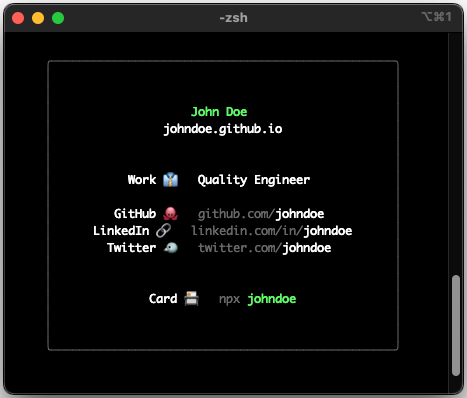
__card-flex__ is cli tools to generate cli-based name-card.
---
# :computer: how to setup
## on your local machine
> [!NOTE]
> VIDEO - [how to : setup card-flex locally](https://github.com/depapp/card-flex/blob/main/HOW_TO_VIDEO.md#how-to--setup-card-flex-locally)
before we get started, please note that you have to install `nodejs` including `npx` to run this cli-tools.
- first, open your terminal and run the following command to initialize the project:
```bash
npx card-flex
```
- the previous command will prompt you with a series of questions. answer them as required to configure your name-card
- make sure there's no error. if you get an error, please write on this [link](https://github.com/depapp/card-flex/issues/new)
- it will create new folder/directory based on your `GitHub username` that you provide before
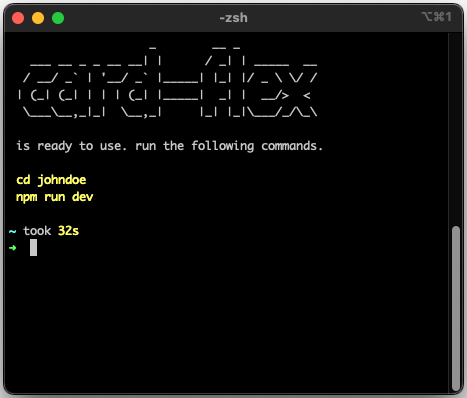
- change the directory using this command
```bash
cd
```
- open your name-card locally using
```bash
npm run dev
```
you should be able to see your own cli-based name-card locally
---
---
## public on "npmjs"
> [!NOTE]
> VIDEO - [how to : npm login](https://github.com/depapp/card-flex/blob/main/HOW_TO_VIDEO.md#how-to--npm-login) \
> VIDEO - [how to : npm publish](https://github.com/depapp/card-flex/blob/main/HOW_TO_VIDEO.md#how-to--npm-publish) \
> VIDEO - [how to : check the package on `npmjs.com`](https://github.com/depapp/card-flex/blob/main/HOW_TO_VIDEO.md#how-to--check-the-package-on-npmjscom) \
> VIDEO - [how to : access your card-flex public using `npx`](https://github.com/depapp/card-flex/blob/main/HOW_TO_VIDEO.md#how-to--access-your-card-flex-public-using-npx)
next step we will make it public using [npmjs.com](https://www.npmjs.com), so people can access your cli-based name-card by using `npx `. \
if don't have an account, you need to register it first to [npmjs.com](https://www.npmjs.com/signup), don't forget to `use your github username as npmjs username`
- open your terminal and login to your `npmjs`
```bash
npm login
```
- follow the prompt to login to your account
- once that is done, go ahead and run an
```bash
npm publish
```
- make sure there's no error. if you get an error, please write on this [link](https://github.com/depapp/card-flex/issues/new)
- if everything is set up right, try running
```bash
npx
```
---
# :hammer_and_wrench: advance usage
you can fully customize your own card, [click here to learn more](/ADVANCE_USAGE.md)
---
# :framed_picture: showcase
show me your-own card-flex by posting it on this [showcase your card](https://github.com/depapp/card-flex/discussions/categories/showcase-your-card)
---
# :muscle: support me



---
# :handshake: thanks to
this project was inspired by [Tierney Cyren](https://github.com/bnb) and [Okafor Irene](https://github.com/Irene-24)
---