https://github.com/dessant/reaction-comments
👍 📨 💔 GitHub Action that deletes +1 comments
https://github.com/dessant/reaction-comments
comments delete-comments github-actions issues pull-requests reactions
Last synced: 6 months ago
JSON representation
👍 📨 💔 GitHub Action that deletes +1 comments
- Host: GitHub
- URL: https://github.com/dessant/reaction-comments
- Owner: dessant
- License: mit
- Created: 2018-06-12T17:08:33.000Z (about 8 years ago)
- Default Branch: main
- Last Pushed: 2023-11-19T10:12:20.000Z (over 2 years ago)
- Last Synced: 2024-11-14T12:54:43.449Z (over 1 year ago)
- Topics: comments, delete-comments, github-actions, issues, pull-requests, reactions
- Language: JavaScript
- Homepage: https://github.com/marketplace/actions/reaction-comments
- Size: 1.51 MB
- Stars: 46
- Watchers: 4
- Forks: 10
- Open Issues: 0
-
Metadata Files:
- Readme: README.md
- Changelog: CHANGELOG.md
- Funding: .github/FUNDING.yml
- License: LICENSE
Awesome Lists containing this project
README
# Reaction Comments
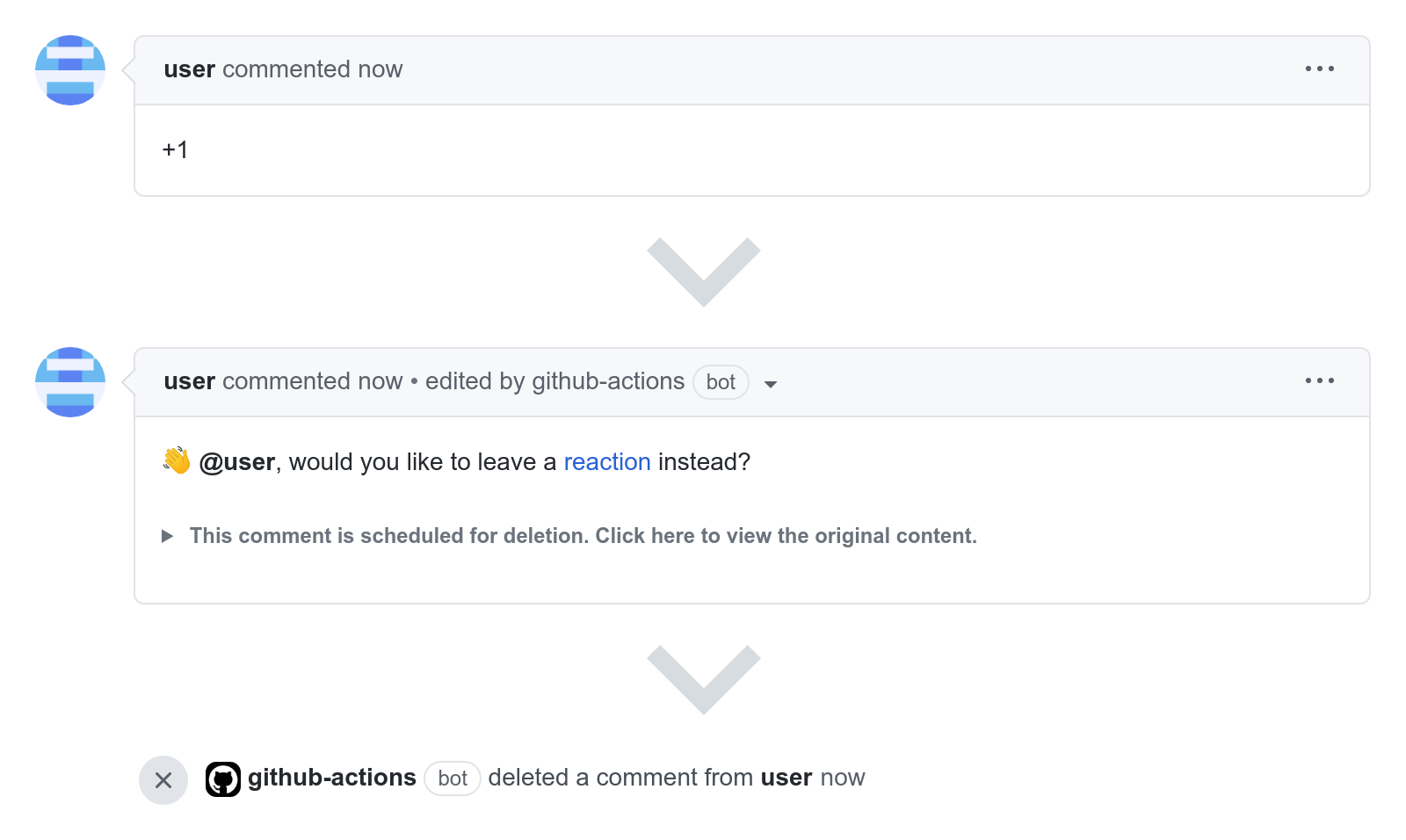
Reaction Comments is a GitHub Action that deletes reaction comments,
such as +1, and encourages the use of GitHub reactions.
## Supporting the Project
The continued development of Reaction Comments is made possible
thanks to the support of awesome backers. If you'd like to join them,
please consider contributing with
[Patreon](https://armin.dev/go/patreon?pr=reaction-comments&src=repo),
[PayPal](https://armin.dev/go/paypal?pr=reaction-comments&src=repo) or
[Bitcoin](https://armin.dev/go/bitcoin?pr=reaction-comments&src=repo).
## How It Works
The action detects if new or edited comments consist solely of emojis
and shortcodes used in GitHub reactions. Matching comments are replaced with
the message set in `issue-comment` or `pr-comment`, and deleted after a day.
When the `issue-comment` or `pr-comment` parameter is set to `''`,
matching comments are immediately deleted.
## Usage
Create the `reaction-comments.yml` workflow file in the `.github/workflows`
directory, use one of the [example workflows](#examples) to get started.
### Inputs
The action can be configured using [input parameters](https://docs.github.com/en/actions/using-workflows/workflow-syntax-for-github-actions#jobsjob_idstepswith).
- **`github-token`**
- GitHub access token, value must be `${{ github.token }}` or an encrypted
secret that contains a [personal access token](#using-a-personal-access-token)
- Optional, defaults to `${{ github.token }}`
- **`exempt-issue-labels`**
- Do not process comments on issues with any of these labels,
value must be a comma separated list of labels
- Optional, defaults to `''`
- **`issue-comment`**
- Replace reaction comments on issues with this message,
`{comment-author}` is an optional placeholder
- Optional, defaults to `:wave: @{comment-author}, would you like to leave
a reaction instead?`
- **`exempt-pr-labels`**
- Do not process comments on pull requests with any of these labels,
value must be a comma separated list of labels
- Optional, defaults to `''`
- **`pr-comment`**
- Replace reaction comments on pull requests with this message,
`{comment-author}` is an optional placeholder
- Optional, defaults to `:wave: @{comment-author}, would you like to leave
a reaction instead?`
- **`process-only`**
- Process comments only on issues or pull requests, value must be
either `issues` or `prs`
- Optional, defaults to `''`
- **`log-output`**
- Log output parameters, value must be either `true` or `false`
- Optional, defaults to `false`
### Outputs
- **`comments`**
- Comments that have been either deleted or scheduled for removal,
value is a JSON string in the form of
`[{"owner": "actions", "repo": "toolkit", "issue_number": 1,
"comment_id": 754701878, "is_review_comment": false, "status": "deleted"}]`,
value of `status` is either `scheduled` or `deleted`
- Defaults to `''`
## Examples
The following workflow will replace new or edited reaction comments
with a helpful message, and delete them after a day.
```yaml
name: 'Reaction Comments'
on:
issue_comment:
types: [created, edited]
pull_request_review_comment:
types: [created, edited]
schedule:
- cron: '0 0 * * *'
permissions:
actions: write
issues: write
pull-requests: write
jobs:
action:
runs-on: ubuntu-latest
steps:
- uses: dessant/reaction-comments@v4
```
### Available input parameters
This workflow declares all the available input parameters of the action
and their default values. Any of the parameters can be omitted.
```yaml
name: 'Reaction Comments'
on:
issue_comment:
types: [created, edited]
pull_request_review_comment:
types: [created, edited]
schedule:
- cron: '0 0 * * *'
permissions:
actions: write
issues: write
pull-requests: write
jobs:
action:
runs-on: ubuntu-latest
steps:
- uses: dessant/reaction-comments@v4
with:
github-token: ${{ github.token }}
exempt-issue-labels: ''
issue-comment: >
:wave: @{comment-author}, would you like to leave
a reaction instead?
exempt-pr-labels: ''
pr-comment: >
:wave: @{comment-author}, would you like to leave
a reaction instead?
process-only: ''
log-output: false
```
### Ignoring comments
This step will process comments only on issues, and ignore threads
with the the `help` or `party-parrot` labels applied.
```yaml
steps:
- uses: dessant/reaction-comments@v4
with:
exempt-issue-labels: 'help, party-parrot'
process-only: 'issues'
```
This step will process comments only on pull requests, and ignore threads
with the `pinned` label applied.
```yaml
steps:
- uses: dessant/reaction-comments@v4
with:
exempt-pr-labels: 'pinned'
process-only: 'prs'
```
### Deleting comments
By default, reaction comments are replaced with a message and deleted
after a day. This step will immediately delete new or edited reaction comments
on issues and pull requests.
```yaml
steps:
- uses: dessant/reaction-comments@v4
with:
issue-comment: ''
pr-comment: ''
```
### Using a personal access token
The action uses an installation access token by default to interact with GitHub.
You may also authenticate with a personal access token to perform actions
as a GitHub user instead of the `github-actions` app.
Create a [personal access token](https://docs.github.com/en/authentication/keeping-your-account-and-data-secure/managing-your-personal-access-tokens#creating-a-personal-access-token-classic)
with the `repo` or `public_repo` scopes enabled, and add the token as an
[encrypted secret](https://docs.github.com/en/actions/security-guides/using-secrets-in-github-actions#creating-secrets-for-a-repository)
for the repository or organization, then provide the action with the secret
using the `github-token` input parameter.
```yaml
steps:
- uses: dessant/reaction-comments@v4
with:
github-token: ${{ secrets.PERSONAL_ACCESS_TOKEN }}
```
## License
Copyright (c) 2018-2023 Armin Sebastian
This software is released under the terms of the MIT License.
See the [LICENSE](LICENSE) file for further information.