https://github.com/detro/consoleplusplus
Console++ - enhance your console
https://github.com/detro/consoleplusplus
Last synced: over 1 year ago
JSON representation
Console++ - enhance your console
- Host: GitHub
- URL: https://github.com/detro/consoleplusplus
- Owner: detro
- License: bsd-3-clause
- Created: 2013-02-13T00:06:20.000Z (over 13 years ago)
- Default Branch: master
- Last Pushed: 2021-01-25T07:46:05.000Z (over 5 years ago)
- Last Synced: 2025-03-30T19:37:36.204Z (over 1 year ago)
- Language: JavaScript
- Size: 77.1 KB
- Stars: 139
- Watchers: 5
- Forks: 5
- Open Issues: 0
-
Metadata Files:
- Readme: README.md
- License: LICENSE
Awesome Lists containing this project
README
[](https://www.npmjs.com/package/consoleplusplus)
[](https://travis-ci.org/detro/consoleplusplus)
[](https://app.fossa.io/projects/git%2Bgithub.com%2Fdetro%2Fconsoleplusplus?ref=badge_shield)
# Console++ - enhance your `console`
**Console++** makes your `console` awesomeR. Colours, logging level and shit
like that.
And it works with both [PhantomJS](http://phantomjs.org) and
[NodeJS](http://nodejs.org) (and pretty much any proper JavaScript runtime).
### NPM _one-liner_?
```
npm install consoleplusplus
```
## How does it make it _awesomeR_?
Like this:
```javascript
// here console is not that awesomeR
require("consoleplusplus");
// or
require("./console++.js"); //< if downloaded locally
// now console is very awesomeR!!!
```
**Console++** adds a bit of sparkling power to your shy little console.
It's not a fancy logging library with all the bells and whistles - it's a
"poor man" logger that you can drop in your code without having to rewrite it.
_Here is for the lazy developer!_
## How do I use it?
_Ehm_, like a `console` genius! Just type stuff like:
```javascript
console.log("A (boring) console.log message");
console.debug("An (irrelevant) console.debug message");
console.info("A (somewhat important) console.info message");
console.warn("A (quite important) console.warning message");
console.error("A (critical!) console.error message");
```
and you get:

## No really, how?
Yes, it manipulates the `console` object (_oh, the horror!_) so that you can
have some fancy colours, timestamped messages and a bit more. Output looks like:
```
[LEVEL - TIMESTAMP] THE_MESSAGE
```
Not all messages are printed. It introduces the concept of `level` (set via
`console.setLevel(level)`): as you would expect, it goes from `DEBUG` (lowest,
that corresponds to _print all the things_) to `ERROR` (highest, that
corresponds to _print only the errors_).
By default the `LEVEL` portion of the message is coloured (see below how
to disable this). Also, you can enable matching colouring for `THE_MESSAGE`
(see methods listing below).
One nifty feature (I think) it's that you have fine-grained control over
`THE_MESSAGE`. You can wrap text within `#COLOR{TEXT_TO_COLOR}` like:
```javascript
var message = "#red{this} is #cyan{a} #yellow{nice} message";
console.debug(message);
```
to print something like:

**PLEASE**, do read the code to learn more.
## How do I configure it?
**Console++** adds some few little methods to the `console` so you can tune
it a bit, based on your taste.
I'd like to be very lazy and say _"go read the code"_, but I guess I can list
here those methods.
```javascript
console.LEVELS = _LEVELS;
// Set/Get Level
console.setLevel(level); //< default `DEBUG`
console.getLevel();
console.getLevelName(level);
console.getLevelColor(level);
console.isLevelVisible(levelToCompare);
// Enable/Disable Colored Output
console.enableColor(); //< default enabled
console.disableColor();
console.isColored();
// Enable/Disable Colored Message Output
console.enableMessageColor(); //< default disabled
console.disableMessageColor();
console.isMessageColored();
// Enable/Disable Timestamped Output
console.enableTimestamp(); //< default enabled
console.disableTimestamp();
console.isTimestamped();
// Enable/Disable Equal Spacing on Level Name
console.enableEqualSpacing(); //< default enabled
console.disableEqualSpacing();
console.isEqualSpaced();
// Set OnOutput Callback (useful to write to file or something)
// Callback: `function(formattedMessage, levelName)`
console.onOutput(callback); //< default `null`
```
## Limitations
* Characters `{` and `}` are reserved: using those will produce an undefined result
## Links
* On NPM: https://npmjs.org/package/consoleplusplus
* On GitHub: https://github.com/detro/consoleplusplus
_Keep calm and make awesome_.
## License
This project is licensed under [BSD 3-Clause "New" or "Revised" License](./LICENSE).
[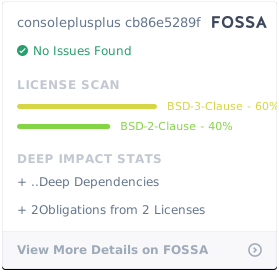](https://app.fossa.io/projects/git%2Bgithub.com%2Fdetro%2Fconsoleplusplus?ref=badge_large)