https://github.com/deusyu/translate-book
Claude Code skill that translates entire books (PDF/DOCX/EPUB) into any language using parallel subagents
https://github.com/deusyu/translate-book
Last synced: 4 months ago
JSON representation
Claude Code skill that translates entire books (PDF/DOCX/EPUB) into any language using parallel subagents
- Host: GitHub
- URL: https://github.com/deusyu/translate-book
- Owner: deusyu
- License: mit
- Created: 2026-03-15T12:04:50.000Z (5 months ago)
- Default Branch: main
- Last Pushed: 2026-04-04T14:37:11.000Z (4 months ago)
- Last Synced: 2026-04-04T16:57:43.504Z (4 months ago)
- Language: Python
- Size: 74.2 KB
- Stars: 588
- Watchers: 1
- Forks: 57
- Open Issues: 4
-
Metadata Files:
- Readme: README.md
- Funding: .github/FUNDING.yml
- License: LICENSE
Awesome Lists containing this project
- awesome-claude-skills-zh - translate-book - agent + 术语表 + SHA-256 校验,覆盖中日韩英法德西。 (Claude Code Skills / 文档与写作)
- awesome-claude-code - **translate-book**
- awesome-agent-skills - deusyu/translate-book - Translate books (PDF/DOCX/EPUB) via parallel sub-agents with resume (Sponsors ❤️ / Community Skills)
- awesome-openclaw-skills - deusyu/translate-book - agents with resume | - | (File & Document Management)
- awesome-agent-skills - translate-book - Claude Code skill that translates entire books (PDF/DOCX/EPUB) into any language using parallel subagents. (Documentation and Writing Skills)
README
# Rainman Translate Book
English | [中文](README.zh-CN.md)
Claude Code skill that translates entire books (PDF/DOCX/EPUB) into any language using parallel subagents.
> Inspired by [claude_translater](https://github.com/wizlijun/claude_translater). The original project uses shell scripts as its entry point, coordinating the Claude CLI with multiple step scripts to perform chunked translation. This project restructures the workflow as a Claude Code Skill, using subagents to translate chunks in parallel, with manifest-driven integrity checks, resumable runs, and multi-format output unified into a single pipeline. As the project structure and implementation differ significantly from the original, this is an independent project rather than a fork.
---
## How It Works
```
Input (PDF/DOCX/EPUB)
│
▼
Calibre ebook-convert → HTMLZ → HTML → Markdown
│
▼
Split into chunks (chunk0001.md, chunk0002.md, ...)
│ manifest.json tracks chunk hashes
▼
Parallel subagents (8 concurrent by default)
│ each subagent: read 1 chunk → translate → write output_chunk*.md
│ batched to respect API rate limits
▼
Validate (manifest hash check, 1:1 source↔output match)
│
▼
Merge → Pandoc → HTML (with TOC) → Calibre → DOCX / EPUB / PDF
```
Each chunk gets its own independent subagent with a fresh context window. This prevents context accumulation and output truncation that happen when translating a full book in a single session.
## Features
- **Parallel subagents** — 8 concurrent translators per batch, each with isolated context
- **Resumable** — chunk-level resume; already-translated chunks are skipped on re-run (for metadata/template changes, use a fresh run)
- **Manifest validation** — SHA-256 hash tracking prevents stale or corrupt outputs from being merged
- **Multi-format output** — HTML (with floating TOC), DOCX, EPUB, PDF
- **Multi-language** — zh, en, ja, ko, fr, de, es (extensible)
- **PDF/DOCX/EPUB input** — Calibre handles the conversion heavy lifting
## Prerequisites
- **Claude Code CLI** — installed and authenticated
- **Calibre** — `ebook-convert` command must be available ([download](https://calibre-ebook.com/))
- **Pandoc** — for HTML↔Markdown conversion ([download](https://pandoc.org/))
- **Python 3** with:
- `pypandoc` — required (`pip install pypandoc`)
- `beautifulsoup4` — optional, for better TOC generation (`pip install beautifulsoup4`)
## Quick Start
### 1. Install the skill
**Option A: npx (recommended)**
```bash
npx skills add deusyu/translate-book -a claude-code -g
```
**Option B: ClawHub**
```bash
clawhub install translate-book
```
**Option C: Git clone**
```bash
git clone https://github.com/deusyu/translate-book.git ~/.claude/skills/translate-book
```
### 2. Translate a book
In Claude Code, say:
```
translate /path/to/book.pdf to Chinese
```
Or use the slash command:
```
/translate-book translate /path/to/book.pdf to Japanese
```
The skill handles the full pipeline automatically — convert, chunk, translate in parallel, validate, merge, and build all output formats.
### 3. Find your outputs
All files are in `{book_name}_temp/`:
| File | Description |
|------|-------------|
| `output.md` | Merged translated Markdown |
| `book.html` | Web version with floating TOC |
| `book.docx` | Word document |
| `book.epub` | E-book |
| `book.pdf` | Print-ready PDF |
## Pipeline Details
### Step 1: Convert
```bash
python3 scripts/convert.py /path/to/book.pdf --olang zh
```
Calibre converts the input to HTMLZ, which is extracted and converted to Markdown, then split into chunks (~6000 chars each). A `manifest.json` records the SHA-256 hash of each source chunk for later validation.
### Step 2: Translate (parallel subagents)
The skill launches subagents in batches (default: 8 concurrent). Each subagent:
1. Reads one source chunk (e.g. `chunk0042.md`)
2. Translates to the target language
3. Writes the result to `output_chunk0042.md`
If a run is interrupted, re-running skips chunks that already have valid output files. Failed chunks are retried once automatically.
### Step 3: Merge & Build
```bash
python3 scripts/merge_and_build.py --temp-dir book_temp --title "《translated title》"
```
Before merging, the script validates:
- Every source chunk has a corresponding output file (1:1 match)
- Source chunk hashes match the manifest (no stale outputs)
- No output files are empty
Then: merge → Pandoc HTML → inject TOC → Calibre generates DOCX, EPUB, PDF.
**Note:** `{book_name}_temp/` is a working directory for a single translation run. If you change the title, author, output language, template, or image assets, either use a fresh temp directory or delete the existing final artifacts (`output.md`, `book*.html`, `book.docx`, `book.epub`, `book.pdf`) before re-running.
## Project Structure
| File | Purpose |
|------|---------|
| `SKILL.md` | Claude Code skill definition — orchestrates the full pipeline |
| `scripts/convert.py` | PDF/DOCX/EPUB → Markdown chunks via Calibre HTMLZ |
| `scripts/manifest.py` | Chunk manifest: SHA-256 tracking and merge validation |
| `scripts/merge_and_build.py` | Merge chunks → HTML → DOCX/EPUB/PDF |
| `scripts/calibre_html_publish.py` | Calibre wrapper for format conversion |
| `scripts/template.html` | Web HTML template with floating TOC |
| `scripts/template_ebook.html` | Ebook HTML template |
## Troubleshooting
| Problem | Solution |
|---------|----------|
| `Calibre ebook-convert not found` | Install Calibre and ensure `ebook-convert` is in PATH |
| `Manifest validation failed` | Source chunks changed since splitting — re-run `convert.py` |
| `Missing source chunk` | Source file deleted — re-run `convert.py` to regenerate |
| Incomplete translation | Re-run the skill — it resumes from where it stopped |
| Changed title/template/assets but output didn't update | Delete existing `output.md`, `book*.html`, `book.docx`, `book.epub`, `book.pdf` from the temp dir, then re-run `merge_and_build.py` |
| `output.md exists but manifest invalid` | Stale output — the script auto-deletes and re-merges |
| PDF generation fails | Ensure Calibre is installed with PDF output support |
## Star History
If you find this project helpful, please consider giving it a Star ⭐!
[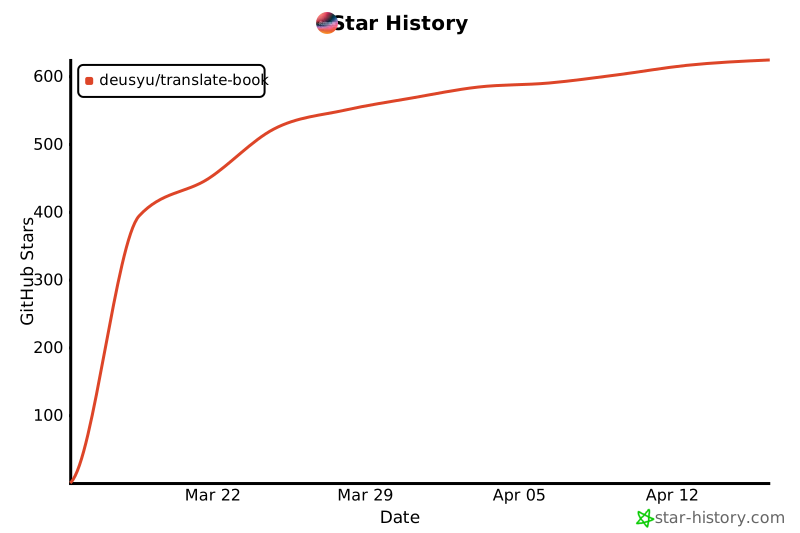](https://star-history.com/#deusyu/translate-book&Date)
## Sponsor
If this project saves you time, consider sponsoring to keep it maintained and improved.
[](https://github.com/sponsors/deusyu)
## License
[MIT](LICENSE)