https://github.com/dev-kasibhatla/log_plus
A simple customisable logger written in pure dart. Works with CLI applications and flutter app. Log levels, coloured console output, log history, records stack traces.
https://github.com/dev-kasibhatla/log_plus
dart flutter logging
Last synced: 4 months ago
JSON representation
A simple customisable logger written in pure dart. Works with CLI applications and flutter app. Log levels, coloured console output, log history, records stack traces.
- Host: GitHub
- URL: https://github.com/dev-kasibhatla/log_plus
- Owner: dev-kasibhatla
- License: bsd-3-clause
- Created: 2024-02-26T06:36:00.000Z (over 2 years ago)
- Default Branch: main
- Last Pushed: 2024-02-28T06:39:46.000Z (over 2 years ago)
- Last Synced: 2025-10-23T05:02:08.290Z (8 months ago)
- Topics: dart, flutter, logging
- Language: Dart
- Homepage:
- Size: 135 KB
- Stars: 1
- Watchers: 1
- Forks: 0
- Open Issues: 0
-
Metadata Files:
- Readme: README.md
- Changelog: CHANGELOG.md
- License: LICENSE
Awesome Lists containing this project
README
[](https://github.com/dev-kasibhatla/log_plus)
[](https://github.com/dev-kasibhatla/log_plus/blob/main/LICENSE)
[](https://github.com/dev-kasibhatla/log_plus/actions)
# log_plus
Small, feature-rich logging package for Dart and Flutter.
Written in pure Dart, with no dependencies.
## Features
- [x] Multiple Log Levels: Define distinct log levels to categorize messages.
- [x] Formatted Console Logs: Print logs to the console in a structured and readable format with color-coded log levels
- [x] Selective Output: Control console output based on log levels to streamline debugging workflows
- [x] In-Memory Log Storage: Store logs in memory for post-execution analysis and troubleshooting
- [x] Enhanced Debugging: Optionally include and print stack traces alongside log messages to expedite debugging
## Getting started
1. Install the package
2. Import the package
3. Create a new instance of `Logs` and start logging. Use the same instance across your application to maintain a single log history.
## Screenshots

View structured and coloured output in console
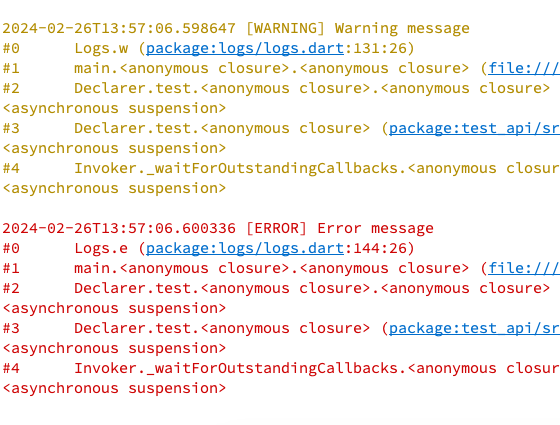
Optionally include stack trace in logs
## Usage
Get started with no configuration:
```dart
import 'package:log_plus/log_plus.dart';
void main() {
final log = Logs();
log.v('This is a verbose message');
log.d('This is a debug message');
log.i('This is an info message');
log.w('This is a warning message');
log.e('This is an error message', includeStackTrace: true); // Optionally include stack trace
}
```
Customise output and storage:
```dart
import 'package:log_plus/log_plus.dart';
void main() {
final log = Logs(
storeLogLevel: LogLevel.warning, // Store logs with warning level and above
printLogLevelWhenDebug: LogLevel.verbose, // Print logs with verbose level and above in debug mode
printLogLevelWhenRelease: LogLevel.error, // Print logs with error level and above in release mode
storeLimit: 500, // Store up to 500 logs in memory
);
log.v('This is a verbose message'); // Will be printed in debug mode, but not stored
log.d('This is a debug message'); // Will be printed in debug mode, but not stored
log.i('This is an info message'); // Will be printed in debug mode, but not stored
log.w('This is a warning message', includeStackTrace: true); // Optionally include stack trace
log.e('This is an error message', includeStackTrace: true); // Optionally include stack trace
}
```
## Additional information
Report any issues or feature requests on the [GitHub repository](https://github.com/dev-kasibhatla/log_plus/issues).
PRs welcome.