https://github.com/devamoghs/keras-style-transfer
An implementation of "A Neural Algorithm of Artistic Style" in Keras
https://github.com/devamoghs/keras-style-transfer
deep-learning neural-networks neural-style neural-style-transfer style-transfer
Last synced: about 1 year ago
JSON representation
An implementation of "A Neural Algorithm of Artistic Style" in Keras
- Host: GitHub
- URL: https://github.com/devamoghs/keras-style-transfer
- Owner: devAmoghS
- License: mit
- Created: 2019-03-04T04:44:03.000Z (over 7 years ago)
- Default Branch: master
- Last Pushed: 2023-02-10T23:09:41.000Z (over 3 years ago)
- Last Synced: 2025-03-30T18:03:34.724Z (over 1 year ago)
- Topics: deep-learning, neural-networks, neural-style, neural-style-transfer, style-transfer
- Language: Python
- Size: 3.24 MB
- Stars: 35
- Watchers: 1
- Forks: 5
- Open Issues: 5
-
Metadata Files:
- Readme: README.md
- License: LICENSE
Awesome Lists containing this project
README
# Keras-Style-Transfer (KeSTra)
An implementation of "A Neural Algorithm of Artistic Style" (http://arxiv.org/abs/1508.06576) in Keras
The code present in this repository is presented in this [blog](https://medium.com/@singhal.amogh1995/utilising-cnns-to-transform-your-model-into-a-budding-artist-1330dc392e25).
The code is written in Keras 2.2.2
# Preview
This is a 5-sec gif of **Chicago city** painted in the style of **Rain Princess**

### Content Image and Style Image
| Content Image | Style Image |
|---|---|
| 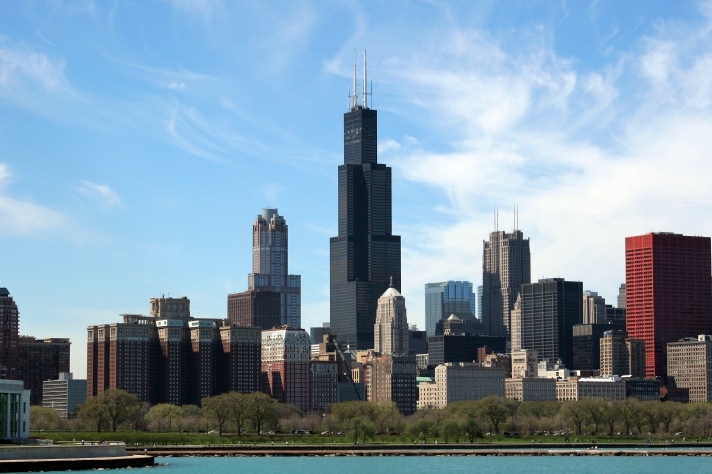 |
|  |
|
## Installation notes
KeSTra is built using Python 3.5. The easiest way to set up a compatible
environment is to use [Conda](https://conda.io/). This will set up a virtual
environment with the exact version of Python used for development along with all the
dependencies needed to run KeSTra.
1. [Download and install Conda](https://conda.io/docs/download.html).
2. Create a Conda environment with Python 3.
(**Note**: enter ```cd ~``` to go on **$HOME** , then perform these commands)
```
conda create --name *your env name* python=3.5
```
You will get the following, kestra-test is the env name used in this example
```
Solving environment: done
## Package Plan ##
environment location: /home/user/anaconda3/envs/kestra-test
added / updated specs:
- python=3.5
The following NEW packages will be INSTALLED:
ca-certificates: 2018.12.5-0
certifi: 2018.8.24-py35_1
libedit: 3.1.20181209-hc058e9b_0
libffi: 3.2.1-hd88cf55_4
libgcc-ng: 8.2.0-hdf63c60_1
libstdcxx-ng: 8.2.0-hdf63c60_1
ncurses: 6.1-he6710b0_1
openssl: 1.0.2p-h14c3975_0
pip: 10.0.1-py35_0
python: 3.5.6-hc3d631a_0
readline: 7.0-h7b6447c_5
setuptools: 40.2.0-py35_0
sqlite: 3.26.0-h7b6447c_0
tk: 8.6.8-hbc83047_0
wheel: 0.31.1-py35_0
xz: 5.2.4-h14c3975_4
zlib: 1.2.11-h7b6447c_3
Proceed ([y]/n)? *Press y*
Preparing transaction: done
Verifying transaction: done
Executing transaction: done
#
# To activate this environment, use:
# > source activate kestra-test
#
# To deactivate an active environment, use:
# > source deactivate
#
```
The environment is successfully created.
3. Now activate the Conda environment.
```
source activate *your env name*
```
You will get the following
```
(kestra-test) amogh@hp15X34:~$
```
Enter `conda list` to get the list of available packages
```
(kestra-test) amogh@hp15X34:~$ conda list
# packages in environment at /home/amogh/anaconda3/envs/mlwp-test:
#
# Name Version Build Channel
ca-certificates 2018.12.5 0
certifi 2018.8.24 py35_1
libedit 3.1.20181209 hc058e9b_0
libffi 3.2.1 hd88cf55_4
libgcc-ng 8.2.0 hdf63c60_1
libstdcxx-ng 8.2.0 hdf63c60_1
ncurses 6.1 he6710b0_1
openssl 1.0.2p h14c3975_0
pip 10.0.1 py35_0
python 3.5.6 hc3d631a_0
readline 7.0 h7b6447c_5
setuptools 40.2.0 py35_0
sqlite 3.26.0 h7b6447c_0
tk 8.6.8 hbc83047_0
wheel 0.31.1 py35_0
xz 5.2.4 h14c3975_4
zlib 1.2.11 h7b6447c_3
```
4. Install the required dependencies.
```
(kestra-test) amogh@hp15X34:~$ conda install --yes --file *path to requirements.txt*
```
5. In case you are not able to install the packages or getting `PackagesNotFoundError`
Use the following command ` conda install -c conda-forge *list of packages separated by space*`.
## How good is the code ?
* It is well tested
* It passes style checks (PEP8 compliant)
* It can compile in its current state (and there are relatively no issues)
## How much support is available?
* FAQs (coming soon)
* Documentation (coming soon)
## Issues
Feel free to submit issues and enhancement requests.
## Contributing
Please refer to each project's style guidelines and guidelines for submitting patches and additions. In general, we follow the "fork-and-pull" Git workflow.
1. **Fork** the repo on GitHub
2. **Clone** the project to your own machine
3. **Commit** changes to your own branch
4. **Push** your work back up to your fork
5. Submit a **Pull request** so that we can review your changes
NOTE: Be sure to merge the latest from "upstream" before making a pull request!