https://github.com/devcrew-io/snapchat_loginkit
Flutter plugin for integrating Snapchat LoginKit, providing a seamless authentication experience in Flutter apps.
https://github.com/devcrew-io/snapchat_loginkit
Last synced: 4 months ago
JSON representation
Flutter plugin for integrating Snapchat LoginKit, providing a seamless authentication experience in Flutter apps.
- Host: GitHub
- URL: https://github.com/devcrew-io/snapchat_loginkit
- Owner: DevCrew-io
- License: mit
- Created: 2024-01-17T11:42:08.000Z (over 2 years ago)
- Default Branch: main
- Last Pushed: 2024-03-06T13:48:03.000Z (over 2 years ago)
- Last Synced: 2025-10-22T23:39:37.011Z (8 months ago)
- Language: Dart
- Size: 1.99 MB
- Stars: 6
- Watchers: 3
- Forks: 1
- Open Issues: 1
-
Metadata Files:
- Readme: README.md
- Changelog: CHANGELOG.md
- Contributing: CONTRIBUTING.md
- License: LICENSE
- Code of conduct: CODE_OF_CONDUCT.md
- Security: SECURITY.md
Awesome Lists containing this project
README
# snapchat_loginkit
[](https://pub.dev/packages/snapchat_loginkit)
[](https://github.com/DevCrew-io/snapchat_loginkit/blob/main/LICENSE)


A Flutter plugin for integrating Snapchat login kit into your Flutter applications, allowing users to log in with their Snapchat accounts.
## Features
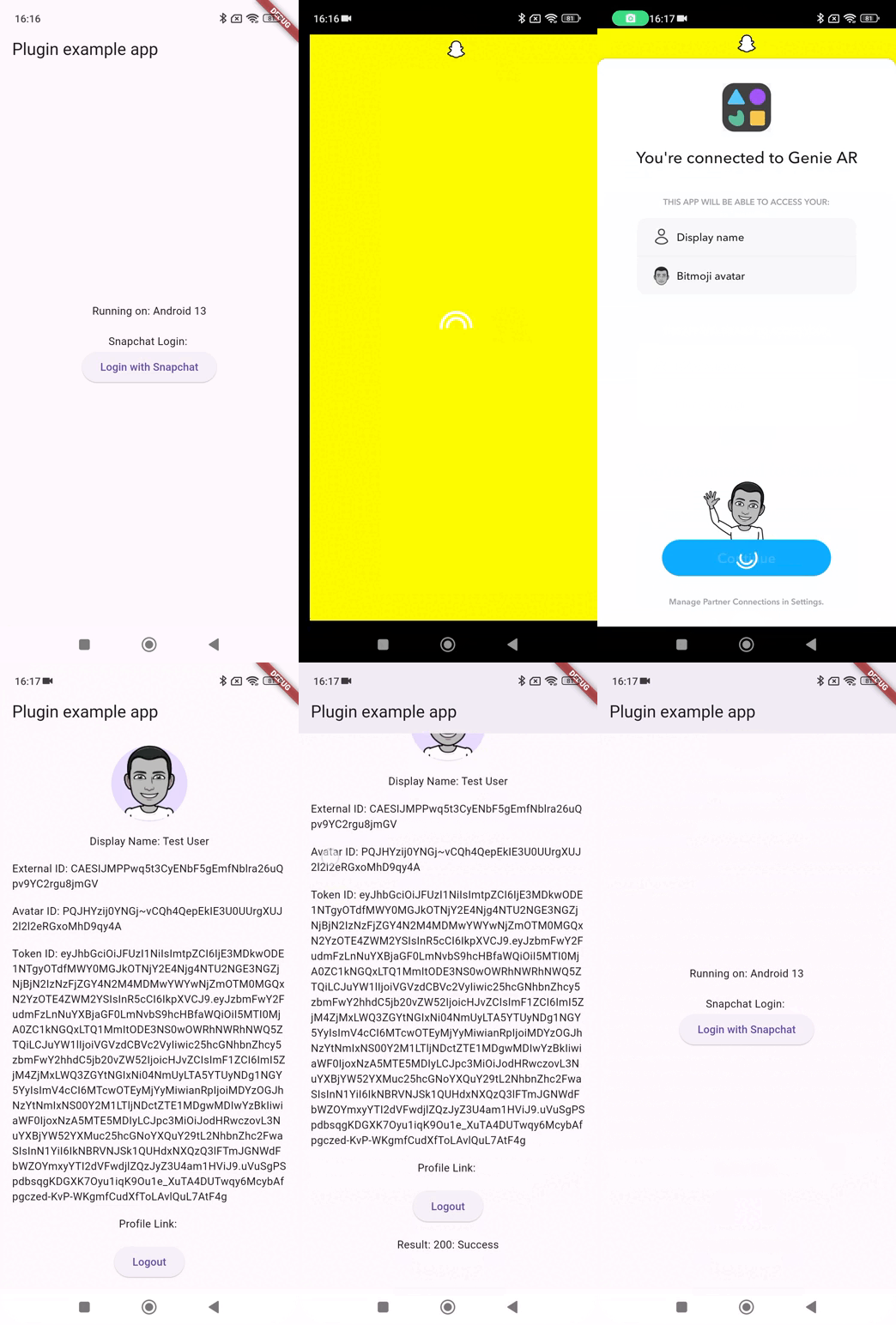
- **Snapchat login:** Enable users to log in to your app using their Snapchat credentials.
- **Subscribe / Unsubscribe to Login State Updates:** Subscribe or Unsubscribe to updates about the success of the login process.
- **Send Requests to Get User Data**: After Successful login, Get the user information such as displayName, AvatarUrl, AvatarId, externalId, tokenId and profileLink.
- **Query Login State**: Check if the user is already logged in to Snapchat.
- **Fetch Access Token**: Retrieve the access token after a successful login, which can be used to make API calls to Snapchat on behalf of the user.
- **Access To Scope**: Check if the user has granted access to a specific scope (permission) in their Snapchat account.
- **Login With Firebase**: Integrate Firebase authentication with Snapchat login, allowing users to log in to your app using Firebase authentication after logging in with Snapchat.
## Getting Started
First thing first, you must login to your developer account on [Snapchat Developers portal](https://developers.snap.com/) and get your **Client ID** for the app. For more information you can read the docs [Login Kit](https://docs.snap.com/snap-kit/login-kit/overview).
#### CAUTION
The **Client ID** is different for **Production** and **Staging** environment. So be careful to use the correct values.
**Note:** To use **Production** Client ID, your snapchat app should be approved and live on snapchat developer portal. [Read more](https://docs.snap.com/camera-kit/app-review/release-app) about submitting app for review.
## Configuration
It is necessary to perform platform-specific configuration setups first.
## Understand Scopes
[Snapchat Scopes](https://docs.snap.com/snap-kit/login-kit/Tutorials/android#understand-scopes) let your application declare which Login Kit features it wants access to. If a scope is toggleable, the user can deny access to one scope while agreeing to grant access to others.
## Android
In **:android** module, define `snap_connect_scopes` as an Android resource array in [`values/arrays.xml`](https://developer.android.com/guide/topics/resources/providing-resources#table1).
Define the following values in `local.properties` file under **:android** module.
```properties
#sdk.dir=PATH_TO_ANDROID_SDK
# staging env for snapkit
# Your app’s client id
com.snap.kit.clientId=YOUR_APP_CLIENT_ID
# The url that will handle login completion
com.snap.kit.redirectUrl=REDIRECT_URL
# Enter the parts of your redirect url below
# e.g., if your redirect url is myapp://snap-kit/oauth2
# android:scheme="myapp"
# android:host="snap-kit"
# android:path="oauth2"
com.snap.kit.scheme=SCHEME
com.snap.kit.host=HOST
com.snap.kit.path=PATH
# Set the firebase custom token url
com.snap.kit.firebaseExtCustomTokenUrl=FIREBASE_CUSTOM_TOKEN_URL
```
Inside the app's `build.gradle` use [manifestPlaceholders](https://developer.android.com/build/manage-manifests#inject_build_variables_into_the_manifest) attribute to pass these values to login kit. Read more about [configuring build types](https://developer.android.com/build/build-variants#build-types) in android.
- Depending on your requirements, you can either setup only one configuration for all `productFlavors`
```groovy
android {
defaultConfig {
manifestPlaceholders = [
SNAP_CLIENT_ID : localProperties.getProperty("com.snap.kit.clientId"),
SNAP_REDIRECT_URL : localProperties.getProperty("com.snap.kit.redirectUrl"),
SNAP_SCOPES_ARRAY : "@array/snap_connect_scopes",
SNAP_REDIRECT_HOST : localProperties.getProperty("com.snap.kit.host"),
SNAP_REDIRECT_PATH : localProperties.getProperty("com.snap.kit.path"),
SNAP_REDIRECT_SCHEME : localProperties.getProperty("com.snap.kit.scheme"),
FIREBASE_CUSTOM_TOKEN_URL: localProperties.getProperty("com.snap.kit.firebaseExtCustomTokenUrl")
]
}
//...
}
```
- **OR** better way, setup different configurations for different `productFlavors`
```groovy
android {
//...
flavorDimensions "environment"
productFlavors {
staging {
manifestPlaceholders = [
SNAP_CLIENT_ID : localProperties.getProperty("com.snap.kit.clientId"),
SNAP_REDIRECT_URL : localProperties.getProperty("com.snap.kit.redirectUrl"),
SNAP_SCOPES_ARRAY : "@array/snap_connect_scopes",
SNAP_REDIRECT_HOST : localProperties.getProperty("com.snap.kit.host"),
SNAP_REDIRECT_PATH : localProperties.getProperty("com.snap.kit.path"),
SNAP_REDIRECT_SCHEME : localProperties.getProperty("com.snap.kit.scheme"),
FIREBASE_CUSTOM_TOKEN_URL: localProperties.getProperty("com.snap.kit.firebaseExtCustomTokenUrl")
]
}
production {
manifestPlaceholders = [
SNAP_CLIENT_ID : localProperties.getProperty("com.snap.kit.clientId"),
SNAP_REDIRECT_URL : localProperties.getProperty("com.snap.kit.redirectUrl"),
SNAP_SCOPES_ARRAY : "@array/snap_connect_scopes",
SNAP_REDIRECT_HOST : localProperties.getProperty("com.snap.kit.host"),
SNAP_REDIRECT_PATH : localProperties.getProperty("com.snap.kit.path"),
SNAP_REDIRECT_SCHEME : localProperties.getProperty("com.snap.kit.scheme"),
FIREBASE_CUSTOM_TOKEN_URL: localProperties.getProperty("com.snap.kit.firebaseExtCustomTokenUrl")
]
}
}
//...
}
```
**NOTE:** The same properties name should be used as defined in the `local.properties` file.
## iOS
Add the following fields in your application’s `Info.plist` file:
```xml
SCSDKClientId
$(SNAP_CLIENT_ID)
SCSDKRedirectUrl
$(SNAP_REDIRECT_URL)
SCSDKScopes
https://auth.snapchat.com/oauth2/api/user.display_name
https://auth.snapchat.com/oauth2/api/user.external_id
https://auth.snapchat.com/oauth2/api/user.bitmoji.avatar
LSApplicationQueriesSchemes
snapchat
CFBundleURLTypes
CFBundleTypeRole
Editor
CFBundleURLName
$(PRODUCT_BUNDLE_IDENTIFIER)
CFBundleURLSchemes
$(SNAP_REDIRECT_SCHEME)
x
```
Read [Snapchat iOS Documentation](https://docs.snap.com/snap-kit/login-kit/Tutorials/ios#get-started) for more information.
#### **Securing Your Client ID in Xcode**
Adding a [Build Configuration](https://developer.apple.com/documentation/xcode/adding-a-build-configuration-file-to-your-project) file to your project for storing your client id and confidential keys. Let's add `SNAP_CLIENT_ID`, `SNAP_REDIRECT_URL` and `SNAP_REDIRECT_SCHEME` properties in configuration file.
```properties
/// Configuration settings file format documentation can be found at:
/// https://help.apple.com/xcode/#/dev745c5c974
/// Snapchat Settings
/// your app’s client id
SNAP_CLIENT_ID = YOUR_CLIENT_ID
/// the url that will handle login completion
SNAP_REDIRECT_URL = YOUR_REDIRECT_URL
/// This should contain your redirect URL’s scheme
SNAP_REDIRECT_SCHEME = YOUR_REDIRECT_SCHEME
```
- **OR** better way, setup different configurations file for different `productFlavors`
**NOTE:** Now, whenever we push code to our repo, we can make sure that config file does not reach the server by adding it in .gitignore
## Handle Deeplink
In `AppDelegate`, use the `SCSDKLoginClient` interface to receive the deeplink:
```swift
import SCSDKLoginKit
func application(
_ app: UIApplication,
open url: URL,
options: [UIApplicationOpenURLOptionsKey : Any] = [:]) -> Bool {
...
if SCSDKLoginClient.application(app, open: url, options: options) {
return true
}
...
}
```
## Installation
After the perform platform-specific configuration setups, add `snapchat_loginkit:` as a dependency in your pubspec.yaml file.
Then run ```flutter pub get``` to install the package.
Now in your Dart code, you can use:
```dart
import 'package:snapchat_loginkit/snapchat_loginkit.dart';
```
## Initializing the SnapchatLoginkit
```dart
class _MyAppState extends State{
/// Declaring a SnapchatLoginkit variable
late final SnapchatLoginkit _snapchatLoginkitPlugin;
@override
void initState() {
super.initState();
/// Initializing the _snapchatLoginkitPlugin variable
_snapchatLoginkitPlugin = SnapchatLoginkit(loginStateCallback: this);
}
@override
Widget build(BuildContext context) {
return MaterialApp(
home: Scaffold(
appBar: AppBar(
title: const Text('Snapchat loginkit example'),
),
body: Container(),
),
);
}
}
```
## Login with snapchat
To login, use `login()`.
LoginStateCallback Provides methods to handle Snapchat login callbacks.
Use [LoginStateCallback] methods to listen to login events such as success, failure, start, and logout.
```dart
class _MyAppState extends State implements LoginStateCallback {
/// Declaring a SnapchatLoginkit variable
late final SnapchatLoginkit _snapchatLoginkitPlugin;
@override
void initState() {
super.initState();
/// Initializing the _snapchatLoginkitPlugin variable
_snapchatLoginkitPlugin = SnapchatLoginkit(loginStateCallback: this);
}
@override
Widget build(BuildContext context) {
return MaterialApp(
home: Scaffold(
appBar: AppBar(
title: const Text('Snapchat loginkit example'),
),
body: Center(child: ElevatedButton(
onPressed: () {
/// call login event
/// LoginStateCallback Provides methods to handle Snapchat login callbacks.
_snapchatLoginkitPlugin.login();
},
child: const Text('Login with Snapchat'),
),
),
),
);
}
/// Callback method invoked when the login process fails.
@override
void onFailure(String message) {}
/// Callback method invoked when the user logs out.
@override
void onLogout() {}
/// Callback method invoked when the login process starts.
@override
void onStart() {}
/// Callback method invoked when the login process is successful.
@override
void onSuccess(String accessToken) async {}
}
```
## Subscribe / Unsubscribe to Login State Updates
To subscribe to updates about the success of the login process, use `addLoginStateCallback()`.
To unsubscribe from login updates, use `removeLoginStateCallback()`.
```dart
class _MyAppState extends State implements LoginStateCallback {
/// Declaring a SnapchatLoginkit variable
late final SnapchatLoginkit _snapchatLoginkitPlugin;
@override
void initState() {
super.initState();
/// Initializing the _snapchatLoginkitPlugin variable
_snapchatLoginkitPlugin = SnapchatLoginkit(loginStateCallback: this);
/// Subscribe for login updates
_snapchatLoginkitPlugin.addLoginStateCallback();
}
@override
void dispose() {
/// Unsubscribe from login updates
_snapchatLoginkitPlugin.removeLoginStateCallback();
super.dispose();
}
@override
Widget build(BuildContext context) {
return MaterialApp(
home: Scaffold(
appBar: AppBar(
title: const Text('Snapchat loginkit example'),
),
body: Container(),
),
);
}
/// Callback method invoked when the login process fails.
@override
void onFailure(String message) {}
/// Callback method invoked when the user logs out.
@override
void onLogout() {}
/// Callback method invoked when the login process starts.
@override
void onStart() {}
/// Callback method invoked when the login process is successful.
@override
void onSuccess(String accessToken) async {}
}
```
## Send Requests to Get User Data
Once a user logs into your app with Snapchat, you can make requests for their `displayName`, `AvatarUrl`, `AvatarId`, `externalId`, `tokenId` and `profileLink`.
Construct the user data query
```dart
UserDataQuery query = UserDataQueryBuilder()
/// optional: for 'displayName' resource
.withDisplayName()
/// optional: for ‘bitmoji’ resource
.withBitmojiAvatarId()
.withBitmojiAvatarUrl()
/// optional: for 'externalID' resource
.withExternalId()
/// optional: for Snap OIDC (OpenID Connect) token
/// Snap OIDC (OpenID Connect) provides a generic authentication and identity solution
/// that allows otherwise different systems to interoperate and share authentication state
/// and user profile information.
/// Typically, this allows 3rd party backend services to accept and authenticate requests
/// from Snap clients.
.withIdToken()
/// optional: for 'profileLink' resource
.withProfileLink()
.build();
```
Call the fetch API
```dart
UserResponse userResponse = await _snapchatLoginkitPlugin.fetchUserData(query);
/// handle the response code
debugPrint("User Code: ${userResponse.code}");
/// handle the response message
debugPrint("User Message: ${userResponse.message}");
/// handle the response user
debugPrint("User: ${userResponse.user}");
/// get user display name
final displayName = userResponse.user.displayName;
/// get user avatar url
final avatarUrl = userResponse.user.avatarUrl;
/// get user avatar id
final avatarId = userResponse.user.avatarId;
/// get user external id
final externalId = userResponse.user.externalId;
/// get user token id
final tokenId = userResponse.user.tokenId;
/// get user profile link
final profileLink = userResponse.user.profileLink;
```
## Query Login State
To check whether a user is currently logged in, use `isUserLoggedIn()`
```dart
/// Query user’s logged-in state
bool isUserLoggedIn = await _snapchatLoginkitPlugin.isUserLoggedIn();
```
## Fetch Access Token
Retrieve the access token after a successful login, use `fetchAccessToken()`
```dart
final response = await _snapchatLoginkitPlugin.fetchAccessToken();
/// handle response code
debugPrint("Token Code: ${response.code}");
/// handle response meesage
debugPrint("Token Message: ${response.message}");
/// get access token
debugPrint("Token Token: ${response.token}");
```
## Access To Scope
Check if the user has granted access to a specific scope (permission) in their Snapchat account. use `hasAccessToScope('scope')`
```dart
/// Login Kit offers the following scopes:
/// https://auth.snapchat.com/oauth2/api/user.bitmoji.avatar
/// https://auth.snapchat.com/oauth2/api/user.display_name
final bool hasAccess = await _snapchatLoginkitPlugin.hasAccessToScope('https://auth.snapchat.com/oauth2/api/user.display_name');
```
## Authenticate With Firebase
Users to authenticate with Firebase using their Snapchat accounts. Define the `com.snap.kit.firebaseExtCustomTokenUrl=firebaseExtCustomTokenUrl` value in `local.properties` file under **:android** module.
Before call this method `loginWithFirebase()` you should need to provide Firebase extension token url. for more help, how to generate firebase extension token url visit
[Firebase Extension Token Url Android](https://docs.snap.com/snap-kit/login-kit/Tutorials/firebase/android#get-started) , [Firebase Extension Token Url iOS](https://docs.snap.com/snap-kit/login-kit/Tutorials/firebase/ios)
## Unlink
A user can choose to end the current OAuth2 Snapchat session and stop sharing their Display Name and Bitmoji avatar with your app.
The `logout()` method can be used to clear the access.
```dart
/// Clear the access and refresh token locally
_snapchatLoginkitPlugin.logout();
```
## Bugs and feature requests
Have a bug or a feature request? Please first search for existing and closed issues. If your problem
or idea is not addressed
yet, [please open a new issue](https://github.com/DevCrew-io/snapchat_loginkit/issues/new).
## Author
[DevCrew I/O](https://devcrew.io/)
Connect with Us:



## Contributing
Contributions, issues, and feature requests are welcome!
## Show your Support
Give a star if this project helped you.