https://github.com/develmusa/mkdocs-network-graph-plugin
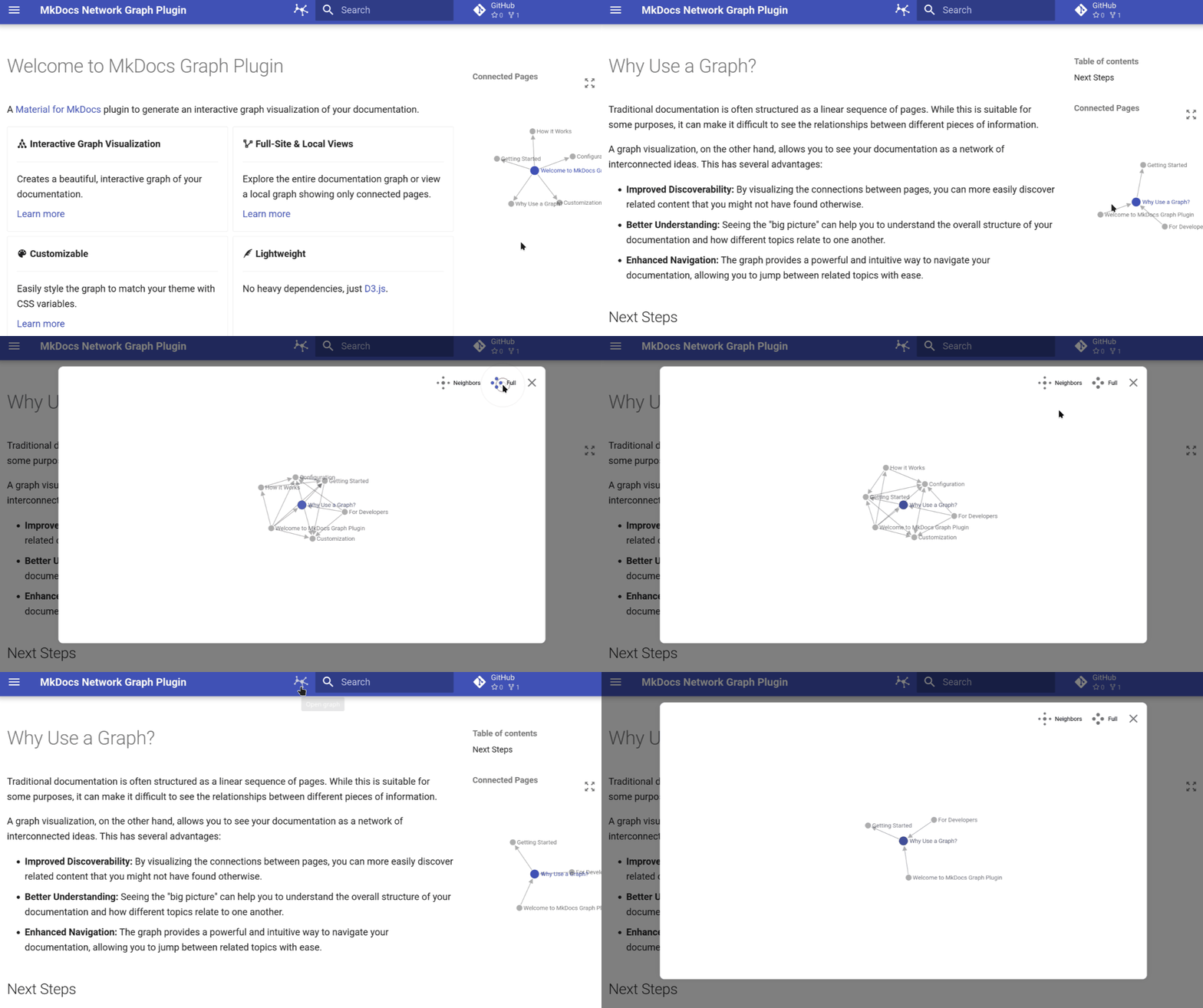
A MkDocs plugin that generates interactive network graph visualizations of your documentation structure, showing relationships between pages.
https://github.com/develmusa/mkdocs-network-graph-plugin
material-for-mkdocs mkdocs mkdocs-plugin
Last synced: 11 months ago
JSON representation
A MkDocs plugin that generates interactive network graph visualizations of your documentation structure, showing relationships between pages.
- Host: GitHub
- URL: https://github.com/develmusa/mkdocs-network-graph-plugin
- Owner: develmusa
- License: mit
- Created: 2025-08-21T12:07:57.000Z (11 months ago)
- Default Branch: main
- Last Pushed: 2025-09-11T15:02:33.000Z (11 months ago)
- Last Synced: 2025-09-11T16:14:51.057Z (11 months ago)
- Topics: material-for-mkdocs, mkdocs, mkdocs-plugin
- Language: Python
- Homepage: https://develmusa.github.io/mkdocs-network-graph-plugin/
- Size: 16.3 MB
- Stars: 0
- Watchers: 0
- Forks: 1
- Open Issues: 0
-
Metadata Files:
- Readme: README.md
- Changelog: CHANGELOG.md
- License: LICENSE
Awesome Lists containing this project
README
# MkDocs Network Graph Plugin
**Add an interactive knowledge network graph to your Material for MkDocs documentation project**
[](https://pypi.org/project/mkdocs-network-graph-plugin/)
[](https://pypi.org/project/mkdocs-network-graph-plugin/)
[](https://github.com/develmusa/mkdocs-network-graph-plugin/blob/main/LICENSE)
[](https://github.com/develmusa/mkdocs-network-graph-plugin/actions)
[](https://develmusa.github.io/mkdocs-network-graph-plugin/)
*A powerful [Material for MkDocs](https://squidfunk.github.io/mkdocs-material/) plugin that generates beautiful, interactive graph visualizations of your documentation structure and relationships.*
[**Documentation**](https://develmusa.github.io/mkdocs-network-graph-plugin/) • [**Quick Start**](#quick-start) • [**Configuration**](#configuration) • [**Contributing**](#contributing)
---
## Table of Contents
- [Features](#features)
- [Quick Start](#quick-start)
- [Installation](#installation)
- [Configuration](#configuration)
- [Customization](#customization)
- [Documentation](#documentation)
- [Contributing](#contributing)
- [License](#license)
- [Acknowledgments](#acknowledgments)
## Features
| **Interactive Visualization** | **Smart Navigation** | **Fully Customizable** | **Lightweight** |
|:---:|:---:|:---:|:---:|
| **Interactive Graph Visualization** of your documentation structure | **Dual View Modes** to switch between a full-site overview and local page connections | **Theme Integration** that seamlessly blends with Material for MkDocs | **Performance Optimized** with minimal impact on build times and a responsive design |
## Quick Start
Get up and running in under 2 minutes:
### 1. Install the plugin
```bash
pip install mkdocs-network-graph-plugin
```
### 2. Enable in your `mkdocs.yml`
```yaml
plugins:
- graph
```
### 3. Build your docs
```bash
mkdocs serve
```
That's it! Your documentation now includes an interactive graph visualization.
## Installation
### Using pip (recommended)
```bash
pip install mkdocs-network-graph-plugin
```
### Using uv (faster)
```bash
uv pip install mkdocs-network-graph-plugin
```
### Using pipx (isolated)
```bash
pipx install mkdocs-network-graph-plugin
```
### Development Installation
For contributors, this is the recommended setup:
1. **Clone the repository**
```bash
git clone https://github.com/develmusa/mkdocs-network-graph-plugin.git
cd mkdocs-network-graph-plugin
```
2. **Set up the development environment**
```bash
# Sync with the lockfile
uv sync
# Install required Python versions for testing
uv python install 3.10 3.11 3.12 3.13
# Install in editable mode with dev dependencies
uv pip install -e '.[dev]'
# Install pre-commit hooks
uv run pre-commit install
```
For more details, see the [developer guide](https://develmusa.github.io/mkdocs-network-graph-plugin/how-to/for-developers/).
### Requirements
- **Python**: 3.10+
- **MkDocs**: Compatible with latest versions
- **Theme**: Designed for [Material for MkDocs](https://squidfunk.github.io/mkdocs-material/) (v9.0.0+)
## Configuration
### Basic Configuration
```yaml
plugins:
- graph:
name: "title" # Use page titles for node names
debug: false # Disable debug logging
```
### Advanced Configuration
```yaml
plugins:
- graph:
name: "file_name" # Use file names instead of titles
debug: true # Enable verbose logging for troubleshooting
```
### Configuration Options
| Option | Type | Default | Description |
|--------|------|---------|-------------|
| `name` | `string` | `"title"` | Node naming strategy: `"title"` or `"file_name"` |
| `debug` | `boolean` | `false` | Enable debug logging for development |
## Customization
Customize the graph appearance using CSS variables in your `extra.css`:
```css
:root {
/* Node styling */
--md-graph-node-color: #1976d2;
--md-graph-node-color--hover: #1565c0;
--md-graph-node-color--current: #ff5722;
/* Link styling */
--md-graph-link-color: #757575;
/* Text styling */
--md-graph-text-color: #212121;
}
```
### Available CSS Variables
| Variable | Description | Default |
|----------|-------------|---------|
| `--md-graph-node-color` | Default node color | Theme primary |
| `--md-graph-node-color--hover` | Node hover color | Darker primary |
| `--md-graph-node-color--current` | Current page node color | Theme accent |
| `--md-graph-link-color` | Connection line color | Theme text (muted) |
| `--md-graph-text-color` | Node label text color | Theme text |
## Documentation
Comprehensive documentation is available at **[develmusa.github.io/mkdocs-network-graph-plugin](https://develmusa.github.io/mkdocs-network-graph-plugin/)**
### Documentation Sections
- **[Getting Started](https://develmusa.github.io/mkdocs-network-graph-plugin/tutorials/getting-started/)** - Installation and basic setup
- **[Why Use a Graph?](https://develmusa.github.io/mkdocs-network-graph-plugin/explanation/why-use-a-graph/)** - Benefits and use cases
- **[How it Works](https://develmusa.github.io/mkdocs-network-graph-plugin/explanation/how-it-works/)** - Technical implementation details
- **[Configuration](https://develmusa.github.io/mkdocs-network-graph-plugin/reference/configuration/)** - Complete configuration reference
- **[Customization](https://develmusa.github.io/mkdocs-network-graph-plugin/how-to/customization/)** - Styling and theming guide
- **[For Developers](https://develmusa.github.io/mkdocs-network-graph-plugin/how-to/for-developers/)** - Contributing and development guide
## Contributing
We welcome contributions! For a complete guide on how to contribute, please see the [developer guide](https://develmusa.github.io/mkdocs-network-graph-plugin/how-to/for-developers/).
To get started, set up your environment by following the [Development Installation](#development-installation) instructions. From there, you can run tests and linting using `nox`:
```bash
# Run tests
uv run nox -s tests
# Run linting
uv run nox -s lint
```
### Contribution Guidelines
- **Bug Reports**: Use the [issue tracker](https://github.com/develmusa/mkdocs-network-graph-plugin/issues)
- **Feature Requests**: Open an issue with your proposal
- **Pull Requests**: Fork, create a feature branch, and submit a PR
- **Documentation**: Help improve our docs
## License
This project is licensed under the **MIT License** - see the [LICENSE](https://github.com/develmusa/mkdocs-network-graph-plugin/blob/main/LICENSE) file for details
## Acknowledgments
- **[mkdocs-obsidian-interactive-graph-plugin](https://github.com/daxcore/mkdocs-obsidian-interactive-graph-plugin)** - Thank you for the inspiration and logos for the MkDocs graph visualization
- **[Material for MkDocs](https://squidfunk.github.io/mkdocs-material/)**
- **[D3.js](https://d3js.org/)**
- **[MkDocs](https://www.mkdocs.org/)**
### Related Projects
Explore other tools with Markdown documentation graph visualization:
- **[mkdocs-obsidian-interactive-graph-plugin](https://github.com/daxcore/mkdocs-obsidian-interactive-graph-plugin)**
- **[Digital Garden](https://dg-docs.ole.dev/)** - A comprehensive digital garden solution with graph visualization
- **[Foam](https://foambubble.github.io/foam/user/features/graph-visualization.html)** - Personal knowledge management and sharing system with graph features
---
**[Star this project](https://github.com/develmusa/mkdocs-network-graph-plugin)** if you find it useful!
Made with AI and ❤️ by [develmusa](https://github.com/develmusa)