https://github.com/dever-m/yami
An open-source music player with simple UI
https://github.com/dever-m/yami
customtkinter hacktoberfest online-music-player spotdl tkinter youtube-music-player
Last synced: about 1 year ago
JSON representation
An open-source music player with simple UI
- Host: GitHub
- URL: https://github.com/dever-m/yami
- Owner: DevER-M
- License: gpl-3.0
- Created: 2024-10-02T05:18:55.000Z (almost 2 years ago)
- Default Branch: main
- Last Pushed: 2024-11-24T12:55:58.000Z (over 1 year ago)
- Last Synced: 2025-05-10T19:19:18.280Z (about 1 year ago)
- Topics: customtkinter, hacktoberfest, online-music-player, spotdl, tkinter, youtube-music-player
- Language: Python
- Homepage: https://pypi.org/project/yami-music-player/
- Size: 7.89 MB
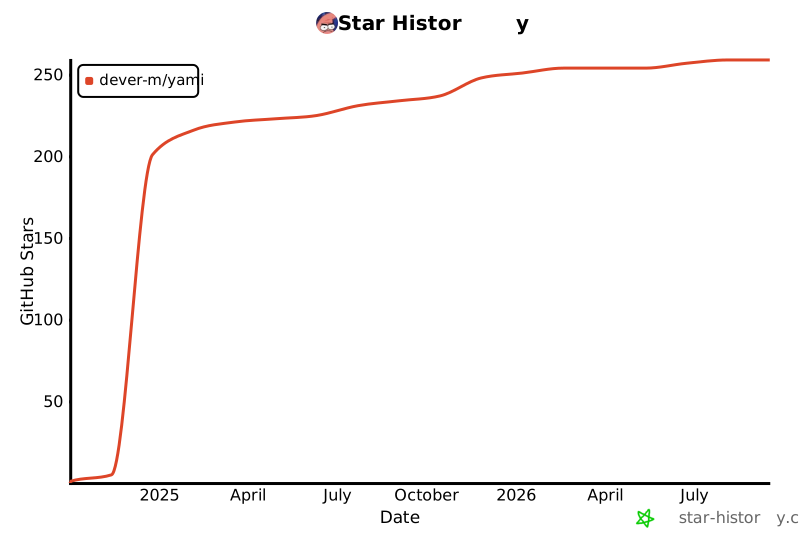
- Stars: 232
- Watchers: 2
- Forks: 5
- Open Issues: 1
-
Metadata Files:
- Readme: README.md
- License: LICENSE
- Code of conduct: CODE_OF_CONDUCT.md
Awesome Lists containing this project
README

---




yami | An open-source music player with simple UI
Download or play music locally without ads!
[Installation](#installation) • [Usage](#usage) • [Features](#features) • [Contributing](#contributing) • [License](#license)
## 🔍Overview
`Yami` is a lightweight, open-source music player built in Python. It focuses on simplicity and ease of use, providing an intuitive user interface (UI) for users to manage and play their music. Whether you're playing local files or downloading from online sources using spotdl, Yami offers a seamless experience. This project is designed for users who want a minimalistic, cross-platform music player with the ability to integrate external sources like Spotify/Youtube Music.
## 📸Screenshot


## 🛠️ Getting Started
### Prerequisites
- **Python** 3.8+
- **pip** for dependency management
### Installation
#### From Pip
```sh
pip install yami-music-player
```
#### From Github
##### 1. Clone the Repository
```sh
git clone https://github.com/DevER-M/yami.git
cd yami
```
##### 2. Create and activate a virtual environment:
```sh
python -m venv venv
source venv/bin/activate # On Windows, use `venv\Scripts\activate`
```
3. Install `yami-music-player` (in editable mode):
```sh
pip install -e .
```
# Usage
To run `yami`, use the following command in your terminal:
```sh
$ yami
# Or
$ python -m yami
```
## Features
- **Spotdl Integration:** Download music directly from the app using spotdl
- **Asynchronous Downloading :** From synchronous `spotdl.Downloader.search_and_download()`
- **Player Controls:**
- ** :** Pause/play music
- ** :** Play next song
- ** :** Play previous song
- ** :** Choose folder
- ** :** Download music
- **`ctrl+o` :** Choose folder
This will open the app, for the logs check the terminal.
# Contributing
Contributions are welcome and greatly appreciated! Here's how you can contribute:
1. Fork the Project
2. Create your Feature Branch (`git checkout -b feature/AmazingFeature`)
3. Commit your Changes (`git commit -m 'Add some AmazingFeature'`)
4. Push to the Branch (`git push origin feature/AmazingFeature`)
5. Open a Pull Request
# License
Distributed under the GPLV3 License. See [`LICENSE`](LICENSE) for more information.
# Discussions
Discussions are available and can be used for feature requests and questions
# Credits
- [Custom Tkinter](https://github.com/TomSchimansky/CustomTkinter)
- [Spotdl](https://github.com/spotDL/spotify-downloader)
- [@ElSaico](https://github.com/ElSaico) for fixing [locale scaling](https://github.com/ElSaico/CustomTkinter/tree/fix-locale-scaling)
## Star History
[](https://api.star-history.com/svg?repos=DevER-M/yami&type=Date)