https://github.com/devful/contribution-streak-maintainer
🔥 Automatically maintain your GitHub contribution streak with Contribution Streak Maintainer :octocat:
https://github.com/devful/contribution-streak-maintainer
collaborate contribution contribution-graph github-actions hacktoberfest npm-package open-source open-source-project opensource standout
Last synced: over 1 year ago
JSON representation
🔥 Automatically maintain your GitHub contribution streak with Contribution Streak Maintainer :octocat:
- Host: GitHub
- URL: https://github.com/devful/contribution-streak-maintainer
- Owner: devful
- License: mit
- Created: 2023-11-15T03:15:26.000Z (over 2 years ago)
- Default Branch: main
- Last Pushed: 2024-02-19T01:38:08.000Z (over 2 years ago)
- Last Synced: 2025-04-09T23:05:26.475Z (over 1 year ago)
- Topics: collaborate, contribution, contribution-graph, github-actions, hacktoberfest, npm-package, open-source, open-source-project, opensource, standout
- Language: TypeScript
- Homepage: https://www.npmjs.com/package/contribution-streak-maintainer
- Size: 645 KB
- Stars: 15
- Watchers: 0
- Forks: 0
- Open Issues: 5
-
Metadata Files:
- Readme: README.md
- Contributing: CONTRIBUTING.md
- License: LICENSE
Awesome Lists containing this project
README
# 📅 Contribution Streak Maintainer

[](https://www.npmjs.com/package/contribution-streak-maintainer) [](https://www.npmjs.com/package/contribution-streak-maintainer) [](https://github.com/devful/contribution-streak-maintainer/blob/main/LICENSE) [](https://github.com/devful/contribution-streak-maintainer/stargazers)
[](https://github.com/devful/contribution-streak-maintainer/actions) [](https://github.com/devful/contribution-streak-maintainer/issues) [](https://github.com/devful/contribution-streak-maintainer/pulls) [](https://github.com/devful/contribution-streak-maintainer/graphs/contributors)
 [](https://github.com/devful/contribution-streak-maintainer/commits/main) [](https://github.com/devful/contribution-streak-maintainer) 
- _Have you ever wanted to keep your contribution streak going but never been able to?_
- _Do you find it challenging to make manual contributions every single day?_
- _Worry no more!_
**Contribution Streak Maintainer** is a tool, available as an [npm package](https://www.npmjs.com/package/contribution-streak-maintainer), designed to be used inside a GitHub Actions workflow. This npm package is utilized within your workflow, automatically maintaining your GitHub contribution streak. The GitHub Actions workflow, configured through YAML files, generates and pushes commits to your repository, ensuring your activity stays active even on days when you're not able to make manual contributions.
Now you can focus on your work, knowing that your GitHub contributions are being taken care of automatically. Keep your streak alive effortlessly by integrating the Contribution Streak Maintainer npm package into your GitHub Actions workflow!
## Installation
Here is how to add my badges to your profile:
1. Star this repository.
2. Create a private repository `your-username/name-of-your-choice`
3. Add the following workflow to your repository at `.github/workflows/contribution-streak-maintainer.yml`
```yaml
name: contribution-streak-maintainer
on:
workflow_dispatch:
schedule:
# For more information on the cron scheduler,
# see https://crontab.guru/ or https://crontab.cronhub.io/.
# This cron schedule means the action runs every day at midnight UTC.
- cron: "0 22 * * *"
permissions:
contents: write
jobs:
contribution-streak-maintainer:
runs-on: ubuntu-latest
steps:
- name: Make a contribution
run: npx contribution-streak-maintainer ${{github.repository}} --email=primary-github-email@email.com
env:
DEVFUL_GITHUB_TOKEN: ${{ secrets.CSM_GITHUB_TOKEN }}
```
4. Create your own personal access tokens (classic)
1. [Verify your email address](https://docs.github.com/en/get-started/signing-up-for-github/verifying-your-email-address), if it hasn't been verified yet.
2. In the upper-right corner of any page, click your profile photo, then click **Settings**.
3. In the left sidebar, click **Developer settings**.
4. In the left sidebar, under **Personal access tokens**, click **Tokens (classic)**.
5. Click **Generate new token** button then **Generate new token (classic)**.
6. Under **Note**, enter a name for the token.
7. Under **Expiration**, select **No expiration** for the token.
8. Under **Select scopes**, check **repo**, **read:user**, **user:email**.
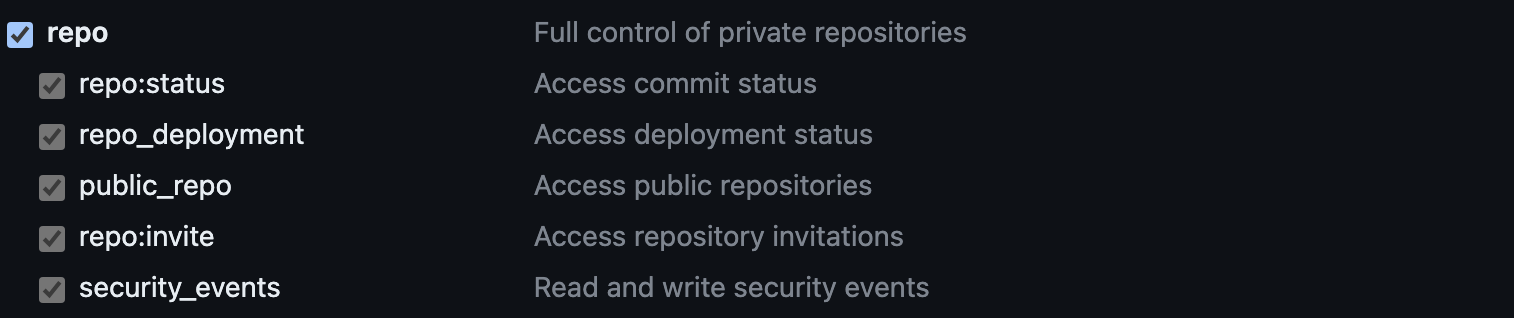

9. Click **Generate token**.
10. Note down the generated token.
5. Create a secret for your private repository
- Check out the [docs](https://docs.github.com/en/actions/security-guides/using-secrets-in-github-actions#creating-secrets-for-a-repository)
- In the **Name** field, type `CSM_GITHUB_TOKEN`.
- In the **Secret** field, enter the newly generated token.
> **_NOTE:_** Ensure that the GitHub token (`CSM_GITHUB_TOKEN`) is kept private and not shared publicly.
## Run Manually
You can start **contribution-streak-maintainer** workflow manually, or wait for it to run automatically.
Alternatively, you can perform these steps manually:
- Go to your newly created local repo.
- Run `npx contribution-streak-maintainer / --email= --token= --condition=`
- Example: `npx contribution-streak-maintainer my-username --email=my-primary-github-email@email.com --token=gph_nJkKQKJKFb7YxqkLtFf3wvXyU6X --condition=6`
- Verify changes in `AUTOMATED_CONTRIBUTIONS.md`.
## Configuration
| Param | ENV alias | Type | Description | Required | Default |
| ------------ | --------------------- | ------ | ----------------------------------------------------------------- | -------- | ------- |
| `repository` | `DEVFUL_GITHUB_REPO` | String | The owner and repository name. For example, `octocat/Hello-World` | Yes | |
| `email` | | String | Primary email address associated with your GitHub account | Yes | |
| `token` | `DEVFUL_GITHUB_TOKEN` | String | Github Auth token | Yes | |
| `condition` | | String | Condition for contribution to be made | No | 0 |
By default, this action runs daily, checks if the user has made any contribution, and generates a random number of commits between 1-3. If the user sets the condition to, for example, 5, the action will only make commits if the user has made 0-5 commits that day.
## Authors
- [@EliasAfara](https://www.github.com/eliasafara)
## License
[MIT](LICENSE)