https://github.com/devlooped/actions
Single-purpose actions authored as C# single-file programs to be run with dnx runcs
https://github.com/devlooped/actions
Last synced: 8 months ago
JSON representation
Single-purpose actions authored as C# single-file programs to be run with dnx runcs
- Host: GitHub
- URL: https://github.com/devlooped/actions
- Owner: devlooped
- License: mit
- Created: 2025-08-30T17:53:47.000Z (10 months ago)
- Default Branch: main
- Last Pushed: 2025-09-04T19:07:21.000Z (10 months ago)
- Last Synced: 2025-10-06T14:55:05.500Z (9 months ago)
- Language: C#
- Size: 8.79 KB
- Stars: 0
- Watchers: 0
- Forks: 0
- Open Issues: 0
-
Metadata Files:
- Readme: readme.md
- License: license.txt
Awesome Lists containing this project
README
# dnx actions
This project leverages .NET 10.0, C# 14.0 file-based apps
and [SmallSharp](https://github.com/devlooped/SmallSharp/)
to provide the ultimate developer productivity experience
for simple tasks or scripts, which can leverage the full
power of .NET while being as easy to use as a shell script
yet far more powerful and productive, and remaining cross-platform.
## Getting started
1. Install the [.NET 10.0 SDK](https://dotnet.microsoft.com/en-us/download/dotnet/10.0).
2. Use `dnx runcs devlooped/actions[@REF][:FILE]` to run any script in this repo.
> [!TIP]
> [Learn more](https://github.com/devlooped/runcs) about the format and capabilities of `runcs`.
>
If `@ref` is omitted (i.e. no `@main` branch or `@v1` tag) the tip of the
default branch is used.
If `:file` is omitted (i.e. no `:hello.cs`) the first C# file is used.
### GitHub Actions
You can use any of these scripts in your GitHub Actions workflows
with the same one-liner provided you previously installed .NET 10.0 SDK
(for now since it's preview, until the hosted runners include it by default).
```yaml
- name: Run hello world
run: dnx runcs devlooped/actions@main:hello.cs
```
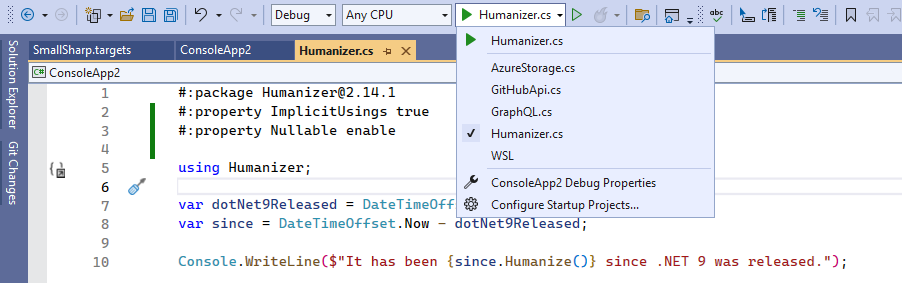
### SmallSharp
This project also uses [SmallSharp](https://github.com/devlooped/SmallSharp/)
so there is a C# project in the repository root which allows editing
any of the file-based scripts using the full power of an IDE like
Visual Studio. You just pick the active one via the IDE dropdown that
is automatically populated with all `.cs` files alongside the project.
## hello
```bash
dnx runcs devlooped/actions:hello.cs
```
A simple hello world script that demonstrates how `runcs` automatically
downloads (and keeps updated) the script on your machine, and runs it.
And the [hello.cs](hello.cs) script itself is just a few lines of C#
code including a nuget package reference to Spectre.Console.
## which-dotnet
```bash
dnx runcs devlooped/actions:which-dotnet.cs
```
Determines which versions of .NET are in use and persists them to a JSON file.
This is a straight port of the [which-dotnet](https://github.com/devlooped/actions-which-dotnet/blob/main/action.yml)
GitHub Action as a file-based C# script to showcase how you can easily
migrate while keeping the same convenience of execution.