https://github.com/devlooped/smallsharp
Create, edit and run multiple C# top-level programs in the same project by just selecting the startup program from the start button.
https://github.com/devlooped/smallsharp
console-application csharp csharp-sourcegenerator learning visual-studio
Last synced: 7 months ago
JSON representation
Create, edit and run multiple C# top-level programs in the same project by just selecting the startup program from the start button.
- Host: GitHub
- URL: https://github.com/devlooped/smallsharp
- Owner: devlooped
- License: mit
- Created: 2020-10-01T05:19:49.000Z (almost 6 years ago)
- Default Branch: main
- Last Pushed: 2025-04-12T00:26:01.000Z (over 1 year ago)
- Last Synced: 2025-04-12T01:27:11.542Z (over 1 year ago)
- Topics: console-application, csharp, csharp-sourcegenerator, learning, visual-studio
- Language: C#
- Homepage: https://clarius.org/SmallSharp
- Size: 6.72 MB
- Stars: 294
- Watchers: 4
- Forks: 13
- Open Issues: 1
-
Metadata Files:
- Readme: readme.md
- Changelog: changelog.md
- License: license.txt
Awesome Lists containing this project
README
 SmallSharp
============
[](https://www.nuget.org/packages/SmallSharp)
[](https://www.nuget.org/packages/SmallSharp)
[](https://github.com/devlooped/SmallSharp/blob/main/osmfeula.txt)
[](https://github.com/devlooped/SmallSharp/blob/main/license.txt)
Create, edit and run multiple C# file-based apps in the same project in the IDE, honoring per-file `#:package`
references, `#:property` project values and even `#:sdk` 😍
## Open Source Maintenance Fee
To ensure the long-term sustainability of this project, users of this package who generate
revenue must pay an [Open Source Maintenance Fee](https://opensourcemaintenancefee.org).
While the source code is freely available under the terms of the [License](license.txt),
this package and other aspects of the project require [adherence to the Maintenance Fee](osmfeula.txt).
To pay the Maintenance Fee, [become a Sponsor](https://github.com/sponsors/devlooped) at the proper
OSMF tier. A single fee covers all of [Devlooped packages](https://www.nuget.org/profiles/Devlooped).
## Overview
C# [top-level programs](https://learn.microsoft.com/en-us/dotnet/csharp/fundamentals/program-structure/top-level-statements)
allow a very intuitive, simple and streamlined experience for quickly spiking or learning C#.
The addition of [file-based apps](https://devblogs.microsoft.com/dotnet/announcing-dotnet-run-app/) in
.NET 10 [takes this further](https://learn.microsoft.com/en-us/dotnet/csharp/language-reference/preprocessor-directives#file-based-apps) by allowing package references and even MSBuild properties to be
specified per file:
```csharp
#:package Humanizer@2.14.1
#:property ImplicitUsings=true
#:property Nullable=enable
using Humanizer;
var dotNet9Released = DateTimeOffset.Parse("2024-12-03");
var since = DateTimeOffset.Now - dotNet9Released;
Console.WriteLine($"It has been {since.Humanize()} since .NET 9 was released.");
```
Editing these standalone files in VSCode, however, is suboptimal compared with the full C#
experience in Visual Studio. In Visual Studio, though, you can only have one top-level program
in a project, and as of now, you cannot leverage the `#:package` and `#:property` directives
at all.
**SmallSharp** allows dynamically selecting the file to run, right from the Start button/dropdown
(for compilation and launch/debug). It also automatically restores the `#:package` references so
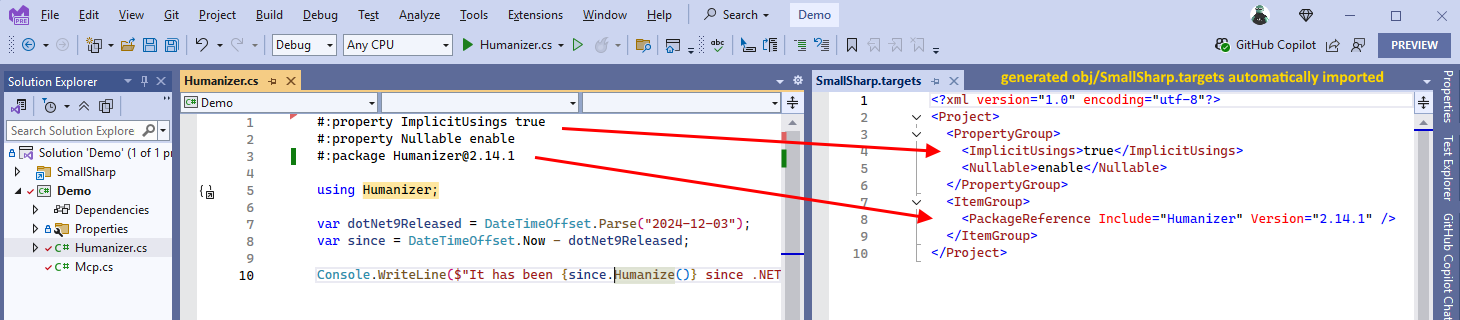
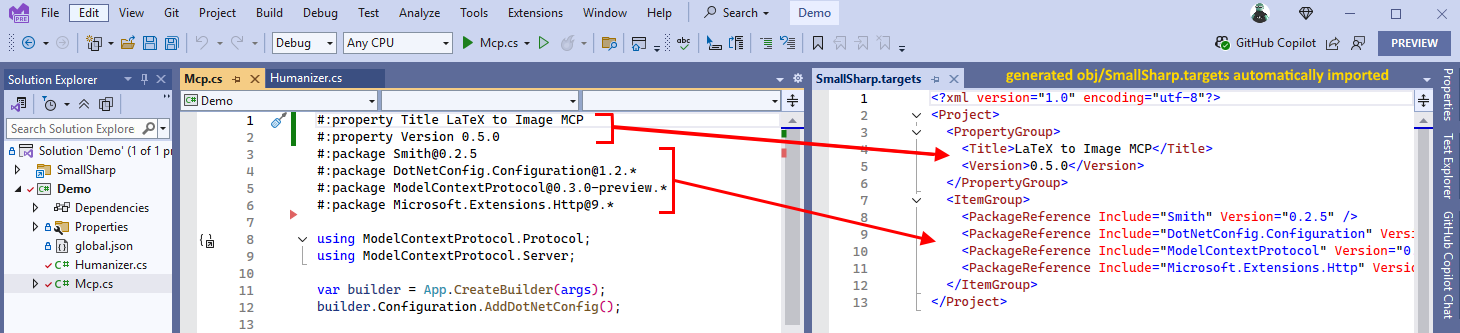
the project system can resolve them, and even emits the `#:property` directives if present to customize
the build as needed.
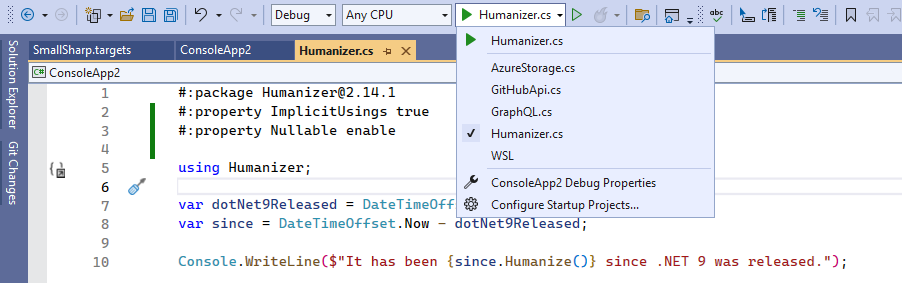
This list is automatically kept in sync as you add more `.cs` files to the project. When you select
one target C# file, that becomes the only top-level program to be compiled, so you don't have to
modify any of the others since they automatically become *None* items.
> [!TIP]
> An initial build after selection change migh be needed to restore the packages and compile the
> selected file, unless you're using the SDK mode for SmallSharp (see below).
All compile files directly under the project directory root are considered top-level programs for
selection and compilation purposes. If you need to share code among them, you can place additional
files in subdirectories and those will behave like normal compile items.
## Usage
SmallSharp works by just installing the
[SmallSharp](https://nuget.org/packages/SmallSharp) nuget package in a C# console project
and adding a couple extra properties to the project file:
```xml
Exe
net10.0
true
true
```
There are some limitations with this mode, however:
* You cannot use the `#:sdk` [directive](https://learn.microsoft.com/en-us/dotnet/csharp/language-reference/preprocessor-directives#file-based-apps)
to specify a different SDK per file, since the project file already specifies one.
* CLI-based builds may require multiple passes to restore and build the selected file, since
the package is only restored after the first build.
* You must add ImportProjectExtensionProps/ImportProjectExtensionTargets manually, polluting the
project file.
So the recommended way to use SmallSharp is via the SDK mode, which results in a more streamlined
and seamless experience across IDE and CLI builds:
```xml
Exe
net10.0
```
The SDK mode will always produce a successful build in a single `dotnet build` pass even if you
change the `ActiveFile` between builds.
> [!IMPORTANT]
> If no `#:sdk` directive is provided by a specific C# file-based app, the `Microsoft.NET.SDK` will be
> used by default in this SDK mode.
Keep adding as many top-level programs as you need, and switch between them easily by simply
selecting the desired file from the Start button dropdown.
When running from the command-line, you can select the file to run by passing it as an argument to `dotnet run`:
```bash
dotnet run -p:start=program1.cs
```
You can also use the shortcut `-p:s=[FILE]`.
## How It Works
This nuget package leverages in concert the following standalone and otherwise
unrelated features of the compiler, nuget and MSBuild:
1. The C# compiler only allows one top-level program per compilation.
2. Launch profiles (the entries in the Run dropdown) are populated from the Properties\launchSettings.json file
3. Whenever changed, the dropdown selection is persisted as the `$(ActiveDebugProfile)` MSBuild property in a file
named after the project with the `.user` extension
4. This file is imported before NuGet-provided MSBuild targets
5. VS ignores `#:` directives when adding the flag `FileBasedProgram` to the `$(Features)` project property.
Using the above features in concert, **SmallSharp** essentially does the following:
* Emit top-level files as a `launchSettings.json` profile and set the `$(ActiveDebugProfile)`.
* Exclude `.cs` files at the project level from being included as `` by the default SDK
includes and include them explicitly as `` instead so they show up in the solution explorer.
This prevents the compiler from causing an error for multiple top-level programs.
* Explicitly include as `` only the `$(ActiveDebugProfile)` property value.
* Emit `#:package` and `#:property` directive to an automatically imported `obj\SmallSharp.targets` file
* SmallSharp MSBuild SDK automatically imports the `SmallSharp.targets` file, which causes a new
restore to automatically happen in Visual Studio, bringing all required dependencies automatically.
This basically mean that this it will also work consistently if you use `dotnet run` from the command-line,
since the "Main" file selection is performed exclusively via MSBuild item manipulation.
> [!TIP]
> It is recommended to keep the project file to its bare minimum, usually having just the SmallSharp
> SDK reference, and do all project/package references in the top-level files using the `#:package` and
> `#:property` directives for improved isolation between the different file-based apps.
# Sponsors
[](https://github.com/clarius)
[](https://github.com/MFB-Technologies-Inc)
[](https://github.com/sandrock)
[](https://github.com/drivenet)
[](https://github.com/Keflon)
[](https://github.com/tbolon)
[](https://github.com/kfrancis)
[](https://github.com/unoplatform)
[](https://github.com/rbnswartz)
[](https://github.com/jfoshee)
[](https://github.com/Mrxx99)
[](https://github.com/eajhnsn1)
[](https://github.com/davidjenni)
[](https://github.com/Jonathan-Hickey)
[](https://github.com/akunzai)
[](https://github.com/KenBonny)
[](https://github.com/SimonCropp)
[](https://github.com/agileworks-eu)
[](https://github.com/arsdragonfly)
[](https://github.com/vezel-dev)
[](https://github.com/ChilliCream)
[](https://github.com/4OTC)
[](https://github.com/v-limo)
[](https://github.com/DominicSchell)
[](https://github.com/jwendl)
[](https://github.com/adalon)
[](https://github.com/Eule02)
[](https://github.com/torutek)
[](https://github.com/mccaffers)
[](https://github.com/christoh)
[](https://github.com/ADS-Fund)
[](https://github.com/sponsors/devlooped)
[Learn more about GitHub Sponsors](https://github.com/sponsors)