https://github.com/devunt/purple-line
libpurple plugin for LINE (IM which created by LINE Coperation). Only working with LINE accounts within Korea region.
https://github.com/devunt/purple-line
Last synced: about 1 year ago
JSON representation
libpurple plugin for LINE (IM which created by LINE Coperation). Only working with LINE accounts within Korea region.
- Host: GitHub
- URL: https://github.com/devunt/purple-line
- Owner: devunt
- Created: 2014-09-22T03:28:28.000Z (almost 12 years ago)
- Default Branch: master
- Last Pushed: 2014-09-22T23:03:45.000Z (almost 12 years ago)
- Last Synced: 2024-12-27T06:10:13.994Z (over 1 year ago)
- Language: C++
- Homepage:
- Size: 293 KB
- Stars: 4
- Watchers: 2
- Forks: 0
- Open Issues: 0
-
Metadata Files:
- Readme: README.md
Awesome Lists containing this project
README
Original codes are here: http://altrepo.eu/git/purple-line.git/
**Warning: Unfinished software!** This plugin is still under development and many things are still unstable or unimplemented.
purple-line
===========
libpurple (Pidgin, Finch) protocol plugin for LINE (http://line.me/) by Naver / LINE Corporation.
In current version, you should login with NAVER Account. (In-Korea regions)
Does it work?
-------------
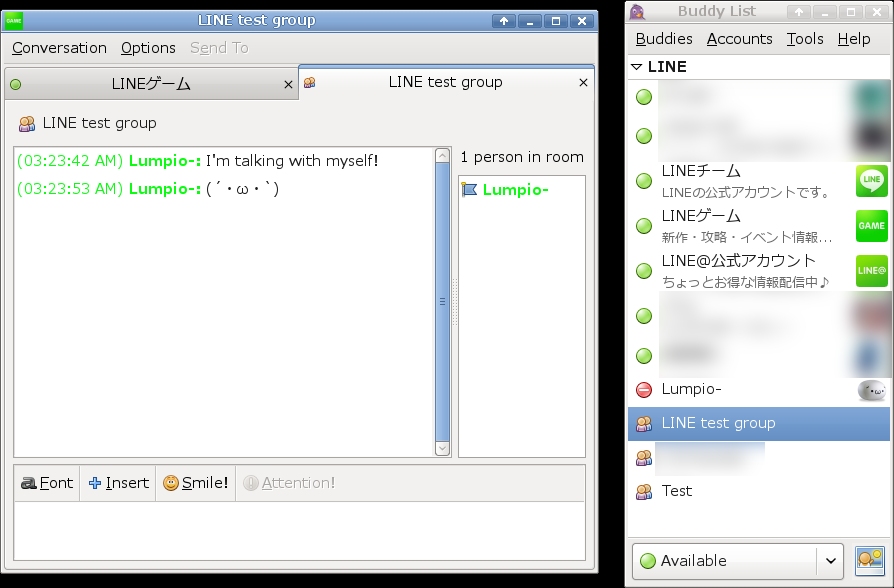
Yes, to an extent. Here's Pidgin logged in to LINE, but it's not quite stable and featureful enough
to be used as one's main LINE client yet.
How to install
--------------
Make sure you have the required prerequisites:
* libpurple - probably available via package manager
* Apache Thrift compiler and C++ library - v0.9.1 should be stable. The Git version and OS packages
are sometimes a bit iffy. Compiling by hand is your best bet.
* line_main.thrift - not included, must be placed in the project root directory. For the time being,
you can acquire this file from the https://www.dropbox.com/s/9btem9lwuqo6vrk/line_main.thrift?dl=1
Then simply run:
make
make install
This will build and install the plugin into your home directory. Builds are only tested on
recent Ubuntu for now.
Implemented
-----------
* Logging in with NAVER Account
* Authentication
* Fetching user profile
* Account icon
* Syncing friends, groups and chats
* Send and receive messages in IM, groups and chats
* Fetch recent messages
* For groups and chats
* For IMs
* Synchronize buddy list on the fly
* Adding friends
* Blocking friends
* Removing friends
* Joining chats
* Leaving chats
* Group invitations
* Joining groups
* Leaving groups
* Buddy icons
* Editing buddy list
* Removing friends
* Leaving chats
* Leaving groups
* Message types
* Text (send/receive)
* Sticker (send via command/receive)
* Image (receive preview)
* Audio (receive preview)
* Location (receive)
To do
-----
* Both supporting NAVER account / EMail account
* Only fetch unseen messages, let a log plugin handle already seen messages
* Synchronize buddy list on the fly
* Sync group/chat users more gracefully, show people joining/leaving
* Editing buddy list
* Adding friends (needs search function)
* Creating chats
* Inviting people to chats
* Creating groups
* Updating groups
* Inviting people to groups
* Changing your account icon
* Message types
* Image (send)
* Audio/Video (send) File transfer API for sending?
* Figure out what the other 15 message types mean...
* Emoji (is it possible to tap into the smiley system for sending too?)
* Companion Pidgin plugin
* "Show more history" button
* Sticker list
* Open image messages
* Open audio messages
* Open video messages
* Sending/receiving "message read" notifications
* Check builds on more platforms
* Packaging