https://github.com/devutilsapp/differencechecker.app
Text Diff Checker offline macOS app
https://github.com/devutilsapp/differencechecker.app
app checker diff macos native offline text
Last synced: about 1 year ago
JSON representation
Text Diff Checker offline macOS app
- Host: GitHub
- URL: https://github.com/devutilsapp/differencechecker.app
- Owner: DevUtilsApp
- Created: 2020-11-21T03:07:56.000Z (over 5 years ago)
- Default Branch: main
- Last Pushed: 2020-11-25T14:07:44.000Z (over 5 years ago)
- Last Synced: 2025-03-16T00:19:13.795Z (about 1 year ago)
- Topics: app, checker, diff, macos, native, offline, text
- Language: HTML
- Homepage: https://differencechecker.app
- Size: 7.81 KB
- Stars: 3
- Watchers: 0
- Forks: 0
- Open Issues: 0
-
Metadata Files:
- Readme: README.md
Awesome Lists containing this project
README
Text Diff Checker
=================
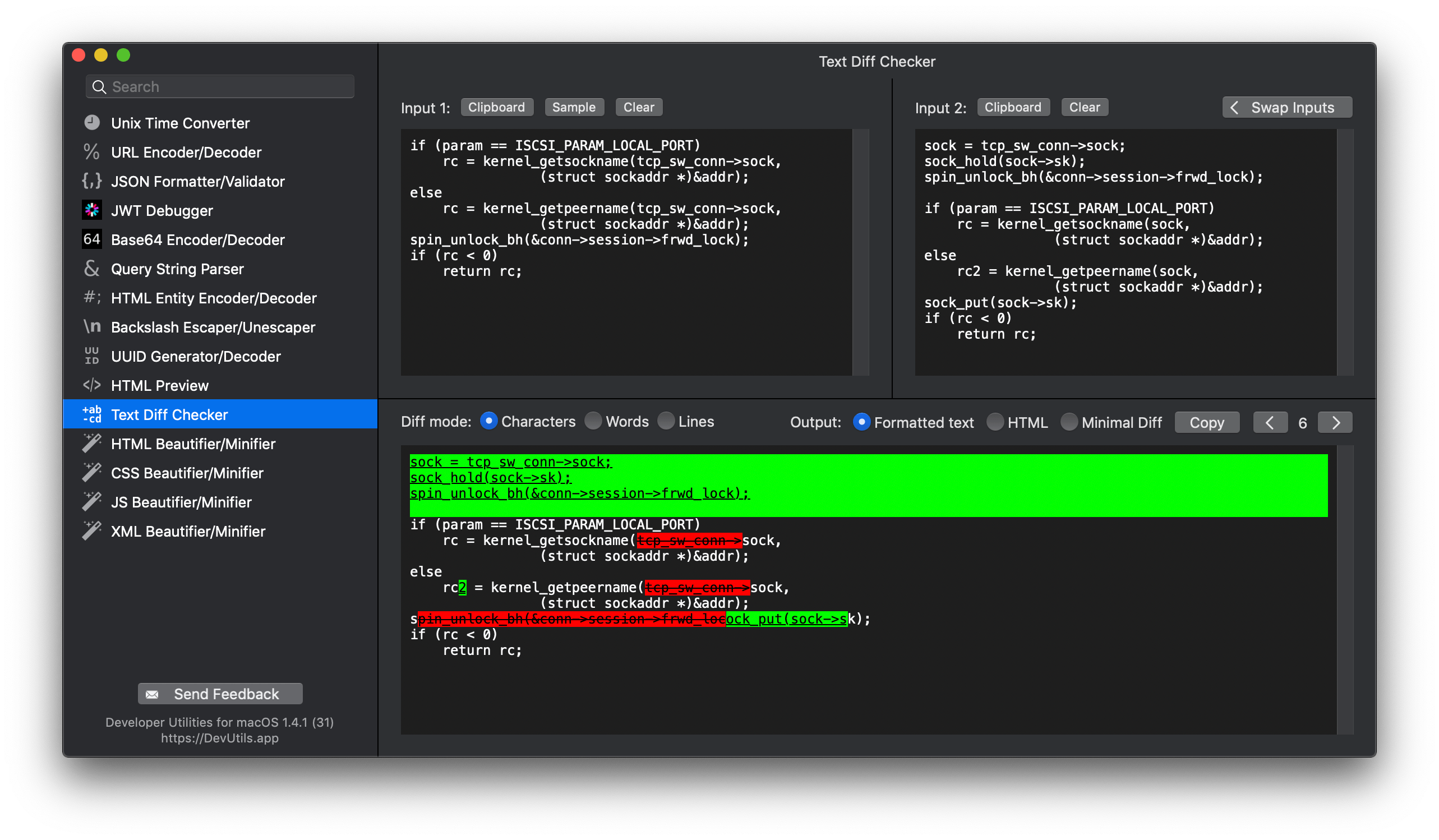
Compare texts for differences without online tools. [DevUtils.app](https://devutils.app) allows you to quickly compare the difference between text strings without any internet connection. It supports visual highlighting the diff, renders HTML, or the patch format of the diff.
🚀 Download | 🎬 Demo & Screenshots | 📝 View source
Quickly compare two text strings
--------------------------------
You can start to compares text strings from anywhere in your macOS (terminal, in email, web browser,...). Activate the app by:
* Copy text ► Press ⌃⌥⌘Space `(Or your own customized hotkey, up to you)`
* Copy text ► Click to icon  in the status bar
* Select text ► Right-click ► "Inspect in DevUtils.app" `(This menu appears after you install the app)`
Input
-----
Enter your first string in the left input textbox and the second string to compare in the right input textbox. Clicking the "Swap Inputs" button allows you to quickly swap the two strings.
Output
------
The tool will render the diff and highlight it visually in the bottom panel. You can choose to view the diff with the following format:
* **Formatted text**: Text with its background as green/red based on the diff. You can copy this and paste it into other rich text editors.
* **HTML**: The HTML version of the formatted text, where the html tags are used to represents the diff, for example `inserted deleted`.
* **Minimal diff**: Return the raw diff data. This format is similar to the [UniDiff](https://en.wikipedia.org/wiki/Diff#Unified_format) format but with some differences. See [this page](https://github.com/google/diff-match-patch/wiki/Unidiff) for more details.
You can navigate through the diffs by clicking the arrow buttons near the output text view. The number between arrows is the number of diff sections found in the output.
Options
-------
You can choose to compare the text strings using character-based, word-based, or line-based. Select the option you want in the "Diff mode" section.