https://github.com/dfdx/piecewiseaffinetransforms.jl
Smooth image transformations for complex shapes
https://github.com/dfdx/piecewiseaffinetransforms.jl
Last synced: 7 months ago
JSON representation
Smooth image transformations for complex shapes
- Host: GitHub
- URL: https://github.com/dfdx/piecewiseaffinetransforms.jl
- Owner: dfdx
- License: other
- Created: 2015-04-21T21:17:34.000Z (over 11 years ago)
- Default Branch: master
- Last Pushed: 2020-02-08T16:09:04.000Z (over 6 years ago)
- Last Synced: 2025-01-22T07:16:49.193Z (over 1 year ago)
- Language: Julia
- Size: 1.61 MB
- Stars: 12
- Watchers: 4
- Forks: 5
- Open Issues: 1
-
Metadata Files:
- Readme: README.md
- License: LICENSE.md
Awesome Lists containing this project
README
# Piecewise Affine Transformations
[](https://travis-ci.org/dfdx/PiecewiseAffineTransforms.jl)
Package for smooth deformation of complex shapes.
## Installation
Pkg.add("PiecewiseAffineTransforms")
## Usage Overview
Piecewise affine transformation resembles ordinary affine transformation, but instead of warping single region linearly, it splits down area under the question into a set of triangles and warps each such triangle separately.
Let's say, we have an image of a face and want to warp it to have different expression (destination image is here only for demonstration, we will not use it):
using PiecewiseAffineTransforms
src_img = ...
dst_img = ...
(full version of code is available in `examples/ex.jl`)
Source imageDestination image
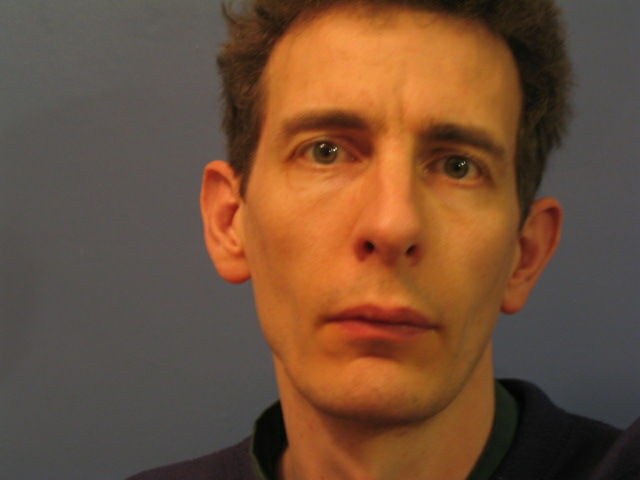

We will also assume that both faces are annotated with corresponding shape landmarks:
src_shape = ... # should be a Nx2 matrix of Float64,
# where N is a number of landmarks
dst_shape = ...
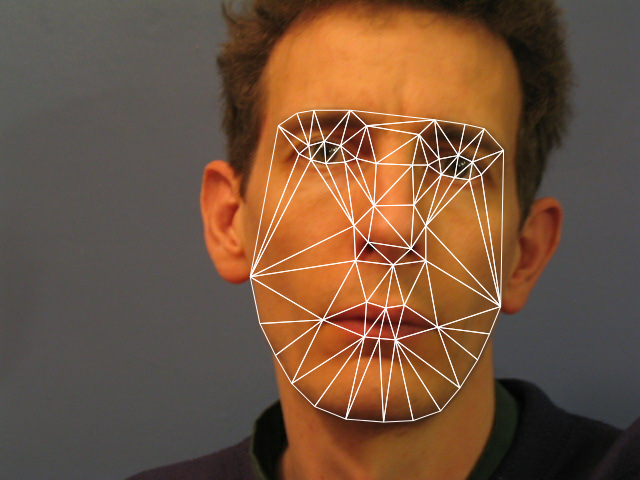
First of all, we need to split the shapes into triangles, i.e. triangulate them:
trigs = delaunayindexes(src_shape) # Tx3 matrix of Int, where T is
# a number of resuling triangles
# needs ImageView installed (Pkg.add("ImageView"))
triplot(src_img, src_shape, trigs)
triplot(dst_img, dst_shape, trigs)
**WARNING:** Triangulation is based on [VoronoiDelaunay.jl](https://github.com/JuliaGeometry/VoronoiDelaunay.jl/), which currently has a [bug](https://github.com/JuliaGeometry/VoronoiDelaunay.jl/issues/6) resulting in one lost triangle from time to time. To overcome this, just get good sample of triangulation and save it for future use.
Source shapeDestination shape

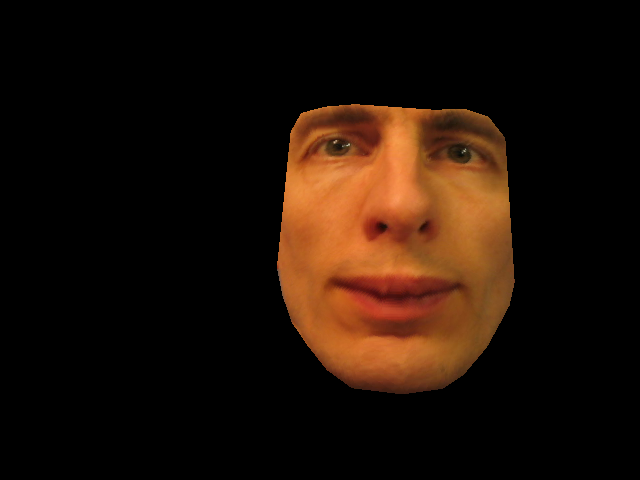
Warping `src_image` from `src_shape` to `dst_shape` may be as simple as calling this:
@time warped = pa_warp(src_img, src_shape, dst_shape, trigs)
# 1.44 seconds
But if you are going to repeat warping to `dst_shape` for many source images or just many times, it's worth to prepare warp by creating `PAWarpParams` object and using it for all future transformation to `dst_shape`:
@time pa_params = pa_warp_params(dst_shape, trigs, (480, 640))
# 5.92 seconds
@time warped = pa_warp(pa_params, src_img, src_shape)
# 0.075 seconds
But anyway, they both give (almost) the same result:
Original imageWarped image
## Acknowledgement
Code for prepared warp was mostly extracted from ICAAM project by Luca Vezzaro.