https://github.com/dgkf/webviewer
An R viewer to display outputs in a web browser
https://github.com/dgkf/webviewer
ide plots r server
Last synced: 12 months ago
JSON representation
An R viewer to display outputs in a web browser
- Host: GitHub
- URL: https://github.com/dgkf/webviewer
- Owner: dgkf
- License: mit
- Created: 2021-07-11T22:00:50.000Z (almost 5 years ago)
- Default Branch: master
- Last Pushed: 2021-07-12T13:51:29.000Z (almost 5 years ago)
- Last Synced: 2025-02-05T03:48:58.104Z (over 1 year ago)
- Topics: ide, plots, r, server
- Language: R
- Homepage:
- Size: 11.7 KB
- Stars: 0
- Watchers: 2
- Forks: 0
- Open Issues: 0
-
Metadata Files:
- Readme: README.md
- License: LICENSE
Awesome Lists containing this project
README
# `webviewer` :warning: SUPERCEDED :warning:
> :warning: The package
> [httpgd](https://github.com/nx10/httpgd) which does everything I was looking
> for. I don't have any plans to develop this further knowing that there is
> such a brilliant solution already out there.
An R package to host an output viewer as a locally hosted website.
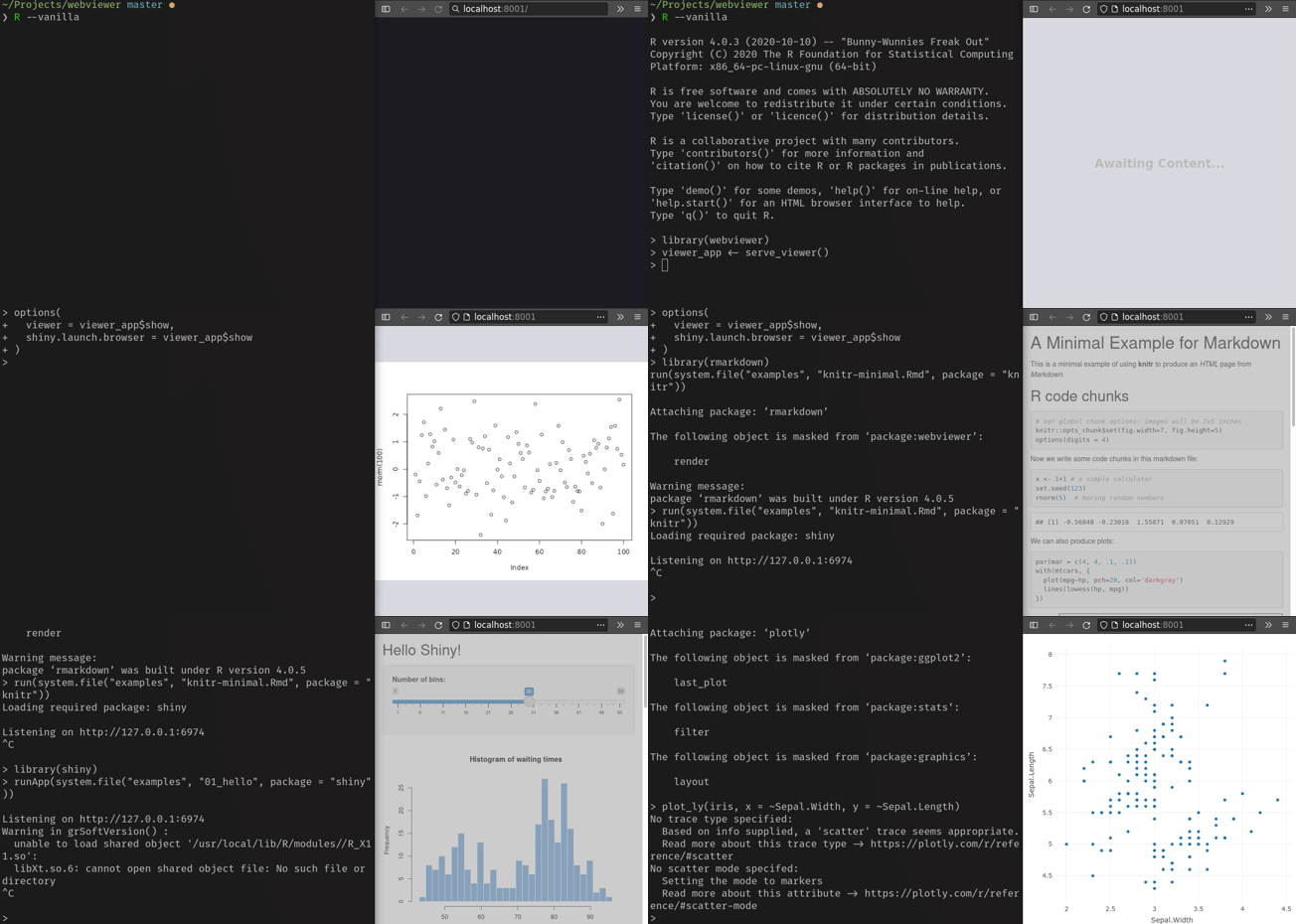
# Use Case
Outside of all-inclusive IDEs (RStudio), viewing outputs can be inconsistent.
Plot devices often uses X11 (or OS-specific alternative) to display plots, while
dynamic content may launch a local website of its own. If using R in a system
without X11 support (for example, within a development container), [it can be a
pain to view
results](https://github.com/rocker-org/rocker-versioned/blob/master/X11/README.md).
Launching images this way is also host-OS specific, making environments less
portable. With a web viewer, content can be shared to a host machine with
minimal expectations of the host capabilities.
# Quick Start
## Examples
```r
library(webviewer)
# host a viewer at localhost:8001
# for now you need to load the page before sending plots
viewer_app <- serve_viewer()
options(
viewer = viewer_app$show,
shiny.launch.browser = viewer_app$show
)
```
Example plotting using base plotting devices (see example below for ragg device
example)
```r
png(f <- tempfile("Rplot", fileext = ".png"), width = 500, height = 400)
plot(rnorm(100))
dev.off()
viewer_app$show(f)
```
Example of Rmarkdown rendering, automatically picking up a shiny-hosted viewer
```r
library(rmarkdown)
run(system.file("examples", "knitr-minimal.Rmd", package = "knitr"))
```
Example of Rmarkdown rendering, showing an html file by passing a file name
```r
library(rmarkdown)
viewer_app$show(render(
system.file("examples", "knitr-minimal.Rmd", package = "knitr"),
"html_document"
))
```
Example automatically launching a shiny app viewer
```r
library(shiny)
runApp(system.file("examples", "01_hello", package = "shiny"))
```
Example showing interactive plots using plotly
```r
library(plotly)
plot_ly(iris, x = ~Sepal.Width, y = ~Sepal.Length)
```
## Device Setup
Default plotting devices can be burdensome to manage. This setup aims to mimic
RStudio-style plot feedback, rendering content as soon as a plot is produced and
updating the viewer anytime the active rendering device is updated.
```r
library(webviewer)
# host a viewer at localhost:8001
# for now you need to load the page before sending plots
viewer_app <- serve_viewer()
.Last <- function() { viewer_app$server$stop() }
options(
viewer = viewer_app$show,
shiny.launch.browser = viewer_app$show,
device = ragg::agg_capture
)
suppressMessages(invisible({
# trace dev.flush to automatically show plots upon updates
trace("dev.flush", print = FALSE, exit = quote({
f <- file.path(tempdir(), "Rplot.png")
md5.old <- if (file.exists(f)) tools::md5sum(f) else ""
png::writePNG(cap <- dev.capture(native = TRUE), f)
md5.new <- tools::md5sum(f)
if (any(cap != -1) && md5.old != md5.new) viewer_app$show(f)
}))
# Flush current device to file after each top level call. For large plots, you
# may prefer not to set this callback and to just call dev.flush manually.
addTaskCallback(function(...) { dev.flush(); TRUE })
}))
```
# Status
This is a very rough proof of concept, aiming to experiment with a middle-ground
viewer solution so that it is easier to use alternative IDEs and containerized
environments.
There are plenty of issues with the current implementation:
- Server threads can hang around after you kill an R session
- The `serve_viewer` function should probably be an `R6` object, not some
gnarly, undocumented environment that gets passed around.
- I'm sure there are plenty of output types that I don't handle.
- The webpage UI could use some love
- Perhaps a plot history
- Plot resolution isn't updated to correspond to browser window size
- I'm sure this could be written to be ReactJS-less. There really isn't anything
that needs that deep of a web stack.
- The graphics device setup is overbearing and could use some streamlined setup
that would make it easy to add to a `.Rprofile`
Feedback, encouragement, suggestions and contributions welcome.