https://github.com/dhravya/auto-twitter-banner
Automatically updates the twitter banner with the images of 5 latest followers, using tweepy python
https://github.com/dhravya/auto-twitter-banner
automation python tweepy tweepy-api twitter twitter-bot
Last synced: about 1 year ago
JSON representation
Automatically updates the twitter banner with the images of 5 latest followers, using tweepy python
- Host: GitHub
- URL: https://github.com/dhravya/auto-twitter-banner
- Owner: Dhravya
- Created: 2022-03-06T13:53:41.000Z (over 4 years ago)
- Default Branch: main
- Last Pushed: 2022-04-27T09:18:32.000Z (about 4 years ago)
- Last Synced: 2025-03-31T14:13:04.283Z (over 1 year ago)
- Topics: automation, python, tweepy, tweepy-api, twitter, twitter-bot
- Language: Python
- Homepage:
- Size: 2.77 MB
- Stars: 9
- Watchers: 2
- Forks: 4
- Open Issues: 1
-
Metadata Files:
- Readme: README.md
Awesome Lists containing this project
README
Auto twitter banner

Automatically updates the twitter banner every few seconds with follower profile pics on it
***
Here's how it looks!

***
### Installation
```
git clone https://github.com/Dhravya/auto-twitter-banner.git
cd auto-twitter-banner
pip install -r requirements.txt
```
### Usage
First, you need your developer tokens from twitter:
- Go to https://developer.twitter.com/en/portal/
- Create an app, and get your keys and tokens
- Make a `.env` file and fill it up according to `.env.example`
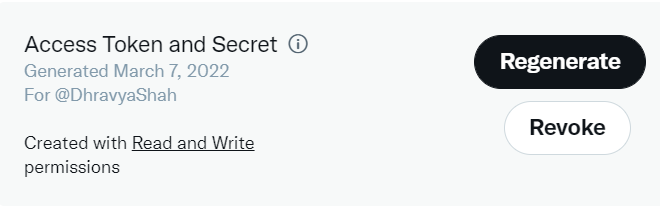
- Go to your app settings -> User authentication settings -> Toggle on OAuth 1.0a, and in the OAuth 1.0a Settings section, select Read and write
Make sure it says read and write access here, something like this
You might need to make your own banner and figure out the position where you need to paste the images and just change the `FIRST_IMAGE_COORDS` and `IMAGE_DIA` constants
```
python main.py
```
### Contributing
All contributors are welcome!
- Open an issue
- Assign yourself
- fork and send a PR
### License
This project is licensed under the mit license
### Show your support
Leave a ⭐ if you like this project
***
Readme made with 💖 using [README Generator by Dhravya Shah](https://github.com/Dhravya/readme-generator)