https://github.com/dhth/dfft
monitor changes as AI agents modify your codebase
https://github.com/dhth/dfft
diff tui
Last synced: 3 months ago
JSON representation
monitor changes as AI agents modify your codebase
- Host: GitHub
- URL: https://github.com/dhth/dfft
- Owner: dhth
- License: mit
- Created: 2025-07-05T20:01:18.000Z (about 1 year ago)
- Default Branch: main
- Last Pushed: 2026-03-26T16:48:21.000Z (4 months ago)
- Last Synced: 2026-03-27T06:53:12.994Z (4 months ago)
- Topics: diff, tui
- Language: Rust
- Homepage: https://tools.dhruvs.space/dfft/
- Size: 587 KB
- Stars: 18
- Watchers: 0
- Forks: 0
- Open Issues: 5
-
Metadata Files:
- Readme: README.md
- Changelog: CHANGELOG.md
- License: LICENSE
Awesome Lists containing this project
- awesome-cli-apps-in-a-csv - dfft - The program monitors changes as AI agents modify your codebase. (<a name="programming"></a>Programming)
- awesome-cli-apps - dfft - The program monitors changes as AI agents modify your codebase. (<a name="programming"></a>Programming)
README
dfft




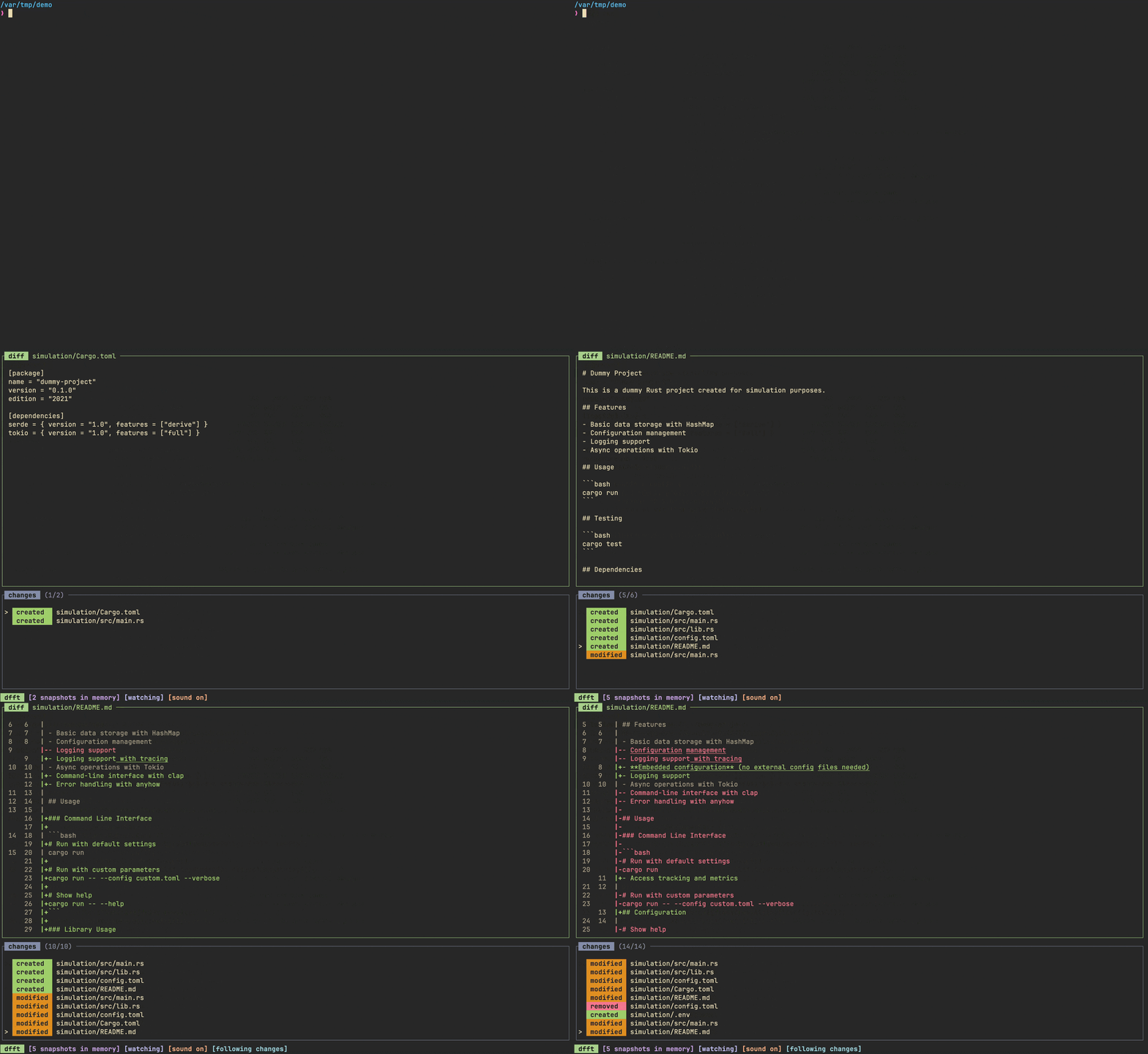
`dfft` (short for "diff-trail") lets you monitor changes as AI agents modify
your codebase.
🤔 Motivation
---
I recently started to make use of agentic AI tools in my day-to-day workflows.
While I like setting them off on their own to solve problems, every now and then
I find myself needing to keep an eye on the changes introduced by them, either
to see if they're on the right track, or just because I'm curious about their
approach. Most agentic tools will print the changes they make as they make them,
but more often than not, the output gets scrolled out of view pretty fast. I
wanted a fast and simple tool that would let me peruse the changes made by these
agents at my own pace via a keyboard driven TUI.
`dfft` came out of my attempts at finding a good balance between letting AI
agents operate freely and having control over every little change in my
codebases. The hope is that the added transparency `dfft` provides helps me
understand the process AI agents follow when implementing a change, and also
lets me catch issues early.
💾 Installation
---
**homebrew**:
```sh
brew install dhth/tap/dfft
```
**cargo**:
```sh
cargo install dfft
```
Or get the binaries directly from a Github [release][1]. Read more about
verifying the authenticity of released artifacts
[here](#-verifying-release-artifacts).
⚡️ Usage
---
```bash
dfft run --help
```
```text
Usage: dfft run [OPTIONS]
Options:
-p, --path Path of the directory to watch (defaults to current directory)
--debug Output debug information without doing anything
-f, --follow-changes Start with the setting "follow changes" enabled
--no-prepop Skip prepopulating cache with file snapshots
--no-watch Start with file watching disabled
--no-sound Start with sound notifications disabled
-h, --help Print help
```
🔔 Notifications
---
By default `dfft` will play distinct sound notifications for each kind of change
(`CREATION` / `MODIFICATION` / `REMOVAL`). You can toggle them on/off whenever
needed. If you prefer to not use sound notifications at all, you can build a
version of `dfft` that has no audio dependencies using the following.
```bash
cargo install --no-default-features dfft
```
📟 TUI
---
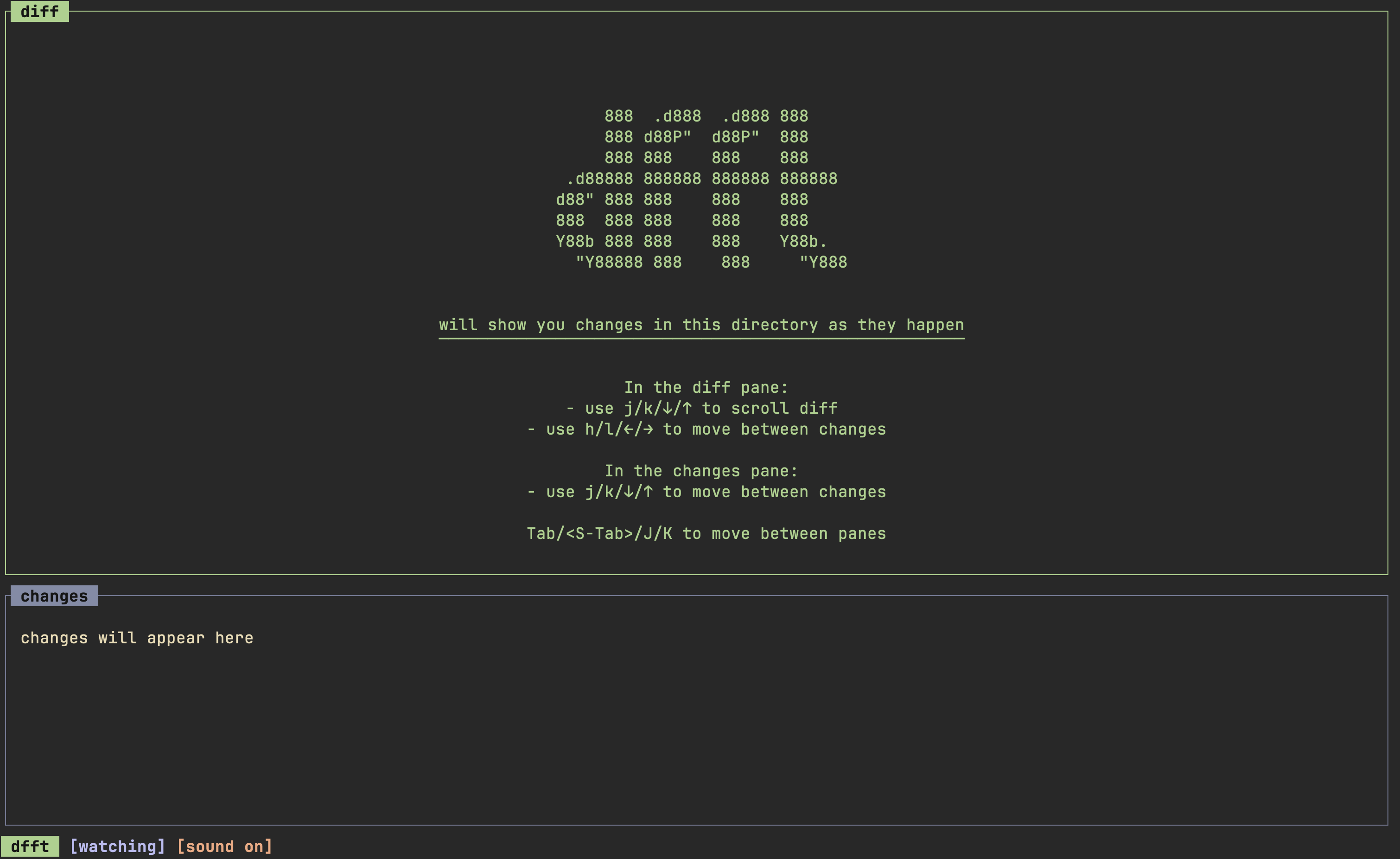
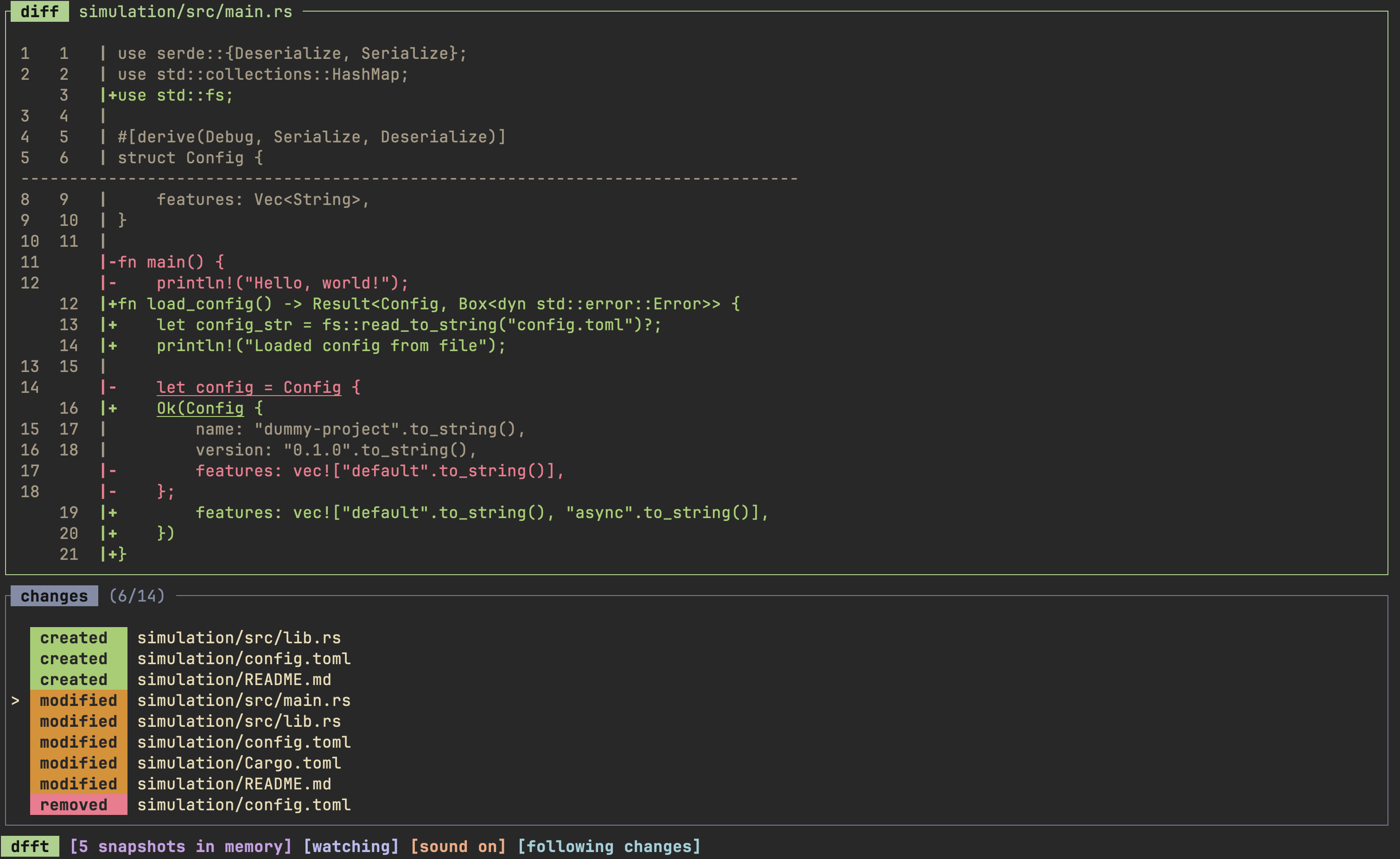
`dfft`'s TUI has 2 panes:
- `diff`: shows the diff for a change, or file contents for newly created files.
Supports scrolling.
- `changes`: Holds the list of changes, with a label for each change
### General
| Key | Action |
|-------------|---------------------|
| `?` | show/hide help view |
| `Esc` / `q` | go back/exit |
| `` | exit immediately |
### Diff Pane
| Key | Action |
|---------------------|-------------------------------|
| `j` / `↓` | select next change |
| `k` / `↑` | select previous change |
| `J` | scroll diff down by a line |
| `K` | scroll diff up by a line |
| `` | scroll diff down by half page |
| `` | scroll diff up by half page |
| `g` | select first change |
| `G` | select last change |
| `` | toggle watching |
| `` | reset list |
| `f` | toggle following changes |
| `s` | toggle sound notifications |
| `` / `` | switch to changes pane |
### Changes Pane
| Key | Action |
|---------------------|-------------------------------|
| `j` / `↓` | select next change |
| `k` / `↑` | select previous change |
| `g` | select first change |
| `G` | select last change |
| `J` | scroll diff down by a line |
| `K` | scroll diff up by a line |
| `` | scroll diff down by half page |
| `` | scroll diff up by half page |
| `f` | toggle following changes |
| `s` | toggle sound notifications |
| `` | reset list |
| `` | toggle watching |
| `` / `` | switch to diff pane |
### Help Pane
| Key | Action |
|-----------|-------------|
| `j` / `↓` | scroll down |
| `k` / `↑` | scroll up |
Ignoring files
---
By default, `dfft` will consider `.gitignore` and `.git/info/exclude` files when
deciding which files to ignore. Additionally, you can create a `.dfftignore`
file to exclude paths that are not covered by the previous two.
🔐 Verifying release artifacts
---
In case you get the `dfft` binary directly from a [release][1], you may want to
verify its authenticity. Checksums are applied to all released artifacts, and
the resulting checksum file is attested using [Github Attestations][2].
Steps to verify (replace `A.B.C` in the commands below with the version you
want):
1. Download the sha256 checksum file for your platform from the release:
```shell
curl -sSLO https://github.com/dhth/dfft/releases/download/vA.B.C/dfft-x86_64-unknown-linux-gnu.tar.xz.sha256
```
2. Verify the integrity of the checksum file using [gh][3].
```shell
gh attestation verify dfft-x86_64-unknown-linux-gnu.tar.xz.sha256 --repo dhth/dfft
```
3. Download the compressed archive you want, and validate its checksum:
```shell
curl -sSLO https://github.com/dhth/dfft/releases/download/vA.B.C/dfft-x86_64-unknown-linux-gnu.tar.xz
sha256sum --ignore-missing -c dfft-x86_64-unknown-linux-gnu.tar.xz.sha256
```
3. If checksum validation goes through, uncompress the archive:
```shell
tar -xzf dfft-x86_64-unknown-linux-gnu.tar.xz
cd dfft-x86_64-unknown-linux-gnu
./dfft
# profit!
```
[1]: https://github.com/dhth/dfft/releases
[2]: https://github.blog/news-insights/product-news/introducing-artifact-attestations-now-in-public-beta/
[3]: https://github.com/cli/cli