https://github.com/dhth/ecscope
monitor AWS ECS resources from the terminal
https://github.com/dhth/ecscope
aws aws-ecs ecs ecs-service ecs-task ratatui
Last synced: 11 months ago
JSON representation
monitor AWS ECS resources from the terminal
- Host: GitHub
- URL: https://github.com/dhth/ecscope
- Owner: dhth
- License: mit
- Created: 2025-03-03T17:22:58.000Z (over 1 year ago)
- Default Branch: main
- Last Pushed: 2025-06-12T22:06:31.000Z (about 1 year ago)
- Last Synced: 2025-06-12T22:56:04.219Z (about 1 year ago)
- Topics: aws, aws-ecs, ecs, ecs-service, ecs-task, ratatui
- Language: Rust
- Homepage: https://tools.dhruvs.space/ecscope
- Size: 394 KB
- Stars: 5
- Watchers: 1
- Forks: 0
- Open Issues: 0
-
Metadata Files:
- Readme: README.md
- Changelog: CHANGELOG.md
- License: LICENSE
Awesome Lists containing this project
README
ecscope




`ecscope` lets you monitor AWS ECS resources from the terminal.
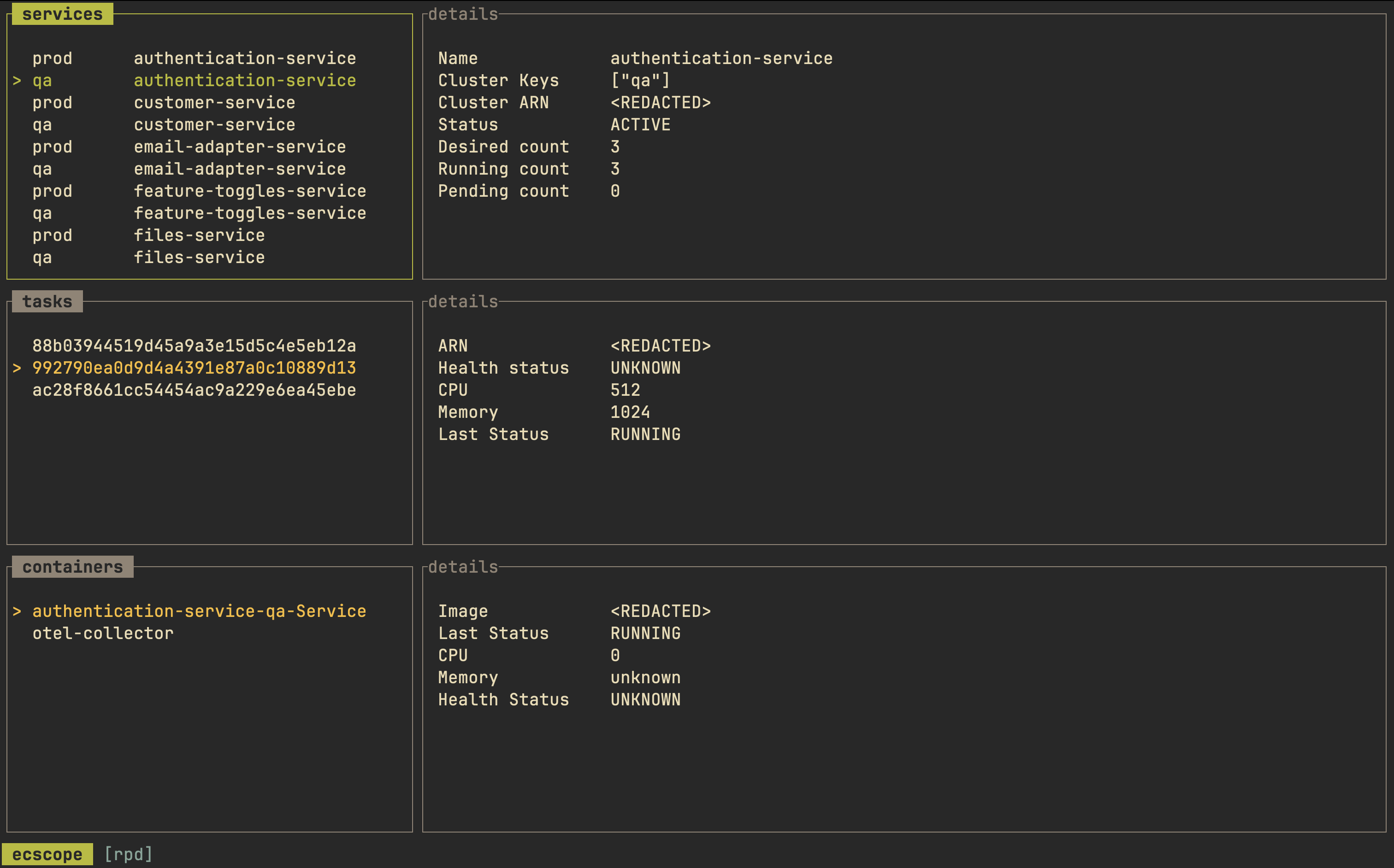
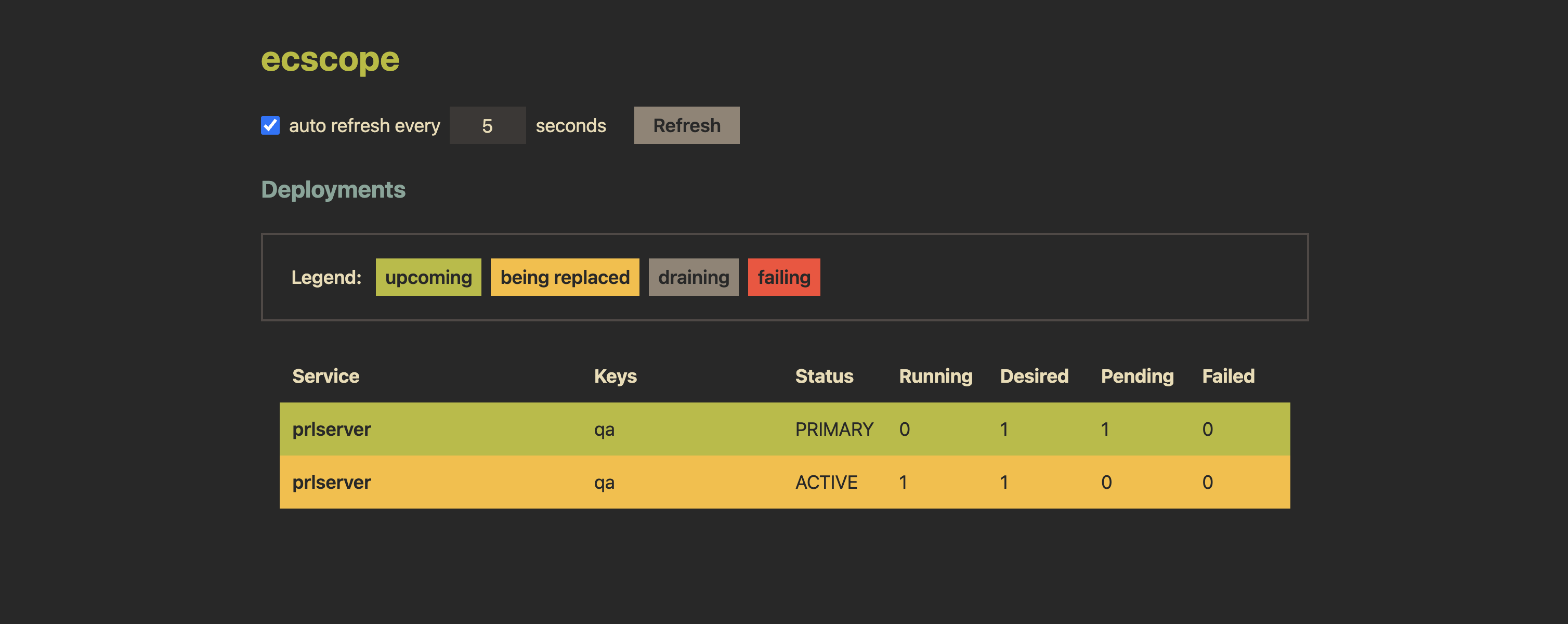
It does so by offering a [TUI](#-monitoring-tui) which shows services, tasks and
containers in a single view. Instead of having to log into several accounts (or
change regions) via the AWS website, you're able to view relevant information
for ECS deployments in one place. You can group services by configuring them via
a "profile", and have `ecscope` load it up. Besides the TUI, `ecscope` can also
show deployments updates via a minimal [web interface](#web-ui).
💾 Installation
---
**homebrew**:
```sh
brew install dhth/tap/ecscope
```
**cargo**:
```sh
cargo install ecscope
```
Or get the binaries directly from a Github [release][1]. Read more about
verifying the authenticity of released artifacts
[here](#-verifying-release-artifacts).
⚡️ Usage
---
```text
Usage: ecscope [OPTIONS]
Commands:
deps List ECS deployments
profiles Manage ecscope's profiles
monitor Open monitoring TUI
help Print this message or the help of the given subcommand(s)
Options:
--debug Output debug information without doing anything
-h, --help Print help
```
📃 Profiles
---
### Adding a profile
The first thing you'll do after installing `ecscope` is to set up a profile. A
profile is simply configuration that groups together ECS resources you want to
monitor in one go. You set up a profile using:
```bash
ecscope profiles add
```
This will generate a TOML file in your config directory that looks like this:
```toml
[[clusters]]
keys = [""]
arn = "arn:aws:ecs:eu-central-1::cluster/"
services = [
"service-a",
"service-b"
]
# use this to provide configuration and credentials via environment variables
# https://docs.aws.amazon.com/sdkref/latest/guide/environment-variables.html
config_source = "env"
[[clusters]]
keys = [""]
arn = "arn:aws:ecs:eu-central-1::cluster/"
services = [
"service-a",
"service-b"
]
# use this to leverage a profile contained in the shared AWS config and credentials files
# https://docs.aws.amazon.com/sdkref/latest/guide/file-format.html
config_source = "profile:"
[[clusters]]
keys = [""]
arn = "arn:aws:ecs:eu-central-1::cluster/"
services = [
"service-a",
"service-b"
]
# use this when you want to provide configuration and credentials via environment variables
# but want to assume another role for performing the actual operations
config_source = "assume:"
```
### Listing profiles
You can list configured profiles using `ecscope profiles list`.
🛠 AWS Configuration
---
`ecscope` supports getting AWS configuration from the following sources:
### Environment variables
This is configured by setting `config_source` to `"env"` in the profile config.
The following environment variables need to be set for this option.
- AWS_ACCESS_KEY_ID
- AWS_SECRET_ACCESS_KEY
- AWS_SESSION_TOKEN
- AWS_REGION
Read more about this
[here](https://docs.aws.amazon.com/sdkref/latest/guide/environment-variables.html).
### Shared config
Use this option when you want to leverage profiles set in the [shared AWS
config](https://docs.aws.amazon.com/sdkref/latest/guide/file-format.html) for
authentication and configuration.
`ecscope` can be configured to use this option by setting `config_source` to
`"profile:"` in the profile config.
⏳ Deployments
---
ECS deployments can be viewed using the `deps` command.
```text
$ ecscope deps -h
Usage: ecscope deps [OPTIONS]
Arguments:
Profile to use
Options:
-s, --service-filter Filtration query for service names
-k, --key-filter Filtration query for cluster keys
-S, --state Deployment state to query for [possible values: finished, in-progress, failing]
-c, --config-dir Config directory (to override ecscope's default config directory)
-f, --format Format to use [default: json] [possible values: delimited, json, plain]
--debug Output debug information without doing anything
-m, --mode Output mode [default: default] [possible values: default, web]
--web-skip-opening Whether to skip opening web results in browser (when --mode=web)
-h, --help Print help (see more with '--help')
```
```bash
ecscope deps
# filter by cluster keys
ecscope deps -k prod
# filter by cluster keys
ecscope deps -k '(qa|prod)'
# filter by service names
ecscope deps -s '.*-service'
# only show deployments that are finished
ecscope deps --state finished
# only show deployments that are pending
ecscope deps --state pending
# only show deployments that are failing
ecscope deps --state failing
```
By default, the `deps` command outputs results in the JSON format.
Sample output
```bash
ecscope deps -s auth
```
```json
[
{
"service_name": "authentication-service",
"keys": "qa",
"cluster_arn": "arn:aws:ecs:eu-central-1::cluster/authentication-service-infrastructure-qa",
"deployment_id": "ecs-svc/",
"status": "PRIMARY",
"running_count": 3,
"desired_count": 3,
"pending_count": 0,
"failed_count": 0
},
{
"service_name": "authentication-service",
"keys": "staging",
"cluster_arn": "arn:aws:ecs:eu-central-1::cluster/authentication-service-infrastructure-staging",
"deployment_id": "ecs-svc/",
"status": "PRIMARY",
"running_count": 1,
"desired_count": 1,
"pending_count": 0,
"failed_count": 0
},
{
"service_name": "authentication-service",
"keys": "prod",
"cluster_arn": "arn:aws:ecs:eu-central-1::cluster/authentication-service-infrastructure-prod",
"deployment_id": "ecs-svc/",
"status": "PRIMARY",
"running_count": 3,
"desired_count": 3,
"pending_count": 0,
"failed_count": 0
}
]
```
### Tabular Output
You can view the output of `deps` command as a table as follows (uses
[tbll](https://github.com/dhth/tbll)):
```bash
ecscope deps -s auth -f delimited |
(read -r header && echo "$header" && sort) |
tbll -C 2,3
```
```text
┌────────────────────────┬─────────┬─────────┬───────────────┬───────────────┬───────────────┬──────────────┐
│ service_name │ keys │ status │ running_count │ desired_count │ pending_count │ failed_count │
├────────────────────────┼─────────┼─────────┼───────────────┼───────────────┼───────────────┼──────────────┤
│ authentication-service │ prod │ PRIMARY │ 3 │ 3 │ 0 │ 0 │
│ authentication-service │ qa │ PRIMARY │ 3 │ 3 │ 0 │ 0 │
│ authentication-service │ staging │ PRIMARY │ 1 │ 1 │ 0 │ 0 │
└────────────────────────┴─────────┴─────────┴───────────────┴───────────────┴───────────────┴──────────────┘
```
### Web UI
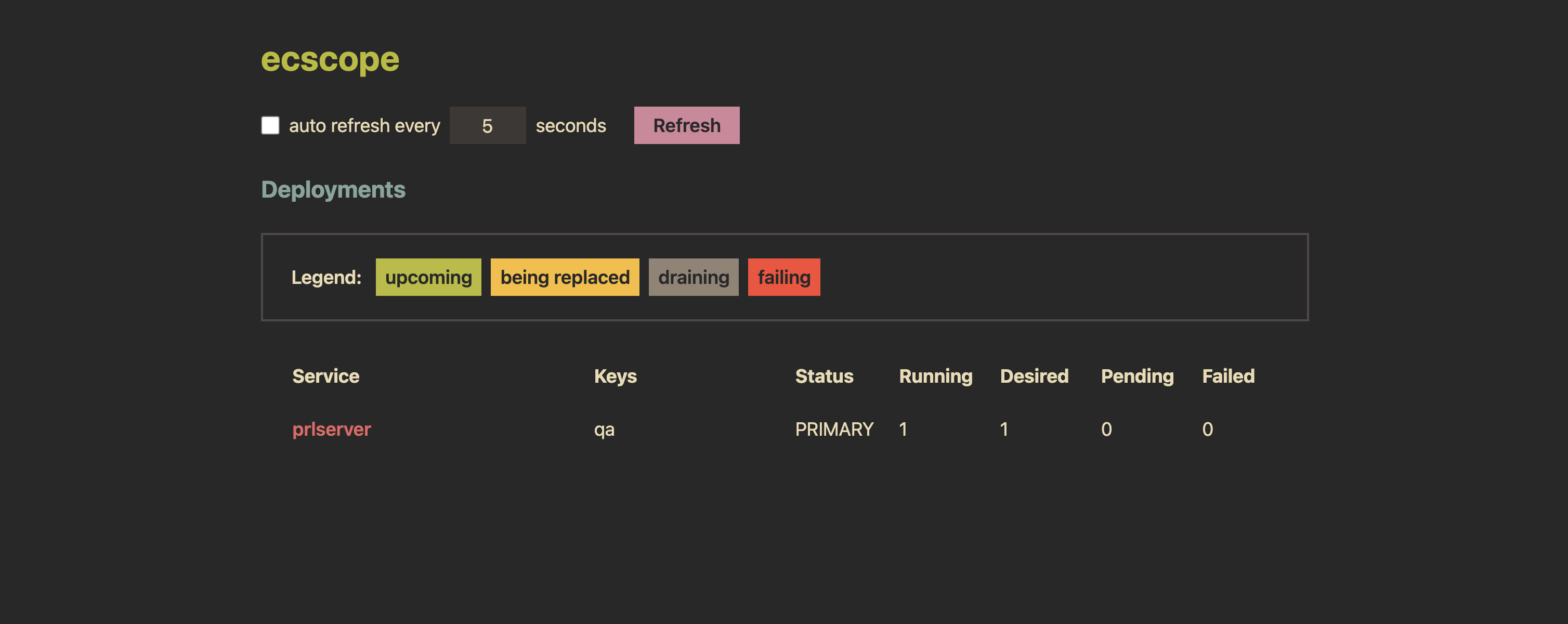
Deployments can also be viewed through a web UI (using `--mode web`). This
allows you to monitor deployment status in real time with a simple interface.

📟 Monitoring TUI
---
Once a profile is configured, you can begin monitoring ECS deployments via
`ecscope`'s TUI.
```text
$ ecscope monitor -h
Usage: ecscope monitor [OPTIONS]
Arguments:
Profile to use
Options:
-s, --service-filter Filtration query for service names
-k, --key-filter Filtration query for cluster keys
--debug Output debug information without doing anything
-h, --help Print help
```
The TUI displays running tasks for each configured service, along with their
respective containers. Additionally, details for the currently selected service,
task, and container are shown in dedicated panes to the right.
The TUI also supports refreshing of results — either on a schedule or manually.
Additionally, you can mark specific services to be targeted for the refresh.
### TUI Reference Manual
```text
Keymaps
---
General
? show/hide help view
Esc / q go back/exit
exit immediately
Main View
j / ↓ go down in a list
k / ↑ go up in a list
H / ← move to the pane to the left
J / Tab move to the pane below
K / move to the pane above
L / → move to the pane to the right
r refresh details for current item
refresh data (either the ones marked, or all)
R toggle auto refresh (for either the ones marked, or all)
Services List
m mark service for auto refresh
```
### Filtering services to be monitored
You can filter services using two kinds of filter queries, one for the cluster
key and the other for the service name.
```bash
# will show all services that match a regex .*-service
ecscope monitor profile -s '.*-service'
# will show all services in clusters where a key matches the regex qa|staging
ecscope monitor profile -k 'qa|staging'
# combine both filters
ecscope monitor profile -s '.*-service' -k 'qa'
```
🔐 Verifying release artifacts
---
In case you get the `ecscope` binary directly from a [release][1], you may want
to verify its authenticity. Checksums are applied to all released artifacts, and
the resulting checksum file is attested using [Github Attestations][2].
Steps to verify (replace `A.B.C` in the commands below with the version you
want):
1. Download the sha256 checksum file for your platform from the release:
```shell
curl -sSLO https://github.com/dhth/ecscope/releases/download/vA.B.C/ecscope-x86_64-unknown-linux-gnu.tar.xz.sha256
```
2. Verify the integrity of the checksum file using [gh][3].
```shell
gh attestation verify ecscope-x86_64-unknown-linux-gnu.tar.xz.sha256 --repo dhth/ecscope
```
3. Download the compressed archive you want, and validate its checksum:
```shell
curl -sSLO https://github.com/dhth/ecscope/releases/download/vA.B.C/ecscope-x86_64-unknown-linux-gnu.tar.xz
sha256sum --ignore-missing -c ecscope-x86_64-unknown-linux-gnu.tar.xz.sha256
```
3. If checksum validation goes through, uncompress the archive:
```shell
tar -xzf ecscope-x86_64-unknown-linux-gnu.tar.xz
cd ecscope-x86_64-unknown-linux-gnu
./ecscope
# profit!
```
≈ Related tools
---
- [ecsv](https://github.com/dhth/ecsv) lets you quickly check the versions of
your systems running in ECS tasks across various environments
[1]: https://github.com/dhth/ecscope/releases
[2]: https://github.blog/news-insights/product-news/introducing-artifact-attestations-now-in-public-beta/
[3]: https://github.com/cli/cli