https://github.com/dhth/mrj
merge your dependency upgrade PRs
https://github.com/dhth/mrj
Last synced: 4 months ago
JSON representation
merge your dependency upgrade PRs
- Host: GitHub
- URL: https://github.com/dhth/mrj
- Owner: dhth
- License: mit
- Created: 2025-05-22T22:38:19.000Z (about 1 year ago)
- Default Branch: main
- Last Pushed: 2025-06-12T16:40:47.000Z (about 1 year ago)
- Last Synced: 2025-06-12T17:29:39.900Z (about 1 year ago)
- Language: Rust
- Homepage: https://tools.dhruvs.space/mrj
- Size: 225 KB
- Stars: 0
- Watchers: 1
- Forks: 0
- Open Issues: 2
-
Metadata Files:
- Readme: README.md
- Changelog: CHANGELOG.md
- License: LICENSE
Awesome Lists containing this project
README
mrj




`mrj` merges your open dependency upgrade PRs.
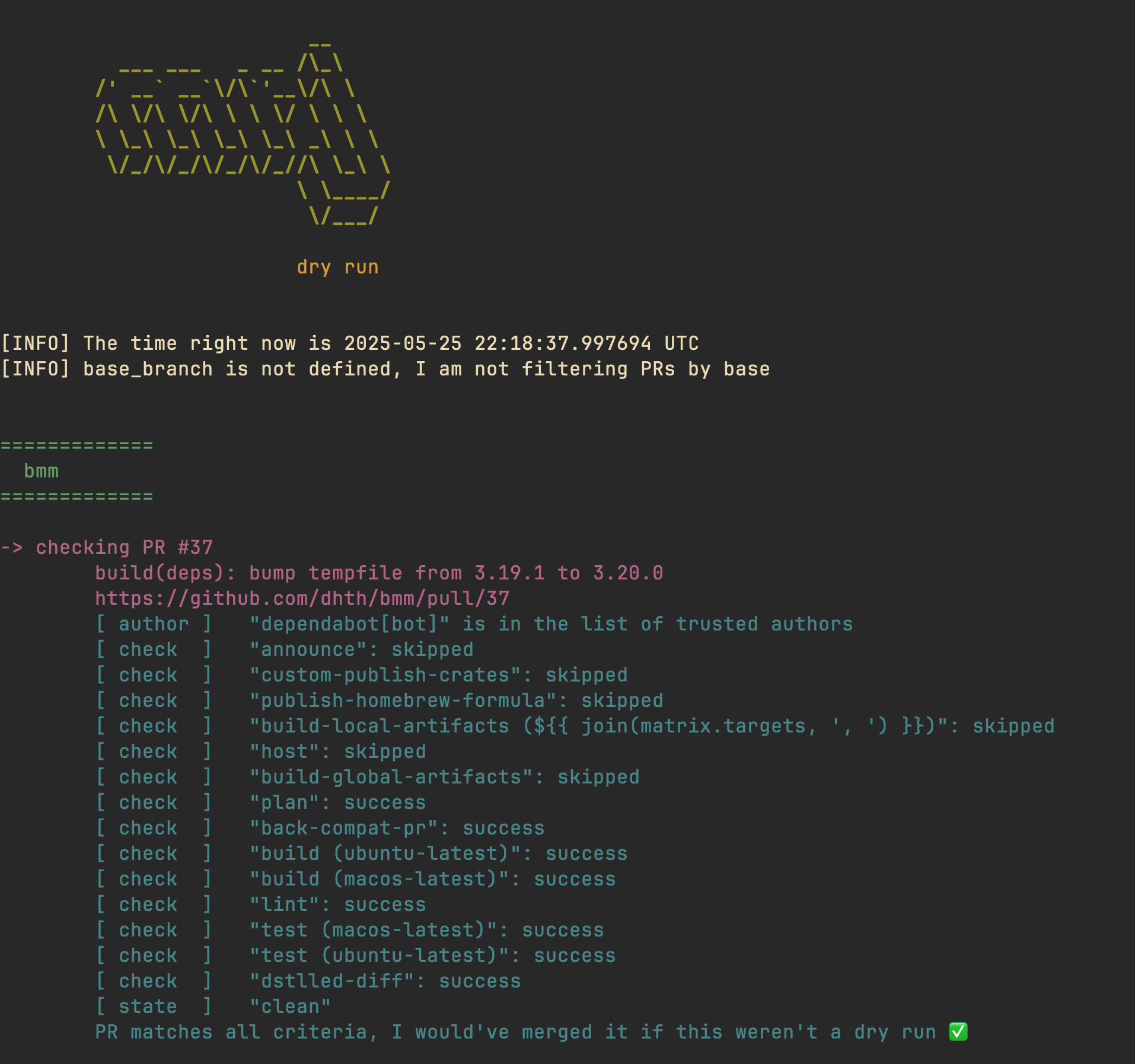
> Want to see a demo before you read the rest of the documentation?
> View `mrj` in action [here][1].
🤔 Motivation
---
Keeping up with dependency upgrade PRs can be overwhelming — they seem to appear
nonstop! I wanted a hassle-free tool that would automatically merge open PRs
based on a simple set of rules, one that I could also run locally. Having a
browsable archive of past runs was also a priority. After I couldn't find
anything that fit my needs, I wrote `mrj`.
`mrj` now takes care of merging dependency PRs for my projects. It runs on a
schedule on GitHub Actions [here][2].
💾 Installation
---
**homebrew**:
```sh
brew install dhth/tap/mrj
```
**cargo**:
```sh
cargo install mrj
```
Or get the binaries directly from a Github [release][3]. Read more about
verifying the authenticity of released artifacts
[here](#-verifying-release-artifacts).
⚡️ Usage
---
```text
$ mrj -h
mrj merges your open PRs
Usage: mrj [OPTIONS]
Commands:
run Check for open PRs and merge them
config Interact with mrj's config
report Generate report from mrj runs
help Print this message or the help of the given subcommand(s)
Options:
--debug Output debug information without doing anything
-h, --help Print help
```
```text
$ mrj run -h
Check for open PRs and merge them
Usage: mrj run [OPTIONS]
Options:
-c, --config
Path to mrj's config file [default: mrj.toml]
-r, --repos
Repos to run for (will override repos in config)
-o, --output
Whether to write output to a file
--debug
Output debug information without doing anything
--output-path
Whether to write mrj's log of events to a file [default: output.txt]
-s, --summary
Whether to write merge summary to a file
--summary-path
File to write summary to [default: summary.txt]
-n, --show-repos-with-no-prs
Whether to show information for repos with no PRs
-u, --show-prs-from-untrusted-authors
Whether to show information for PRs from untrusted authors
-d, --dry-run
Whether to only print out information without merging any PRs
-h, --help
Print help
```
```text
$ mrj report generate -h
Generate a report
Usage: mrj report generate [OPTIONS]
Options:
-p, --output-path File containing the output of "mrj run" [default: output.txt]
-o, --open Whether to open report in the browser
-n, --num-runs Maximum number of runs to keep in the report (allowed range: [1, 100]) [default: 10]
--debug Output debug information without doing anything
-h, --help Print help
```
🔑 Authentication
---
`mrj` tries to get an authentication token for GitHub in the following order:
- Using the value of environment variable `MRJ_TOKEN`
- Get it from [gh](https://github.com/cli/cli) (if installed)
Make sure `mrj` can get a token from either one of these approaches, and that
the token has the following permissions for the relevant repos:
- Read access to checks, metadata, and pull requests
- Read and write access to code
🎛️ Config
---
`mrj` needs a config file to run. Here's a sample config.
```toml
# repos to run for
# (required)
repos = [
"owner/repo-1",
"owner/repo-2",
"owner/repo-3",
]
# mrj will only consider repos created by the authors in this list
# (required)
trusted_authors = ["dependabot[bot]"]
# by default mrj doesn't filter PRs by base branches
# (optional, default: empty)
base_branch = "main"
# by default mrj doesn't filter PRs by head refs
# read more on this here
# https://docs.github.com/en/rest/pulls/pulls?apiVersion=2022-11-28#list-pull-requests--parameters
# the value needs to be valid regex
# (optional, default: empty)
head_pattern = "(dependabot|update)"
# by default mrj only considers PRs which can be cleanly merged
# if this setting is ON, mrj will also consider PRs where merging is blocked
# (optional, default: false)
merge_if_blocked = true
# by default mrj only considers PRs where checks have either passed or are skipped
# if this setting is OFF, mrj will not merge PRs where one or more checks have been skipped
# (optional, default: true)
merge_if_checks_skipped = true
# squash/merge/rebase (make sure the choice is actually enabled in your settings)
# (required)
merge_type = "squash"
```
📃 Generating a Report
---
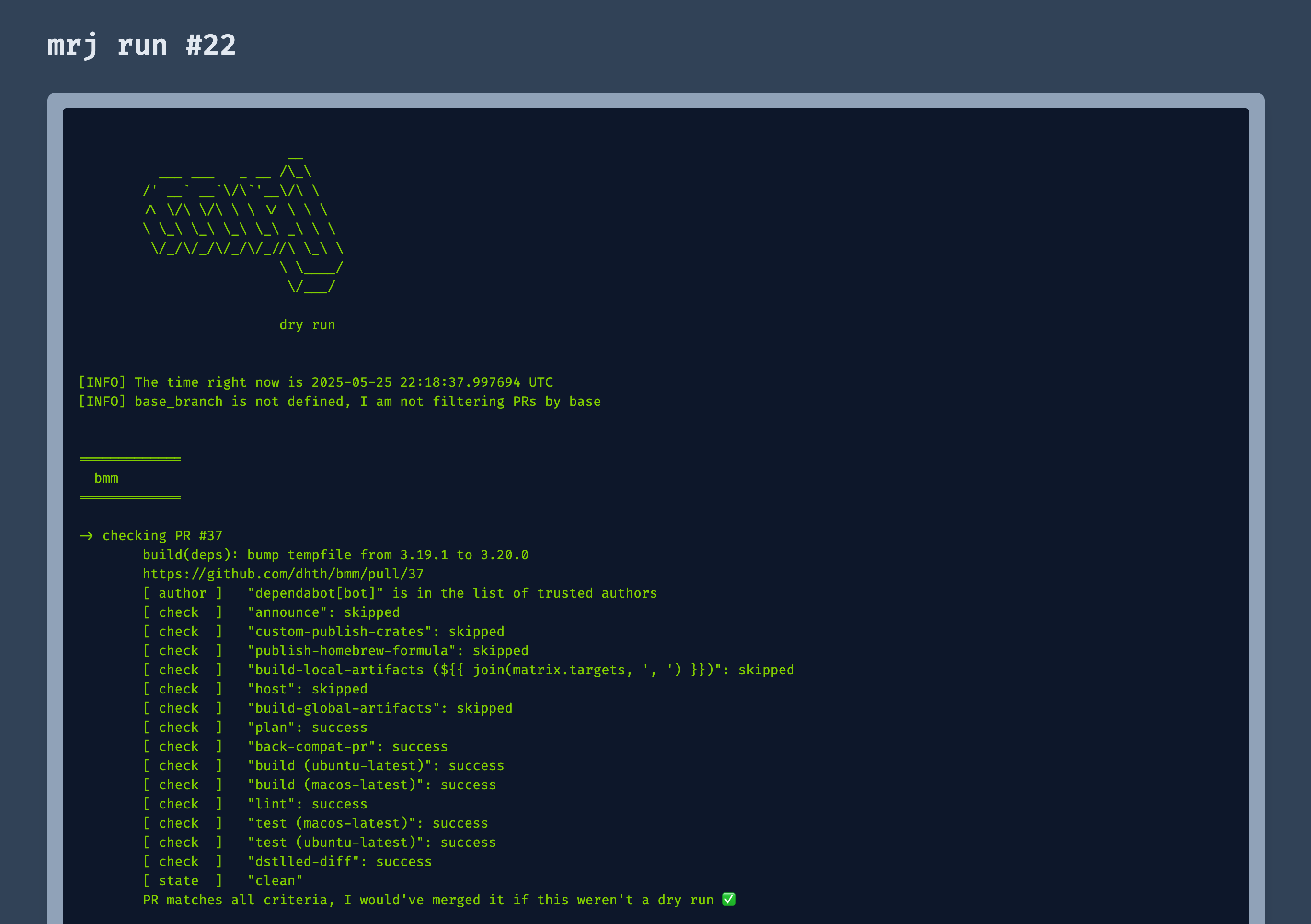
`mrj` lets you create an HTML report from its output. This report holds
information for the latest run as well as the last few runs of `mrj` (for
historical reference). You need an output to be able to generate a report, which
you can create by passing the `--output/-o` flag to `mrj run`.
```bash
mrj run --output
mrj report generate --open
```
This will generate a report that looks like this:
⏱️ Running on a schedule via Github Actions
---
You can let `mrj` run on a schedule by itself, and have it merge open
PRs that satisy your requirements.
Create a GitHub app for yourself that has the following permissions:
- Read access to checks, metadata, and pull requests
- Read and write access to code
Install the app in the relevant repositories. Generate a private key for
yourself.
Create a dedicated repository to use as the "runner" for `mrj` or choose an
existing one. Store the App ID and the private key as secrets in this
repository.
> [!TIP]
> You can see the following workflows in action [here][2].
Create a GitHub workflow as follows:
```yaml
name: mrj
on:
schedule:
- cron: '0-59/30 21-23 * * *'
workflow_dispatch:
permissions:
contents: read
id-token: write
env:
MRJ_VERSION: v0.1.0
jobs:
run:
runs-on: ubuntu-latest
steps:
- name: Install mrj
uses: jaxxstorm/action-install-gh-release@v2.1.0
with:
repo: dhth/mrj
tag: ${{ env.MRJ_VERSION }}
- uses: actions/checkout@v4
- name: Generate GH token
id: generate-token
uses: actions/create-github-app-token@v1
with:
app-id: ${{ secrets.MRJ_APP_ID }}
private-key: ${{ secrets.MRJ_APP_PRIVATE_KEY }}
owner:
- name: Run mrj
env:
MRJ_TOKEN: ${{ steps.generate-token.outputs.token }}
CLICOLOR_FORCE: 1
COLORTERM: "truecolor"
run: |
mrj run
```
If you also want to generate reports that can be deployed on GitHub Pages, use
the following workflow. Make sure deployment to Github Pages via GitHub Actions
is enabled for your repository.
```yaml
name: mrj
on:
schedule:
- cron: '0 21,22 * * *'
workflow_dispatch:
permissions:
contents: write
pages: write
id-token: write
env:
MRJ_VERSION: v0.1.0
jobs:
run:
runs-on: ubuntu-latest
steps:
- name: Install mrj
uses: jaxxstorm/action-install-gh-release@v2.1.0
with:
repo: dhth/mrj
tag: ${{ env.MRJ_VERSION }}
- uses: actions/checkout@v4
- name: Generate GH token
id: generate-token
uses: actions/create-github-app-token@v1
with:
app-id: ${{ secrets.MRJ_APP_ID }}
private-key: ${{ secrets.MRJ_APP_PRIVATE_KEY }}
owner: dhth
- name: Run mrj
env:
MRJ_TOKEN: ${{ steps.generate-token.outputs.token }}
CLICOLOR_FORCE: 1
COLORTERM: "truecolor"
run: |
mrj run -os
- name: Generate report
run: |
mrj report generate
- name: Get run number
id: run-number
run: echo "number=$(cat ./.mrj/last-run.txt)" >> "$GITHUB_OUTPUT"
- name: Setup Pages
uses: actions/configure-pages@v5
- name: Upload artifact
uses: actions/upload-pages-artifact@v3
with:
path: "dist"
- name: Deploy to GitHub Pages
id: deployment
uses: actions/deploy-pages@v4
- name: Commit and push results
run: |
git config user.name "github-actions[bot]"
# https://github.com/actions/checkout?tab=readme-ov-file#push-a-commit-using-the-built-in-token
git config user.email "41898282+github-actions[bot]@users.noreply.github.com"
git add .
git commit -m "add run-${{ steps.run-number.outputs.number }}"
git push
```
This will merge PRs and deploy a report to GitHub Pages. It will also push a
commit to the repo containing the newly generated output.
🔐 Verifying release artifacts
---
In case you get the `mrj` binary directly from a [release][1], you may want
to verify its authenticity. Checksums are applied to all released artifacts, and
the resulting checksum file is attested using [Github Attestations][2].
Steps to verify (replace `A.B.C` in the commands below with the version you
want):
1. Download the sha256 checksum file for your platform from the release:
```shell
curl -sSLO https://github.com/dhth/mrj/releases/download/vA.B.C/mrj-x86_64-unknown-linux-gnu.tar.xz.sha256
```
2. Verify the integrity of the checksum file using [gh][3].
```shell
gh attestation verify mrj-x86_64-unknown-linux-gnu.tar.xz.sha256 --repo dhth/mrj
```
3. Download the compressed archive you want, and validate its checksum:
```shell
curl -sSLO https://github.com/dhth/mrj/releases/download/vA.B.C/mrj-x86_64-unknown-linux-gnu.tar.xz
sha256sum --ignore-missing -c mrj-x86_64-unknown-linux-gnu.tar.xz.sha256
```
3. If checksum validation goes through, uncompress the archive:
```shell
tar -xzf mrj-x86_64-unknown-linux-gnu.tar.xz
cd mrj-x86_64-unknown-linux-gnu
./mrj -h
# profit!
```
[1]: https://dhth.github.io/mrj-runner/index.html
[2]: https://github.com/dhth/mrj-runner
[3]: https://github.com/dhth/mrj/releases