https://github.com/dias1c/lem-in
🐜 Find optimal paths for ants
https://github.com/dias1c/lem-in
01-edu alem-school algorithms clean-architecture go golang graph lem-in lemin pkg suurballe-algorithm visualization web
Last synced: about 1 year ago
JSON representation
🐜 Find optimal paths for ants
- Host: GitHub
- URL: https://github.com/dias1c/lem-in
- Owner: Dias1c
- License: mit
- Created: 2021-09-07T13:58:18.000Z (almost 5 years ago)
- Default Branch: master
- Last Pushed: 2022-05-11T17:34:20.000Z (about 4 years ago)
- Last Synced: 2025-03-31T09:39:01.918Z (about 1 year ago)
- Topics: 01-edu, alem-school, algorithms, clean-architecture, go, golang, graph, lem-in, lemin, pkg, suurballe-algorithm, visualization, web
- Language: Go
- Homepage:
- Size: 3.33 MB
- Stars: 28
- Watchers: 2
- Forks: 2
- Open Issues: 0
-
Metadata Files:
- Readme: README.md
- License: LICENSE
Awesome Lists containing this project
README
# lem-in
The task of the project is [here](https://github.com/01-edu/public/tree/master/subjects/lem-in)
Wiki [here](https://github.com/Dias1c/lem-in/wiki) and thx for [him](https://github.com/elijahkash)
# Chapters
- [Briefly about the project](#Briefly-about-the-project)
- [Graphs in file](#Graphs-in-file)
- [How use program](#How-use-program)
- [How Program works](#How-Program-works)
- [Authors](#Authors)
# Briefly about the project
This is a console program that builds a graph based on the data transmitted by the user and distributes the ants along the paths so that everyone reaches from `A` to `B` in a minimum of steps.
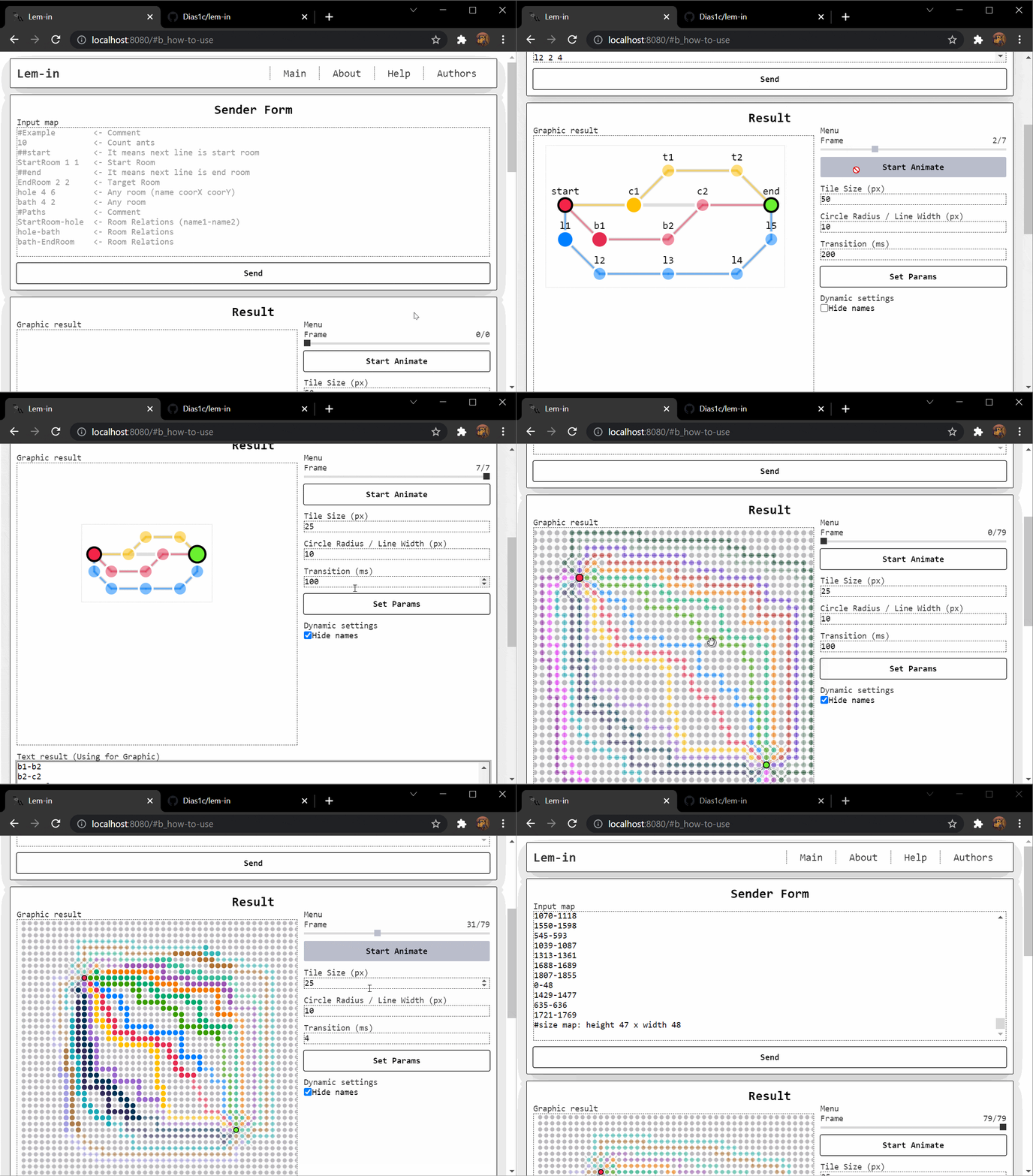
> Also you can use web version for visualize your result. To do this, insert the map with result into the `text result` block and click on Set Params. Now your graph is represented graphically.
# How use program
> Program takes only 1 argument.
It can be filename or flags.
#### Default:
- `"filename"` - your file path with graph data
#### Flags:
- `--file="filename"` - as default input. Just an explicit launch with a file
- `--http=":port"` - starts run server on your port. Using for visualization.
For run project:
```bash
go run ./cmd (filename | --http=:port | --file=filename)
```
### Example:
Run program:
```bash
$ go run ./cmd example.txt
#My comment
3
##start
start 2 2
r1 3 1
r2 3 3
r3 4 1
##end
end 5 2
start-r1
start-r2
r1-r3
r2-end
r3-end
L1-r2 L2-r1
L1-end L2-r3 L3-r2
L2-end L3-end
```
Also Get Steps Count:
```bash
$ go run ./cmd example.txt | grep '^L' | wc -l
3
```
Run visualization:
```bash
$ go run ./cmd --http=:8080
YYYY/MM/DD hh:mm:ss Server started on http://localhost:8080
```
The program is provided with information about the graph (anthill) at the input:
- Number of `ants` (ants > 0)
- The name of the vertices and their coordinates. The `##start` and `##end` commands specify the starting and ending vertices of the path. (x > 0 & y > 0)
- Edges connecting vertices.
- Optional comments starting by `#` (program ignore them)
# Graphs in file
The map file looks like this
```txt
#My comment
3
##start
start 2 2
r1 3 1
r2 3 3
r3 4 1
##end
end 5 2
start-r1
start-r2
r1-r3
r2-end
r3-end
```
# How Program works

> To learn more, read the [wiki](https://github.com/Dias1c/lem-in/wiki)
### Suurballe's algorithm Links:
- [Detailed explanation](https://en.wikipedia.org/wiki/Suurballe%27s_algorithm)
- [Briefly in pictures](http://www.macfreek.nl/memory/Disjoint_Path_Finding)
# Authors
- [Dias1c](https://github.com/Dias1c)
- [nrblzn](https://github.com/RaevNur)