https://github.com/digicorp/data-dictionary-with-google-script
This repository contains the end to end solution to create google app script that creates data dictionary in meaningful and deliverable format from google spreadsheet.
https://github.com/digicorp/data-dictionary-with-google-script
Last synced: 11 months ago
JSON representation
This repository contains the end to end solution to create google app script that creates data dictionary in meaningful and deliverable format from google spreadsheet.
- Host: GitHub
- URL: https://github.com/digicorp/data-dictionary-with-google-script
- Owner: digicorp
- Created: 2017-02-27T08:09:52.000Z (over 9 years ago)
- Default Branch: master
- Last Pushed: 2018-07-07T01:16:04.000Z (almost 8 years ago)
- Last Synced: 2025-04-26T20:34:05.023Z (about 1 year ago)
- Language: JavaScript
- Size: 302 KB
- Stars: 6
- Watchers: 7
- Forks: 1
- Open Issues: 1
-
Metadata Files:
- Readme: README.md
Awesome Lists containing this project
README
# Overview
This repository contains the end to end solution to create google app script that creates data dictionary document from google sheet. The solution solves our product team’s problem of generating data dictionary in meaningful and deliverable format at [Digicorp](https://www.digi-corp.com) with few clicks. with few clicks. The tutorial divided into following three sections.
1. [Core Library (Lib.gs)](#core-library)
2. [Helper Class (Helper.gs)](#helper-class)
3. [Controller (Controller.gs)](#controller-class)
_[Note : It is assumed that one will have basic knowledge of creating google app script on google spreadsheet. For basic steps you can refer [Google App Script](https://developers.google.com/apps-script/)]_
# Getting Started
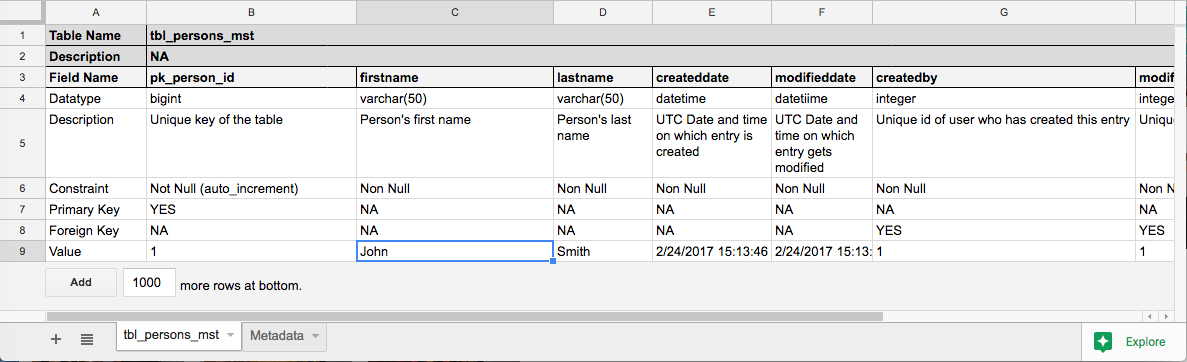
1. [Spreadsheet](https://docs.google.com/spreadsheets/d/1rqK-ZTGejOAVQyNFKyHC1N_otsHTDFqRo30-4lFcML8/edit#gid=0) must have at-least one table described in following image
2. [Spreadsheet](https://docs.google.com/spreadsheets/d/1rqK-ZTGejOAVQyNFKyHC1N_otsHTDFqRo30-4lFcML8/edit#gid=0) should have sheet called "Metadata" to store metadata during execution
# Core Library
Core library contains generic functions and methods those are used throughout the solution. These functions are generic and can be used in any google script solution. These are wrapper functions written on top of google app script functions.
Function Definition
Function | Type | Description | Input | Output
--------------------------------------------- | ------------ | ------------------------------------------------------------ | ------------------------------ | -------------
[Get Current Spreadsheet Name](#get-current-spreasheet-name) | Core Library | Get the current active spreadsheet name | `spreadsheet` | `spreadsheetname`
[Get Sheets](#get-sheets) | Core Library | Get all sheets as an array of the specific spreadsheet | `spreadsheet` | `sheets`
[Get Active Sheet](#get-active-sheet) | Core Library | Get the active sheet | `sheetname` | `sheet`
[Get Sheet Name](#get-sheet-name) | Core Library | Get name of specific sheet | `sheets`,`index` | `sheetname`
[Set Cell Value](#set-cell-value) | Core Library | Set value in specific cell of sheet | `sheet`,`row`,`column`,`value` | `-`
[Get Cell Value](#get-cell-value) | Core Library | Set value of specific cell of sheet | `sheet`,`row`,`column` | `-`
## Get Current Spreadsheet Name
`GetCurrentSpreadSheetName` used to get the name of the specific spreadsheet. it takes `spreadsheet` as input and it returns spreadsheet name as `spreadsheetname`
```javascript
/**
* To get the name of current active spreadsheet
* @param spreadsheet Spreadsheet
*/
function GetCurrentSpreadSheetName(spreadsheet)
{
return spreadsheet.getName();
}
```
## Get Sheets
`GetSheets` used to get the all sheets in form of array of specific spreadsheet. it takes `spreadsheet` as input and it returns array of sheets as `sheets`
```javascript
/**
* To get sheets of the current active spreadsheet
* @param spreadsheet Spreadsheet
*/
function GetSheets(spreadsheet)
{
return spreadsheet.getSheets();
}
```
## Get Active Sheet
`GetActiveSheet` function used to get the active OR specific sheet of spreadsheet. it takes `sheetname` as input argument. in case if `sheetname` passed as blank string, it returns active sheet, otherwise it return the sheet provided as `sheetname`
We had need of get instance of Current Sheet and in some cases Specific Sheet. so we created a parameterized function that served purpose. To get the Current Active Sheet we can simply use this function with empty sting ('') and in case to get Specific Sheet we can simply use sheet name.
```javascript
/**
* Get active sheet OR Get sheet by name
* @param sheetname Name of the sheet.
*/
function GetActiveSheet(sheetname) {
var sheet;
if (sheetname == '') {
sheet = SpreadsheetApp.getActive().getActiveSheet();
} else {
sheet = SpreadsheetApp.getActive().getSheetByName(sheetname);
}
return sheet;
}
```
## Get Sheet Name
`GetSheetName` used to get name of the particular sheet from the array of sheets. it takes `sheets` and `index` as input and it returns the name of sheet as `sheetname` from array of sheets for specific `index`.
```javascript
/**
* To get name of sheet
* @param sheets Array of sheets.
* @param index Index number for item of arrary
*/
function GetSheetName(sheets,index)
{
var sheetname;
if (sheets.length>0)
{
sheetname = sheets[index].getName();
}
else
{
sheetname = ''
}
return sheetname;
}
```
## Set Cell Value
`SetCellValue` method used to set the `value` in specific `row` and `column`
```javascript
/**
* To set value of a cell
* @param sheet Sheet contain cell on which value should set.
* @param row Row on which value should set
* @param column Column on which value should set
* @param value Value which should set in cell
*/
function SetCellValue(sheet,row,column,value)
{
sheet.getRange(row, column).setValue(value);
}
```
## Get Cell Value
`GetCellValue` function used to get the of value `row` and `column` of specified `sheet`
```javascript
/**
* To get value of a cell
* @param sheet Sheet contain cell of which value should get.
* @param row Row on which value should get
* @param column Column on which value should get
*/
function GetCellValue(sheet,row,column)
{
return sheet.getRange(row, column).getValue();
}
```
# Helper Class
We have created helper class that contains business logic specific functions and methods which will be called from controller on specific events.
Function | Type | Description | Input | Output
--------------------------------------- | ------------ | ----------------------------------------------------------------------------------------- | -------------------------------- | -------------
[Create New Document](#create-new-document) | Helper Class | Create new google document | `-` | `documentid`
[Get Existing Document](#get-existing-document) | Helper Class | Get the existing document| `-` | `documentid`
[Get Document File](#get-document-file) | Helper Class | Get the existing document file| `-` | `documentfile`
## Create New Document
`CreateNewDocument` method used to create new google document with the name same as spreadsheet. once document is created document id is stored in metadata.
```javascript
/**
* To create new google document with same name that sheet has
*/
function CreatNewDocument()
{
var sheet = GetActiveSheet("Metadata");
var spreadsheet = SpreadsheetApp.getActiveSpreadsheet();
var documentname = GetCurrentSpreadSheetName(spreadsheet)
var document=DocumentApp.create(documentname);
var documentid = document.getId();
SetCellValue(sheet,1,1,documentid);
return documentid;
}
```
## Get Existing Document
`GetExistingDocument` method used to get the existing document id from metadata
```javascript
/**
* To get existing document
*/
function GetExistingDocument()
{
var sheet = GetActiveSheet("Metadata");
var documentid = GetCellValue(sheet,1,1);
return documentid;
}
```
## Get Document File
`GetDocumentFile` method used to get google document file for the document id stored in metadata.
```javascript
/**
* To get existing document file
*/
function GetDocumentFile()
{
var documentid = GetExistingDocument();
var documentfile = DriveApp.getFileById(documentid);
return documentfile;
}
```
# Controller Class
We have created helper class that contains business logic specific functions and methods which will be called from controller on specific events.
Function | Type | Description | Input | Output
--------------------------------------- | ------------ | ----------------------------------------------------------------------------------------- | -------------------------------- | -------------
[Create Menu](#create-menu) | Controller Class | Create menu with submenu item | `-` | `-`
[Create Data Dictionary](#create-data-dictionary) | Controller Class |Create data dictionary| `-` | `-`
[Create Table](#create-table) | Controller Class | Create table| `-` | `-`
[Email Data Dictionary](#email-data-dictionary) | Controller Class | Send data dictionary as PDF| `-` | `-`
## Create Menu
`onOpen` method used to create menu with submenu items in spreadsheet.
```javascript
/**
* To create menu on google sheet
*/
function onOpen() {
var spreadsheet = SpreadsheetApp.getActive();
var menuItems = [{
name: 'Generate Dictionary',
functionName: 'CreateDataDictionary'
},{
name: 'Email Document as PDF',
functionName: 'EmailDataDictionary'
}];
spreadsheet.addMenu('Digicorp Data Dictionary', menuItems);
}
```
## Create Data Dictionary
`CreateDataDictionary` method used to create data dictionary from spreadsheet. It will check all sheets under specific spreadsheet in specific format and create data dictionary in standard tabular format.
```javascript
/**
* To create data dictionary from sheets of spreadsheet
*/
function CreateDataDictionary()
{
var spreadsheet = SpreadsheetApp.getActiveSpreadsheet();
var documentid = GetExistingDocument();
if (documentid == '')
{
documentid = CreatNewDocument()
}
var body = DocumentApp.openById(documentid).getBody();
var sheets = GetSheets(spreadsheet);
var sheetscount = sheets.length;
body.clear();
for (count = 0; count