https://github.com/dimen311/component-element-usage
Angular Component Usage Finder is a Visual Studio Code extension that helps you quickly find the usage of Angular components within your project's HTML templates. Simply right-click on an Angular component and select "Find Component Usages" to locate where it's used across your project.
https://github.com/dimen311/component-element-usage
angular angular2
Last synced: about 2 months ago
JSON representation
Angular Component Usage Finder is a Visual Studio Code extension that helps you quickly find the usage of Angular components within your project's HTML templates. Simply right-click on an Angular component and select "Find Component Usages" to locate where it's used across your project.
- Host: GitHub
- URL: https://github.com/dimen311/component-element-usage
- Owner: dimen311
- License: mit
- Created: 2024-08-29T13:38:34.000Z (almost 2 years ago)
- Default Branch: master
- Last Pushed: 2025-11-21T11:47:38.000Z (8 months ago)
- Last Synced: 2025-11-21T13:20:26.010Z (8 months ago)
- Topics: angular, angular2
- Language: TypeScript
- Homepage:
- Size: 919 KB
- Stars: 0
- Watchers: 1
- Forks: 0
- Open Issues: 0
-
Metadata Files:
- Readme: README.md
- Changelog: CHANGELOG.md
- License: LICENSE
Awesome Lists containing this project
README
# Angular Component Usage Finder
## Overview
VS CODE - Angular Component Usage Finder
**Angular Component Usage Finder** is a Visual Studio Code extension that helps you quickly find the usage of Angular components within your project's HTML templates. Simply right-click on an Angular component and select "Find Component Usages" to locate where it's used across your project.
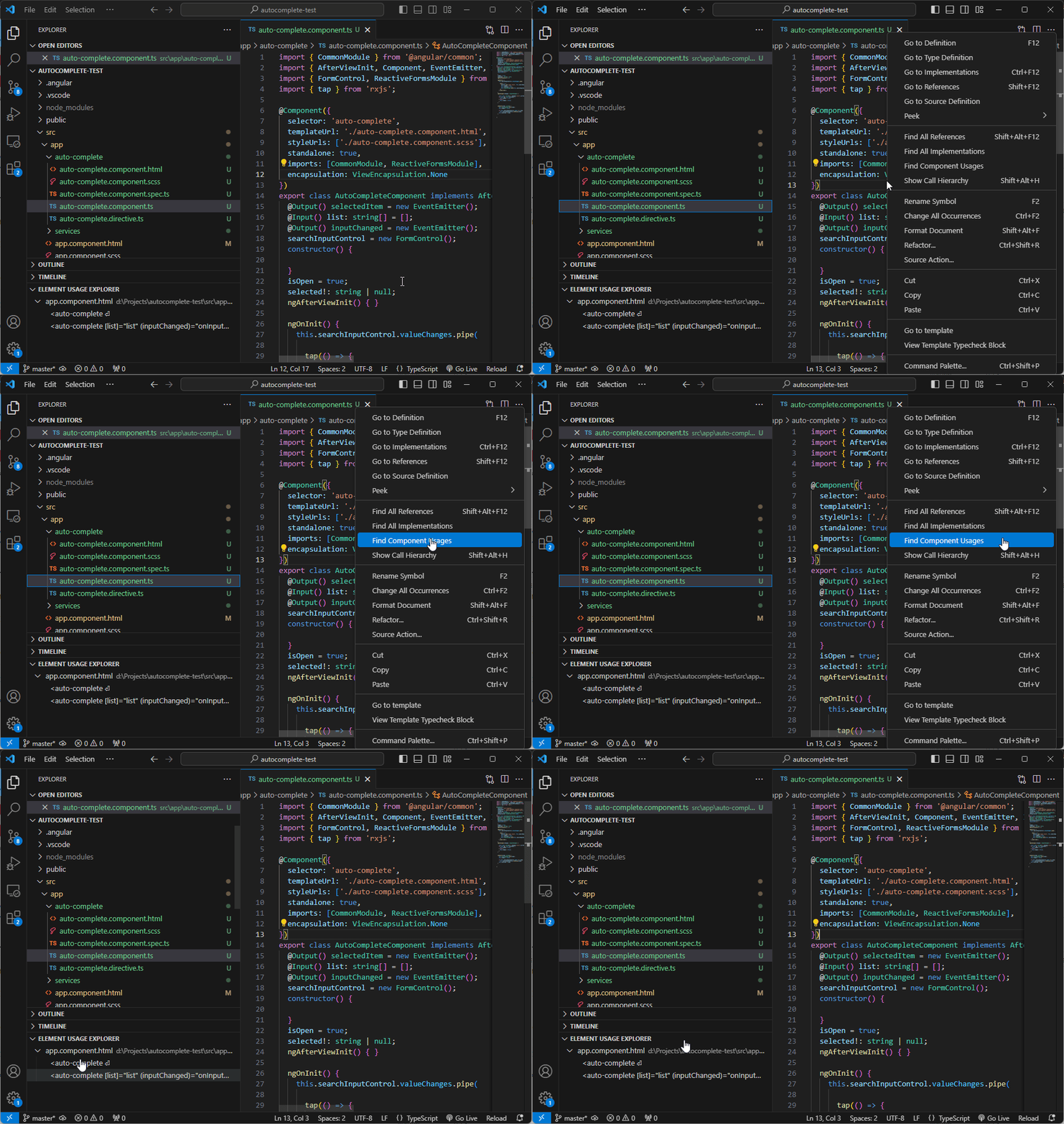
## Usage
1. Open any Angular project in Visual Studio Code.
2. In the HTML file, right-click on a component tag you wish to find.
3. Select **Find Component Usages** from the context menu.
4. The extension will search through your project’s HTML templates and display all occurrences of the component under explorer: Element usage explorer.
## Features
- Quickly find Angular component usage in HTML templates.
- Seamlessly integrated into the VS Code right-click context menu.
- Supports projects using the Angular framework.
## Installation
1. Open Visual Studio Code.
2. Go to the Extensions view by clicking on the Extensions icon in the Activity Bar on the side of the window or pressing `Ctrl+Shift+X`.
3. Search for **Angular Component Usage Finder**.
4. Click **Install**.
Alternatively, you can manually install the extension by downloading it from the [Visual Studio Code Marketplace](https://marketplace.visualstudio.com/items?itemName=ExtensionDmn.angularComponentElementUsage).
## Requirements
- An Angular project with properly structured templates.
- Visual Studio Code version 1.60.0 or later.
## Known Issues
- **Dynamic Components**: The extension may not detect component usage in dynamic or conditional templates.
## Changelog
### 0.3.0
- Added option to search a component from its HTML template (invoke "Find Component Usages" while an HTML template is active).
- Added statistics footer in the Element usage explorer showing the top 3 components and their usage counts.
## Contributing
Contributions are welcome! If you'd like to contribute, please fork the repository and submit a pull request. For any issues or suggestions, please open a ticket on the [GitHub Issues page](https://github.com/dimen311/component-element-usage).
## License
This extension is licensed under the [MIT License](https://opensource.org/licenses/MIT).