https://github.com/dimitarchristoff/timeplunk
tiny timeline picker for d3
https://github.com/dimitarchristoff/timeplunk
Last synced: about 1 year ago
JSON representation
tiny timeline picker for d3
- Host: GitHub
- URL: https://github.com/dimitarchristoff/timeplunk
- Owner: DimitarChristoff
- License: mit
- Created: 2014-07-30T08:45:06.000Z (almost 12 years ago)
- Default Branch: master
- Last Pushed: 2015-03-13T12:59:07.000Z (over 11 years ago)
- Last Synced: 2025-03-23T03:32:43.813Z (about 1 year ago)
- Language: JavaScript
- Size: 250 KB
- Stars: 1
- Watchers: 2
- Forks: 0
- Open Issues: 0
-
Metadata Files:
- Readme: README.md
- License: LICENSE
Awesome Lists containing this project
README
timeplunk
=========
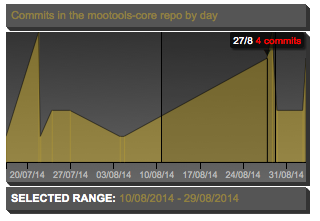
Tiny timeline picker for d3. Used to display and normalise events on a timeline and allows for a range selection (brush).
## Installing
You can install from bower:
```sh
$ bower install timeplunk
```
Or you can clone the repo or download the `timeplunk.js` file.
## Dependencies
d3, d3-tip, jquery (just object merge for options).
Additionally, `timeplunk.css` is needed (just copy and style your own svg elements).
## Use
TimePlunk is written with a UMD wrap so it works as a AMD module as well as via global objects.
```javascript
// no AMD, assumes d3, d3.tip and $ are loaded
var timeplunk = new TimePlunk('svg.tp', {
maxTicks: 5,
onBrush: function(a, b){
a = new Date(a), b = new Date(b);
out.html('SELECTED RANGE: ' + format(a) + ' - ' + format(b));
},
tooltipFormat: function(d){
return d.nice + ' ' + d.y + ' commits';
},
height: 110
});
// or requirejs, assumes `d3`, `d3-tip` and `jquery` are defined in your `require.config`
require(['timeplunk'], function(TimePlunk){
new TimePlunk('svg.tp', { ... });
});
```
## API
### Constructor
The constructor supports 2 arguments:
- @param `{String} element` selector to bind to
- @param `{Object=} options` optional overrides
The options are as follows:
```javascript
({
// margins
top: 0,
bottom: 20,
right: 0,
left: 0,
// base width/height
width: 300,
height: 90,
interpolateMethod: 'linear',
// xAxis
maxTicks: 3,
brushEvent: 'brushend', // also brush, brushstart etc. d3 docs.
// date format
dateFormat: '%d/%m/%y',
// tooltip
tooltipClass: 'd3-tip',
tooltipsEnabled: true && d3tip,
tooltipFormat: function(d){
return d.nice + ' ' + d.y + '';
},
/**
* @description handler for brush selection, returns d3.brush.extent
* @param {Date.toString} start
* @param {Date.toString} end
*/
onBrush: function(start, end){},
// function that parses
dataParser: null
});
```
You can override any of the defaults or leave as is.
### setData
Method used to pass on the data.
- @param `{Array} data`
- @param `{Boolean=} clearBrush` selection when truthy
For more, read the source, it's tiny.