https://github.com/diningphil/mlwiz
Machine Learning Research Wizard
https://github.com/diningphil/mlwiz
evaluation-framework experiments machine-learning
Last synced: 3 months ago
JSON representation
Machine Learning Research Wizard
- Host: GitHub
- URL: https://github.com/diningphil/mlwiz
- Owner: diningphil
- License: bsd-3-clause
- Created: 2024-07-14T09:07:24.000Z (almost 2 years ago)
- Default Branch: main
- Last Pushed: 2026-04-12T14:47:50.000Z (3 months ago)
- Last Synced: 2026-04-12T16:26:20.638Z (3 months ago)
- Topics: evaluation-framework, experiments, machine-learning
- Language: Python
- Homepage:
- Size: 10.3 MB
- Stars: 13
- Watchers: 2
- Forks: 0
- Open Issues: 0
-
Metadata Files:
- Readme: README.md
- Changelog: CHANGELOG.md
- Contributing: CONTRIBUTING.md
- License: LICENSE
Awesome Lists containing this project
README

# MLWiz
_Machine Learning Research Wizard — reproducible experiments from YAML (model selection + risk assessment) for vectors, images, time-series, and graphs._
[](https://pypi.org/project/mlwiz/)
[](https://pypi.org/project/mlwiz/)
[](https://github.com/diningphil/mlwiz/actions/workflows/python-test-and-coverage.yml)
[](https://mlwiz.readthedocs.io/en/stable/)
[](https://github.com/diningphil/mlwiz/actions/workflows/python-test-and-coverage.yml)
[](https://interrogate.readthedocs.io/en/latest/)
[](https://opensource.org/licenses/BSD-3-Clause)
[](https://github.com/diningphil/mlwiz/stargazers)
## 🔗 Quick Links
- 📘 Docs: https://mlwiz.readthedocs.io/en/stable/
- 🧪 Tutorial (recommended): https://mlwiz.readthedocs.io/en/stable/tutorial.html
- 📦 PyPI: https://pypi.org/project/mlwiz/
- 📝 Changelog: `CHANGELOG.md`
- 🤝 Contributing: `CONTRIBUTING.md`
## ✨ What It Does
MLWiz helps you run end-to-end research experiments with minimal boilerplate:
- 🧱 Build/prepare datasets and generate splits (hold-out or nested CV)
- 🎛️ Expand a hyperparameter search space (grid, random, or Bayesian search)
- ⚡ Run model selection + risk assessment in parallel with Ray (CPU/GPU or cluster)
- 📈 Log metrics, checkpoints, and TensorBoard traces in a consistent folder structure
Inspired by (and a generalized version of) [PyDGN](https://github.com/diningphil/PyDGN).
## ✅ Key Features
| Area | What you get |
| --- | --- |
| Research Oriented Framework | Anything is customizable, easy prototyping of models and setups |
| Reproducibility | Ensure your results are reproducible across multiple runs |
| Automatic Split Generation | Dataset preparation + `.splits` generation for hold-out / (nested) CV |
| Automatic and Robust Evaluation | Nested model selection (inner folds) + risk assessment (outer folds) |
| Parallelism | Ray-based execution across CPU/GPU (or a Ray cluster) |
## 🚀 Getting Started
### 📦 Installation
MLWiz supports Python 3.10+.
```bash
pip install mlwiz
```
Tip: for GPU / graph workloads, install PyTorch and PyG following their official instructions first, then `pip install mlwiz`.
### ⚡ Quickstart
| Step | Command | Notes |
| --- | --- | --- |
| 1) Prepare dataset + splits | `mlwiz-data --config-file examples/DATA_CONFIGS/config_MNIST.yml` | Creates processed data + a `.splits` file |
| 2) Run an experiment (grid search) | `mlwiz-exp --config-file examples/MODEL_CONFIGS/config_MLP.yml` | Add `--debug` to run sequentially and print logs |
| 3) Inspect results | `cat RESULTS/mlp_MNIST/MODEL_ASSESSMENT/assessment_results.json` | Aggregated results live under `RESULTS/` |
| 4) Visualize in TensorBoard | `tensorboard --logdir RESULTS/mlp_MNIST` | Per-run logs are written automatically |
| 5) Stop a running experiment | Press `Ctrl-C` | |
### 🧭 Navigating the CLI (non-debug mode)
Example of the global view CLI:
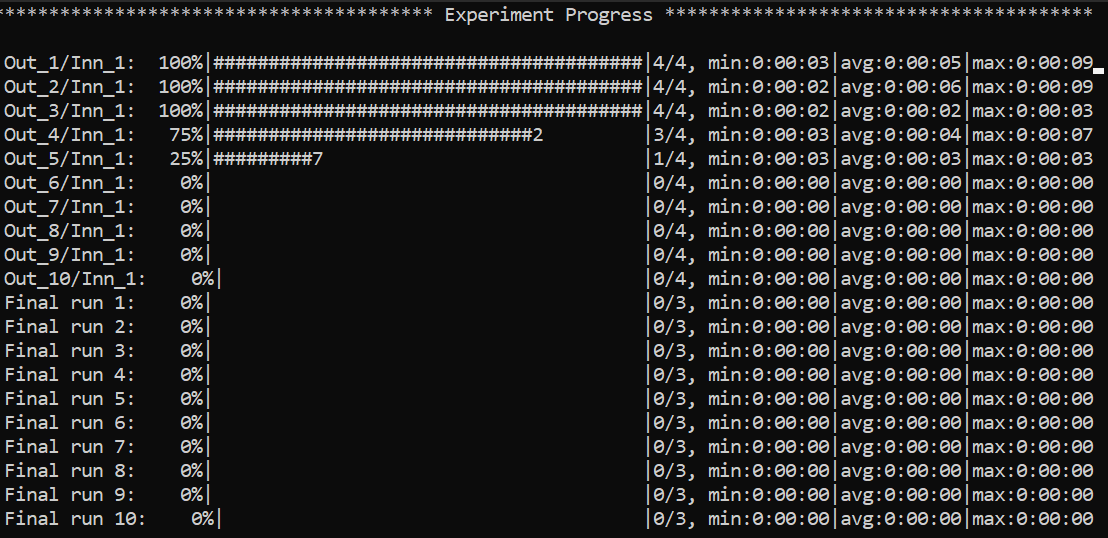
Specific views can be accessed, e.g. to visualize a specific model run:
```bash
:
```
…or, analogously, a risk assessment run:
```bash
:
```
Here is how it will look like
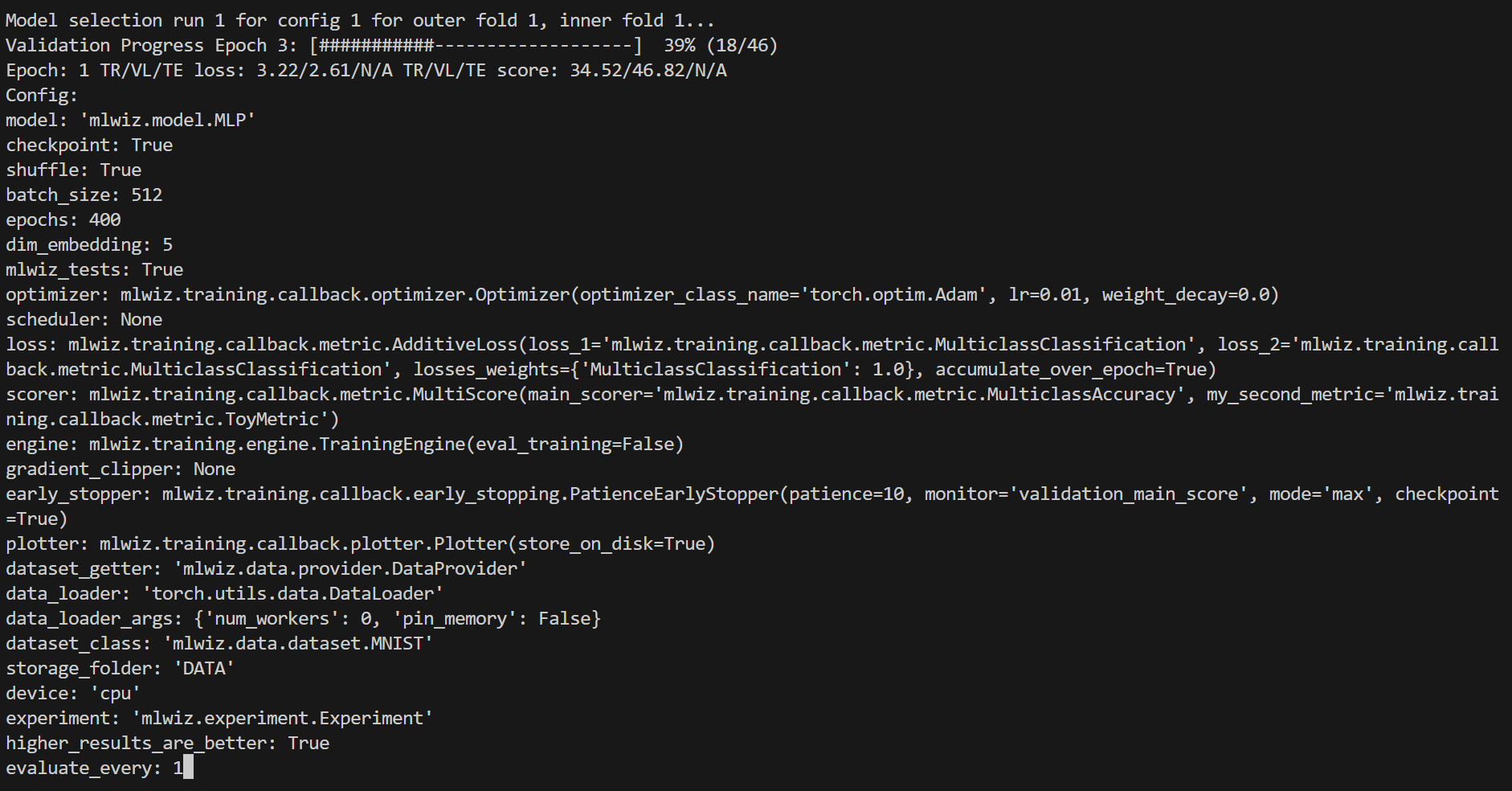
Handy commands:
```bash
: # or :g or :global (back to global view)
:r # or :refresh (refresh the screen)
```
You can use **left-right arrows** to move across configurations, and **up-down arrows** to switch between model selection and risk assessment runs.
## 🧩 Architecture (High-Level)
MLWiz is built around two YAML files and a small set of composable components:
```text
data.yml ──► mlwiz-data ──► processed dataset + .splits
exp.yml ──► mlwiz-exp ──► Ray workers
├─ inner folds: model selection (best hyperparams)
└─ outer folds: risk assessment (final scores)
```
- 🧰 **Data pipeline**: `mlwiz-data` instantiates your dataset class and writes a `.splits` file for hold-out / (nested) CV.
- 🧪 **Search space**: `grid:` and `random:` sections expand into concrete hyperparameter configurations.
- 🛰️ **Orchestration**: the evaluator schedules training runs with Ray across CPU/GPU (or a Ray cluster).
- 🏗️ **Execution**: each run builds a model + training engine from dotted paths, then logs artifacts and returns structured results.
## ⚙️ Configuration At A Glance
MLWiz expects:
- 🗂️ one YAML for **data + splits**
- 🧾 one YAML for **experiment + search space**
Minimal data config:
```yaml
splitter:
splits_folder: DATA_SPLITS/
class_name: mlwiz.data.splitter.Splitter
args:
n_outer_folds: 3
n_inner_folds: 2
seed: 42
dataset:
class_name: mlwiz.data.dataset.MNIST
args:
storage_folder: DATA/
```
Minimal experiment config (grid search):
```yaml
storage_folder: DATA
dataset_class: mlwiz.data.dataset.MNIST
data_splits_file: DATA_SPLITS/MNIST/MNIST_outer3_inner2.splits
device: cpu
max_cpus: 8
dataset_getter: mlwiz.data.provider.DataProvider
data_loader:
class_name: torch.utils.data.DataLoader
args:
num_workers : 0
pin_memory: False
result_folder: RESULTS
exp_name: mlp
experiment: mlwiz.experiment.Experiment
model_selection_criteria:
- metric: main_score
direction: max
evaluate_every: 1
risk_assessment_training_runs: 3
model_selection_training_runs: 2
grid:
model: mlwiz.model.MLP
epochs: 400
batch_size: 512
dim_embedding: 5
mlwiz_tests: True # patch: allow reshaping of MNIST dataset
optimizer:
- class_name: mlwiz.training.callback.optimizer.Optimizer
args:
optimizer_class_name: torch.optim.Adam
lr:
- 0.01
- 0.03
weight_decay: 0.
loss: mlwiz.training.callback.metric.MulticlassClassification
scorer: mlwiz.training.callback.metric.MulticlassAccuracy
engine:
class_name: mlwiz.training.engine.TrainingEngine
args:
mixed_precision: false
mixed_precision_dtype: torch.float16
```
When `mixed_precision: true` is used on CPU, requesting
`mixed_precision_dtype: torch.float16` is automatically converted to
`torch.bfloat16`.
`higher_results_are_better` remains available as a legacy shortcut for
`main_score`, but it cannot be set together with `model_selection_criteria`.
See `examples/` for complete configs (including random/Bayesian search, schedulers, early stopping, and more).
### 🧩 Custom Code Via Dotted Paths
Point YAML entries to your own classes (in your project). `mlwiz-data` and `mlwiz-exp` add the current working directory to `sys.path`, so this works out of the box:
```yaml
grid:
model: my_project.models.MyModel
dataset:
class_name: my_project.data.MyDataset
```
## 📦 Outputs
Runs are written under `RESULTS/`:
| Output | Location |
| --- | --- |
| Aggregated outer-fold results | `RESULTS/_/MODEL_ASSESSMENT/assessment_results.json` |
| Per-fold summaries | `RESULTS/_/MODEL_ASSESSMENT/OUTER_FOLD_k/outer_results.json` |
| Model selection (inner folds + winner config) | `.../MODEL_SELECTION/...` |
| Final retrains with selected hyperparams | `.../final_run*/` |
Each training run also writes TensorBoard logs under `/tensorboard/`.
## 🛠️ Utilities
### 🗂️ Config Management (CLI)
Duplicate a base experiment config across multiple datasets:
```bash
mlwiz-config-duplicator --base-exp-config base.yml --data-config-files data1.yml data2.yml
```
### 📊 Post-process Results (Python)
Filter configurations from a `MODEL_SELECTION/` folder and convert them to a DataFrame:
```python
from mlwiz.evaluation.util import retrieve_experiments, filter_experiments, create_dataframe
configs = retrieve_experiments(
"RESULTS/mlp_MNIST/MODEL_ASSESSMENT/OUTER_FOLD_1/MODEL_SELECTION/"
)
filtered = filter_experiments(configs, logic="OR", parameters={"lr": 0.001})
df = create_dataframe(
config_list=filtered,
key_mappings=[("lr", float), ("avg_validation_score", float)],
)
```
Export aggregated assessment results to LaTeX:
```python
from mlwiz.evaluation.util import create_latex_table_from_assessment_results
experiments = [
("RESULTS/mlp_MNIST", "MLP", "MNIST"),
("RESULTS/dgn_PROTEINS", "DGN", "PROTEINS"),
]
latex_table = create_latex_table_from_assessment_results(
experiments,
metric_key="main_score",
no_decimals=3,
model_as_row=True,
use_single_outer_fold=False,
)
print(latex_table)
```
Compare statistical significance between models (Welch t-test):
```python
from mlwiz.evaluation.util import statistical_significance
reference = ("RESULTS/mlp_MNIST", "MLP", "MNIST")
competitors = [
("RESULTS/baseline1_MNIST", "B1", "MNIST"),
("RESULTS/baseline2_MNIST", "B2", "MNIST"),
]
df = statistical_significance(
highlighted_exp_metadata=reference,
other_exp_metadata=competitors,
metric_key="main_score",
set_key="test",
confidence_level=0.95,
)
print(df)
```
### 🔍 Load a Trained Model (Notebook-friendly)
Load the best configuration for a fold, instantiate dataset/model, and restore a checkpoint:
```python
from mlwiz.evaluation.util import (
retrieve_best_configuration,
instantiate_dataset_from_config,
instantiate_model_from_config,
load_checkpoint,
)
config = retrieve_best_configuration(
"RESULTS/mlp_MNIST/MODEL_ASSESSMENT/OUTER_FOLD_1/MODEL_SELECTION/"
)
dataset = instantiate_dataset_from_config(config)
model = instantiate_model_from_config(config, dataset)
load_checkpoint(
"RESULTS/mlp_MNIST/MODEL_ASSESSMENT/OUTER_FOLD_1/final_run1/best_checkpoint.pth",
model,
device="cpu",
)
```
For more post-processing helpers, see the tutorial: https://mlwiz.readthedocs.io/en/stable/tutorial.html
## 🤝 Contributing
See `CONTRIBUTING.md`.
## 📄 License
BSD-3-Clause. See `LICENSE`.