https://github.com/dipjul/learnjdbc
https://github.com/dipjul/learnjdbc
Last synced: 11 months ago
JSON representation
- Host: GitHub
- URL: https://github.com/dipjul/learnjdbc
- Owner: dipjul
- Created: 2022-11-14T04:01:24.000Z (about 3 years ago)
- Default Branch: main
- Last Pushed: 2022-11-14T16:49:23.000Z (about 3 years ago)
- Last Synced: 2025-01-07T21:11:39.398Z (about 1 year ago)
- Size: 10.7 KB
- Stars: 1
- Watchers: 2
- Forks: 0
- Open Issues: 0
-
Metadata Files:
- Readme: README.md
Awesome Lists containing this project
README
# Learn Java Database Connectivity (JDBC)
## Introduction
### What is JDBC?
The Java Database Connectivity (JDBC) API provides universal data access from the Java programming language. Using the JDBC API, you can access virtually any data source, from relational databases to spreadsheets and flat files. JDBC technology also provides a common base on which tools and alternate interfaces can be built.
The JDBC API is comprised of two packages:
- java.sql
- javax.sql
You automatically get both packages when you download the Java Platform Standard Edition (Java SE) 8.
To use the JDBC API with a particular database management system, you need a JDBC technology-based driver to mediate between JDBC technology and the database. Depending on various factors, a driver might be written purely in the Java programming language or in a mixture of the Java programming language and Java Native Interface (JNI) native methods.
### JDBC Architecture

- **JDBC API** uses a driver manager and database-specific drivers to provide transparent connectivity to heterogeneous databases
- **JDBC driver** manager ensures that the correct driver is used to access each data source. The driver manager is capable of supporting multiple concurrent drivers connected to multiple heterogeneous databases
### Common JDBC Components
**DriverManager:** This class manages a list of database drivers. Matches connection requests from the java application with the proper database driver using communication subprotocol. The first driver that recognizes a certain subprotocol under JDBC will be used to establish a database Connection.
- **Driver:** This interface handles the communications with the database server. You will interact directly with Driver objects very rarely. Instead, you use DriverManager objects, which manages objects of this type. It also abstracts the details associated with working with Driver objects.
- **Connection:** This interface with all methods for contacting a database. The connection object represents communication context, i.e., all communication with database is through connection object only.
- **Statement:** You use objects created from this interface to submit the SQL statements to the database. Some derived interfaces accept parameters in addition to executing stored procedures.
- **ResultSet:** These objects hold data retrieved from a database after you execute an SQL query using Statement objects. It acts as an iterator to allow you to move through its data.
- **SQLException:** This class handles any errors that occur in a database application.
## Drivers Types
### What is JDBC Driver?
- JDBC drivers implement the defined interfaces in the JDBC API, for interacting with your database server.
- The Java.sql package that ships with JDK, contains various classes with their behaviours defined and their actual implementaions are done in third-party drivers.
### JDBC Drivers Types
Sun has divided the implementation types into four categories, Types 1, 2, 3, and 4
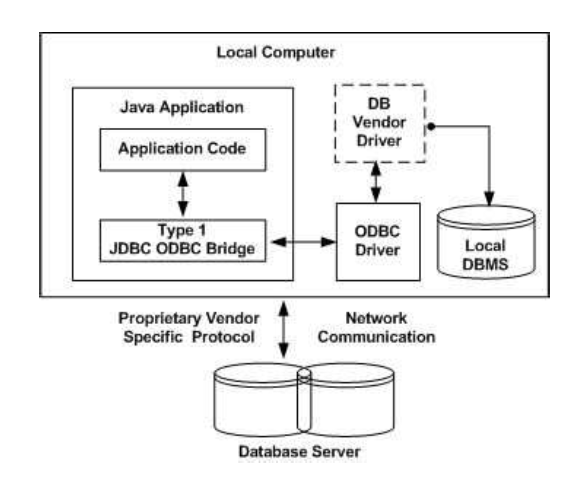
- **Type 1: JDBC-ODBC Bridge Driver**
- In a Type 1 driver, a JDBC bridge is used to access ODBC drivers installed on each client machine. Using ODBC, requires configuring on your system a Data Source Name (DSN) that represents the target database.
- When Java first came out, this was a useful driver because most databases only supported ODBC access but now this type of driver is recommended only for experimental use or when no other alternative is available
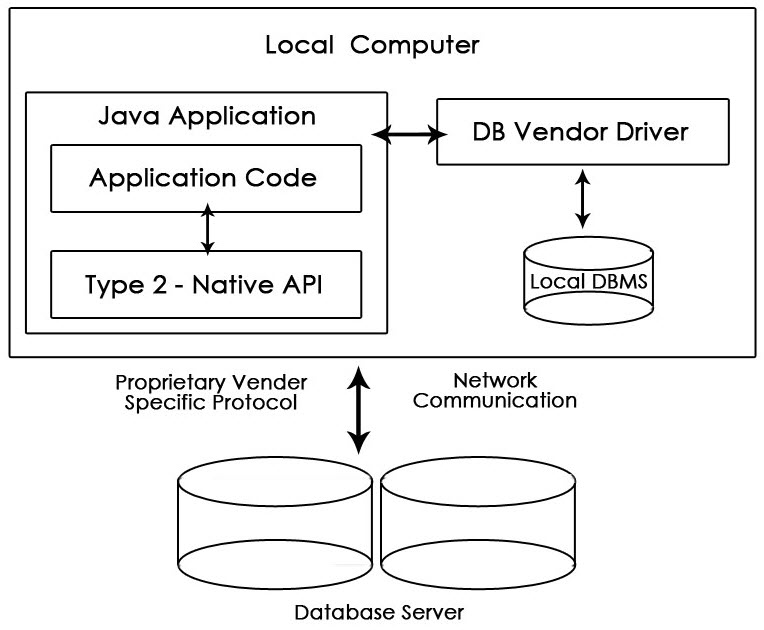
- **Type 2: JDBC-Native API**
- In a Type 2 driver, JDBC API calls are converted into native C/C++ API calls, which are unique to the database. These drivers are typically provided by the database vendors and used in the same manner as the JDBC-ODBC Bridge. The vendor-specific driver must be installed on each client machine.
- If we change the Database, we have to change the native API, as it is specific to a database and they are mostly obsolete now, but you may realize some speed increase with a Type 2 driver, because it eliminates ODBC's overhead.
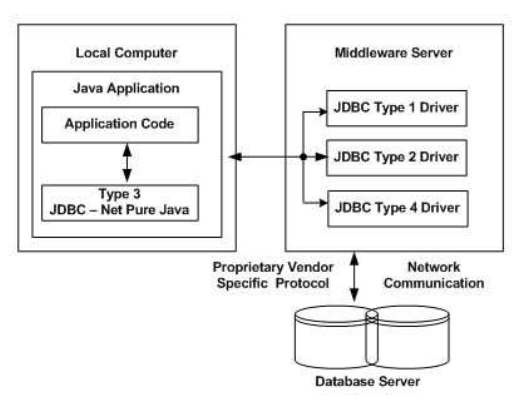
- **Type 3: JDBC-Net Pure Java**
- In a Type 3 driver, a three-tier approach is used to access databases. The JDBC clients use standard network sockets to communicate with a middleware application server. The socket information is then translated by the middleware application server into the call format required by the DBMS, and forwarded to the database server.
- This kind of driver is extremely flexible, since it requires no code installed on the client and a single driver can actually provide access to multiple databases.
- You can think of the application server as a JDBC "proxy," meaning that it makes calls for the client application. As a result, you need some knowledge of the application server's configuration in order to effectively use this driver type.
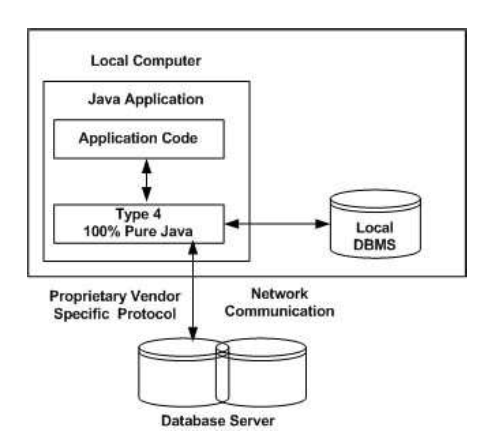
- **Type 4: 100% Pure Java**
- In a Type 4 driver, a pure Java-based driver communicates directly with the vendor's database through socket connection. This is the highest performance driver available for the database and is usually provided by the vendor itself.
## Creating JDBC Application
There are following six steps involved in building a JDBC application:
- **Import the packages**: Requires that you include the packages containing the JDBC classes needed for database programming. Most often, using `import java.sql.*` will suffice.
- **Register the JDBC driver**: Requires that you initialize a driver so you can open a communication channel with the database.
- **Open a connection**: Requires using the `DriverManager.getConnection()` method to create a Connection object, which represents a physical connection with the database.
- **Execute a query**: Requires using an object of type Statement for building and submitting an SQL statement to the database.
- **Extract data from result set**: Requires that you use the `appropriateResultSet.getXXX()` method to retrieve the data from the result set.
- **Clean up the environment**: Requires explicitly closing all database resources versus relying on the JVM's garbage collection.
### Statements
- **Statement**: Use this for general-purpose access to your database. Useful when you are using static SQL statements at runtime. The Statement interface cannot accept parameters.
- **PreparedStatement**: Use this when you plan to use the SQL statements many times. The PreparedStatement interface accepts input parameters at runtime.
- **CallableStatement**: Use this when you want to access the database stored procedures. The CallableStatement interface can also accept runtime input parameters.
## Sample Code
**Note**: *Code is not tested and is only meant for showcasing how to use the methods available in JDBC*
```java
import java.sql.*; // for standard JDBC programs
public class FirstExample {
// JDBC driver name and database URL
static final String JDBC_DRIVER = "com.mysql.jdbc.Driver";
static final String DB_URL = "jdbc:mysql://localhost/EMP";
// Database credentials
static final String USER = "username";
static final String PASS = "password";
public static void main(String[] args) {
Connection conn = null;
Statement stmt = null;
/* Statement:
* Use this for general-purpose access to your database.
* Useful when you are using static SQL statements at runtime.
* The Statement interface cannot accept parameters.
*/
PreparedStatement pstmt = null;
/* PreparedStatement:
* Use this when you plan to use the SQL statements many times.
* The PreparedStatement interface accepts input parameters at runtime.
*/
CallableStatement cstmt = null;
/*
* CallableStatement:
* Use this when you want to access the database stored procedures.
* The CallableStatement interface can also accept runtime input parameters.
*/
try {
//STEP 2: Register JDBC driver
Class.forName("com.mysql.jdbc.Driver");
// or use the below two lines
// Driver myDriver = new oracle.jdbc.driver.OracleDriver();
// DriverManager.registerDriver( myDriver );
//STEP 3: Open a connection
System.out.println("Connecting to database...");
conn = DriverManager.getConnection(DB_URL, USER, PASS);
// Other ways:
// DriverManager.getConnection(String url);
// String URL = "jdbc:oracle:thin:username/password@amrood:1521:EMP";
// conn = DriverManager.getConnection(URL);
// DriverManager.getConnection(String url, Properties info);
// String URL = "jdbc:oracle:thin:@amrood:1521:EMP";
// Properties info = new Properties( );
// info.put( "user", "username" );
// info.put( "password", "password" );
// conn = DriverManager.getConnection(URL, info);
/*Transactions */
conn.setAutoCommit(false);
// conn.commit( );
// conn.rollback( );
//STEP 4: Execute a query
/*Statement */
System.out.println("Creating statement...");
stmt = conn.createStatement();
// stmt = conn.createStatement(ResultSet.TYPE_SCROLL_INSENSITIVE, ResultSet.CONCUR_READ_ONLY);
// stmt = conn.createStatement(ResultSet.TYPE_SCROLL_INSENSITIVE, ResultSet.CONCUR_UPDATABLE);
String sql = "SELECT id, first, last, age FROM Employees";
ResultSet rs = stmt.executeQuery(sql); // Returns a ResultSet object. Use this method when you expect to get a result set.
Boolean ret = stmt.execute(sql); // Returns a boolean value of true if a ResultSet object can be retrieved; otherwise, it returns false.
int rows = stmt.executeUpdate(sql); // Returns the number of rows affected by the execution of the SQL statement
// Move cursor to the last row.
System.out.println("Moving cursor to the last...");
rs.last();
// Move cursor to the first row.
System.out.println("Moving cursor to the first row...");
rs.first();
//STEP 5: Extract data from result set
while (rs.next()) {
//Retrieve by column name
int id = rs.getInt("id");
int age = rs.getInt("age");
String first = rs.getString("first");
String last = rs.getString("last");
//Display values
System.out.print("ID: " + id);
System.out.print(", Age: " + age);
System.out.print(", First: " + first);
System.out.println(", Last: " + last);
}
/* PreparedStatement */
//STEP 4: Execute a query
System.out.println("Creating statement...");
String sqlForPstmt = "UPDATE Employees set age=? WHERE id=?";
pstmt = conn.prepareStatement(sqlForPstmt);
//Bind values into the parameters.
pstmt.setInt(1, 35); // This would set age
pstmt.setInt(2, 102); // This would set ID
// Let us update age of the record with ID = 102;
int prows = pstmt.executeUpdate();
System.out.println("Rows impacted : " + rows);
// Let us select all the records and display them.
psql = "SELECT id, first, last, age FROM Employees";
ResultSet prs = pstmt.executeQuery(sql);
//STEP 5: Extract data from result set
while (prs.next()) {
//Retrieve by column name
int id = prs.getInt("id");
int age = prs.getInt("age");
String first = prs.getString("first");
String last = prs.getString("last");
//Display values
System.out.print("ID: " + id);
System.out.print(", Age: " + age);
System.out.print(", First: " + first);
System.out.println(", Last: " + last);
}
/* Callable Statement Example */
System.out.println("Creating statement...");
String sqlForCallableStmt = "{call getEmpName (?, ?)}";
cstmt = conn.prepareCall(sqlForCallableStmt);
//Bind IN parameter first, then bind OUT parameter
int empID = 102;
cstmt.setInt(1, empID); // This would set ID as 102
// Because second parameter is OUT so register it
cstmt.registerOutParameter(2, java.sql.Types.VARCHAR);
//Use execute method to run stored procedure.
System.out.println("Executing stored procedure...");
cstmt.execute();
//Retrieve employee name with getXXX method
String empName = cstmt.getString(2);
System.out.println("Emp Name with ID:" +
empID + " is " + empName);
/* Savepont */
Savepoint savepoint1 = conn.setSavepoint("ROWS_DELETED_1");
System.out.println("Deleting row....");
// Assume we delete some stuffs here
conn.rollback(savepoint1);
conn.commit();
//STEP 6: Clean-up environment
rs.close();
prs.close();
stmt.close();
conn.close();
pstmt.close();
cstmt.close();
} catch (SQLException se) {
//Handle errors for JDBC
/* Methods available */
se.getErrorCode();
se.getMessage();
se.getSQLState();
se.getNextException();
se.printStackTrace();
// se.printStackTrace(PrintStream s);
// se.printStackTrace(PrintWriter w);
} catch (Exception e) {
// TODO: handle exception
conn.rollback();
}
}
}
```