https://github.com/dirtbagxon/ldfrontend
Daphne/Singe Frontend for Linux Laserdisc games
https://github.com/dirtbagxon/ldfrontend
daphneloader emulators frontend gtk laserdisc linux singe
Last synced: about 1 month ago
JSON representation
Daphne/Singe Frontend for Linux Laserdisc games
- Host: GitHub
- URL: https://github.com/dirtbagxon/ldfrontend
- Owner: DirtBagXon
- License: gpl-2.0
- Created: 2020-01-25T12:27:32.000Z (over 6 years ago)
- Default Branch: master
- Last Pushed: 2020-08-05T11:22:20.000Z (almost 6 years ago)
- Last Synced: 2025-09-16T17:32:26.666Z (9 months ago)
- Topics: daphneloader, emulators, frontend, gtk, laserdisc, linux, singe
- Language: C
- Homepage:
- Size: 2.6 MB
- Stars: 1
- Watchers: 1
- Forks: 1
- Open Issues: 0
-
Metadata Files:
- Readme: README.md
- License: COPYING
Awesome Lists containing this project
README
Linux DaphneLoader Clone
========================
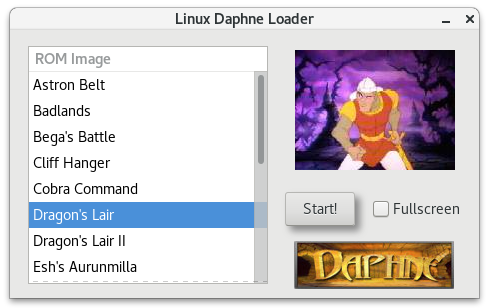
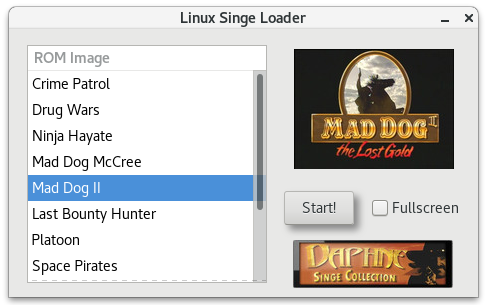
## Simple GTK based Daphne/Singe/ActionMax Frontend
These are simple frontends for loading games in the Linux based Daphne/Singe emulators via a GUI. \
Provide GTK utilities that can be easily loaded through a `.desktop` file to access multiple games:
[Desktop Entry]
Version=1.0
Encoding=UTF-8
Name=Daphne Loader
Exec=/usr/local/bin/daphneloader
Terminal=false
Icon=/usr/local/icons/daphne.png
Type=Application
Categories=Game;Player;
They provide a frontend for `Daphne`, `Singe` and `ActionMax` games.
The loaders will start games in `windowed` or `fullscreen` mode.
Layout is based around the closed source `daphneloader` utility, by Matt Ownby, but lacking \
the configuration options.
*Feature:* Starting `Thayer's Quest` in *windowed* mode will pop-up a keyboard mapping image.
The assumption is made that all games are legally owned. \
No Game data is contained within this repository.
Loaders are designed to utilise the scripts provided with these projects:
https://github.com/DirtBagXon/daphne \
https://github.com/DirtBagXon/singe
**All configuration for the games is still based within the `run.sh` script of these projects.**
## Compiled binaries
Compiled binaries for `x86_64` and Rasberry Pi `armv7l` using the default `SCRIPT_HOME`, `SCRIPT_NAME` and \
`GAME_DEFS` are within the binaries directory of this repository. They will require GTK libraries, which are \
most probably installed with linux desktop environments.
If you have issues, check for missing libraries with:
ldd daphneloader
## Configuring for your own build
Default `SCRIPT_HOME` is set as:
/usr/local/games/daphne [for run.sh]
/usr/local/games/singe [for run.sh and actionmax.sh]
At present, custom configuration must be made directly in the `.h` header file for each utility. \
Set the `SCRIPT_HOME`, `SCRIPT_NAME`, `GAME_` and `NAME_` `DEFS` for your installation preference.
i.e. in `daphne.h`
#define SCRIPT_HOME "/usr/local/games/daphne"
#define SCRIPT_NAME "run.sh"
#define GAME_LAIR "dle21"
#define GAME_LAIR2 "lair2"
....
## Compiling the Loaders on Linux
The layout was designed using `Glade` (https://glade.gnome.org).
`apt-get install glade` will fulfill build requirments and provide you the opportunity to customise the layout \
using the available `.glade` files if desired.
Otherwise, you will need a build environment with `libgtk-3-dev`, `libgdk-pixbuf2.0-dev`, `libxml2-utils`, \
`libcanberra-gtk3-module` as a miniumum.
cd daphne_loader
./compile.script
sudo cp daphneloader /usr/local/bin/
cd ..
cd singe_loader/
./compile.script
sudo cp singeloader /usr/local/bin/
cd ..
cd actionmax_launcher
./compile.script
sudo cp actionmaxlauncher /usr/local/bin/
## Purpose
These utilities were written to scratch an itch. i.e. remove the need open a terminal and run CLI commands. \
Also they provide a simplified method to easily access many games via the Desktop Applications menu.
They currently possess no game configuration ability. \
They are not currently a means to replace the **configuration ability** of the original closed source `DaphneLoader`.
Game configuration should still take place in the `run.sh` of the scripts provided in the projects above. \
Time permitting, I may try and add options within these launchers in the future, and take the initiative \
to learn more about `Glade` and `GTK`, this was my first foray...