https://github.com/distributedsystemsgroup/tensorkart
https://github.com/distributedsystemsgroup/tensorkart
Last synced: 2 months ago
JSON representation
- Host: GitHub
- URL: https://github.com/distributedsystemsgroup/tensorkart
- Owner: DistributedSystemsGroup
- License: apache-2.0
- Created: 2017-03-10T08:24:45.000Z (over 9 years ago)
- Default Branch: master
- Last Pushed: 2017-06-28T08:31:52.000Z (almost 9 years ago)
- Last Synced: 2025-03-20T18:17:34.606Z (over 1 year ago)
- Language: Jupyter Notebook
- Size: 57.2 MB
- Stars: 0
- Watchers: 4
- Forks: 1
- Open Issues: 0
-
Metadata Files:
- Readme: README.md
- License: LICENSE
Awesome Lists containing this project
README
TensorKart
==========
self-driving MarioKart with TensorFlow
Driving a new (untrained) section of the Royal Raceway:
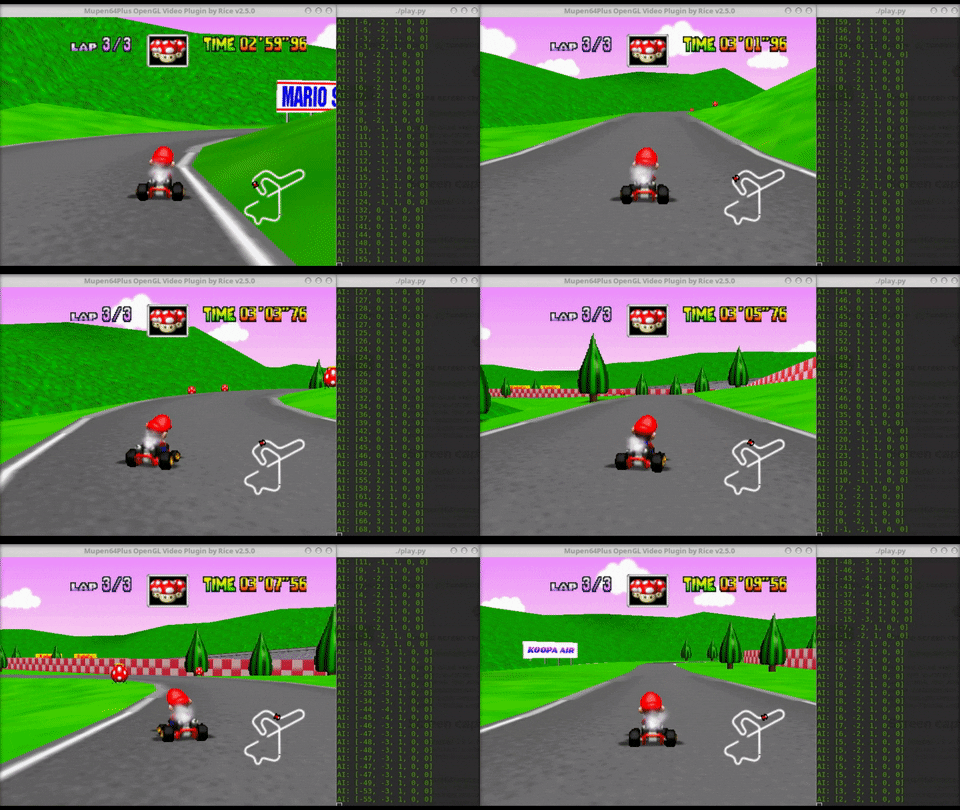
Driving Luigi Raceway:
[](https://youtu.be/vrccd3yeXnc)
The model was trained with:
* 4 races on Luigi Raceway
* 2 races on Kalimari Desert
* 2 races on Mario Raceway
With even a small training set the model is sometimes able to generalize to a new track (Royal Raceway seen above).
Dependencies
------------
* `python` and `pip` then run `pip install -r requirements.txt`
* `mupen64plus` (install via apt-get)
Recording Samples
-----------------
1. Start your emulator program (`mupen64plus`) and run Mario Kart 64
2. Make sure you have a joystick connected and that `mupen64plus` is using the sdl input plugin
3. Run `record.py`
4. Make sure the graph responds to joystick input.
5. Position the emulator window so that the image is captured by the program (top left corner)
6. Press record and play through a level. You can trim some images off the front and back of the data you collect afterwards (by removing lines in `data.csv`).

Notes
- the GUI will stop updating while recording to avoid any slow downs.
- double check the samples, sometimes the screenshot is the desktop instead. Remove the appropriate lines from the `data.csv` file
Viewing Samples
---------------
Run `python utils.py viewer samples/luigi_raceway` to view the samples
Data Pre-Processing and Augmentation
---------------
To improve the perfomances of your AI, you can remove parts of the image which represent noise for the model such as the sky with `python image_editing.py crop samples/*` and the kart with `python image_editing.py remove_mario samples/*`. In addition, you may want to augment your dataset to avoid overfitting. Use `python image_editing.py invert samples/*` to chromatically invert your dataset, `python image_editing.py flip samples/*` to create a mirrored version of a track (remember also to run `./flipper.sh` to flip the steering value of your dataset) and `python image_editing.py darken samples/*` to increase or decrease darkness of your images so as to make it more robust to different driving scenarios.
Preparing Training Data
-----------------------
Run `python utils.py prepare samples/*` with an array of sample directories to build an `X` and `y` matrix for training. (zsh will expand samples/* to all the directories. Passing a glob directly also works)
`X` is a 3-Dimensional array of images
`y` is the expected joystick ouput as an array:
```
[0] joystick x axis
[1] joystick y axis
[2] button a
[3] button b
[4] button rb
```
Preparing Test Data
-----------------------
Run `python utils.py prepare_test samples/*` with an array of sample directories to build an `X` and `y` matrix for test.
Training
--------
The `train.py` program will train a model using Google's TensorFlow framework and cuDNN for GPU acceleration. Training can take a while (~1 hour) depending on how much data you are training with and your system specs. The program will save the model to disk when it is done.
Layer Visualization
--------
Once the model is trained, it is possible to inspect and see what has been "learned". To visualize the first layer's filters, run `python layer_viz.py filters`. Run `python layer_viz.py maps` to show the feature maps, instead.
Test
--------
Before attempting a real track and letting your AI drive Mario, you can test your model and see if your predictions are close to the real steering commands and what is the total MSE on a test track. Run `python test.py` to obtain this. How good is your model? Will it be able to safely drive?
Play
----
The `play.py` program will take screenshots of your desktop expecting the emulator to be in the top left corner again. These images will be sent to the model to acquire the joystick command to send. The AI joystick commands can be overridden by holding the 'LB' button on the controller.
Note - you need to start the emulator a [custom input driver](https://github.com/kevinhughes27/mupen64plus-input-bot) in order to pass the output from the AI to the emulator:
```
mupen64plus --input ~/src/mupen64plus-input-bot/mupen64plus-input-bot.so MarioKart64.z64
```
Future Work / Ideas:
--------------------
* If your TensorFlow is configured to run on GPUs, try and train the CNN_LSTM model to obtain [state-of-the-art results](https://github.com/udacity/self-driving-car/tree/master/steering-models/community-models)!
* How confident is our AI when making predicitons? In a real-life application, it would be more appropriate to report the uncertainty level of your system. To this end, different methodologies can be explored: dividing the steering angle into "bins" and transform the problem into a classification task, or delve into more powerful [probabilistic models](https://github.com/mauriziofilippone/deep_gp_random_features).
* Could also have a shadow mode where the AI just draws out what it would do rather than sending actions. A real self driving car would have this and use it a lot before letting it take the wheel.
* Add a reinforcement layer based on lap time or other metrics so that the AI can start to teach itself now that it has a baseline.
* Deep learning is all about data; perhaps a community could form around collecting a large amount of data and pushing the performance of this AI.
Special Thanks To
-----------------
* https://github.com/SullyChen/Autopilot-TensorFlow
* https://github.com/udacity/self-driving-car/tree/master/steering-models/community-models/komanda
Contributing
------------
Open a PR! I promise I am friendly :)