https://github.com/djeada/bash-scripts
A collection of Bash scripts for automating routine tasks and streamlining your workflow.
https://github.com/djeada/bash-scripts
bash scripting shell shell-script unix
Last synced: about 1 year ago
JSON representation
A collection of Bash scripts for automating routine tasks and streamlining your workflow.
- Host: GitHub
- URL: https://github.com/djeada/bash-scripts
- Owner: djeada
- License: mit
- Created: 2019-03-19T18:56:56.000Z (over 7 years ago)
- Default Branch: master
- Last Pushed: 2025-02-22T22:20:56.000Z (over 1 year ago)
- Last Synced: 2025-04-04T13:12:21.375Z (about 1 year ago)
- Topics: bash, scripting, shell, shell-script, unix
- Language: Shell
- Homepage: https://adamdjellouli.com/articles/linux_notes
- Size: 602 KB
- Stars: 182
- Watchers: 4
- Forks: 39
- Open Issues: 4
-
Metadata Files:
- Readme: README.md
- License: LICENSE
Awesome Lists containing this project
README
[](https://github.com/djeada/Bash-scripts/stargazers)
[](https://github.com/djeada/Bash-scripts/network)
[](https://github.com/djeada/Bash-scripts/blob/master/LICENSE)
[]( )
# Bash-scripts
A collection of Bash scripts for automating routine tasks and streamlining your workflow. From simple file renaming to more complex deployments, these Bash scripts have you covered.

## About Bash
Bash (Bourne Again SHell) is an essential component of Unix-like operating systems. It's a powerful scripting language and command interpreter that has evolved from its predecessors in the Unix world. Here's an overview:
### Historical Background
The origin of scripting languages can be traced back to their initial role as enhancements to command interpreters within operating systems. These early scripting tools were designed to automate repetitive tasks, streamline workflows, and improve the efficiency of system administration.
One of the first significant developments in this area was the creation of the **Bourne Shell (sh)** in the 1970s. Developed by Stephen Bourne at AT&T’s Bell Labs, it became the standard command interpreter for Unix systems, setting the foundation for future shell environments with its powerful scripting capabilities and control structures.
Building upon the Bourne Shell’s framework, the **Bash (Bourne Again SHell)** was introduced in 1989 as part of the GNU Project. Designed as a free software replacement for the Bourne Shell, Bash incorporated numerous enhancements, including improved scripting features, better error handling, and additional programming constructs. Today, Bash is the most widely used Unix shell, favored for its versatility and robust functionality across Unix-like operating systems, including Linux and macOS.
In addition to Bash, several other Unix shells have been developed over time, each offering unique features tailored to different user preferences and system requirements. These include the **C Shell (csh)**, which introduced C-like syntax; the **TENEX C Shell (tcsh)**, an enhanced version of csh with improved interactive features; the lightweight **Dash (Debian Almquist Shell)**, optimized for speed and minimal resource usage; the **Korn Shell (ksh)**, known for its advanced scripting capabilities and compatibility with both Bourne and C shell syntax; and the highly customizable **Z Shell (zsh)**, which combines features from multiple shells and offers extensive configurability for power users.
### Purpose of Shell Scripts
- Shell scripts are invaluable for repetitive command sequences by **automating** tasks, particularly in programming and server administration, especially for file and directory operations, text processing, and network configuration.
- Bash and other scripting languages incorporate features like variables, conditional statements, loops, arrays, and functions, providing more **sophisticated** control flow.
- The true strength of shell scripting lies in its ability to **utilize** the vast array of Unix commands.
- When scripts become overly complex for Bash, transitioning to more powerful languages like **Python** is advisable.
- Bash scripts can be used to integrate or 'glue' together complex scripts written in languages such as **Python**.
### Limitations of Bash
- Bash is not well-suited for developing **complex** applications.
- It's not designed for building **GUI** applications.
- Bash scripts may not be **portable** across different operating systems without modification.
- It's less efficient for **complex** calculations compared to languages like Python.
- Bash has limitations in handling advanced **network** programming tasks.
### "Hello World" in Bash
A basic example of a Bash script is the famous "Hello World". It demonstrates how to output text to the console.
```bash
#!/usr/bin/env bash
echo "Hello world"
```
### Executing a script
To execute a Bash script, you need to make it executable and then run it from the terminal. Here's how you can do it:
```bash
chmod u+x filename.sh # Make the script executable
./filename.sh # Execute the script
```
### The Shebang
The shebang (`#!`) line at the beginning of a script is crucial for defining the script's interpreter. It's more than just a convention; it's an essential aspect of script execution in Unix-like systems. Here's an expanded view:
Example Shebang for Bash:
```bash
#!/usr/bin/env bash
```
Execution Contexts
- When a script is executed directly from a terminal, the shebang's specified **interpreter** is used. Example: `./filename.sh`
- If the script is invoked from another shell script, the parent script's **interpreter** is used, and the shebang in the child script is ignored.
- When a script is executed with an explicit interpreter command (like `bash ./filename.sh`), the shebang line is **bypassed**.
Shebang in Other Languages
- The shebang is not limited to Bash scripts, as it is used in various scripting languages to specify their respective **interpreters**.
- An example of a shebang for Perl is `#!/usr/bin/env perl`.
- An example of a shebang for Python is `#!/usr/bin/env python3`.
### Variables
Variables in Bash are not just simple placeholders for values; they can be used in more complex ways:
- To assign a value to a **variable**, you use `var="Test"`.
- To retrieve the value stored in a variable, you use `$var` or `${var}`.
- Bash supports explicitly defining variable types such as integers and **arrays**.
```bash
declare -i var # 'var' is an integer
declare -a arr # 'arr' is an array
declare -r var2=5 # 'var2' is a read-only variable
```
- Bash allows storing the output of a command in a **variable** using command substitution, like `var=$(whoami)`.
- Environment variables are global and can be accessed by any process running in the shell **session**, such as `PATH`, `HOME`, and `USER`.
- To make a variable available to child processes, it needs to be **exported** using `export var`.
- Variables in functions can be made local to avoid affecting the global **scope**.
```bash
function myFunc() {
local localVar="value"
}
```
### Command Line Arguments in Bash
Command line arguments in Bash scripts are accessed using special variables:
- `$1` represents the first **argument** passed to the script.
- `$@` is an array-like construct that holds all command line **arguments**.
- `$#` gives the number of command line arguments **passed**.
- `$?` contains the exit status of the last executed **command**.
### If Statements in Bash
If statements in Bash are crucial for decision-making processes based on conditions.
Basic Syntax:
```bash
if [ condition ]; then
# commands
fi
```
- **Integer Comparisons**: Use specific operators for comparing integer values.
```bash
if [ $i -eq 10 ]; then echo True; fi # Integer comparison
```
- **String Comparisons**: Strings are compared differently from integers.
```bash
if [ "$name" == "10" ]; then echo True; fi # String comparison
```
Operators for Integer Comparison
| Operator | Description |
| --- | --- |
| `-eq` | equal |
| `-ne` | not equal |
| `-gt` | greater than |
| `-ge` | greater than or equal to |
| `-lt` | less than |
| `-le` | less than or equal to |
Operators for String Comparison
| Operator | Description |
| --- | --- |
| `==` | equal |
| `!=` | not equal |
| `>` | greater than |
| `<` | less than |
| `-n` | string is not null |
| `-z` | string is null |
Single vs Double Square Brackets:
- Single brackets `[ ]` are compatible with POSIX shell and suitable for basic **tests**.
- Double brackets `[[ ]]` are used in Bash and other shells like Zsh and Ksh to offer enhanced test **constructs**.
- They support logical operators like `||` and regex matching with `=~`.
- They do not perform word splitting or filename **expansion**.
Filename Expansion Example:
- No Globbing with Double Brackets:
```bash
if [[ -f *.csv ]]; then echo True; fi # Checks for a file named "*.csv"
```
- Globbing with Single Brackets:
```bash
if [ -f *.csv ]; then echo True; fi # Performs filename expansion
```
### Loops
Loops are used in Bash to execute a series of commands multiple times. There are several types of loops, each serving different purposes.
#### For Loop
The `for` loop is used to iterate over a list of items or a range of values.
Syntax:
```bash
for var in list; do
# commands
done
```
Example with a List:
```bash
for i in 1 2 3; do
echo $i
done
```
Example with a Range:
```bash
for i in {1..3}; do
echo $i
done
```
Example with Command Output:
```bash
for file in $(ls); do
echo $file
done
```
#### While Loop
The while loop executes as long as a specified condition is true.
Syntax:
```bash
while [ condition ]; do
# commands
done
```
Example:
```bash
i=1
while [ $i -le 3 ]; do
echo $i
((i++))
done
```
#### Until Loop
The until loop is similar to the while loop but runs until a condition becomes true.
Syntax:
```bash
until [ condition ]; do
# commands
done
```
Example:
```bash
i=1
until [ $i -gt 3 ]; do
echo $i
((i++))
done
```
#### Loop Control: Break and Continue
- **break**: Exits the loop.
```bash
for i in 1 2 3 4 5; do
if [ $i -eq 3 ]; then
break
fi
echo $i
done
```
- **continue**: Skips the rest of the loop iteration and continues with the next one.
```bash
for i in 1 2 3 4 5; do
if [ $i -eq 3 ]; then
continue
fi
echo $i
done
```
#### C-Style For Loop
Bash also supports a C-style syntax for for loops, which provides more control over the iteration process.
Syntax:
```bash
for (( initialisation; condition; increment )); do
# commands
done
```
Example:
```bash
for (( i=1; i<=3; i++ )); do
echo $i
done
```
### Arrays
An array is a variable that holds an ordered list of values. The values are separated by spaces. The following example creates an array named `array` and assigns the values 1, 2, 3, 4, 5 to it:
```bash
array=(1 2 3 4 5)
```
It is possible to create an array with specified element indices:
```bash
array=([3]='elem_a' [4]='elem_b')
```
To insert an elementat (e.g. 'abc') at a given index (e.g. 2) in the array, use the following syntax:
```bash
array=("${array[@]:0:2}" 'new' "${array[@]:2}")
```
To iterate over the elements of an array, use the following syntax:
```bash
items=('item_1' 'item_2' 'item_3' 'item_4')
for item in "${items[@]}"; do
echo "$item"
done
# => item_1
# => item_2
# => item_3
# => item_4
```
It is often useful to print the elements of an array on a single line. The following code will print the elements of the array on a single line:
```bash
echo "${array[*]}"
```
### Functions
Functions are used to group a sequence of commands into a single unit. They are used to perform repetitive tasks. Functions can be called from anywhere in the script. The following example creates a function named `hello_world` that prints the string `Hello World` to the standard output (stdout):
```bash
hello_world()
{
echo "Hello World!"
}
```
To call the function, use the following syntax:
```bash
hello_world
```
The above function does not take any arguments and does not explicitly return a value. It is possible to pass any number of arguments to the function. It is also possible to return a value from the function, but only an integer from range [0,255] is allowed.
Here is a complete example of a script that defines and uses a function to sum two numbers:
```bash
#!/usr/bin/env bash
sum_two()
{
return $(($1 + $2))
}
sum_two 5 3
echo $?
```
### Pipes
The pipe is used to pass the output of one command as input to the next:
```bash
ps -x | grep chromium
```
### Redirections
But what if you'd want to save the results to a file? Bash has a redirect operator > that may be used to control where the output is delivered.
```bash
some_command > out.log # Redirect stdout to out.log
some_command 2> err.log # Redirect stderr to file err.log
some_command 2>&1 # Redirect stderr to stdout
some_command 1>/dev/null 2>&1 # Silence both stdout and stderr
```
Complete summary:
| Syntax | StdOut visibility | StdErr visibility | StdOut in file | StdErr in file | existing file |
| -------- | ----------------- | ----------------- | -------------- | -------------- | ------------- |
| `>` | no | yes | yes | no | overwrite |
| `>>` | no | yes | yes | no | append |
| `2>` | yes | no | no | yes | overwrite |
| `2>>` | yes | no | no | yes | append |
| `&>` | no | no | yes | yes | overwrite |
| `&>>` | no | no | yes | yes | append |
| `tee` | yes | yes | yes | no | overwrite |
| `tee -a` | yes | yes | yes | no | append |
| `n.e. (*)` | yes | yes | no | yes | overwrite |
| `n.e. (*)` | yes | yes | no | yes | append |
| `\|& tee` | yes | yes | yes | yes | overwrite |
| `\|& tee -a` | yes | yes | yes | yes | append |
### Formatting and linting
It is important to keep the formatting of your script as consistent as possible. Beautysh is an amazing tool that helps you to format your script. To use it, just run the following command in a directory where your scripts are located:
```bash
beautysh **/*.sh
```
Additionally we advise to use shellcheck for code inspection.
```bash
shellcheck **/*.sh
```
## Available scripts
### Intro
| # | Description | Code |
|---|---------------------------------------------------------------------|------------------------------------------------------------------------------------------|
| 1 | Prints "Hello, world!" to the console. | [hello_world.sh](https://github.com/djeada/Bash-scripts/blob/master/src/hello_world.sh) |
| 2 | Demonstrates the use of if statements to check conditions. | [conditionals.sh](https://github.com/djeada/Bash-scripts/blob/master/src/conditionals.sh) |
| 3 | Shows the use of a while loop to repeatedly execute code. | [while_loop.sh](https://github.com/djeada/Bash-scripts/blob/master/src/while_loop.sh) |
| 4 | Demonstrates the use of a for loop to iterate over elements. | [for_loop.sh](https://github.com/djeada/Bash-scripts/blob/master/src/for_loop.sh) |
| 5 | Displays the digits of a given number, one digit per line. | [digits.sh](https://github.com/djeada/Bash-Scripts/blob/master/src/digits.sh) |
| 6 | Prints all of the numbers within a specified range, one number per line. | [numbers_in_interval.sh](https://github.com/djeada/Bash-Scripts/blob/master/src/numbers_in_interval.sh) |
| 7 | Prints a Christmas tree pattern to the console. | [christmas_tree.sh](https://github.com/djeada/Bash-Scripts/blob/master/src/christmas_tree.sh) |
| 8 | Prompts the user for a response to a given question and stores their response in a variable. | [prompt_for_answer.sh](https://github.com/djeada/Bash-Scripts/blob/master/src/prompt_for_answer.sh) |
### Math
| # | Description | Code |
|---|------------------------------------------------------------------------------------------------------------------|---------------------------------------------------------------------------------------------------|
| 1 | Performs basic arithmetic operations (addition, subtraction, multiplication, and division) on two numbers. | [arithmetic_operations.sh](https://github.com/djeada/Bash-scripts/blob/master/src/arithmetic_operations.sh) |
| 2 | Calculates the sum of all the arguments passed to it, treating them as numbers. | [sum_args.sh](https://github.com/djeada/Bash-scripts/blob/master/src/sum_args.sh) |
| 3 | Converts a number from the decimal (base 10) system to its equivalent in the binary (base 2) system. | [decimal_binary.sh](https://github.com/djeada/Bash-scripts/blob/master/src/decimal_binary.sh) |
| 4 | Calculates the factorial of a given integer. | [factorial.sh](https://github.com/djeada/Bash-scripts/blob/master/src/factorial.sh) |
| 5 | Determines whether a given number is a prime number or not. | [is_prime.sh](https://github.com/djeada/Bash-scripts/blob/master/src/is_prime.sh) |
| 6 | Calculates the square root of a given number. | [sqrt.sh](https://github.com/djeada/Bash-scripts/blob/master/src/sqrt.sh) |
### Strings
| # | Description | Code |
|---|---------------------------------------------------------------------------------------------------------------------------------|--------------------------------------------------------------------------------------------------|
| 1 | Counts the number of times a specific character appears in a given string. | [count_char.sh](https://github.com/djeada/Bash-Scripts/blob/master/src/count_char.sh) |
| 2 | Converts all uppercase letters in a given string to lowercase. | [lower.sh](https://github.com/djeada/Bash-Scripts/blob/master/src/lower.sh) |
| 3 | Converts all lowercase letters in a given string to uppercase. | [upper.sh](https://github.com/djeada/Bash-Scripts/blob/master/src/upper.sh) |
| 4 | Checks if a given string is a palindrome, i.e., a word that is spelled the same way forwards and backwards. | [is_palindrome.sh](https://github.com/djeada/Bash-Scripts/blob/master/src/is_palindrome.sh) |
| 5 | Checks if two given strings are anagrams, i.e., if they are made up of the same letters rearranged in a different order. | [are_anagrams.sh](https://github.com/djeada/Bash-Scripts/blob/master/src/are_anagrams.sh) |
| 6 | Calculates the Hamming Distance between two strings, i.e., the number of positions at which the corresponding characters are different. | [hamming_distance.sh](https://github.com/djeada/Bash-Scripts/blob/master/src/hamming_distance.sh) |
| 7 | Sorts a given string alphabetically, considering all letters to be lowercase. | [sort_string.sh](https://github.com/djeada/Bash-Scripts/blob/master/src/sort_string.sh) |
| 8 | Creates a word histogram. | [word_histogram.sh](https://github.com/djeada/Bash-Scripts/blob/master/src/word_histogram.sh) |
### Arrays
| # | Description | Code |
|---|--------------------------------------------------------------------------------------------------------------|----------------------------------------------------------------------------------------------------------|
| 1 | Calculates the arithmetic mean of a given list of numbers. | [arith_mean.sh](https://github.com/djeada/Bash-Scripts/blob/master/src/arith_mean.sh) |
| 2 | Finds the maximum value in a given array of numbers. | [max_array.sh](https://github.com/djeada/Bash-Scripts/blob/master/src/max_array.sh) |
| 3 | Finds the minimum value in a given array of numbers. | [min_array.sh](https://github.com/djeada/Bash-Scripts/blob/master/src/min_array.sh) |
| 4 | Removes duplicates from a given array of numbers. | [remove_duplicates_in_array.sh](https://github.com/djeada/Bash-Scripts/blob/master/src/remove_duplicates_in_array.sh) |
### Files
| # | Description | Code |
|----|------------------------------------------------------------------------------------------------|----------------------------------------------------------------------------------------------------------------|
| 1 | Counts the number of files in a specified directory. | [count_files.sh](https://github.com/djeada/Bash-scripts/blob/master/src/count_files.sh) |
| 2 | Creates a new directory with a specified name. | [make_dir.sh](https://github.com/djeada/Bash-scripts/blob/master/src/make_dir.sh) |
| 3 | Counts the number of lines in a specified text file. | [line_counter.sh](https://github.com/djeada/Bash-scripts/blob/master/src/line_counter.sh) |
| 4 | Gets the middle line from a specified text file. | [middle_line.sh](https://github.com/djeada/Bash-scripts/blob/master/src/middle_line.sh) |
| 5 | Removes duplicate lines from a specified file. | [remove_duplicate_lines.sh](https://github.com/djeada/Bash-Scripts/blob/master/src/remove_duplicate_lines.sh) |
| 6 | Replaces all forward slashes with backward slashes and vice versa in a specified file. | [switch_slashes.sh](https://github.com/djeada/Bash-Scripts/blob/master/src/switch_slashes.sh) |
| 7 | Adds specified text to the beginning of a specified file. | [prepend_text_to_file.sh](https://github.com/djeada/Bash-Scripts/blob/master/src/prepend_text_to_file.sh) |
| 8 | Removes all lines in a specified file that contain only whitespaces. | [remove_empty_lines.sh](https://github.com/djeada/Bash-Scripts/blob/master/src/remove_empty_lines.sh) |
| 9 | Renames all files in a specified directory with a particular extension to a new extension. | [rename_extension.sh](https://github.com/djeada/Bash-Scripts/blob/master/src/rename_extension.sh) |
| 10 | Strips digits from every string found in a given file. | [strip_digits.sh](https://github.com/djeada/Bash-Scripts/blob/master/src/strip_digits.sh) |
| 11 | Lists the most recently modified files in a given directory. | [recently_modified_files.sh](https://github.com/djeada/Bash-Scripts/blob/master/src/recently_modified_files.sh) |
### System administration
| # | Description | Code |
|----|---------------------------------------------------------------------------------------------------------------------------------------|------------------------------------------------------------------------------------------------------------------|
| 1 | Retrieves basic system information, such as hostname and kernel version. | [system_info.sh](https://github.com/djeada/Bash-scripts/blob/master/src/system_info.sh) |
| 2 | Determines the type and version of the operating system running on the machine. | [check_os.sh](https://github.com/djeada/Bash-scripts/blob/master/src/check_os.sh) |
| 3 | Checks whether the current user has root privileges. | [check_if_root.sh](https://github.com/djeada/Bash-Scripts/blob/master/src/check_if_root.sh) |
| 4 | Checks if the apt command, used for package management on Debian-based systems, is available on the machine. | [check_apt_avail.sh](https://github.com/djeada/Bash-Scripts/blob/master/src/check_apt_avail.sh) |
| 5 | Retrieves the size of the machine's random access memory (RAM). | [ram_memory.sh](https://github.com/djeada/Bash-Scripts/blob/master/src/ram_memory.sh) |
| 6 | Gets the current temperature of the machine's central processing unit (CPU). | [cpu_temp.sh](https://github.com/djeada/Bash-scripts/blob/master/src/cpu_temp.sh) |
| 7 | Retrieves the current overall CPU usage of the machine. | [cpu_usage.sh](https://github.com/djeada/Bash-Scripts/blob/master/src/cpu_usage.sh) |
| 8 | Blocks certain websites from being visited on the local machine by modifying the hosts file. | [web_block.sh](https://github.com/djeada/Bash-Scripts/blob/master/src/web_block.sh) |
| 9 | Creates a backup of the system's files, compresses the backup, and encrypts the resulting archive for storage. | [backup.sh](https://github.com/djeada/Bash-scripts/blob/master/src/backup.sh) |
| 10 | Displays processes that are not being waited on by any parent process. Orphan processes are created when the parent process terminates. | [orphans.sh](https://github.com/djeada/Bash-scripts/blob/master/src/orphans.sh) |
| 11 | Displays processes that are in an undead state, also known as a "zombie" state. Zombie processes have completed execution but remain in the process table. | [zombies.sh](https://github.com/djeada/Bash-scripts/blob/master/src/zombies.sh) |
### Programming workflow
| # | Description | Code |
|---|----------------------------------------------------------------------------------------------------------------------------------------------------------------------------------------------------------------------------|--------------------------------------------------------------------------------------------------------------|
| 1 | Removes the carriage return character (`\r`) from the given files, which may be present in files transferred between systems with different line ending conventions. | [remove_carriage_return.sh](https://github.com/djeada/Bash-scripts/blob/master/src/remove_carriage_return.sh) |
| 2 | Replaces all characters with diacritical marks in the given files with their non-diacritical counterparts. Diacritical marks are small signs added above or below letters to indicate different pronunciations or tones in some languages. | [remove_diacritics.sh](https://github.com/djeada/Bash-scripts/blob/master/src/remove_diacritics.sh) |
| 3 | Changes all spaces in file names to underscores and converts them to lowercase. This can be useful for making the file names more compatible with systems that do not support spaces in file names or for making the file names easier to read or type. | [correct_file_names.sh](https://github.com/djeada/Bash-scripts/blob/master/src/correct_file_names.sh) |
| 4 | Removes any trailing whitespace characters (spaces or tabs) from the end of every file in a given directory. Trailing whitespace can cause formatting issues or interfere with certain tools and processes. | [remove_trailing_whitespaces.sh](https://github.com/djeada/Bash-Scripts/blob/master/src/remove_trailing_whitespaces.sh) |
| 5 | Formats and beautifies every shell script found in the current repository. This can make the scripts easier to read and maintain by adding consistent indentation and whitespace. | [beautify_script.sh](https://github.com/djeada/Bash-Scripts/blob/master/src/beautify_script.sh) |
| 6 | Finds functions and classes in a Python project that are not being used or called anywhere in the code. This can help identify and remove unnecessary code, which can improve the project's performance and maintainability. | [dead_code.sh](https://github.com/djeada/Bash-Scripts/blob/master/src/dead_code.sh) |
### Git
| # | Description | Code |
|---|------------------------------------------------------------------------------------------------------------------------------------------------------------------------------------------------------------------------------------------------------------------------------------------------------------|-----------------------------------------------------------------------------------------------------------------------------|
| 1 | Resets the local repository to match the state of the remote repository, discarding any local commits and changes. This can be useful for starting over or synchronizing with the latest version on the remote repository. | [reset_to_origin.sh](https://github.com/djeada/Bash-scripts/blob/master/src/reset_to_origin.sh) |
| 2 | Deletes the specified branch both locally and on the remote repository. This can be useful for removing branches that are no longer needed or for consolidating multiple branches into a single branch. | [remove_branch.sh](https://github.com/djeada/Bash-scripts/blob/master/src/remove_branch.sh) |
| 3 | Counts the total number of lines of code in a git repository, including lines in all branches and commits. This can be useful for tracking the size and complexity of a project over time. | [count_lines_of_code.sh](https://github.com/djeada/Bash-scripts/blob/master/src/count_lines_of_code.sh) |
| 4 | Combines multiple commits into a single commit. This can be useful for simplifying a commit history or for cleaning up a series of small, incremental commits that were made in error. | [squash_n_last_commits.sh](https://github.com/djeada/Bash-Scripts/blob/master/src/squash_n_last_commits.sh) |
| 5 | Removes the `n` last commits from the repository. This can be useful for undoing mistakes or for removing sensitive information that was accidentally committed. | [remove_n_last_commits.sh](https://github.com/djeada/Bash-Scripts/blob/master/src/remove_n_last_commits.sh) |
| 6 | Changes the date of the last commit in the repository. This can be useful for altering the commit history for cosmetic purposes. | [change_commit_date.sh](https://github.com/djeada/Bash-Scripts/blob/master/src/change_commit_date.sh) |
| 7 | Downloads all of the public repositories belonging to a specified user on GitHub. This can be useful for backing up repositories. | [download_all_github_repos.sh](https://github.com/djeada/Bash-Scripts/blob/master/src/download_all_github_repos.sh) |
| 8 | Squashes all commits on a specified Git branch into a single commit. | [squash_branch.sh](https://github.com/djeada/Bash-Scripts/blob/master/src/squash_branch.sh) |
| 9 | Counts the total lines changed by a specific author in a Git repository. | [contributions_by_git_author.sh](https://github.com/djeada/Bash-Scripts/blob/master/src/contributions_by_git_author.sh) |
### Utility
| # | Description | Code |
|---|-------------|------|
| 1 | Finds the public IP address of the device running the script. | [ip_info.sh](https://github.com/djeada/Bash-scripts/blob/master/src/ip_info.sh) |
| 2 | Deletes all files in the trash bin. | [empty_trash.sh](https://github.com/djeada/Bash-scripts/blob/master/src/empty_trash.sh) |
| 3 | Extracts files with a specified extension from a given directory. | [extract.sh](https://github.com/djeada/Bash-Scripts/blob/master/src/extract.sh) |
| 4 | Determines which programs are currently using a specified port number on the local system. | [program_on_port.sh](https://github.com/djeada/Bash-Scripts/blob/master/src/program_on_port.sh) |
| 5 | Converts month names to numbers and vice versa in a string. For example, "January" to "1" and "1" to "January". | [month_to_number.sh](https://github.com/djeada/Bash-Scripts/blob/master/src/month_to_number.sh) |
| 6 | Creates command aliases for all the scripts in a specified directory, allowing them to be run by simply typing their names. | [alias_all_the_scripts.sh](https://github.com/djeada/Bash-scripts/blob/master/src/alias_all_the_scripts.sh) |
| 7 | Generates a random integer within a given range. The range can be specified as arguments to the script. | [rand_int.sh](https://github.com/djeada/Bash-Scripts/blob/master/src/rand_int.sh) |
| 8 | Generates a random password of the specified length, using a combination of letters, numbers, and special characters. | [random_password.sh](https://github.com/djeada/Bash-Scripts/blob/master/src/random_password.sh) |
| 9 | Measures the time it takes to run a program with the specified input parameters. Output the elapsed time in seconds. | [time_execution.sh](https://github.com/djeada/Bash-scripts/blob/master/src/time_execution.sh) |
| 10 | Downloads the audio from a YouTube video or playlist in MP3 format. Specify the video or playlist URL and the destination directory for the downloaded files. | [youtube_to_mp3.sh](https://github.com/djeada/Bash-scripts/blob/master/src/youtube_to_mp3.sh) |
| 11 | Clears the local caches in the user's cache directory (e.g. `~/.cache`) that are older than a specified number of days. | [clear_cache.sh](https://github.com/djeada/Bash-scripts/blob/master/src/clear_cache.sh) |
| 12 | Resizes all JPG files in the current directory to a specified dimension (A4). | [resize_to_a4](https://github.com/djeada/Bash-Scripts/edit/master/src/resize_to_a4.sh) |
## References
### Official Documentation
- [GNU Bash Manual](https://www.gnu.org/software/bash/manual/bash.html): The official documentation for GNU Bash, detailing built-in commands, syntax, and features.
- [Linux Documentation Project](https://www.tldp.org/): Comprehensive collection of HOWTOs, guides, and FAQs for Linux users and administrators.
### Guides and Tutorials
- [Bash Guide by Greg's Wiki](http://mywiki.wooledge.org/BashGuide): An excellent resource for learning Bash scripting, written in an approachable and detailed manner.
- [Advanced Bash-Scripting Guide](https://tldp.org/LDP/abs/html/): A thorough guide for mastering advanced Bash scripting techniques and best practices.
- [Bash Hackers Wiki](https://wiki.bash-hackers.org/): In-depth explanations and tips for Bash scripting, focusing on practical usage and pitfalls.
### Learning Platforms
- [Codecademy's Learn the Command Line](https://www.codecademy.com/learn/learn-the-command-line): An interactive platform for beginners to learn basic command line skills.
- [edX's Linux Foundation Courses](https://www.edx.org/school/linuxfoundationx): Online courses covering various aspects of Linux, including command line proficiency and system administration.
### Community and Support
- [Unix & Linux Stack Exchange](https://unix.stackexchange.com/): A Q&A site for users of Linux, FreeBSD, and other Un*x-like operating systems.
- [Reddit's r/bash](https://www.reddit.com/r/bash/): A subreddit dedicated to discussions and questions about Bash scripting and shell programming.
### Tools and Utilities
- [ShellCheck](https://www.shellcheck.net/): An online tool that helps you find and fix bugs in your shell scripts.
- [Explainshell](https://explainshell.com/): A web application that breaks down complex command lines into simple explanations.
- [Oh My Zsh](https://ohmyz.sh/): A framework for managing your Zsh configuration, making it easier to customize your shell.
### Books
- "Learning the bash Shell" by Cameron Newham: A comprehensive guide to Bash programming, suitable for beginners and experienced users alike.
- "Linux Command Line and Shell Scripting Bible" by Richard Blum and Christine Bresnahan: A detailed book covering Linux command line and shell scripting from the basics to advanced topics.
- "Bash Cookbook" by Carl Albing, JP Vossen, and Cameron Newham: A collection of useful Bash scripting recipes for various tasks and problems.
### Blogs and Articles
- [Linux Journal's Bash Articles](https://www.linuxjournal.com/tag/bash): A series of articles covering various Bash scripting topics and tips.
- [DigitalOcean's Bash Tutorials](https://www.digitalocean.com/community/tutorial_series/understanding-bash): Tutorials and guides to help you understand and use Bash effectively.
- [Bash-One-Liners Explained](https://www.bashoneliners.com/): A collection of Bash one-liners, with explanations on how they work and when to use them.
## How to Contribute
We encourage contributions that enhance the repository's value. To contribute:
1. Fork the repository.
2. Create your feature branch (`git checkout -b feature/AmazingFeature`).
3. Commit your changes (`git commit -m 'Add some AmazingFeature'`).
4. Push to the branch (`git push origin feature/AmazingFeature`).
5. Open a Pull Request.
## License
This project is licensed under the [MIT License](LICENSE) - see the LICENSE file for details.
## Star History
[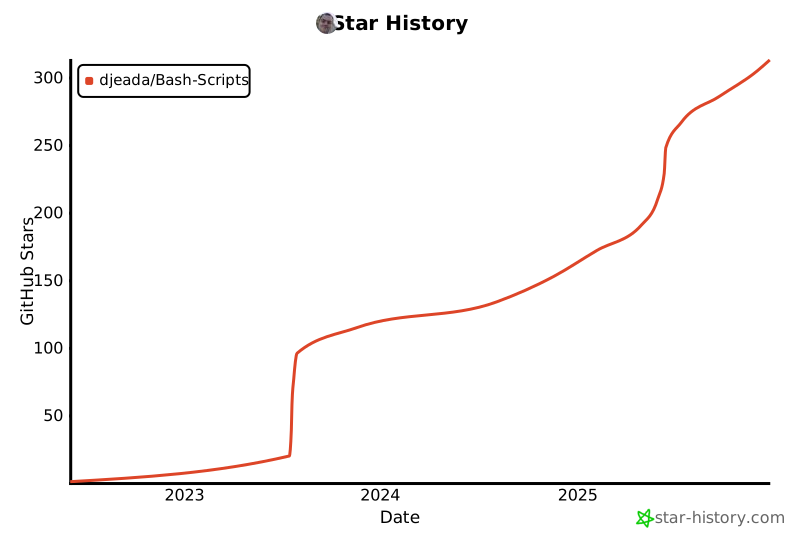](https://star-history.com/#djeada/Bash-Scripts&Date)