https://github.com/djeada/django-minimal
This is a simple to-do list application created using Django. It allows users to create and manage their tasks, as well as view and update the status of existing tasks.
https://github.com/djeada/django-minimal
Last synced: about 1 year ago
JSON representation
This is a simple to-do list application created using Django. It allows users to create and manage their tasks, as well as view and update the status of existing tasks.
- Host: GitHub
- URL: https://github.com/djeada/django-minimal
- Owner: djeada
- License: mit
- Created: 2022-01-11T16:27:44.000Z (over 4 years ago)
- Default Branch: main
- Last Pushed: 2024-12-06T22:37:22.000Z (over 1 year ago)
- Last Synced: 2025-03-30T10:11:38.130Z (about 1 year ago)
- Language: Python
- Homepage:
- Size: 80.1 KB
- Stars: 0
- Watchers: 2
- Forks: 0
- Open Issues: 0
-
Metadata Files:
- Readme: README.md
- License: LICENSE
Awesome Lists containing this project
README
# Django-minimal
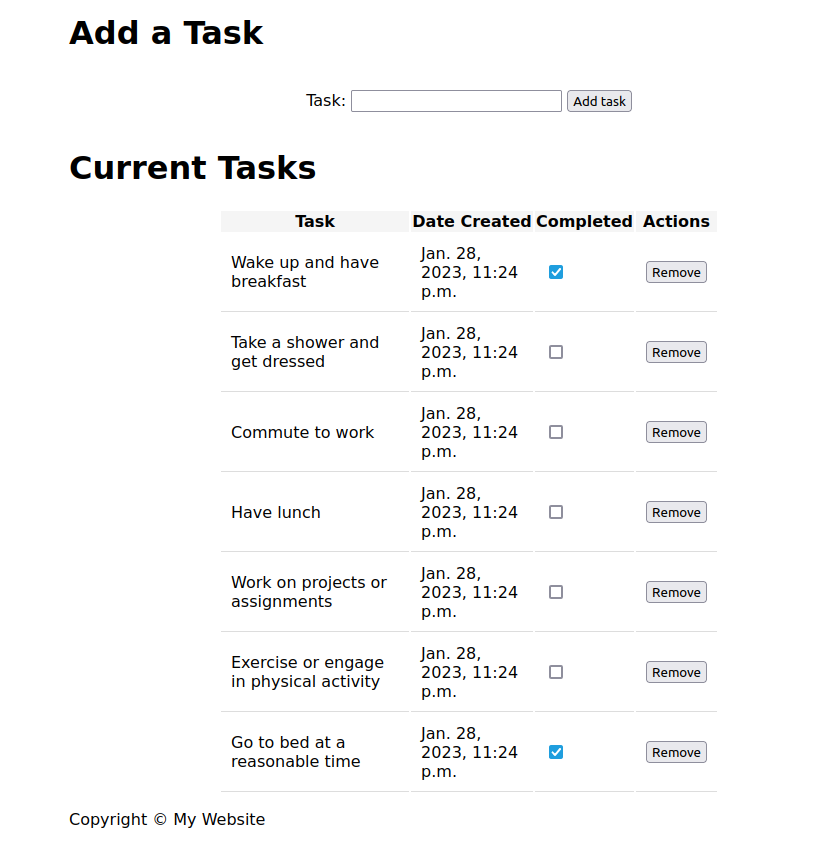
This is a simple to-do list application created using Django. It allows users to create, view, update, and delete tasks. The application includes a form for creating new tasks, a page to view all tasks, and functionality to update and delete tasks.
## Getting Started
To run this application locally, you will need to have Python and Django installed on your machine.
1. Clone the repository to your local machine
2. Navigate to the root directory of the project
3. Run the command "python manage.py runserver" to start the development server
4. Open your web browser and navigate to "http://127.0.0.1:8000/todo/" to view the application
Alternatively, you can also use the command "python manage.py migrate --run-syncdb" to set up the database.
## Tests
To run the tests for this application, run the command "python manage.py test" from the root directory of the project.
## Functionality
- Create new tasks by filling in the form on the homepage
- View all tasks on the todo list page
- Update the status of a task by clicking on the task
- Delete a task by clicking on remove button
## Step by step guide for creating a To-do app using Django
If you're interested in creating a similar application, you can follow these steps:
1. Start by creating a new Django project using the command "django-admin startproject projectname"
2. Create a new app within the project using the command "python manage.py startapp appname"
3. Create a new model for the app in the models.py file. This model will represent the data for the to-do items, such as the task name and completion status.
4. Create a new view for the app in the views.py file. This view will handle the logic for displaying and updating the to-do items.
5. Create a new template for the app in the templates directory. This template will define the HTML layout and display the to-do items.
6. In the project's urls.py file, map the view to a URL pattern so that it can be accessed by the user.
7. Create a new migration using the command "python manage.py makemigrations"
8. Apply the migration using the command "python manage.py migrate"
9. Run the development server using the command "python manage.py runserver"
10. Access the app in the browser at the specified URL and test the functionality.
Keep in mind that these steps provide a general outline and additional configuration may be necessary for a production-ready application.