https://github.com/djibrilm/react-lite-player
react video player library
https://github.com/djibrilm/react-lite-player
library player react subtitles track typescript
Last synced: 6 months ago
JSON representation
react video player library
- Host: GitHub
- URL: https://github.com/djibrilm/react-lite-player
- Owner: DjibrilM
- License: other
- Created: 2024-03-16T22:40:44.000Z (over 2 years ago)
- Default Branch: main
- Last Pushed: 2024-06-15T18:55:51.000Z (about 2 years ago)
- Last Synced: 2025-03-12T01:26:47.659Z (over 1 year ago)
- Topics: library, player, react, subtitles, track, typescript
- Language: TypeScript
- Homepage: https://www.npmjs.com/package/r-lite-player
- Size: 55.1 MB
- Stars: 1
- Watchers: 1
- Forks: 0
- Open Issues: 0
-
Metadata Files:
- Readme: README.md
- License: LICENSE
Awesome Lists containing this project
README
React Lite Player
ReactLitePlayer player is a minimalistic video player aimed to offer simple usage with the least of features you need for your project, while making everything simple the library offers customization and call-back functions that you may want.
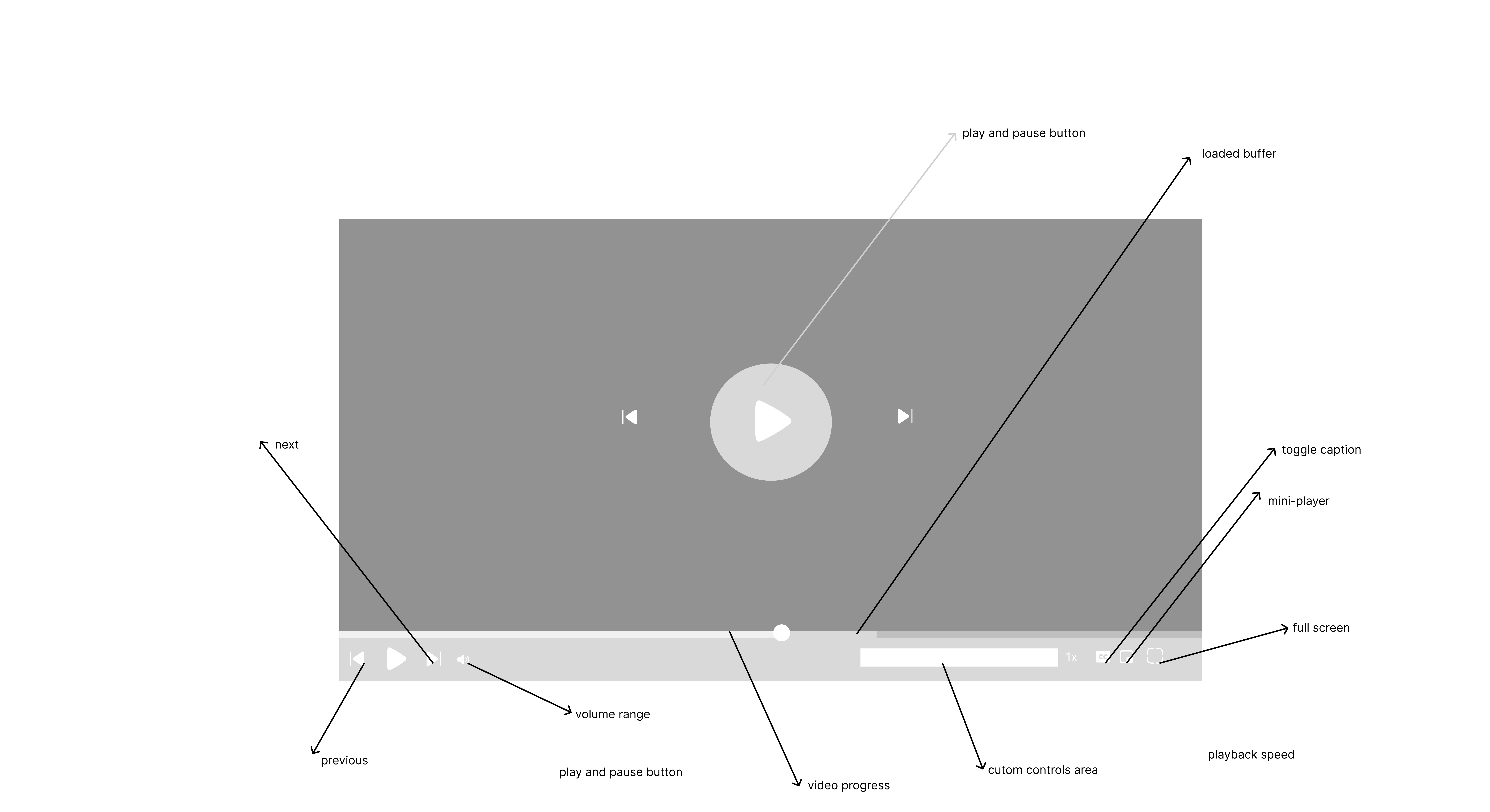
installation
```ts
npm i react-lite-player
```
#### usage
```tsx
import { Video } from "r-lite-player";
function App() {
return (
<>
>
);
}
```
##### Props
| prop | Description | Default |
| --------------------------- | ------------------------------------------------------------------------------------------------------------------------------------------------------------------------------------------------------------------------- | --------------------- |
| url | Your video URL | No default. |
| subtitleUrl | Your subtitle file's URL | No default. |
| subtitleLanguage | Subtitle language | English |
| subtitleColor | Subtitle text color | #ffff |
| poster | Poster image URL | No default. |
| enableNextButton | Show next and previous buttons | False |
| onPlay | Event triggered upon the commencement of playback | |
| onPause | Event triggered when the video pauses | No default. |
| next | Function called when pressing the next button | Undefined |
| previous | Function called when pressing the previous button | Undefined |
| width | Video width | 100% |
| height | Video height | Auto |
| wrapperBackground | Video container background | #333 |
| errorMessage | Error message displayed when an error occurs | Something went wrong. |
| customErrorMessageComponent | Custom error component; having one overrides the default | Null |
| loop | Allow video to play in a loop | False |
| hideVideoWhenError | Hide the video when an error occurs | True (recommended) |
| crossOrigin | Video cross-origin property | Anonymous |
| subtitleBackground | Subtitle background | #000000a3 |
| bufferedIndicatorBackground | Background of the loaded-buffer progress | Undefined |
| videoProgressBackground | Video progress background | #ffff |
| autoPlay | Play the video immediately after loading | False |
| playerProgressBarContainer | Progress bar container | #9d9d9d34 |
| customControlsArea | his area is reserved for any elements you may want to add to the bottom-left side of the controllers, such as a subtitles drop-down or settings drop-down for the player. Just anything you may want to add to the player | null |
**Video Ref**
To allow full customization and control over the video, the video forwards its ref and some methods that you can access using the `useVideoRef` hook those methods are
| Method | Use case |
| ----------------- | ------------------------------------ |
| togglePlay | play and pause the video |
| toggleCaptions | show and hide the subtitle component |
| togglePictureMode | toggle picture mode |
| toggleMute | Mute or unmute the video |
| toggleFullscreen | enter and exit full screen |
The video can also but accessed from the ref but calling `ref.current.video`(the name ref depends on how you name your variable)
**Example use case**
```ts
import { Video, useVideoRef } from "react-lite-player";
function App() {
const video = useVideoRef();
function togglePlay() {
video.current?.togglePlay();
}
return (
toggle play{" "}
{/*//control the player from your component directly using the forwarded ref */}
);
}
export default App;
```
If you find this library useful consider linking it on GitHub, or maybe why not contribute to it 😌😌