https://github.com/dkandalov/activity-tracker
Plugin for IntelliJ IDEs to track and record user activity
https://github.com/dkandalov/activity-tracker
data intellij plugin
Last synced: 9 months ago
JSON representation
Plugin for IntelliJ IDEs to track and record user activity
- Host: GitHub
- URL: https://github.com/dkandalov/activity-tracker
- Owner: dkandalov
- Created: 2013-04-10T12:05:05.000Z (about 13 years ago)
- Default Branch: master
- Last Pushed: 2024-09-29T20:11:52.000Z (over 1 year ago)
- Last Synced: 2025-05-07T23:43:41.941Z (about 1 year ago)
- Topics: data, intellij, plugin
- Language: Kotlin
- Homepage: https://plugins.jetbrains.com/plugin/8126?pr=idea
- Size: 32.8 MB
- Stars: 72
- Watchers: 7
- Forks: 14
- Open Issues: 4
-
Metadata Files:
- Readme: README.md
Awesome Lists containing this project
README
[](https://github.com/dkandalov/activity-tracker/actions)
## Activity Tracker
This is a proof-of-concept plugin for IntelliJ IDEs to track and record user activity.
Currently, the main feature is recording user activity into CSV files.
To install the plugin use `IDE Settings -> Plugins -> Marketplace -> Search for "Activity Tracker"`.
To use the plugin see the "Activity tracker" widget in the IDE status bar.
## Why?
The main idea is to mine recorded data for interesting user or project-specific insights,
e.g. time spent in each part of the project or editing/browsing ratio.
If you use the plugin and find an interesting way to analyze the data, feel free to get in touch on
[Mastodon](https://mastodon.social/@dkandalov),
[Twitter](https://twitter.com/dmitrykandalov) or
[GitHub](https://github.com/dkandalov/activity-tracker/issues).
## Help
To open plugin popup menu:
- click on the "Activity tracker" widget in the IDE status bar or
- use the "Activity Tracker Popup" action (`ctrl+alt+shift+O` shortcut)
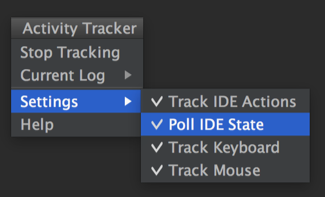
### Popup menu actions
- **Start/Stop Tracking** - activate/deactivate recording of IDE events.
Events are written to `ide-events.csv` file. This file is referred to as the "current log".
- **Current Log**
- **Show Stats** - analyse the current log and open the tool window which shows time spent editing each file.
- **Open in IDE** - open the current log file in IDE editor.
- **Open in File Manager** - open the current log in file manager
(can be useful to navigate to log file location path).
- **Roll Tracking Log** - rename the current log file by adding date postfix to it.
The intention is to keep previous data and clear the current log.
- **Clear Tracking Log** - remove all data from the current log.
- **Settings**
- **Track IDE Action** - enable capturing IDE actions.
- **Poll IDE State** - enable polling IDE state (every 1 second) even if there is no activity.
Enable this option to get more accurate data about time spent in/outside of IDE.
- **Track Keyboard** - enable tracking keyboard events. __**Beware!**__
If you enter sensitive information (like passwords), it might be captured and stored in the current log file.
- **Track Mouse** - enable tracking mouse click events.
Note that because of the high volume of mouse move and wheel events, they are logged at most every 250 milliseconds.
### Log file format
The event log file is written as [CSV RFC4180](https://tools.ietf.org/html/rfc4180) in UTF-8 encoding.
- **timestamp** - time of the event in `yyyy-MM-dd'T'HHmmss.SSSZ` format
(see [createDateTimePrintFormat() method](https://github.com/dkandalov/activity-tracker/blob/6ca1342e8c71c96f5f7a1c52095c61317cc78650/src/main/activitytracker/TrackerEvent.groovy#L109-L109)).
In plugin version 0.1.3 it was [ISO-8601 extended format](https://docs.oracle.com/javase/8/docs/api/java/time/format/DateTimeFormatter.html#ISO_OFFSET_DATE_TIME).
In plugin version 0.1.2 it was `yyyy/MM/dd kk:mm:ss.SSS` format.
- **user name** - current user name. The intention is to be able to merge logs from several users.
- **event type**, **event data** - content depends on the type of captured event.
- **IDE actions**: event type = `Action`, event data = `[action id]` (e.g. `Action,EditorUp`);
or event type = `VcsAction`, event data = `[Push|Update|Commit]`;
or event type = `CompilationFinished`, event data = `[amount of errors during compilation]`.
- **Executions**: event type = `Execution`, event data = `[Run|Debug|Coverage]:[Run configuration name]:[full commandline instruction]`.
- **IDE polling events**: event type = `IdeState`, event data = `[Active|Inactive|NoProject]`,
where `Inactive` means IDE doesn't have focus, `NoProject` means all projects are closed.
- **keyboard events**: event type = `KeyEvent`, event data = `[eventId]:[keyChar]:[keyCode]:[modifiers]`
(see [AWT KeyEvent](https://docs.oracle.com/javase/7/docs/api/java/awt/event/KeyEvent.html)).
- **mouse events**: event type = `MouseEvent`, event data can be
- `click:[button]:[clickCount]:[modifiers]`
- `move:[x]:[y]:[modifiers]`
- `wheel:[wheelRotation]:[wheelModifiers]`
(see java [MouseEvent](https://docs.oracle.com/javase/7/docs/api/java/awt/event/MouseEvent.html)
and [MouseWheelEvent](https://docs.oracle.com/javase/7/docs/api/java/awt/event/MouseWheelEvent.html) for details).
- **project name** - the name of the active project.
- **focused component** - can be `Editor`, `Dialog`, `Popup`, or tool window id (e.g. `Version Control` or `Project`).
- **current file** - absolute path to file open in the editor (even when the editor has no focus).
- **PSI path** - [PSI](http://www.jetbrains.org/intellij/sdk/docs/basics/architectural_overview/psi_elements.html)
path to currently selected element, format `[parent]::[child]`.
Empty value if the file was not parsed by IDE (e.g. plain text file).
- **editor line** - caret line number in Editor.
- **editor column** - caret column number in Editor.
- **task/change list name** - the name of the current task (`Main Menu -> Tools -> Tasks & Contexts`)
or current VCS change list name if the "Task Management" plugin is not installed.
### Example of log file
```
2015-12-31T17:42:30.171Z,dima,IdeState,Active,activity-tracker,Editor,/path/to/jdk/src.zip!/java/awt/AWTEvent.java,AWTEvent::isConsumed,450,8,
2015-12-31T17:42:30.35Z,dima,Action,EditorLineEnd,activity-tracker,Editor,/path/to/jdk/src.zip!/java/awt/AWTEvent.java,AWTEvent::isConsumed,450,8,
2015-12-31T17:42:30.351Z,dima,KeyEvent,401:97:79:8,activity-tracker,Editor,/path/to/jdk/src.zip!/java/awt/AWTEvent.java,AWTEvent::isConsumed,450,24,
2015-12-31T17:42:30.566Z,dima,Action,EditorLineStart,activity-tracker,Editor,/path/to/jdk/src.zip!/java/awt/AWTEvent.java,AWTEvent::isConsumed,450,24,
2015-12-31T17:42:30.568Z,dima,KeyEvent,401:97:85:8,activity-tracker,Editor,/path/to/jdk/src.zip!/java/awt/AWTEvent.java,AWTEvent::isConsumed,450,8,
2015-12-31T17:42:30.998Z,dima,KeyEvent,401:65535:157:4,activity-tracker,Editor,/path/to/jdk/src.zip!/java/awt/AWTEvent.java,AWTEvent::isConsumed,450,8,
2015-12-31T17:42:31.17Z,dima,IdeState,Active,activity-tracker,Editor,/path/to/jdk/src.zip!/java/awt/AWTEvent.java,AWTEvent::isConsumed,450,8,
2015-12-31T17:42:32.169Z,dima,IdeState,Inactive,,,,,-1,-1,
2015-12-31T17:42:33.168Z,dima,IdeState,Inactive,,,,,-1,-1,
```
### How to use log file?
This is up to you.
## Contributing
The most interesting part is the analysis of the recorded data.
All suggestions and code are welcome (even if it's not a JVM language, e.g. a Python snippet).
If you have a question, feel free to create an issue.
Working on the plugin:
- to edit code, open project in IJ IDEA importing Gradle configuration
- to build use `./gradlew buildPlugin` task which will create `build/distributions/activity-tracker-plugin.zip`
- to run use `./gradlew runIde` task
- alternatively, you can use [LivePlugin](https://github.com/dkandalov/live-plugin)
as an [entry point](https://github.com/dkandalov/live-plugin/wiki/Liveplugin-as-an-entry-point-for-standard-plugins).