https://github.com/dkedar7/fast_dash
Turn your Python functions into interactive apps! Fast Dash is an innovative way to deploy your Python code as interactive web apps with minimal changes.
https://github.com/dkedar7/fast_dash
dash data-analysis data-science data-visualization deep-learning fast-dash flask machine-learning plotly-dash python ui webdevelopment
Last synced: 3 months ago
JSON representation
Turn your Python functions into interactive apps! Fast Dash is an innovative way to deploy your Python code as interactive web apps with minimal changes.
- Host: GitHub
- URL: https://github.com/dkedar7/fast_dash
- Owner: dkedar7
- License: mit
- Created: 2022-01-30T02:15:48.000Z (over 4 years ago)
- Default Branch: release
- Last Pushed: 2026-04-19T03:09:37.000Z (3 months ago)
- Last Synced: 2026-04-19T03:23:45.731Z (3 months ago)
- Topics: dash, data-analysis, data-science, data-visualization, deep-learning, fast-dash, flask, machine-learning, plotly-dash, python, ui, webdevelopment
- Language: Python
- Homepage: https://docs.fastdash.app/
- Size: 64.3 MB
- Stars: 126
- Watchers: 3
- Forks: 18
- Open Issues: 2
-
Metadata Files:
- Readme: README.md
- Changelog: CHANGELOG.md
- Contributing: docs/contributing.md
- License: LICENSE
- Code of conduct: CODE_OF_CONDUCT.md
- Citation: CITATION.cff
Awesome Lists containing this project
README

Turn any Python function into a web app with a single decorator ⚡






---
- **Documentation**: [docs.fastdash.app](https://docs.fastdash.app)
- **Source**: [github.com/dkedar7/fast_dash](https://github.com/dkedar7/fast_dash)
- **Install**: `pip install fast-dash`
- **Claude Code users**: `/plugin marketplace add dkedar7/fast_dash` then `/plugin install fast-dash@fast-dash` to load the Fast Dash skill — agents will pick it up automatically when you ask them to "turn this function into a web app".
---
## What is Fast Dash?
Fast Dash inspects your Python function's signature, picks UI components from the type hints and default values, and serves the result as a [Plotly Dash](https://github.com/plotly/dash) app — usually in under five lines of code. No frontend, no callbacks, no boilerplate.
It exists for one job: collapse the gap between a working Python function and a shareable interactive web app.
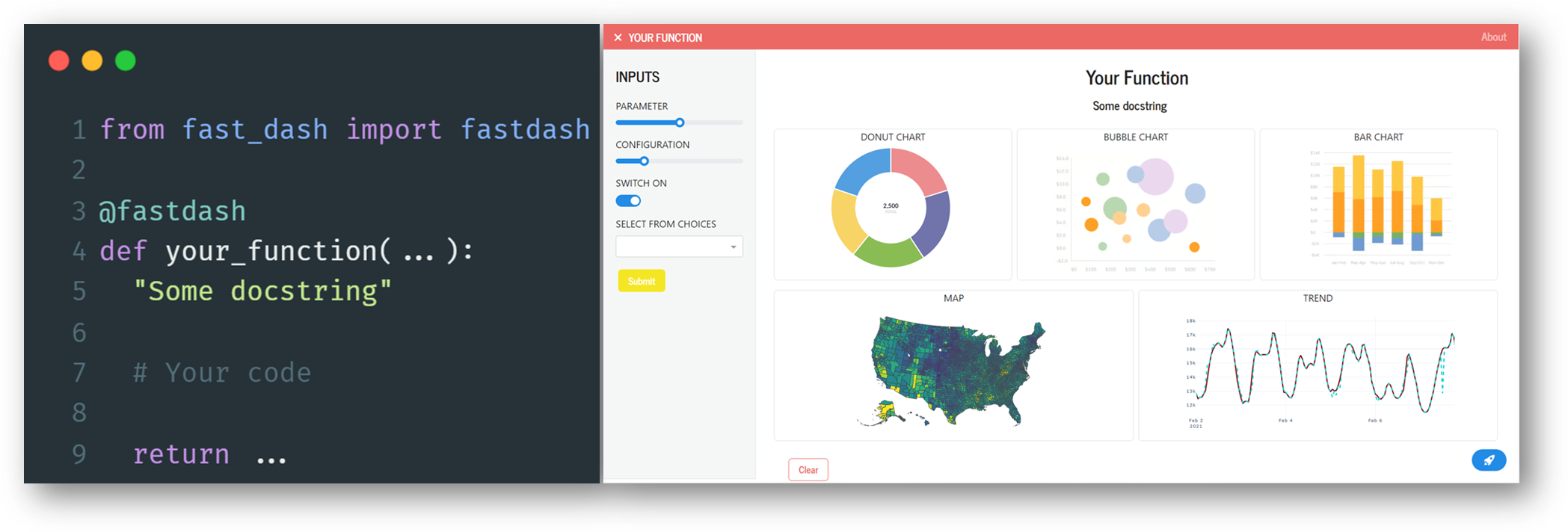
## 30-second example
```bash
pip install fast-dash
```
```python
from fast_dash import fastdash
@fastdash
def greet(name: str = "world") -> str:
return f"Hello, {name}!"
# Serving on http://127.0.0.1:8080
```
That's the entire app. Open the URL, type a name, click Run, see the response.
## How it works
The `@fastdash` decorator does three things at import time:
1. **Inspects the function signature** — each parameter becomes an input component, the return becomes an output component.
2. **Picks components from type hints and defaults** — `int` → number input, `bool` → checkbox, `pd.DataFrame` → table, etc. (full table below).
3. **Builds a Dash app and starts the server** — the function body is wired as the callback that runs when the user clicks Run.
You can override any of this by passing components explicitly via `inputs=` and `outputs=`, or by skipping the decorator and using the `FastDash(...)` class directly.
## Type hint → component reference
Inputs (parameter type → UI component):
| Type hint | Component |
| --- | --- |
| `str` | Textarea |
| `str` with `default=[...]` | Single-select dropdown |
| `int`, `float` | Number input |
| `int`/`float` with `range(...)` default | Slider |
| `bool` | Checkbox |
| `list` | Multi-select dropdown |
| `dict` (with default) | Multi-select dropdown (keys) |
| `datetime.date` | Date picker |
| `PIL.Image.Image` | Image upload |
| `Literal["a", "b"]` | Single-select dropdown |
| `enum.Enum` subclass | Single-select dropdown |
| `Annotated[int, range(0, 100)]` | Slider |
| `Annotated[str, ["a", "b"]]` | Single-select dropdown |
| `Optional[T]` | As `T`, but nullable |
| Any Dash component instance | Used directly |
| Any Fast Dash component (`Text`, `Slider`, ...) | Used directly |
Outputs (return type → UI component):
| Return type | Component |
| --- | --- |
| `str`, `int`, `float`, etc. | Text (rendered as `
`) |
| `pd.DataFrame` | Table |
| `PIL.Image.Image`, `matplotlib.figure.Figure` | Image |
| `plotly.graph_objects.Figure` (or string-form `"go.Figure"`, `"Figure"`) | Plotly chart |
| Tuple of types | Multiple outputs (one component each) |
| Any Fast Dash component (`Graph`, `Image`, ...) | Used directly |
```python
from fast_dash import fastdash, Graph
@fastdash
def chart(rows: int = 100) -> Graph:
import plotly.express as px
return px.scatter(px.data.iris().head(rows), x="sepal_width", y="sepal_length")
```
Unknown hints fall back to text. Source-introspection failures (REPL, `exec`) fall back to generic `OUTPUT_1`, `OUTPUT_2` labels — the app still works.
### Built-in components
The package exports ready-to-use Fast Dash components you can pass directly as `inputs=` or `outputs=`:
| Component | Use as | Notes |
| --- | --- | --- |
| `Text`, `TextArea`, `PasswordInput` | input or output | Single-line, multi-line, masked text |
| `NumberInput`, `Slider` | input | Numeric with optional bounds |
| `Switch` | input | Toggle (True / False) |
| `MultiSelect` | input | Multi-select dropdown |
| `DateInput`, `DateRange` | input | Single date / date range picker |
| `ColorInput` | input | Color picker, returns hex |
| `Upload`, `UploadImage` | input | File / image upload |
| `Graph`, `Image`, `Table`, `Markdown` | output | Plotly chart, image, DataFrame table, rendered Markdown |
| `Chat` | output | Streaming chat history (with `stream=True`) |
| `Download` | output | Triggers a browser download |
## Common patterns
**Multiple inputs and outputs**
```python
from fast_dash import fastdash
@fastdash
def describe(text: str, count: int = 3) -> str:
"""Repeat text `count` times."""
return " · ".join([text] * count)
```
**Mosaic layout** for arranging multiple outputs:
```python
from fast_dash import fastdash, Graph
import plotly.express as px
import pandas as pd
@fastdash(mosaic="AB\nAC")
def dashboard(rows: int = 100) -> (Graph, Graph, Graph):
df = px.data.iris().head(rows)
return (
px.scatter(df, x="sepal_width", y="sepal_length", color="species"),
px.histogram(df, x="petal_width"),
px.box(df, y="petal_length", color="species"),
)
```
The mosaic string is ASCII art (inspired by Matplotlib's `subplot_mosaic`). Each letter corresponds to one output, in order.
**Wrapping arbitrary Dash components** with `Fastify`:
```python
from fast_dash import fastdash, Fastify
from dash import dcc
custom_slider = Fastify(dcc.Slider(min=0, max=100, value=50), "value")
@fastdash
def my_app(x: custom_slider) -> str:
return f"You picked {x}"
```
**Cascading inputs** with `depends_on` — wire one input's options to another input's value:
```python
from fast_dash import fastdash, depends_on
countries = {
"USA": ["California", "Texas", "New York"],
"India": ["Maharashtra", "Karnataka", "Delhi"],
}
@fastdash
def pick_state(
country: str = list(countries),
state: str = depends_on("country", lambda c: countries[c]),
) -> str:
return f"{state}, {country}"
```
The resolver receives the parent input's current value. Return:
- a **list** to set the dependent dropdown's options (and clear its value),
- a **dict** like `{"data": [...], "value": ...}` to set both, or
- a **scalar** to set just the value.
**Skip the decorator** when you want more control over the lifecycle:
```python
from fast_dash import FastDash
def my_fn(x: int) -> int: return x * 2
app = FastDash(callback_fn=my_fn, title="Doubler", port=8050)
app.run()
```
**Multiple functions in a single tabbed app** — pass a list of callbacks:
```python
from fast_dash import FastDash
def greet(name: str) -> str:
return f"Hello, {name}!"
def add(a: int, b: int) -> int:
return a + b
app = FastDash([greet, add], tab_titles=["Greeter", "Adder"])
app.run()
```
Each function gets its own tab with independent inputs, outputs, and callbacks. `tab_titles` is optional — without it, tabs are named after the functions.
**Multi-step pipelines** with `steps=` — chain functions into a wizard, threading outputs forward via `from_step`:
```python
from fast_dash import FastDash, from_step
import pandas as pd
def load_data(rows: int = 100) -> pd.DataFrame:
"""Load a sample dataset."""
return pd.DataFrame({"x": range(rows), "y": [i * 2 for i in range(rows)]})
def double(data=from_step(load_data)) -> pd.DataFrame:
"""Double every value."""
return data * 2
def summarise(data=from_step(double), prefix: str = "Result:") -> str:
"""One-line summary."""
return f"{prefix} {len(data)} rows, sum={data.values.sum()}"
FastDash(steps=[load_data, double, summarise], title="Pipeline Demo").run()
```
Each step is shown one at a time with a stepper progress indicator. Click **Run** to execute the active step, then **Next** to advance. Use `from_step(prev_fn)` as a parameter default to wire an upstream output into a downstream input. Steps without `from_step` parameters can mix in regular UI inputs (like `prefix` above).
## Decorator options
Most apps need none of these — defaults are sensible. Pass any of them as kwargs to `@fastdash(...)` or `FastDash(...)`.
| Option | Default | Effect |
| --- | --- | --- |
| `title` | function name | App title shown in the header |
| `inputs`, `outputs` | inferred | Override component selection |
| `mosaic` | `None` | ASCII layout for multiple outputs |
| `theme` | `"JOURNAL"` | Any [Bootswatch](https://bootswatch.com/) theme name |
| `port` | `8080` | Port to serve on |
| `mode` | `None` | Set to `"jupyterlab"`, `"inline"`, or `"external"` for notebook use |
| `update_live` | `False` | Re-run on every input change instead of waiting for the Run button |
| `about` | `True` | Show the docstring as an "About" modal; pass a string to override |
| `minimal` | `False` | Hide chrome (header, footer, nav) for embedding |
| `branding` | `False` | Show the Fast Dash rocket footer |
| `stream` | `False` | Enable streaming outputs (see docs) |
The full list lives in the [docs](https://docs.fastdash.app).
## Limits and gotchas
- **Output labels are inferred from the `return` line of your source.** If the source can't be retrieved (REPL, `exec`, frozen environments), Fast Dash falls back to generic `OUTPUT_1`, `OUTPUT_2` labels rather than crashing. Pass `output_labels=[...]` explicitly to control them.
- **Reusing component instances across inputs and outputs** can mutate shared attributes. Construct fresh components per slot (or use `inputs=Text` rather than `inputs=text_instance`).
- **The `theme` arg expects a Bootswatch name**, not a CSS URL. The chrome (header, navbar, buttons, inputs) is rendered with Mantine components and does not pick up Bootswatch accent colors or fonts — only the dark/light mode flips for known dark themes (`CYBORG`, `DARKLY`, `QUARTZ`, `SLATE`, `SOLAR`, `SUPERHERO`, `VAPOR`). Bootswatch CSS still loads and styles `dbc`-rendered bits (e.g. data tables).
## Development
```bash
git clone https://github.com/dkedar7/fast_dash.git
cd fast_dash
uv pip install -e ".[test]" # or: pip install -e ".[test]"
uv pip install "dash[testing]"
uv run --no-sync pytest tests/
```
Selenium tests need a `chromedriver` matching your installed Chrome version (`brew install --cask chromedriver` on macOS).
The `tests/` directory is the canonical example collection — `tests/examples.py` and `tests/test_typing_hints.py` cover most patterns the library supports.
## Project structure
```
fast_dash/
fast_dash.py # FastDash class + @fastdash decorator + callback wiring
Components.py # Layout (AppLayout) + type-hint inference + built-in components
utils.py # Source introspection, theme mapping, docstring parsing
assets/ # Static CSS served by Dash
tests/ # pytest suite (also serves as runnable examples)
docs/ # MkDocs site source
```
## License
MIT. Built on top of [Plotly Dash](https://github.com/plotly/dash).