https://github.com/dkorunic/ismc
Apple SMC CLI tool that can decode and display temperature, fans, battery, power, voltage and current information
https://github.com/dkorunic/ismc
apple current fan hardware macos monitoring power smc temperature voltage
Last synced: 3 months ago
JSON representation
Apple SMC CLI tool that can decode and display temperature, fans, battery, power, voltage and current information
- Host: GitHub
- URL: https://github.com/dkorunic/ismc
- Owner: dkorunic
- License: gpl-3.0
- Created: 2019-10-17T20:47:42.000Z (almost 7 years ago)
- Default Branch: master
- Last Pushed: 2026-04-10T12:44:10.000Z (3 months ago)
- Last Synced: 2026-04-10T13:28:15.763Z (3 months ago)
- Topics: apple, current, fan, hardware, macos, monitoring, power, smc, temperature, voltage
- Language: Go
- Size: 524 KB
- Stars: 182
- Watchers: 3
- Forks: 18
- Open Issues: 1
-
Metadata Files:
- Readme: README.md
- License: LICENSE
Awesome Lists containing this project
README
# iSMC
[](https://github.com/dkorunic/iSMC/blob/master/LICENSE)
[](https://github.com/dkorunic/iSMC/releases/latest)
## About
`iSMC` is a macOS command-line tool for querying the Apple System Management Controller (SMC). It reads a broad set of well-known SMC keys, determines their type and value, and classifies the results into temperature, power, current, voltage, fan, and battery readings. Each key is accompanied by a human-readable description.
In addition to standard SMC support for Intel Mac hardware, `iSMC` supports Apple Silicon (M1–M5 and later, including the Neo family), where temperature, voltage, current, and power sensors are exposed through a HID sensor hub rather than the SMC directly.

## Installation
`iSMC` runs on macOS only.
### Homebrew
You can install iSMC using [Homebrew](https://brew.sh/) by adding the `homebrew-tap` tap and installing the `ismc` package:
```shell
brew tap dkorunic/tap
brew install ismc
```
### Manual
Download the appropriate iSMC binary for your platform from [the releases page](https://github.com/dkorunic/iSMC/releases/latest) and install it manually.
### Using go install
You can also install iSMC using the `go install` command:
```shell
CGO_ENABLED=1 go install github.com/dkorunic/iSMC@latest
```
## Usage
```shell
Apple SMC CLI tool that can decode and display temperature, fans, battery, power, voltage and current
information for various hardware in your Apple Mac hardware.
Usage:
iSMC [flags]
iSMC [command]
Available Commands:
all Display all known sensors, fans and battery status
batt Display battery status
completion Generate the autocompletion script for the specified shell
curr Display current sensors
fans Display fans status
guess Map SMC temperature sensors to CPU cores by thermal correlation
help Help about any command
hw Display hardware information
power Display power sensors
raw Display all raw SMC keys and their byte values
temp Display temperature sensors
version Print the version number of iSMC
volt Display voltage sensors
Flags:
-h, --help help for iSMC
-o, --output string Output format (ascii, table, json, influx) (default "table")
Use "iSMC [command] --help" for more information about a command.
```
Each command also accepts short and long aliases: `bat`/`batt`/`battery`, `cur`/`curr`/`current`, `fan`/`fans`, `pow`/`power`, `tmp`/`temp`/`temperature`, `vol`/`volt`/`voltage`, `everything`/`all`.
### Output formats
| Format | Description |
| -------- | --------------------------------- |
| `table` | Coloured terminal table (default) |
| `ascii` | Plain ASCII table |
| `json` | JSON |
| `influx` | InfluxDB line protocol |
## Related work
This tool was inspired by several Apple SMC-related projects:
- **SMCKit** — Apple SMC library and tool in Swift: [github.com/beltex/SMCKit](https://github.com/beltex/SMCKit)
- **libsmc** — SMC API in pure C: [github.com/beltex/libsmc](https://github.com/beltex/libsmc)
- **iStats** — Ruby gem for Mac stats: [github.com/Chris911/iStats](https://github.com/Chris911/iStats)
- **smcFanControl** — Fan control tool in Objective-C, includes `smc-command` for raw SMC key queries: [github.com/hholtmann/smcFanControl](https://github.com/hholtmann/smcFanControl)
- **FakeSMC** — Hackintosh kext: [github.com/RehabMan/OS-X-FakeSMC-kozlek](https://github.com/RehabMan/OS-X-FakeSMC-kozlek)
- **VirtualSMC** — Hackintosh kext: [github.com/acidanthera/VirtualSMC](https://github.com/acidanthera/VirtualSMC)
- **osx-cpu-temp** — CPU temperature display in pure C: [github.com/lavoiesl/osx-cpu-temp](https://github.com/lavoiesl/osx-cpu-temp)
- **applesmc.c** — Linux kernel Apple SMC driver: [github.com/torvalds/linux](https://github.com/torvalds/linux/blob/master/drivers/hwmon/applesmc.c)
- **gosmc** — Low-level Go SMC bindings: [github.com/panotza/gosmc](https://github.com/panotza/gosmc)
- **sensors** — Koan-Sin Tan's M1 IOKit demo: [github.com/freedomtan/sensors](https://github.com/freedomtan/sensors)
- **Stats** — Serhiy Mytrovtsiy's macOS Stats app: [github.com/exelban/stats](https://github.com/exelban/stats)
## Todo
Planned features:
- fetch and decode SMC key descriptions from the SMC itself,
- generate and probe random SMC keys,
- persist discovered SMC keys to a configuration file,
- add support for missing data types (`si*`, `hex_`, `pwm`, etc.).
## Bugs, feature requests, etc.
Please open an issue or submit a pull request.
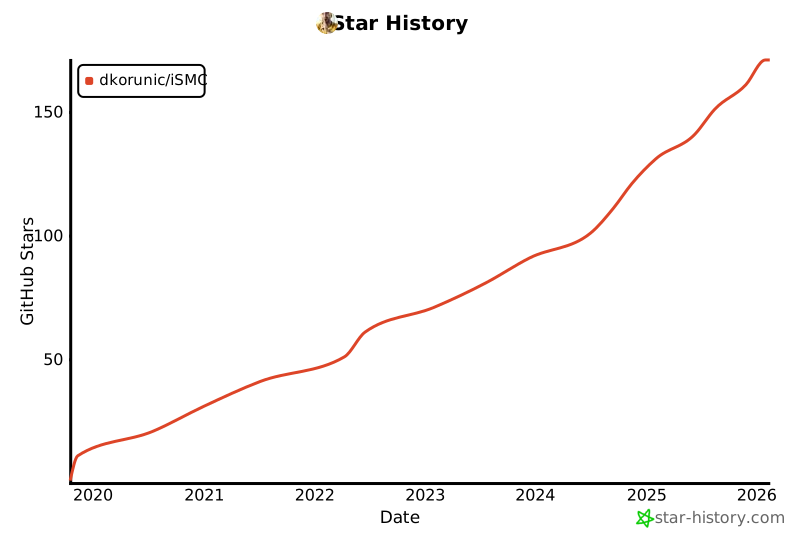
## Star history
[](https://star-history.com/#dkorunic/iSMC&Date)