https://github.com/dll-as/gitc
High-Performance AI for Lightning-Fast Conventional & Gitmoji commit messages 🚀
https://github.com/dll-as/gitc
ai-commit ai-git-commit commit git git-commit go golang
Last synced: 6 months ago
JSON representation
High-Performance AI for Lightning-Fast Conventional & Gitmoji commit messages 🚀
- Host: GitHub
- URL: https://github.com/dll-as/gitc
- Owner: dll-as
- License: mit
- Created: 2025-05-08T17:35:17.000Z (about 1 year ago)
- Default Branch: master
- Last Pushed: 2025-09-08T08:41:51.000Z (10 months ago)
- Last Synced: 2025-10-01T08:45:14.522Z (10 months ago)
- Topics: ai-commit, ai-git-commit, commit, git, git-commit, go, golang
- Language: Go
- Homepage:
- Size: 2.29 MB
- Stars: 41
- Watchers: 1
- Forks: 1
- Open Issues: 0
-
Metadata Files:
- Readme: README.md
- Changelog: CHANGELOG.md
- Contributing: CONTRIBUTING.md
- License: LICENSE
Awesome Lists containing this project
README

# ✨ gitc - AI-Powered Git Commit Messages
[](https://pkg.go.dev/github.com/dll-as/gitc)
[](go.mod)
[](https://sourcegraph.com/github.com/dll-as/gitc?badge)
[](https://github.com/dll-as/gitc/discussions)
[](https://github.com/dll-as/gitc/releases)
[](LICENSE)
[](https://deepwiki.com/dll-as/gitc)
> `gitc` is a fast, lightweight CLI tool that uses AI to generate clear, consistent, and standards-compliant commit messages — directly from your Git diffs. With built-in support for [Conventional Commits](https://www.conventionalcommits.org), [Gitmoji](https://gitmoji.dev), and fully customizable rules, `gitc` helps you and your team write better commits, faster
# 🚀 Features
`gitc` is a lightweight CLI tool that leverages AI to craft clear, standards-compliant Git commit messages from your diffs. Supporting [Conventional Commits](https://www.conventionalcommits.org), [Gitmoji](https://gitmoji.dev), and custom rules, it saves time and boosts commit quality for you and your team.
- 🧠 **AI-Powered Commits**
- Generates context-aware commit messages using OpenAI, Grok (xAI), or DeepSeek.
- Supports multiple languages (e.g., English, Persian, Russian) for global teams.
- Extensible for future AI providers like Gemini.
- 📝 **Standards & Customization**
- Follows [Conventional Commits](https://www.conventionalcommits.org) (`feat`, `fix`, `docs`, etc.) for semantic versioning.
- Adds [Gitmoji](https://gitmoji.dev) emojis for visual flair (e.g., ✨, 🚑).
- Customizable prefixes (e.g., JIRA IDs) via JSON.
- 🔧 **Git Integration**
- Processes staged Git diffs, ignoring irrelevant files (`node_modules/*`, `*.lock`).
- Configurable file exclusions for focused commits.
- ⚙️ **Flexible Configuration**
- Supports CLI flags, environment variables, and `~/.gitc/config.json`.
- Includes proxy support, adjustable timeouts, and redirect limits.
- ⚡️ **Performance & Reliability**
- Fast JSON parsing with [sonic](https://github.com/bytedance/sonic) and HTTP requests with [fasthttp](https://github.com/valyala/fasthttp).
- Robust error handling for reliable operation.
- 🧪 Debug & Dry-Run
- Preview prompts and configs without API calls — perfect for tuning without burning tokens.
## 📦 Installation
### Prerequisites:
- Go: Version **1.18** or higher (required for building from source).
- Git: Required for retrieving staged changes.
- OpenAI API Key: Required for AI-powered commit message generation. Set it via the `AI_API_KEY` environment variable or in the config file.
#### Quick Install:
```bash
go install github.com/dll-as/gitc@latest
```
### Manual Install
1. Download binary from [releases](https://github.com/dll-as/gitc/releases)
2. `chmod +x gitc`
3. Move to `/usr/local/bin`
### Verify Installation
After installation, verify the tool is installed correctly and check its version:
```bash
gitc --version
```
# 💻 Basic Usage
```bash
# 1. Stage your changes
git add . # or gitc -a
# 2. Generate perfect commit message
gitc
# Stage specific files and generate
gitc bot.py
gitc src/utils.go main.go
# Pro Tip: Add emojis and specify language
gitc --emoji --lang fa
# Custom commit type
gitc --commit-type fix
# Debug mode: See what prompt would be sent without API cost
gitc --dry-run
```
## Environment Variables
```bash
export OPENAI_API_KEY="sk-your-key-here"
export GITC_LANGUAGE="fa"
export GITC_MODEL="gpt-4"
```
# ⚙️ Configuration
Config File (`~/.gitc/config.json`) :
```json
{
"provider": "openai",
"max_length": 200,
"temperature": 0.7,
"proxy": "",
"language": "en",
"timeout": 10,
"commit_type": "",
"custom-convention": "",
"use_gitmoji": false,
"max_redirects": 5,
"open_ai": {
"api_key": "sk-your-key-here",
"model": "gpt-4o-mini",
"url": "https://api.openai.com/v1/chat/completions"
}
}
```
### Update Configuration
```bash
gitc config --api-key "sk-your-key-here" --model "gpt-4o-mini" --lang en
```
# 📚 Full Options
The following CLI flags are available for the `ai-commit` command and its `config` subcommand. All flags can also be set via environment variables or the `~/.gitc/config.json` file.
| Flag | Alias | Description | Default | Environment Variable | Example |
|------|-------|-------------|---------|----------------------|---------|
| `--all` | `-a` | Stage all changes before generating commit message (equivalent to `git add .`) | `false` | `GITC_STAGE_ALL` | `-all` or `-a`
| `--provider` | - | AI provider to use (e.g., `openai`, `anthropic`) | `openai` | `AI_PROVIDER` | `--provider openai` |
| `--url` | `-u` | Custom API URL for the AI provider | Provider-specific | `GITC_API_URL` | `--url https://api.x.ai/v1/chat/completions`
| `--model` | - | OpenAI model for commit message generation | `gpt-4o-mini` | - | `--model gpt-4o` |
| `--lang` | - | Language for commit messages (e.g., `en`, `fa`, `ru`) | `en` | `GITC_LANGUAGE` | `--lang fa` |
| `--timeout` | - | Request timeout in seconds | `10` | - | `--timeout 15` |
| `--max-length` | - | Maximum length of the commit message | `200` | - | `--max-length 150` |
| `--temperature` | - | Control AI creativity (0.0 = fully deterministic, 1.0 = very creative) | `0.7` | - | `--temperature 0.8`
| `--api-key` | `-k` | API key for the AI provider | - | `AI_API_KEY` | `--api-key sk-xxx` |
| `--proxy` | `-p` | Proxy URL for API requests | - | `GITC_PROXY` | `--proxy http://proxy.example.com:8080` |
| `--commit-type` | `-t` | Commit type for Conventional Commits (e.g., `feat`, `fix`) | - | `GITC_COMMIT_TYPE` | `--commit-type feat` |
| `--scope` | `-s` | Add scope to the commit type (e.g. `auth`, `ui`, `db`) — works with or without `--commit-type` | - | - | `--scope auth` or `-s ui` |
| `--custom-convention` | `-C` | Custom commit message convention (JSON format) | - | `GITC_CUSTOM_CONVENTION` | `--custom-convention '{"prefix": "JIRA-123"}'` |
| `--emoji` | `-g` | Add Gitmoji to the commit message | `false` | `GITC_GITMOJI` | `--emoji` |
| `--no-emoji` | - | Disables Gitmoji in commit messages (overrides `--emoji` and config file) | `false` | - | `--no-emoji`
| `--dry-run` | -d | Preview the exact prompt and config sent to AI without making an API request (great for debugging prompts and avoiding costs) | `false` | `GITC_DRY_RUN` | --dry-run or -d
| `--max-redirects` | `-r` | Maximum number of HTTP redirects | `5` | `GITC_MAX_REDIRECTS` | `--max-redirects 10` |
| `--config` | `-c` | Path to the configuration file | `~/.gitc/config.json` | `GITC_CONFIG_PATH` | `--config ./my-config.json` |
> [!NOTE]
> - Flags for the `config` subcommand are similar but exclude defaults, as they override the config file.
> - **Flags** > **Environment Variables** > **Config File** — This is the order of precedence when multiple settings are provided.
> - The `--custom-convention` flag expects a JSON string with a `prefix` field (e.g., `{"prefix": "JIRA-123"}`).
> - The `--version` flag displays the current tool version (e.g., `0.3.0`) and can be used to verify installation.
> - The `--all` flag (alias `-a`) stages all changes in the working directory before generating the commit message, streamlining the workflow. For example, `gitc -a --emoji` stages all changes and generates a commit message with Gitmoji.
> - Environment variables take precedence over config file settings but are overridden by CLI flags.
> - You can reset all configuration values to their defaults by using gitc config `gitc reset-config`.
## 🤖 AI Providers
`gitc` is designed to be AI-provider agnostic. While it currently supports OpenAI out of the box, support for additional providers is on the roadmap to ensure flexibility and future-proofing.
| Provider | Supported Models | Required Configuration | Status |
| --- | --- | --- | --- |
| **OpenAI** | `gpt-4o`, `gpt-4o-mini`, `gpt-3.5-turbo` | `api_key`, `model`, `url` (optional) | ✅ Supported (default) |
| **Grok (xAI)** | grok-3 (experimental) | `api_key`, `model`, `url` | 🧪 Experimental Support |
| **DeepSeek** | deepseek-rag (experimental) | `api_key`, `model`, `url` | 🧪 Experimental Support |
| **Gemini (Google)** | Coming Soon | - | 🔜 Planned |
| **Others** | - | - | 🧪 Under consideration |
> ℹ️ We're actively working on supporting multiple AI backends to give you more control, flexibility, and performance. Have a provider you'd like to see? [Open a discussion](https://github.com/dll-as/gitc/discussions)!
## 🤝 Contributing
We welcome contributions! Please check out the [contributing guide](CONTRIBUTING.md) before making a PR.
## ⭐️ Star History
[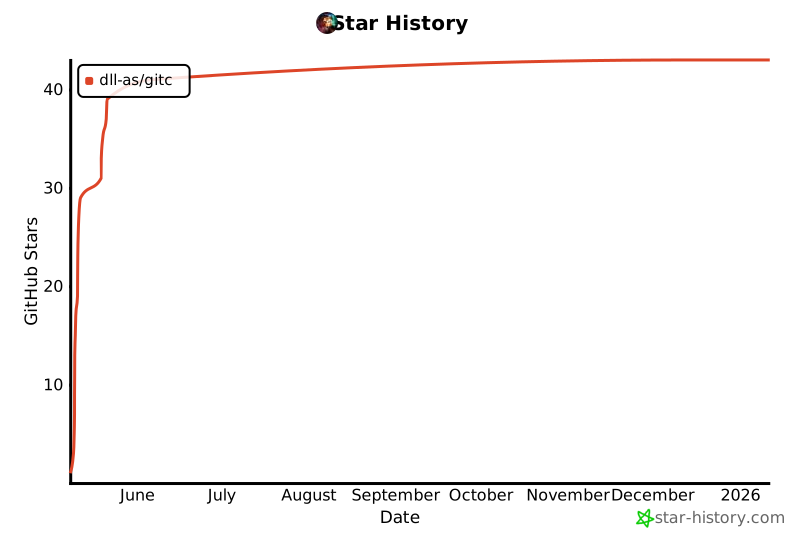](https://www.star-history.com/#dll-as/gitc&Date)