https://github.com/dmccuskey/lua-corovel
Asynchronous, event-loop development environment for Lua (think nodejs, luvit, etc)
https://github.com/dmccuskey/lua-corovel
Last synced: 10 months ago
JSON representation
Asynchronous, event-loop development environment for Lua (think nodejs, luvit, etc)
- Host: GitHub
- URL: https://github.com/dmccuskey/lua-corovel
- Owner: dmccuskey
- License: mit
- Created: 2014-05-23T04:19:40.000Z (about 12 years ago)
- Default Branch: master
- Last Pushed: 2015-04-30T00:47:20.000Z (over 11 years ago)
- Last Synced: 2025-05-07T13:58:07.772Z (about 1 year ago)
- Language: Lua
- Homepage:
- Size: 547 KB
- Stars: 12
- Watchers: 3
- Forks: 3
- Open Issues: 1
-
Metadata Files:
- Readme: README.md
- License: LICENSE
Awesome Lists containing this project
- my-awesome-lua - Lua Corovel - Asynchronous, event-loop development environment for Lua (Resources / Asynchronous I/O)
README
## Lua Corovel ##
An event-loop programming environment for Lua that mimics the one in Corona SDK.
### Features ###
Though it's in its infancy, Corovel is pretty cool. It will allow you to:
* Run unmodified, *non-visual* code from Corona SDK on a server
* create and run other Corvel environments in separate threads
Combined with [Lua Lanes](https://github.com/LuaLanes/lanes), each environment can run in its own OS thread ! sweet
### Overview ###
**Corovel Environment**
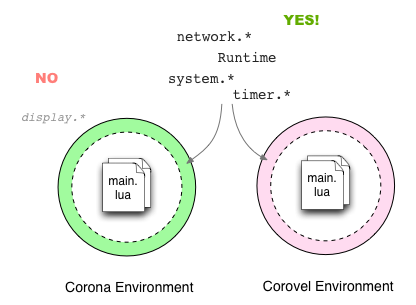
Corovel provides some core environment objects from the Corona SDK so that *non-visual* code will run unmodified.
**Threaded Corovels**
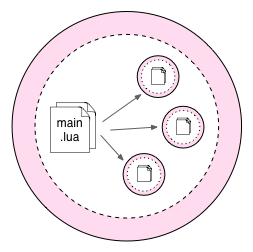
Here the Main Corovel launches and controls multiple Corovel instances, each running in separate threads via LuaLanes. Depending on needs, each process can be short-lived (eg, Web Worker) or loop forever (eg, server process).
Each sub-Corovel can launch its own threaded Corovels, too !
### Dependencies ###
Corovel is a library written in pure Lua. It requires the following Lua modules:
* Lua 5.1 (5.2 should work too, though not tested)
* LuaSocket
Optional installs:
* Lua Lanes
### How to Use Corovel ###
Launch your Lua file with Corovel like so:
* `lua corovel.lua main`
This launches `./main.lua` inside of the main Corovel
* `lua corovel.lua commands.master`
This launches the file `./commands/master.lua` inside of the main Corovel
### Why Corovel ? ###
The name Corovel comes from the phrase *Corona Event Loop*. I created it so that I could run certain modules from my DMC Corona Library in a server environment (eg, async TCP Sockets, WebSockets, and WAMP). I figured if I could create an enviroment similar to the Corona SDK, then I wouldn't have to re-write any of the libraries and could continue to code in my "normal" Corona-esque manner. =)
Async programming is easy if you have the right building blocks for async code. The Corona SDK environment provides two core objects: the Corona Runtime and Corona Timer. The event loop powers both the *Runtime* which sends out events every "frame" and the *Timer* which will call a handler after a certain time has passed.
Note that *Corovel is NOT the Corona SDK !* Corovel *does not* provide any visual services to code – eg, sprites, game-engine, etc.
### Corona Modules ###
These objects from the Corona world are available, but might not be complete:
* Runtime
* timer
* system
* network
These shims are available for Lua modules:
* json
### Tests ###
There are two types of test frameworks used – Busted and Lunatest.
Lunatest tests run inside of a running Corovel. The script `run.sh` is setup for those. Type the following to run:
`> ./run.sh`
Bested tests run outside of Corovel and test basic units. Type the following to run:
`> busted`
### Documentation & Examples ###
More docs coming soon. http://docs.davidmccuskey.com/display/docs/Lua+Corovel
Examples are in the `examples` folder.